display BMW 760LI SEDAN 2007 Repair Manual
[x] Cancel search | Manufacturer: BMW, Model Year: 2007, Model line: 760LI SEDAN, Model: BMW 760LI SEDAN 2007Pages: 253, PDF Size: 8.59 MB
Page 134 of 253
Destination input
132 The system also assists you with the following
features:
>If you do not enter a street, the system will
guide you to the downtown area of a town or
city.
>Depending on the data stored on your navi-
gation CD/DVD, you can also enter the
house or building number on some streets.
>You can skip the entry of country and city if
the existing entries should be retained for
your new destination.
Using the voice command system:
Entering name
You do not absolutely have to enter a name to
use route guidance or to store an address in the
list, but assigning each address a name can
make it easier for you to recognize the
addresses in a list.
1.Select "Name" and press the controller.
2.Turn to select the letters, then confirm your
selections by pressing.
>To enter a blank space:
Select the symbol and press the
controller.
>To delete the last letter entered:
Select the symbol and press the con-
troller.
>To cancel selection:
Select the arrow and press the con-
troller.
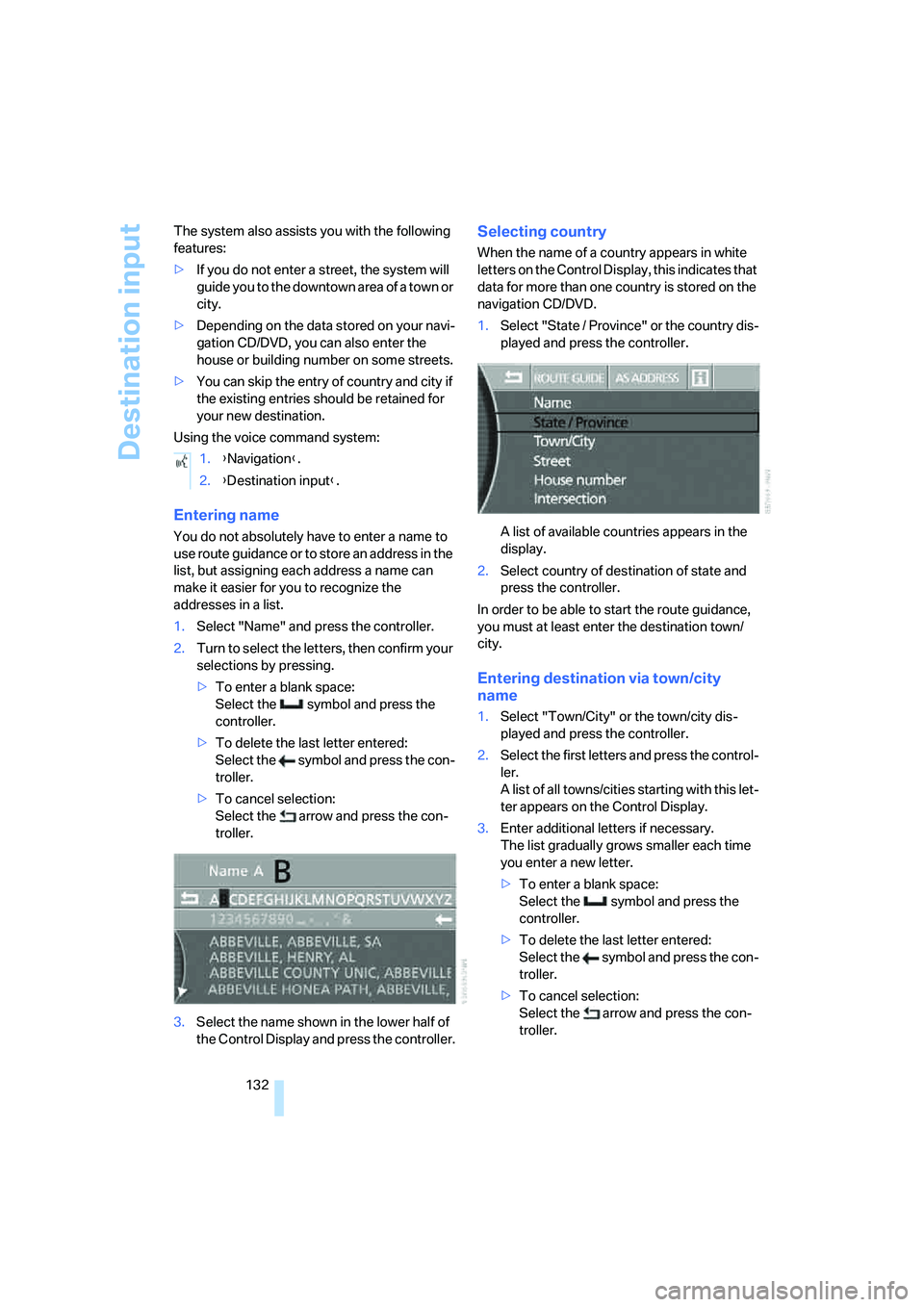
3.Select the name shown in the lower half of
the Control Display and press the controller.
Selecting country
When the name of a country appears in white
letters on the Control Display, this indicates that
data for more than one country is stored on the
navigation CD/DVD.
1.Select "State / Province" or the country dis-
played and press the controller.
A list of available countries appears in the
display.
2.Select country of destination of state and
press the controller.
In order to be able to start the route guidance,
you must at least enter the destination town/
city.
Entering destination via town/city
name
1.Select "Town/City" or the town/city dis-
played and press the controller.
2.Select the first letters and press the control-
ler.
A list of all towns/cities starting with this let-
ter appears on the Control Display.
3.Enter additional letters if necessary.
The list gradually grows smaller each time
you enter a new letter.
>To enter a blank space:
Select the symbol and press the
controller.
>To delete the last letter entered:
Select the symbol and press the con-
troller.
>To cancel selection:
Select the arrow and press the con-
troller. 1.{Navigation}.
2.{Destination input}.
Page 135 of 253
Navigation
Driving tips
133Reference
At a glance
Controls
Communications
Entertainment
Mobility
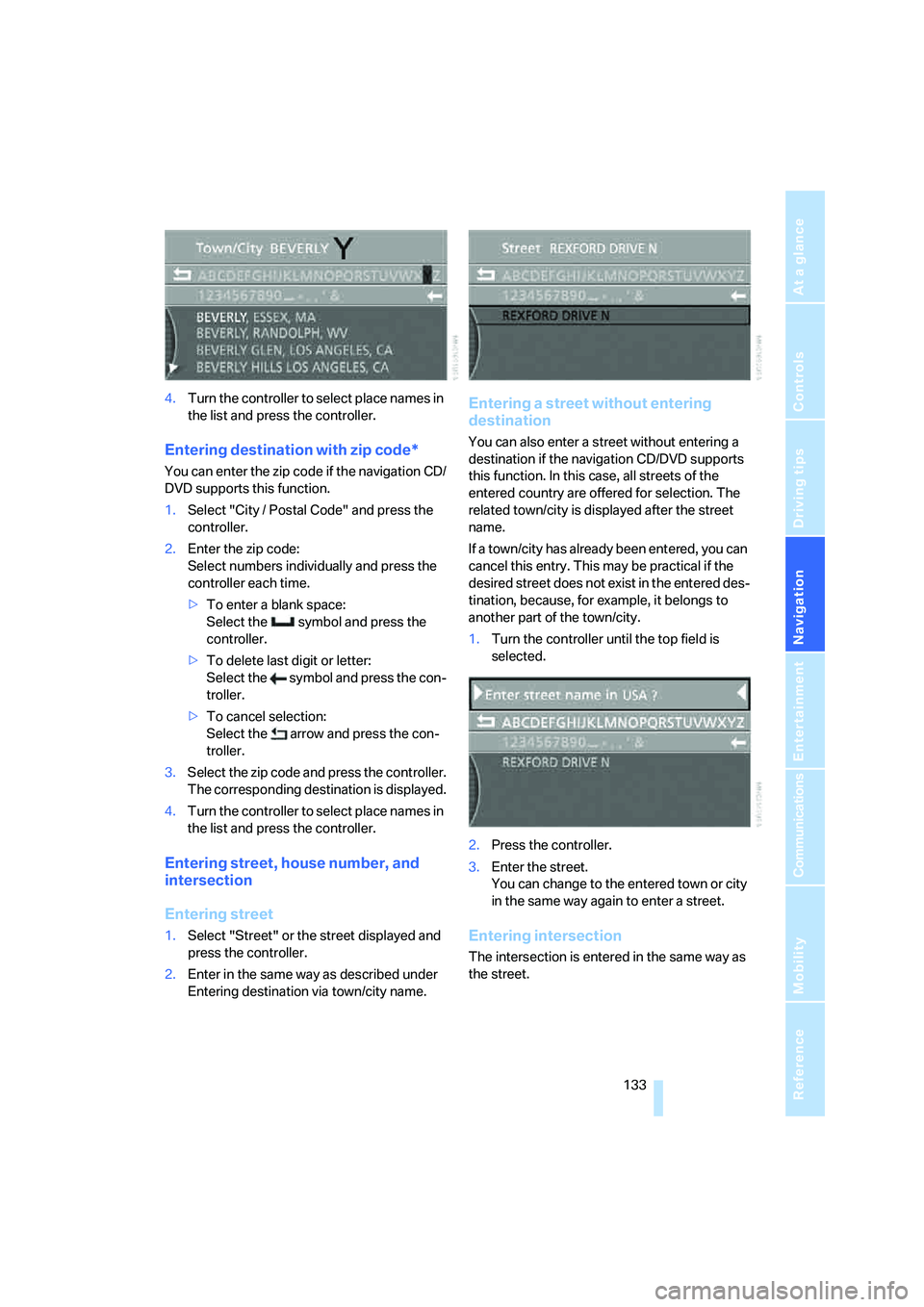
4.Turn the controller to select place names in
the list and press the controller.
Entering destination with zip code*
You can enter the zip code if the navigation CD/
DVD supports this function.
1.Select "City / Postal Code" and press the
controller.
2.Enter the zip code:
Select numbers individually and press the
controller each time.
>To enter a blank space:
Select the symbol and press the
controller.
>To delete last digit or letter:
Select the symbol and press the con-
troller.
>To cancel selection:
Select the arrow and press the con-
troller.
3.Select the zip code and press the controller.
The corresponding destination is displayed.
4.Turn the controller to select place names in
the list and press the controller.
Entering street, house number, and
intersection
Entering street
1.Select "Street" or the street displayed and
press the controller.
2.Enter in the same way as described under
Entering destination via town/city name.
Entering a street without entering
destination
You can also enter a street without entering a
destination if the navigation CD/DVD supports
this function. In this case, all streets of the
entered country are offered for selection. The
related town/city is displayed after the street
name.
If a town/city has already been entered, you can
cancel this entry. This may be practical if the
desired street does not exist in the entered des-
tination, because, for example, it belongs to
another part of the town/city.
1.Turn the controller until the top field is
selected.
2.Press the controller.
3.Enter the street.
You can change to the entered town or city
in the same way again to enter a street.
Entering intersection
The intersection is entered in the same way as
the street.
Page 136 of 253
Destination input
134
Entering house number
You can enter the house number if the naviga-
tion CD/DVD supports this function.
1.Select "House number" and press the con-
troller.
2.Enter the house number:
Select numbers individually and press the
controller each time.
>To delete last digit or letter:
Select the symbol and press the con-
troller.
>To cancel selection:
Select the arrow and press the con-
troller.
If the house number entered is not stored
on the navigation CD/DVD, then the system
displays the closest possible number.
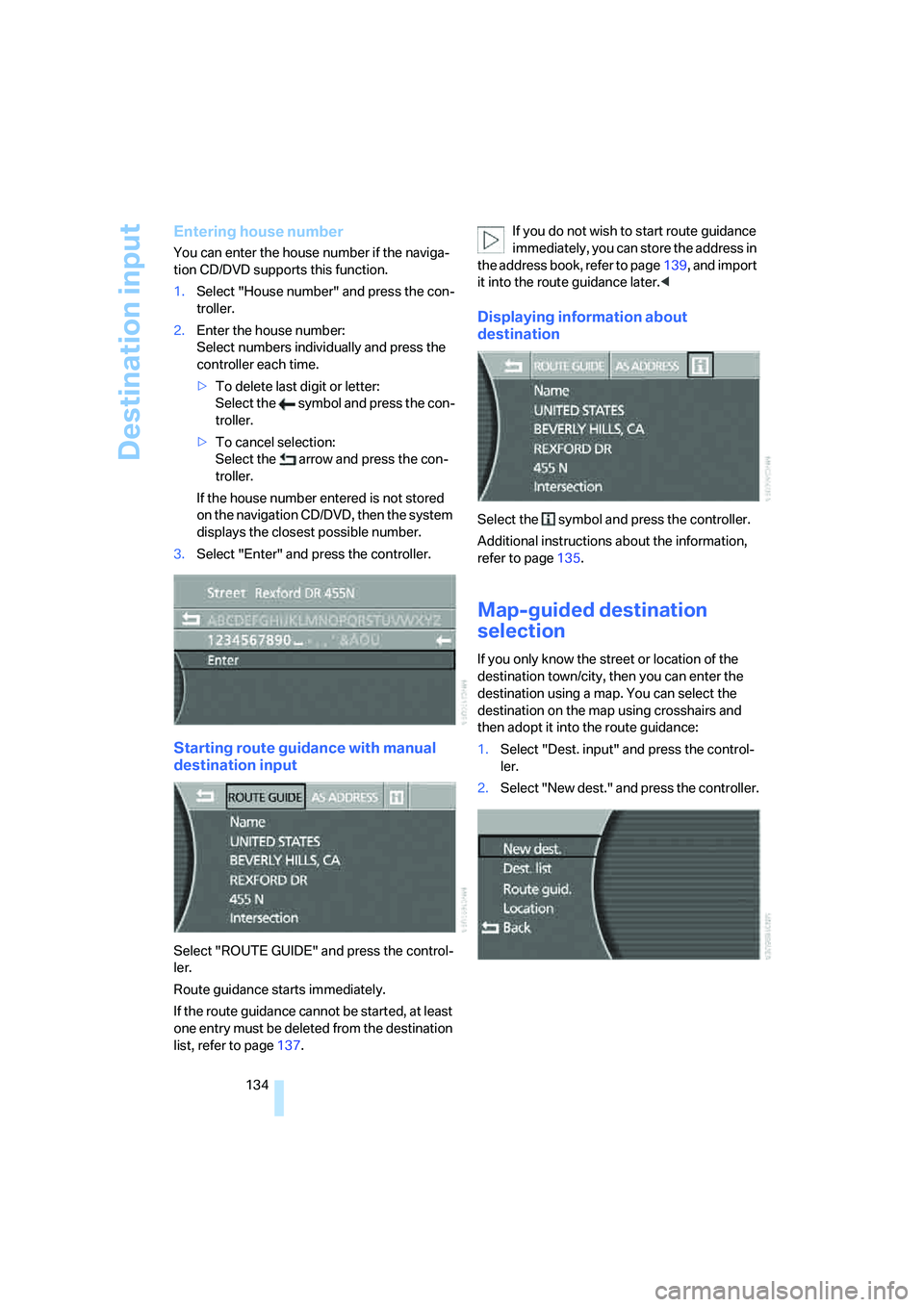
3.Select "Enter" and press the controller.
Starting route guidance with manual
destination input
Select "ROUTE GUIDE" and press the control-
ler.
Route guidance starts immediately.
If the route guidance cannot be started, at least
one entry must be deleted from the destination
list, refer to page137.If you do not wish to start route guidance
immediately, you can store the address in
the address book, refer to page139, and import
it into the route guidance later.<
Displaying information about
destination
Select the symbol and press the controller.
Additional instructions about the information,
refer to page135.
Map-guided destination
selection
If you only know the street or location of the
destination town/city, then you can enter the
destination using a map. You can select the
destination on the map using crosshairs and
then adopt it into the route guidance:
1.Select "Dest. input" and press the control-
ler.
2.Select "New dest." and press the controller.
Page 137 of 253
Navigation
Driving tips
135Reference
At a glance
Controls
Communications
Entertainment
Mobility
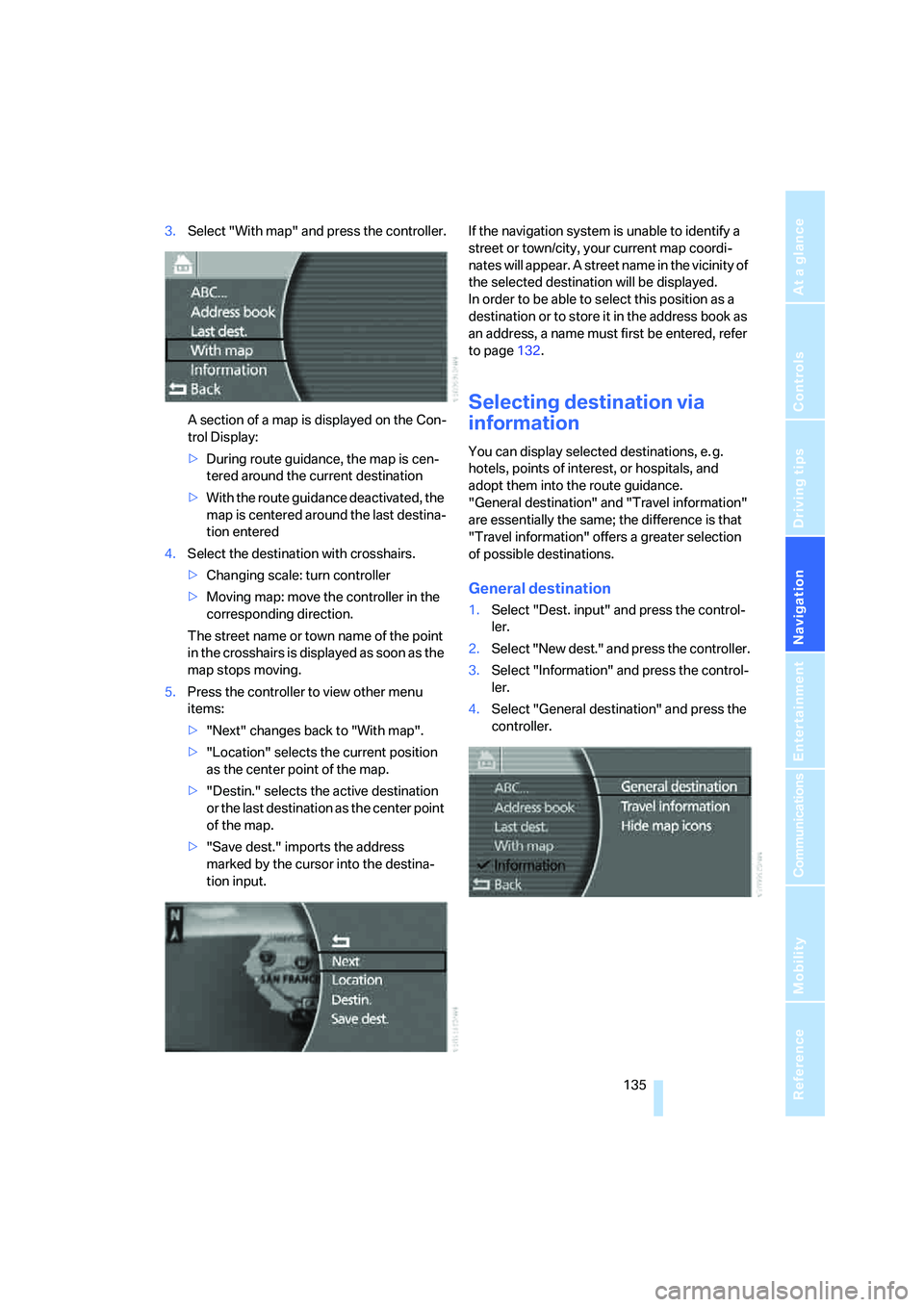
3.Select "With map" and press the controller.
A section of a map is displayed on the Con-
trol Display:
>During route guidance, the map is cen-
tered around the current destination
>With the route guidance deactivated, the
map is centered around the last destina-
tion entered
4.Select the destination with crosshairs.
>Changing scale: turn controller
>Moving map: move the controller in the
corresponding direction.
The street name or town name of the point
in the crosshairs is displayed as soon as the
map stops moving.
5.Press the controller to view other menu
items:
>"Next" changes back to "With map".
>"Location" selects the current position
as the center point of the map.
>"Destin." selects the active destination
or the last destination as the center point
of the map.
>"Save dest." imports the address
marked by the cursor into the destina-
tion input.If the navigation system is unable to identify a
street or town/city, your current map coordi-
nates will appear. A street name in the vicinity of
the selected destination will be displayed.
In order to be able to select this position as a
destination or to store it in the address book as
an address, a name must first be entered, refer
to page132.
Selecting destination via
information
You can display selected destinations, e. g.
hotels, points of interest, or hospitals, and
adopt them into the route guidance.
"General destination" and "Travel information"
are essentially the same; the difference is that
"Travel information" offers a greater selection
of possible destinations.
General destination
1.Select "Dest. input" and press the control-
ler.
2.Select "New dest." and press the controller.
3.Select "Information" and press the control-
ler.
4.Select "General destination" and press the
controller.
Page 138 of 253
Destination input
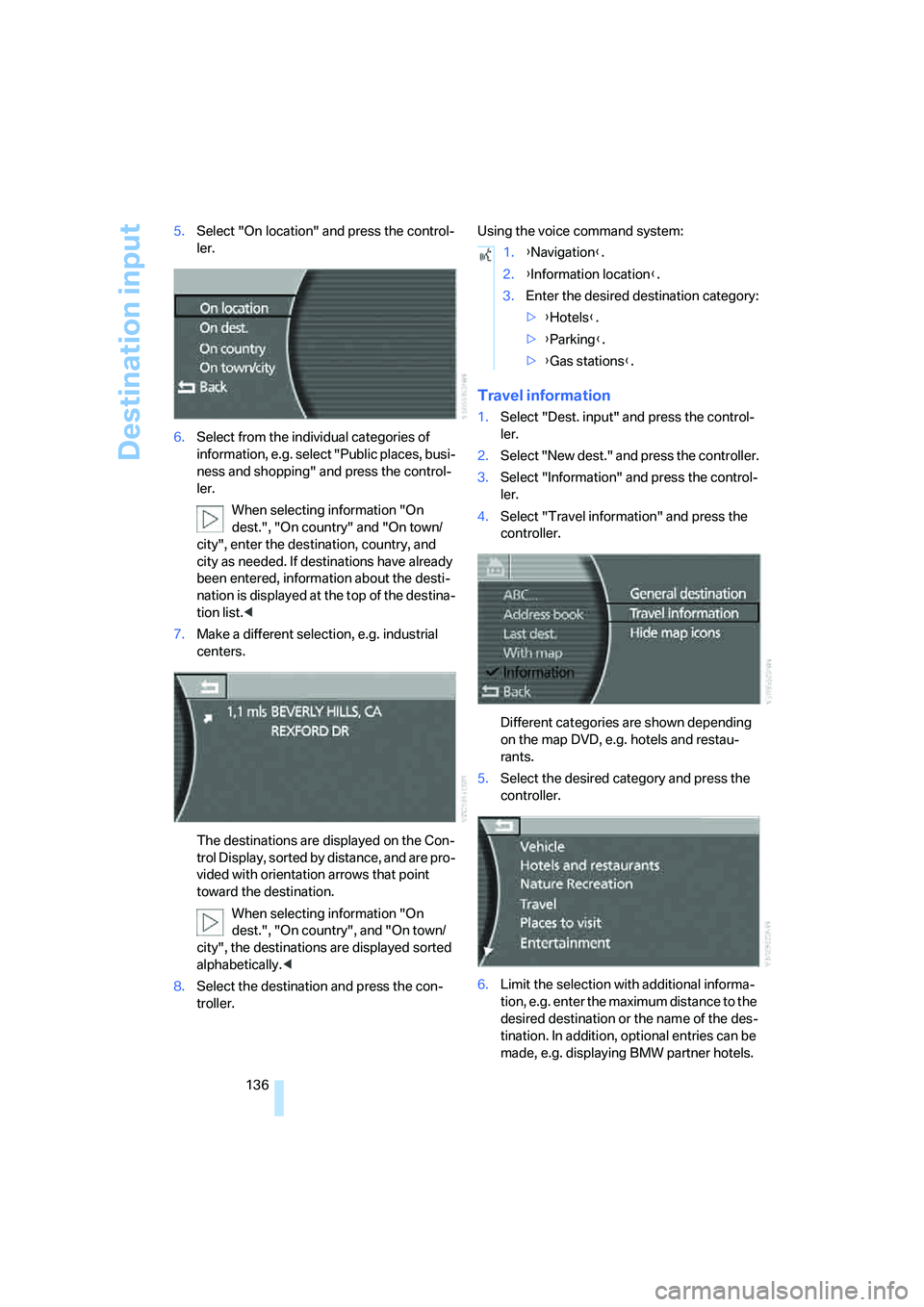
136 5.Select "On location" and press the control-
ler.
6.Select from the individual categories of
information, e.g. select "Public places, busi-
ness and shopping" and press the control-
ler.
When selecting information "On
dest.", "On country" and "On town/
city", enter the destination, country, and
city as needed. If destinations have already
been entered, information about the desti-
nation is displayed at the top of the destina-
tion list.<
7.Make a different selection, e.g. industrial
centers.
The destinations are displayed on the Con-
trol Display, sorted by distance, and are pro-
vided with orientation arrows that point
toward the destination.
When selecting information "On
dest.", "On country", and "On town/
city", the destinations are displayed sorted
alphabetically.<
8.Select the destination and press the con-
troller.Using the voice command system:
Travel information
1.Select "Dest. input" and press the control-
ler.
2.Select "New dest." and press the controller.
3.Select "Information" and press the control-
ler.
4.Select "Travel information" and press the
controller.
Different categories are shown depending
on the map DVD, e.g. hotels and restau-
rants.
5.Select the desired category and press the
controller.
6.Limit the selection with additional informa-
tion, e.g. enter the maximum distance to the
desired destination or the name of the des-
tination. In addition, optional entries can be
made, e.g. displaying BMW partner hotels.
1.{Navigation}.
2.{Information location}.
3.Enter the desired destination category:
>{Hotels}.
>{Parking}.
>{Gas stations}.
Page 139 of 253
Navigation
Driving tips
137Reference
At a glance
Controls
Communications
Entertainment
Mobility
The destinations in the surrounding area
are displayed, sorted by distance to the
destination and the other information.
7.Select the destination and press the con-
troller.
To exit the menu:
Select the arrow and press the controller.
Hiding icons in the map view
In the map view, the destinations of the
selected category are displayed in the form of
icons as a function of the map scale and cate-
gory. You can hide them.
Select "Hide map icons" and press the control-
ler.
To display the icons, select a category again
under "General destination" or "Travel informa-
tion".
Recent destinations
The system stores the last ten destinations
entered. You can import these destinations into
the route guidance and edit the entries and the
list.
Importing destination into route
guidance
1.Select "Dest. input" and press the control-
ler.
2.Select "New dest." and press the controller.
3.Select "Last dest." and press the controller.
A list of the destinations last reached
appears on the right side of the Control Dis-
play.4.Select the desired destination and press
the controller.
5."ROUTE GUIDE" is selected. Press the
controller.
Route guidance starts.
Editing recent destinations
You can edit the last destinations in the same
way as the destination list, refer to Editing des-
tination list on page138.
Destination list
The destination list includes the last 25 destina-
tions entered. The most recently entered desti-
nation appears at the top of the list.
The system guides you to the destinations in
the sequence in which they appear in the desti-
nation list. You are thus guided first to the des-
tination in the top or first position of the destina-
tion list.
You can edit individual destinations and their
sequence in the list and delete the destination
list, refer to Editing destination list on page138.
In order, for example, to plan a longer route, you
can store all of the destinations to which you
wish to drive in the destination list, refer to
Entering destination manually on page131.
If the destination list is full, then you must
delete at least one entry in order to be
able to store a new destination in the destina-
tion list.<
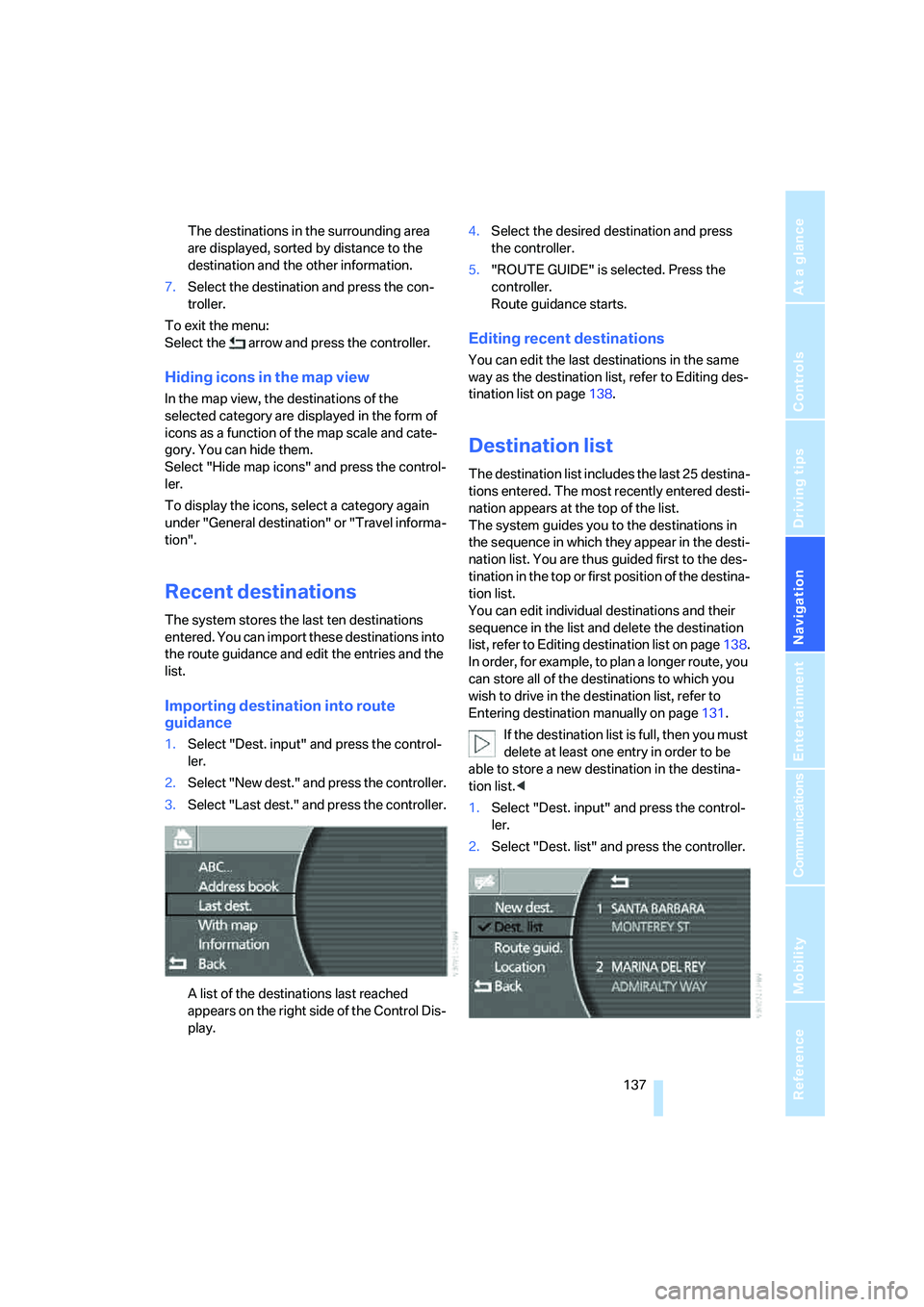
1.Select "Dest. input" and press the control-
ler.
2.Select "Dest. list" and press the controller.
Page 140 of 253
Destination input
138
Importing destination into route
guidance
1.Select desired destination from destination
list and move to top or first position of des-
tination list, refer to Editing destination list.
2.Select "Route guid." and press the control-
ler.
Route guidance starts.
Using the voice command system:
Editing destination list
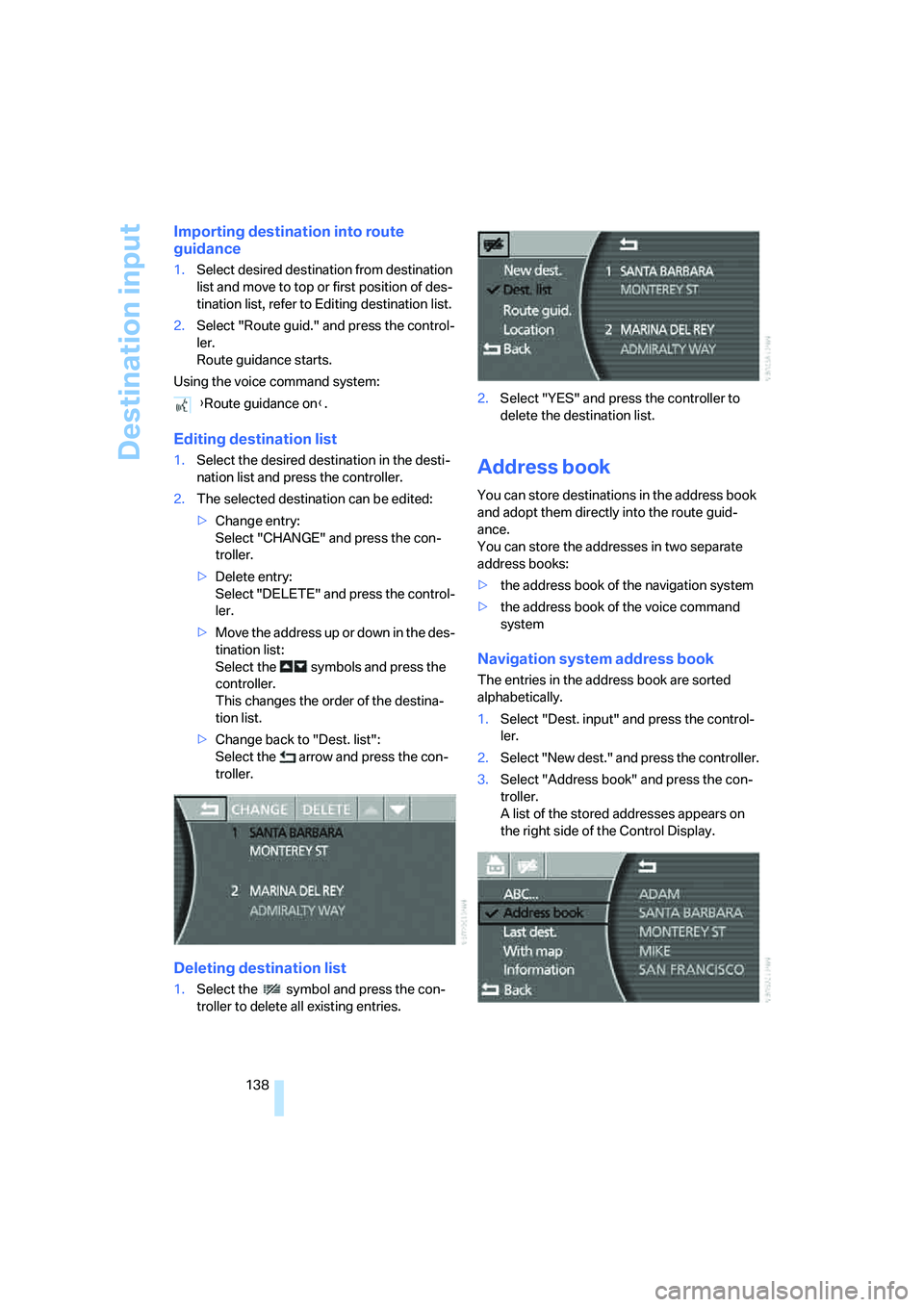
1.Select the desired destination in the desti-
nation list and press the controller.
2.The selected destination can be edited:
>Change entry:
Select "CHANGE" and press the con-
troller.
>Delete entry:
Select "DELETE" and press the control-
ler.
>Move the address up or down in the des-
tination list:
Select the symbols and press the
controller.
This changes the order of the destina-
tion list.
>Change back to "Dest. list":
Select the arrow and press the con-
troller.
Deleting destination list
1.Select the symbol and press the con-
troller to delete all existing entries.2.Select "YES" and press the controller to
delete the destination list.
Address book
You can store destinations in the address book
and adopt them directly into the route guid-
ance.
You can store the addresses in two separate
address books:
>the address book of the navigation system
>the address book of the voice command
system
Navigation system address book
The entries in the address book are sorted
alphabetically.
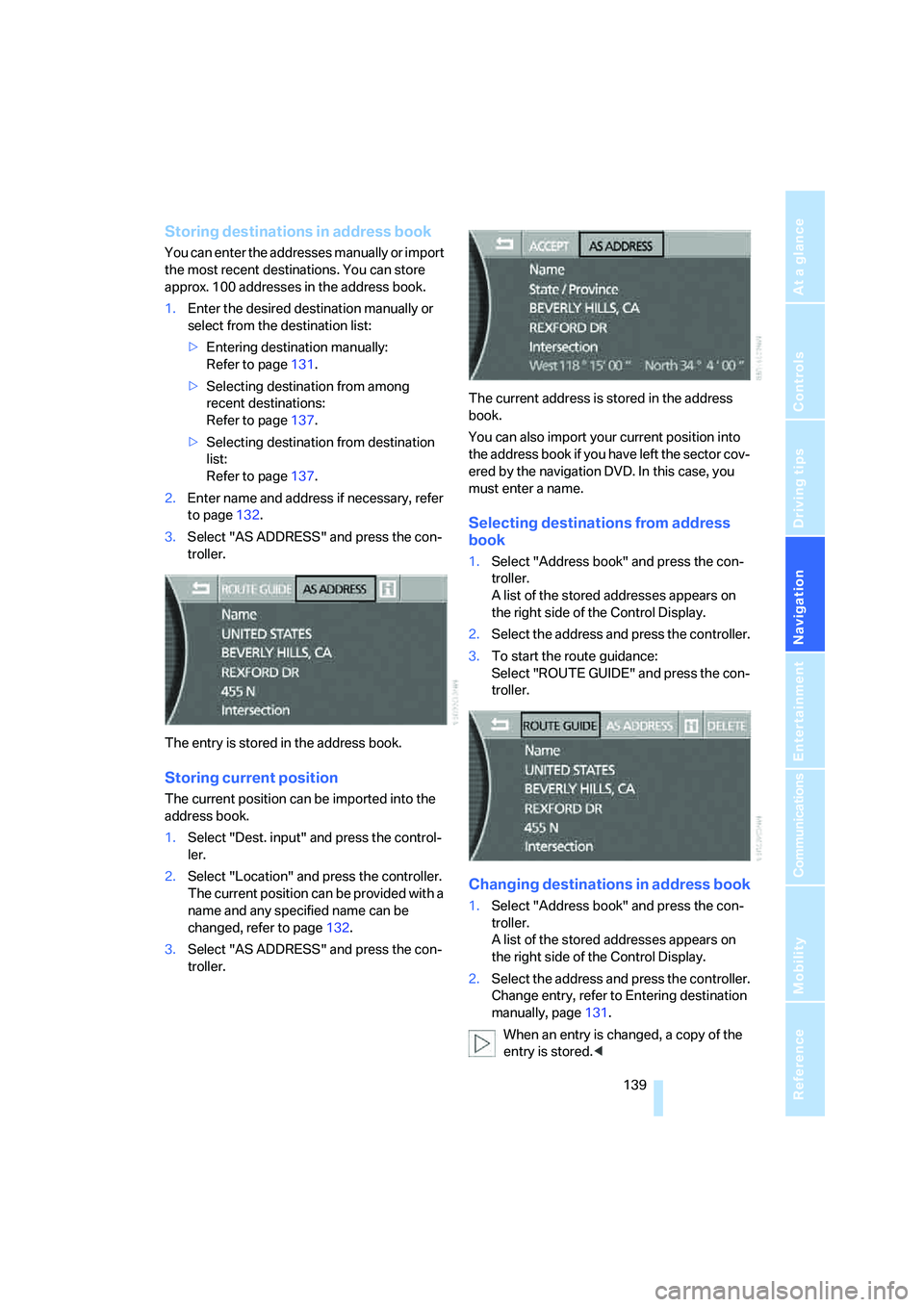
1.Select "Dest. input" and press the control-
ler.
2.Select "New dest." and press the controller.
3.Select "Address book" and press the con-
troller.
A list of the stored addresses appears on
the right side of the Control Display. {Route guidance on}.
Page 141 of 253
Navigation
Driving tips
139Reference
At a glance
Controls
Communications
Entertainment
Mobility
Storing destinations in address book
You can enter the addresses manually or import
the most recent destinations. You can store
approx. 100 addresses in the address book.
1.Enter the desired destination manually or
select from the destination list:
>Entering destination manually:
Refer to page131.
>Selecting destination from among
recent destinations:
Refer to page137.
>Selecting destination from destination
list:
Refer to page137.
2.Enter name and address if necessary, refer
to page132.
3.Select "AS ADDRESS" and press the con-
troller.
The entry is stored in the address book.
Storing current position
The current position can be imported into the
address book.
1.Select "Dest. input" and press the control-
ler.
2.Select "Location" and press the controller.
The current position can be provided with a
name and any specified name can be
changed, refer to page132.
3.Select "AS ADDRESS" and press the con-
troller.The current address is stored in the address
book.
You can also import your current position into
the address book if you have left the sector cov-
ered by the navigation DVD. In this case, you
must enter a name.
Selecting destinations from address
book
1.Select "Address book" and press the con-
troller.
A list of the stored addresses appears on
the right side of the Control Display.
2.Select the address and press the controller.
3.To start the route guidance:
Select "ROUTE GUIDE" and press the con-
troller.
Changing destinations in address book
1.Select "Address book" and press the con-
troller.
A list of the stored addresses appears on
the right side of the Control Display.
2.Select the address and press the controller.
Change entry, refer to Entering destination
manually, page131.
When an entry is changed, a copy of the
entry is stored.<
Page 142 of 253
Destination input
140
Deleting destinations individually from
address book
1.Select "Address book" and press the con-
troller.
A list of the stored addresses appears on
the right side of the Control Display.
2.Select the address and press the controller.
3.Select "DELETE" and press the controller.
4.Select "YES" and press the controller to
delete the address.
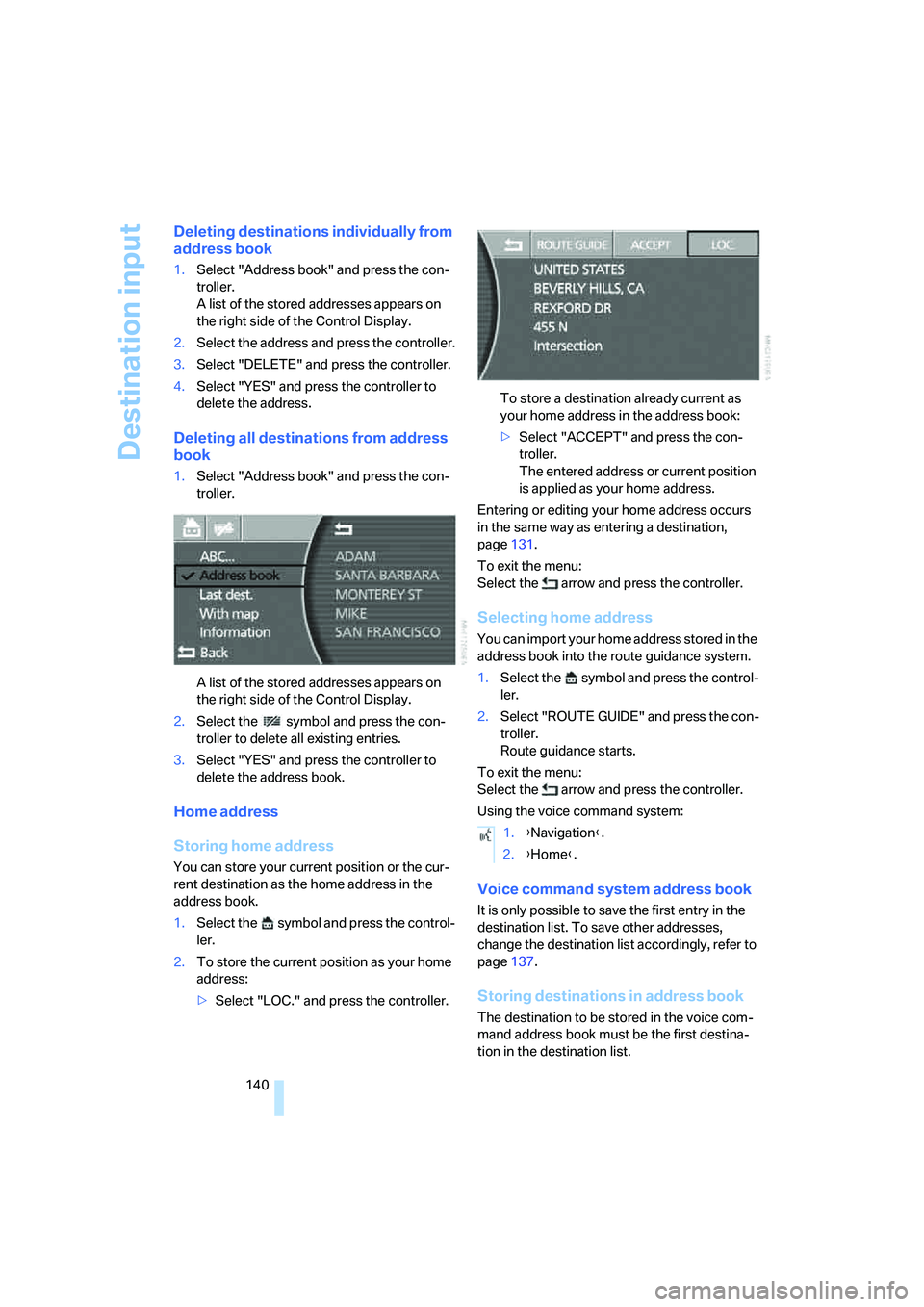
Deleting all destinations from address
book
1.Select "Address book" and press the con-
troller.
A list of the stored addresses appears on
the right side of the Control Display.
2.Select the symbol and press the con-
troller to delete all existing entries.
3.Select "YES" and press the controller to
delete the address book.
Home address
Storing home address
You can store your current position or the cur-
rent destination as the home address in the
address book.
1.Select the symbol and press the control-
ler.
2.To store the current position as your home
address:
>Select "LOC." and press the controller.To store a destination already current as
your home address in the address book:
>Select "ACCEPT" and press the con-
troller.
The entered address or current position
is applied as your home address.
Entering or editing your home address occurs
in the same way as entering a destination,
page131.
To exit the menu:
Select the arrow and press the controller.
Selecting home address
You can import your home address stored in the
address book into the route guidance system.
1.Select the symbol and press the control-
ler.
2.Select "ROUTE GUIDE" and press the con-
troller.
Route guidance starts.
To exit the menu:
Select the arrow and press the controller.
Using the voice command system:
Voice command system address book
It is only possible to save the first entry in the
destination list. To save other addresses,
change the destination list accordingly, refer to
page137.
Storing destinations in address book
The destination to be stored in the voice com-
mand address book must be the first destina-
tion in the destination list.
1.{Navigation}.
2.{Home}.
Page 143 of 253
Navigation
Driving tips
141Reference
At a glance
Controls
Communications
Entertainment
Mobility
The house number is not stored in the
address book of the voice command sys-
tem.<
Using the voice command system:
Selecting destinations from address
book
Deleting destinations from address
book
To delete individual destinations:
To delete all existing entries:
Route selection
You can influence the calculated route by
choosing certain route criteria.
The route is planned according to fixed rules,
taking the road type into account, e.g. whether
the route involves highways or winding roads.
The road types are stored on the navigation
DVD. As a result, the routes recommended by
the navigation system may not always be the same ones that you would choose based on
personal experience.
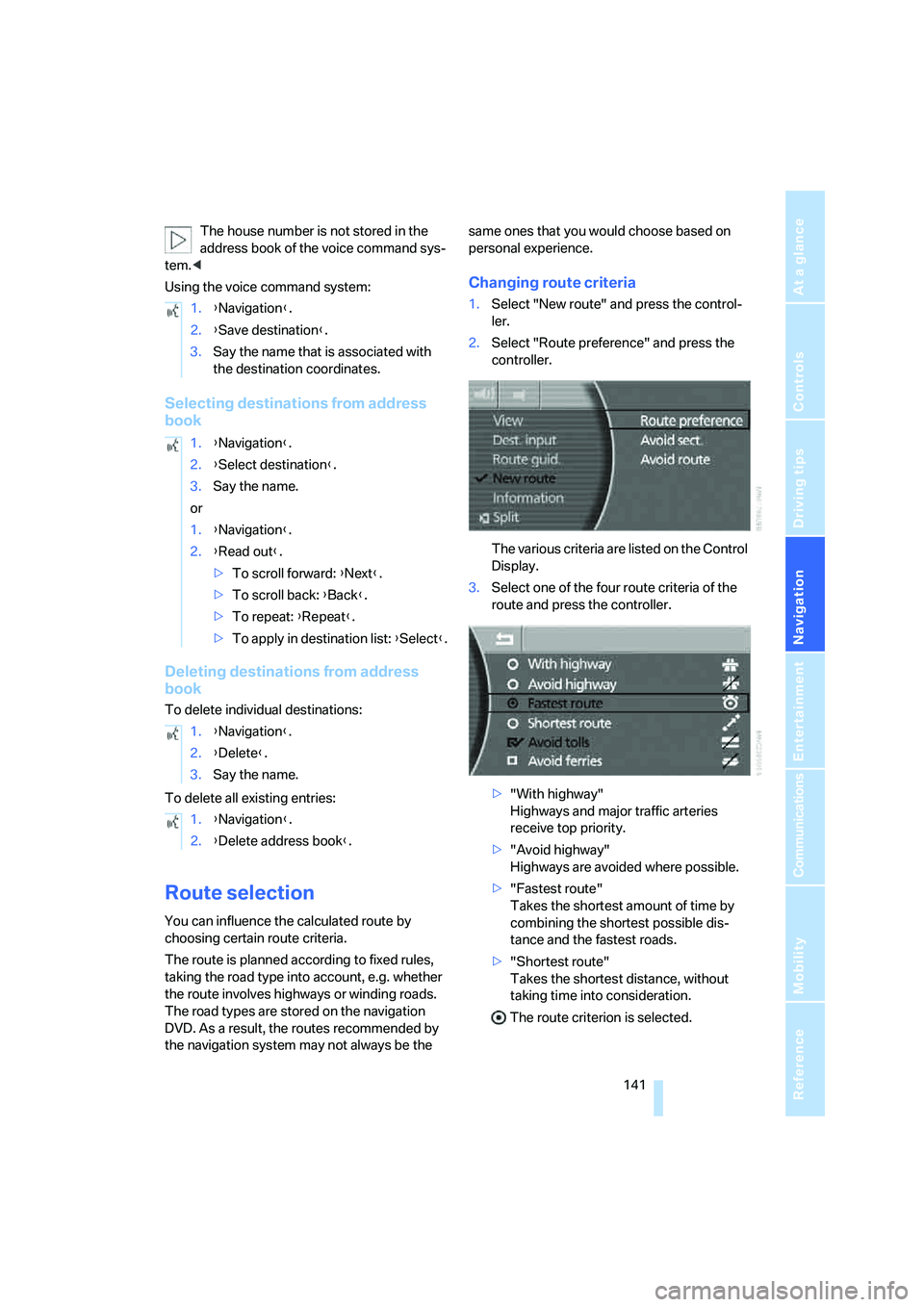
Changing route criteria
1.Select "New route" and press the control-
ler.
2.Select "Route preference" and press the
controller.
The various criteria are listed on the Control
Display.
3.Select one of the four route criteria of the
route and press the controller.
>"With highway"
Highways and major traffic arteries
receive top priority.
>"Avoid highway"
Highways are avoided where possible.
>"Fastest route"
Takes the shortest amount of time by
combining the shortest possible dis-
tance and the fastest roads.
>"Shortest route"
Takes the shortest distance, without
taking time into consideration.
The route criterion is selected. 1.{Navigation}.
2.{Save destination}.
3.Say the name that is associated with
the destination coordinates.
1.{Navigation}.
2.{Select destination}.
3.Say the name.
or
1.{Navigation}.
2.{Read out}.
>To scroll forward: {Next}.
>To scroll back: {Back}.
>To repeat: {Repeat}.
>To apply in destination list: {Select}.
1.{Navigation}.
2.{Delete}.
3.Say the name.
1.{Navigation
}.
2.{Delete address book}.