display BMW 760LI SEDAN 2015 Owners Manual
[x] Cancel search | Manufacturer: BMW, Model Year: 2015, Model line: 760LI SEDAN, Model: BMW 760LI SEDAN 2015Pages: 314, PDF Size: 7.9 MB
Page 274 of 314
Take care not to add too much engine oil.CAUTION
Too much engine oil can damage the en‐
gine or the catalytic converter. There is risk of
property damage. Do not add too much engine
oil. Have too much engine oil siphoned off by a
dealer’s service center or another qualified
service center or repair shop.◀
Detailed measurement
The concept In the detailed measurement the engine oil
level is checked and displayed via a scale.
Gasoline engine:
If the engine oil level reaches the minimum
level, a check control message is displayed.
Diesel engine:
During the measurement, the idle speed is in‐
creased somewhat.
General information
A detailed measurement is only possible with
certain engines.
Requirements▷Vehicle is on level road.▷Selector lever in selector lever position N
or P and accelerator pedal not depressed.▷Engine is running and is at operating tem‐
perature.
Performing a detailed measurement
About iDrive:
1."My Vehicle"2."Vehicle status"3. "Measure engine oil level"4."Start measurement"
The engine oil level is checked and displayed
via a scale.
Time: approx. 1 minute.
Adding engine oil
Information CAUTION
A too low engine oil level causes engine
damage. There is risk of property damage.
Add engine oil within the next
125 miles/200 km.◀
CAUTION
Too much engine oil can damage the en‐
gine or the catalytic converter. There is risk of
property damage. Do not add too much engine
oil. Have too much engine oil siphoned off by a
dealer’s service center or another qualified
service center or repair shop.◀
WARNING
Operating materials, e.g. oils, greases,
coolants, fuels, can contain harmful ingredi‐
ents. There is risk of injuries or danger to life.
Observe the instructions on the containers.
Avoid the contact of articles of clothing, skin or
eyes with operating materials. Do not refill op‐
erating materials into different bottles. Store
operating materials out of reach of children.◀
General information
Establish idle state and safely park the vehicle
before engine oil is added.
Overview The oil filler neck is located in the engine com‐
partment, refer to page 271.
Opening the oil filler neck Only add engine oil when the message is dis‐
played in the instrument cluster. The quantity
to be added is indicated in the message dis‐
played in the instrument cluster.1.Opening the hood, refer to page 272Seite 274MobilityEngine oil274
Online Edition for Part no. 0140 2 964 330 - VI/15
Page 279 of 314
MaintenanceVehicle features and options
This chapter describes all standard, country-
specific and optional features offered with the
series. It also describes features that are not
necessarily available in your car, e. g., due to
the selected options or country versions. This
also applies to safety-related functions and
systems. The respectively applicable country
provisions must be observed when using the
respective features and systems.
BMW maintenance system The maintenance system indicates required
maintenance measures, and thereby provides
support in maintaining road safety and the op‐
erational reliability of the vehicle.
In some cases scopes and intervals may vary
according to the country-specific version. Re‐
placement work, spare parts, fuels and lubri‐
cants and wear materials are calculated sepa‐
rately. Further information is available from a
dealer’s service center or another qualified
service center or repair shop.
Condition Based ServiceCBS
Sensors and special algorithms take into ac‐
count the driving conditions of your vehicle.
Based on this, Condition Based Service recog‐
nizes the maintenance requirements.
The system makes it possible to adapt the
amount of maintenance corresponding to your
user profile.
Detailed information on service requirements,
refer to page 119, can be displayed on the
Control Display.Service data in the remote control
Information on the required maintenance is
continuously stored in the remote control. The dealer’s service center can read this data out
and suggest an optimized maintenance scope
for your vehicle.
Therefore, hand the service advisor the remote
control with which the vehicle was driven most
recently.
Storage periods Storage periods during which the vehicle bat‐
tery was disconnected are not taken into ac‐
count.
If this occurs, have a dealer's service center or
another qualified service center or repair shop
update the time-dependent maintenance pro‐
cedures, such as checking brake fluid and, if
necessary, changing the engine oil and the mi‐
crofilter/activated-charcoal filter.
Service and WarrantyInformation Booklet for US
models and Warranty and
Service Guide Booklet for
Canadian models
Please consult your Service and Warranty In‐
formation Booklet for US models and Warranty
and Service Guide Booklet for Canadian mod‐
els for additional information on service re‐
quirements.
The manufacturer of your vehicle recommends
that maintenance and repair be performed by a
dealer’s service center or another qualified
service center or repair shop. Records of regu‐
lar maintenance and repair work should be re‐
tained.Seite 279MaintenanceMobility279
Online Edition for Part no. 0140 2 964 330 - VI/15
Page 285 of 314
Check Control messages of these comfort fea‐
tures are no longer displayed.
Charging the battery
General information
Make sure that the battery is always suffi‐
ciently charged to guarantee that the battery
remains usable for its full service life.
The battery may need to be charged in the fol‐
lowing cases:▷When making frequent short-distance
drives.▷If the vehicle is not used for prolonged pe‐
riods, longer than a month.
Information
CAUTION
Battery chargers for the vehicle battery
can work with high voltages and currents,
which means that the 12V on-board network
can be overloaded or damaged. There is risk of
property damage. Only connect battery charg‐
ers for the vehicle battery to the starting aid
terminals in the engine compartment.◀
Starting aid terminals
In the vehicle, only charge the battery via the
starting aid terminals, refer to page 288, in the
engine compartment with the engine off.
Power failure
After a temporary power loss, some equipment
needs to be newly initialized or individual set‐
tings updated, e. g.:
▷Seat, mirror, and steering wheel memory:
store the positions again.▷Time: update.▷Date: update.▷Glass sunroof: initialize the system, refer to
page 75.Disposing of old batteries
Have old batteries disposed of by a
dealer’s service center or another
qualified service center or repair shop
or take them to a collection point.
Maintain the battery in an upright position for
transport and storage. Secure the battery so
that it does not tip over during transport.
Fuses Information WARNING
Incorrect and repaired fuses can overload
electrical lines and components. There is risk
of fire. Never attempt to repair a blown fuse
and do not replace a nonworking fuse with a
substitute of another color or amperage rat‐
ing.◀
In the trunk
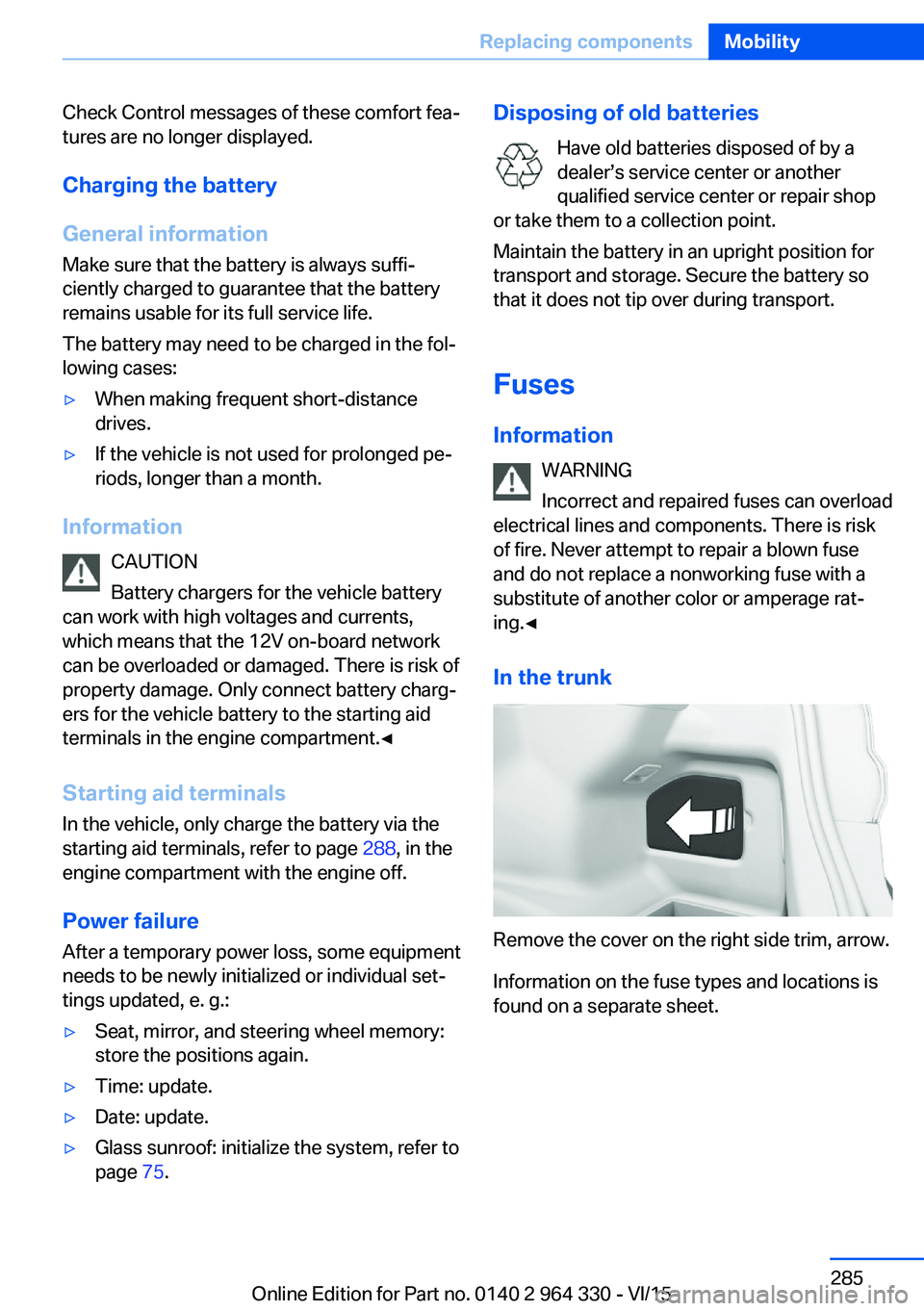
Remove the cover on the right side trim, arrow.
Information on the fuse types and locations is
found on a separate sheet.
Seite 285Replacing componentsMobility285
Online Edition for Part no. 0140 2 964 330 - VI/15
Page 286 of 314
Breakdown assistanceVehicle features and options
This chapter describes all standard, country-
specific and optional features offered with the
series. It also describes features that are not
necessarily available in your car, e. g., due to
the selected options or country versions. This
also applies to safety-related functions and
systems. The respectively applicable country
provisions must be observed when using the
respective features and systems.
Hazard warning flashers
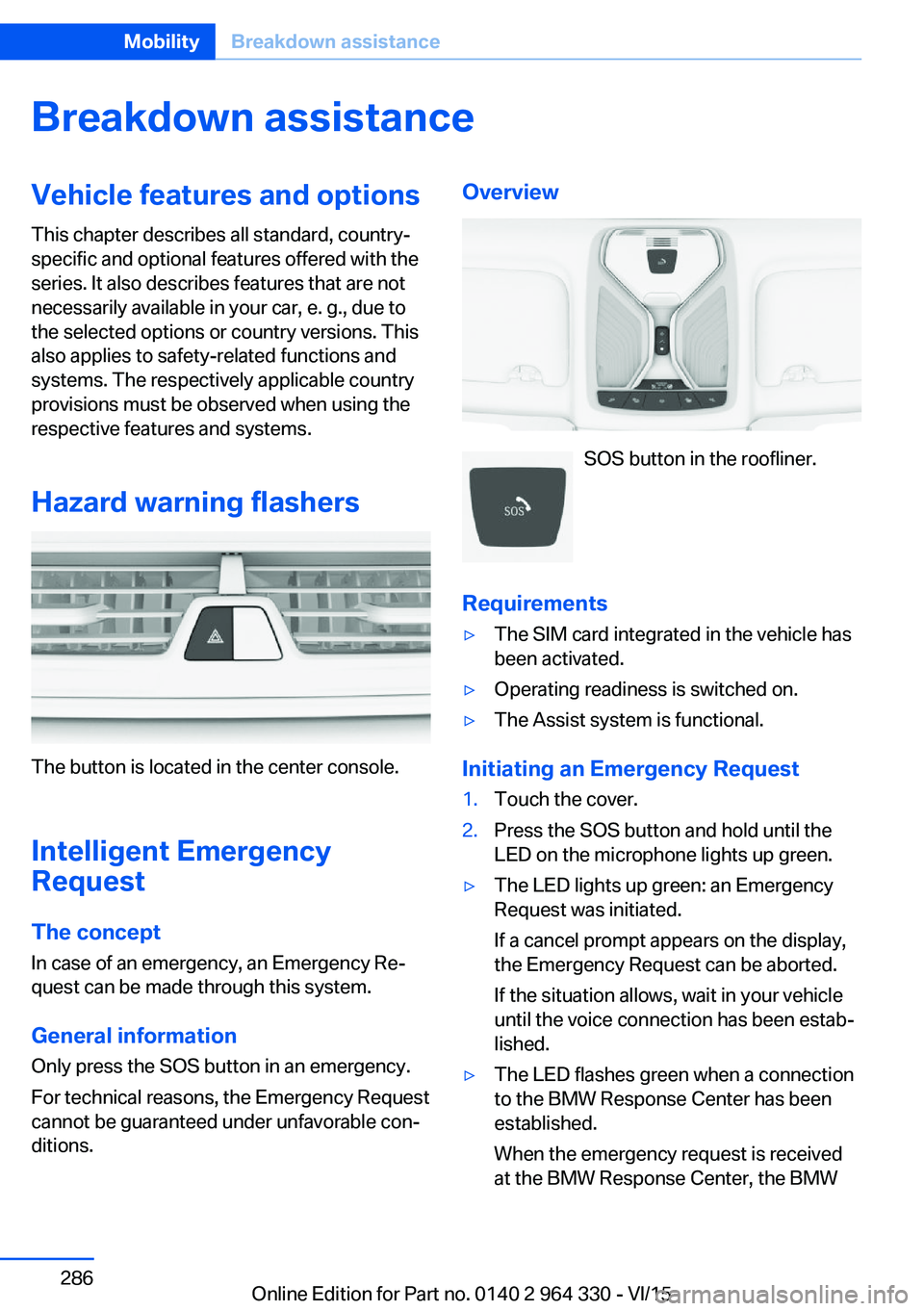
The button is located in the center console.
Intelligent Emergency
Request
The concept In case of an emergency, an Emergency Re‐
quest can be made through this system.
General information
Only press the SOS button in an emergency.
For technical reasons, the Emergency Request
cannot be guaranteed under unfavorable con‐
ditions.
Overview
SOS button in the roofliner.
Requirements
▷The SIM card integrated in the vehicle has
been activated.▷Operating readiness is switched on.▷The Assist system is functional.
Initiating an Emergency Request
1.Touch the cover.2.Press the SOS button and hold until the
LED on the microphone lights up green.▷The LED lights up green: an Emergency
Request was initiated.
If a cancel prompt appears on the display,
the Emergency Request can be aborted.
If the situation allows, wait in your vehicle
until the voice connection has been estab‐
lished.▷The LED flashes green when a connection
to the BMW Response Center has been
established.
When the emergency request is received
at the BMW Response Center, the BMWSeite 286MobilityBreakdown assistance286
Online Edition for Part no. 0140 2 964 330 - VI/15
Page 292 of 314
In this way, operating readiness remains
switched on, and a Check-Control mes‐
sage is displayed.
The vehicle cannot be locked from the outside
when in selector lever position N. A signal
sounds when an attempt is made to lock the
vehicle.
For activation of drive readiness:
1.Depress the brake pedal.2.Press the Start/Stop button.
When the Start/Stop button is pressed without
stepping on the brake, a Check Control mes‐
sage is displayed.
Selector lever positionSelector lever position P is automatically en‐
gaged after approx. 25 minutes.
Headlights
▷Do not rub dry and do not use abrasive or
acidic cleansers.▷Soak areas that have been dirtied e. g.,
from insects, with shampoo and wash off
with water.▷Thaw ice with de-icing spray; do not use an
ice scraper.
After washing the vehicle
After washing the vehicle, apply the brakes
briefly to dry them; otherwise, braking action
can be reduced and corrosion of the brake
discs can occur.
Completely remove all residues on the win‐
dows, to minimize loss of visibility due to
smearing and to reduce wiper noises and
wiper blade wear.
Vehicle care
Car care productsThe manufacturer of your vehicle recommends
using car care and cleaning products from
BMW.
WARNING
Cleansers can contain substances that
are dangerous and harmful to your health.
There is risk of injuries. When cleaning the in‐
terior, open the doors or windows. Only use
products intended for cleaning vehicles. Fol‐
low the instructions on the container.◀
Vehicle paint Regular care contributes to driving safety and
value retention. Environmental influences in
areas with elevated air pollution or natural con‐
taminants, such as tree resin or pollen can af‐
fect the vehicle's paintwork. Tailor the fre‐
quency and extent of your car care to these
influences.
Aggressive substances such as spilled fuel, oil,
grease or bird droppings, must be removed im‐
mediately to prevent the finish from being al‐
tered or discolored.
Matte finish Only use cleaning and care products suitable
for vehicles with matte finish. These are availa‐
ble from a dealer’s service center or another
qualified service center or repair shop.
Leather care
Remove dust from the leather often, using a
cloth or vacuum cleaner.
Otherwise, particles of dust and road grime
chafe in pores and folds, and lead to increased
wear and premature degradation of the leather
surface.
To guard against discoloration, such as from
clothing, provide leather care roughly every
two months.Seite 292MobilityCare292
Online Edition for Part no. 0140 2 964 330 - VI/15
Page 294 of 314
WARNING
Chemical cleansers can destroy the
safety belt webbing. Missing protective effect
of the safety belts. There is risk of injuries or
danger to life. Use only a mild soapy solution
for cleaning the safety belts.◀
Use only a mild soapy solution, with the safety
belts clipped into their buckles.
Do not allow the switchs to retract the safety
belts until they are dry.
Carpets and floor mats WARNING
Objects in the driver's floor area can limit
the pedal distance or block a depressed pedal.
There is risk of an accident. Stow objects in
the vehicle such that they are secured and
cannot enter into the driver's floor area. Use
floor mats that are suitable for the vehicle and
can be safely attached to the floor. Do not use
loose floor mats and do not layer several floor
mats. Make sure that there is sufficient clear‐
ance for the pedals. Ensure that the floor mats
are securely fastened again after they were re‐
moved, e.g. for cleaning.◀
Floor mats can be removed from the car's inte‐
rior for cleaning.
If the floor carpets are very dirty, clean with a
microfiber cloth and water or a textile cleaner.
To prevent matting of the carpet, rub back and
forth in the direction of travel only.
Sensor/camera lenses
To clean sensors and camera lenses, use a
cloth moistened with a small amount of glass
detergent.Displays/screens/protective glass of
the Head-up Display
CAUTION
Chemical cleansers, moisture or fluids of
any kind can damage the surface of displays
and screens. There is risk of property damage.
Clean with a clean, antistatic microfiber cloth.◀
CAUTION
The surface of displays can be damaged
with improper cleaning. There is risk of prop‐
erty damage. Avoid pressure that is too high
and do not use any scratching materials.◀
Clean with a clean, antistatic microfiber cloth.
Clean the protective glass of the Head-up Dis‐
play, refer to page 126, using a microfiber cloth
and commercially available dish-washing soap.
Long-term
When the vehicle is shut down for longer than
three months, special measures must be
taken. Further information is available from a
dealer’s service center or another qualified
service center or repair shop.Seite 294MobilityCare294
Online Edition for Part no. 0140 2 964 330 - VI/15
Page 302 of 314
Everything from A to Z
IndexA ABS, Antilock Brake Sys‐ tem 163
ACC, Active Cruise Control with Stop & Go 168
Acceleration Assistant, see Launch Control 106
Accessories and parts 7
Accident prevention, see Ac‐ tive Protection 160
Activated-charcoal filter 206
Activating gesture control 30
Active Blind Spot Detec‐ tion 153
Active comfort chassis 201
Active Cruise Control with Stop & Go, ACC 168
Active damping adjust‐ ment 201
Active Protection 160
Active roll stabilization 202
Active seat ventilation 92
Active Steering, integral 166
Adaptive brake assistant 163
Adaptive brake lights, see Brake force display 160
ADAPTIVE drive mode, see Driving Dynamics Con‐
trol 110
Adaptive Light Control 131
ADAPTIVE, see Driving Dy‐ namics Control 110
Additives, oil 275
Adjustments, seats/head re‐ straints 76
After washing vehicle 292
Airbags 136
Airbags, indicator/warning light 137 Air circulation, see Recircu‐
lated-air mode 205
Air, dehumidifying, see Cool‐ ing function 204
Air distribution, manual 205
Air flow, automatic climate control 205
Air outlets, see ventila‐ tion 206
Air pressure, tires 254
Air suspension 200
Alarm system 69
Alarm, unintentional 70
All around the center con‐ sole 16
All around the roofliner 18
All around the steering wheel 14
All-season tires, see Winter tires 259
All-wheel-drive, see xDrive 165
Alternating-code hand-held transmitter 216
Alternative oil types 275
Ambient air package 211
Ambient light 133, 134
Animal detection, see Night Vision 147
Antifreeze, washer fluid 106
Antilock Brake System, ABS 163
Anti-slip control, see DSC 163
Approved axle load 299
Arrival time 124
Ashtray 217
Ashtray, front 217
Ashtray, rear 218
Assistance when driving off 163 Attentiveness assistant 161
AUC Automatic Recirculating Air Control 205
Audio 6
AUTO H button 100
AUTO H button, see Auto‐ matic Hold 100
AUTO intensity 204
Automatic car wash 291
Automatic climate con‐ trol 203
Automatic Cruise Control with Stop & Go 168
Automatic Curb Monitor 85
Automatic deactivation, Front-seat passenger air‐
bags 138
Automatic headlight con‐ trol 130
Automatic Hold 100
Automatic locking 68
Automatic Recirculating Air Control AUC 205
Automatic Soft Closing, doors 63
Automatic transmission, see Steptronic transmis‐
sion 106
Automatic unlocking 68
AUTO program, automatic cli‐ mate control 204
AUTO program, intensity 204
Auto Start/Stop function 98
Average fuel consump‐ tion 124
Average speed 124
Axle loads, weights 299 Seite 302ReferenceEverything from A to Z302
Online Edition for Part no. 0140 2 964 330 - VI/15
Page 303 of 314
BBackrest curvature, see Lum‐ bar support 77
Backrest, seats 76
Backrest, width 77
Band-aids, see First-aid kit 287
Bar for tow-starting/ towing 289
Basic position, rear seats 80
Battery replacement, vehicle battery 284
Battery replacement, vehicle remote control 55
Battery, vehicle 284
Being towed, see tow-start‐ ing/towing 289
Belts, safety belts 80
Beverage holder, cu‐ pholder 228
Blinds, sun protection 72
Bluetooth connection 42
BMW Assist 6
BMW display key 55
BMW Driver’s Guide App 6
BMW gesture control 30
BMW Homepage 6
BMW Internet page 6
BMW maintenance sys‐ tem 279
BMW Touch Command 36
Bonus range, ECO PRO 243
Bottle holder, see Cu‐ pholder 228
Brake assistant 163
Brake assistant, adaptive 163
Brake discs, break-in 234
Brake force display 160
Brake lights, adaptive 160
Brake lights, brake force dis‐ play 160
Brake pads, break-in 234
Braking, hints 235
Breakdown assistance 286
Break-in 234 Brightness of Control Dis‐
play 39
Bulb replacement 282
Bulb replacement, front 282
Bulb replacement, front lamps 282
Bulb replacement, rear 282
Bulb replacement, tail lamps 282
Bulbs and lights 282
Button, Start/Stop 97
Bypassing, see Jump-start‐ ing 287
C
California Proposition 65 Warning 8
Calling up mirror adjust‐ ment 68
Calling up seat adjust‐ ment 68
Calling up steering wheel ad‐ justment 68
Camera-based damping ad‐ justment 201
Camera lenses, care 294
Camera, rearview camera, without Surround View 184
Camera, see Surround View 187
Can holder, see Cu‐ pholder 228
Captain’s chair 89
Car battery 284
Car care products 292
Care, displays 294
Care, vehicle 292
Cargo 237
Cargo area, storage compart‐ ments 229
Cargo, securing 238
Cargo straps, securing cargo 238
Car key, see Remote con‐ trol 54 Carpet, care 294
Cartridge replacement, see Ambient air package 211
Car wash 291
Catalytic converter, see Hot exhaust system 235
CBS Condition Based Serv‐ ice 279
Center armrest 227
Center console 16
Central locking system 63
Central screen, see Control Display 21
Changes, technical, see Own Safety 7
Changing parts 281
Changing wheels 282
Changing wheels/tires 258
Chassis number, see vehicle identification number 10
Check Control 114
Checking the engine oil level electronically 273
Checking the oil level elec‐ tronically 273
Children, seating position 93
Children, transporting safely 93
Child restraint fixing sys‐ tem 93
Child restraint fixing system LATCH 95
Child restraint fixing systems, mounting 94
Child safety locks 96
Child seat, mounting 94
Child seats 93
Chrome parts, care 293
Cigarette lighter 218
Cleaning displays 294
Climate control 203
Climate control on roof‐ liner 209
Clock 118
Closing the trunk lid with no- touch activation 66 Seite 303Everything from A to ZReference303
Online Edition for Part no. 0140 2 964 330 - VI/15
Page 304 of 314
Closing via door lock 62
Closing without remote con‐ trol 62
Clothes hooks 229
Coasting 245
Coasting with engine decou‐ pled, coasting 245
Coasting with idling en‐ gine 245
Collision warning with braking function 140
Collision warning with City braking function 140
Combination switch, see Turn signals 103
Combination switch, see Wiper system 103
Comfort Access 65
COMFORT drive mode, see Driving Dynamics Con‐
trol 110
COMFORT PLUS drive mode, see Driving Dynamics
Control 110
COMFORT PLUS, see Driv‐ ing Dynamics Control 110
COMFORT, see Driving Dy‐ namics Control 110
Communication 6
Compact wheel, see Emer‐ gency wheel 282
Compartments in the doors 226
Compatible devices 42
Compatible mobile phones 42
Compressor 260
Computer, see on-board computer 122
Condensation on win‐ dows 206
Condensation under the vehi‐ cle 236
Condition Based Service CBS 279
Confirmation signal 68 ConnectedDrive 6
ConnectedDrive Services 6
Connecting device 41
Connecting electrical devi‐ ces 219
Connecting mobile phone 41
Connecting smartphone 41
Connecting telephone 41
Connections 41
Continued driving with a flat tire 267 , 270
Control Display 21
Control Display, settings 38
Controller 22
Control systems, driving sta‐ bility 163
Convenient opening with the remote control 61
Coolant 277
Coolant level 277
Coolant temperature 118
Cooler 223
Cooling function 204
Cooling, maximum 204
Cooling system 277
Corrosion on brake discs 236
Cosmetic mirror 217
Courtesy lamps with the vehi‐ cle locked 61
Cross traffic warning 197
Cruise control 175
Cruise control, active with Stop & Go 168
Cruising range 123
Cupholder 228
Current fuel consump‐ tion 123
D
Damage, tires 258
Damping control, dy‐ namic 201
Data, technical 298
Daytime running lights 131 Defrosting, see Windows, de‐
frosting 206
Dehumidifying, air 204
Deleting personal data 40
Deletion of personal data 40
Departure time, parked-car heating 211
Departure time, parked-car ventilation 211
Destination distance 124
Device list 41
Digital clock 118
Dimensions 298
Dimmable exterior mirrors 86
Dimmable interior rearview mirror 86
Direction indicator, see Turn signals 103
Display in windshield 126
Display lighting, see Instru‐ ment lighting 133
Displays 113
Displays, cleaning 294
Disposal, coolant 278
Disposal, vehicle battery 285
Distance control, see PDC 180
Distance to destination 124
Divided screen view, split screen 27
Door handle lighting, see wel‐ come lights 130
Door lock 62
Door lock, see Remote con‐ trol 54
Doors, Automatic Soft Clos‐ ing 63
Downhill control 165
Drive mode 110
Drive-off assistant 163
Drive-off assistant, see DSC 163
Drive readiness, see starting the engine 97
Driving Dynamics Con‐ trol 110 Seite 304ReferenceEverything from A to Z304
Online Edition for Part no. 0140 2 964 330 - VI/15
Page 305 of 314
Driving instructions, break-in 234
Driving notes, general 234
Driving stability control sys‐ tems 163
Driving style analysis 246
Driving tips 234
DSC Dynamic Stability Con‐ trol 163
DTC Dynamic Traction Con‐ trol 164
Dynamic Damping Con‐ trol 201
Dynamic Stability Control DSC 163
Dynamic Traction Control DTC 164
E
ECO PRO 241
ECO PRO, bonus range 243
ECO PRO display 241
ECO PRO drive mode, see Driving Dynamics Con‐
trol 110
ECO PRO driving mode 241
ECO PRO driving style analy‐ sis 246
ECO PRO INDIVIDUAL drive mode, see Driving Dynamics
Control 110
ECO PRO INDIVIDUAL, see Driving Dynamics Con‐
trol 110
ECO PRO mode 241
ECO PRO, route-ahead assis‐ tant 244
ECO PRO, see Driving Dy‐ namics Control 110
ECO PRO Tip - driving in‐ struction 243
Electronic oil measure‐ ment 273
Electronic Stability Program ESP, see DSC 163 Emergency detection, remote
control 55
Emergency release, fuel filler flap 250
Emergency Request 286
Emergency start function, en‐ gine start 55
Emergency unlocking, trans‐ mission lock 106
Emergency unlocking, trunk lid 65
Emergency wheel 282
Energy control 123
Energy recovery 123
Engine, automatic Start/Stop function 98
Engine, automatic switch-on/ off 98
Engine compartment 271
Engine compartment, work‐ ing in 272
Engine coolant 277
Engine idling when driving, coasting 245
Engine oil 273
Engine oil, adding 274
Engine oil additives 275
Engine oil change 275
Engine oil filler neck 274
Engine oil temperature 118
Engine oil types, suitable 275
Engine start during malfunc‐ tion 55
Engine start, jump-start‐ ing 287
Engine start, see drive readi‐ ness 97
Engine stopping, see drive readiness 97
Engine temperature 118
Entering a car wash 291
Entertainment 6
Equipment, interior 215
Error displays, see Check Control 114 ESP Electronic Stability Pro‐
gram, see DSC 163
Exchanging wheels/tires 258
Executive Drive Pro 201
Exhaustion warner 161
Exhaust system 235
Exterior lighting during un‐ locking 60
Exterior mirror, automatic dimming feature 86
Exterior mirrors 85
External start 287
External temperature dis‐ play 118
External temperature warn‐ ing 118
Eyes for securing cargo 238
F
Failure message, see Check Control 114
False alarm, see Unintentional alarm 70
Fan, see Air flow 205
Filler neck for engine oil 274
Fine wood, care 293
First-aid kit 287
Fitting for towing, see tow- starting/towing 289
Flat tire, changing wheels 282
Flat Tire Monitor FTM 268
Flat tire, repairing 260
Flat tire, Tire Pressure Moni‐ tor TPM 264
Flat tire, warning lamp 266, 269
Flooding 235
Floor carpet, care 294
Floor mats, care 294
Folding table in the rear 223
Fold-out position, wiper 105
Foot brake 235
Fragrance cartridge, see Am‐ bient air package 211 Seite 305Everything from A to ZReference305
Online Edition for Part no. 0140 2 964 330 - VI/15