belt BMW ACTIVEHYBRID 5 2012 User Guide
[x] Cancel search | Manufacturer: BMW, Model Year: 2012, Model line: ACTIVEHYBRID 5, Model: BMW ACTIVEHYBRID 5 2012Pages: 319, PDF Size: 12.54 MB
Page 95 of 319
Protective action
Airbags are not triggered in every impact situa‐
tion, e.g., in less severe accidents or rear-end
collisions.
Information on how to ensure the optimal
protective effect of the airbags▷Keep at a distance from the airbags.▷Always grasp the steering wheel on the
steering wheel rim, holding your hands at
the 3 o'clock and 9 o'clock positions, to keep
the danger of injury to your hands or arms as
low as possible if the airbag is triggered.▷There should be no people, animals, or ob‐
jects between an airbag and a person.▷Do not use the cover of the front airbag on
the front passenger side as a storage area.▷Keep the dashboard and window on the
front passenger side clear, i.e., do not cover
with adhesive labels or coverings, and do not
attach holders such as for navigation instru‐
ments and mobile phones.▷Make sure that the front passenger is sitting
correctly, i.e., keeps his or her feet and legs
in the footwell; otherwise, leg injuries can
occur if the front airbag is triggered.▷Do not place slip covers, seat cushions or
other objects on the front passenger seat
that are not approved specifically for seats
with integrated side airbags.▷Do not hang pieces of clothing, such as jack‐
ets, over the backrests.▷Make sure that occupants keep their heads
away from the side airbag and do not rest
against the head airbag; otherwise, injuries
can occur if the airbags are triggered.▷Do not remove the airbag restraint system.▷Do not remove the steering wheel.▷Do not apply adhesive materials to the air‐
bag cover panels, cover them or modify
them in any way.▷Never modify either the individual compo‐
nents or the wiring in the airbag system. This
also applies to steering wheel covers, the
dashboard, the seats, the roof pillars and the
sides of the headliner.◀
Even when all instructions are followed closely,
injury from contact with the airbags cannot be
ruled out in certain situations.
The ignition and inflation noise may lead to
short-term and, in most cases, temporary hear‐
ing impairment in sensitive individuals.
In the case of a malfunction, deactivation
and after triggering of the airbags
Do not touch the individual components imme‐
diately after the system has been triggered; oth‐
erwise, there is the danger of burns.
Only have the airbags checked, repaired or dis‐
mantled and the airbag generator scrapped by
your service center or a workshop that has the
necessary authorization for handling explosives.
Non-professional attempts to service the sys‐
tem could lead to failure in an emergency or un‐
desired triggering of the airbag, either of which
could result in injury.◀
Warnings and information on the airbags are
also found on the sun visors.
Functional readiness of the airbag
system
When the ignition is switch on, the warn‐
ing lamp in the instrument cluster lights
up briefly and thereby indicates the op‐
erational readiness of the entire airbag system
and the belt tensioner.
Airbag system malfunctioning
▷Warning lamp does not come on when the
ignition is turned on.▷The warning lamp lights up continuously.Seite 95SafetyControls95
Online Edition for Part no. 01 40 2 900 579 - 03 12 490
Page 106 of 319
Personal responsibility
The system cannot serve as a substitute
for the driver's personal judgment of the traffic
situation. The system may not always detect
critical situations reliably and in a timely manner.
Adapt speed to traffic situation and drive alertly;
otherwise, a risk to safety may result.◀
Function
After the safety belt is buckled, the front belts
are automatically tightened once after the vehi‐
cle is driven is away.
In critical driving situations, the following indi‐
vidual functions become active as needed:▷The front belts are automatically tightened.▷Automatic closing of the windows.▷Automatic closing of the glass sunroof.▷Automatic Positioning of the backrest for
the front passenger seat.
After a critical driving situation without an acci‐
dent, the front belts are loosened again. All other
systems can be restored to the desired setting.
If the belt tension does not loosen automatically,
stop the vehicle and unbuckle the belt using the
red button in the buckle. Fasten the belt before
continuing on your trip.
Seite 106ControlsSafety106
Online Edition for Part no. 01 40 2 900 579 - 03 12 490
Page 159 of 319
Stowing cargo▷Heavy cargo: stow as far forward and as low
as possible, ideally directly behind the cargo
area separating wall.▷The cover of the high-voltage battery is lo‐
cated in the trunk. Do not remove the cover
to stow luggage.▷Very heavy cargo: when the rear seat is not
occupied, secure each of the outer safety
belts in the opposite buckle.▷Cover sharp edges and corners.
Securing cargo
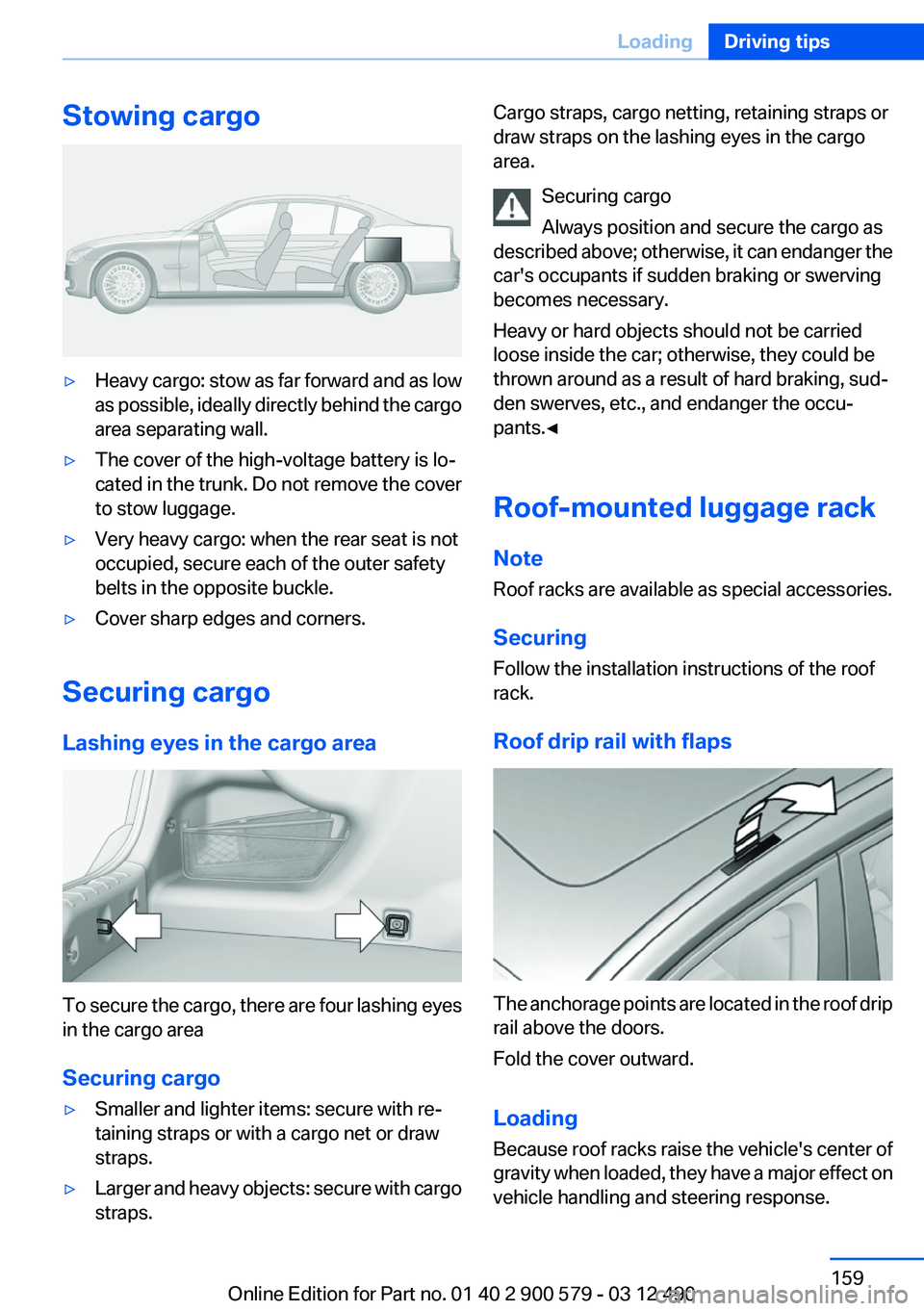
Lashing eyes in the cargo area
To secure the cargo, there are four lashing eyes
in the cargo area
Securing cargo
▷Smaller and lighter items: secure with re‐
taining straps or with a cargo net or draw
straps.▷Larger and heavy objects: secure with cargo
straps.Cargo straps, cargo netting, retaining straps or
draw straps on the lashing eyes in the cargo
area.
Securing cargo
Always position and secure the cargo as
described above; otherwise, it can endanger the
car's occupants if sudden braking or swerving
becomes necessary.
Heavy or hard objects should not be carried
loose inside the car; otherwise, they could be
thrown around as a result of hard braking, sud‐
den swerves, etc., and endanger the occu‐
pants.◀
Roof-mounted luggage rack
Note
Roof racks are available as special accessories.
Securing
Follow the installation instructions of the roof
rack.
Roof drip rail with flaps
The anchorage points are located in the roof drip
rail above the doors.
Fold the cover outward.
Loading
Because roof racks raise the vehicle's center of
gravity when loaded, they have a major effect on
vehicle handling and steering response.
Seite 159LoadingDriving tips159
Online Edition for Part no. 01 40 2 900 579 - 03 12 490
Page 187 of 319
Multi-channel playback,
surround
Choose between stereo and multi-channel play‐
back, surround.
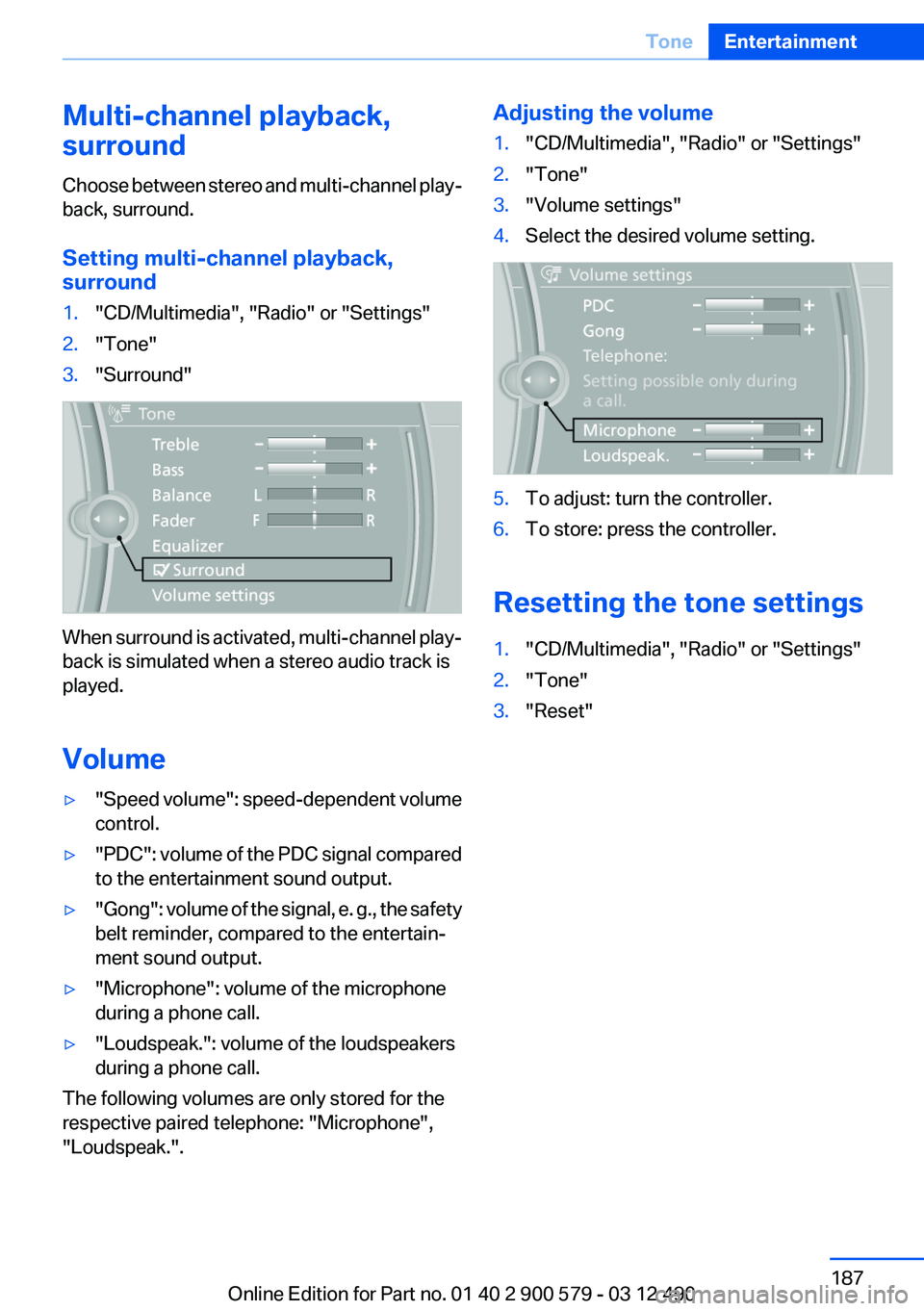
Setting multi-channel playback,
surround1."CD/Multimedia", "Radio" or "Settings"2."Tone"3."Surround"
When surround is activated, multi-channel play‐
back is simulated when a stereo audio track is
played.
Volume
▷" Speed volume": speed-dependent volume
control.▷"PDC" : volume of the PDC signal compared
to the entertainment sound output.▷"Gong" : volume of the signal, e. g., the safety
belt reminder, compared to the entertain‐
ment sound output.▷"Microphone": volume of the microphone
during a phone call.▷"Loudspeak.": volume of the loudspeakers
during a phone call.
The following volumes are only stored for the
respective paired telephone: "Microphone",
"Loudspeak.".
Adjusting the volume1."CD/Multimedia", "Radio" or "Settings"2."Tone"3."Volume settings"4.Select the desired volume setting.5.To adjust: turn the controller.6.To store: press the controller.
Resetting the tone settings
1."CD/Multimedia", "Radio" or "Settings"2."Tone"3."Reset"Seite 187ToneEntertainment187
Online Edition for Part no. 01 40 2 900 579 - 03 12 490
Page 291 of 319
Damage from Velcro® fasteners
Open Velcro® fasteners on pants or other
articles of clothing can damage the seat covers.
Ensure that any Velcro® fasteners are closed. ◀
Caring for special components
Light-alloy wheels
Use wheel cleaner, particularly during the winter
months. Do not use aggressive, acidic, strongly
alkaline or abrasive cleaners, or steam jets
above 140 ℉/60 ℃; follow the manufacturer's
instructions.
Chrome surfaces
Carefully clean components such as the radiator
grille or door handles with an ample supply of
water, possibly with shampoo added, particu‐
larly when they have been exposed to road salt.
Rubber components
Aside from water, treat only with rubber cleans‐
ers.
When cleaning rubber seals, do not use any sil‐
icon-containing car care products in order to
avoid damage or reduced noise damping.
Fine wood parts
Clean fine wood facing and fine wood compo‐
nents only with a moist rag. Then dry with a soft
cloth.
Plastic components
These include:▷Imitation leather surfaces.▷Headliner.▷Lamp lenses.▷Instrument cluster cover.▷Matte black spray-coated components.▷Painted parts in the interior.
Clean with a microfiber cloth.
Lightly dampen the cloth with water.
Do not soak the headliner.
Do not use cleansers that contain alcohol
or solvents
Do not use cleansers that contain alcohol or sol‐
vents, such as lacquer thinners, heavy-duty
grease removers, fuel, or such; this could lead to
surface damage.◀
Safety belts
Dirty belt straps impede the reeling action and
thus have a negative impact on safety.
Chemical cleaning
Do not clean chemically; this can destroy
the webbing.◀
Use only a mild soapy solution, with the safety
belts clipped into their buckles.
Do not allow the reels to retract the safety belts
until they are dry.
Floor carpets and floor mats No objects in the area around the pedals
Keep floor mats, carpets, and any other
objects out of the area of motion of the pedals;
otherwise, the function of the pedals could be
impeded while driving
Do not place additional floor mats over existing
mats or other objects.
Only use floor mats that have been approved for
the vehicle and can be properly fixed in place.
Ensure that the floor mats are securely fastened
again after they were removed for cleaning, for
example.◀
Floor mats can be removed from the passenger
compartment for cleaning.
If the floor carpets are very dirty, clean with a
microfiber cloth and water or a textile cleaner. To
prevent matting of the carpet, rub back and forth
in the direction of travel only.Seite 291CareMobility291
Online Edition for Part no. 01 40 2 900 579 - 03 12 490
Page 309 of 319
Bar for tow-starting/tow‐ing 286
Bass 186
Battery replacement, auxiliary air conditioning remote con‐
trol 138
Battery replacement, remote control for parked-car heat‐
ing/ventilation 140
Battery replacement, remote control, rear entertain‐
ment 218
Battery replacement, vehicle battery 281
Battery replacement, vehicle remote control 32
Battery, vehicle 281
Belts, safety belts 53
Beverage holder, cu‐ pholder 148
Blinds, sun protection 46
Bluetooth audio 212
Bluetooth connection, activat‐ ing/deactivating 227
BMW ActiveHybrid 27
BMW Assist 249
BMW Homepage 6
BMW Internet page 6
BMW Live 252
BMW Maintenance Sys‐ tem 273
BMW Search 251
Bottle holder, refer to Cu‐ pholder 148
Brake assistant 107
Brake discs, breaking in 154
Brake force display 105
Brake lamps, brake force dis‐ play 105
Brake lamps, bulb replace‐ ment 280
Brake lights, adaptive 105
Brake pads, breaking in 154
Braking, notes 157
Breakdown assis‐ tance 283, 284 Breaking in 154
Brightness of Control Dis‐ play 87
Bulb replacement 275
Bulb replacement, front 276
Bulb replacement, rear 279
Bulbs and lamps 275
Button, Start/Stop 64
Bypassing, refer to Jump- starting 284
C
Calendar 243
California Proposition 65 Warning 7
Camera, backup camera 118
Camera, care 292
Camera, Side View 121
Camera, Top View 120
Can holder, refer to Cu‐ pholder 148
Car battery 281
Car care products 290
Care, displays 292
Care, vehicle 290
Cargo 158
Cargo area lid 39
Cargo area, storage compart‐ ments 149
Cargo straps, securing cargo 159
Car key, refer to Remote con‐ trol 32
Carpet, care 291
Car wash 289
Catalytic converter, refer to Hot exhaust system 156
CBS Condition Based Serv‐ ice 273
CD/DVD 196
CD/DVD player, rear 217
CDs, storing 203
Cell phone 226
Center armrest 147
Center console 14 Central locking system 35
Central screen, refer to Control Display 16
Changes, technical, refer to Safety 7
Changing parts 275
Changing wheels 281
Changing wheels/tires 265
CHARGE, energy recovery 68
Charge indicator, high-voltage battery 81
Check Control 77
Children, seating position 60
Children, transporting safely 60
Child restraint fixing sys‐ tem 60
Child restraint fixing system LATCH 61
Child restraint fixing systems, mounting 60
Child safety locks 63
Child seat, mounting 60
Child seats 60
Chrome parts, care 291
Cigarette lighter 143
Cleaning, displays 292
Climate control 130
Climate control wind‐ shield 156
Clock 80
Closing/opening from in‐ side 39
Closing/opening via door lock 38
Closing/opening with remote control 36
Clothes hooks 149
Combination switch, refer to Turn signals 70
Combination switch, refer to Wiper system 71
Combustion engine, start‐ ing 66
COMFORT+ program, Driving Experience Switch 110 Seite 309Everything from A to ZReference309
Online Edition for Part no. 01 40 2 900 579 - 03 12 490
Page 315 of 319
Roadside Assistance 250
Roadside parking lamps 90
Roller sunblinds 46
Roof load capacity 297
Roof-mounted luggage rack 159
Rope for tow-starting/tow‐ ing 286
Route 175
Route criteria, route 174
Route, displaying 175
Routes, avoiding 174
Route section, bypassing 175
RSC Run Flat System Compo‐ nent, refer to Run-flat
tires 267
Rubber components, care 291
Run-flat tires 267
S
Safe braking 157
Safety 7
Safety belt reminder for driv‐ er's seat and front passenger
seat 54
Safety belts 53
Safety belts, care 291
Safety of the hybrid sys‐ tem 287
Safety Package, refer to Active Protection 105
Safety switch, windows 46
Safety systems, airbags 94
Satellite radio 190
Saving fuel 0
Scale, changing during navi‐ gation 177
Screen, refer to Control Dis‐ play 16
Screwdriver 275
Screw thread for tow fit‐ ting 287
Search, refer to BMW Search 251 Seat belts, refer to Safety
belts 53
Seat heating, front 52
Seat heating, rear 52
Seating position for chil‐ dren 60
Seat, mirror, and steering wheel memory 56
Seats 49
Seat ventilation, front 52
Selection list in instrument cluster 83
Selector lever, automatic transmission 74
Sensors, care 292
Service and warranty 8
Service requirements, Condi‐ tion Based Service CBS 273
Service requirements, dis‐ play 82
Service, Roadside Assis‐ tance 284
Settings on Control Dis‐ play 86
Settings, storing for seat, mir‐ rors, steering wheel 56
Shifting, automatic transmis‐ sion 73
Shift paddles on steering wheel 75
Short commands 299
Shoulder support 51
Side airbags 94
Side View 120
Signaling, horn 12
Signals when unlocking 37
Silent Start, electric drive read‐ iness 65
Sitting safely 49
Size 296
Slide/tilt glass roof 47
Smallest turning circle 297
Smoker's package 143
Snap-in adapter, mobile phone 236
Snow chains 267 Socket 144
Socket, OBD Onboard Diag‐ nostics 274
Software applications, iPhone 254
Software update 215
Spare fuse 282
Special destinations, naviga‐ tion 169
Specified engine oil types 271
Speed, average 84
Speed limit in the com‐ puter 85
Speed Volume, volume equal‐ ization 187
Split screen 20
Split screen map settings 178
Spoken instructions, naviga‐ tion 176
SPORT+ program, Dynamic Driving Control 109
Sport automatic transmis‐ sion 75
SPORT program, Dynamic Driving Control 109
Sport program, transmis‐ sion 74
Stability control systems 107
Start/Stop button 64
Start function during malfunc‐ tion 33
Starting the combustion en‐ gine 66
State/province, selecting for navigation 166
Stations, stored 194
Station, storing 188
Status display, tires 97
Status information, iDrive 19
Status of Owner's Manual 7
Steering wheel, adjusting 59
Steering wheel heating 59
Steering wheel memory 56
Steptronic, automatic trans‐ mission 73 Seite 315Everything from A to ZReference315
Online Edition for Part no. 01 40 2 900 579 - 03 12 490