driver BMW ACTIVEHYBRID X6 2011 Service Manual
[x] Cancel search | Manufacturer: BMW, Model Year: 2011, Model line: ACTIVEHYBRID X6, Model: BMW ACTIVEHYBRID X6 2011Pages: 312, PDF Size: 8.91 MB
Page 269 of 312
Mobility
267Reference
At a glance
Controls
Driving tips
Communications
Navigation
Entertainment
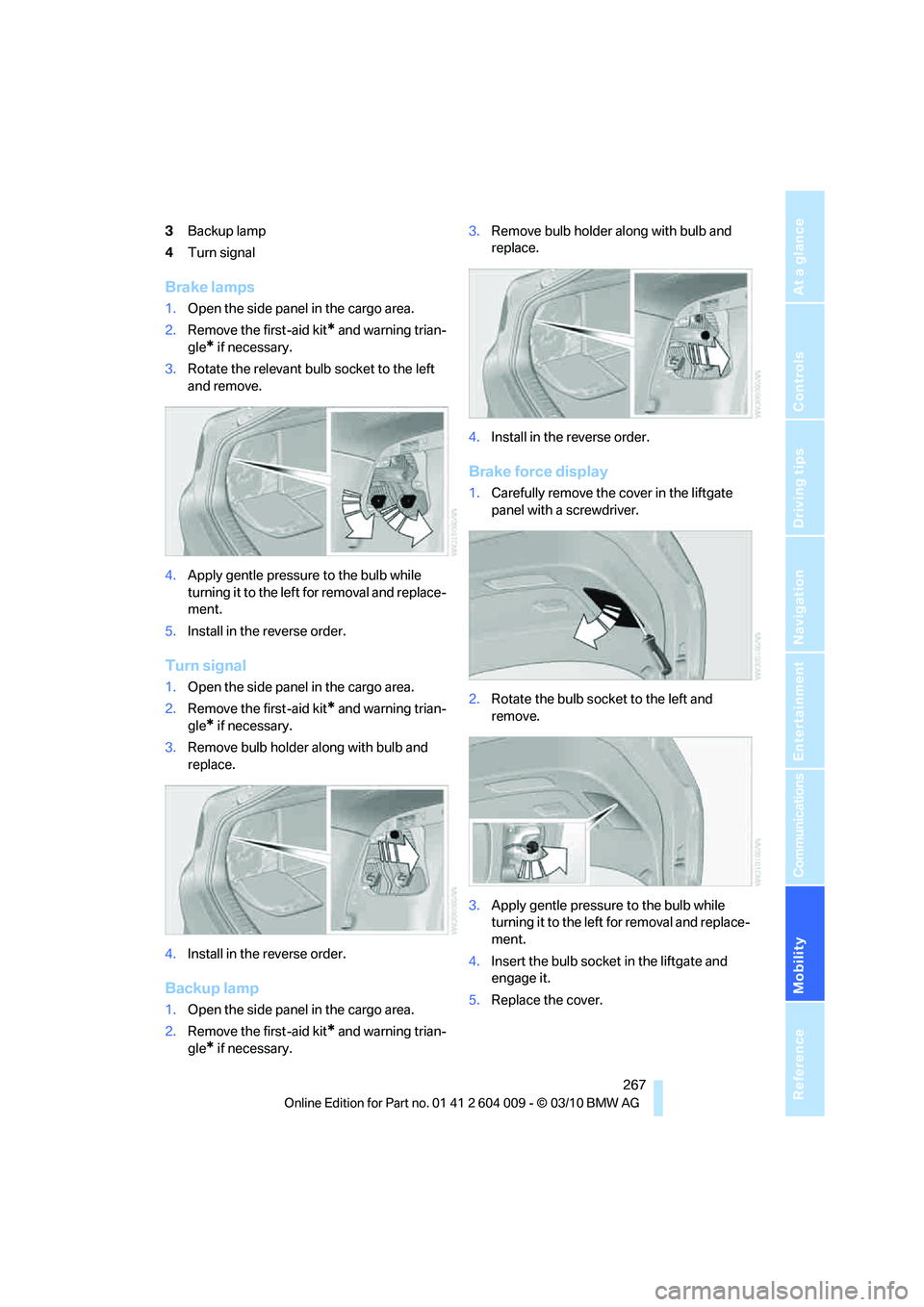
3Backup lamp
4Turn signal
Brake lamps
1.Open the side panel in the cargo area.
2.Remove the first-aid kit
* and warning trian-
gle
* if necessary.
3.Rotate the relevant bulb socket to the left
and remove.
4.Apply gentle pressure to the bulb while
turning it to the left for removal and replace-
ment.
5.Install in the reverse order.
Turn signal
1.Open the side panel in the cargo area.
2.Remove the first-aid kit
* and warning trian-
gle
* if necessary.
3.Remove bulb holder along with bulb and
replace.
4.Install in the reverse order.
Backup lamp
1.Open the side panel in the cargo area.
2.Remove the first-aid kit
* and warning trian-
gle
* if necessary.3.Remove bulb holder along with bulb and
replace.
4.Install in the reverse order.
Brake force display
1.Carefully remove the cover in the liftgate
panel with a screwdriver.
2.Rotate the bulb socket to the left and
remove.
3.Apply gentle pressure to the bulb while
turning it to the left for removal and replace-
ment.
4.Insert the bulb socket in the liftgate and
engage it.
5.Replace the cover.
Page 270 of 312
Replacing components
268
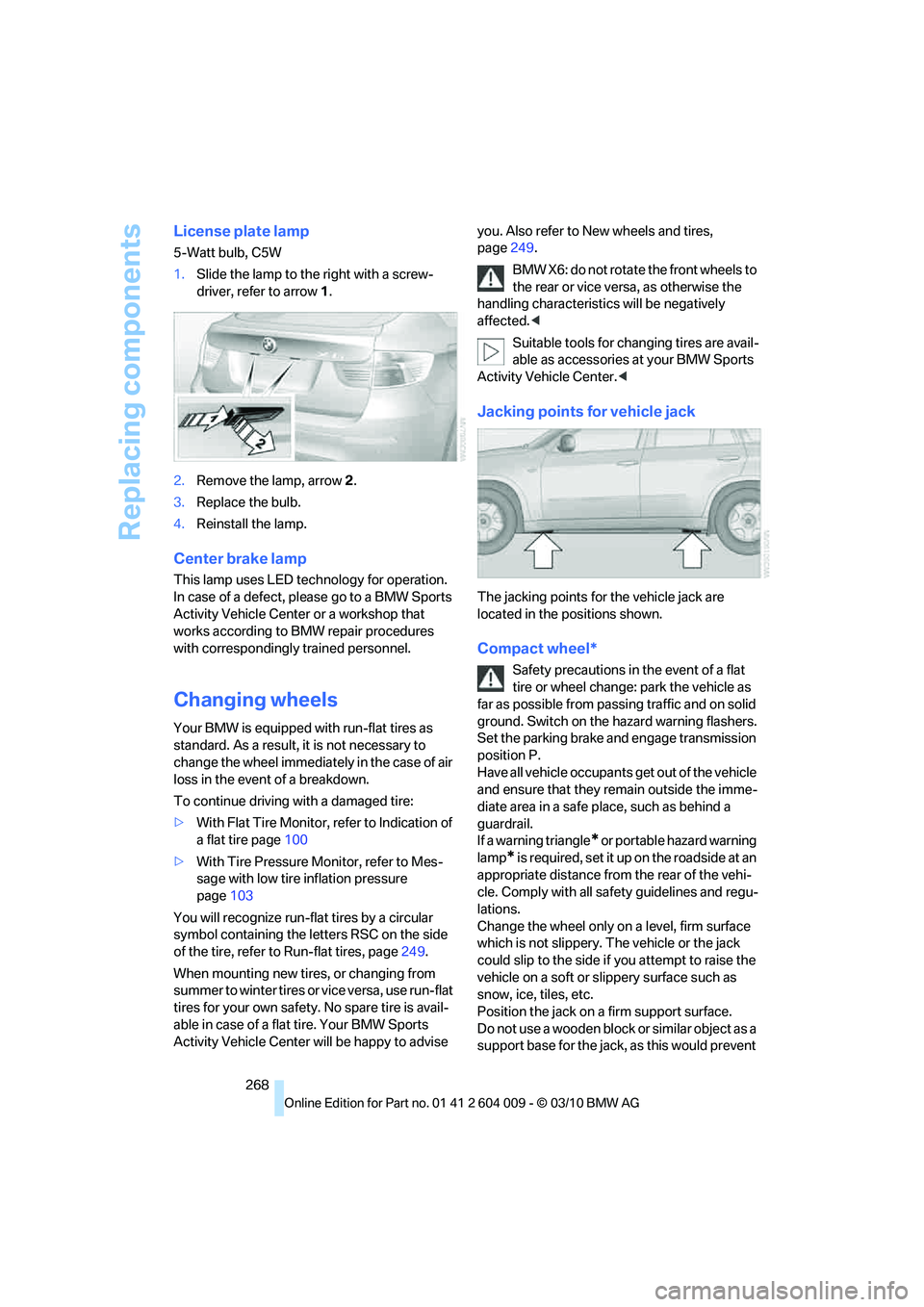
License plate lamp
5-Watt bulb, C5W
1.Slide the lamp to the right with a screw-
driver, refer to arrow1.
2.Remove the lamp, arrow2.
3.Replace the bulb.
4.Reinstall the lamp.
Center brake lamp
This lamp uses LED technology for operation.
In case of a defect, please go to a BMW Sports
Activity Vehicle Center or a workshop that
works according to BMW repair procedures
with correspondingly trained personnel.
Changing wheels
Your BMW is equipped with run-flat tires as
standard. As a result, it is not necessary to
change the wheel immediately in the case of air
loss in the event of a breakdown.
To continue driving with a damaged tire:
>With Flat Tire Monitor, refer to Indication of
a flat tire page100
>With Tire Pressure Monitor, refer to Mes-
sage with low tire inflation pressure
page103
You will recognize run-flat tires by a circular
symbol containing the letters RSC on the side
of the tire, refer to Run-flat tires, page249.
When mounting new tires, or changing from
s u m m e r t o w i n t e r t i r e s o r v i c e v e r s a , u s e r u n - f l a t
tires for your own safety. No spare tire is avail-
able in case of a flat tire. Your BMW Sports
Activity Vehicle Center will be happy to advise you. Also refer to New wheels and tires,
page249.
BMW X6: do not rotate the front wheels to
the rear or vice versa, as otherwise the
handling characteristics will be negatively
affected.<
Suitable tools for changing tires are avail-
able as accessories at your BMW Sports
Activity Vehicle Center.<
Jacking points for vehicle jack
The jacking points for the vehicle jack are
located in the positions shown.
Compact wheel*
Safety precautions in the event of a flat
tire or wheel change: park the vehicle as
far as possible from passing traffic and on solid
ground. Switch on the hazard warning flashers.
Set the parking brake and engage transmission
position P.
Have all vehicle occupants get out of the vehicle
and ensure that they remain outside the imme-
diate area in a safe place, such as behind a
guardrail.
If a warning triangle
* or portable hazard warning
lamp
* is required, set it up on the roadside at an
appropriate distance from the rear of the vehi-
cle. Comply with all safety guidelines and regu-
lations.
Change the wheel only on a level, firm surface
which is not slippery. The vehicle or the jack
could slip to the side if you attempt to raise the
vehicle on a soft or slippery surface such as
snow, ice, tiles, etc.
Position the jack on a firm support surface.
Do not use a wooden block or similar object as a
support base for the jack, as this would prevent
Page 277 of 312
Mobility
275Reference
At a glance
Controls
Driving tips
Communications
Navigation
Entertainment
Your BMW has a special nut as body ground
or negative pole.
5.Attach the second end of the cable to the
negative terminal of the battery or to the
engine or body ground of the vehicle to be
started.
Starting engine
1.Start the engine on the assisting vehicle
and allow it to run at idle for several minutes
at slightly increased speed.
2.Start the engine on the other vehicle in the
usual way.
If the first starting attempt is not successful,
wait a few minutes before another attempt
in order to allow the discharged battery to
recharge.
3.Let the engines run for a few minutes.
4.Disconnect the jumper cables by reversing
the connection sequence.
Check the battery and recharge if necessary.
Never use spray fluids to start the
engine.<
Tow-starting and towing
Observe applicable laws and regulations
for tow-starting and towing.<
Do not transport any passengers other
than the driver in a vehicle that is being
towed.<
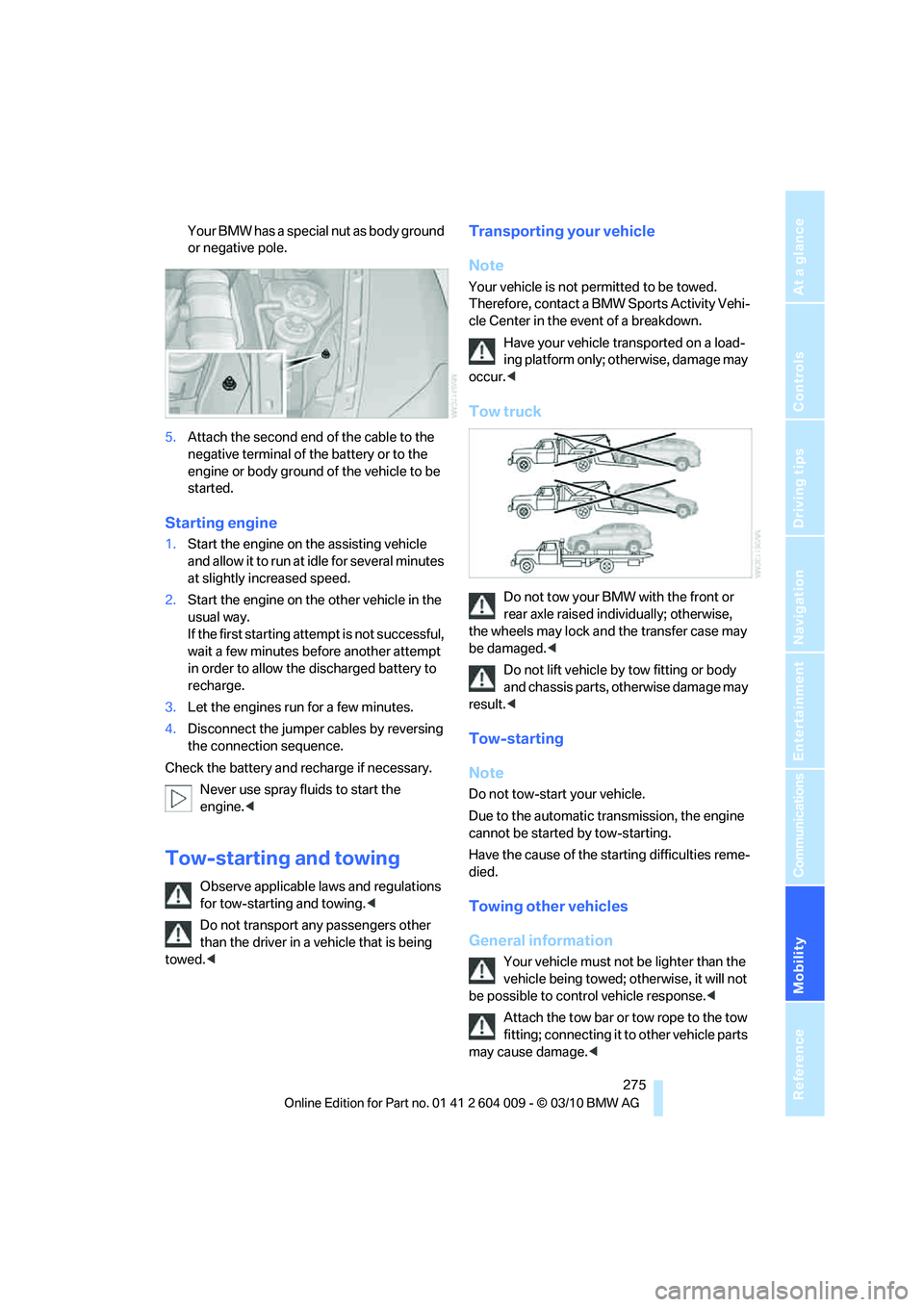
Transporting your vehicle
Note
Your vehicle is not permitted to be towed.
Therefore, contact a BMW Sports Activity Vehi-
cle Center in the event of a breakdown.
Have your vehicle transported on a load-
ing platform only; otherwise, damage may
occur.<
Tow truck
Do not tow your BMW with the front or
rear axle raised individually; otherwise,
the wheels may lock and the transfer case may
be damaged.<
Do not lift vehicle by tow fitting or body
and chassis parts, otherwise damage may
result.<
Tow-starting
Note
Do not tow-start your vehicle.
Due to the automatic transmission, the engine
cannot be started by tow-starting.
Have the cause of the starting difficulties reme-
died.
Towing other vehicles
General information
Your vehicle must not be lighter than the
vehicle being towed; otherwise, it will not
be possible to control vehicle response.<
Attach the tow bar or tow rope to the tow
fitting; connecting it to other vehicle parts
may cause damage.<
Page 296 of 312
Everything from A - Z
294 Breaking-in rear axle
differential138
Break-in period138
Brightness
– of Control Display86
– on Head-up Display109
Button for starting engine58
Buttons on steering wheel11
C
Calibrating driver's seat49
California Proposition 65
Warning6
Call
– accepting215
– ending216
– rejecting216
Calling, refer to Phone
numbers, dialing216
Calling, refer to the telephone
owner's manual
Camera
– refer to Rear view camera93
– refer to Top View90
Camera, Side View93
Can holder, refer to
Cupholders128
Capacities284
Capacity of cargo area283
Car battery, refer to Vehicle
battery270Care258
– car-care products258
– carpets260
– car washes258
– CD/DVD-player261
– chrome components259
– displays260
– exterior258
– fine wooden
components260
– hand washing259
– headlamps259
– high-pressure cleaning
jets259
– interior260
– leather260
– light-alloy wheels259
– paint259
– plastic components260
– rubber gaskets259
– running boards260
– safety belts260
– sensors and cameras260
– upholstery materials and
cloth-covered paneling260
– windows259
Cargo
– refer to Loading140
– securing142
– securing with ski bag135
Cargo area
– capacity283
– emergency actuation, refer
to Manually opening or
closing34
– emergency operation, refer
to Opening manually31
– expanding132
– opening
33
– opening/closing, refer to
Liftgate30,33
– opening/closing, refer to
Tailgate32
– opening from inside31
– opening from outside31
– opening with remote
control28
Cargo area, refer to Cargo
area131Cargo area cover, refer to
Luggage compartment
roller cover131
Caring for the vehicle
finish259
Car key, refer to Keys/remote
control26
Car phone
– installation location, refer to
Center armrest, front128
– refer to separate operating
instructions
Car phone, refer to
Telephone212
Car radio, refer to Radio171
Car wash258
– before driving in59
– with Comfort Access36
Car washes258
Catalytic converter, refer to
Hot exhaust system139
CBC Cornering Brake
Control95
CBS Condition Based
Service256
CD, audio playback180
CD, refer to Playing audio
tracks, DVD system in
rear202
CD/DVD changer
– magazine, loading183
CD-/DVD player in rear197
CD changer179,183
– controls168
– fast forward/reverse181
– random play sequence180
– selecting a track180
– switching on/off168
– tone control168
– volume168
CD player179
– controls168
– fast forward/reverse181
– random play sequence180
– selecting a track180
– switching on/off168
– tone control168
– volume168
Page 298 of 312
Everything from A - Z
296 Data memory257
Data transfer230
Date76
– display format85
– retrieving76
– setting85
Daytime driving lamps112
Defrosting windows118
Defrosting windows and
removing condensation118
Defrost position, refer to
Defrosting windows118
Deleting a trip157
Destination, entering by town/
city name149
Destination address
– entering149,155
Destination entry using BMW
Assist153
Destination for navigation
– entering149
– entering by voice155
– entering via map154
Destination guidance158
– bypassing a route
section159
– changing specified
route158
– continuing158
– starting158
– voice instructions160
– volume of voice
instructions160
Diesel exhaust fluid
– at low temperatures237
– at minimum236
– refilling yourself237
Diesel particulate filter139
Digital clock76
Digital compass125
Digital radio, refer to HD
Radio172
Dimensions281
Directional indicators, refer to
Turn signals65
Direction announcements,
refer to Voice
instructions160Directory for navigation, refer
to Address book151
Displacement, refer to Engine
data280
Display, refer to iDrive16
Displaying images204
Displaying special
destinations154
Display lighting, refer to
Instrument lighting115
Displays, refer to Instrument
panel12
Displays on the windshield,
refer to Head-up
Display109
Disposal
– battery of remote control
with Comfort Access37
– battery of the remote
control, DVD system in
rear198
– vehicle battery270
Distance, refer to
Computer79
Distance, selecting for active
cruise control70
Distance control, refer to
Active cruise control68
Distance to destination, refer
to Computer79
Distance warning, refer to
PDC Park Distance
Control88
Door entry lighting115
Door key, refer to Keys/
remote control26
Door lock29
Door locking, confirmation
signals28
Doors
– manual operation29
– remote control28
DOT Quality Grades247
Downhill driving assistance,
refer to HDC97
Draft-free ventilation120
Drinks holder, refer to
Cupholders128
Drive-off assistant99Driver's seat, calibrating49
Driving lamps, refer to Parking
lamps/low beams111
Driving on poor roads143
Driving stability control
systems95
Driving through water140
Driving tips, refer to General
driving notes138
Dry air, refer to Cooling
function119
Drying the air, refer to Cooling
function119
DSC Dynamic Stability
Control95
– indicator lamp13,96
DSC OFF, refer to Dynamic
Stability Control95
DTC Dynamic Traction
Control96
– activating96
– indicator lamp97
DVD
– country codes181
– settings182
– video playback181
DVD changer183
– malfunctions184
DVD changer, refer to CD
changer179
DVD menu182
DVD player, refer to CD
player179
DVD system in rear196
– CD/DVD player197
– connecting headphones197
– controls196
– displaying images from CD/
DVD204
– DVD country codes199
– external device207
– information on CD/DVD
player205
– playing audio tracks from
CD/DVD202
– playing video from CD/
DVD199
– remote control197
– switching on/off198
Page 299 of 312
Reference 297
At a glance
Controls
Driving tips
Communications
Navigation
Entertainment
Mobility
DVD video181
Dynamic destination
guidance159
Dynamic Performance
Control97
Dynamic Stability Control
DSC95
Dynamic Traction, refer to
Dynamic Traction
Control96
Dynamic Traction Control
DTC96
E
Easy entry/exit53
Eject button, refer to Buttons
on the CD/DVD player168
Electrical malfunction
– door lock29
– driver's door29
– fuel filler flap234
– liftgate31
– parking brake62
Electric seat43
Electric steering wheel
adjustment53
Electronic brake-force
distribution95
Electronic oil level check253
Emergency operation, refer to
Manual operation
– door lock29
– driver's door29
– fuel filler flap234
– liftgate31
Emergency request273
Emergency services, refer to
Roadside Assistance274Engine
– breaking-in138
– data280
– oil temperature77
– overheated, refer to Coolant
temperature77
– speed280
– starting59
– starting, with Comfort
Access36
– switching off59
Engine compartment252
Engine coolant255
Engine oil
– adding254
– additives, refer to Approved
engine oils255
– approved engine oil255
– checking oil level253
– electronic oil level check253
– temperature77
Engine oil temperature77
Engine output, refer to Engine
data280
Engine speed280
Engine starting, refer to
Starting engine59
Entering special destinations
by name153
Entertainment sound output
on/off168
Entry map for destination154
Equalizer, tone setting169
ESP Electronic Stability
Program, refer to DSC
Dynamic Stability
Control95
Exhaust system, refer to Hot
exhaust system139
Extended connectivity of the
music player in the mobile
phone192Exterior mirrors51
– adjusting51
– automatic dimming
feature52
– automatic heating51
– folding in and out51
– tilting down passenger-side
exterior mirror52
External audio device128
External devices
– random sequence194
Eye for tow-starting and
towing, refer to Tow
fitting276
F
Failure messages, refer to
Check Control82
False alarm, refer to Avoiding
unintentional alarms35
Fastening safety belts, refer to
Safety belts48
– warning lamp48
Fastest route for
navigation158
Fast forward
– CD changer181
– CD player181
Fault displays, refer to Check
Control82
Filler neck for washer fluid67
First aid, refer to First-aid
kit273
First-aid kit273
Fixing system, adaptive133
Flashing during locking/
unlocking, refer to Setting
confirmation signals28
Flat tire
– changing wheels268
– compact wheel268
– Flat Tire Monitor99
– run-flat tires100,103,249
– TPM Tire Pressure
Monitor101
Flat Tire Monitor FTM99
Fluid reservoir, refer to Filler
neck for washer fluid67
Page 302 of 312
Everything from A - Z
300 LATCH child restraint fixing
system55
Leather care260
LEDs light-emitting
diodes263
Length, refer to
Dimensions281
License plate lamp, replacing
bulbs265,268
Liftgate30,33
– adjusting opening
height31,33
– automatic operation31
– closing31,33
– locking and unlocking from
inside30
– manually opening or
closing34
– opening33
– opening from inside31
– opening from outside31
– opening manually31
Light
– refer to High-beam
Assistant113
Light-emitting diodes
LEDs263
Lighter130
Lighter socket130
Lighting
– instruments115
– lamps and bulbs262
– of the vehicle, refer to
Lamps111
Light switch111
Load141
Loading140
– securing cargo142
– stowing cargo142
– vehicle140
Load securing equipment,
refer to Securing cargo142
Lock buttons in the doors,
refer to Locking30Locking
– from inside30
– setting confirmation
signals28
– using remote control28
– without key, refer to Comfort
Access35
Locking and unlocking doors
– from inside30
– setting confirmation
signals28
Locking without key, refer to
Comfort Access
35
Low beams111
– automatic111
Lower back support, refer to
Lumbar support44
Low-sulfur diesel235
Lug bolts269
– tightening torque, refer to
After mounting270
– wrench269
Luggage compartment
capacity, refer to Cargo area
capacity283
Luggage compartment roller
cover131
Luggage rack, refer to Roof-
mounted luggage rack143
Lumbar support44
M
M+S tires, refer to Winter
tires250
Main menu, iDrive17
Maintenance
– refer to Service and
Warranty Information
Booklet for US models256
– refer to Warranty and
Service Guide Booklet for
Canadian models256
Maintenance, refer to Service
requirements79
Maintenance system256Malfunction
– door lock29
– driver's door29
– fuel filler flap234
– liftgate31
– parking brake62
Malfunction warnings, refer to
Check Control82
Manual air distribution118
Manual mode, automatic
transmission with
Steptronic64
Manual operation
– door lock29
– driver's door29
– fuel filler flap234
Manual operation, Side
View92
Map display160
Map for navigation
– changing scale161
– entering destination154
Master key, refer to Keys/
remote control26
Maximum cooling119
Maximum speed
– for winter tires250
– with compact wheel270
Memory, refer to Seat, mirror
and steering wheel
memory44
Menus, refer to iDrive16
Messages218
Messages from the concierge
service219
Microfilter121
Microphone
– for mobile phone14
– for telephone14
– for voice activation
system14
Mirror dimming feature52
Page 305 of 312
Reference 303
At a glance
Controls
Driving tips
Communications
Navigation
Entertainment
Mobility
Rear automatic climate
control
– air flow122
– switching off122
Rear entertainment, refer to
DVD system in rear196
Rear fog lamps
– indicator lamp13
Rear lamps, refer to Tail
lamps264,266
– replacing bulbs264,266
Rear seat backrest,
folding132
Rear seats
– adjusting47
– adjusting head restraints47
– folding over backrest132
– head restraint adjustment47
– heating50
Rear seats, heating50
Rear socket130
Rear ventilation120
– automatic climate control in
rear121
– 3rd row seats120
Rear view camera93
– cleaning95
– displays on Control
Display95
– driver assistance
functions93
– switching off93
– switching on93
Rearview mirror51
Rear window
– replacing wiper blade262
– windshield wiper66,258
Rear window, heating118
Rear window safety switch38
Rear window wiper, replacing
wiper blade262
Reception
– quality172
– radio station172
Reception level of mobile
phone, refer to Status
information19Recirculated-air mode119
– air recirculation119
– AUC Automatic
recirculated-air control119
Reclining seat, refer to
Seats43
Reflectors, refer to Tail
lamps264,266
Refueling234
Releasing
– hood251
Releasing, refer to
Unlocking36
Remaining distance, refer to
Cruising range78
Remaining distance to
destination, refer to
Computer79
Remote control26
– Comfort Access35
– garage door opener124
– liftgate28
– malfunction29,37
– replacing battery37
Remote control, DVD system
in rear197
– battery replacement198
Removing condensation on
the windows118
Replacement fuses271
Replacement of tires249
– changing wheels268
– new wheels and tires249
Replacing bulbs, refer to
Lamps and bulbs262
Replacing wheels/tires, refer
to New wheels and tires249
Replacing wiper blades262
Reporting an accident, refer to
Initiating an emergency
request273
Reporting safety defects7
Reserve warning, refer to Fuel
gauge78
Reset, refer to Resetting tone
settings170
Residual heat119Restraint systems
– for children54
– refer to Safety belts48
Retreaded tires249
Reverse
– CD changer181
– CD player181
Reverse gear, automatic
transmission with
Steptronic64
Road map160
Roadside
Assistance227,274
Roadside parking lamps113
Roller blind
– luggage compartment roller
cover131
Roller blinds
– roller sun blinds127
Roller blinds, refer to Roller
sun blinds127
Roller sun blinds127
Roof load capacity
283
Roof-mounted luggage
rack143
Rope, refer to Tow-starting
and towing275
Rotary pushbutton, refer to
iDrive16
Route158,159
– bypassing sections159
– changing158,159
– changing criteria158
– displaying map view160
– displaying streets or towns/
cities159
– selecting158
Route instructions, refer to
Destination guidance
through voice
instructions160
Route map, refer to Map
display160
Route section, changing159
Route selection158
RSC Runflat System
Component, refer to Run-
flat tires249
Page 309 of 312
Reference 307
At a glance
Controls
Driving tips
Communications
Navigation
Entertainment
Mobility
Unlocking
– from inside30
– liftgate28
– setting behavior28
– using remote control28
– without key, refer to Comfort
Access35
Unlocking and locking doors
– using remote control28
Unlocking without key, refer to
Comfort Access35
Updating the navigation
data148
USB audio interface192
Used batteries
– refer to Disposal270
– refer to Replacing battery37
V
Valve screw caps, refer to
After mounting270
VCD181
Vehicle
– battery270
– breaking-in138
– loading140
– measurements, refer to
Dimensions281
– parking59
– storing261
– weights283
Vehicle care, refer to Care258
Vehicle jack269
– jacking points269
Ventilation120
– draft-free120
– in the rear120
– rear automatic climate
control122
– 3rd row seats120
– while stationary122
Vents, refer to Ventilation120
Vents of the automatic climate
control116
Video menu181
Video playback181Voice, refer to Destination
guidance through voice
instructions160
Voice activation system22
– short commands285
Voice commands
– telephone219
Voice instructions for
navigation system160
– repeating160
– switching on/off160
– volume160
Voice phone book221
Volume168
– audio sources168
– mobile phone215
– voice instructions160
Volume balance, tone
setting169
Volume of warning tones87
W
Warning lamps, refer to
Indicator and warning
lamps13
Warning messages, refer to
Check Control82
Warning tone, volume87
Warning triangle273
Warranty and Service Guide
Booklet for Canadian
models256
Washer/wiper system65
– rain sensor66
– washer fluid67
– windshield washer
nozzles66
Washer fluid67
– capacity of the reservoir67
Washing the car258
Water on roads, refer to
Driving through water140
Water penetration259
Waveband for radio171
Wear indicators in tires, refer
to Minimum tread depth248
Website4
Weights283Wheel/tire combination, refer
to New wheels and tires249
Wheel/tire damage248
Wheelbase, refer to
Dimensions281
Wheels and tires239
Width, refer to
Dimensions281
Windows37
– convenient opening and
closing28
– convenient opening and
closing from outside29
– convenient opening and
closing with Comfort
Access36
– opening, closing37
– pinch protection system38
– safety switch38
Windshield
– cleaning, refer to Washer/
wiper system65
– defrosting, refer to
Defrosting windows118
– displays, refer to Head-up
Display109
Windshield washer system
– refer to Washer/wiper
system65
– windshield washer
nozzles66
Windshield wipers, refer to
Washer/wiper system65
– replacing wiper blades262
Winter diesel235
Winter tires250
– storage250
Word matching principle for
navigation157
Working in the engine
compartment251
Wrenches/screwdrivers, refer
to Onboard toolkit262
X
xDrive97
Xenon lamps263,265
– bulb changing263,265