stop start BMW ACTIVEHYBRID3 2013 Owner's Manual
[x] Cancel search | Manufacturer: BMW, Model Year: 2013, Model line: ACTIVEHYBRID3, Model: BMW ACTIVEHYBRID3 2013Pages: 220, PDF Size: 5.09 MB
Page 153 of 220
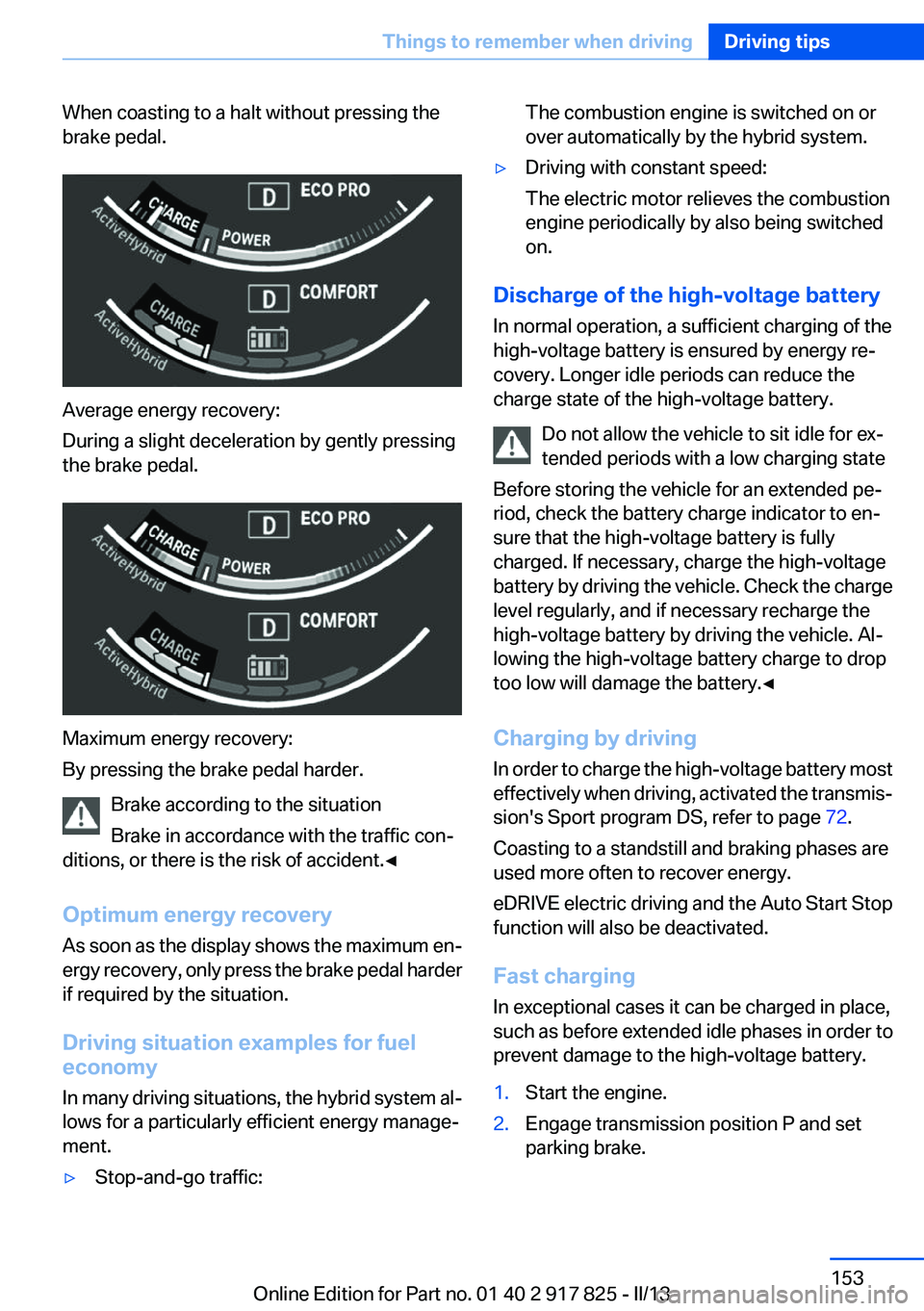
When coasting to a halt without pressing the
brake pedal.
Average energy recovery:
During a slight deceleration by gently pressing
the brake pedal.
Maximum energy recovery:
By pressing the brake pedal harder.
Brake according to the situation
Brake in accordance with the traffic con‐
ditions, or there is the risk of accident.◀
Optimum energy recovery
As soon as the display shows the maximum en‐
ergy recovery, only press the brake pedal harder
if required by the situation.
Driving situation examples for fuel
economy
In many driving situations, the hybrid system al‐
lows for a particularly efficient energy manage‐
ment.
▷Stop-and-go traffic:The combustion engine is switched on or
over automatically by the hybrid system.▷Driving with constant speed:
The electric motor relieves the combustion
engine periodically by also being switched
on.
Discharge of the high-voltage battery
In normal operation, a sufficient charging of the
high-voltage battery is ensured by energy re‐
covery. Longer idle periods can reduce the
charge state of the high-voltage battery.
Do not allow the vehicle to sit idle for ex‐
tended periods with a low charging state
Before storing the vehicle for an extended pe‐
riod, check the battery charge indicator to en‐
sure that the high-voltage battery is fully
charged. If necessary, charge the high-voltage
battery by driving the vehicle. Check the charge
level regularly, and if necessary recharge the
high-voltage battery by driving the vehicle. Al‐
lowing the high-voltage battery charge to drop
too low will damage the battery.◀
Charging by driving
In order to charge the high-voltage battery most
effectively when driving, activated the transmis‐
sion's Sport program DS, refer to page 72.
Coasting to a standstill and braking phases are
used more often to recover energy.
eDRIVE electric driving and the Auto Start Stop
function will also be deactivated.
Fast charging
In exceptional cases it can be charged in place,
such as before extended idle phases in order to
prevent damage to the high-voltage battery.
1.Start the engine.2.Engage transmission position P and set
parking brake.Seite 153Things to remember when drivingDriving tips153
Online Edition for Part no. 01 40 2 917 825 - II/13
Page 160 of 220
Braking longer will charge the high-voltage bat‐
tery more.
Use coasting conditions
When approaching a red light, take your foot off
the accelerator and let the vehicle coast to a halt.
On a downhill gradient, take your foot off the ac‐
celerator and let the vehicle roll.
The flow of fuel is interrupted while coasting.
Switch off the engine during
longer stops
Switch off the engine during longer stops, e.g.,
at traffic lights, railroad crossings or in traffic
congestion.
Auto Start/Stop function
The Auto Start/Stop function of your vehicle au‐
tomatically switches off the engine during a
stop.
If the engine is switched off and then restarted
rather than leaving the engine running con‐
stantly, fuel consumption and emissions are re‐
duced. Savings can begin within a few seconds
of switching off the engine.
Using this system can cause certain compo‐
nents of the vehicle to become worn prema‐
turely.
In addition, fuel consumption is also determined
by other factors, such as driving style, road con‐
ditions, maintenance or environmental factors.
Switch off any functions that
are not currently needed
Functions such as seat heating and the rear win‐
dow defroster require a lot of energy and con‐
sume additional fuel, especially in city and stop-
and-go traffic.Therefore, switch off these functions if they are
not actually needed.
Have maintenance carried out
Have vehicles maintained regularly to achieve
optimal vehicle economy and operating life.
Have the maintenance carried out by your serv‐
ice center.
Please also note the BMW Maintenance Sys‐
tem, refer to page 181.
ECO PRO
The concept
ECO PRO supports a driving style that saves on
fuel consumption. For this purpose, the engine
control and comfort functions, e. g. the climate
control output, are adjusted.
eDRIVE electric driving, refer to page 66, is be‐
coming possible in more and more areas.
In addition, context-sensitive instructions can
be displayed that assist in driving in a manner
that optimizes fuel consumption.
The extension of the range that is achieved as a
result can be displayed in the instrument cluster.
At a glance
The system includes the following
EfficientDynamics functions and displays:▷ECO PRO bonus range, refer to page 161▷ECO PRO tips driving instruction, refer to
page 162▷ECO PRO climate control, refer to
page 161
Activating ECO PRO
Press button repeatedly until ECO PRO
is displayed in the instrument cluster.
Seite 160Driving tipsSaving fuel160
Online Edition for Part no. 01 40 2 917 825 - II/13
Page 210 of 220
Everything from A to Z
IndexA
ABS, Antilock Brake Sys‐ tem 111
Activated-charcoal filter 134
Activate drive readiness 64
Active Blind Spot Detec‐ tion 106
ActiveHybrid, system 30
Active Protection 108
Adaptive brake lights, refer to Brake force display 108
Adaptive light control 92
Additives, oil 179
Adjustments, seats/head re‐ straints 49
After washing vehicle 201
Airbags 95
Airbags, indicator/warning light 96
Air circulation, refer to Recir‐ culated-air mode 133
Air, dehumidifying, refer to Cooling function 133
Air distribution, manual 134
Air flow, automatic climate control 134
Air pressure, tires 169
Air vents, refer to Ventila‐ tion 135
Alarm system 44
Alarm, unintentional 45
All around the center con‐ sole 16
All around the headliner 17
All around the steering wheel 14
All-season tires, refer to Win‐ ter tires 174
Alternating-code hand-held transmitter 139 Alternative oil types 179
Antifreeze, washer fluid 70
Antilock Brake System, ABS 111
Anti-slip control, refer to DSC 111
Approved axle load 207
Approved engine oils 179
Arrival time 85
Ash tray 142
Assistance for the combustion engine 67
Assistance, Roadside Assis‐ tance 195
Assistance when driving off 115
ASSIST, Hybrid system 67
Assist system information, on Control Display 88
Attentiveness assistant 108
AUTO intensity 133
Automatic car wash 200
Automatic climate control with enhanced features 132
Automatic Curb Monitor 57
Automatic deactivation, front passenger airbags 97
Automatic deactivation of the hybrid system 199
Automatic engine start-stop function 65
Automatic headlamp con‐ trol 91
Automatic locking 41
Automatic recirculated-air control 133
Automatic transmission with Steptronic 71
AUTO program, automatic cli‐ mate control 133
AUTO program, intensity 133 Auxiliary air conditioning 136
Average fuel consumption 85
Average speed 85
Axle loads, weights 207
B
Backrest curvature, refer to Lumbar support 51
Backrest, width 51
Backup camera 120
Band-aids, refer to First aid kit 195
Bar for tow-starting/tow‐ ing 197
Battery replacement, vehicle battery 192
Battery replacement, vehicle remote control 34
Battery, vehicle 191
Belts, safety belts 52
Beverage holder, cu‐ pholder 148
Blinds, sun protection 47
BMW ActiveHybrid 30
BMW Assist, see user's manual for Navigation, Enter‐
tainment and Communica‐
tion
BMW Homepage 6
BMW Internet page 6
BMW maintenance sys‐ tem 181
Bonus range, ECO PRO 161
Bottle holder, refer to Cu‐ pholder 148
Brake assistant 111
Brake discs, breaking in 152
Brake force display 108
Brake lamps, brake force dis‐ play 108 Seite 210ReferenceEverything from A to Z210
Online Edition for Part no. 01 40 2 917 825 - II/13
Page 211 of 220
Brake lights, adaptive 108
Brake pads, breaking in 152
Braking, notes 154
Breakdown assis‐ tance 194, 195
Breaking in 152
Brightness of Control Dis‐ play 88
Bulb replacement 183
Bulb replacement, front 184
Bulb replacement, halogen headlamps 184
Bulb replacement, rear 189
Bulb replacement, xenon headlamps 187
Bulbs and lamps 183
Button, Start/Stop 63
Bypassing, refer to Jump- starting 195
C
California Proposition 65 Warning 7
Camera, backup camera 121
Camera, care 203
Camera, Side View 125
Camera, Top View 123
Can holder, refer to Cu‐ pholder 148
Car battery 191
Car care products 201
Care, displays 203
Care, vehicle 201
Cargo 156
Cargo area, enlarging 144
Cargo area lid 41
Cargo area, storage compart‐ ments 149
Cargo straps, securing cargo 157
Car key, refer to Remote con‐ trol 34
Carpet, care 202
Car wash 200 Catalytic converter, refer to
Hot exhaust system 154
CBS Condition Based Serv‐ ice 181
CD/Multimedia, see user's manual for Navigation, Enter‐
tainment and Communica‐
tion
Center armrest 147
Center console 16
Central locking system 37
Central screen, refer to Control Display 18
Changes, technical, refer to Safety 7
Changing parts 183
Changing wheels 191
Changing wheels/tires 173
CHARGE, energy recovery 67
Charge indicator, high-voltage battery 79
Check Control 75
Children, seating position 59
Children, transporting safely 59
Child restraint fixing sys‐ tem 59
Child restraint fixing system LATCH 60
Child restraint fixing systems, mounting 59
Child safety locks 62
Child seat, mounting 59
Child seats 59
Chrome parts, care 202
Cigarette lighter 142
Cleaning, displays 203
Climate control 132
Clock 78
Closing/opening from in‐ side 41
Closing/opening via door lock 40
Closing/opening with remote control 38
Clothes hooks 148 Coasting 66
Collision warning 103
Combination switch, refer to Turn signals 68
Combination switch, refer to Wiper system 69
Combustion engine, start‐ ing 65
Comfort Access 42
COMFORT program, Dynamic Driving Control 114
Compartments in the doors 147
Compass 140
Computer 84
Condensation on win‐ dows 134
Condensation under the vehi‐ cle 155
Condition Based Service CBS 181
Confirmation signal 39
ConnectedDrive, see user's manual for Navigation, Enter‐
tainment and Communica‐
tion
Contact with water, hybrid system 199
Control Display 18
Control Display, settings 87
Controller 18, 19
Control systems, driving sta‐ bility 111
Convenient opening 38
Coolant 180
Coolant temperature 78
Cooling function 133
Cooling, maximum 133
Cooling system 180
Corrosion on brake discs 155
Cruise control 116
Cruising range 78
Cupholder 148
Current fuel consumption 81 Seite 211Everything from A to ZReference211
Online Edition for Part no. 01 40 2 917 825 - II/13
Page 216 of 220
Rain sensor 69
Rear lamps 189
Rear socket 143
Rearview mirror 56
Rear window defroster 134
Recirculated-air filter 134
Recirculated-air mode 133
Recommended tire brands 174
Refueling 166
Remaining range 78
Remote control/key 34
Remote control, auxiliary air conditioning, key 136
Remote control, malfunc‐ tion 40
Remote control, universal 138
Replacement fuse 192
Replacing parts 183
Replacing wheels/tires 173
Reporting safety defects 9
Reserve warning, refer to Range 78
Reset, Tire Pressure Monitor TPM 99
Residual cooling 136
Retaining straps, securing cargo 157
Retreaded tires 174
Roadside parking lamps 91
Roller sunblinds 47
RON gasoline quality 168
Roof load capacity 207
Roof-mounted luggage rack 157
Rope for tow-starting/tow‐ ing 198
RSC Run Flat System Compo‐ nent, refer to Run-flat
tires 175
Rubber components, care 202
Run-flat tires 175 S
Safe braking 154
Safety 7
Safety belt reminder for driv‐ er's seat and front passenger
seat 53
Safety belts 52
Safety belts, care 202
Safety of the hybrid sys‐ tem 198
Safety Package, refer to Active Protection 108
Safety switch, windows 46
Safety systems, airbags 95
Saving fuel 159
Screen, refer to Control Dis‐ play 18
Screwdriver 183
Screw thread for tow fit‐ ting 198
Seat and mirror memory 55
Seat belts, refer to Safety belts 52
Seat heating, front 52
Seat heating, rear 52
Seating position for chil‐ dren 59
Seats 49
Selection list in instrument cluster 84
Selector lever, automatic transmission 72
Sensors, care 203
Service and warranty 8
Service history 82
Service requirements, Condi‐ tion Based Service CBS 181
Service requirements, dis‐ play 81
Service, Roadside Assis‐ tance 195
Settings on Control Dis‐ play 87
Settings, storing for seat, mir‐ ror 55 Shifting, automatic transmis‐
sion 71
Shift paddles on steering wheel 73
Side airbags 95
Side View 125
Signaling, horn 14
Signals when unlocking 39
Silent Start, electric drive read‐ iness 64
Sitting safely 49
Size 206
Slide/tilt glass roof 47
Smallest turning circle 207
Snow chains 175
Socket 142
Socket, OBD Onboard Diag‐ nostics 182
SOS button 194
Spare fuse 192
Specified engine oil types 179
Speed, average 85
Speed limit detection, on‐ board computer 85
Speed limiter, display 82
Speed Limit Information 82
Speed limit in the com‐ puter 85
Split screen 23
SPORT+ - program, Dynamic Driving Control 113
Sport automatic transmis‐ sion 73
Sport displays, torque display, performance display 87
SPORT program, Dynamic Driving Control 113
Sport program, transmis‐ sion 72
Sport steering, variable 112
Stability control systems 111
Start/Stop button 63
Start function during malfunc‐ tion 35 Seite 216ReferenceEverything from A to Z216
Online Edition for Part no. 01 40 2 917 825 - II/13