light BMW ACTIVEHYBRID3 2013 Repair Manual
[x] Cancel search | Manufacturer: BMW, Model Year: 2013, Model line: ACTIVEHYBRID3, Model: BMW ACTIVEHYBRID3 2013Pages: 220, PDF Size: 5.09 MB
Page 143 of 220
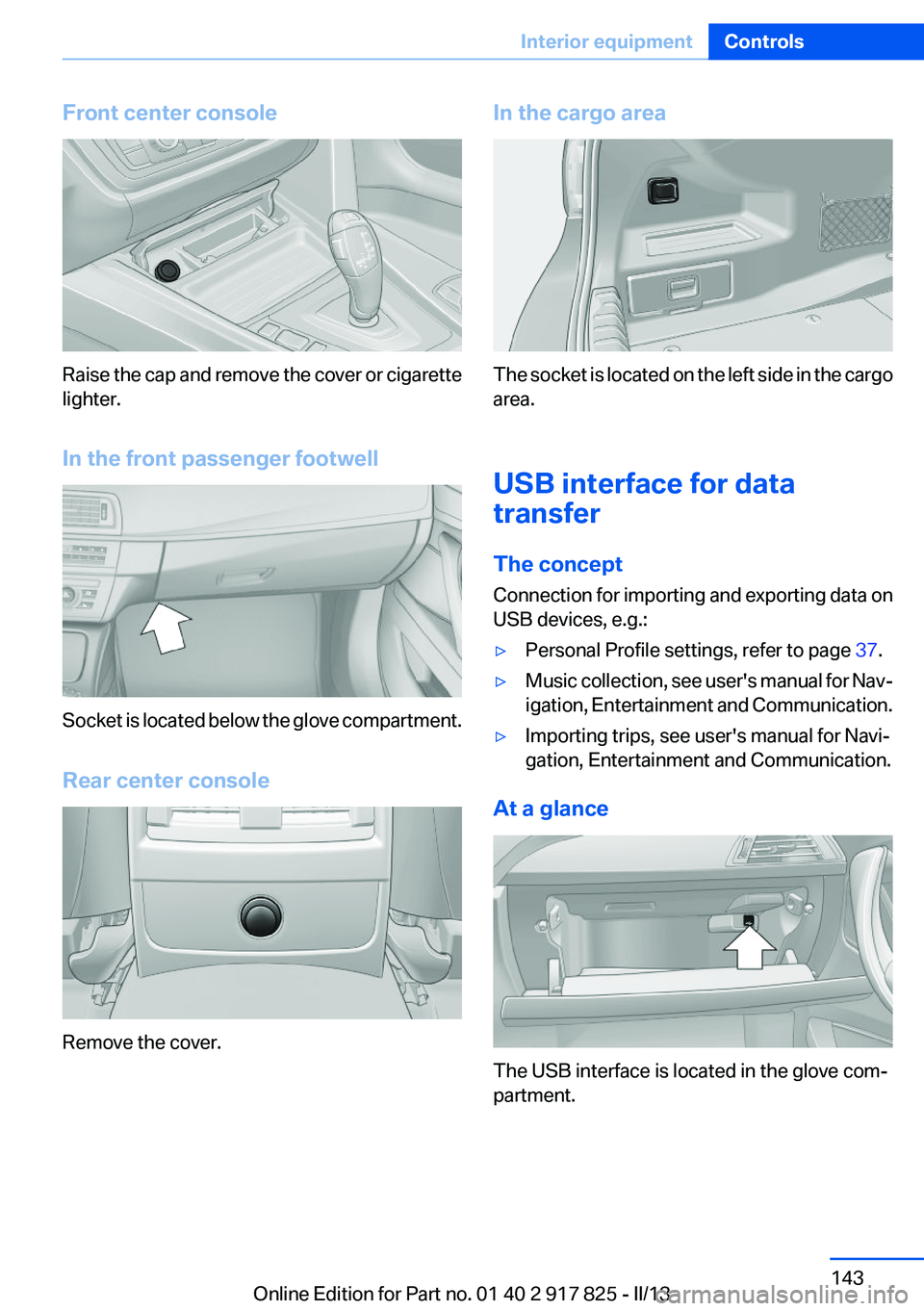
Front center console
Raise the cap and remove the cover or cigarette
lighter.
In the front passenger footwell
Socket is located below the glove compartment.
Rear center console
Remove the cover.
In the cargo area
The socket is located on the left side in the cargo
area.
USB interface for data
transfer
The concept
Connection for importing and exporting data on
USB devices, e.g.:
▷Personal Profile settings, refer to page 37.▷Music collection, see user's manual for Nav‐
igation, Entertainment and Communication.▷Importing trips, see user's manual for Navi‐
gation, Entertainment and Communication.
At a glance
The USB interface is located in the glove com‐
partment.
Seite 143Interior equipmentControls143
Online Edition for Part no. 01 40 2 917 825 - II/13
Page 145 of 220
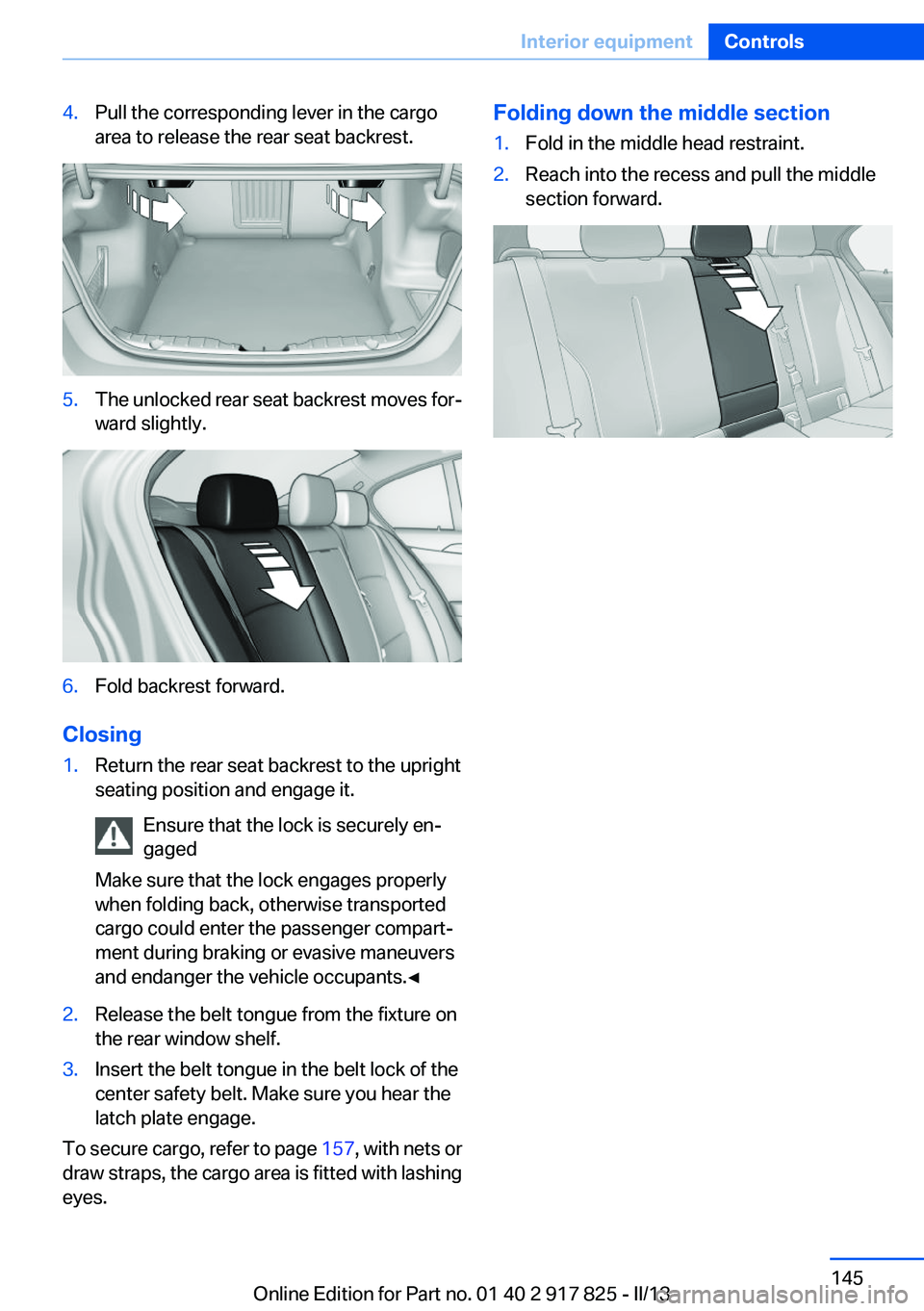
4.Pull the corresponding lever in the cargo
area to release the rear seat backrest.5.The unlocked rear seat backrest moves for‐
ward slightly.6.Fold backrest forward.
Closing
1.Return the rear seat backrest to the upright
seating position and engage it.
Ensure that the lock is securely en‐
gaged
Make sure that the lock engages properly
when folding back, otherwise transported
cargo could enter the passenger compart‐
ment during braking or evasive maneuvers
and endanger the vehicle occupants.◀2.Release the belt tongue from the fixture on
the rear window shelf.3.Insert the belt tongue in the belt lock of the
center safety belt. Make sure you hear the
latch plate engage.
To secure cargo, refer to page 157, with nets or
draw straps, the cargo area is fitted with lashing
eyes.
Folding down the middle section1.Fold in the middle head restraint.2.Reach into the recess and pull the middle
section forward.Seite 145Interior equipmentControls145
Online Edition for Part no. 01 40 2 917 825 - II/13
Page 147 of 220
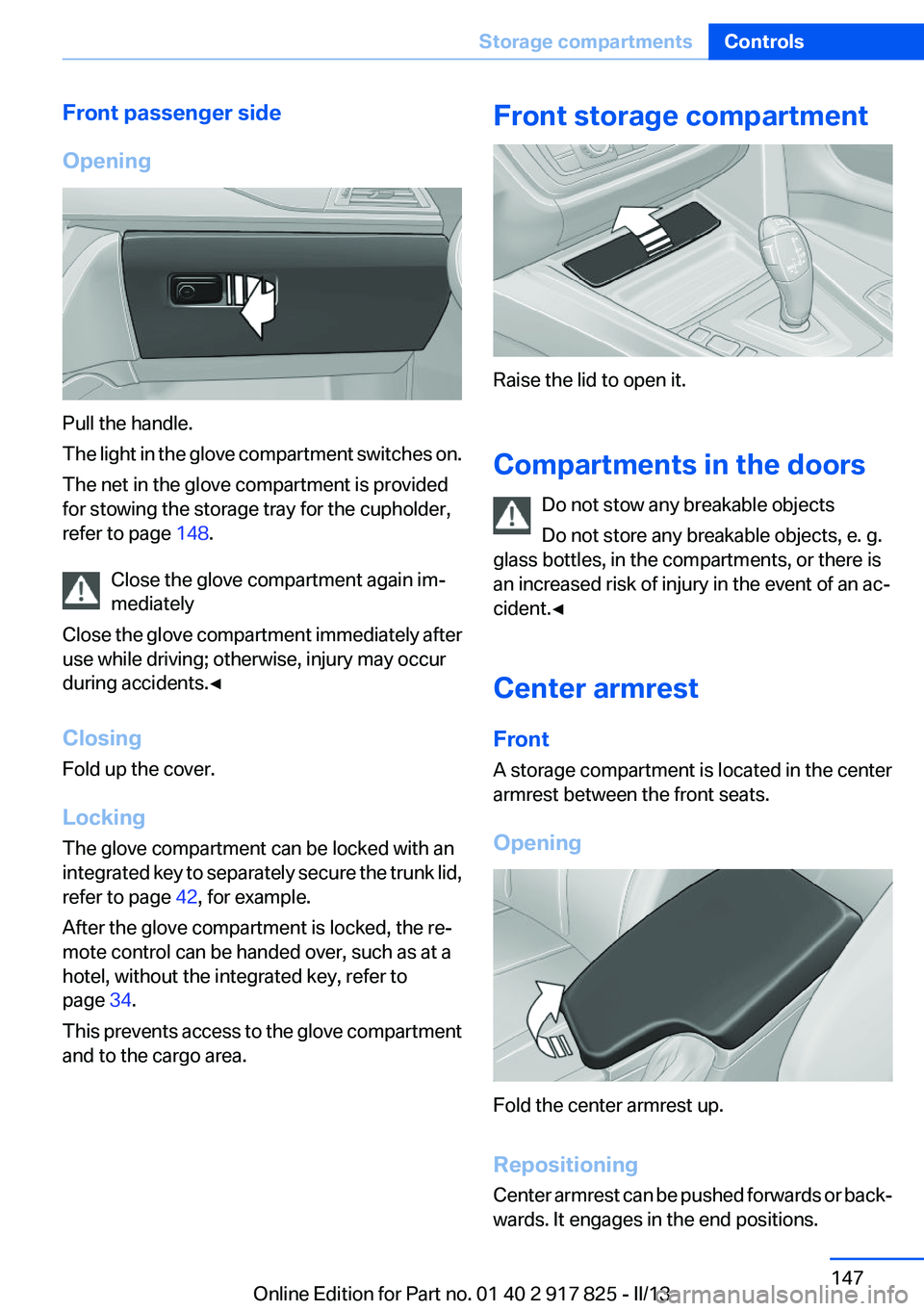
Front passenger side
Opening
Pull the handle.
The light in the glove compartment switches on.
The net in the glove compartment is provided
for stowing the storage tray for the cupholder,
refer to page 148.
Close the glove compartment again im‐
mediately
Close the glove compartment immediately after
use while driving; otherwise, injury may occur
during accidents.◀
Closing
Fold up the cover.
Locking
The glove compartment can be locked with an
integrated key to separately secure the trunk lid,
refer to page 42, for example.
After the glove compartment is locked, the re‐
mote control can be handed over, such as at a
hotel, without the integrated key, refer to
page 34.
This prevents access to the glove compartment
and to the cargo area.
Front storage compartment
Raise the lid to open it.
Compartments in the doors Do not stow any breakable objects
Do not store any breakable objects, e. g.
glass bottles, in the compartments, or there is
an increased risk of injury in the event of an ac‐
cident.◀
Center armrest
Front
A storage compartment is located in the center
armrest between the front seats.
Opening
Fold the center armrest up.
Repositioning
Center armrest can be pushed forwards or back‐
wards. It engages in the end positions.
Seite 147Storage compartmentsControls147
Online Edition for Part no. 01 40 2 917 825 - II/13
Page 148 of 220
Connection for an external audio
device
.
For a description, see the user's
manual for Navigation, Entertain‐
ment and Communication.
Cupholders
Notes Shatter-proof containers and no hot
drinks
Use light and shatter-proof containers and do
not transport hot drinks. Otherwise, there is the
increased danger of injury in an accident.◀
Unsuitable containers
Do not forcefully push unsuitable contain‐
ers into the cupholders. This may result in dam‐
age.◀
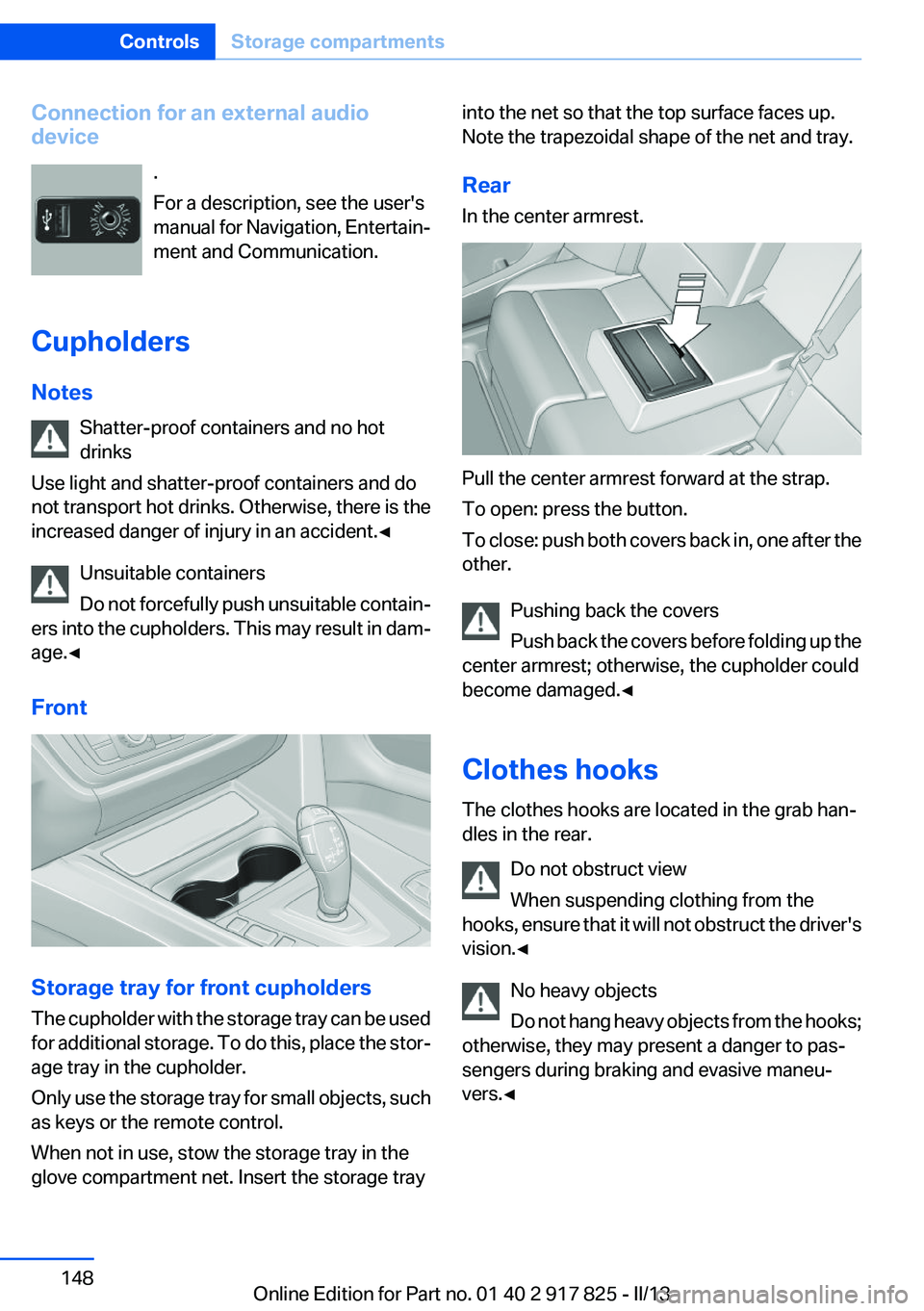
Front
Storage tray for front cupholders
The cupholder with the storage tray can be used
for additional storage. To do this, place the stor‐
age tray in the cupholder.
Only use the storage tray for small objects, such
as keys or the remote control.
When not in use, stow the storage tray in the
glove compartment net. Insert the storage tray
into the net so that the top surface faces up.
Note the trapezoidal shape of the net and tray.
Rear
In the center armrest.
Pull the center armrest forward at the strap.
To open: press the button.
To close: push both covers back in, one after the
other.
Pushing back the covers
Push back the covers before folding up the
center armrest; otherwise, the cupholder could
become damaged.◀
Clothes hooks
The clothes hooks are located in the grab han‐
dles in the rear.
Do not obstruct view
When suspending clothing from the
hooks, ensure that it will not obstruct the driver's
vision.◀
No heavy objects
Do not hang heavy objects from the hooks;
otherwise, they may present a danger to pas‐
sengers during braking and evasive maneu‐
vers.◀
Seite 148ControlsStorage compartments148
Online Edition for Part no. 01 40 2 917 825 - II/13
Page 149 of 220
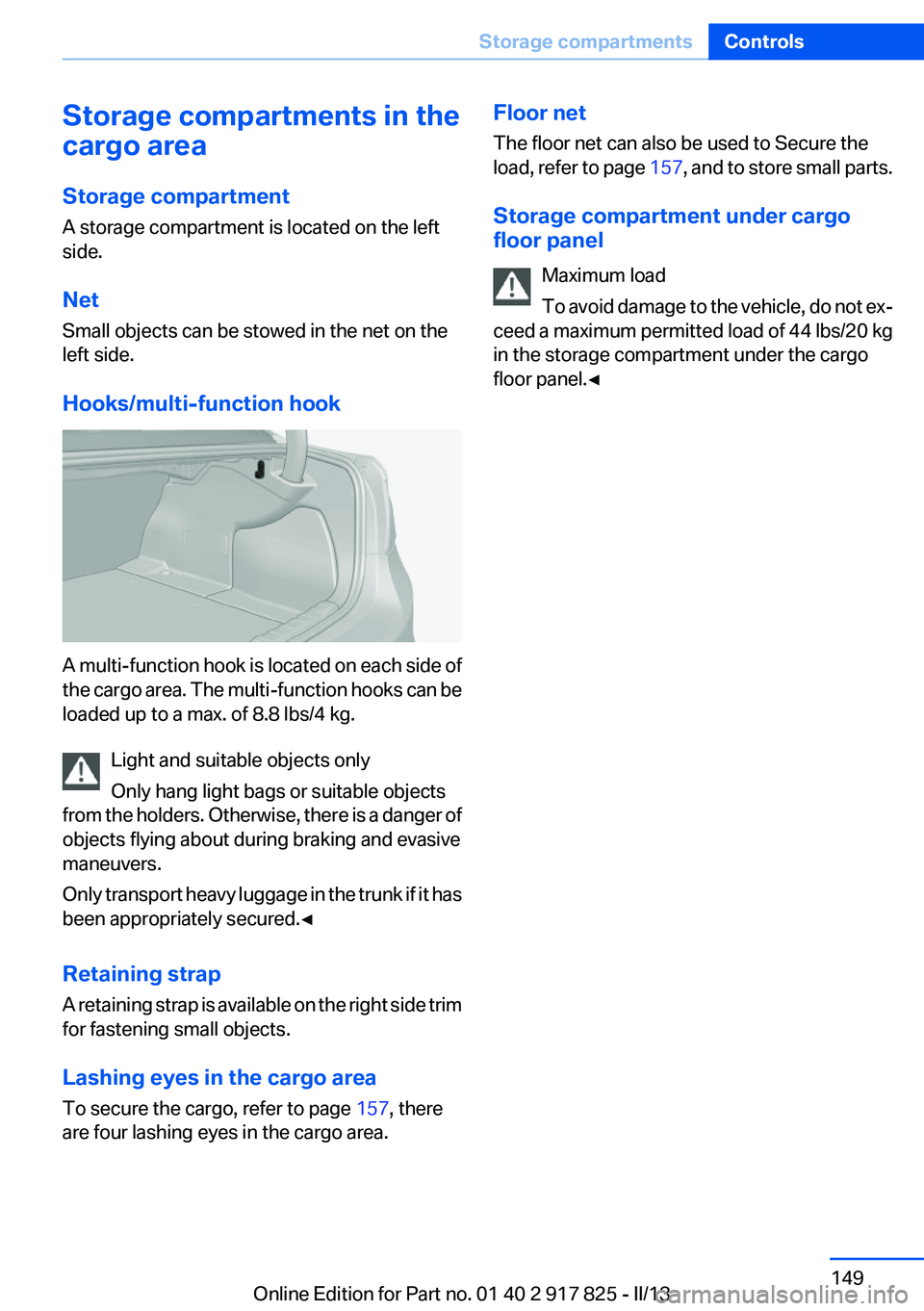
Storage compartments in the
cargo area
Storage compartment
A storage compartment is located on the left
side.
Net
Small objects can be stowed in the net on the
left side.
Hooks/multi-function hook
A multi-function hook is located on each side of
the cargo area. The multi-function hooks can be
loaded up to a max. of 8.8 lbs/4 kg.
Light and suitable objects only
Only hang light bags or suitable objects
from the holders. Otherwise, there is a danger of
objects flying about during braking and evasive
maneuvers.
Only transport heavy luggage in the trunk if it has
been appropriately secured.◀
Retaining strap
A retaining strap is available on the right side trim
for fastening small objects.
Lashing eyes in the cargo area
To secure the cargo, refer to page 157, there
are four lashing eyes in the cargo area.
Floor net
The floor net can also be used to Secure the
load, refer to page 157, and to store small parts.
Storage compartment under cargo
floor panel
Maximum load
To avoid damage to the vehicle, do not ex‐
ceed a maximum permitted load of 44 lbs/20 kg
in the storage compartment under the cargo
floor panel.◀Seite 149Storage compartmentsControls149
Online Edition for Part no. 01 40 2 917 825 - II/13
Page 153 of 220
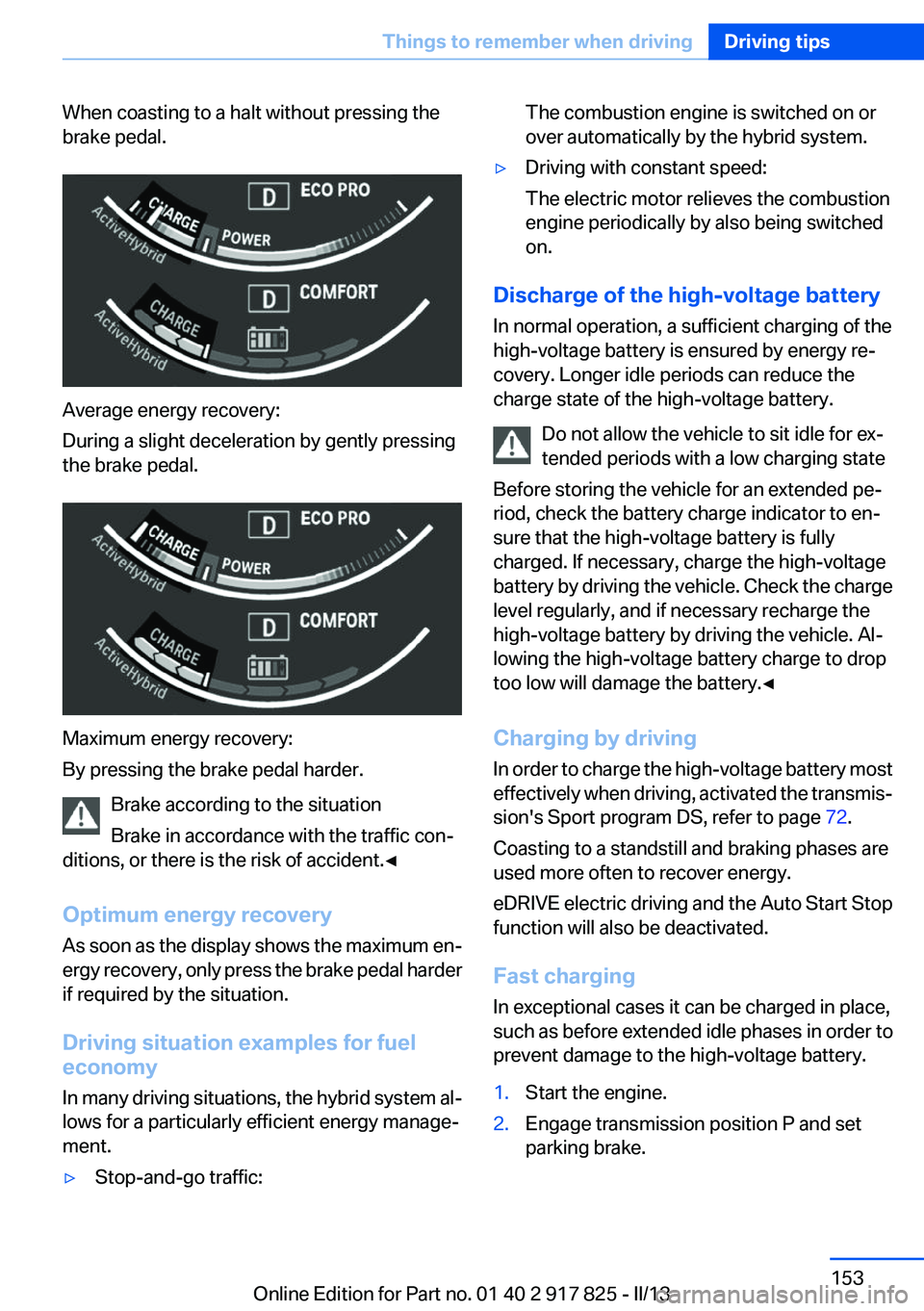
When coasting to a halt without pressing the
brake pedal.
Average energy recovery:
During a slight deceleration by gently pressing
the brake pedal.
Maximum energy recovery:
By pressing the brake pedal harder.
Brake according to the situation
Brake in accordance with the traffic con‐
ditions, or there is the risk of accident.◀
Optimum energy recovery
As soon as the display shows the maximum en‐
ergy recovery, only press the brake pedal harder
if required by the situation.
Driving situation examples for fuel
economy
In many driving situations, the hybrid system al‐
lows for a particularly efficient energy manage‐
ment.
▷Stop-and-go traffic:The combustion engine is switched on or
over automatically by the hybrid system.▷Driving with constant speed:
The electric motor relieves the combustion
engine periodically by also being switched
on.
Discharge of the high-voltage battery
In normal operation, a sufficient charging of the
high-voltage battery is ensured by energy re‐
covery. Longer idle periods can reduce the
charge state of the high-voltage battery.
Do not allow the vehicle to sit idle for ex‐
tended periods with a low charging state
Before storing the vehicle for an extended pe‐
riod, check the battery charge indicator to en‐
sure that the high-voltage battery is fully
charged. If necessary, charge the high-voltage
battery by driving the vehicle. Check the charge
level regularly, and if necessary recharge the
high-voltage battery by driving the vehicle. Al‐
lowing the high-voltage battery charge to drop
too low will damage the battery.◀
Charging by driving
In order to charge the high-voltage battery most
effectively when driving, activated the transmis‐
sion's Sport program DS, refer to page 72.
Coasting to a standstill and braking phases are
used more often to recover energy.
eDRIVE electric driving and the Auto Start Stop
function will also be deactivated.
Fast charging
In exceptional cases it can be charged in place,
such as before extended idle phases in order to
prevent damage to the high-voltage battery.
1.Start the engine.2.Engage transmission position P and set
parking brake.Seite 153Things to remember when drivingDriving tips153
Online Edition for Part no. 01 40 2 917 825 - II/13
Page 155 of 220
Applying the brakes fully is the most effective
way of braking in situations when this is neces‐
sary.
The vehicle maintains steering responsiveness.
You can still avoid any obstacles with a minimum
of steering effort.
Pulsation of the brake pedal and sounds from
the hydraulic circuits indicate that ABS is in its
active mode.
Objects in the area around the pedals No objects in the area around the pedals
Keep floor mats, carpets, and any other
objects out of the area of motion of the pedals;
otherwise, the function of the pedals could be
impeded while driving
Do not place additional floor mats over existing
mats or other objects.
Only use floor mats that have been approved for
the vehicle and can be properly fixed in place.
Ensure that the floor mats are securely fastened
again after they were removed for cleaning, for
example.◀
Driving in wet conditions
When roads are wet or there is heavy rain, briefly
exert gentle pressure on the brake pedal every
few miles.
Ensure that this action does not endanger other
road users.
The heat generated in this process helps dry the
brake discs and pads.
In this way braking efficiency will be available
when you need it.
Hills
Drive long or steep downhill gradients in the gear
in which the least braking is required. Otherwise,
the brake system may overheat, resulting in a
reduction in the brake system efficiency.You can increase the engine's braking effect by
shifting down, going all the way to first gear, if
necessary.
Avoid load on the brakes
Avoid placing excessive load on the brake
system. Light but consistent brake pressure can
lead to high temperatures, brake wear and pos‐
sibly even brake failure.◀
Do not drive in neutral
Do not drive in neutral or with the engine
stopped, as doing so disables engine braking. In
addition, steering and brake assist is unavailable
with the engine stopped.◀
Brake disc corrosion
Corrosion on the brake discs and contamination
on the brake pads are furthered by:▷Low mileage.▷Extended periods when the vehicle is not
used at all.▷Infrequent use of the brakes.
Corrosion occurs when the minimum pressure
that must be exerted by the pads during brake
applications to clean the discs is not reached.
Should corrosion form on the brake discs, the
brakes will tend to respond with a pulsating ef‐
fect that generally cannot be corrected.
Condensation under the parked vehicle
When using the automatic climate control, con‐
densation water develops that exits underneath
the vehicle.
Traces of water under the vehicle like this are
normal.
Seite 155Things to remember when drivingDriving tips155
Online Edition for Part no. 01 40 2 917 825 - II/13
Page 157 of 220
Stowing cargo▷The cover of the high-voltage battery is lo‐
cated in the trunk. Do not remove the cover
to stow luggage.▷Cover sharp edges and corners on the
cargo.▷Heavy cargo: stow as far forward as possi‐
ble, directly behind and at the bottom of the
rear passenger seat backrests.▷Very heavy cargo: when the rear seat is not
occupied, secure each of the outer safety
belts in the opposite buckle.▷If necessary, fold down the rear backrests to
stow cargo.▷Do not stack cargo above the top edge of the
backrests.
Securing cargo
Lashing eyes in the cargo area
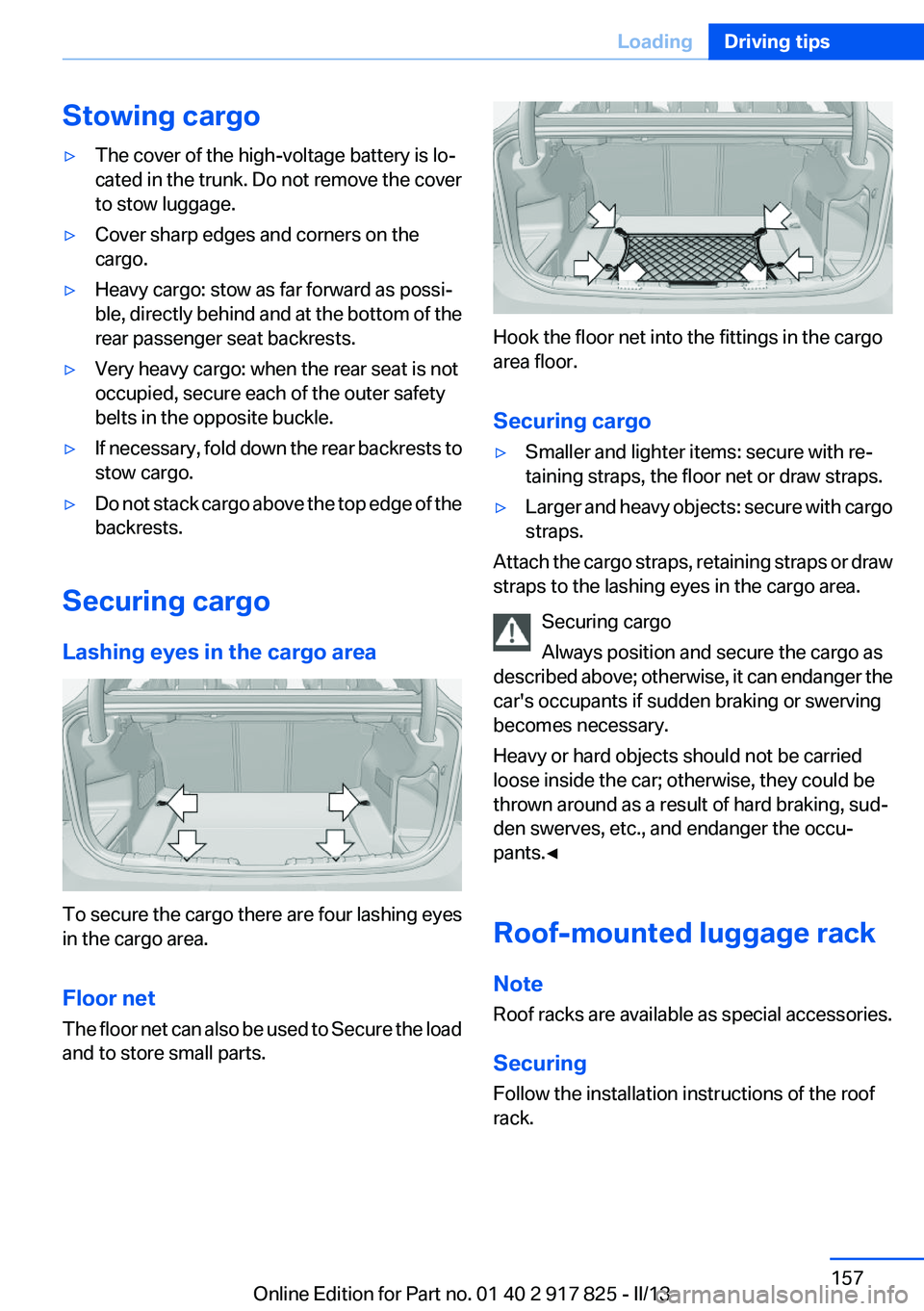
To secure the cargo there are four lashing eyes
in the cargo area.
Floor net
The floor net can also be used to Secure the load
and to store small parts.
Hook the floor net into the fittings in the cargo
area floor.
Securing cargo
▷Smaller and lighter items: secure with re‐
taining straps, the floor net or draw straps.▷Larger and heavy objects: secure with cargo
straps.
Attach the cargo straps, retaining straps or draw
straps to the lashing eyes in the cargo area.
Securing cargo
Always position and secure the cargo as
described above; otherwise, it can endanger the
car's occupants if sudden braking or swerving
becomes necessary.
Heavy or hard objects should not be carried
loose inside the car; otherwise, they could be
thrown around as a result of hard braking, sud‐
den swerves, etc., and endanger the occu‐
pants.◀
Roof-mounted luggage rack
Note
Roof racks are available as special accessories.
Securing
Follow the installation instructions of the roof
rack.
Seite 157LoadingDriving tips157
Online Edition for Part no. 01 40 2 917 825 - II/13
Page 160 of 220
Braking longer will charge the high-voltage bat‐
tery more.
Use coasting conditions
When approaching a red light, take your foot off
the accelerator and let the vehicle coast to a halt.
On a downhill gradient, take your foot off the ac‐
celerator and let the vehicle roll.
The flow of fuel is interrupted while coasting.
Switch off the engine during
longer stops
Switch off the engine during longer stops, e.g.,
at traffic lights, railroad crossings or in traffic
congestion.
Auto Start/Stop function
The Auto Start/Stop function of your vehicle au‐
tomatically switches off the engine during a
stop.
If the engine is switched off and then restarted
rather than leaving the engine running con‐
stantly, fuel consumption and emissions are re‐
duced. Savings can begin within a few seconds
of switching off the engine.
Using this system can cause certain compo‐
nents of the vehicle to become worn prema‐
turely.
In addition, fuel consumption is also determined
by other factors, such as driving style, road con‐
ditions, maintenance or environmental factors.
Switch off any functions that
are not currently needed
Functions such as seat heating and the rear win‐
dow defroster require a lot of energy and con‐
sume additional fuel, especially in city and stop-
and-go traffic.Therefore, switch off these functions if they are
not actually needed.
Have maintenance carried out
Have vehicles maintained regularly to achieve
optimal vehicle economy and operating life.
Have the maintenance carried out by your serv‐
ice center.
Please also note the BMW Maintenance Sys‐
tem, refer to page 181.
ECO PRO
The concept
ECO PRO supports a driving style that saves on
fuel consumption. For this purpose, the engine
control and comfort functions, e. g. the climate
control output, are adjusted.
eDRIVE electric driving, refer to page 66, is be‐
coming possible in more and more areas.
In addition, context-sensitive instructions can
be displayed that assist in driving in a manner
that optimizes fuel consumption.
The extension of the range that is achieved as a
result can be displayed in the instrument cluster.
At a glance
The system includes the following
EfficientDynamics functions and displays:▷ECO PRO bonus range, refer to page 161▷ECO PRO tips driving instruction, refer to
page 162▷ECO PRO climate control, refer to
page 161
Activating ECO PRO
Press button repeatedly until ECO PRO
is displayed in the instrument cluster.
Seite 160Driving tipsSaving fuel160
Online Edition for Part no. 01 40 2 917 825 - II/13
Page 161 of 220
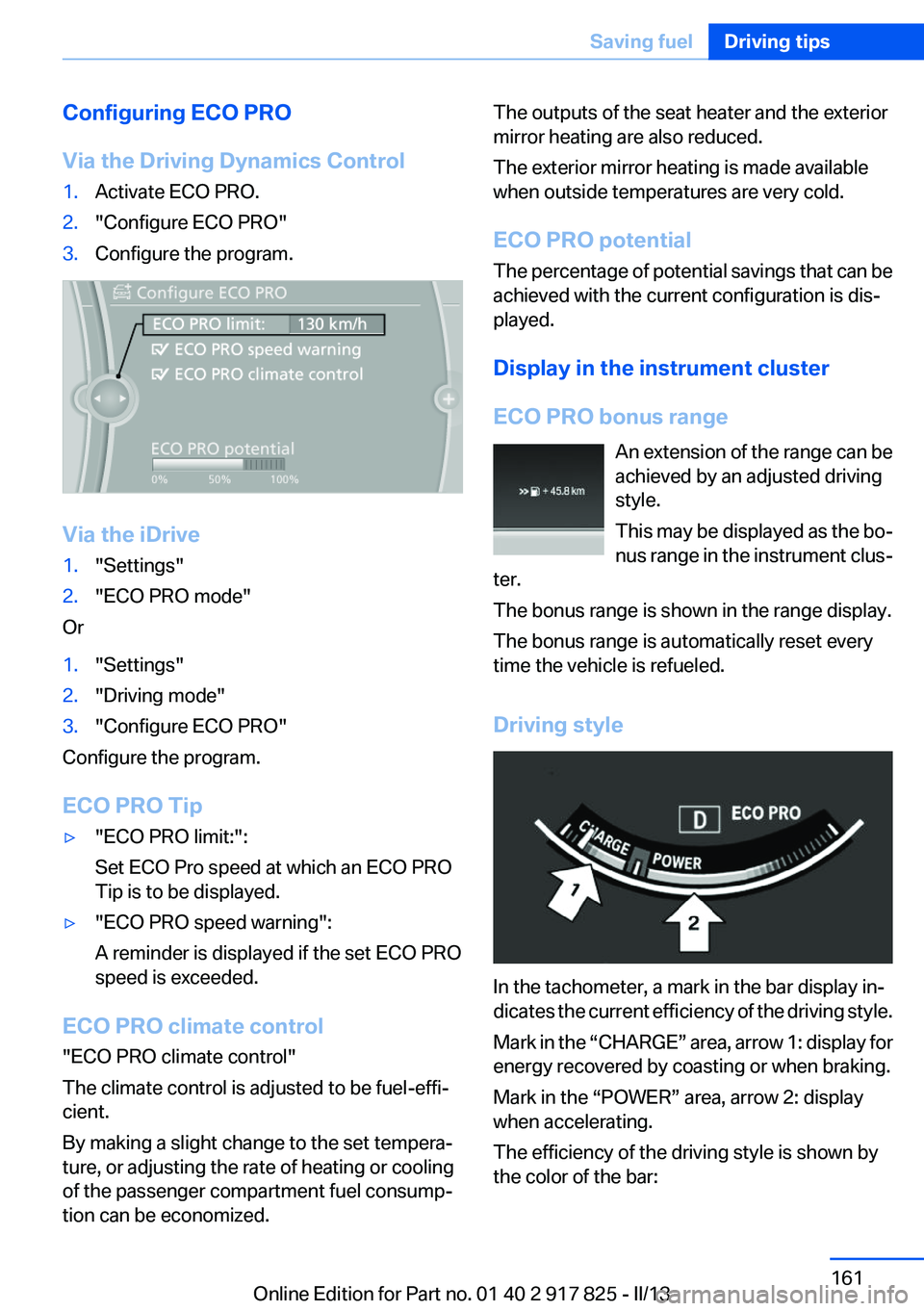
Configuring ECO PRO
Via the Driving Dynamics Control1.Activate ECO PRO.2."Configure ECO PRO"3.Configure the program.
Via the iDrive
1."Settings"2."ECO PRO mode"
Or
1."Settings"2."Driving mode"3."Configure ECO PRO"
Configure the program.
ECO PRO Tip
▷"ECO PRO limit:":
Set ECO Pro speed at which an ECO PRO
Tip is to be displayed.▷"ECO PRO speed warning":
A reminder is displayed if the set ECO PRO
speed is exceeded.
ECO PRO climate control
"ECO PRO climate control"
The climate control is adjusted to be fuel-effi‐
cient.
By making a slight change to the set tempera‐
ture, or adjusting the rate of heating or cooling
of the passenger compartment fuel consump‐
tion can be economized.
The outputs of the seat heater and the exterior
mirror heating are also reduced.
The exterior mirror heating is made available
when outside temperatures are very cold.
ECO PRO potential
The percentage of potential savings that can be
achieved with the current configuration is dis‐
played.
Display in the instrument cluster
ECO PRO bonus range An extension of the range can be
achieved by an adjusted driving
style.
This may be displayed as the bo‐
nus range in the instrument clus‐
ter.
The bonus range is shown in the range display.
The bonus range is automatically reset every
time the vehicle is refueled.
Driving style
In the tachometer, a mark in the bar display in‐
dicates the current efficiency of the driving style.
Mark in the “CHARGE” area, arrow 1: display for
energy recovered by coasting or when braking.
Mark in the “POWER” area, arrow 2: display
when accelerating.
The efficiency of the driving style is shown by
the color of the bar:
Seite 161Saving fuelDriving tips161
Online Edition for Part no. 01 40 2 917 825 - II/13