turn signal bulb BMW ACTIVEHYBRID5 2013 Owners Manual
[x] Cancel search | Manufacturer: BMW, Model Year: 2013, Model line: ACTIVEHYBRID5, Model: BMW ACTIVEHYBRID5 2013Pages: 224, PDF Size: 4.96 MB
Page 73 of 224
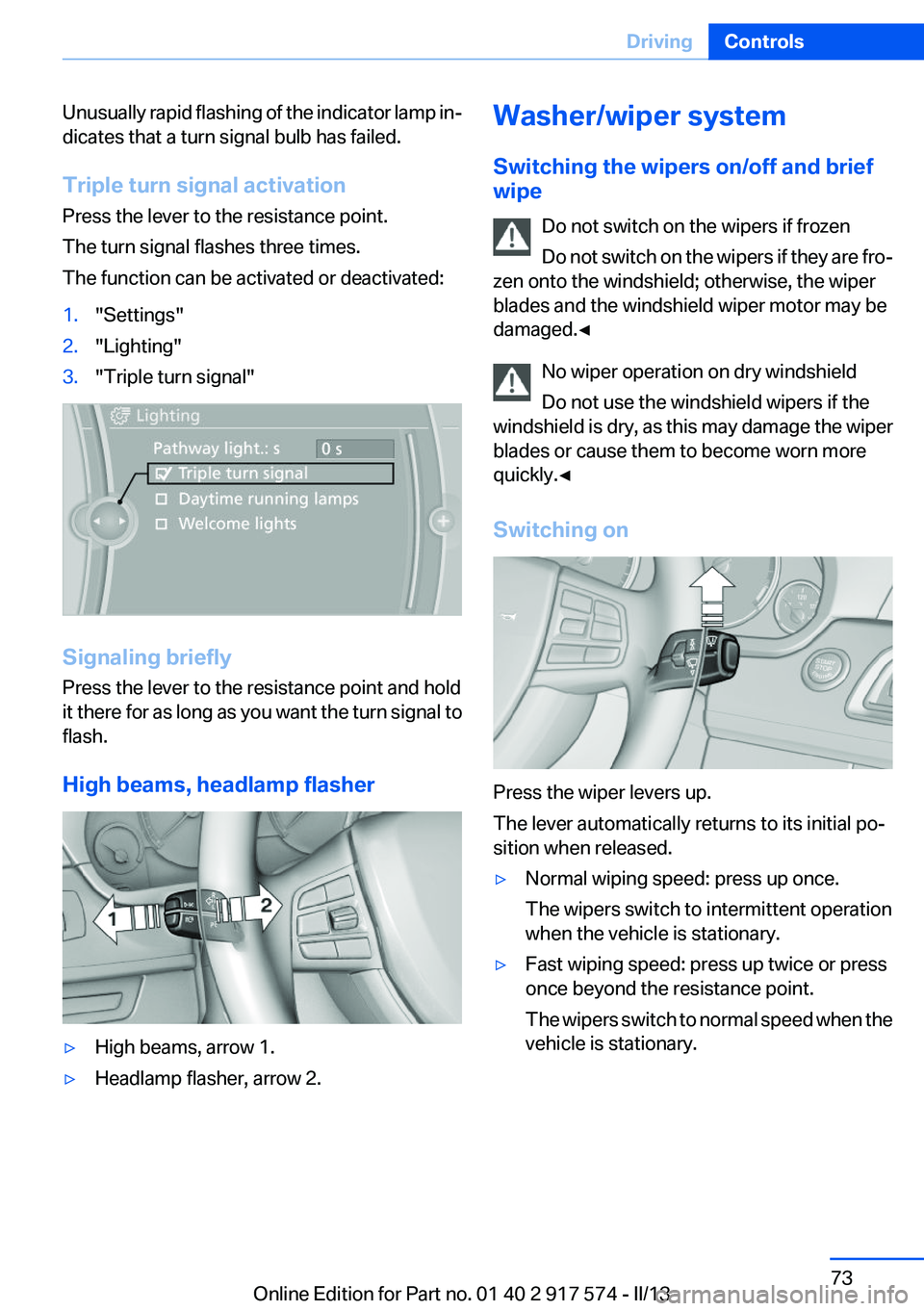
Unusually rapid flashing of the indicator lamp in‐
dicates that a turn signal bulb has failed.
Triple turn signal activation
Press the lever to the resistance point.
The turn signal flashes three times.
The function can be activated or deactivated:1."Settings"2."Lighting"3."Triple turn signal"
Signaling briefly
Press the lever to the resistance point and hold
it there for as long as you want the turn signal to
flash.
High beams, headlamp flasher
▷High beams, arrow 1.▷Headlamp flasher, arrow 2.Washer/wiper system
Switching the wipers on/off and brief
wipe
Do not switch on the wipers if frozen
Do not switch on the wipers if they are fro‐
zen onto the windshield; otherwise, the wiper
blades and the windshield wiper motor may be
damaged.◀
No wiper operation on dry windshield
Do not use the windshield wipers if the
windshield is dry, as this may damage the wiper
blades or cause them to become worn more
quickly.◀
Switching on
Press the wiper levers up.
The lever automatically returns to its initial po‐
sition when released.
▷Normal wiping speed: press up once.
The wipers switch to intermittent operation
when the vehicle is stationary.▷Fast wiping speed: press up twice or press
once beyond the resistance point.
The wipers switch to normal speed when the
vehicle is stationary.Seite 73DrivingControls73
Online Edition for Part no. 01 40 2 917 574 - II/13
Page 191 of 224
the service center if you are unfamiliar with them
or they are not described here.
You can obtain a selection of replacement bulbs
at the service center.
Danger of burns
Only change bulbs when they are cool;
otherwise, there is the danger of getting
burned.◀
Working on the lighting system
When working on the lighting system, you
should always switch off the lights affected to
prevent short circuits.
To avoid possible injury or equipment damage
when replacing bulbs, observe any instructions
provided by the bulb manufacturer.◀
Do not perform work/bulb replacement on
xenon headlamps
Have any work on the xenon lighting system, in‐
cluding bulb replacement, performed only by a
service center. Due to the high voltage present
in the system, there is the danger of fatal injuries
if work is carried out improperly.◀
Do not touch the bulbs
Do not touch the glass of new bulbs with
your bare hands, as even minute amounts of
contamination will burn into the bulb's surface
and reduce its service life.
Use a clean tissue, cloth or something similar, or
hold the bulb by its base.◀
Light-emitting diodes (LEDs)
Light-emitting diodes installed behind a cover
serve as the light source for controls, display el‐
ements and other equipment.
These light-emitting diodes, which are related
to conventional lasers, are officially designated
as Class 1 light-emitting diodes.Do not remove the covers
Do not remove the covers, and never stare
into the unfiltered light for several hours; other‐
wise, irritation of the retina could result.◀
Headlamp glass
Condensation can form on the inside of the ex‐
ternal lamps in cool or humid weather. When
driving with the light switched on, the conden‐
sation evaporates after a short time. The head‐
lamp glasses do not need to be changed.
If the headlamps do not dim despite driving with
the light switched on, increasing humidity forms,
e. g. water droplets in the light, have the service
center check this.
Front lamps, bulb replacement
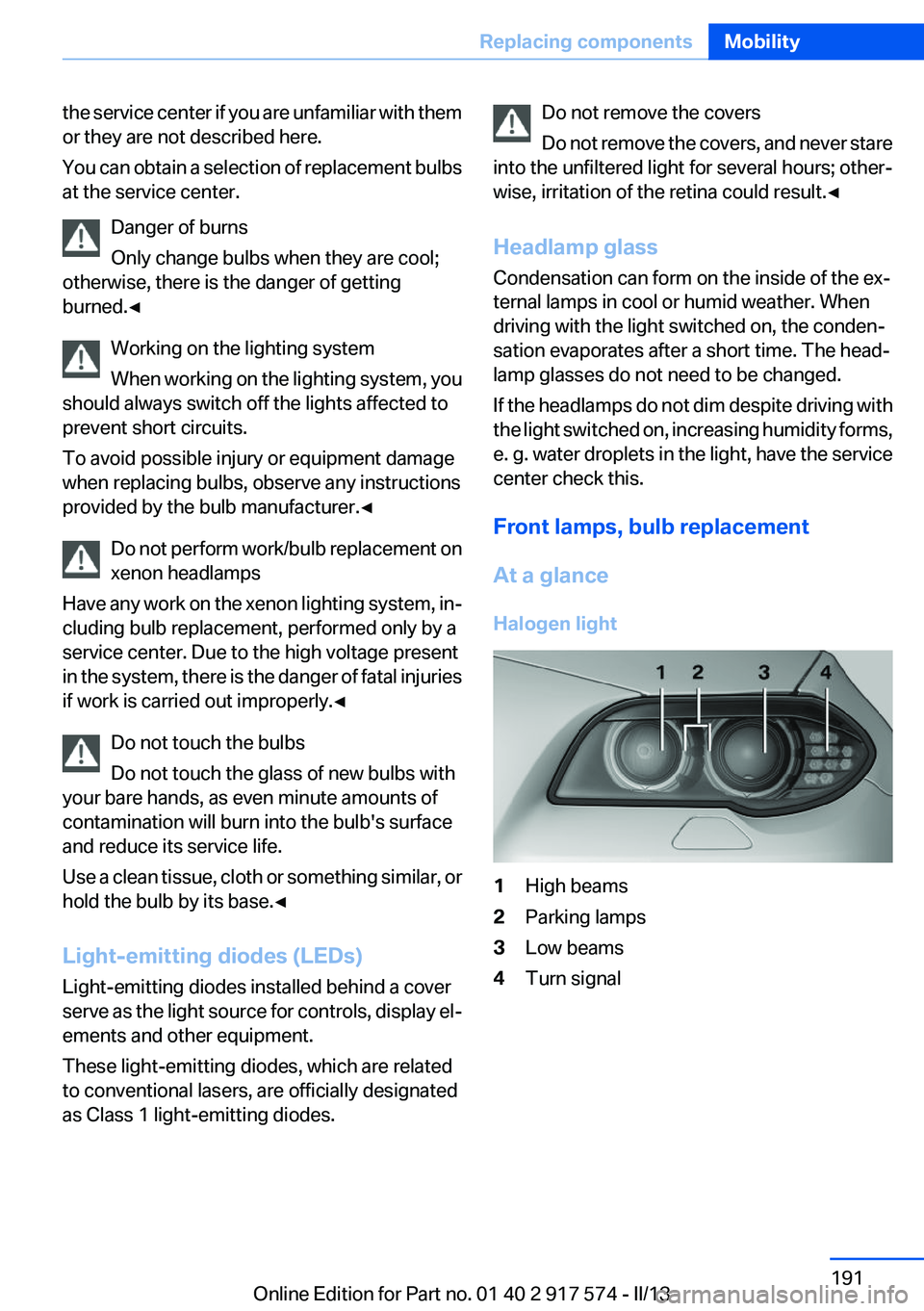
At a glance
Halogen light1High beams2Parking lamps3Low beams4Turn signalSeite 191Replacing componentsMobility191
Online Edition for Part no. 01 40 2 917 574 - II/13
Page 192 of 224
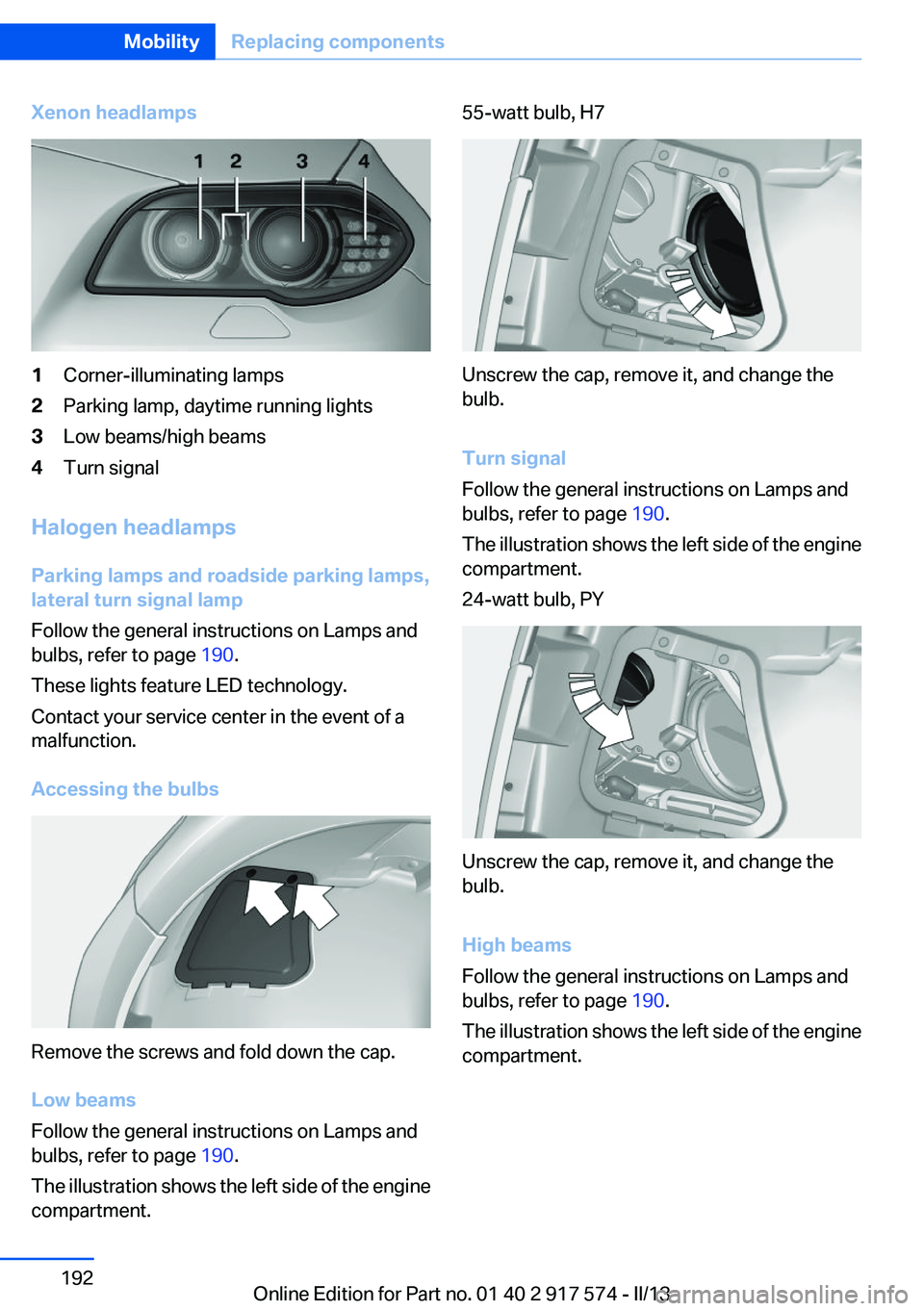
Xenon headlamps1Corner-illuminating lamps2Parking lamp, daytime running lights3Low beams/high beams4Turn signal
Halogen headlamps
Parking lamps and roadside parking lamps,
lateral turn signal lamp
Follow the general instructions on Lamps and
bulbs, refer to page 190.
These lights feature LED technology.
Contact your service center in the event of a
malfunction.
Accessing the bulbs
Remove the screws and fold down the cap.
Low beams
Follow the general instructions on Lamps and
bulbs, refer to page 190.
The illustration shows the left side of the engine
compartment.
55-watt bulb, H7
Unscrew the cap, remove it, and change the
bulb.
Turn signal
Follow the general instructions on Lamps and
bulbs, refer to page 190.
The illustration shows the left side of the engine
compartment.
24-watt bulb, PY
Unscrew the cap, remove it, and change the
bulb.
High beams
Follow the general instructions on Lamps and
bulbs, refer to page 190.
The illustration shows the left side of the engine
compartment.
Seite 192MobilityReplacing components192
Online Edition for Part no. 01 40 2 917 574 - II/13
Page 193 of 224
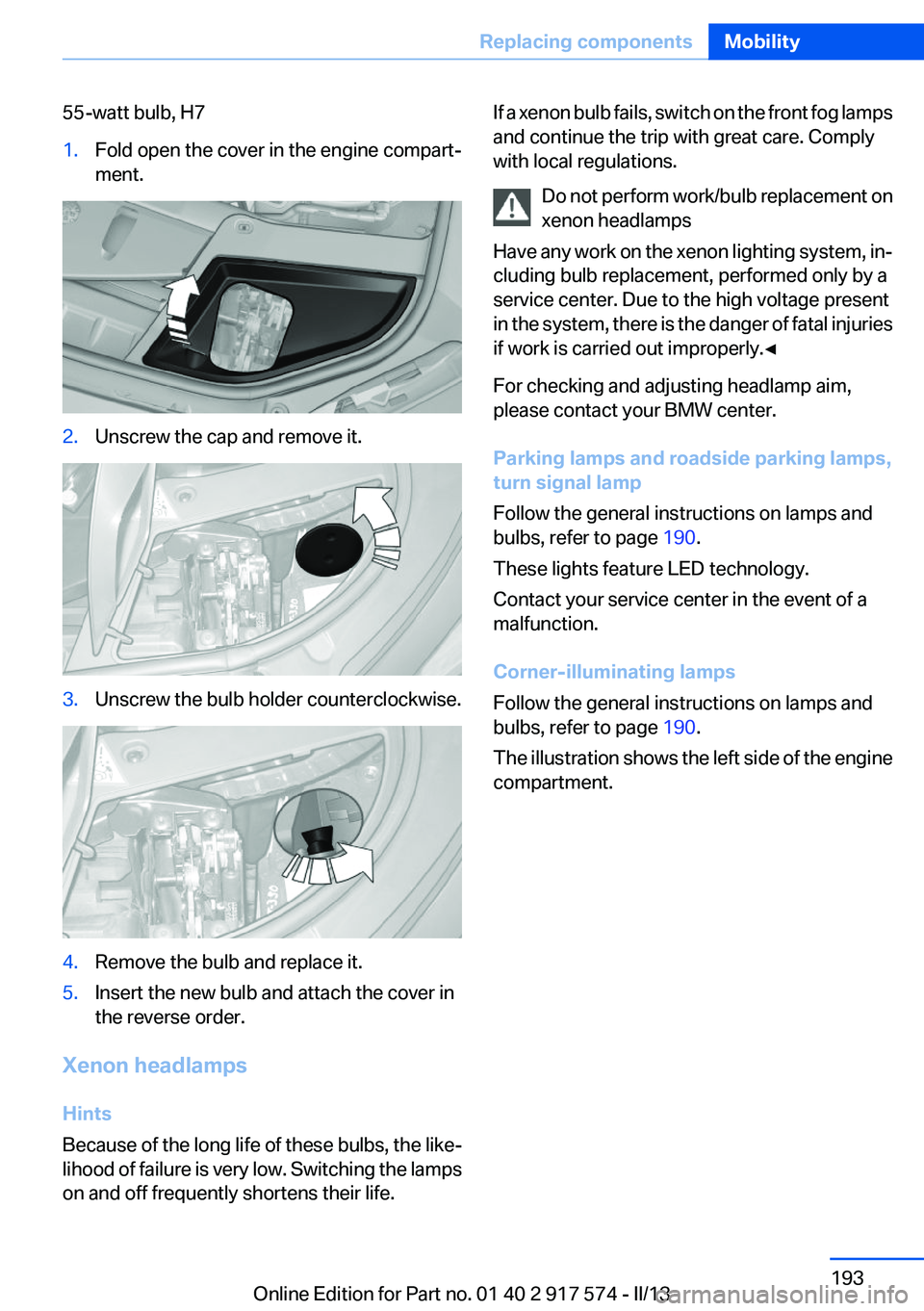
55-watt bulb, H71.Fold open the cover in the engine compart‐
ment.2.Unscrew the cap and remove it.3.Unscrew the bulb holder counterclockwise.4.Remove the bulb and replace it.5.Insert the new bulb and attach the cover in
the reverse order.
Xenon headlamps
Hints
Because of the long life of these bulbs, the like‐
lihood of failure is very low. Switching the lamps
on and off frequently shortens their life.
If a xenon bulb fails, switch on the front fog lamps
and continue the trip with great care. Comply
with local regulations.
Do not perform work/bulb replacement on
xenon headlamps
Have any work on the xenon lighting system, in‐
cluding bulb replacement, performed only by a
service center. Due to the high voltage present
in the system, there is the danger of fatal injuries
if work is carried out improperly.◀
For checking and adjusting headlamp aim,
please contact your BMW center.
Parking lamps and roadside parking lamps,
turn signal lamp
Follow the general instructions on lamps and
bulbs, refer to page 190.
These lights feature LED technology.
Contact your service center in the event of a
malfunction.
Corner-illuminating lamps
Follow the general instructions on lamps and
bulbs, refer to page 190.
The illustration shows the left side of the engine
compartment.Seite 193Replacing componentsMobility193
Online Edition for Part no. 01 40 2 917 574 - II/13
Page 194 of 224
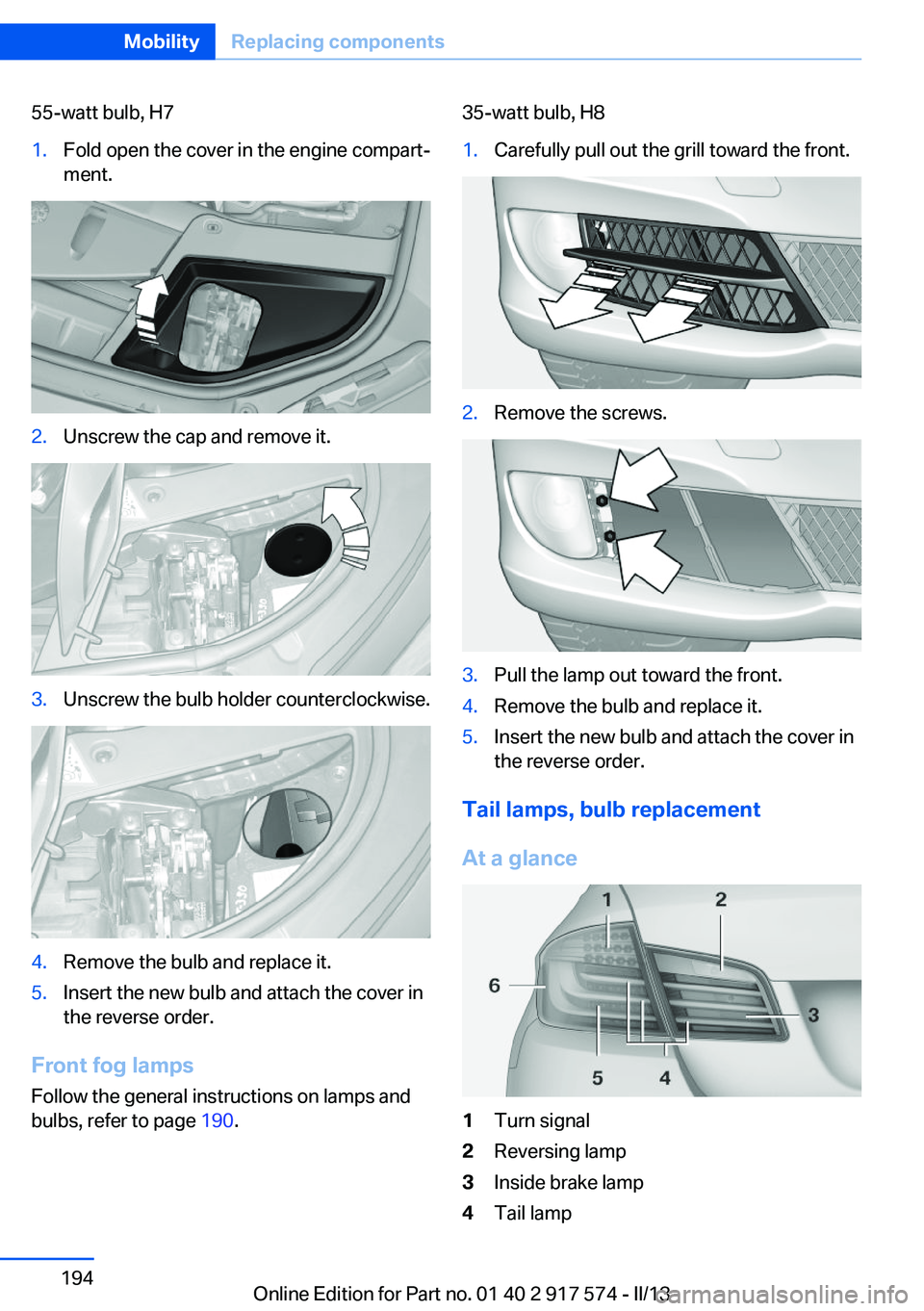
55-watt bulb, H71.Fold open the cover in the engine compart‐
ment.2.Unscrew the cap and remove it.3.Unscrew the bulb holder counterclockwise.4.Remove the bulb and replace it.5.Insert the new bulb and attach the cover in
the reverse order.
Front fog lamps
Follow the general instructions on lamps and
bulbs, refer to page 190.
35-watt bulb, H81.Carefully pull out the grill toward the front.2.Remove the screws.3.Pull the lamp out toward the front.4.Remove the bulb and replace it.5.Insert the new bulb and attach the cover in
the reverse order.
Tail lamps, bulb replacement
At a glance
1Turn signal2Reversing lamp3Inside brake lamp4Tail lampSeite 194MobilityReplacing components194
Online Edition for Part no. 01 40 2 917 574 - II/13
Page 195 of 224
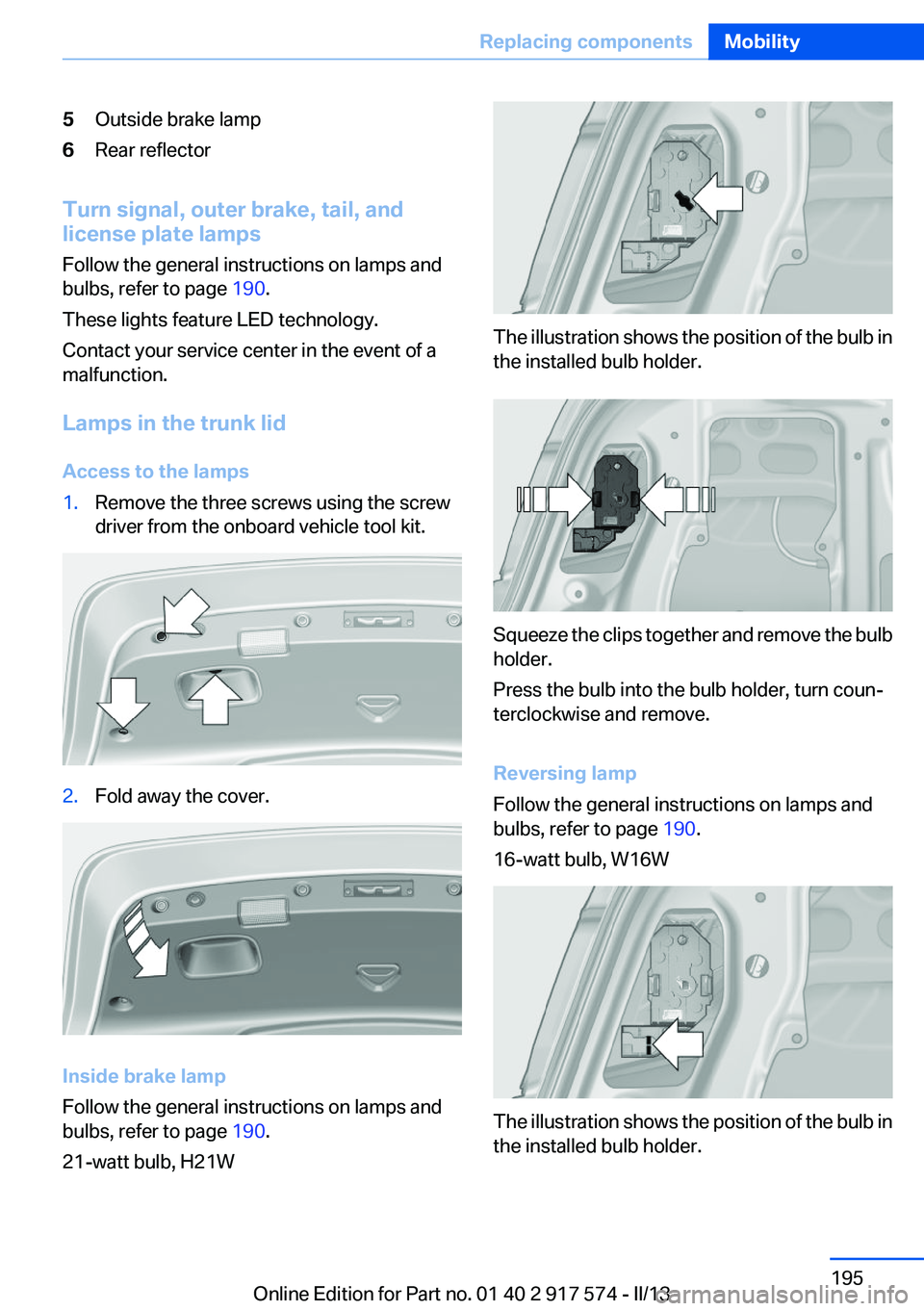
5Outside brake lamp6Rear reflector
Turn signal, outer brake, tail, and
license plate lamps
Follow the general instructions on lamps and
bulbs, refer to page 190.
These lights feature LED technology.
Contact your service center in the event of a
malfunction.
Lamps in the trunk lid
Access to the lamps
1.Remove the three screws using the screw
driver from the onboard vehicle tool kit.2.Fold away the cover.
Inside brake lamp
Follow the general instructions on lamps and
bulbs, refer to page 190.
21-watt bulb, H21W
The illustration shows the position of the bulb in
the installed bulb holder.
Squeeze the clips together and remove the bulb
holder.
Press the bulb into the bulb holder, turn coun‐
terclockwise and remove.
Reversing lamp
Follow the general instructions on lamps and
bulbs, refer to page 190.
16-watt bulb, W16W
The illustration shows the position of the bulb in
the installed bulb holder.
Seite 195Replacing componentsMobility195
Online Edition for Part no. 01 40 2 917 574 - II/13
Page 215 of 224
tainment and Communica‐
tion
BMW Homepage 6
BMW Internet page 6
BMW maintenance sys‐ tem 188
Bonus range, ECO PRO 168
Bottle holder, refer to Cu‐ pholder 154
Brake assistant 117
Brake discs, breaking in 158
Brake force display 115
Brake lamps, brake force dis‐ play 115
Brake lamps, bulb replace‐ ment 195
Brake lights, adaptive 115
Brake pads, breaking in 158
Braking, notes 161
Breakdown assis‐ tance 198, 199
Breaking in 158
Brightness of Control Dis‐ play 92
Bulb replacement 190
Bulb replacement, front 191
Bulb replacement, rear 194
Bulbs and lamps 190
Button assignment for remote control 34
Button, Start/Stop 66
Bypassing, refer to Jump- starting 199
C
California Proposition 65 Warning 7
Camera, backup camera 127
Camera, care 207
Camera, Side View 131
Camera, Top View 129
Can holder, refer to Cu‐ pholder 154
Car battery 196
Car care products 205 Care, displays 207
Care, vehicle 205
Cargo 163
Cargo area lid 41
Cargo area, storage compart‐ ments 155
Cargo straps, securing cargo 164
Car key, refer to Remote con‐ trol 34
Carpet, care 206
Car wash 204
Catalytic converter, refer to Hot exhaust system 160
CBS Condition Based Serv‐ ice 188
CD/Multimedia, see user's manual for Navigation, Enter‐
tainment and Communica‐
tion
Center armrest 153
Center console 16
Central locking system 38
Central screen, refer to Control Display 18
Changes, technical, refer to Safety 7
Changing parts 190
Changing wheels 196
Changing wheels/tires 179
CHARGE, energy recovery 70
Charge indicator, high-voltage battery 84
Check Control 80
Children, seating position 62
Children, transporting safely 62
Child restraint fixing sys‐ tem 62
Child restraint fixing system LATCH 63
Child restraint fixing systems, mounting 62
Child safety locks 65
Child seat, mounting 62
Child seats 62 Chrome parts, care 206
Cigarette lighter 148
Cleaning, displays 207
Climate control 138
Climate control wind‐ shield 160
Clock 83
Closing/opening from in‐ side 41
Closing/opening via door lock 40
Closing/opening with remote control 38
Clothes hooks 154
Coasting 69
Collision warning 107
Combination switch, refer to Turn signals 72
Combination switch, refer to Wiper system 73
Combustion engine, start‐ ing 68
COMFORT+ program, Driving Dynamics Control 120
Comfort Access 44
COMFORT program, Driving Dynamics Control 120
Computer 89
Condensation on win‐ dows 139
Condensation under the vehi‐ cle 162
Condition Based Service CBS 188
Confirmation signal 39
ConnectedDrive, see user's manual for Navigation, Enter‐
tainment and Communica‐
tion
Contact with water, hybrid system 203
Control Display 18
Control Display, settings 91
Controller 18
Control systems, driving sta‐ bility 117 Seite 215Everything from A to ZReference215
Online Edition for Part no. 01 40 2 917 574 - II/13
Page 220 of 224
Plastic, care 206
Power failure 197
Power sunroof, glass 49
Power windows 47
Pressure, tire air pres‐ sure 175
Pressure warning FTM, tires 105
Profile, refer to Personal Pro‐ file 35
Programmable memory but‐ tons, iDrive 22
Protective function, glass sun‐ roof 50
Protective function, win‐ dows 48
Push-and-turn switch, refer to Controller 18
R
Radiator fluid 187
Radio-operated key, refer to Remote control 34
Radio ready state 66
Radio, see user's manual for Navigation, Entertainment
and Communication
Rain sensor 74
Rear automatic climate con‐ trol 142
Rear lamps 194
Rear socket 150
Rearview mirror 59
Rear window defroster 140
Recirculated-air mode 140
Recommended tire brands 180
Refueling 172
Remaining range 84
Remote control/key 34
Remote control, auxiliary air conditioning, key 145
Remote control, button as‐ signment 34 Remote control, malfunc‐
tion 40
Remote control, universal 146
Replacement fuse 197
Replacing parts 190
Replacing wheels/tires 179
Reporting safety defects 9
Reserve warning, refer to Range 84
Reset, Tire Pressure Monitor TPM 103
Residual cooling 143
Residual heat, automatic cli‐ mate control 140
Retaining straps, securing cargo 164
Retreaded tires 180
Reversing lamp, bulb replace‐ ment 195
Roadside parking lamps 95
Roller sunblinds 48
RON gasoline quality 174
Roof load capacity 211
Roof-mounted luggage rack 164
Rope for tow-starting/tow‐ ing 202
RSC Run Flat System Compo‐ nent, refer to Run-flat
tires 181
Rubber components, care 206
Run-flat tires 181
S
Safe braking 161
Safety 7
Safety belt reminder for driv‐ er's seat and front passenger
seat 56
Safety belts 55
Safety belts, care 206
Safety of the hybrid sys‐ tem 202 Safety Package, refer to Active
Protection 115
Safety switch, windows 48
Safety systems, airbags 99
Saving fuel 166
Screen, refer to Control Dis‐ play 18
Screwdriver 190
Screw thread for tow fit‐ ting 202
Seat belts, refer to Safety belts 55
Seat heating, front 54
Seat heating, rear 54
Seating position for chil‐ dren 62
Seat, mirror, and steering wheel memory 58
Seats 51
Seat ventilation, front 54
Selection list in instrument cluster 88
Selector lever, automatic transmission 76
Sensors, care 207
Service and warranty 8
Service requirements, Condi‐ tion Based Service CBS 188
Service requirements, dis‐ play 86
Service, Roadside Assis‐ tance 199
Settings on Control Dis‐ play 91
Settings, storing for seat, mir‐ rors, steering wheel 58
Shifting, automatic transmis‐ sion 76
Shift paddles on steering wheel 78
Shoulder support 53
Side airbags 99
Side View 130
Signaling, horn 14
Signals when unlocking 39 Seite 220ReferenceEverything from A to Z220
Online Edition for Part no. 01 40 2 917 574 - II/13
Page 221 of 224
Silent Start, electric drive read‐iness 67
Sitting safely 51
Size 210
Slide/tilt glass roof 49
Smallest turning circle 211
Smoker's package 148
Snow chains 181
Socket 149
Socket, OBD Onboard Diag‐ nostics 189
SOS button 198
Spare fuse 197
Speaker lighting 98
Specified engine oil types 185
Speed, average 89
Speed limit detection, on‐ board computer 90
Speed limiter, display 87
Speed Limit Information 87
Speed limit in the com‐ puter 90
Split screen 22
SPORT+ - program, Dynamic Driving Control 119
Sport automatic transmis‐ sion 78
SPORT program, Dynamic Driving Control 120
Sport program, transmis‐ sion 77
Stability control systems 117
Start/Stop button 66
Start function during malfunc‐ tion 35
Starting the combustion en‐ gine 68
Status display, tires 102
Status information, iDrive 21
Status of Owner's Manual 7
Steering wheel, adjusting 61
Steering wheel heating 61
Steering wheel memory 58
Steptronic, automatic trans‐ mission 76 Storage compartment, remote
control 154
Storage compartments 152
Storage compartments, loca‐ tions 152
Storage, tires 181
Storing the vehicle 207
Summer tires, tread 179
Supplementary text mes‐ sage 82
Surround View 126
Suspension settings 119
Switch for Dynamic Driving Control 119
Switch-on times, parked-car ventilation 144
Switch, refer to Cockpit 14
Symbols 6
T
Tachometer 83
Tail and brake lamps 195
Tailgate 41
Tailgate, automatic 42
Tailgate opening with no- touch activation 45
Tailgate via remote control 39
Tail lamps 194
Tail lamps, bulb replace‐ ment 195
Technical changes, refer to Safety 7
Technical data 210
Telephone, see user's manual for Navigation, Entertain‐
ment and Communication
Temperature, automatic cli‐ mate control 139
Temperature display, external temperature 83
Temperature, engine oil 83
Terminal, jump-starting 200
Text message, supplemen‐ tary 82 Theft alarm system, refer to
Alarm system 46
Theft protection, refer to Cen‐ tral locking system 38
Thermal camera, refer to Night Vision 109
Tilt alarm sensor 47
Time of arrival 90
Tire damage 179
Tire identification marks 177
Tire inflation pressure 175
Tire inflation pressure monitor, refer to FTM 105
Tire Pressure Monitor TPM 102
Tires, changing 179
Tires, everything on wheels and tires 175
Tires, run-flat tires 181
Tire tread 179
Tone, see user's manual for Navigation, Entertainment
and Communication
Tools 190
Top View 129
Total vehicle weight 211
Tow fitting 202
Towing 201
Tow-starting 201
TPM Tire Pressure Moni‐ tor 102
Traction control 118
Transmission, automatic 76
Transporting children safely 62
Tread, tires 179
Trip computer 90
Triple turn signal activa‐ tion 73
Trip odometer 83
Trunk lid 41
Trunk lid, automatic 42
Trunk lid, emergency unlock‐ ing 44
Trunk lid, hotel function 43 Seite 221Everything from A to ZReference221
Online Edition for Part no. 01 40 2 917 574 - II/13
Page 222 of 224
Trunk lid opening with no-touch activation 45
Trunk lid via remote con‐ trol 39
Turning circle 211
Turning circle lines, backup camera 128
Turn signals, operation 72
Turn signals, rear, bulb re‐ placement 195
U
Unintentional alarm 47
Units of measure 92
Universal remote control 146
Unlock button, automatic transmission 76
Unlocking/locking from in‐ side 41
Unlocking/locking via door lock 40
Unlocking/locking with remote control 38
Updates made after the edito‐ rial deadline 7
Upholstery care 206
USB interface 150
V
Variable button assignment for remote control 34
Vehicle battery 196
Vehicle battery, replacing 196
Vehicle, breaking in 158
Vehicle care 205
Vehicle equipment 6
Vehicle identification number, refer to Identification number
in the engine compart‐
ment 182
Vehicle jack 196
Vehicle paint 205
Vehicle storage 207
Vehicle wash 204 Ventilation 141
Voice activation system 24
W
Warning messages, refer to Check Control 80
Warning triangle 199
Washer fluid 75
Washer fluid reservoir, ca‐ pacity 212
Washer nozzles, wind‐ shield 75
Washer system 73
Washing, vehicle 204
Water, hybrid system 203
Water on roads 161
Weights 211
Welcome lamps 94
What to do after an acci‐ dent 203
Wheel base, vehicle 211
Wheels, changing 179
Wheels, everything on wheels and tires 175
Wheels, Flat Tire Monitor FTM 105
Wheels, Tire Pressure Monitor TPM 102
Width, vehicle 210
Window defroster, rear 140
Windows, powered 47
Windshield, climate con‐ trol 160
Windshield washer fluid 75
Windshield washer noz‐ zles 75
Windshield washer system 73
Windshield wiper 73
Windshield wipers, fold-out position 75
Winter storage, care 207
Winter tires, suitable tires 180
Winter tires, tread 179
Wiper blades, replacing 190
Wiper fluid 75 Wiper system 73
Wood, care 206
Word match concept, naviga‐ tion 23
Working on the hybrid sys‐ tem 202
Wrench 190
X
Xenon headlamps, bulb re‐ placement 193 Seite 222ReferenceEverything from A to Z222
Online Edition for Part no. 01 40 2 917 574 - II/13