battery BMW I3 2014 I01 User Guide
[x] Cancel search | Manufacturer: BMW, Model Year: 2014, Model line: I3, Model: BMW I3 2014 I01Pages: 230, PDF Size: 29.93 MB
Page 75 of 230
▷The low beams reel to parking lights after
approx. 15 minutes of no use.
Drive readiness
If drive readiness is switched on, the vehicle
ready to drive and the READY signal, refer to
page 63, is displayed in the instrument clus‐
ter.
All vehicle systems are ready for operation.
Most of the indicator and warning lights in the
instrument cluster light up for a varied length
of time.
Activated drive readiness is the equivalent of a
running engine in conventional vehicles. Deac‐
tivated engine readiness is equivalent to
switching the ignition off.
To save battery power when parking, reel off
drive readiness and any unnecessary elec‐
tronic systems/power consumers.
Drive readiness is switched off automatically:
▷When opening or closing the driver door, if
the driver's safety belt is unbuckled.
Note
If drive readiness is switched on, the system
automatically switches to the radio-ready state
when the door is opened and the driver's
safety belt is unbuckled, or if the lights are
turned off or the daytime running lights are ac‐
tivated.
Selector lever position P with drive readi‐
ness switched off
When drive readiness is switched off, selector
lever position P is automatically engaged.
When in an automatic car wash, e.g., ensure
that the drive readiness is not switched off ac‐
cidentally, otherwise, wheels can lock up.◀
Drive readiness in detail
Hints Do not leave the vehicle unattended
Do not leave the vehicle unattended with
drive readiness switched on; otherwise, it may
pose a risk.◀
Before leaving the vehicle
Before leaving the vehicle, with drive
readiness switched on engage lever in position
P P and set the parking brake; otherwise, the
vehicle is not secured against rolling away.◀
Switching on drive readiness1.Close the driver's door.2.Depress the brake pedal.3.Press the Start/Stop button.
Drive readiness is switched on.
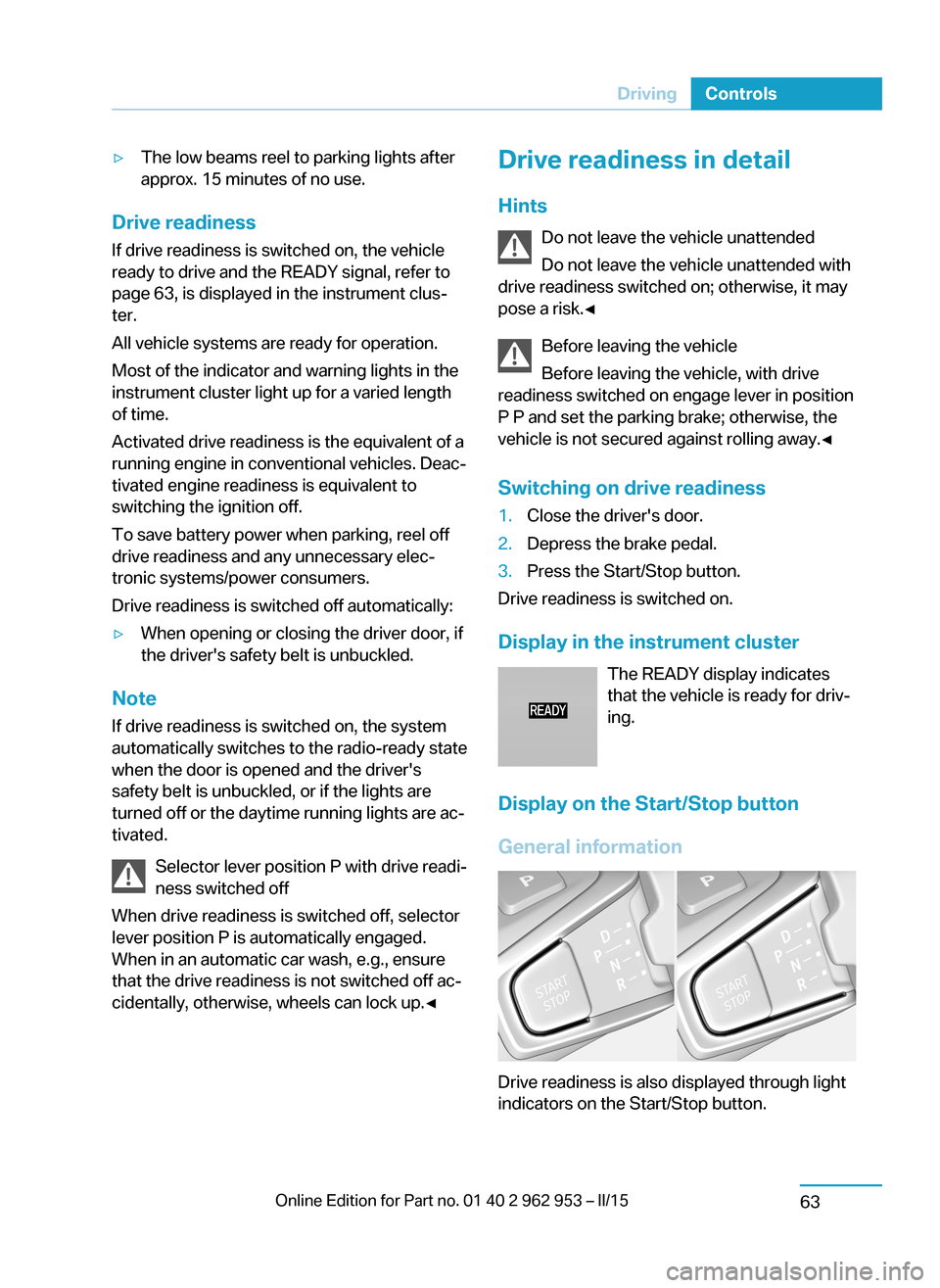
Display in the instrument cluster The READY display indicates
that the vehicle is ready for driv‐
ing.
Display on the Start/Stop button
General information
Drive readiness is also displayed through light
indicators on the Start/Stop button.
Seite 61DrivingControls63
Page 76 of 230
Lighting pulses orange▷After unlocking and opening the door.▷After switching off drive readiness.
When the brake pedal is depressed, the light‐
ing becomes more intense.
Lighting lights up steady blue
After drive readiness is switched on, light turns
blue. The vehicle is ready to drive. The READY
indicator lights up in the instrument cluster. In
addition, a signal sounds.
Lighting off
Drive readiness, operating readiness and
radio-ready state are turned off. The vehicle is
in the idle state. The charging cable may be
connected.
Driving off
Requirements
Driving is possible under the following condi‐
tions:
▷The high-voltage battery is sufficiently
charged.▷The driver's door is closed.
sDriving
1.Switch on drive readiness.2.Apply the brake and engage lever in posi‐
tion P D or R.3.Release the parking brake.4.Depress the accelerator pedal to drive.Selector lever positions
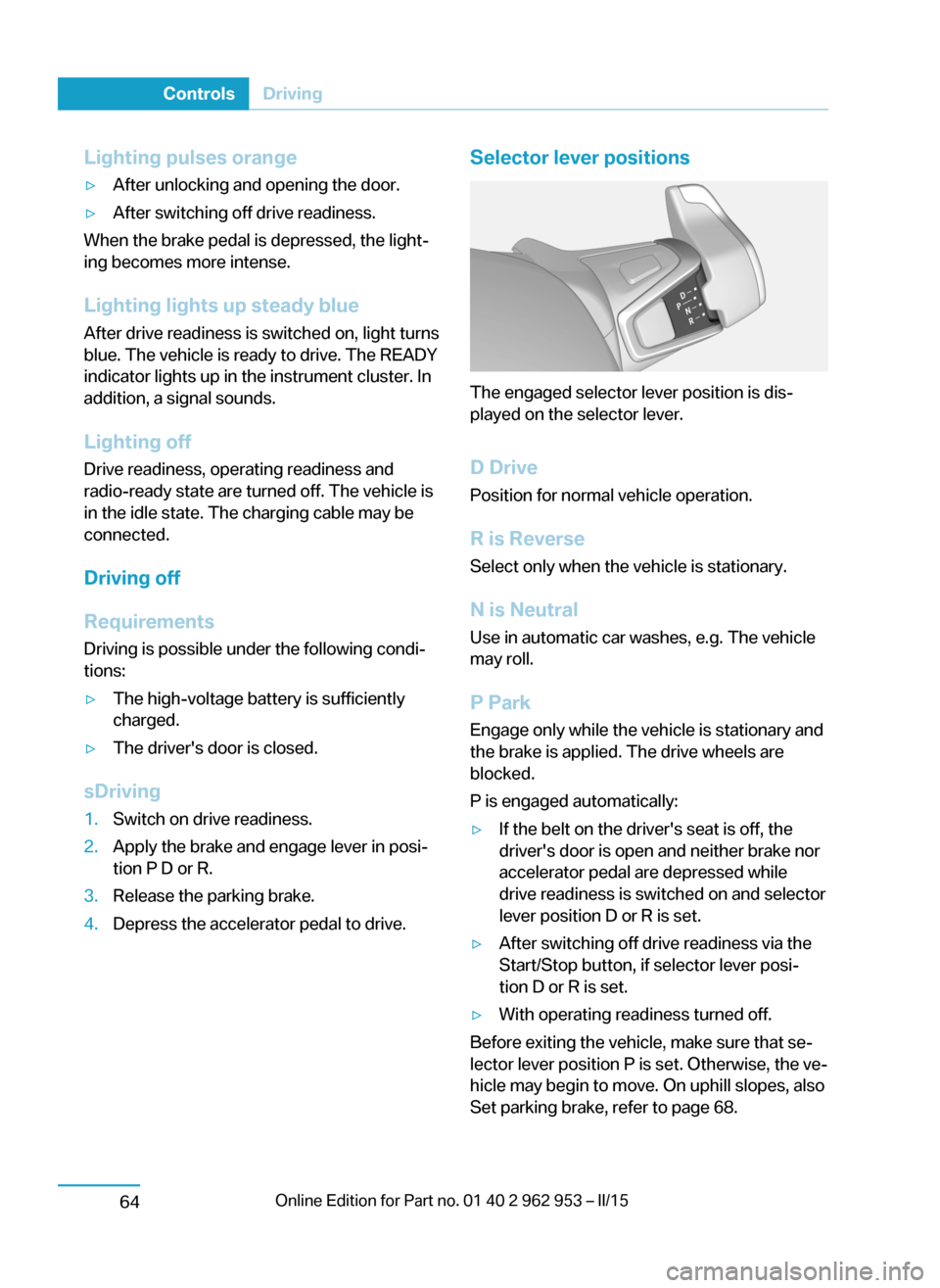
The engaged selector lever position is dis‐
played on the selector lever.
D Drive
Position for normal vehicle operation.
R is Reverse
Select only when the vehicle is stationary.
N is NeutralUse in automatic car washes, e.g. The vehicle
may roll.
P Park Engage only while the vehicle is stationary and
the brake is applied. The drive wheels are
blocked.
P is engaged automatically:
▷If the belt on the driver's seat is off, the
driver's door is open and neither brake nor
accelerator pedal are depressed while
drive readiness is switched on and selector
lever position D or R is set.▷After switching off drive readiness via the
Start/Stop button, if selector lever posi‐
tion D or R is set.▷With operating readiness turned off.
Before exiting the vehicle, make sure that se‐
lector lever position P is set. Otherwise, the ve‐
hicle may begin to move. On uphill slopes, also
Set parking brake, refer to page 68.
Seite 62ControlsDriving64
Page 78 of 230
Before driving into a car wash
So that the vehicle can roll into a car wash ob‐
serve instructions for going into an automatic
car wash, refer to page 198.
Driving in detail: eDRIVE
Hints Awareness of vehicle reduced when
driven in electric mode
When driving in electric mode, note that, due
to the lack of engine noise, pedestrians and
other traffic might pay less attention to the ve‐
hicle due to missing engine noises. Please
take special care when parking or leaving a
parking space.◀
Cautiously remove your foot from the ac‐
celerator pedal
Cautiously remove your foot from the acceler‐
ator pedal because the braking effect of the
electric motor can be stronger than with a
combustion engine. Otherwise, abrupt braking
and slow-down may confuse other traffic.◀
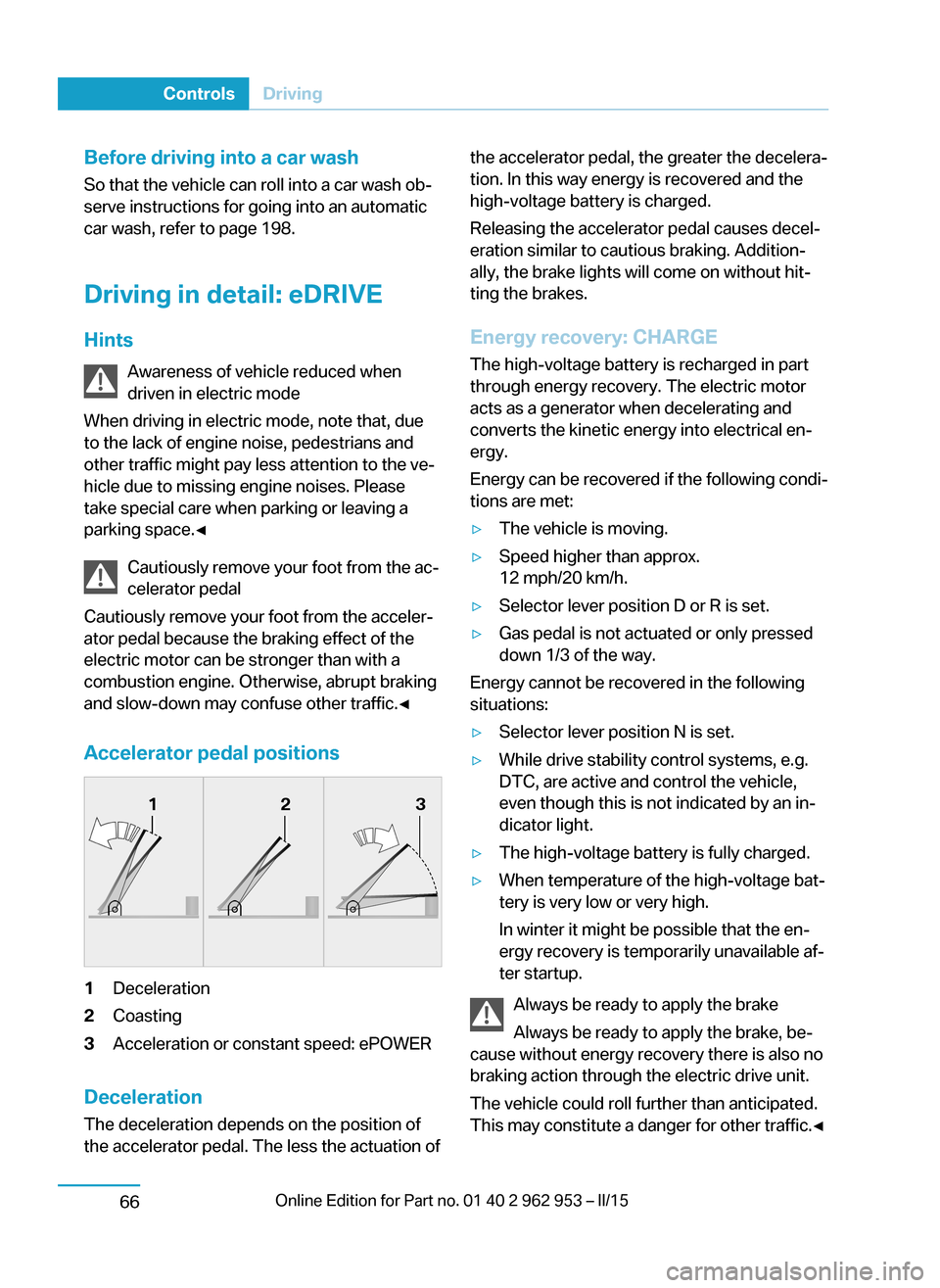
Accelerator pedal positions1Deceleration2Coasting3Acceleration or constant speed: ePOWER
Deceleration
The deceleration depends on the position of
the accelerator pedal. The less the actuation of
the accelerator pedal, the greater the decelera‐
tion. In this way energy is recovered and the
high-voltage battery is charged.
Releasing the accelerator pedal causes decel‐
eration similar to cautious braking. Addition‐
ally, the brake lights will come on without hit‐
ting the brakes.
Energy recovery: CHARGE The high-voltage battery is recharged in part
through energy recovery. The electric motor
acts as a generator when decelerating and
converts the kinetic energy into electrical en‐
ergy.
Energy can be recovered if the following condi‐
tions are met:▷The vehicle is moving.▷Speed higher than approx.
12 mph/20 km/h.▷Selector lever position D or R is set.▷Gas pedal is not actuated or only pressed
down 1/3 of the way.
Energy cannot be recovered in the following
situations:
▷Selector lever position N is set.▷While drive stability control systems, e.g.
DTC, are active and control the vehicle,
even though this is not indicated by an in‐
dicator light.▷The high-voltage battery is fully charged.▷When temperature of the high-voltage bat‐
tery is very low or very high.
In winter it might be possible that the en‐
ergy recovery is temporarily unavailable af‐
ter startup.
Always be ready to apply the brake
Always be ready to apply the brake, be‐
cause without energy recovery there is also no
braking action through the electric drive unit.
The vehicle could roll further than anticipated.
This may constitute a danger for other traffic.◀
Seite 64ControlsDriving66
Page 79 of 230
Exemplary traffic situations
If a deceleration operation is foreseeable while
driving, this can be used for energy recovery.
The following exemplary driving situations may
show that:▷Decelerating downhill.▷Deceleration before a red light.
Avoid late or abrupt braking. Instead, deceler‐
ate the vehicle using energy recovery.
Coasting
The electric drive makes it possible to roll with‐
out consuming energy. This driving condition
is referred to as coasting.
Proactive driving reduces energy consumption
and increases the range.
With vehicle rolling, READY is displayed in the
instrument cluster. With vehicle rolling, no en‐
ergy is recovered.
Exemplary traffic situations
If a route can be traveled without anticipated
need for braking, it is advantageous to roll.
The following exemplary driving situations may
show that:
▷Rolling on a straight downhill route without
obstacles.▷Coasting on a route without obstacles.
Avoid late or abrupt braking.
Range Extender
Increase range
If the charging state of the high-voltage battery
drops during travel to a minimum value, the
Range Extender starts and supplies the re‐
quired electrical energy for driving on.
The symbol on the charging state indicator
designates a Range Extender reel-on time.
The Range Extender controls its output auto‐
matically, turns itself off and restarts according
to the driving situation.
The high-voltage battery will not be charged
by the Range Extender.
Automatic maintenance run
To ensure that the Range Extender functions
properly even during longer periods of non- use, the Range Extender is automatically acti‐
vated for a few minutes at certain intervals dur‐
ing the trip. Respective Check Control
messages indicate the dry run. Should that oc‐
cur at an unfavorable time you may cancel the
dry run by pressing the Start/Stop button. It
postpones the dry run.
Should the high-voltage battery be fully
charged or if there is not enough gas in the
tank then a dry run will not be executed.
Heavily discharged high-voltage
battery
If the high-voltage battery is heavily dis‐
charged during the trip, the performance and
some comfort features are reduced step-by-
step to extend the range.
Heated high-voltage batteryWith a stationary dirt In exceptional cases, it is possible that the
high-voltage battery heats up sharply when the
vehicle is stationary. E. g. with extreme exter‐
nal temperatures and direct solar radiation.
With a overheated high-voltage battery, drive
readiness cannot be switched on.
A Check Control message is displayed.
Another message will indicate when drive readiness is available again.
While driving
If the high-voltage battery overheats during the
trip, the performance is reduced step-by-step
in order to cool down the battery. The ePO‐
WER performance display in the instrument
cluster returns in the process. When tempera‐
ture increases further, park the vehicle until theSeite 65DrivingControls67
Page 86 of 230
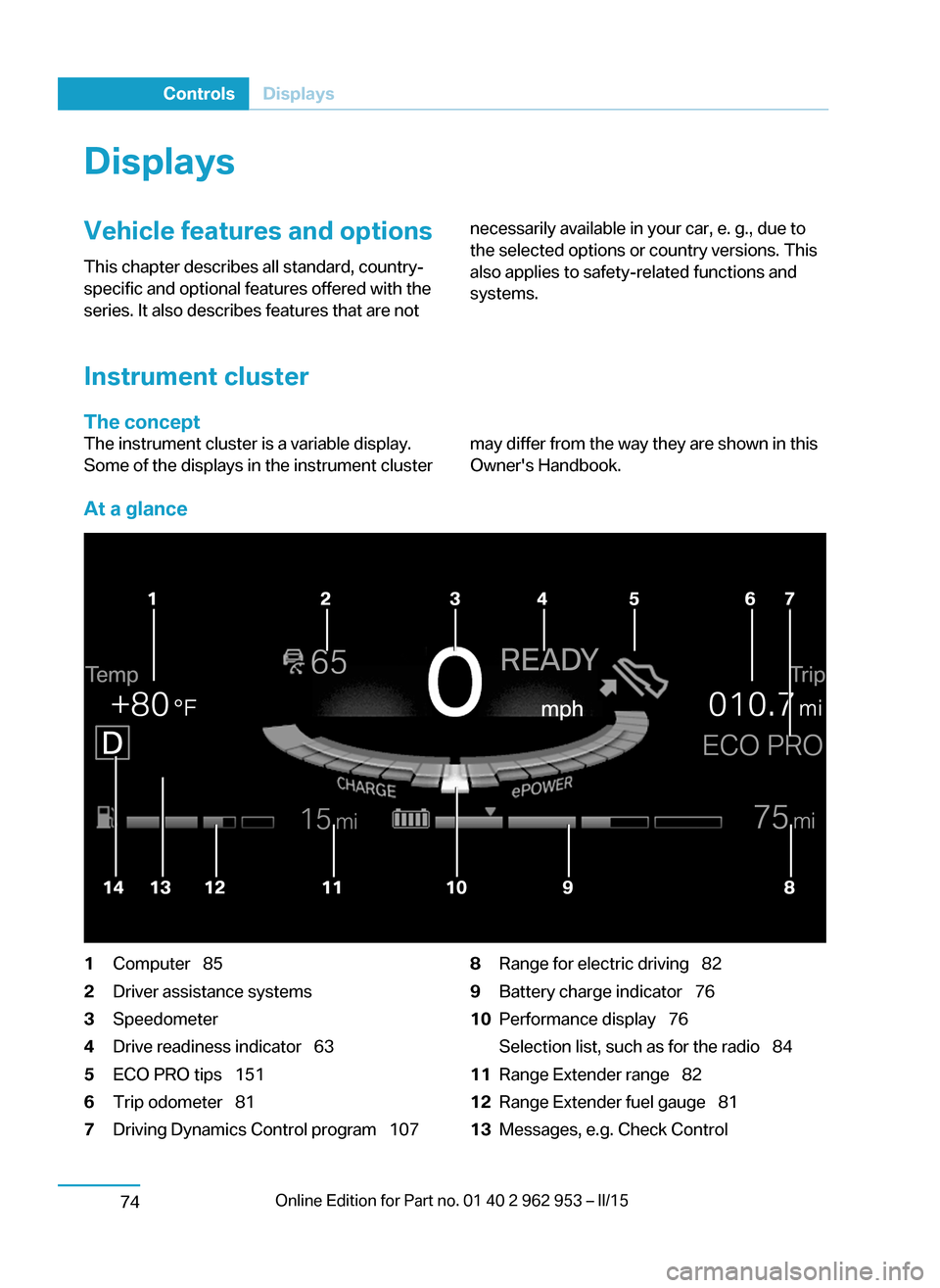
DisplaysVehicle features and optionsThis chapter describes all standard, country-
specific and optional features offered with the
series. It also describes features that are notnecessarily available in your car, e. g., due to
the selected options or country versions. This
also applies to safety-related functions and
systems.
Instrument cluster
The concept
The instrument cluster is a variable display.
Some of the displays in the instrument clustermay differ from the way they are shown in this
Owner's Handbook.
At a glance
1Computer 852Driver assistance systems3Speedometer4Drive readiness indicator 635ECO PRO tips 1516Trip odometer 817Driving Dynamics Control program 1078Range for electric driving 829Battery charge indicator 7610Performance display 76
Selection list, such as for the radio 8411Range Extender range 8212Range Extender fuel gauge 8113Messages, e.g. Check ControlSeite 72ControlsDisplays74
Page 87 of 230
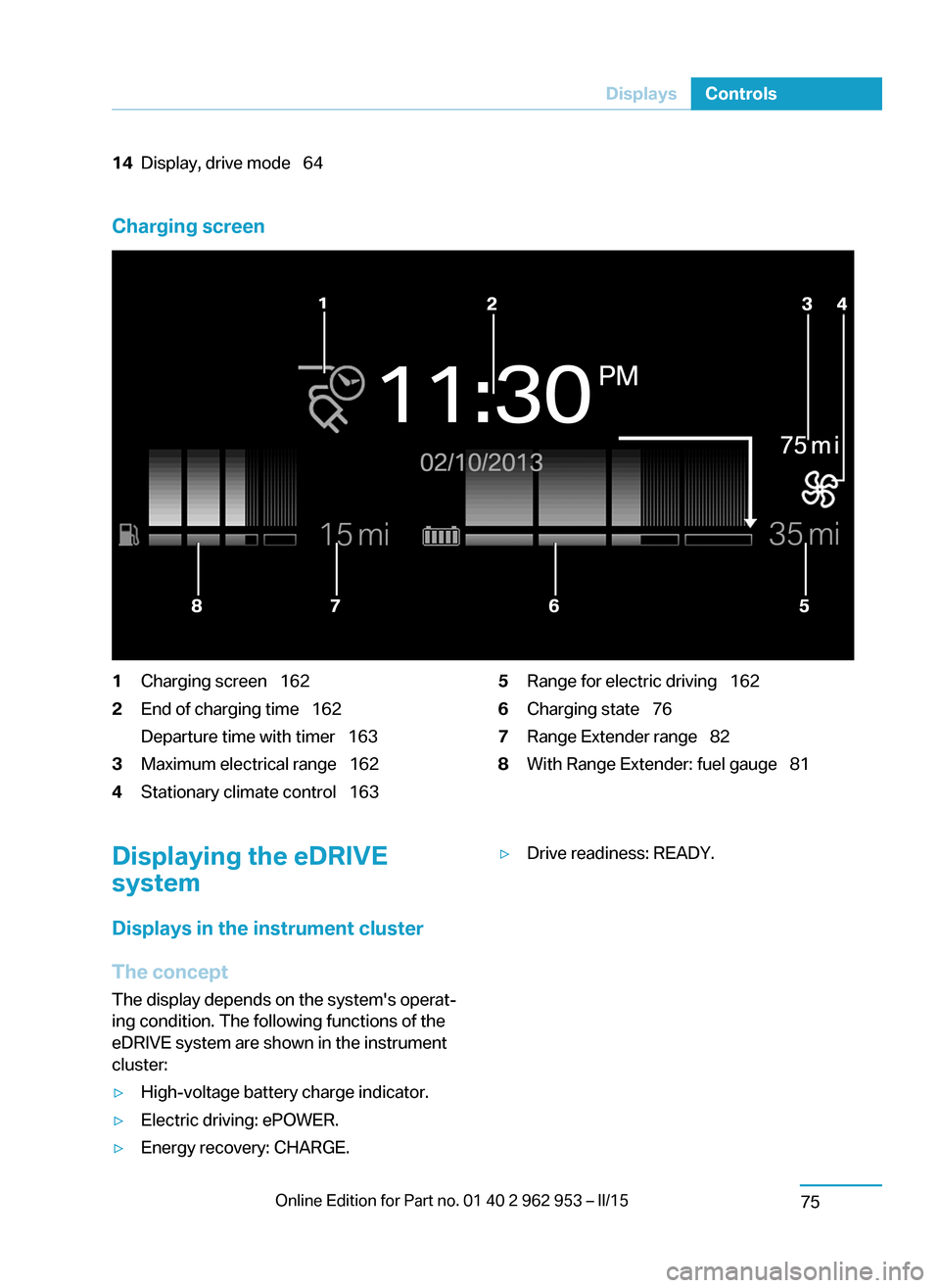
14Display, drive mode 64
Charging screen
1Charging screen 1622End of charging time 162
Departure time with timer 1633Maximum electrical range 1624Stationary climate control 1635Range for electric driving 1626Charging state 767Range Extender range 828With Range Extender: fuel gauge 81Displaying the eDRIVE
system
Displays in the instrument cluster
The concept The display depends on the system's operat‐
ing condition. The following functions of the
eDRIVE system are shown in the instrument
cluster:▷High-voltage battery charge indicator.▷Electric driving: ePOWER.▷Energy recovery: CHARGE.▷Drive readiness: READY.Seite 73DisplaysControls75
Page 88 of 230
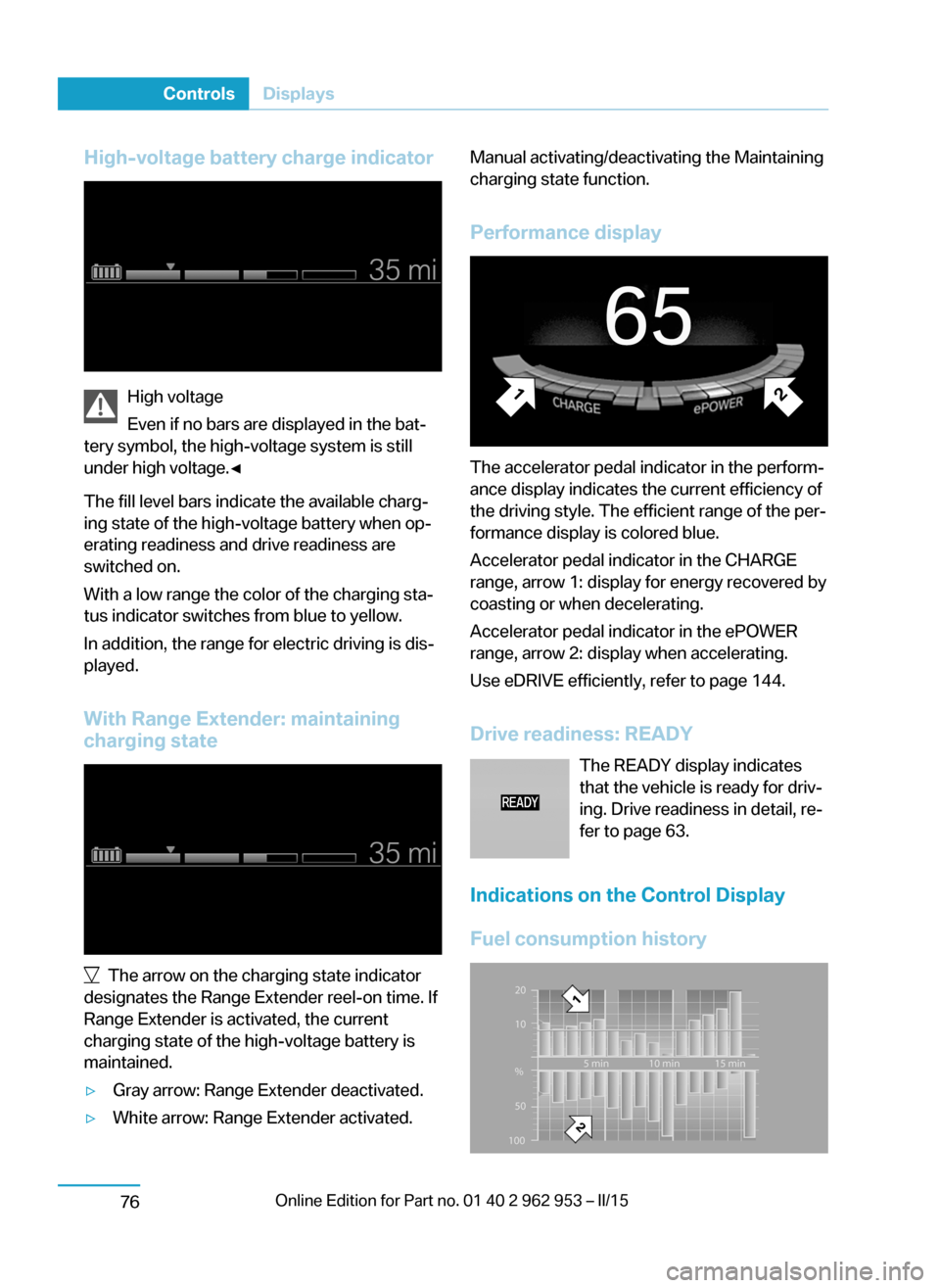
High-voltage battery charge indicator
High voltage
Even if no bars are displayed in the bat‐
tery symbol, the high-voltage system is still
under high voltage.◀
The fill level bars indicate the available charg‐
ing state of the high-voltage battery when op‐
erating readiness and drive readiness are
switched on.
With a low range the color of the charging sta‐
tus indicator switches from blue to yellow.
In addition, the range for electric driving is dis‐
played.
With Range Extender: maintaining charging state
The arrow on the charging state indicator
designates the Range Extender reel-on time. If
Range Extender is activated, the current
charging state of the high-voltage battery is
maintained.
▷Gray arrow: Range Extender deactivated.▷White arrow: Range Extender activated.Manual activating/deactivating the Maintaining
charging state function.
Performance display
The accelerator pedal indicator in the perform‐
ance display indicates the current efficiency of
the driving style. The efficient range of the per‐
formance display is colored blue.
Accelerator pedal indicator in the CHARGE
range, arrow 1: display for energy recovered by
coasting or when decelerating.
Accelerator pedal indicator in the ePOWER
range, arrow 2: display when accelerating.
Use eDRIVE efficiently, refer to page 144.
Drive readiness: READY The READY display indicates
that the vehicle is ready for driv‐
ing. Drive readiness in detail, re‐
fer to page 63.
Indications on the Control Display
Fuel consumption history
Seite 74ControlsDisplays76
Page 89 of 230
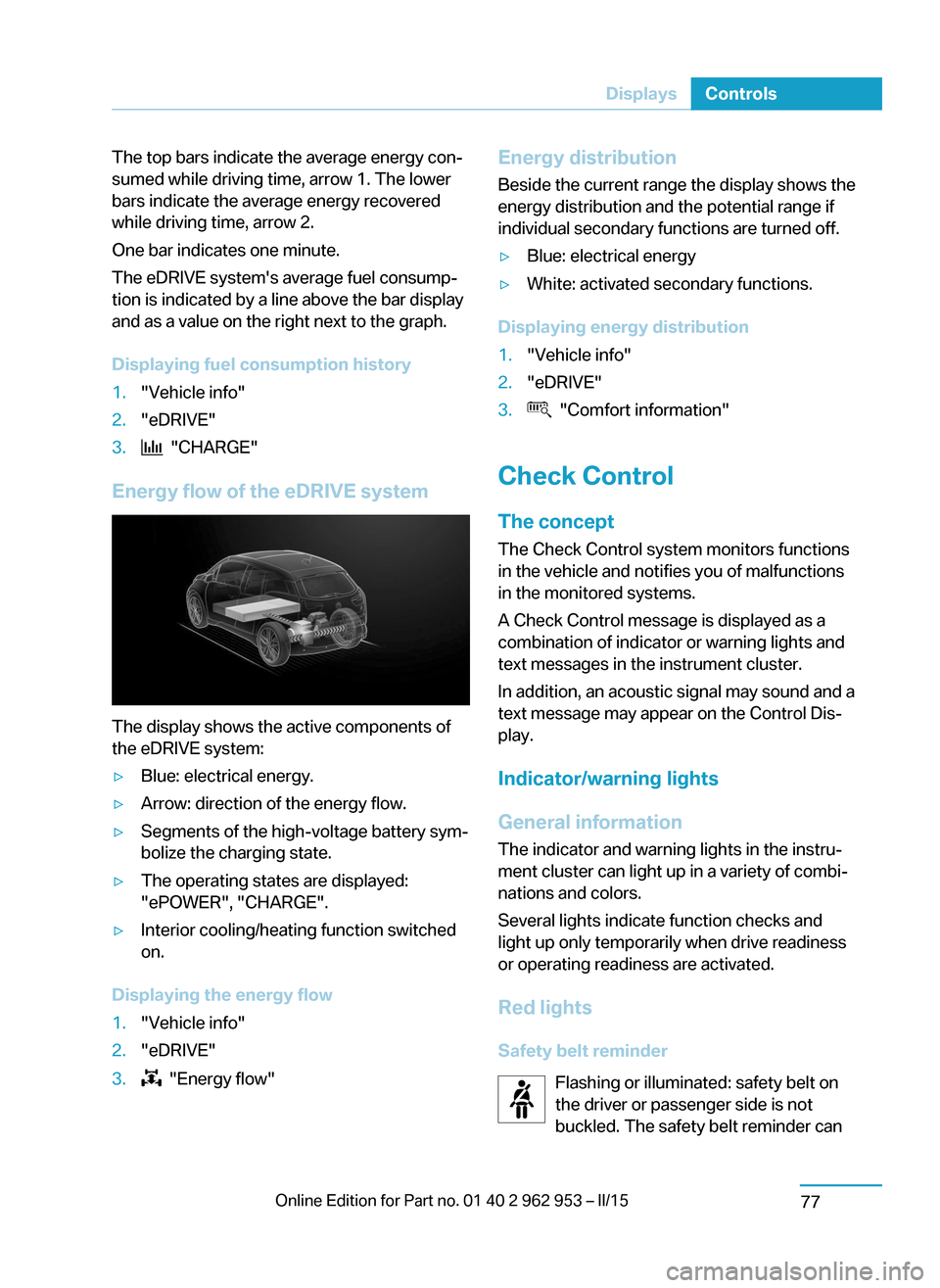
The top bars indicate the average energy con‐
sumed while driving time, arrow 1. The lower
bars indicate the average energy recovered
while driving time, arrow 2.
One bar indicates one minute.
The eDRIVE system's average fuel consump‐
tion is indicated by a line above the bar display
and as a value on the right next to the graph.
Displaying fuel consumption history1."Vehicle info"2."eDRIVE"3. "CHARGE"
Energy flow of the eDRIVE system
The display shows the active components of
the eDRIVE system:
▷Blue: electrical energy.▷Arrow: direction of the energy flow.▷Segments of the high-voltage battery sym‐
bolize the charging state.▷The operating states are displayed:
"ePOWER", "CHARGE".▷Interior cooling/heating function switched
on.
Displaying the energy flow
1."Vehicle info"2."eDRIVE"3. "Energy flow"Energy distribution
Beside the current range the display shows the
energy distribution and the potential range if
individual secondary functions are turned off.▷Blue: electrical energy▷White: activated secondary functions.
Displaying energy distribution
1."Vehicle info"2."eDRIVE"3. "Comfort information"
Check Control
The concept The Check Control system monitors functions
in the vehicle and notifies you of malfunctions
in the monitored systems.
A Check Control message is displayed as a
combination of indicator or warning lights and
text messages in the instrument cluster.
In addition, an acoustic signal may sound and atext message may appear on the Control Dis‐
play.
Indicator/warning lights
General information
The indicator and warning lights in the instru‐
ment cluster can light up in a variety of combi‐
nations and colors.
Several lights indicate function checks and
light up only temporarily when drive readiness
or operating readiness are activated.
Red lights Safety belt reminder Flashing or illuminated: safety belt on
the driver or passenger side is not
buckled. The safety belt reminder can
Seite 75DisplaysControls77
Page 94 of 230
Ice on roads
Even at temperatures above
+37 ℉/+3 ℃, roads might be icy.
Therefore, drive carefully on bridges and
shaded roads, e.g., to avoid the increased risk
of an accident.◀
Time
The time is displayed in the computer.
Setting the time and time format, refer to
page 87.
Range
The expected range for the energy stored in
the high-voltage battery is displayed on the
right side of the instrument cluster next to the
charging state indicator of the high-voltage
battery.
With Range Extender:
The range of the Range Extender is displayed
separately next to the fuel gauge. The total
range can be displayed via the on-board com‐
puter. Expanding the range with Range Ex‐
tender, refer to page 67.
Two Check Control messages indicate a lim‐
ited range.
The range display is dynamic.
The range can be abruptly reduced or in‐
creased based on the following factors:▷Driving style.▷Traffic conditions.▷Program change via Driving Dynamics
Control.▷Climate and terrain conditions.▷Automatic climate control settings.▷After determination of a route by the navi‐
gation system.▷When exiting a route or recalculating a
route.Hints
Observe range
Always make sure that the range is suffi‐
cient for the planned trip. The range is dynamic
and can abruptly change.◀
Increase range, refer to page 144.
Service requirements
The concept
The driving distance or the time to the next
scheduled maintenance is displayed briefly in
the instrument cluster after operating readi‐
ness is switched on.
Your service specialist can read the current
service requirements from your remote con‐
trol.
Display
Data regarding the service status or legally
mandated vehicle inspections are automati‐
cally transmitted to your service center before
a service due date.
Detailed information on service
requirements
More information on the scope of service re‐
quired can be displayed on the Control Dis‐
play.
On the Control Display:1."Vehicle info"2."Vehicle status"3. "Service required"
Required maintenance procedures and le‐
gally mandated inspections are displayed.4.Select an entry to call up detailed informa‐
tion.Seite 80ControlsDisplays82
Page 98 of 230
Information in detail
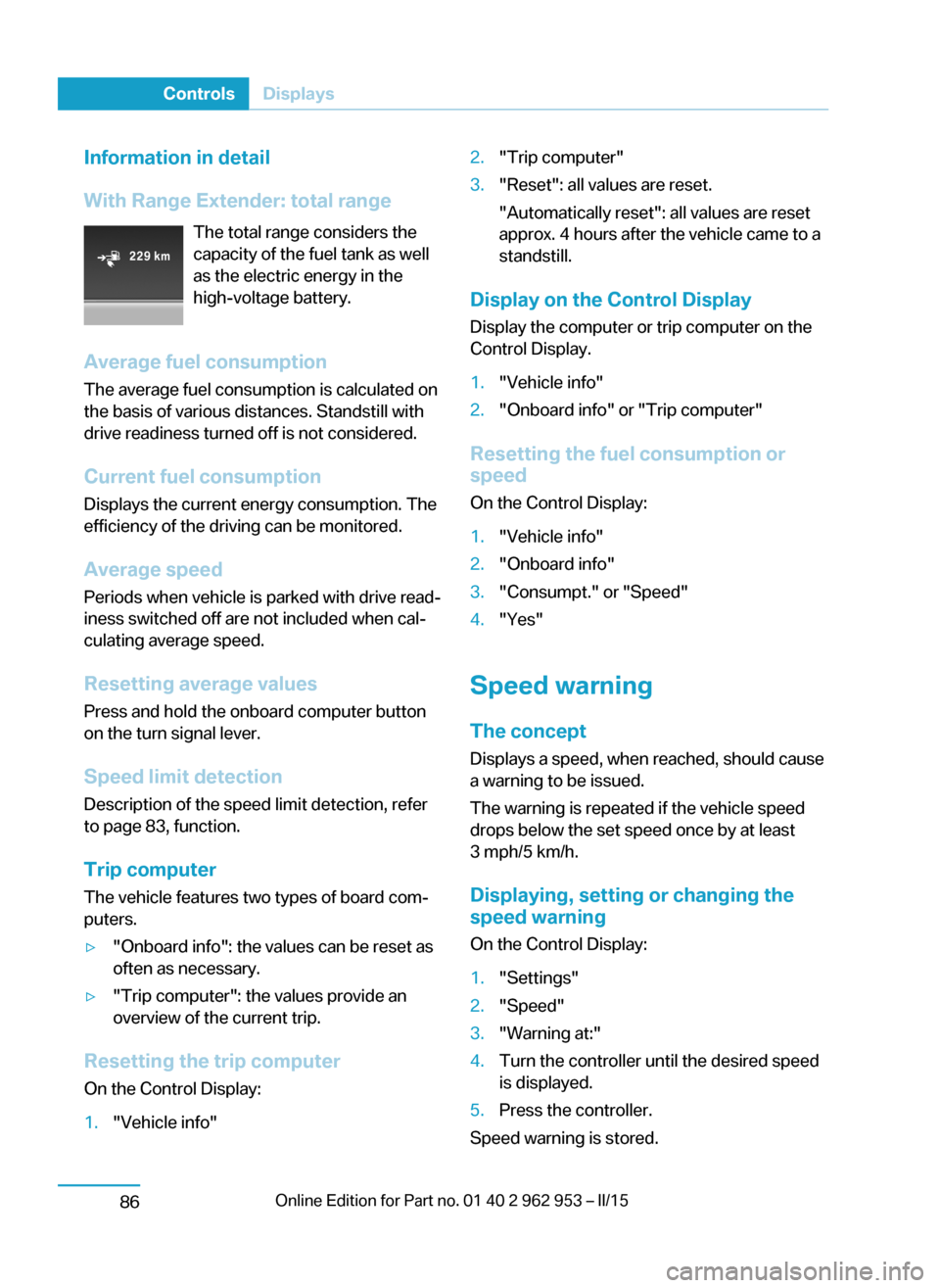
With Range Extender: total range The total range considers the
capacity of the fuel tank as well
as the electric energy in the
high-voltage battery.
Average fuel consumption
The average fuel consumption is calculated on
the basis of various distances. Standstill with
drive readiness turned off is not considered.
Current fuel consumption Displays the current energy consumption. The
efficiency of the driving can be monitored.
Average speed
Periods when vehicle is parked with drive read‐
iness switched off are not included when cal‐
culating average speed.
Resetting average values Press and hold the onboard computer button
on the turn signal lever.
Speed limit detection
Description of the speed limit detection, refer
to page 83, function.
Trip computer
The vehicle features two types of board com‐
puters.▷"Onboard info": the values can be reset as
often as necessary.▷"Trip computer": the values provide an
overview of the current trip.
Resetting the trip computer
On the Control Display:
1."Vehicle info"2."Trip computer"3."Reset": all values are reset.
"Automatically reset": all values are reset
approx. 4 hours after the vehicle came to a
standstill.
Display on the Control Display
Display the computer or trip computer on the
Control Display.
1."Vehicle info"2."Onboard info" or "Trip computer"
Resetting the fuel consumption or
speed
On the Control Display:
1."Vehicle info"2."Onboard info"3."Consumpt." or "Speed"4."Yes"
Speed warning
The concept Displays a speed, when reached, should cause
a warning to be issued.
The warning is repeated if the vehicle speed
drops below the set speed once by at least
3 mph/5 km/h.
Displaying, setting or changing the
speed warning
On the Control Display:
1."Settings"2."Speed"3."Warning at:"4.Turn the controller until the desired speed
is displayed.5.Press the controller.
Speed warning is stored.
Seite 84ControlsDisplays86