battery BMW I3 2014 I01 Owner's Guide
[x] Cancel search | Manufacturer: BMW, Model Year: 2014, Model line: I3, Model: BMW I3 2014 I01Pages: 230, PDF Size: 29.93 MB
Page 101 of 230
LightsVehicle features and optionsThis chapter describes all standard, country-
specific and optional features offered with the
series. It also describes features that are not
necessarily available in your car, e. g., due to
the selected options or country versions. This
also applies to safety-related functions and
systems.
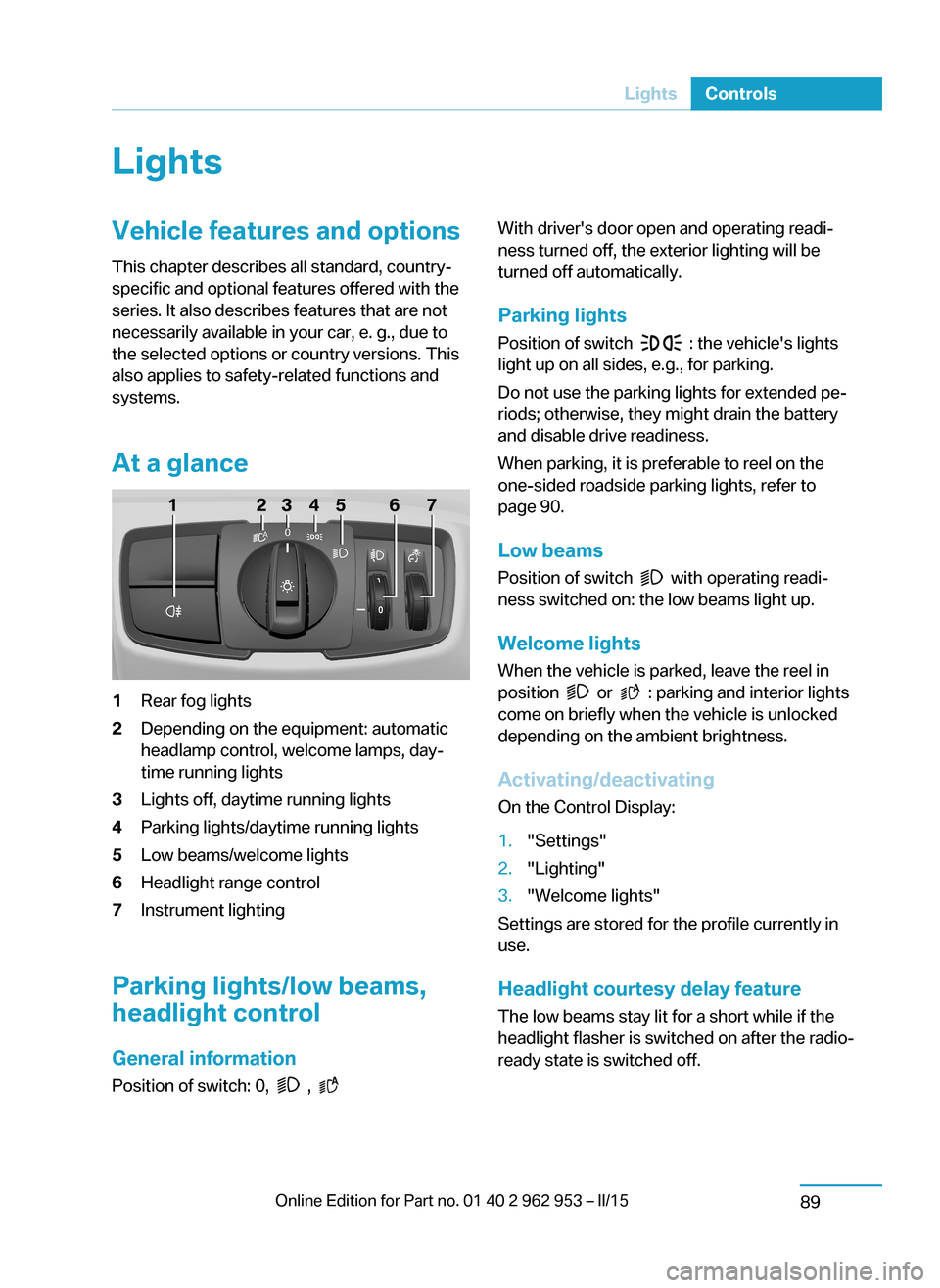
At a glance1Rear fog lights2Depending on the equipment: automatic
headlamp control, welcome lamps, day‐
time running lights3Lights off, daytime running lights4Parking lights/daytime running lights5Low beams/welcome lights6Headlight range control7Instrument lighting
Parking lights/low beams,
headlight control
General information
Position of switch: 0,
,
With driver's door open and operating readi‐
ness turned off, the exterior lighting will be
turned off automatically.
Parking lights
Position of switch
: the vehicle's lights
light up on all sides, e.g., for parking.
Do not use the parking lights for extended pe‐
riods; otherwise, they might drain the battery
and disable drive readiness.
When parking, it is preferable to reel on the
one-sided roadside parking lights, refer to
page 90.
Low beams Position of switch
with operating readi‐
ness switched on: the low beams light up.
Welcome lights When the vehicle is parked, leave the reel in
position
or : parking and interior lights
come on briefly when the vehicle is unlocked
depending on the ambient brightness.
Activating/deactivating
On the Control Display:
1."Settings"2."Lighting"3."Welcome lights"
Settings are stored for the profile currently in
use.
Headlight courtesy delay featureThe low beams stay lit for a short while if the
headlight flasher is switched on after the radio-
ready state is switched off.
Seite 87LightsControls89
Page 141 of 230
The air flow from the air conditioner may be re‐
duced automatically to save battery power.
Switching the system on/off
Switch off Press and hold the left button until the
control switches off.
Switching on
Press any button except▷Rear window defroster.▷Seat heating.
Microfilter
In external and recirculated air mode the mi‐
crofilter filters dust and pollen from the air.
This filter should be replaced during scheduled
maintenance, refer to page 185, of your vehi‐
cle.
Automatic climate control
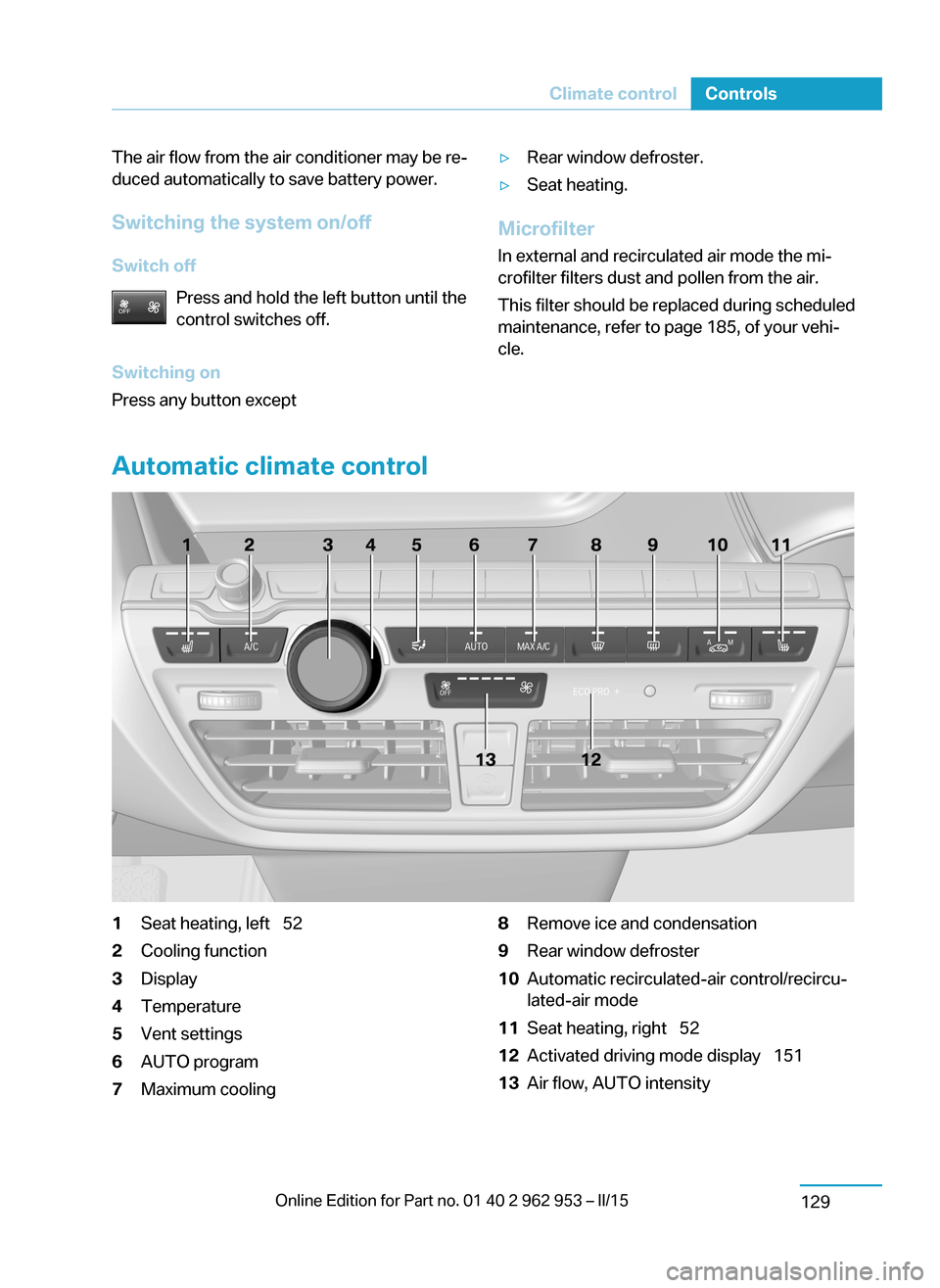
1Seat heating, left 522Cooling function3Display4Temperature5Vent settings6AUTO program7Maximum cooling8Remove ice and condensation9Rear window defroster10Automatic recirculated-air control/recircu‐
lated-air mode11Seat heating, right 5212Activated driving mode display 15113Air flow, AUTO intensitySeite 127Climate controlControls129
Page 143 of 230
Intensity of the AUTO program
With the AUTO program activated, the auto‐
matic intensity control can be changed.
Press the left or right side of the but‐
ton: decrease or increase the inten‐
sity.
The intensity level is indicated through LEDs.
Maximum cooling Press button.
The system is set to the lowest tem‐
perature, optimum air flow and air circulation
mode.
Air flows out of the vents to the upper body re‐
gion. The vents need to be open for this.
The function is available above an external
temperature of approx. 32 ℉/0 ℃ and when
drive readiness is indicated.
If ECO PRO+, refer to page 151, is activated,
this function is deactivated.
Adjust air flow with the program active.
Defrosts windows and removes
condensation
Press button.
Ice and condensation are quickly re‐
moved from the windshield and the front side
windows.
For this purpose, point the side vents onto the
side windows as needed.
Adjust air flow with the program active.
If the windows are fogged over, you can also
reel on the cooling function or press the AUTO
button to utilize the condensation sensor.
Rear window defroster Press button.
The rear window defroster switches
off automatically after a certain period of time.Automatic recirculated-air control/ recirculated-air mode
You may respond to unpleasant odors or pollu‐ tants in the immediate environment by tempo‐
rarily suspending the supply of outside air. The
system then recirculates the air currently
within the vehicle.
Press button repeatedly to select an
operating mode:▷LEDs off: outside air flows in continuously.▷Left LED on, automatic recirculated-air
control: a sensor detects pollutants in the
outside air and shuts off automatically.▷Right LED on, recirculated-air mode: the
supply of outside air into the vehicle is per‐
manently blocked.
To prevent window fogging, recirculated air
mode switches off automatically after a certain
amount of time, depending on the environ‐
mental conditions.
If the windows are fogged over, reel off the re‐
circulated-air mode and press the AUTO but‐
ton to utilize the condensation sensor. Make
sure that air can flow to the windshield.
Sufficient ventilation
When remaining in the vehicle for an ex‐
tended period of time, ensure sufficient exter‐
nal ventilation. Do not continuously use recir‐
culated-air mode; otherwise the air quality in
the interior continuously worsens.◀
Air flow, manual
To manually adjust air flow turn off AUTO pro‐
gram first.
Press the left or right side of the but‐
ton: decrease or increase air flow.
The intensity is indicated through LEDs. The
highest level is active when five LEDs are lit.
The air flow of the automatic climate control
may be reduced automatically to save battery
power.
Seite 129Climate controlControls131
Page 144 of 230
Switching the system on/off
Switch off Press and hold the left button until the
control switches off.
Switching on
Press any button except▷Rear window defroster.▷Seat heating.
Microfilter/activated-charcoal filter
In external and recirculated air mode the mi‐
crofilter/activated charcoal filter filters dust,
pollen, and gaseous pollutants out of the air.
This filter should be replaced during scheduled
maintenance, refer to page 185, of your vehi‐
cle.
Ventilation
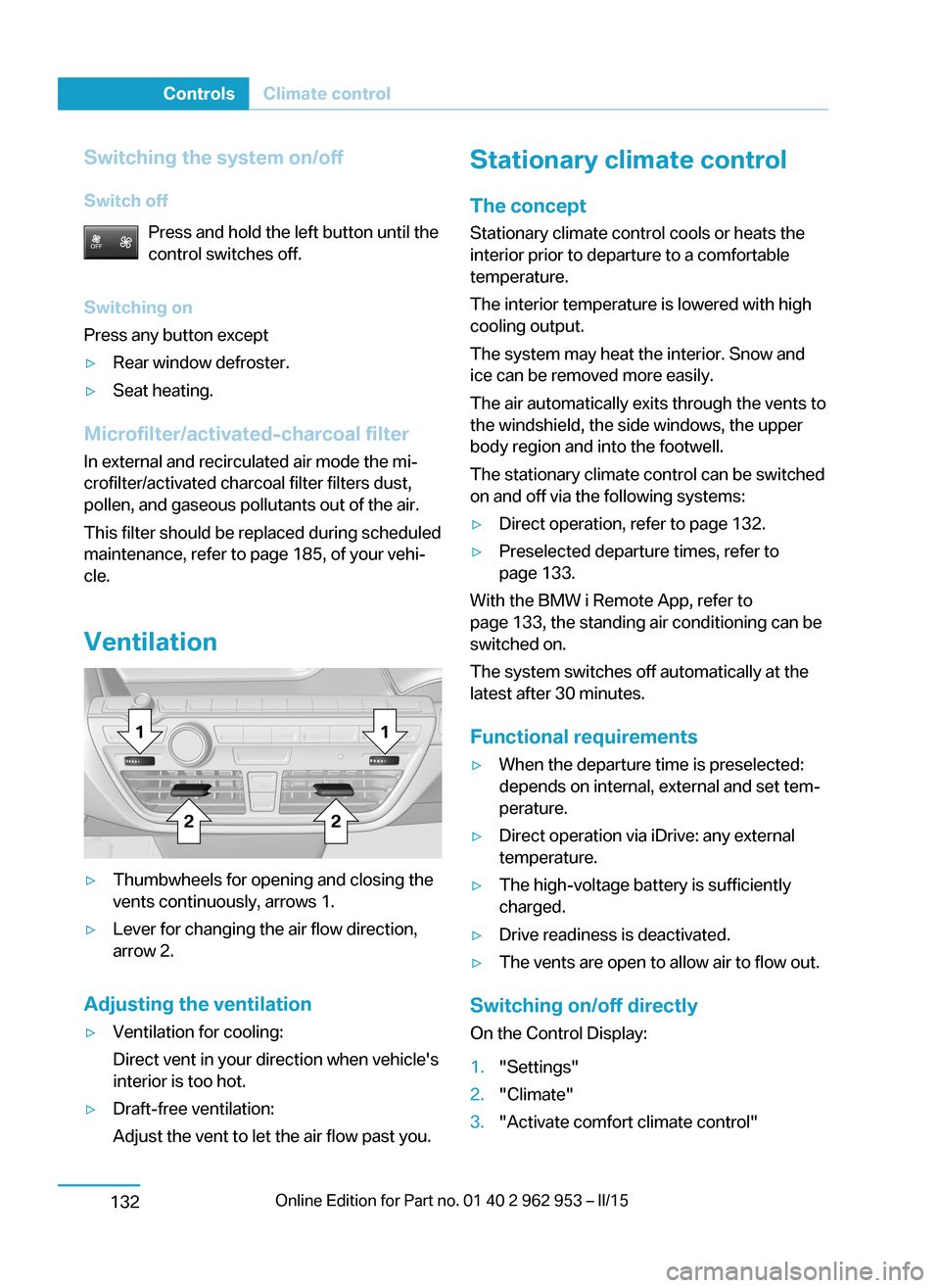
▷Thumbwheels for opening and closing the
vents continuously, arrows 1.▷Lever for changing the air flow direction,
arrow 2.
Adjusting the ventilation
▷Ventilation for cooling:
Direct vent in your direction when vehicle's
interior is too hot.▷Draft-free ventilation:
Adjust the vent to let the air flow past you.Stationary climate control
The concept Stationary climate control cools or heats the
interior prior to departure to a comfortable
temperature.
The interior temperature is lowered with high
cooling output.
The system may heat the interior. Snow and
ice can be removed more easily.
The air automatically exits through the vents to
the windshield, the side windows, the upper
body region and into the footwell.
The stationary climate control can be switched
on and off via the following systems:▷Direct operation, refer to page 132.▷Preselected departure times, refer to
page 133.
With the BMW i Remote App, refer to
page 133, the standing air conditioning can be
switched on.
The system switches off automatically at the
latest after 30 minutes.
Functional requirements
▷When the departure time is preselected:
depends on internal, external and set tem‐
perature.▷Direct operation via iDrive: any external
temperature.▷The high-voltage battery is sufficiently
charged.▷Drive readiness is deactivated.▷The vents are open to allow air to flow out.
Switching on/off directly
On the Control Display:
1."Settings"2."Climate"3."Activate comfort climate control"Seite 130ControlsClimate control132
Page 146 of 230
Interior equipmentVehicle features and optionsThis chapter describes all standard, country-
specific and optional features offered with the
series. It also describes features that are not
necessarily available in your car, e. g., due to
the selected options or country versions. This
also applies to safety-related functions and
systems.
Sun visorGlare shield
Fold the sun visor down or up.
Vanity mirror
A vanity mirror is located in the sun visor be‐
hind a cover. When the cover is opened, the
mirror lighting switches on.
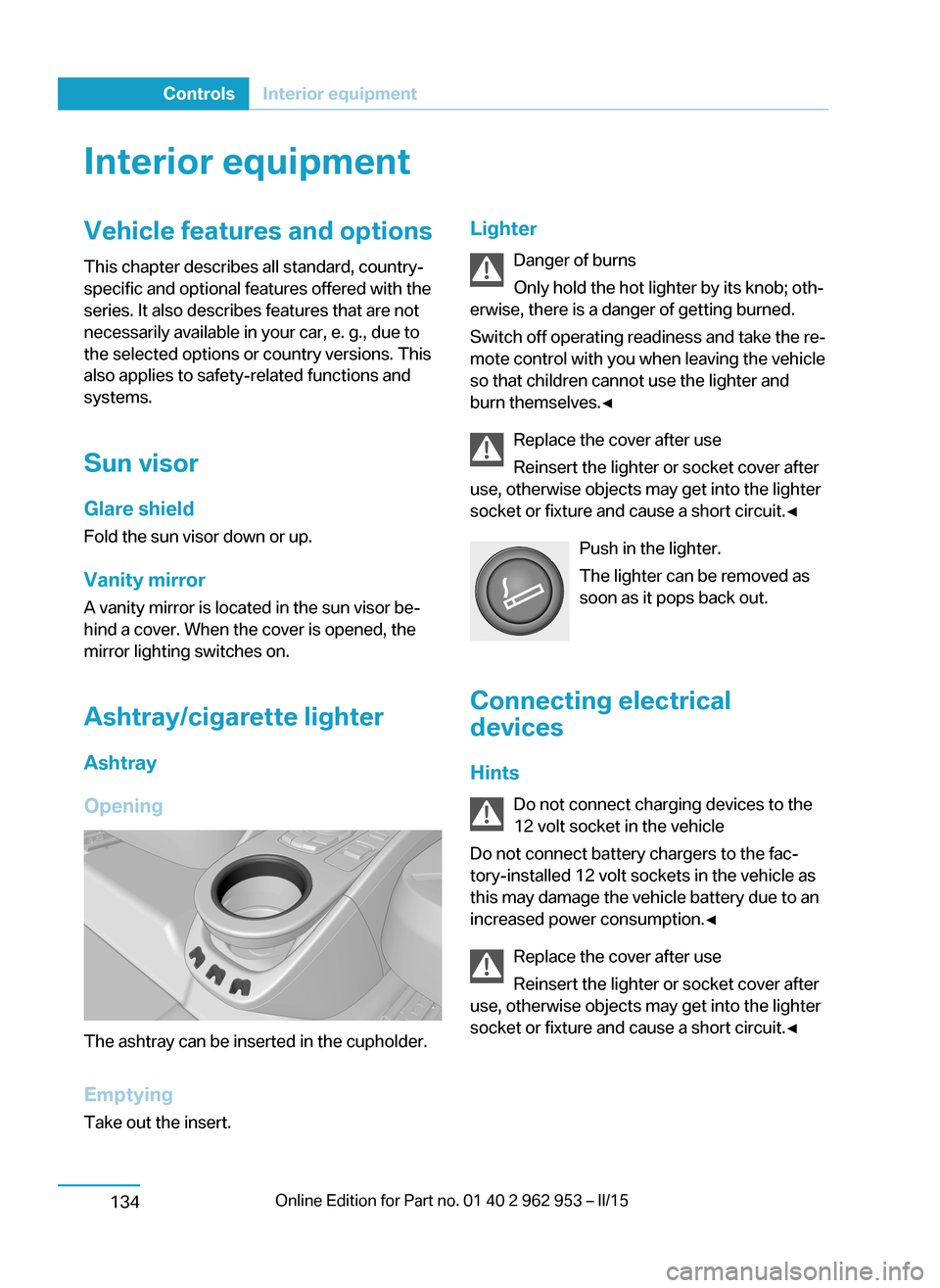
Ashtray/cigarette lighterAshtray
Opening
The ashtray can be inserted in the cupholder.
Emptying Take out the insert.
Lighter
Danger of burns
Only hold the hot lighter by its knob; oth‐
erwise, there is a danger of getting burned.
Switch off operating readiness and take the re‐
mote control with you when leaving the vehicle
so that children cannot use the lighter and
burn themselves.◀
Replace the cover after use
Reinsert the lighter or socket cover after
use, otherwise objects may get into the lighter
socket or fixture and cause a short circuit.◀
Push in the lighter.
The lighter can be removed as
soon as it pops back out.
Connecting electrical
devices
Hints Do not connect charging devices to the
12 volt socket in the vehicle
Do not connect battery chargers to the fac‐
tory-installed 12 volt sockets in the vehicle as
this may damage the vehicle battery due to an
increased power consumption.◀
Replace the cover after use
Reinsert the lighter or socket cover after
use, otherwise objects may get into the lighter
socket or fixture and cause a short circuit.◀Seite 132ControlsInterior equipment134
Page 156 of 230
Things to remember when drivingVehicle features and options
This chapter describes all standard, country-
specific and optional features offered with the
series. It also describes features that are not
necessarily available in your car, e. g., due to
the selected options or country versions. This
also applies to safety-related functions and
systems.
Breaking-in period
General information Moving parts need time to adjust to one an‐
other (break-in time).
The following instructions will help accomplish
a long vehicle life and good efficiency.
Range Extender The full performance of the Range Extender is
available after a brief operating period and is
only minimally restricted during the run-in
phase.
Control of the Range Extender during and after
the run-in phase, as well as the activation of
the full performance, are preset depending on
the system and take place automatically.
Tires
Tire traction is not optimal due to manufactur‐
ing circumstances when tires are brand-new;
they achieve their full traction potential after a
break-in time.
Drive conservatively for the first
200 miles/300 km.
Brake system
Brakes require an initial break-in period of ap‐
prox. 300 miles/500 km to achieve optimal per‐
formance between brake discs and brakepads. Drive moderately during this break-in pe‐
riod.
Following part replacement
The same break-in procedures should be ob‐
served if any of the components above-men‐
tioned have to be renewed in the course of the
vehicle's operating life.
Using eDRIVE efficiently The concept
eDRIVE operates automatically. Proactive driv‐
ing utilizes energy consumption and energy re‐
covery optimally. Energy recovery is used to
charge the high-voltage battery. It is important
for the supply of electrical components and
thus a prerequisite for an extensive range. En‐
ergy consumption and recovery depend very
much, among other things, on your driving
style.
Optimizing driving style
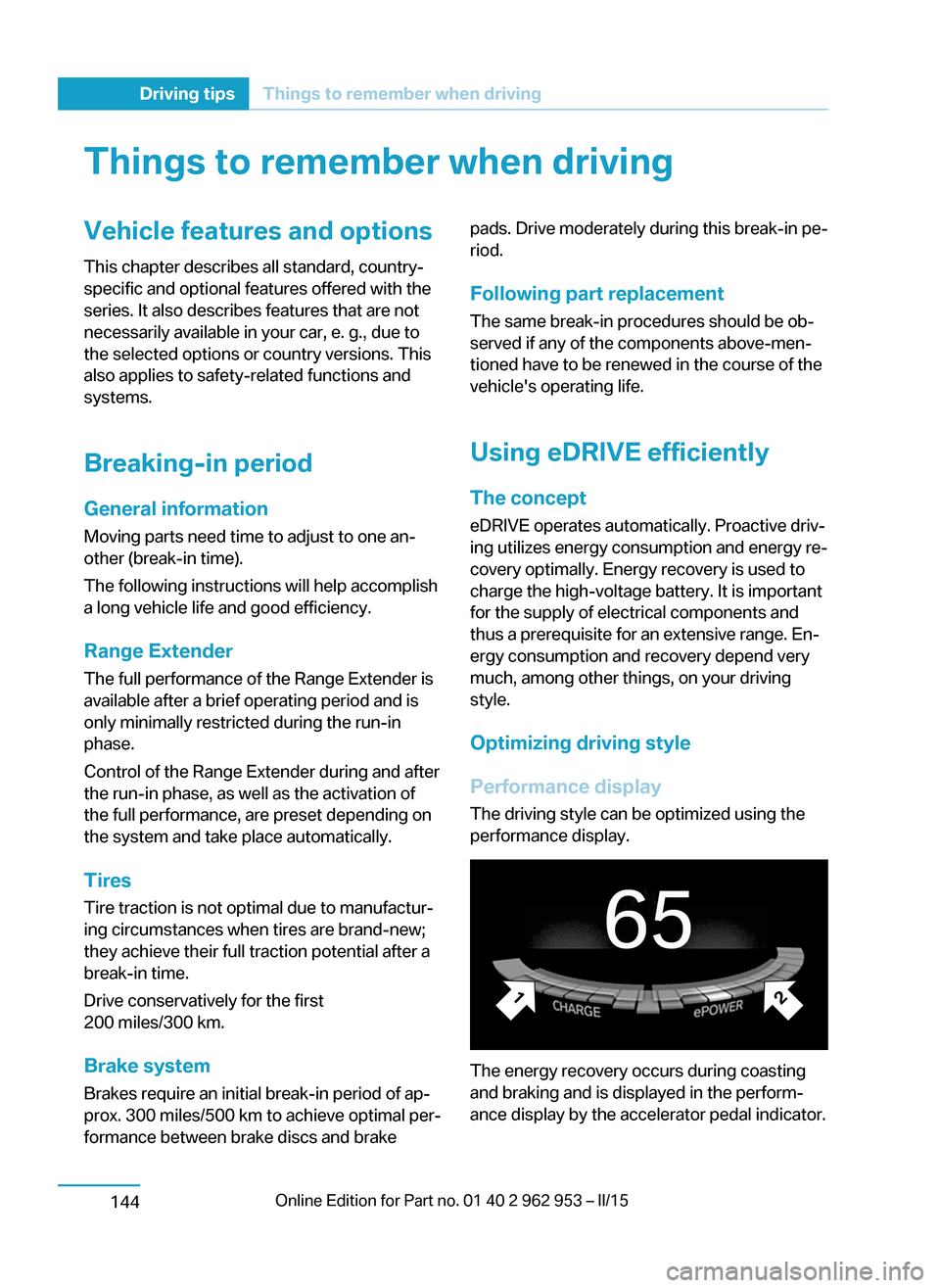
Performance display The driving style can be optimized using the
performance display.
The energy recovery occurs during coasting
and braking and is displayed in the perform‐
ance display by the accelerator pedal indicator.
Seite 142Driving tipsThings to remember when driving144
Page 157 of 230
The accelerator pedal pointer is within the
CHARGE range.
Efficient energy recovery:▷The accelerator pedal moves to the left
within the blue range of the CHARGE dis‐
play, arrow 1.▷The energy use while driving can be opti‐
mized by efficient acceleration.
Efficient acceleration:
▷The accelerator pedal moves to the right
within the blue range of the ePOWER dis‐
play, arrow 2.▷Use deceleration during coasting as often
as possible for energy recovery.
Brake according to traffic and circum‐
stances
Brake in accordance with the traffic conditions,
or there is the risk of accident.◀
Discharge of the high-voltage battery
Longer idle periods can reduce the charge
state of the high-voltage battery.
Do not allow the vehicle to sit idle for ex‐
tended periods with a low charging state
Before storing the vehicle for an extended pe‐
riod, check the battery charge indicator to en‐
sure that the high-voltage battery is fully
charged. During the idle period, connect the
vehicle to a charging station at a suitable
charging location. If necessary, the high-volt‐
age battery will be charged automatically.
Make sure that the charging process takes
place. Regularly check the charging state.
Don't allow battery charge status to drop too
low - it will damage the battery.◀
General driving notes
Closing the tailgate Drive with the tailgate closed
Only drive with the tailgate closed; other‐
wise, in the event of an accident or braking and
evasive maneuvers, passengers and other traf‐
fic may be injured, and the vehicle may be
damaged. Moreover, exhaust gases can get
into the vehicle interior and the lights in the
tailgate cannot be recognized.◀
If driving with the tailgate open cannot be
avoided:▷Close all windows and the glass sunroof.▷Greatly increase the air flow from the vents.▷Drive moderately.
Hot exhaust system
Hot exhaust system
High temperatures are generated in the
exhaust system.
Do not remove the heat shields installed and
never apply undercoating to them. Make sure
that flammable materials, e. g. hay, leaves,
grass, etc. do not come in contact with the hot
exhaust system while driving, while in idle po‐
sition mode, or when parked. Such contact
could lead to a fire, resulting in an increased
risk of serious personal injury as well as prop‐
erty damage.
Do not touch hot exhaust pipes; otherwise,
there is a danger of getting burned.◀
Mobile communication devices in the
vehicle
Mobile communication devices in the ve‐
hicle
It is not recommended to use mobile phones,
such as mobile phones, in the vehicle interior
without a direct connection to an external aer‐
ial. Otherwise, the vehicle's electronics and
mobile communication devices can interfere
Seite 143Things to remember when drivingDriving tips145
Page 162 of 230
Increase rangeGeneral informationThe vehicle contains comprehensive technolo‐
gies for reducing the energy consumption and
for maximizing the range.
The range depends on a number of different
factors.
The implementation of certain measures, driv‐
ing style and regular maintenance can increase
range and thereby also reduce the environ‐
mental impact.
Remove unnecessary cargo
Additional weight reduces the range.
Remove attached parts
following use
Attached parts on the vehicle impair the aero‐ dynamics and increase the energy consump‐
tion.
Close the windows and glass
sunroof
Driving with the glass sunroof and windows
open results in increased air resistance and
thereby reduces the range.
Tires
General information
Tires can affect energy consumption in various
ways, for instance energy consumption can be
influenced by tire size.Check the tire inflation pressure
regularly
Check and, if needed, correct the tire inflationpressure at least twice a month and before
starting on a long trip.
Low tire inflation pressure increases rolling re‐
sistance and thus raises energy consumption
and tire wear.
Standing air conditioning Run advance climate control, refer to
page 132, in the vehicle during charging if pos‐
sible before driving off.
Heating and cooling operations are very en‐
ergy intensive and substantially reduce the
electric range.
Look well ahead when
driving
Avoid unnecessary acceleration and braking.
By maintaining a suitable distance to the vehi‐
cle driving ahead of you.
Driving smoothly and proactively reduces en‐
ergy consumption.
Longer braking procedures result in more effi‐
cient charging of the high-voltage battery via
energy recovery from braking.
Use accelerator pedal for
deceleration and coasting
When approaching a red light, use accelerator
pedal for decelerating.
For going downhill use coasting function; for
this purpose, press accelerator pedal just
enough that the vehicle rolls.Seite 148Driving tipsIncrease range150
Page 168 of 230
Charging vehicleVehicle features and options
This chapter describes all standard, country-
specific and optional features offered with the
series. It also describes features that are not
necessarily available in your car, e. g., due to
the selected options or country versions. This
also applies to safety-related functions and
systems.
The concept
The vehicle can be charged using various
charging cables at charging stations or hous‐
hold sockets. Control and monitoring of the
charging process are handled completely au‐
tomatically. The charge current strength can
be set by means of the Control Display.
General information
High-voltage battery The high-voltage battery is used as an energy
accumulator. The high-voltage battery can be
charged by energy recovery during the trip or
via the power grid.
When charging via the power grid, you can
chose between the following variants.▷Level 1 charging via a household socket.▷Level 2 charging via a Level 2 charging sta‐
tion.▷Charging via a DC charging station.
Level 1 charging is possible via a household
socket within a voltage range of 100 volts to
240 volts.
For optimal use of the energy from the power
grid, charging at a Level 2 charging station,
such as BMW i Wallbox, is recommended.
Charge current
The charge current strength is indicated in am‐
peres.
The vehicle cannot automatically detect the
maximum permissible charge current strength
during charging via a household socket or
charging station.
Level 1 charging
Prior to the first Level 1 charging at your own
household socket, as well as when charging at
external electrical power sockets in Level 1,
the allowed charge current strength must be
determined, e.g. by a qualified electrician.
The charge current strength for Level 1 charg‐
ing, refer to page 161, can be adjusted in the
vehicle in three steps.
At delivery, the charge current for
Level 1 charging is set to "Low".
Depending on the country-specific version,
one of four ampere ratings is printed on the
Level 1 charging cable. This ampere rating is
the limit which must be adhered to for the vehi‐
cle if the charge current is set to "Maximum".
According to the market-specific version, the
charge current strength changes differently if
the setting "Reduced" or "Low" is selected."Maximum""Reduced""Low"8 A6 A6 A10 A7.5 A6 A12 A9 A6 A15 A11.25 A7.5 A
Charging at a Level 2 charging station
The permitted charge current strength must
be determined prior to charging at a
Level 2 charging station, e.g. from the operator
Seite 154MobilityCharging vehicle156
Page 172 of 230
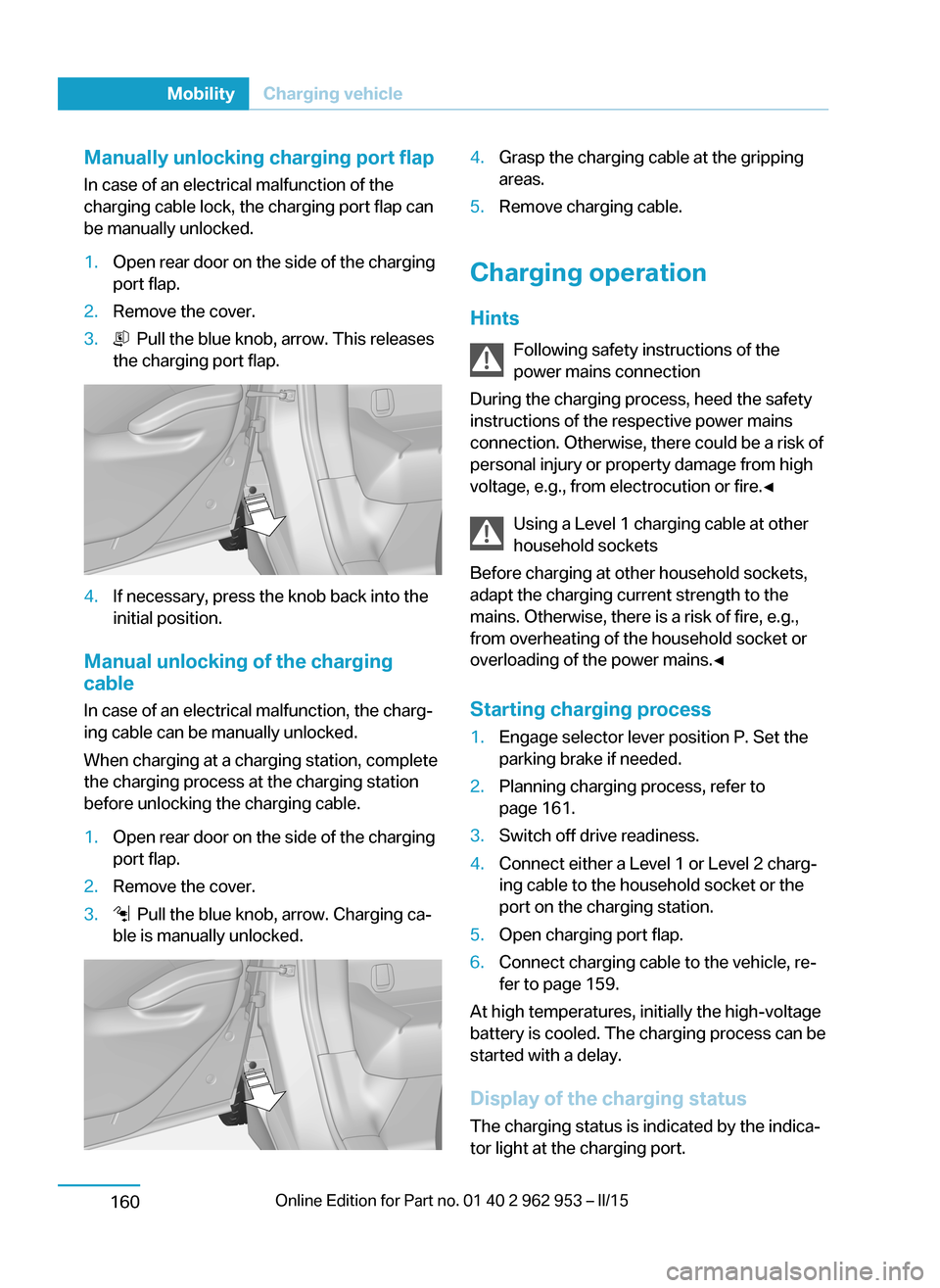
Manually unlocking charging port flapIn case of an electrical malfunction of the
charging cable lock, the charging port flap can
be manually unlocked.1.Open rear door on the side of the charging
port flap.2.Remove the cover.3. Pull the blue knob, arrow. This releases
the charging port flap.4.If necessary, press the knob back into the
initial position.
Manual unlocking of the charging
cable
In case of an electrical malfunction, the charg‐
ing cable can be manually unlocked.
When charging at a charging station, complete
the charging process at the charging station
before unlocking the charging cable.
1.Open rear door on the side of the charging
port flap.2.Remove the cover.3. Pull the blue knob, arrow. Charging ca‐
ble is manually unlocked.4.Grasp the charging cable at the gripping
areas.5.Remove charging cable.
Charging operation
Hints Following safety instructions of the
power mains connection
During the charging process, heed the safety
instructions of the respective power mains
connection. Otherwise, there could be a risk of
personal injury or property damage from high
voltage, e.g., from electrocution or fire.◀
Using a Level 1 charging cable at other
household sockets
Before charging at other household sockets,
adapt the charging current strength to the
mains. Otherwise, there is a risk of fire, e.g.,
from overheating of the household socket or
overloading of the power mains.◀
Starting charging process
1.Engage selector lever position P. Set the
parking brake if needed.2.Planning charging process, refer to
page 161.3.Switch off drive readiness.4.Connect either a Level 1 or Level 2 charg‐
ing cable to the household socket or the
port on the charging station.5.Open charging port flap.6.Connect charging cable to the vehicle, re‐
fer to page 159.
At high temperatures, initially the high-voltage
battery is cooled. The charging process can be
started with a delay.
Display of the charging status
The charging status is indicated by the indica‐
tor light at the charging port.
Seite 158MobilityCharging vehicle160