change time BMW I3 2014 I01 User Guide
[x] Cancel search | Manufacturer: BMW, Model Year: 2014, Model line: I3, Model: BMW I3 2014 I01Pages: 230, PDF Size: 29.93 MB
Page 174 of 230
3."AC charging power:"
Settings are stored. When you change charg‐
ing locations you also might need to change
the setting for charging.
Set the charge current strength at other
household sockets to "Low".
Setting charging via a
Level 2 charging cable
Depending on the electrical mains, the vehicle
must be charged with a different charging cur‐
rent strength, refer to page 156.
When charging with a Level 2 charging cable,
the charging process can be completed faster
at a Level 2 charging station.
1."Settings"2."Charging"3."Level 2:"
Settings are stored. When you change charg‐
ing locations you also might need to change
the setting for charging.
Stopping charging process The charging operation can be stopped at any
time by removing the charging cable and con‐
tinued at a later time by connecting the charg‐
ing cable in order to use other loads on the
power connection or to prevent simultaneous
high power from multiple loads.
The charging operation is interrupted when the
vehicle is unlocked and automatically resumed
after a brief time or when it is locked.
Continue charging operation If the charging operation is interrupted, e.g.,
through a temporary power failure, the charg‐
ing operation is automatically continued after
the interruption.
Terminating charging process1.Removing the charging cable from the ve‐
hicle, refer to page 159.2.Stow the charging cable as required.3.Close the charging port flap.4.Lock vehicle if it is unlocked.
Displays in the instrument
cluster
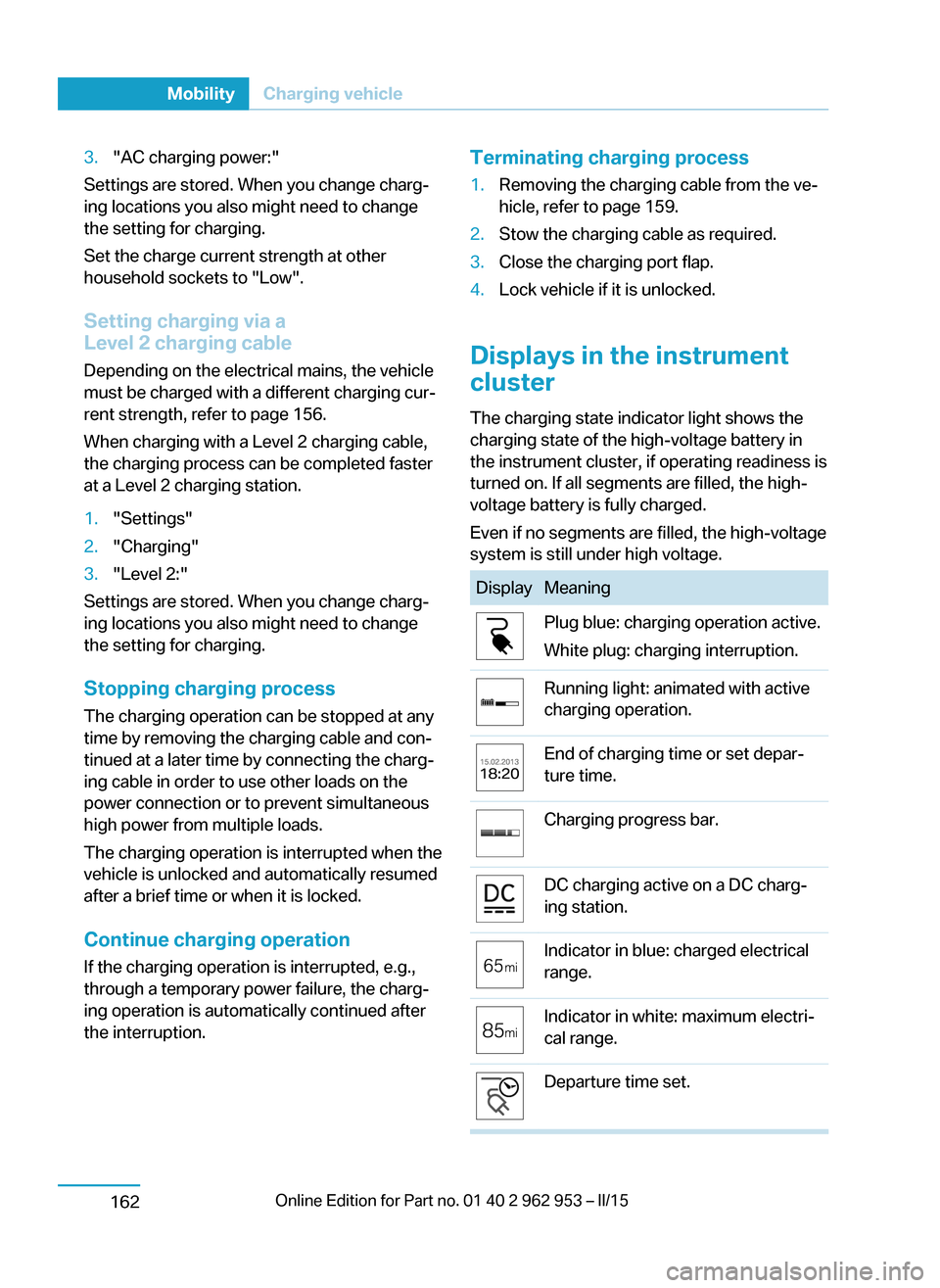
The charging state indicator light shows the
charging state of the high-voltage battery in
the instrument cluster, if operating readiness is
turned on. If all segments are filled, the high-
voltage battery is fully charged.
Even if no segments are filled, the high-voltage
system is still under high voltage.
DisplayMeaningPlug blue: charging operation active.
White plug: charging interruption.Running light: animated with active
charging operation.End of charging time or set depar‐
ture time.Charging progress bar.DC charging active on a DC charg‐
ing station.Indicator in blue: charged electrical
range.Indicator in white: maximum electri‐
cal range.Departure time set.Seite 160MobilityCharging vehicle162
Page 175 of 230
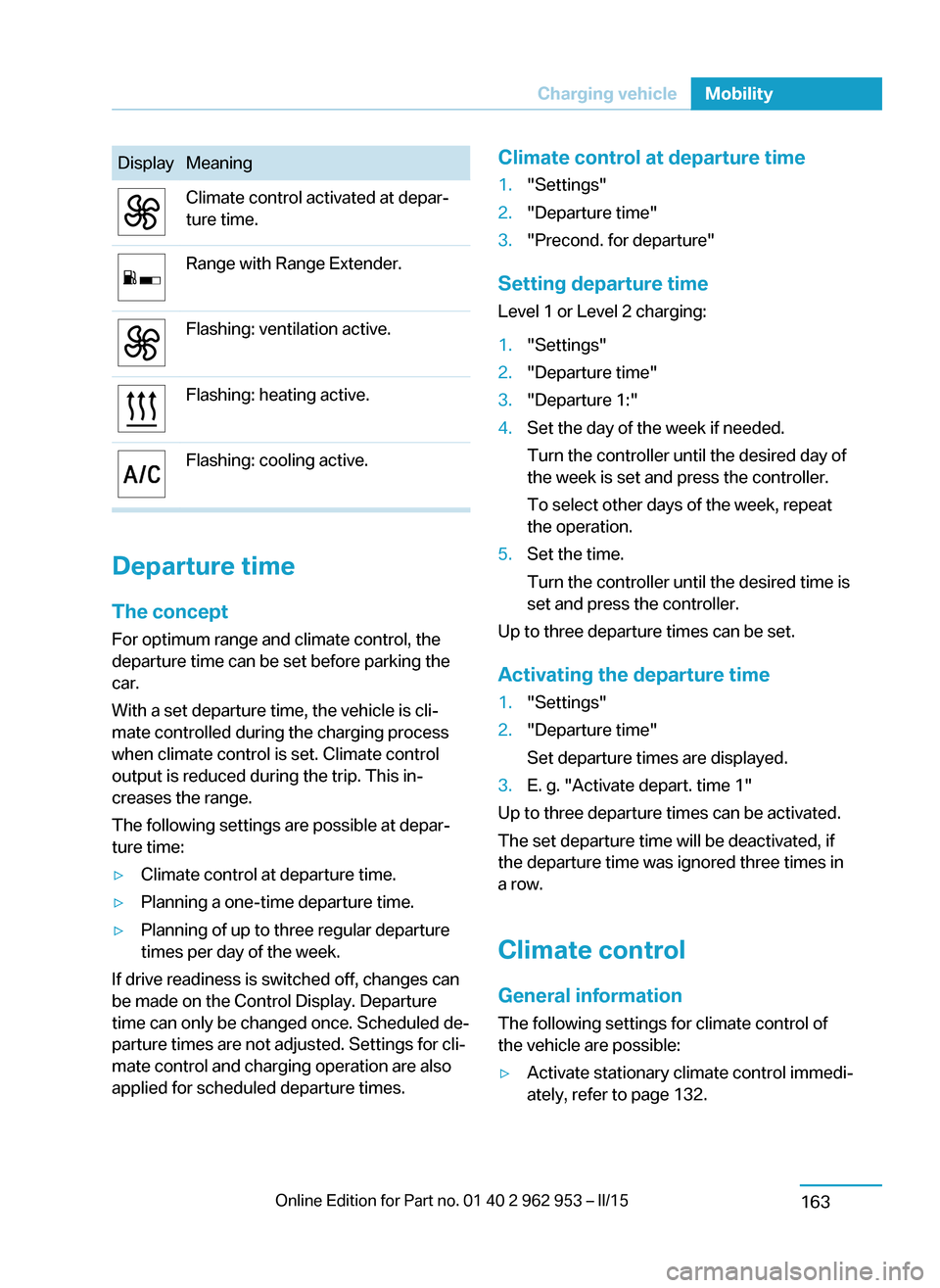
DisplayMeaningClimate control activated at depar‐
ture time.Range with Range Extender.Flashing: ventilation active.Flashing: heating active.Flashing: cooling active.
Departure time
The concept For optimum range and climate control, the
departure time can be set before parking the
car.
With a set departure time, the vehicle is cli‐
mate controlled during the charging process
when climate control is set. Climate control
output is reduced during the trip. This in‐
creases the range.
The following settings are possible at depar‐
ture time:
▷Climate control at departure time.▷Planning a one-time departure time.▷Planning of up to three regular departure
times per day of the week.
If drive readiness is switched off, changes can
be made on the Control Display. Departure
time can only be changed once. Scheduled de‐
parture times are not adjusted. Settings for cli‐
mate control and charging operation are also
applied for scheduled departure times.
Climate control at departure time1."Settings"2."Departure time"3."Precond. for departure"
Setting departure time
Level 1 or Level 2 charging:
1."Settings"2."Departure time"3."Departure 1:"4.Set the day of the week if needed.
Turn the controller until the desired day of
the week is set and press the controller.
To select other days of the week, repeat
the operation.5.Set the time.
Turn the controller until the desired time is
set and press the controller.
Up to three departure times can be set.
Activating the departure time
1."Settings"2."Departure time"
Set departure times are displayed.3.E. g. "Activate depart. time 1"
Up to three departure times can be activated.
The set departure time will be deactivated, if
the departure time was ignored three times in
a row.
Climate control General information
The following settings for climate control of
the vehicle are possible:
▷Activate stationary climate control immedi‐
ately, refer to page 132.Seite 161Charging vehicleMobility163
Page 200 of 230
the service center if you are unfamiliar those or
if they have not been described here.
You can obtain a selection of replacement
bulbs at the service center.
Danger of burns
Only change bulbs when they are cool;
otherwise, there is a danger of getting
burned.◀
Working on the lighting system
When working on the lighting system,
you should always reel off the lights affected to
prevent short circuits.
To avoid possible injury or equipment damage
when replacing bulbs, observe any instructions
provided by the bulb manufacturer.◀
Do not touch the bulbs
Do not touch the glass of new bulbs with
your bare hands, as even minute amounts of
contamination will burn into the bulb's surface
and reduce its service life.
Use a clean tissue, cloth or something similar,
or hold the bulb by its base.◀
Light-emitting diodes (LEDs)
Some items of equipment use light-emitting
diodes installed behind a cover as a light
source.
These light-emitting diodes, which are related
to conventional lasers, are officially designated as Class 1 light-emitting diodes.
Do not remove the covers
Do not remove the covers, and never
stare into the unfiltered light for several hours;
otherwise, irritation of the retina could result.◀
Headlight glass
Condensation can form on the inside of the ex‐
ternal lights in cool or humid weather. When
driving with the light switched on, the conden‐
sation evaporates after a short time. The head‐
light glass does not need to be changed.If the headlights do not dim despite driving
with the light switched on, increasing humidity
forms, e. g. water droplets in the light, have the
service center check this.
Headlight setting The headlight adjustments can be affected by
changing lights and bulbs. Have the head‐
lights' settings checked and corrected by serv‐
ice after a replacement.
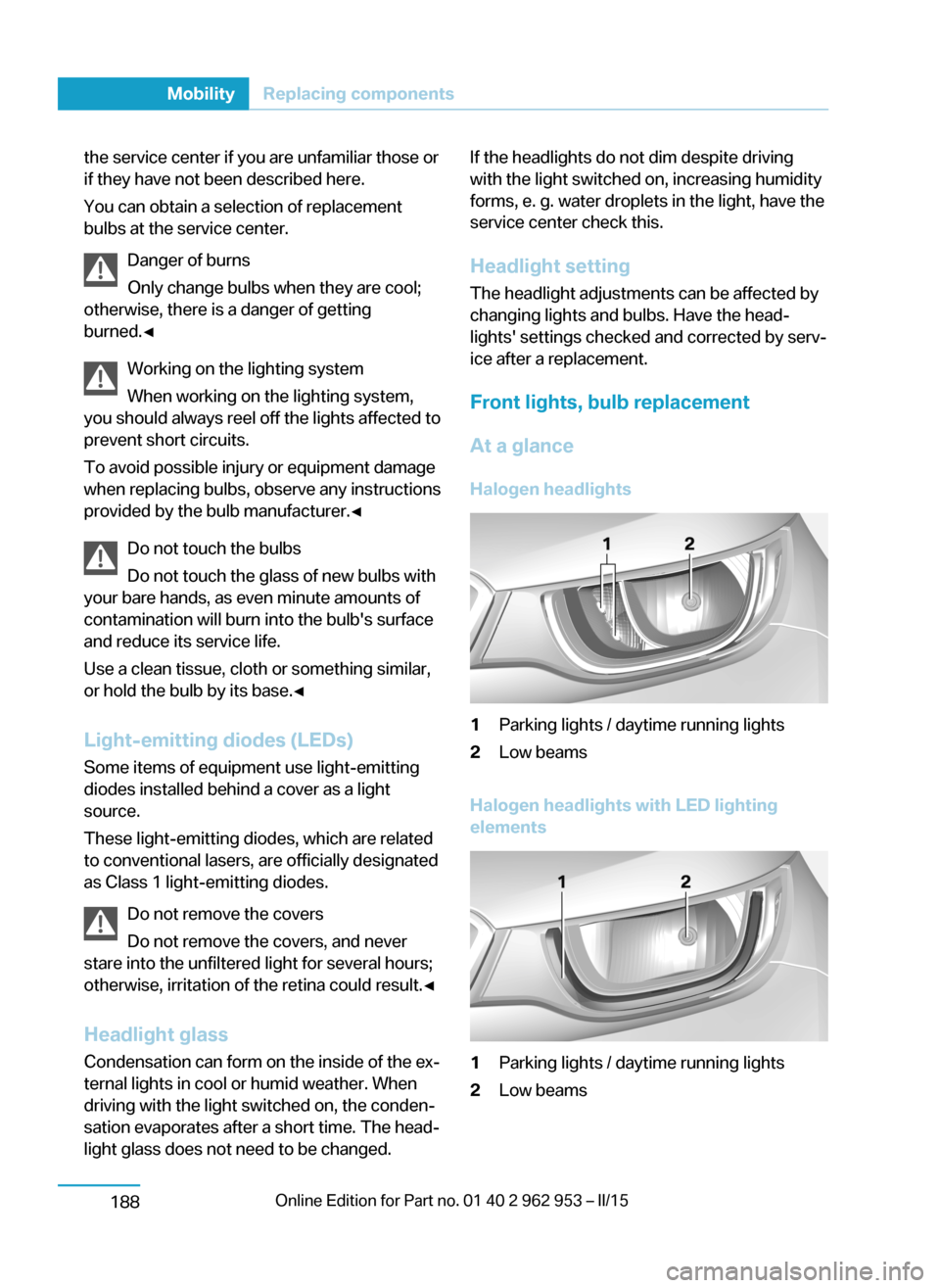
Front lights, bulb replacement At a glance Halogen headlights1Parking lights / daytime running lights2Low beams
Halogen headlights with LED lighting
elements
1Parking lights / daytime running lights2Low beamsSeite 186MobilityReplacing components188
Page 225 of 230
Menu in instrument clus‐ter 84
Menus, operating, iDrive 18
Menus, refer to iDrive operat‐ ing concept 19
Messages, see Check Con‐ trol 77
Microfilter 129, 132
Minimum tread, tires 172
Mirrors 55
Mobile communication devi‐ ces in the vehicle 145
Mobility System 174
Modifications, technical, refer to Safety 7
Moisture in headlight 188
Monitor, refer to Control Dis‐ play 18
Mounting of child restraint systems 58
Multifunction steering wheel, buttons 14
Multimedia 6
N
Navigation 6
Neck restraints, front, refer to Head restraints 54
Neck restraints, rear, refer to Head restraints 54
Neutral cleaner, see wheel cleaner 200
New wheels and tires 173
Nylon rope for tow-starting/ towing 195
O OBD Onboard Diagnosis 186
OBD, see OBD Onboard Di‐ agnosis 186
Obstacle marking, rearview camera 121
Octane rating, refer to Rec‐ ommended fuel grade 168 Odometer 81
Office 6
Oil 181
Oil, adding 182
Oil change interval, service requirements 82
Old batteries, disposal 191
Onboard monitor, refer to Control Display 18
Opening/closing via door lock 41
Opening and closing 36
Opening and closing, without remote control 41
Opening and closing, with re‐ mote control 39
Operating concept, iDrive 18
Optional equipment, standard equipment 6
Outside air, refer to Auto‐ matic recirculated-air con‐
trol 131
Overheating of engine, refer to Coolant temperature 81
P Paint, vehicle 199
Parallel parking assistant 122
Park Distance Control PDC 117
Parked vehicle, condensa‐ tion 147
Parking aid, refer to PDC 117
Parking assistant 122
Parking brake 68
Parking lights 89
Passenger side mirror, tilting downward 55
Pathway lines, rearview cam‐ era 121
PDC Park Distance Con‐ trol 117
Pedestrian warning with city braking function 102
Performance display 76 Personal Profile 37
Personal Profile, exporting profiles 38
Pinch protection system, glass sunroof 49
Pinch protection system, win‐ dows 48
Plastic, care 200
Power failure 191
Power sunroof, glass 49
Power windows 48
Pressure, tire air pres‐ sure 170
Pressure warning FTM, tires 98
Profile, refer to Personal Pro‐ file 37
Programmable memory but‐ tons, iDrive 23
Protective function, glass sunroof 49
Protective function, win‐ dows 48
Pulling, refer to Towing 194
Push-and-turn reel, refer to Controller 18
Q Quick charging cable, see Level 2 charging cable 158
Quick charging, see Level 2 Charging 162
R Radiator fluid 183
Radio 6
Radio-operated key, refer to Remote control 36
Rain sensor 71
Range Extender, fuel gauge 81
Range Extender, increasing range 67 Seite 211Everything from A to ZReference213