cooling BMW I3 2015 I01 User Guide
[x] Cancel search | Manufacturer: BMW, Model Year: 2015, Model line: I3, Model: BMW I3 2015 I01Pages: 236, PDF Size: 17.6 MB
Page 172 of 236
ECO PRO Tip▷"Limit at:":
Adjust the ECO PRO speed.▷"ECO PRO speed warning":
The output is reduced once the set ECO
PRO speed is reached.
Coasting
With little pressure on the accelerator pedal,
the vehicle can coast without energy recovery.
The accelerator pedal indicator in the instru‐
ment display is centered between CHARGE
and ePOWER during coasting.
ECO PRO climate control "ECO PRO climate control"
Climate control is set to be fuel-efficient.
By making a slight change to the set tempera‐
ture, or slowly adjusting the rate of heating or
cooling of the car's interior, fuel consumption
can be economized.
ECO PRO potential Shows potential savings with the current set‐
tings in percentages.
Display in the instrument cluster
Efficiency display
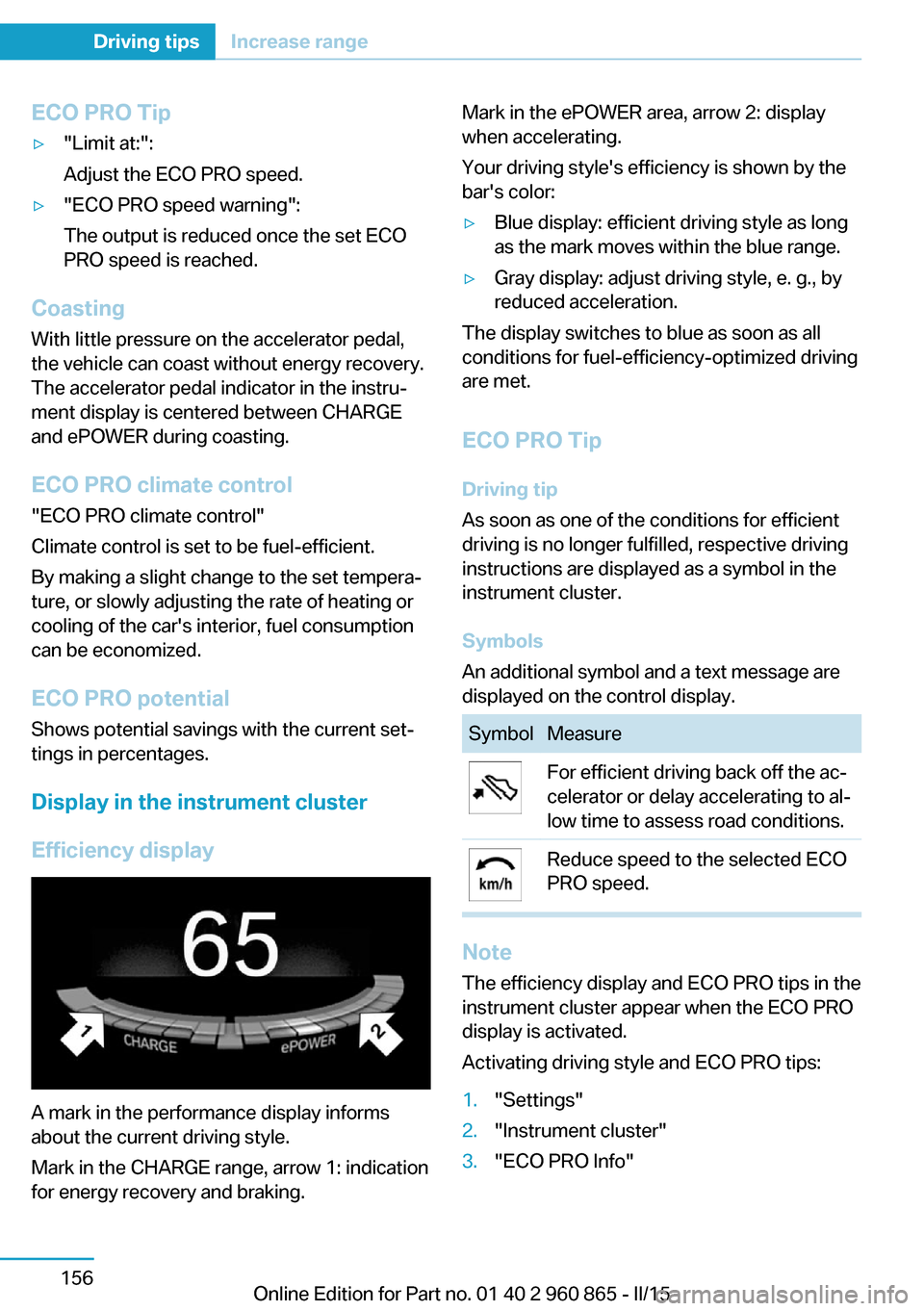
A mark in the performance display informs
about the current driving style.
Mark in the CHARGE range, arrow 1: indication
for energy recovery and braking.
Mark in the ePOWER area, arrow 2: display
when accelerating.
Your driving style's efficiency is shown by the
bar's color:▷Blue display: efficient driving style as long
as the mark moves within the blue range.▷Gray display: adjust driving style, e. g., by
reduced acceleration.
The display switches to blue as soon as all
conditions for fuel-efficiency-optimized driving
are met.
ECO PRO Tip Driving tip
As soon as one of the conditions for efficient
driving is no longer fulfilled, respective driving
instructions are displayed as a symbol in the
instrument cluster.
Symbols
An additional symbol and a text message are
displayed on the control display.
SymbolMeasureFor efficient driving back off the ac‐
celerator or delay accelerating to al‐
low time to assess road conditions.Reduce speed to the selected ECO
PRO speed.
Note
The efficiency display and ECO PRO tips in the
instrument cluster appear when the ECO PRO
display is activated.
Activating driving style and ECO PRO tips:
1."Settings"2."Instrument cluster"3."ECO PRO Info"Seite 156Driving tipsIncrease range156
Online Edition for Part no. 01 40 2 960 865 - II/15
Page 183 of 236
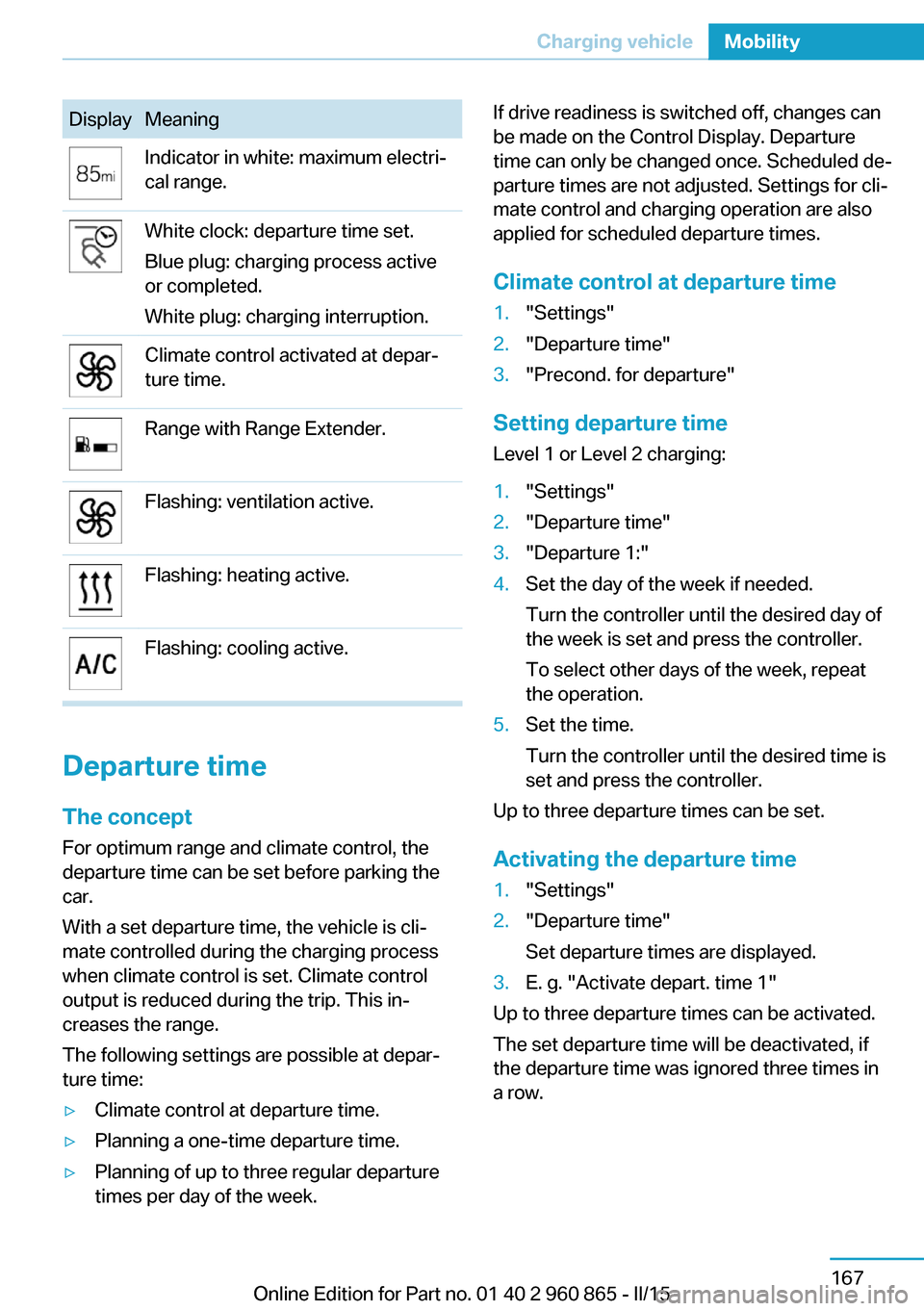
DisplayMeaningIndicator in white: maximum electri‐
cal range.White clock: departure time set.
Blue plug: charging process active
or completed.
White plug: charging interruption.Climate control activated at depar‐
ture time.Range with Range Extender.Flashing: ventilation active.Flashing: heating active.Flashing: cooling active.
Departure time
The concept For optimum range and climate control, the
departure time can be set before parking the
car.
With a set departure time, the vehicle is cli‐
mate controlled during the charging process
when climate control is set. Climate control
output is reduced during the trip. This in‐
creases the range.
The following settings are possible at depar‐
ture time:
▷Climate control at departure time.▷Planning a one-time departure time.▷Planning of up to three regular departure
times per day of the week.If drive readiness is switched off, changes can
be made on the Control Display. Departure
time can only be changed once. Scheduled de‐
parture times are not adjusted. Settings for cli‐
mate control and charging operation are also
applied for scheduled departure times.
Climate control at departure time1."Settings"2."Departure time"3."Precond. for departure"
Setting departure time
Level 1 or Level 2 charging:
1."Settings"2."Departure time"3."Departure 1:"4.Set the day of the week if needed.
Turn the controller until the desired day of
the week is set and press the controller.
To select other days of the week, repeat
the operation.5.Set the time.
Turn the controller until the desired time is
set and press the controller.
Up to three departure times can be set.
Activating the departure time
1."Settings"2."Departure time"
Set departure times are displayed.3.E. g. "Activate depart. time 1"
Up to three departure times can be activated.
The set departure time will be deactivated, if
the departure time was ignored three times in
a row.
Seite 167Charging vehicleMobility167
Online Edition for Part no. 01 40 2 960 865 - II/15
Page 202 of 236
CoolantVehicle features and optionsThis chapter describes all standard, country-
specific and optional features offered with the
series. It also describes features that are not
necessarily available in your car, e. g., due to
the selected options or country versions. This
also applies to safety-related functions and
systems. The respectively applicable country
provisions must be observed when using the
respective features and systems.
Hints Danger of burns from hot engine
Do not open the cooling system while
the engine is hot; otherwise, esliding coolant
may cause burns.◀
Suitable additives
Only use suitable additives; otherwise,
engine damage may occur. The additives are
harmful to your health.◀
Coolant consists of water and additives.
The vehicle's cooling circuits are filled with dif‐
ferent types of coolant. Do not mix the differ‐
ent types of coolant.
Not all commercially available additives are
suitable for the vehicle. Information about the
suitable additives are available from the service
center.
Coolant reservoir
The vehicle has two coolant reservoirs that are
located under the hood.
To ensure the operational reliability of the vehi‐
cle, always check the coolant level of both
coolant reservoirs.
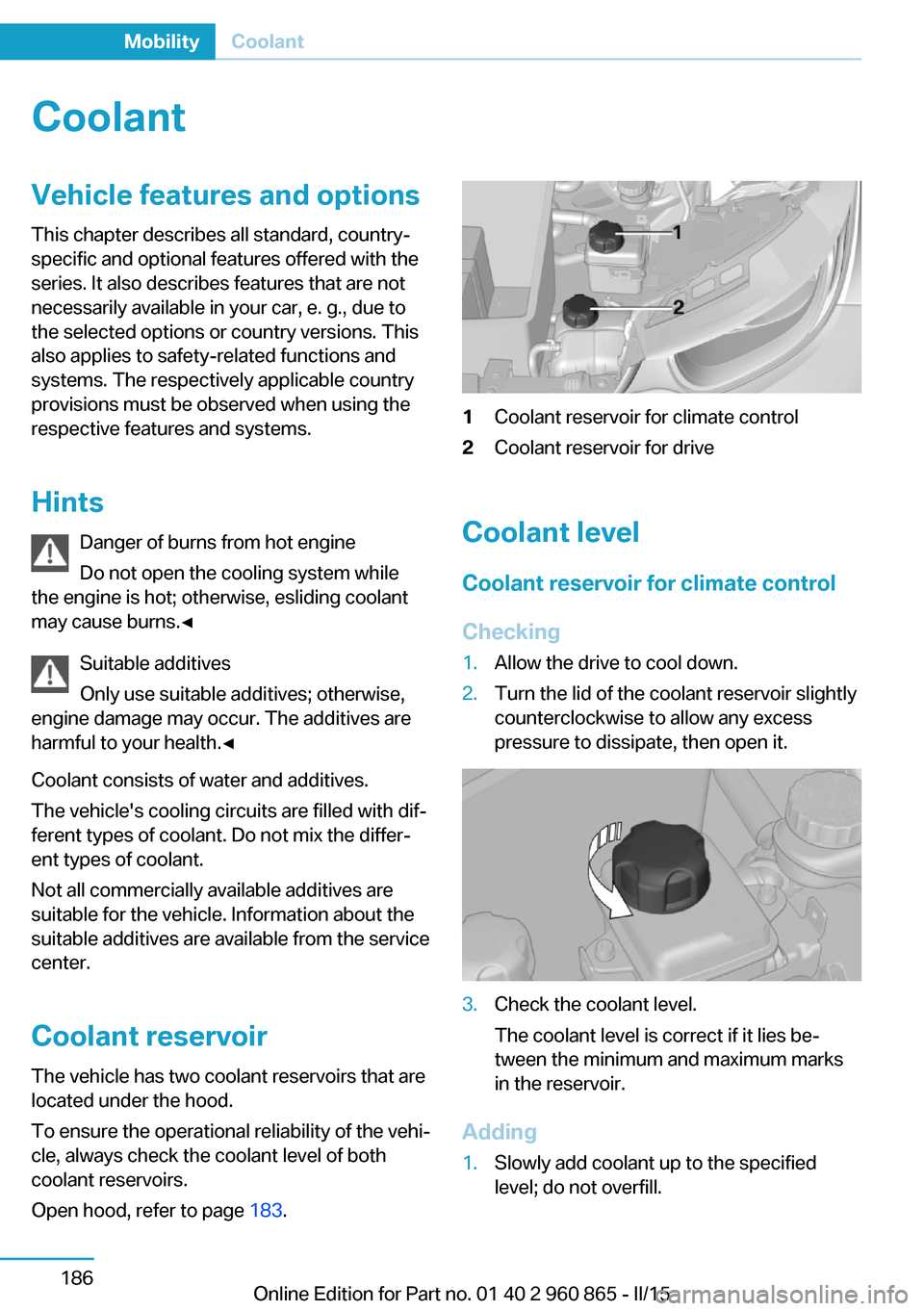
Open hood, refer to page 183.1Coolant reservoir for climate control2Coolant reservoir for drive
Coolant level
Coolant reservoir for climate control
Checking
1.Allow the drive to cool down.2.Turn the lid of the coolant reservoir slightly
counterclockwise to allow any excess
pressure to dissipate, then open it.3.Check the coolant level.
The coolant level is correct if it lies be‐
tween the minimum and maximum marks
in the reservoir.
Adding
1.Slowly add coolant up to the specified
level; do not overfill.Seite 186MobilityCoolant186
Online Edition for Part no. 01 40 2 960 865 - II/15
Page 226 of 236
Everything from A to Z
IndexA ABS, Antilock Brake Sys‐ tem 107
ACC, Active Cruise Control with Stop & Go 110
Accelerator pedal posi‐ tions 68
Accessories and parts 7
AC quick charging cable, see Level 2 charging cable 162
Activated-charcoal filter 133
Active Cruise Control with Stop & Go, ACC 110
Adjustments, seats/head re‐ straints 53
Adjustments, steering wheel 59
Advance climate control, refer to Stationary climate con‐
trol 133
After washing vehicle 201
Airbags 93
Airbags, indicator/warning light 94
Air circulation, refer to Recir‐ culated-air mode 129, 132
Air conditioner 128
Air, dehumidifying, refer to Cooling function 129, 131
Air distribution, manual 129, 131
Air flow, air conditioner 130
Air flow, automatic climate control 133
Air pressure, tires 173
Air vents, refer to Ventila‐ tion 133
Alarm system 49
Alarm, unintentional 50 All around the center con‐
sole 16
All around the roofliner 17
All around the steering wheel 14
All-season tires, refer to Win‐ ter tires 177
Alternating-code hand-held transmitter 136
Ambient light 92
Antifreeze, washer fluid 74
Antilock Brake System, ABS 107
Anti-slip control, refer to DSC 107
Approved axle load 207
Ash tray 139
Assistance when driving off 109
Assist system, refer to Intelli‐ gent Safety 100
AUTO intensity 132
Automatic car wash 200
Automatic climate con‐ trol 130
Automatic cornering adjust‐ ment 57
Automatic Cruise Control with Stop & Go 110
Automatic Curb Monitor 57
Automatic deactivation, front- seat passenger airbags 95
Automatic deactivation of the high-voltage system 34
Automatic headlight con‐ trol 91
Automatic locking 48
Automatic recirculated-air control 132
AUTO program, automatic cli‐ mate control 131 AUTO program, intensity 132
Average fuel consumption 87
Average speed 87
Axle loads, weights 207
B Backup charging 168
Band-aids, refer to First aid kit 197
Bar for tow-starting/ towing 198
Battery, 12 volt 194
Battery replacement, vehicle battery 194
Battery replacement, vehicle remote control 39
Battery state indicator 77
Battery, vehicle 194
Being pulled, referred to Tow‐ ing 197
Belts, safety belts 55
BMW Assist 6
BMW eDRIVE 31
BMW Homepage 6
BMW i Driver’s Guide App 6
BMW Internet page 6
BMW maintenance sys‐ tem 188
Body work, see Working on the vehicle 34
Brake assistant 107
Brake discs, break-in 148
Brake pads, break-in 148
Braking, hints 150
Breakdown assistance 196
Break-in 148
Brightness of Control Dis‐ play 89
Bulb replacement 190
Bulb replacement, front 191 Seite 210ReferenceEverything from A to Z210
Online Edition for Part no. 01 40 2 960 865 - II/15
Page 227 of 236
Bulb replacement, taillights 193
Bulbs and lamps 190
Button, RES 113
Button, Start/Stop 64
Bypassing, refer to Jump- starting 197
C
California Proposition 65 Warning 8
Camera-based Cruise Con‐ trol 110
Camera lenses, care 203
Camera, rearview cam‐ era 121
Car battery 194
Car care products 201
Care, displays 203
Care, vehicle 201
Cargo 152
Cargo area 141
Cargo area, enlarging 141
Cargo area, storage compart‐ ments 145
Cargo cover 141
Cargo, securing 153
Cargo straps, securing cargo 153
Car key, refer to Remote con‐ trol 38
Carpet, care 203
Car wash 200
Catalytic converter, refer to Hot exhaust system 149
CBS Condition Based Serv‐ ice 188
Center armrest 143
Center console 16
Central locking system 44
Central screen, refer to Con‐ trol Display 18
Changes, technical, refer to Safety 7
Changing wheels 194 Changing wheels/tires 176
Charging battery, see Vehicle charging 160
Charging, refer to Charging vehicle 160
Charging, refer to Vehicle charging 160
Charging screen 76
Charging state indicator, high-voltage battery 77
Charging status, see display of the charging status 164
Charging vehicle 160
Charging vehicle, refer to Ve‐ hicle charging 160
Chassis number, see vehicle identification number 10
Check Control 78
Check engine oil 184
Check oil level 184
Children, seating position 60
Children, transporting safely 60
Child restraint fixing sys‐ tem 60
Child restraint fixing system LATCH 61
Child restraint fixing systems, mounting 60
Child seat, mounting 60
Child seats 60
Chrome parts, care 202
Cigarette lighter 139
Cleaning displays 203
Climate control 128, 130
Clock 83
Closing/opening via door lock 43
Closing/opening with remote control 41
Clothes hooks 145
Coasting 69
Combination reel, refer to Turn signals 71
Combination switch, refer to Wiper system 72 Comfort Access 46
COMFORT program, Dy‐ namic Driving Control 108
Compartments in the doors 145
Compass 137
Compressor 178
Computer, refer to On-board computer 86
Condensation on win‐ dows 129, 132
Condensation under the vehi‐ cle 151
Condition Based Service CBS 188
Confirmation signal 48
ConnectedDrive 6
ConnectedDrive Services 6
Connecting electrical devi‐ ces 139
Contact with water, high-volt‐ age system 34
Control Display 18
Control Display, settings 88
Controller 18
Control systems, driving sta‐ bility 107
Convenient opening with the remote control 41
Coolant 186
Coolant temperature 82
Cooling function 129, 131
Cooling, maximum 132
Cooling system 186
Corrosion on brake discs 151
Cosmetic mirror 139
Courtesy lamps during un‐ locking 41
Courtesy lamps with the vehi‐ cle locked 42
Cruise control 116
Cruise control, active with Stop & Go 110
Cruise control, refer to Cam‐ era-based Cruise Con‐
trol 110 Seite 211Everything from A to ZReference211
Online Edition for Part no. 01 40 2 960 865 - II/15
Page 231 of 236
Make-up mirror 139
Malfunction displays, see Check Control 78
Manual air distribu‐ tion 129, 131
Manual air flow 130, 133
Manual operation, door lock 43
Manual operation, exterior mirrors 57
Manual operation, fuel filler flap 170
Manual operation, Park Dis‐ tance Control PDC 119
Manual operation, rearview camera 121
Marking on approved tires 177
Master key, refer to Remote control 38
Maximum cooling 132
Maximum speed, display 84
Maximum speed, winter tires 177
Measure, units of 89
Medical kit 197
Menu, EfficientDynamics 157
Menu in instrument clus‐ ter 85
Menus, operating, iDrive 18
Menus, refer to iDrive operat‐ ing concept 19
Messages, see Check Con‐ trol 78
Microfilter 130, 133
Minimum tread, tires 176
Mirrors 57
Mobile communication devi‐ ces in the vehicle 150
Mobility System 178
Modifications, technical, refer to Safety 7
Moisture in headlight 191
Monitor, refer to Control Dis‐ play 18 Mounting of child restraint
systems 60
Multifunction steering wheel, buttons 14
Multimedia 6
N
Navigation 6
Neck restraints, front, refer to Head restraints 56
Neck restraints, rear, refer to Head restraints 56
Neutral cleaner, see wheel cleaner 202
New wheels and tires 176
Nylon rope for tow-starting/ towing 198
O OBD Onboard Diagnosis 189
OBD, see OBD Onboard Di‐ agnosis 189
Obstacle marking, rearview camera 122
Octane rating, refer to Rec‐ ommended fuel grade 172
Odometer 82
Office 6
Oil 184
Oil, adding 185
Oil change interval, service requirements 83
Old batteries, disposal 194
On-board computer 86
Onboard monitor, refer to Control Display 18
Opening/closing via door lock 43
Opening and closing 38
Opening and closing, without remote control 43
Opening and closing, with re‐ mote control 41
Operating concept, iDrive 18 Optional equipment, standard
equipment 6
Outside air, refer to Auto‐ matic recirculated-air con‐
trol 132
Overheating of engine, refer to Coolant temperature 82
P Paint, vehicle 201
Parallel parking assistant 123
Park Distance Control PDC 118
Parked car ventilation, refer to Stationary climate con‐
trol 133
Parked vehicle, condensa‐ tion 151
Parking aid, refer to PDC 118
Parking assistant 123
Parking brake 70
Parking lights 90
Parts and accessories 7
Passenger side mirror, tilting downward 57
Pathway lines, rearview cam‐ era 122
PDC Park Distance Con‐ trol 118
Pedestrian warning with city braking function 104
Performance display 77
Personal Profile 39
Personal Profile, exporting profiles 40
Pinch protection system, glass sunroof 52
Pinch protection system, win‐ dows 51
Plastic, care 202
Power failure 194
Power sunroof, glass 51
Power windows 50
Pressure, tire air pres‐ sure 173 Seite 215Everything from A to ZReference215
Online Edition for Part no. 01 40 2 960 865 - II/15