fuel BMW I3 2015 I01 Owner's Guide
[x] Cancel search | Manufacturer: BMW, Model Year: 2015, Model line: I3, Model: BMW I3 2015 I01Pages: 236, PDF Size: 17.6 MB
Page 193 of 236
Approved wheels and tires
You should only use wheels and tires
that have been approved by the vehicle manu‐
facturer for your vehicle type; otherwise, e.g.,
despite having the same official size ratings,
variations can lead to chassis contact and with
it, the risk of severe accidents
The manufacturer of your vehicle cannot eval‐
uate non-approved wheels and tires to deter‐
mine if they are suited for use, and therefore
cannot guarantee the operating safety of the
vehicle.◀
Recommended tire brands
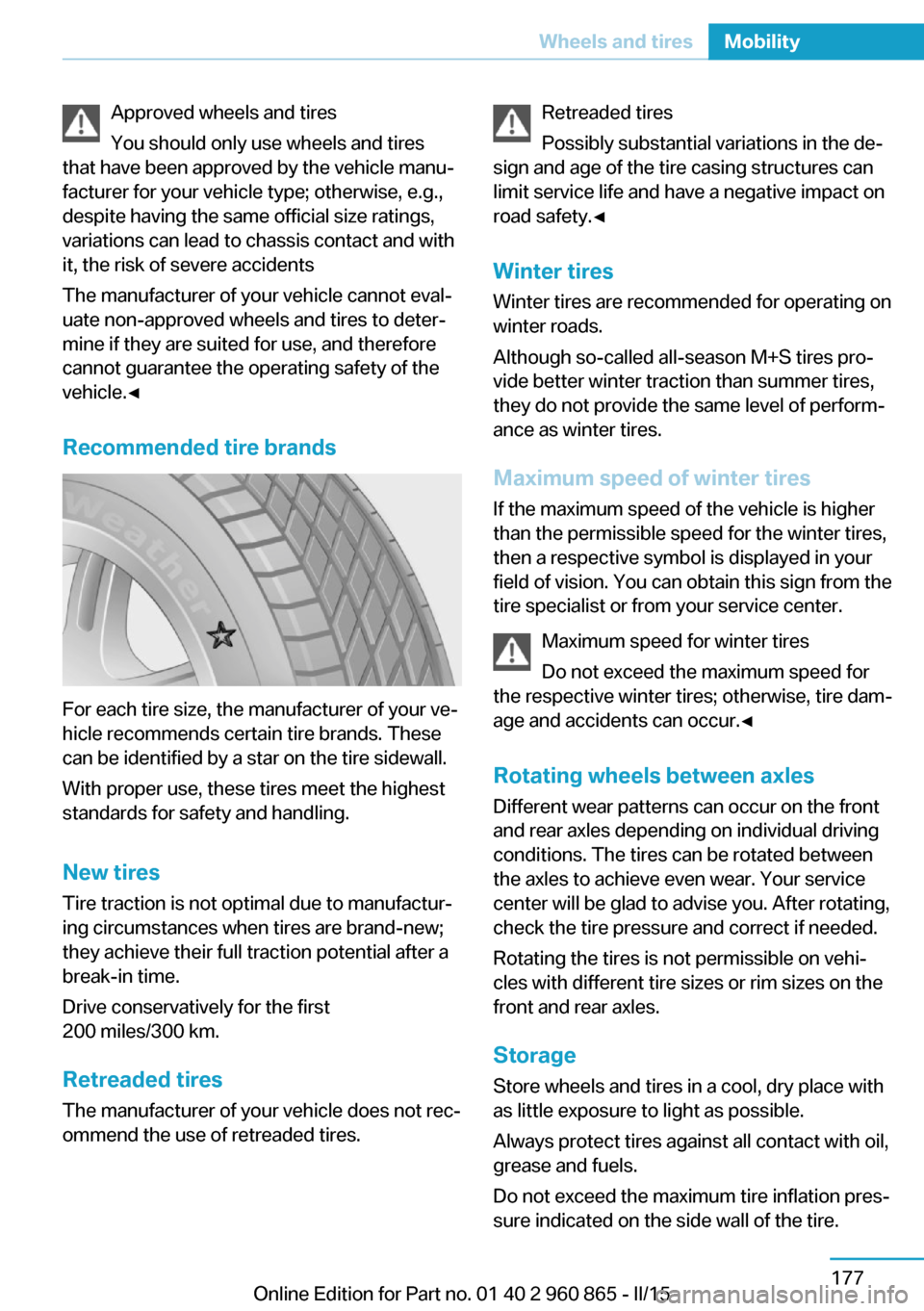
For each tire size, the manufacturer of your ve‐
hicle recommends certain tire brands. These
can be identified by a star on the tire sidewall.
With proper use, these tires meet the highest
standards for safety and handling.
New tires Tire traction is not optimal due to manufactur‐
ing circumstances when tires are brand-new;
they achieve their full traction potential after a
break-in time.
Drive conservatively for the first
200 miles/300 km.
Retreaded tires
The manufacturer of your vehicle does not rec‐
ommend the use of retreaded tires.
Retreaded tires
Possibly substantial variations in the de‐
sign and age of the tire casing structures can
limit service life and have a negative impact on
road safety.◀
Winter tires
Winter tires are recommended for operating on
winter roads.
Although so-called all-season M+S tires pro‐
vide better winter traction than summer tires, they do not provide the same level of perform‐
ance as winter tires.
Maximum speed of winter tires If the maximum speed of the vehicle is higher
than the permissible speed for the winter tires,
then a respective symbol is displayed in your
field of vision. You can obtain this sign from the
tire specialist or from your service center.
Maximum speed for winter tires
Do not exceed the maximum speed for
the respective winter tires; otherwise, tire dam‐
age and accidents can occur.◀
Rotating wheels between axles Different wear patterns can occur on the front
and rear axles depending on individual driving
conditions. The tires can be rotated between
the axles to achieve even wear. Your service
center will be glad to advise you. After rotating,
check the tire pressure and correct if needed.
Rotating the tires is not permissible on vehi‐
cles with different tire sizes or rim sizes on the
front and rear axles.
StorageStore wheels and tires in a cool, dry place with
as little exposure to light as possible.
Always protect tires against all contact with oil,
grease and fuels.
Do not exceed the maximum tire inflation pres‐
sure indicated on the side wall of the tire.Seite 177Wheels and tiresMobility177
Online Edition for Part no. 01 40 2 960 865 - II/15
Page 200 of 236
Engine oilVehicle features and options
This chapter describes all standard, country-
specific and optional features offered with the
series. It also describes features that are not
necessarily available in your car, e. g., due to
the selected options or country versions. This
also applies to safety-related functions and
systems. The respectively applicable country
provisions must be observed when using the
respective features and systems.
General information Engine oil consumption depends on the fre‐
quency of Range Extender use. Therefore,
regularly check the engine oil level after refuel‐
ing.
Checking the oil level NoteCheck the engine oil level with Range Extender
warmed up to operating temperature.
After switching off the Range Extender, wait
several minutes before checking the oil level
so that the engine oil can collect in the oil pan.
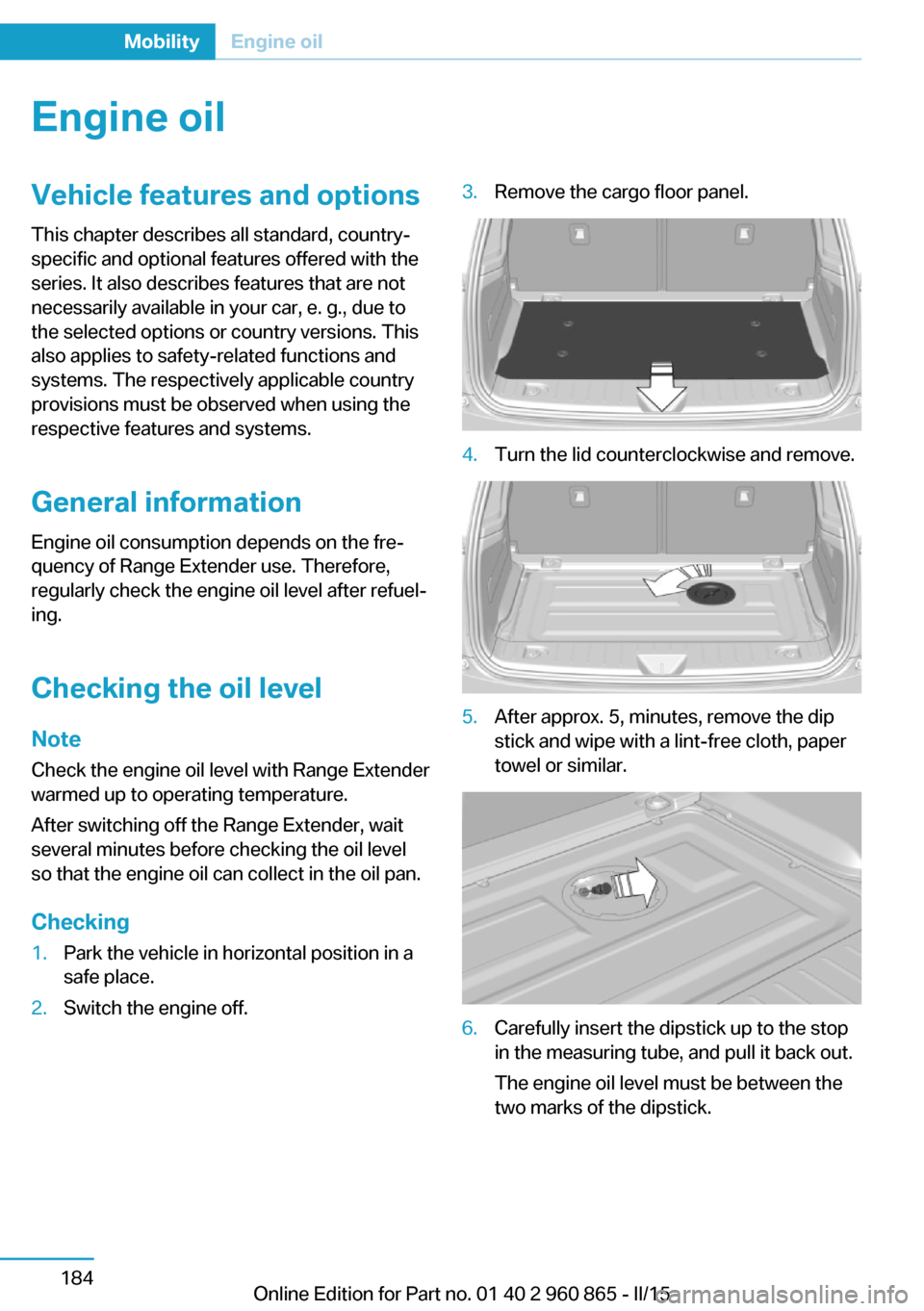
Checking1.Park the vehicle in horizontal position in a
safe place.2.Switch the engine off.3.Remove the cargo floor panel.4.Turn the lid counterclockwise and remove.5.After approx. 5, minutes, remove the dip
stick and wipe with a lint-free cloth, paper
towel or similar.6.Carefully insert the dipstick up to the stop
in the measuring tube, and pull it back out.
The engine oil level must be between the
two marks of the dipstick.Seite 184MobilityEngine oil184
Online Edition for Part no. 01 40 2 960 865 - II/15
Page 204 of 236
MaintenanceVehicle features and options
This chapter describes all standard, country-
specific and optional features offered with the
series. It also describes features that are not
necessarily available in your car, e. g., due to
the selected options or country versions. This
also applies to safety-related functions and
systems. The respectively applicable country
provisions must be observed when using the
respective features and systems.
BMW maintenance system The maintenance system indicates required
maintenance measures, and thereby provides
support in maintaining road safety and the op‐
erational reliability of the vehicle.
In some cases scopes and intervals may vary
according to the country-specific version. Re‐
placement work, spare parts, fuels and lubri‐
cants and wear materials are calculated sepa‐
rately. Additional information is available from
the service center.
Note Maintenance and repairs
Have maintenance and repair work per‐
formed only by a service center or a workshop
that works according to BMW specifications
with appropriately trained personnel. Other‐
wise, there is the risk of fatal injury from elec‐
trocution due to the high-voltage system's
high voltage.◀Condition Based Service
CBS
Sensors and special algorithms take into ac‐
count the driving conditions of your vehicle.
Based on this, Condition Based Service recog‐
nizes the maintenance requirements.
The system makes it possible to adapt the
amount of maintenance corresponding to your
user profile.
Detailed information on service requirements,
refer to page 83, can be displayed on the Con‐
trol Display.
Service data in the remote control Information on the required maintenance is
continuously stored in the remote control. Your service center will read out this data and
suggest the right array of service procedures for your vehicle.
Therefore, hand your service specialist the re‐
mote control with which the vehicle was driven
most recently.
Storage periods Storage periods during which the vehicle bat‐
tery was disconnected are not taken into ac‐
count.
If this occurs, have a service center update the
time-dependent maintenance procedures,
such as checking brake fluid and, if needed,
changing the engine oil and the microfilter/
activated-charcoal filter.Seite 188MobilityMaintenance188
Online Edition for Part no. 01 40 2 960 865 - II/15
Page 217 of 236
tions on avoiding an unintentional alarm,
refer to page 50.
Guide rails in car washes
Avoid car washes with guide rails higher
than 4 in/10 cm; otherwise, the vehicle body
could be damaged.◀
Before driving into a car wash In order to ensure that the vehicle can roll in a
car wash, take the following steps:
1.Drive into the car wash.2.Engage selector lever position N.3.Remove foot from brake pedal.4.Press the Start/Stop button.
In this way, operating readiness remains
switched on, and a Check-Control mes‐
sage is displayed.
To activate drive readiness:
1.Depress the brake pedal.2.Press the Start/Stop button.
Pressing the Start/Stop button without step‐
ping on the brake turns operating readiness
off.
Selector lever position Selector lever position P is engaged automati‐
cally:
▷With operating readiness turned off.▷After approx. 15 minutes.
Headlights
▷Do not rub dry and do not use abrasive or
acidic cleansers.▷Soak areas that have been dirtied e. g.,
from insects, with shampoo and wash off
with water.▷Thaw ice with de-icing spray; do not use an
ice scraper.After washing the vehicle
After washing the vehicle, apply the brakes
briefly to dry them; otherwise, braking action
can be reduced and corrosion of the brake
discs can occur.
Completely remove all residues on the win‐
dows, to minimize loss of visibility due to
smearing and to reduce wiper noises and
wiper blade wear.
Vehicle care
Car care products BMW recommends using care and cleaning
products from BMW, since these have been
tested and approved.
Car care and cleaning products
Follow the instructions on the container.
When cleaning the interior, open the doors or
windows.
Only use products intended for cleaning vehi‐
cles.
Cleansers can contain substances that are
dangerous and harmful to your health.◀
Vehicle paint
Regular care contributes to driving safety and
value retention. Environmental influences in
areas with elevated air pollution or natural con‐
taminants, such as tree resin or pollen can af‐
fect the vehicle's paintwork. Tailor the fre‐
quency and extent of your car care to these
influences.
Aggressive substances such as spilled fuel, oil,
grease or bird droppings, must be removed im‐
mediately to prevent the finish from being al‐
tered or discolored.
Leather care
Remove dust from the leather often, using a
cloth or vacuum cleaner.Seite 201CareMobility201
Online Edition for Part no. 01 40 2 960 865 - II/15
Page 218 of 236
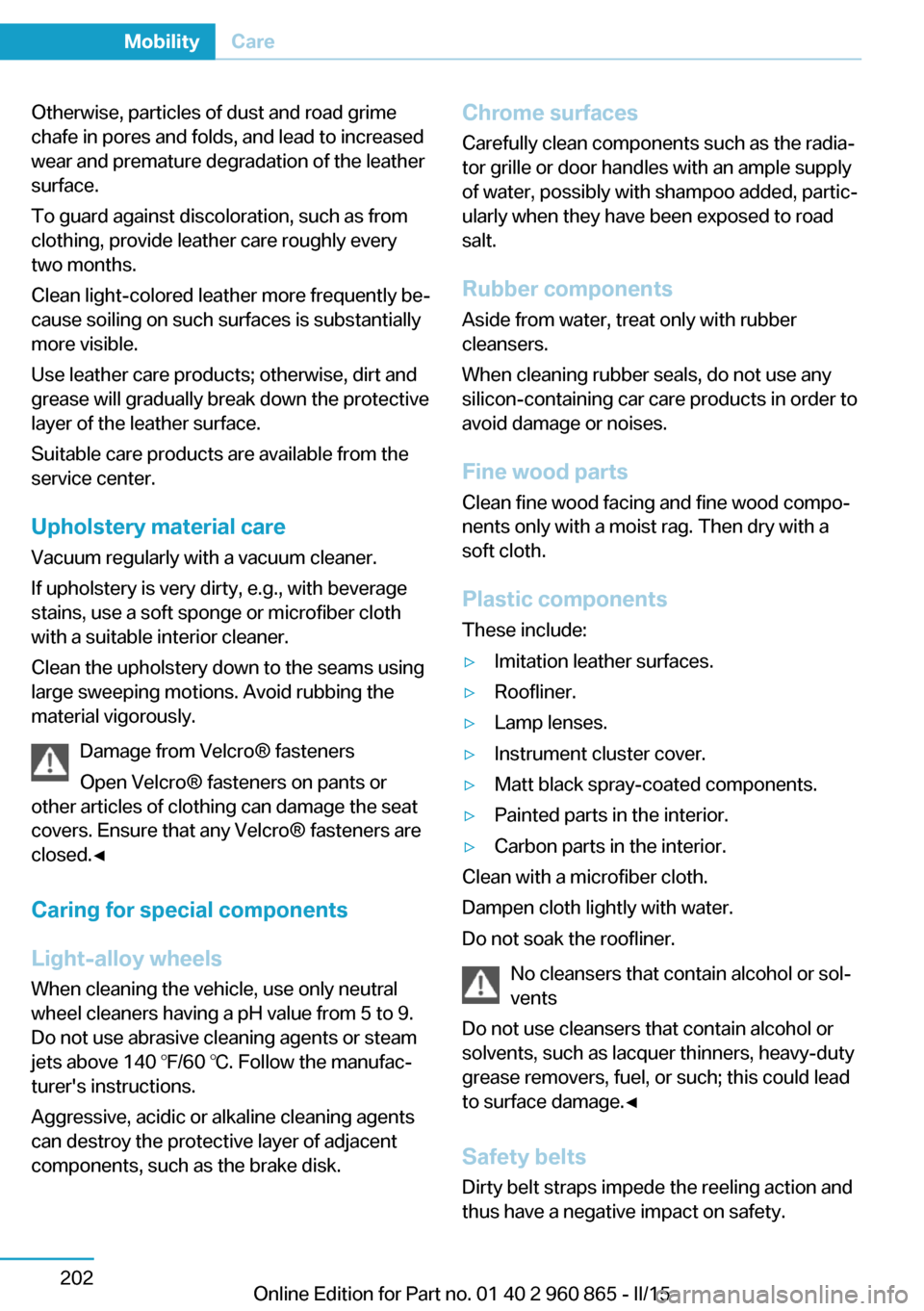
Otherwise, particles of dust and road grime
chafe in pores and folds, and lead to increased
wear and premature degradation of the leather
surface.
To guard against discoloration, such as from
clothing, provide leather care roughly every
two months.
Clean light-colored leather more frequently be‐
cause soiling on such surfaces is substantially
more visible.
Use leather care products; otherwise, dirt and
grease will gradually break down the protective
layer of the leather surface.
Suitable care products are available from the
service center.
Upholstery material care Vacuum regularly with a vacuum cleaner.
If upholstery is very dirty, e.g., with beverage
stains, use a soft sponge or microfiber cloth
with a suitable interior cleaner.
Clean the upholstery down to the seams using
large sweeping motions. Avoid rubbing the
material vigorously.
Damage from Velcro® fasteners
Open Velcro® fasteners on pants or
other articles of clothing can damage the seat
covers. Ensure that any Velcro® fasteners are
closed.◀
Caring for special components
Light-alloy wheels When cleaning the vehicle, use only neutral
wheel cleaners having a pH value from 5 to 9.
Do not use abrasive cleaning agents or steam
jets above 140 ℉/60 ℃. Follow the manufac‐
turer's instructions.
Aggressive, acidic or alkaline cleaning agents
can destroy the protective layer of adjacent
components, such as the brake disk.Chrome surfaces
Carefully clean components such as the radia‐
tor grille or door handles with an ample supply
of water, possibly with shampoo added, partic‐
ularly when they have been exposed to road
salt.
Rubber components
Aside from water, treat only with rubber
cleansers.
When cleaning rubber seals, do not use any
silicon-containing car care products in order to
avoid damage or noises.
Fine wood partsClean fine wood facing and fine wood compo‐
nents only with a moist rag. Then dry with a
soft cloth.
Plastic components
These include:▷Imitation leather surfaces.▷Roofliner.▷Lamp lenses.▷Instrument cluster cover.▷Matt black spray-coated components.▷Painted parts in the interior.▷Carbon parts in the interior.
Clean with a microfiber cloth.
Dampen cloth lightly with water.
Do not soak the roofliner.
No cleansers that contain alcohol or sol‐
vents
Do not use cleansers that contain alcohol or
solvents, such as lacquer thinners, heavy-duty
grease removers, fuel, or such; this could lead
to surface damage.◀
Safety belts
Dirty belt straps impede the reeling action and
thus have a negative impact on safety.
Seite 202MobilityCare202
Online Edition for Part no. 01 40 2 960 865 - II/15
Page 223 of 236
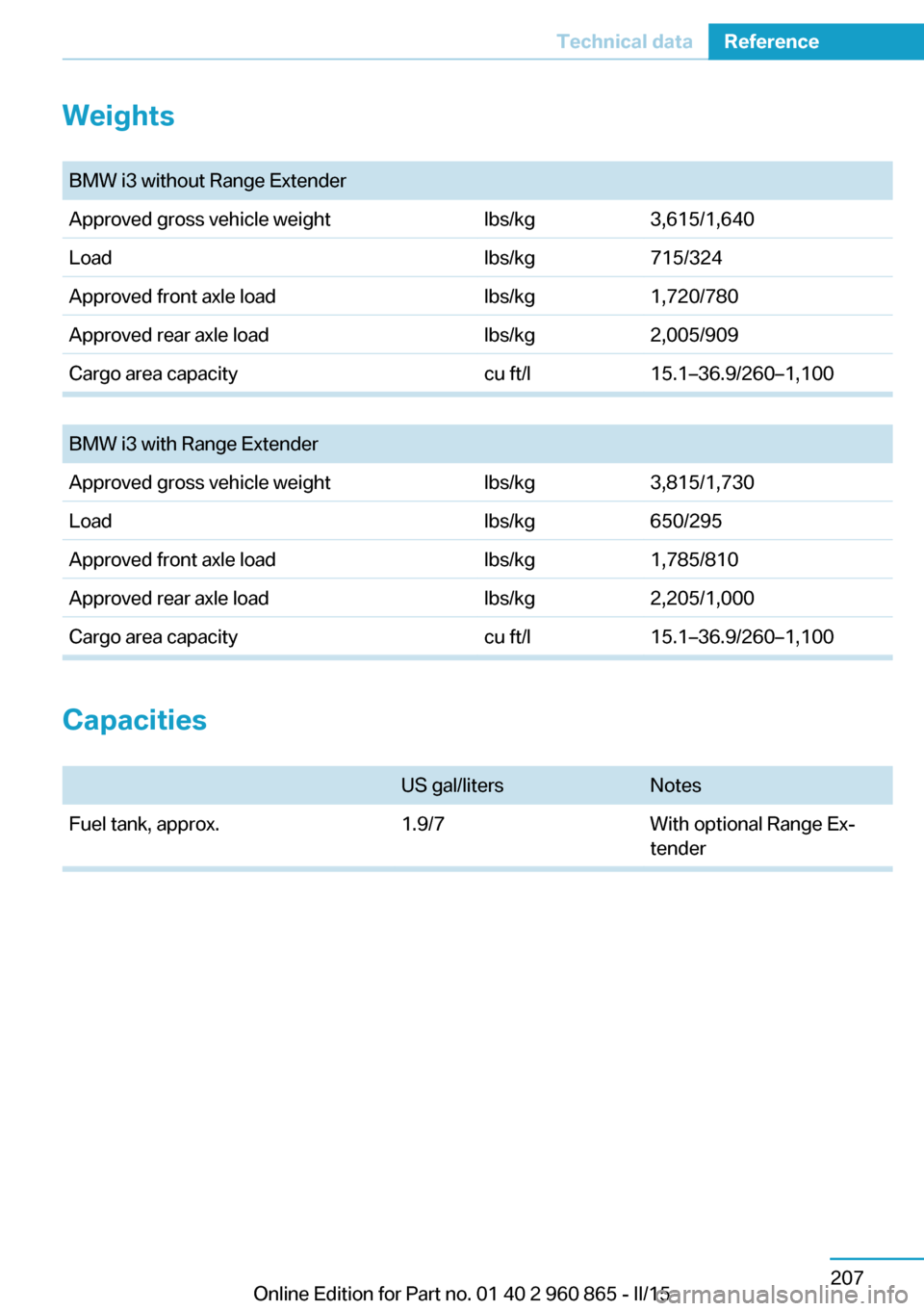
Weights
BMW i3 without Range ExtenderApproved gross vehicle weightlbs/kg3,615/1,640Loadlbs/kg715/324Approved front axle loadlbs/kg1,720/780Approved rear axle loadlbs/kg2,005/909Cargo area capacitycu ft/l15.1–36.9/260–1,100
BMW i3 with Range ExtenderApproved gross vehicle weightlbs/kg3,815/1,730Loadlbs/kg650/295Approved front axle loadlbs/kg1,785/810Approved rear axle loadlbs/kg2,205/1,000Cargo area capacitycu ft/l15.1–36.9/260–1,100
Capacities
US gal/litersNotesFuel tank, approx.1.9/7With optional Range Ex‐
tenderSeite 207Technical dataReference207
Online Edition for Part no. 01 40 2 960 865 - II/15
Page 226 of 236
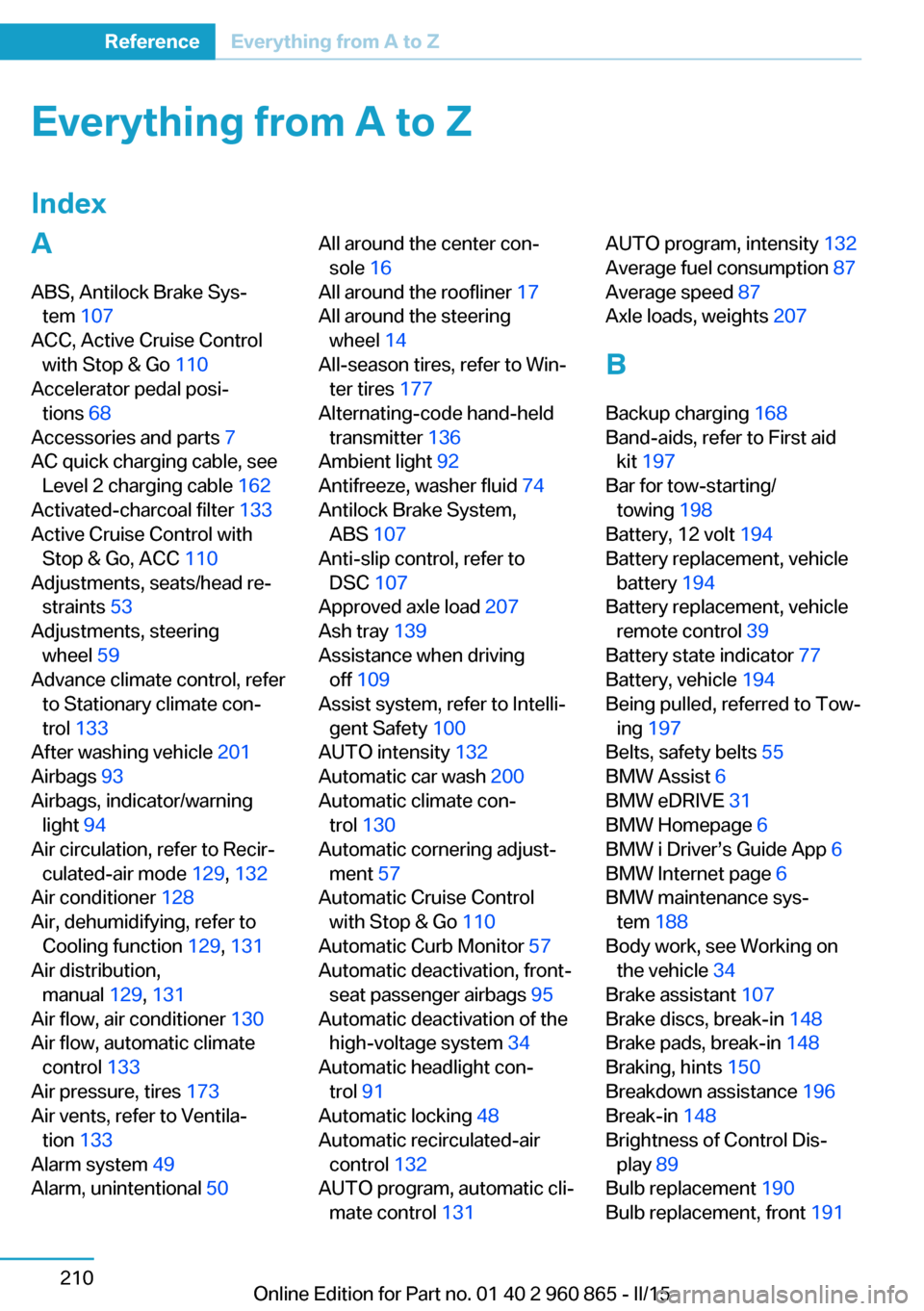
Everything from A to Z
IndexA ABS, Antilock Brake Sys‐ tem 107
ACC, Active Cruise Control with Stop & Go 110
Accelerator pedal posi‐ tions 68
Accessories and parts 7
AC quick charging cable, see Level 2 charging cable 162
Activated-charcoal filter 133
Active Cruise Control with Stop & Go, ACC 110
Adjustments, seats/head re‐ straints 53
Adjustments, steering wheel 59
Advance climate control, refer to Stationary climate con‐
trol 133
After washing vehicle 201
Airbags 93
Airbags, indicator/warning light 94
Air circulation, refer to Recir‐ culated-air mode 129, 132
Air conditioner 128
Air, dehumidifying, refer to Cooling function 129, 131
Air distribution, manual 129, 131
Air flow, air conditioner 130
Air flow, automatic climate control 133
Air pressure, tires 173
Air vents, refer to Ventila‐ tion 133
Alarm system 49
Alarm, unintentional 50 All around the center con‐
sole 16
All around the roofliner 17
All around the steering wheel 14
All-season tires, refer to Win‐ ter tires 177
Alternating-code hand-held transmitter 136
Ambient light 92
Antifreeze, washer fluid 74
Antilock Brake System, ABS 107
Anti-slip control, refer to DSC 107
Approved axle load 207
Ash tray 139
Assistance when driving off 109
Assist system, refer to Intelli‐ gent Safety 100
AUTO intensity 132
Automatic car wash 200
Automatic climate con‐ trol 130
Automatic cornering adjust‐ ment 57
Automatic Cruise Control with Stop & Go 110
Automatic Curb Monitor 57
Automatic deactivation, front- seat passenger airbags 95
Automatic deactivation of the high-voltage system 34
Automatic headlight con‐ trol 91
Automatic locking 48
Automatic recirculated-air control 132
AUTO program, automatic cli‐ mate control 131 AUTO program, intensity 132
Average fuel consumption 87
Average speed 87
Axle loads, weights 207
B Backup charging 168
Band-aids, refer to First aid kit 197
Bar for tow-starting/ towing 198
Battery, 12 volt 194
Battery replacement, vehicle battery 194
Battery replacement, vehicle remote control 39
Battery state indicator 77
Battery, vehicle 194
Being pulled, referred to Tow‐ ing 197
Belts, safety belts 55
BMW Assist 6
BMW eDRIVE 31
BMW Homepage 6
BMW i Driver’s Guide App 6
BMW Internet page 6
BMW maintenance sys‐ tem 188
Body work, see Working on the vehicle 34
Brake assistant 107
Brake discs, break-in 148
Brake pads, break-in 148
Braking, hints 150
Breakdown assistance 196
Break-in 148
Brightness of Control Dis‐ play 89
Bulb replacement 190
Bulb replacement, front 191 Seite 210ReferenceEverything from A to Z210
Online Edition for Part no. 01 40 2 960 865 - II/15
Page 228 of 236
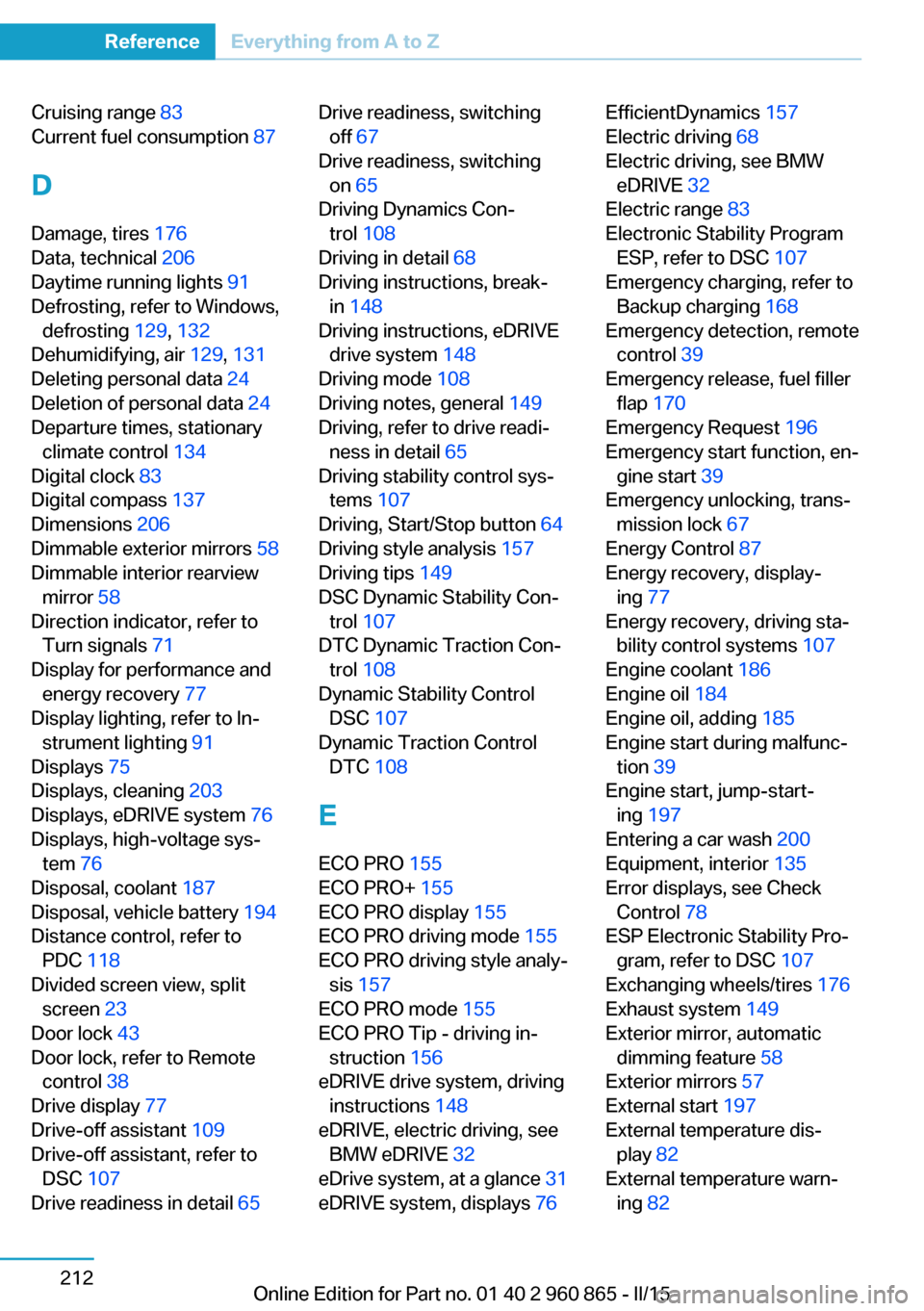
Cruising range 83
Current fuel consumption 87
D
Damage, tires 176
Data, technical 206
Daytime running lights 91
Defrosting, refer to Windows, defrosting 129, 132
Dehumidifying, air 129, 131
Deleting personal data 24
Deletion of personal data 24
Departure times, stationary climate control 134
Digital clock 83
Digital compass 137
Dimensions 206
Dimmable exterior mirrors 58
Dimmable interior rearview mirror 58
Direction indicator, refer to Turn signals 71
Display for performance and energy recovery 77
Display lighting, refer to In‐ strument lighting 91
Displays 75
Displays, cleaning 203
Displays, eDRIVE system 76
Displays, high-voltage sys‐ tem 76
Disposal, coolant 187
Disposal, vehicle battery 194
Distance control, refer to PDC 118
Divided screen view, split screen 23
Door lock 43
Door lock, refer to Remote control 38
Drive display 77
Drive-off assistant 109
Drive-off assistant, refer to DSC 107
Drive readiness in detail 65 Drive readiness, switching
off 67
Drive readiness, switching on 65
Driving Dynamics Con‐ trol 108
Driving in detail 68
Driving instructions, break- in 148
Driving instructions, eDRIVE drive system 148
Driving mode 108
Driving notes, general 149
Driving, refer to drive readi‐ ness in detail 65
Driving stability control sys‐ tems 107
Driving, Start/Stop button 64
Driving style analysis 157
Driving tips 149
DSC Dynamic Stability Con‐ trol 107
DTC Dynamic Traction Con‐ trol 108
Dynamic Stability Control DSC 107
Dynamic Traction Control DTC 108
E ECO PRO 155
ECO PRO+ 155
ECO PRO display 155
ECO PRO driving mode 155
ECO PRO driving style analy‐ sis 157
ECO PRO mode 155
ECO PRO Tip - driving in‐ struction 156
eDRIVE drive system, driving instructions 148
eDRIVE, electric driving, see BMW eDRIVE 32
eDrive system, at a glance 31
eDRIVE system, displays 76 EfficientDynamics 157
Electric driving 68
Electric driving, see BMW eDRIVE 32
Electric range 83
Electronic Stability Program ESP, refer to DSC 107
Emergency charging, refer to Backup charging 168
Emergency detection, remote control 39
Emergency release, fuel filler flap 170
Emergency Request 196
Emergency start function, en‐ gine start 39
Emergency unlocking, trans‐ mission lock 67
Energy Control 87
Energy recovery, display‐ ing 77
Energy recovery, driving sta‐ bility control systems 107
Engine coolant 186
Engine oil 184
Engine oil, adding 185
Engine start during malfunc‐ tion 39
Engine start, jump-start‐ ing 197
Entering a car wash 200
Equipment, interior 135
Error displays, see Check Control 78
ESP Electronic Stability Pro‐ gram, refer to DSC 107
Exchanging wheels/tires 176
Exhaust system 149
Exterior mirror, automatic dimming feature 58
Exterior mirrors 57
External start 197
External temperature dis‐ play 82
External temperature warn‐ ing 82 Seite 212ReferenceEverything from A to Z212
Online Edition for Part no. 01 40 2 960 865 - II/15
Page 229 of 236
Eyes for securing cargo 153
F
Failure message, see Check Control 78
False alarm, refer to Uninten‐ tional alarm 50
Fan, refer to Air flow 130, 133
Fine wood, care 202
First aid kit 197
Fitting for towing, see Tow fit‐ ting 199
Flat tire, changing wheels 194
Flat Tire Monitor FTM 99
Flat tire, Tire Pressure Moni‐ tor TPM 96
Flat tire, warning lamp 97, 99
Flooding 150
Floor carpet, care 203
Floor mats, care 203
Folding back rear seat back‐ rests 141
Fold-out position, wiper 74
Foot brake 150
Front airbags 93
Front armrest 143
Front beverage holder, front cup holder 144
Front bottle holder, refer to Front cup holder 144
Front can holder, refer to Front cup holder 144
Front cup holder 144
Front-end collision warning with City Braking func‐
tion 101
Front holder for bever‐ ages 144
Front lights 191
front-seat passenger airbags, automatic deactivation 95
Front-seat passenger airbags, indicator lamp 95 FTM Flat Tire Monitor 99
Fuel 172
Fuel consumption, current 87
Fuel consumption, refer to Average fuel consump‐
tion 87
Fuel filler flap 169
Fuel gauge, Range Ex‐ tender 82
Fuel lid 169
Fuel quality 172
Fuel recommendation 172
Fuel, tank capacity 207
Fuse 194
G
Garage door opener, refer to Universal Integrated Remote
Control 135
Gasoline 172
General driving notes 149
Glare shield 139
Glass sunroof, powered 51
Glove compartment 143
GPS location, vehicle posi‐ tion 89
Gross vehicle weight, ap‐ proved 207
H
Halogen headlights, bulb re‐ placement 0
Handbrake, refer to parking brake 70
Hand-held transmitter, alter‐ nating code 136
Hazard warning flashers 196
Head airbags 93
Headlight control, auto‐ matic 91
Headlight courtesy delay fea‐ ture 90
Headlight courtesy delay fea‐ ture, remote control 48 Headlight courtesy delay fea‐
ture via remote control 42
Headlight flasher 72
Headlight glass 191
Headlights 191
Headlights, care 201
Head restraints 53
Head restraints, front 56
Head restraints, rear 56
Heavy cargo, stowing 153
Height, vehicle 206
High beams 72
High beams, bulb replace‐ ment 192
High-voltage battery, charg‐ ing state indicator 77
High-voltage battery, dis‐ charge 149
High-voltage battery, heated 69
High-voltage battery, heavily discharged 69
High-voltage system, auto‐ matic deactivation 34
High-voltage system, contact with water 34
High-voltage system, dis‐ plays 76
High-voltage system, safety 34
Hills 150
Hill start assistant, refer to Drive-off assistant 109
Hints 6
Hold function 71
Homepage 6
Hood 44
Hood via remote control 42
Horn 14
Hot exhaust system 149
Hydroplaning 150
I Ice warning, see External temperature warning 82 Seite 213Everything from A to ZReference213
Online Edition for Part no. 01 40 2 960 865 - II/15
Page 231 of 236
Make-up mirror 139
Malfunction displays, see Check Control 78
Manual air distribu‐ tion 129, 131
Manual air flow 130, 133
Manual operation, door lock 43
Manual operation, exterior mirrors 57
Manual operation, fuel filler flap 170
Manual operation, Park Dis‐ tance Control PDC 119
Manual operation, rearview camera 121
Marking on approved tires 177
Master key, refer to Remote control 38
Maximum cooling 132
Maximum speed, display 84
Maximum speed, winter tires 177
Measure, units of 89
Medical kit 197
Menu, EfficientDynamics 157
Menu in instrument clus‐ ter 85
Menus, operating, iDrive 18
Menus, refer to iDrive operat‐ ing concept 19
Messages, see Check Con‐ trol 78
Microfilter 130, 133
Minimum tread, tires 176
Mirrors 57
Mobile communication devi‐ ces in the vehicle 150
Mobility System 178
Modifications, technical, refer to Safety 7
Moisture in headlight 191
Monitor, refer to Control Dis‐ play 18 Mounting of child restraint
systems 60
Multifunction steering wheel, buttons 14
Multimedia 6
N
Navigation 6
Neck restraints, front, refer to Head restraints 56
Neck restraints, rear, refer to Head restraints 56
Neutral cleaner, see wheel cleaner 202
New wheels and tires 176
Nylon rope for tow-starting/ towing 198
O OBD Onboard Diagnosis 189
OBD, see OBD Onboard Di‐ agnosis 189
Obstacle marking, rearview camera 122
Octane rating, refer to Rec‐ ommended fuel grade 172
Odometer 82
Office 6
Oil 184
Oil, adding 185
Oil change interval, service requirements 83
Old batteries, disposal 194
On-board computer 86
Onboard monitor, refer to Control Display 18
Opening/closing via door lock 43
Opening and closing 38
Opening and closing, without remote control 43
Opening and closing, with re‐ mote control 41
Operating concept, iDrive 18 Optional equipment, standard
equipment 6
Outside air, refer to Auto‐ matic recirculated-air con‐
trol 132
Overheating of engine, refer to Coolant temperature 82
P Paint, vehicle 201
Parallel parking assistant 123
Park Distance Control PDC 118
Parked car ventilation, refer to Stationary climate con‐
trol 133
Parked vehicle, condensa‐ tion 151
Parking aid, refer to PDC 118
Parking assistant 123
Parking brake 70
Parking lights 90
Parts and accessories 7
Passenger side mirror, tilting downward 57
Pathway lines, rearview cam‐ era 122
PDC Park Distance Con‐ trol 118
Pedestrian warning with city braking function 104
Performance display 77
Personal Profile 39
Personal Profile, exporting profiles 40
Pinch protection system, glass sunroof 52
Pinch protection system, win‐ dows 51
Plastic, care 202
Power failure 194
Power sunroof, glass 51
Power windows 50
Pressure, tire air pres‐ sure 173 Seite 215Everything from A to ZReference215
Online Edition for Part no. 01 40 2 960 865 - II/15