ECO mode BMW I8 2014 I12 Owner's Guide
[x] Cancel search | Manufacturer: BMW, Model Year: 2014, Model line: I8, Model: BMW I8 2014 I12Pages: 216, PDF Size: 12.45 MB
Page 150 of 216
Things to remember when drivingVehicle features and options
This chapter describes all standard, country-
specific and optional features offered with the
series. It also describes features that are not
necessarily available in your car, e. g., due to
the selected options or country versions. This
also applies to safety-related functions and
systems.
Breaking-in period
General information Moving parts need time to adjust to one an‐
other (break-in time).
The following instructions will help accomplish
a long vehicle life and good efficiency.
During break-in, do not use the Launch Con‐
trol, refer to page 70.
Engine, transmission, and axle drive Always obey the official speed limit.
Up to 1,200 miles/2,000 km
Do not exceed the maximum engine and road
speed:▷For gasoline engine 4,500 rpm and
100 mph/160 km/h.
Avoid full load or kickdown under all circum‐
stances.
From 1,200 miles/2,000 km The engine and vehicle speed can gradually be
increased.
Tires
Tire traction is not optimal due to manufactur‐
ing circumstances when tires are brand-new;
they achieve their full traction potential after a
break-in time.
Drive conservatively for the first
200 miles/300 km.
Brake system
Brakes require an initial break-in period of ap‐
prox. 300 miles/500 km to achieve optimal per‐
formance between brake discs and brake
pads. Drive moderately during this break-in pe‐
riod.
Following part replacement
The same break-in procedures should be ob‐
served if any of the components above-men‐
tioned have to be renewed in the course of the
vehicle's operating life.
Using eDRIVE efficiently The concept
eDRIVE operates automatically. Proactive driv‐
ing utilizes energy consumption and energy re‐
covery optimally. Energy recovery is used to
charge the high-voltage battery. It is important
for the supply of electrical components and
thus a prerequisite for an extensive range. En‐
ergy consumption and recovery depend very
much, among other things, on your driving
style.
Optimizing driving style
Performance display The driving style can be optimized using the
performance display in ECO PRO mode.Seite 134Driving tipsThings to remember when driving134
Online Edition for Part no. 01 40 2 957 072 - X/14
Page 151 of 216
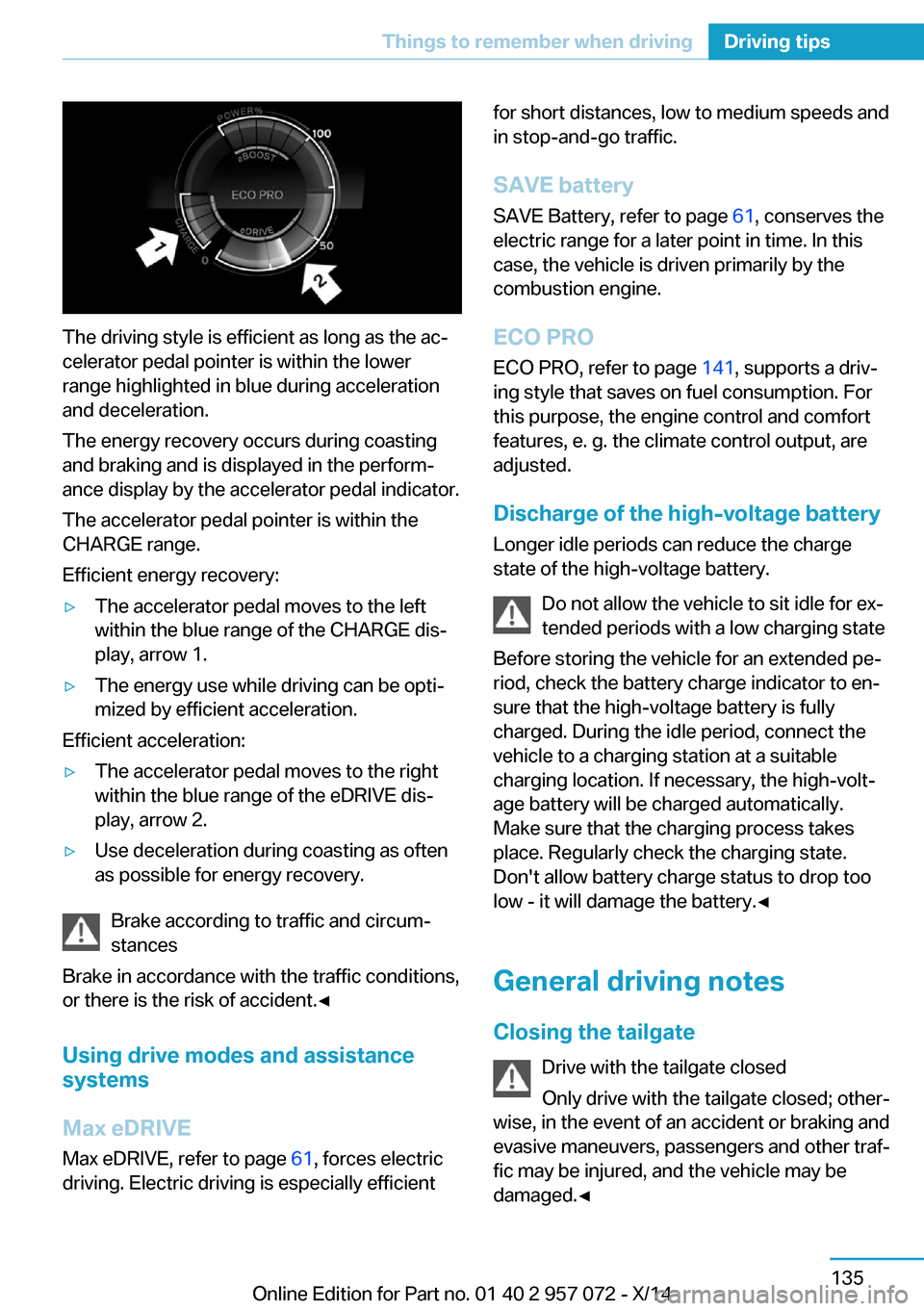
The driving style is efficient as long as the ac‐
celerator pedal pointer is within the lower
range highlighted in blue during acceleration
and deceleration.
The energy recovery occurs during coasting
and braking and is displayed in the perform‐
ance display by the accelerator pedal indicator.
The accelerator pedal pointer is within the
CHARGE range.
Efficient energy recovery:
▷The accelerator pedal moves to the left
within the blue range of the CHARGE dis‐
play, arrow 1.▷The energy use while driving can be opti‐
mized by efficient acceleration.
Efficient acceleration:
▷The accelerator pedal moves to the right
within the blue range of the eDRIVE dis‐
play, arrow 2.▷Use deceleration during coasting as often
as possible for energy recovery.
Brake according to traffic and circum‐
stances
Brake in accordance with the traffic conditions,
or there is the risk of accident.◀
Using drive modes and assistance
systems
Max eDRIVE
Max eDRIVE, refer to page 61, forces electric
driving. Electric driving is especially efficient
for short distances, low to medium speeds and
in stop-and-go traffic.
SAVE battery
SAVE Battery, refer to page 61, conserves the
electric range for a later point in time. In this
case, the vehicle is driven primarily by the
combustion engine.
ECO PRO ECO PRO, refer to page 141, supports a driv‐
ing style that saves on fuel consumption. For
this purpose, the engine control and comfort
features, e. g. the climate control output, are
adjusted.
Discharge of the high-voltage battery Longer idle periods can reduce the charge
state of the high-voltage battery.
Do not allow the vehicle to sit idle for ex‐
tended periods with a low charging state
Before storing the vehicle for an extended pe‐
riod, check the battery charge indicator to en‐
sure that the high-voltage battery is fully
charged. During the idle period, connect the
vehicle to a charging station at a suitable
charging location. If necessary, the high-volt‐
age battery will be charged automatically.
Make sure that the charging process takes
place. Regularly check the charging state.
Don't allow battery charge status to drop too
low - it will damage the battery.◀
General driving notes
Closing the tailgate Drive with the tailgate closed
Only drive with the tailgate closed; other‐
wise, in the event of an accident or braking and
evasive maneuvers, passengers and other traf‐
fic may be injured, and the vehicle may be
damaged.◀Seite 135Things to remember when drivingDriving tips135
Online Edition for Part no. 01 40 2 957 072 - X/14
Page 152 of 216
If driving with the tailgate open cannot be
avoided:▷Drive moderately.
Hot exhaust system
Hot exhaust system
High temperatures are generated in the
exhaust system.
Do not remove the heat shields installed and
never apply undercoating to them. Make sure
that flammable materials, e. g. hay, leaves,
grass, etc. do not come in contact with the hot
exhaust system while driving, while in idle po‐
sition mode, or when parked. Such contact
could lead to a fire, resulting in an increased
risk of serious personal injury as well as prop‐
erty damage.
Do not touch hot exhaust pipes; otherwise,
there is a danger of getting burned.◀
Mobile communication devices in the
vehicle
Mobile communication devices in the ve‐
hicle
It is not recommended to use mobile phones,
such as mobile phones, in the vehicle interior
without a direct connection to an external aer‐
ial. Otherwise, the vehicle's electronics and
mobile communication devices can interfere
with each other. In addition, there is no assur‐
ance that the radiation generated during trans‐
mission will be conducted away from the vehi‐
cle interior.◀
Hydroplaning Hydroplaning
When driving on wet or slushy roads, re‐
duce your speed to prevent hydroplaning.◀
On wet or slushy roads, a wedge of water can
form between the tires and road surface.
This phenomenon is referred to as hydroplan‐
ing. It is characterized by a partial or complete
loss of contact between the tires and the road
surface, ultimately undermining your ability to
steer and brake the vehicle.
Driving through water Observe water level and speed
Do not exceed the maximum water level
and maximum speed; otherwise, the vehicle's
engine, the electrical systems and the trans‐
mission may be damaged.◀
Drive though calm water only and only if it is
not deeper than 9.8 inches/25 cm and at this
height, no faster than walking speed, up to
3 mph/5 km/h.
Braking safely
Your vehicle is equipped with ABS as a stand‐
ard feature.
Applying the brakes fully is the most effective
way of braking in situations needed.
Steering is still responsive. You can still avoid
any obstacles with a minimum of steering ef‐
fort.
Pulsation of the brake pedal and sounds from
the hydraulic circuits indicate that ABS is in its
active mode.
In certain braking situations, the perforated
brake discs can cause functional problems.
However, this has no effect on the perform‐
ance and operational reliability of the brake.
Objects within the range of movement
of the pedals
No objects in the area around the pedals
Keep floor mats, carpets, and any other
objects out of the pedal area; otherwise, the
function of the pedals could be impeded while driving and create the risk of an accident.
Do not place additional floor mats over existing
mats or other objects.Seite 136Driving tipsThings to remember when driving136
Online Edition for Part no. 01 40 2 957 072 - X/14
Page 157 of 216
Switch off any functions that
are not currently needed
Functions such as seat heating and the rear
window defroster require a lot of energy and
reduce the range, especially in city and stop-
and-go traffic.
Reel off these functions if they are not needed.
The ECO PRO driving program supports the
energy conserving use of comfort features.
These functions are automatically deactivated
partially or completely.
Have maintenance carried
out
Have vehicles maintained regularly to achieve
optimal vehicle efficiency and operating life.
The maintenance should be carried out by
your service center.
ECO PRO The concept
ECO PRO supports a driving style that saves
on fuel consumption. For this purpose, the en‐
gine control and comfort features, e. g. the cli‐
mate control output, are adjusted.
At a glance
ECO PRO▷Reduce heat output or heating cycle for ex‐
terior mirror, rear window and seat heating.▷What reduces the the cooling and heating
output of the climate control system.
Activate ECO PRO
Press button repeatedly until ECO
PRO is displayed in the instrument
cluster.
Configuring ECO PRO
Via the Driving Dynamics Control1.Activate ECO PRO.2."Configure ECO PRO"3.Configure the program.
Via the iDrive
1."Settings"2."ECO PRO mode"
Or
1."Settings"2."Driving mode"3."Configure ECO PRO"
Configure the program.
ECO PRO Tip
▷"Limit at:":
Adjust the ECO PRO speed.▷"ECO PRO speed warning":
The output is reduced once the set ECO
PRO speed is reached.
ECO PRO climate control
"ECO PRO climate control"
Climate control is set to be fuel-efficient.
By making a slight change to the set tempera‐
ture, or slowly adjusting the rate of heating or
cooling of the car's interior, fuel consumption
can be economized.
The outputs of the seat heater and the Addi‐
tionally heat output to seats and exterior mirror
is reduced.
The mirror heating is made available when out‐
side temperatures are very cold.
ECO PRO potential
Shows potential savings with the current set‐
tings in percentages.
Seite 141Increase rangeDriving tips141
Online Edition for Part no. 01 40 2 957 072 - X/14
Page 186 of 216
MaintenanceVehicle features and options
This chapter describes all standard, country-
specific and optional features offered with the
series. It also describes features that are not
necessarily available in your car, e. g., due to
the selected options or country versions. This
also applies to safety-related functions and
systems.
BMW maintenance system
The maintenance system indicates required
maintenance measures, and thereby provides
support in maintaining road safety and the op‐
erational reliability of the vehicle.
Note Maintenance and repairs
Have maintenance and repair work per‐
formed only by a service center or a workshop
that works according to BMW specifications
with appropriately trained personnel. Other‐
wise, there is the risk of fatal injury from elec‐
trocution due to the high-voltage system's
high voltage.◀
Condition Based Service
CBS
Sensors and special algorithms take into ac‐
count the driving conditions of your vehicle.
Based on this, Condition Based Service recog‐
nizes the maintenance requirements.
The system makes it possible to adapt the
amount of maintenance corresponding to your
user profile.Detailed information on service requirements,
refer to page 80, can be displayed on the Con‐
trol Display.
For service data Information on the required maintenance is
continuously stored in the remote control. Your service center will read out this data and
suggest the right array of service procedures for your vehicle.
Therefore, hand your service specialist the re‐
mote control with which the vehicle was driven
most recently.
Storage periods
Storage periods during which the vehicle bat‐
tery was disconnected are not taken into ac‐
count.
If this occurs, have a service center update the
time-dependent maintenance procedures,
such as checking brake fluid and, if needed,
changing the engine oil and the microfilter/
activated-charcoal filter.
Service and Warranty
Information Booklet for US
models and Warranty and
Service Guide Booklet for
Canadian models
Please consult your Service and Warranty In‐
formation Booklet for US models and Warranty
and Service Guide Booklet for Canadian mod‐
els for additional information on service re‐
quirements.
Maintenance and repair should be performed
by your service center. Make sure to have reg‐
ular maintenance procedures recorded in the
vehicle's Service and Warranty Information
Booklet for US models, and in the WarrantySeite 170MobilityMaintenance170
Online Edition for Part no. 01 40 2 957 072 - X/14
Page 208 of 216
Defrosting, refer to Windows,defrosting 122
Dehumidifying, air 121
Deleting personal data 24
Deletion of personal data 24
Departure times, stationary climate control 124
Destination distance 84
Digital clock 80
Dimensions 186
Dimmable exterior mirrors 52
Dimmable interior rearview mirror 52
Direction indicator, refer to Turn signals 64
Display in windshield 87
Display lighting, refer to In‐ strument lighting 92
Displays 72
Displays, cleaning 183
Displays, hybrid system 74
Disposal, vehicle battery 174
Distance control, refer to PDC 111
Distance to destination 84
Divided screen view, split screen 23
Door lock 41
Door lock, refer to Remote control 36
Drive-off assistant 108
Drive-off assistant, refer to DSC 105
Driver's door, LED 39
Drive readiness 58
Drive readiness in detail 59
Driving Dynamics Con‐ trol 107
Driving instructions, break- in 134
Driving instructions, eDRIVE drive system 134
Driving mode 107
Driving notes, general 135
Driving stability control sys‐ tems 105 Driving tips 135
Driving with combustion en‐ gine, POWER 62
DSC Dynamic Stability Con‐ trol 105
DTC Dynamic Traction Con‐ trol 106
Dynamic Stability Control DSC 105
Dynamic Traction Control DTC 106
E
eBOOST 62
ECO PRO 141
ECO PRO display 141
ECO PRO driving mode 141
ECO PRO mode 141
ECO PRO Tip - driving in‐ struction 142
eDRIVE drive system, driving instructions 134
eDRIVE, electric driving, see BMW eDRIVE 31
eDrive system, at a glance 31
EfficientDynamics 142
Electric drive readiness, Si‐ lent Start 60
Electric driving, ePOWER 61
Electric driving, max eDRIVE 61
Electric driving, see BMW eDRIVE 31
Electronic oil measure‐ ment 165
Electronic Stability Program ESP, refer to DSC 105
Emergency charging, refer to Backup charging 152
Emergency detection, remote control 37
Emergency release, fuel filler flap 155
Emergency Request 175 Emergency service, refer to
Roadside Assistance 176
Emergency start function, en‐ gine start 37
Emergency unlocking, tail‐ gate 43
Emergency unlocking, trans‐ mission lock 70
Energy Control 84
Energy recovery, CHARGE 62
Engine coolant 169
Engine noise, artificial 62
Engine oil 165
Engine oil, adding 167
Engine oil additives 167
Engine oil change 168
Engine oil filler neck 167
Engine oil temperature 79
Engine oil types, alterna‐ tive 168
Engine oil types, ap‐ proved 167
Engine start during malfunc‐ tion 37
Engine start, jump-start‐ ing 176
Engine temperature 79
Entering a car wash 180
ePOWER, electric driving 61
Equipment, interior 125
Error displays, see Check Control 76
ESP Electronic Stability Pro‐ gram, refer to DSC 105
Exchanging wheels/tires 163
Exhaust system 136
Exterior mirror, automatic dimming feature 52
Exterior mirrors 51
External start 176
External temperature dis‐ play 80
External temperature warn‐ ing 80 Seite 192ReferenceEverything from A to Z192
Online Edition for Part no. 01 40 2 957 072 - X/14
Page 211 of 216
Menu, EfficientDynamics 142
Menu in instrument clus‐ ter 83
Menus, operating, iDrive 18
Menus, refer to iDrive operat‐ ing concept 19
Messages, see Check Con‐ trol 76
Microfilter 123
Minimum tread, tires 162
Mirrors 51
Mobile communication devi‐ ces in the vehicle 136
Modifications, technical, refer to Safety 7
Moisture in headlight 172
Monitor, refer to Control Dis‐ play 18
Mounting of child restraint systems 54
Multifunction steering wheel, buttons 14
Multimedia 6
N
Navigation 6
Neck restraints, front, refer to Head restraints 51
Neutral cleaner, see wheel cleaner 182
New wheels and tires 163
O OBD Onboard Diagnosis 171
OBD, see OBD Onboard Di‐ agnosis 171
Obstacle marking, rearview camera 115
Octane rating, refer to Rec‐ ommended fuel grade 157
Odometer 80
Office 6
Oil 165
Oil, adding 167 Oil additives 167
Oil change 168
Oil change interval, service requirements 80
Oil filler neck 167
Oil types, alternative 168
Oil types, approved 167
Old batteries, disposal 174
Onboard monitor, refer to Control Display 18
Opening/closing via door lock 41
Opening and closing 36
Opening and closing, without remote control 41
Opening and closing, with re‐ mote control 39
Operating concept, iDrive 18
Operating readiness 58
Operating readiness off 59
Operating readiness on 58
Optional equipment, standard equipment 6
Outside air, refer to Auto‐ matic recirculated-air con‐
trol 121
Overheating of engine, refer to Coolant temperature 79
P Paint, vehicle 181
Park Distance Control PDC 111
Parked vehicle, condensa‐ tion 137
Parking aid, refer to PDC 111
Parking brake 63
Parking lights 89
Passenger side mirror, tilting downward 51
Pathway lines, rearview cam‐ era 115
PDC Park Distance Con‐ trol 111
Pedestrian protection 62 Pedestrian warning with city
braking function 102
Performance Control 107
Personal Profile 37
Personal Profile, exporting profiles 38
Pinch protection system, win‐ dows 47
Plastic, care 182
POWER, driving with com‐ bustion engine 62
Power failure 173
Power windows 47
Pressure, tire air pres‐ sure 159
Profile, refer to Personal Pro‐ file 37
Programmable memory but‐ tons, iDrive 23
Protective function, win‐ dows 47
Push-and-turn reel, refer to Controller 18
Q Quick charging cable, see Level 2 charging cable 147
R Radiator fluid 169
Radio 6
Radio-operated key, refer to Remote control 36
Radio ready state 58
Rain sensor 65
Rearview camera 113
Rearview mirror 51
Rear window defroster 123
Recirculated-air filter 123
Recirculated-air mode 121
Recommended fuel grade 157
Recommended tire brands 163 Seite 195Everything from A to ZReference195
Online Edition for Part no. 01 40 2 957 072 - X/14