steering BMW I8 2015 I12 Owner's Guide
[x] Cancel search | Manufacturer: BMW, Model Year: 2015, Model line: I8, Model: BMW I8 2015 I12Pages: 224, PDF Size: 12.46 MB
Page 135 of 224
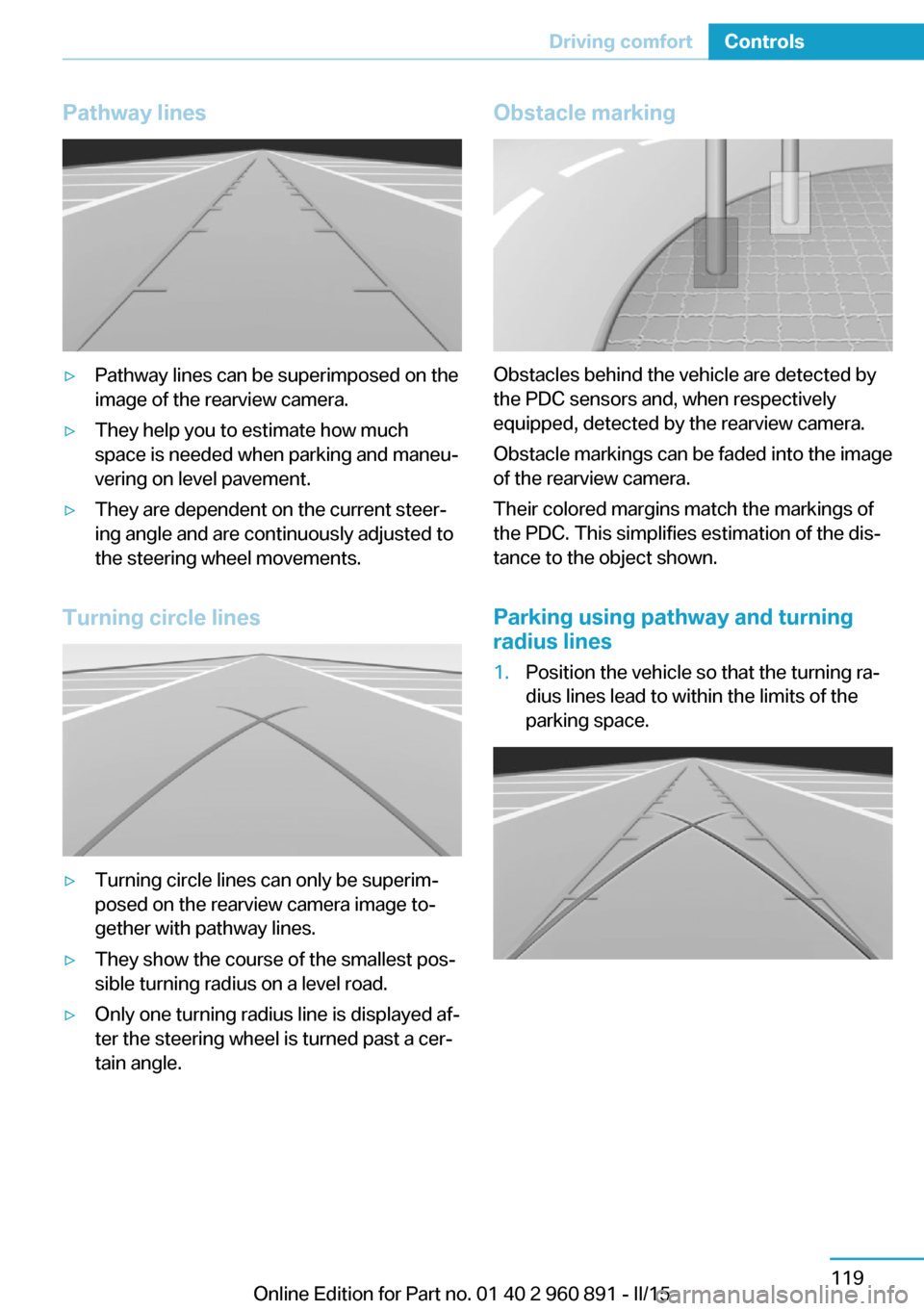
Pathway lines▷Pathway lines can be superimposed on the
image of the rearview camera.▷They help you to estimate how much
space is needed when parking and maneu‐
vering on level pavement.▷They are dependent on the current steer‐
ing angle and are continuously adjusted to
the steering wheel movements.
Turning circle lines
▷Turning circle lines can only be superim‐
posed on the rearview camera image to‐
gether with pathway lines.▷They show the course of the smallest pos‐
sible turning radius on a level road.▷Only one turning radius line is displayed af‐
ter the steering wheel is turned past a cer‐
tain angle.Obstacle marking
Obstacles behind the vehicle are detected by
the PDC sensors and, when respectively
equipped, detected by the rearview camera.
Obstacle markings can be faded into the image
of the rearview camera.
Their colored margins match the markings of
the PDC. This simplifies estimation of the dis‐
tance to the object shown.
Parking using pathway and turning
radius lines
1.Position the vehicle so that the turning ra‐
dius lines lead to within the limits of the
parking space.Seite 119Driving comfortControls119
Online Edition for Part no. 01 40 2 960 891 - II/15
Page 136 of 224
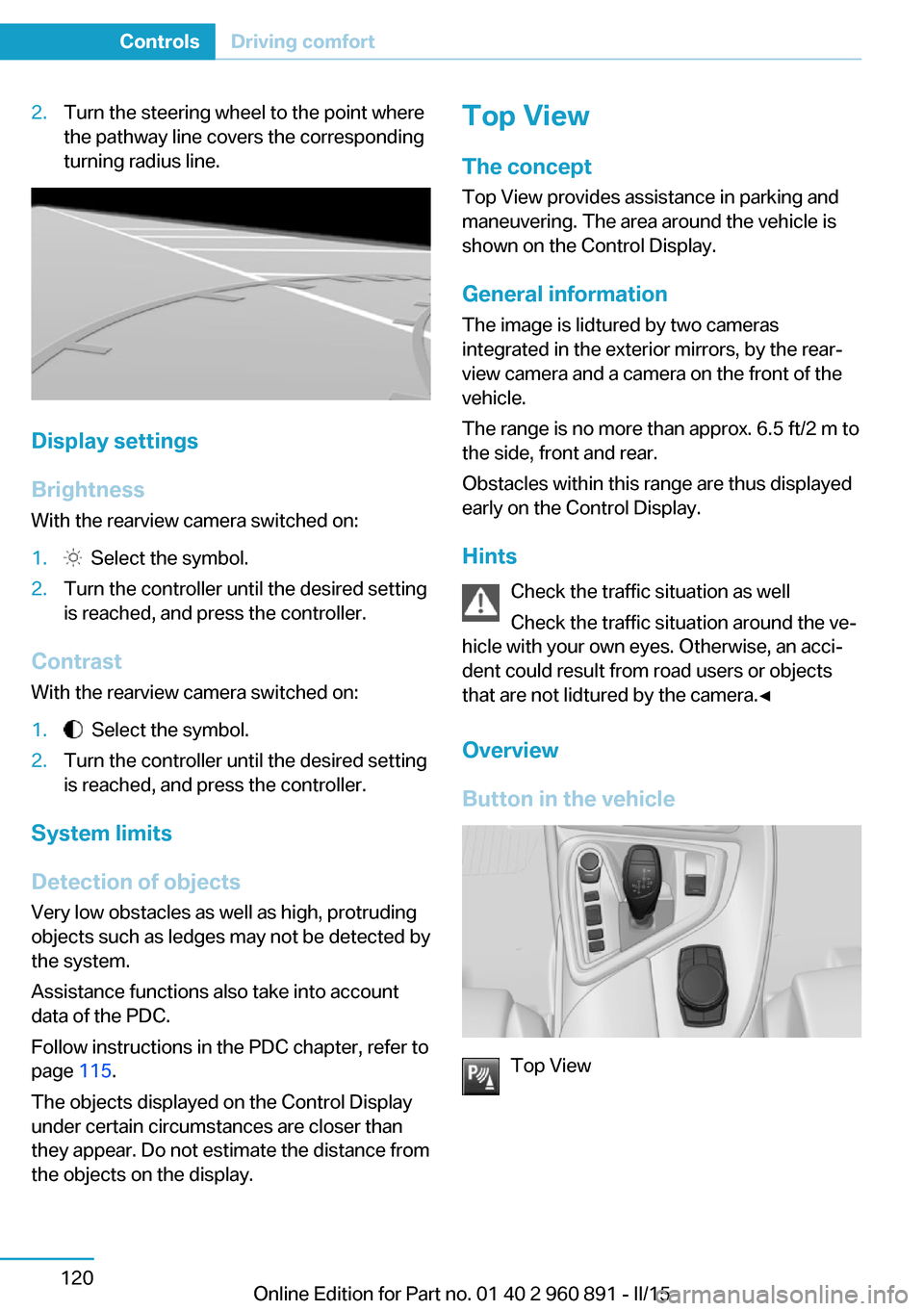
2.Turn the steering wheel to the point where
the pathway line covers the corresponding
turning radius line.
Display settings
Brightness
With the rearview camera switched on:
1. Select the symbol.2.Turn the controller until the desired setting
is reached, and press the controller.
Contrast
With the rearview camera switched on:
1. Select the symbol.2.Turn the controller until the desired setting
is reached, and press the controller.
System limits
Detection of objects
Very low obstacles as well as high, protruding
objects such as ledges may not be detected by
the system.
Assistance functions also take into account
data of the PDC.
Follow instructions in the PDC chapter, refer to
page 115.
The objects displayed on the Control Display
under certain circumstances are closer than
they appear. Do not estimate the distance from
the objects on the display.
Top View
The concept Top View provides assistance in parking and
maneuvering. The area around the vehicle is
shown on the Control Display.
General information The image is lidtured by two cameras
integrated in the exterior mirrors, by the rear‐
view camera and a camera on the front of the
vehicle.
The range is no more than approx. 6.5 ft/2 m to
the side, front and rear.
Obstacles within this range are thus displayed
early on the Control Display.
Hints Check the traffic situation as well
Check the traffic situation around the ve‐
hicle with your own eyes. Otherwise, an acci‐
dent could result from road users or objects
that are not lidtured by the camera.◀
Overview
Button in the vehicle
Top View
Seite 120ControlsDriving comfort120
Online Edition for Part no. 01 40 2 960 891 - II/15
Page 138 of 224
2.Turn the controller until the desired setting
is reached, and press the controller.
Displaying the turning radius and
pathway lines
▷The static, red turning radius line shows
the space needed to the side of the vehicle
when the steering wheel is turned all the
way.▷The variable, green pathway line assists
you in assessing the amount of space ac‐
tually needed to the side of the vehicle.
The lane line depends on the engaged
gear and the current steering angle. The
track line is continuously adjusted for the
steering wheel movement.
"Parking aid lines"
Turning circle and pathway lines are displayed.
System limits
A Check Control message is displayed when a
camera is defective.
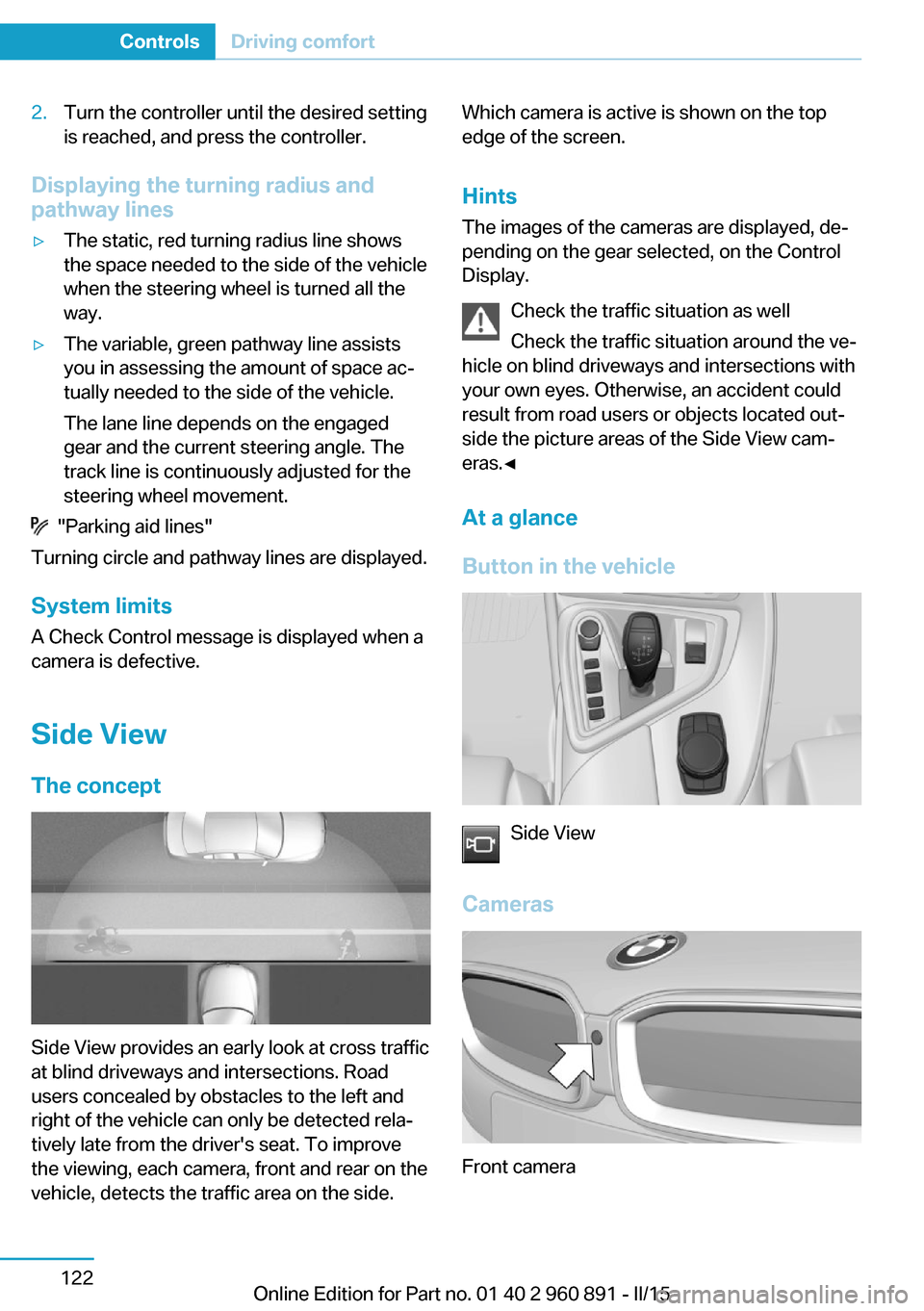
Side ViewThe concept
Side View provides an early look at cross traffic
at blind driveways and intersections. Road
users concealed by obstacles to the left and
right of the vehicle can only be detected rela‐
tively late from the driver's seat. To improve
the viewing, each camera, front and rear on the
vehicle, detects the traffic area on the side.
Which camera is active is shown on the top
edge of the screen.
Hints The images of the cameras are displayed, de‐
pending on the gear selected, on the Control
Display.
Check the traffic situation as well
Check the traffic situation around the ve‐
hicle on blind driveways and intersections with
your own eyes. Otherwise, an accident could
result from road users or objects located out‐
side the picture areas of the Side View cam‐
eras.◀
At a glance
Button in the vehicle
Side View
Cameras
Front camera
Seite 122ControlsDriving comfort122
Online Edition for Part no. 01 40 2 960 891 - II/15
Page 156 of 224
fic may be injured, and the vehicle may be
damaged.◀
If driving with the tailgate open cannot be
avoided:▷Drive moderately.
Hot exhaust system
Hot exhaust system
High temperatures are generated in the
exhaust system.
Do not remove the heat shields installed and
never apply undercoating to them. Make sure
that flammable materials, e. g. hay, leaves,
grass, etc. do not come in contact with the hot
exhaust system while driving, while in idle po‐
sition mode, or when parked. Such contact
could lead to a fire, resulting in an increased
risk of serious personal injury as well as prop‐
erty damage.
Do not touch hot exhaust pipes; otherwise,
there is a danger of getting burned.◀
Mobile communication devices in the
vehicle
Mobile communication devices in the ve‐
hicle
It is not recommended to use mobile phones,
such as mobile phones, in the vehicle interior
without a direct connection to an external aer‐
ial. Otherwise, the vehicle's electronics and
mobile communication devices can interfere
with each other. In addition, there is no assur‐
ance that the radiation generated during trans‐
mission will be conducted away from the vehi‐
cle interior.◀
Hydroplaning Hydroplaning
When driving on wet or slushy roads, re‐
duce your speed to prevent hydroplaning.◀
On wet or slushy roads, a wedge of water can
form between the tires and road surface.
This phenomenon is referred to as hydroplan‐
ing. It is characterized by a partial or complete
loss of contact between the tires and the road
surface, ultimately undermining your ability to
steer and brake the vehicle.
Driving through water Observe water level and speed
Do not exceed the maximum water level
and maximum speed; otherwise, the vehicle's
engine, the electrical systems and the trans‐
mission may be damaged.◀
Drive though calm water only and only if it is
not deeper than 9.8 inches/25 cm and at this
height, no faster than walking speed, up to
3 mph/5 km/h.
Braking safely
Your vehicle is equipped with ABS as a stand‐
ard feature.
Applying the brakes fully is the most effective
way of braking in situations needed.
Steering is still responsive. You can still avoid
any obstacles with a minimum of steering ef‐
fort.
Pulsation of the brake pedal and sounds from
the hydraulic circuits indicate that ABS is in its
active mode.
In certain braking situations, the perforated
brake discs can cause functional problems.
However, this has no effect on the perform‐
ance and operational reliability of the brake.
Objects within the range of movement
of the pedals
No objects in the area around the pedals
Keep floor mats, carpets, and any other
objects out of the pedal area; otherwise, the
function of the pedals could be impeded while driving and create the risk of an accident.
Do not place additional floor mats over existing
mats or other objects.Seite 140Driving tipsThings to remember when driving140
Online Edition for Part no. 01 40 2 960 891 - II/15
Page 157 of 224
Only use floor mats that have been approved
for the vehicle and can be properly attached to
floor.
Ensure that the floor mats are securely fas‐
tened again after they were removed for clean‐
ing, e.g.◀
Driving in wet conditions When roads are wet, salted, or in heavy rain,
press brake pedal ever so gently every few
miles.
Ensure that this action does not endanger other traffic.
The heat generated in this process helps dry
the brake discs and pads.
In this way braking efficiency will be available
when you need it.
Hills Avoid stressing the brakes
Avoid placing excessive stress on the
brake system. Light but consistent brake pres‐
sure can lead to high temperatures, brakes
wearing out and possibly even brake failure.◀
Do not drive in neutral
Do not drive in neutral, in the ECO PRO
driving program, or with drive readiness
switched off, as doing so disables engine brak‐
ing. In addition, steering and brake assist are
unavailable with the engine stopped.◀
Drive long or steep downhill gradients in the
gear that requires least braking efforts. Other‐
wise the brakes may overheat and reduce
brake efficiency.
You can increase the engine's braking effect
by shifting down, going all the way to first gear,
if needed.
On downhill sections, use energy recovery if
possible to decelerate the vehicle.Brake disc corrosion
Brake disc corrosion and contamination of the
brake pads are favored by:▷Low mileage.▷Extended periods when the vehicle is not
used at all.▷Infrequent use of the brakes.
Corrosion will built up when the maximum
pressure applied to the brake pads during
braking is not reached - thus discs don't get
cleaned.
Corrosion buildup on the brake discs will cause
a pulsating effect on the brakes in their re‐
sponse - generally that cannot be corrected.
Condensation under the parked
vehicle
When using the automatic climate control,
condensation water develops collecting under‐
neath the vehicle.
These traces of water under the vehicle are
normal.
Seite 141Things to remember when drivingDriving tips141
Online Edition for Part no. 01 40 2 960 891 - II/15
Page 184 of 224
Retreaded tires
Possibly substantial variations in the de‐
sign and age of the tire casing structures can
limit service life and have a negative impact on
road safety.◀
Winter tires
Winter tires are recommended for operating on
winter roads.
Although so-called all-season M+S tires pro‐
vide better winter traction than summer tires, they do not provide the same level of perform‐
ance as winter tires.
Maximum speed of winter tires If the maximum speed of the vehicle is higher
than the permissible speed for the winter tires,
then a respective symbol is displayed in your
field of vision. You can obtain this sign from the
tire specialist or from your service center.
Maximum speed for winter tires
Do not exceed the maximum speed for
the respective winter tires; otherwise, tire dam‐
age and accidents can occur.◀
Rotating wheels between axles Different wear patterns can occur on the front
and rear axles depending on individual driving
conditions. The tires can be rotated between
the axles to achieve even wear. Your service
center will be glad to advise you. After rotating,
check the tire pressure and correct if needed.
Rotating the tires is not permissible on vehi‐
cles with different tire sizes or rim sizes on the
front and rear axles.
StorageStore wheels and tires in a cool, dry place with
as little exposure to light as possible.
Always protect tires against all contact with oil,
grease and fuels.
Do not exceed the maximum tire inflation pres‐
sure indicated on the side wall of the tire.Mobility System
The concept
With the Mobility System, minor tire damage
can be sealed quickly to enable continued
travel. To accomplish this, sealant is pumped
into the tires, which seals the damage from the
inside.
The compressor can be used to check the tire
inflation pressure.
Hints▷Follow the instructions on using the Mobi‐
lity System found on the compressor and
sealant container.▷Use of the Mobility System may be ineffec‐
tive if the tire puncture measures approx.
1/8 in/4 mm or more.▷Contact the nearest service center if the
tire cannot be made drivable.▷If possible, do not remove foreign bodies
that have penetrated the tire.▷Pull the speed limit sticker off the sealant
container and apply it to the steering
wheel.▷The use of a sealant can damage the TPM
wheel electronics. In this case, have the
electronics checked at the next opportu‐
nity and have them replaced if needed.
Enclosed areas
Do not let the engine run in enclosed
areas, since breathing in exhaust fumes may
lead to loss of consciousness and death. The
exhaust gases contain carbon monoxide, an
odorless and colorless but highly toxic gas.◀
Storage The Mobility System is located behind the left
side trim in the trunk.
Seite 168MobilityWheels and tires168
Online Edition for Part no. 01 40 2 960 891 - II/15
Page 214 of 224
Everything from A to Z
IndexA ABS, Antilock Brake Sys‐ tem 109
Acceleration Assistant, refer to Launch Control 73
Accessories and parts 7
Acoustic pedestrian protec‐ tion 65
AC quick charging cable, see Level 2 charging cable 152
Activated-charcoal filter 127
Activate drive readiness 63
Adapting to the course of the road, hybrid system 79
Adaptive brake lights, refer to Brake force display 108
Additives, oil 175
Adjustments, seats/head re‐ straints 51
Adjustments, steering wheel 56
Advance climate control, refer to Stationary climate con‐
trol 127
After washing vehicle 188
Airbags 96
Airbags, indicator/warning light 97
Air circulation, refer to Recir‐ culated-air mode 125
Air, dehumidifying, refer to Cooling function 125
Air distribution, manual 126
Air flow, automatic climate control 126
Air pressure, tires 163
Air vents, refer to Ventila‐ tion 127
Alarm system 47
Alarm, unintentional 48 All around the center con‐
sole 16
All around the roofliner 17
All around the steering wheel 14
All-season tires, refer to Win‐ ter tires 168
Alternating-code hand-held transmitter 130
Alternative oil types 176
Ambient light 95
Antifreeze, washer fluid 70
Antilock Brake System, ABS 109
Anti-slip control, refer to DSC 109
Approved axle load 195
Approved engine oils, see Suitable engine oil
types 175
Arrival time 88
Artificial engine noise 65
Assistance for the combus‐ tion engine 65
Assistance when driving off 112
ASSIST, Hybrid system 65
Assist system, refer to Intelli‐ gent Safety 102
AUTO intensity 126
Automatic car wash 187
Automatic climate con‐ trol 124
Automatic Curb Monitor 54
Automatic deactivation, front- seat passenger airbags 98
Automatic deactivation of the high-voltage system 34
Automatic headlight con‐ trol 93
Automatic locking 47 Automatic recirculated-air
control 125
Automatic transmission, see Steptronic Sport transmis‐
sion 70
AUTO program, automatic cli‐ mate control 126
AUTO program, intensity 126
Average fuel consumption 87
Average speed 88
Axle loads, weights 195
B Backup charging 156
Band-aids, refer to First aid kit 184
Battery, 12 volt 181
Battery replacement, vehicle battery 181
Battery replacement, vehicle remote control 39
Battery state indicator 77
Battery, vehicle 181
Belts, safety belts 53
BMW Assist 6
BMW eDRIVE 31
BMW Homepage 6
BMW i Driver’s Guide App 6
BMW Internet page 6
BMW maintenance sys‐ tem 178
Body work, see Working on the vehicle 34
Brake assistant 109
Brake discs, break-in 138
Brake force display 108
Brake lights, adaptive 108
Brake lights, brake force dis‐ play 108
Brake pads, break-in 138 Seite 198ReferenceEverything from A to Z198
Online Edition for Part no. 01 40 2 960 891 - II/15
Page 219 of 224
Manual operation, rearviewcamera 118
Manual operation, Top View 121
Marking on approved tires 167
Master key, refer to Remote control 38
Max eDRIVE, electric driv‐ ing 64
Maximum cooling 125
Maximum speed, display 85
Maximum speed, winter tires 168
Measure, units of 90
Medical kit 184
Menu, EfficientDynamics 146
Menu in instrument clus‐ ter 86
Menus, operating, iDrive 18
Menus, refer to iDrive operat‐ ing concept 19
Messages, see Check Con‐ trol 79
Microfilter 127
Minimum tread, tires 166
Mirrors 54
Mobile communication devi‐ ces in the vehicle 140
Mobility System 168
Modifications, technical, refer to Safety 7
Moisture in headlight 180
Monitor, refer to Control Dis‐ play 18
Mounting of child restraint systems 57
Multifunction steering wheel, buttons 14
Multimedia 6
N
Navigation 6
Neck restraints, front, refer to Head restraints 54 Neutral cleaner, see wheel
cleaner 189
New wheels and tires 167
O OBD Onboard Diagnosis 179
OBD, see OBD Onboard Di‐ agnosis 179
Obstacle marking, rearview camera 119
Octane rating, refer to Rec‐ ommended fuel grade 161
Odometer 83
Office 6
Oil 173
Oil, adding 175
Oil additives 175
Oil change 176
Oil change interval, service requirements 84
Oil filler neck 175
Oil types, alternative 176
Oil types, approved 175
Old batteries, disposal 182
On-board computer 87
Onboard monitor, refer to Control Display 18
Opening/closing via door lock 43
Opening and closing 38
Opening and closing, without remote control 43
Opening and closing, with re‐ mote control 41
Operating concept, iDrive 18
Operating readiness 61
Operating readiness off 62
Operating readiness on 61
Optional equipment, standard equipment 6
Outside air, refer to Auto‐ matic recirculated-air con‐
trol 125
Overheating of engine, refer to Coolant temperature 83 P
Paint, vehicle 188
Park Distance Control PDC 115
Parked car ventilation, refer to Stationary climate con‐
trol 127
Parked vehicle, condensa‐ tion 141
Parking aid, refer to PDC 115
Parking brake 66
Parking lights 92
Parts and accessories 7
Passenger side mirror, tilting downward 54
Pathway lines, rearview cam‐ era 119
PDC Park Distance Con‐ trol 115
Pedestrian protection 65
Pedestrian warning with city braking function 105
Performance Control 111
Personal Profile 39
Personal Profile, exporting profiles 40
Pinch protection system, win‐ dows 49
Plastic, care 189
POWER, driving with com‐ bustion engine 65
Power failure 181
Power windows 49
Pressure, tire air pres‐ sure 163
Profile, refer to Personal Pro‐ file 39
Programmable memory but‐ tons, iDrive 23
Protective function, win‐ dows 49
Push-and-turn switch, refer to Controller 18 Seite 203Everything from A to ZReference203
Online Edition for Part no. 01 40 2 960 891 - II/15
Page 220 of 224
QQuick charging cable, see Level 2 charging cable 152
R Radiator fluid 177
Radio 6
Radio-operated key, refer to Remote control 38
Radio ready state 61
Rain sensor 69
Rear beverage holder, rear cup holder 135
Rear bottle holder, refer to Rear cup holder 135
Rear can holder, refer to Rear Cup holder 135
Rear cup holder 135
Rear holder for bever‐ ages 135
Rearview camera 117
Rearview mirror 54
Rear window defroster 127
Recirculated-air filter 127
Recirculated-air mode 125
Recommended fuel grade 161
Recommended tire brands 167
Refueling 158
Remaining range 83
Remote control/key 38
Remote control, malfunc‐ tion 43
Remote control, univer‐ sal 129
Replacement fuse 182
Replacing wheels/tires 167
Reporting safety defects 10
RES button, see Cruise con‐ trol 113
Reserve warning, refer to Range 83 Reset, Tire Pressure Monitor
TPM 100
Retreaded tires 167
Roadside parking lights 93
RON recommended fuel grade 161
Roofliner 17
Rubber components, care 189
S
Safe braking 140
Safety 7
Safety belt reminder for driv‐ er's seat and front passen‐
ger seat 53
Safety belts 53
Safety belts, care 189
Safety of the high-voltage system 34
Safety systems, airbags 96
SAVE Battery, maintaining charging state 64
Screen, refer to Control Dis‐ play 18
Screw thread, see screw thread for tow fitting, screw
thread for tow fitting 186
Sealant 168
Seat belts, refer to Safety belts 53
Seat heating, front 52
Seating position for chil‐ dren 57
Seats 51
Selection list in instrument cluster 86
Selector lever, Steptronic Sport transmission 71
Sensors, care 190
Service and warranty 8
Service requirements, Condi‐ tion Based Service
CBS 178 Service requirements, dis‐
play 84
Services, ConnectedDrive 6
SET button, see Cruise con‐ trol 113
Settings, locking/unlock‐ ing 46
Settings, mirrors 54
Settings on Control Dis‐ play 89
Shift paddles on the steering wheel 73
Side airbags 96
Side View 122
Signaling, horn 14
Signals when unlocking 47
Silent Start, electric drive readiness 63
Sitting safely 51
Size 194
Smallest turning radius 194
Snow chains 171
Socket 131
Socket, OBD Onboard Diag‐ nostics 179
SOS button 183
Spare fuse 182
Specified engine oil types 175
Speed, average 88
Speed limit detection, on- board computer 88
Speed limiter, display 85
Speed Limit Information 85
Speed warning 88
Split screen 23
Sport program, transmis‐ sion 72
Stability control systems 109
Standard charging cable, see Level 1 charging cable 152
Standard charging, see Level 1 Charging 155
Standing air conditioning, re‐ mote control 47
Start/Stop button 61 Seite 204ReferenceEverything from A to Z204
Online Edition for Part no. 01 40 2 960 891 - II/15
Page 221 of 224
Start function during malfunc‐tion 39
Starting the combustion en‐ gine 63
Stationary climate con‐ trol 127
Status control display, tires 100
Status information, iDrive 22
Status of Owner's Manual 7
Steering wheel, adjusting 56
Steptronic Sport transmis‐ sion 70
Storage compartments 134
Storage compartments, loca‐ tions 134
Storage, tires 168
Storing the vehicle 190
Suitable engine oils 175
Summer tires, tread 166
Sun visor 131
Supplementary text mes‐ sage 82
Surround View 117
Switch for Dynamic Driv‐ ing 111
Switch, refer to Cockpit 14
Symbols 6
Symbols in the status field 22
SYNC program, automatic cli‐ mate control 125
T Tachometer 82
Tailgate closing 45
Tailgate, emergency unlock‐ ing 45
Tailgate opening 44
Tailgate via remote con‐ trol 42
Tail lamps, see Bulb replace‐ ment 180
Tank unlocking, refer to Tank vent 158
Tank vent 158 Technical changes, refer to
Safety 7
Technical data 194
Telephone 6
Temperature, automatic cli‐ mate control 125
Temperature display for ex‐ ternal temperature 83
Temperature, engine oil 83
Text message, supplemen‐ tary 82
Theft alarm system, refer to Alarm system 47
Tilt alarm sensor 48
Time of arrival 88
Tire damage 166
Tire identification marks 164
Tire inflation pressure 163
Tire Pressure Monitor TPM 99
Tires, changing 167
Tire sealant 168
Tires, everything on wheels and tires 163
Tire tread 166
Tone 6
Top View 120
Total range 83
Total vehicle weight 195
Touchpad 21
Tow fitting 185
Towing 185
Tow lug, see Tow fitting 185
Tow-starting 185
TPM Tire Pressure Moni‐ tor 99
Traction control 110
TRACTION, driving dynam‐ ics 110
Transmission lock, electronic unlocking 73
Transmission, see Steptronic Sport transmission 70
Transporting children safely 57
Tread, tires 166 Trip computer 88
Triple turn signal activa‐ tion 68
Trip odometer 83
Turning circle lines, rearview camera 119
Turning radius 194
Turn signals, operation 67
U Unintentional alarm 48
Units of measure 90
Universal remote control 129
Unlock button, Steptronic Sport transmission 71
Unlocking/locking via door lock 43
Unlocking/locking with re‐ mote control 41
Unlocking, settings 46
Updates made after the edito‐ rial deadline 7
Upholstery care 189
USB interface 132
V Vanity mirror 131
Variable light distribution 93
Vehicle battery 181
Vehicle battery, replac‐ ing 181
Vehicle, break-in 138
Vehicle care 188
Vehicle features and op‐ tions 6
Vehicle identification num‐ ber 10
Vehicle jack 181
Vehicle paint 188
Vehicle position, GPS loca‐ tion 90
Vehicle wash 187
Ventilation 127 Seite 205Everything from A to ZReference205
Online Edition for Part no. 01 40 2 960 891 - II/15