stop start BMW M2 2016 Owner's Manual
[x] Cancel search | Manufacturer: BMW, Model Year: 2016, Model line: M2, Model: BMW M2 2016Pages: 220, PDF Size: 4.71 MB
Page 114 of 220
Driving stability control systemsVehicle features and optionsThis chapter describes all standard, country-
specific and optional features offered with the
series. It also describes features that are not
necessarily available in your car, e. g., due to
the selected options or country versions. This
also applies to safety-related functions and
systems. The respectively applicable country
provisions must be observed when using the
respective features and systems.
Anti-lock Braking System
ABS
ABS prevents locking of the wheels during
braking.
The vehicle contains its steering power even
during full brake applications, thus increasing
active safety.
ABS is operational every time you start the en‐
gine.
Brake assistant When you apply the brakes rapidly, this system
automatically produces the greatest possible
braking force boost. It reduces the braking dis‐
tance to a minimum during emergency stop.
This system utilizes all of the benefits provided
by ABS.
Do not reduce the pressure on the brake pedal
for the duration of the emergency stop.DSC Dynamic Stability
Control
The concept Within the physical limits, the system helps to
keep the vehicle on a steady course by reduc‐
ing engine speed and by applying brakes to
the individual wheels.
General information Dynamic Stability Control detect for example
the following unstable driving conditions:▷Fishtailing, which can lead to oversteering.▷Loss of traction of the front wheels, which
can lead to understeering.
Information
The laws of physics cannot be repealed, not
even with DSC.
WARNING
The system does not release from the
personal responsibility to correctly assess the
traffic situation. Based on the limits of the sys‐
tem, it cannot independently react to all traffic
situations. There is risk of an accident. Adjust
the driving style to the traffic conditions. Watch
traffic closely and actively intervene in the re‐
spective situations.◀
WARNING
When driving with roof load, e.g., with
roof-mounted luggage rack, driving safety may
not be ensured in driving-critical situations due
to the elevated center of gravity. There is risk
of accidents or risk of property damage. Do not
deactivate Dynamic Stability Control DSC
when driving with roof load.◀
Seite 114ControlsDriving stability control systems114
Online Edition for Part no. 01 40 2 970 518 - II/16
Page 160 of 220
Avoid high engine speeds
As a rule: driving at low engine speeds lowers
fuel consumption and reduces wear.
Use 1st gear to get the vehicle moving. Start‐
ing with the 2nd gear, accelerate rapidly. When
accelerating, shift up before reaching high en‐
gine speeds.
When you reach the desired speed, shift into
the highest applicable gear and drive with the
engine speed as low as possible and at a con‐
stant speed.
If necessary, observe the gear shift indicator of
the vehicle, refer to page 86.
Use coasting
When approaching a red light, take your foot
off the accelerator and let the vehicle coast to
a halt.
For going downhill take your foot off the accel‐
erator and let the vehicle roll.
The flow of fuel is interrupted while coasting.
Switch off the engine during longer stops
Switch off the engine during longer stops, for
example, at traffic lights, railroad crossings or
in traffic congestion.
Auto Start/Stop function
The Auto Start/Stop function of the vehicle au‐
tomatically switches off the engine during a
stop.
If the engine is switched off and then restarted
rather than leaving the engine running con‐
stantly, fuel consumption and emissions are
reduced. Savings can begin within a few sec‐
onds of switching off the engine.
In addition, fuel consumption is also deter‐
mined by other factors, such as driving style,road conditions, maintenance or environmental
factors.
Switch off any functions that
are not currently needed
Functions such as seat heating and the rear
window defroster require a lot of energy and
reduce the range, especially in city and stop-
and-go traffic.
Switch off these functions if they are not
needed.
Have maintenance carried
out
Have vehicles maintained regularly to achieve
optimal vehicle efficiency and service life.
BMW recommends that maintenance work be
performed by a BMW dealer’s service center.
For information on the BMW Maintenance
System, refer to page 184.Seite 160Driving tipsSaving fuel160
Online Edition for Part no. 01 40 2 970 518 - II/16
Page 166 of 220
FuelVehicle features and optionsThis chapter describes all standard, country-
specific and optional features offered with the
series. It also describes features that are not
necessarily available in your car, e. g., due to
the selected options or country versions. This
also applies to safety-related functions and
systems. The respectively applicable country
provisions must be observed when using the
respective features and systems.
Fuel recommendation General information
Depending on the region, many gas stations
sell fuel that has been customized to winter or
summer conditions. Fuel that is available in
winter helps make a cold start easier, for exam‐
ple.
Information ATTENTION
Even fuels that conform to the specifica‐
tions can be of low quality. This may cause en‐
gine problems, e.g., poor engine start-up be‐
havior, poor handling and/or poor performance.
There is a risk of damage to property. In case
of engine problems, switch gas stations or use
a brand name fuel with a higher octane rat‐
ing.◀
Gasoline
General information For the best fuel efficiency, the gasoline
should be sulfur-free or very low in sulfur con‐
tent.
Fuels that are marked on the gas pump as con‐
taining metal must not be used.Fuels with a maximum ethanol content of
10 %, i. e., E10, may be used for refueling.
Ethanol should meet the following quality
standards:
US: ASTM 4806–xx
CAN: CGSB-3.511–xx
xx: comply with the current standard in each
case.
Information ATTENTION
Do not press the Start/Stop button after
refueling with the wrong fuel. Furthermore, the
catalytic converter is permanently damaged.
There is a risk of damage to property. Do not
refuel or add the following in the case of gaso‐
line engines:▷Leaded gasoline.▷Metallic additives, e.g., manganese or iron.
Do not press the Start/Stop button after refuel‐
ing with the wrong fuel. Contact a dealer’s
service center or another qualified service cen‐
ter or repair shop.◀
ATTENTION
Incorrect fuels can damage the fuel sys‐
tem and the engine. There is a risk of damage
to property. Do not use a fuel with a higher
ethanol percentage than recommended or one
with other types of alcohol, e.g., M5 to M100.◀
ATTENTION
Fuel that does not comply with the mini‐
mum quality can compromise engine function
or cause engine damage. There is a risk of
damage to property. Do not fill with fuel that
does not comply with the minimum quality.◀
Seite 166MobilityFuel166
Online Edition for Part no. 01 40 2 970 518 - II/16
Page 196 of 220
corresponding engine or body ground of
the vehicle to be started.
Starting the engine
Never use spray fluids to start the engine.
1.Start the engine of the assisting vehicle
and let it run for several minutes at an in‐
creased idle speed.2.Start the engine of the vehicle that is to be
started in the usual way.
If the first starting attempt is not success‐
ful, wait a few minutes before making an‐
other attempt in order to allow the dis‐
charged battery to recharge.3.Let both engines run for several minutes.4.Disconnect the jumper cables in the re‐
verse order.
Check the battery and recharge if needed.
Tow-starting and towing Information WARNING
Due to system limits, individual functions
can malfunction during tow-starting/towing
with the Intelligent Safety systems activated,
e.g., approach control warning with light brak‐
ing function. There is risk of an accident.
Switch all Intelligent Safety systems off prior to
tow-starting/towing.◀
Manual transmission
Gearshift lever in neutral position.
Towing Follow the following instructions:
▷Make sure that the ignition is switched on;
otherwise, the low beams, tail lamps, turn
signals, and wipers may be unavailable.▷Do not tow the vehicle with the rear axle
tilted, as the front wheels could turn.▷When the engine is stopped, there is no
power assist. Consequently, more force
needs to be applied when braking and
steering.▷Larger steering wheel movements are re‐
quired.▷The towing vehicle must not be lighter
than the vehicle being towed; otherwise,
it will not be possible to control the vehi‐
cle's response.▷Do not exceed a towing speed of
30 mph/50 km/h.▷Do not exceed a towing distance of
30 miles/50 km.
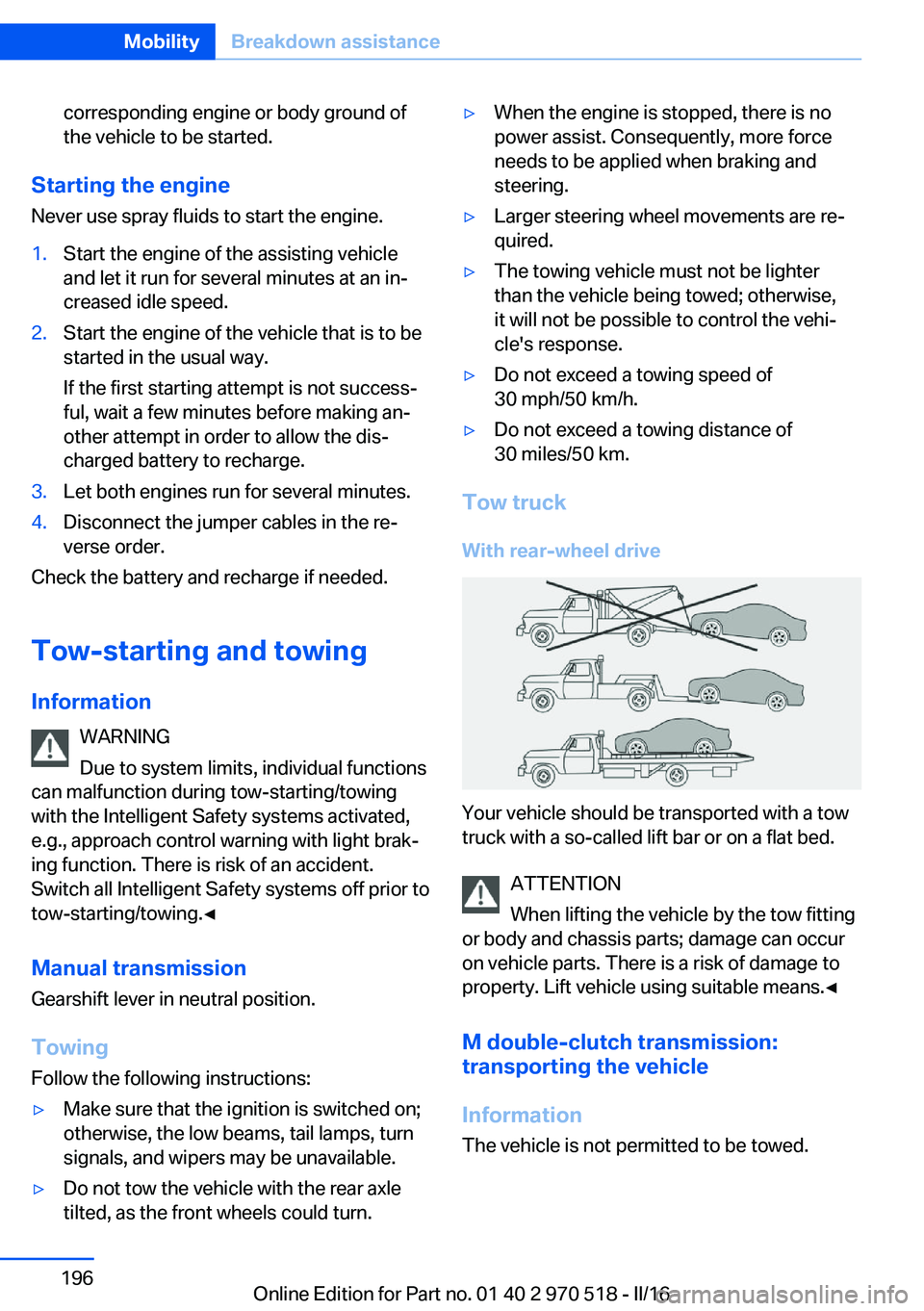
Tow truck
With rear-wheel drive
Your vehicle should be transported with a tow
truck with a so-called lift bar or on a flat bed.
ATTENTION
When lifting the vehicle by the tow fitting
or body and chassis parts; damage can occur
on vehicle parts. There is a risk of damage to
property. Lift vehicle using suitable means.◀
M double-clutch transmission:
transporting the vehicle
Information The vehicle is not permitted to be towed.
Seite 196MobilityBreakdown assistance196
Online Edition for Part no. 01 40 2 970 518 - II/16
Page 198 of 220
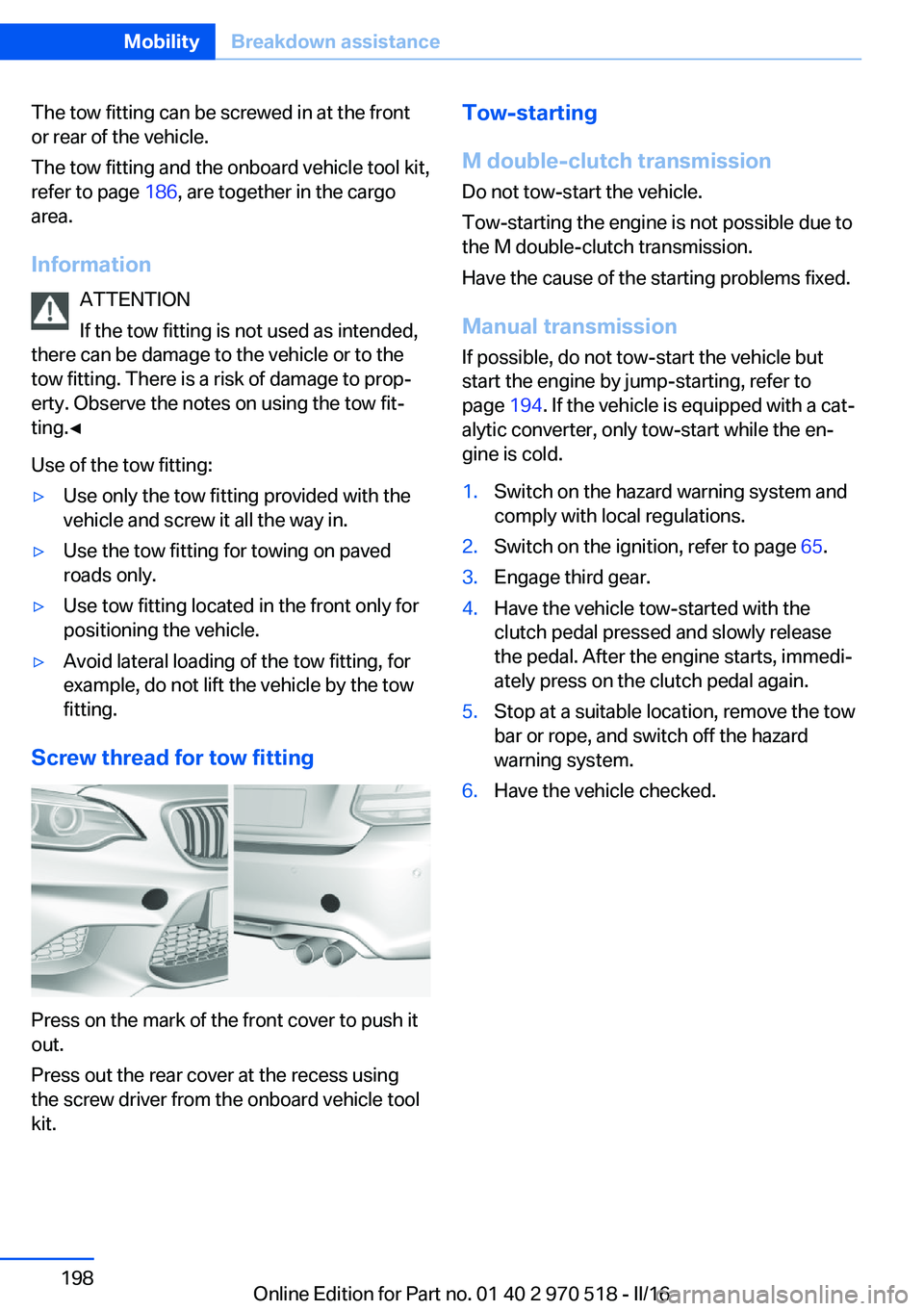
The tow fitting can be screwed in at the front
or rear of the vehicle.
The tow fitting and the onboard vehicle tool kit,
refer to page 186, are together in the cargo
area.
Information ATTENTION
If the tow fitting is not used as intended,
there can be damage to the vehicle or to the
tow fitting. There is a risk of damage to prop‐
erty. Observe the notes on using the tow fit‐
ting.◀
Use of the tow fitting:▷Use only the tow fitting provided with the
vehicle and screw it all the way in.▷Use the tow fitting for towing on paved
roads only.▷Use tow fitting located in the front only for
positioning the vehicle.▷Avoid lateral loading of the tow fitting, for
example, do not lift the vehicle by the tow
fitting.
Screw thread for tow fitting
Press on the mark of the front cover to push it
out.
Press out the rear cover at the recess using
the screw driver from the onboard vehicle tool
kit.
Tow-starting
M double-clutch transmission
Do not tow-start the vehicle.
Tow-starting the engine is not possible due to
the M double-clutch transmission.
Have the cause of the starting problems fixed.
Manual transmission If possible, do not tow-start the vehicle but
start the engine by jump-starting, refer to
page 194. If the vehicle is equipped with a cat‐
alytic converter, only tow-start while the en‐
gine is cold.1.Switch on the hazard warning system and
comply with local regulations.2.Switch on the ignition, refer to page 65.3.Engage third gear.4.Have the vehicle tow-started with the
clutch pedal pressed and slowly release
the pedal. After the engine starts, immedi‐
ately press on the clutch pedal again.5.Stop at a suitable location, remove the tow
bar or rope, and switch off the hazard
warning system.6.Have the vehicle checked.Seite 198MobilityBreakdown assistance198
Online Edition for Part no. 01 40 2 970 518 - II/16
Page 200 of 220
Manual transmission:1.Drive into the car wash.2.Shift to neutral.3.Switch the engine off.4.Switch on the ignition.
M double-clutch transmission:
1.Drive into the car wash.2.Engage selector lever position N.3.Switch the engine off.
In this way, the ignition remains switched
on, and a Check-Control message is dis‐
played.
CAUTION
Selector lever position P is automati‐
cally engaged when the ignition is
switched off. There is a risk of property
damage. Do not switch ignition off in car
washes.◀
The vehicle cannot be locked from the outside
when in selector lever position N. A signal
sounds when an attempt is made to lock the
vehicle.
To start the engine with manual transmission:
1.Press on the clutch pedal.2.Press the Start/Stop button.
To start the engine with a M double clutch
transmission:
1.Depress the brake pedal.2.Press the Start/Stop button.
Pressing the Start/Stop button without step‐
ping on the brake turns the ignition off.
Transmission position
Transmission position P is engaged automati‐
cally:
▷When the ignition is switched off.▷After approx. 15 minutes.Headlights▷Do not rub dry and do not use abrasive or
acidic cleansers.▷Soak areas that have been dirtied e. g.,
from insects, with shampoo and wash off
with water.▷Thaw ice with de-icing spray; do not use an
ice scraper.
After washing the vehicle
After washing the vehicle, apply the brakes
briefly to dry them; otherwise, braking action
can be reduced and corrosion of the brake
discs can occur.
Completely remove all residues on the win‐
dows, to minimize loss of visibility due to
smearing and to reduce wiper noises and
wiper blade wear.
Vehicle care
Vehicle care products BMW recommends using vehicle care and
cleaning products from BMW.
WARNING
Cleansers can contain substances that
are dangerous and harmful to your health. There is a risk of injury. When cleaning the in‐
terior, open the doors or windows. Only use
products intended for cleaning vehicles. Fol‐
low the instructions on the container.◀
Vehicle paint
Regular care contributes to driving safety and
value retention. Environmental influences in
areas with elevated air pollution or natural con‐
taminants, such as tree resin or pollen can af‐
fect the vehicle's paintwork. Tailor the fre‐
quency and extent of your vehicle care to
these influences.
Aggressive substances such as spilled fuel, oil,
grease or bird droppings, must be removed im‐
Seite 200MobilityCare200
Online Edition for Part no. 01 40 2 970 518 - II/16
Page 210 of 220
Everything from A to Z
IndexA ABS, Antilock Brake Sys‐ tem 114
Acceleration Assistant, see Launch Control 78
Accessories and parts 8
Activated-charcoal filter 132
Activation times, parked-car ventilation 133
Active M differential 116
Adaptive brake lights, see Brake force display 112
Adaptive Light Control 95
Additional information, iDrive 23
Additives, oil 181
Adjustments, seats/head re‐ straints 49
After washing vehicle 200
Airbags 98
Airbags, indicator/warning light 99
Air circulation, see Recircu‐ lated-air mode 128, 131
Air, dehumidifying, see Cool‐ ing function 128, 130
Air distribution, man‐ ual 129 , 131
Air flow, air conditioner 128
Air flow, automatic climate control 131
Air pressure, tires 168
Air vents, see Ventilation 132
Alarm system 44
Alarm, unintentional 45
All around the center con‐ sole 16
All around the roofliner 17
All around the steering wheel 14 All-season tires, see Winter
tires 172
Alternating-code hand-held transmitter 135
Alternative oil types 181
Ambient light 97
Antifreeze, washer fluid 73
Antilock Brake System, ABS 114
Anti-slip control, see DSC 114
App, BMW Driver’s Guide 6
Approved axle load 207
Arrival time 90
Ashtray 138
Assistance, Roadside Assis‐ tance 194
Assistance when driving off 118
Attentiveness assistant 112
AUTO intensity 131
Automatic car wash 199
Automatic climate con‐ trol 127
Automatic climate control with enhanced features 129
Automatic Curb Monitor 58
Automatic deactivation, Front-seat passenger air‐
bags 100
Automatic headlamp con‐ trol 94
Automatic locking 43
Automatic recirculated-air control 131
AUTO program, automatic cli‐ mate control 130
AUTO program, climate con‐ trol 128
AUTO program, intensity 131
Auto Start/Stop function 67 AUX-IN port, general informa‐
tion 139
Average fuel consumption 89
Average speed 89
Axle loads, weights 207
B Backrest curvature, see Lum‐ bar support 51
Backrest, width 52
Band-aids, see First-aid kit 194
Battery replacement, vehicle battery 190
Battery replacement, vehicle remote control 35
Battery, vehicle 190
Being towed, see Tow-start‐ ing and towing 196
Belts, safety belts 53
Beverage holder, cup holder 145
BMW Assist 6
BMW Driver’s Guide app 6
BMW Homepage 6
BMW Internet page 6
BMW maintenance sys‐ tem 184
BMW M technology 150
Bottle holder, see Cup holder 145
Brake assistant 114
Brake discs, break-in 152
Brake force display 112
Brake lights, adaptive 112
Brake lights, brake force dis‐ play 112
Brake pads, break-in 152
Braking, information 153 Seite 210ReferenceEverything from A to Z210
Online Edition for Part no. 01 40 2 970 518 - II/16
Page 211 of 220
Breakdown assis‐tance 193, 194
Break-in 152
Brightness of Control Dis‐ play 92
Bulb replacement 186
Bulb replacement, front 187
Bulb replacement, rear 189
Bulbs and lights 186
Button, Start/Stop 65
Bypassing, see Jump-start‐ ing 194
C
California Proposition 65 Warning 8
Calling up mirror adjust‐ ment 44
Calling up seat adjust‐ ment 44
Camera lenses, care 202
Camera, rearview cam‐ era 124
Can holder, see Cup holder 145
Car battery 190
Care, displays 202
Care, vehicle 200
Cargo 156
Cargo area, enlarging 141
Cargo area, storage compart‐ ments 146
Cargo straps, securing cargo 157
Car key, see Remote con‐ trol 34
Carpet, care 202
Car wash 199
Catalytic converter, see Hot exhaust system 153
CBS Condition Based Serv‐ ice 184
Center armrest 144
Center console 16
Central locking system 40 Central screen, see Control
Display 18
Changes, technical, see Own Safety 7
Changing parts 186
Changing wheels 190
Changing wheels/tires 171
Chassis number, see Vehicle identification number 10
Check Control 80
Checking the engine oil level electronically 179
Checking the oil level elec‐ tronically 179
Children, seating position 61
Children, transporting safely 61
Child restraint fixing system LATCH 63
Child restraint system 61
Child restraint systems, mounting 62
Child seat, mounting 62
Child seats 61
Chrome parts, care 201
Cigarette lighter 138
Cleaning displays 202
Climate control 127, 129
Clock 84
Closing/opening via door lock 39
Closing/opening with remote control 37
Clothes hooks 146
Cockpit 14
Combination switch, see Turn signals 70
Combination switch, see Wiper system 71
Comfort Access 41
COMFORT program, Dy‐ namic Driving Control 118
Compartments in the doors 144
Compass 136
Compound brake 150 Compressor 173
Condensation on win‐ dows 131
Condensation under the vehi‐ cle 154
Condition Based Service CBS 184
Confirmation signal 43
ConnectedDrive 6
ConnectedDrive Services 6
Connecting electrical devi‐ ces 138
Container for washer fluid 73
Control Display 18
Control Display, settings 91
Controller 19
Control systems, driving sta‐ bility 114
Convenient opening with the remote control 38
Coolant 182
Cooling function 128, 130
Cooling, maximum 130
Cooling system 182
Cornering light 95
Corrosion on brake discs 154
Cosmetic mirror 138
Courtesy lamps during un‐ locking 38
Courtesy lamps with the vehi‐ cle locked 38
Cruise control 119
Cruise control without dis‐ tance control, see cruise
control 119
Cruising range 84
Cup holder 145
Current fuel consumption 84
D
Damage, tires 171
Data, technical 206
Date 84
Daytime running lights 95 Seite 211Everything from A to ZReference211
Online Edition for Part no. 01 40 2 970 518 - II/16
Page 212 of 220
Defrosting, see defrosting thewindows 129
Defrosting, see Windows, de‐ frosting 131
Defrosting the windows 129
Dehumidifying, air 128, 130
Deleting personal data 25
Deletion of personal data 25
Destination distance 89
Differential lock 116
Digital clock 84
Digital compass 136
Dimensions 206
Dimmable exterior mirrors 58
Dimmable interior mirror 59
Direction indicator, see Turn signals 70
Display EfficientDynamics 85
Display, electronic, instru‐ ment cluster 79
Display, engine tempera‐ ture 89
Display lighting, see Instru‐ ment lighting 96
Displays, cleaning 202
Disposal, coolant 183
Disposal, vehicle battery 191
Distance control, see PDC 121
Distance to destination 89
Divided screen view, split screen 24
Door lock 39
Door lock, see Remote con‐ trol 34
Double-clutch transmis‐ sion 75
Drivelogic 77
Drive mode 76
Drive-off assistant 118
Drive-off assistant, see DSC 114
Driver assistance, see Intelli‐ gent Safety 105
Driving Assistant, see Intelli‐ gent Safety 105 Driving Dynamics Con‐
trol 116
Driving instructions, break- in 152
Driving mode 116
Driving notes, general 153
Driving on racetracks 150
Driving program, see Drive‐ logic 77
Driving stability control sys‐ tems 114
Driving tips 153
DSC Dynamic Stability Con‐ trol 114
Dynamic Stability Control DSC 114
E
EfficientDynamics 85
Electronic displays, instru‐ ment cluster 79
Electronic oil measure‐ ment 179
Electronic Stability Program ESP, see DSC 114
Emergency detection, remote control 35
Emergency Request 193
Emergency service, see Roadside Assistance 194
Emergency start function, en‐ gine start 35
Emergency unlocking, tail‐ gate 41
Energy Control 84
Energy recovery 84
Engine, automatic Start/Stop function 67
Engine, automatic switch- off 67
Engine compartment 177
Engine compartment, work‐ ing in 177
Engine coolant 182
Engine oil 179 Engine oil, adding 180
Engine oil additives 181
Engine oil change 181
Engine oil filler neck 180
Engine oil types, alterna‐ tive 181
Engine oil types, suitable 181
Engine start during malfunc‐ tion 35
Engine start, jump-start‐ ing 194
Engine start, see Starting the engine 66
Engine stop 67
Engine temperature, dis‐ play 89
Entering a car wash 199
Equipment, interior 134
Error displays, see Check Control 80
ESP Electronic Stability Pro‐ gram, see DSC 114
Exchanging wheels/tires 171
Exhaust system 153
Exterior mirror, automatic dimming feature 58
Exterior mirrors 57
External start 194
External temperature dis‐ play 84
External temperature warn‐ ing 84
Eyes for securing cargo 157
F
Failure message, see Check Control 80
False alarm, see Unintentional alarm 45
Fan, see Air flow 128, 131
Filler neck for engine oil 180
Fine wood, care 201
First-aid kit 194
Flat tire, changing wheels 190 Seite 212ReferenceEverything from A to Z212
Online Edition for Part no. 01 40 2 970 518 - II/16
Page 215 of 220
Mounting of child restraintsystems 62
M technology 150
Multifunction steering wheel, buttons 14
Multimedia 6
N
Navigation 6
Neck restraints, front, see Head restraints 54
Neck restraints, rear, see Head restraints 55
Neutral cleaner, see wheel cleaner 201
New wheels and tires 171
O OBD Onboard Diagnosis 185
OBD, see OBD Onboard Di‐ agnosis 185
Obstacle marking, rearview camera 125
Octane rating, see Recom‐ mended fuel grade 167
Odometer 83
Office 6
Oil 179
Oil, adding 180
Oil additives 181
Oil change 181
Oil change interval, service requirements 85
Oil filler neck 180
Oil types, alternative 181
Oil types, suitable 181
Old batteries, disposal 191
Onboard computer 88
Onboard computer, see On‐ board computer 88
Onboard monitor, see Control Display 18
Onboard vehicle tool kit 186 Opening/closing via door
lock 39
Opening and closing 34
Opening and closing, without remote control 39
Opening and closing, with re‐ mote control 37
Operating concept, iDrive 18
Optional equipment 7
Outside air, see Automatic re‐ circulated-air control 131
Own Safety 7
P
Paint, vehicle 200
Park Distance Control PDC 121
Parked-car ventilation 132
Parked vehicle, condensa‐ tion 154
Parking aid, see PDC 121
Parking brake 70
Parking lights 93
Parts and accessories 8
Passenger side mirror, tilting downward 58
Pathway lines, rearview cam‐ era 125
PDC Park Distance Con‐ trol 121
Personal Profile 36
Personal Profile, exporting profiles 37
Personal Profile, importing profiles 37
Person warning with City light braking function 109
Pinch protection system, glass sunroof 48
Pinch protection system, win‐ dows 46
Plastic, care 201
Power failure 191
Power sunroof, glass 47
Power windows 45 Prescribed engine oil
types 181
Pressure, tire air pres‐ sure 168
Pressure warning, tires 104
Preventing Auto Start Stop 69
Profile, see Personal Pro‐ file 36
Programmable memory but‐ tons, iDrive 24
Protective function, glass sunroof 48
Protective function, win‐ dows 46
Push-and-turn switch, see Controller 19
R Racetrack operation 150
Radiator fluid 182
Radio 6
Radio-operated key, see Re‐ mote control 34
Radio ready state 65
Rain sensor 72
Ratchet straps, securing cargo 157
Rear lights 189
Rear socket 139
Rearview camera 124
Rearview mirror 57
Rear window de‐ froster 129, 132
Recirculated-air filter 132
Recirculated-air mode 128, 131
Recommended fuel grade 167
Recommended tire brands 172
Refueling 164
Remaining range 84
Remote control/key 34 Seite 215Everything from A to ZReference215
Online Edition for Part no. 01 40 2 970 518 - II/16