accessories BMW M3 1995 E36 User Guide
[x] Cancel search | Manufacturer: BMW, Model Year: 1995, Model line: M3, Model: BMW M3 1995 E36Pages: 759
Page 345 of 759
GENERAL
This
repair
group
covers
interior
trim
removal
and
installa-
tion
procedures
.
Forremoval
and
installation
of
interior
switches,
including
interior
lighting
equipment,
see
612
Switches
and
Electrical
Accessories
.
Most
of
the
interior
trim
and
finish
paneis
are
clipped
or
screwed
into
place
.
Many
of
the
trim
retaining
clips
arede-
signed
to
be
used
only
once
.
When
removing
trim
that
is
held
in
place
with
clips,
it
is
a
good
idea
lo
have
spareson
hand
be-
fore
beginningthejob
.
CENTER
CONSOLE
The
front
section
center
console
houses
the
Multi-Informa-
tion
Display
(MID)
module,the
front
ashtray
and
cigarette
lighter
;
shifter
lever,
power
window
switches
and
the
hazard
warning
switch
.
The
rear
center
console
section
houses
the
ashtray(s)
and
covers
the
emergency
brakecable
ends
.
Center
console,
removing
and
installing
1
.
Disconnect
negative
(-)
cable
from
battery
and
cover
terminal
with
insulating
material
.
CA
UTION-
Prior
to
disconnectiog
the
battery,
read
the
battery
disconnection
cautionsgiven
at
the
front
of
this
manual
onpage
viii
.
2
.
Remove
shifter
boot
or
selectorlever
cover
.
See250
Gearshift
t-inkage
.
3
.
Remove
rear
ashtray
retaining
screws
totake
out
ash-
tray
.
Remove
rear
console
retaining
screwunder
ash-
tray
.
513
Interior
Tri
m
INTERIORTRIM
513-1
GENERAL
..
.
.....
.
.
.
.
.
.
.
.
.
.
.
......
.
.
.
513-1
DASHBOARD
.....
.
.
.
.
.
.
.
.
.
.
.
.
.
.
...
.
:
.
.513-2
Glove
compartment,removing
and
installing
.
.513-2
CENTER
CONSOLE
.
.
.
.
.
.
.
.
.
.
.........
513-1
Lower
left
dash
panel,
Center
console,
removing
and
installing
.....
513-1
removing
and
installing
.
.
.
.
.
.
.
.
.
.
.....
.
.
513-2
Dashboard,removing
and
installing
.
.
.
.
...
.
.513-3
4
.
Remove
Multi-Information
Display
module
.
See620
In-
struments
.
5
.
Remove
hazardwarning
switch
and
power
window
switches
bypushing
up
and
out
from
below
.
6
.
Remove
lower
left
dashboard
panel
and
glove
compart-
ment
as
described
later
in
this
repair
group
.
7
.
Remove
retaining
screwunder
hazard
light
switch
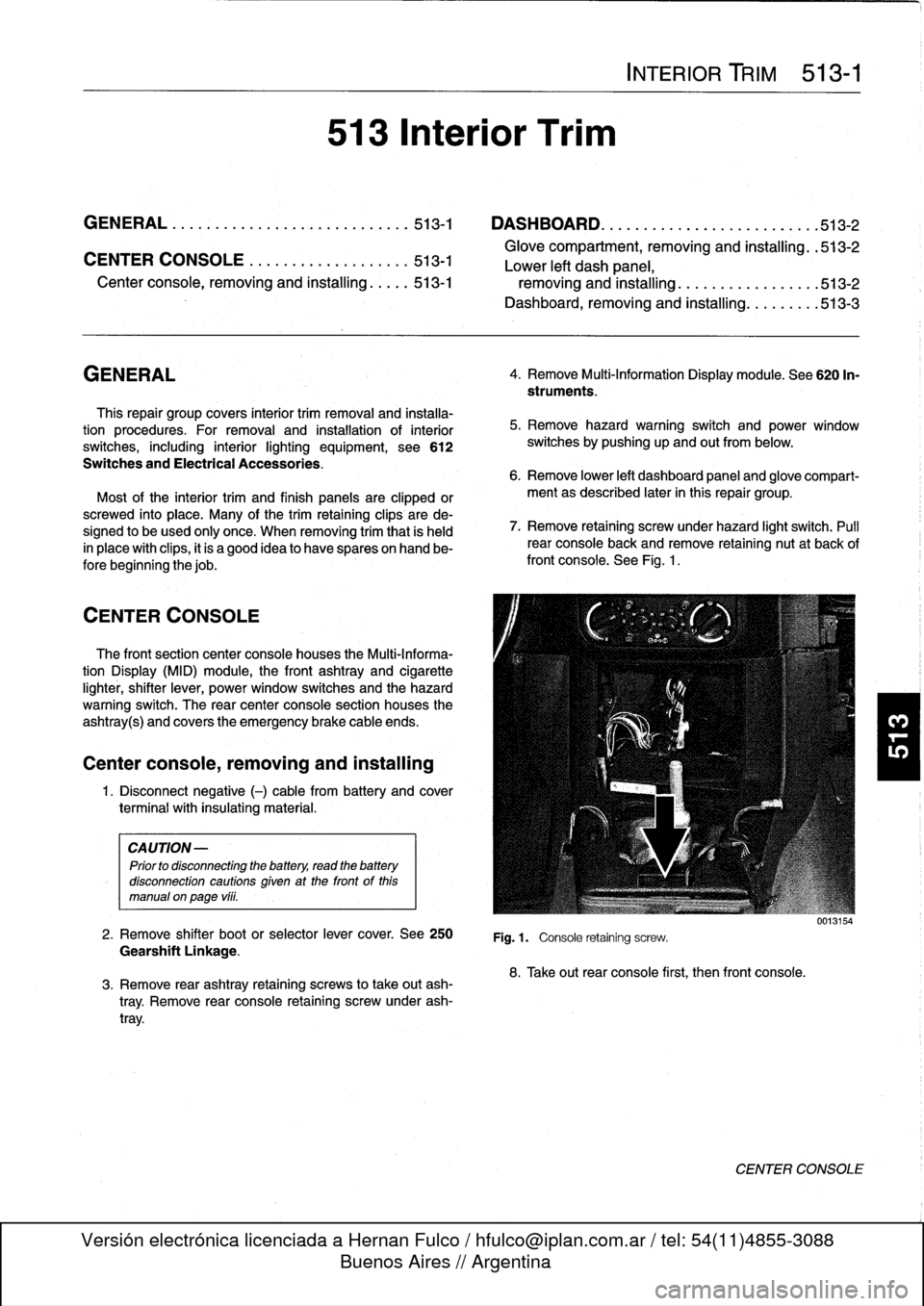
.
Pull
rear
console
back
and
remove
retaining
nut
at
back
of
front
console
.
See
Fig
.
1
.
Fig
.1.
Console
retaining
screw
.
8
.
Take
out
rear
console
first,
then
front
console
.
0013154
CENTER
CONSOLE
Page 347 of 759
Dashboard,
removing
and
installing
1
.
Disconnect
negative
(-)
cable
from
battery
and
cover
terminal
with
insulating
material
.
CAUTION-
Prior
to
disconnectiog
the
battery,
read
the
battery
disconnection
cautionsgiven
at
the
front
of
this
manual
onpage
vi¡¡
.
2
.
Remove
center
console
as
described
earlier
.
3
.
Remove
glove
compartment
as
described
earlier
.
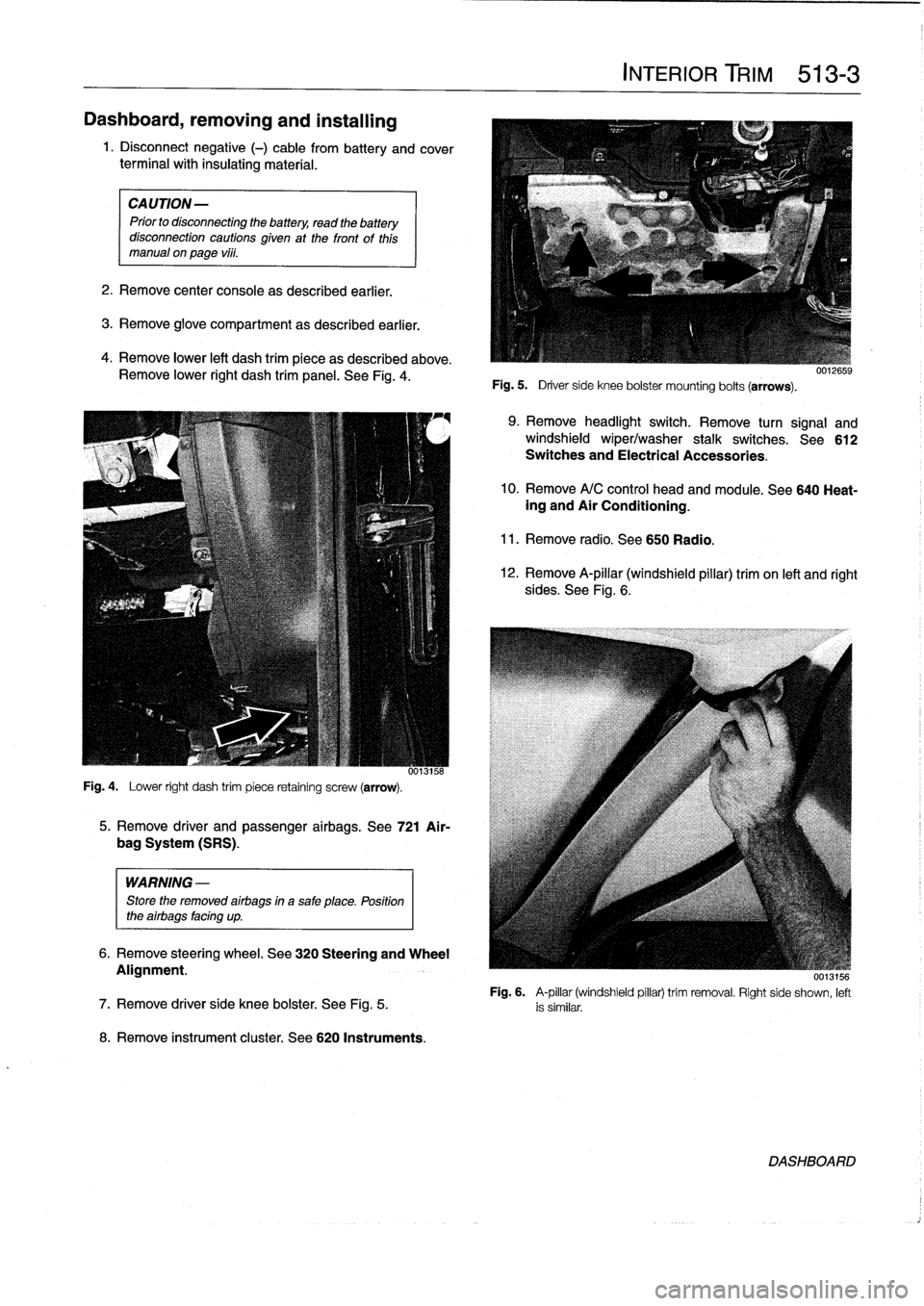
4
.
Remove
lower
left
dash
trim
piece
as
described
above
.
Remove
lower
right
dash
trim
panel
.
See
Fig
.
4
.
Fig
.
4
.
Lower
right
dash
trim
piece
retaining
screw
(arrow)
.
WARNING
-
Store
the
removed
airbags
in
a
safe
place
.
Position
the
airbags
facing
up
.
8
.
Remove
instrument
cluster
.
See
620
Instruments
.
5
.
Remove
driver
and
passenger
airbags
.
See
721
Air-
bag
System
(SRS)
.
6
.
Remove
steering
wheel
.
See
320
Steering
and
Wheel
Alignment
.
INTERIOR
TRIM
513-
3
Fig
.
5
.
Driver
side
knee
bolster
mounting
bolts
(arrows)
.
9
.
Remove
headlight
switch
.
Remove
turn
signal
and
windshield
wiper/washer
stalk
switches
.
See612
Switches
and
Electrical
Accessories
.
10
.
Remove
A/C
control
head
and
module
.
See
640
Heat-ing
and
Air
Conditioning
.
11
.
Remove
radio
.
See650
Radio
.
12
.
Remove
A-pillar
(windshield
pillar)
trim
on
left
and
right
sides
.
See
Fig
.
6
.
UU13156
Fig
.
6
.
A-pillar
(windshield
pillar)
trim
removal
.
Right
side
shown,
left
7
.
Remove
driver
side
knee
bolster
.
See
Fig
.
5
.
is
similar
.
DASHBOARD
Page 387 of 759
610
Electrical
Component
Locations
GENERAL
...........
.
.
.
.
.
.
.
.
.
........
610-1
FOSE
POSITION
TABLES
..
.
.
.
.
.
.....
.
610-19
FUSE
AND
RELAY
POSITIONS
.
...
.
.
.
.
.
610-1
Fuse
Positions
.
.
.
................
.
.
.
.
.
610-1
Relay
Positions
.
.
.
.....
.
.
.
........
.
.
.
.
.
610-2
Auxiliary
RelayPanel
.....
.
...
.
........
.
610-2
SplicePanel,
Left
.
.
.
...
.
.
.
...
.
........
.
610-2
SplicePanel,
Right
.
.
.
.
.
.
.
.
...
.
.........
610-3
COMPONENT
LOCATIONS
.
.
.
.
.......
.
.610-3
Component
Location
Table
.
.
.
.
.
.
.........
610-9
GENERAL
FUSE
AND
RELAY
POSITIONS
This
repair
group
covers
f
use,
relay,
and
control
module
lo-
The
front
power
distribution
box,
an
auxiliary
relay
panel,cation
information
.
Electrical
equipment
and
accessories
in-
and
two
auxiliary
splice
panels
contain
most
of
the
fuses
and
stalled
varies
depending
on
model
and
model
year
.
Always
relays
in
E36
vehicles
.
Refer
to
the
component
location
later
confirm
that
the
proper
electrical
component
has
been
identi-
in
this
section,
as
well
as
the
tables
at
the
end
of
this
repair
fied
by
using
the
electrical
wiring
diagrams
.
group
for
electrical
component
location
.
WARNING
-
On
cars
equipped
with
airbags,
special
precautionsapply
to
any
electrical
system
testing
orrepair
.
Air-
bag
units
areexplosive
devices
and
mustbe
han-
dled
with
extremecare
.
Before
starting
any
work
onan
airbag
equipped
car,
refer
to
the
wamings
and
cautions
in
721
Airbag
System
(SRS)
.
CAUTION
-
"
Prior
to
disconnectiog
the
battery,
read
the
bat-
tery
disconnection
cautions
given
at
the
front
of
this
manual
on
page
viii
.
"
Relay
and
fuse
positions
are
subject
to
changeand
may
varyfrom
car
to
car
.
If
questions
arise,
an
authorized
BMW
dealer
is
the
best
source
for
the
most
accurate
and
up-to-date
information
.
"
A
good
way
to
verify
a
relay
position
isto
com-
pare
the
wiring
colors
at
the
relay
socket
to
thecolors
indicated
on
the
wiring
diagrams
located
at
the
rear
of
this
manual
.
"
Always
switchthe
ignition
off
and
disconnect
the
negative
(-)
battery
cable
before
removing
any
electrical
components
.
"
Connect
and
disconnect
ignition
system
wires,
multiple
connectors,
and
ignition
test
equipment
leads
only
while
the
ignition
is
switched
off
.
"
Only
usea
digital
multimeter
for
electrical
tests
.
ELECTRICAL
COMPONENT
LOCATIONS
610-1
TABLES
a
.
E36Component
Locations
...........
.
.
..
...
610-10b
.
1992
E36
Fuse
Positions
..........
..
.
.
.....
610-20c
.
1993
E36
Fuse
Positions
..........
..
..
.
....
610-22d
.
1994
E36
Fuse
Positions
.........
...
.......
610-24e
.
1995
E36
Fuse
Positions
.........
...
.......
610-26
f
.
1996
E36
Fuse
Positions
.........
...
.......
610-28g
.
1997-1998
E36
Fuse
Positions
..
.
..
...
.......
610-30
Fuse
Positions
CAUTION
-
"
Replace
fuses
with
those
of
the
same
rating
.
In-
stalling
a
fuse
with
higher
rating
can
lead
to
cir-
cuit
failure
and
may
also
start
a
fire
.
"
Relay/fuse
positions
vary
by
model
and
equip-
ment
.
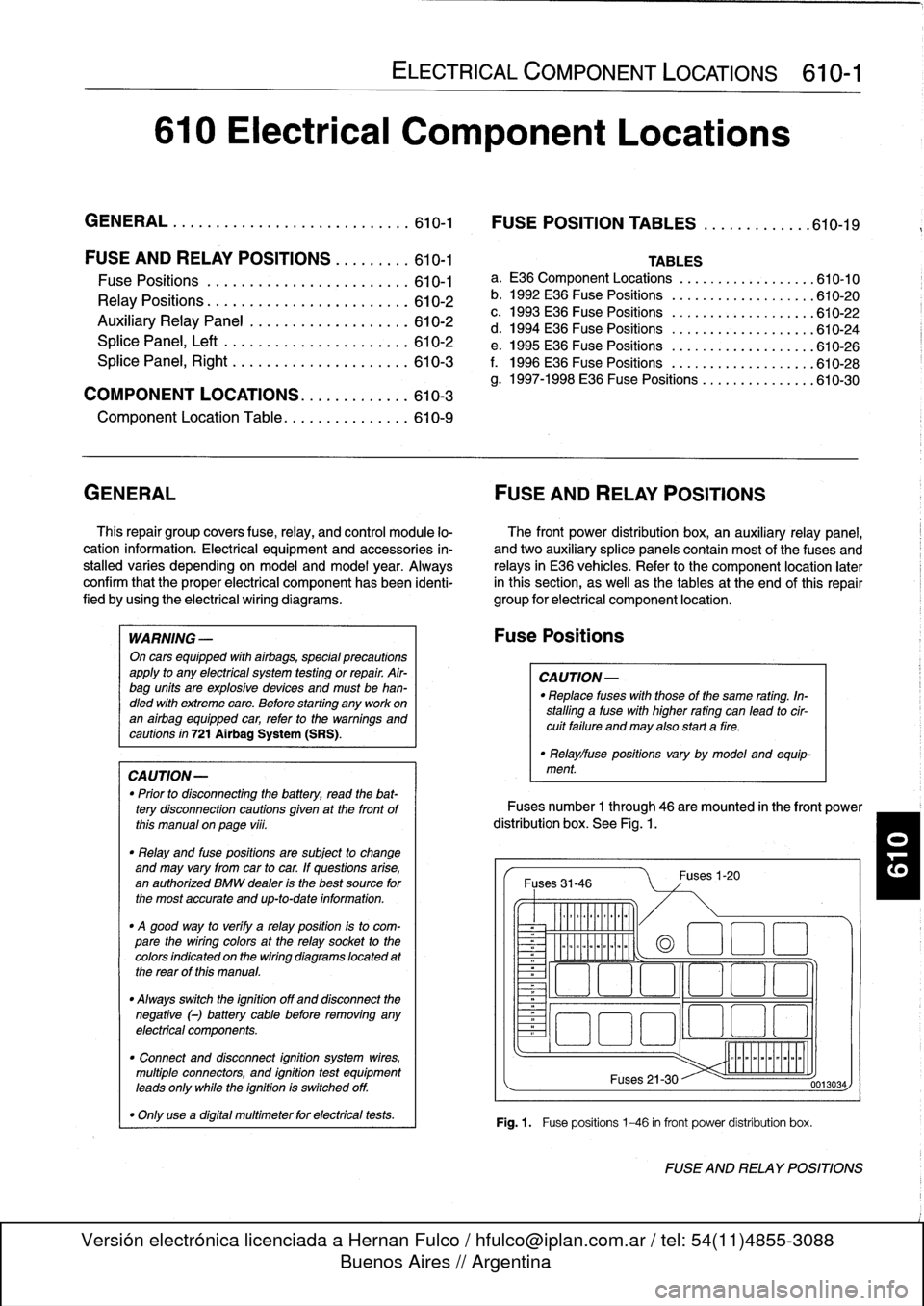
Fuses
number
1
through
46
are
mounted
in
the
front
power
distribution
box
.
See
Fig
.
1.
Fuses
31-46
~
Illlllllllll
°
-
Ilmmlmomlmoi
Fuses
1-20
(a
1
:1
E
El
~
~O!7
L~~n
4~
i
Fuses
21-30
Fig
.1.
Fuse
positions
1-46
in
front
power
distribution
box
.
0013034
FUSE
AND
RELAY
POSITIONS
Page 419 of 759
611
Wipers
and
Washers
GENERAL
..
.
.
.
.
.
.
.
.
.
.
.
.
.
.....
.
......
.
611-1
Windshield
wiper
motor,
removing
and
installing
.
...............
.611-8
WIPER
BLADES
.
.
.
.....
.
.
.
.
.
.
...
....
.611-1
Wiper
Blade
Cleaning
Problems
.
.
.
.
.
.
.....
611-1
Wiper
blades,replacing
...
.
.
.
.
.
.
.
.
.
.....
611-1
Wiper
blade
inserts,
replacing
.
.
.
.
.
.
.
.
.....
611-2
Wiper
arms,
removing
and
installing
.
.
.
.....
611-2
WINDSHIELD
WIPER
ASSEMBLY
.
.
.....
611-3
Windshield
wiper
assembly,
removing
and
installing
(4-door
models)
.
.
.
.
.
.
.....
611-3
Windshield
wiper
assembly,
removing
and
installing
(2-door
models)
.
.
.
.
.
.
.....
611-5
GENERAL
This
repair
group
covers
windshield
wiper
and
washer
sys-
tem
repair
information
.
Please
note
that
some
procedures
are
different
for
2-
and
4-door
models
.
The
windshield
wiper/washer
stalk
switch
assembly
is
cov-
ered
in
612
Switches
and
Electrical
Accessories
.
Electrical
NOTE-
wiring
diagrams
and
relays
for
the
wiper/washer
system
are
BMwhas
available
a
special
toollgauge
(BMWspecial
covered
in
Electrical
Wiring
Diagrams
.
tool
no
.
00
9210)
to
align
the
angle
of
the
wiper
arm
to
the
windshield
glass
.
WIPERBLADES
CA
UTION-
Never
turn
on
the
wiper
blades
while
the
hood
is
open
.
Damage
to
the
wiper
system
and
hood
may
occur
.
Toensure
safetyduring
wiper
biade
system
procedures,
remove
the
windshieldwiper
fuse
.
See
610
Electrical
Component
Locations
.
Wiper
Blade
Cleaning
Problems
Common
cleaning
problems
with
thewipers
includestreak-
ing
or
sheeting,
waterdrops
after
wiping,
and
blade
chatter
.
Streaking
is
usually
caused
when
wiper
blades
are
coated
with
road
film
or
car
wash
wax
.
Clean
the
blades
using
soapy
water
.
If
cleaning
does
not
cure
the
problem,
the
blades
should
be
replaced
.
BMW
recommends
replacing
the
wiper
blades
twice
a
year,
before
and
after
the
cold
season
.
WIPERS
AND
WASHERS
611-1
WINDSHIELD
CLEANING
SYSTEM
......
611-9
Windshield
spray
nozzle,
removing
and
installing
.......
.
........
.611-9
Washer
fluid
reservoir,
replacing
.........
.611-9
Windshield
washer
fluid
pump,
replacing
..
.
......
.
........
.611-9
Washer
fluid
level
sensor,
replacing
(models
with
check
control)
.
.
.
.
........
611-10
Wiper
blade
chatter
may
be
caused
by
dirty
or
worn
blades,
or
by
wiper
arms
that
areout
of
alignment
.
Clean
the
blades
and
windshield
as
described
above
.
Adjust
the
wiper
arm
so
that
there
is
even
pressure
along
the
blade,
and
so
that
the
blade
at
rest
is
perpendicular
to
the
windshield
.
If
problems
persist,
theblades
and
wiper
arms
should
be
replaced
.
The
wiper
blades
can
be
renewed
in
one
of
two
ways
:
either
by
replacing
the
complete
blade
or
by
replacing
just
therubber
insert
.
Insert
replacement
is
the
mosteconomicalmethod,
al-
though
overtime
the
wiperblade
itselfwill
become
worn
.
One
ruleof
thumb
wouldbe
to
replace
just
the
inserts
every
second
time
.
Wiper
blades,
replacing
1
.
Pivot
wiper
arm
off
windshield
.
2
.
Position
wiperblade
approximately
perpendicular
to
wiper
arm
.
3
.
Remove
wiperblade
from
wiper
arm
by
depressing
re-
taining
tab
and
sliding
blade
out
of
arm
.
See
Fig
.
1
.
Drops
that
remain
behind
after
wiping
are
usually
caused
by
NOTE-
oil,
road
film,
or
diesel
exhaust
residue
onthe
glass
.
Use
an
Some
wiperblade
versions
may
havetwo
retaining
alcohol
or
ammonia
solution
or
a
non-abrasive
cleaner
(such
tabs
.
a
s
Bon-Ami
to
clean
the
windshield
.
GENERAL
Page 429 of 759
612
Switches
and
Electrical
Accessories
GENERAL
.
.
.
.
.
.
.
.
.
...
.
.
.
.
.
...
.
......
.612-1
Headlight
switch,
replacing
..
.
...
.
.
.
.
.
.
.
.
.
612-5
Foglight
switch,
replacing
....
.
.
.
.
.
.
.
.
.
.
.
.
.
612-5
INTERIOR
SWITCHES
.
.
...
.
.
.
.
.
.
.
.....
612-1
Hazard
warning
switch,
replacing
.
.
.
.
.
.
.
.
.
.612-5
Turn
signal
switch
and
wiper
switch,
Powerwindow
switch,
replacing
.
.
.
...
.
.
.
.
.
612-5
replacing
.
.
.
.
.
.
.
...
.
.
.
.....
.
....
.
.
.
.
612-1
Outside
mirrorswitch,
replacing
.
.
.
.
.....
.
.
.612-6
Ignition
Switch
Assembly
.
.
.
.
.
.
.
.
....
.
...
612-3
Ignition
electrical
switch,
replacing
.
...
.
....
612-3
INTERIOR
LIGHTS
.
.
................
.
..
612-6
Ignition
lock
cylinder,
replacing
.
.
.
.
.....
.
..
612-4
Dome
light,
rear
map
lights,
trunk
light,
Headlight
and
Foglight
Switch
Assembly
.
.
.
.
612-5
replacing
bulbs
.
......
.
.
.
.
.
.
.
.
.
.....
.
.612-7
GENERAL
Turn
signal
switch
and
wiper
switch,
replacing
Thissection
covers
replacement
of
interior
switches
and
accessories
.
The
procedures
for
removing
the
turn
signal
stalk
switch
and
the
wiper
system
stalk
switchare
similar
.
When
working
on
electrical
switches,
always
disconnect
the
negative
(-)
cable
from
the
battery
and
insulate
the
cable
end
to
prevent
accidental
re-connection
.
CAUTION-
Prior
to
disconnectiog
the
battery,
read
the
battery
disconnection
cautions
given
at
the
front
of
this
manual
on
page
viii
.
WARNING
-
The
cars
covered
by
this
manual
are
equipped
with
a
Supplemental
Restraint
System
(SRS)
that
auto-'
matically
deploys
one
or
more
airbags
.
Each
airbag
unit
houses
an
explosive
powerful
charge
.
Any
work
involving
the
SRS
system
should
only
be
per-
formed
byan
authorized
BMW
dealer
.
Making
re-
pairs
without
the
proper
knowledge
and
special
test
equipment
may
cause
serious
personal
injury
.
See
721
Airbag
System
(SRS)
3
.
With
front
wheels
pointed
straight
ahead,
remove
steer-
"
Testing
and
replacement
information
for
the
oil
ores-
¡ng
wheel
.
See
320
Steering
and
Wheel
Alignment
.
sure
switch
is
covered
in
119
Lubrication
System
.
NOTE-
"
Wirfng
diagramscan
be
found
in
Electrical
Wiring
Diagrams
.
"
Fuse,
relay
and
electrical
component
locations
can
be
found
in
610
Electrical
Component
Locations
.
"
Replacement
information
for
thetransmission
gear
position/neutral
safety
switch
is
covered
in
250
Gear-
shift
Unkage
.
INTERIOR
SWITCHES
NOTE
-
To
preventmarring
interior
trim,
wrap
the
tips
of
screw-
drivers
and
pliers
with
tape
beforeprying
out
switches
or
electrical
accessories
.
SWITCHES
AND
ELECTRICAL
ACCESSORIES
612-1
1
.
Disconnect
negative
(-)
cable
from
battery
and
cover
terminal
with
insulating
material
.
2
.
Remove
airbag
unit
from
steering
wheel
.
See
721
Air-
bag
System
(SRS)
.
Store
airbag
unit
in
a
safe
placew¡th
pad
facing
up
.
NOTE
-
To
helo
with
reassembly,
mark
steering
wheel
and
col-
umn
before
disassembly
.
4
.
Remove
trim
panel
from
lower
left
side
of
instrument
panel
.
See513
Interior
Trim
.
INTERIOR
SWITCHES
Page 430 of 759
612-2
SWITCHES
AND
ELECTRICAL
ACCESSORIES
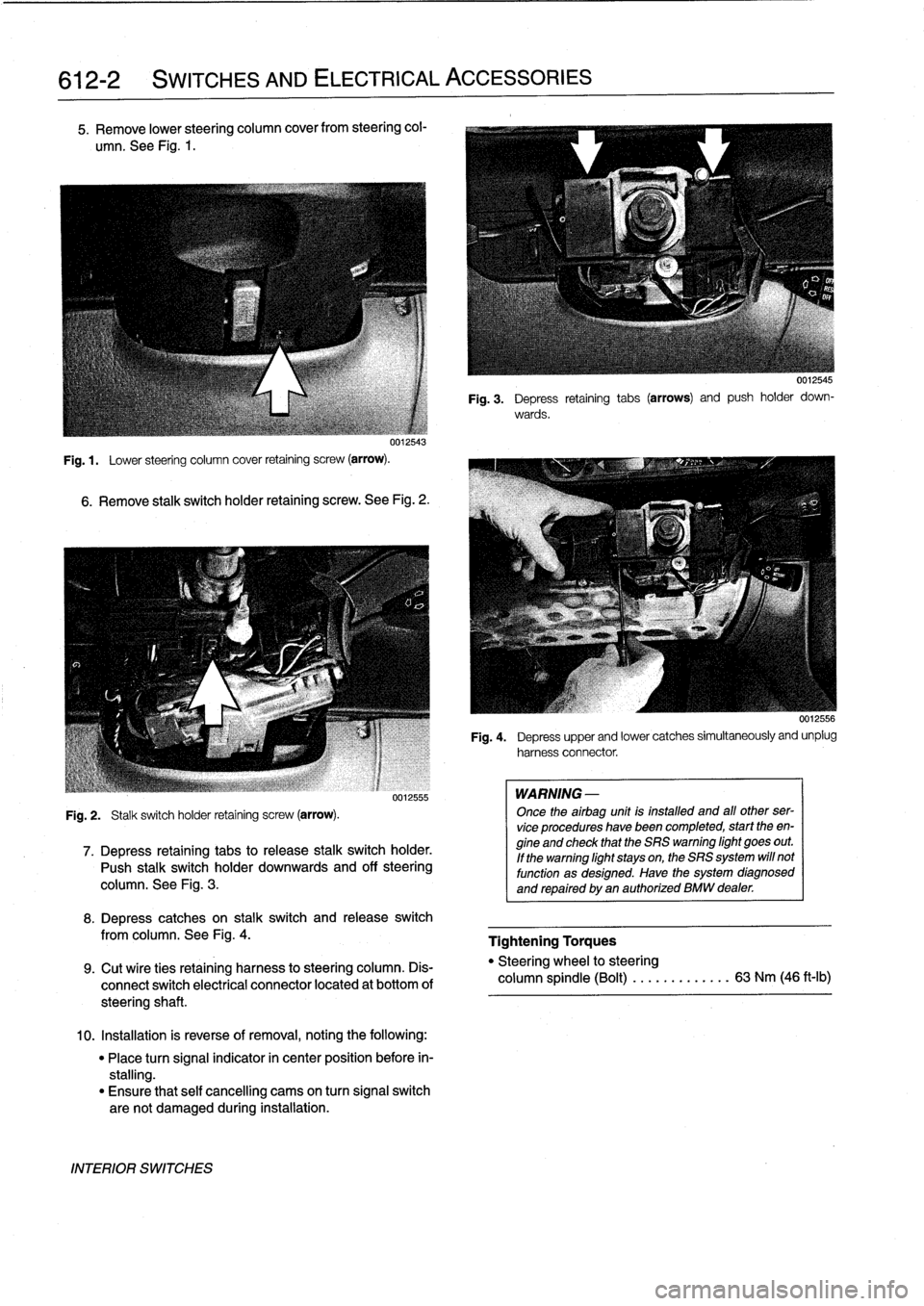
5
.
Remove
lower
steering
column
cover
from
steering
col-
umn
.
See
Fig
.
1
.
uu12543
Fig
.
1
.
Lower
steering
column
cover
retaining
screw
(arrow)
.
6
.
Remove
stalk
switch
holder
retaining
screw
.
See
Fig
.
2
.
Fig
.
2
.
Stalk
switch
holder
retaining
screw
(arrow)
.
0012555
7
.
Depress
retaining
tabs
to
release
stalk
switchholder
.
Push
stalk
switchholder
downwards
and
off
steering
column
.
See
Fig
.
3
.
8
.
Depress
catches
on
stalk
switch
and
release
switch
from
columna
See
Fig
.
4
.
9
.
Cut
wíre
ties
retaining
harness
to
steering
column
.
Dis-
connect
switch
electrical
connector
located
at
bottom
of
steeringshaft
.
10
.
Installation
is
reverse
of
removal,
noting
the
following
:
"
Place
turn
signal
indicator
in
center
position
before
in-
stalling
.
"
Ensure
that
self
cancelling
cams
on
turn
signal
switch
are
not
damaged
during
installation
.
INTERIOR
SWITCHES
WARNING
-
Once
theairbag
unit
is
installed
and
all
other
ser-
vice
procedures
havebeen
completed,
start
theen-
gine
and
check
that
the
SRS
warning
light
goes
out
.
If
the
warning
light
stays
on,
the
SRS
system
will
not
function
as
designed
.
Have
the
system
diagnosed
and
repaired
by
an
authorized
BMW
dealer
.
0012545
Fig
.
3
.
Depress
retaining
tabs
(arrows)
and
push
holder
down-
wards
.
0012556
Fig
.
4
.
Depress
upper
and
lower
catches
simultaneously
and
unplug
harnessconnector
.
Tightening
Torques
"
Steering
wheel
to
steering
column
spindle
(Bolt)
...
.
.
.
..
.....
63
Nm
(46
ft-lb)
Page 431 of 759
Ignition
Switch
ASsembly
3
.
Remove
screw
retaining
lower
steering
column
cover
and
remove
cover
.
Refer
to
Fig
.
1
.
,
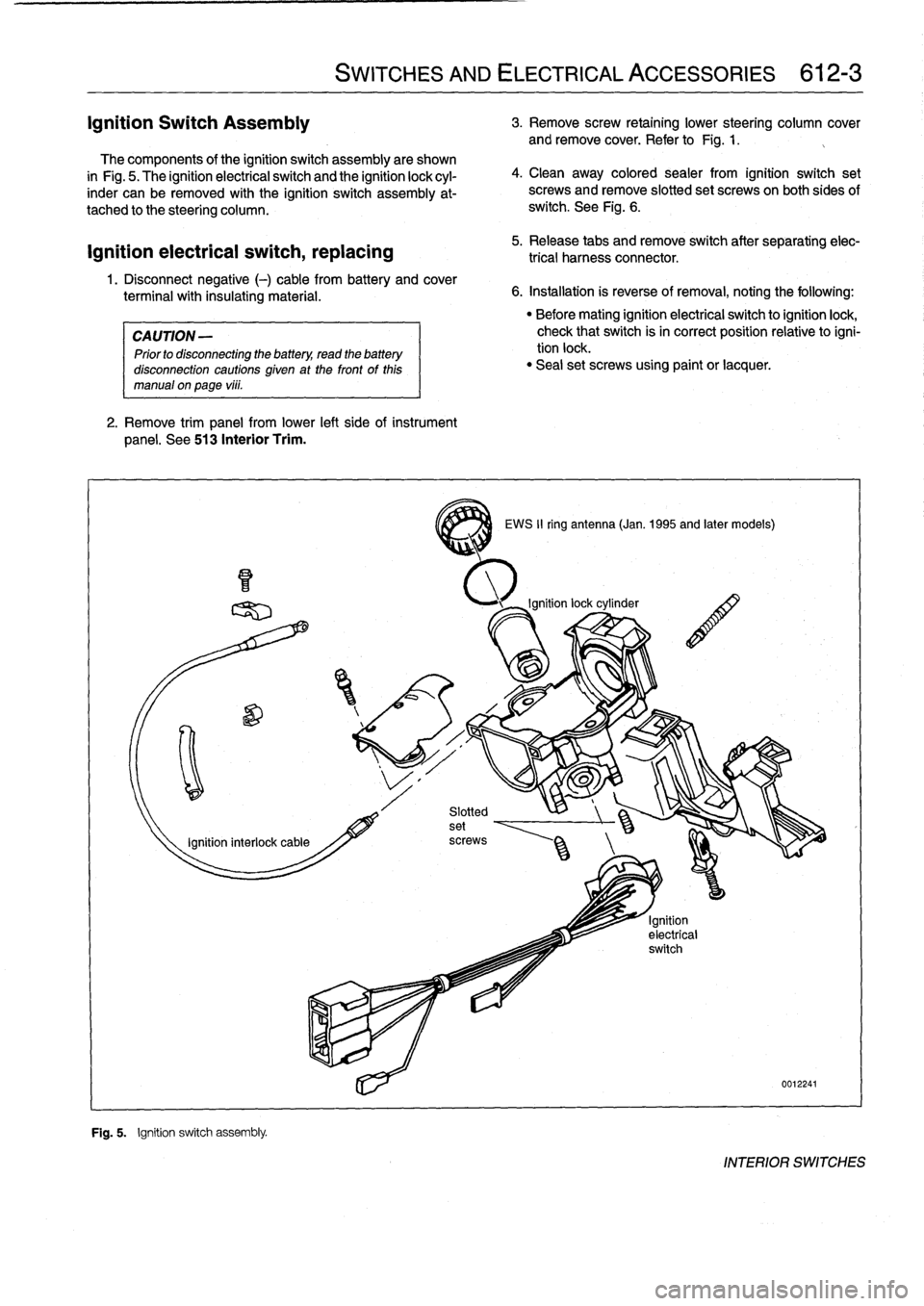
The
components
of
the
ignition
switch
assembly
are
shown
in
Fig
.
5
.
The
ignitionelectrical
switch
and
the
ignition
lock
cyl-
inder
can
be
removed
with
the
ignition
switch
assembly
at-
tached
to
the
steering
column
.
ignition
electrical
switch,
replacing
1
.
Disconnect
negative
(-)
cable
from
battery
and
cover
terminal
with
insulating
material
.
CAUTION
-
Prior
to
disconnecting
the
battery,
read
the
battery
disconnection
cautions
given
at
the
front
of
this
manual
on
page
vi¡¡
.
2
.
Remove
trim
panel
from
lower
left
side
of
instrument
panel
.
See
513
Interior
Trim
.
F~
"
Fig
.
5
.
Ignition
switch
assembly
.
SWITCHES
AND
ELECTRICAL
ACCESSORIES
612-3
4
.
Clean
away
colored
sealer
from
ignition
switch
set
screws
and
remove
slotted
set
screwson
both
sides
of
switch
.
See
Fig
.
6
.
5
.
Release
tabs
andremove
switch
after
separating
elec-
trical
harness
connector
.
6
.
Installation
is
reverse
of
removal,
noting
the
following
:
3
EWS
II
ring
antenna
(Jan
.
1995
and
later
models)
"
Before
mating
ignition
electrical
switch
toignitionlock,
check
that
switch
isin
correct
position
relativetoigni-
tion
lock
.
"
Seal
set
screws
using
paint
or
lacquer
.
0012241
INTERIOR
SWITCHES
Page 432 of 759
612-4
SWITCHES
AND
ELECTRICAL
ACCESSORIES
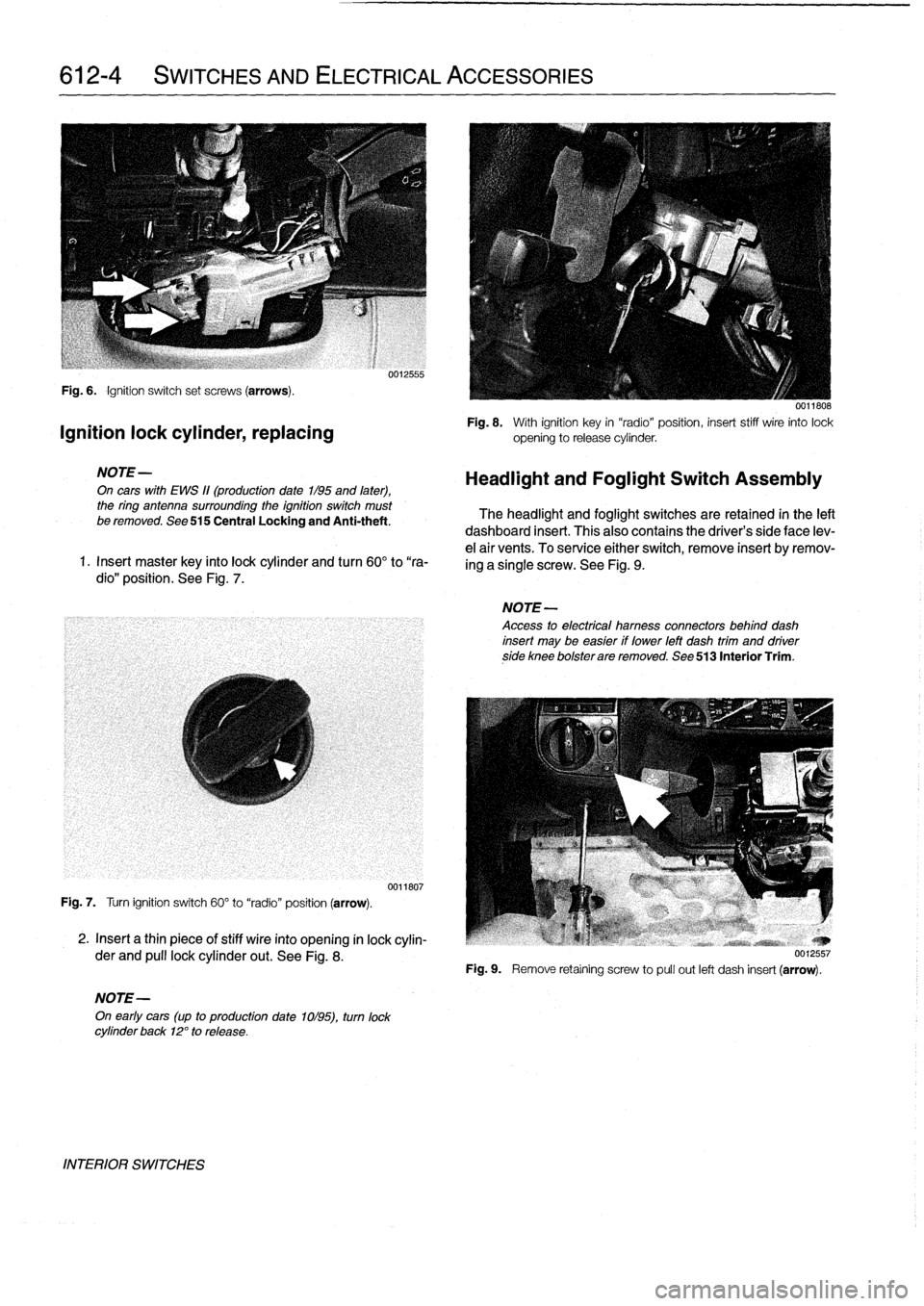
Fig
.
6
.
Ignition
switch
set
screws
(arrows)
.
Ignition
lock
cylinder,
replacing
NOTE-
On
cars
with
EWS
11(production
date
1/95
and
later),
the
ring
antenna
surrounding
the
ignition
switch
must
be
removed
.
See
515
Central
Locking
and
Anti-theft
.
1
.
Insert
master
key
finto
lock
cylinder
and
turn
60°
to
"ra-
dio"
position
.
See
Fig
.
7
.
Fig
.
7
.
Turn
ignition
switch
60°
to
"radio"
position
(arrow)
.
2
.
Insert
a
thin
piece
of
stiff
wire
into
opening
in
lock
cylin-
der
and
pull
lockcylinder
out
.
See
Fig
.
8
.
NOTE-
On
early
cars
(up
to
production
date
1ol95),
turn
lock
cylinder
back
12°
to
release
.
INTERIOR
SWITCHES
0012555
0011807
0011808
Fig
.
8
.
With
ignition
key
in
"radio"position,
insert
stiff
wire
into
lock
opening
to
release
cylinder
.
Headlight
and
Foglight
Switch
Assembly
The
headlight
and
foglight
switches
are
retained
in
the
left
dashboard
insert
.
This
alsocontains
the
driver's
side
face
lev-
e¡
air
vents
.
To
service
either
switch,
remove
insert
byremov-
ing
a
single
screw
.
See
Fig
.
9
.
NOTE-
Access
to
electrical
hamess
connectors
behind
dash
insert
may
be
easier
if
lower
left
dash
trim
and
driverside
knee
bolsterare
removed
.
See
513
Interior
Trim
.
Fig
.
9
.
Remove
retaíning
screw
to
pull
out
left
dash
insert
(arrow)
.
Page 433 of 759
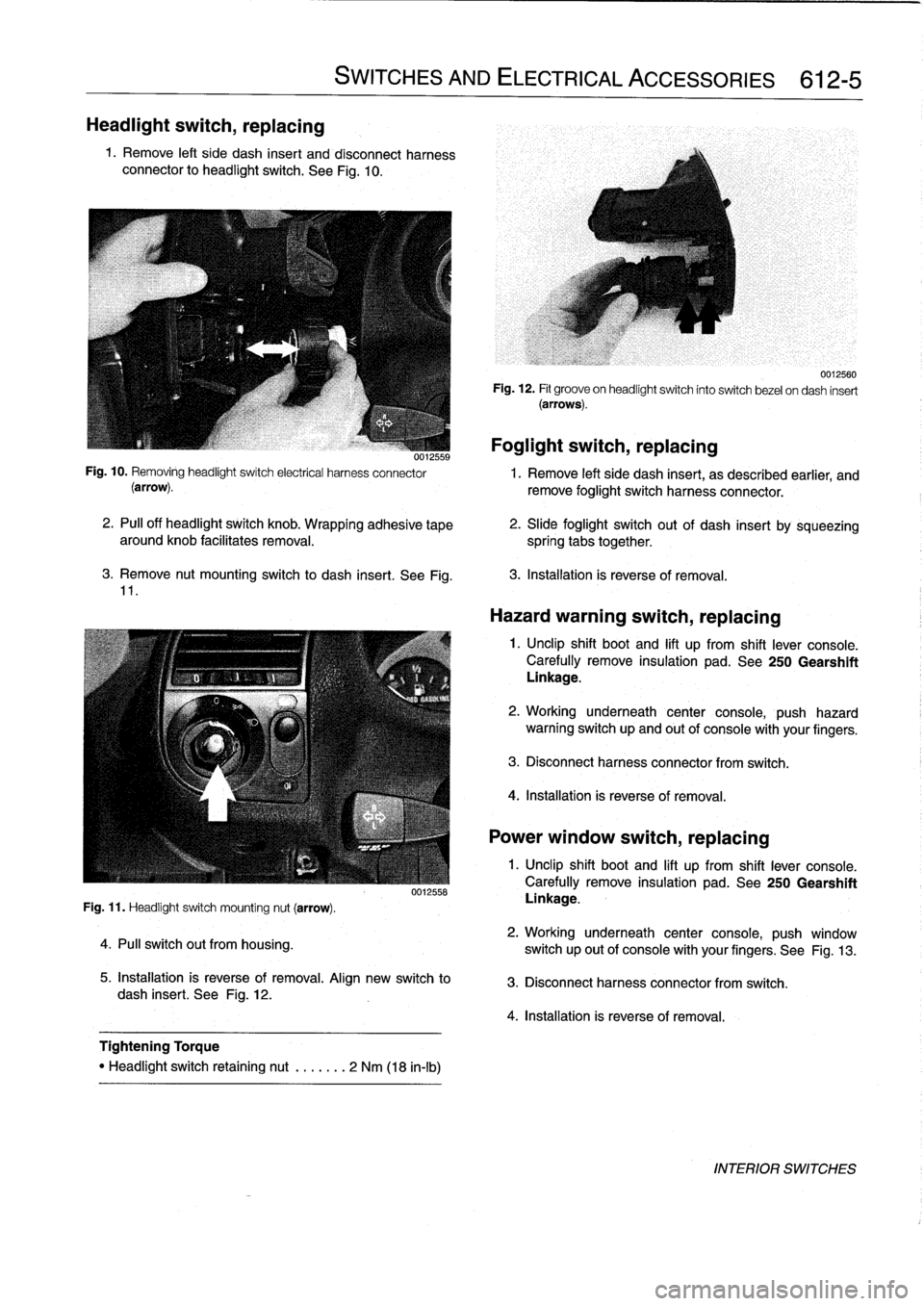
Headlight
switch,
replacing
1
.
Remove
left
side
dash
insert
and
disconnect
harness
connector
to
headlight
switch
.
See
Fig
.
10
.
3
.
Remove
nut
mounting
switch
to
dash
insert
.
See
Fig
.
11
.
Fig
.
11
.
Headlight
switch
mounting
nut
(arrow)
.
4
.
Pull
switch
out
from
housing
.
SWITCHES
AND
ELECTRICAL
ACCESSORIES
612-5
0012558
5
.
Installation
is
reverse
of
removal
.
Align
new
switch
to
dash
insert
.
See
Fig
.
12
.
Tightening
Torque
"
Headlight
switch
retaining
nut
.
......
2
Nm
(18
in-lb)
Foglight
switch,
replacing
0012559
Fig
.
10
.
Removing
headlightswitch
electrical
harness
connector
1
.
Remove
left
side
dash
insert,
as
described
earlier,
and
(arrow)
.
remove
foglight
switch
harness
connector
.
2
.
PA
off
headlight
switch
knob
.
Wrapping
adhesive
tape
aroundknob
facilitates
removal
.
spring
tabs
together
.
0012560
Fig
.
12
.
Fit
groove
on
headlightswitch
into
switch
bezel
ondash
insert
(arrows)
.
2
.
Slide
foglight
switch
out
of
dash
insert
by
sqúeezing
3
.
Installation
is
reverse
of
removal
.
Hazard
warning
switch,
replacing
1
.
Unclip
shift
boot
and
lift
up
from
shift
lever
console
.
Carefully
remove
insulation
pad
.
See
250
Gearshift
Linkage
.
2
.
Working
underneath
center
console,
push
hazard
warning
switch
up
and
out
of
console
with
your
fingers
.
3
.
Disconnect
harness
connector
from
switch
.
4
.
Installation
is
reverse
of
removal
.
Power
window
switch,
replacing
1
.
Unclip
shift
boot
and
lift
up
from
shift
lever
console
.
Carefully
remove
insulation
pad
.
See250
Gearshift
Linkage
.
2
.
Working
underneath
center
console,
push
window
switch
up
out
of
console
with
your
fingers
.
See
Fig
.
13
.
3
.
Disconnect
harness
connector
from
switch
.
4
.
Installation
is
reverse
of
removal
.
INTERIOR
SWITCHES
Page 434 of 759
612-6
SWITCHES
AND
ELECTRICAL
ACCESSORIES
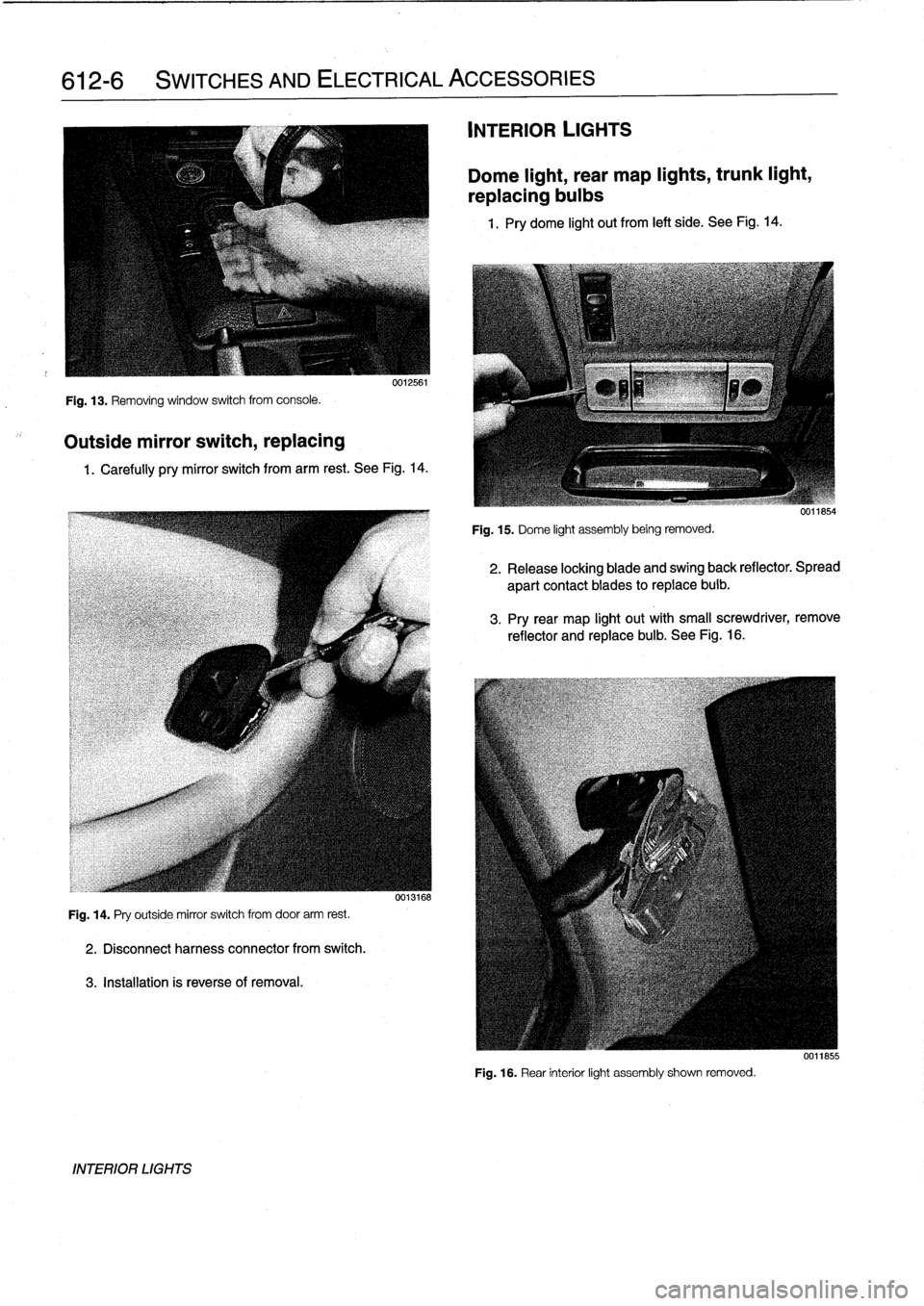
Fig
.
13
.
Removing
window
switch
from
console
.
Outside
mirror
switch,
replacing
0012561
1
.
Carefully
pry
mirror
switch
from
arm
rest
.
See
Fig
.
14
.
Fig
.
14
.
Pry
outside
mirror
switch
from
door
arm
rest
.
2
.
Disconnectharness
connector
from
switch
.
3
.
Installation
is
reverseof
removal
.
INTERIOR
LIGHTS
0013168
INTERIOR
LIGHTS
Dome
light,
rear
map
lights,
trunk
light,
replacing
bulbs
1
.
Pry
dome
light
out
from
left
side
.
See
Fig
.
14
.
Fig
.
15
.
Dome
light
assembly
being
removed
.
2
.
Release
locking
blade
and
swing
back
reflector
.
Spread
apart
contact
blades
toreplace
buib
.
3
.
Pry
rear
map
light
out
with
small
screwdriver,
remove
reflector
and
replace
bulb
.
See
Fig
.
16
.
Fig
.
16
.
Rear
interior
light
assembly
shown
removed
.
0011855