ESP BMW M3 2008 Workshop Manual
[x] Cancel search | Manufacturer: BMW, Model Year: 2008, Model line: M3, Model: BMW M3 2008Pages: 266, PDF Size: 8.85 MB
Page 176 of 266

USB-audio interface
174
Repeating tracks
1.Select the current track and press the con-
troller.
2.Select "Repeat track" and press the con-
troller.
Stop repeating:
1.Press the controller.
2.Select "Repeat track" and press the con-
troller.
Random play sequence
You can play the tracks in the selected list in
random order, e. g. all tracks of a single artist.
1.Select the current track and press the con-
troller.
2.Select "Random" and press the controller.
Stop random play:
1.Press the controller.
2.Select "Random" and press the controller.
Fast forward/reverse
Buttons on the steering wheel or CD player:
Press and hold the button for the
corresponding direction.
Notes
Do not expose the audio device to
extreme environmental conditions, e. g.
very high temperatures, refer to the operating
instructions of the audio device. Otherwise the audio device may become damaged, which
could compromise safety while driving.<
Depending on the configuration of the audio
files, e. g. bit rates greater than 256 KBit/s, the
files may not play back correctly in every case.
Notes on connecting
>The USB-audio interface acts as the power
supply to the connected audio devices, pro-
vided that this is supported by the audio
device. Therefore, do not connect the USB
audio device to the power socket in the
vehicle during operation.
>Do not forcibly connect the plug to the USB
interface.
>Do not connect devices such as fans or
lamps to the USB-audio interface.
>Do not connect USB hard disks.
>Do not use the USB-audio interface to
charge external devices.
Page 183 of 266
181
Entertainment
Reference
At a glance
Controls
Driving tips Communications
Navigation
Mobility
As soon as a mobile phone is detected by the
vehicle, the phone book entries stored on the
SIM card or on your mobile phone are transmit-
ted to the vehicle. This data transfer depends
on your mobile phone and can take several min-
utes; please refer to your mobile phone's oper-
ating instructions, if necessary.
If not all phone book entries are displayed:
>Transfer all phone book entries from the
SIM card to the mobile phone, if necessary.
>Phone book entries with special characters
may not be displayed.
Up to four mobile phones can be paired, one
after the other. If a fifth mobile phone is paired,
the pairing data for the mobile phone whose
pairing data was first stored on the vehicle is
deleted.
Checks to perform if pairing is
unsuccessful
>Is the mobile phone supported by the
mobile phone preparation package? You
can obtain information on the Internet at:
www.bmw.com.
>Do the Bluetooth passkeys on the mobile
phone and vehicle match? The same Blue-
tooth passkey must be entered on the
mobile phone's display and via iDrive.
>Did it take you more than 30 seconds to
enter the Bluetooth passkey?
>Only a limited number of devices can be
connected with the mobile phone. If neces-
sary, delete connections with other devices.
>Is the mobile phone no longer responding?
Switch the mobile phone off and on or
briefly disconnect the power supply.
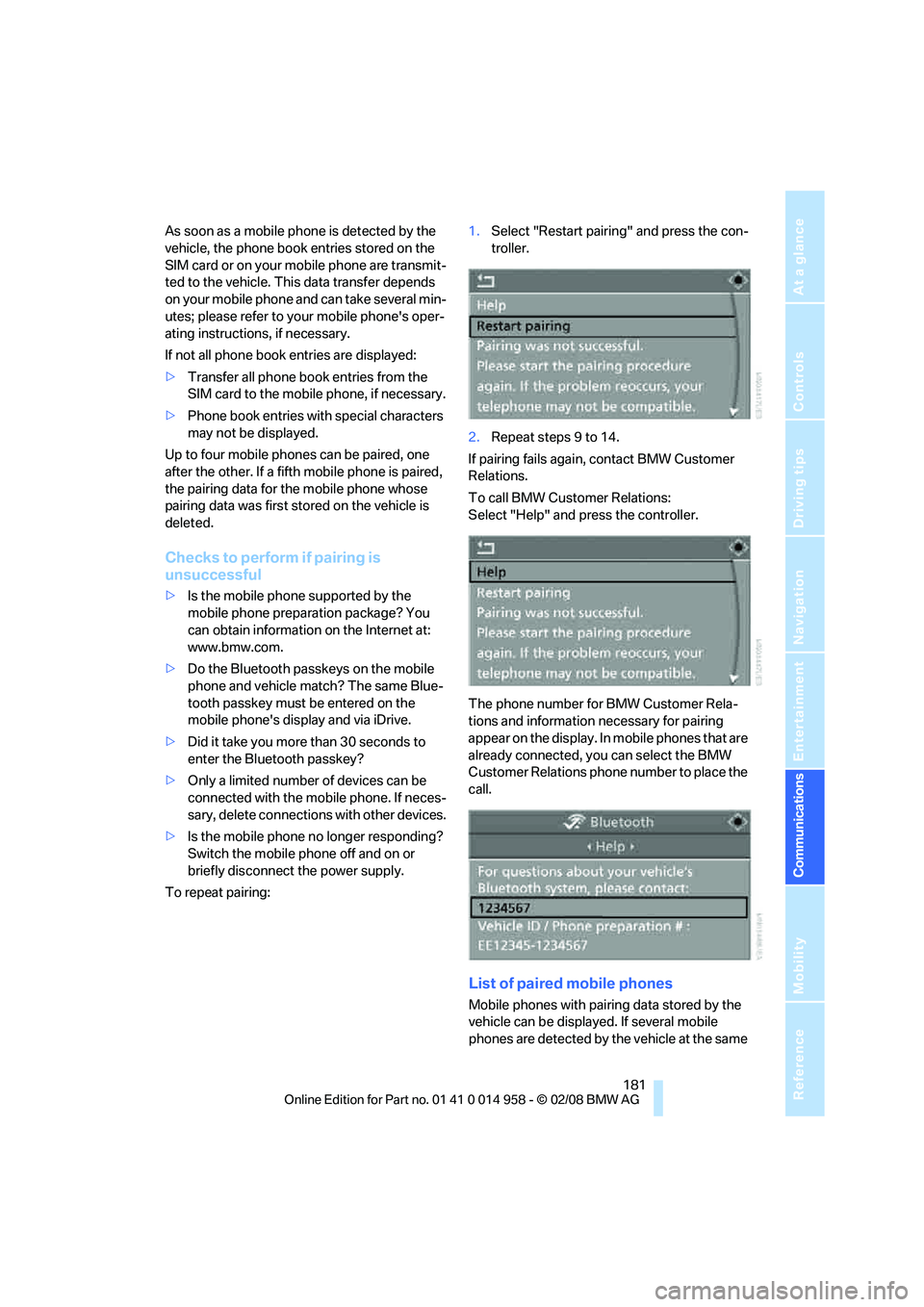
To repeat pairing:1.Select "Restart pairing" and press the con-
troller.
2.Repeat steps 9 to 14.
If pairing fails again, contact BMW Customer
Relations.
To call BMW Customer Relations:
Select "Help" and press the controller.
The phone number for BMW Customer Rela-
tions and information necessary for pairing
appear on the display. In mobile phones that are
already connected, you can select the BMW
Customer Relations phone number to place the
call.
List of paired mobile phones
Mobile phones with pairing data stored by the
vehicle can be displayed. If several mobile
phones are detected by the vehicle at the same
Page 187 of 266

185
Entertainment
Reference
At a glance
Controls
Driving tips Communications
Navigation
Mobility
Calling
Dialing phone numbers
1.Select "Phone" and press the controller.
2.Select "Dial" and press the controller.
3.Enter the desired phone number by select-
ing the digits individually and pressing the
controller.
Always enter the complete phone number
consisting of national dialing code, area
code, and phone number.
The letters correspond to the numbers on
the keypad of the mobile phone.
To delete the last digit:
Move the controller towards the right to
select the arrow and press the control-
ler.
4.Select "Dial number" and press the control-
ler.
Alternatively: press the button on the
steering wheel.
For your phone number to be displayed to the
person you are talking to, the display of phone
numbers must be enabled by your provider.
Via programmable memory keys
You can store phone numbers on the program-
mable memory keys to call these numbers
directly, refer to page21.
Ending a call
Press the button on the steering wheel.
Alternatively:
1.Select the phone number and press the
controller.
2."End call" is selected.
Press the controller.
Selecting a phone number from the
phone book or from a list of stored
phone numbers
Phone numbers you have dialed, received calls
and phone book entries are stored in lists when
the mobile phone is linked to the vehicle via
Bluetooth. If the caller is listed in the phone
book, the name of the entry is displayed instead
of the phone number.
You can select the desired subscriber from the
list and establish the connection.
Five lists are available:
>"A - Z"
The entries in your mobile phone's phone
Page 191 of 266
189
Entertainment
Reference
At a glance
Controls
Driving tips Communications
Navigation
Mobility
and/or your mobile phone's operating
instructions.
>Press the button above the storage
compartment.
From hands-free system to mobile
phone
If you are making a call via the hands-free sys-
tem, it may be possible to continue the call via
the mobile phone, depending on your mobile
phone model. Refer to the display on your
mobile phone and/or your mobile phone's oper-
ating instructions.
Alternatively, you can deactivate the Bluetooth
link.
Depending on the type of mobile phone you are
using, it may occur that calls are switched from
the hands-free system to the mobile phone if
reception of the wireless network is poor.
Operation by voice
commands*
The concept
You can operate your mobile phone without
having to take a hand off the steering wheel.
During your entries, you will be guided in many
cases by announcements or questions.
The same prerequisites apply as for operation
via iDrive, refer to page183.
Symbols in the Owner's Manual
Saying commands
Activating the system
1.Briefly press the button on the steering
wheel.
A sound signal indicates that you can say
commands.
2.Say the command.
Ending/canceling operation by voice
commands
Press the button on the steering wheel
or
In dialogs where text is spoken, e.g. a name
rather than a command, canceling is only possi-
ble using the button on the steering wheel.
Having the possible commands read
aloud
The system recognizes specific commands
t h a t m u s t b e p r o n o u n c e d e x a c t l y w o r d f o r w o r d .
You can have the possible commands for any
function read aloud to you:
Using alternative commands
Often there is more than a single command to
run a function, e.g.:
Digits from zero to nine are recognized.
You can say each digit individually or group
them into a sequence to accelerate the input.
{...}Say the specified commands word for
word.
{{...}} Indicates responses of the system.
{Cancel}.
{Help}
{Dial name} or {Name}.
Page 192 of 266
Telephoning
190
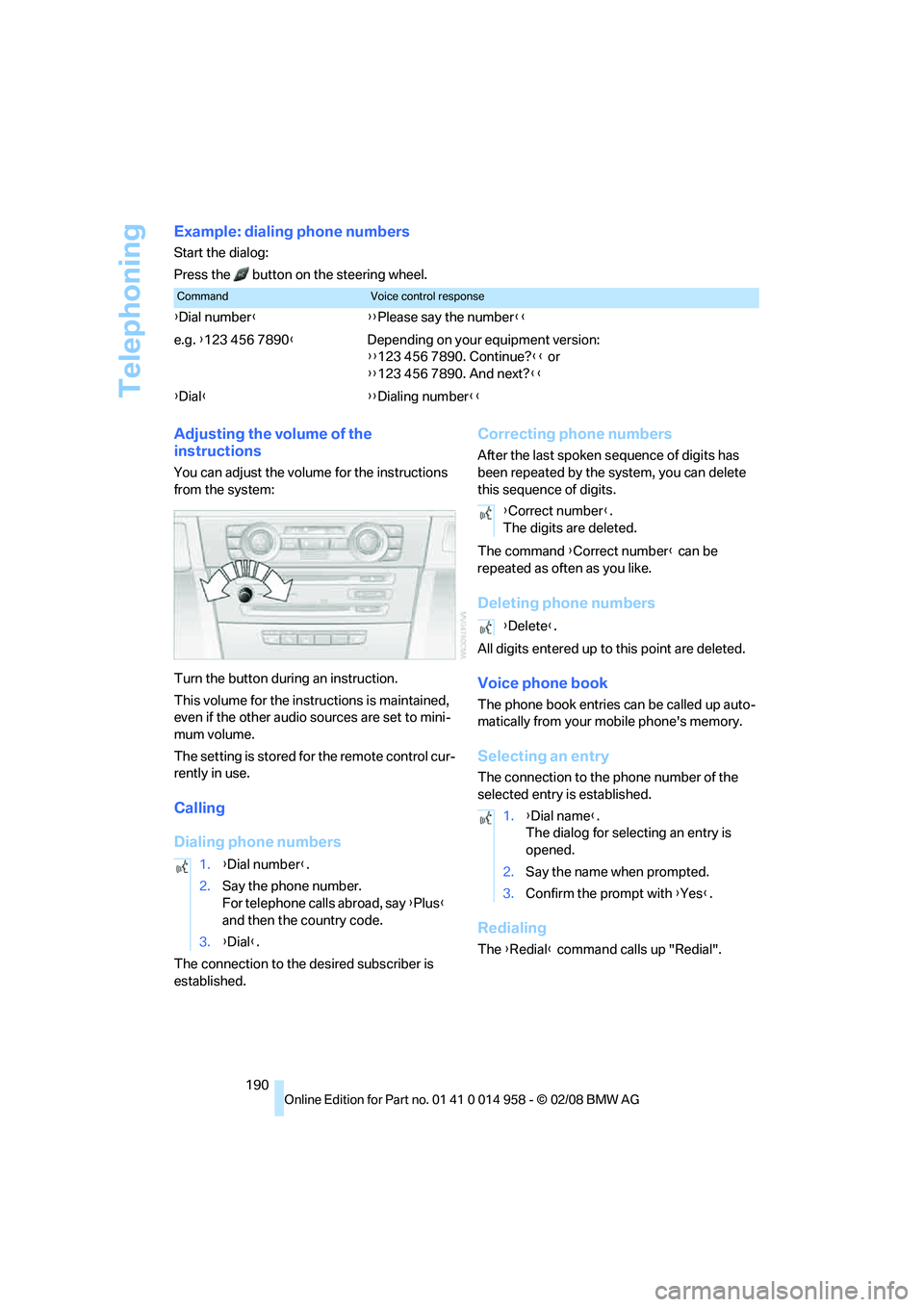
Example: dialing phone numbers
Start the dialog:
Press the button on the steering wheel.
Adjusting the volume of the
instructions
You can adjust the volume for the instructions
from the system:
Turn the button during an instruction.
This volume for the instructions is maintained,
even if the other audio sources are set to mini-
mum volume.
The setting is stored for the remote control cur-
rently in use.
Calling
Dialing phone numbers
The connection to the desired subscriber is
established.
Correcting phone numbers
After the last spoken sequence of digits has
been repeated by the system, you can delete
this sequence of digits.
The command {Correct number} can be
repeated as often as you like.
Deleting phone numbers
All digits entered up to this point are deleted.
Voice phone book
The phone book entries can be called up auto-
matically from your mobile phone's memory.
Selecting an entry
The connection to the phone number of the
selected entry is established.
Redialing
The {Redial} command calls up "Redial".
CommandVoice control response
{Dial number}{{Please say the number}}
e.g. {123 456 7890}Depending on your equipment version:
{{123 456 7890. Continue?}} or
{{123 456 7890. And next?}}
{Dial}{{Dialing number}}
1.{Dial number}.
2.Say the phone number.
For telephone calls abroad, say {Plus}
and then the country code.
3.{Dial}.
{Correct number}.
The digits are deleted.
{Delete}.
1.{Dial name}.
The dialog for selecting an entry is
opened.
2.Say the name when prompted.
3.Confirm the prompt with {Yes}.
Page 195 of 266
193
Entertainment
Reference
At a glance
Controls
Driving tips Communications
Navigation
Mobility
BMW Assist
BMW Assist provides you with various services.
For example, the position data of your vehicle
can be transmitted to the BMW Assist
Response Center if an Emergency Request
*
has been sent.
Many BMW Assist services depend on the indi-
vidually agreed contract.
After your contract has expired, the
BMW Assist system will be deactivated by the
BMW Assist Response Center without you hav-
ing to visit a BMW center. After the BMW Assist
system has been deactivated, no BMW Assist
service will be available. The BMW Assist sys-
tem can be reactivated by a BMW center after a
new contract has been signed.
Requirements
You can use BMW Assist when the following
requirements are met:
>The installed BMW Assist system is logged
on to a mobile phone network. This network
must be capable of transmitting the ser-
vices.
>To transmit position data, the vehicle must
be able to determine the current position.
>To activate and update BMW Assist, a GPS
signal must be available.
>You have subscribed to BMW Assist with
your BMW center or with the BMW Assist
Response Center. Enabling must have
been completed.
>BMW Assist is activated, refer to page198.
Offered services
The following services are available via
BMW Assist:
>Emergency Request, refer to page230:
When you press the SOS button, a connec-
tion is established to the BMW Assist
Response Center. The BMW Assist Response Center contacts you and takes
further steps to help you.
>Automatic Collision Notification:
Under certain conditions, a connection is
established to the BMW Assist Response
Center after a serious accident. If possible,
the BMW Assist Response Center contacts
you and takes further steps to help you.
>Enhanced Roadside Assistance:
You can call BMW Roadside Assistance
*
should you require help in the event of a
breakdown. If possible, the vehicle data and
position data are transmitted during this
call.
>Customer Relations:
For all information related to your vehicle
you can be connected with BMW Customer
Relations.
>BMW TeleServices
*:
Data on your vehicle's service status or
required inspections are transmitted to your
BMW center either automatically before a
service due date or when you request a
BMW service appointment.
>Remote Door Unlock:
Contact the BMW Assist Response Center
if your remote control or key is not available
and you would like to have the vehicle
unlocked.
>Stolen Vehicle Recovery:
After you report your vehicle stolen with the
police, call the BMW Assist Response Cen-
ter to determine its position.
In addition, optional services can be provided to
you, such as the Concierge service or informa-
tion on directions, traffic or the weather. You
can use Critical Calling to activate a limited
number of calls via the BMW Assist Response
Center, e.g. when you do not have your mobile
phone with you.
Press the SOS button in order to contact the
BMW Assist Response Center, see below.
*
Page 196 of 266
BMW Assist
194 You can also access the BMW Assist Concierge
service via the Internet.
Characteristics of the offered services
The following characteristics apply to the ser-
vices:
>The services offered are country-specific.
>Voice contact is established or data are
transferred, depending on the equipment
and the country. In some countries, it is
possible to do both.
>The data transmitted can be vehicle data,
for example, your current position or the
Condition Based Service CBS data.
Using services
Contacting the BMW Assist Response
Center
You can contact the BMW Assist Response
Center via the SOS button.
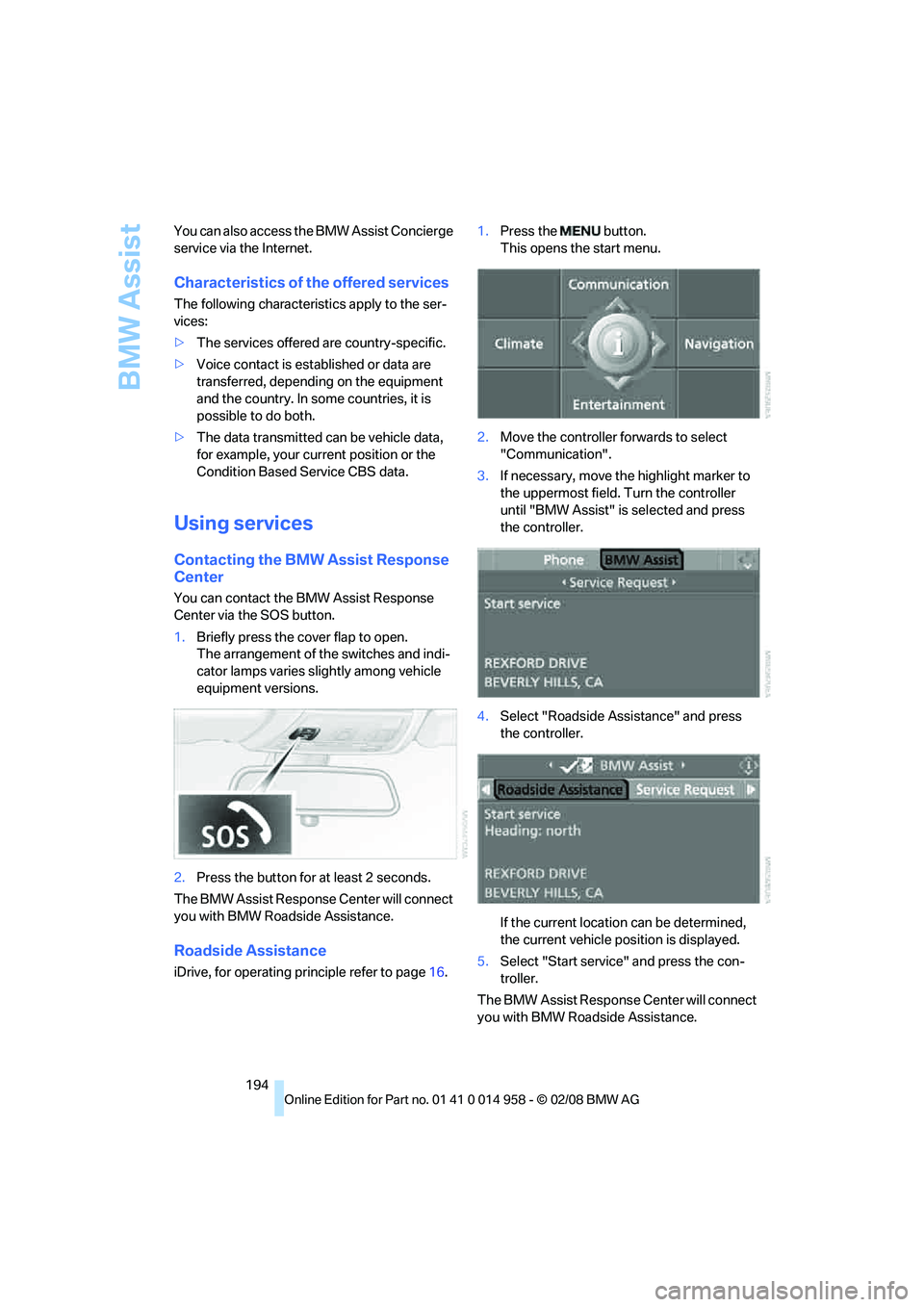
1.Briefly press the cover flap to open.
The arrangement of the switches and indi-
cator lamps varies slightly among vehicle
equipment versions.
2.Press the button for at least 2 seconds.
The BMW Assist Response Center will connect
you with BMW Roadside Assistance.
Roadside Assistance
iDrive, for operating principle refer to page16.1.Press the button.
This opens the start menu.
2.Move the controller forwards to select
"Communication".
3.If necessary, move the highlight marker to
the uppermost field. Turn the controller
until "BMW Assist" is selected and press
the controller.
4.Select "Roadside Assistance" and press
the controller.
If the current location can be determined,
the current vehicle position is displayed.
5.Select "Start service" and press the con-
troller.
The BMW Assist Response Center will connect
you with BMW Roadside Assistance.
Page 198 of 266
BMW Assist
196 5.Select "Start service" and press the con-
troller.
The service-relevant data are transmitted. Your
BMW center will contact you to arrange a ser-
vice appointment.
Displaying and updating* BMW
TeleServices
1.Press the button.
This opens the start menu.
2.Press the controller to open the menu.
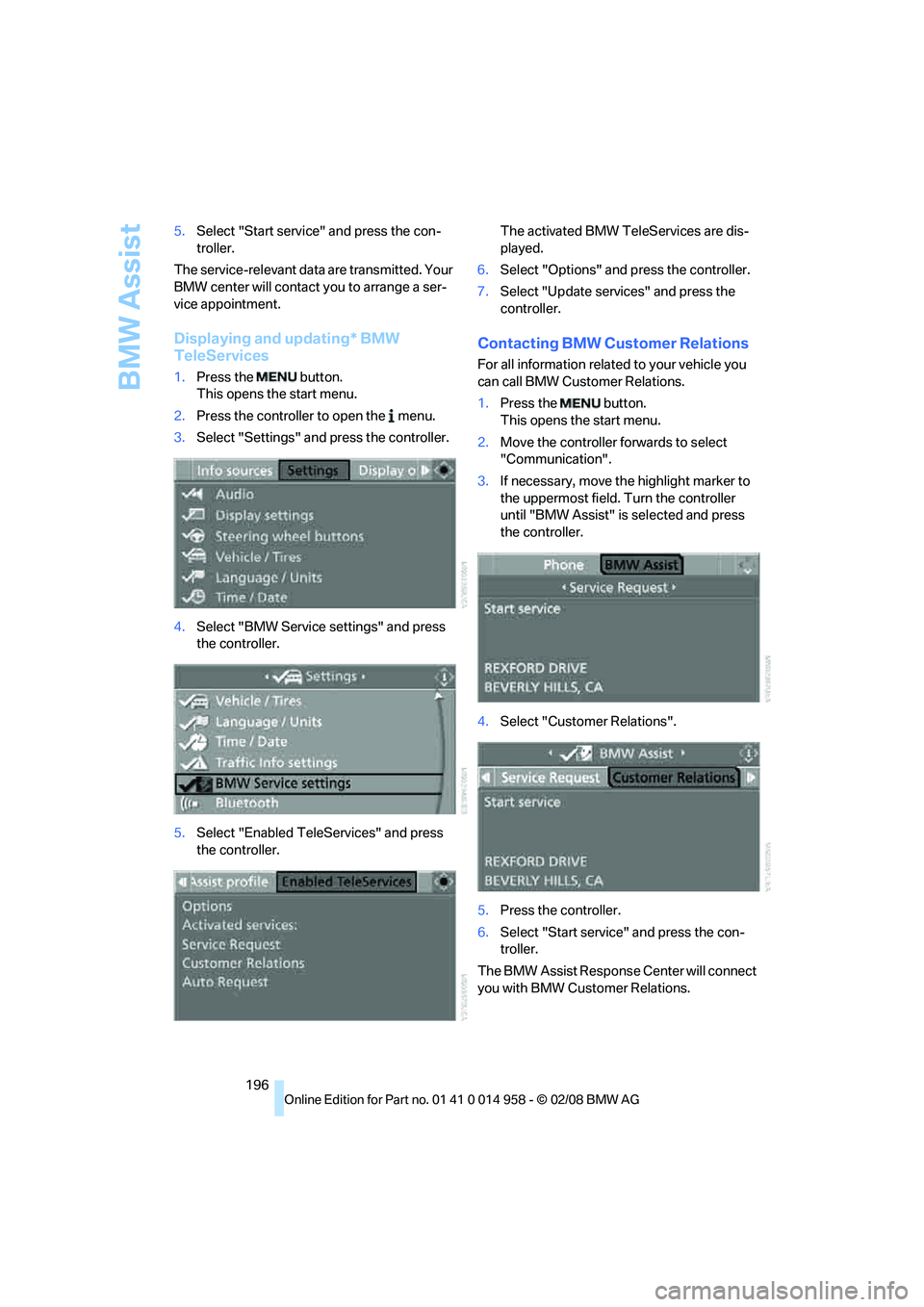
3.Select "Settings" and press the controller.
4.Select "BMW Service settings" and press
the controller.
5.Select "Enabled TeleServices" and press
the controller.The activated BMW TeleServices are dis-
played.
6.Select "Options" and press the controller.
7.Select "Update services" and press the
controller.
Contacting BMW Customer Relations
For all information related to your vehicle you
can call BMW Customer Relations.
1.Press the button.
This opens the start menu.
2.Move the controller forwards to select
"Communication".
3.If necessary, move the highlight marker to
the uppermost field. Turn the controller
until "BMW Assist" is selected and press
the controller.
4.Select "Customer Relations".
5.Press the controller.
6.Select "Start service" and press the con-
troller.
The BMW Assist Response Center will connect
you with BMW Customer Relations.
Page 199 of 266
197
Entertainment
Reference
At a glance
Controls
Driving tips Communications
Navigation
Mobility
Concierge service*
When you call the BMW Assist Concierge, you
can obtain information about, e.g., current
events, gas stations or hotels, as well as receive
the corresponding telephone numbers and
addresses. Many hotels can be booked directly
through the BMW Assist Concierge service.
Concierge service requires additional enabling
by the BMW Assist Response Center.
Calling the Concierge
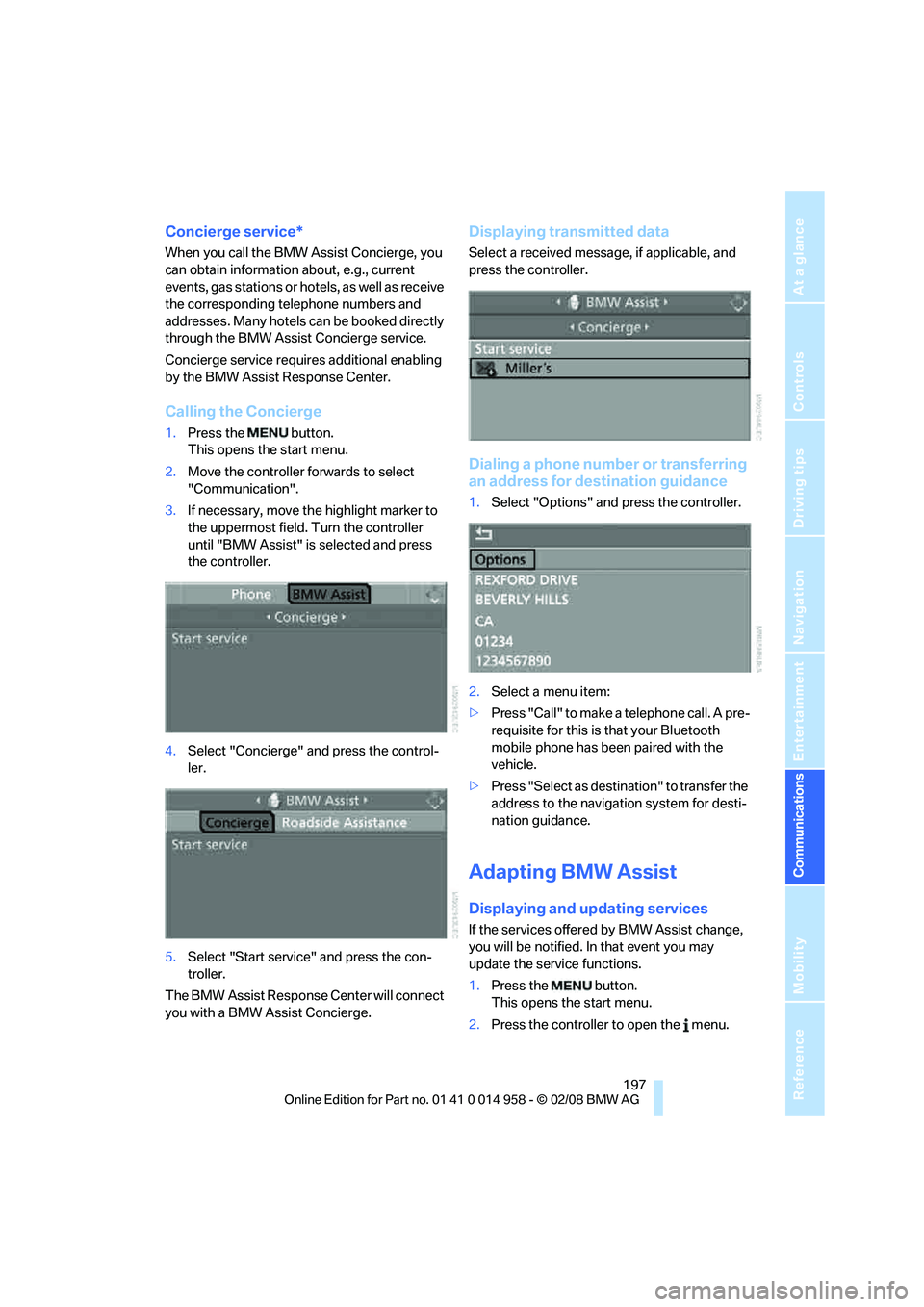
1.Press the button.
This opens the start menu.
2.Move the controller forwards to select
"Communication".
3.If necessary, move the highlight marker to
the uppermost field. Turn the controller
until "BMW Assist" is selected and press
the controller.
4.Select "Concierge" and press the control-
ler.
5.Select "Start service" and press the con-
troller.
The BMW Assist Response Center will connect
you with a BMW Assist Concierge.
Displaying transmitted data
Select a received message, if applicable, and
press the controller.
Dialing a phone number or transferring
an address for destination guidance
1.Select "Options" and press the controller.
2.Select a menu item:
>Press "Call" to make a telephone call. A pre-
requisite for this is that your Bluetooth
mobile phone has been paired with the
vehicle.
>Press "Select as destination" to transfer the
address to the navigation system for desti-
nation guidance.
Adapting BMW Assist
Displaying and updating services
If the services offered by BMW Assist change,
you will be notified. In that event you may
update the service functions.
1.Press the button.
This opens the start menu.
2.Press the controller to open the menu.
Page 201 of 266
199
Entertainment
Reference
At a glance
Controls
Driving tips Communications
Navigation
Mobility
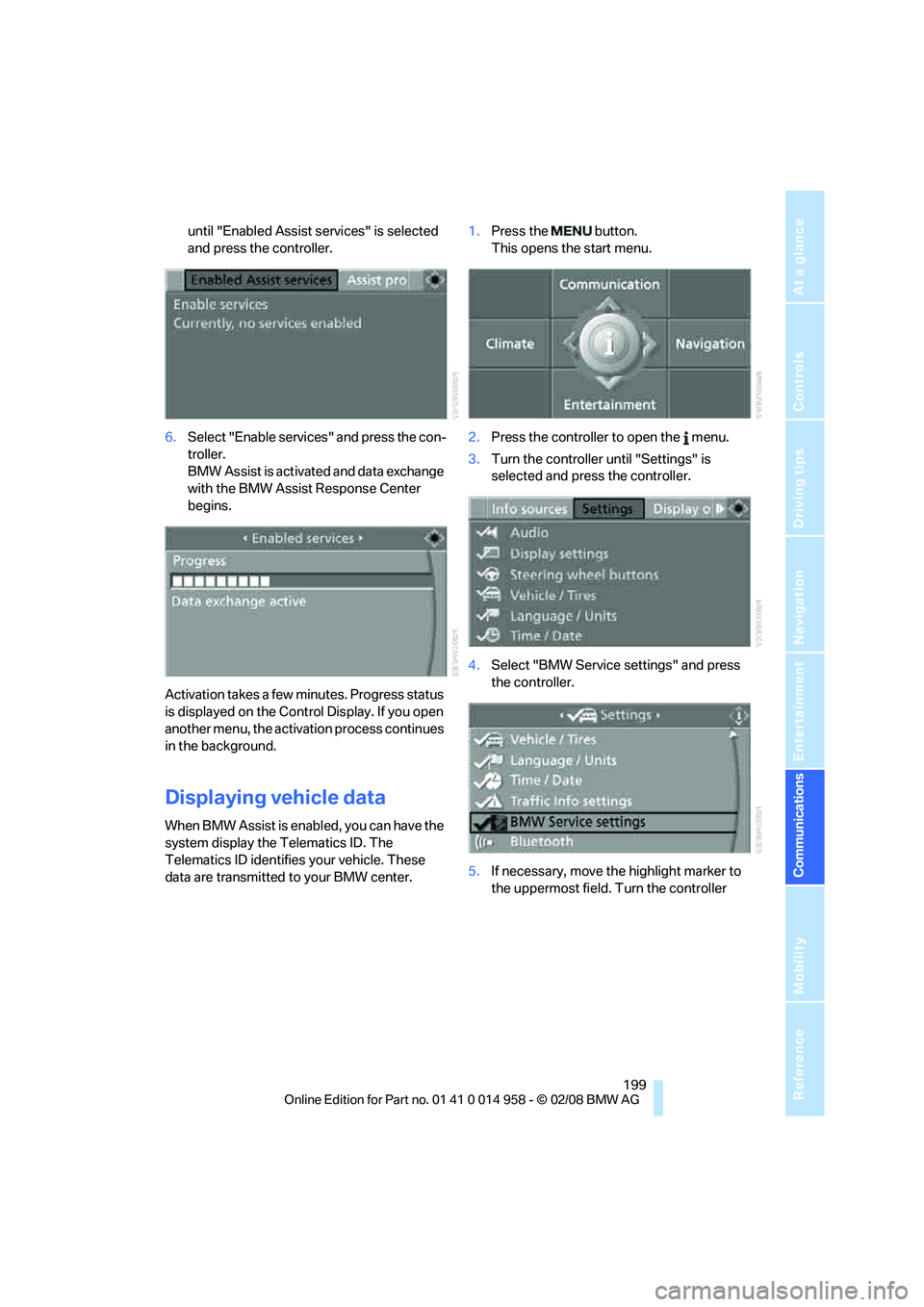
until "Enabled Assist services" is selected
and press the controller.
6.Select "Enable services" and press the con-
troller.
BMW Assist is activated and data exchange
with the BMW Assist Response Center
begins.
Activation takes a few minutes. Progress status
is displayed on the Control Display. If you open
another menu, the activation process continues
in the background.
Displaying vehicle data
When BMW Assist is enabled, you can have the
system display the Telematics ID. The
Telematics ID identifies your vehicle. These
data are transmitted to your BMW center.1.Press the button.
This opens the start menu.
2.Press the controller to open the menu.
3.Turn the controller until "Settings" is
selected and press the controller.
4.Select "BMW Service settings" and press
the controller.
5.If necessary, move the highlight marker to
the uppermost field. Turn the controller