navigation BMW M3 2009 Owners Manual
[x] Cancel search | Manufacturer: BMW, Model Year: 2009, Model line: M3, Model: BMW M3 2009Pages: 246, PDF Size: 11.68 MB
Page 173 of 246
171
Entertainment
Reference
At a glance
Controls
Driving tips Communications
Navigation
Mobility
Selecting an entry
The connection to the phone number of the
selected entry is established.
Redialing
To redial the phone number dialed last:
Notes
Important for voice commands
For voice commands, bear in mind the follow-
ing:
>Pronounce the commands smoothly and at
normal volume, avoiding excessive empha-
ses and pauses.
>Keep the doors, windows and glass roof
closed to prevent interference from outside
noise.
>Avoid ambient noise in the vehicle while
speaking.
Inserting/removing the snap-
in adapter
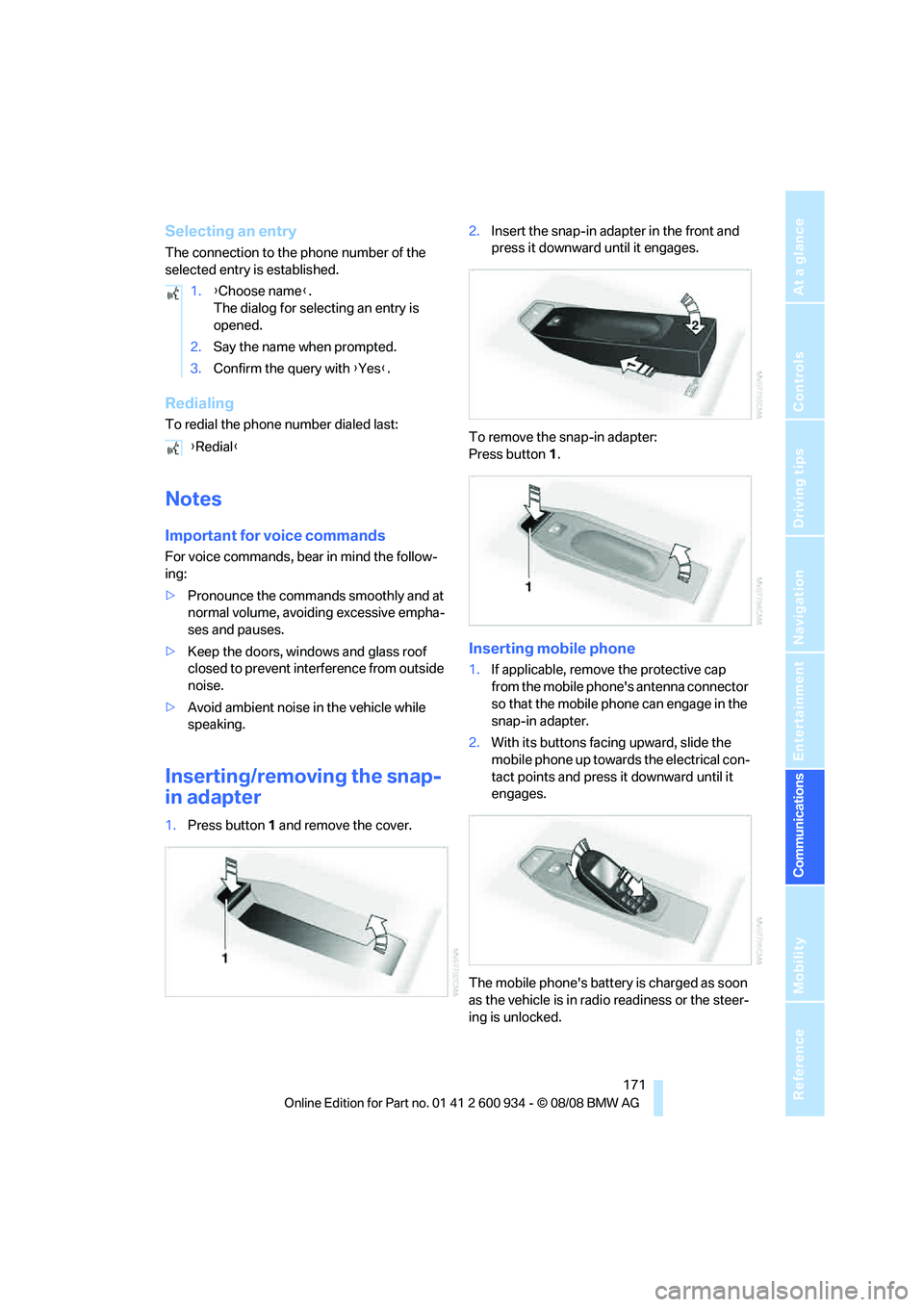
1.Press button1 and remove the cover.2.Insert the snap-in adapter in the front and
press it downward until it engages.
To remove the snap-in adapter:
Press button 1.
Inserting mobile phone
1.If applicable, remove the protective cap
from the mobile phone's antenna connector
so that the mobile phone can engage in the
snap-in adapter.
2.With its buttons facing upward, slide the
mobile phone up towards the electrical con-
tact points and press it downward until it
engages.
The mobile phone's battery is charged as soon
as the vehicle is in radio readiness or the steer-
ing is unlocked. 1.{Choose name}.
The dialog for selecting an entry is
opened.
2.Say the name when prompted.
3.Confirm the query with {Yes}.
{Redial}
ba8_E90M3_cic.book Seite 171 Dienstag, 19. August 2008 11:51 11
Page 175 of 246
173
Entertainment
Reference
At a glance
Controls
Driving tips Communications
Navigation
Mobility
Contacts
You can create and edit contacts. The contacts
of the mobile phone
* are also displayed. The
addresses can be used as destinations for nav-
igation and the phone numbers can be dialed.
New contact
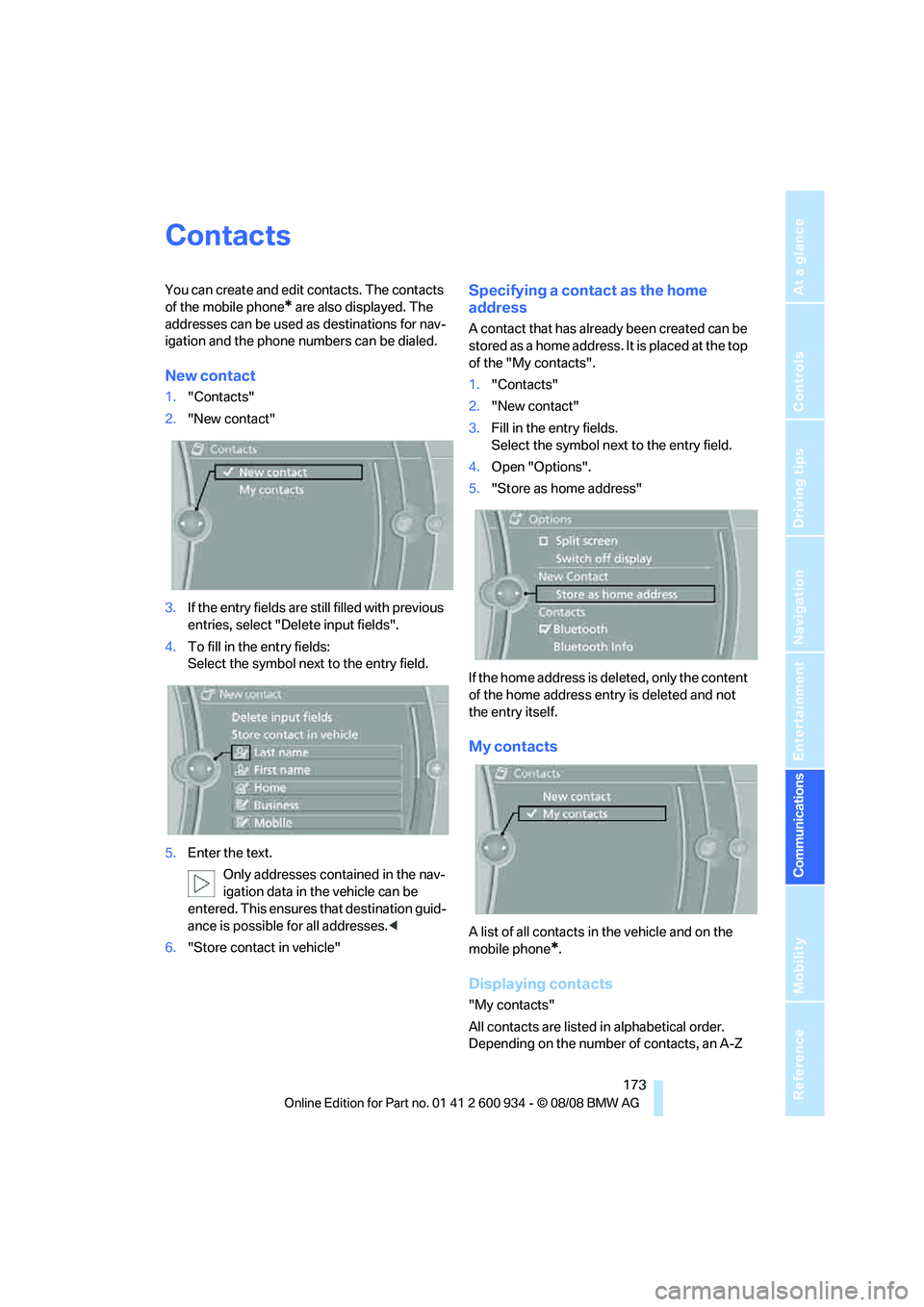
1."Contacts"
2."New contact"
3.If the entry fields are still filled with previous
entries, select "Delete input fields".
4.To fill in the entry fields:
Select the symbol next to the entry field.
5.Enter the text.
Only addresses contained in the nav-
igation data in the vehicle can be
entered. This ensures that destination guid-
ance is possible for all addresses.<
6."Store contact in vehicle"
Specifying a contact as the home
address
A contact that has already been created can be
stored as a home address. It is placed at the top
of the "My contacts".
1."Contacts"
2."New contact"
3.Fill in the entry fields.
Select the symbol next to the entry field.
4.Open "Options".
5."Store as home address"
If the home address is deleted, only the content
of the home address entry is deleted and not
the entry itself.
My contacts
A list of all contacts in the vehicle and on the
mobile phone
*.
Displaying contacts
"My contacts"
All contacts are listed in alphabetical order.
Depending on the number of contacts, an A-Z
ba8_E90M3_cic.book Seite 173 Dienstag, 19. August 2008 11:51 11
Page 176 of 246
Contacts
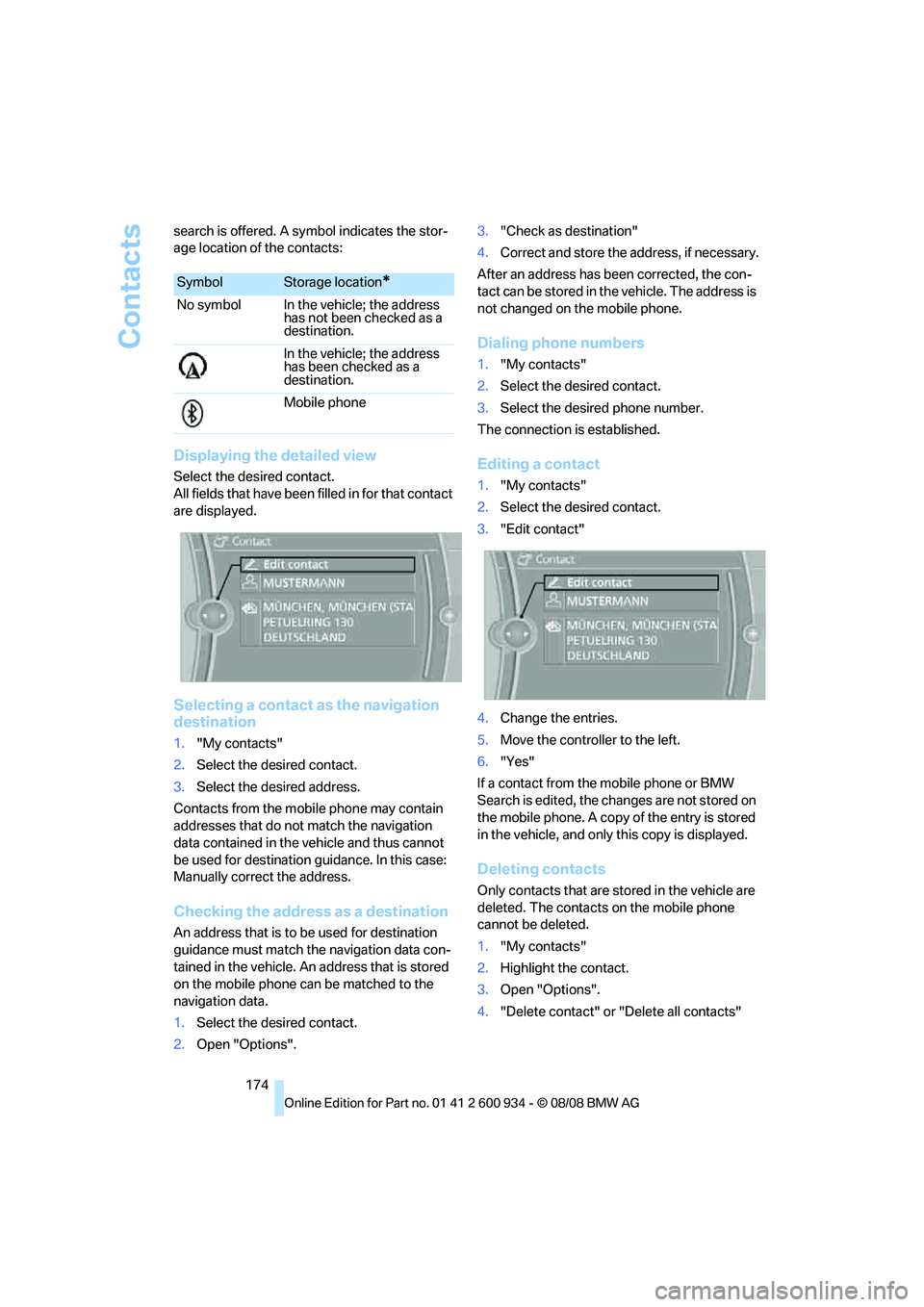
174 search is offered. A symbol indicates the stor-
age location of the contacts:
Displaying the detailed view
Select the desired contact.
All fields that have been filled in for that contact
are displayed.
Selecting a contact as the navigation
destination
1."My contacts"
2.Select the desired contact.
3.Select the desired address.
Contacts from the mobile phone may contain
addresses that do not match the navigation
data contained in the vehicle and thus cannot
be used for destination guidance. In this case:
Manually correct the address.
Checking the address as a destination
An address that is to be used for destination
guidance must match the navigation data con-
tained in the vehicle. An address that is stored
on the mobile phone can be matched to the
navigation data.
1.Select the desired contact.
2.Open "Options".3."Check as destination"
4.Correct and store the address, if necessary.
After an address has been corrected, the con-
tact can be stored in the vehicle. The address is
not changed on the mobile phone.
Dialing phone numbers
1."My contacts"
2.Select the desired contact.
3.Select the desired phone number.
The connection is established.
Editing a contact
1."My contacts"
2.Select the desired contact.
3."Edit contact"
4.Change the entries.
5.Move the controller to the left.
6."Yes"
If a contact from the mobile phone or BMW
Search is edited, the changes are not stored on
the mobile phone. A copy of the entry is stored
in the vehicle, and only this copy is displayed.
Deleting contacts
Only contacts that are stored in the vehicle are
deleted. The contacts on the mobile phone
cannot be deleted.
1."My contacts"
2.Highlight the contact.
3.Open "Options".
4."Delete contact" or "Delete all contacts"
SymbolStorage location*
No symbol In the vehicle; the address
has not been checked as a
destination.
In the vehicle; the address
has been checked as a
destination.
Mobile phone
ba8_E90M3_cic.book Seite 174 Dienstag, 19. August 2008 11:51 11
Page 177 of 246
175
Entertainment
Reference
At a glance
Controls
Driving tips Communications
Navigation
Mobility
BMW Assist
Concierge service*
When you call the BMW Assist Concierge, you
can obtain information about, for example, res-
taurants, emergency pharmacy services, gas
stations or hotels, as well as receive the corre-
sponding telephone numbers and addresses.
You can then dial a phone number directly or
use an address for destination guidance.
Starting the concierge service
1."BMW Assist"
2."Concierge"
3."Start service"
A voice connection is established to the BMW
Concierge.
You are connected to an employee of the BMW
Concierge to obtain the required information.
You can then have the phone number and
address sent to you and, for example, use it for
destination guidance in the navigation system.
Many hotels can be booked directly through the
BMW Assist Concierge service. When an infor-
mation message is received, a list of the
received messages is displayed automatically.
Messages
The BMW Concierge messages and MyInfo
messages from the BMW Assist portal are
listed here.
1."BMW Assist"
2."Messages"
3.Select the desired message.
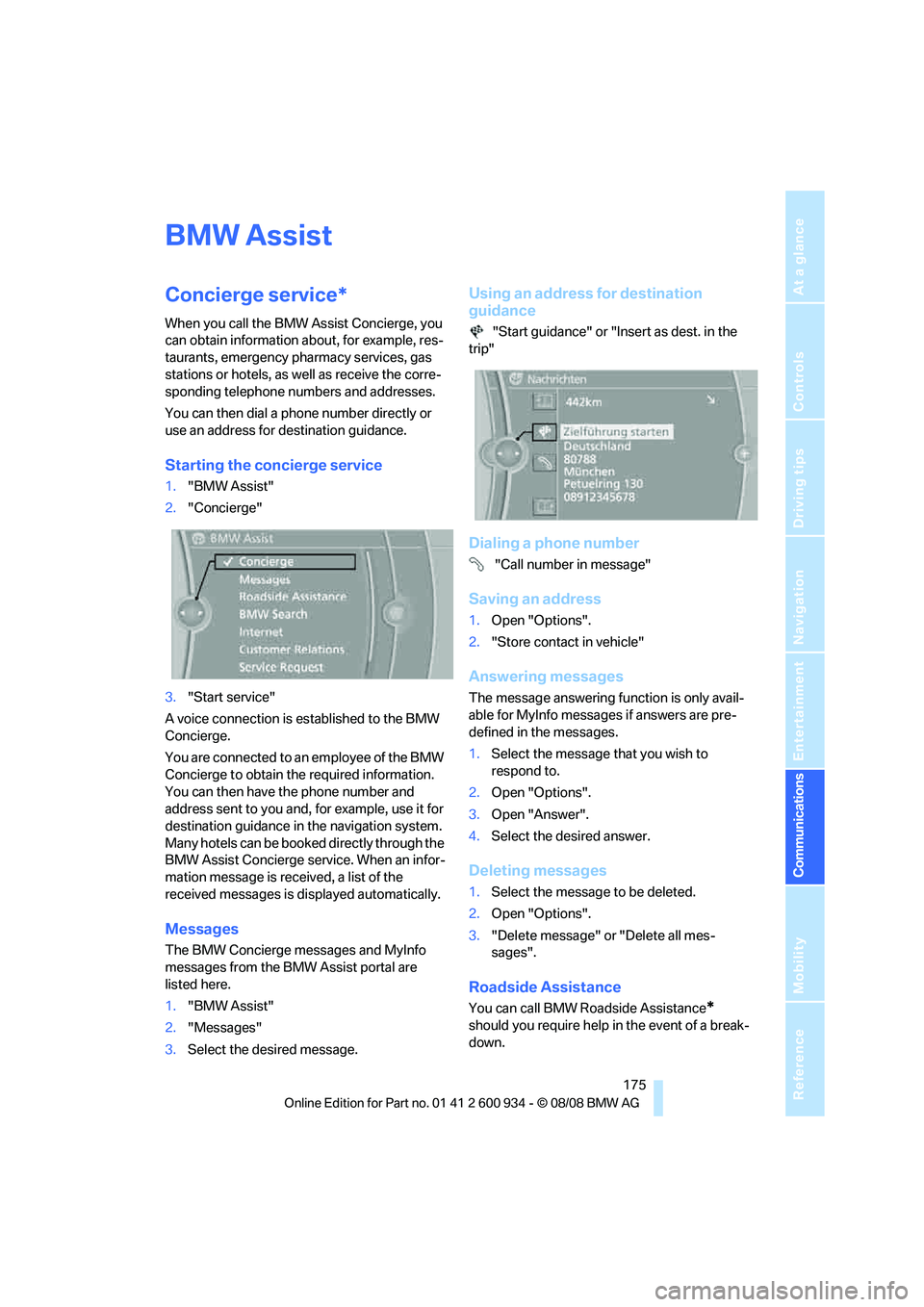
Using an address for destination
guidance
"Start guidance" or "Insert as dest. in the
trip"
Dialing a phone number
"Call number in message"
Saving an address
1.Open "Options".
2."Store contact in vehicle"
Answering messages
The message answering function is only avail-
able for MyInfo messages if answers are pre-
defined in the messages.
1.Select the message that you wish to
respond to.
2.Open "Options".
3.Open "Answer".
4.Select the desired answer.
Deleting messages
1.Select the message to be deleted.
2.Open "Options".
3."Delete message" or "Delete all mes-
sages".
Roadside Assistance
You can call BMW Roadside Assistance*
should you require help in the event of a break-
down.
ba8_E90M3_cic.book Seite 175 Dienstag, 19. August 2008 11:51 11
Page 179 of 246
177
Entertainment
Reference
At a glance
Controls
Driving tips Communications
Navigation
Mobility
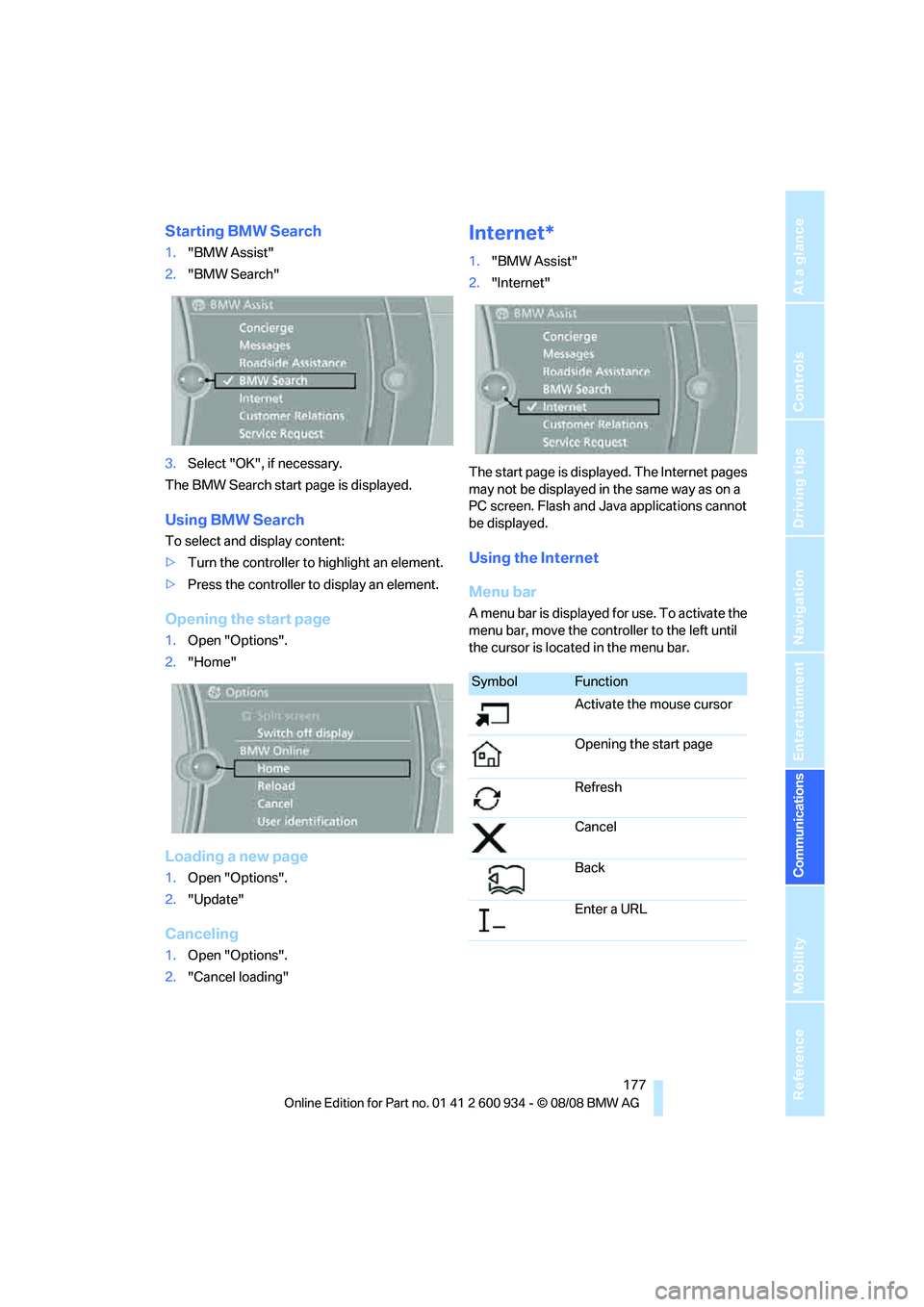
Starting BMW Search
1."BMW Assist"
2."BMW Search"
3.Select "OK", if necessary.
The BMW Search start page is displayed.
Using BMW Search
To select and display content:
>Turn the controller to highlight an element.
>Press the controller to display an element.
Opening the start page
1.Open "Options".
2."Home"
Loading a new page
1.Open "Options".
2."Update"
Canceling
1.Open "Options".
2."Cancel loading"
Internet*
1."BMW Assist"
2."Internet"
The start page is displayed. The Internet pages
may not be displayed in the same way as on a
PC screen. Flash and Java applications cannot
be displayed.
Using the Internet
Menu bar
A menu bar is displayed for use. To activate the
menu bar, move the controller to the left until
the cursor is located in the menu bar.
SymbolFunction
Activate the mouse cursor
Opening the start page
Refresh
Cancel
Back
Enter a URL
ba8_E90M3_cic.book Seite 177 Dienstag, 19. August 2008 11:51 11
Page 181 of 246
179
Entertainment
Reference
At a glance
Controls
Driving tips Communications
Navigation
Mobility
Settings
Suppressing cookies
1.Open "Options".
2."Suppress cookies"
Suppressing pop-ups
1.Open "Options".
2."Suppress pop-ups"
Suppressing safety warnings
1.Open "Options".
2."Block HTTPS pop-ups"
Activating TeleService*
If the services are not displayed, they may need
to be activated.
1."BMW Assist"
2."Activate TeleService"
Customer Relations
Contact Customer Relations for information on
all aspects of your vehicle.
Vehicle equipped with BMW Assist or
TeleService
1."BMW Assist"
2."Customer Relations"
3."Start service"
A voice connection is established to Customer
Relations.
Vehicle not equipped with BMW Assist
or TeleService
1."BMW Assist"
2."Customer Relations"
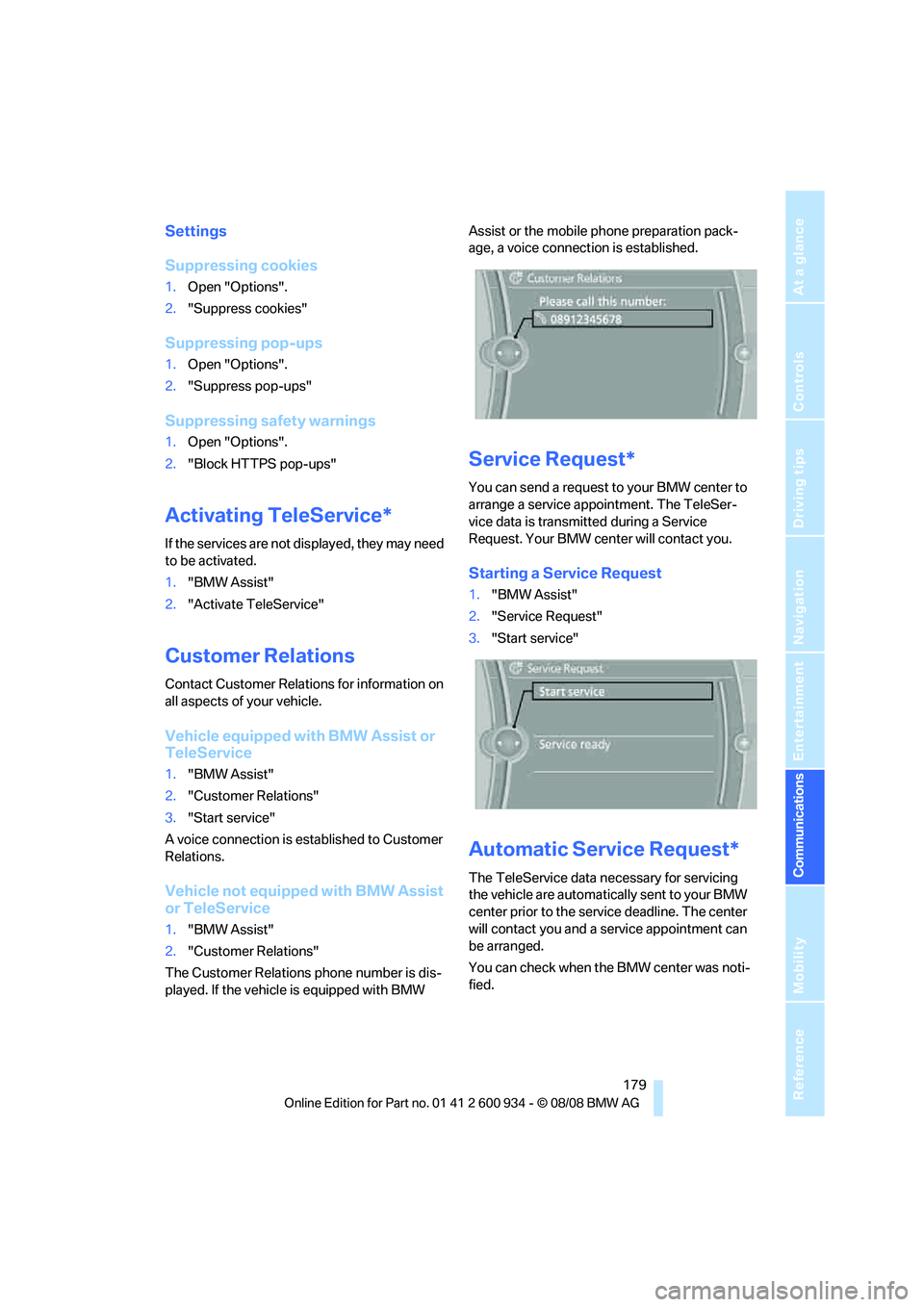
The Customer Relations phone number is dis-
played. If the vehicle is equipped with BMW Assist or the mobile phone preparation pack-
age, a voice connection is established.
Service Request*
You can send a request to your BMW center to
arrange a service appointment. The TeleSer-
vice data is transmitted during a Service
Request. Your BMW center will contact you.
Starting a Service Request
1."BMW Assist"
2."Service Request"
3."Start service"
Automatic Service Request*
The TeleService data necessary for servicing
the vehicle are automatically sent to your BMW
center prior to the service deadline. The center
will contact you and a service appointment can
be arranged.
You can check when the BMW center was noti-
fied.
ba8_E90M3_cic.book Seite 179 Dienstag, 19. August 2008 11:51 11
Page 183 of 246
181
Entertainment
Reference
At a glance
Controls
Driving tips Communications
Navigation
Mobility
ba8_E90M3_cic.book Seite 181 Dienstag, 19. August 2008 11:51 11
Page 187 of 246
Mobility
185Reference
At a glance
Controls
Driving tips
Communications
Navigation
Entertainment
Do not fill the tank with E85, i.e. fuel containing
85Ξ ethanol, nor with FlexFuel. Otherwise the
engine and fuel supply system will be dam-
aged.<
Required fuel
Super Premium Gasoline/AKI 93
Always use this premium grade fuel to obtain
maximum fuel economy and performance.
The minimum approved fuel grade is AKI 91.
Do not use any gasoline below the speci-
fied minimum fuel grade. Otherwise the
engine could be damaged.<
Use high-quality brands
Field experience has indicated significant dif-
ferences in fuel quality: volatility, composition,
additives, etc., among gasolines offered for sale
in the United States and Canada. Fuels contain-
ing up to and including 10Ξ ethanol or other
oxygenates with up to 2.8Ξ oxygen by weight,
that is, 15Ξ MTBE or 3Ξ methanol plus an
equivalent amount of co-solvent, will not void
the applicable warranties with respect to
defects in materials or workmanship.
The use of poor-quality fuels may result in
driveability, starting and stalling problems
especially under certain environmental condi-
tions such as high ambient temperature and
high altitude.
Should you encounter driveability problems
which you suspect could be related to the fuel
you are using, we recommend that you respond
by switching to a recognized high-quality brand
such as gasoline that is advertised as Top Tier
Detergent Gasoline.
Failure to comply with these recommendations
may also result in unscheduled maintenance.<
ba8_E90M3_cic.book Seite 185 Dienstag, 19. August 2008 11:51 11
Page 189 of 246
Mobility
187Reference
At a glance
Controls
Driving tips
Communications
Navigation
Entertainment
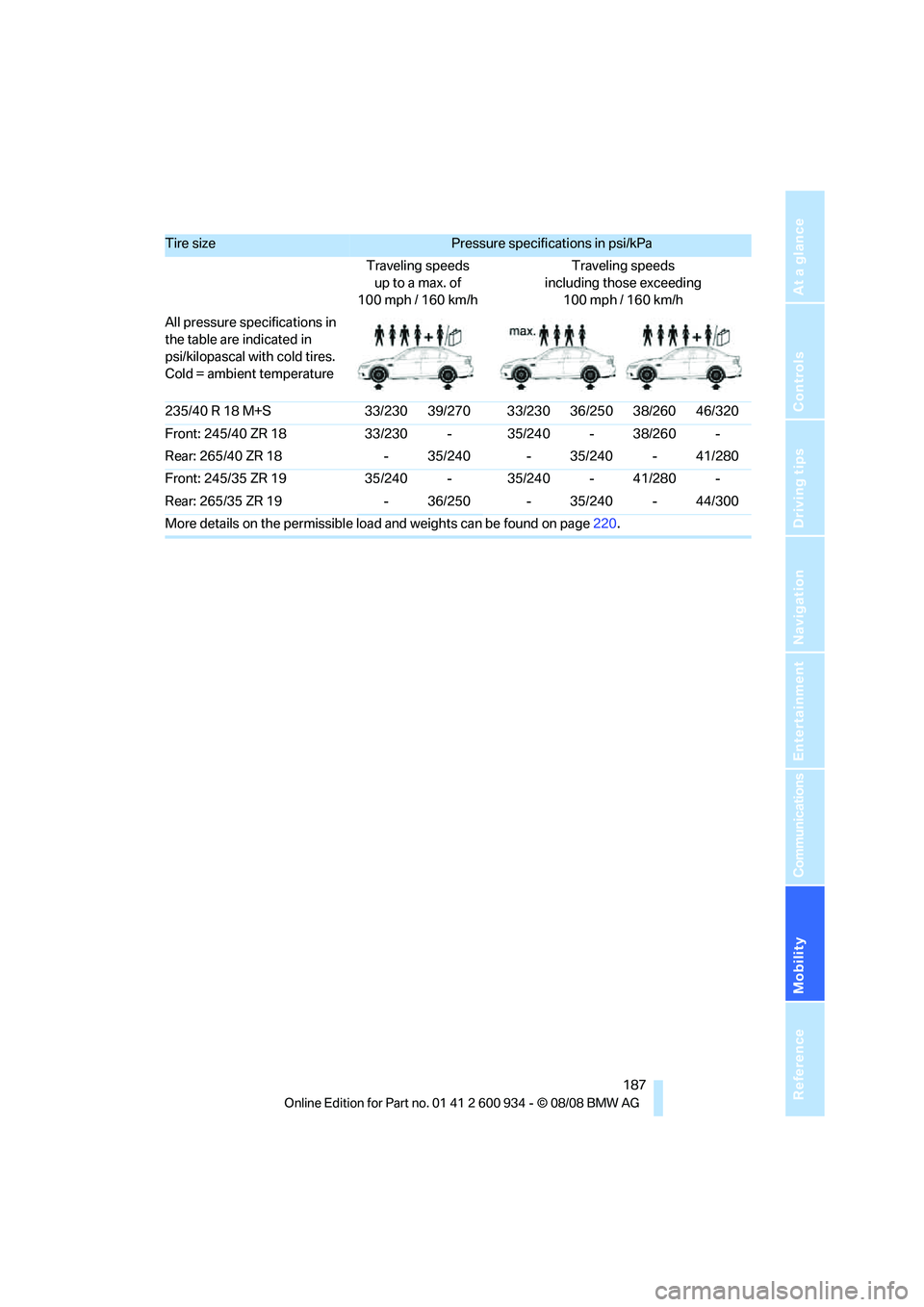
Tire size Pressure specifications in psi/kPa
Traveling speeds
up to a max. of
100 mph / 160 km/hTraveling speeds
including those exceeding
100 mph / 160 km/h
All pressure specifications in
the table are indicated in
psi/kilopascal with cold tires.
Cold = ambient temperature
235/40 R 18 M+S 33/230 39/270 33/230 36/250 38/260 46/320
Front: 245/40 ZR 18 33/230 - 35/240 - 38/260 -
Rear: 265/40 ZR 18 - 35/240 - 35/240 - 41/280
Front: 245/35 ZR 19 35/240 - 35/240 - 41/280 -
Rear: 265/35 ZR 19 - 36/250 - 35/240 - 44/300
More details on the permissible load and weights can be found on page220.
ba8_E90M3_cic.book Seite 187 Dienstag, 19. August 2008 11:51 11
Page 191 of 246
Mobility
189Reference
At a glance
Controls
Driving tips
Communications
Navigation
Entertainment
Temperature
The temperature grades are A, the highest, B,
and C, representing the tire's resistance to the
generation of heat and its ability to dissipate
heat when tested under controlled conditions
on a specified indoor laboratory test wheel.
Sustained high temperature can cause the
material of the tire to degenerate and reduce
tire life, and excessive temperature can lead to
sudden tire failure. The grade C corresponds to
a level of performance which all passenger car
tires must meet under the Federal Motor Vehi-
cle Safety Standard No. 109. Grades B and A
represent higher levels of performance on the
laboratory test wheel than the minimum
required by law.
The temperature grade for this tire is
established for a tire that is properly
inflated and not overloaded. Excessive speed,
underinflation, or excessive loading, either sep-
arately or in combination, can cause heat
buildup and possible tire failure.<
M+S
Winter and all-season tires.
These have better winter properties than sum-
mer tires.
XL
Designation for specially reinforced tires.
Tire condition
Inspect your tires frequently for tread wear,
signs of damage and for foreign objects lodged
in the tread. Check the tread depth.
Minimum tread depth
The tread depth should not drop below 1/8 in/
3 mm, although, for example, European legisla-
tion only specifies a minimum tread depth of
1/16 in/1.6 mm. At tread depths below 1/8 in/
3 mm there is an increased risk of high-speed
hydroplaning, even when only small amounts of
water are present on the road surface.
When winter tires wear down past a tread depth
of 1/6 in/4 mm, they become perceptibly less suitable for winter conditions. In the interest of
safety, new tires should be installed.
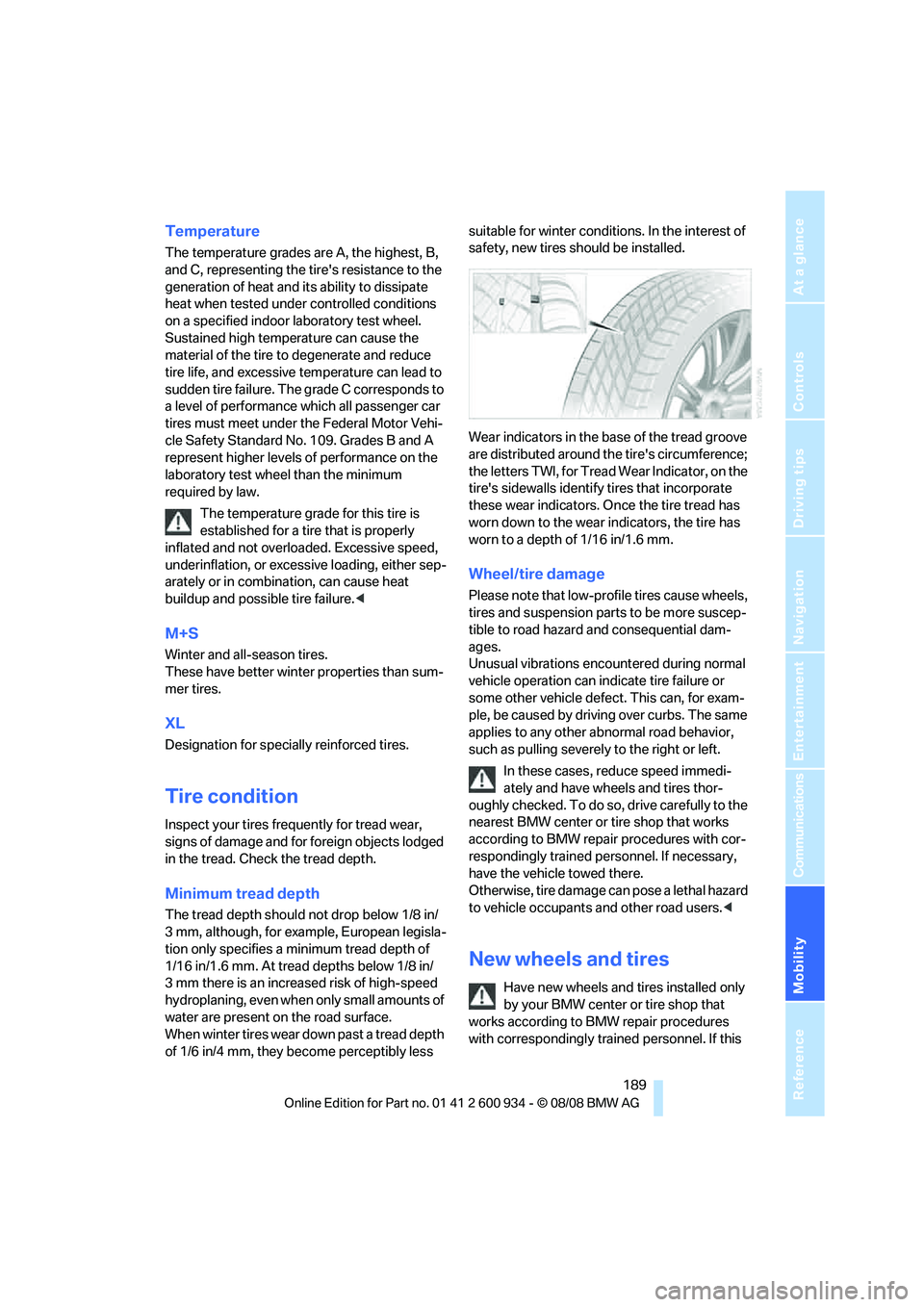
Wear indicators in the base of the tread groove
are distributed around the tire's circumference;
the letters TWI, for Tread Wear Indicator, on the
tire's sidewalls identify tires that incorporate
these wear indicators. Once the tire tread has
worn down to the wear indicators, the tire has
worn to a depth of 1/16 in/1.6 mm.
Wheel/tire damage
Please note that low-profile tires cause wheels,
tires and suspension parts to be more suscep-
tible to road hazard and consequential dam-
ages.
Unusual vibrations encountered during normal
vehicle operation can indicate tire failure or
some other vehicle defect. This can, for exam-
ple, be caused by driving over curbs. The same
applies to any other abnormal road behavior,
such as pulling severely to the right or left.
In these cases, reduce speed immedi-
ately and have wheels and tires thor-
oughly checked. To do so, drive carefully to the
nearest BMW center or tire shop that works
according to BMW repair procedures with cor-
respondingly trained personnel. If necessary,
have the vehicle towed there.
Otherwise, tire damage can pose a lethal hazard
to vehicle occupants and other road users.<
New wheels and tires
Have new wheels and tires installed only
by your BMW center or tire shop that
works according to BMW repair procedures
with correspondingly trained personnel. If this
ba8_E90M3_cic.book Seite 189 Dienstag, 19. August 2008 11:51 11