navigation BMW M3 2009 Owners Manual
[x] Cancel search | Manufacturer: BMW, Model Year: 2009, Model line: M3, Model: BMW M3 2009Pages: 246, PDF Size: 11.68 MB
Page 213 of 246
Mobility
211Reference
At a glance
Controls
Driving tips
Communications
Navigation
Entertainment
First aid pouch*
Some of the articles contained in the first aid
pouch have a limited service life. Therefore,
check the expiration dates of the contents reg-
ularly and replace any items in good time, if nec-
essary.
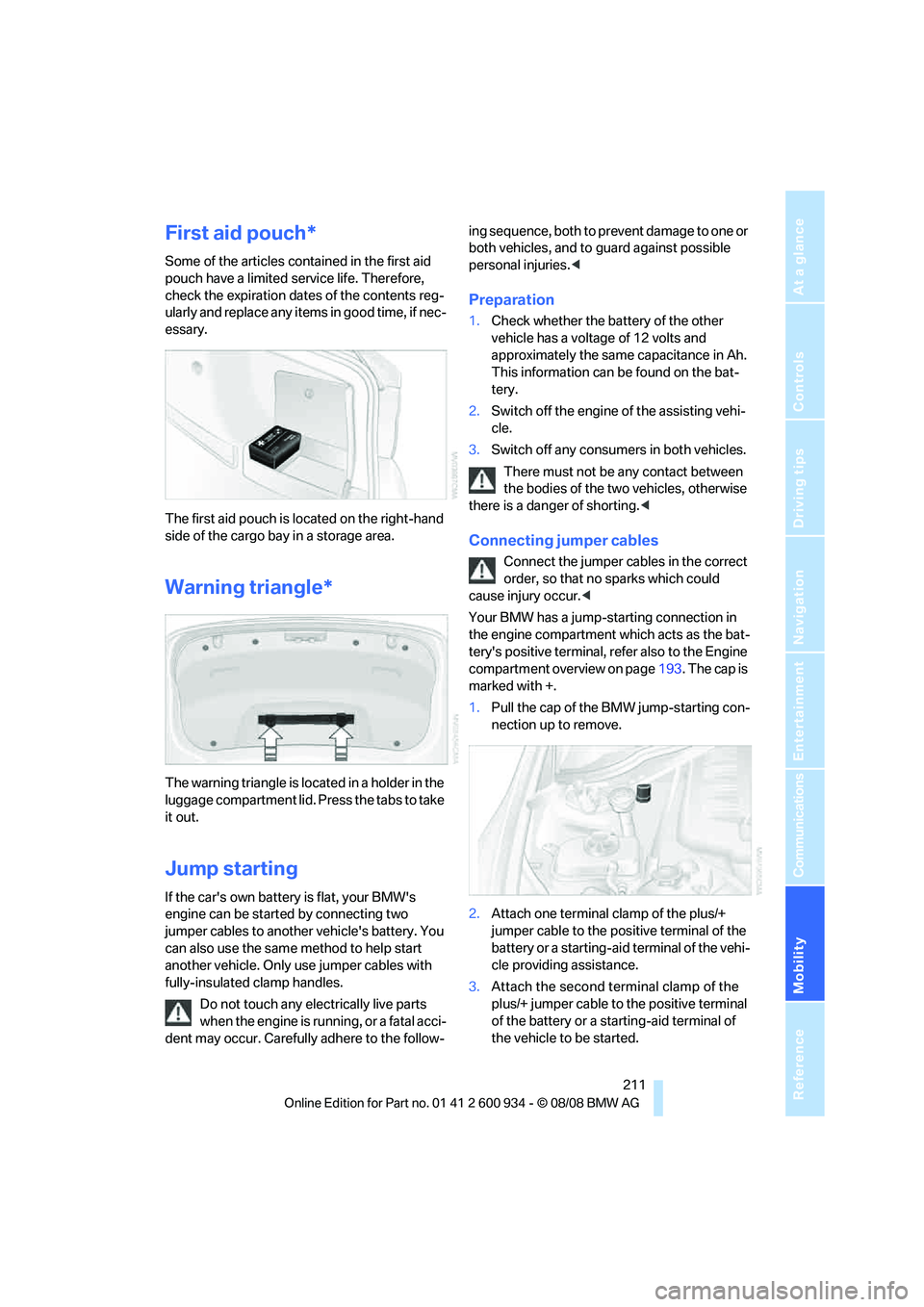
The first aid pouch is located on the right-hand
side of the cargo bay in a storage area.
Warning triangle*
The warning triangle is located in a holder in the
luggage compartment lid. Press the tabs to take
it out.
Jump starting
If the car's own battery is flat, your BMW's
engine can be started by connecting two
jumper cables to another vehicle's battery. You
can also use the same method to help start
another vehicle. Only use jumper cables with
fully-insulated clamp handles.
Do not touch any electrically live parts
when the engine is running, or a fatal acci-
dent may occur. Carefully adhere to the follow-ing sequence, both to prevent damage to one or
both vehicles, and to guard against possible
personal injuries.<
Preparation
1.Check whether the battery of the other
vehicle has a voltage of 12 volts and
approximately the same capacitance in Ah.
This information can be found on the bat-
tery.
2.Switch off the engine of the assisting vehi-
cle.
3.Switch off any consumers in both vehicles.
There must not be any contact between
the bodies of the two vehicles, otherwise
there is a danger of shorting.<
Connecting jumper cables
Connect the jumper cables in the correct
order, so that no sparks which could
cause injury occur.<
Your BMW has a jump-starting connection in
the engine compartment which acts as the bat-
tery's positive terminal, refer also to the Engine
compartment overview on page193. The cap is
marked with +.
1.Pull the cap of the BMW jump-starting con-
nection up to remove.
2.Attach one terminal clamp of the plus/+
jumper cable to the positive terminal of the
battery or a starting-aid terminal of the vehi-
cle providing assistance.
3.Attach the second terminal clamp of the
plus/+ jumper cable to the positive terminal
of the battery or a starting-aid terminal of
the vehicle to be started.
ba8_E90M3_cic.book Seite 211 Dienstag, 19. August 2008 11:51 11
Page 215 of 246
Mobility
213Reference
At a glance
Controls
Driving tips
Communications
Navigation
Entertainment
headlamps, tail lamps, turn signal indicators and
windshield wipers may be unavailable.
Power steering assistance is not available when
the engine is not running. Thus, braking and
steering will require increased effort.<
Manual transmission
Gearshift lever in neutral position.
M dual clutch transmission with
Drivelogic
Ensure that the parking lock P is not
engaged as the rear wheels will otherwise
be blocked.
When using the car wash function, refer to
page51, note that the parking lock P is
engaged automatically after approx. 30 min-
utes, blocking the rear wheels.
If an electrical malfunction occurs or if towing
takes longer than approx. 20 minutes, manually
release the parking lock, refer to page54.<
When towing, do not exceed a maximum
speed of 30 mph/50 km/h and a maxi-
mum distance of 30 miles/50 km, otherwise the
transmission can be damaged.<
BMW recommends transporting the vehicle on
a tow truck with a flat bed.
Towing methods
Do not lift the vehicle by a tow fitting or
body and chassis parts, otherwise dam-
age may result.<
With a tow bar
The towing vehicle must not be lighter
than the towed vehicle, otherwise it may
be impossible to maintain control.<
The tow fittings used should be on the same
side on both vehicles. Should it prove impossi-
ble to avoid mounting the tow bar at an angle,
please observe the following:
>Clearance and maneuvering capability will
be sharply limited during cornering.
>The tow bar will generate lateral forces if it is
attached offset.Attach the tow bar to the tow fittings only,
as attaching it to other parts of the vehicle
could result in damage.<
With a tow rope
When starting off in the towing vehicle, make
sure that the tow rope is taut.
To avoid jerking and the associated
stresses on vehicle components when
towing, always use nylon ropes or nylon straps.
Attach the tow rope to the tow fittings only, as
attaching it to other parts of the vehicle could
result in damage.<
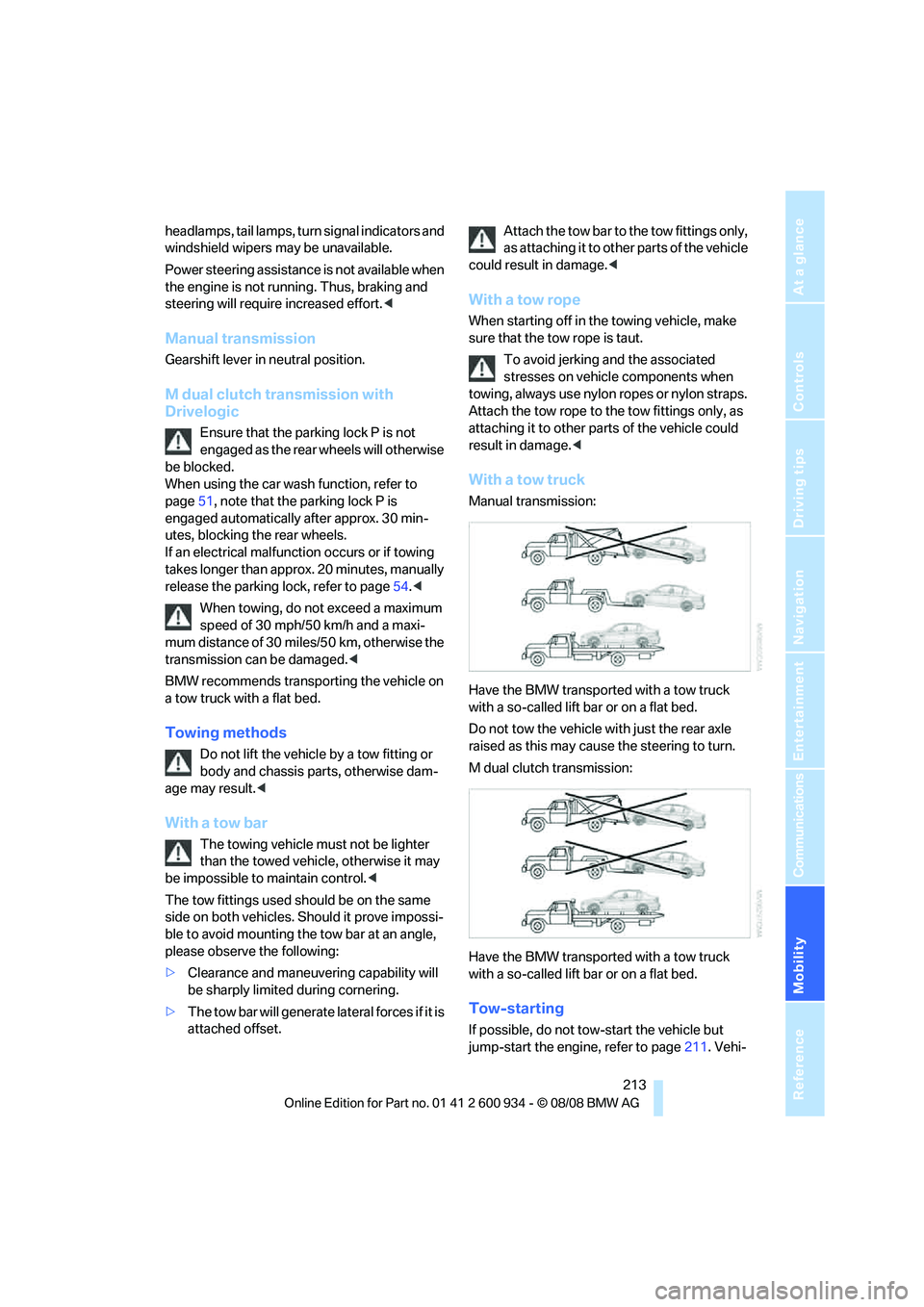
With a tow truck
Manual transmission:
Have the BMW transported with a tow truck
with a so-called lift bar or on a flat bed.
Do not tow the vehicle with just the rear axle
raised as this may cause the steering to turn.
M dual clutch transmission:
Have the BMW transported with a tow truck
with a so-called lift bar or on a flat bed.
Tow-starting
If possible, do not tow-start the vehicle but
jump-start the engine, refer to page211. Vehi-
ba8_E90M3_cic.book Seite 213 Dienstag, 19. August 2008 11:51 11
Page 217 of 246
Mobility
215Reference
At a glance
Controls
Driving tips
Communications
Navigation
Entertainment
ba8_E90M3_cic.book Seite 215 Dienstag, 19. August 2008 11:51 11
Page 221 of 246
Reference 219
At a glance
Controls
Driving tips
Communications
Navigation
Entertainment
Mobility
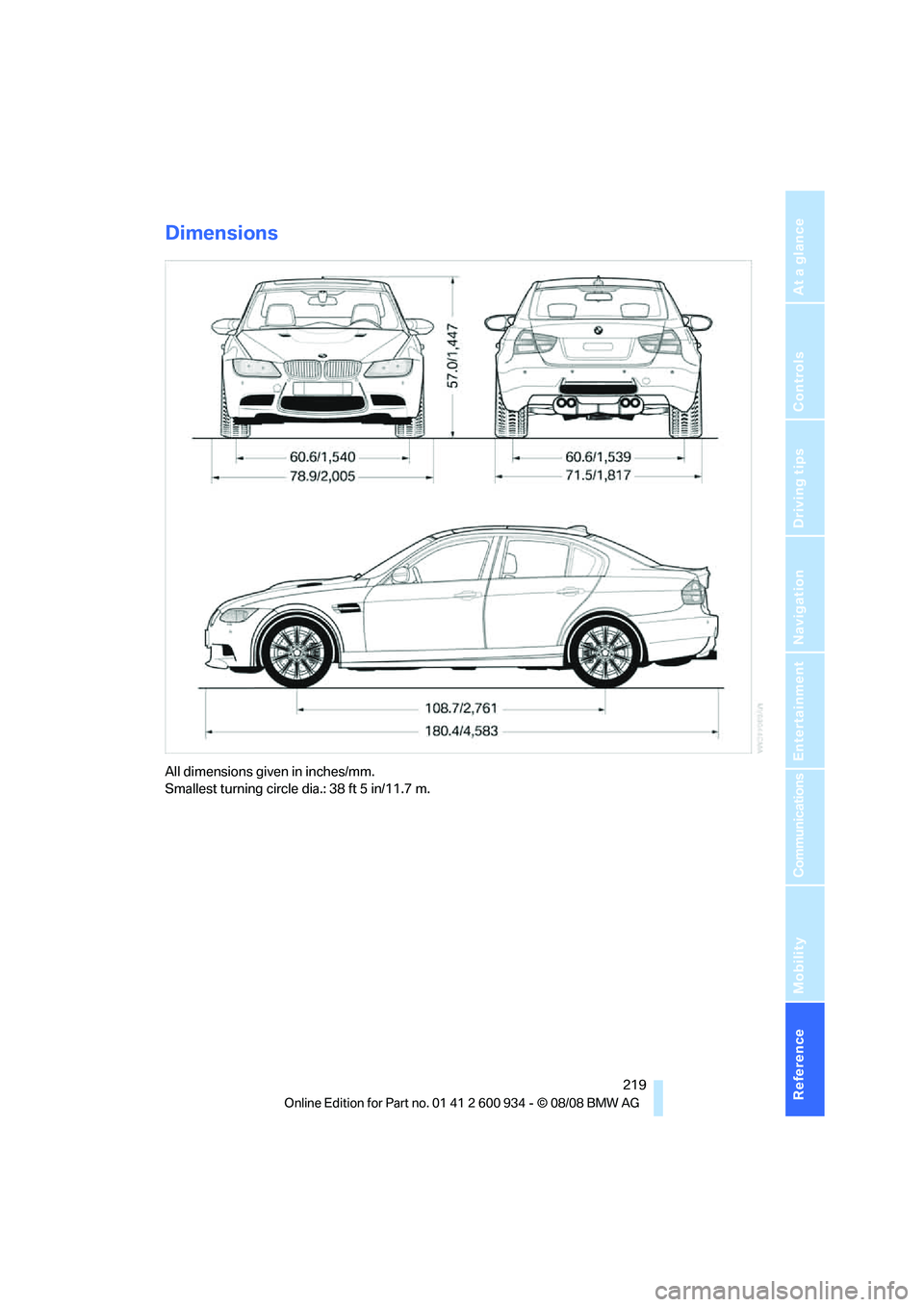
Dimensions
All dimensions given in inches/mm.
Smallest turning circle dia.: 38 ft 5 in/11.7 m.
ba8_E90M3_cic.book Seite 219 Dienstag, 19. August 2008 11:51 11
Page 223 of 246
Reference 221
At a glance
Controls
Driving tips
Communications
Navigation
Entertainment
Mobility
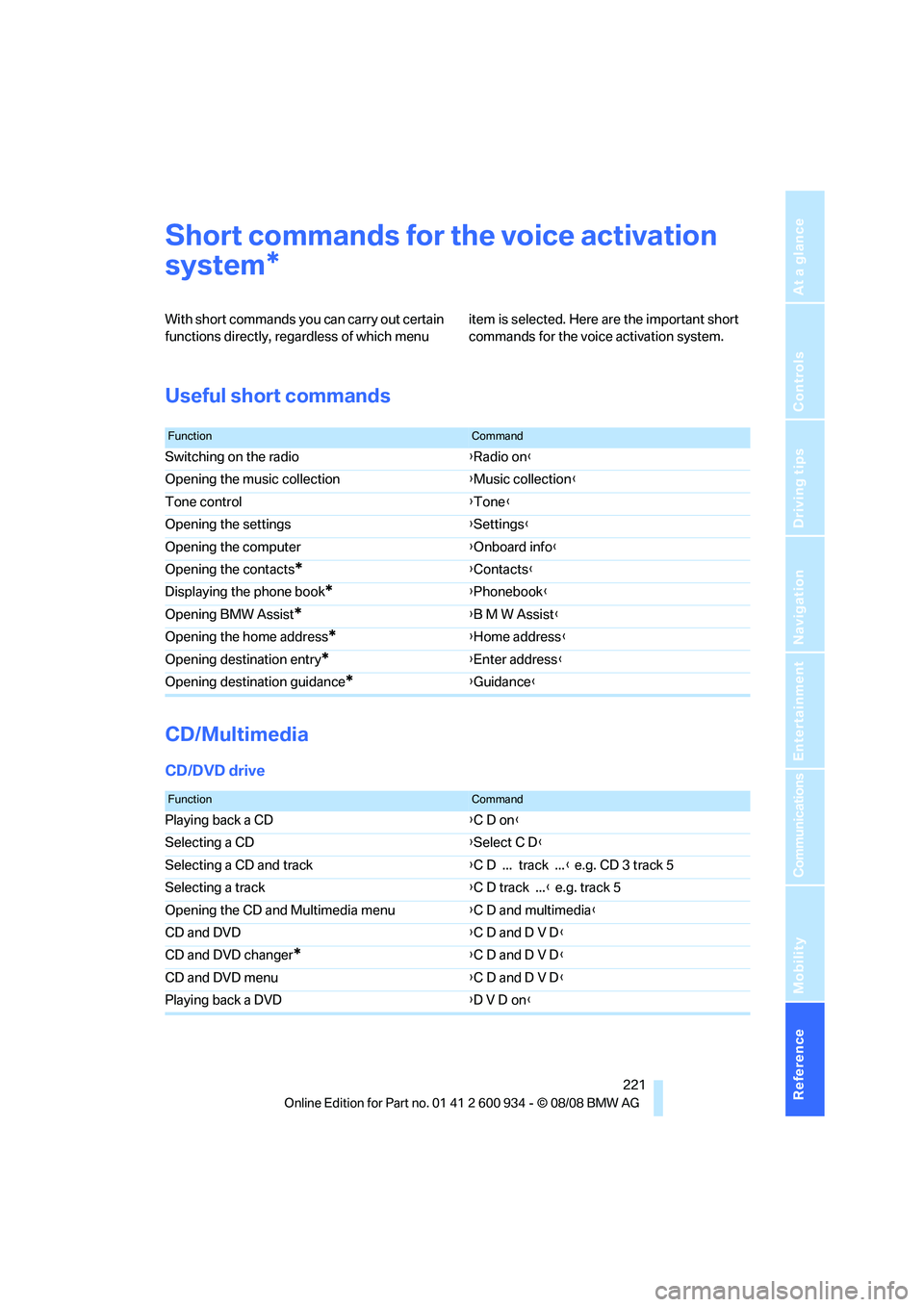
Short commands for the voice activation
system
With short commands you can carry out certain
functions directly, regardless of which menu item is selected. Here are the important short
commands for the voice activation system.
Useful short commands
CD/Multimedia
CD/DVD drive
*
FunctionCommand
Switching on the radio{Radio on}
Opening the music collection{Music collection}
Tone control{Tone}
Opening the settings{Settings}
Opening the computer{Onboard info}
Opening the contacts
*{Contacts}
Displaying the phone book
*{Phonebook}
Opening BMW Assist
*{B M W Assist}
Opening the home address
*{Home address}
Opening destination entry
*{Enter address}
Opening destination guidance
*{Guidance}
FunctionCommand
Playing back a CD{C D on}
Selecting a CD{Select C D}
Selecting a CD and track{C D ... track ...} e.g. CD 3 track 5
Selecting a track{C D track ...} e.g. track 5
Opening the CD and Multimedia menu{C D and multimedia}
CD and DVD{C D and D V D}
CD and DVD changer
*{C D and D V D}
CD and DVD menu{C D and D V D}
Playing back a DVD{D V D on}
ba8_E90M3_cic.book Seite 221 Dienstag, 19. August 2008 11:51 11
Page 225 of 246
Reference 223
At a glance
Controls
Driving tips
Communications
Navigation
Entertainment
Mobility
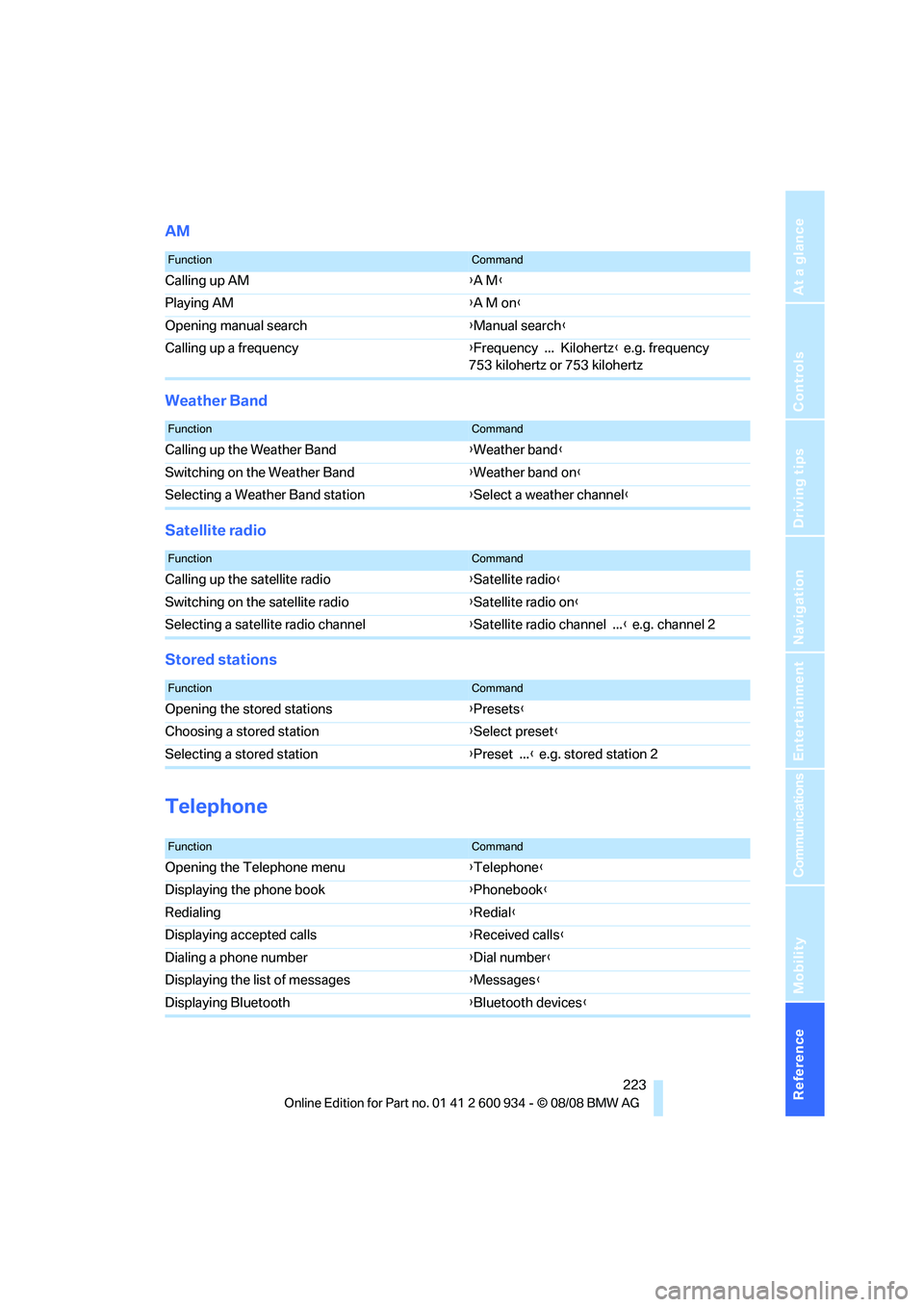
AM
Weather Band
Satellite radio
Stored stations
Telephone
FunctionCommand
Calling up AM{A M}
Playing AM{A M on}
Opening manual search{Manual search}
Calling up a frequency{Frequency ... Kilohertz} e.g. frequency
753 kilohertz or 753 kilohertz
FunctionCommand
Calling up the Weather Band{Weather band}
Switching on the Weather Band{Weather band on}
Selecting a Weather Band station{Select a weather channel}
FunctionCommand
Calling up the satellite radio{Satellite radio}
Switching on the satellite radio{Satellite radio on}
Selecting a satellite radio channel{Satellite radio channel ...} e.g. channel 2
FunctionCommand
Opening the stored stations{Presets}
Choosing a stored station{Select preset}
Selecting a stored station{Preset ...} e.g. stored station 2
FunctionCommand
Opening the Telephone menu{Telephone}
Displaying the phone book{Phonebook}
Redialing{Redial}
Displaying accepted calls{Received calls}
Dialing a phone number{Dial number}
Displaying the list of messages{Messages}
Displaying Bluetooth{Bluetooth devices}
ba8_E90M3_cic.book Seite 223 Dienstag, 19. August 2008 11:51 11
Page 226 of 246
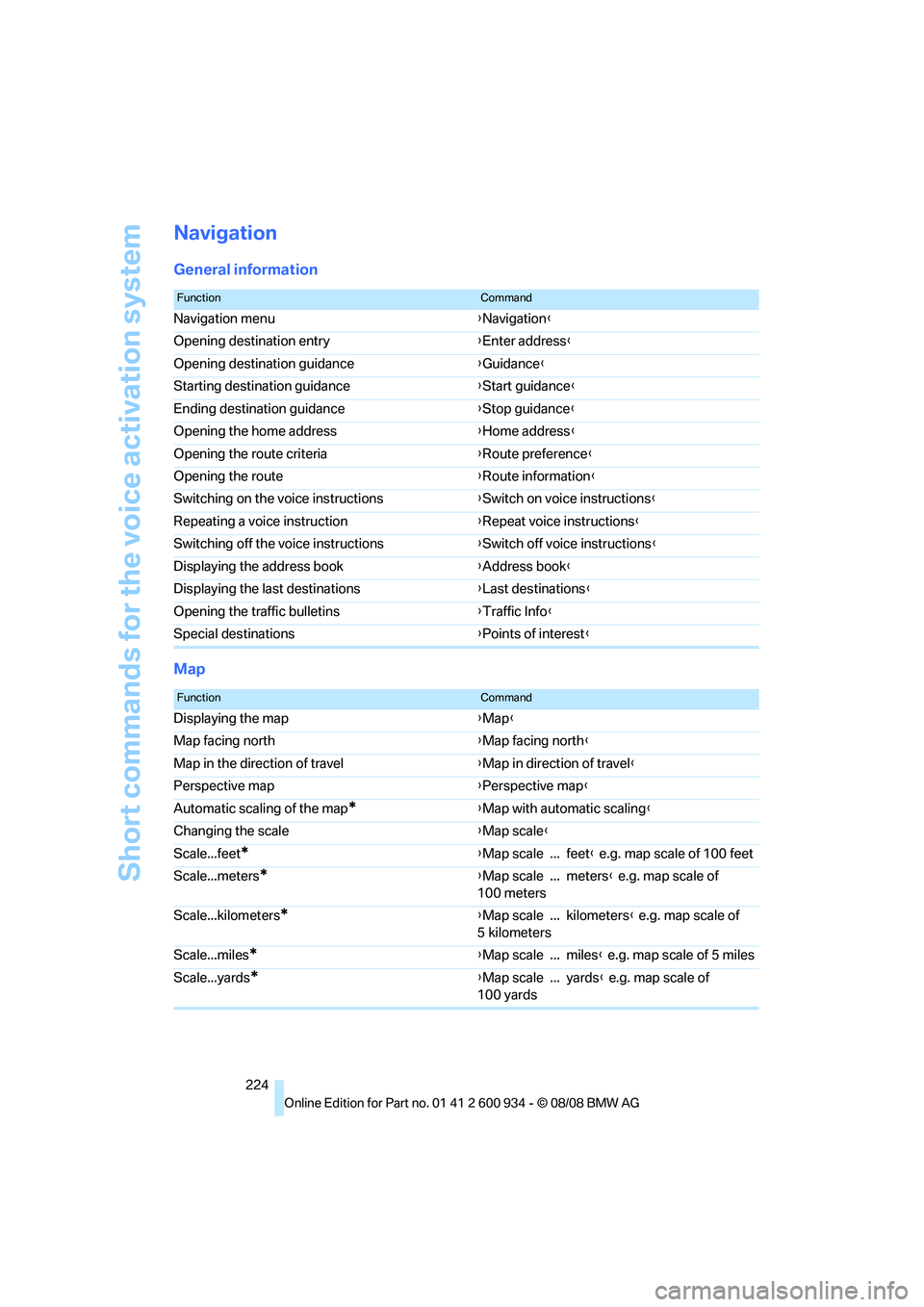
Short commands for the voice activation system
224
Navigation
General information
Map
FunctionCommand
Navigation menu{Navigation}
Opening destination entry{Enter address}
Opening destination guidance{Guidance}
Starting destination guidance{Start guidance}
Ending destination guidance{Stop guidance}
Opening the home address{Home address}
Opening the route criteria{Route preference}
Opening the route{Route information}
Switching on the voice instructions{Switch on voice instructions}
Repeating a voice instruction{Repeat voice instructions}
Switching off the voice instructions{Switch off voice instructions}
Displaying the address book{Address book}
Displaying the last destinations{Last destinations}
Opening the traffic bulletins{Traffic Info}
Special destinations{Points of interest}
FunctionCommand
Displaying the map{Map}
Map facing north{Map facing north}
Map in the direction of travel{Map in direction of travel}
Perspective map{Perspective map}
Automatic scaling of the map
*{Map with automatic scaling}
Changing the scale{Map scale}
Scale...feet
*{Map scale ... feet} e.g. map scale of 100 feet
Scale...meters
*{Map scale ... meters} e.g. map scale of
100 meters
Scale...kilometers
*{Map scale ... kilometers} e.g. map scale of
5 kilometers
Scale...miles
*{Map scale ... miles} e.g. map scale of 5 miles
Scale...yards
*{Map scale ... yards} e.g. map scale of
100 yards
ba8_E90M3_cic.book Seite 224 Dienstag, 19. August 2008 11:51 11
Page 227 of 246
Reference 225
At a glance
Controls
Driving tips
Communications
Navigation
Entertainment
Mobility
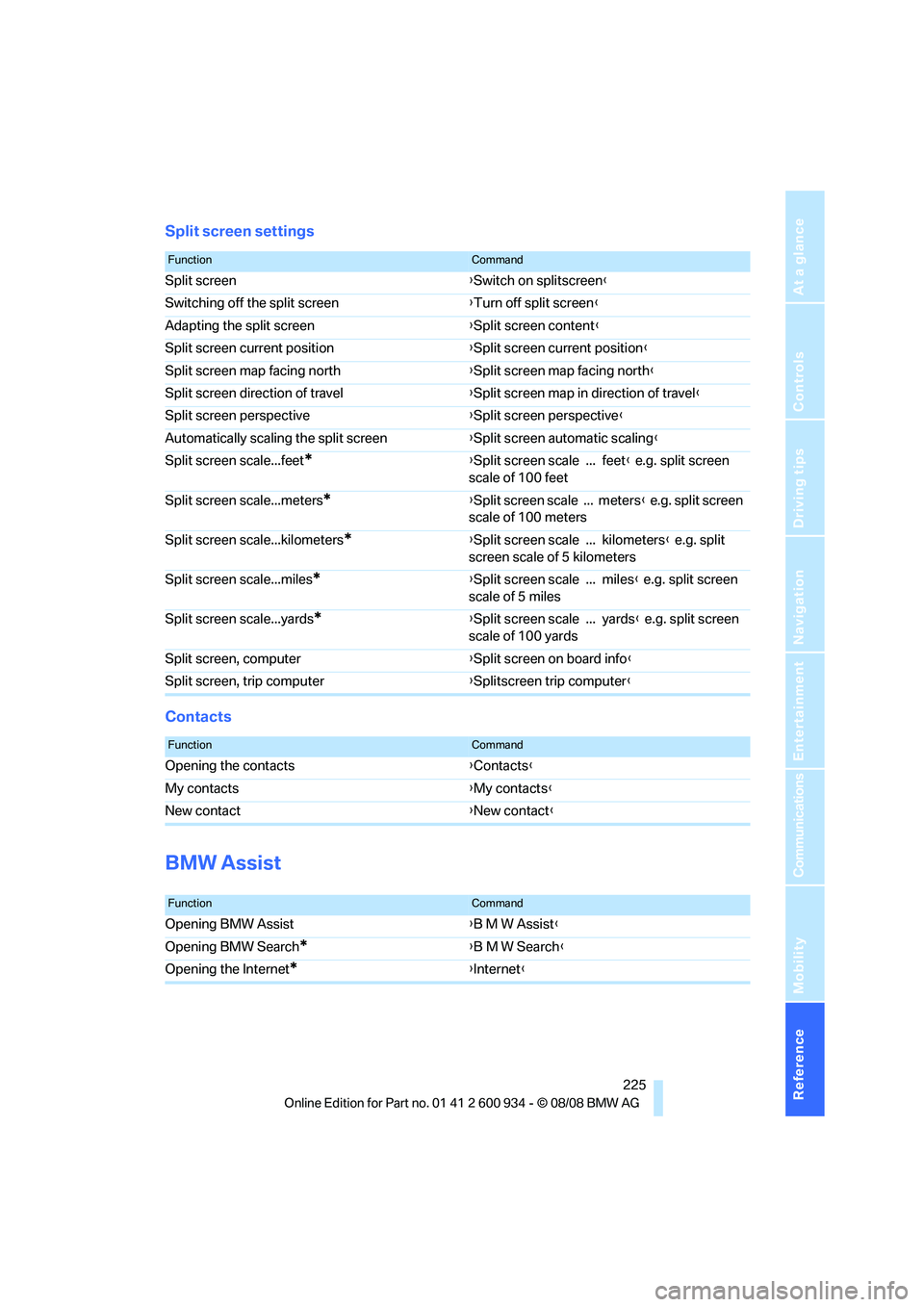
Split screen settings
Contacts
BMW Assist
FunctionCommand
Split screen{Switch on splitscreen}
Switching off the split screen{Turn off split screen}
Adapting the split screen{Split screen content}
Split screen current position{Split screen current position}
Split screen map facing north{Split screen map facing north}
Split screen direction of travel{Split screen map in direction of travel}
Split screen perspective{Split screen perspective}
Automatically scaling the split screen{Split screen automatic scaling}
Split screen scale...feet
*{Split screen scale ... feet} e.g. split screen
scale of 100 feet
Split screen scale...meters
*{Split screen scale ... meters} e.g. split screen
scale of 100 meters
Split screen scale...kilometers
*{Split screen scale ... kilometers} e.g. split
screen scale of 5 kilometers
Split screen scale...miles
*{Split screen scale ... miles} e.g. split screen
scale of 5 miles
Split screen scale...yards
*{Split screen scale ... yards} e.g. split screen
scale of 100 yards
Split screen, computer{Split screen on board info}
Split screen, trip computer{Splitscreen trip computer}
FunctionCommand
Opening the contacts{Contacts}
My contacts{My contacts}
New contact{New contact}
FunctionCommand
Opening BMW Assist{B M W Assist}
Opening BMW Search
*{B M W Search}
Opening the Internet
*{Internet}
ba8_E90M3_cic.book Seite 225 Dienstag, 19. August 2008 11:51 11
Page 229 of 246

Reference 227
At a glance
Controls
Driving tips
Communications
Navigation
Entertainment
Mobility
ba8_E90M3_cic.book Seite 227 Dienstag, 19. August 2008 11:51 11
Page 230 of 246
Everything from A - Z
228
Everything from A - Z
Index
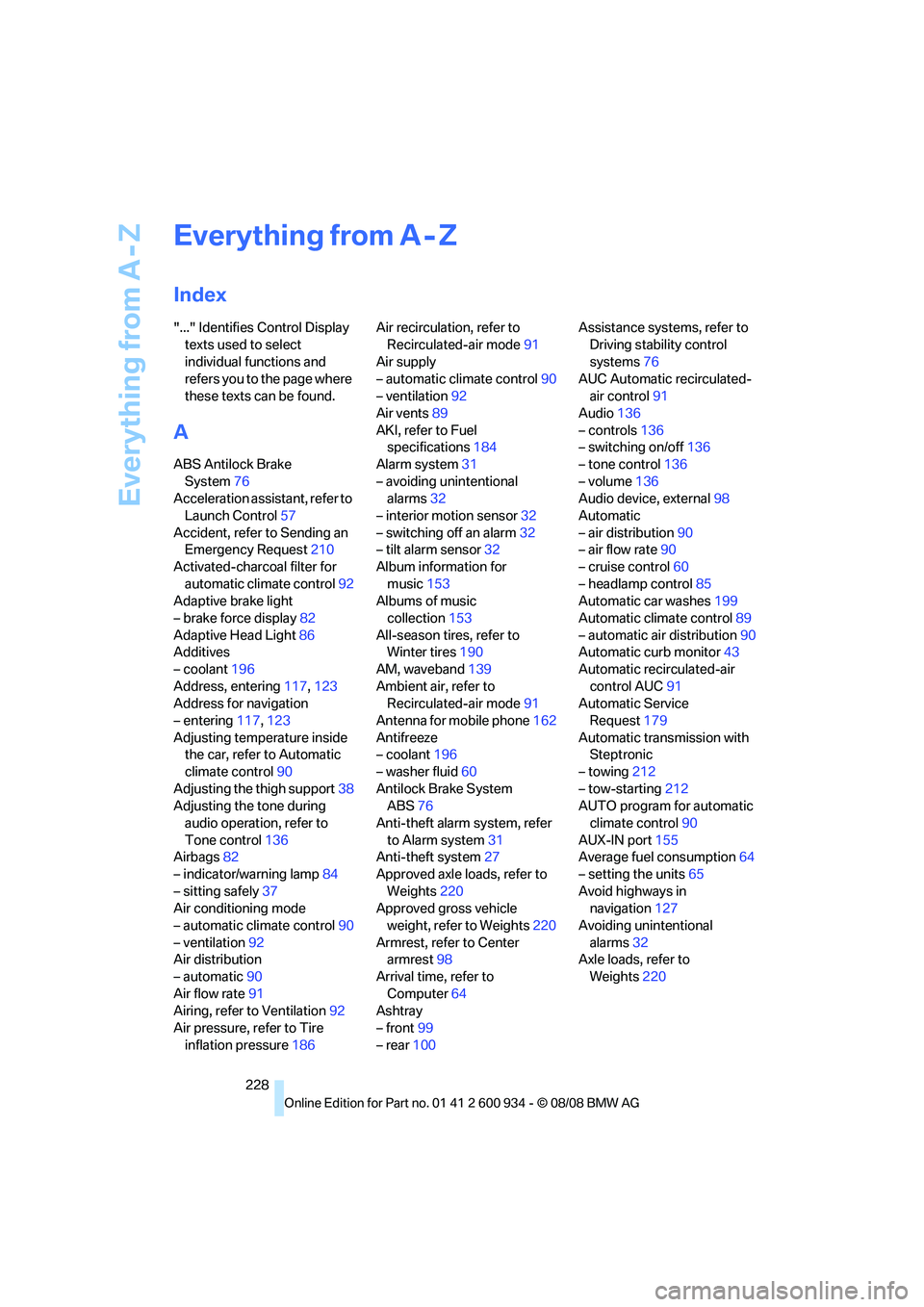
"..." Identifies Control Display
texts used to select
individual functions and
refers you to the page where
these texts can be found.
A
ABS Antilock Brake
System76
Acceleration assistant, refer to
Launch Control57
Accident, refer to Sending an
Emergency Request210
Activated-charcoal filter for
automatic climate control92
Adaptive brake light
– brake force display82
Adaptive Head Light86
Additives
– coolant196
Address, entering117,123
Address for navigation
– entering117,123
Adjusting temperature inside
the car, refer to Automatic
climate control90
Adjusting the thigh support38
Adjusting the tone during
audio operation, refer to
Tone control136
Airbags82
– indicator/warning lamp84
– sitting safely37
Air conditioning mode
– automatic climate control90
– ventilation92
Air distribution
– automatic90
Air flow rate91
Airing, refer to Ventilation92
Air pressure, refer to Tire
inflation pressure186Air recirculation, refer to
Recirculated-air mode91
Air supply
– automatic climate control90
– ventilation92
Air vents89
AKI, refer to Fuel
specifications184
Alarm system31
– avoiding unintentional
alarms32
– interior motion sensor32
– switching off an alarm32
– tilt alarm sensor32
Album information for
music153
Albums of music
collection153
All-season tires, refer to
Winter tires190
AM, waveband139
Ambient air, refer to
Recirculated-air mode91
Antenna for mobile phone162
Antifreeze
– coolant196
– washer fluid60
Antilock Brake System
ABS
76
Anti-theft alarm system, refer
to Alarm system31
Anti-theft system27
Approved axle loads, refer to
Weights220
Approved gross vehicle
weight, refer to Weights220
Armrest, refer to Center
armrest98
Arrival time, refer to
Computer64
Ashtray
– front99
– rear100Assistance systems, refer to
Driving stability control
systems76
AUC Automatic recirculated-
air control91
Audio136
– controls136
– switching on/off136
– tone control136
– volume136
Audio device, external98
Automatic
– air distribution90
– air flow rate90
– cruise control60
– headlamp control85
Automatic car washes199
Automatic climate control89
– automatic air distribution90
Automatic curb monitor43
Automatic recirculated-air
control AUC91
Automatic Service
Request179
Automatic transmission with
Steptronic
– towing212
– tow-starting212
AUTO program for automatic
climate control90
AUX-IN port155
Average fuel consumption64
– setting the units65
Avoid highways in
navigation127
Avoiding unintentional
alarms32
Axle loads, refer to
Weights220
ba8_E90M3_cic.book Seite 228 Dienstag, 19. August 2008 11:51 11