battery BMW M3 2009 User Guide
[x] Cancel search | Manufacturer: BMW, Model Year: 2009, Model line: M3, Model: BMW M3 2009Pages: 246, PDF Size: 11.68 MB
Page 94 of 246
Climate
92 The cooling function helps prevent condensa-
tion on the windows or removes it quickly.
Depending on the weather, the windshield may
fog over briefly when the engine is started.
Pressing the AUTO button automatically
switches on the cooling function.
Rear window defroster
The defroster is switched off auto-
matically after a certain time.
Depending on your vehicle's
equipment, the upper wires serve as an antenna
and are not part of the rear window defroster.
Ventilation
1Use the knurled wheels to smoothly open
and close the air vents
2Use the lever to change the direction of the
airflow
3Knurled wheel for more or less cool air from
the vents for the upper body area
Ventilation for cooling
Adjust the vent outlets to direct the flow of cool
air in your direction, for instance if it has become
too hot in the car.
Draft-free ventilation
Set the vent outlets so that the air flows past
you and not straight at you.
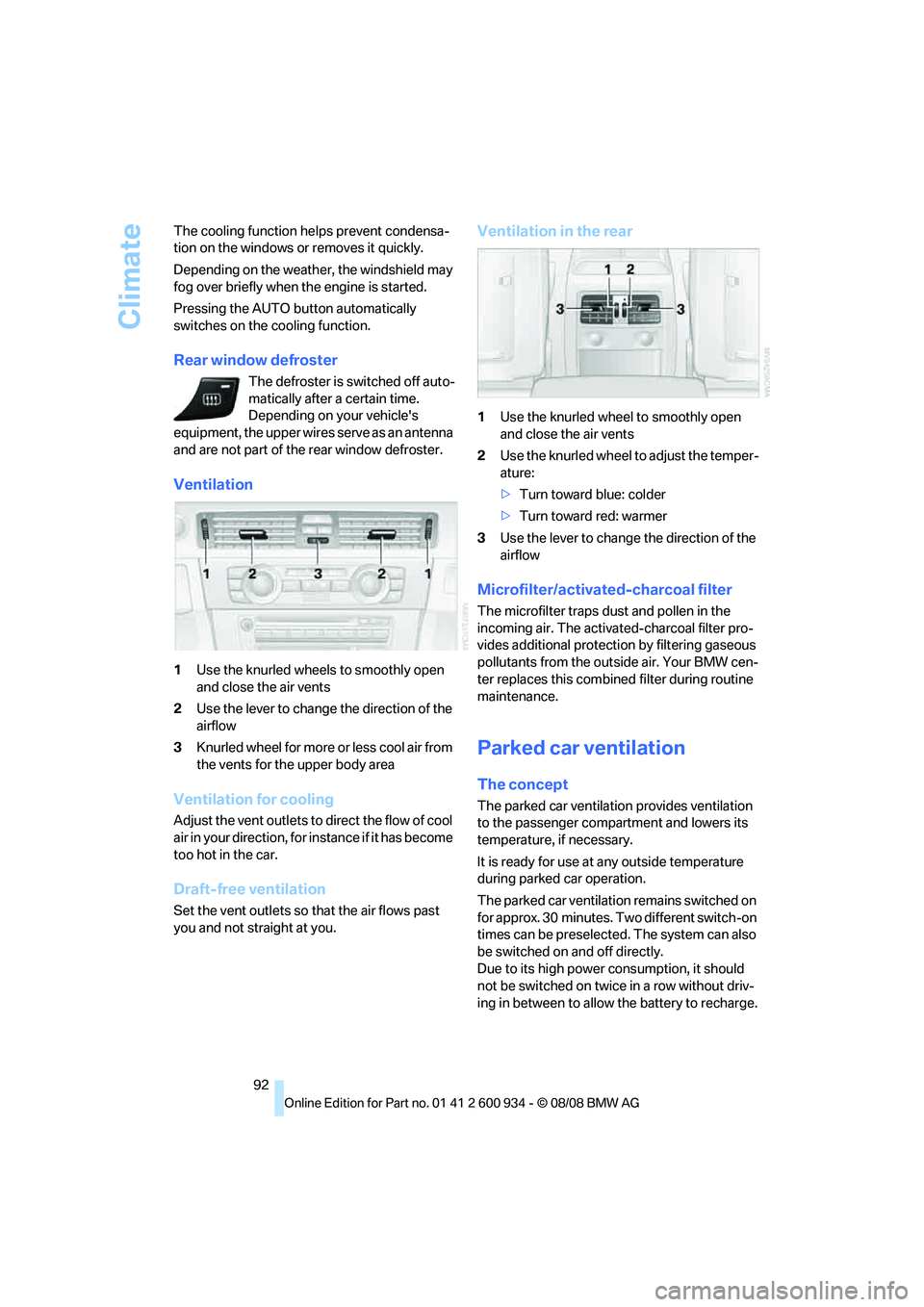
Ventilation in the rear
1Use the knurled wheel to smoothly open
and close the air vents
2Use the knurled wheel to adjust the temper-
ature:
>Turn toward blue: colder
>Turn toward red: warmer
3Use the lever to change the direction of the
airflow
Microfilter/activated-charcoal filter
The microfilter traps dust and pollen in the
incoming air. The activated-charcoal filter pro-
vides additional protection by filtering gaseous
pollutants from the outside air. Your BMW cen-
ter replaces this combined filter during routine
maintenance.
Parked car ventilation
The concept
The parked car ventilation provides ventilation
to the passenger compartment and lowers its
temperature, if necessary.
It is ready for use at any outside temperature
during parked car operation.
The parked car ventilation remains switched on
for approx. 30 minutes. Two different switch-on
times can be preselected. The system can also
be switched on and off directly.
Due to its high power consumption, it should
not be switched on twice in a row without driv-
ing in between to allow the battery to recharge.
ba8_E90M3_cic.book Seite 92 Dienstag, 19. August 2008 11:51 11
Page 135 of 246
Navigation
Driving tips
133Reference
At a glance
Controls
Communications
Entertainment
Mobility
What to do if …
What to do if …
>The current position cannot be displayed?
The position is in an unrecognized region, in
a poor reception area, or the system is in the
process of determining the position. Try
again later.
>The destination guidance does not accept
an address without the street name?
A downtown area cannot be determined for
the town or city that has been entered. Input
any street in the selected town/city and
start destination guidance.
>The letters for a destination cannot be
selected during destination entry?
The stored data do not contain the data of
the destination. Select a destination that is
as close as possible to the original.
>Voice instructions are no longer issued
before intersections during destination
guidance?
The area has not yet been fully recorded
>The system does not react to entries?
If the battery was disconnected, it takes up
to 15 minutes before the system is once
again operational.
ba8_E90M3_cic.book Seite 133 Dienstag, 19. August 2008 11:51 11
Page 164 of 246
Telephone
162
Telephone
The concept
Your BMW is equipped with a Full preparation
package mobile phone. After pairing a suitable
mobile phone with the vehicle once, you can
operate the mobile phone via iDrive, the buttons
on the steering wheel or via voice commands.
Once a mobile phone has been paired with your
vehicle, it is automatically recognized as soon
as it is inside the vehicle while the engine is run-
ning or the ignition is switched on. You can
store the pairing data for up to four mobile
phones simultaneously. If several mobile
phones are detected at the same time, the
mobile phone last paired can be operated via
the vehicle.
Using the telephone inside
the vehicle
Using the snap-in adapter*
The so-called snap-in adapter, a holder for
mobile phones, allows you to charge the mobile
phone's battery and connect the mobile phone
to your vehicle's outside antenna. This ensures
better network reception and consistent repro-
duction quality. Please contact your
BMW center to find out for which mobile
phones there are snap-in adapters available.
For your safety
A car phone makes life more convenient in
many ways, and can even save lives in an emer-
gency. While you should consult your mobile
phone's separate operating instructions for a
detailed description of safety precautions and
information, we request that you direct your
particular attention to the following:
Only make entries when the traffic situa-
tion allows you to do so. Do not hold the
mobile phone in your hand while you are driving;
use the hands-free system instead. If you do
not observe this precaution, your being dis-tracted can endanger vehicle occupants and
other road users.<
Suitable mobile phones
Please ask your BMW center which mobile
phones with Bluetooth interface are supported
by the mobile phone preparation package and
which mobile phones are compatible with the
snap-in adapter. By virtue of their particular
software versions, these mobile phones sup-
port the functions described in this Owner's
Manual. Malfunctions may occur with other
mobile phones.
Operating options
You can operate the mobile phone* using:
>Buttons on the steering wheel, refer to
page10
>iDrive, refer to page16
>Voice commands, refer to page169
>Programmable memory keys, refer to
page20
Avoid operating a mobile phone recognized by
the vehicle via the mobile phone's keypad, oth-
erwise malfunctions may result.
Start-up
Pairing the mobile phone with the
vehicle
The following prerequisites must be met:
>Compatible mobile phone: the mobile
phone is supported by the Full preparation
package mobile phone. You can obtain
information on the Internet at:
www.bmw.com
>The mobile phone is ready to operate.
*
ba8_E90M3_cic.book Seite 162 Dienstag, 19. August 2008 11:51 11
Page 173 of 246
171
Entertainment
Reference
At a glance
Controls
Driving tips Communications
Navigation
Mobility
Selecting an entry
The connection to the phone number of the
selected entry is established.
Redialing
To redial the phone number dialed last:
Notes
Important for voice commands
For voice commands, bear in mind the follow-
ing:
>Pronounce the commands smoothly and at
normal volume, avoiding excessive empha-
ses and pauses.
>Keep the doors, windows and glass roof
closed to prevent interference from outside
noise.
>Avoid ambient noise in the vehicle while
speaking.
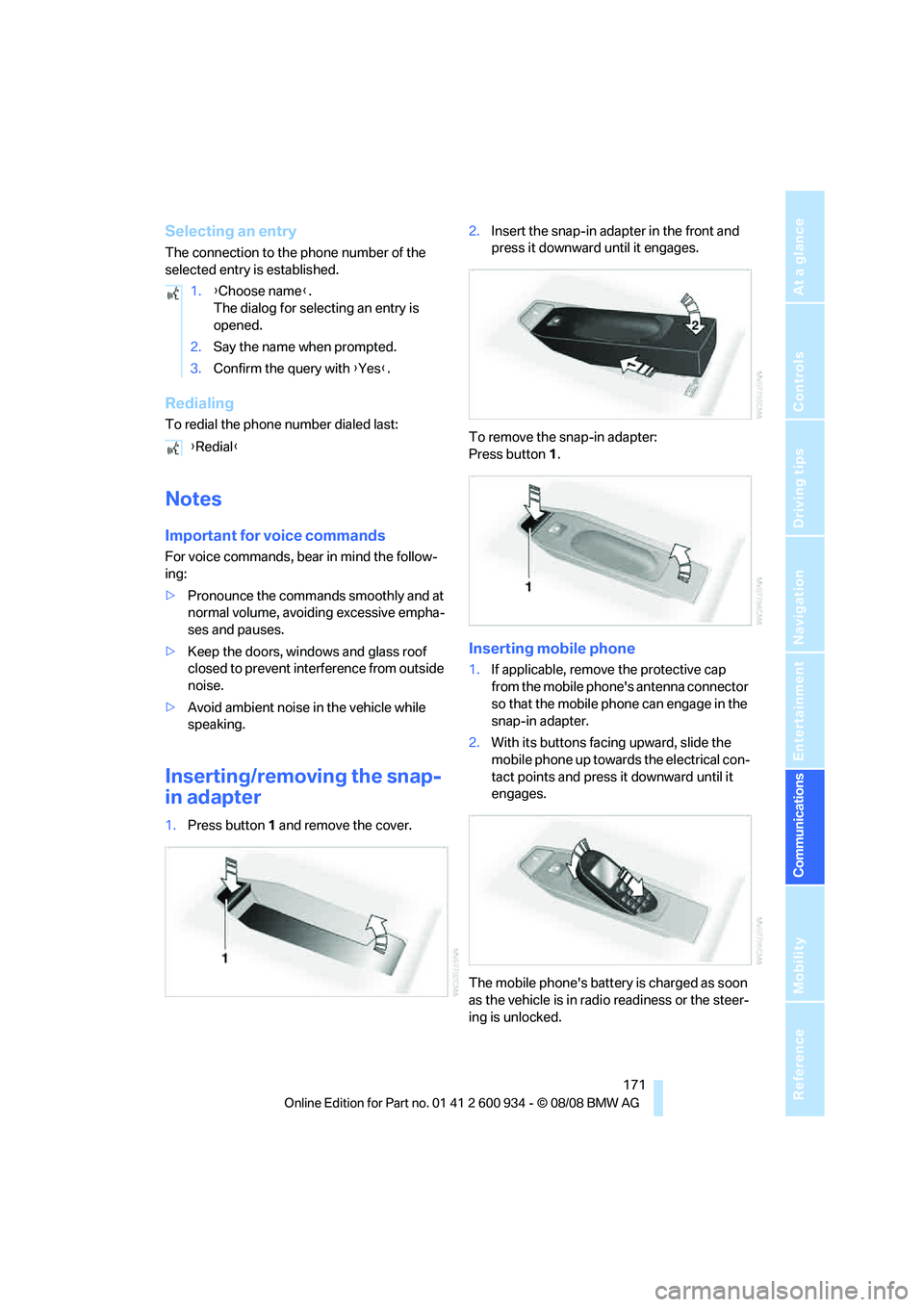
Inserting/removing the snap-
in adapter
1.Press button1 and remove the cover.2.Insert the snap-in adapter in the front and
press it downward until it engages.
To remove the snap-in adapter:
Press button 1.
Inserting mobile phone
1.If applicable, remove the protective cap
from the mobile phone's antenna connector
so that the mobile phone can engage in the
snap-in adapter.
2.With its buttons facing upward, slide the
mobile phone up towards the electrical con-
tact points and press it downward until it
engages.
The mobile phone's battery is charged as soon
as the vehicle is in radio readiness or the steer-
ing is unlocked. 1.{Choose name}.
The dialog for selecting an entry is
opened.
2.Say the name when prompted.
3.Confirm the query with {Yes}.
{Redial}
ba8_E90M3_cic.book Seite 171 Dienstag, 19. August 2008 11:51 11
Page 174 of 246
Telephone
172 To conserve battery power, you should
avoid using the mobile phone when the
ignition is switched off.<
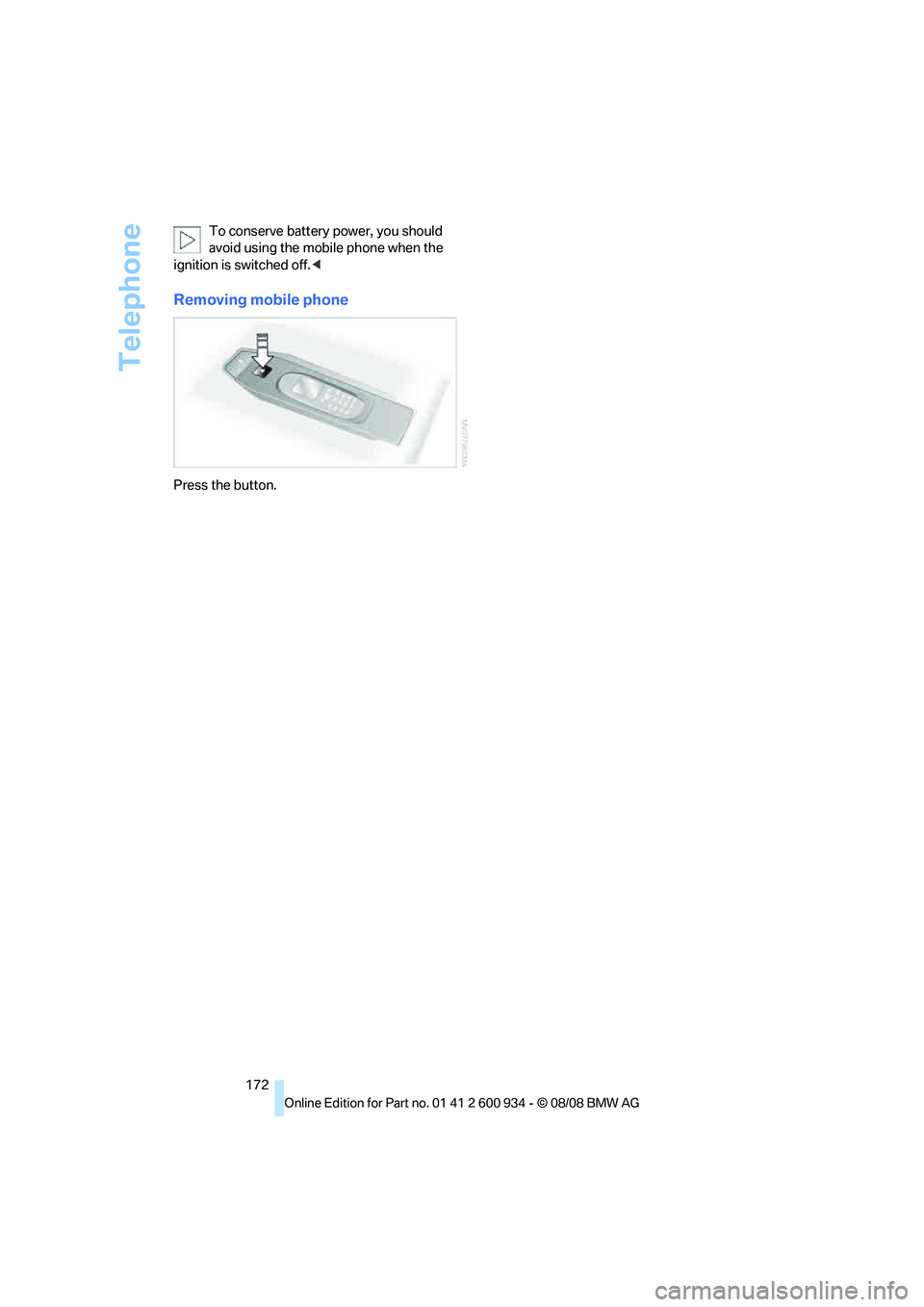
Removing mobile phone
Press the button.
ba8_E90M3_cic.book Seite 172 Dienstag, 19. August 2008 11:51 11
Page 210 of 246
Replacing components
208 Do not exceed a speed of 35 mph/
60 km/h. If possible, do not fall below a
speed of 12 mph/20 km/h.<
Producing the tire inflation pressure
1.After driving approx. 2 miles/3 km, stop at a
suitable location.
2.Connect connection hose9 of the com-
pressor directly to the tire valve.
3.Insert connector 3 into the cigarette lighter
socket/power socket in the interior of the
vehicle.
4.Adjust the tire inflation pressure to 29 psi/
200 kPa. With the ignition switched on, pro-
ceed as follows:
>To increase the inflation pressure:
Switch on the compressor, position I. To
check the current inflation pressure set-
ting, briefly switch off the compressor.
Do not let the compressor run for
more than 10 minutes, otherwise the
device will overheat and may be dam-
aged.<
>To reduce the inflation pressure: turn
screw 8 on the pressure gauge.
If the inflation pressure is not maintained,
drive the vehicle a second time, refer to
Distributing the sealant. Then repeat steps 1 to
4.
Use of the M Mobility System may be ineffec-
tual for tire damage larger than approx. 0.16 in/
4 mm. Please contact the nearest BMW center,
refer to page210, or a workshop that works
according to BMW repair procedures with cor-
respondingly trained personnel if the tire can-
not be made roadworthy with the M Mobility
System.<
The tire inflation pressure must be at least
29 psi/200 kPa. If it is not, do not continue
driving.<
Continuing your trip
Do not exceed the maximum allowable
speed of 50 mph/80 km/h to avoid the risk
of an accident.
Have the faulty tire and the sealant bottle of the
M Mobility System replaced as soon as possi-
ble.<
Changing wheels
The tools for changing wheels are avail-
able as optional accessories from your
BMW center.<
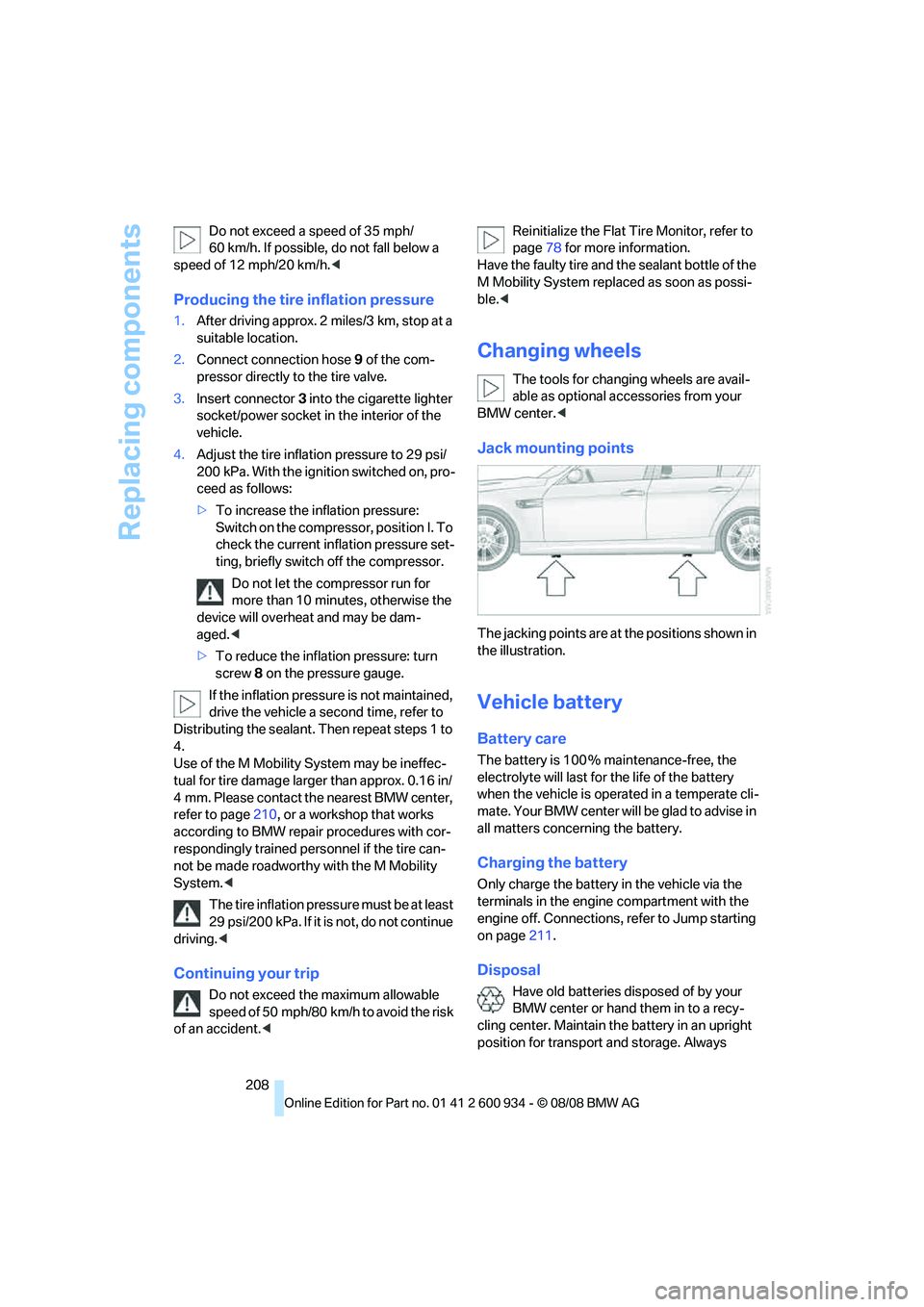
Jack mounting points
The jacking points are at the positions shown in
the illustration.
Vehicle battery
Battery care
The battery is 100 % maintenance-free, the
electrolyte will last for the life of the battery
when the vehicle is operated in a temperate cli-
mate. Your BMW center will be glad to advise in
all matters concerning the battery.
Charging the battery
Only charge the battery in the vehicle via the
terminals in the engine compartment with the
engine off. Connections, refer to Jump starting
on page211.
Disposal
Have old batteries disposed of by your
BMW center or hand them in to a recy-
cling center. Maintain the battery in an upright
position for transport and storage. Always
ba8_E90M3_cic.book Seite 208 Dienstag, 19. August 2008 11:51 11
Page 211 of 246
Mobility
209Reference
At a glance
Controls
Driving tips
Communications
Navigation
Entertainment
secure the battery against tipping over during
transport.<
Power failure
After a temporary power loss, the functioning of
some equipment may be limited and require
reinitialization. Individual settings may likewise
have been lost and will have to be programmed:
>Time and date
These values must be updated, refer to
page68.
>Radio
In some cases, stations may have to be
stored again, refer to page139.
>Navigation system
Operability must be waited for, refer to
page116.
>Glass roof
It may happen that the roof can only be
raised. The system must be initialized.
Please contact your BMW center.
>Seat and mirror memory
The positions must be stored again, refer to
page40.
>Inside rearview mirror with digital compass
The system must be calibrated, refer to
page96.
Fuses
Never attempt to repair a blown fuse and
do not replace a defective fuse with a sub-
stitute of another color or amperage rating, oth-
erwise this could lead to a circuit overload, ulti-
mately resulting in a fire in the vehicle.
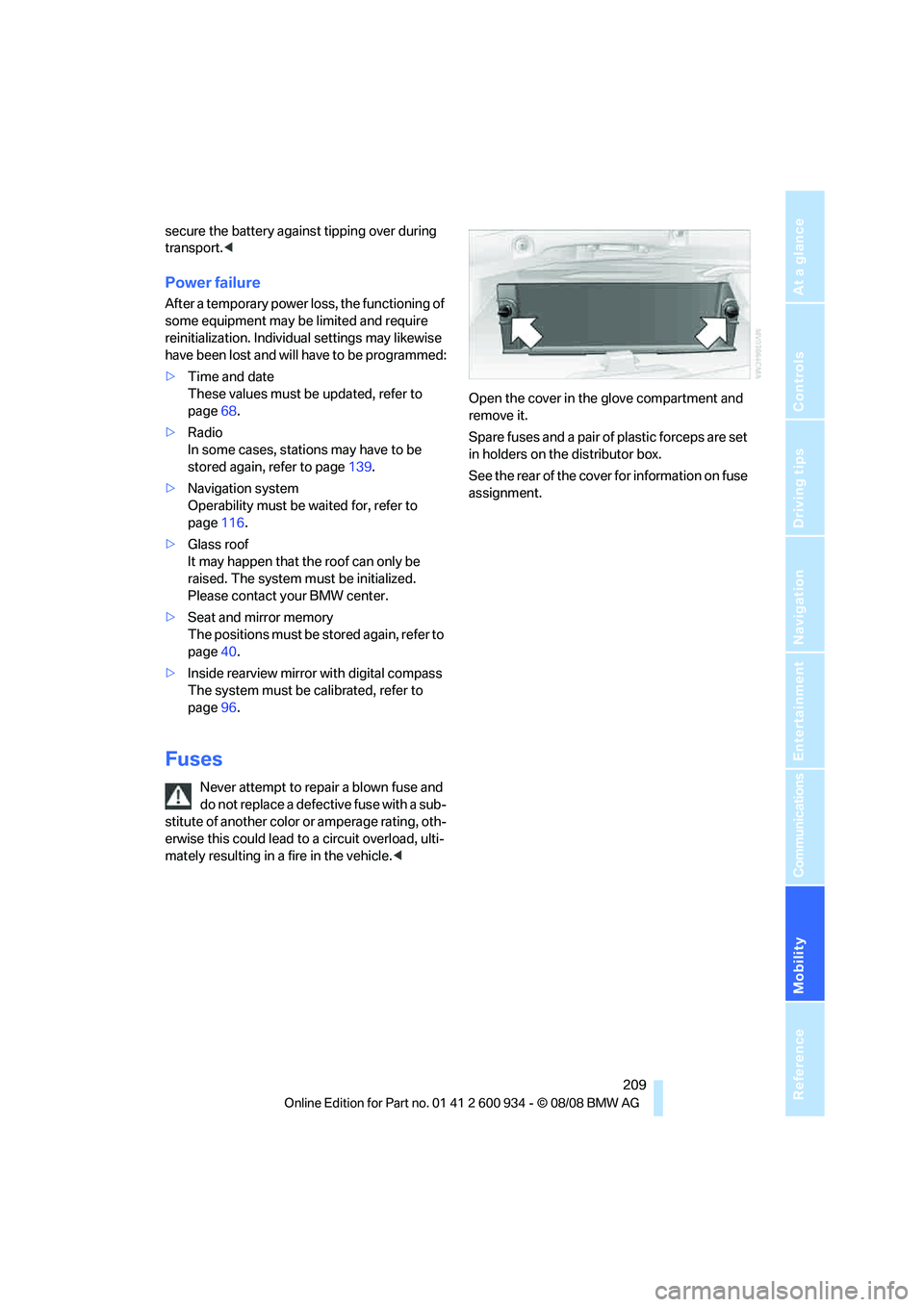
Spare fuses and a pair of plastic forceps are set
in holders on the distributor box.
See the rear of the cover for information on fuse
assignment.
ba8_E90M3_cic.book Seite 209 Dienstag, 19. August 2008 11:51 11
Page 213 of 246
Mobility
211Reference
At a glance
Controls
Driving tips
Communications
Navigation
Entertainment
First aid pouch*
Some of the articles contained in the first aid
pouch have a limited service life. Therefore,
check the expiration dates of the contents reg-
ularly and replace any items in good time, if nec-
essary.
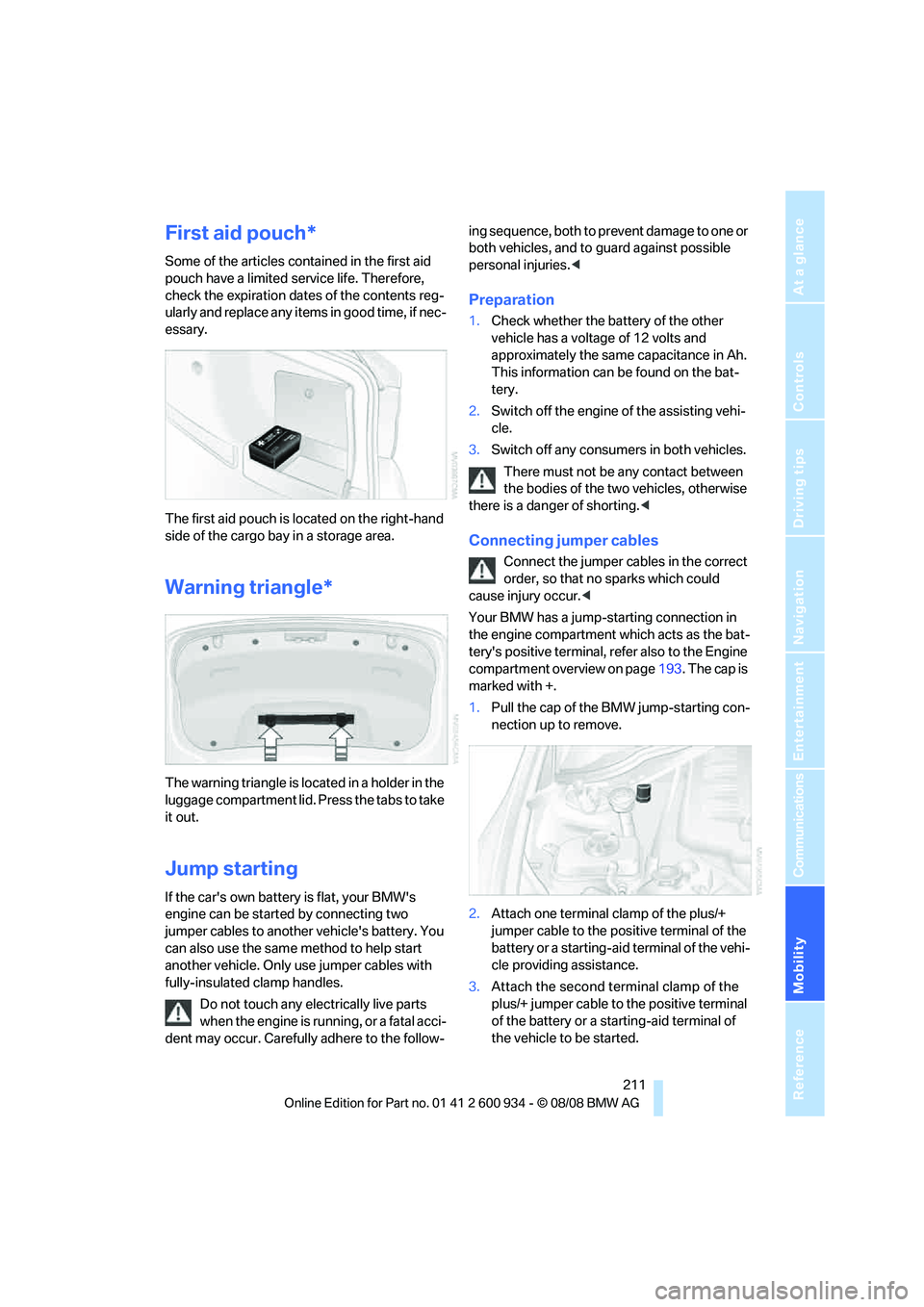
The first aid pouch is located on the right-hand
side of the cargo bay in a storage area.
Warning triangle*
The warning triangle is located in a holder in the
luggage compartment lid. Press the tabs to take
it out.
Jump starting
If the car's own battery is flat, your BMW's
engine can be started by connecting two
jumper cables to another vehicle's battery. You
can also use the same method to help start
another vehicle. Only use jumper cables with
fully-insulated clamp handles.
Do not touch any electrically live parts
when the engine is running, or a fatal acci-
dent may occur. Carefully adhere to the follow-ing sequence, both to prevent damage to one or
both vehicles, and to guard against possible
personal injuries.<
Preparation
1.Check whether the battery of the other
vehicle has a voltage of 12 volts and
approximately the same capacitance in Ah.
This information can be found on the bat-
tery.
2.Switch off the engine of the assisting vehi-
cle.
3.Switch off any consumers in both vehicles.
There must not be any contact between
the bodies of the two vehicles, otherwise
there is a danger of shorting.<
Connecting jumper cables
Connect the jumper cables in the correct
order, so that no sparks which could
cause injury occur.<
Your BMW has a jump-starting connection in
the engine compartment which acts as the bat-
tery's positive terminal, refer also to the Engine
compartment overview on page193. The cap is
marked with +.
1.Pull the cap of the BMW jump-starting con-
nection up to remove.
2.Attach one terminal clamp of the plus/+
jumper cable to the positive terminal of the
battery or a starting-aid terminal of the vehi-
cle providing assistance.
3.Attach the second terminal clamp of the
plus/+ jumper cable to the positive terminal
of the battery or a starting-aid terminal of
the vehicle to be started.
ba8_E90M3_cic.book Seite 211 Dienstag, 19. August 2008 11:51 11
Page 214 of 246
Giving and receiving assistance
212 4.Attach one terminal clamp of the minus/–
jumper cable to the negative terminal of the
battery or to an engine or body ground of
the assisting vehicle.
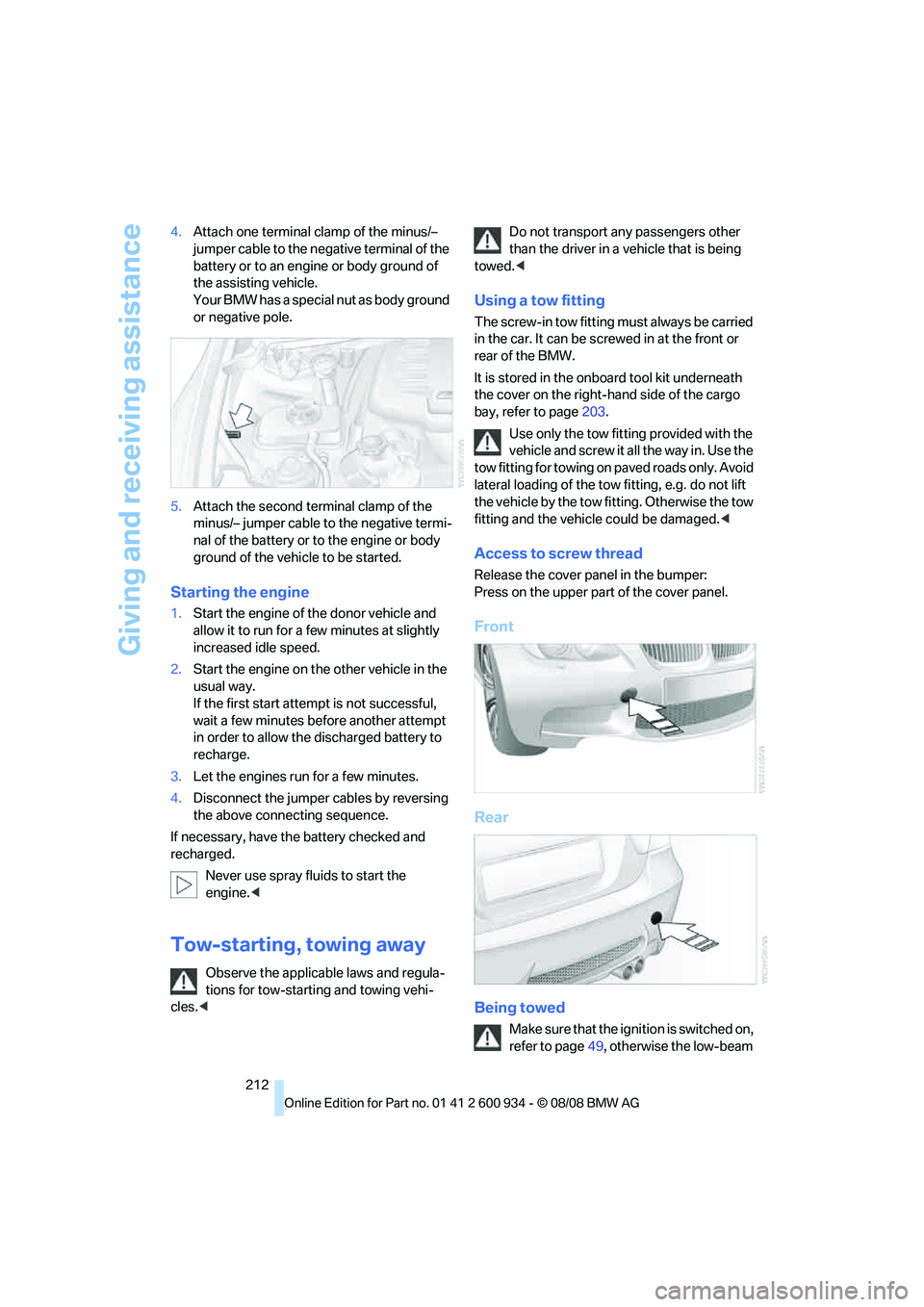
Your BMW has a special nut as body ground
or negative pole.
5.Attach the second terminal clamp of the
minus/– jumper cable to the negative termi-
nal of the battery or to the engine or body
ground of the vehicle to be started.
Starting the engine
1.Start the engine of the donor vehicle and
allow it to run for a few minutes at slightly
increased idle speed.
2.Start the engine on the other vehicle in the
usual way.
If the first start attempt is not successful,
wait a few minutes before another attempt
in order to allow the discharged battery to
recharge.
3.Let the engines run for a few minutes.
4.Disconnect the jumper cables by reversing
the above connecting sequence.
If necessary, have the battery checked and
recharged.
Never use spray fluids to start the
engine.<
Tow-starting, towing away
Observe the applicable laws and regula-
tions for tow-starting and towing vehi-
cles.
towed.<
Using a tow fitting
The screw-in tow fitting must always be carried
in the car. It can be screwed in at the front or
rear of the BMW.
It is stored in the onboard tool kit underneath
the cover on the right-hand side of the cargo
bay, refer to page203.
Use only the tow fitting provided with the
vehicle and screw it all the way in. Use the
tow fitting for towing on paved roads only. Avoid
lateral loading of the tow fitting, e.g. do not lift
the vehicle by the tow fitting. Otherwise the tow
fitting and the vehicle could be damaged.<
Access to screw thread
Release the cover panel in the bumper:
Press on the upper part of the cover panel.
Front
Rear
Being towed
Make sure that the ignition is switched on,
refer to page49, otherwise the low-beam
ba8_E90M3_cic.book Seite 212 Dienstag, 19. August 2008 11:51 11
Page 231 of 246
Reference 229
At a glance
Controls
Driving tips
Communications
Navigation
Entertainment
Mobility
B
Backrest contour, refer to
Lumbar support38
Backrests, refer to Seat
adjustment38
Backrest width adjustment39
Back seats
– refer to Rear seats39
Backup lamps
– replacing bulb205,206
Backup lamps, refer to Tail
lamps205
Band-aids, refer to First-aid
pouch211
Bar, refer to Towing
methods213
Base plate for telephone or
mobile phone
– refer to Snap-in adapter171
– refer to Snap-in adapter in
the center armrest storage
compartment98
Bass, tone setting136
Battery208
– charging208
– disposal34,208
– jump starting211
– remote control26
– temporary power failure209
Battery for mobile phone171
Battery renewal
– remote control34
– remote control for vehicle34
Being towed212
Belts, refer to Safety belts41
Belt tensioner, refer to Safety
belts41
Beverage holders, refer to
Cup holders99
Blower, refer to Air flow
rate91
Bluetooth, activating/
deactivating164
Bluetooth, refer to separate
Owner's Manual
BMW
– car shampoo201
BMW Assist, activating176BMW Assist175
BMW center180
BMW Homepage4
BMW Maintenance
System197
BMW Search176
BMW webpage4
Bottle holders, refer to Cup
holders99
Brake assist76
Brake fluid, refer to Service
requirements66
Brake force display82
Brake lamps
– replacing bulb205,206
Brake lights
– brake force display82
Brake pads106
– breaking in106
Brake rotors107
– brakes106
– breaking in106
Brakes
– ABS76
– BMW Maintenance
System197
– brake force display82
– breaking in106
– parking brake51
– service requirements66
Brakes, refer to Braking
safely107
Brake system106
– BMW Maintenance
System197
– breaking in106
– disc brakes107
Breakdown services, refer to
Roadside Assistance210
Breaking in the clutch106
Breaking in the differential,
refer to Engine and
differential106
Break-in period106
Brightness of the Control
Display73
Bulb changing, refer to Lamps
and bulbs203Button for starting the engine,
refer to Start/stop button49
Buttons on the steering
wheel11
C
California Proposition 65
warning6
Call
– accepting165
– ending166
– rejecting166
Calling, refer to Phone
numbers, dialing166
Can holders, refer to Cup
holders99
Capacities220
Capacity of the cargo bay220
Car battery, refer to Vehicle
battery208
Car care, refer to Care199
Care199
– automatic car washes199
– care products199
– carpets201
– CD/DVD drives201
– chrome parts200
– displays201
– exterior199
– fine wood parts201
– headlamps200
– high-pressure washer199
– interior201
– leather201
– light-alloy wheels200
– paintwork200
– plastic parts201
– rubber seals200
– safety belts201
– sensors and cameras201
– upholstery and cloth
trim201
– washing the car
manually200
– windows200
– wiper blades200
Cargo, securing109
ba8_E90M3_cic.book Seite 229 Dienstag, 19. August 2008 11:51 11