belt BMW M3 2009 User Guide
[x] Cancel search | Manufacturer: BMW, Model Year: 2009, Model line: M3, Model: BMW M3 2009Pages: 246, PDF Size: 11.68 MB
Page 102 of 246
Practical interior accessories
100 other areas could result in burns.
When leaving the car, always remove the
remote control so that children cannot operate
the cigarette lighter and burn themselves.<
Ashtray, rear
Opening
Push the ridge on the cover.
Emptying
Lift out the insert.
Connecting electrical
appliances
In your BMW, when the engine is running or the
ignition is switched on, you can use electrical
devices such as a flashlight, car vacuum
cleaner, etc., up to approx. 200 watts at
12 volts, as long as one of the following sockets
is available. Avoid damaging the sockets by
attempting to insert plugs of unsuitable shape
or size.
Cigarette lighter socket*
To access the socket: take the cigarette lighter
out of the socket.
Socket in the center armrest
External audio device, refer to page98.
Sockets in the rear center console*
Remove corresponding cover.
Socket in the cargo bay*
Open the cap.
Through-loading system*
Opening
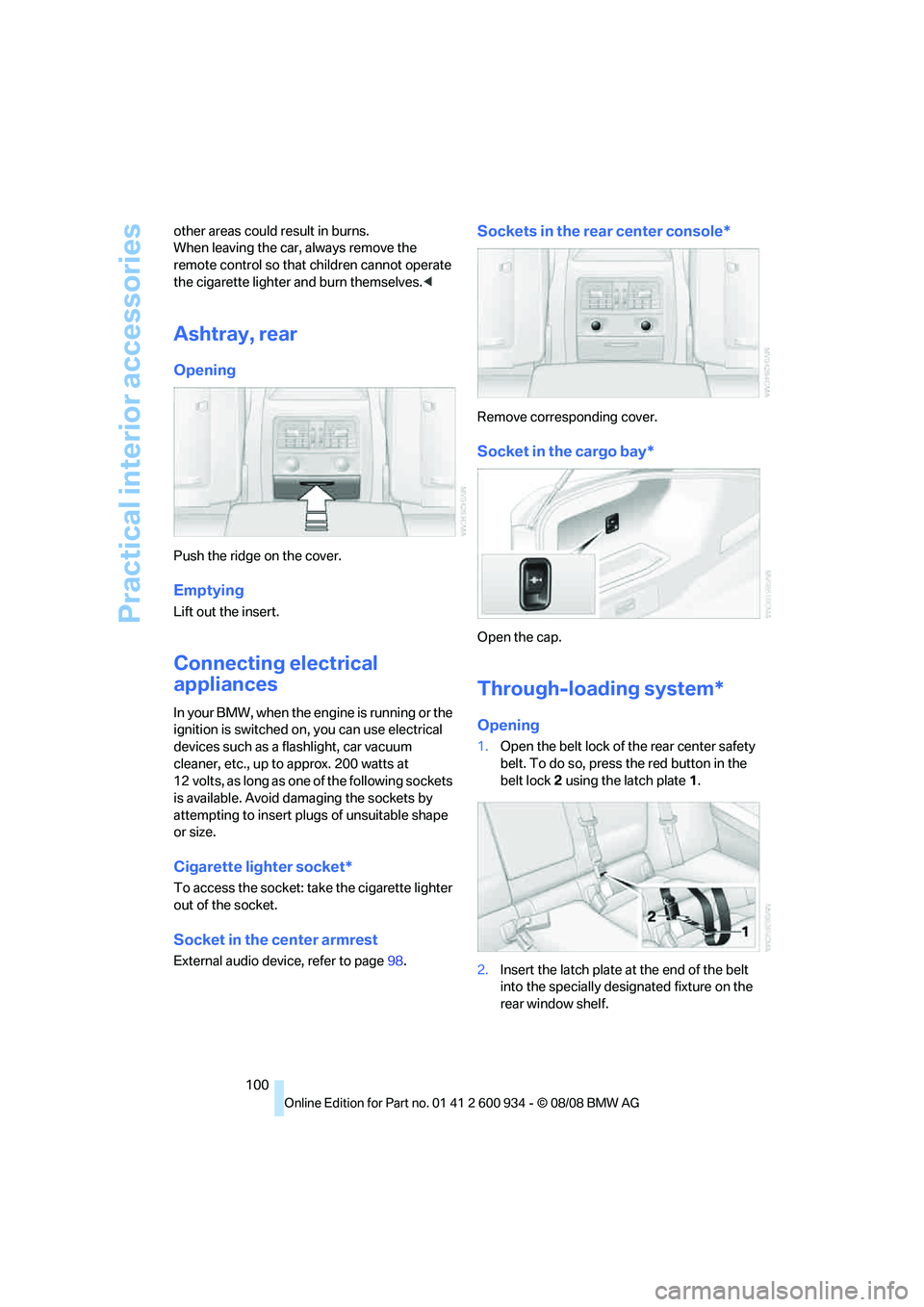
1.Open the belt lock of the rear center safety
belt. To do so, press the red button in the
belt lock 2 using the latch plate1.
2.Insert the latch plate at the end of the belt
into the specially designated fixture on the
rear window shelf.
ba8_E90M3_cic.book Seite 100 Dienstag, 19. August 2008 11:51 11
Page 103 of 246
Controls
101Reference
At a glance
Driving tips
Communications
Navigation
Entertainment
Mobility
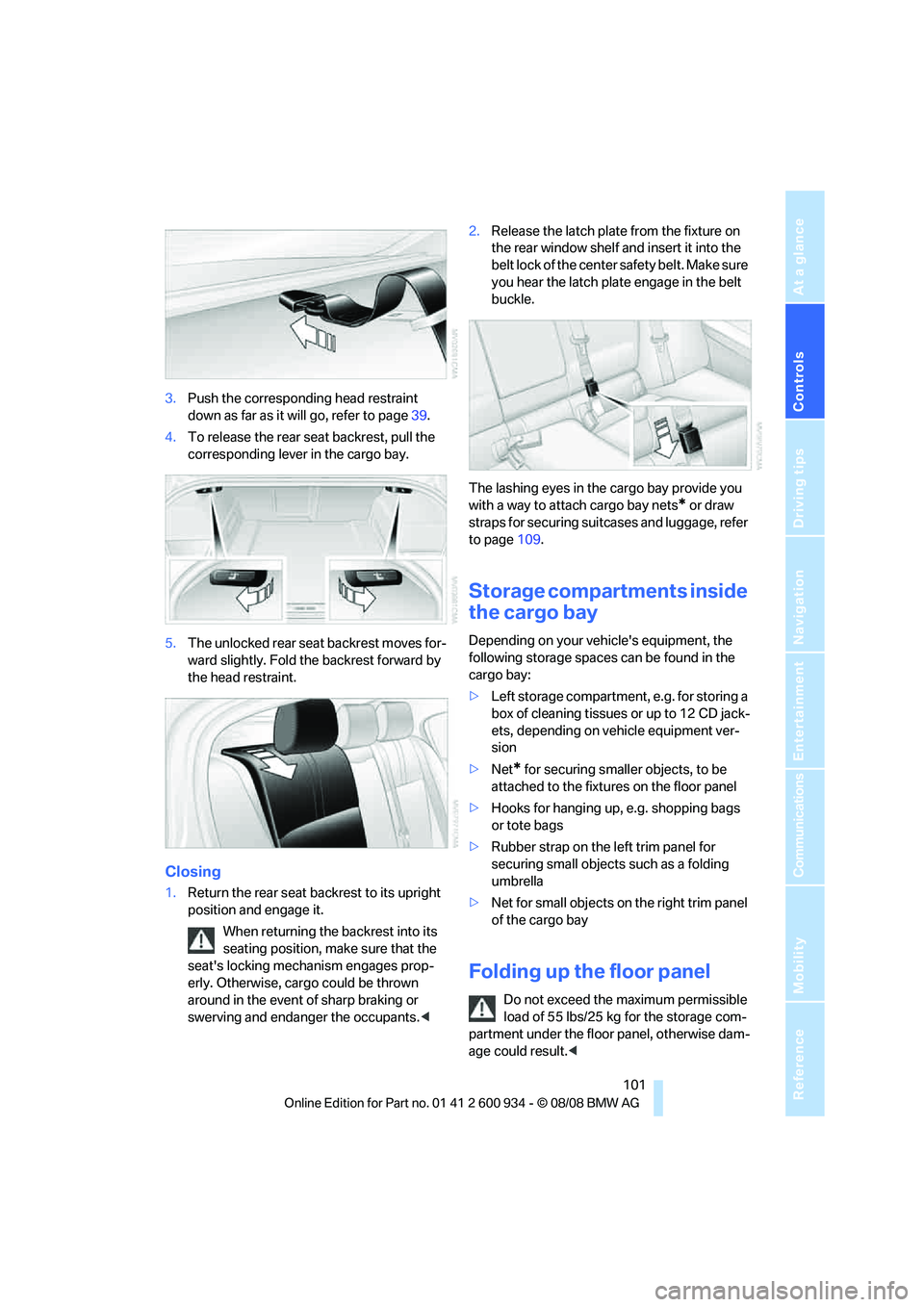
3.Push the corresponding head restraint
down as far as it will go, refer to page39.
4.To release the rear seat backrest, pull the
corresponding lever in the cargo bay.
5.The unlocked rear seat backrest moves for-
ward slightly. Fold the backrest forward by
the head restraint.
Closing
1.Return the rear seat backrest to its upright
position and engage it.
When returning the backrest into its
seating position, make sure that the
seat's locking mechanism engages prop-
erly. Otherwise, cargo could be thrown
around in the event of sharp braking or
swerving and endanger the occupants.<2.Release the latch plate from the fixture on
the rear window shelf and insert it into the
belt lock of the center safety belt. Make sure
you hear the latch plate engage in the belt
buckle.
The lashing eyes in the cargo bay provide you
with a way to attach cargo bay nets
* or draw
straps for securing suitcases and luggage, refer
to page109.
Storage compartments inside
the cargo bay
Depending on your vehicle's equipment, the
following storage spaces can be found in the
cargo bay:
>Left storage compartment, e.g. for storing a
box of cleaning tissues or up to 12 CD jack-
ets, depending on vehicle equipment ver-
sion
>Net
* for securing smaller objects, to be
attached to the fixtures on the floor panel
>Hooks for hanging up, e.g. shopping bags
or tote bags
>Rubber strap on the left trim panel for
securing small objects such as a folding
umbrella
>Net for small objects on the right trim panel
of the cargo bay
Folding up the floor panel
Do not exceed the maximum permissible
load of 55 lbs/25 kg for the storage com-
partment under the floor panel, otherwise dam-
age could result.<
ba8_E90M3_cic.book Seite 101 Dienstag, 19. August 2008 11:51 11
Page 104 of 246
Practical interior accessories
102 Press the floor panel up and secure it with the
catch.
Lashing eyes
You will find lashing eyelets in the cargo bay for
securing luggage items with nets or tensioning
straps, refer to page109.
Ski bag*
The ski bag is designed for safe, clean transport
of up to 4 pairs of standard skis or up to
2snowboards.
With the ski bag you can stow skis with a length
of up to 6 ft 10 in/2.10 m. When skis of 6 ft 10 in/
2.10 m length are loaded, the overall capacity of
the ski bag is reduced due to its tapered design.
Loading
1.Fold down the center armrest.
2.Press the button, reach into the recess and
fold down the cover.
3.Open the Velcro fastener, spread the ski
bag between the front seats and insert the
skis or snowboards.
The zip fastener makes objects in the ski
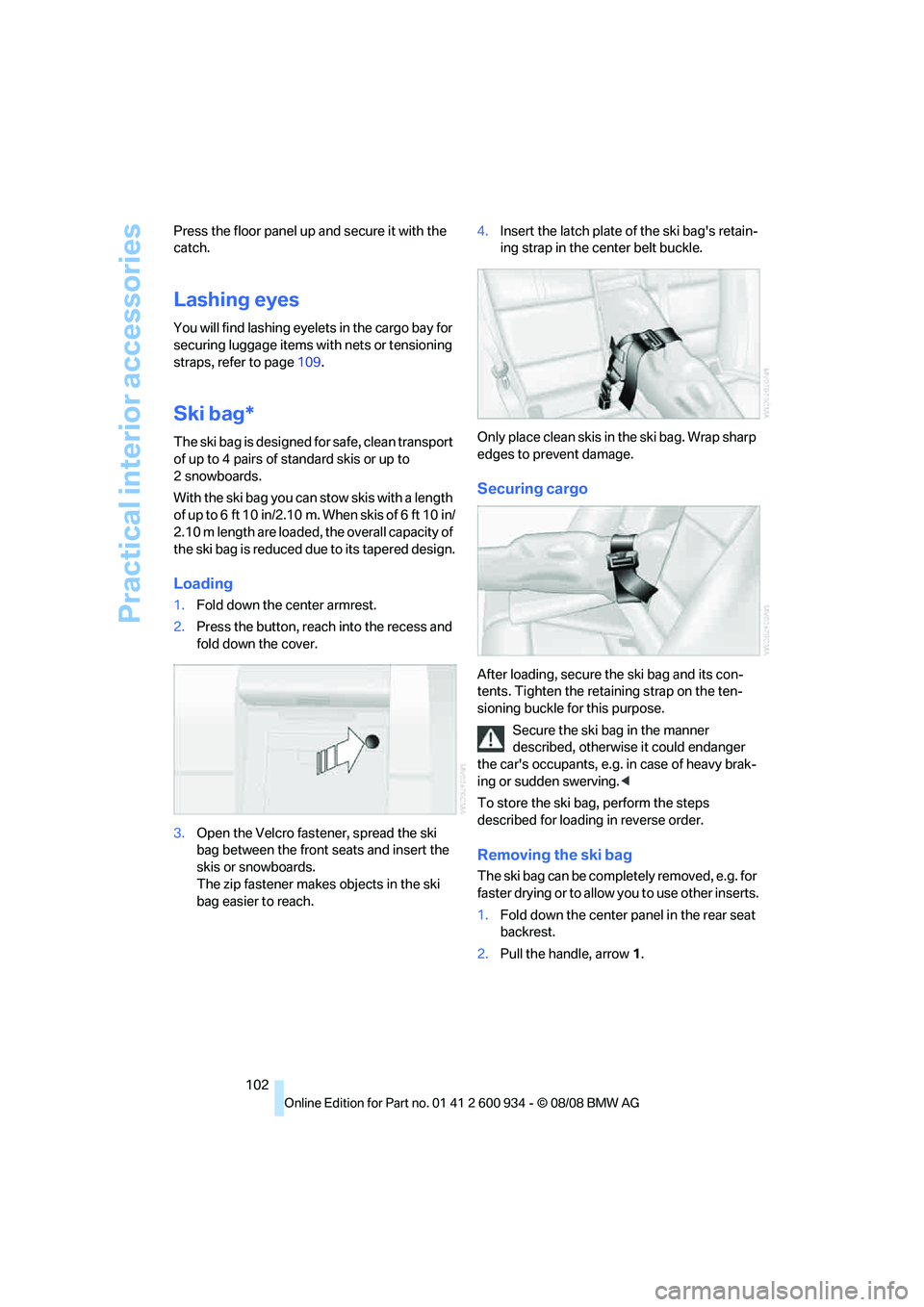
bag easier to reach.4.Insert the latch plate of the ski bag's retain-
ing strap in the center belt buckle.
Only place clean skis in the ski bag. Wrap sharp
edges to prevent damage.
Securing cargo
After loading, secure the ski bag and its con-
tents. Tighten the retaining strap on the ten-
sioning buckle for this purpose.
Secure the ski bag in the manner
described, otherwise it could endanger
the car's occupants, e.g. in case of heavy brak-
ing or sudden swerving.<
To store the ski bag, perform the steps
described for loading in reverse order.
Removing the ski bag
The ski bag can be completely removed, e.g. for
faste r drying or to allow you to use other inserts.
1.Fold down the center panel in the rear seat
backrest.
2.Pull the handle, arrow1.
ba8_E90M3_cic.book Seite 102 Dienstag, 19. August 2008 11:51 11
Page 111 of 246
Driving tips
109Reference
At a glance
Controls
Communications
Navigation
Entertainment
Mobility
Load
The permissible load is the total of the weight of
occupants and cargo/luggage. The greater the
weight of the occupants, the less cargo/lug-
gage can be transported.
Stowing cargo
>Position heavy objects as low and as far for-
ward as possible, ideally directly behind the
respective seat backrests.
>Cover sharp edges and corners.
>For very heavy cargo when the rear seat is
not occupied, secure each safety belt in the
opposite buckle.
Securing cargo
>Secure smaller and lighter items using
retaining straps, a cargo bay net
* or draw
straps
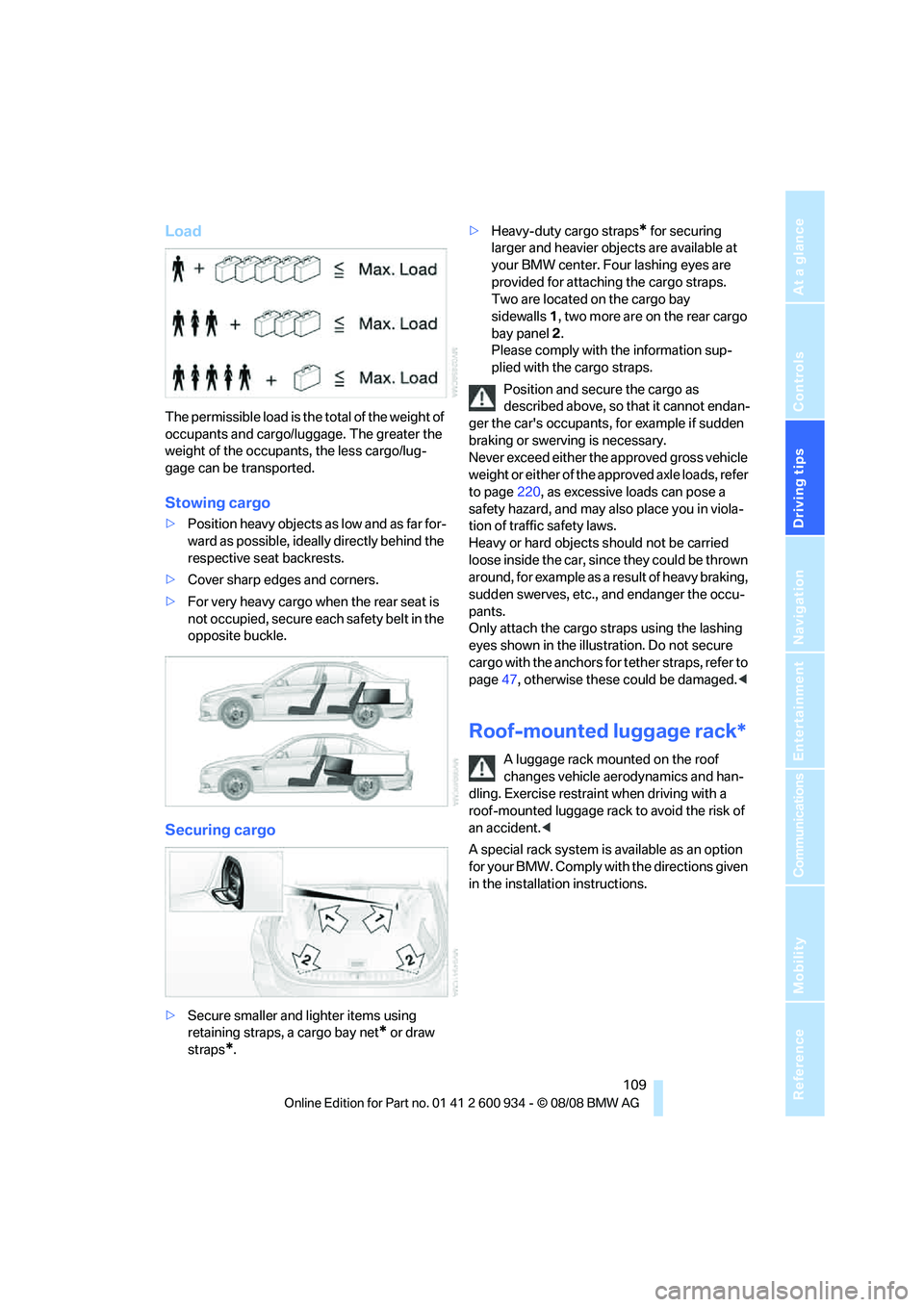
*.>Heavy-duty cargo straps
* for securing
larger and heavier objects are available at
your BMW center. Four lashing eyes are
provided for attaching the cargo straps.
Two are located on the cargo bay
sidewalls1, two more are on the rear cargo
bay panel2.
Please comply with the information sup-
plied with the cargo straps.
Position and secure the cargo as
described above, so that it cannot endan-
ger the car's occupants, for example if sudden
braking or swerving is necessary.
Never exceed either the approved gross vehicle
weight or either of the approved axle loads, refer
to page220, as excessive loads can pose a
safety hazard, and may also place you in viola-
tion of traffic safety laws.
Heavy or hard objects should not be carried
loose inside the car, since they could be thrown
around, for example as a result of heavy braking,
sudden swerves, etc., and endanger the occu-
pants.
Only attach the cargo straps using the lashing
eyes shown in the illustration. Do not secure
cargo with the anchors for tether straps, refer to
page47, otherwise these could be damaged.<
Roof-mounted luggage rack*
A luggage rack mounted on the roof
changes vehicle aerodynamics and han-
dling. Exercise restraint when driving with a
roof-mounted luggage rack to avoid the risk of
an accident.<
A special rack system is available as an option
for your BMW. Comply with the directions given
in the installation instructions.
ba8_E90M3_cic.book Seite 109 Dienstag, 19. August 2008 11:51 11
Page 139 of 246
Navigation
Entertainment
Driving tips
137Reference
At a glance
Controls
Communications
Mobility
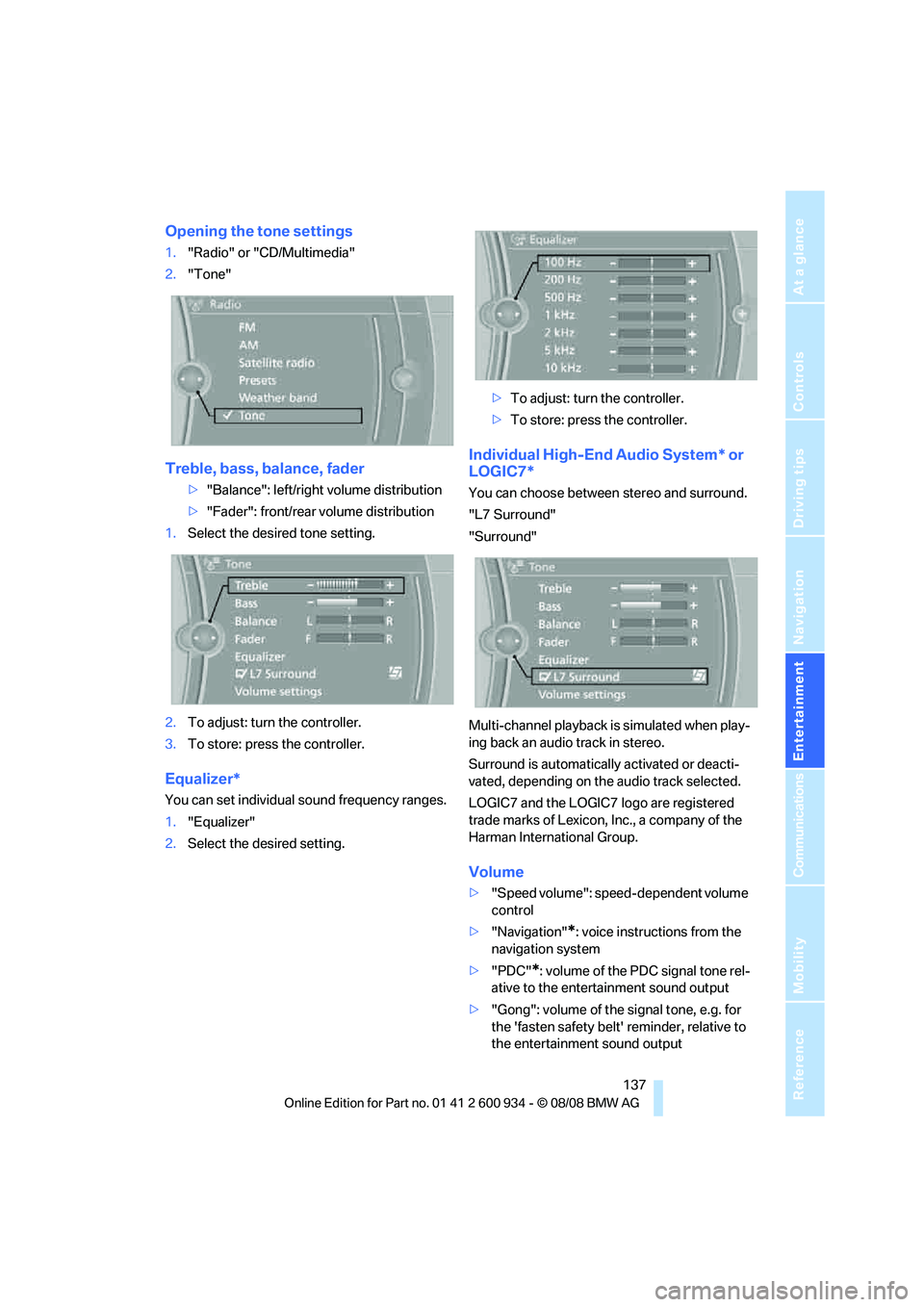
Opening the tone settings
1."Radio" or "CD/Multimedia"
2."Tone"
Treble, bass, balance, fader
>"Balance": left/right volume distribution
>"Fader": front/rear volume distribution
1.Select the desired tone setting.
2.To adjust: turn the controller.
3.To store: press the controller.
Equalizer*
You can set individual sound frequency ranges.
1."Equalizer"
2.Select the desired setting.>To adjust: turn the controller.
>To store: press the controller.
Individual High-End Audio System* or
LOGIC7*
You can choose between stereo and surround.
"L7 Surround"
"Surround"
Multi-channel playback is simulated when play-
ing back an audio track in stereo.
Surround is automatically activated or deacti-
vated, depending on the audio track selected.
LOGIC7 and the LOGIC7 logo are registered
trade marks of Lexicon, Inc., a company of the
Harman International Group.
Volume
>"Speed volume": speed-dependent volume
control
>"Navigation"
*: voice instructions from the
navigation system
>"PDC"
*: volume of the PDC signal tone rel-
ative to the entertainment sound output
>"Gong": volume of the signal tone, e.g. for
the 'fasten safety belt' reminder, relative to
the entertainment sound output
ba8_E90M3_cic.book Seite 137 Dienstag, 19. August 2008 11:51 11
Page 190 of 246
Wheels and tires
188
Tire identification marks
Knowledge of the labeling on the side of the tire
makes it easier to identify and choose the right
tires.
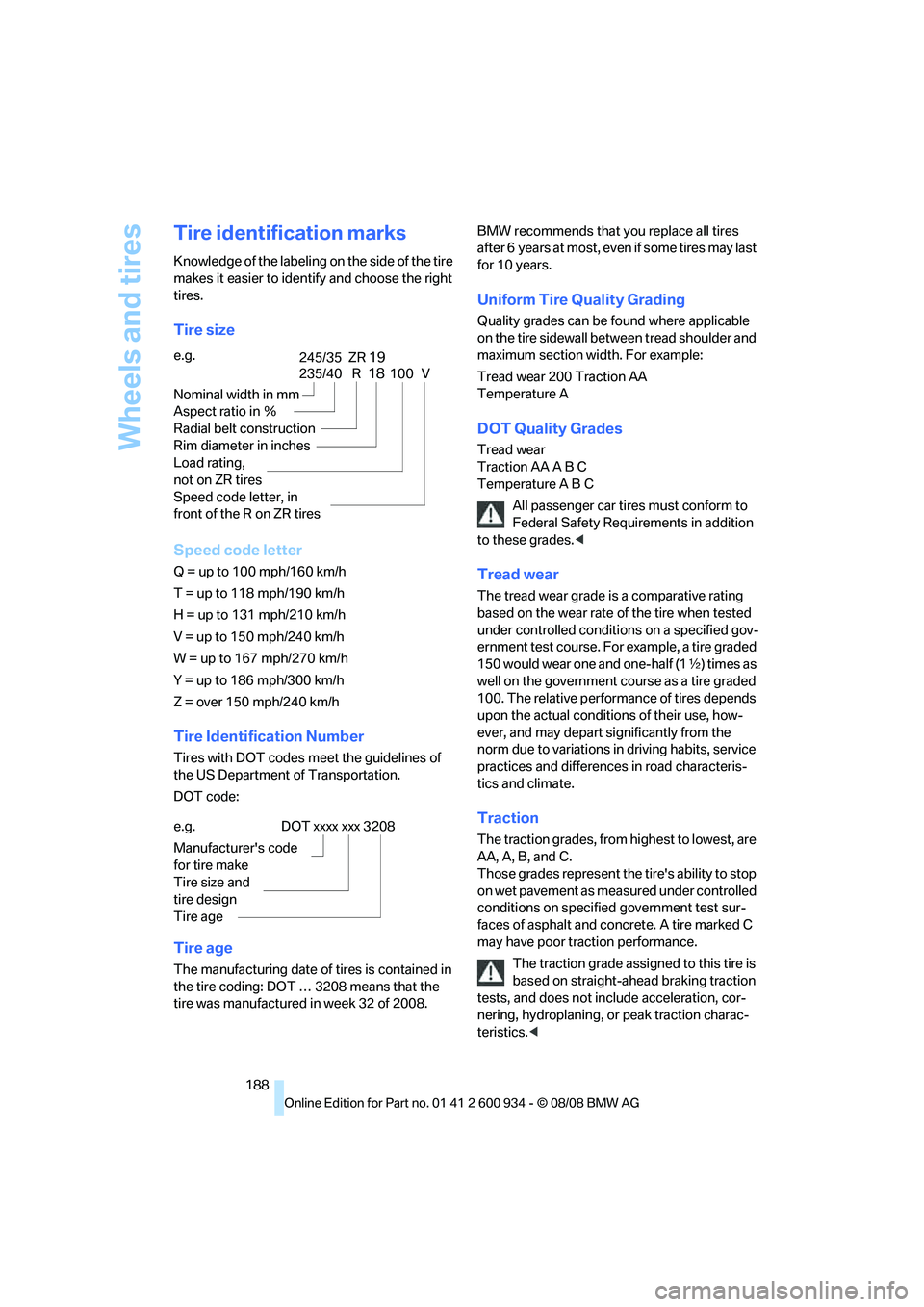
Tire size
Speed code letter
Q = up to 100 mph/160 km/h
T = up to 118 mph/190 km/h
H = up to 131 mph/210 km/h
V = up to 150 mph/240 km/h
W = up to 167 mph/270 km/h
Y = up to 186 mph/300 km/h
Z = over 150 mph/240 km/h
Tire Identification Number
Tires with DOT codes meet the guidelines of
the US Department of Transportation.
DOT code:
Tire age
The manufacturing date of tires is contained in
the tire coding: DOT … 3208 means that the
tire was manufactured in week 32 of 2008.BMW recommends that you replace all tires
after 6 years at most, even if some tires may last
for 10 years.
Uniform Tire Quality Grading
Quality grades can be found where applicable
on the tire sidewall between tread shoulder and
maximum section width. For example:
Tread wear 200 Traction AA
Temperature A
DOT Quality Grades
Tread wear
Traction AA A B C
Temperature A B C
All passenger car tires must conform to
Federal Safety Requirements in addition
to these grades.<
Tread wear
The tread wear grade is a comparative rating
based on the wear rate of the tire when tested
under controlled conditions on a specified gov-
ernment test course. For example, a tire graded
150 would wear one and one-half (1γ) times as
well on the government course as a tire graded
100. The relative performance of tires depends
upon the actual conditions of their use, how-
ever, and may depart significantly from the
norm due to variations in driving habits, service
practices and differences in road characteris-
tics and climate.
Traction
The traction grades, from highest to lowest, are
AA, A, B, and C.
Those grades represent the tire's ability to stop
on wet pavement as measured under controlled
conditions on specified government test sur-
faces of asphalt and concrete. A tire marked C
may have poor traction performance.
The traction grade assigned to this tire is
based on straight-ahead braking traction
tests, and does not include acceleration, cor-
nering, hydroplaning, or peak traction charac-
teristics.< e.g.
Nominal width in mm
Aspect ratio in Ξ
Radial belt construction
Rim diameter in inches
Load rating,
not on ZR tires
Speed code letter, in
front of the R on ZR tires
235/40 R18100 V
245/35 ZR19
e.g.
Manufacturer's code
for tire make
Tire size and
tire design
Tire ageDOT xxxx xxx 3208
ba8_E90M3_cic.book Seite 188 Dienstag, 19. August 2008 11:51 11
Page 203 of 246
Mobility
201Reference
At a glance
Controls
Driving tips
Communications
Navigation
Entertainment
Outside sensors / cameras
Keep the sensors and cameras on the
outside of the vehicle, e.g. Park Distance
Control, clean and free of ice to ensure that they
remain fully functional.<
Interior care
Upholstery / cloth trim
Vacuum regularly with a vacuum cleaner to
remove superficial dirt.
To treat severe stains, e.g. from beverages, use
a soft sponge or lint-free microfiber cloth in
combination with suitable interior cleaners. Fol-
low the instructions on the packaging.
Clean the upholstery down to the seams
using a sweeping motion. Avoid strong
rubbing.<
Opened Velcro fasteners on pants or
other articles of clothing can damage the
seat covers. Ensure that Velcro fasteners are
closed.<
Leather / leather trim
The leather used by BMW is a high quality
natural product. Slight irregularities in the
leather are a typical characteristic of natural
leather.<
Dust and road grit in the pores and folds of the
leather have an abrasive effect, leading to
increased wear and causing the leather surface
to become brittle prematurely. Therefore, fre-
quently clean the leather of dust using a cloth or
vacuum cleaner.
In particular, ensure that light-colored leather is
cleaned regularly as it has a tendency to soil
more easily.
Treat the leather twice a year using a leather
lotion as dirt and grease will gradually attack the
leather's protective layer.
Carpets / cargo bay
You can vacuum the carpets and floor mats or
clean them with interior cleaner if heavily soiled.The floor mats can be removed for cleaning.
When replacing the mats, ensure that the seat
rails do not extend over the floor mats, as this
may damage the mats.
Lint on the floor mats occurs for technical rea-
sons and can be removed by vacuuming
repeatedly.
Interior plastic parts
>Imitation leather surfaces
>Lamp glasses
>Display pane of instrument cluster
>Matt parts
Clean with water and, if necessary, with sol-
vent-free plastic cleaner.
Fine wood parts
Clean fine wood trim and fine wood parts with a
damp cloth. Wipe dry with a soft cloth.
Safety belts
Do not clean with cleaning agents as
these may destroy the fabric.<
Interior sensors / cameras
To clean interior sensors and cameras, use a
lint-free cloth moistened with glass cleaner.
Displays
To clean the displays, e.g. of the radio or instru-
ment cluster, use a display cleaning cloth or a
soft, non-abrasive, lint-free cloth.
Avoid applying excessive pressure when
cleaning the displays, otherwise damage
may occur.<
Do not use chemical or abrasive house-
hold cleaning agents. Keep all types of
fluid away from the device. Otherwise, surfaces
or electrical components may be corroded or
damaged.<
CD/DVD drives
Do not use a cleaning CD, as it may dam-
age parts of the drive.<
ba8_E90M3_cic.book Seite 201 Dienstag, 19. August 2008 11:51 11
Page 231 of 246
Reference 229
At a glance
Controls
Driving tips
Communications
Navigation
Entertainment
Mobility
B
Backrest contour, refer to
Lumbar support38
Backrests, refer to Seat
adjustment38
Backrest width adjustment39
Back seats
– refer to Rear seats39
Backup lamps
– replacing bulb205,206
Backup lamps, refer to Tail
lamps205
Band-aids, refer to First-aid
pouch211
Bar, refer to Towing
methods213
Base plate for telephone or
mobile phone
– refer to Snap-in adapter171
– refer to Snap-in adapter in
the center armrest storage
compartment98
Bass, tone setting136
Battery208
– charging208
– disposal34,208
– jump starting211
– remote control26
– temporary power failure209
Battery for mobile phone171
Battery renewal
– remote control34
– remote control for vehicle34
Being towed212
Belts, refer to Safety belts41
Belt tensioner, refer to Safety
belts41
Beverage holders, refer to
Cup holders99
Blower, refer to Air flow
rate91
Bluetooth, activating/
deactivating164
Bluetooth, refer to separate
Owner's Manual
BMW
– car shampoo201
BMW Assist, activating176BMW Assist175
BMW center180
BMW Homepage4
BMW Maintenance
System197
BMW Search176
BMW webpage4
Bottle holders, refer to Cup
holders99
Brake assist76
Brake fluid, refer to Service
requirements66
Brake force display82
Brake lamps
– replacing bulb205,206
Brake lights
– brake force display82
Brake pads106
– breaking in106
Brake rotors107
– brakes106
– breaking in106
Brakes
– ABS76
– BMW Maintenance
System197
– brake force display82
– breaking in106
– parking brake51
– service requirements66
Brakes, refer to Braking
safely107
Brake system106
– BMW Maintenance
System197
– breaking in106
– disc brakes107
Breakdown services, refer to
Roadside Assistance210
Breaking in the clutch106
Breaking in the differential,
refer to Engine and
differential106
Break-in period106
Brightness of the Control
Display73
Bulb changing, refer to Lamps
and bulbs203Button for starting the engine,
refer to Start/stop button49
Buttons on the steering
wheel11
C
California Proposition 65
warning6
Call
– accepting165
– ending166
– rejecting166
Calling, refer to Phone
numbers, dialing166
Can holders, refer to Cup
holders99
Capacities220
Capacity of the cargo bay220
Car battery, refer to Vehicle
battery208
Car care, refer to Care199
Care199
– automatic car washes199
– care products199
– carpets201
– CD/DVD drives201
– chrome parts200
– displays201
– exterior199
– fine wood parts201
– headlamps200
– high-pressure washer199
– interior201
– leather201
– light-alloy wheels200
– paintwork200
– plastic parts201
– rubber seals200
– safety belts201
– sensors and cameras201
– upholstery and cloth
trim201
– washing the car
manually200
– windows200
– wiper blades200
Cargo, securing109
ba8_E90M3_cic.book Seite 229 Dienstag, 19. August 2008 11:51 11
Page 234 of 246
Everything from A - Z
232 Driving lamps, refer to Parking
lamps/low beams85
Driving notes106
Driving off on hills, refer to
Drive-off assistant78
Driving stability control
systems76
Driving through water107
Driving tips, refer to Driving
notes106
Dry air, refer to Cooling
function91
DSC Dynamic Stability
Control76
DVD
– country codes146
– settings147
– video playback146
DVD menu147
DVD video146
Dynamic Stability Control
DSC
– indicator/warning lamp77
– M Dynamic Mode MDM76
E
EDC, refer to Electronic
Damper Control77
Eject button, refer to Buttons
on the CD player136
Electric
– seat adjustment38
Electrical malfunction
– door lock29
– driver's door29
– fuel filler door184
– glass roof36
– M dual clutch transmission
with Drivelogic54
Electric seat38
Electric seat adjustment38
Electric steering wheel lock
– with convenient access33
Electronic brake-force
distribution76
Electronic Damper Control
EDC77
Electronic oil level check193Electronic Stability Program
ESP, refer to Dynamic
Stability Control DSC76
Emergency operation
– fuel filler door, manual
release184
Emergency operation, refer to
Closing manually
– glass roof36
Emergency operation, refer to
Manual operation
– door lock29
Emergency release
– luggage compartment lid
from inside31
Emergency Request210
Emergency services, refer to
Roadside Assistance210
Engine
– breaking in106
– data218
– overheated, refer to Coolant
temperature63
– speed218
– starting50
– starting, convenient
access32
– switching off50
Engine compartment193
Engine coolant, refer to
Coolant196
Engine oil
– adding195
– BMW Maintenance
System197
– checking level193
– intervals between changes,
refer to Service
requirements66
– possible displays194
Engine output, refer to Engine
data218
Engine speed, refer to Engine
data
218
Engine starting, refer to
Starting the engine50
Entry lamps, refer to Interior
lamps87
Entry map for destination122Equalizer, tone setting137
Error messages, refer to
Check Control70
Event data recorders198
Exhaust system, refer to Hot
exhaust system106
Exterior mirrors42
– adjusting42
– automatic dimming
feature43
– automatic heating43
– folding in and out42
External audio device98
Eyes
– for tow-starting and towing
away212
– for tying down loads109
F
Failure messages, refer to
Check Control70
Failure of an electrical
consumer209
False alarm
– avoiding unintentional
alarm32
– switching off an alarm32
Fastening safety belts, refer to
Safety belts41
Fastest route for
navigation127
Fast forward
– CD changer146
– CD player146
Filter
– refer to Microfilter/activated-
charcoal filter for automatic
climate control92
First aid pouch211
Fixture for remote control,
refer to Ignition lock49
Flash when locking/
unlocking28
Flat tire
– Tire Pressure Monitor
TPM79
Flat tire, repairing206
ba8_E90M3_cic.book Seite 232 Dienstag, 19. August 2008 11:51 11
Page 236 of 246
Everything from A - Z
234
I
IBOC, refer to High Definition
Radio140
Ice warning, refer to Outside
temperature warning62
ID3 tag, refer to Information
about the track145
ID3 tags, refer to Album
information153
Identification marks, tire
coding188
iDrive16
– adjusting brightness73
– changing language73
– changing units of measure
and display format65
– controls16
– menu guidance17
– operating principle16
– overview16
– setting the date and time69
– start menu17
– status information19
iDrive operating principle16
Ignition49
– switched off50
– switched on49
Ignition key, refer to Remote
control26
Ignition key position 1, refer to
Radio readiness49
Ignition key position 2, refer to
Ignition on49
Ignition lock49
Imprint2
Indicator and warning
lamps13
– MDrive45
– M Dynamic Mode77
– Tire Pressure Monitor
TPM80
Inflation pressure, refer to Tire
inflation pressure186
Inflation pressure monitoring,
refer to Tire Pressure
Monitor TPM79Initializing
– after power failure209
– compass, refer to Digital
compass, calibrating96
– Flat Tire Monitor FTM78
– glass roof36
– radio, refer to Station,
storing139
– refer to Setting the time and
date69
Installation location
– CD changer148
– navigation DVD drive116
– telephone98
Instructions for navigation
system, refer to Voice
instructions128
Instrument cluster12
Instrument lighting87
Instrument panel, refer to
Cockpit10
Integrated key26
Integrated universal remote
control94
Interior lamps87
– remote control28
Interior motion sensor32
Interior rearview mirror43
– automatic dimming
feature43
– compass96
Intermittent mode of the
wipers59
Intersection, entering,
navigation118
iPod, connecting, refer to
AUX-IN port155
iPod, connecting, refer to
USB-audio interface156
J
Jacking points208
Joystick, refer to iDrive16
Jumpering, refer to Jump
starting211
Jump starting211
K
Key, refer to Remote
control26
Keyless go, refer to
Convenient access32
Keyless opening and closing,
refer to Convenient
access32
Key Memory, refer to Personal
Profile26
Knock control184
L
Lamps
– automatic headlamp
control85
– parking lamps/low beams85
Lamps and bulbs, replacing
bulbs203
Lap-and-shoulder belt, refer
to Safety belts41
Lashing eyes, refer to
Securing cargo109
Last destinations120
LATCH child-restraint fixing
system47
Launch Control57
Leather care201
LED light-emitting diodes203
Length, refer to
Dimensions219
License plate lamp, replacing
bulb206
Light-alloy wheels200
Light-emitting diodes
LED203
Lighter99
– connecting electrical
appliances100
Lighting
– instruments87
– lamps and bulbs203
– vehicle, refer to Lamps85
Light switch85
Limit, refer to Speed limit72
Load securing equipment,
refer to Securing cargo109
ba8_E90M3_cic.book Seite 234 Dienstag, 19. August 2008 11:51 11