light BMW M3 CONVERTIBLE 2011 Workshop Manual
[x] Cancel search | Manufacturer: BMW, Model Year: 2011, Model line: M3 CONVERTIBLE, Model: BMW M3 CONVERTIBLE 2011Pages: 174, PDF Size: 2.68 MB
Page 143 of 174
143
Using the M Mobility systemTo repair a flat tire using the M Mobility
system, proceed as follows:
>Fill with sealant, refer to page 143
>Distribute the sealant, refer to
page 143
>Restore tire inflation pressure, refer
to page 143.
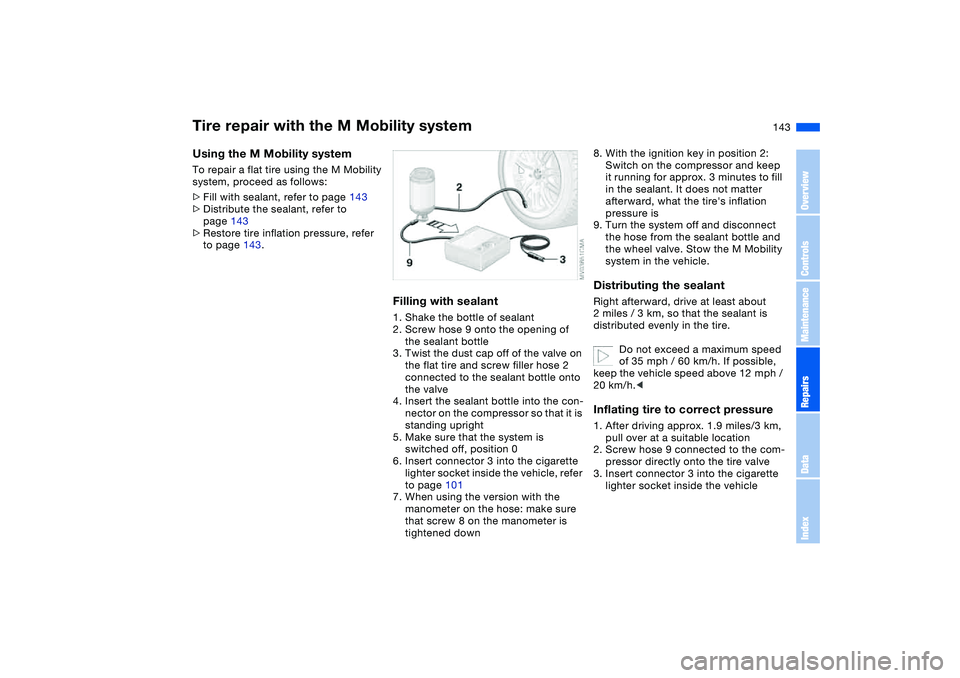
Filling with sealant1. Shake the bottle of sealant
2. Screw hose 9 onto the opening of
the sealant bottle
3. Twist the dust cap off of the valve on
the flat tire and screw filler hose 2
connected to the sealant bottle onto
the valve
4. Insert the sealant bottle into the con-
nector on the compressor so that it is
standing upright
5. Make sure that the system is
switched off, position 0
6. Insert connector 3 into the cigarette
lighter socket inside the vehicle, refer
to page 101
7. When using the version with the
manometer on the hose: make sure
that screw 8 on the manometer is
tightened down
8. With the ignition key in position 2:
Switch on the compressor and keep
it running for approx. 3 minutes to fill
in the sealant. It does not matter
afterward, what the tire's inflation
pressure is
9. Turn the system off and disconnect
the hose from the sealant bottle and
the wheel valve. Stow the M Mobility
system in the vehicle.Distributing the sealantRight afterward, drive at least about
2 miles / 3 km, so that the sealant is
distributed evenly in the tire.
Do not exceed a maximum speed
of 35 mph / 60 km/h. If possible,
keep the vehicle speed above 12 mph /
20 km/h.
2. Screw hose 9 connected to the com-
pressor directly onto the tire valve
3. Insert connector 3 into the cigarette
lighter socket inside the vehicle
Tire repair with the M Mobility system
OverviewControlsMaintenanceRepairsDataIndex
Page 146 of 174
146Giving and receiving assistance
Receiving assistanceThe BMW Group's Mobile Service
offers you 24-hour assistance in the
event of a breakdown, even on week-
ends and holidays.
The telephone numbers of the Mobile
Service control center in your country
are listed in the Contact brochure.
If your vehicle has the necessary equip-
ment, you can contact the Mobile Ser-
vice or issue an emergency call using
buttons in the interior rearview mirror.
When an emergency call is initiated, a
telephone connection is established
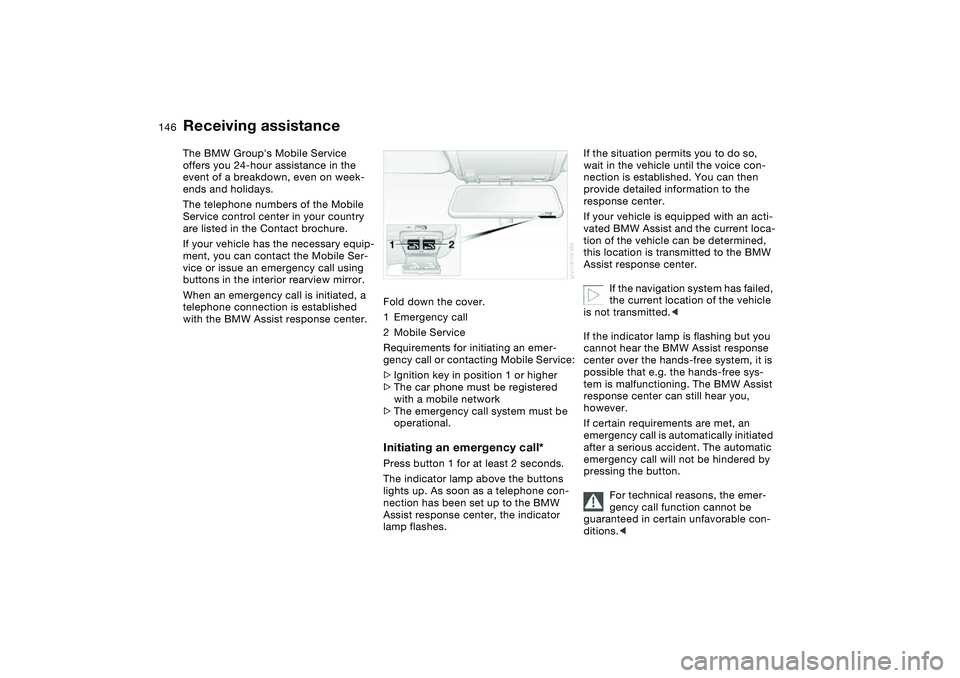
with the BMW Assist response center.Fold down the cover.
1Emergency call
2Mobile Service
Requirements for initiating an emer-
gency call or contacting Mobile Service:
>Ignition key in position 1 or higher
>The car phone must be registered
with a mobile network
>The emergency call system must be
operational.
Initiating an emergency call*Press button 1 for at least 2 seconds.
The indicator lamp above the buttons
lights up. As soon as a telephone con-
nection has been set up to the BMW
Assist response center, the indicator
lamp flashes.
If the situation permits you to do so,
wait in the vehicle until the voice con-
nection is established. You can then
provide detailed information to the
response center.
If your vehicle is equipped with an acti-
vated BMW Assist and the current loca-
tion of the vehicle can be determined,
this location is transmitted to the BMW
Assist response center.
If the navigation system has failed,
the current location of the vehicle
is not transmitted.<
If the indicator lamp is flashing but you
cannot hear the BMW Assist response
center over the hands-free system, it is
possible that e.g. the hands-free sys-
tem is malfunctioning. The BMW Assist
response center can still hear you,
however.
If certain requirements are met, an
emergency call is automatically initiated
after a serious accident. The automatic
emergency call will not be hindered by
pressing the button.
For technical reasons, the emer-
gency call function cannot be
guaranteed in certain unfavorable con-
ditions.<
Page 147 of 174
147
Mobile Service*To establish contact with the BMW
Group's Mobile Service:
Press button 2 for at least 2 seconds.
The indicator lamp above the buttons
lights up. As soon as a telephone con-
nection has been set up with the Mobile
Service, the indicator lamp flashes.
Depending on the country you are in,
your vehicle's current location will also
be transmitted if your vehicle is
equipped with an activated BMW Assist
function.
Jump-startingWhen your battery is discharged, you
can use two jumper cables to start your
vehicle with power from the battery in a
second vehicle. You can also use the
same method to help start another
vehicle. Use only jumper cables with
fully insulated handles on the terminal
clamps.
Do not touch high-voltage wiring
and cables on a running engine.
Contact with components carrying high
voltage can be harmful or fatal.
Carefully observe the following instruc-
tions to avoid personal injury and/or
damage to one or both vehicles.
approximately the same capacity –
measured in Ah. This information is
provided on the battery
2. Stop the engine of the support vehi-
cle
3. Switch off all consumers in both
vehicles.
Make absolutely certain that there
is no contact between the body-
work of the two vehicles, otherwise
there is a short circuit hazard.<
Connecting the jumper cables
Be sure to connect the jumper
cables in the right order; other-
wise there is a risk of injury due to
sparks being created near the battery.<
The jump-starting terminal located in
your BMW's engine compartment
serves as the positive battery terminal;
refer also to the engine compartment
overview on page 124. The cover of this
auxiliary terminal is marked with a +.
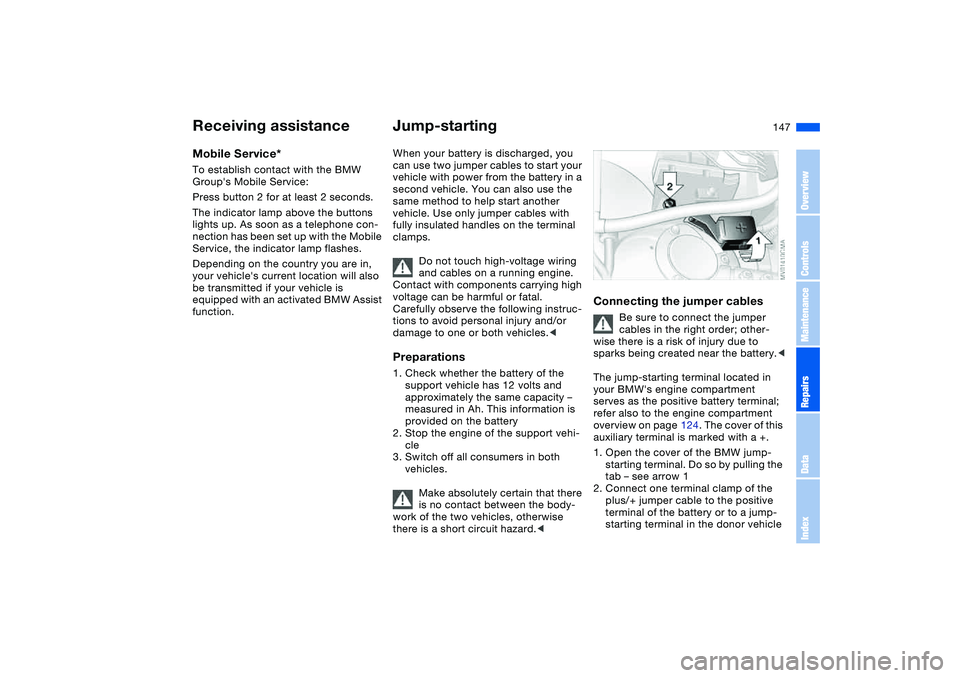
1. Open the cover of the BMW jump-
starting terminal. Do so by pulling the
tab – see arrow 1
2. Connect one terminal clamp of the
plus/+ jumper cable to the positive
terminal of the battery or to a jump-
starting terminal in the donor vehicle
Receiving assistance
OverviewControlsMaintenanceRepairsDataIndex
Page 148 of 174
148
3. Connect the second terminal clamp
of the plus/+ jumper cable to the
positive terminal of the battery or to a
jump-starting terminal in the vehicle
to be started
4. Your BMW is equipped with a special
nut – see arrow 2 – to serve as the
ground or negative terminal.
Attach a terminal clamp of the
minus/– jumper cable to the negative
terminal of the support vehicle's bat-
tery or to a suitable ground on its
engine or bodywork
5. Attach the second terminal clamp of
the minus/– jumper cable to the neg-
ative terminal of the battery or to a
suitable ground on the engine or
bodywork of the vehicle to be
started.Starting the engine1. Start the engine of the support vehi-
cle and let it run for several minutes
at a slightly elevated engine idle
speed
2. Start the engine of the other vehicle
as usual.
If the first start attempt is not suc-
cessful, wait a few minutes before
another attempt in order to allow the
discharged battery to recharge3. Allow the engines to run for several
minutes
4. Disconnect the jumper cables in
reverse sequence.
Have the battery recharged at your
BMW center as required.
Do not use spray starter fluids to
start the engine.
Page 149 of 174
149
Towing and tow-starting the vehicle
Always observe all applicable
towing laws and regulations.<
Using the towing eyeletThe screw-in towing eyelet is in the lug-
gage compartment under the floor
panel and must remain with the vehicle
at all times. It can be attached at the
front or rear of your BMW.
Observe the following instruc-
tions in order to avoid damaging
the towing eyelet or the vehicle: use
only the towing eyelet supplied with the
vehicle, and screw it in firmly until it
stops. Use the towing eyelet for towing
on paved roads only. Avoid subjecting
the towing eyelet to lateral loads, e.g.
do not lift the vehicle using the towing
eyelet.<
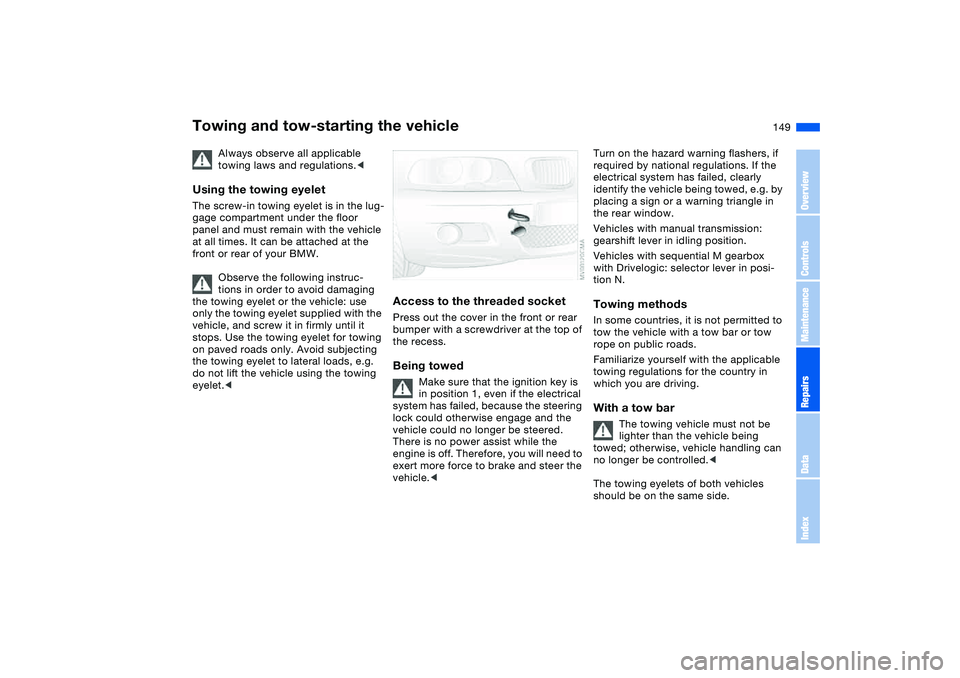
Access to the threaded socketPress out the cover in the front or rear
bumper with a screwdriver at the top of
the recess.Being towed
Make sure that the ignition key is
in position 1, even if the electrical
system has failed, because the steering
lock could otherwise engage and the
vehicle could no longer be steered.
There is no power assist while the
engine is off. Therefore, you will need to
exert more force to brake and steer the
vehicle.<
Turn on the hazard warning flashers, if
required by national regulations. If the
electrical system has failed, clearly
identify the vehicle being towed, e.g. by
placing a sign or a warning triangle in
the rear window.
Vehicles with manual transmission:
gearshift lever in idling position.
Vehicles with sequential M gearbox
with Drivelogic: selector lever in posi-
tion N.Towing methodsIn some countries, it is not permitted to
tow the vehicle with a tow bar or tow
rope on public roads.
Familiarize yourself with the applicable
towing regulations for the country in
which you are driving.With a tow bar
The towing vehicle must not be
lighter than the vehicle being
towed; otherwise, vehicle handling can
no longer be controlled.<
The towing eyelets of both vehicles
should be on the same side.
OverviewControlsMaintenanceRepairsDataIndex
Page 161 of 174
Everything from A to Z
161
BMW sports seat 47
Bore, refer to Engine
data 154
Bottle holders, see Bever-
age holders 100
Brake fluid 129
indicator lamp 18, 129
level 129
Brake force display 89
Brake lamps
bulb replacement 139
indicator lamp, defective
lamp 81
Brake lamps, refer to Brake
force display 89
Brake pads
brake fluid level 18, 129
breaking in 110
Brake rotors
breaking in 110
Brake system
brake pads, indicator
lamp 19
Brake wear warning
indicator lamp 19Brakes
ABS 113
brake fluid 129
brake force display 89
brake pads 112
breaking in 110
driving notes 111
indicator/warning lamp
18, 19
parking brake 68
Break-in procedures 110
Bridging, refer to Jump-
starting 147
Bulb replacement 137
Bulb replacement, refer to
Lamps and bulbs 137
Buttons in steering wheel 22
C
California Proposition 65
warning 6
Can holders, see Beverage
holders 100
Capacities 157
Car battery 144
Car care, refer to the Caring
for your vehicle brochure
Car keys, refer to Keys 28
Car phone hookup
microphone 100
Car radio, refer to the
Owner's Manual for RadioCar telephone, refer to the
separate Owner's Manual
Car vacuum cleaner, con-
necting 101
Car wash, refer to the Caring
for your vehicle brochure
Carpet care, refer to the
Caring for your vehicle
brochure
Cassette operation, refer to
the Owner's Manual for
Radio/Onboard Computer
CBC Cornering Brake Con-
trol 113
warning lamp 19
CD changer, refer to the
Owner's Manual for
Radio/Onboard Computer
CD operation, refer to the
Owner's Manual for
Radio/Onboard Computer
Center armrest
front 99
Center high-mount brake
lamp
bulb replacement 140
Central locking system 28
button 32
passenger
compartment 32
Check Control 81Check Gas Cap
indicator lamp 19
Child seats, refer to Child-
restraint systems 58
Child-restraint mounting
system LATCH 60
Child-restraint systems 58
Cigarette lighter 100
Cleaning chrome parts, refer
to the Caring for your vehi-
cle brochure
Cleaning light alloy wheels,
refer to the Caring for your
vehicle brochure
Cleaning position, convert-
ible top 44
Cleaning the vehicle, refer to
the Caring for your vehicle
brochure
Cleaning windshield 77
Clock 82
12-/24-hour mode 82
setting, refer also to the
Owner's Manual for
Radio/Onboard Computer
Closing
from inside 32
from outside 29
Clutch
breaking in 110
Cockpit 14
OverviewControlsMaintenanceRepairsDataIndex
Page 162 of 174
Everything from A to ZCode, refer to the Owner's
Manual for Radio/Onboard
Computer
Coin box 100
Cold start, refer to Starting
the engine 66
Compact disc operation,
refer to the Owner's Man-
ual for Radio/Onboard
Computer
Compression ratio, refer to
Engine data 154
Computer 83
Condensation, refer to Air
conditioning mode 96
Configuring settings, refer to
Vehicle Memory, Key
Memory 64
Connecting a vacuum
cleaner, refer to Power
socket 101
Consumption, refer to Aver-
age fuel consumption 84
Control elements, refer to
Cockpit 14
Convenience operation
from outside 31
windows 29Convertible top 39
cleaning position 44
convenience operation
29, 31
electrical malfunction 42
emergency operation 42
indicator lamps 41
opening and closing 40
remote control 29
Coolant 128
indicator lamp 19, 80
level 128
temperature gauge 80
Coolant water, refer to Cool-
ant 128
Cooling, refer to Tempera-
ture 96
Copyright 4
Cornering Brake Control
(CBC) 113
warning lamp 19
Cruise control 77
indicator lamp 20
Cup holders, see Beverage
holders 100
Curb weight, refer to
Weights 156
Cylinders, refer to Engine
data 154D
Dashboard, refer to
Cockpit 14
Data
capacities 157
dimensions 155
engine 154
technical 154
weights 156
Daytime driving lamps 90
DBC Dynamic Brake Control
19, 113
Deep water, refer to Driving
through water 111
Defrost position, refer to
Defrosting windows 96
Defrosting and demisting
windows
automatic climate
control 96
Defrosting windows 96
Defrosting windshield, refer
to Defrosting windows 96
Demisting windows
automatic climate
control 96
Differential
breaking in 110
Digital clock 82
Dimensions 155
Dipstick, engine oil 126Displacement, refer to
Engine data 154
Display lighting, refer to
Instrument lighting 91
Displays, refer to Instrument
cluster 16
Disposal
oil 127
vehicle battery 145
Distance warning, refer to
Park Distance Control
(PDC) 85
Door key 28
Door lock 31
Doors
emergency operation 31
Draft-free ventilation 97
Drivelogic 73
Driving light, refer to Parking
lamps/Low beams 90
Driving notes 111
Driving through water, deep
water 111
Dry air, refer to Air condi-
tioning mode 96
DSC Dynamic Stability Con-
trol 86
indicator lamp 19, 86
Dynamic Brake Control
(DBC) 19, 113
indicator lamp 19
Page 164 of 174
Everything from A to ZFuel reserve indicator, refer
to Fuel gauge 80
Fuel tank capacity 157
Fuses 145
G
Gasoline consumption, refer
to Average fuel consump-
tion 84
Gasoline, refer to Fuel spec-
ifications 25
Gear indicator 71
Gearbox
manual transmission 69
Gearbox malfunction
sequential M gearbox with
Drivelogic 74
Gearbox, sequential 70
Gearshift lever
manual transmission 69
sequential M gearbox with
Drivelogic 70
General driving notes 111
Glove compartment 99
Gradient assistance 73
Grills, refer to Ventilation 94
Gross weight, refer to
Weights 156
H
Handbrake, refer to Parking
brake 68Hands-free system 100
Hardtop 113
Hardtop preparation 113
Hardtop, refer to the sepa-
rate Owner's Manual 113
Hazard warning flashers 14
Hazard warning triangle 23
Head restraints 48
Headlamp cleaning system
cleaning headlamps 77
washer fluid 126, 157
Headlamp control, auto-
matic 90
Headlamp flasher 91
indicator lamp 21
Headlamps
bulb replacement 137
care, refer to the Caring
for your vehicle brochure
Heated mirrors 53
Heated rear window
automatic climate
control 97
Heated seats 52
Heating
exterior mirrors 53
rear window 97
seats 52
Heating and ventilation 94
Heavy loads, refer to Cargo
loading 105Height adjustment
seats 47
steering wheel 54
Height, refer to
Dimensions 155
High beams 75, 91
bulb replacement 137
headlamp flasher 91
indicator lamp 21
Holder for beverages 100
Hood release 123
Horn 14
Hydraulic brake assistant,
refer to DBC 113
Hydroplaning 111
I
Ice warning 83
Ignition 65
Ignition key 28
positions 65
Ignition lock 65
Imprint 4
Indicator lamps 18Indicator/warning lamp
airbags 18
alarm system 37
brakes 18, 19
Check Gas Cap 19
convertible top 41
coolant 19, 80
DSC 19
Flat Tire Monitor
18, 19, 88
fog lamps 20
Please fasten safety
belts 18
reserve 80
rollover protection
system 19
Service Engine Soon 19
Individual air distribution 96
Individual settings, refer to
Vehicle Memory, Key
Memory 64
Inflation pressure monitor-
ing, refer to Flat Tire Moni-
tor 87
Inflation pressure, tires 116
INSPECTION 81
Instrument cluster 16
Instrument lighting 91
Instrument panel 14
Interface socket for onboard
diagnostics (OBD) 132
event data recorders 132
Page 165 of 174
Everything from A to Z
165
Interior lamps 92
remote control 30
Interior motion sensor 36, 37
switching off 37
Interior rearview mirror
automatic dimming
feature 53
Interior temperature
adjusting 96
Intermittent mode, wipers 76
Interval display, service 81
J
Jump-starting 147
K
Key Memory 64
Keys 28
with remote control 28
L
Lamp defect 137
Lamps
reading lamps 92
Lamps and bulbs 137
Lashing down loads, refer to
Cargo loading 104
Lashing eyelets, refer to
Securing cargo 106
Lashing fittings, refer to
Securing cargo 106LATCH child-restraint
mounting system 60
Leather care, refer to the
Caring for your vehicle
brochure
Leaving the vehicle 68
LEDs light-emitting
diodes 140
Length, refer to
Dimensions 155
License plate lamp
bulb replacement 140
Light switch 90
Light-emitting diodes
(LEDs) 140
Lighter 100
LIGHTS ON warning 90
Lights, refer to Parking
lamps/Low beams 90
Load, determining the maxi-
mum 104
Load, refer to Cargo
loading 104
Loading
vehicle 104
Load-securing devices 106
Lock buttons on doors, refer
to Locking 32
Lock, steering wheel 65
Locking
from inside 32
from outside 29, 31Locking and unlocking
doors
from inside 32
from outside 29, 31
Low beams 90
automatic 90
bulb replacement 137
indicator lamp, defective
lamp 81
Luggage compartment 35
capacity 156
emergency operation,
refer to Manual
operation 33
floor panel 35
increase volume 35
lid 33
lighting 33
opening from outside 33
opening, remote
control 30
opening/closing, refer to
Luggage compartment
lid 33
remote control 30
securing separately 33
volume 156Luggage compartment lid 33
emergency operation 33
emergency release 34
indicator lamp 81
opening from inside the
vehicle 33
opening from outside 33
remote control 30
unlocking manually 33
Luggage rack, refer to Roof-
mounted luggage rack 107
Lumbar support 48
M
M Engine dynamics
control 89
M Mobility system 141
Maintenance 81, 130
Maintenance system 130
Malfunction
convertible top 42
door lock 31
fuel filler door 24
Malfunction displays 81
Manual operation
convertible top 42
door lock 31
driver's door 31
fuel filler door 24
luggage compartment
lid 33
power convertible top 42
OverviewControlsMaintenanceRepairsDataIndex
Page 167 of 174
Everything from A to Z
167
Power output, refer to
Engine data 154
Power seat 47
Power socket 101
Power socket, cigarette
lighter 101
Power windows
electric 38
Pressure monitoring, tires
Flat Tire Monitor 87
Pressure, tires 116
inflating with M Mobility
system 143
Proposition 65 warning 6
Protective function
electric power windows 38
Puncture
M Mobility system 141
R
Radio remote control key,
refer to Master key with
remote control 28
Radio, refer to the Owner's
Manual for Radio
Rain sensor 76
Range 84
Reading lamps
hardtop 113
rear 93Rear lamps
bulb replacement 139
indicator lamp, defective
lamp 81
Rear window heating
automatic climate
control 97
Rear-entry assist 49
Rearview mirror 53
Receiving assistance 146
Recirculated-air mode
automatic climate
control 97
Recirculating the air, refer to
Recirculated-air mode 97
Reclining seat, refer to Seat
adjustment 47
Refueling 24
fuel filler door 24
Releasing
hood 123
Remaining distance to ser-
vice 81
Remaining distance, refer to
Range 84
Remote control 29
luggage compartment
lid 30
malfunction 30
Replacement key 29
Replacing lamps, refer to
Lamps and bulbs 137Reporting safety defects 7
Restraint systems
for children 58
Restraint systems, refer to
Safety belts 50
Reverse gear
manual transmission 69
Rollover protection
system 62
indicator lamp 19
lowering 62
Roof load capacity 156
Roof-mounted luggage
rack 107
Rope, refer to Towing and
tow-starting the
vehicle 149
S
Safe seating position 46
airbags 46
safety belt 46
Safety belt
safe seating position 46
Safety belt height adjust-
ment 50
Safety belts 50
height adjustment 50
seat-integrated safety belt
system 49
warning lamp 18Safety systems, refer to
Antilock Brake
System 113
Dynamic Stability Control
(DSC) 86
Screwdriver, refer to
Onboard tool kit 136
Seat adjustment 47
BMW sports seat 47
lumbar support 47, 48
power seats 47
Seat belt tensioner, refer to
Safety belts 50
Seat heating 52
Seat memory, refer to Seat
and mirror memory 51
Seat positions, storing 51
Seats 47
Securing cargo 106
Securing child-restraint sys-
tem 60
Securing the vehicle
from inside 32
from outside 29, 31
Selector lever
sequential M gearbox with
Drivelogic 70
Selector lever positions
sequential M gearbox with
Drivelogic 70
OverviewControlsMaintenanceRepairsDataIndex