light BMW M3 CONVERTIBLE 2012 Repair Manual
[x] Cancel search | Manufacturer: BMW, Model Year: 2012, Model line: M3 CONVERTIBLE, Model: BMW M3 CONVERTIBLE 2012Pages: 255, PDF Size: 6.32 MB
Page 126 of 255
125
Practical interior accessories
Controls
W h e n t h e r e a r s e a t b a c k r e s t i s f o l d e d d o w n , y o u
will find two bag holders
on the cargo area wall:
1. Fold open the holder by pressing the but-
ton.
2. Press the handles of the bag onto the
holder from above.
Only hang light shopping bags or other
suitable objects from the holders; other-
wise, braking maneuvers and swerving, for
example, may lead to a safety hazard due to
objects flying about the passenger compart-
ment. Only transport heavy luggage in the
cargo area if it has been appropriately
secured. <
For more information on loading the vehicle,
refer to page 135.
Storage compartment behind the rear
seat backrest
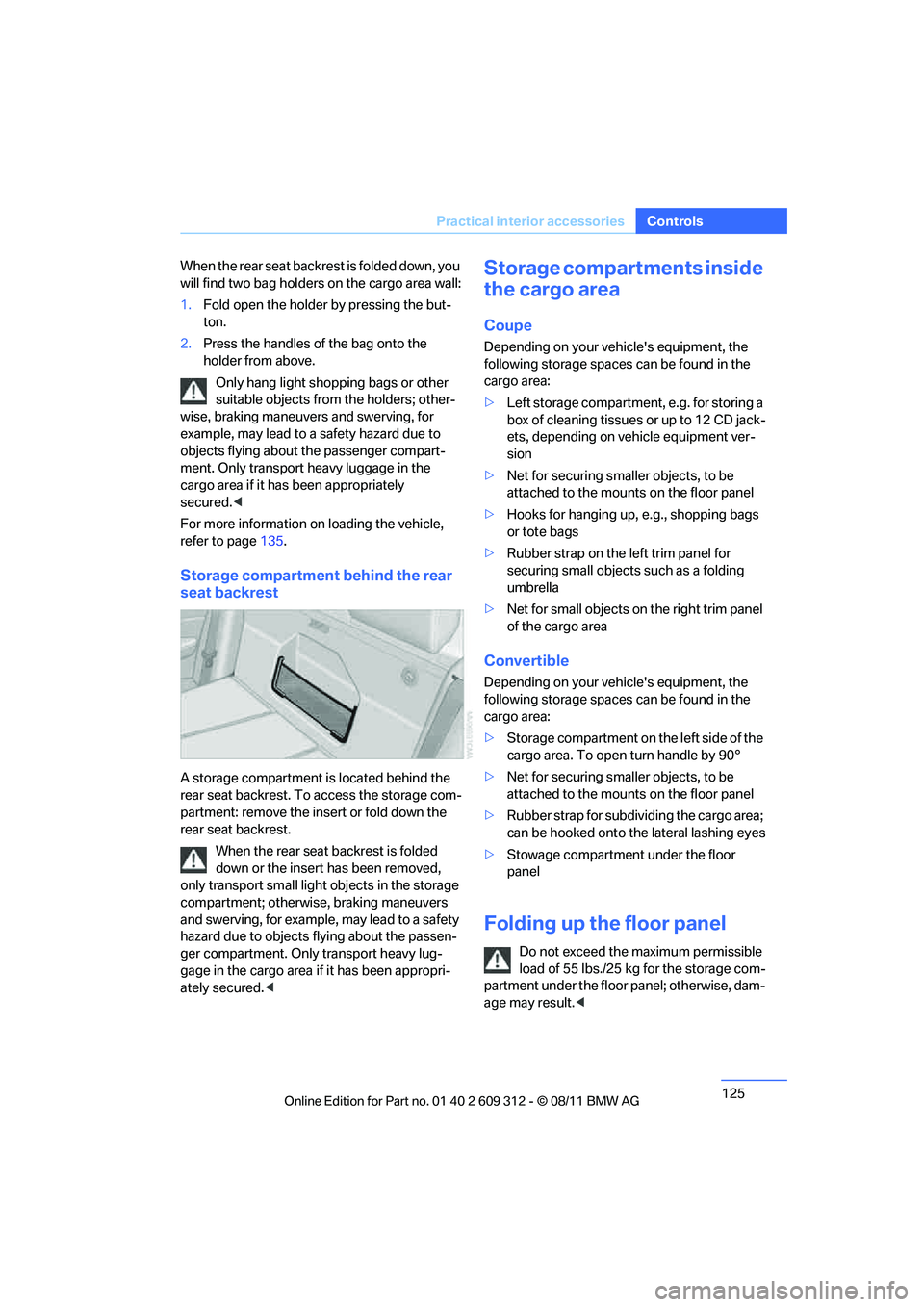
A storage compartment is located behind the
rear seat backrest. To access the storage com-
partment: remove the insert or fold down the
rear seat backrest.
When the rear seat backrest is folded
down or the insert has been removed,
only transport small light objects in the storage
compartment; otherwise, braking maneuvers
and swerving, for example, may lead to a safety
hazard due to objects flying about the passen-
ger compartment. Only transport heavy lug-
gage in the cargo area if it has been appropri-
ately secured. <
Storage compartments inside
the cargo area
Coupe
Depending on your vehicle's equipment, the
following storage spaces can be found in the
cargo area:
>Left storage compartment, e.g. for storing a
box of cleaning tissues or up to 12 CD jack-
ets, depending on vehicle equipment ver-
sion
> Net for securing smaller objects, to be
attached to the mounts on the floor panel
> Hooks for hanging up, e.g., shopping bags
or tote bags
> Rubber strap on the left trim panel for
securing small objects such as a folding
umbrella
> Net for small objects on the right trim panel
of the cargo area
Convertible
Depending on your vehicle's equipment, the
following storage spaces can be found in the
cargo area:
>Storage compartment on the left side of the
cargo area. To open turn handle by 90°
> Net for securing smaller objects, to be
attached to the mounts on the floor panel
> Rubber strap for subdividing the cargo area;
can be hooked onto th e lateral lashing eyes
> Stowage compartment under the floor
panel
Folding up the floor panel
Do not exceed the maximum permissible
load of 55 lbs./25 kg for the storage com-
partment under the floor panel; otherwise, dam-
age may result. <
Online Edition for Part no. 01 40 2 609 312 - \251 08/11 BMW AG
Page 134 of 255
133
Things to remember when driving
Driving tips
Check tire inflation pressure regularly
Check the tire inflation pr
essure at least twice a
month and before embarking on a long journey,
and correct it if necessary.
Low tire inflation pressure causes higher rolling
resistance and thus increases fuel consumption
and tire wear.
Set off immediately
Do not let the engine wa rm up while the car is
still standing, but set off immediately at moder-
ate engine speed. This is the fastest way for the
cold engine to reach its operating temperature.
Drive defensively
Avoid unnecessary acceleration and braking
maneuvers. To do so, keep an adequate dis-
tance between you and th e vehicle in front of
you. A defensive and smooth driving style
keeps fuel consumption down.
Avoid high engine speeds
Only use first gear when setting off. In second
and higher gears, accele rate without hesitation
or pauses. When accelera ting, shift up before
reaching high engine speeds.
When you reach the desi red speed, shift into
the highest applicable ge ar and drive with the
engine speed as low as possible and at a con-
stant speed.
As a rule: driving at low engine speeds lowers
fuel consumption and reduces wear.
Coasting
When approaching a red lig ht, take your foot off
the accelerator and coast to a stop in the high-
est applicable gear.
On a downhill slope, take your foot off the accel-
erator and coast in a suitable gear.
The fuel supply is interrupted when coasting.
Switch off the engine during lengthy
stops
Switch off the engine when stopping for lengthy
periods, e.g. at traffic lights, railroad crossings
or in traffic congestions. You achieve fuel sav-
ings even if standing time is as short as approx.
4seconds.
Switch off functions you do not need at
the moment
Functions such as the air conditioner, seat
heating or rear window defroster draw large
amounts of power and consume additional fuel.
Especially in city traffic and in stop-and-go driv-
ing they have a considerable impact. Therefore,
switch these functions off when they are not
really needed.
Have the vehicle serviced
Have the vehicle serviced regularly to achieve
good economy and a long vehicle life. BMW
recommends having the vehicle serviced at
your BMW center. Also note the BMW service
system, refer to page 202.
General driving notes
Close the trunk lid
Only drive with the trunk closed. Failure to
do so may endanger passengers or other
road users or may damage the vehicle in the
event of an accident or a braking and evasive
maneuver. In addition, exhaust gas may flow
into the passenger compartment. <
If special circumstances make it absolutely nec-
essary to drive with the trunk open:
1. Close all windows and the glass roof.
2. Greatly increase the air volume of the air
conditioner or automatic climate control
system, refer to page 110 or113.
3. Drive cautiously.
Online Edition for Part no. 01 40 2 609 312 - \251 08/11 BMW AG
Page 136 of 255
135
Things to remember when driving
Driving tips
Hills
To prevent overheating and the resulting
reduced efficiency of the brake system,
drive long or steep downhill gradients in the
gear in which the least br aking is required. Even
light but consistent brak e pressure can lead to
high temperatures, brake wear and possibly
even brake failure. <
You can increase the engine's braking effect by
shifting down, all the way to first gear if neces-
sary. This strategy he lps you avoid placing
excessive loads on the brake system. Down-
shifting in manual mode of the automatic trans-
mission, refer to page 61.
Sport automatic transm ission with double
clutch: never drive with the transmission
in neutral or with the en gine switched off; other-
wise, there will be no en gine braking action and
no power assistance to the brakes and steering.
Manual transmission: never drive with the
clutch held down, with the transmission in neu-
tral or with the engine switched off; otherwise,
there will be no engine braking action and no
power assistance to the brakes and steering.
Never allow floor mats, carpets or any other
objects to protrude into the area around the
pedals; otherwise, pedal function could be
impaired. <
Corrosion on brake rotors
When the vehicle is driv en only occasionally,
during extended periods when the vehicle is not
used at all, and in operating conditions where
brake applications are le ss frequent, there is an
increased tendency for corrosion to form on
rotors, while contaminan ts accumulate on the
brake pads. This occurs because the minimum
pressure which must be exerted by the pads
during brake applications to clean the rotors is
not reached.
Should corrosion form on the brake rotors, the
brakes will tend to respond with a pulsating
effect that even extended application will fail to
cure.
When the vehicle is parked
Condensation forms wh ile the automatic cli-
mate control is in operation, and then exits
under the vehicle. Traces of condensed water
under the vehicle are therefore normal.
Cargo loading
To avoid loading the tires beyond their
approved carrying ca pacity, never over-
load the vehicle. Overlo ading can lead to over-
heating and increases the rate at which damage
develops inside the tires. In some situations,
this can result in sudden loss of tire pressure. <
Make sure that no liquids are spilled or
leak from their containers in the cargo
area, as this could result in damage to the vehi-
cle. <
Determining loading limit
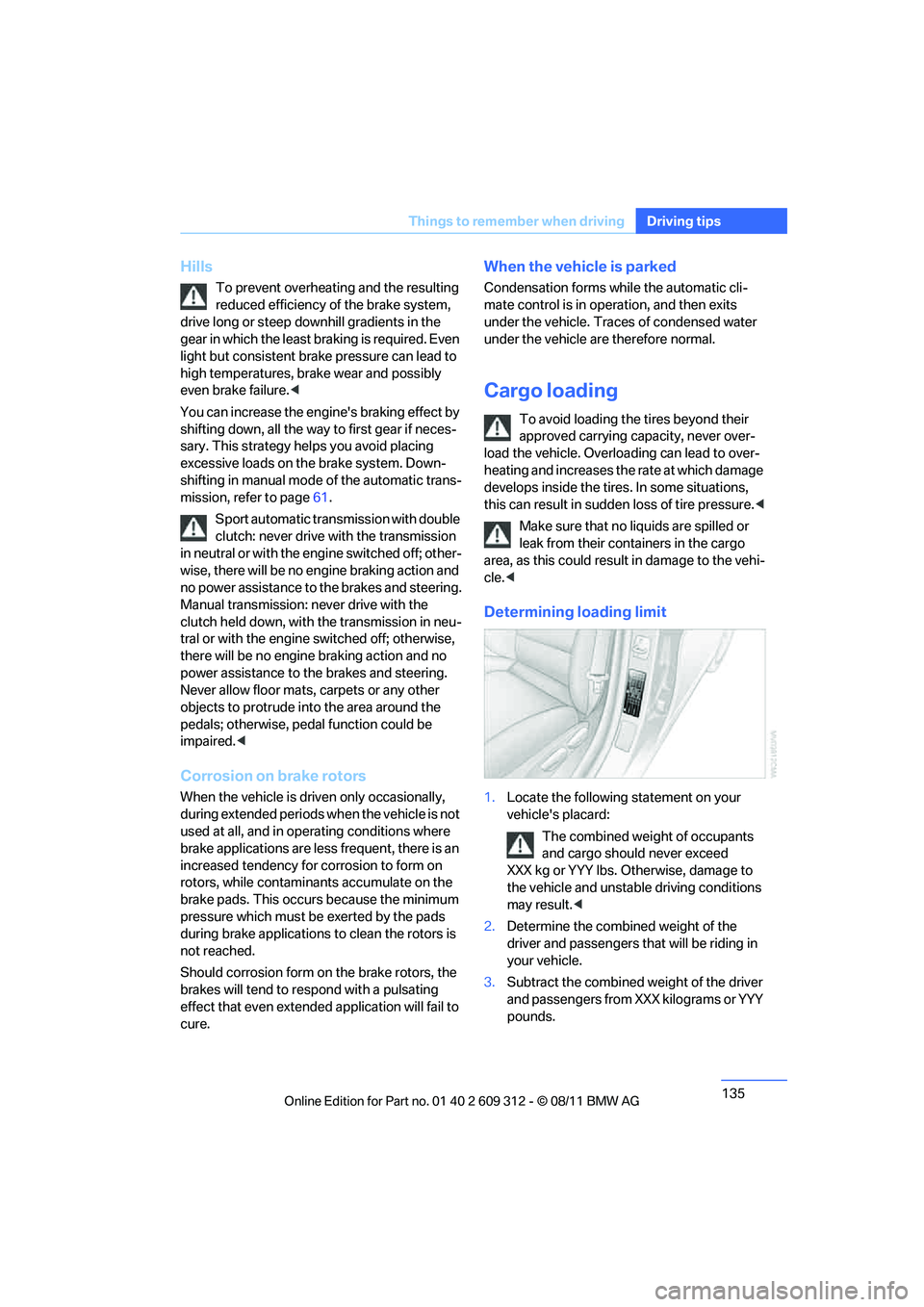
1. Locate the following statement on your
vehicle's placard:
The combined weight of occupants
and cargo should never exceed
XXX kg or YYY lbs. Otherwise, damage to
the vehicle and unstable driving conditions
may result. <
2. Determine the combined weight of the
driver and passengers that will be riding in
your vehicle.
3. Subtract the combined weight of the driver
and passengers from XXX kilograms or YYY
pounds.
Online Edition for Part no. 01 40 2 609 312 - \251 08/11 BMW AG
Page 138 of 255
137
Things to remember when driving
Driving tips
Securing cargo
Coupe
Convertible
>
Secure smaller and lighter items using
retaining straps, a carg o area net, or draw
straps.
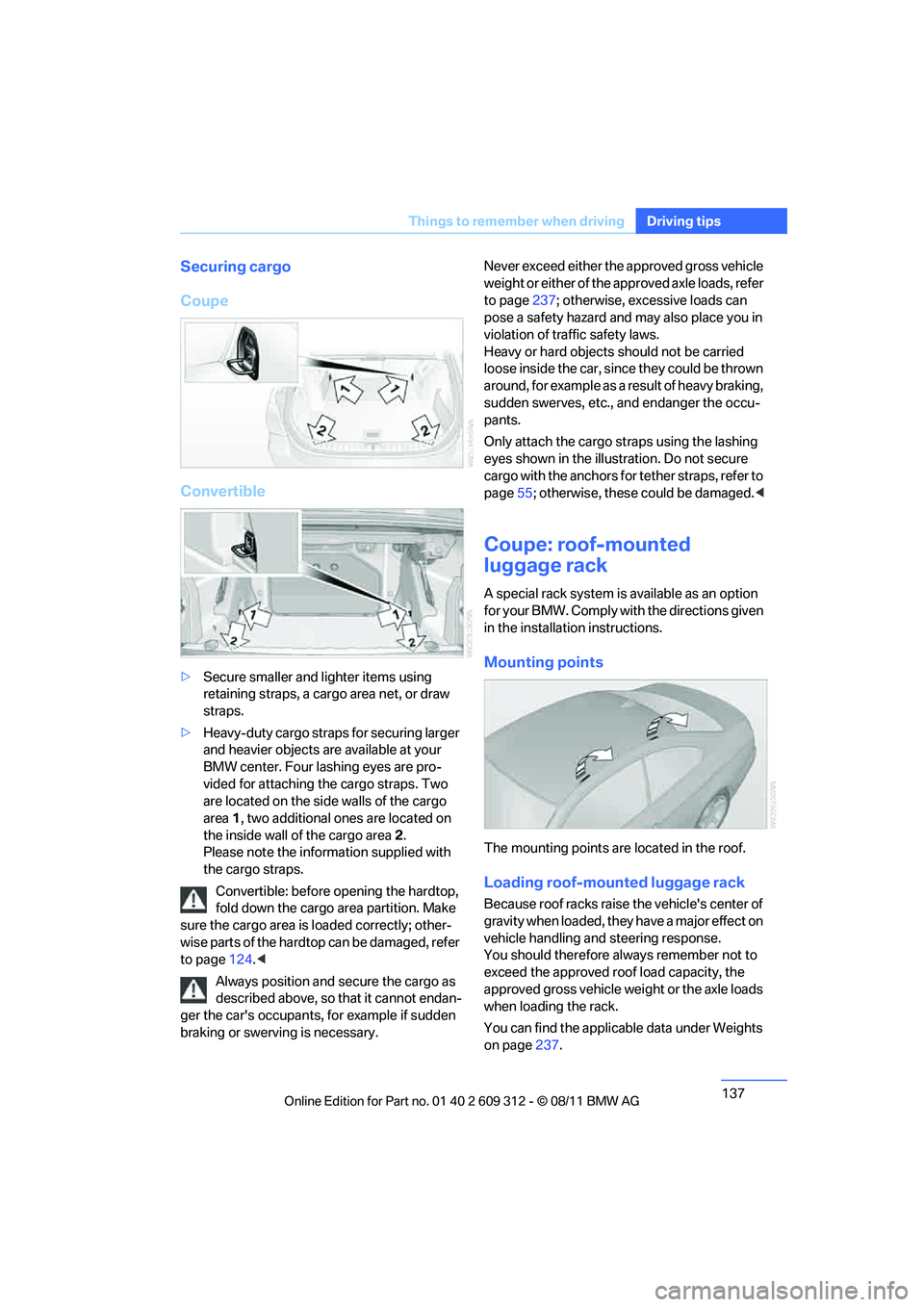
> Heavy-duty cargo straps for securing larger
and heavier objects are available at your
BMW center. Four lashing eyes are pro-
vided for attaching the cargo straps. Two
are located on the side walls of the cargo
area 1, two additional ones are located on
the inside wall of the cargo area 2.
Please note the information supplied with
the cargo straps.
Convertible: before opening the hardtop,
fold down the cargo ar ea partition. Make
sure the cargo area is loaded correctly; other-
wise parts of the hardto p can be damaged, refer
to page 124.<
Always position and secure the cargo as
described above, so that it cannot endan-
ger the car's occupants, for example if sudden
braking or swerving is necessary. Never exceed either the approved gross vehicle
weight or either of the approved axle loads, refer
to page
237; otherwise, excessive loads can
pose a safety hazard and may also place you in
violation of traffic safety laws.
Heavy or hard objects should not be carried
loose inside the car, sinc e they could be thrown
around, for example as a result of heavy braking,
sudden swerves, etc., and endanger the occu-
pants.
Only attach the cargo st raps using the lashing
eyes shown in the illust ration. Do not secure
cargo with the anchors for tether straps, refer to
page 55; otherwise, these could be damaged. <
Coupe: roof-mounted
luggage rack
A special rack system is available as an option
f o r y o u r B M W . C o m p l y w i t h t h e d i r e c t i o n s g i v e n
in the installation instructions.
Mounting points
The mounting points are located in the roof.
Loading roof-mounted luggage rack
Because roof racks raise the vehicle's center of
gravity when loaded, they have a major effect on
vehicle handling and steering response.
You should therefore always remember not to
exceed the approved roof load capacity, the
approved gross vehicle weight or the axle loads
when loading the rack.
You can find the applicable data under Weights
on page 237.
Online Edition for Part no. 01 40 2 609 312 - \251 08/11 BMW AG
Page 144 of 255
143
BMW Professional radio
Entertainment
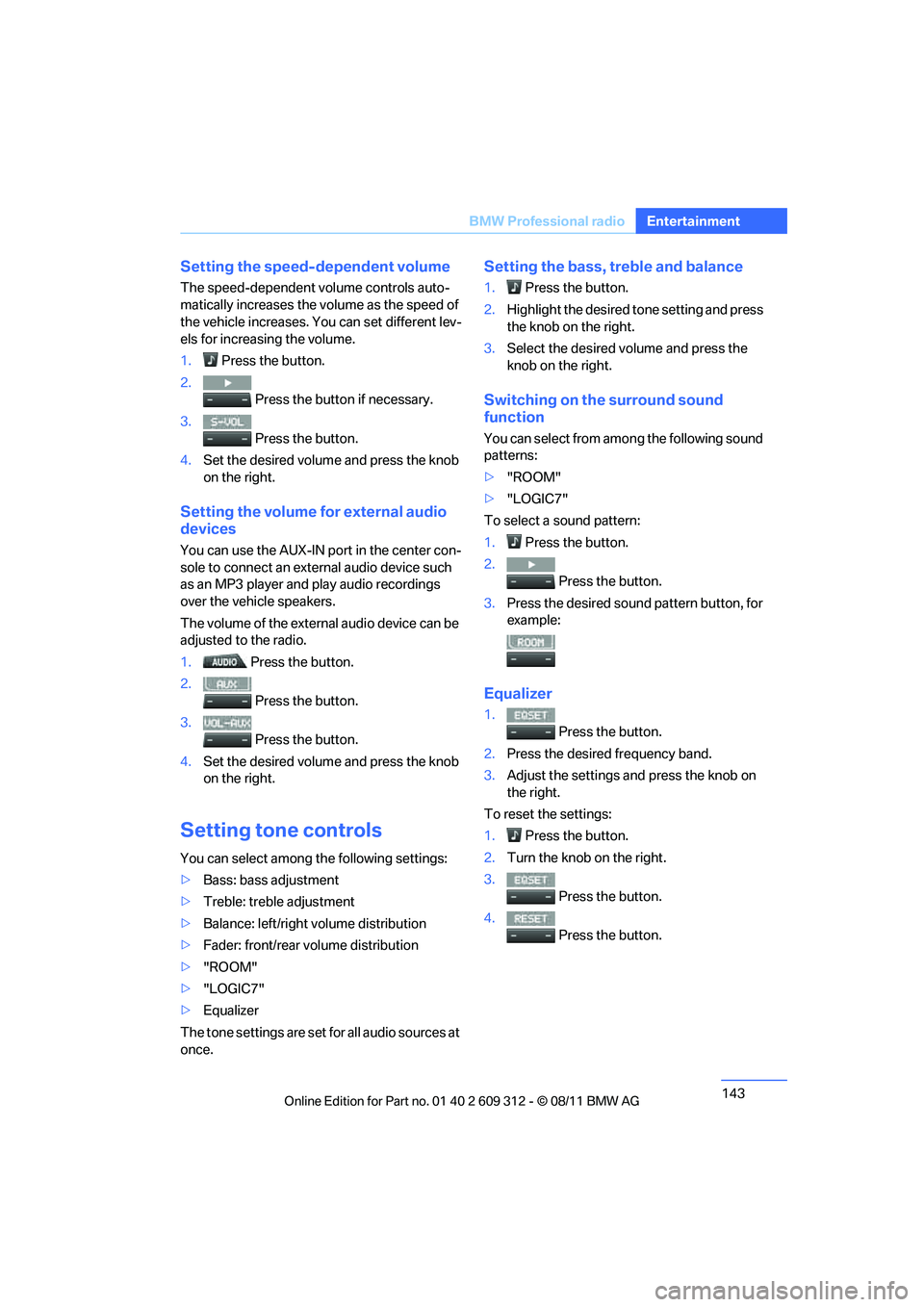
Setting the speed-dependent volume
The speed-dependent volume controls auto-
matically increases the vo
lume as the speed of
the vehicle increases. You can set different lev-
els for increasing the volume.
1. Press the button.
2. Press the button if necessary.
3. Press the button.
4. Set the desired volume and press the knob
on the right.
Setting the volume for external audio
devices
You can use the AUX-IN port in the center con-
sole to connect an exte rnal audio device such
as an MP3 player and play audio recordings
over the vehicle speakers.
The volume of the external audio device can be
adjusted to the radio.
1. Press the button.
2. Press the button.
3. Press the button.
4. Set the desired volume and press the knob
on the right.
Setting tone controls
You can select among the following settings:
>Bass: bass adjustment
> Treble: treble adjustment
> Balance: left/right volume distribution
> Fader: front/rear volume distribution
> "ROOM"
> "LOGIC7"
> Equalizer
The tone settings are set for all audio sources at
once.
Setting the bass, treble and balance
1. Press the button.
2. Highlight the desired tone setting and press
the knob on the right.
3. Select the desired volume and press the
knob on the right.
Switching on the surround sound
function
You can select from among the following sound
patterns:
>"ROOM"
> "LOGIC7"
To select a sound pattern:
1. Press the button.
2. Press the button.
3. Press the desired sound pattern button, for
example:
Equalizer
1. Press the button.
2. Press the desired frequency band.
3. Adjust the settings and press the knob on
the right.
To reset the settings:
1. Press the button.
2. Turn the knob on the right.
3. Press the button.
4. Press the button.
Online Edition for Part no. 01 40 2 609 312 - \251 08/11 BMW AG
Page 149 of 255
148
EntertainmentBMW Professional radio
Changing the music track
Skipping tracks
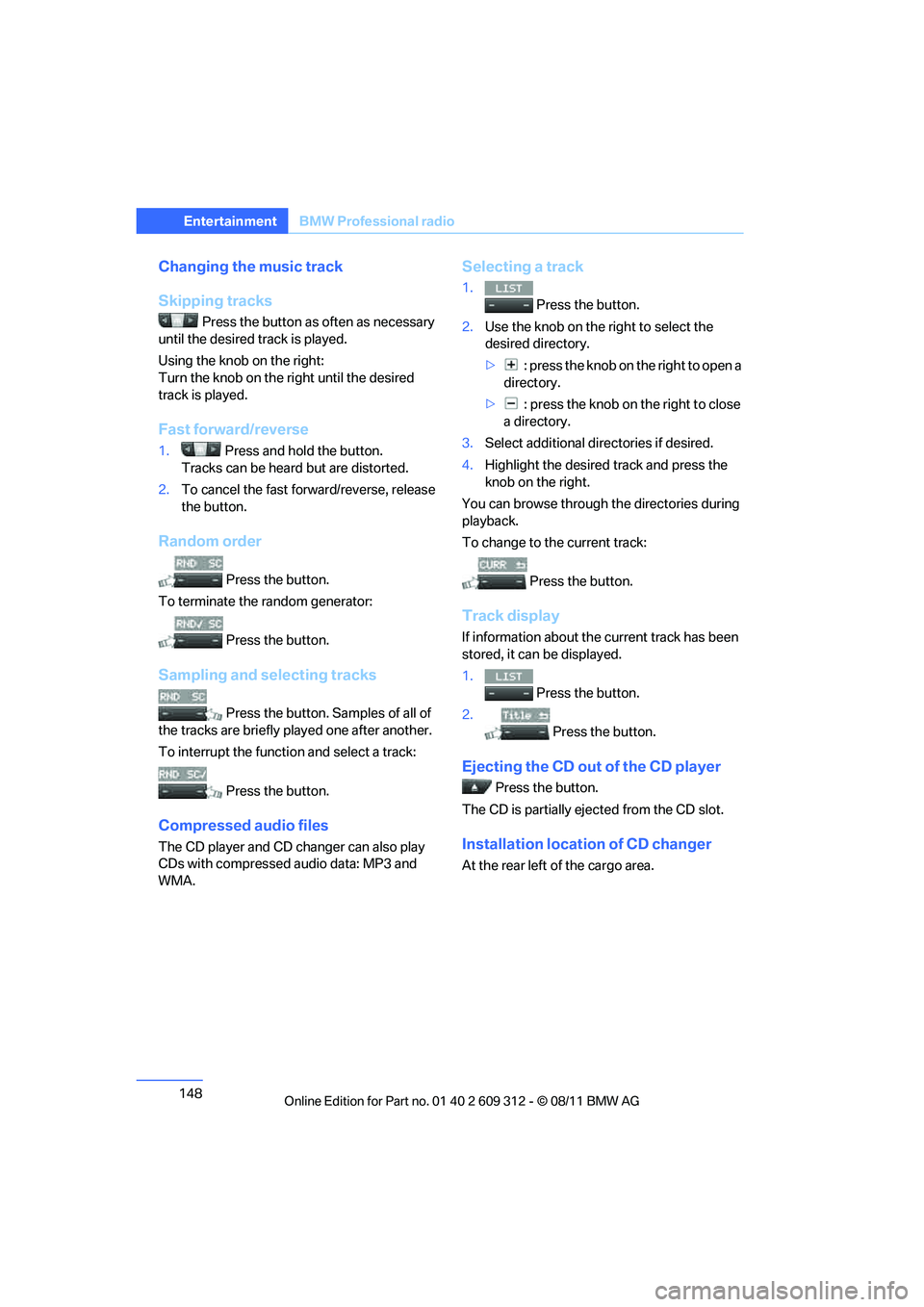
Press the button as often as necessary
until the desired track is played.
Using the knob on the right:
Turn the knob on the right until the desired
track is played.
Fast forward/reverse
1. Press and hold the button.
Tracks can be heard but are distorted.
2. To cancel the fast forward/reverse, release
the button.
Random order
Press the button.
To terminate the random generator:
Press the button.
Sampling and selecting tracks
Press the button. Samples of all of
the tracks are briefly pl ayed one after another.
To interrupt the functi on and select a track:
Press the button.
Compressed audio files
The CD player and CD changer can also play
CDs with compressed audio data: MP3 and
WMA.
Selecting a track
1. Press the button.
2. Use the knob on the right to select the
desired directory.
> : press the knob on the right to open a
directory.
> : press the knob on the right to close
a directory.
3. Select additional di rectories if desired.
4. Highlight the desired track and press the
knob on the right.
You can browse through the directories during
playback.
To change to the current track:
Press the button.
Track display
If information about the current track has been
stored, it can be displayed.
1.
Press the button.
2. Press the button.
Ejecting the CD out of the CD player
Press the button.
The CD is partially ejec ted from the CD slot.
Installation location of CD changer
At the rear left of the cargo area.
Online Edition for Part no. 01 40 2 609 312 - \251 08/11 BMW AG
Page 151 of 255
150
EntertainmentBMW Professional radio
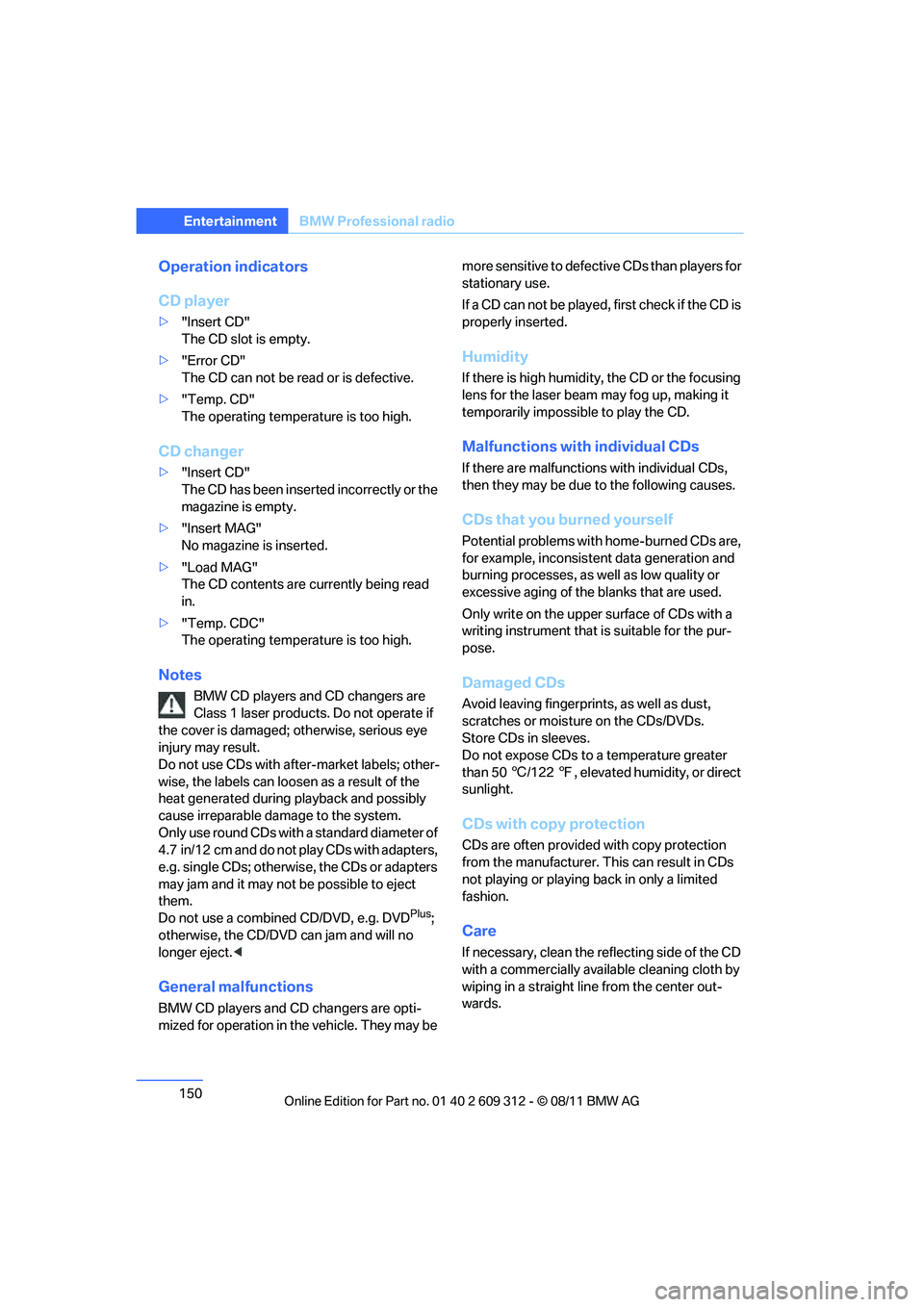
Operation indicators
CD player
>"Insert CD"
The CD slot is empty.
> "Error CD"
The CD can not be read or is defective.
> "Temp. CD"
The operating temperature is too high.
CD changer
>"Insert CD"
The CD has been inserted incorrectly or the
magazine is empty.
> "Insert MAG"
No magazine is inserted.
> "Load MAG"
The CD contents are currently being read
in.
> "Temp. CDC"
The operating temperature is too high.
Notes
BMW CD players and CD changers are
Class 1 laser products. Do not operate if
the cover is damaged; otherwise, serious eye
injury may result.
Do not use CDs with afte r-market labels; other-
wise, the labels can loosen as a result of the
heat generated during playback and possibly
cause irreparable damage to the system.
Only use round CDs with a standard diameter of
4.7 in/12 cm and do not play CDs with adapters,
e.g. single CDs; otherwise, the CDs or adapters
may jam and it may not be possible to eject
them.
Do not use a combined CD/DVD, e.g. DVD
Plus;
otherwise, the CD/DVD can jam and will no
longer eject. <
General malfunctions
BMW CD players and CD changers are opti-
mized for operation in the vehicle. They may be more sensitive to defective CDs than players for
stationary use.
If a CD can not be played,
first check if the CD is
properly inserted.
Humidity
If there is high humidity, the CD or the focusing
lens for the laser beam may fog up, making it
temporarily impossible to play the CD.
Malfunctions with individual CDs
If there are malfunctions with individual CDs,
then they may be due to the following causes.
CDs that you burned yourself
Potential problems with home-burned CDs are,
for example, inconsistent data generation and
burning processes, as well as low quality or
excessive aging of the blanks that are used.
Only write on the upper surface of CDs with a
writing instrument that is suitable for the pur-
pose.
Damaged CDs
Avoid leaving fingerprints, as well as dust,
scratches or moisture on the CDs/DVDs.
Store CDs in sleeves.
Do not expose CDs to a temperature greater
than 50 6/122 7, elevated humidity, or direct
sunlight.
CDs with copy protection
CDs are often provided with copy protection
from the manufacturer. This can result in CDs
not playing or playing back in only a limited
fashion.
Care
If necessary, clean the reflecting side of the CD
with a commercially available cleaning cloth by
wiping in a straight line from the center out-
wards.
Online Edition for Part no. 01 40 2 609 312 - \251 08/11 BMW AG
Page 154 of 255
153
BMW Professional radio
Entertainment
Random order
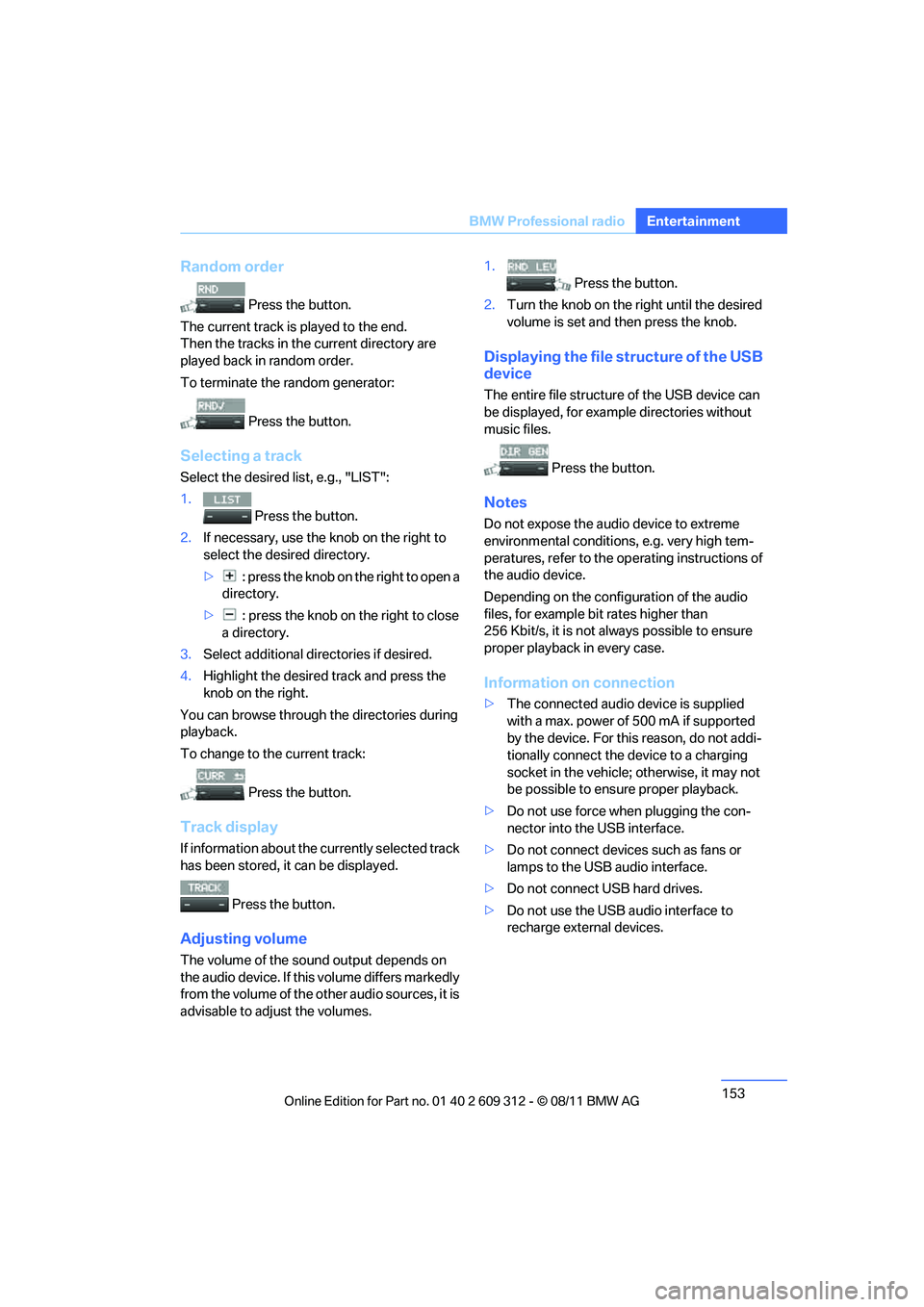
Press the button.
The current track is played to the end.
Then the tracks in the current directory are
played back in random order.
To terminate the random generator:
Press the button.
Selecting a track
Select the desired list, e.g., "LIST":
1. Press the button.
2. If necessary, use the knob on the right to
select the desired directory.
> : press the knob on the right to open a
directory.
> : press the knob on the right to close
a directory.
3. Select additional directories if desired.
4. Highlight the desired track and press the
knob on the right.
You can browse through the directories during
playback.
To change to th e current track:
Press the button.
Track display
If information about the currently selected track
has been stored, it can be displayed.
Press the button.
Adjusting volume
The volume of the sound output depends on
the audio device. If this volume differs markedly
from the volume of the ot her audio sources, it is
advisable to adjust the volumes. 1.
Press the button.
2. Turn the knob on the right until the desired
volume is set and then press the knob.
Displaying the file structure of the USB
device
The entire file structure of the USB device can
be displayed, for example directories without
music files.
Press the button.
Notes
Do not expose the audio device to extreme
environmental conditions , e.g. very high tem-
peratures, refer to the op erating instructions of
the audio device.
Depending on the config uration of the audio
files, for example bi t rates higher than
256 Kbit/s, it is not always possible to ensure
proper playback in every case.
Information on connection
> The connected audio device is supplied
with a max. power of 500 mA if supported
by the device. For this reason, do not addi-
tionally connect the de vice to a charging
socket in the vehicle; otherwise, it may not
be possible to ensure proper playback.
> Do not use force when plugging the con-
nector into the USB interface.
> Do not connect devices such as fans or
lamps to the USB audio interface.
> Do not connect USB hard drives.
> Do not use the USB audio interface to
recharge external devices.
Online Edition for Part no. 01 40 2 609 312 - \251 08/11 BMW AG
Page 158 of 255
157
Te l e p h o n e
Communications
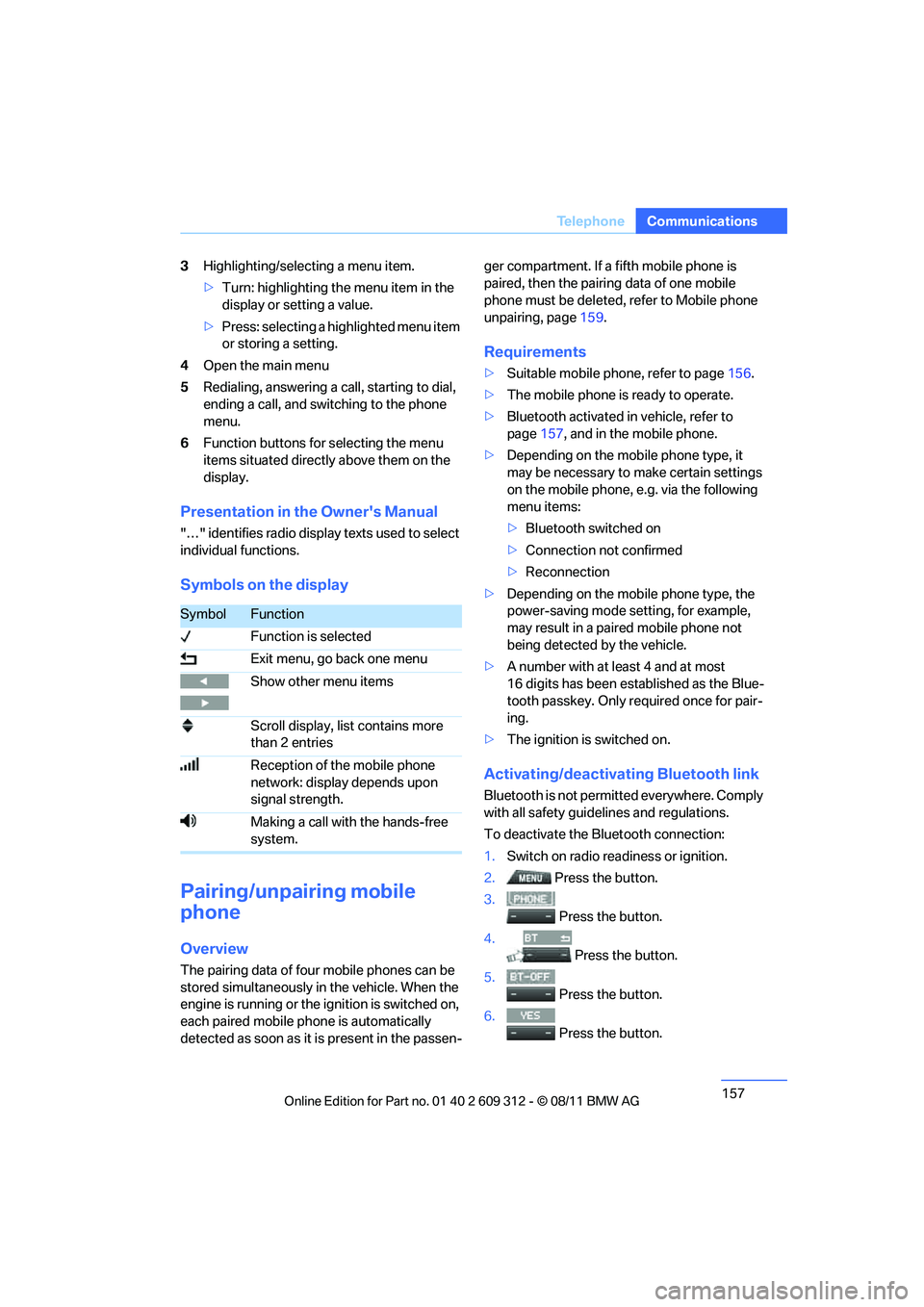
3
Highlighting/selecting a menu item.
>Turn: highlighting the menu item in the
display or setting a value.
> Press: selecting a highlighted menu item
or storing a setting.
4 Open the main menu
5 Redialing, answering a call, starting to dial,
ending a call, and switching to the phone
menu.
6 Function buttons for selecting the menu
items situated directly above them on the
display.
Presentation in the Owner's Manual
"…" identifies radio displa y texts used to select
individual functions.
Symbols on the display
Pairing/unpairing mobile
phone
Overview
The pairing data of four mobile phones can be
stored simultaneously in the vehicle. When the
engine is running or the ignition is switched on,
each paired mobile ph one is automatically
detected as soon as it is present in the passen- ger compartment. If a fifth mobile phone is
paired, then the pairing data of one mobile
phone must be deleted, refer to Mobile phone
unpairing, page
159.
Requirements
>Suitable mobile phone, refer to page 156.
> The mobile phone is ready to operate.
> Bluetooth activated in vehicle, refer to
page 157, and in the mobile phone.
> Depending on the mobile phone type, it
may be necessary to make certain settings
on the mobile phone, e.g. via the following
menu items:
>Bluetooth switched on
> Connection not confirmed
> Reconnection
> Depending on the mobile phone type, the
power-saving mode setting, for example,
may result in a paired mobile phone not
being detected by the vehicle.
> A number with at least 4 and at most
16 digits has been established as the Blue-
tooth passkey. Only re quired once for pair-
ing.
> The ignition is switched on.
Activating/deactivating Bluetooth link
Bluetooth is not permi tted everywhere. Comply
with all safety guide lines and regulations.
To deactivate the Bluetooth connection:
1. Switch on radio readiness or ignition.
2. Press the button.
3.
Press the button.
4. Press the button.
5.
Press the button.
6.
Press the button.
SymbolFunction
Function is selected
Exit menu, go back one menu
Show other menu items
Scroll display, list contains more
than 2 entries
Reception of the mobile phone
network: display depends upon
signal strength.
Making a call with the hands-free
system.
Online Edition for Part no. 01 40 2 609 312 - \251 08/11 BMW AG
Page 175 of 255
174
MobilityRefueling
Refueling
Vehicle equipment
In this chapter, all pr oduction, country, and
optional equipment that is offered in the model
range is described. For this reason, descrip-
tions will be given of some equipment that may
not be available in a vehi cle, for example due to
the special options or national-market version
selected. This also app lies to safety related
functions and systems.
General information
Always switch off the engine before refu-
eling; otherwise, fuel cannot be added to
the tank and a message will be displayed. <
Take all precautionary measures and
observe all applicable regulations when
handling fuel. Do not carry any spare fuel con-
tainers in your vehicle. They can develop a leak
and cause an explosion or cause a fire in the
event of an accident. <
Fuel filler flap
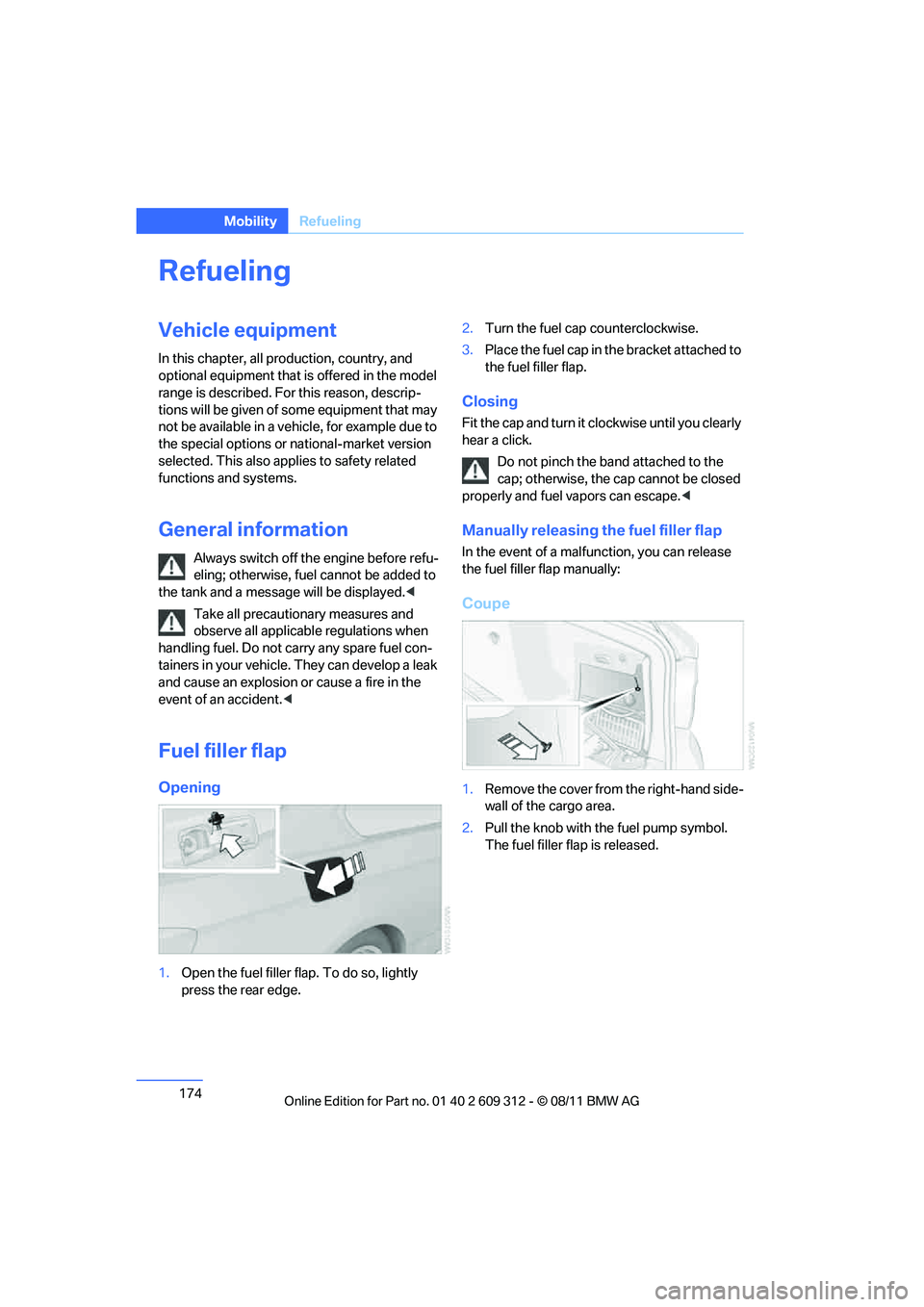
Opening
1.Open the fuel filler flap. To do so, lightly
press the rear edge. 2.
Turn the fuel cap counterclockwise.
3. Place the fuel cap in th e bracket attached to
the fuel filler flap.
Closing
Fit the cap and turn it cl ockwise until you clearly
hear a click.
Do not pinch the band attached to the
cap; otherwise, the cap cannot be closed
properly and fuel vapors can escape. <
Manually releasing the fuel filler flap
In the event of a malfunction, you can release
the fuel filler flap manually:
Coupe
1.Remove the cover from the right-hand side-
wall of the cargo area.
2. Pull the knob with the fuel pump symbol.
The fuel filler flap is released.
Online Edition for Part no. 01 40 2 609 312 - \251 08/11 BMW AG