brake BMW M3 COUPE 2002 E46 User Guide
[x] Cancel search | Manufacturer: BMW, Model Year: 2002, Model line: M3 COUPE, Model: BMW M3 COUPE 2002 E46Pages: 151, PDF Size: 2.14 MB
Page 60 of 151
60n
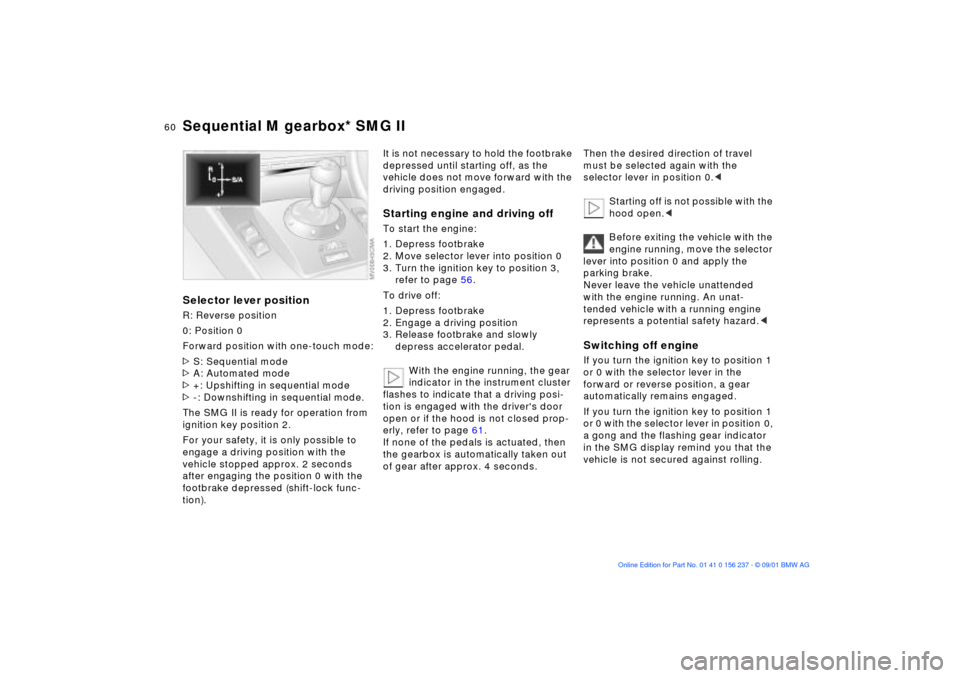
Sequential M gearbox* SMG IISelector lever positionR: Reverse position
0: Position 0
Forward position with one-touch mode:
>S: Sequential mode
>A: Automated mode
>+: Upshifting in sequential mode
>-: Downshifting in sequential mode.
The SMG II is ready for operation from
ignition key position 2.
For your safety, it is only possible to
engage a driving position with the
vehicle stopped approx. 2 seconds
after engaging the position 0 with the
footbrake depressed (shift-lock func-
tion).
It is not necessary to hold the footbrake
depressed until starting off, as the
vehicle does not move forward with the
driving position engaged.Starting engine and driving offTo start the engine:
1. Depress footbrake
2. Move selector lever into position 0
3. Turn the ignition key to position 3,
refer to page 56.
To drive off:
1. Depress footbrake
2. Engage a driving position
3. Release footbrake and slowly
depress accelerator pedal.
With the engine running, the gear
indicator in the instrument cluster
flashes to indicate that a driving posi-
tion is engaged with the driver's door
open or if the hood is not closed prop-
erly, refer to page 61.
If none of the pedals is actuated, then
the gearbox is automatically taken out
of gear after approx. 4 seconds.
Then the desired direction of travel
must be selected again with the
selector lever in position 0.<
Starting off is not possible with the
hood open.<
Before exiting the vehicle with the
engine running, move the selector
lever into position 0 and apply the
parking brake.
Never leave the vehicle unattended
with the engine running. An unat-
tended vehicle with a running engine
represents a potential safety hazard.
forward or reverse position, a gear
automatically remains engaged.
If you turn the ignition key to position 1
or 0 with the selector lever in position 0,
a gong and the flashing gear indicator
in the SMG display remind you that the
vehicle is not secured against rolling.
Page 61 of 151
61n
OverviewControlsMaintenanceRepairsDataIndex
Sequential M gearbox* SMG IIThe warning stops after approx.
10 seconds. If you move the selector
lever into a forward or reverse position
during this time, a gear is automatically
engaged.
The SMG II has no park position
for securing the vehicle against
rolling.
The ignition key can be removed in any
selector lever position.<
Always engage the parking brake
when parking on downhill roads.
Engaging a gear may not sufficiently
secure the vehicle against rolling.<
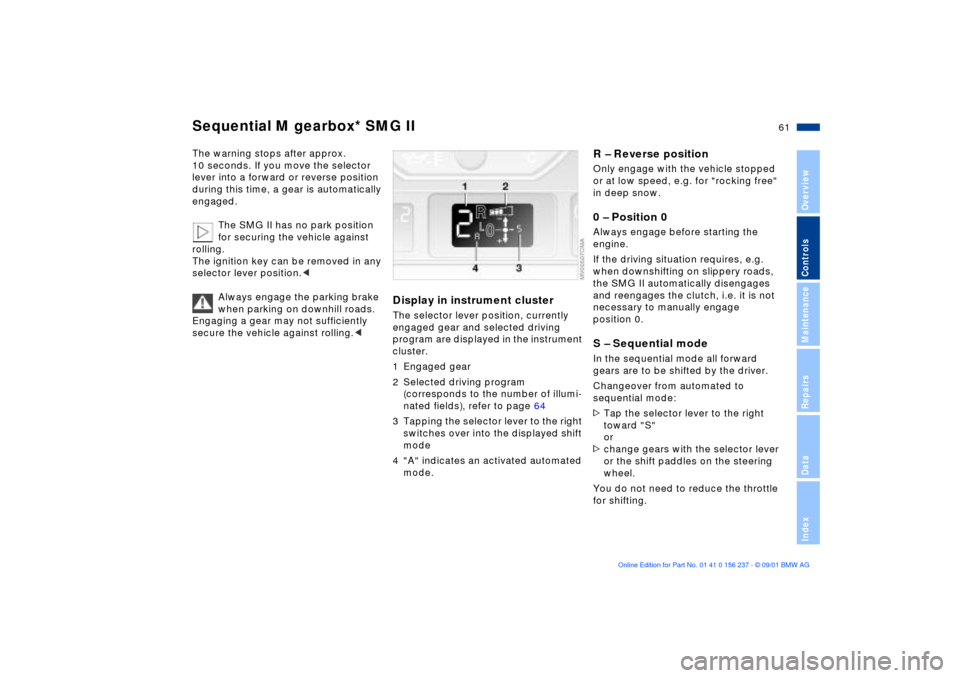
Display in instrument clusterThe selector lever position, currently
engaged gear and selected driving
program are displayed in the instrument
cluster.
1 Engaged gear
2 Selected driving program
(corresponds to the number of illumi-
nated fields), refer to page 64
3 Tapping the selector lever to the right
switches over into the displayed shift
mode
4 "A" indicates an activated automated
mode.
R Ð Reverse positionOnly engage with the vehicle stopped
or at low speed, e.g. for "rocking free"
in deep snow.0 Ð Position 0Always engage before starting the
engine.
If the driving situation requires, e.g.
when downshifting on slippery roads,
the SMG II automatically disengages
and reengages the clutch, i.e. it is not
necessary to manually engage
position 0. S Ð Sequential modeIn the sequential mode all forward
gears are to be shifted by the driver.
Changeover from automated to
sequential mode:
>Tap the selector lever to the right
toward "S"
or
>change gears with the selector lever
or the shift paddles on the steering
wheel.
You do not need to reduce the throttle
for shifting.
Page 63 of 151
63n
OverviewControlsMaintenanceRepairsDataIndex
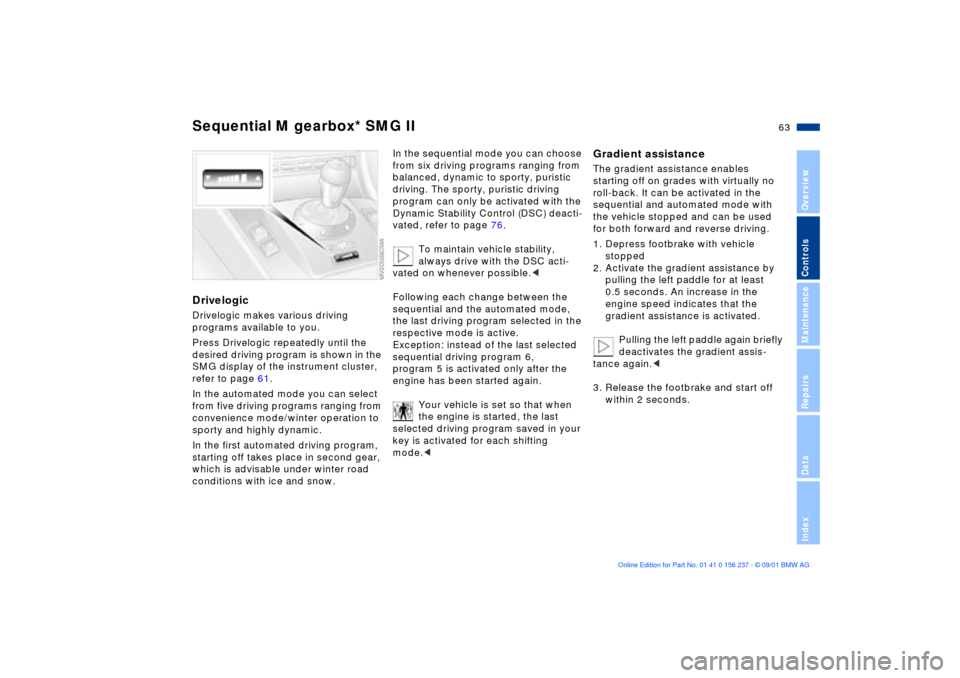
Sequential M gearbox* SMG IIDrivelogicDrivelogic makes various driving
programs available to you.
Press Drivelogic repeatedly until the
desired driving program is shown in the
SMG display of the instrument cluster,
refer to page 61.
In the automated mode you can select
from five driving programs ranging from
convenience mode/winter operation to
sporty and highly dynamic.
In the first automated driving program,
starting off takes place in second gear,
which is advisable under winter road
conditions with ice and snow.
In the sequential mode you can choose
from six driving programs ranging from
balanced, dynamic to sporty, puristic
driving. The sporty, puristic driving
program can only be activated with the
Dynamic Stability Control (DSC) deacti-
vated, refer to page 76.
To maintain vehicle stability,
always drive with the DSC acti-
vated on whenever possible.<
Following each change between the
sequential and the automated mode,
the last driving program selected in the
respective mode is active.
Exception: instead of the last selected
sequential driving program 6,
program 5 is activated only after the
engine has been started again.
Your vehicle is set so that when
the engine is started, the last
selected driving program saved in your
key is activated for each shifting
mode.<
Gradient assistanceThe gradient assistance enables
starting off on grades with virtually no
roll-back. It can be activated in the
sequential and automated mode with
the vehicle stopped and can be used
for both forward and reverse driving.
1. Depress footbrake with vehicle
stopped
2. Activate the gradient assistance by
pulling the left paddle for at least
0.5 seconds. An increase in the
engine speed indicates that the
gradient assistance is activated.
Pulling the left paddle again briefly
deactivates the gradient assis-
tance again.<
3. Release the footbrake and start off
within 2 seconds.
Page 64 of 151
64n
Sequential M gearbox* SMG II
The vehicle may roll slightly before
it is held by the gradient assis-
tance after releasing the footbrake.
Two seconds after the footbrake is
released, the vehicle begins to roll, as it
is no longer held with the gradient
assistance.<
The gradient assistance must be reacti-
vated before each use.
Indicator lamp
The transmission indicator lamp
in the instrument cluster goes
out after the engine is started.
>If it does not go out, or if it lights up
during driving, a fault has occurred.
The available functions may be
limited under certain circumstances.
Drive carefully and with the Dynamic
Stability Control (DSC) activated.
Have the system checked by the
nearest BMW center
>If the indicator lamp flashes while
driving, the system is overloaded.
Avoid high loads until the indicator
lamp goes out again permanently.
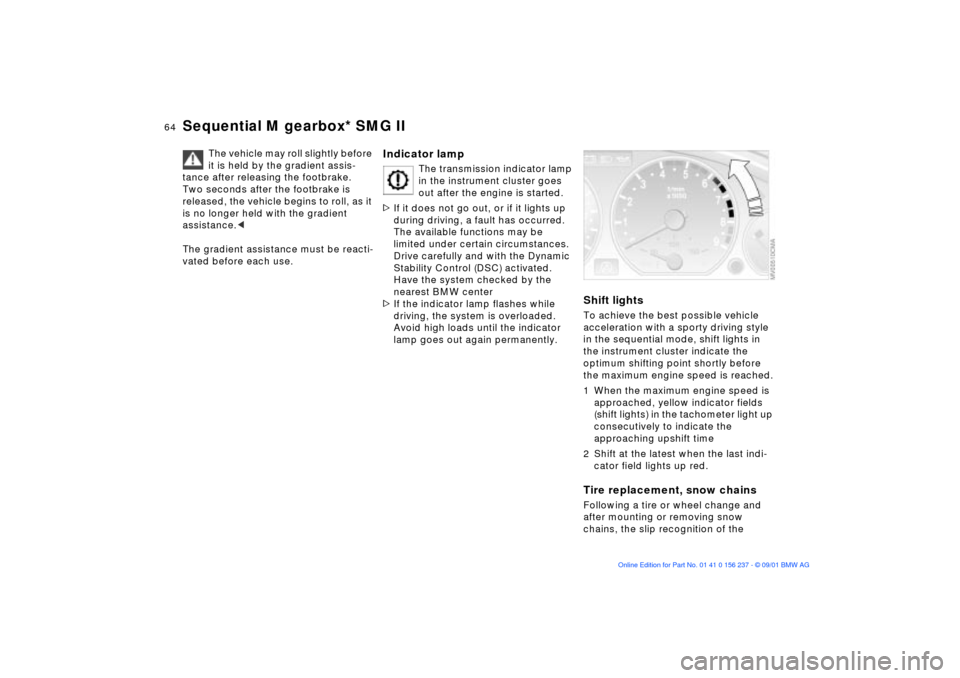
Shift lightsTo achieve the best possible vehicle
acceleration with a sporty driving style
in the sequential mode, shift lights in
the instrument cluster indicate the
optimum shifting point shortly before
the maximum engine speed is reached.
1 When the maximum engine speed is
approached, yellow indicator fields
(shift lights) in the tachometer light up
consecutively to indicate the
approaching upshift time
2 Shift at the latest when the last indi-
cator field lights up red.Tire replacement, snow chainsFollowing a tire or wheel change and
after mounting or removing snow
chains, the slip recognition of the
Page 69 of 151
69n
OverviewControlsMaintenanceRepairsDataIndex
Cruise control To deceleratePress button (Ð) briefly:
When cruise control is active, every tap
of the button reduces the speed by
approx. 0.6 mph (1 km/h).
Press and hold button (Ð):
With the cruise control active, the
system automatically reduces the
throttle opening to slow the vehicle.
When you release the button, the
system maintains and stores the
current speed.
To interrupt the cruise controlWhen the system is activated, press the
button. The indicator lamp stays on.
You can use the cruise control again
whenever you want by calling up the
speed that was stored last.
In addition, cruise control is interrupted
automatically:
>When the brakes are applied
>When pressing down the clutch pedal
>If you exceed or fall below the
programmed speed for an extended
period (by depressing the acceler-
ator, for example)
>When shifting in the sequential mode,
refer to sequential M gearbox
*
SMG II on page 59.
To recall the stored speedPress button:
The vehicle accelerates to and main-
tains the last speed stored.
Page 72 of 151
72n
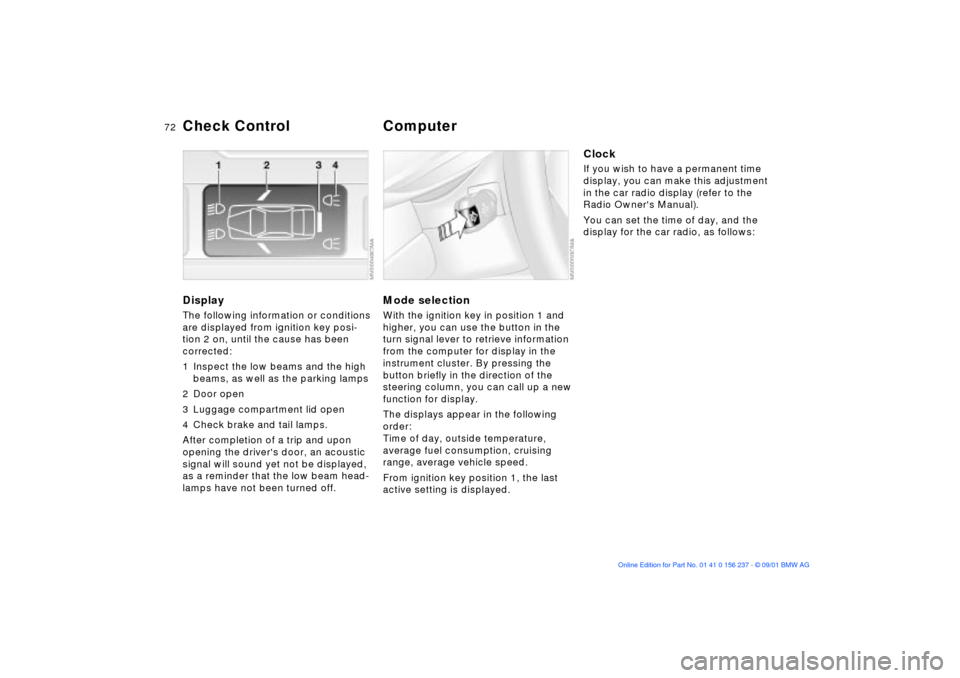
DisplayThe following information or conditions
are displayed from ignition key posi-
tion 2 on, until the cause has been
corrected:
1 Inspect the low beams and the high
beams, as well as the parking lamps
2 Door open
3 Luggage compartment lid open
4 Check brake and tail lamps.
After completion of a trip and upon
opening the driver's door, an acoustic
signal will sound yet not be displayed,
as a reminder that the low beam head-
lamps have not been turned off.
Mode selectionWith the ignition key in position 1 and
higher, you can use the button in the
turn signal lever to retrieve information
from the computer for display in the
instrument cluster. By pressing the
button briefly in the direction of the
steering column, you can call up a new
function for display.
The displays appear in the following
order:
Time of day, outside temperature,
average fuel consumption, cruising
range, average vehicle speed.
From ignition key position 1, the last
active setting is displayed.
ClockIf you wish to have a permanent time
display, you can make this adjustment
in the car radio display (refer to the
Radio Owner's Manual).
You can set the time of day, and the
display for the car radio, as follows:
Check Control
Computer
Page 76 of 151

76n
Dynamic Stability Control (DSC)
The conceptDSC maintains vehicle stability, even in
critical driving situations.
The system optimizes vehicle stability
during acceleration and when starting
from a full stop, as well as optimizing
traction. In addition, it also recognizes
unstable driving conditions such as
under- or oversteering on curves, and
helps the vehicle remain on a steady
course by using the engine and brake
system to intervene at the different
wheels Ð doing only what it can within
the laws of physics, of course.
The DSC is operational every time you
start the engine. The laws of physics cannot be
repealed, even with DSC. The
results of driving irresponsibly rest with
the driver. We therefore urge you to
avoid using the additional safety margin
of the system as an excuse for taking
risks.
Do not make any modifications to the
DSC system. Allow only authorized
technicians to perform service proce-
dures on the DSC.<
At first, you may need some time to
become accustomed to this system's
intervention. However, it guarantees
optimum drive force and at the same
time, the best possible vehicle stability.
Indicator lamp
The indicator lamp in the instru-
ment cluster will go out shortly
after the ignition has been
switched on, refer to pages 18, 19.
>Indicator lamp flashes: the DSC is
active and is controlling the drive
torque based on driving conditions
>If the indicator lamp fails to go out
after the engine has been started, or
if it comes on during normal driving
and stays on: the DSC has been
deactivated via the button or there is
a malfunction. You can continue to
drive the vehicle normally, but
without DSC. Please consult your
BMW center for repairs.
Page 77 of 151
77n
OverviewControlsMaintenanceRepairsDataIndex
Dynamic Stability Control (DSC) Flat Tire MonitorTo deactivate DSCPress the DSC button briefly; the indi-
cator lamp will light up and stay on.
The vehicle does not execute the
stability-enhancement and traction-
control functions when DSC is deacti-
vated.
We recommend that you deactivate
DSC for increased traction:
>When rocking the vehicle or starting
off in deep snow or on loose surfaces
>When driving with snow chains.
To maintain vehicle stability,
always drive with the DSC acti-
vated on whenever possible.<
Reactivating the DSCPress the button again; the indicator
lamp goes out.Dynamic Brake Control (DBC)DBC is an integral component of the
DSC system.
If you apply the brakes rapidly, this
system automatically generates
maximum braking force boost and thus
helps to achieve the shortest possible
braking distance in "panic braking" situ-
ations. All of the benefits of the ABS
system are exploited under these
circumstances.
Do not reduce the pressure on the
brake pedal for the duration of the
brake application. When the brake
pedal is released, the DBC is deacti-
vated.
The conceptAs you drive, the Flat Tire Monitor
keeps track of pressure levels in all four
tires in order to detect and warn of any
substantial pressure loss.
The system actually detects pressure
loss by monitoring differences in the
relative speeds of the four wheels. It
interprets variations outside specified
limits as severe pressure loss, and then
responds by generating a warning.
Page 100 of 151

100n
To ensure that your vehicle provides
maximum economy throughout a long
service life, we request that you
observe the following instructions.
Because of its engineering design,
the BMW M3 is an especially high-
quality vehicle. It is in your best interest
to follow the break-in instructions very
closely. Doing this, you will create the
basis for a long, optimum service life.<
Engine and differential>Until a km reading of 1,200 miles
(2,000 km): drive at varying engine
and road speeds, but do not exceed
the following rpms or road speeds:
5,500 rpm or 105 mph (170 km/h)
Obey your local and state maximum
speed limits.
Do not depress the accelerator pedal to
the full-throttle position.
Vehicles with SMG II
* (refer to
page 59): refrain from using driving
program 6 in the sequential mode
during the break-in period.
>After you have monitored the break-
in period for 1,200 miles (2,000 km),
you can begin to gradually increase
both engine and road speed.
Please remember to observe the same
break-in procedures if either the engine
or the differential is replaced later in the
course of the vehicle's service life.TiresOwing to technical factors associated
with their manufacture, tires do not
achieve their full traction potential until
an initial break-in period has elapsed.
Thus drive with extra care during the
initial 200 miles (300 km).
Obey your local and state maximum
speed limits.
When the vehicle is operated on
wet or slushy roads, a wedge of
water may form between the tire and
the road surface. This phenomenon is
referred to as aquaplaning, or hydro-
planing, and can lead to partial or
complete loss of traction, vehicle
control and braking effectiveness.
Reduce your speed on wet roads.<
Brake systemApprox. 300 miles (500 km) must
elapse before the brake pads and
rotors achieve the optimal pad-surface
and wear patterns required for trouble-
free operation and long service life later
on.
To break-in the separate parking brake
drums, apply the parking brake lightly
when coasting to a standstill (at a traffic
signal, for instance), provided that
traffic conditions allow you to do so. To
avoid corrosion, repeat this procedure
from time to time.
The brake lamps do not come on
when the parking brake is
engaged.
Vacuum for the brake system servo unit
on your BMW is available only when the
engine is running. When you move the
vehicle with the engine off Ð when
towing, for example Ð substantially
higher levels of pedal force will be
required to brake the vehicle.
(500 km). Drive cautiously during this
break-in period and do not shift at high
engine speeds.
Break-in procedures
Page 101 of 151

101n
OverviewControlsMaintenanceRepairsDataIndex
Brakes:
Do not drive with your foot resting
on the brake pedal. Even light but
consistent pedal pressure can lead to
high temperatures, brake wear and
possibly even brake failure.
Aquaplaning:
When driving on wet or slushy roads,
reduce vehicle speed. If you do not, a
wedge of water may form between the
tires and the road surface. This
phenomenon is referred to as aqua-
planing, or hydroplaning, and can lead
to partial or complete loss of traction,
vehicle control and braking effective-
ness.
Driving through water:
Do not drive through water on the road
if it is deeper than 1 foot (30 cm), and
then only at walking speed. Otherwise,
the vehicle's engine, the electrical
systems and the transmission may be
damaged.
Rear parcel tray:
Never use it to store heavy or hard
objects, otherwise, occupants could be
injured if the vehicle is braked hard.
Clothes hooks:
When suspending clothing from the
hooks, be sure that they will not
obstruct the driver's vision. Do not hang
heavy objects on the hooks. If you do
so, they could cause personal injury
during braking or evasive maneuvers.<
The conceptThe Antilock Brake System (ABS) keeps
the wheels from locking while braking,
thereby enhancing active driving safety.Braking with ABSIf you are in a situation that requires full
braking, you will exploit the full benefits
of the ABS system if you apply
maximum brake pressure ("panic
stop"). Since the vehicle maintains
steering responsiveness, you can
nevertheless avoid possible obstacles
with a minimum of steering effort.
Pulsation at the brake pedal combines
with sounds from the hydraulic circuits
to indicate to the driver that ABS is in
its active mode.Cornering Brake Control (CBC)CBC is an advanced engineering
design of the ABS. When braking while
cornering at high speed or braking
during high lateral acceleration, or
when braking during a lane change,
vehicle stability is improved and
steering response is enhanced.
Driving notes Antilock Brake System