engine BMW M3 COUPE 2004 E46 Service Manual
[x] Cancel search | Manufacturer: BMW, Model Year: 2004, Model line: M3 COUPE, Model: BMW M3 COUPE 2004 E46Pages: 170, PDF Size: 2.62 MB
Page 128 of 170
128Laws and regulations
California Proposition 65 warningCalifornia laws require us to state the
following warning:
Engine exhaust and a wide variety
of automobile components and
parts, including components found in
the interior furnishings in a vehicle, con-
tain or emit chemicals known to the
State of California to cause cancer and
birth defects and reproductive harm. In
addition, certain fluids contained in
vehicles and certain products of com-
ponent wear contain or emit chemicals
known to the State of California to
cause cancer and birth defects or other
reproductive harm.
Battery posts, terminals and related
accessories contain lead and lead com-
pounds. Wash your hands after
handling.
Used engine oil contains chemicals that
have caused cancer in laboratory ani-
mals. Always protect your skin by
washing thoroughly with soap and
water.<
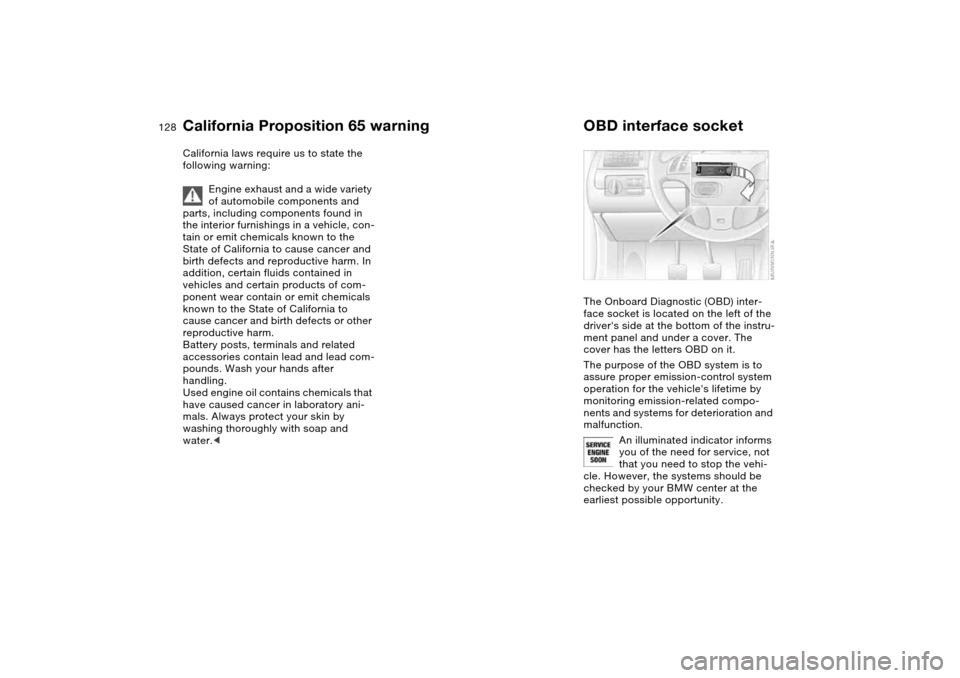
OBD interface socketThe Onboard Diagnostic (OBD) inter-
face socket is located on the left of the
driver's side at the bottom of the instru-
ment panel and under a cover. The
cover has the letters OBD on it.
The purpose of the OBD system is to
assure proper emission-control system
operation for the vehicle's lifetime by
monitoring emission-related compo-
nents and systems for deterioration and
malfunction.
An illuminated indicator informs
you of the need for service, not
that you need to stop the vehi-
cle. However, the systems should be
checked by your BMW center at the
earliest possible opportunity.
Page 129 of 170
129
If the indicator blinks or flashes, this
indicates a high level of engine misfire.
Reduce speed and contact your near-
est BMW center immediately. Severe
engine misfiring for even a short period
of time can seriously damage emission-
control system components, especially
the catalytic converter.
SERVICE ENGINE SOON warn-
ing lamp for Canadian models.
If the gas cap is not on tight
enough, the OBD system can
detect leaking vapor and the indicator
will light up. If the gas cap is then tight-
ened, the indicator will usually go out
after a short period of time.
Page 132 of 170
132Replacement procedures
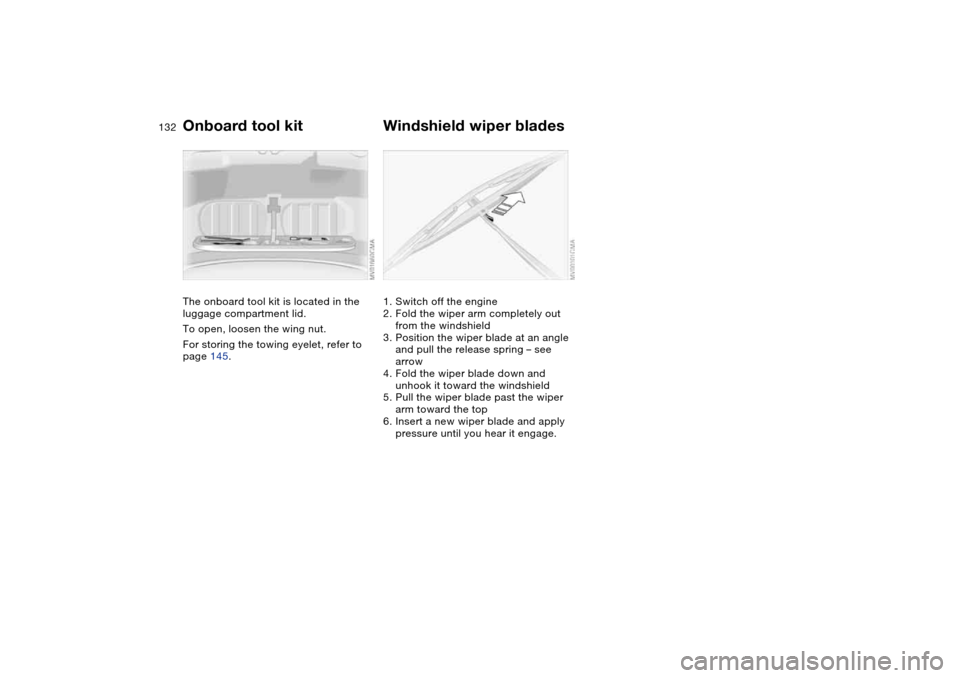
Onboard tool kitThe onboard tool kit is located in the
luggage compartment lid.
To open, loosen the wing nut.
For storing the towing eyelet, refer to
page 145.
Windshield wiper blades1. Switch off the engine
2. Fold the wiper arm completely out
from the windshield
3. Position the wiper blade at an angle
and pull the release spring – see
arrow
4. Fold the wiper blade down and
unhook it toward the windshield
5. Pull the wiper blade past the wiper
arm toward the top
6. Insert a new wiper blade and apply
pressure until you hear it engage.
Page 140 of 170
140
Even if the tire fails to hold the
pressure, you should still carry out
Step 3 before proceeding to drive the
vehicle again, refer to Distributing the
sealant for more information. Then
repeat Steps 1 through 3.
The use of the M Mobility system may
be ineffective if the damaged area in
the tire is larger than approx. 1/8 in /
4 mm. Please consult the nearest BMW
center if the tire cannot be temporarily
repaired with the M Mobility system.<
3. Unscrew the hose from the valve and
stow the M Mobility system in the
luggage compartment. Screw the
dust cap onto the valve again.
Do not exceed the maximum
speed limit described below, oth-
erwise it could lead to accidents.<
When you start driving again, do not
exceed the permissible maximum
speed of 45 mph / 80 km/h.
You will find corresponding
instructions for using the
M Mobility system on the device.
Replace the defective tire as soon as
possible and have the new wheel bal-
anced. Reinitialize the Flat Tire Monitor,
and refer to page 85 for further informa-
tion. Have the M Mobility system
refilled. Contact your BMW center for
this.<
Protect valve stems against dirt using
screw-on dust caps. Dirty valve stems
frequently lead to slow pressure loss.
Battery
Battery posts, terminals, and
related accessories contain lead
and lead compounds. Wash hands after
handling.<
MaintenanceThe battery is completely maintenance-
free. That means that the original bat-
tery acid will normally last for the ser-
vice life of the battery under moderate
climate conditions.
Please consult your BMW center
whenever you have any questions
concerning the battery.
connections provided in the engine
compartment. For information on the
connections, see Jump-Starting,
page 143.Disposal
Return used batteries to a recy-
cling point or your BMW center.
Maintain the battery in an upright posi-
tion for transport and storage. Secure
the battery against tilting in transit.<
Repairing a flat tire
Page 143 of 170
143
Jump-startingWhen your battery is discharged, you
can use two jumper cables to start your
vehicle with power from the battery in a
second vehicle. You can also use the
same method to help start another
vehicle. Use only jumper cables with
fully insulated handles on the terminal
clamps.
Do not touch high-voltage wiring
and cables on a running engine.
Contact with components carrying high
voltage can be harmful or fatal.
Carefully observe the following instruc-
tions to avoid personal injury and/or
damage to one or both vehicles.
approximately the same capacity –
measured in Ah. This information is
provided on the battery
2. Stop the engine of the support vehi-
cle
3. Switch off all electrical components
in both vehicles.
Make absolutely certain that there
is no contact between the body-
work of the two vehicles, otherwise
there is a short circuit hazard.<
Connecting the jumper cables
Always adhere to this sequence
when connecting jumper cables;
failure to observe this procedure can
lead to sparks at the battery terminals
and pose an injury hazard.<
The auxiliary jump-starting terminal
located in your BMW's engine compart-
ment acts as the positive battery termi-
nal. Refer to the engine compartment
overview on page 120. The cover of this
auxiliary terminal is marked with a +.
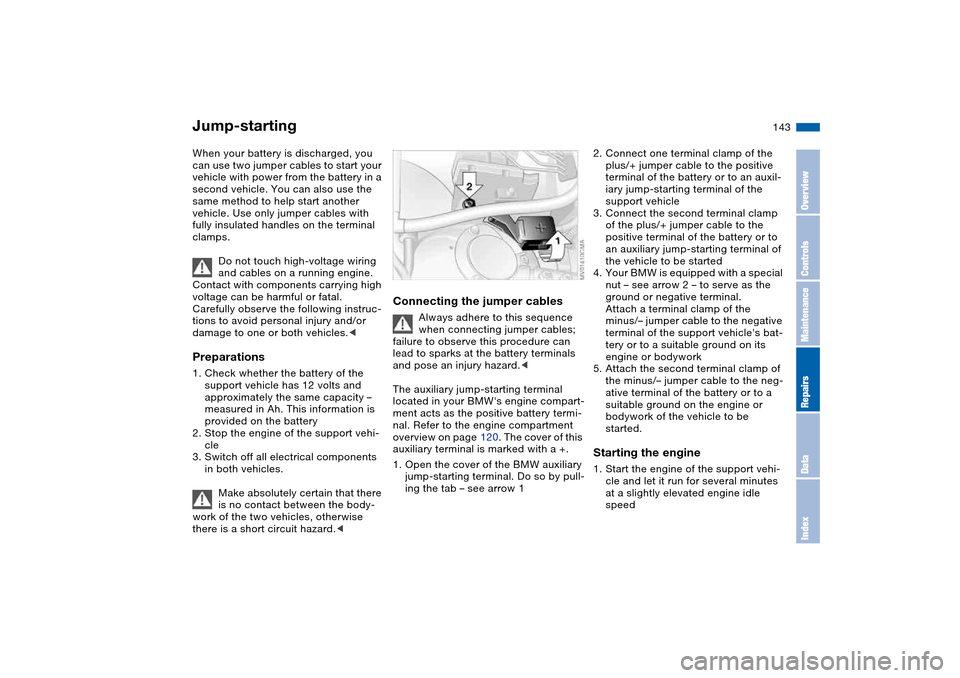
1. Open the cover of the BMW auxiliary
jump-starting terminal. Do so by pull-
ing the tab – see arrow 1
2. Connect one terminal clamp of the
plus/+ jumper cable to the positive
terminal of the battery or to an auxil-
iary jump-starting terminal of the
support vehicle
3. Connect the second terminal clamp
of the plus/+ jumper cable to the
positive terminal of the battery or to
an auxiliary jump-starting terminal of
the vehicle to be started
4. Your BMW is equipped with a special
nut – see arrow 2 – to serve as the
ground or negative terminal.
Attach a terminal clamp of the
minus/– jumper cable to the negative
terminal of the support vehicle's bat-
tery or to a suitable ground on its
engine or bodywork
5. Attach the second terminal clamp of
the minus/– jumper cable to the neg-
ative terminal of the battery or to a
suitable ground on the engine or
bodywork of the vehicle to be
started.Starting the engine1. Start the engine of the support vehi-
cle and let it run for several minutes
at a slightly elevated engine idle
speed
OverviewControlsMaintenanceRepairsDataIndex
Page 144 of 170
144
2. Start the engine of the other vehicle
as usual.
If the first start attempt is not suc-
cessful, wait a few minutes before
another attempt in order to allow the
discharged battery to recharge
3. Allow the engines to run for several
minutes
4. Disconnect the jumper cables in
reverse sequence.
Have the battery recharged at your
BMW center as required.
Do not use spray starter fluids to
start the engine.<
Towing the vehicle
Always observe all applicable
towing laws and regulations.<
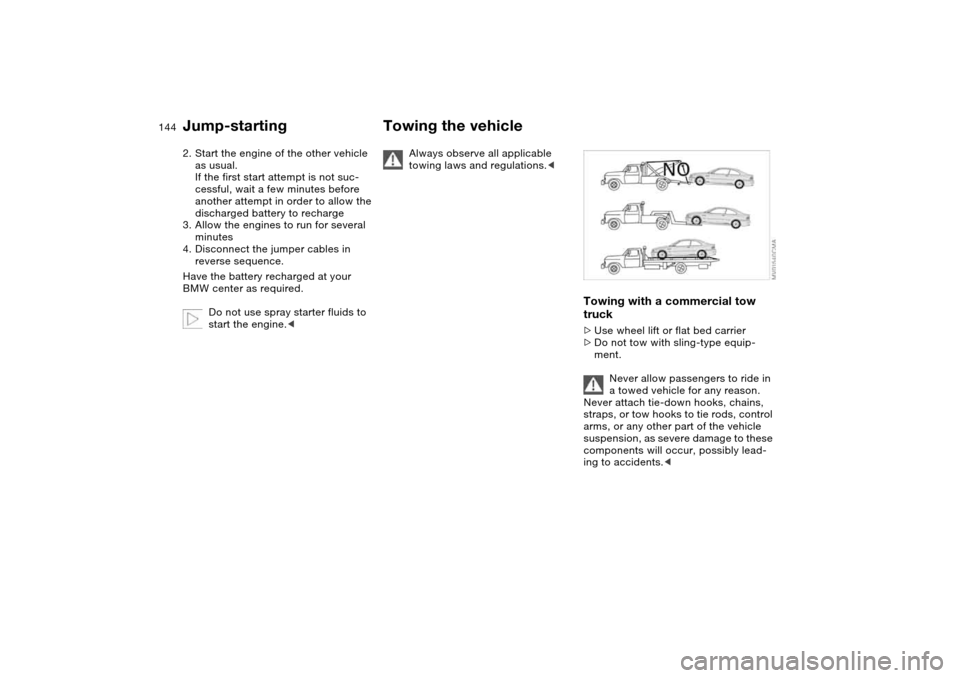
Towing with a commercial tow
truck>Use wheel lift or flat bed carrier
>Do not tow with sling-type equip-
ment.
Never allow passengers to ride in
a towed vehicle for any reason.
Never attach tie-down hooks, chains,
straps, or tow hooks to tie rods, control
arms, or any other part of the vehicle
suspension, as severe damage to these
components will occur, possibly lead-
ing to accidents.<
Jump-starting
Page 150 of 170
150
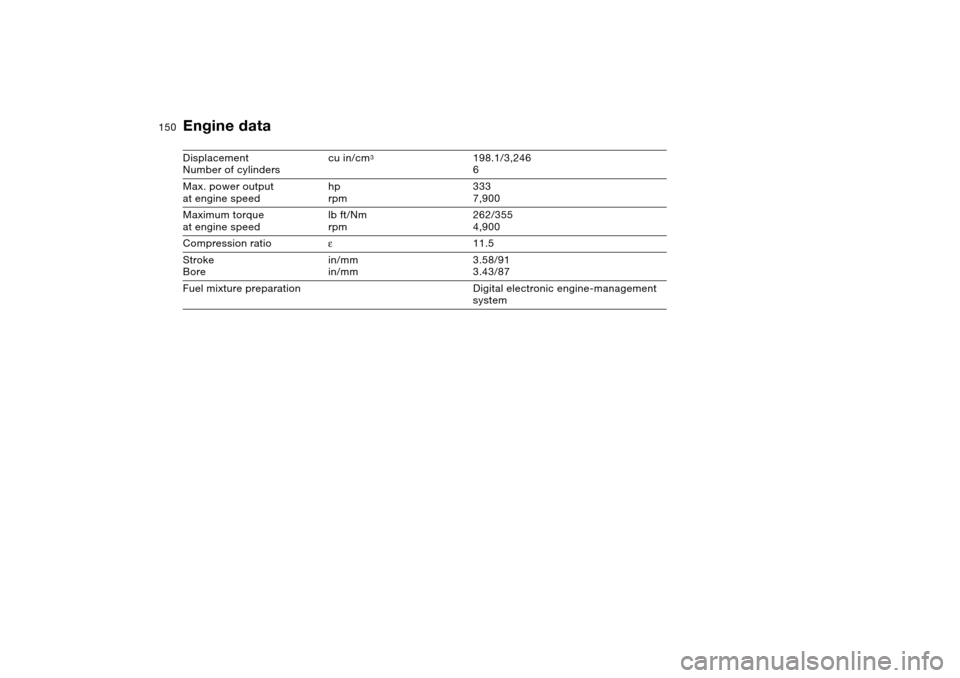
Engine dataDisplacement
Number of cylinderscu in/cm
3
198.1/3,246
6
Max. power output
at engine speedhp
rpm333
7,900
Maximum torque
at engine speedlb ft/Nm
rpm262/355
4,900
Compression ratioε11.5
Stroke
Borein/mm
in/mm3.58/91
3.43/87
Fuel mixture preparation Digital electronic engine-management
system
Page 153 of 170
153
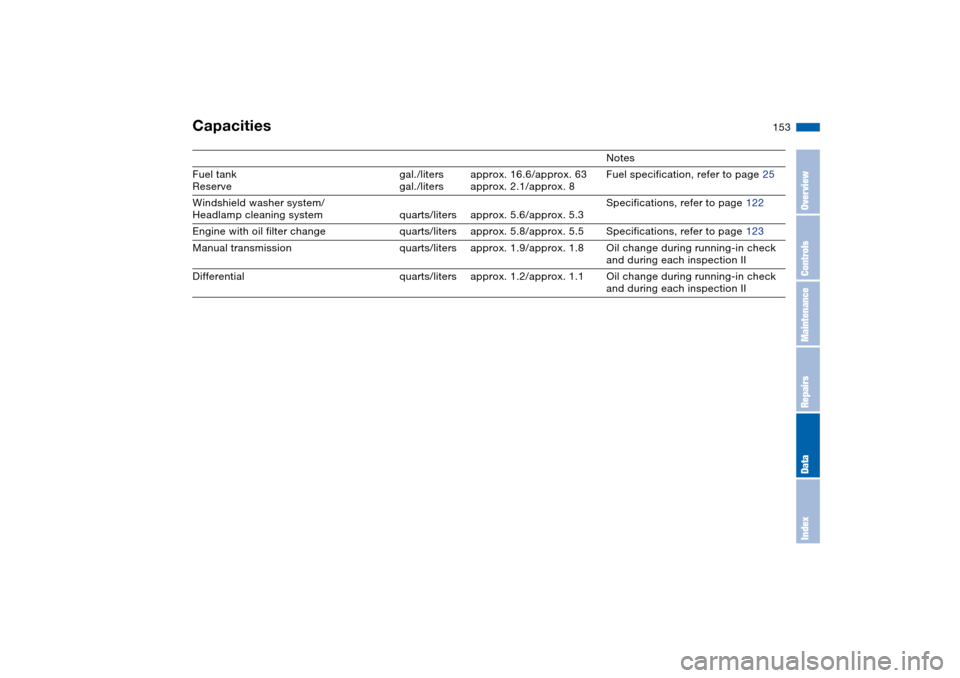
Capacities
Notes
Fuel tank
Reservegal./liters
gal./litersapprox. 16.6/approx. 63
approx. 2.1/approx. 8Fuel specification, refer to page 25
Windshield washer system/
Headlamp cleaning system quarts/liters approx. 5.6/approx. 5.3Specifications, refer to page 122
Engine with oil filter change quarts/liters approx. 5.8/approx. 5.5 Specifications, refer to page 123
Manual transmission quarts/liters approx. 1.9/approx. 1.8 Oil change during running-in check
and during each inspection II
Differential quarts/liters approx. 1.2/approx. 1.1 Oil change during running-in check
and during each inspection II
OverviewControlsMaintenanceRepairsDataIndex
Page 157 of 170
Everything from A to Z
157
Blower
automatic climate
control 94
BMW Maintenance
System 126
BMW sports seat 45
Bore, refer to Engine
data 150
Bottle holders, see Bever-
age holders 98, 99
Brake fluid 125
indicator lamp 18, 125
level 125
Brake force display 87
Brake hydraulic system 112
Brake lamps
bulb replacement 135
indicator lamp, defective
lamp 78
Brake lights
brake force display 87
Brake pads 113
brake fluid level
18, 112, 125
breaking in 110
disc brakes 112
Brake rotors
brake system 112
breaking in 110
Brake system
brake pads, indicator
lamp 19Brake wear warning
indicator lamp 19
Brakes
ABS 112
brake fluid 125
breaking in 110
indicator/warning lamp
18, 19
parking brake 65
Break-in procedures 110
Bulb replacement 133
Bulb replacement, refer to
Lamps and bulbs 133
Buttons in steering wheel 22
C
California Proposition
65 warning 128
Can holders, see Beverage
holders 98, 99
Capacities 153
Car battery 140
Car care, refer to the Caring
for your vehicle brochure
Car keys, refer to Keys 30
Car radio, refer to the
Owner's Manual for Radio
Car telephone
preparation 99
Car telephone, refer to the
separate Owner's ManualCar vacuum cleaner, con-
necting 100
Car wash, refer to the Caring
for your vehicle brochure
Caring for headlamp cov-
ers, refer to the Caring for
your vehicle brochure 133
Carpet care, refer to the
Caring for your vehicle
brochure
Cassette operation, refer to
the Owner's Manual for
Radio/Onboard Computer
CBC Cornering Brake Con-
trol 112
warning lamp 19
CD changer, refer to the
Owner's Manual for
Radio/Onboard Computer
CD operation, refer to the
Owner's Manual for
Radio/Onboard Computer
Cellular phone 99
Center high-mount brake
lamp
bulb replacement 136
Central locking system 30
button 34
passenger
compartment 34
Charge indicator lamp 18
Check Control 78Check Gas Cap
indicator lamp 19
Child seats, refer to Child-
restraint systems 56
Child-restraint systems 56
Cigarette lighter 100
Cigarette lighter socket 100
Cleaning chrome parts, refer
to the Caring for your vehi-
cle brochure
Cleaning light alloy wheels,
refer to the Caring for your
vehicle brochure
Cleaning the vehicle, refer to
the Caring for your vehicle
brochure
Cleaning windshield 74
Clock 79
12-/24-hour mode 79
setting, refer also to the
Owner's Manual for
Radio/Onboard Computer
Closing
from inside 34
from outside 31
Clothes hooks 101, 111
Clutch
breaking in 110
Cockpit 14
Code, refer to the Owner's
Manual for Radio/Onboard
Computer
OverviewControlsMaintenanceRepairsDataIndex
Page 158 of 170
Everything from A to ZCoin box 98
Cold start, refer to Starting
the engine 63
Compact disc operation,
refer to the Owner's Man-
ual for Radio/Onboard
Computer
Compartments 98
Compression ratio, refer to
Engine data 150
Computer 80
Condensation, refer to Air
conditioning mode 94
Configuring settings, refer to
Vehicle Memory, Key
Memory 60
Connecting a vacuum
cleaner, refer to Cigarette
lighter 100
Consumption, refer to Aver-
age fuel consumption 81
Control elements, refer to
Cockpit 14
Convenience operation
from outside 33
glass sunroof 32
windows 32
Coolant 124
indicator lamp 19, 77
level 124
temperature gauge 77Coolant water, refer to Cool-
ant 124
Cooling, refer to Tempera-
ture 94
Copyright 4
Cornering Brake Control
(CBC) 112
warning lamp 19
Correct tires 117
Cruise control 74
indicator lamp 20
Cup holders, see Beverage
holders 98, 99
Curb weight, refer to
Weights 152
Cylinders, refer to Engine
data 150
D
Dashboard, refer to
Cockpit 14
Data
capacities 153
dimensions 151
engine 150
weights 152
Daytime driving lamps 88
DBC Dynamic Brake
Control 112
warning lamp 19
Deep water, refer to Water
on roadways 111Defrost position, refer to
Defrosting windows 94
Defrosting and demisting
windows
automatic climate
control 94
Defrosting windows 94
Defrosting windshield, refer
to Defrosting windows 94
Demisting windows
automatic climate
control 94
Determining the maximum
load 104
Differential
breaking in 110
Digital clock 79
Dimensions 151
Dipstick, engine oil 122
Disc brakes 112
Displacement, refer to
Engine data 150
Display lighting, refer to
Instrument lighting 89
Displays, refer to Instrument
cluster 16
Disposal
oil 123
vehicle battery 140
Distance warning, refer to
Park Distance Control
(PDC) 82Divided rear backrest 102
Door key 30
Door lock 33
Doors
emergency operation 33
Draft-free ventilation 95
Drivelogic 70
Driving light, refer to Parking
lamps/Low beams 88
Driving notes 111
Dry air, refer to Air condi-
tioning mode 94
DSC Dynamic Stability Con-
trol 83
indicator lamp 19, 83
DTC Dynamic Traction Con-
trol
indicator lamp 19
Dynamic Brake Control
(DBC) 112
warning lamp 19
Dynamic Stability Control
(DSC) 19, 83
Dynamic Traction Control
(DTC)
indicator lamp 19
E
Easy entry, refer to Entering
the rear 47
Electric glass sunroof 41
Electric power windows 40