light BMW M3 COUPE 2004 E46 Service Manual
[x] Cancel search | Manufacturer: BMW, Model Year: 2004, Model line: M3 COUPE, Model: BMW M3 COUPE 2004 E46Pages: 170, PDF Size: 2.62 MB
Page 133 of 170
133
Lamps and bulbsThe lamps and bulbs make essential
contributions to the safety of your vehi-
cle. Therefore, proceed carefully when
handling bulbs. BMW recommends that
you have such work performed by your
BMW center if you are not familiar with
the procedures.
Do not touch the glass portion of
a new bulb with your bare hands
since even small amounts of impurities
burn in to the surface and reduce the
service life of the bulb. Use a clean
cloth, paper napkin, or a similar mate-
rial, or hold the bulb by its metallic
base.<
A replacement bulb set is available from
your BMW center.
Before working on the electrical
system, switch off the electrical
accessory you are working on or dis-
connect the cable from the negative
terminal of the battery. Failure to
observe this precaution could result in
short circuits.
To prevent injuries and damage when
changing a bulb, be sure to comply with
any instructions provided by the bulb
manufacturer.<
Low beams and high beams>Low beams: H7 bulb, 55 watts.
>High beams: H7 bulb, 55 watts.
The H7 bulb is pressurized. There-
fore, wear safety glasses and pro-
tective gloves. Failure to comply with
this precaution could lead to injury if the
bulb is damaged.<
Please contact a BMW center in case of
a malfunction.
When cleaning the headlamps, please
follow the instructions in the Caring for
your vehicle brochure.Parking lamps5 watt bulb
Please contact a BMW center in case of
a malfunction.Xenon lamps*The service life of these bulbs is very
long and the probability of a failure is
very low, provided that they are not
switched on and off an unusual number
of times. If one of these bulbs should
nevertheless fail, it is possible to con-
tinue driving with great caution using
the fog lamps, provided traffic laws in
your area do not prohibit this.
Because of the extremely high
voltages involved, any work on the
xenon lighting system, including bulb-
changing, should be carried out by
technically-qualified personnel only.
Otherwise, there is a risk of fatal
injury.<
OverviewControlsMaintenanceRepairsDataIndex
Page 134 of 170
134
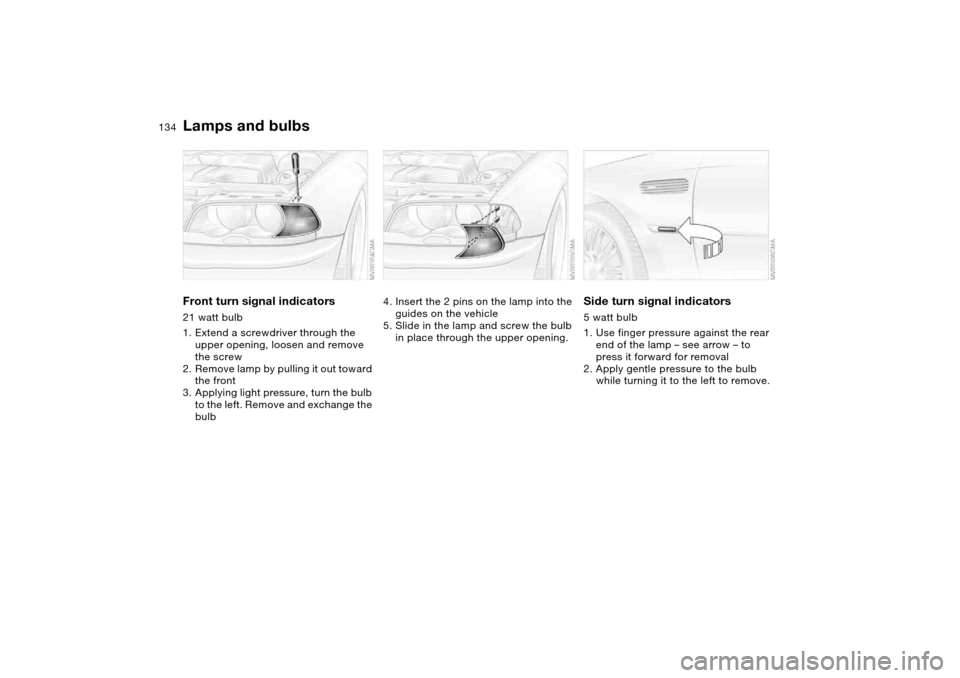
Front turn signal indicators21 watt bulb
1. Extend a screwdriver through the
upper opening, loosen and remove
the screw
2. Remove lamp by pulling it out toward
the front
3. Applying light pressure, turn the bulb
to the left. Remove and exchange the
bulb
4. Insert the 2 pins on the lamp into the
guides on the vehicle
5. Slide in the lamp and screw the bulb
in place through the upper opening.
Side turn signal indicators5 watt bulb
1. Use finger pressure against the rear
end of the lamp – see arrow – to
press it forward for removal
2. Apply gentle pressure to the bulb
while turning it to the left to remove.
Lamps and bulbs
Page 135 of 170
135
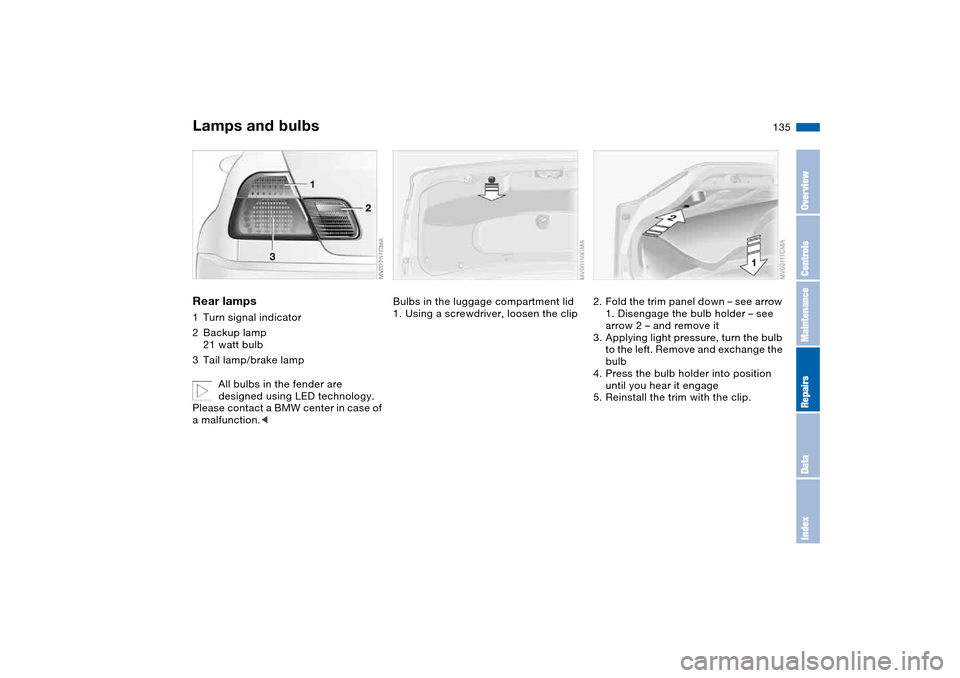
Rear lamps1Turn signal indicator
2Backup lamp
21 watt bulb
3Tail lamp/brake lamp
All bulbs in the fender are
designed using LED technology.
Please contact a BMW center in case of
a malfunction.<
Bulbs in the luggage compartment lid
1. Using a screwdriver, loosen the clip
2. Fold the trim panel down – see arrow
1. Disengage the bulb holder – see
arrow 2 – and remove it
3. Applying light pressure, turn the bulb
to the left. Remove and exchange the
bulb
4. Press the bulb holder into position
until you hear it engage
5. Reinstall the trim with the clip.
Lamps and bulbs
OverviewControlsMaintenanceRepairsDataIndex
Page 138 of 170
138
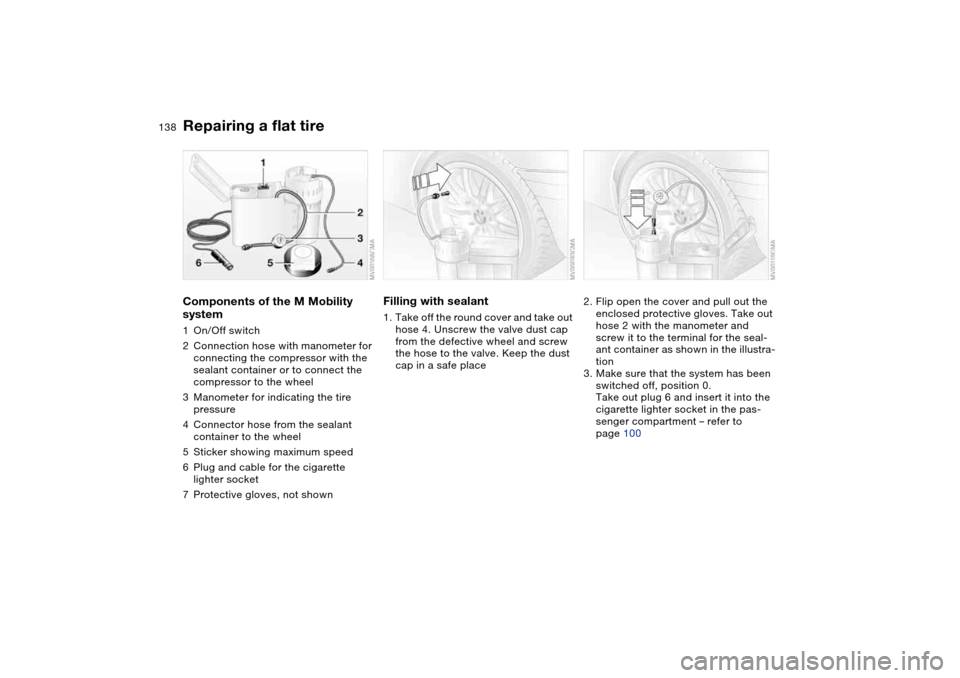
Components of the M Mobility
system1On/Off switch
2Connection hose with manometer for
connecting the compressor with the
sealant container or to connect the
compressor to the wheel
3Manometer for indicating the tire
pressure
4Connector hose from the sealant
container to the wheel
5Sticker showing maximum speed
6Plug and cable for the cigarette
lighter socket
7Protective gloves, not shown
Filling with sealant1. Take off the round cover and take out
hose 4. Unscrew the valve dust cap
from the defective wheel and screw
the hose to the valve. Keep the dust
cap in a safe place
2. Flip open the cover and pull out the
enclosed protective gloves. Take out
hose 2 with the manometer and
screw it to the terminal for the seal-
ant container as shown in the illustra-
tion
3. Make sure that the system has been
switched off, position 0.
Take out plug 6 and insert it into the
cigarette lighter socket in the pas-
senger compartment – refer to
page 100
Repairing a flat tire
Page 139 of 170
139
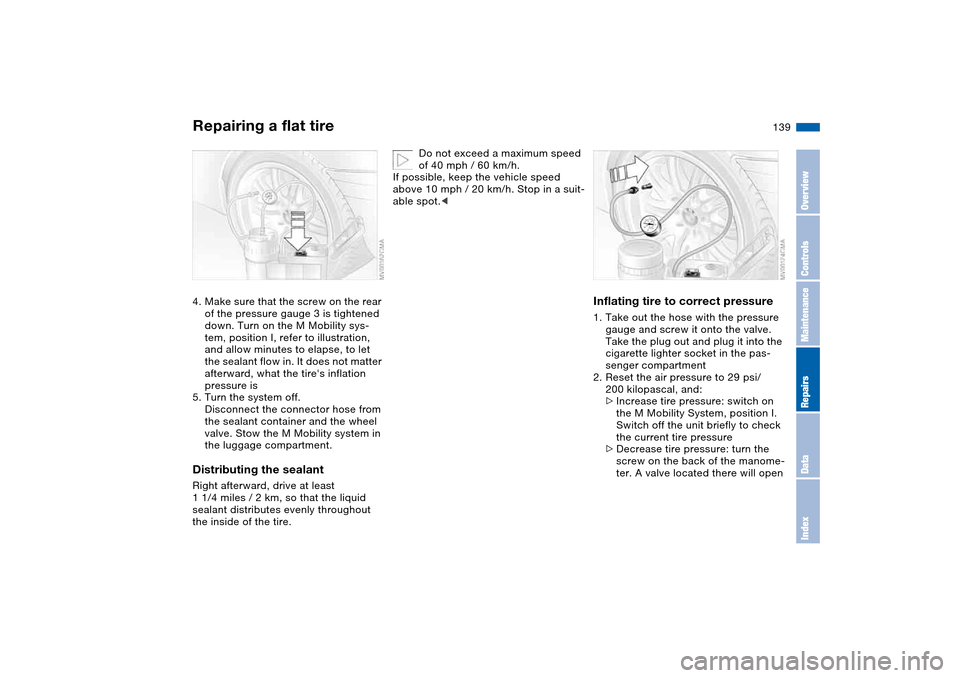
4. Make sure that the screw on the rear
of the pressure gauge 3 is tightened
down. Turn on the M Mobility sys-
tem, position I, refer to illustration,
and allow minutes to elapse, to let
the sealant flow in. It does not matter
afterward, what the tire's inflation
pressure is
5. Turn the system off.
Disconnect the connector hose from
the sealant container and the wheel
valve. Stow the M Mobility system in
the luggage compartment.Distributing the sealantRight afterward, drive at least
1 1/4 miles / 2 km, so that the liquid
sealant distributes evenly throughout
the inside of the tire.
Do not exceed a maximum speed
of 40 mph / 60 km/h.
If possible, keep the vehicle speed
above 10 mph / 20 km/h. Stop in a suit-
able spot.<
Inflating tire to correct pressure1. Take out the hose with the pressure
gauge and screw it onto the valve.
Take the plug out and plug it into the
cigarette lighter socket in the pas-
senger compartment
2. Reset the air pressure to 29 psi/
200 kilopascal, and:
>Increase tire pressure: switch on
the M Mobility System, position I.
Switch off the unit briefly to check
the current tire pressure
>Decrease tire pressure: turn the
screw on the back of the manome-
ter. A valve located there will open
Repairing a flat tire
OverviewControlsMaintenanceRepairsDataIndex
Page 142 of 170
142Giving and receiving assistance
Receiving assistanceThe BMW Group's Mobile Service
offers you 24-hour assistance in the
event of a breakdown, even on week-
ends and holidays.
The telephone numbers of the Mobile
Service control center in your country
are listed in the BMW Dealer Directory.
If your vehicle has the necessary equip-
ment, you can contact the Mobile Ser-
vice or issue an emergency call using
buttons in the interior rearview mirror.
When an emergency call is initiated, a
telephone connection is established
with the general emergency call center.
In vehicles with activated BMW Assist
function, a telephone connection is set
up to the BMW Assist emergency call
center. If the current location of your
vehicle can be determined, this location
is transmitted to the BMW Assist emer-
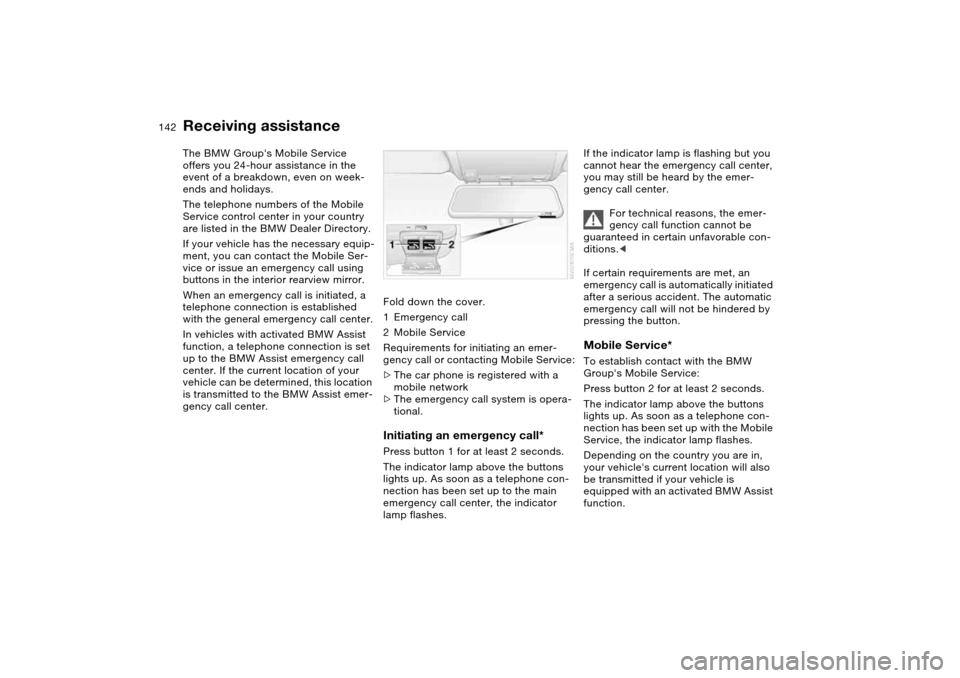
gency call center.Fold down the cover.
1Emergency call
2Mobile Service
Requirements for initiating an emer-
gency call or contacting Mobile Service:
>The car phone is registered with a
mobile network
>The emergency call system is opera-
tional.
Initiating an emergency call*Press button 1 for at least 2 seconds.
The indicator lamp above the buttons
lights up. As soon as a telephone con-
nection has been set up to the main
emergency call center, the indicator
lamp flashes.
If the indicator lamp is flashing but you
cannot hear the emergency call center,
you may still be heard by the emer-
gency call center.
For technical reasons, the emer-
gency call function cannot be
guaranteed in certain unfavorable con-
ditions.<
If certain requirements are met, an
emergency call is automatically initiated
after a serious accident. The automatic
emergency call will not be hindered by
pressing the button.Mobile Service*To establish contact with the BMW
Group's Mobile Service:
Press button 2 for at least 2 seconds.
The indicator lamp above the buttons
lights up. As soon as a telephone con-
nection has been set up with the Mobile
Service, the indicator lamp flashes.
Depending on the country you are in,
your vehicle's current location will also
be transmitted if your vehicle is
equipped with an activated BMW Assist
function.
Page 143 of 170
143
Jump-startingWhen your battery is discharged, you
can use two jumper cables to start your
vehicle with power from the battery in a
second vehicle. You can also use the
same method to help start another
vehicle. Use only jumper cables with
fully insulated handles on the terminal
clamps.
Do not touch high-voltage wiring
and cables on a running engine.
Contact with components carrying high
voltage can be harmful or fatal.
Carefully observe the following instruc-
tions to avoid personal injury and/or
damage to one or both vehicles.
approximately the same capacity –
measured in Ah. This information is
provided on the battery
2. Stop the engine of the support vehi-
cle
3. Switch off all electrical components
in both vehicles.
Make absolutely certain that there
is no contact between the body-
work of the two vehicles, otherwise
there is a short circuit hazard.<
Connecting the jumper cables
Always adhere to this sequence
when connecting jumper cables;
failure to observe this procedure can
lead to sparks at the battery terminals
and pose an injury hazard.<
The auxiliary jump-starting terminal
located in your BMW's engine compart-
ment acts as the positive battery termi-
nal. Refer to the engine compartment
overview on page 120. The cover of this
auxiliary terminal is marked with a +.
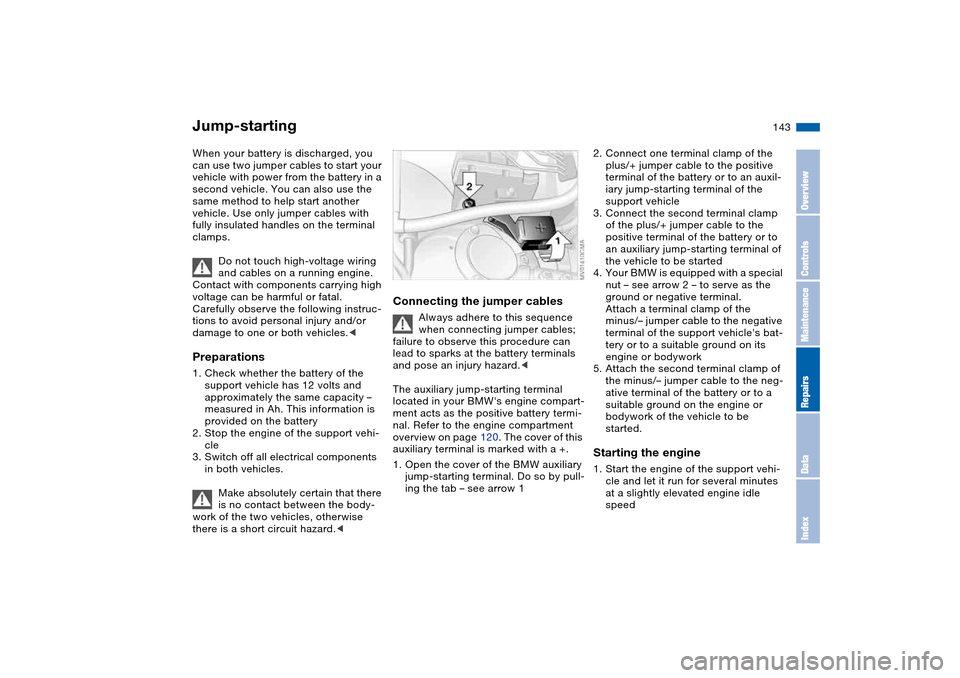
1. Open the cover of the BMW auxiliary
jump-starting terminal. Do so by pull-
ing the tab – see arrow 1
2. Connect one terminal clamp of the
plus/+ jumper cable to the positive
terminal of the battery or to an auxil-
iary jump-starting terminal of the
support vehicle
3. Connect the second terminal clamp
of the plus/+ jumper cable to the
positive terminal of the battery or to
an auxiliary jump-starting terminal of
the vehicle to be started
4. Your BMW is equipped with a special
nut – see arrow 2 – to serve as the
ground or negative terminal.
Attach a terminal clamp of the
minus/– jumper cable to the negative
terminal of the support vehicle's bat-
tery or to a suitable ground on its
engine or bodywork
5. Attach the second terminal clamp of
the minus/– jumper cable to the neg-
ative terminal of the battery or to a
suitable ground on the engine or
bodywork of the vehicle to be
started.Starting the engine1. Start the engine of the support vehi-
cle and let it run for several minutes
at a slightly elevated engine idle
speed
OverviewControlsMaintenanceRepairsDataIndex
Page 146 of 170
146
Keep the vehicles in line and avoid
towing at an offset angle. Ensure
that the towing strap connecting the
two vehicles is tight, with no slack,
before starting off.<
Use only a nylon towing strap to tow
the vehicle, since the inherent resil-
ience of this material helps protect both
vehicles from sudden jerking move-
ments.
The towed vehicle should always
be the lighter of the two vehicles.
If this is not the case, it will not be pos-
sible to control vehicle handling.<
Tow-startingFor instructions on jump-starting, refer
to page 143.
Never attempt to use your vehicle to
push another vehicle, since damage to
the energy-absorbing bumpers could
result.Towing the vehicle
Page 157 of 170
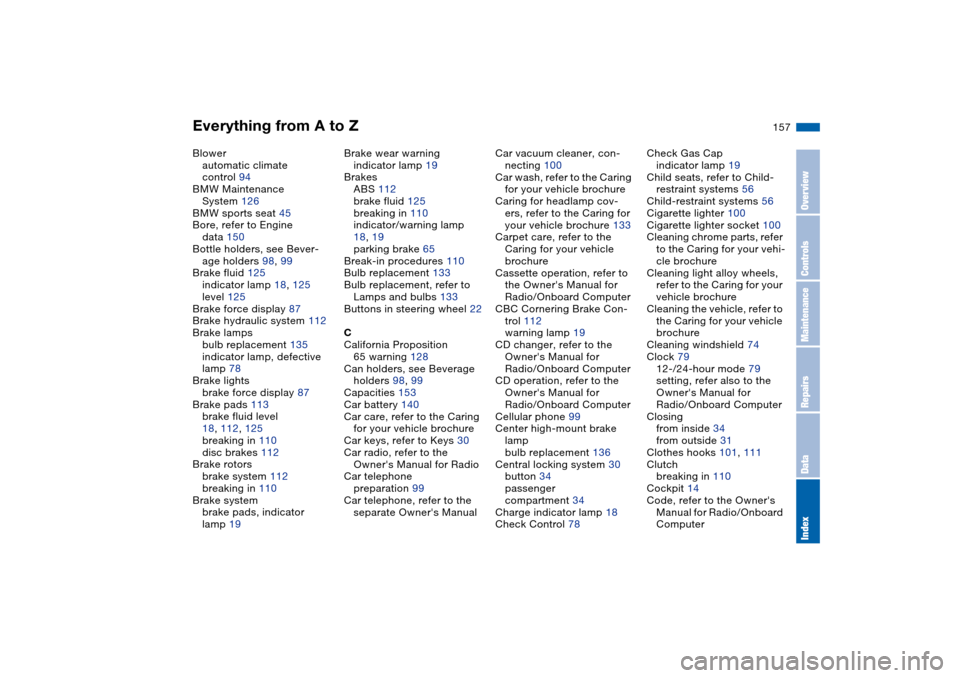
Everything from A to Z
157
Blower
automatic climate
control 94
BMW Maintenance
System 126
BMW sports seat 45
Bore, refer to Engine
data 150
Bottle holders, see Bever-
age holders 98, 99
Brake fluid 125
indicator lamp 18, 125
level 125
Brake force display 87
Brake hydraulic system 112
Brake lamps
bulb replacement 135
indicator lamp, defective
lamp 78
Brake lights
brake force display 87
Brake pads 113
brake fluid level
18, 112, 125
breaking in 110
disc brakes 112
Brake rotors
brake system 112
breaking in 110
Brake system
brake pads, indicator
lamp 19Brake wear warning
indicator lamp 19
Brakes
ABS 112
brake fluid 125
breaking in 110
indicator/warning lamp
18, 19
parking brake 65
Break-in procedures 110
Bulb replacement 133
Bulb replacement, refer to
Lamps and bulbs 133
Buttons in steering wheel 22
C
California Proposition
65 warning 128
Can holders, see Beverage
holders 98, 99
Capacities 153
Car battery 140
Car care, refer to the Caring
for your vehicle brochure
Car keys, refer to Keys 30
Car radio, refer to the
Owner's Manual for Radio
Car telephone
preparation 99
Car telephone, refer to the
separate Owner's ManualCar vacuum cleaner, con-
necting 100
Car wash, refer to the Caring
for your vehicle brochure
Caring for headlamp cov-
ers, refer to the Caring for
your vehicle brochure 133
Carpet care, refer to the
Caring for your vehicle
brochure
Cassette operation, refer to
the Owner's Manual for
Radio/Onboard Computer
CBC Cornering Brake Con-
trol 112
warning lamp 19
CD changer, refer to the
Owner's Manual for
Radio/Onboard Computer
CD operation, refer to the
Owner's Manual for
Radio/Onboard Computer
Cellular phone 99
Center high-mount brake
lamp
bulb replacement 136
Central locking system 30
button 34
passenger
compartment 34
Charge indicator lamp 18
Check Control 78Check Gas Cap
indicator lamp 19
Child seats, refer to Child-
restraint systems 56
Child-restraint systems 56
Cigarette lighter 100
Cigarette lighter socket 100
Cleaning chrome parts, refer
to the Caring for your vehi-
cle brochure
Cleaning light alloy wheels,
refer to the Caring for your
vehicle brochure
Cleaning the vehicle, refer to
the Caring for your vehicle
brochure
Cleaning windshield 74
Clock 79
12-/24-hour mode 79
setting, refer also to the
Owner's Manual for
Radio/Onboard Computer
Closing
from inside 34
from outside 31
Clothes hooks 101, 111
Clutch
breaking in 110
Cockpit 14
Code, refer to the Owner's
Manual for Radio/Onboard
Computer
OverviewControlsMaintenanceRepairsDataIndex
Page 158 of 170
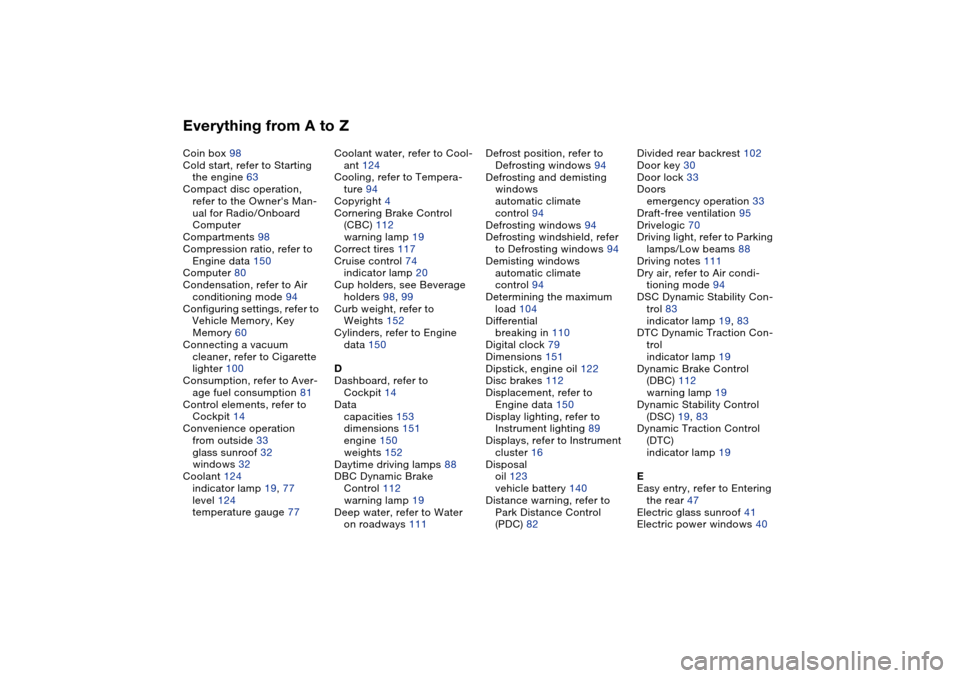
Everything from A to ZCoin box 98
Cold start, refer to Starting
the engine 63
Compact disc operation,
refer to the Owner's Man-
ual for Radio/Onboard
Computer
Compartments 98
Compression ratio, refer to
Engine data 150
Computer 80
Condensation, refer to Air
conditioning mode 94
Configuring settings, refer to
Vehicle Memory, Key
Memory 60
Connecting a vacuum
cleaner, refer to Cigarette
lighter 100
Consumption, refer to Aver-
age fuel consumption 81
Control elements, refer to
Cockpit 14
Convenience operation
from outside 33
glass sunroof 32
windows 32
Coolant 124
indicator lamp 19, 77
level 124
temperature gauge 77Coolant water, refer to Cool-
ant 124
Cooling, refer to Tempera-
ture 94
Copyright 4
Cornering Brake Control
(CBC) 112
warning lamp 19
Correct tires 117
Cruise control 74
indicator lamp 20
Cup holders, see Beverage
holders 98, 99
Curb weight, refer to
Weights 152
Cylinders, refer to Engine
data 150
D
Dashboard, refer to
Cockpit 14
Data
capacities 153
dimensions 151
engine 150
weights 152
Daytime driving lamps 88
DBC Dynamic Brake
Control 112
warning lamp 19
Deep water, refer to Water
on roadways 111Defrost position, refer to
Defrosting windows 94
Defrosting and demisting
windows
automatic climate
control 94
Defrosting windows 94
Defrosting windshield, refer
to Defrosting windows 94
Demisting windows
automatic climate
control 94
Determining the maximum
load 104
Differential
breaking in 110
Digital clock 79
Dimensions 151
Dipstick, engine oil 122
Disc brakes 112
Displacement, refer to
Engine data 150
Display lighting, refer to
Instrument lighting 89
Displays, refer to Instrument
cluster 16
Disposal
oil 123
vehicle battery 140
Distance warning, refer to
Park Distance Control
(PDC) 82Divided rear backrest 102
Door key 30
Door lock 33
Doors
emergency operation 33
Draft-free ventilation 95
Drivelogic 70
Driving light, refer to Parking
lamps/Low beams 88
Driving notes 111
Dry air, refer to Air condi-
tioning mode 94
DSC Dynamic Stability Con-
trol 83
indicator lamp 19, 83
DTC Dynamic Traction Con-
trol
indicator lamp 19
Dynamic Brake Control
(DBC) 112
warning lamp 19
Dynamic Stability Control
(DSC) 19, 83
Dynamic Traction Control
(DTC)
indicator lamp 19
E
Easy entry, refer to Entering
the rear 47
Electric glass sunroof 41
Electric power windows 40