stop start BMW M3 COUPE 2006 E46 Owner's Manual
[x] Cancel search | Manufacturer: BMW, Model Year: 2006, Model line: M3 COUPE, Model: BMW M3 COUPE 2006 E46Pages: 170, PDF Size: 2.63 MB
Page 18 of 170
18
Indicator and warning lamps
Technology that monitors itself
Indicator and warning lamps that are
identified by
●
are tested for proper
functioning whenever the ignition key is
turned. They each light up once for dif-
ferent periods of time.
If a fault should occur in one of these
systems, the corresponding lamp does
not go out after the engine is started, or
it lights up while the vehicle is moving.
You will see how to react to this below.
Red: stop immediately
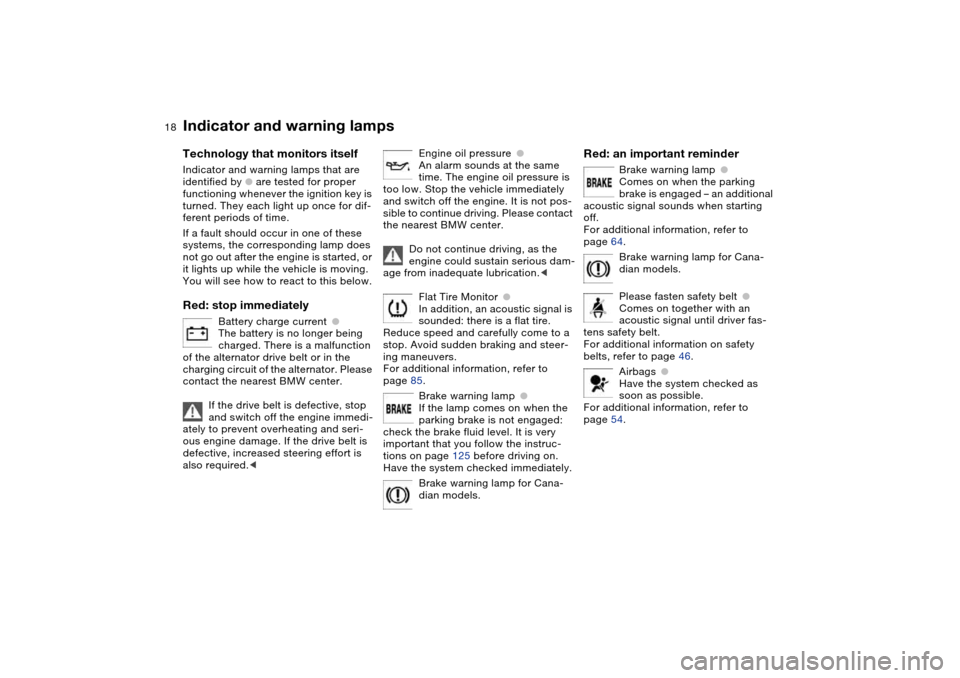
Battery charge current
●
The battery is no longer being
charged. There is a malfunction
of the alternator drive belt or in the
charging circuit of the alternator. Please
contact the nearest BMW center.
If the drive belt is defective, stop
and switch off the engine immedi-
ately to prevent overheating and seri-
ous engine damage. If the drive belt is
defective, increased steering effort is
also required.
<
Engine oil pressure
●
An alarm sounds at the same
time. The engine oil pressure is
too low. Stop the vehicle immediately
and switch off the engine. It is not pos-
sible to continue driving. Please contact
the nearest BMW center.
Do not continue driving, as the
engine could sustain serious dam-
age from inadequate lubrication.
<
Flat Tire Monitor
●
In addition, an acoustic signal is
sounded: there is a flat tire.
Reduce speed and carefully come to a
stop. Avoid sudden braking and steer-
ing maneuvers.
For additional information, refer to
page 85.
Brake warning lamp
●
If the lamp comes on when the
parking brake is not engaged:
check the brake fluid level. It is very
important that you follow the instruc-
tions on page 125 before driving on.
Have the system checked immediately.
Brake warning lamp for Cana-
dian models.
Red: an important reminder
Brake warning lamp
●
Comes on when the parking
brake is engaged – an additional
acoustic signal sounds when starting
off.
For additional information, refer to
page 64.
Brake warning lamp for Cana-
dian models.
Please fasten safety belt
●
Comes on together with an
acoustic signal until driver fas-
tens safety belt.
For additional information on safety
belts, refer to page 46.
Airbags
●
Have the system checked as
soon as possible.
For additional information, refer to
page 54.
Page 19 of 170
19
Red and yellow: continue driving
cautiously
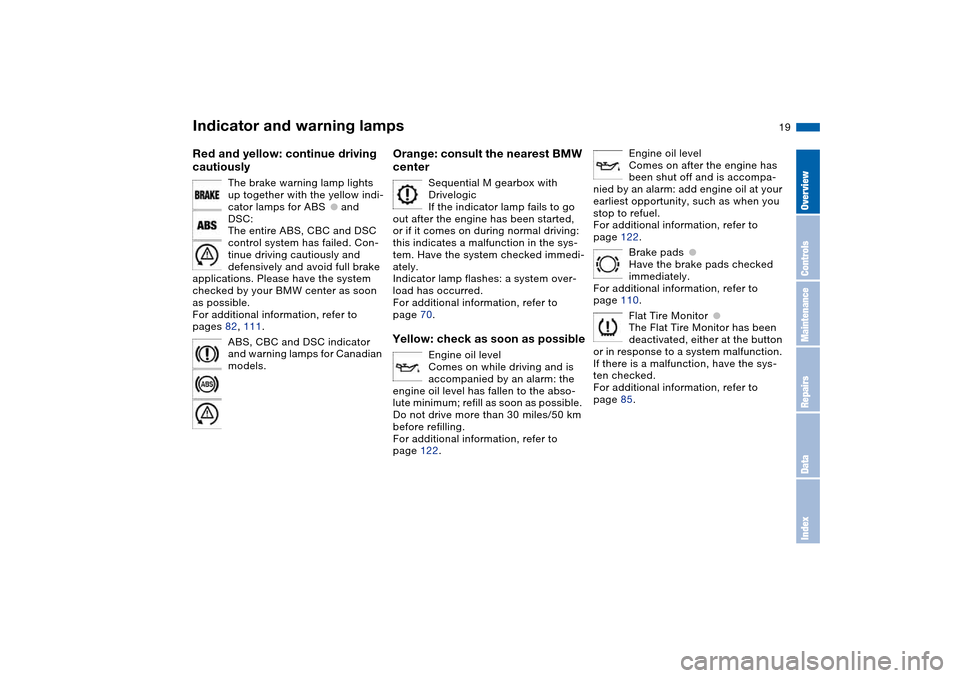
The brake warning lamp lights
up together with the yellow indi-
cator lamps for ABS
●
and
DSC:
The entire ABS, CBC and DSC
control system has failed. Con-
tinue driving cautiously and
defensively and avoid full brake
applications. Please have the system
checked by your BMW center as soon
as possible.
For additional information, refer to
pages 82, 111.
ABS, CBC and DSC indicator
and warning lamps for Canadian
models.
Orange: consult the nearest BMW
center
Sequential M gearbox with
Drivelogic
If the indicator lamp fails to go
out after the engine has been started,
or if it comes on during normal driving:
this indicates a malfunction in the sys-
tem. Have the system checked immedi-
ately.
Indicator lamp flashes: a system over-
load has occurred.
For additional information, refer to
page 70.
Yellow: check as soon as possible
Engine oil level
Comes on while driving and is
accompanied by an alarm: the
engine oil level has fallen to the abso-
lute minimum; refill as soon as possible.
Do not drive more than 30 miles/50 km
before refilling.
For additional information, refer to
page 122.
Engine oil level
Comes on after the engine has
been shut off and is accompa-
nied by an alarm: add engine oil at your
earliest opportunity, such as when you
stop to refuel.
For additional information, refer to
page 122.
Brake pads
●
Have the brake pads checked
immediately.
For additional information, refer to
page 110.
Flat Tire Monitor
●
The Flat Tire Monitor has been
deactivated, either at the button
or in response to a system malfunction.
If there is a malfunction, have the sys-
ten checked.
For additional information, refer to
page 85.
Indicator and warning lamps
OverviewControlsMaintenanceRepairsDataIndex
Page 22 of 170
22
Buttons* in steering wheel
These buttons let you operate the fol-
lowing functions quickly and without
being distracted from traffic conditions:
>
Selected radio functions
*
>
The cruise control
*
>
Selected telephone functions
*
>
The voice command system*
>M Track mode*, part of Dynamic Sta-
bility Control DSC.
The controls are active only when
the corresponding systems and
accessories are switched on.<
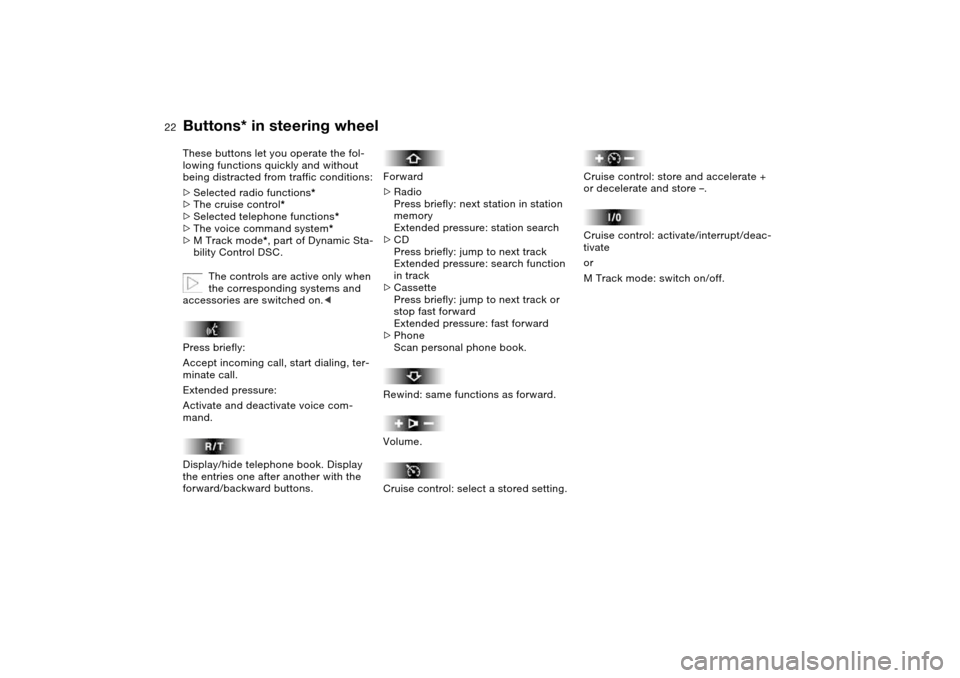
Press briefly:
Accept incoming call, start dialing, ter-
minate call.
Extended pressure:
Activate and deactivate voice com-
mand.
Display/hide telephone book. Display
the entries one after another with the
forward/backward buttons.
Forward
>Radio
Press briefly: next station in station
memory
Extended pressure: station search
>CD
Press briefly: jump to next track
Extended pressure: search function
in track
>Cassette
Press briefly: jump to next track or
stop fast forward
Extended pressure: fast forward
>Phone
Scan personal phone book.
Rewind: same functions as forward.
Volume.
Cruise control: select a stored setting.
Cruise control: store and accelerate +
or decelerate and store –.
Cruise control: activate/interrupt/deac-
tivate
or
M Track mode: switch on/off.
Page 67 of 170
67
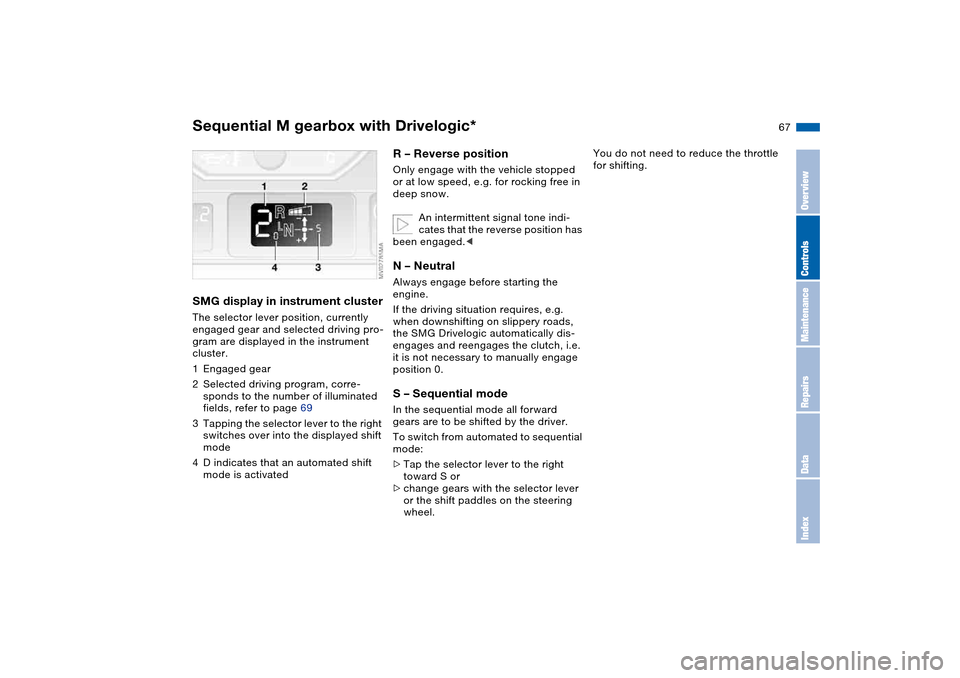
SMG display in instrument clusterThe selector lever position, currently
engaged gear and selected driving pro-
gram are displayed in the instrument
cluster.
1Engaged gear
2Selected driving program, corre-
sponds to the number of illuminated
fields, refer to page 69
3Tapping the selector lever to the right
switches over into the displayed shift
mode
4D indicates that an automated shift
mode is activated
R – Reverse position Only engage with the vehicle stopped
or at low speed, e.g. for rocking free in
deep snow.
An intermittent signal tone indi-
cates that the reverse position has
been engaged.
If the driving situation requires, e.g.
when downshifting on slippery roads,
the SMG Drivelogic automatically dis-
engages and reengages the clutch, i.e.
it is not necessary to manually engage
position 0.S – Sequential modeIn the sequential mode all forward
gears are to be shifted by the driver.
To switch from automated to sequential
mode:
>Tap the selector lever to the right
toward S or
>change gears with the selector lever
or the shift paddles on the steering
wheel.
You do not need to reduce the throttle
for shifting.
Sequential M gearbox with Drivelogic*
OverviewControlsMaintenanceRepairsDataIndex
Page 68 of 170
68
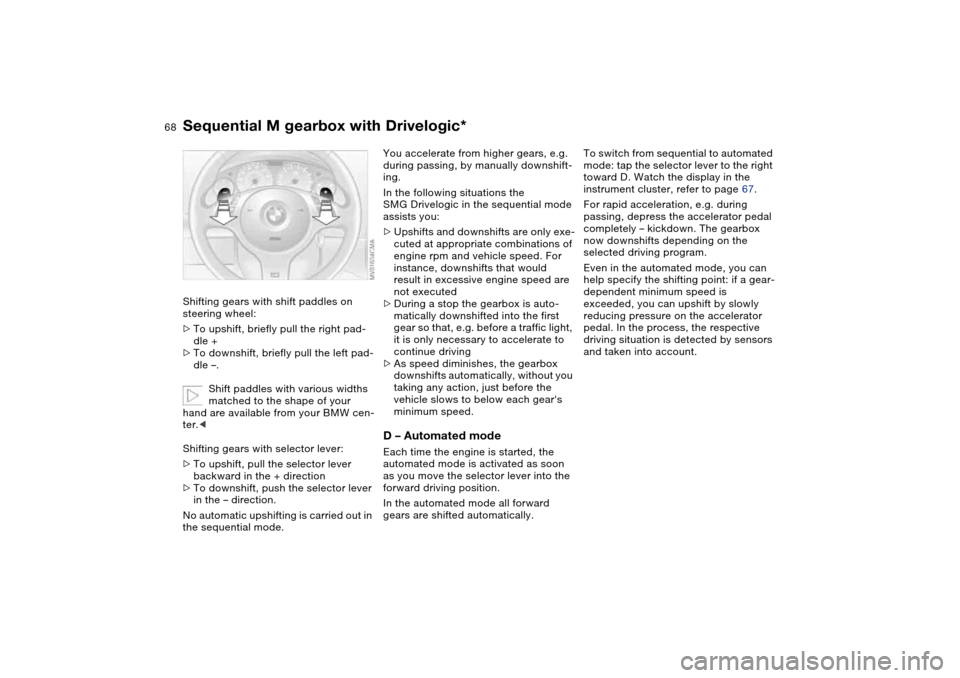
Shifting gears with shift paddles on
steering wheel:
>To upshift, briefly pull the right pad-
dle +
>To downshift, briefly pull the left pad-
dle –.
Shift paddles with various widths
matched to the shape of your
hand are available from your BMW cen-
ter.<
Shifting gears with selector lever:
>To upshift, pull the selector lever
backward in the + direction
>To downshift, push the selector lever
in the – direction.
No automatic upshifting is carried out in
the sequential mode.
You accelerate from higher gears, e.g.
during passing, by manually downshift-
ing.
In the following situations the
SMG Drivelogic in the sequential mode
assists you:
>Upshifts and downshifts are only exe-
cuted at appropriate combinations of
engine rpm and vehicle speed. For
instance, downshifts that would
result in excessive engine speed are
not executed
>During a stop the gearbox is auto-
matically downshifted into the first
gear so that, e.g. before a traffic light,
it is only necessary to accelerate to
continue driving
>As speed diminishes, the gearbox
downshifts automatically, without you
taking any action, just before the
vehicle slows to below each gear's
minimum speed.D – Automated modeEach time the engine is started, the
automated mode is activated as soon
as you move the selector lever into the
forward driving position.
In the automated mode all forward
gears are shifted automatically.To switch from sequential to automated
mode: tap the selector lever to the right
toward D. Watch the display in the
instrument cluster, refer to page 67.
For rapid acceleration, e.g. during
passing, depress the accelerator pedal
completely – kickdown. The gearbox
now downshifts depending on the
selected driving program.
Even in the automated mode, you can
help specify the shifting point: if a gear-
dependent minimum speed is
exceeded, you can upshift by slowly
reducing pressure on the accelerator
pedal. In the process, the respective
driving situation is detected by sensors
and taken into account.
Sequential M gearbox with Drivelogic*
Page 69 of 170
69
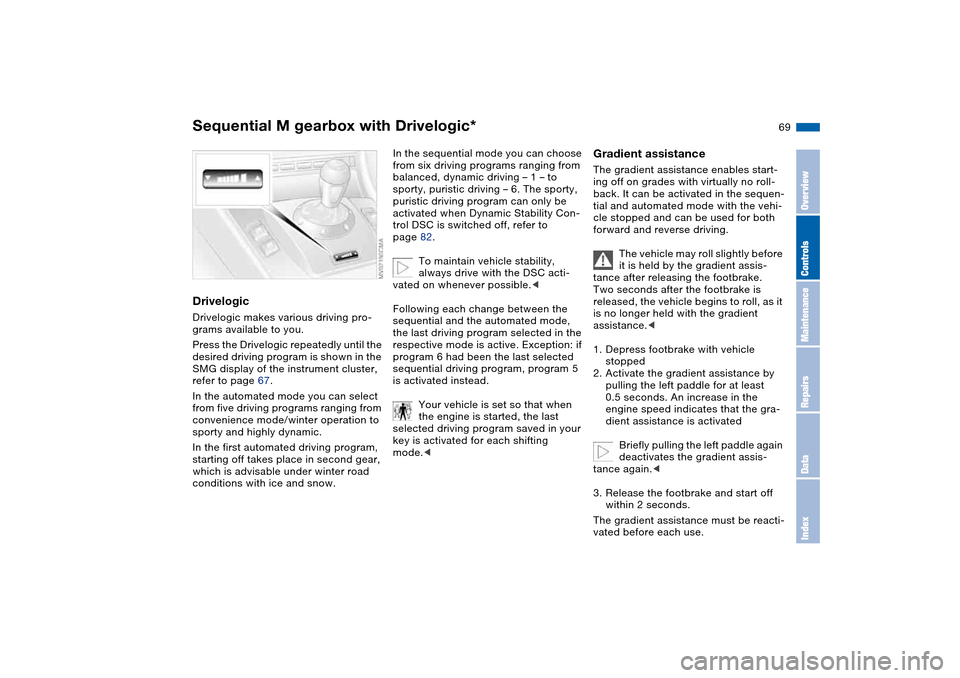
DrivelogicDrivelogic makes various driving pro-
grams available to you.
Press the Drivelogic repeatedly until the
desired driving program is shown in the
SMG display of the instrument cluster,
refer to page 67.
In the automated mode you can select
from five driving programs ranging from
convenience mode/winter operation to
sporty and highly dynamic.
In the first automated driving program,
starting off takes place in second gear,
which is advisable under winter road
conditions with ice and snow.
In the sequential mode you can choose
from six driving programs ranging from
balanced, dynamic driving – 1 – to
sporty, puristic driving – 6. The sporty,
puristic driving program can only be
activated when Dynamic Stability Con-
trol DSC is switched off, refer to
page 82.
To maintain vehicle stability,
always drive with the DSC acti-
vated on whenever possible.<
Following each change between the
sequential and the automated mode,
the last driving program selected in the
respective mode is active. Exception: if
program 6 had been the last selected
sequential driving program, program 5
is activated instead.
Your vehicle is set so that when
the engine is started, the last
selected driving program saved in your
key is activated for each shifting
mode.<
Gradient assistanceThe gradient assistance enables start-
ing off on grades with virtually no roll-
back. It can be activated in the sequen-
tial and automated mode with the vehi-
cle stopped and can be used for both
forward and reverse driving.
The vehicle may roll slightly before
it is held by the gradient assis-
tance after releasing the footbrake.
Two seconds after the footbrake is
released, the vehicle begins to roll, as it
is no longer held with the gradient
assistance.<
1. Depress footbrake with vehicle
stopped
2. Activate the gradient assistance by
pulling the left paddle for at least
0.5 seconds. An increase in the
engine speed indicates that the gra-
dient assistance is activated
Briefly pulling the left paddle again
deactivates the gradient assis-
tance again.<
3. Release the footbrake and start off
within 2 seconds.
The gradient assistance must be reacti-
vated before each use.
Sequential M gearbox with Drivelogic*
OverviewControlsMaintenanceRepairsDataIndex
Page 85 of 170
85
Flat tire
The indicator lamp in the instru-
ment cluster lights up red. In
addition, an acoustic signal is
sounded.
1. Carefully reduce speed and come to
a stop. Avoid sudden braking and
steering maneuvers
2. Determine which wheel is damaged
If this cannot be determined, con-
tact your BMW center.<
3. Fix the flat tire using the M Mobility
system, refer to page 137
4. Press the button for approx.
4 seconds. The red indicator lamp
goes out.
After replacing the damaged tire, initial-
ize the system.
System malfunction
The indicator lamp in the instru-
ment cluster lights up yellow.
The Flat Tire Monitor is malfunc-
tioning or out of order. Please contact
your BMW center for additional infor-
mation.
M Engine dynamics controlThe system – Sport mode – will cause
the engine to respond more spontane-
ously to any motion of the accelerator
pedal.Activating/deactivating Sport
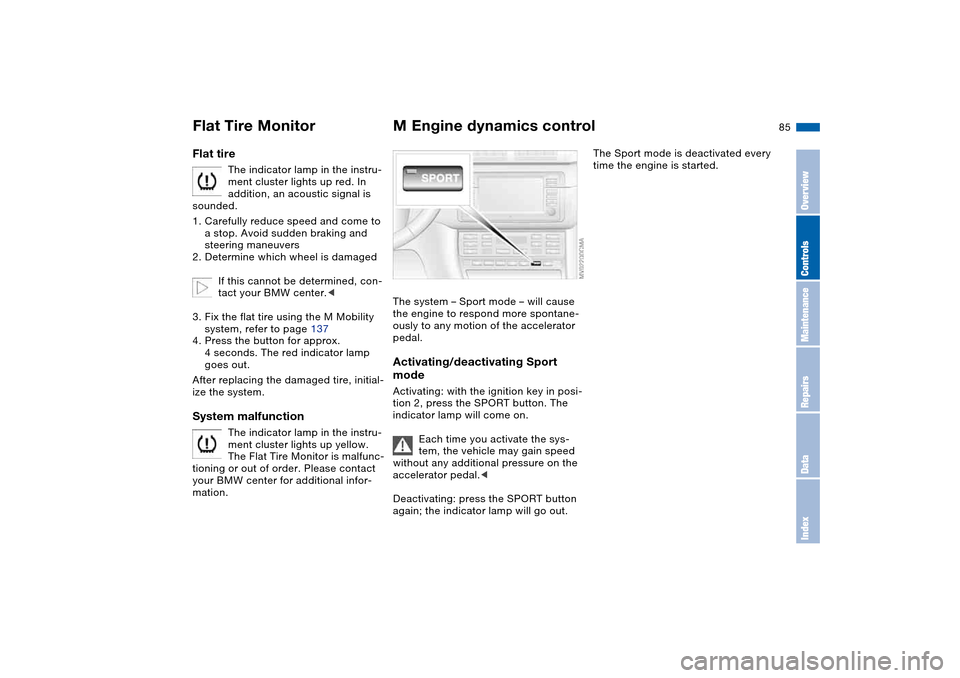
modeActivating: with the ignition key in posi-
tion 2, press the SPORT button. The
indicator lamp will come on.
Each time you activate the sys-
tem, the vehicle may gain speed
without any additional pressure on the
accelerator pedal.<
Deactivating: press the SPORT button
again; the indicator lamp will go out.
The Sport mode is deactivated every
time the engine is started.
Flat Tire Monitor
OverviewControlsMaintenanceRepairsDataIndex
Page 92 of 170
92
Tips for pleasant drivingUse the automatic mode – switch on
with AUTO button 6. Select the desired
interior temperature.
Detailed setting options are described
for you in the following sections.
You can make the settings of your
vehicle in such a manner that,
when you unlock the vehicle with the
remote control of your personal key,
your own personalized setting for the
automatic climate control is initiated.
air supply and the air distribu-
tion to the windshield and the side win-
dows, towards the upper body and to
the footwells, and in addition adapts
the temperature to external influences:
summer, winter.
The cooling function is automatically
switched on when you are using the
AUTO program.
Individual air distribution
You can cancel the AUTO pro-
gram by selecting specific dis-
tribution patterns to suit your
own individual requirements.
While the AUTO program is then deacti-
vated, the automatic airflow control
remains in operation. Air flows onto
the windows , toward the upper
body , and into the footwell . You
can reactivate the automatic air supply
by pressing the AUTO button.Temperature
The interior temperature that
appears in the display panel is a
general figure intended for refer-
ence purposes. We recommend 727/
+226 as a comfortable setting, even if
the air conditioning is on. When you
start the vehicle, the system ensures
that the selected temperature is
reached as quickly as possible. It then
maintains this temperature, regardless
of the season.
To select the units of measure 7/6 of
the display, refer to page 79.
Air supply/Blower
By pressing the upper or lower
button, you can vary the air sup-
ply. This deactivates the auto-
matic air supply – the AUTO display dis-
appears from the panel. Nevertheless,
the automatic air distribution remains
unchanged. You can reactivate the
automatic air supply by pressing the
AUTO button.
When the lowest blower speed is set
and you press the lower button, all of
the displays are canceled: the blower,
heating and air conditioner are
switched off, and the air supply is
stopped. You can reactivate the system
by pressing any button for the auto-
matic climate control.To defrost windows and remove
condensation
This program quickly removes
ice and condensation from the
windshield and the side windows.
Air conditioning
The air is cooled and dehumidi-
fied and – depending on the
temperature setting – rewarmed.
Depending on the weather, the wind-
shield may fog over briefly when the
engine is started. Air conditioning helps
prevent the windows from fogging up.
The cooling function is automatically
switched on when you are using the
AUTO program.
Automatic climate control
Page 93 of 170
93
Condensation forms during opera-
tion of the air conditioning system,
which then exits under the vehicle.
Traces of condensed water of this kind
are thus normal.<
Outside air/Automatic
recirculated-air control (AUC)/
Recirculated air
You can respond to unpleasant
external odors or pollutants by
temporarily stopping the flow of outside
air. The system then recirculates the air
currently within the vehicle.
By repeatedly pressing the button, you
can select one of three different operat-
ing modes.
>Indicator lamps off: outside air always
flowing into the vehicle
>Left-hand indicator lamp on – auto-
matic mode: the system detects pol-
lutants in the outside air and
responds by deactivating the outside
airflow as required. The system then
recirculates the air currently within
the vehicle.
Depending on air quality require-
ments, the system automatically
switches between outside air supply
and recirculation of the air already
within the vehicle
>Right-hand indicator lamp on: the
flow of outside air is permanently
blocked. The system recirculates the
air already within the vehicle.
If the windows fog over in the
recirculated-air mode, switch the
recirculated-air mode off and increase
the air supply as required.
is activated, the indicator lamp
comes on. The rear window defroster
switches off automatically after a short
while.
You can have your vehicle pro-
grammed in such a way that the
rear window defroster switches on
automatically. This occurs within 5 min-
utes after starting the engine when out-
side temperatures are below approx.
397/+46.<
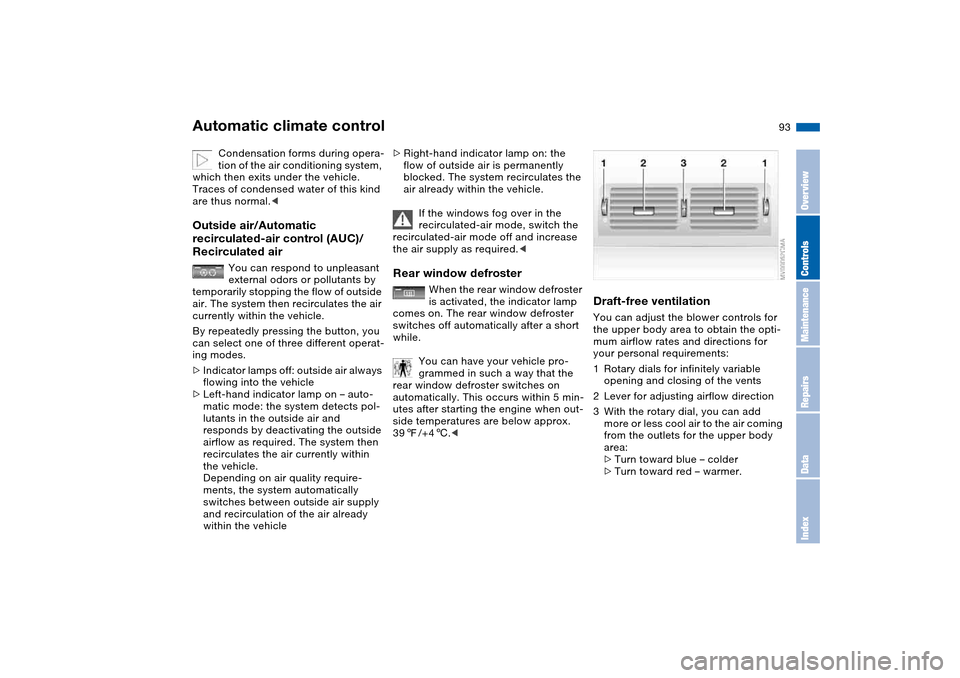
Draft-free ventilationYou can adjust the blower controls for
the upper body area to obtain the opti-
mum airflow rates and directions for
your personal requirements:
1Rotary dials for infinitely variable
opening and closing of the vents
2Lever for adjusting airflow direction
3With the rotary dial, you can add
more or less cool air to the air coming
from the outlets for the upper body
area:
>Turn toward blue – colder
>Turn toward red – warmer.
Automatic climate control
OverviewControlsMaintenanceRepairsDataIndex
Page 143 of 170
143
Mobile Service*To establish contact with the BMW
Group's Mobile Service:
Press button 2 for at least 2 seconds.
The indicator lamp above the buttons
lights up. As soon as a telephone con-
nection has been set up with the Mobile
Service, the indicator lamp flashes.
Depending on the country you are in,
your vehicle's current location will also
be transmitted if your vehicle is
equipped with an activated BMW Assist
function.
Jump-startingWhen your battery is discharged, you
can use two jumper cables to start your
vehicle with power from the battery in a
second vehicle. You can also use the
same method to help start another
vehicle. Use only jumper cables with
fully insulated handles on the terminal
clamps.
Do not touch high-voltage wiring
and cables on a running engine.
Contact with components carrying high
voltage can be harmful or fatal.
Carefully observe the following instruc-
tions to avoid personal injury and/or
damage to one or both vehicles.
approximately the same capacity –
measured in Ah. This information is
provided on the battery
2. Stop the engine of the support vehi-
cle
3. Switch off all consumers in both
vehicles.
Make absolutely certain that there
is no contact between the body-
work of the two vehicles, otherwise
there is a short circuit hazard.<
Connecting the jumper cables
Be sure to connect the jumper
cables in the right order; other-
wise there is a risk of injury due to
sparks being created near the battery.<
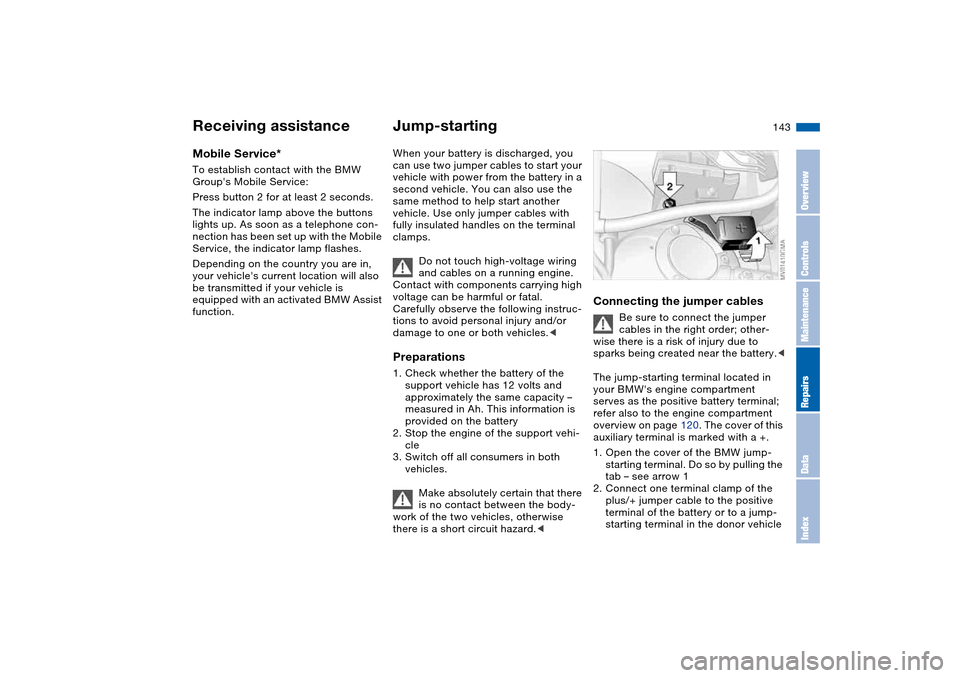
The jump-starting terminal located in
your BMW's engine compartment
serves as the positive battery terminal;
refer also to the engine compartment
overview on page 120. The cover of this
auxiliary terminal is marked with a +.
1. Open the cover of the BMW jump-
starting terminal. Do so by pulling the
tab – see arrow 1
2. Connect one terminal clamp of the
plus/+ jumper cable to the positive
terminal of the battery or to a jump-
starting terminal in the donor vehicle
Receiving assistance
OverviewControlsMaintenanceRepairsDataIndex