Unlock button BMW M3 COUPE 2011 E92 User Guide
[x] Cancel search | Manufacturer: BMW, Model Year: 2011, Model line: M3 COUPE, Model: BMW M3 COUPE 2011 E92Pages: 278, PDF Size: 8.18 MB
Page 52 of 278
Adjustments
50
Pinch protection system
If the belt hand-over encounters resistance on
moving in or out, it moves back slightly in the
opposite direction and stops in this position. To
reactivate the belt hand-over: open and close
the door or switch the ignition off and on.
Although there is a pinch protection sys-
tem, always check that the maneuvering
area of the belt hand-over is clear. Otherwise it
cannot be ensured that the system will stop
moving in certain extreme situations.<
Mirrors
Exterior mirrors
The front passenger's mirror is more con-
vex than the driver's mirror. The objects
seen in the mirror are closer than they appear.
Do not gauge your distance from traffic behind
you on the basis of what you see in the mirror;
otherwise, there is an increased risk of an acci-
dent.<
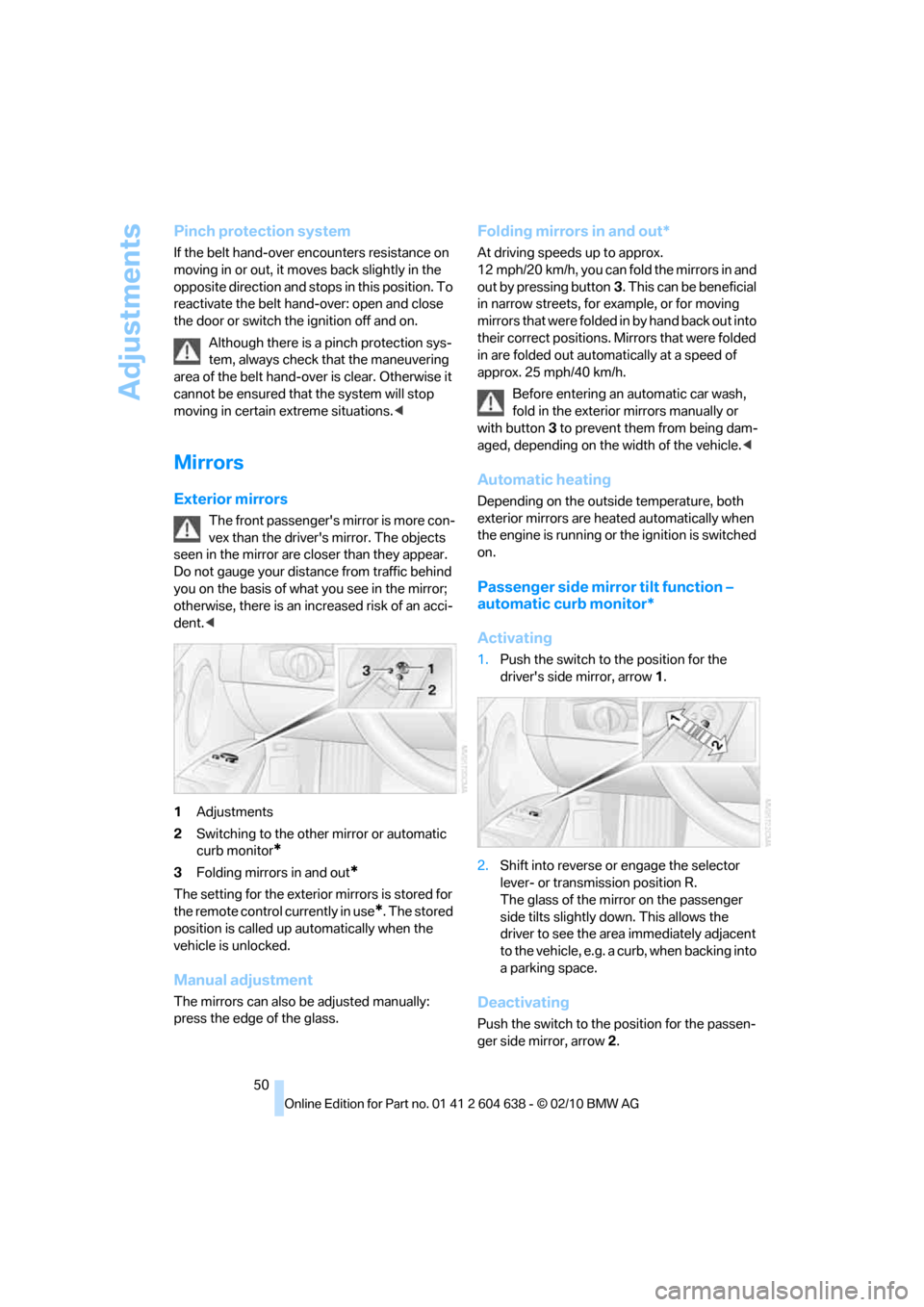
1Adjustments
2Switching to the other mirror or automatic
curb monitor
*
3Folding mirrors in and out*
The setting for the exterior mirrors is stored for
the remote control currently in use
*. The stored
position is called up automatically when the
vehicle is unlocked.
Manual adjustment
The mirrors can also be adjusted manually:
press the edge of the glass.
Folding mirrors in and out*
At driving speeds up to approx.
12 mph/20 km/h, you can fold the mirrors in and
out by pressing button3. This can be beneficial
in narrow streets, for example, or for moving
mirrors that were folded in by hand back out into
their correct positions. Mirrors that were folded
in are folded out automatically at a speed of
approx. 25 mph/40 km/h.
Before entering an automatic car wash,
fold in the exterior mirrors manually or
with button3 to prevent them from being dam-
aged, depending on the width of the vehicle.<
Automatic heating
Depending on the outside temperature, both
exterior mirrors are heated automatically when
the engine is running or the ignition is switched
on.
Passenger side mirror tilt function –
automatic curb monitor*
Activating
1.Push the switch to the position for the
driver's side mirror, arrow 1.
2.Shift into reverse or engage the selector
lever- or transmission position R.
The glass of the mirror on the passenger
side tilts slightly down. This allows the
driver to see the area immediately adjacent
to the vehicle, e.g. a curb, when backing into
a parking space.
Deactivating
Push the switch to the position for the passen-
ger side mirror, arrow 2.
Page 65 of 278
Controls
63Reference
At a glance
Driving tips
Communications
Navigation
Entertainment
Mobility
Deactivating the system
>Press the SPORT button again
>Switching off the engine
The LED in the button lights up and SPORT
appears in the info display.
Manually unlocking parking lock
In the event of a power supply interrup-
tion such as a discharged or discon-
nected battery or an electrical malfunction, the
parking lock must be manually unlocked; other-
wise, the rear wheels are immobilized and the
vehicle cannot be towed.<
Only unlock the parking lock manually for tow-
ing and make sure to set the parking brake
forcefully beforehand so that the vehicle cannot
roll. Lock the parking lock again after the vehicle
is parked.
Releasing
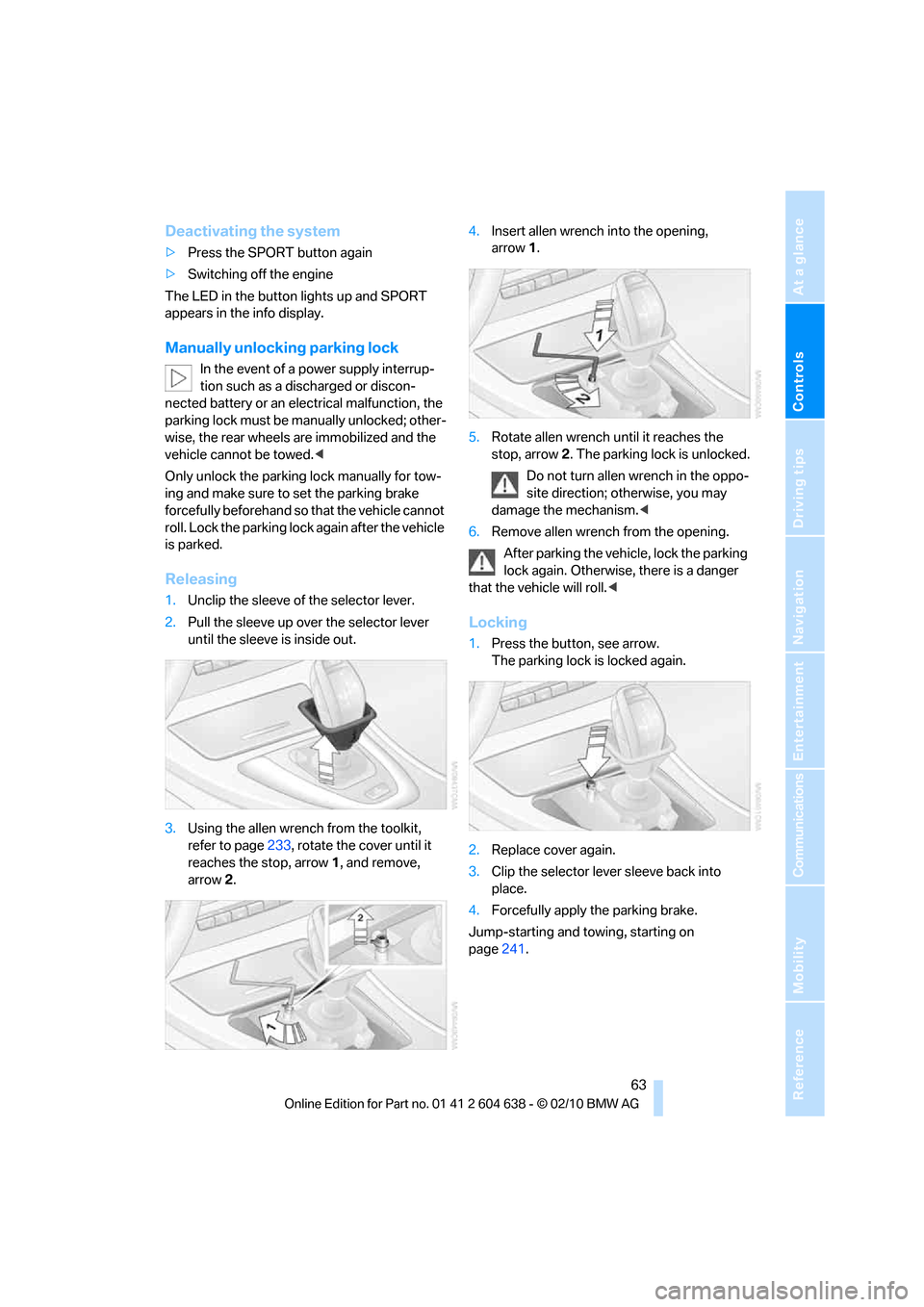
1.Unclip the sleeve of the selector lever.
2.Pull the sleeve up over the selector lever
until the sleeve is inside out.
3.Using the allen wrench from the toolkit,
refer to page233, rotate the cover until it
reaches the stop, arrow 1, and remove,
arrow2.4.Insert allen wrench into the opening,
arrow1.
5.Rotate allen wrench until it reaches the
stop, arrow2. The parking lock is unlocked.
Do not turn allen wrench in the oppo-
site direction; otherwise, you may
damage the mechanism.<
6.Remove allen wrench from the opening.
After parking the vehicle, lock the parking
lock again. Otherwise, there is a danger
that the vehicle will roll.<
Locking
1.Press the button, see arrow.
The parking lock is locked again.
2.Replace cover again.
3.Clip the selector lever sleeve back into
place.
4.Forcefully apply the parking brake.
Jump-starting and towing, starting on
page241.
Page 121 of 278
Controls
119Reference
At a glance
Driving tips
Communications
Navigation
Entertainment
Mobility
Convertible:
Cargo loading
Enlarging the cargo area
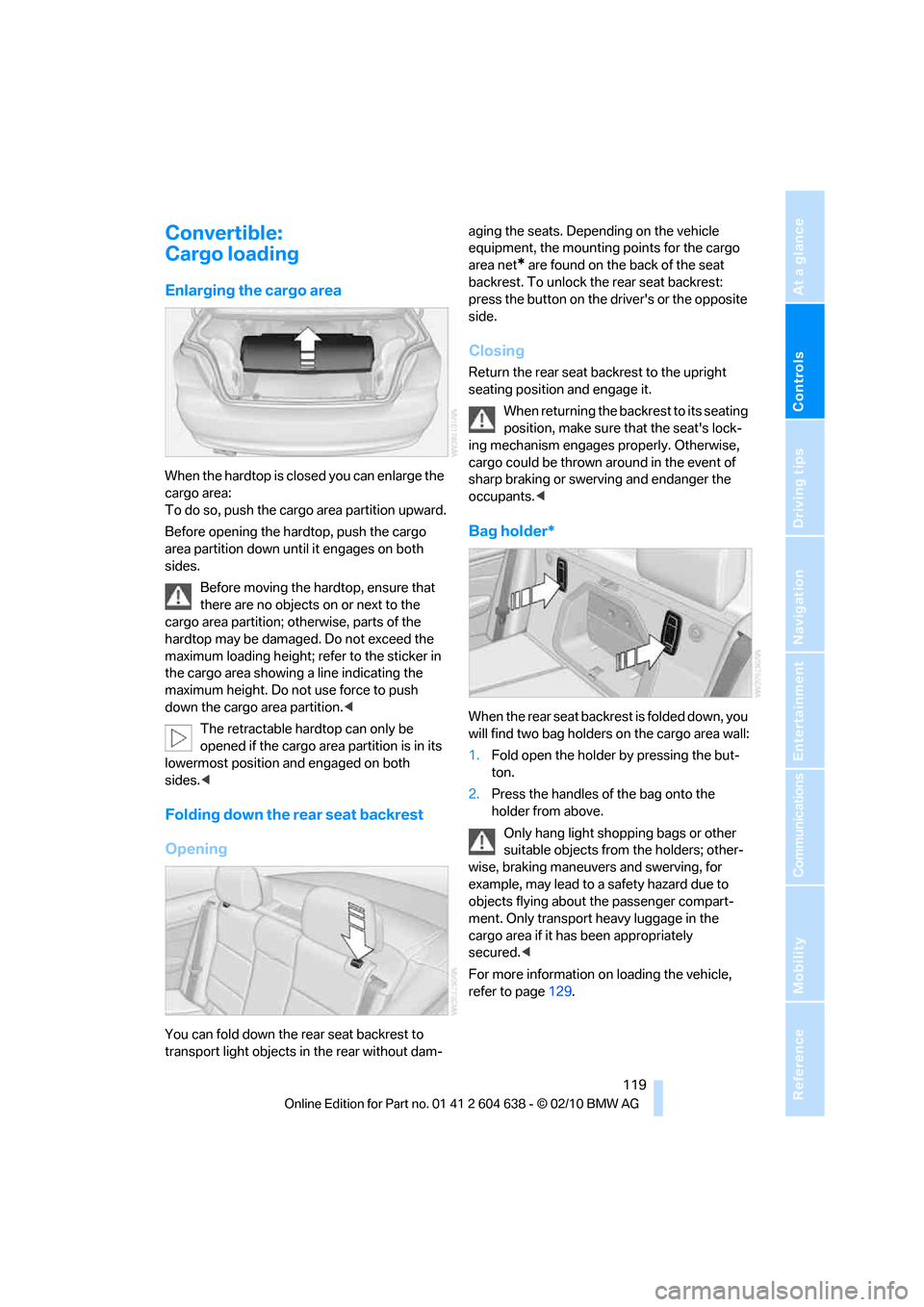
When the hardtop is closed you can enlarge the
cargo area:
To do so, push the cargo area partition upward.
Before opening the hardtop, push the cargo
area partition down until it engages on both
sides.
Before moving the hardtop, ensure that
there are no objects on or next to the
cargo area partition; otherwise, parts of the
hardtop may be damaged. Do not exceed the
maximum loading height; refer to the sticker in
the cargo area showing a line indicating the
maximum height. Do not use force to push
down the cargo area partition.<
The retractable hardtop can only be
opened if the cargo area partition is in its
lowermost position and engaged on both
sides.<
Folding down the rear seat backrest
Opening
You can fold down the rear seat backrest to
transport light objects in the rear without dam-aging the seats. Depending on the vehicle
equipment, the mounting points for the cargo
area net
* are found on the back of the seat
backrest. To unlock the rear seat backrest:
press the button on the driver's or the opposite
side.
Closing
Return the rear seat backrest to the upright
seating position and engage it.
When returning the backrest to its seating
position, make sure that the seat's lock-
ing mechanism engages properly. Otherwise,
cargo could be thrown around in the event of
sharp braking or swerving and endanger the
occupants.<
Bag holder*
W h e n t h e r e a r s e a t b a c k r e s t i s f o l d e d d o w n , y o u
will find two bag holders on the cargo area wall:
1.Fold open the holder by pressing the but-
ton.
2.Press the handles of the bag onto the
holder from above.
Only hang light shopping bags or other
suitable objects from the holders; other-
wise, braking maneuvers and swerving, for
example, may lead to a safety hazard due to
objects flying about the passenger compart-
ment. Only transport heavy luggage in the
cargo area if it has been appropriately
secured.<
For more information on loading the vehicle,
refer to page129.
Page 197 of 278
195
Entertainment
Reference
At a glance
Controls
Driving tips Communications
Navigation
Mobility
Inserting/removing the
snap-in adapter*
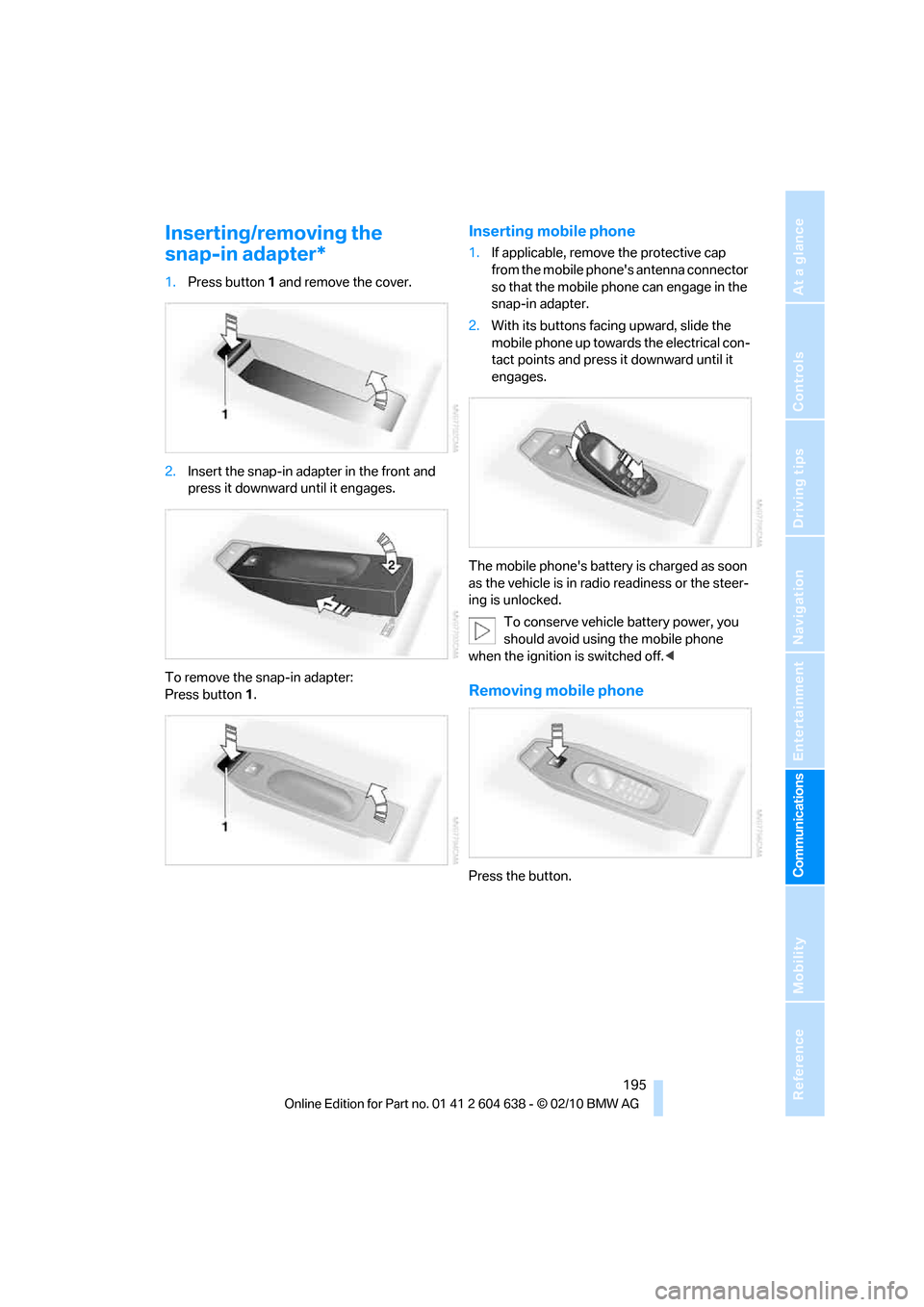
1.Press button1 and remove the cover.
2.Insert the snap-in adapter in the front and
press it downward until it engages.
To remove the snap-in adapter:
Press button 1.
Inserting mobile phone
1.If applicable, remove the protective cap
from the mobile phone's antenna connector
so that the mobile phone can engage in the
snap-in adapter.
2.With its buttons facing upward, slide the
mobile phone up towards the electrical con-
tact points and press it downward until it
engages.
The mobile phone's battery is charged as soon
as the vehicle is in radio readiness or the steer-
ing is unlocked.
To conserve vehicle battery power, you
should avoid using the mobile phone
when the ignition is switched off.<
Removing mobile phone
Press the button.
Page 200 of 278
BMW Assist
198
BMW Assist
BMW Assist*
BMW Assist provides a number of different ser-
vices. For example, the position data of the
vehicle can be transmitted to the BMW Assist
Response Center when an Emergency
Request
* is sent.
Many BMW Assist services depend on the con-
tract individually agreed upon.
After your contract has expired, the BMW
Assist system will be deactivated by the BMW
Assist Response Center without you having to
visit a BMW center. After the BMW Assist sys-
tem has been deactivated, no BMW Assist ser-
vices will be available. The BMW Assist system
can be reactivated by a BMW center after a new
contract has been signed.
Requirements
>The installed BMW Assist system is logged
in to a wireless communications network.
This network must be capable of transmit-
ting the services.
>To transmit position data, the vehicle must
be able to determine its current position.
>To activate and update BMW Assist, a GPS
signal must be available.
>The BMW Assist service contract was
signed with your BMW center or with the
BMW Assist Response Center. The service
must have been fully enabled.
>BMW Assist is activated.
Services offered
>Emergency Request: when you press the
SOS button, a connection to the BMW
Assist Response Center is established. The
BMW Assist Response Center then speaks
with you and takes further steps to help you.
>Automatic Collision Notification: under cer-
tain conditions, a connection to the BMW
Assist Response Center is established after
a serious accident. If possible, the BMW
Assist Response Center then speaks with
you and takes further steps to help you.
>Enhanced Roadside Assistance: BMW
Roadside Assistance
* can be contacted if
assistance is needed in the event of a
breakdown. If possible, the vehicle data and
position data are transmitted during this
call.
>Customer Relations: connection to Cus-
tomer Relations for information on all
aspects of your vehicle.
>TeleService: data on your vehicle's service
status or required inspections are transmit-
ted to your BMW center, either automati-
cally before a service due date or when you
request a BMW service appointment.
>Remote Door Unlock: the BMW Assist
Response Center provides assistance if, for
example, the remote control is not available
and the vehicle needs to be opened.
>Stolen Vehicle Recovery: after you report to
the police that your vehicle was stolen, the
BMW Assist Response Center can deter-
mine its position.
>In addition, the optional Convenience Plan
offers a concierge service and information
on route planning, the traffic situation and
weather. Using Critical Calling, a limited
number of calls can be made via the BMW
Assist Response Center, for example if the
mobile phone is not available or discharged.
Press the SOS button to contact the
BMW Assist Response Center.
*
Page 267 of 278
Reference 265
At a glance
Controls
Driving tips
Communications
Navigation
Entertainment
Mobility
Instructions for navigation
system, refer to Voice
instructions146
Instrument cluster12
Instrument combination, refer
to Instrument cluster12
Instrument lighting105
Instrument panel, refer to
Cockpit10
Integrated key26
Integrated universal remote
control111
Interactive map141
Interior lamps105
– remote control28
Interior motion sensor33
Interior rearview mirror51
– automatic dimming
feature51
– compass113
Interlock, refer to Disengaging
the remote control58
Intermittent mode of the
wipers65
Intersection, entering,
navigation136
iPod, connecting, refer to
AUX-IN port177
iPod, connecting, refer to USB
audio interface178
J
Jacking points236
Joystick, refer to iDrive16
Jumpering, refer to Jump-
starting239
Jump-starting239
K
Key, refer to Integrated key/
remote control26
Keyless go, refer to Comfort
Access33
Keyless opening and closing,
refer to Comfort Access33
Key Memory, refer to Personal
Profile26Kickdown58
– automatic transmission with
Steptronic58
Knock control207
L
Lamps
– automatic headlamp
control101
– parking lamps/low
beams101
Lamps and bulbs, replacing
bulbs233
Lap-and-shoulder belt, refer
to Safety belts49
Lashing eyes, refer to
Securing cargo130
Last destinations138
LATCH child restraint fixing
system53
Launch Control64
Leather care231
LED Light-emitting
diodes233
Length, refer to
Dimensions247
License plate lamp, replacing
bulb235
Light
– high-beam assistant103
Light-alloy wheels231
Light-emitting diodes
LED233
Lighter117
– connecting electrical
appliances118
Lighting
– instruments105
– lamps and bulbs233
– vehicle, refer to Lamps101
Light switch101
Limit, refer to Speed limit86
Load129
Load securing equipment,
refer to Securing cargo130
Lock buttons, doors, refer to
Locking31Locking
– adjusting confirmation
signal29
– from inside31
– from outside28
– without remote control, refer
to Comfort Access33
Locking and unlocking doors
– confirmation signals29
– from inside30
– from outside27
Low beam control, refer to
High-beam assistant103
Low-beam headlamps101
– automatic101
Lower back support, refer to
Lumbar support44
Luggage rack, refer to Roof-
mounted luggage rack131
Lumbar support44
M
M+S tires, refer to Winter
tires221
Maintenance, refer to Service
Booklet
Maintenance system227
Malfunction
– automatic transmission with
Steptronic59
– tires93
Malfunction warnings, refer to
Check Control84
Manual car wash230
Manually unlocking parking
lock63
Manual mode, automatic
transmission with
Steptronic59
Manual operation
– door lock30
– driver's door30
– fuel filler flap206
– glass roof38
– parking lock63
– parking lock, automatic
transmission59
Page 272 of 278
Everything from A to Z
270 Speed limit86
Speed limit warning, refer to
Speed limit86
Speedometer12
Speed reading, refer to
Speedometer12
Speed Volume155
Split screen, refer to Control
Display, switching on/off19
Split screen content, refer to
Display for split screen
content, selecting20
Sport program with 7-gear
Sports automatic
transmission with double
clutch61
Sports automatic
transmission with double
clutch60
– driving dynamics control62
– Kick-down61
– Launch Control64
– manually unlocking parking
lock63
– neutral61
– reverse gear61
Spray nozzles, refer to
Cleaning windshield and
headlamps66
Stability control, refer to
Driving stability control
systems89
Start/stop button55
– starting the engine56
– switching off the engine56
Starting, refer to Starting the
engine56
Starting assistance, refer to
Jump-starting239
Starting difficulties
– jump-starting239
Starting the engine
– start/stop button55
Start menu17State/province, for
navigation135
Station, selecting
– radio157
Status of this Owner's Manual
at time of printing5
Steam jet229,230
Steering wheel51
– adjustment51
– buttons on steering
wheel11
– heating51
– lock55
– locking with Comfort
Access34
– shift paddles62
Steering wheel buttons, refer
to Shift paddles62
Steering with variable ratio,
refer to Active steering
96
Steptronic, refer to Automatic
transmission with
Steptronic58
Storage232
Storage compartments116
Storage nets120
Stored trip, calling up143
Storing a destination in the
address book137
Storing music172
Storing seat positions, refer to
Seat and mirror memory48
Storing tires221
Stowage, refer to Storage
compartments116
Street, entering,
navigation136
Summer tires, refer to Wheels
and tires208
Surround155
SVCD167
SW, waveband157
Switches, refer to Cockpit10
Switching off
– engine56Switching off the engine
– start/stop button55
Switching on
– audio154
– CD changer154
– CD player154
– radio154
Switching the cooling function
on and off108
Switch-on times of parked car
ventilation, preselecting110
Symbols4
– status information19
T
Tachometer75
Tailgate, refer to Trunk lid31
Tail lamp
– replacing bulb235
Tail lamp, refer to Tail
lamps235
Tail lamps235
– replacing bulb235,236
Tank contents, refer to
Capacities250
Technical data246
– dimensions247
Technical modifications, refer
to For your own safety5
Telephone184
– installation location, refer to
Center armrest115
– refer to separate Owner's
Manual
– voice commands192
TeleService199
TeleService Diagnosis200
TeleService Help200
Temperature
– automatic climate
control107
– changing unit of measure80
– coolant, refer to Coolant
temperature76