display BMW M4 2016 Owners Manual
[x] Cancel search | Manufacturer: BMW, Model Year: 2016, Model line: M4, Model: BMW M4 2016Pages: 228, PDF Size: 4.88 MB
Page 185 of 228
Engine oilVehicle equipment
This chapter describes all standard, national
and special equipment provided in the model
series. Equipment not available in the vehicle is
therefore also described, for example the se‐
lected special equipment or national version.
This also applies to safety-relevant functions
and systems. Comply with the relevant na‐
tional regulations when using the correspond‐
ing functions and systems.
General
The engine oil consumption depends on the
driving style and operating conditions.
Engine oil consumption can be increased, for
example, in the following situations:▷Dynamic driving style.▷Running in the engine.▷Engine idling.▷Use of engine oil grades categorised as
unsuitable.
Therefore check the engine oil level regularly
after each time you fill up with fuel.
With dynamic driving, for example, rapid cor‐
nering, the system cannot make any oil meas‐
urement. With this driving mode, the engine oil
is measured using a detailed measurement,
see page 186.
The vehicle has electronic oil measurement.
Electronic oil measurement has two measure‐
ment principles:
▷Status display▷Detailed measurementElectronic oil measurement
Status display
Principle
The engine oil level is electronically monitored
when travelling and shown on the Control Dis‐
play.
If the engine oil level reaches the minimum, a
check control message is shown.
RequirementsA current measurement is available after ap‐
proximately 30 minutes of driving. With a
shorter trip, the status of the last sufficiently
long trip is shown.
When frequently making short trips, regularly
take a detailed measurement.
Displaying engine oil level On the Control Display:1."Vehicle information"2."Vehicle status"3. "Engine oil level"
Messages for the engine oil level
ATTENTION
Too little engine oil causes engine dam‐
age. Danger of damage to property. Immedi‐
ately replenish engine oil.◀
Ensure not to top up with too much engine oil. ATTENTION
Too much engine oil can damage the en‐
gine or the catalytic converter. Danger of dam‐
age to property. Do not top up with too much
engine oil. If you fill too much engine oil, have
the excess extracted by a Service Partner or a
qualified specialist workshop.◀
Seite 185Engine oilMobility185
Online Edition for Part no. 01 40 2 964 013 - VI/15
Page 186 of 228
Different messages are shown on the display,
depending on the engine oil level. Follow these
messages.
If there is too little engine oil, within the next
200 km, approximately 120 miles top up en‐
gine oil, see page 186.
Detailed measurement
Principle In the detailed measurement, the engine oil
level is checked and shown on a scale.
If the engine oil level reaches the minimum, a
Check Control message is shown.
During the measurement, the idle speed is
slightly raised.
Requirements▷Vehicle is on an even road.▷Manual gearbox: gear lever in neutral posi‐
tion, clutch and accelerator pedal not de‐
pressed.▷M double clutch transmission: selector
lever in selector lever position N and accel‐
erator pedal not depressed.▷Engine is running and is at operating tem‐
perature.
Carrying out a detailed measurement
Carry out a detailed measurement of the en‐
gine oil level:
1."Vehicle information"2."Vehicle status"3. "Measure engine oil level"4."Start measurement"
The engine oil level is checked and shown on a
scale.
Duration: approximately 1 minute.
Adding engine oil
Notes ATTENTION
Too little engine oil causes engine dam‐
age. Danger of damage to property.
Top up the engine oil within the next 200 km,
approximately 120 miles.◀
ATTENTION
Too much engine oil can damage the en‐
gine or the catalytic converter. Danger of dam‐
age to property. Do not top up with too much
engine oil. If you fill too much engine oil, have
the excess extracted by a Service Partner or a
qualified specialist workshop.◀
WARNING
Service products, for example oils,
greases, coolants and fuels, can contain sub‐
stances that are harmful to health. Danger of
injury or life. Comply with the notes on the
containers. Do not allow service products to
come into contact with clothing, skin eyes. Do
not pour service products into other bottles.
Keep service products out of the reach of chil‐
dren.◀
General Do not top up engine oil unless message isdisplayed in instrument cluster. The top-up
amount is specified in the message on the in‐
strument cluster.
Switch off the ignition and securely stop the
vehicle before topping up with engine oil.
Spilled engine oil can damage carbon parts.
Wipe up spilled engine oil with a lint-free cloth.
Overview
The oil filler neck is in the engine compart‐
ment, see page 182.Seite 186MobilityEngine oil186
Online Edition for Part no. 01 40 2 964 013 - VI/15
Page 191 of 228
MaintenanceVehicle equipment
This chapter describes all standard, national
and special equipment provided in the model
series. Equipment not available in the vehicle is
therefore also described, for example the se‐
lected special equipment or national version.
This also applies to safety-relevant functions
and systems. Comply with the relevant na‐
tional regulations when using the correspond‐
ing functions and systems.
BMW Maintenance System
The maintenance system points out the nec‐
essary maintenance measures and so sup‐
ports in maintaining the road and operational
safety of the vehicle.
Scopes and intervals may vary depending on
national version. Replacement work, spare
parts, operating materials and wear material
are calculated separately. Further information
is available from a Service Partner or a qualified
specialist workshop.
Condition Based Service,
CBS
Sensors and advanced algorithms monitor the
conditions in which your vehicle is used. Con‐
dition Based Service uses this information to
calculate the maintenance requirements.
The system thus enables adaptation of the
scope of maintenance to the individual usage
profile.
Detailed information on service requirements,
see page 87, can be displayed at the Control
Display.Service data in the remote control
Information on maintenance requirements is
continually saved in the remote control. The Service Partner or a qualified specialist work‐
shop can read out this data and suggest an op‐
timised maintenance scope for your vehicle.
This is why you should hand over the remote
control that was last used for driving to your
service advisor with the vehicle.
Periods out of use
Immobilisation periods with the vehicle battery
disconnected are not taken into account.
Updating the time-dependent maintenance
scope such as brake fluid and any engine oil
and microfilter or activated carbon filter can be
done by a Service Partner or a qualified spe‐
cialist workshop.
Service history Have maintenance and repair carried out by a
Service Partner or a qualified specialist work‐
shop.
The maintenance work carried out is entered in
the proof of maintenance and the vehicle data.
The entries are, just like a service booklet, evi‐
dence of regular maintenance.
If an entry is made in the electronic service his‐
tory of the vehicle, service-relevant data is not
only saved in the vehicle but also on the central
IT systems of BMW AG, Munich.
The data entered in the electronic service his‐
tory can also be viewed by the new vehicle
owner after a change of vehicle owner. In addi‐
tion, all Service Partners and other authorised
and qualified specialist workshops can view
the data entered in the electronic service his‐
tory.Seite 191MaintenanceMobility191
Online Edition for Part no. 01 40 2 964 013 - VI/15
Page 192 of 228
The vehicle owner can contact his/her Service
Partner or a qualified specialist workshop to
object to the entry in the electronic service his‐
tory, the associated data storage in the vehicle
and data transfer to the vehicle manufacturer,
in relation to his/her time as the vehicle owner.
In that case, no entry is made in the electronic
service history of the vehicle.
Maintenance entered is shown on the Control
Display, see page 88.
For Australia/New Zealand:
maintenance
No maintenance work other than normal main‐
tenance is required to keep the emission levels
of your vehicle within the design limits.
Socket for on-board
diagnosis, OBD
Note ATTENTION
Incorrect use of the on-board diagnosis
socket can result in malfunctions in the vehi‐
cle. Danger of damage to property. The on-
board diagnosis socket is only allowed to be
used by a Service Partner, a qualified specialist
workshop or other authorised persons.◀Position
The OBD socket for checking components de‐
finitive in terms of the composition of the ex‐
haust emissions is on the driver's side.
Emissions
▷The warning light flashes:
Engine malfunction that could
damage the catalytic converter.
Have the vehicle checked as soon
as possible.▷The warning light is illuminated:
Deterioration of exhaust emissions. Have
the vehicle checked as soon as possible.
Recycling
The manufacturer of your vehicle recommends
handing the vehicle in at a take-back point
nominated by the manufacturer at the end of
its life cycle. The regulations concerning the
returning of end-of-life vehicles may vary from
country to country. Further information is avail‐
able from a Service Partner or a qualified spe‐
cialist workshop.
Seite 192MobilityMaintenance192
Online Edition for Part no. 01 40 2 964 013 - VI/15
Page 199 of 228
5.Install the cable on the handle of the emer‐
gency release and engage the handle into
the fastening.6.Fit the bracket for the warning triangle.7.Attach the warning triangle.
Tail lights, number plate lights and
centre brake light
These lights use LED technology. Contact a
Service Partner or a qualified specialist work‐
shop in the case of a defect.
Changing a wheel
Notes
When using sealants, immediate wheel change
in the event of loss of tyre pressure in case of
puncture is not required.
As a result, no spare wheel is available.
The tools for changing wheels are available as
optional accessories from a Service Partner or
a qualified specialist workshop.
Jack mounting points
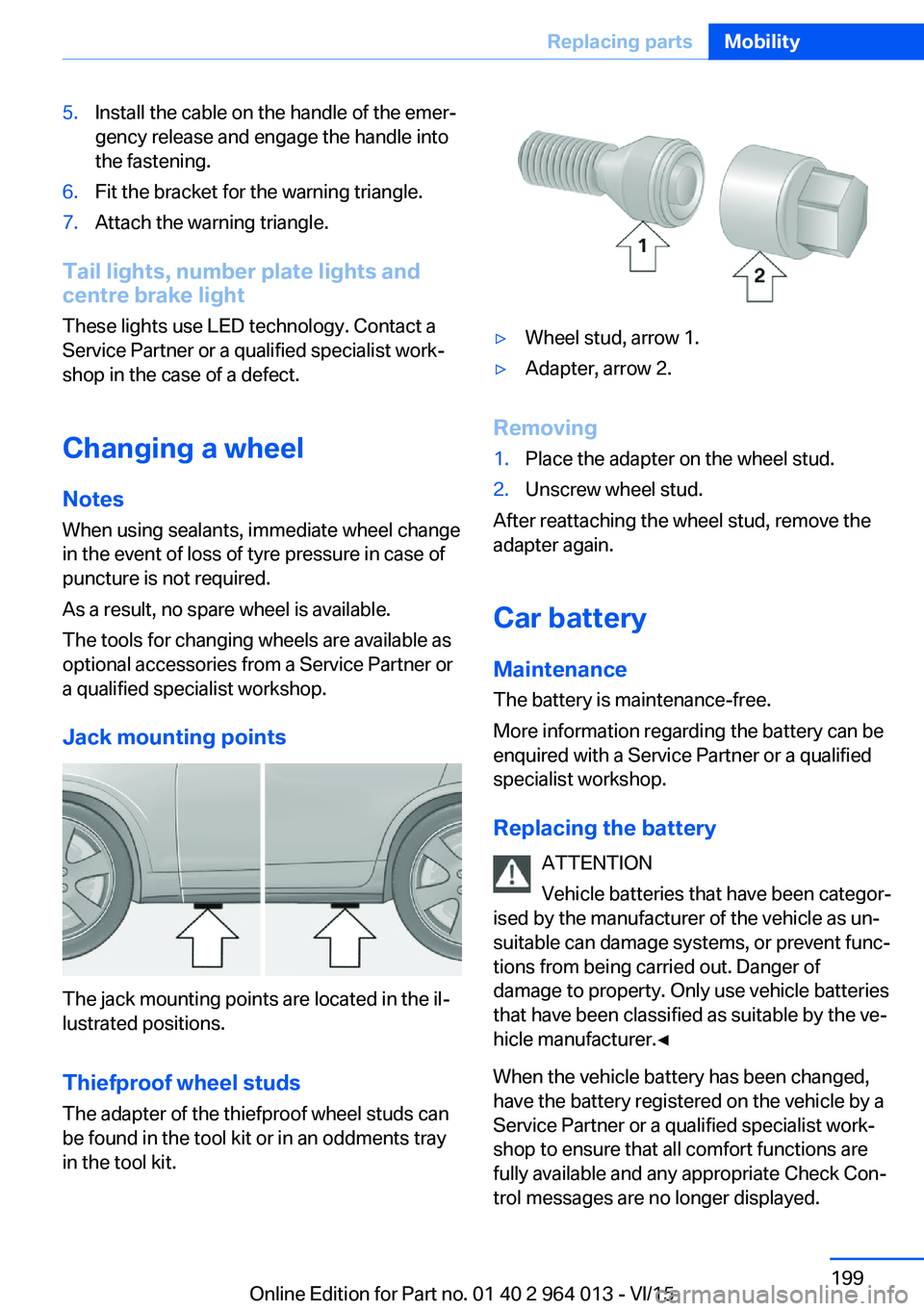
The jack mounting points are located in the il‐
lustrated positions.
Thiefproof wheel studs
The adapter of the thiefproof wheel studs can
be found in the tool kit or in an oddments tray
in the tool kit.
▷Wheel stud, arrow 1.▷Adapter, arrow 2.
Removing
1.Place the adapter on the wheel stud.2.Unscrew wheel stud.
After reattaching the wheel stud, remove the
adapter again.
Car battery Maintenance
The battery is maintenance-free.
More information regarding the battery can be
enquired with a Service Partner or a qualified
specialist workshop.
Replacing the battery ATTENTION
Vehicle batteries that have been categor‐
ised by the manufacturer of the vehicle as un‐
suitable can damage systems, or prevent func‐
tions from being carried out. Danger of
damage to property. Only use vehicle batteries
that have been classified as suitable by the ve‐
hicle manufacturer.◀
When the vehicle battery has been changed,
have the battery registered on the vehicle by a
Service Partner or a qualified specialist work‐
shop to ensure that all comfort functions are
fully available and any appropriate Check Con‐
trol messages are no longer displayed.
Seite 199Replacing partsMobility199
Online Edition for Part no. 01 40 2 964 013 - VI/15
Page 202 of 228
Help in the event of a breakdownVehicle equipment
This chapter describes all standard, national
and special equipment provided in the model
series. Equipment not available in the vehicle is
therefore also described, for example the se‐
lected special equipment or national version.
This also applies to safety-relevant functions
and systems. Comply with the relevant na‐
tional regulations when using the correspond‐
ing functions and systems.
Hazard warning lights
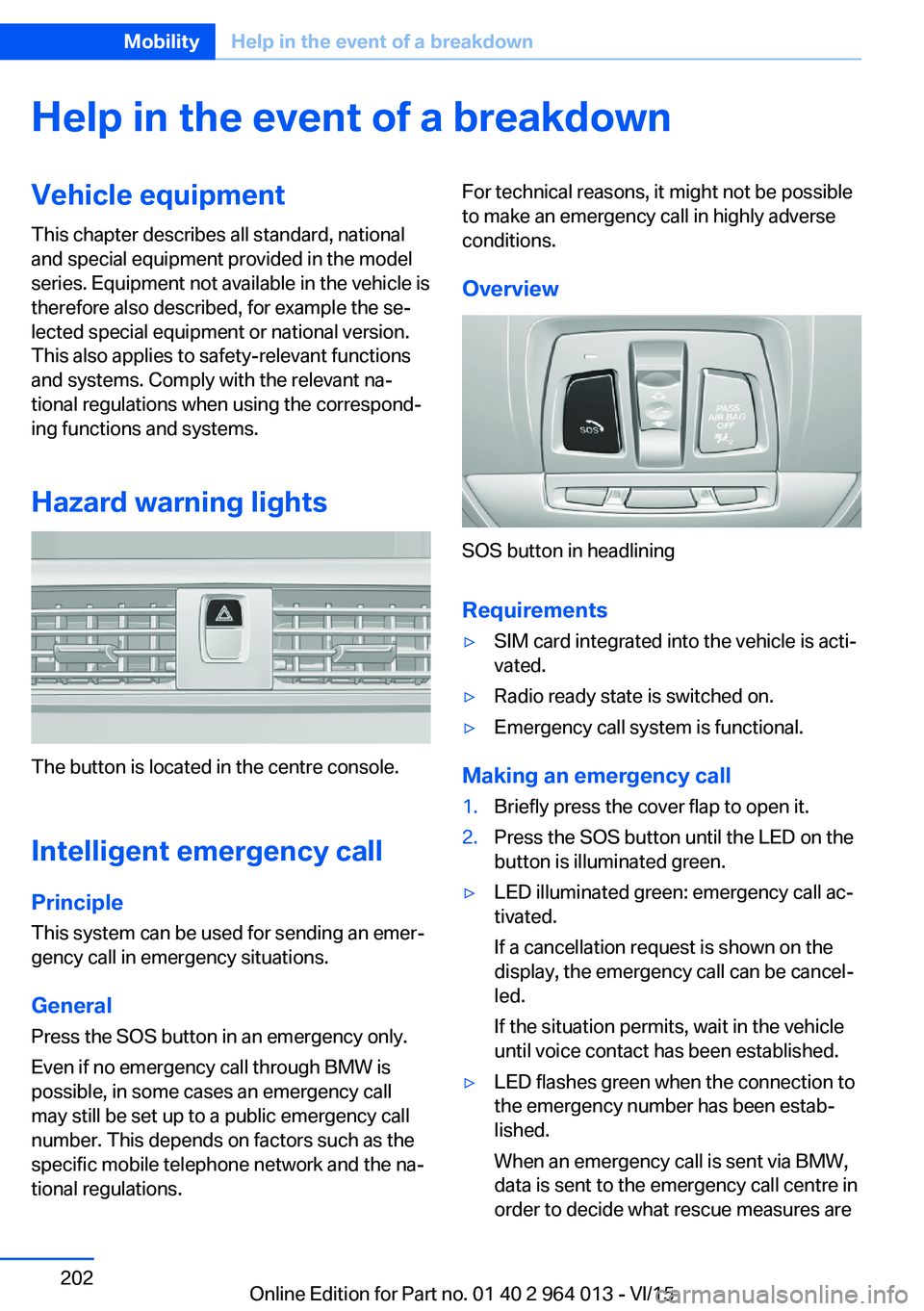
The button is located in the centre console.
Intelligent emergency call
Principle This system can be used for sending an emer‐
gency call in emergency situations.
General Press the SOS button in an emergency only.
Even if no emergency call through BMW is
possible, in some cases an emergency call may still be set up to a public emergency call
number. This depends on factors such as the
specific mobile telephone network and the na‐
tional regulations.
For technical reasons, it might not be possible
to make an emergency call in highly adverse
conditions.
Overview
SOS button in headlining
Requirements
▷SIM card integrated into the vehicle is acti‐
vated.▷Radio ready state is switched on.▷Emergency call system is functional.
Making an emergency call
1.Briefly press the cover flap to open it.2.Press the SOS button until the LED on the
button is illuminated green.▷LED illuminated green: emergency call ac‐
tivated.
If a cancellation request is shown on the
display, the emergency call can be cancel‐
led.
If the situation permits, wait in the vehicle
until voice contact has been established.▷LED flashes green when the connection to
the emergency number has been estab‐
lished.
When an emergency call is sent via BMW,
data is sent to the emergency call centre in
order to decide what rescue measures areSeite 202MobilityHelp in the event of a breakdown202
Online Edition for Part no. 01 40 2 964 013 - VI/15
Page 211 of 228
ATTENTION
Cleaning agents containing alcohol or
solvents, such as nitro thinners, cold cleans‐
ers, fuel or similar can damage plastic parts.
Danger of damage to property. Use a microfi‐
bre cloth to clean. Slightly moisten the cloth
with water.◀
Seat belts Dirt on the seat belts can interfere with the ac‐
tion of the reel and represent a safety hazard.
WARNING
Chemical cleaners can cause irreparable
damage to the fabric of the seat belts. Lack of protective effect of the seat belts. Danger ofinjury or life. Only use a mild soap and water
solution for cleaning the seat belts.◀
Clean only with a mild soap solution while still
fitted to the vehicle.
Never allow seat belts to retract unless they
are dry.
Carpets and foot mats WARNING
Objects in the driver's footwell can re‐
strict the pedal travel, or block a pedal that has
been pressed. Danger of accidents. Stow
items in the vehicle so that they are secure and
cannot get into the driver's footwell. Only use
floor mats that have been categorised as ap‐
propriate for the vehicle and that can be fas‐
tened accordingly. Do not use any loose floor
mats, and do not place several floor mats on
top of one another. Make sure that there is suf‐
ficient space for the pedals. Ensure that the
floor mats are securely reattached after having
been removed, for example for cleaning.◀
Floor mats can be removed from the vehicle to
enable the interior to be cleaned more thor‐
oughly.
In the event of heavy soiling, clean floor car‐
pets using a microfibre cloth and water or tex‐tile cleaner. In doing so, rub back and forth in
the direction of travel, otherwise the carpet can
become tangled.
Sensors/lenses of the camera
Clean sensors or lenses of the camera using a
cloth moistened with a small amount of a glass
detergent.
Displays/screens/protective sleeve of
the Head-Up Displays
ATTENTION
Chemical cleaners, moisture or fluids of
all kinds can damage the surface of displays
and screens. Danger of damage to property.
Use a clean, anti-static microfibre cloth to
clean.◀
ATTENTION
The surfaces of displays can be dam‐
aged due to improper cleaning. Danger of
damage to property. Avoid applying excessive
pressure and do not use abrasive materials.◀
Use a clean, anti-static microfibre cloth to
clean.
Clean the protective sleeve of the Head-Up
Display with a microfibre cloth and commer‐
cially available dishwashing liquid.
Laying up out of use
When the vehicle is laid up for longer than
three months, special measures are to be
taken. Further information is available from a
Service Partner or a qualified specialist work‐
shop.Seite 211General careMobility211
Online Edition for Part no. 01 40 2 964 013 - VI/15
Page 219 of 228
Breakdown, wheelchange 199
Brightness of the Control Dis‐ play 94
Bulb change, rear 196
Bulb change, xenon head‐ light 194
Buttons on the steering wheel 12
Button, start/stop 65
C
Camera, rear-view cam‐ era 134
Camera, Side View 136
Camera, Top View 138
Carbon ceramic brakes M 160
Car care 209
Care, displays 211
Care products 209
Care, vehicle 209
Car jack 199
Car key, see Remote con‐ trol 32
Carpet, care 211
Carrying children safely 58
Car washes 208
Catalytic converter, see Hot exhaust system 163
CBS, Condition Based Serv‐ ice 191
Central key, see Remote con‐ trol 32
Central locking system 38
Central screen, see Control Display 16
Centre armrest 154
Centre console 14
Ceramic brakes 160
Changes, technical, see Your own safety 7
Changing bulb, rear 196
Charcoal canister 146
Chassis, electronic 126 Chassis number, see Vehicle
identification number 9
Check control 80
Checking the oil level elec‐ tronically 185
Child's seats 58
Children, carrying 58
Child restraints 58
Child seat classes, ISOFIX 61
Child seat mounting 59
Child seat mountings, ISO‐ FIX 61
Chrome parts, care 210
Cigarette lighter 149
Cleaning displays 211
Clock 85
Closing/opening using door lock 37
Closing/opening with remote control 35
Coat hooks 155
Cockpit 12
Comfort Access 39
Comfort closing with the re‐ mote control 36
Comfort opening with the re‐ mote control 36
Compound brakes 160
Compressor 178
Computer, see on-board computer 90
Condensate under the vehi‐ cle 165
Condensation on win‐ dows 146
Condition Based Service, CBS 191
Confirmation signals 42
ConnectedDrive 6
ConnectedDrive services 6
Connecting electrical applian‐ ces 150
Contactless opening of boot lid 40
Control Display 16
Control display, settings 93 Controller 17
Control systems, driving sta‐ bility 123
Coolant 189
Coolant temperature 84
Cooling effect, maximum 145
Cooling function 145
Cooling system 189
Cornering light 100
Corrosion of brake discs 164
Courtesy light when unlock‐ ing 35
Courtesy light with the vehi‐ cle locked 36
Cruise Control 129
Cupholder 155
Current fuel consumption 86
D
Damage, tyres 176
Damper control 126
Data, technical 214
Date 85
Daytime driving lights 100
Deactivation, airbags 106
Defrosting, see Defrosting windows 146
Defrosting windows 146
Defrost, see Defrosting win‐ dows 146
Deleting personal data 23
Differential lock 126
Digital clock 85
Digital speed 85
Digital speedometer 85
Dimensions 214
Dimmable exterior mirrors 56
Dimming rear-view mirror 56
Dipping headlights, see High- beam assistance 100
Display in windscreen 94
Display lighting, see Instru‐ ment lighting 102
Displays, cleaning 211 Seite 219Everything from A to ZReference219
Online Edition for Part no. 01 40 2 964 013 - VI/15
Page 220 of 228
Displays, electronic, instru‐ment cluster 79
Disposal, coolant 190
Disposal, vehicle battery 200
Distance to destination 91
Distance warning, see PDC 131
Door key, see Remote con‐ trol 32
Door lock 37
Double clutch transmis‐ sion 74
Downhill gradients 164
Drinks holder, see Cu‐ pholder 155
Drivelogic 76
Drive Mode 75
Drive-off assistant 127
Drive programs, see Drive‐ logic 76
Driving Assistant, see Intelli‐ gent Safety 110
Driving dynamics, system states 86
Driving dynamic systems 86
Driving hints 163
Driving information, gen‐ eral 163
Driving information, running in 162
Driving into a car wash 208
Driving lane lines, rear-view camera 135
Driving lights control, auto‐ matic 99
Driving on racing tracks 161
Driving stability control sys‐ tems 123
Drying air, see Cooling func‐ tion 145
DSC Dynamic Stability Con‐ trol 124
Dynamic brake lights 120
Dynamic Stability Control, DSC 124 E
EfficientDynamics 86
EfficientDynamics display 86
EfficientDynamics menu 86
Electrical Glass Roof 45
Electrical power windows 43
Electric steering wheel lock 57
Electronic displays, instru‐ ment cluster 79
Electronic oil measure‐ ment 185
Electronic Stability Program, ESP, see DSC 124
Emergency call 202
Emergency release, boot lid 39
Emergency release, fuel filler flap 172
Emergency start function, en‐ gine start 33
Energy Control 86
Energy recuperation 86
Engine, automatic shut- off 67
Engine, automatic start-stop function 67
Engine compartment 182
Engine coolant 189
Engine Dynamics Control 78
Engine oil 185
Engine oil additives 187
Engine oil change 187
Engine oil filler neck 186
Engine oil grades, alterna‐ tive 187
Engine oil grades, suita‐ ble 187
Engine oil level, checking electronically 185
Engine oil temperature 84
Engine start 66
Engine start with malfunc‐ tion 33
Engine temperature 84 Entering letters and digits 23
ESP, Electronic Stability Pro‐ gram, see DSC 124
Exhaust system 163
Expanding the boot 151
Extended BMW Online serv‐ ices 6
Exterior mirror, automatically dimming 56
Exterior mirrors 55
External starting 203
Eye for towing, see Towing eye 206
Eyes for securing load 166
F Failure message, see Check control 80
False alarm 43
Fastening seat belts, see Seat belts 52
Fault displays, see Check control 80
Favourites buttons, iDrive 22
Filler neck for engine oil 186
Fine wood, care 210
First-aid kit 203
Flat tyre, warning lamp 108, 109
Flooding 163
Floor carpet, care 211
Fold-out position, windscreen wiper 72
Foot brake 163
Foot mats, care 211
Front airbags 104
Front-end collision warning with city braking func‐
tion 111
Front head restraints 54
Front lights 194
Front neck supports, see Head restraints 54
Front passenger airbags, de‐ activating/activating 106 Seite 220ReferenceEverything from A to Z220
Online Edition for Part no. 01 40 2 964 013 - VI/15
Page 221 of 228
Front passenger airbags,light 106
Fuel 174
Fuel consumption, see Aver‐ age fuel consumption 91
Fuel filler flap 172
Fuel gauge 84
Fuel quality 174
Fuel recommendation 174
Fuel tank cap 172
Fuel, tank capacity 215
Fuse 200
G
Gearbox, manual gearbox 73
Gear change 76
Gearshift, manual gearbox 73
General driving informa‐ tion 163
Glare protection 149
Glass Roof, electric 45
Glove box 153
Ground clearance 165
H
Handbrake, see Parking brake 69
Hazard warning and indicator lights, see Check control 80
Hazard warning lights 202
Head airbags 104
Headlight cleaning system, see Wiper system 71
Headlight courtesy delay fea‐ ture 99
Headlight flasher 70
Headlight lens 194
Headlights 194
Headlights, care 209
Headlining 15
Head restraints 48
Head-Up Display 94
Head-Up Display, care 211
Head-Up Display, M View 95 Head-Up Display, standard
view 95
Heated rear window 146
Heavy transported load, stow‐ ing transported load 166
Height, vehicle 214
Help in driving off 127
High-beam assistance 100
High-beam headlights 70
High performance en‐ gine 160
Hill Start Assist, see Drive-off assistant 127
Homepage 6
Horn 12
Hot exhaust system 163
HUD Head-Up Display 94
I IBA Integrated Owner's Handbook in vehicle 28
Ice warning, see Outside tem‐ perature warning 84
Identification number, see Ve‐ hicle identification num‐
ber 9
iDrive 16
Ignition key, see Remote con‐ trol 32
Ignition off 65
Ignition on 65
Important considerations 58
Important information regard‐ ing the engine compart‐
ment 182
Independent ventilation 147
Indicator and hazard warning lights, see Check control 80
Indicator lights, see Check control 80
Indicators, see Turn indica‐ tors 70
Individual air distribution 146
Individual settings, see M Drive 123 Individual settings, see Per‐
sonal Profile 33
Inflation pressure, tyres 175
Inflation pressure warning RPA, tyres 109
Info Display, see on-board computer 90
Information on no passing 88
Information on speed limit 88
Initialise, Tyre Pressure Moni‐ tor TPM 107
Initialising, runflat indicator, RPA 109
Instrument cluster 79
Instrument cluster, electronic displays 79
Instrument cluster switch, see Turn indicators 70
Instrument cluster switch, see Wiper system 71
Instrument lighting 102
Integrated key 32
Integrated Owner's Handbook in vehicle 28
Intelligent emergency call 202
Intelligent Safety 110
Intensity, AUTO Automatic program 145
Interior light 102
Interior light when unlock‐ ing 35
Interior light with the vehicle locked 36
Interior movement detec‐ tor 43
Intermittent mode 71
Internet site 6
Interval display, service re‐ quirement 87
ISOFIX child seat mount‐ ings 61
J
Jack mounting points 199 Seite 221Everything from A to ZReference221
Online Edition for Part no. 01 40 2 964 013 - VI/15