ESP BMW M4 2016 User Guide
[x] Cancel search | Manufacturer: BMW, Model Year: 2016, Model line: M4, Model: BMW M4 2016Pages: 228, PDF Size: 4.88 MB
Page 43 of 228
On closing the boot lid, it is locked again and
monitored, as long as the doors are locked.
The hazard warning system flashes once.
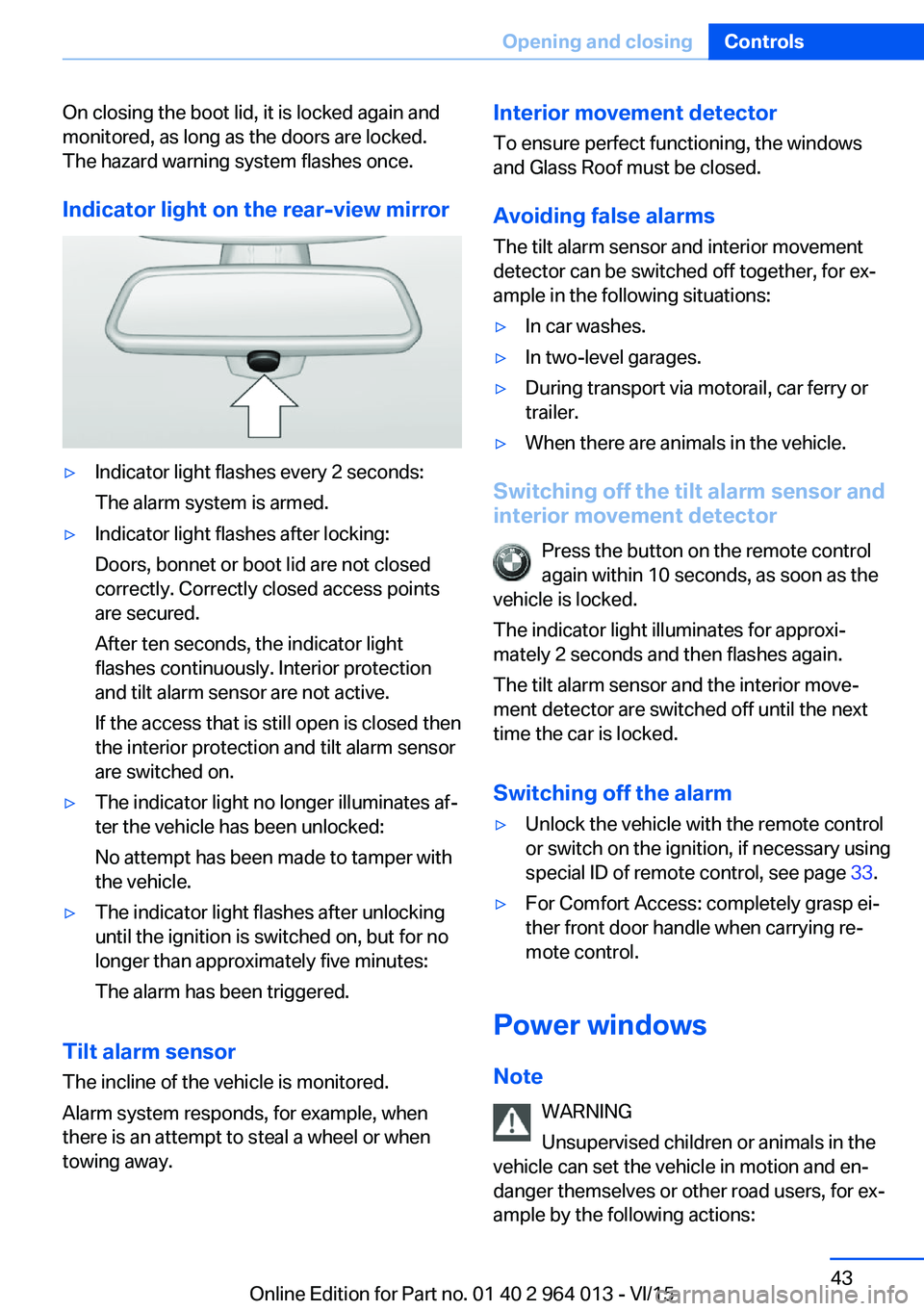
Indicator light on the rear-view mirror▷Indicator light flashes every 2 seconds:
The alarm system is armed.▷Indicator light flashes after locking:
Doors, bonnet or boot lid are not closed
correctly. Correctly closed access points
are secured.
After ten seconds, the indicator light
flashes continuously. Interior protection
and tilt alarm sensor are not active.
If the access that is still open is closed then
the interior protection and tilt alarm sensor
are switched on.▷The indicator light no longer illuminates af‐
ter the vehicle has been unlocked:
No attempt has been made to tamper with
the vehicle.▷The indicator light flashes after unlocking
until the ignition is switched on, but for no
longer than approximately five minutes:
The alarm has been triggered.
Tilt alarm sensor The incline of the vehicle is monitored.
Alarm system responds, for example, when
there is an attempt to steal a wheel or when
towing away.
Interior movement detector
To ensure perfect functioning, the windows
and Glass Roof must be closed.
Avoiding false alarms
The tilt alarm sensor and interior movement detector can be switched off together, for ex‐
ample in the following situations:▷In car washes.▷In two-level garages.▷During transport via motorail, car ferry or
trailer.▷When there are animals in the vehicle.
Switching off the tilt alarm sensor and
interior movement detector
Press the button on the remote control
again within 10 seconds, as soon as the
vehicle is locked.
The indicator light illuminates for approxi‐
mately 2 seconds and then flashes again.
The tilt alarm sensor and the interior move‐
ment detector are switched off until the next
time the car is locked.
Switching off the alarm
▷Unlock the vehicle with the remote control
or switch on the ignition, if necessary using
special ID of remote control, see page 33.▷For Comfort Access: completely grasp ei‐
ther front door handle when carrying re‐
mote control.
Power windows
Note WARNING
Unsupervised children or animals in the
vehicle can set the vehicle in motion and en‐
danger themselves or other road users, for ex‐
ample by the following actions:
Seite 43Opening and closingControls43
Online Edition for Part no. 01 40 2 964 013 - VI/15
Page 48 of 228
AdjustingVehicle equipment
This chapter describes all standard, national
and special equipment provided in the model
series. Equipment not available in the vehicle is
therefore also described, for example the se‐
lected special equipment or national version.
This also applies to safety-relevant functions
and systems. Comply with the relevant na‐
tional regulations when using the correspond‐
ing functions and systems.
Safe seated position A seated position that suitably reflects your re‐
quirements is a vital condition of relaxed driv‐
ing with a minimum of fatigue.
In the event of an accident, the seated position
plays an important role together with:▷Seat belts, see page 52.▷Head restraints, see page 54.▷Airbags, see page 104.
Seats
Notes WARNING
Seat adjustment during the journey can
lead to unexpected seat movements. You
could lose control of the vehicle. Danger of ac‐
cidents. Only adjust the seat on the driver side
when at a standstill.◀
WARNING
If the seat backrest is angled back too
far, the protective effect of the seat belt will no
longer be guaranteed. There is a danger of
slipping under the seat belt in the event of an
accident. Danger of injury or life. Set the seat
before starting the journey. Place the seat
backrest in the most upright possible position,
and do not change it during the journey.◀
WARNING
Danger of trapping when moving the
seats. Danger of injury or damage to property.
Before making the setting, make sure that the
movement area of the seat is clear.◀
Manually adjustable seats
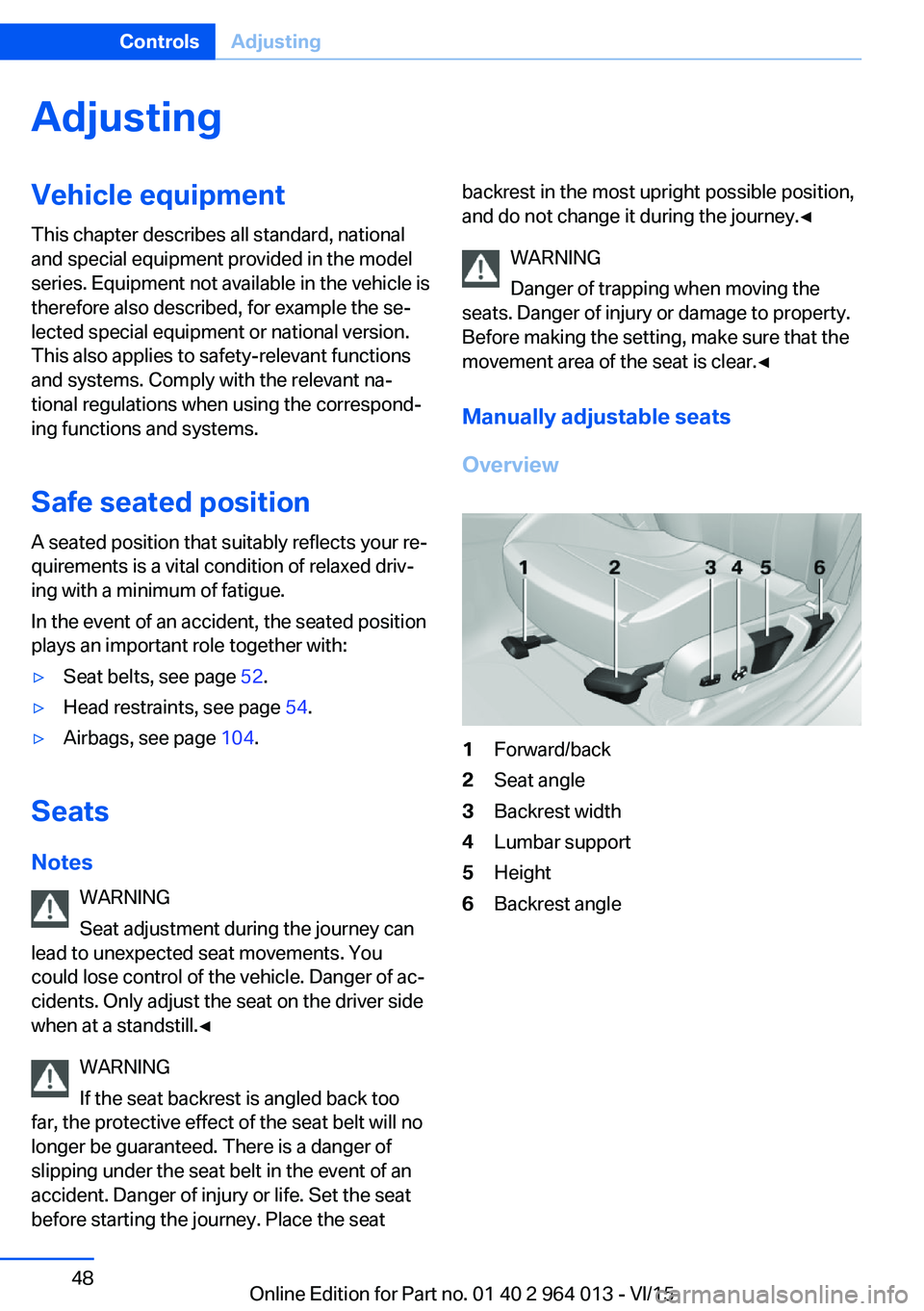
Overview1Forward/back2Seat angle3Backrest width4Lumbar support5Height6Backrest angleSeite 48ControlsAdjusting48
Online Edition for Part no. 01 40 2 964 013 - VI/15
Page 56 of 228
Selecting a mirrorSwitching to other mirror:
Push switch.
Electrical adjustment Corresponding to movement of button
Saving positions
Seat and mirror position memory, see page 54.
Adjusting manually In the event of an electrical defect, for example,
press the borders of the mirror glass.
Automatic parking function
Principle
When reverse gear is engaged, mirror glass on
front passenger side is titled downwards. This
improves the view of the kerb or other obsta‐
cles near the ground, for example when park‐
ing.
Activating1. Push switch to driver's mirror posi‐
tion.2.Engage selector lever position R.
Deactivating
Push switch to front passenger's mirror posi‐
tion.
Folding in and out ATTENTION
Due to the vehicle's width, it could sus‐
tain damage in car washes. Danger of damage
to property. Fold in the mirrors manually or us‐
ing the button prior to washing.◀
Press the button.
Possible up to approximately 20 km/h, approxi‐
mately 15 mph.
Advantageous in the following situations:▷In car washes.▷In narrow streets.▷When folding mirrors back out that have
been folded in manually.
Folded-in mirrors automatically fold out at ap‐
proximately 40 km/h, approximately 25 mph.
Automatic heating Both exterior mirrors are automatically heated
with the engine running.
Automatically dimming
Both exterior mirrors are automatically dim‐
med. Photocells in the rear-view mirror, see
page 56, are used for control.
Rear-view mirror, automatic-dim
Principle
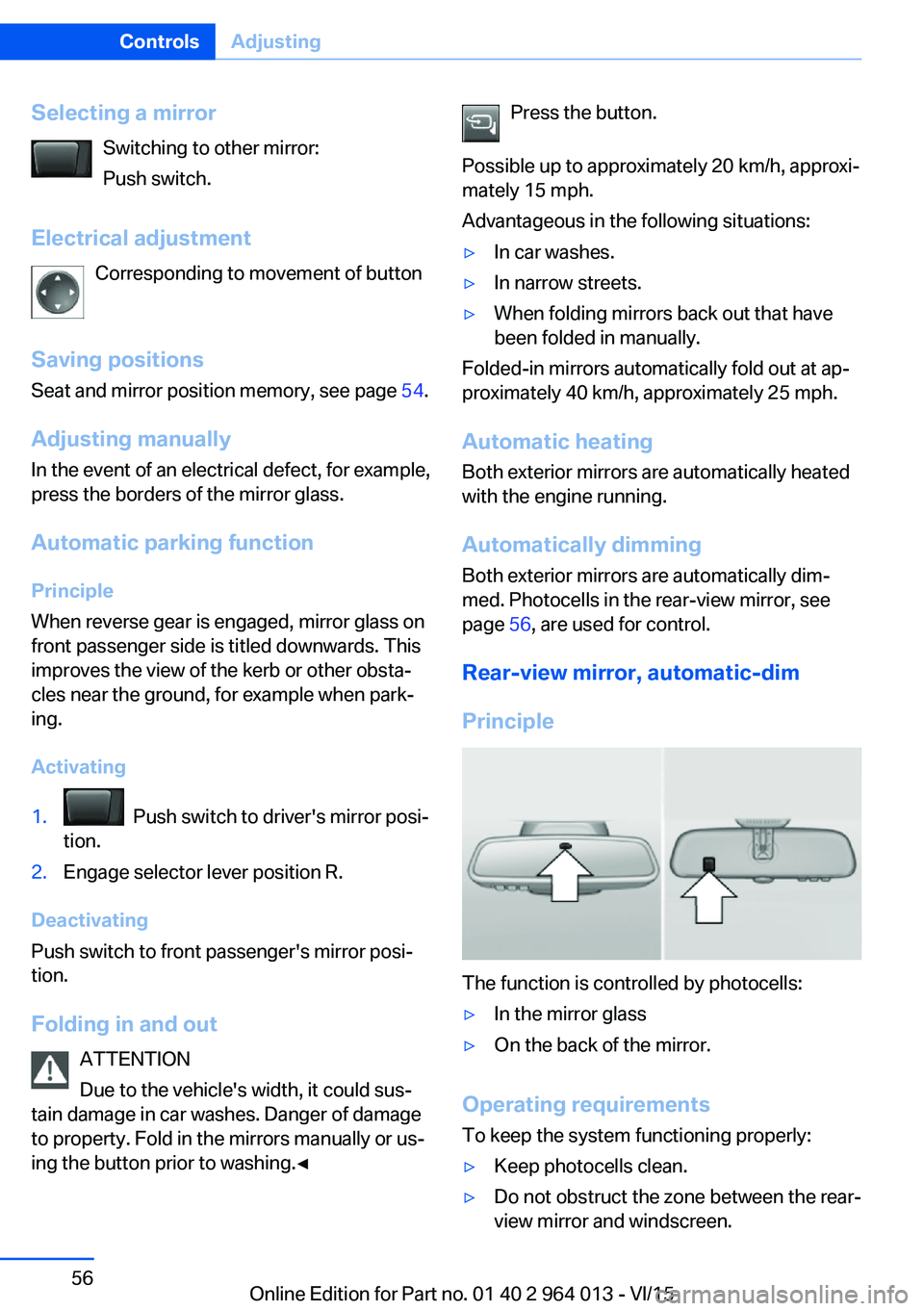
The function is controlled by photocells:
▷In the mirror glass▷On the back of the mirror.
Operating requirements
To keep the system functioning properly:
▷Keep photocells clean.▷Do not obstruct the zone between the rear-
view mirror and windscreen.Seite 56ControlsAdjusting56
Online Edition for Part no. 01 40 2 964 013 - VI/15
Page 58 of 228
Carrying children in safetyVehicle equipmentThis chapter describes all standard, national
and special equipment provided in the model
series. Equipment not available in the vehicle is
therefore also described, for example the se‐lected special equipment or national version.
This also applies to safety-relevant functions
and systems. Comply with the relevant na‐
tional regulations when using the correspond‐
ing functions and systems.
Important considerations
Note
WARNING
Unsupervised children or animals in the
vehicle can set the vehicle in motion and en‐
danger themselves or other road users, for ex‐
ample by the following actions:▷Pressing the start/stop button.▷Releasing the parking brake.▷Opening and closing doors or windows.▷Setting the selector lever to neutral.▷Operating vehicle equipment.
Risk of accident or injury. Do not leave children
or animals unsupervised in the vehicle. When
leaving the vehicle, take the remote control
with you and lock it.◀
Not for Australia/New Zealand: Suitable seats
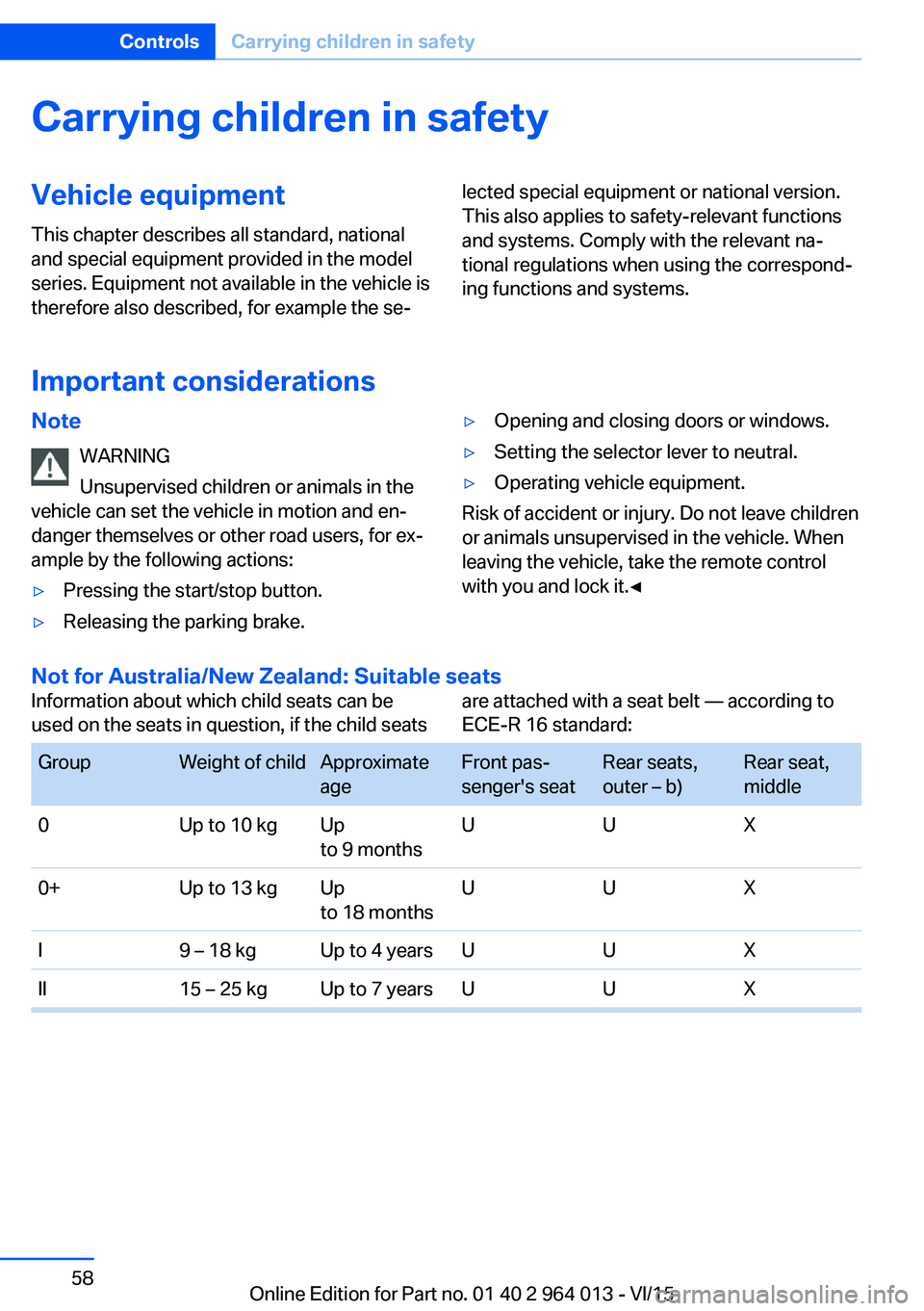
Information about which child seats can be
used on the seats in question, if the child seatsare attached with a seat belt — according to
ECE-R 16 standard: GroupWeight of childApproximate
ageFront pas‐
senger's seatRear seats,
outer – b)Rear seat,
middle0Up to 10 kgUp
to 9 monthsUUX0+Up to 13 kgUp
to 18 monthsUUXI9 – 18 kgUp to 4 yearsUUXII15 – 25 kgUp to 7 yearsUUXSeite 58ControlsCarrying children in safety58
Online Edition for Part no. 01 40 2 964 013 - VI/15
Page 61 of 228
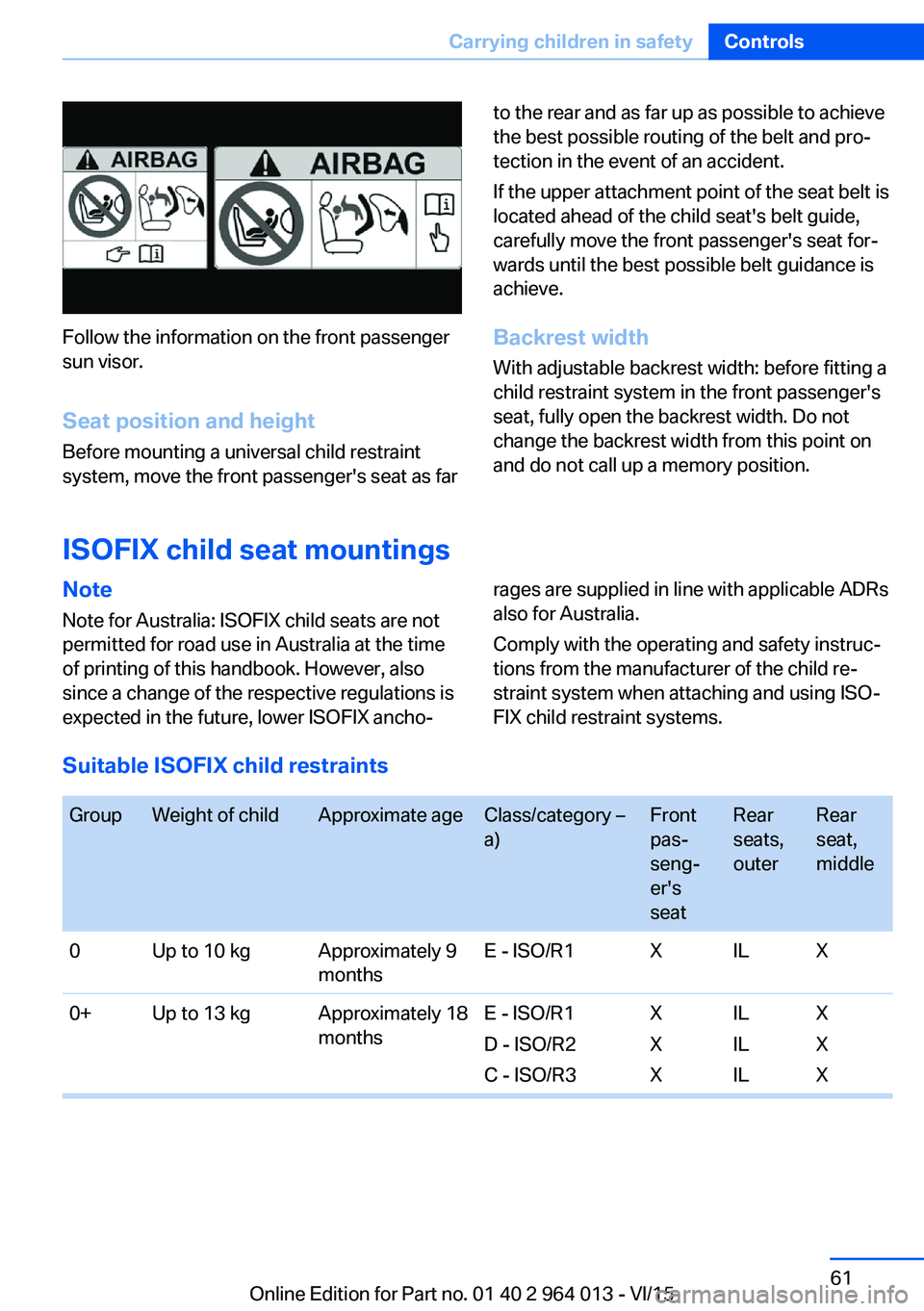
Follow the information on the front passenger
sun visor.
Seat position and height
Before mounting a universal child restraint
system, move the front passenger's seat as far
to the rear and as far up as possible to achieve
the best possible routing of the belt and pro‐
tection in the event of an accident.
If the upper attachment point of the seat belt is
located ahead of the child seat's belt guide,
carefully move the front passenger's seat for‐
wards until the best possible belt guidance is
achieve.
Backrest width With adjustable backrest width: before fitting a
child restraint system in the front passenger's
seat, fully open the backrest width. Do not
change the backrest width from this point on
and do not call up a memory position.
ISOFIX child seat mountings
Note
Note for Australia: ISOFIX child seats are not
permitted for road use in Australia at the time
of printing of this handbook. However, also
since a change of the respective regulations is
expected in the future, lower ISOFIX ancho‐rages are supplied in line with applicable ADRs
also for Australia.
Comply with the operating and safety instruc‐
tions from the manufacturer of the child re‐
straint system when attaching and using ISO‐
FIX child restraint systems.
Suitable ISOFIX child restraints
GroupWeight of childApproximate ageClass/category –
a)Front
pas‐
seng‐
er's
seatRear
seats,
outerRear
seat,
middle0Up to 10 kgApproximately 9
monthsE - ISO/R1XILX0+Up to 13 kgApproximately 18
monthsE - ISO/R1
D - ISO/R2
C - ISO/R3X
X
XIL
IL
ILX
X
XSeite 61Carrying children in safetyControls61
Online Edition for Part no. 01 40 2 964 013 - VI/15
Page 62 of 228
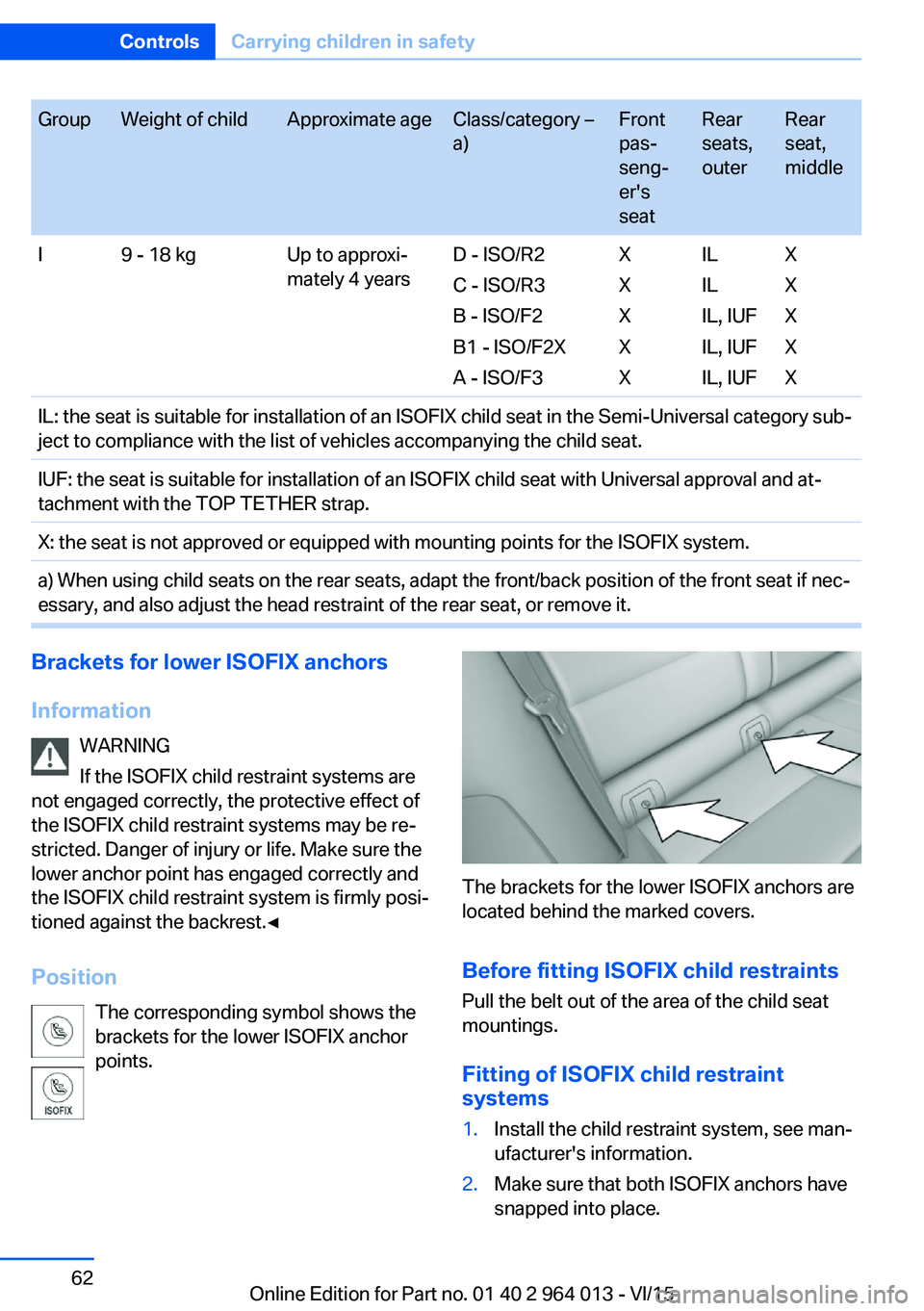
GroupWeight of childApproximate ageClass/category –
a)Front
pas‐
seng‐
er's
seatRear
seats,
outerRear
seat,
middleI9 - 18 kgUp to approxi‐
mately 4 yearsD - ISO/R2
C - ISO/R3
B - ISO/F2
B1 - ISO/F2X
A - ISO/F3X
X
X
X
XIL
IL
IL, IUF
IL, IUF
IL, IUFX
X
X
X
XIL: the seat is suitable for installation of an ISOFIX child seat in the Semi-Universal category sub‐
ject to compliance with the list of vehicles accompanying the child seat.IUF: the seat is suitable for installation of an ISOFIX child seat with Universal approval and at‐
tachment with the TOP TETHER strap.X: the seat is not approved or equipped with mounting points for the ISOFIX system.a) When using child seats on the rear seats, adapt the front/back position of the front seat if nec‐
essary, and also adjust the head restraint of the rear seat, or remove it.Brackets for lower ISOFIX anchors
Information WARNING
If the ISOFIX child restraint systems are
not engaged correctly, the protective effect of
the ISOFIX child restraint systems may be re‐
stricted. Danger of injury or life. Make sure the
lower anchor point has engaged correctly and
the ISOFIX child restraint system is firmly posi‐
tioned against the backrest.◀
Position The corresponding symbol shows the
brackets for the lower ISOFIX anchor
points.
The brackets for the lower ISOFIX anchors are
located behind the marked covers.
Before fitting ISOFIX child restraints
Pull the belt out of the area of the child seat
mountings.
Fitting of ISOFIX child restraint
systems
1.Install the child restraint system, see man‐
ufacturer's information.2.Make sure that both ISOFIX anchors have
snapped into place.Seite 62ControlsCarrying children in safety62
Online Edition for Part no. 01 40 2 964 013 - VI/15
Page 65 of 228
DrivingVehicle equipment
This chapter describes all standard, national
and special equipment provided in the model
series. Equipment not available in the vehicle is
therefore also described, for example the se‐
lected special equipment or national version.
This also applies to safety-relevant functions
and systems. Comply with the relevant na‐
tional regulations when using the correspond‐
ing functions and systems.
Start/stop button
Principle The ignition is switched on or offand the engine is started by
pressing the start/stop button.
M double clutch transmission:
The engine starts if the brakes
are applied when the start-stop button is
pressed.
Manual gearbox: The engine starts if the clutch
pedal is pressed when pressing the start/stop
button.
Ignition on M double clutch transmission: Press the start/
stop button without applying the brakes.
Manual gearbox: Press the start/stop button,
do not press the clutch pedal.
All systems are operational.
Most of the indicator and warning lamps in the
instrument cluster are illuminated for different
lengths of time.
To save battery power when the engine is off,
switch off the ignition and any unnecessary
electronic systems.Ignition off
M double clutch transmission: Press the start/
stop button again without applying the brakes.
Manual gearbox: Press the start/stop button
again, do not press the clutch pedal.
All indicator lights in the instrument cluster ex‐
tinguish.
To save battery power when the engine is off,
switch off the ignition and any unnecessary
electronic systems.
Notes
When the ignition is switched off, selector
lever position P will be automatically engaged,
if selector lever position D or R is engaged.
With the vehicle stationary and the engine shut
down, the ignition is switched off automatically
under the following circumstances:▷When locking, even with the low-beam
headlights switched on.▷Shortly before the battery is discharged so
that an engine start remains possible.▷When opening or closing the driver's door,
if the driver's belt is unfastened and the
low-beam headlights are switched off.▷When the driver's belt is unfastened, if the
driver's door is opened and the low-beam
headlights switched off.
After about 15 minutes without further opera‐
tion, low-beam headlights are changed over to
side lights.
Radio ready state
Activate radio ready state: when the engine is
running, press the start/stop button.
Individual electrical systems remain opera‐
tional.
The radio ready sate is automatically switched
off in the following situations:
Seite 65DrivingControls65
Online Edition for Part no. 01 40 2 964 013 - VI/15
Page 66 of 228
▷After approximately eight minutes.▷When locking via the central locking sys‐
tem.▷Shortly before the battery is discharged so
that an engine start remains possible.
Radio readiness remains active when ignition
is switched off automatically, such as for
following reasons:
▷Opening or closing driver's door.▷Unfastening driver's seat belt.▷When low-beam headlights are automati‐
cally changed to side lights.
If engine is switched off and ignition is
switched on, radio ready state will be automati‐
cally activated when door is opened if light is
switched off or daytime driving lights are
switched on, when corresponding equipment
is fitted.
Engine start Notes DANGER
A blocked exhaust pipe or inadequate
ventilation can allow harmful exhaust fumes to
penetrate the vehicle. The exhaust gas con‐
tains carbon monoxide, which is colourless and
odourless, but highly toxic. In enclosed spaces,
the exhaust fumes can also build up outside
the vehicle. Danger of fatal injury. Keep the ex‐
haust pipe clear and ensure sufficient ventila‐
tion.◀
WARNING
An unsecured vehicle can start moving
and rolling away. Danger of accidents. Before
leaving the vehicle, secure it to prevent rolling
away.
Observe the following to ensure that the vehi‐
cle is secured against rolling away:
▷Engage the parking brake.▷Turn the front wheels into the direction of
the kerb on upward or downward gradi‐
ents.▷Additionally secure the vehicle on upward
or downward gradients, e.g. using a
wedge.◀
ATTENTION
Repeated start attempts or starting sev‐
eral times in quick succession means that fuel
is not combusted, or insufficiently so. The cat‐
alytic converter can overheat. Danger of dam‐
age to property. Avoid starting more than once
in quick succession.◀
M double clutch transmission
Starting the engine
1.Press the brake.2.Press the start/stop button.
Starting proceeds for a certain time automati‐
cally and stops as soon as the engine is star‐
ted.
Manual gearbox
Starting the engine
1.Press the brake.2.Depress the clutch and engage idle posi‐
tion.3.Press the start/stop button.
Starting proceeds for a certain time automati‐
cally and stops as soon as the engine is star‐
ted.
Seite 66ControlsDriving66
Online Edition for Part no. 01 40 2 964 013 - VI/15
Page 77 of 228
5.Turn the Controller until the desired set‐
ting is reached and press the Controller.▷"D"Drive Mode.▷"S"Sequential mode.6."Gear position"7.Turn the Controller until the desired set‐
ting is reached and press the Controller.8.Set other drive programs as necessary.
Setting is immediately accepted with ac‐
tive M Drive.
To activate the desired M Drive with the selec‐
ted settings, press the corresponding button
on the steering wheel:
▷▷
WARNING
Depending on the settings, DSC may
only be available to a limited extent or not at all.
Danger of accident or damage to property. Ob‐
serve the settings for DSC in M Drive and react
actively if necessary. Adjust the driving style
and react if necessary.◀
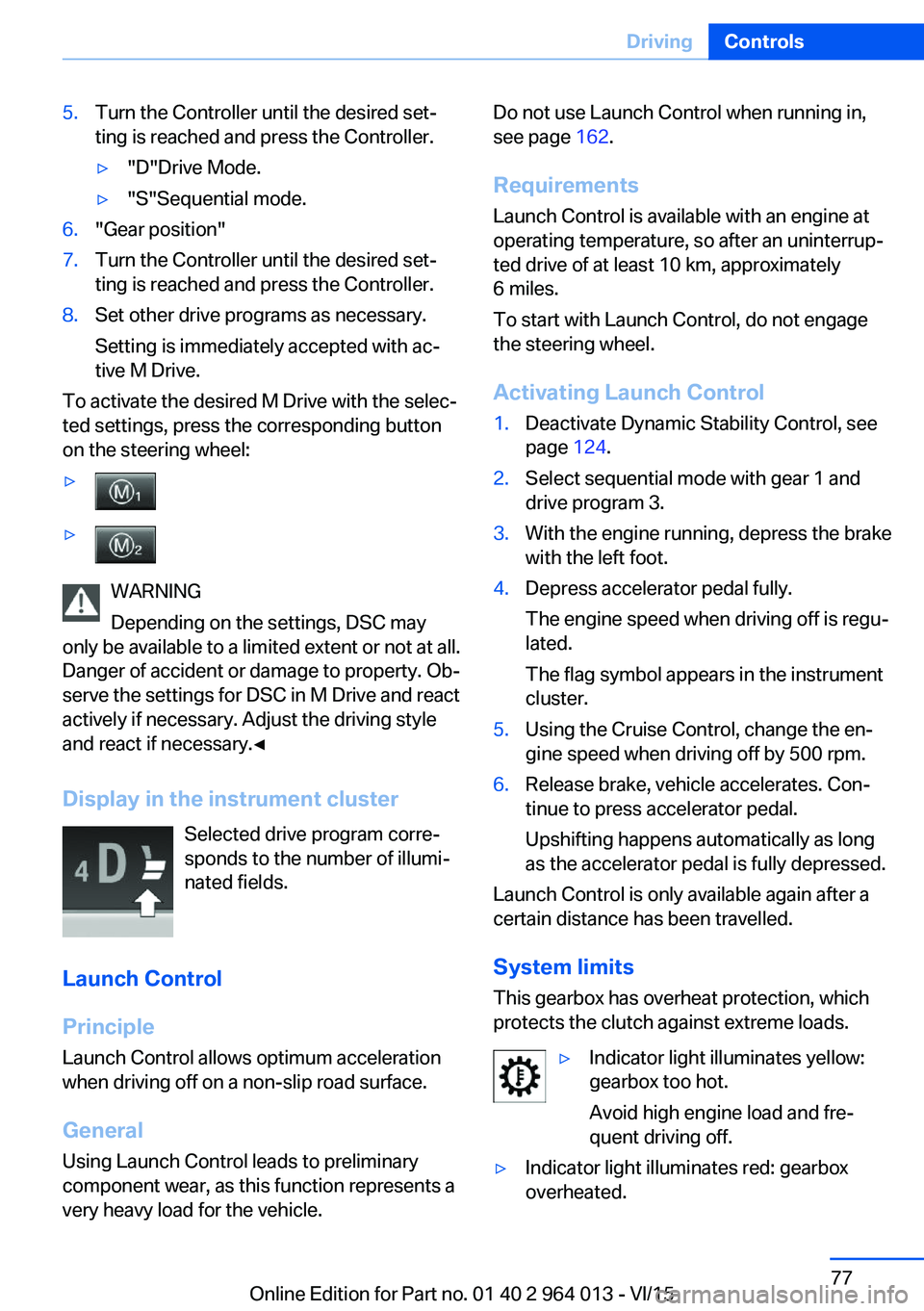
Display in the instrument cluster Selected drive program corre‐
sponds to the number of illumi‐
nated fields.
Launch Control
Principle
Launch Control allows optimum acceleration
when driving off on a non-slip road surface.
General
Using Launch Control leads to preliminary component wear, as this function represents a
very heavy load for the vehicle.
Do not use Launch Control when running in,
see page 162.
Requirements
Launch Control is available with an engine at
operating temperature, so after an uninterrup‐
ted drive of at least 10 km, approximately
6 miles.
To start with Launch Control, do not engage
the steering wheel.
Activating Launch Control1.Deactivate Dynamic Stability Control, see
page 124.2.Select sequential mode with gear 1 and
drive program 3.3.With the engine running, depress the brake
with the left foot.4.Depress accelerator pedal fully.
The engine speed when driving off is regu‐
lated.
The flag symbol appears in the instrument
cluster.5.Using the Cruise Control, change the en‐
gine speed when driving off by 500 rpm.6.Release brake, vehicle accelerates. Con‐
tinue to press accelerator pedal.
Upshifting happens automatically as long
as the accelerator pedal is fully depressed.
Launch Control is only available again after a
certain distance has been travelled.
System limits
This gearbox has overheat protection, which
protects the clutch against extreme loads.
▷Indicator light illuminates yellow:
gearbox too hot.
Avoid high engine load and fre‐
quent driving off.▷Indicator light illuminates red: gearbox
overheated.Seite 77DrivingControls77
Online Edition for Part no. 01 40 2 964 013 - VI/15
Page 78 of 228
Moderate continued driving possible. Stop
at the next opportunity, stop the engine
and allow the gearbox to cool.
Avoid frequent, heavy driving off and on up‐
ward inclines, do not hold the vehicle by
slightly giving gas with sliding clutch, other‐
wise the gearbox may overheat.
In traffic queues or at very low speeds, use the
Low Speed Assistant, see page 74.
M Engine Dynamics Control
Principle The M Engine Dynamics Control affects the
response of the vehicle to movements of the
accelerator pedal.
Programs Possibilities for adjusting the responsiveness:
▷"Efficient": efficient, comfortable. Mini‐
mised consumption
Ideal, for example, in city traffic or on snow▷"Sport": sporty, dynamic.▷"Sport Plus": spontaneous, direct. Maxi‐
mum dynamics
Selecting program
Via M Drive On the Control Display:
1."Settings"2."M Drive 1" or "M Drive 2"3. Select the symbol.4.Select the desired channel.
Setting is immediately accepted with ac‐
tive M Drive.
To activate the desired M Drive with the selec‐
ted settings, press the corresponding button
on the steering wheel:
▷▷
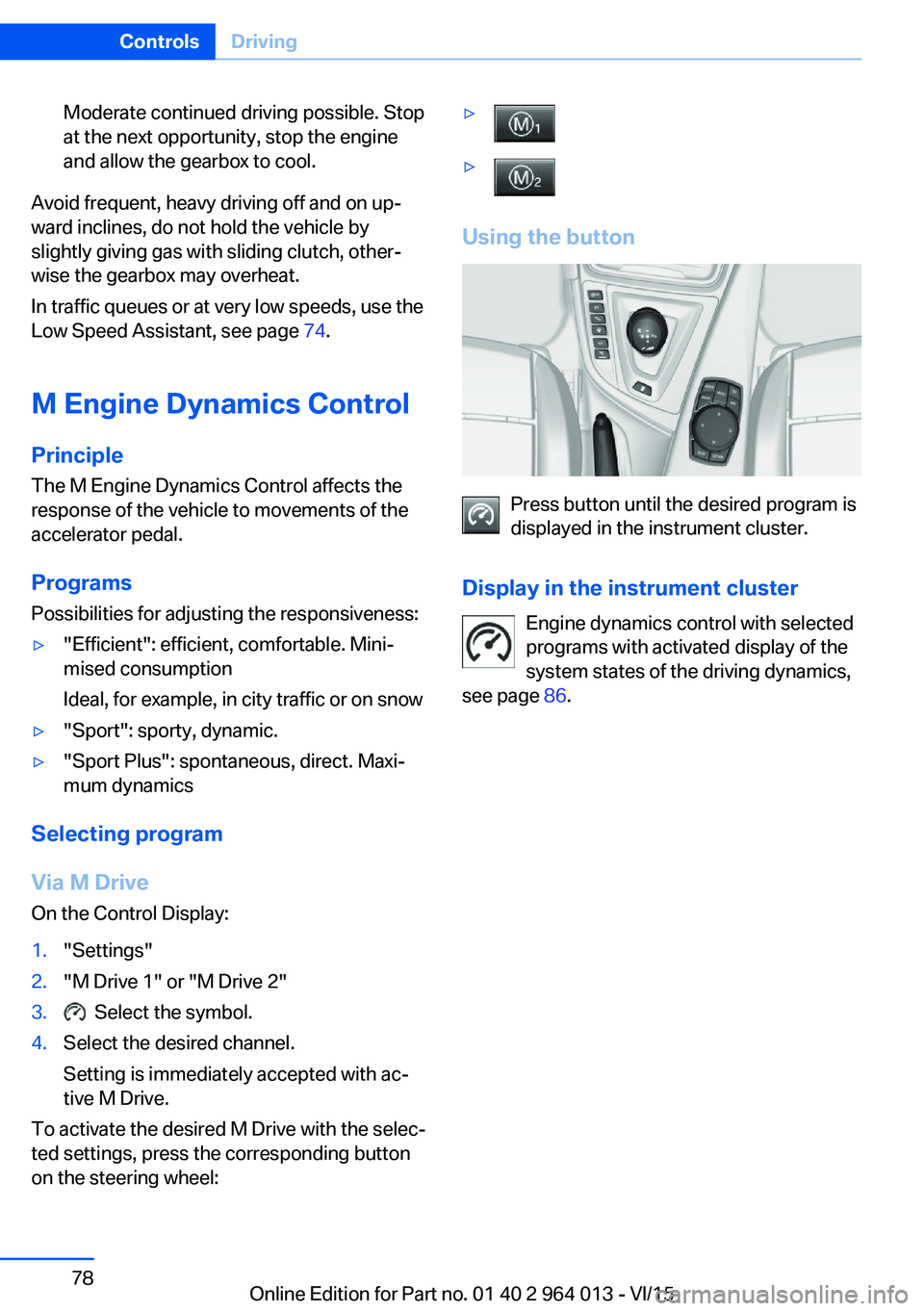
Using the button
Press button until the desired program is
displayed in the instrument cluster.
Display in the instrument cluster Engine dynamics control with selected
programs with activated display of the
system states of the driving dynamics,
see page 86.
Seite 78ControlsDriving78
Online Edition for Part no. 01 40 2 964 013 - VI/15