change time BMW M4 2016 User Guide
[x] Cancel search | Manufacturer: BMW, Model Year: 2016, Model line: M4, Model: BMW M4 2016Pages: 228, PDF Size: 4.88 MB
Page 109 of 228
Runflat indicator RPA
Principle The system identifies a loss of tyre pressure
by comparing the speeds of rotation of the in‐
dividual wheels while the vehicle is in motion.
If a tyre loses pressure, its diameter changes.
This in turn alters the rotational speed of the
corresponding wheel. This is detected and re‐
ported as a flat tyre.
The system does not measure the tyre pres‐
sures as such.
Operating requirements
The system must have been initialised with
correct tyre inflation pressure, otherwise relia‐
ble signalling of a flat tyre cannot be assured.
Each time the tyre pressure is adjusted or a
tyre or wheel is changed, initialise the system
again.
Status display The current status of the runflat indicator can
be shown on the Control Display, for example
whether the runflat indicator is active.
On the Control Display:1."Vehicle information"2."Vehicle status"3. "Flat Tyre Monitor (RPA)"
The status is displayed.
Initialising
On initialisation, the current tyre pressures are
stored as a reference for detection of a flat tyre. The initialisation is started by confirming
the correct tyre inflation pressures.
When driving with snow chains fitted, do not
initialise the system.
On the Control Display:
1."Vehicle information"2."Vehicle status"3. "Perform reset"4.Start the engine – do not drive off.5.Start the initialisation with "Perform reset".6.Drive off.
Initialising is completed while the vehicle is in
motion; this process can be interrupted at any
time.
Initialising resumes automatically when you
continue your journey.
Message of a flat tyre The yellow warning lamp is illuminated.
A Check Control message is shown.
There is a flat tyre or substantial loss of
tyre pressure.
1.Reduce your speed and carefully stop the
vehicle. Avoid violent or sudden braking
and steering manoeuvres.2.Determine which wheel is damaged. Do
this by checking the tyre inflation pres‐
sures with the aid of the Mobility System. If
all tyres are inflated to the correct pres‐
sures, the runflat indicator might not have
been initialised. In this case initialise the
system.3.Remedy the flat tyre with the Mobility Sys‐
tem or replace the damaged wheel.
System limits
A natural, even loss of tyre pressurein all four
tyres that occurs over time is not detected.
Consequently, check the tyre inflation pres‐
sure at regular intervals.
No warning can be given in the event of sud‐
den tyre failure caused by external factors.
In the following situations, the system could be
slow to respond or operate incorrectly:
▷If the system has not been initialised.▷Journey on snow-covered or slippery sur‐
faces.Seite 109SecurityControls109
Online Edition for Part no. 01 40 2 964 013 - VI/15
Page 119 of 228
Manual speed limiterPrinciple With the system, the speed can be restricted
from a value of 30 km/h/20 mph. There are no
restrictions below the set speed limit.
Exceeding the speed limit In particular situations the speed limit can be
deliberately exceeded by accelerating strongly.
The system gives a warning if the travelling
speed exceeds the set speed limit.
No brake intervention
If the set speed limit has been reached or unin‐
tentionally exceeded (for example driving
downhill) there is no brake intervention.
If you set a speed limit during the journey
which is below the current speed, the vehicle
rolls until the driving speed drops below the
speed limit.
Overview
Buttons on the steering wheelPress the but‐
tonFunctionSwitching system on/off,
see page 119Rocker switch:
Change speed limit, see
page 119
Controls
Switching on Press the button on the steering
wheel.
The current speed is assumed as the speed
limit.
When switching on when at a standstill
30 km/h/20 mph is set as the speed limit.
The speedometer marker is set to the corre‐
sponding speed.
When activating the speed limit it is possible
that Dynamic Stability Control, DSC is activa‐
ted.
Switching off Press the button on the steering
wheel.
For example, the system is also deactivated in
the following situations:▷When engaging reverse gear.▷When switching the engine off.▷When switching on Cruise Control.
The indicators turn off.
Change speed limit
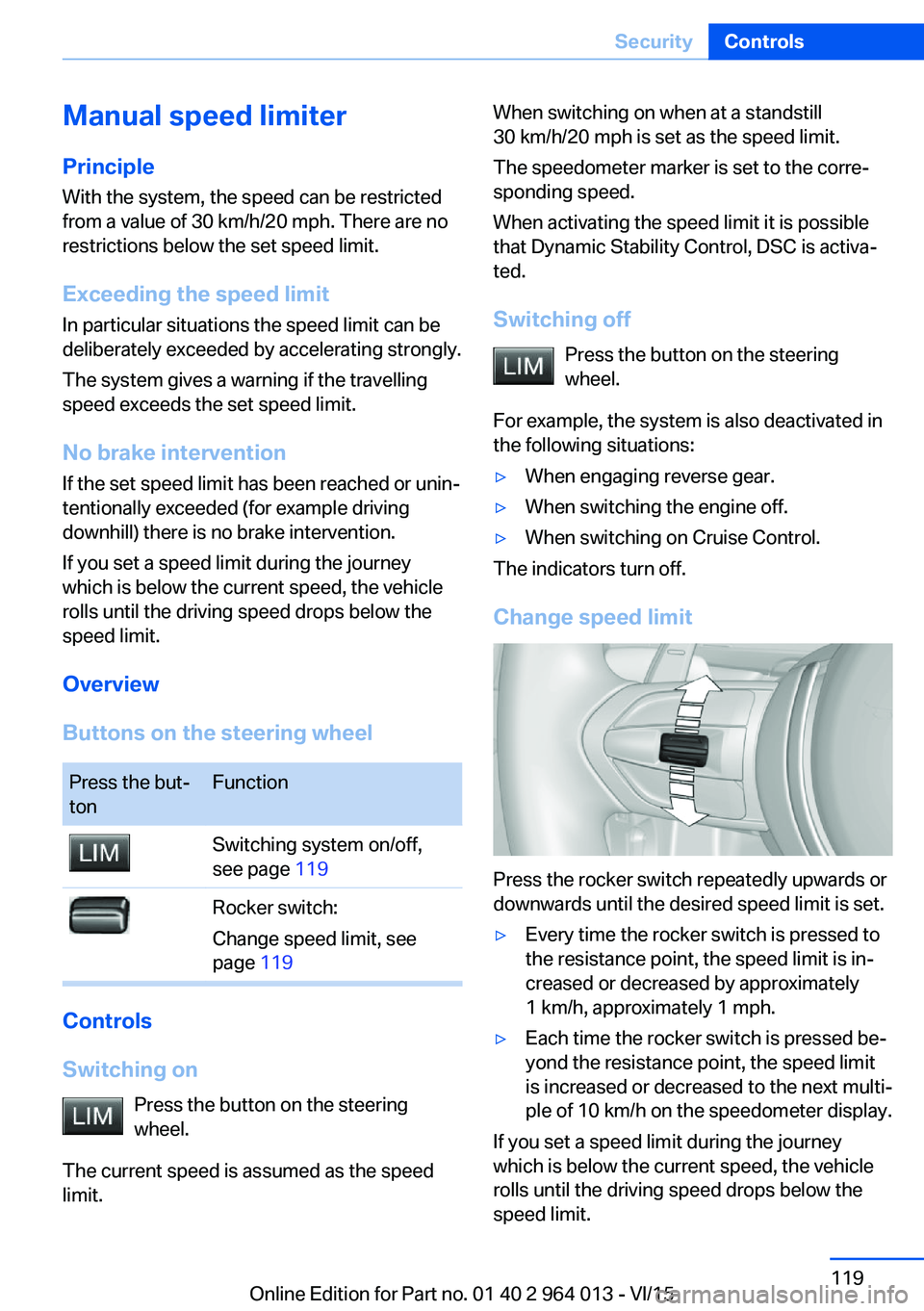
Press the rocker switch repeatedly upwards or
downwards until the desired speed limit is set.
▷Every time the rocker switch is pressed to
the resistance point, the speed limit is in‐
creased or decreased by approximately
1 km/h, approximately 1 mph.▷Each time the rocker switch is pressed be‐
yond the resistance point, the speed limit
is increased or decreased to the next multi‐
ple of 10 km/h on the speedometer display.
If you set a speed limit during the journey
which is below the current speed, the vehicle
rolls until the driving speed drops below the
speed limit.
Seite 119SecurityControls119
Online Edition for Part no. 01 40 2 964 013 - VI/15
Page 121 of 228
Attentiveness assistant
Principle The system can detect increasing inattentive‐
ness or tiring of the driver on long monotonous
drives, for example on motorways. In this situa‐
tion, it is recommended that you take a break.
Note WARNING
The system does not take your personal
responsibility from you when you are estimat‐
ing your physical condition. Increasing inatten‐
tion or fatigue might not be detected, or not in
good time. Danger of accidents. Make sure
that the drive is rested and alert. Adapt driving
style to the driving conditions.◀
Function The system is switched on every time the en‐
gine is started and cannot be switched off.
After the start of the drive, the system is adap‐
ted to the driver so that an increase in inatten‐
tion or fatigue can be detected.
This process considers the following criteria:▷Personal driving style, for example, steer‐
ing.▷Drive conditions, for example, time of day,
duration of drive.
The system is active from approxi‐
mately. 70 km/h, 43 mph and can display a rec‐
ommendation to take a break
Recommendation to take a break
With increasing inattention or tiredness of the
driver, an instruction is shown on the control
display with the recommendation to take a
break.
A recommendation to take a break will only be
displayed once during an uninterrupted trip.
After a break, at the earliest another break rec‐
ommendation may be displayed after approxi‐
mately 45 minutes.
System limits
The function may be restricted in situations
such as the following and no warning or a
wrong one is triggered:▷If the time is wrongly set.▷If the speed driven falls considerably below
70 km/h, 43 mph.▷For sporty driving style, for example, with
heavy acceleration or fast cornering.▷In active drive situations, for example, fre‐
quent lane change.▷With bad road conditions.▷With high side-wind.
PreCrash
Principle With the system from 30 km/h/20 mph critical
driving situations may occur, which could
cause an accident. In these situations, auto‐
matically preventative, protective measures
are taken to minimise the risk of accident.
Critical driving situations are, for example:
▷Full braking.▷Heavy understeering.▷Heavy oversteering.
When collision warning or front-end collision
warning with braking function is fitted, within
the limits of the system, threatened collisions
into vehicles in front or stationary vehicles are
detected.
Note WARNING
The system does not take your personal
responsibility from you. Critical situations can‐
not be detected reliably or in good time due to
limitations of the system. Danger of accidents.
Adapt driving style to the driving conditions.
Observe the traffic situation and intervene ac‐
tively if the situation warrants it.◀
Seite 121SecurityControls121
Online Edition for Part no. 01 40 2 964 013 - VI/15
Page 124 of 228
3.Selected desired adjustment option.4.Select the desired channel.
The individual settings are stored for the cur‐
rently used profile.
With M Drive activated a change is made im‐
mediately on the Control Display setting.
Activating/deactivating M Drive
Activating Press the relevant button on the steering
wheel.
▷Activate M Drive 1▷Activate M Drive 2
If in M Drive, DSC OFF or MDM is set, a mes‐
sage appears in the instrument cluster. This
message is operated by pressing the button
again.
Deactivating Press the relevant button on the steering
wheel again.
Indicator Lights
▷Indicator light illuminates: corre‐
sponding M Drive is activated.▷Indicator light flashes: M Drive
could not be activated. Anti-block‐
ing system ABS or Dynamic Stabil‐
ity Control DSC control drive stabil‐
ity directly.
Reactivate M Drive if the indicator
stops flashing.
Information
With activated M Drive individual settings out‐
side of the M Drive can also be changed, for
example, using buttons in the centre console.
That deactivates the M Drive.
To reactivate all the settings made on the Con‐
trol Display for M Drive, briefly press one of the
following buttons:▷▷
To accept the change settings in M Drive,
press the corresponding button for a long time.
Reset M Drive Individual settings can be reset to default val‐
ues.
1."Settings"2."M Drive 1" or "M Drive 2"3."Reset M Drive 1" or "Reset M Drive 2"4."Yes"
To interrupt resetting: "No"
Dynamic Stability Control,
DSC
Principle DSC prevents the driven wheels losing traction
when you pull away from rest or accelerate.
DSC is also able to detect unstable driving
conditions such as loss of traction at the rear
or vehicle slip over the front wheels. DSC re‐
duces engine output and applies the brakes at
individual wheels, helping, within the limits im‐
posed by the laws of physics, to keep the vehi‐
cle safely on course.
Note Adapt the driving style to the situation as it is
always the driver's responsibility to adapt a
suitable driving style.
Not even DSC can overcome the laws of phys‐
ics.
Do not limit the additional safety afforded by
this system by taking driving risks.
Seite 124ControlsDriving stability control systems124
Online Edition for Part no. 01 40 2 964 013 - VI/15
Page 132 of 228
Functional requirements
To ensure correct functionality:▷Do not cover sensors, for example by stick‐
ers, bicycle rack.▷Keep sensors clean and free from ice.
For cleaning: do not spray the sensors with
high-pressure cleaners for an extended period
of time and maintain a distance of at least
30 cm, 12 in.
Switching on/off
Automatic switching on While the engine is running, engage selector
lever position R.
Automatic switching off when moving forwards
The system switches off when a certain dis‐
tance or speed is exceeded.
Switch the system back on if necessary.
With front PDC: switching on/off
manually
Press the button.
▷On: LED is illuminated.▷Off: LED turns off.
Display
Audible warning signals An intermittent sound indicates position of an
object as the vehicle approaches it. For in‐
stance, if an object is identified to the rear left of the vehicle, the warning signal sounds from
the rear left loudspeaker.
The shorter the distance to an object be‐
comes, the shorter the intervals become.
If the distance to a detected object is less than
approximately 25 cm, 10 in, a continuous tone
sounds.
With front PDC: if there are objects in front of
and behind the vehicle, an alternating continu‐
ous tone sounds.
Volume control It is possible to set the ratio between the vol‐
ume of the PDC acoustic signal and the vol‐
ume of the Entertainment.1."Multimedia", "Radio" or "Settings"2."Sound"3."Volume settings"4."PDC"5.Turn the Controller until the desired set‐
ting is reached.6.Press the Controller.
The setting is saved for the currently used pro‐
file.
Visual warning
When the vehicle is approaching an object it
will be shown on the Control Display. Objects
that are further away from the vehicle will ap‐
pear on the Control Display before an acoustic
signal is given.
A display is superimposed as soon as PDC is
activated.
Recording range of sensors is shown in col‐
ours green, yellow and red.
If the reversing camera image is displayed, it is
possible to change over to PDC:
"Rear view camera"
System limits
Limits of the ultrasound measurement
Detection of objects might not be possible if
the limits of the physical ultrasound measure‐
ment are exceeded, such as for instance at the
following times:
▷With small children and animals.Seite 132ControlsDriving comfort132
Online Edition for Part no. 01 40 2 964 013 - VI/15
Page 145 of 228
Air conditioning functions in detailSwitching system on/off
Switching on
Press any key, except▷Heated rear window.▷Seat heating
Switching off
In the lowest setting, press the left of
the button.
Temperature Turn the wheel to select the de‐
sired temperature.
The automatic air conditioning sets this tem‐ perature as quickly as possible, using higher
cooling or heating power if necessary. The
temperature is then maintained.
Avoid switching between different temperature
settings in rapid succession. The automatic air
conditioning will not then have sufficient time
to establish the temperature selected.
Cooling function
The interior can only be cooled when the en‐
gine is running.
Press the button.
Air is cooled and dried, then reheated
to suit the temperature setting.
Depending on weather conditions, the wind‐
screen and side windows may mist over mo‐
mentarily when the engine is started.
The cooling function is switched on automati‐
cally in the AUTO program.
When using the automatic air conditioning,
condensation water, see page 165, develops
that exits underneath the vehicle.
Maximum cooling effect Press the button.
System is set to lowest temperature,
optimum air flow and recirculated-air mode.
The air flows from the outlets for the upper
body area. Therefore open the ventilation vents.
The function is available through an outside
temperature of approximately 0 ℃/32 ℉ and
with the engine running.
The air flow can be adapted when the program
is active.
AUTO program Press the button.
The air flow, air distribution and tem‐
perature are automatically regulated.
Depending on the selected temperature, inten‐
sity AUTO program and external influences,
the air is directed towards the windscreen, side
windows, upper body, and into the footwell.
The cooling function, see page 145, is
switched on automatically in the AUTO pro‐
gram.
A condensation sensor also controls the pro‐
gram so that condensation is avoided as much
as possible.
Intensity of AUTO program
When AUTO program is switched on, auto‐
matic control of the intensity can be changed.
Pressing the button on the left or right
reduces or increases intensity.
The selected intensity is shown on the display
for automatic air conditioning.Seite 145ClimateControls145
Online Edition for Part no. 01 40 2 964 013 - VI/15
Page 146 of 228
Automatic air recirculation control,
AUC/recirculated-air mode
If the air outside the vehicle has an unpleasant
odour or contains pollutants, the supply to the
interior of the vehicle can be shut off. The air
inside the vehicle is then recirculated.
Press button repeatedly to call up an
operating mode:▷LEDs off: ambient air is constantly entering
the car.▷Left-hand LED on, AUC mode: a sensor
detects pollutants in the outside air and
shuts it out automatically.▷Right-hand LED on, recirculated-air mode:
the ambient air supply is permanently shut
off.
The recirculated-air mode automatically
switches off at low outside temperatures after
a given time, to avoid condensation.
Continuous recirculated-air mode deteriorates
the air quality in the interior and condensation
on the windows increases.
If there is condensation on the window, switch
off recirculated-air mode and press the AUTO
button to use the condensation sensor. Ensure
that air can flow towards the windscreen.
Adjusting the air flow manually To be able to adjust the air flow manually, first
switch off the AUTO program.
Pressing the button on the left or right
reduces or increases the air flow.
The selected air flow is shown on the display
for automatic air conditioning.
In order to protect the battery the air flow rate
of the automatic air conditioning is reduced, if
necessary.
Adjusting the air distribution manually Press button repeatedly to select a
program:
▷Upper body area.▷Upper body area and footwell.▷Footwell.▷Windows and footwell: only on the driver's
side.▷Windows, upper body area and footwell:
only on the driver's side.
If there is condensation on the window, press
the AUTO button in order to use the conden‐
sation sensor.
Defrosting windows and removing
condensation
Press the button.
This removes ice and condensation
quickly from the windscreen and the front side
windows.
To do this, point the side nozzles at the side
windows if necessary.
The air flow can be adapted when the program
is active.
If there is condensation on the window, switch
on the cooling function as well or press the AUTO button to use the condensation sensor.
Heated rear window Press the button.
The heated rear window is switched
off automatically after a certain period of time.
Microfilter/activated charcoal filter
In outside and recirculated-air mode, the mi‐
crofilter/activated carbon filter filters dust, pol‐ len and harmful gases from the air.
This filter should be changed during mainte‐
nance on your vehicle, see page 191.
Seite 146ControlsClimate146
Online Edition for Part no. 01 40 2 964 013 - VI/15
Page 147 of 228
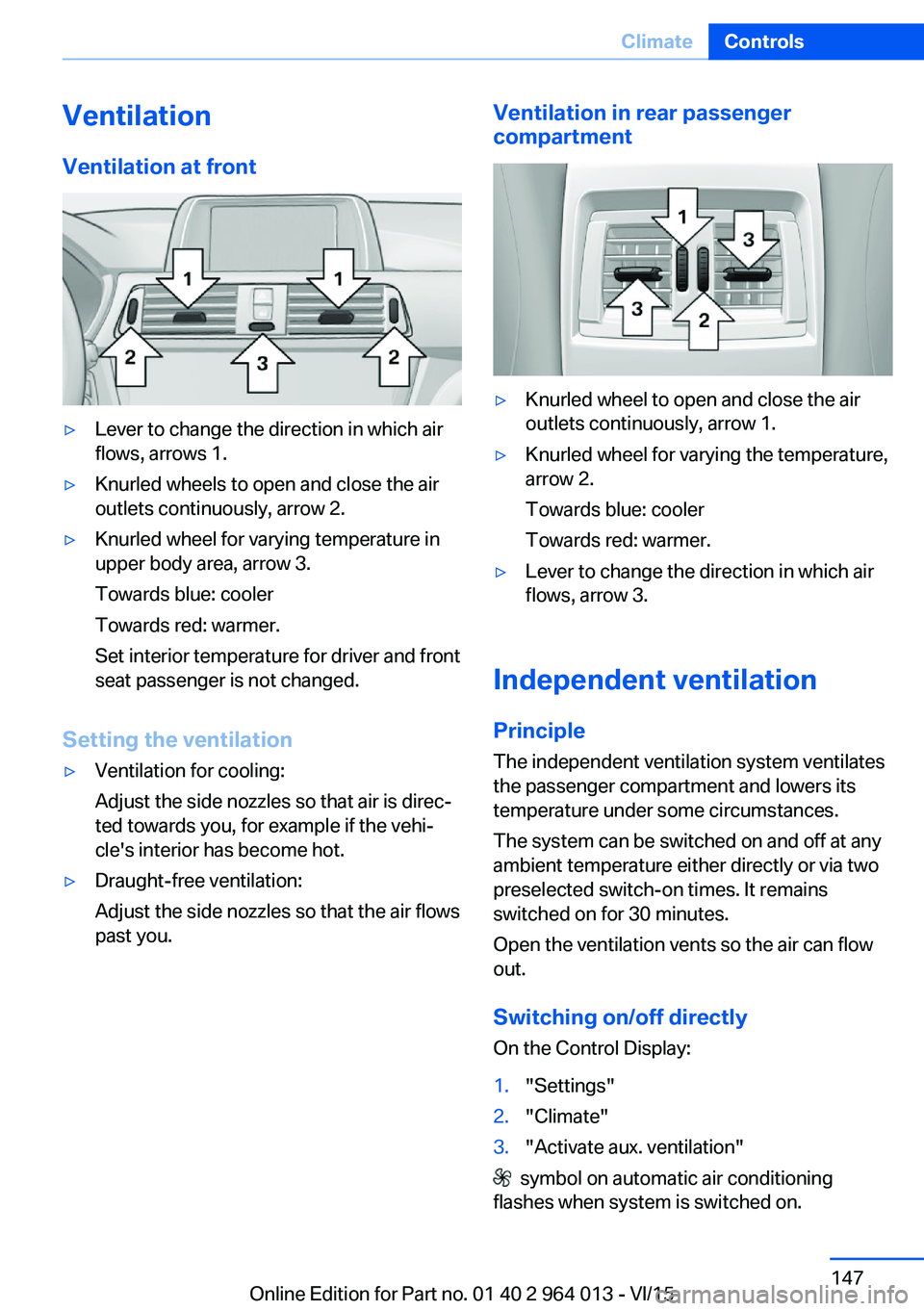
VentilationVentilation at front▷Lever to change the direction in which air
flows, arrows 1.▷Knurled wheels to open and close the air
outlets continuously, arrow 2.▷Knurled wheel for varying temperature in
upper body area, arrow 3.
Towards blue: cooler
Towards red: warmer.
Set interior temperature for driver and front
seat passenger is not changed.
Setting the ventilation
▷Ventilation for cooling:
Adjust the side nozzles so that air is direc‐
ted towards you, for example if the vehi‐
cle's interior has become hot.▷Draught-free ventilation:
Adjust the side nozzles so that the air flows
past you.Ventilation in rear passenger
compartment▷Knurled wheel to open and close the air
outlets continuously, arrow 1.▷Knurled wheel for varying the temperature,
arrow 2.
Towards blue: cooler
Towards red: warmer.▷Lever to change the direction in which air
flows, arrow 3.
Independent ventilation
Principle The independent ventilation system ventilates
the passenger compartment and lowers its
temperature under some circumstances.
The system can be switched on and off at any
ambient temperature either directly or via two
preselected switch-on times. It remains
switched on for 30 minutes.
Open the ventilation vents so the air can flow
out.
Switching on/off directly
On the Control Display:
1."Settings"2."Climate"3."Activate aux. ventilation"
symbol on automatic air conditioning
flashes when system is switched on.
Seite 147ClimateControls147
Online Edition for Part no. 01 40 2 964 013 - VI/15
Page 187 of 228
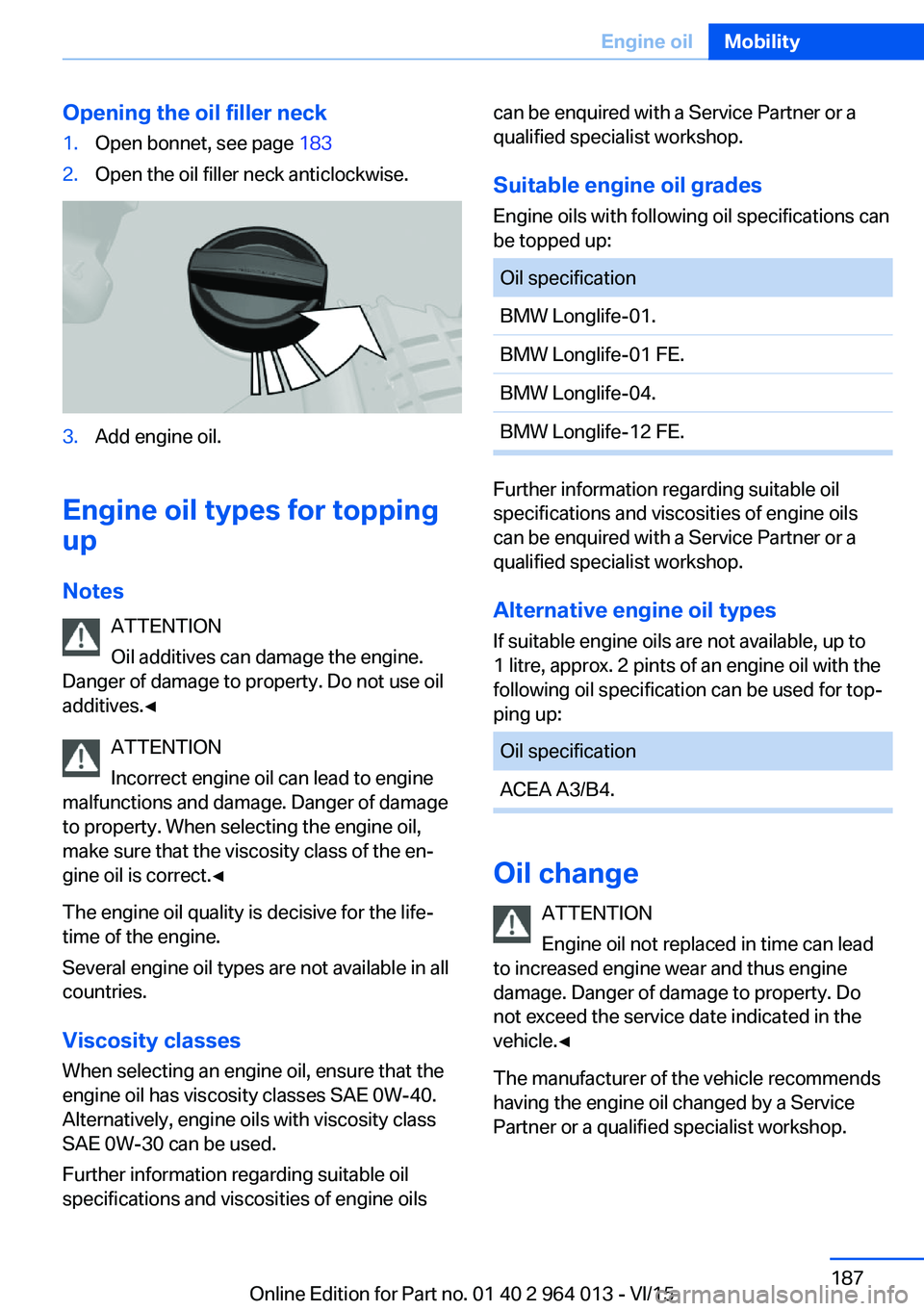
Opening the oil filler neck1.Open bonnet, see page 1832.Open the oil filler neck anticlockwise.3.Add engine oil.
Engine oil types for topping
up
Notes ATTENTION
Oil additives can damage the engine.
Danger of damage to property. Do not use oil
additives.◀
ATTENTION
Incorrect engine oil can lead to engine
malfunctions and damage. Danger of damage
to property. When selecting the engine oil,
make sure that the viscosity class of the en‐
gine oil is correct.◀
The engine oil quality is decisive for the life‐
time of the engine.
Several engine oil types are not available in all
countries.
Viscosity classes When selecting an engine oil, ensure that the
engine oil has viscosity classes SAE 0W-40.
Alternatively, engine oils with viscosity class
SAE 0W-30 can be used.
Further information regarding suitable oil
specifications and viscosities of engine oils
can be enquired with a Service Partner or a
qualified specialist workshop.
Suitable engine oil grades
Engine oils with following oil specifications can
be topped up:Oil specificationBMW Longlife-01.BMW Longlife-01 FE.BMW Longlife-04.BMW Longlife-12 FE.
Further information regarding suitable oil
specifications and viscosities of engine oils
can be enquired with a Service Partner or a
qualified specialist workshop.
Alternative engine oil types If suitable engine oils are not available, up to
1 litre, approx. 2 pints of an engine oil with the
following oil specification can be used for top‐
ping up:
Oil specificationACEA A3/B4.
Oil change
ATTENTION
Engine oil not replaced in time can lead
to increased engine wear and thus engine
damage. Danger of damage to property. Do
not exceed the service date indicated in the
vehicle.◀
The manufacturer of the vehicle recommends
having the engine oil changed by a Service
Partner or a qualified specialist workshop.
Seite 187Engine oilMobility187
Online Edition for Part no. 01 40 2 964 013 - VI/15
Page 191 of 228
MaintenanceVehicle equipment
This chapter describes all standard, national
and special equipment provided in the model
series. Equipment not available in the vehicle is
therefore also described, for example the se‐
lected special equipment or national version.
This also applies to safety-relevant functions
and systems. Comply with the relevant na‐
tional regulations when using the correspond‐
ing functions and systems.
BMW Maintenance System
The maintenance system points out the nec‐
essary maintenance measures and so sup‐
ports in maintaining the road and operational
safety of the vehicle.
Scopes and intervals may vary depending on
national version. Replacement work, spare
parts, operating materials and wear material
are calculated separately. Further information
is available from a Service Partner or a qualified
specialist workshop.
Condition Based Service,
CBS
Sensors and advanced algorithms monitor the
conditions in which your vehicle is used. Con‐
dition Based Service uses this information to
calculate the maintenance requirements.
The system thus enables adaptation of the
scope of maintenance to the individual usage
profile.
Detailed information on service requirements,
see page 87, can be displayed at the Control
Display.Service data in the remote control
Information on maintenance requirements is
continually saved in the remote control. The Service Partner or a qualified specialist work‐
shop can read out this data and suggest an op‐
timised maintenance scope for your vehicle.
This is why you should hand over the remote
control that was last used for driving to your
service advisor with the vehicle.
Periods out of use
Immobilisation periods with the vehicle battery
disconnected are not taken into account.
Updating the time-dependent maintenance
scope such as brake fluid and any engine oil
and microfilter or activated carbon filter can be
done by a Service Partner or a qualified spe‐
cialist workshop.
Service history Have maintenance and repair carried out by a
Service Partner or a qualified specialist work‐
shop.
The maintenance work carried out is entered in
the proof of maintenance and the vehicle data.
The entries are, just like a service booklet, evi‐
dence of regular maintenance.
If an entry is made in the electronic service his‐
tory of the vehicle, service-relevant data is not
only saved in the vehicle but also on the central
IT systems of BMW AG, Munich.
The data entered in the electronic service his‐
tory can also be viewed by the new vehicle
owner after a change of vehicle owner. In addi‐
tion, all Service Partners and other authorised
and qualified specialist workshops can view
the data entered in the electronic service his‐
tory.Seite 191MaintenanceMobility191
Online Edition for Part no. 01 40 2 964 013 - VI/15