lights BMW M4 2016 Owners Manual
[x] Cancel search | Manufacturer: BMW, Model Year: 2016, Model line: M4, Model: BMW M4 2016Pages: 228, PDF Size: 4.88 MB
Page 5 of 228
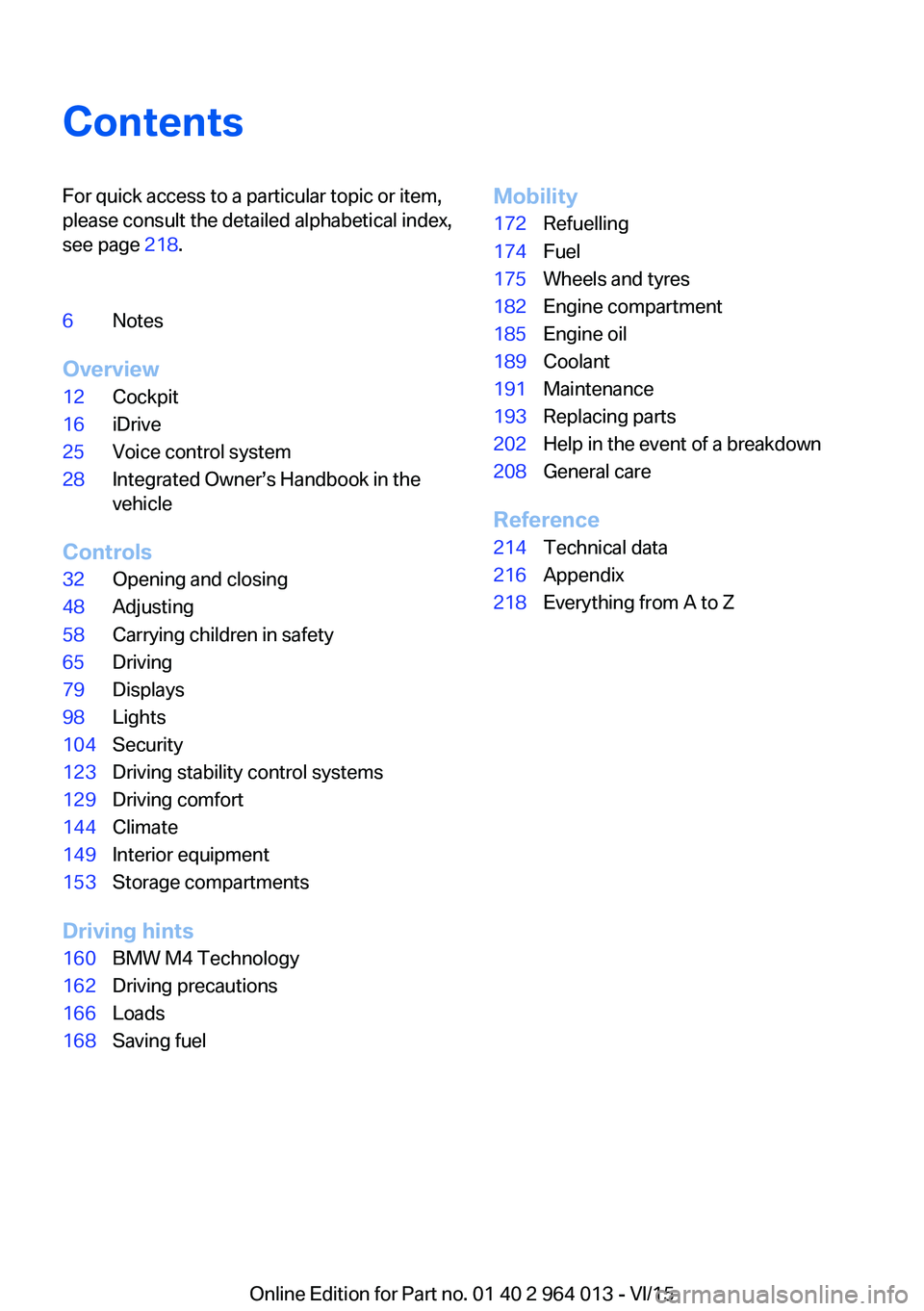
ContentsFor quick access to a particular topic or item,
please consult the detailed alphabetical index,
see page 218.6Notes
Overview
12Cockpit16iDrive25Voice control system28Integrated Owner’s Handbook in the
vehicle
Controls
32Opening and closing48Adjusting58Carrying children in safety65Driving79Displays98Lights104Security123Driving stability control systems129Driving comfort144Climate149Interior equipment153Storage compartments
Driving hints
160BMW M4 Technology162Driving precautions166Loads168Saving fuelMobility172Refuelling174Fuel175Wheels and tyres182Engine compartment185Engine oil189Coolant191Maintenance193Replacing parts202Help in the event of a breakdown208General care
Reference
214Technical data216Appendix218Everything from A to Z
Online Edition for Part no. 01 40 2 964 013 - VI/15
Page 8 of 228
Further information is available from a Service
Partner or a qualified specialist workshop.
Maintenance and repair
Advanced technology behind this vehicle, for
example the use of modern materials and high-
performance electronics, necessitates adapted
methods of maintenance and repair.
The manufacturer of the vehicle recommends
having respective work carried out by a BMW
Service Partner or a qualified specialist work‐
shop. Qualified specialist workshop in this
Owner's Handbook refers to a workshop carry‐
ing out respective work, e.g. maintenance and
repair, according to BMW specifications with
respectively trained personnel.
If such work, e.g maintenance and repair, is
performed inexpertly, it could result in conse‐
quential damage and thus constitute a safety
risk.
Parts and accessories BMW recommends using parts and accessory
products that are approved by BMW and thus
categorised as suitable.
The manufacturer of your vehicle recommends
to consult with a BMW Service Partner prior to
purchasing spare parts, operating materials or
accessories. The BMW Service Partner in‐
forms about genuine BMW parts and accesso‐
ries, other BMW approved products and offers
expert advice on all related matters.
The safety and compatibility of genuine BMW
parts and accessories in conjunction with
BMW vehicles have been checked by BMW.
BMW accepts product liability for them. On the
other hand, BMW cannot accept liability for un‐
suitable parts or accessory products of any
kind.
BMW does not evaluate each individual prod‐
uct of outside origin as to its suitability for use
on BMW vehicles without safety risk. BMW
does not evaluate the suitability of products,
even if a country-specific official approval wasissued. BMW cannot evaluate, whether these
products are suitable for BMW vehicles under
all usage conditions.
Data memory Many of the electronic components of your ve‐
hicle contain data memories, which save tech‐
nical information on vehicle condition, events
and errors temporarily or permanently. This
technical information documents the condition
of a component, a module, a system or its en‐
vironment:▷Operating states of system components,
for example, fill levels.▷Status messages of the vehicle and indi‐
vidual components, for example, wheel ro‐
tation number/speed, movement delay,
transverse acceleration.▷Malfunctions and faults of important sys‐
tem components, for example, lights and
brakes.▷Responses of the vehicle to special driving
situations, for example, triggering of an air‐
bag, using the stability control systems.▷Ambient conditions, for example, tempera‐
ture.
This data is only of a technical nature and is for
detecting and rectifying faults and optimisation
of vehicle functions. Movement profiles over
driven routes cannot be created from this data.
When servicing, for example, during repairs,
service processes, warranty cases or quality
assurance, this technical information can be
read by employees of the Service Partner or a
qualified specialist workshop, including the
manufacturer, from the event and fault data
memories with special diagnostic tools. There,
you will receive further information as needed.
After rectifying the fault, the information in the
fault memory is deleted or continuously over‐
written.
When using the vehicle, situations are conceiv‐
able in which this technical data can be per‐
Seite 8Notes8
Online Edition for Part no. 01 40 2 964 013 - VI/15
Page 12 of 228
CockpitVehicle equipment
This chapter describes all standard, national
and special equipment provided in the model
series. Equipment not available in the vehicle is
therefore also described, for example the se‐lected special equipment or national version.
This also applies to safety-relevant functions
and systems. Comply with the relevant na‐
tional regulations when using the correspond‐
ing functions and systems.
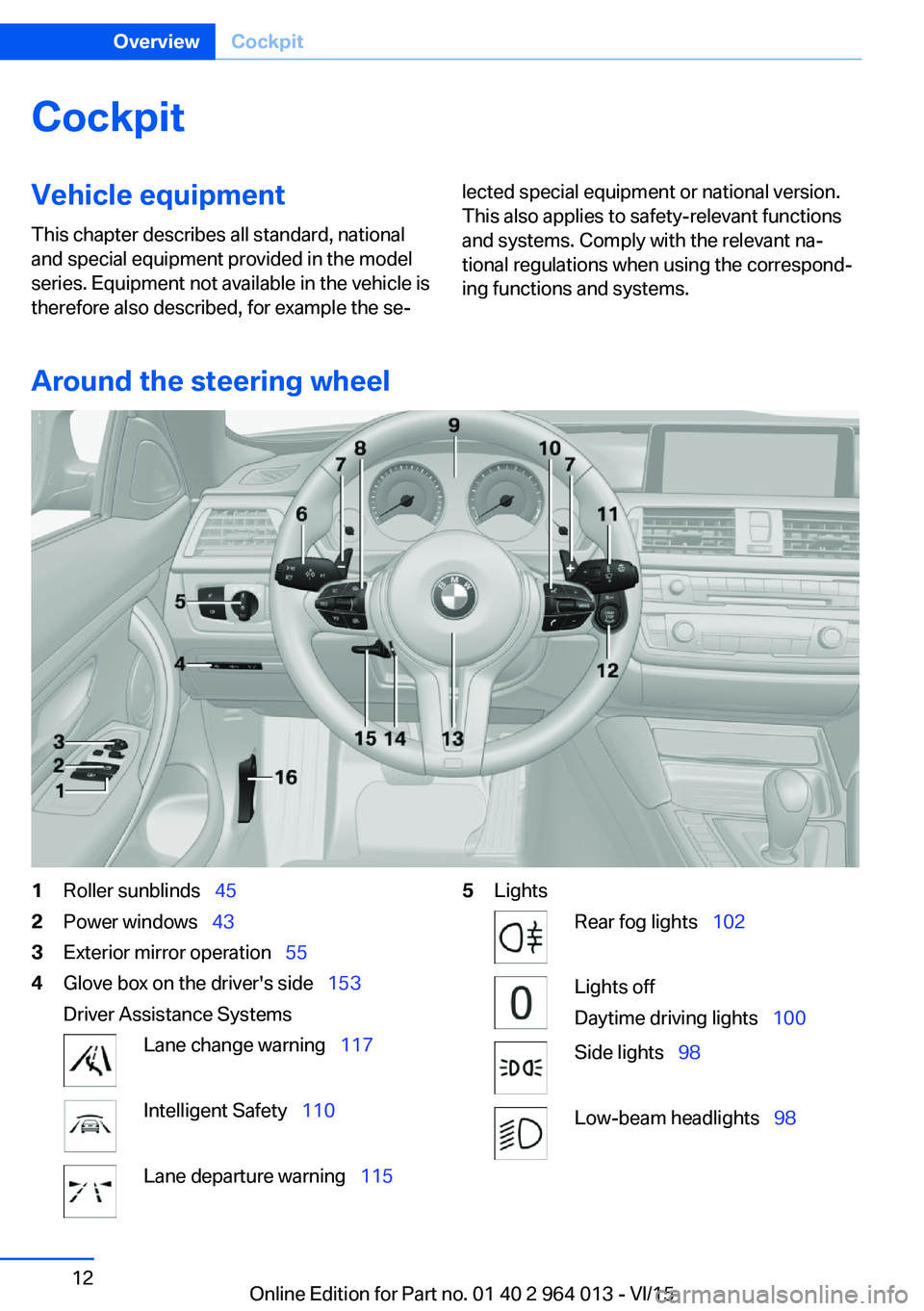
Around the steering wheel
1Roller sunblinds 452Power windows 433Exterior mirror operation 554Glove box on the driver's side 153
Driver Assistance SystemsLane change warning 117Intelligent Safety 110Lane departure warning 1155LightsRear fog lights 102Lights off
Daytime driving lights 100Side lights 98Low-beam headlights 98Seite 12OverviewCockpit12
Online Edition for Part no. 01 40 2 964 013 - VI/15
Page 13 of 228
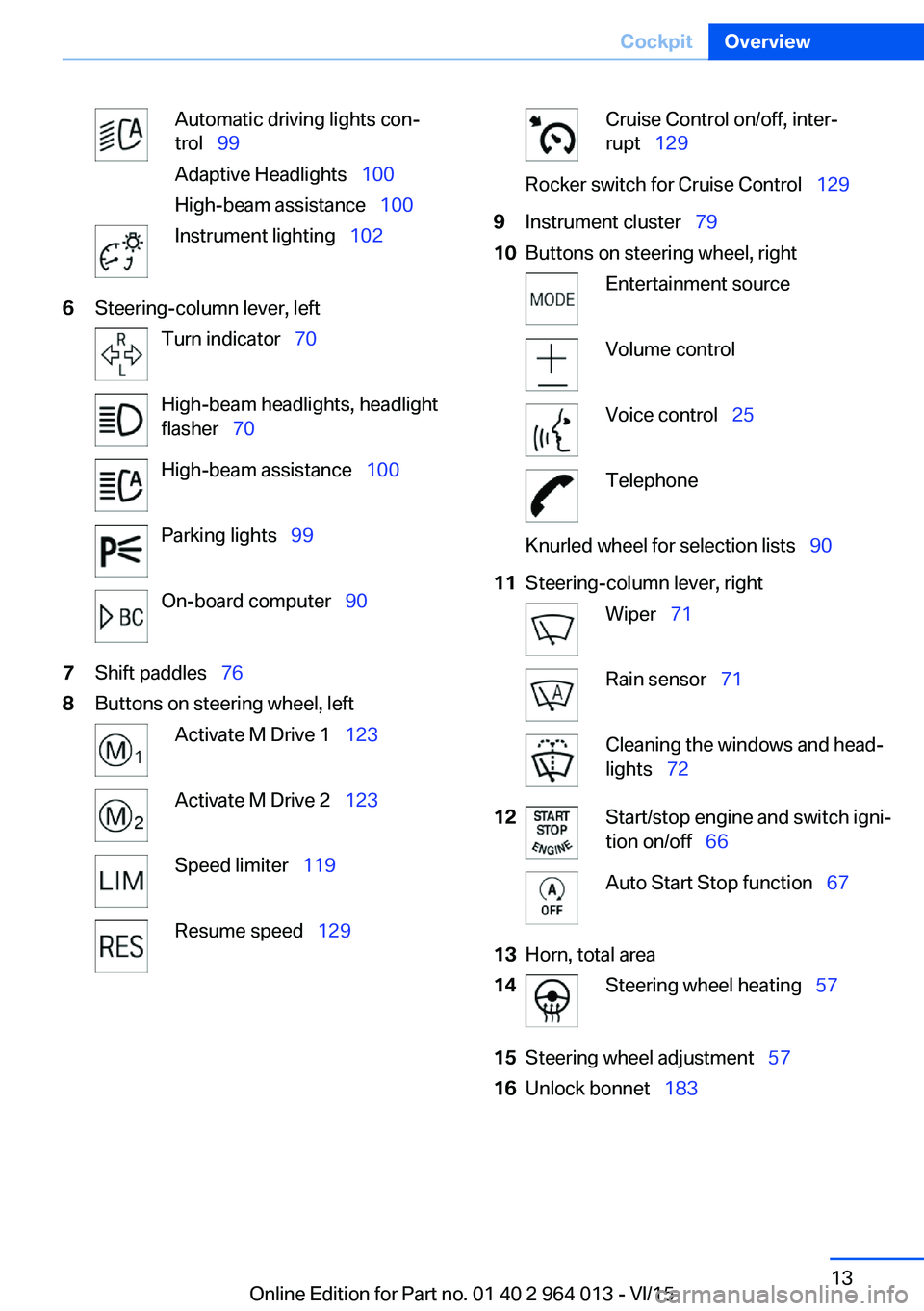
Automatic driving lights con‐
trol 99
Adaptive Headlights 100
High-beam assistance 100Instrument lighting 1026Steering-column lever, leftTurn indicator 70High-beam headlights, headlight
flasher 70High-beam assistance 100Parking lights 99On-board computer 907Shift paddles 768Buttons on steering wheel, leftActivate M Drive 1 123Activate M Drive 2 123Speed limiter 119Resume speed 129Cruise Control on/off, inter‐
rupt 129Rocker switch for Cruise Control 1299Instrument cluster 7910Buttons on steering wheel, rightEntertainment sourceVolume controlVoice control 25TelephoneKnurled wheel for selection lists 9011Steering-column lever, rightWiper 71Rain sensor 71Cleaning the windows and head‐
lights 7212Start/stop engine and switch igni‐
tion on/off 66Auto Start Stop function 6713Horn, total area14Steering wheel heating 5715Steering wheel adjustment 5716Unlock bonnet 183Seite 13CockpitOverview13
Online Edition for Part no. 01 40 2 964 013 - VI/15
Page 14 of 228
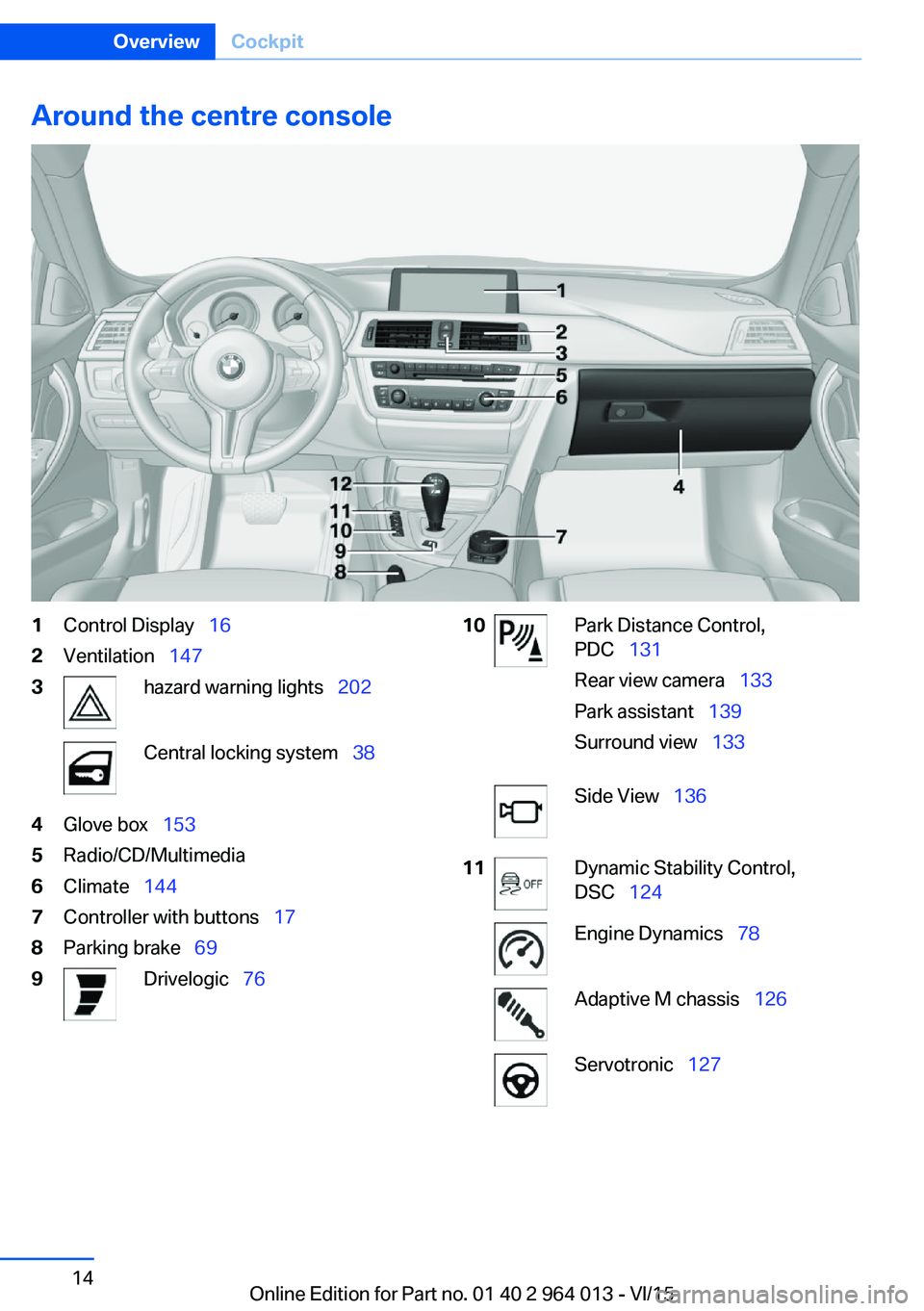
Around the centre console1Control Display 162Ventilation 1473hazard warning lights 202Central locking system 384Glove box 1535Radio/CD/Multimedia6Climate 1447Controller with buttons 178Parking brake 699Drivelogic 7610Park Distance Control,
PDC 131
Rear view camera 133
Park assistant 139
Surround view 133Side View 13611Dynamic Stability Control,
DSC 124Engine Dynamics 78Adaptive M chassis 126Servotronic 127Seite 14OverviewCockpit14
Online Edition for Part no. 01 40 2 964 013 - VI/15
Page 15 of 228
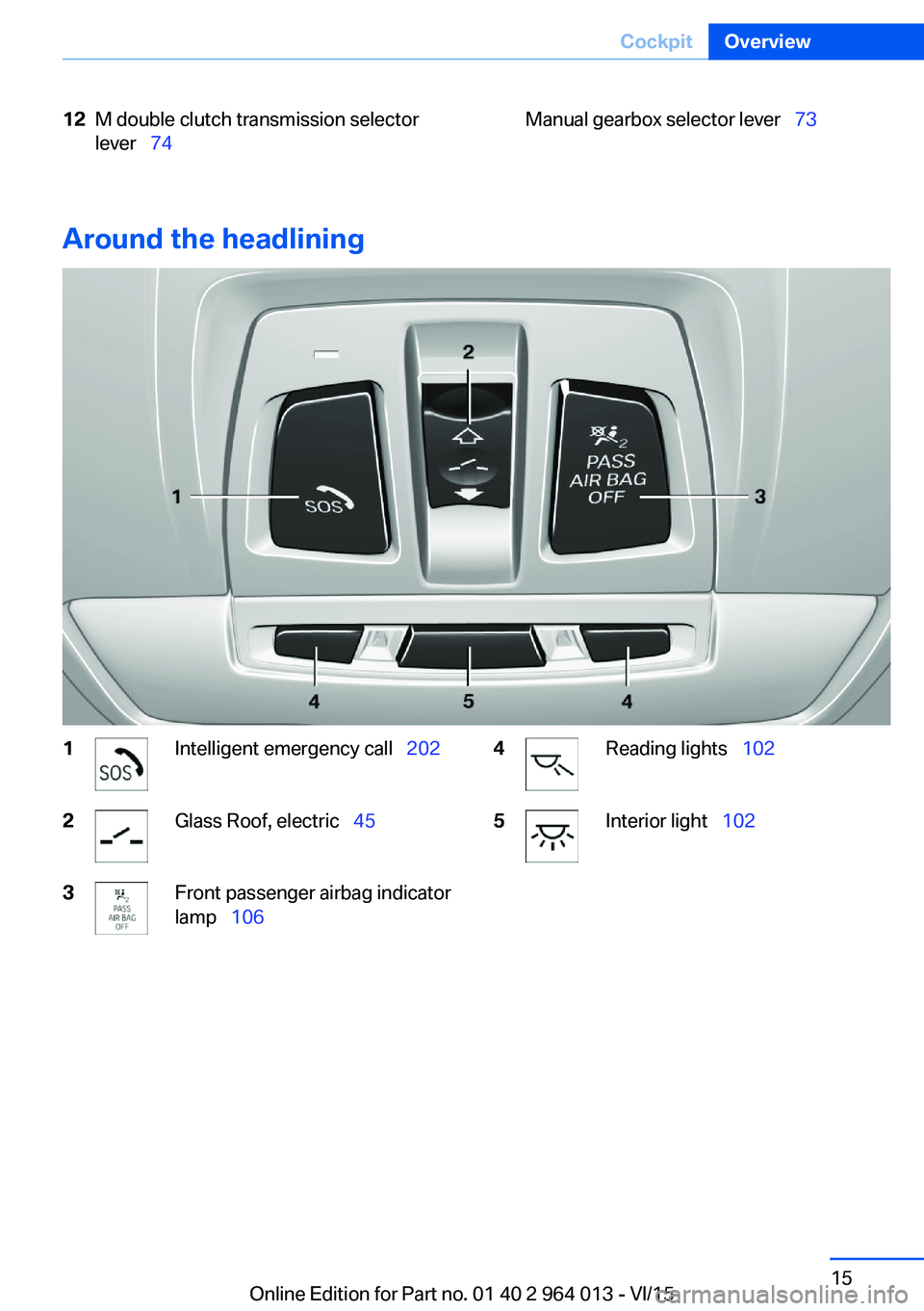
12M double clutch transmission selector
lever 74Manual gearbox selector lever 73
Around the headlining
1Intelligent emergency call 2022Glass Roof, electric 453Front passenger airbag indicator
lamp 1064Reading lights 1025Interior light 102Seite 15CockpitOverview15
Online Edition for Part no. 01 40 2 964 013 - VI/15
Page 38 of 228
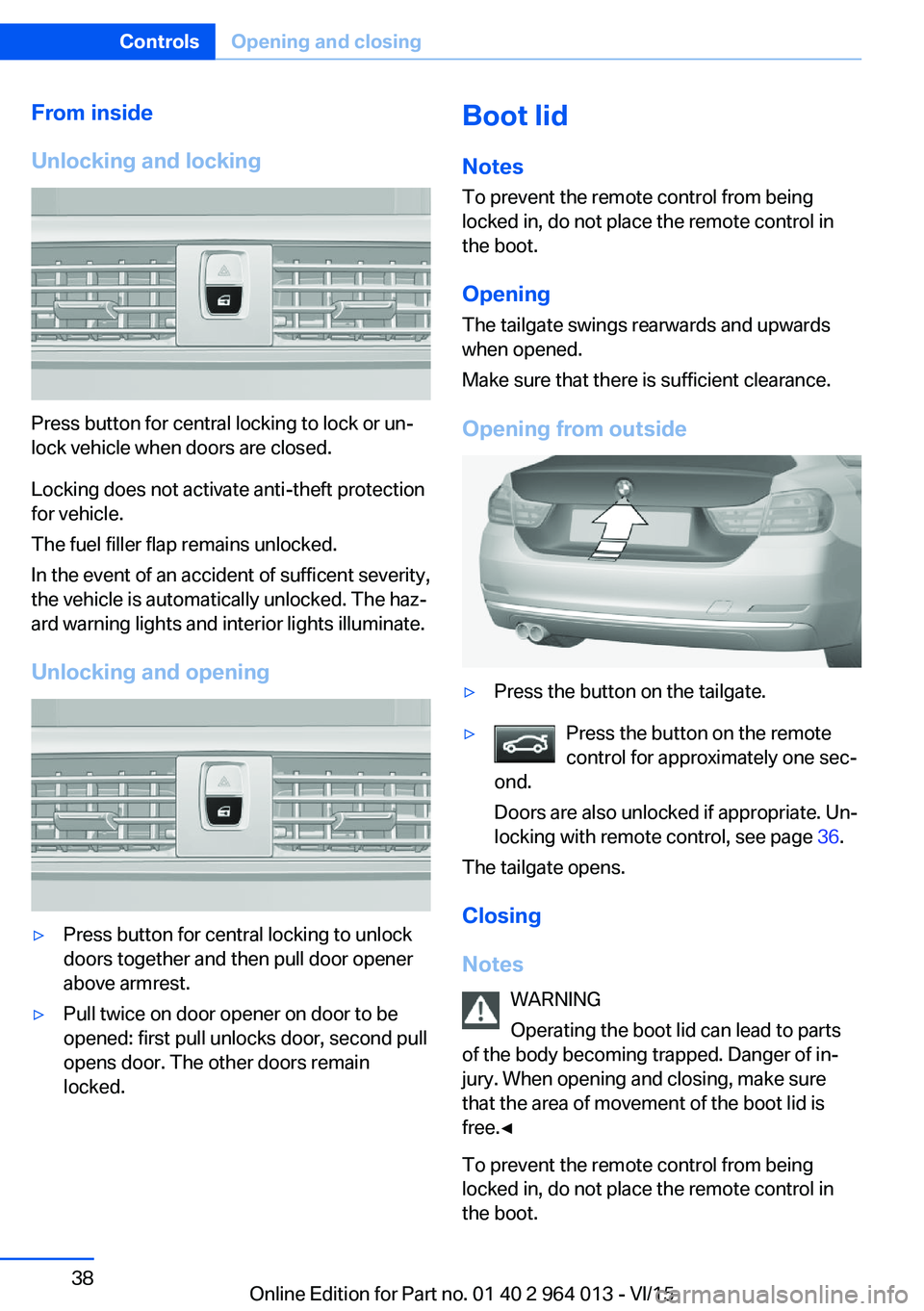
From inside
Unlocking and locking
Press button for central locking to lock or un‐
lock vehicle when doors are closed.
Locking does not activate anti-theft protection
for vehicle.
The fuel filler flap remains unlocked.
In the event of an accident of sufficent severity,
the vehicle is automatically unlocked. The haz‐
ard warning lights and interior lights illuminate.
Unlocking and opening
▷Press button for central locking to unlock
doors together and then pull door opener
above armrest.▷Pull twice on door opener on door to be
opened: first pull unlocks door, second pull
opens door. The other doors remain
locked.Boot lid
Notes
To prevent the remote control from being locked in, do not place the remote control in
the boot.
Opening
The tailgate swings rearwards and upwards
when opened.
Make sure that there is sufficient clearance.
Opening from outside▷Press the button on the tailgate.▷Press the button on the remote
control for approximately one sec‐
ond.
Doors are also unlocked if appropriate. Un‐
locking with remote control, see page 36.
The tailgate opens.
Closing
Notes WARNING
Operating the boot lid can lead to parts
of the body becoming trapped. Danger of in‐
jury. When opening and closing, make sure
that the area of movement of the boot lid is
free.◀
To prevent the remote control from being
locked in, do not place the remote control in
the boot.
Seite 38ControlsOpening and closing38
Online Edition for Part no. 01 40 2 964 013 - VI/15
Page 41 of 228
The boot lid opens, regardless of whether it
was locked or unlocked.
The hazard warning lights flash before open‐
ing.
If the remote control is within the sensor range,
the boot lid can be accidentally opened by an
unintentional or supposedly recognized foot
movement.
The sensor range extends to approx. 1.50 m,
5 ft behind the rear area.
WARNING
Operating the boot lid can lead to parts
of the body becoming trapped. Danger of in‐
jury. When opening and closing, make sure
that the area of movement of the boot lid is
free.◀
ATTENTION
The boot lids swings rearwards and up‐
wards when opened. Danger of damage to
property. When opening and closing, make
sure that the area of movement of the boot lid
is free.◀
Malfunction
Detection of the remote control by the vehicle
may be disrupted by the following circumstan‐
ces, amongst others:▷The battery of the remote control is dis‐
charged. Replacing the battery, see
page 33.▷Disruption of the radio link by transmission
masts or other equipment transmitting
powerful signals.▷Shielding of the remote control by metallic
objects.▷Disruption of the radio link by mobile tele‐
phones or other electronic devices in the
immediate vicinity.
Do not transport the remote control together
with metallic objects or electronic devices.
In case of a fault, unlock and lock the vehicle
with the buttons on the remote control or with
the integrated key, see page 37.
Settings UnlockingSettings are saved in active profile, see
page 33.
Doors1."Settings"2."Doors/key"3. Select the symbol.4.Select the desired function:▷"Driver's door only"
Only the driver's door and fuel filler flap
are unlocked. Pressing again unlocks
the entire vehicle.▷"All doors"
The entire vehicle is unlocked.▷"Comfort entry"
The entire vehicle is unlocked.
Pressing the button on the remote
control twice in direct succession cau‐
ses the window to be lowered further
when the door is subsequently opened.
Boot lid
Depending on the equipment and country ver‐
sion, these settings are not provided.
1."Settings"2."Doors/key"3. Select the symbol.4.Select the desired function:▷"Tailgate"
Boot lid is opened.▷"Tailgate + door(s)"Seite 41Opening and closingControls41
Online Edition for Part no. 01 40 2 964 013 - VI/15
Page 42 of 228
Boot lid is opened and doors are un‐
locked.
Acknowledgement signal of the
vehicle
Settings are saved in active profile, see
page 33.
1."Settings"2."Doors/key"3."Turn signals for lock/unl."
Automatic locking
Settings are saved in active profile, seepage 33.
1."Settings"2."Doors/key"3.Select the desired function:▷"Automatic relock"
The vehicle is locked automatically af‐
ter a short while if no door is opened.▷"Lock after driving away"
On driving off, the vehicle is locked au‐
tomatically.
Calling up seat, mirror setting
The last adjusted driver's seat and exterior mir‐
ror position is saved for the currently used re‐
mote control.
When the vehicle is unlocked, this position is
called up automatically if the function has been
enabled.
WARNING
Danger of trapping when moving the
seats. Danger of injury or damage to property.
Before making the setting, make sure that the
movement area of the seat is clear.◀
Adjustment procedure is interrupted:
▷By operating the switch or the seat adjust‐
ment.▷By touching a button of the seat and mirror
memory.
Enabling setting
1."Settings"2."Doors/key"3."Last seat position autom."
Alarm system
PrincipleThe alarm system is triggered when the vehi‐cle is locked if:
▷A door, the bonnet or the the boot lid is
opened.▷Movements in the interior.▷The vehicle's incline changes, for instance
if an attempt is made to jack it up and steal
the wheels or to raise it prior to towing
away.▷There is an interruption in the power sup‐
ply from the battery.
The alarm system will respond briefly to unau‐
thorised attempts to access the vehicle as fol‐
lows:
▷Acoustic alarm.▷Switching on the hazard warning lights.
Arming and disarming
At the same time as unlocking and locking the
vehicle by remote control or Comfort Access
the alarm system is also disarmed or armed.
Door lock with alarm system armed Alarm system is deactivated if the vehicle is
unlocked using the door lock.
Boot lid with alarm system armed The boot lid can be opened even with the
alarm system armed.
Seite 42ControlsOpening and closing42
Online Edition for Part no. 01 40 2 964 013 - VI/15
Page 65 of 228
DrivingVehicle equipment
This chapter describes all standard, national
and special equipment provided in the model
series. Equipment not available in the vehicle is
therefore also described, for example the se‐
lected special equipment or national version.
This also applies to safety-relevant functions
and systems. Comply with the relevant na‐
tional regulations when using the correspond‐
ing functions and systems.
Start/stop button
Principle The ignition is switched on or offand the engine is started by
pressing the start/stop button.
M double clutch transmission:
The engine starts if the brakes
are applied when the start-stop button is
pressed.
Manual gearbox: The engine starts if the clutch
pedal is pressed when pressing the start/stop
button.
Ignition on M double clutch transmission: Press the start/
stop button without applying the brakes.
Manual gearbox: Press the start/stop button,
do not press the clutch pedal.
All systems are operational.
Most of the indicator and warning lamps in the
instrument cluster are illuminated for different
lengths of time.
To save battery power when the engine is off,
switch off the ignition and any unnecessary
electronic systems.Ignition off
M double clutch transmission: Press the start/
stop button again without applying the brakes.
Manual gearbox: Press the start/stop button
again, do not press the clutch pedal.
All indicator lights in the instrument cluster ex‐
tinguish.
To save battery power when the engine is off,
switch off the ignition and any unnecessary
electronic systems.
Notes
When the ignition is switched off, selector
lever position P will be automatically engaged,
if selector lever position D or R is engaged.
With the vehicle stationary and the engine shut
down, the ignition is switched off automatically
under the following circumstances:▷When locking, even with the low-beam
headlights switched on.▷Shortly before the battery is discharged so
that an engine start remains possible.▷When opening or closing the driver's door,
if the driver's belt is unfastened and the
low-beam headlights are switched off.▷When the driver's belt is unfastened, if the
driver's door is opened and the low-beam
headlights switched off.
After about 15 minutes without further opera‐
tion, low-beam headlights are changed over to
side lights.
Radio ready state
Activate radio ready state: when the engine is
running, press the start/stop button.
Individual electrical systems remain opera‐
tional.
The radio ready sate is automatically switched
off in the following situations:
Seite 65DrivingControls65
Online Edition for Part no. 01 40 2 964 013 - VI/15