ignition BMW M5 2006 Owner's Guide
[x] Cancel search | Manufacturer: BMW, Model Year: 2006, Model line: M5, Model: BMW M5 2006Pages: 231, PDF Size: 8.44 MB
Page 164 of 231
Telephoning
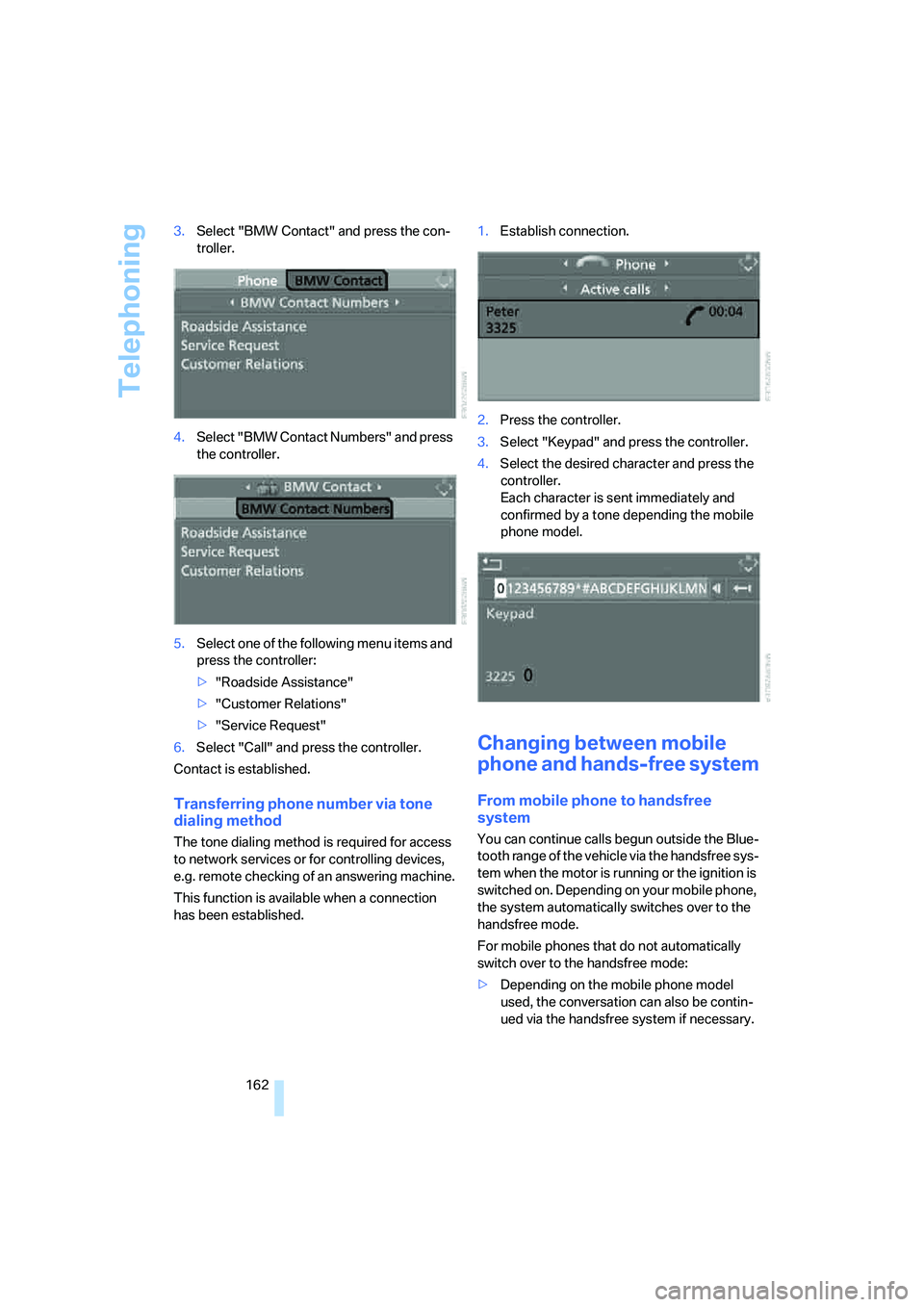
162 3.Select "BMW Contact" and press the con-
troller.
4.Select "BMW Contact Numbers" and press
the controller.
5.Select one of the following menu items and
press the controller:
>"Roadside Assistance"
>"Customer Relations"
>"Service Request"
6.Select "Call" and press the controller.
Contact is established.
Transferring phone number via tone
dialing method
The tone dialing method is required for access
to network services or for controlling devices,
e.g. remote checking of an answering machine.
This function is available when a connection
has been established.1.Establish connection.
2.Press the controller.
3.Select "Keypad" and press the controller.
4.Select the desired character
and press the
controller.
Each character is sent immediately and
confirmed by a tone depending the mobile
phone model.
Changing between mobile
phone and hands-free system
From mobile phone to handsfree
system
You can continue calls begun outside the Blue-
tooth range of the vehicle via the handsfree sys-
tem when the motor is running or the ignition is
switched on. Depending on your mobile phone,
the system automatically switches over to the
handsfree mode.
For mobile phones that do not automatically
switch over to the handsfree mode:
>Depending on the mobile phone model
used, the conversation can also be contin-
ued via the handsfree system if necessary.
Page 168 of 231
Telephoning
166
Mounting/removing snap-in
adapter
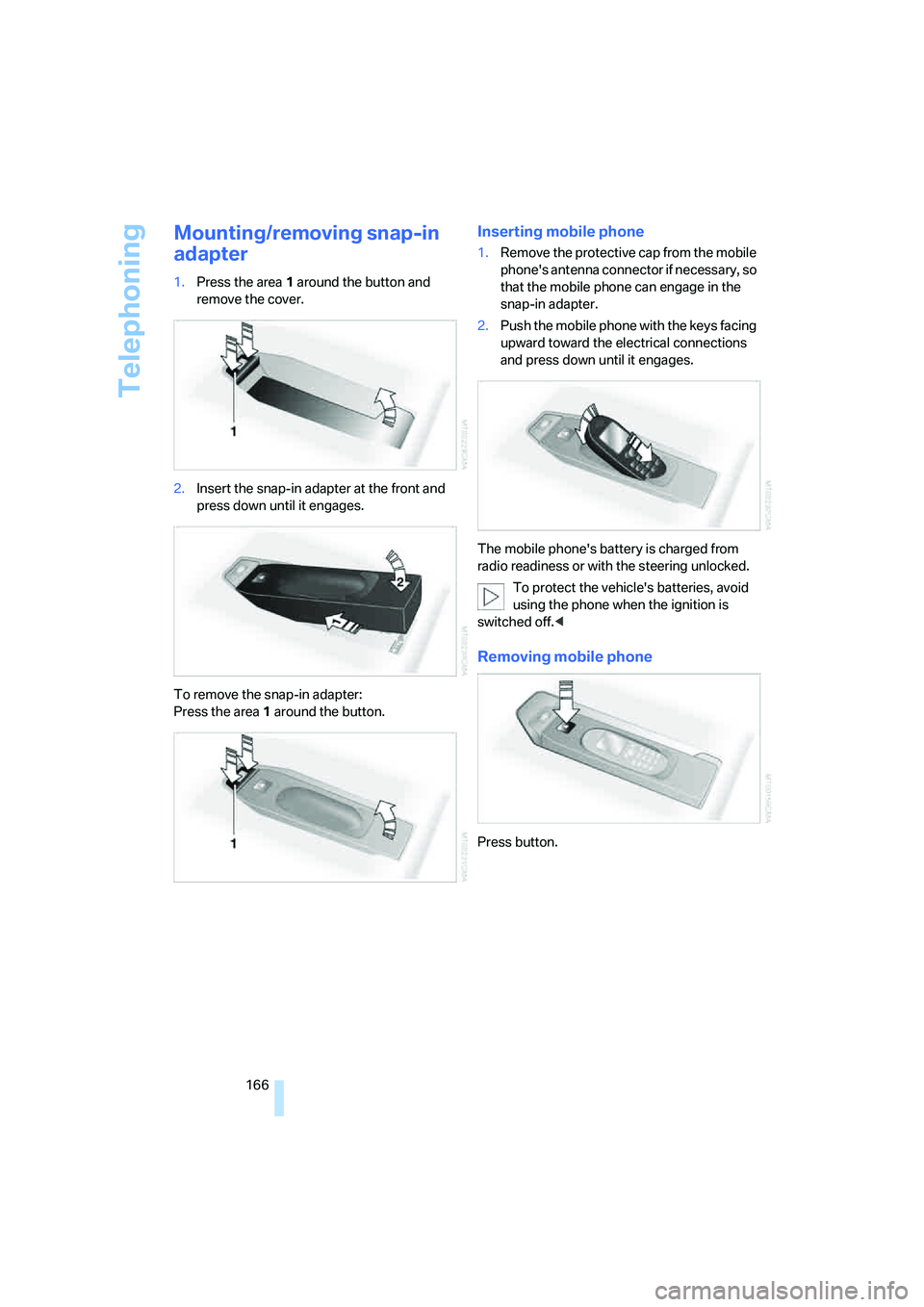
1.Press the area 1 around the button and
remove the cover.
2.Insert the snap-in adapter at the front and
press down until it engages.
To remove the snap-in adapter:
Press the area 1 around the button.
Inserting mobile phone
1.Remove the protective cap from the mobile
phone's antenna connector if necessary, so
that the mobile phone can engage in the
snap-in adapter.
2.Push the mobile phone with the keys facing
upward toward the electrical connections
and press down until it engages.
The mobile phone's battery is charged from
radio readiness or with the steering unlocked.
To protect the vehicle's batteries, avoid
using the phone when the ignition is
switched off.<
Removing mobile phone
Press button.
Page 194 of 231
Replacing components
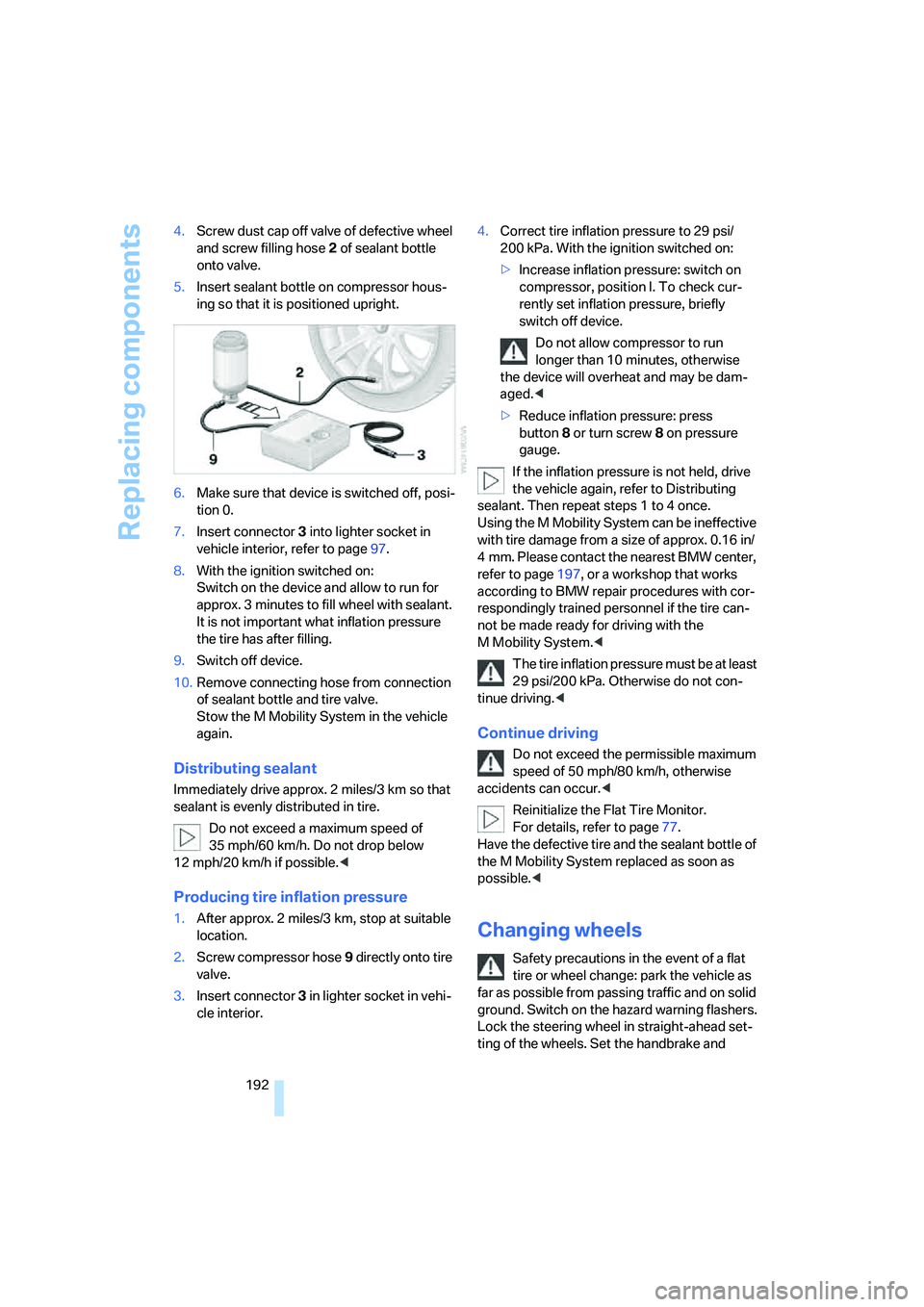
192 4.Screw dust cap off valve of defective wheel
and screw filling hose2 of sealant bottle
onto valve.
5.Insert sealant bottle on compressor hous-
ing so that it is positioned upright.
6.Make sure that device is switched off, posi-
tion 0.
7.Insert connector3 into lighter socket in
vehicle interior, refer to page97.
8.With the ignition switched on:
Switch on the device and allow to run for
approx. 3 minutes to fill wheel with sealant.
It is not important what inflation pressure
the tire has after filling.
9.Switch off device.
10.Remove connecting hose from connection
of sealant bottle and tire valve.
Stow the M Mobility System in the vehicle
again.
Distributing sealant
Immediately drive approx. 2 miles/3 km so that
sealant is evenly distributed in tire.
Do not exceed a maximum speed of
35 mph/60 km/h. Do not drop below
12 mph/20 km/h if possible.<
Producing tire inflation pressure
1.After approx. 2 miles/3 km, stop at suitable
location.
2.Screw compressor hose9 directly onto tire
valve.
3.Insert connector 3 in lighter socket in vehi-
cle interior.4.Correct tire inflation pressure to 29 psi/
200 kPa. With the ignition switched on:
>Increase inflation pressure: switch on
compressor, position I. To check cur-
rently set inflation pressure, briefly
switch off device.
Do not allow compressor to run
longer than 10 minutes, otherwise
the device will overheat and may be dam-
aged.<
>Reduce inflation pressure: press
button8 or turn screw8 on pressure
gauge.
If the inflation pressure is not held, drive
the vehicle again, refer to Distributing
sealant. Then repeat steps 1 to 4 once.
Using the M Mobility System can be ineffective
with tire damage from a size of approx. 0.16 in/
4 mm. Please contact the nearest BMW center,
refer to page197, or a workshop that works
according to BMW repair procedures with cor-
respondingly trained personnel if the tire can-
not be made ready for driving with the
M Mobility System.<
The tire inflation pressure must be at least
29 psi/200 kPa. Otherwise do not con-
tinue driving.<
Continue driving
Do not exceed the permissible maximum
speed of 50 mph/80 km/h, otherwise
accidents can occur.<
Reinitialize the Flat Tire Monitor.
For details, refer to page77.
Have the defective tire and the sealant bottle of
the M Mobility System replaced as soon as
possible.<
Changing wheels
Safety precautions in the event of a flat
tire or wheel change: park the vehicle as
far as possible from passing traffic and on solid
ground. Switch on the hazard warning flashers.
Lock the steering wheel in straight-ahead set-
ting of the wheels. Set the handbrake and
Page 200 of 231
Giving and receiving assistance
198 Your BMW M5 has a special nut as body
ground or negative terminal.
5.Attach the second end of the cable to the
negative terminal of the battery or to the
engine or body ground of the vehicle to be
started.
Starting engine
1.Start the engine on the assisting vehicle
and allow it to run at idle for several minutes
at slightly increased speed.
2.Start the engine on the other vehicle in the
usual way.
If the first starting attempt is not successful,
wait a few minutes before another attempt
in order to allow the discharged battery to
recharge.
3.Let the engines run for a few minutes.
4.Disconnect the jumper cables by reversing
the connection sequence.
Check the battery and recharge if necessary.
Never use spray fluids to start the
engine.<
Tow-starting and towing
Observe applicable laws and regulations
for tow-starting and towing.<
Do not transport any passengers other
than the driver in a vehicle that is being
towed.<
Using tow fitting
The screw-on tow-fitting must always be car-
ried in the vehicle. It can be screwed in at the
front or rear of the BMW M5.It is located in the toolkit in the luggage com-
partment lid, refer to page188.
Use only the tow fitting provided with the
vehicle and screw it all the way in. Use the
tow fitting for towing only on roads. Avoid lateral
loading of the tow fitting, e.g. do not lift the vehi-
cle by the tow fitting. Otherwise damage to the
tow fitting and the vehicle can occur.<
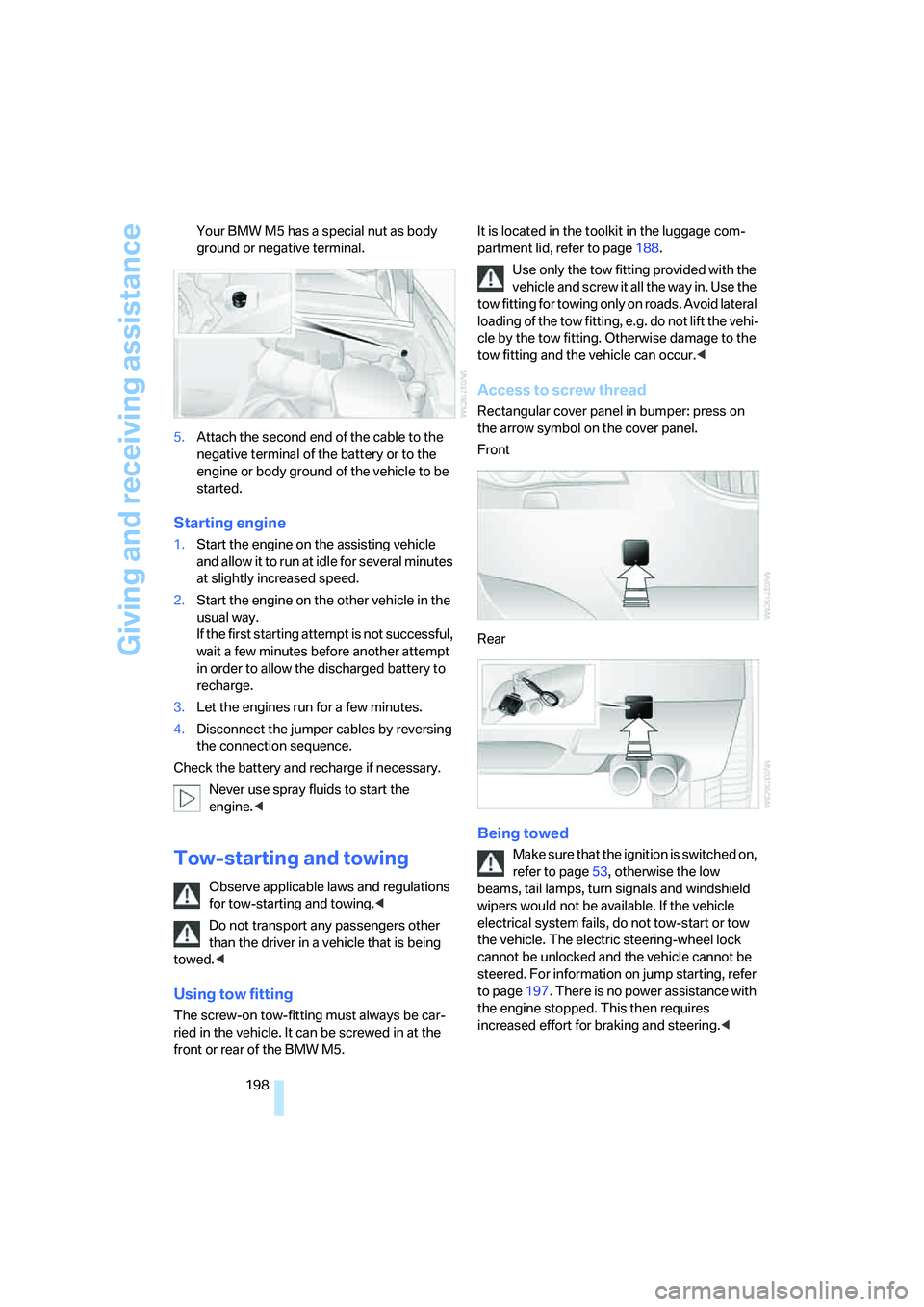
Access to screw thread
Rectangular cover panel in bumper: press on
the arrow symbol on the cover panel.
Front
Rear
Being towed
Make sure that the ignition is switched on,
refer to page53, otherwise the low
beams, tail lamps, turn signals and windshield
wipers would not be available. If the vehicle
electrical system fails, do not tow-start or tow
the vehicle. The electric steering-wheel lock
cannot be unlocked and the vehicle cannot be
steered. For information on jump starting, refer
to page197. There is no power assistance with
the engine stopped. This then requires
increased effort for braking and steering.<
Page 201 of 231
Mobility
199Reference
At a glance
Controls
Driving tips
Communications
Navigation
Entertainment
Switch on the hazard warning flashers depend-
ing on the local regulations. If the electrical sys-
tem fails, mark the vehicle to be towed, e.g. with
a sign or warning triangle in the rear window.
Engage selector lever position N with the igni-
tion switched on.
Towing methods
Do not lift vehicle by tow fitting or body
and chassis parts, otherwise damage may
result.<
In some countries, towing with tow bars or
ropes in public traffic is not permitted. Familiar-
ize yourself with the regulations on towing in the
respective country.
With tow bar
The towing vehicle may not be lighter
than the vehicle to be towed, otherwise it
will not be possible to reliably control vehicle
response.<
The tow fittings used should be on the same
side on both vehicles. Should it prove impossi-
ble to avoid mounting the tow bar at an offset
angle, please observe the following:
>Clearance and maneuvering capability will
be sharply limited during cornering.
>When mounted at an angle, the tow bar will
exert lateral forces, tending to push the
vehicle sideways.
Only attach the tow bar to the tow fittings,
as attachment to other vehicle parts can
lead to damage.<
With tow rope
When starting off in the towing vehicle, make
sure that the tow rope is taut.
To avoid jerking and the associated
stresses on vehicle components when
towing, always use nylon ropes or nylon straps.
Only attach tow ropes to the tow fittings, as
attachment to other vehicle parts can lead to
damage.<
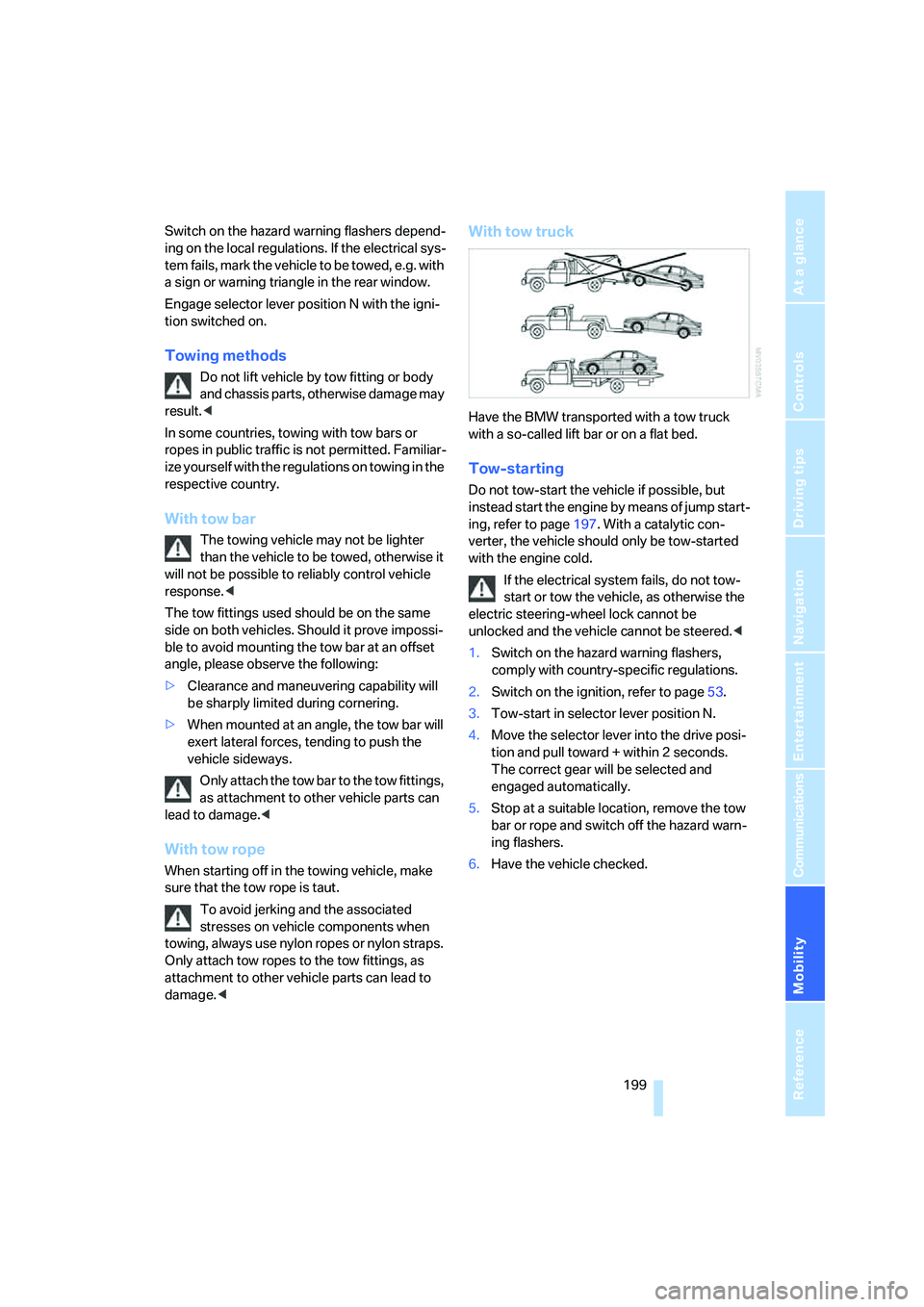
With tow truck
Have the BMW transported with a tow truck
with a so-called lift bar or on a flat bed.
Tow-starting
Do not tow-start the vehicle if possible, but
instead start the engine by means of jump start-
ing, refer to page197. With a catalytic con-
verter, the vehicle should only be tow-started
with the engine cold.
If the electrical system fails, do not tow-
start or tow the vehicle, as otherwise the
electric steering-wheel lock cannot be
unlocked and the vehicle cannot be steered.<
1.Switch on the hazard warning flashers,
comply with country-specific regulations.
2.Switch on the ignition, refer to page53.
3.Tow-start in selector lever position N.
4.Move the selector lever into the drive posi-
tion and pull toward + within 2 seconds.
The correct gear will be selected and
engaged automatically.
5.Stop at a suitable location, remove the tow
bar or rope and switch off the hazard warn-
ing flashers.
6.Have the vehicle checked.
Page 215 of 231
Reference 213
At a glance
Controls
Driving tips
Communications
Navigation
Entertainment
Mobility
CHECK button68
Check Control67
"Check Control
messages"68
Check Gas Cap174
Checking the air pressure,
refer to Tire inflation
pressure176
Child-restraint fixing system
LATCH51
Child restraint systems50
Child-safety lock52
Child seats50
Chime, refer to Check
Control67
Chock193
Chrome parts, care, refer to
Caring for your vehicle
brochure
Cigarette lighter97
Cleaning, refer to Caring for
your vehicle brochure
"Climate"45,88
Clock63
– 12h/24h mode71
– setting time and date71
Closing
– from inside32
– from outside30
Closing fuel filler cap174
Clothes hooks96
Cockpit10
Cold start, refer to Starting
engine54
"Comfort", active backrest
width adjustment42
Comfort access36
– replacing battery37
Comfort area, refer to Around
the center console14
Comfort operation
– windows with comfort
access36
– with comfort access36
"Comfort" with EDC76
"Communication"158,169
"Communication
settings"168Compact Disc
– refer to CD changer145
– refer to CD player145
Compartment for remote
control, refer to Ignition
lock53
Compartments, refer to
Storage compartments96
Compressed audio files145
Computer63
– displays on Control
Display64
– hour signal
71
"Concert hall", refer to Tone
control134
Condition Based Service
CBS186
"Confirmation"31
Connecting car vacuum
cleaner, refer to Connecting
electrical devices97
Consumption, refer to
Average fuel
consumption64
Consumption statistics, refer
to Average fuel
consumption64
"Continue guidance to
destination?"125
Control Center, refer to
iDrive16
Control Display, refer to
iDrive16
– setting brightness72
Controller, refer to iDrive16
Controls, refer to Cockpit10
Convenience operation
– glass sunroof30
– windows30
Convenience start, refer to
Starting engine54
Coolant184
– checking level184
– temperature62
Cooling, maximum89
Cornering Brake Control
CBC74
Country of destination for
navigation114Courtesy lamps86
Cradle for telephone or mobile
phone95
Cruise control61
Cruising range64
Cup holders96
Curb weight, refer to
Weights204
"Current position"128
Current position
– displaying128
– entering120
– storing120
"Customer
Relations"162,169
Cylinders, refer to Engine
data202
D
Dashboard, refer to
Cockpit10
Data202
– capacities204
– dimensions203
– engine202
– technical data202
– weights204
"Date"71
Date
– display format72
– setting71
"Date format"72
Daytime running lamps84
DBC Dynamic Brake
Control74
"Deactivated"43
Decommissioning the vehicle,
refer to Caring for your
vehicle brochure
Defect
– fuel filler door174
– glass sunroof39
– luggage compartment lid34
Defrosting windows89
Defrosting windows and
removing condensation89
Defrost position, refer to
Defrosting windows89
Page 219 of 231
Reference 217
At a glance
Controls
Driving tips
Communications
Navigation
Entertainment
Mobility
ID3 tag, refer to Information on
track147
Idle56
iDrive16
– assistance window20
– automatic climate control
with expanded scope88
– changing date and time71
– changing language72
– changing menu page19
– changing settings70
– changing units of measure
and display type72
– confirming selection or
entry19
– controller16
– controls16
– displays, menus17
– selecting menu item19
– setting brightness72
– start menu17
– status information20
– symbols18
Ignition53
– switched off53
– switched on53
Ignition key, refer to Keys/
remote control28
Ignition key position 1, refer to
Radio readiness53
Ignition key position 2, refer to
Ignition on53
Ignition lock53
– starting engine with comfort
access37
Independent ventilation, refer
to Parked car ventilation91
Indicator/warning lamps
– airbags80
– brake fluid185
– brake pads185
– DSC13,75
– Flat Tire Monitor77
– high beams13
– MDrive13,49
– M Dynamic Mode13,75
– parking lamps/low beams13
– safety belt warning44Indicator and warning
lamps13
Individual air distribution89
Individually programmable
button on steering wheel47
Individual settings, refer to
MDrive
48
Individual settings, refer to
Personal Profile29
Inflation pressure, refer to Tire
inflation pressure176
Inflation pressure monitoring,
refer to Flat Tire Monitor76
Information
– on another location118
– on current position118
– on destination location118
"Information" for navigation
system118
"Information on
destination"120
"Initializing..."77
Initializing
– Flat Tire Monitor77
– radio, refer to Storing
stations138
– refer to Power failure195
– refer to Setting time and
date71
– seat, mirror and steering
wheel memory42
"Input map"118
Installation location
– CD changer149
– mobile phone95
– navigation drive112
Instructions for navigation
system, refer to Voice
instructions127
Instrument cluster12
Instrument illumination, refer
to Instrument lighting86
Instrument lighting86
Instrument panel
– refer to Cockpit10
– refer to Instrument
cluster12
Integrated key28Integrated universal remote
control93
Interesting destination for
navigation118
"Interim time"70
Interior lamps86
– switching on with remote
control31
Interior motion sensor35
– switching off35
Interior rearview mirror46
– automatic dimming
feature105
Intermittent mode of the
wipers59
J
Jacking points193
Joystick, refer to iDrive16
Jumpering, refer to Jump
starting197
Jump starting197
K
Keyless-Go, refer to Comfort
access36
Keyless opening and closing,
refer to Comfort access36
Key Memory, refer to Personal
Profile29
"Keypad"162
Keys28
– key-related settings, refer to
Personal Profile29
Knock control175
L
Lamps, refer to Parking lamps/
low beams83
Lamps and bulbs188
"Languages"72
– for navigation system127
Lashing eyes, refer to
Securing cargo108
Page 222 of 231
Everything from A to Z
220 Opening and closing
– comfort access36
– from inside32
– from outside30
– using remote control30
– using the door lock32
Operation by voice for mobile
phone163
– adjusting volume164
– canceling163
– commands163
– correcting phone
number164
– dialing phone number164
– placing a call164
– redialing165
– voice phone book164
"Options"170
Orientation menu, refer to
Start menu17
Output, refer to Engine
data202
Outside air, refer to AUC
Automatic recirculated-air
control90
Outside temperature
display63
– changing unit of measure72
– in computer72
P
"P 400"58
"P 500"58
"P 500 Sport"58
Panic mode31
Park Distance Control PDC73
"Parked car operation"91
"Parked car ventilation"91
Parked car ventilation91
– activating activation time92
– indicator lamp87
– preselecting activation
times91
– switching on and off
directly91
Parking, vehicle54
Parking aid, refer to PDC Park
Distance Control73Parking assistant, refer to
PDC Park Distance
Control73
Parking brake, refer to
Handbrake55
Parking lamps83
– indicator lamp13
Parking lamps/low beams,
indicator lamp13
Parts and accessories6
Passenger airbags, deacti-
vating, refer to Exception for
front passenger seat50
Passenger-side exterior
mirror, tilting down46
"Pathway lighting"83
Pathway lighting83
"PDC"74
"PDC display on"74
PDC Park Distance Control73
Personal Profile29
"Perspective"126
"Phone"159
Phone book158
Phone numbers
– deleting from phone
book161
– dialing159
– most recent numbers160
– selecting in phone book160
– Top 8160
Pinch protection system
– glass sunroof, electric39
– power windows38
Plasters, refer to First-aid
kit196
"Play"
– in audio mode146
– on the radio143
Plug-in unit for remote
control, refer to Ignition
lock53
Pollen, refer to Microfilter/
activated charcoal filter91
Position
– displaying128
– storing120
"POWER"48POWER, refer to M Engine
Dynamic Control58
Power failure195
Power windows, refer to
Windows37
Preselecting activation times
of the parked car
ventilation91
"Presets" on the radio136
Pressure, tires176
– producing with M Mobility
System190
"Profile"170
Programming button function,
refer to Programmable
button on steering wheel47
Protective function, refer to
Pinch protection system
– glass sunroof, electric39
– windows38
R
Radio
– Autostore137
– controls132
– High Definition Radio140
– sampling stations137
– satellite radio141
– selecting frequency
manually137
– selecting reception
range132
– selecting waveband136
– station search137
– station selection136
– station with the best
reception137
– storing stations138
– switching on/off132
– tone control133
– volume133
– Weather Band, refer to
Weather news flashes139
Radio key, refer to Keys/
remote control28
Radio position, refer to Radio
readiness53
Page 225 of 231
Reference 223
At a glance
Controls
Driving tips
Communications
Navigation
Entertainment
Mobility
Sitting safely40
– with airbags40
– with head restraint40
– with safety belts40
Ski bag99
Sliding/tilt sunroof, refer to
Glass sunroof, electric38
Slope assistant, refer to
Starting off on slopes105
SMG, refer to Sequential
Manual Transmission with
Drivelogic55
"SMG Drivelogic"48,57
Snow chains180
Socket for Onboard
Diagnostics interface187
Socket for remote control,
refer to Ignition lock53
Sockets, refer to Connecting
electrical devices97
Soft closure aid, refer to
Automatic soft closing33
Song search with CD, refer to
Playing a track147
SOS, refer to Initiating an
emergency call196
Spare fuses195
Spare key28
– adapter28
Spare remote control28
Spare wheel193
– driving with spare wheel194
– refer to Changing
wheels192
Special oils, refer to Approved
engine oils184
Specified oil grades, refer to
Approved engine oils184
Speed-dependent
volume134
Speed limit warning, refer to
Speed limit69
Speedometer12
"Speed volume", refer to Tone
control134
Speed with winter tires180"Sport"
– active backrest width
adjustment42
– with EDC76
Stability control, refer to
Driving stability control
systems74
Start/Stop button53
"Start" for stopwatch70
"Start guidance"116,124
Starting, refer to Starting
engine54
Starting assistance, refer to
Jump starting197
Starting assistant, refer to
Starting off on slopes105
Starting difficulties
– jump starting197
– refer to Special starting
conditions54
Starting off
– on a slippery surface105
– on slopes105
Start menu, iDrive17
"Start route guidance"118
"Start service"169
"State / Province" for desti-
nation entry114
"State inspection"67
Station, refer to Radio136
"Stations", presets143
"Status"66
Status of this Owner's Manual
at time of printing5
Steering wheel
– adjustment47
– buttons on steering
wheel11
– easy entry/exit47
– lock53
– locking53
– MDrive button48
– memory42
– programmable button47
"Steering wheel button"47
Steering-wheel shift buttons,
refer to Shift paddles57"Stop" for stopwatch70
"Stopwatch"70
Stopwatch70
Storage compartments96
"Store in address book" for
navigation system120
"Store" on the radio138,143
Storing current position120
Storing radio stations138
Storing sitting position, refer
to Seat, mirror and steering
wheel memory42
Storing tires180
Straps, refer to Loading108
"Street" for destination
entry115
Summer tires, refer to Wheels
and tires176
Sun blinds94
"Surround Settings", refer to
Tone control134
SW, waveband136
Switches, refer to Cockpit10
Switching between high
beams and low beams,
automatic, refer to High-
beam assistant84
Switching cooling function on
and off89
Switching off engine54
Switching off tilt alarm
sensor35
Switching on
– audio132
– CD changer132
– CD player132
– radio132
Switching on hour signal71
Swiveling headlamps, refer to
Adaptive Head Light84
Symbols4
– indicator/warning lamps13