transmission BMW M5 2007 Owner's Manual
[x] Cancel search | Manufacturer: BMW, Model Year: 2007, Model line: M5, Model: BMW M5 2007Pages: 253, PDF Size: 8.57 MB
Page 156 of 253
Radio
154
Calling up weather news flashes
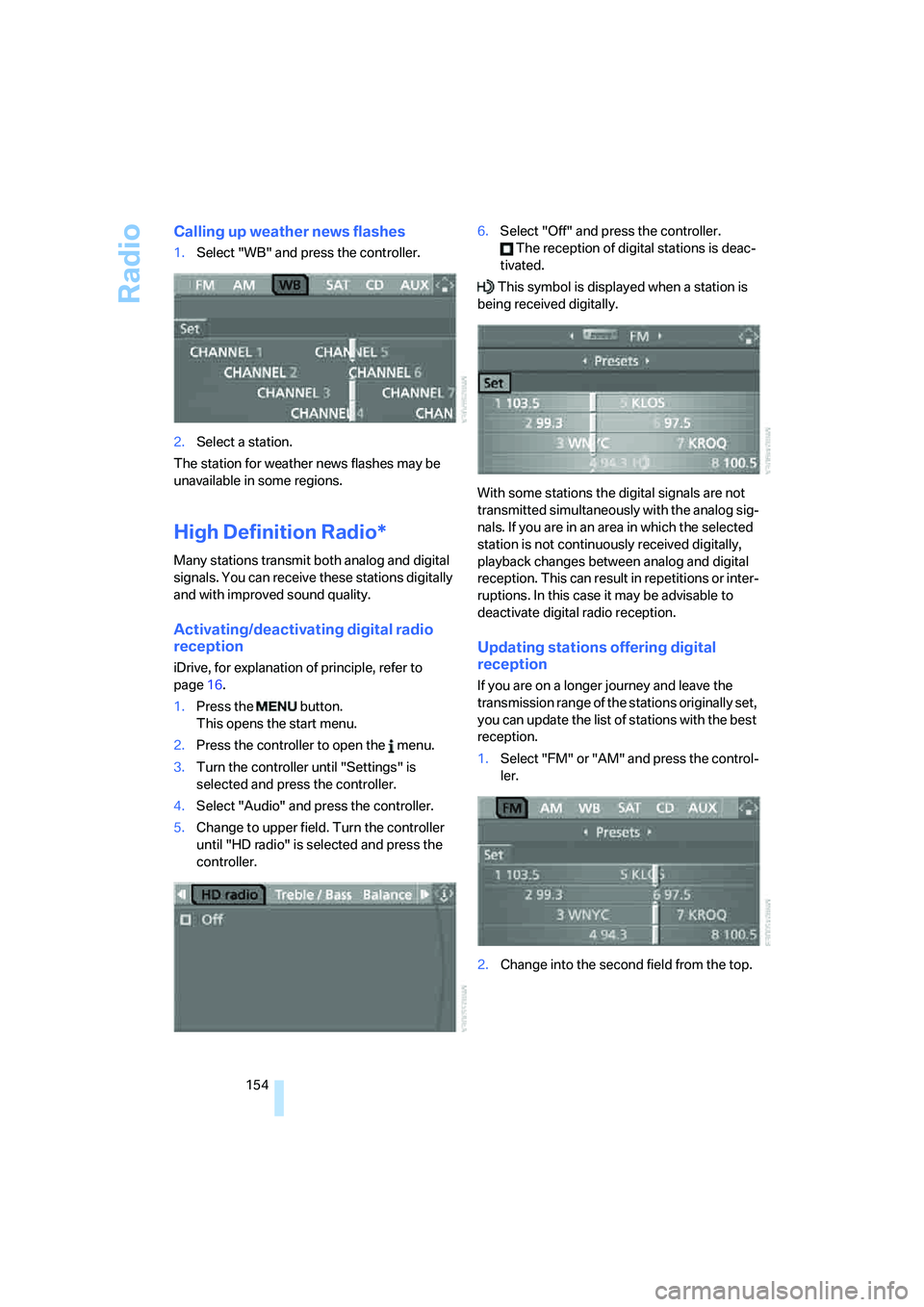
1.Select "WB" and press the controller.
2.Select a station.
The station for weather news flashes may be
unavailable in some regions.
High Definition Radio*
Many stations transmit both analog and digital
signals. You can receive these stations digitally
and with improved sound quality.
Activating/deactivating digital radio
reception
iDrive, for explanation of principle, refer to
page16.
1.Press the button.
This opens the start menu.
2.Press the controller to open the menu.
3.Turn the controller until "Settings" is
selected and press the controller.
4.Select "Audio" and press the controller.
5.Change to upper field. Turn the controller
until "HD radio" is selected and press the
controller.6.Select "Off" and press the controller.
The reception of digital stations is deac-
tivated.
This symbol is displayed when a station is
being received digitally.
With some stations the digital signals are not
transmitted simultaneously with the analog sig-
nals. If you are in an area in which the selected
station is not continuously received digitally,
playback changes between analog and digital
reception. This can result in repetitions or inter-
ruptions. In this case it may be advisable to
deactivate digital radio reception.
Updating stations offering digital
reception
If you are on a longer journey and leave the
transmission range of the stations originally set,
you can update the list of stations with the best
reception.
1.Select "FM" or "AM" and press the control-
ler.
2.Change into the second field from the top.
Page 170 of 253
Telephoning
168
Telephoning
The concept
Your BMW is equipped with a full mobile phone
preparation package. After logging on a suitable
mobile phone on the vehicle once, you can
operate the mobile phone via iDrive, with the
buttons on the steering wheel and by voice.
A mobile phone that has been logged on once is
automatically detected again with the engine
running or the ignition switched on as soon as
it is in the vehicle interior. The logon data of up
to four mobile phones can be stored simulta-
neously. If several mobile phones are detected
simultaneously, the respective last mobile
phone logged on can be operated via the vehi-
cle.
Using a phone in your vehicle
Using snap-in adapter*
The so-called snap-in adapter, a mobile phone
cradle, enables the battery to be charged and
the mobile phone to be connected to the exter-
nal antenna of your vehicle. This ensures
improved network reception and a consistent
voice reproduction quality. Ask your BMW cen-
ter which mobile phones snap-in adapters are
offered for.
BMW discourages the use of mobile
phones or other mobile communications
devices inside the vehicle without a direct con-
nection to an outside antenna. Otherwise, the
vehicle electronics and mobile communication
device can influence one another. In addition,
there is no assurance that the radiation which
results from transmission will be dissipated
from the vehicle interior.<
Avoid operating a mobile phone detected by
the vehicle with the keypad of the mobile
phone, otherwise malfunctions can occur.
For your safety
A car phone makes life more convenient in
many ways, and can even save lives in an emer-
gency. While you should consult your mobile
phone's separate operating instructions for a
detailed description of safety precautions and
information, we request that you direct your
particular attention to the following:
Only make entries when the traffic situa-
tion allows you to do so. Do not hold the
mobile phone in your hand while you are driving;
use the hands-free system instead. If you do
not observe this precaution, your being dis-
tracted can endanger vehicle occupants and
other road users.<
Suitable mobile phones
Ask your BMW center which mobile phones
with a Bluetooth interface are supported by the
mobile phone preparation package or which
mobile phones snap-in adapters are available
for. These mobile phones support the functions
described in this Owner's Manual with a certain
software version. Malfunctions can occur with
other mobile phones.
Care instructions
You can find what you need to know about car-
ing for your mobile phone in the separate Caring
for your vehicle brochure and in the mobile
phone operating instructions.
Operating options
You can operate the mobile phone* using:
>The steering wheel, refer to page11
>iDrive, refer to page16
>Voice commands, refer to page177
*
Page 172 of 253
Telephoning
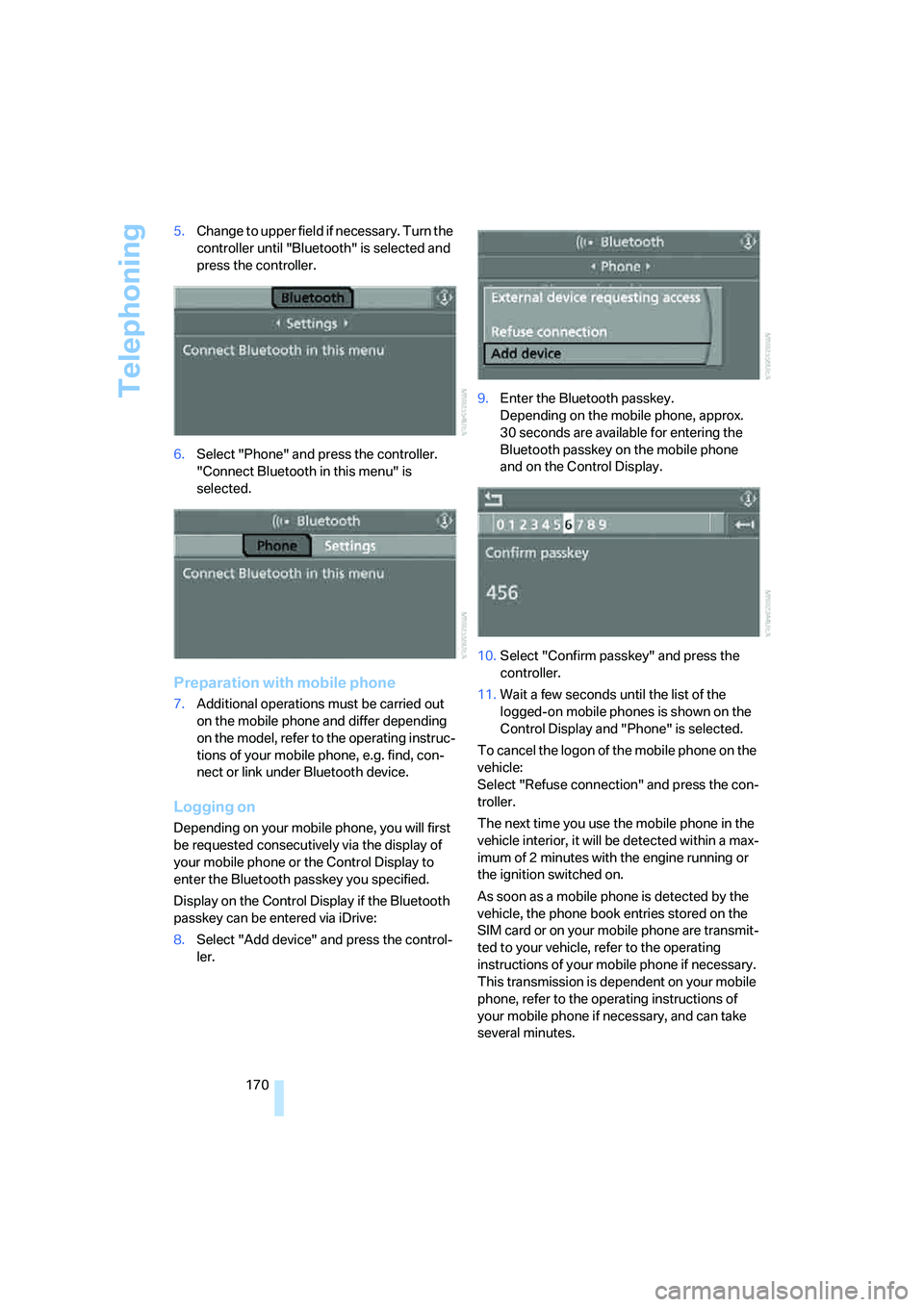
170 5.Change to upper field if necessary. Turn the
controller until "Bluetooth" is selected and
press the controller.
6.Select "Phone" and press the controller.
"Connect Bluetooth in this menu" is
selected.
Preparation with mobile phone
7.Additional operations must be carried out
on the mobile phone and differ depending
on the model, refer to the operating instruc-
tions of your mobile phone, e.g. find, con-
nect or link under Bluetooth device.
Logging on
Depending on your mobile phone, you will first
be requested consecutively via the display of
your mobile phone or the Control Display to
enter the Bluetooth passkey you specified.
Display on the Control Display if the Bluetooth
passkey can be entered via iDrive:
8.Select "Add device" and press the control-
ler.9.Enter the Bluetooth passkey.
Depending on the mobile phone, approx.
30 seconds are available for entering the
Bluetooth passkey on the mobile phone
and on the Control Display.
10.Select "Confirm passkey" and press the
controller.
11.Wait a few seconds until the list of the
logged-on mobile phones is shown on the
Control Display and "Phone" is selected.
To cancel the logon of the mobile phone on the
vehicle:
Select "Refuse connection" and press the con-
troller.
The next time you use the mobile phone in the
vehicle interior, it will be detected within a max-
imum of 2 minutes with the engine running or
the ignition switched on.
As soon as a mobile phone is detected by the
vehicle, the phone book entries stored on the
SIM card or on your mobile phone are transmit-
ted to your vehicle, refer to the operating
instructions of your mobile phone if necessary.
This transmission is dependent on your mobile
phone, refer to the operating instructions of
your mobile phone if necessary, and can take
several minutes.
Page 200 of 253
Wheels and tires
198 Tire Pressure Monitor cannot detect a flat tire,
refer to page84. Your BMW center will be
happy to advise you on this subject.
Recommended tire brands
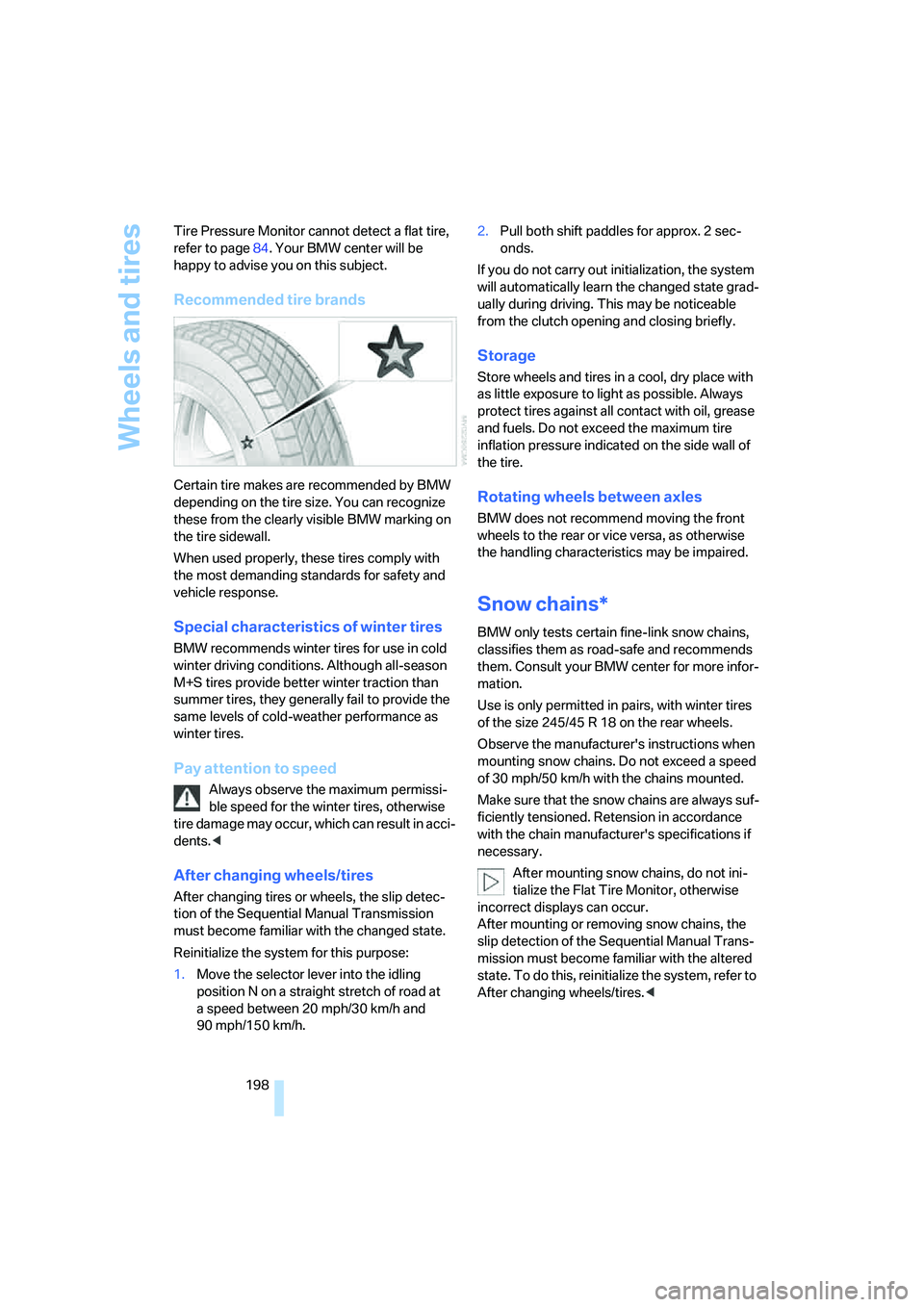
Certain tire makes are recommended by BMW
depending on the tire size. You can recognize
these from the clearly visible BMW marking on
the tire sidewall.
When used properly, these tires comply with
the most demanding standards for safety and
vehicle response.
Special characteristics of winter tires
BMW recommends winter tires for use in cold
winter driving conditions. Although all-season
M+S tires provide better winter traction than
summer tires, they generally fail to provide the
same levels of cold-weather performance as
winter tires.
Pay attention to speed
Always observe the maximum permissi-
ble speed for the winter tires, otherwise
tire damage may occur, which can result in acci-
dents.<
After changing wheels/tires
After changing tires or wheels, the slip detec-
tion of the Sequential Manual Transmission
must become familiar with the changed state.
Reinitialize the system for this purpose:
1.Move the selector lever into the idling
position N on a straight stretch of road at
a speed between 20 mph/30 km/h and
90 mph/150 km/h.2.Pull both shift paddles for approx. 2 sec-
onds.
If you do not carry out initialization, the system
will automatically learn the changed state grad-
ually during driving. This may be noticeable
from the clutch opening and closing briefly.
Storage
Store wheels and tires in a cool, dry place with
as little exposure to light as possible. Always
protect tires against all contact with oil, grease
and fuels. Do not exceed the maximum tire
inflation pressure indicated on the side wall of
the tire.
Rotating wheels between axles
BMW does not recommend moving the front
wheels to the rear or vice versa, as otherwise
the handling characteristics may be impaired.
Snow chains*
BMW only tests certain fine-link snow chains,
classifies them as road-safe and recommends
them. Consult your BMW center for more infor-
mation.
Use is only permitted in pairs, with winter tires
of the size 245/45 R 18 on the rear wheels.
Observe the manufacturer's instructions when
mounting snow chains. Do not exceed a speed
of 30 mph/50 km/h with the chains mounted.
Make sure that the snow chains are always suf-
ficiently tensioned. Retension in accordance
with the chain manufacturer's specifications if
necessary.
After mounting snow chains, do not ini-
tialize the Flat Tire Monitor, otherwise
incorrect displays can occur.
After mounting or removing snow chains, the
slip detection of the Sequential Manual Trans-
mission must become familiar with the altered
state. To do this, reinitialize the system, refer to
After changing wheels/tires.<
Page 203 of 253
Mobility
201Reference
At a glance
Controls
Driving tips
Communications
Navigation
Entertainment
value indicates the current oil level in liters
above Minimum.
After starting the engine, the last determined
value is displayed.
The oil level must be between the two marks.
Manual transmission: the engine oil level
will be shown in the lower display.<
Exact measurement
The oil level is measured continuously while
driving or when stopped with the engine run-
ning.
The determination of a new value can take
30 minutes or longer.
If only dashes are shown in the display, it
was not possible to determine a new
value. This can, for example, be the case when
driving short distances or with a sporty driving
style.<
Fast measurement
In addition to the continuous measurement, you
can also quickly determine the current oil level,
e.g. after adding engine oil, however with a low
measuring accuracy.
1.With the engine at operating temperature,
i.e. after at least 6 miles/10 km of uninter-
rupted driving, park the vehicle in a horizon-
tal position.
2.Allow the engine to run at idle.
3.Press the BC button on the turn signal lever
repeatedly until the oil level display is
shown in the instrument cluster.
4.Press the BC button on the turn signal lever
for at least 2 seconds.
The oil level is determined. A clock symbol
is displayed during the measurement.
5.After approx. 1 minute the current oil level is
displayed.
If not all measuring conditions are met,
e.g. with the engine cold, "-.-" is dis-
played. The requested measurement is carried
out as soon as possible.<
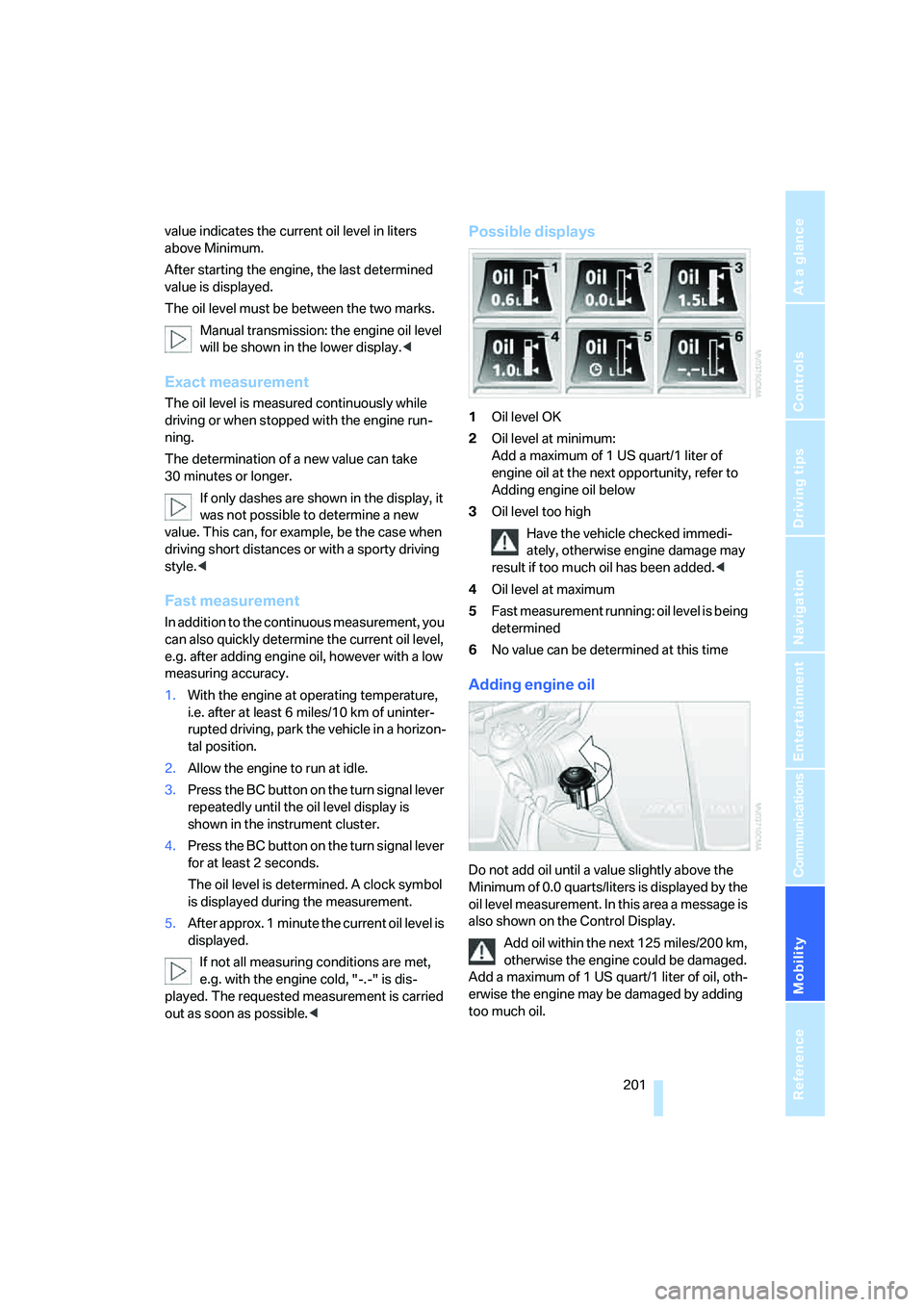
Possible displays
1Oil level OK
2Oil level at minimum:
Add a maximum of 1 US quart/1 liter of
engine oil at the next opportunity, refer to
Adding engine oil below
3Oil level too high
Have the vehicle checked immedi-
ately, otherwise engine damage may
result if too much oil has been added.<
4Oil level at maximum
5Fast measurement running: oil level is being
determined
6No value can be determined at this time
Adding engine oil
Do not add oil until a value slightly above the
Minimum of 0.0 quarts/liters is displayed by the
oil level measurement. In this area a message is
also shown on the Control Display.
Add oil within the next 125 miles/200 km,
otherwise the engine could be damaged.
Add a maximum of 1 US quart/1 liter of oil, oth-
erwise the engine may be damaged by adding
too much oil.
Page 213 of 253
Mobility
211Reference
At a glance
Controls
Driving tips
Communications
Navigation
Entertainment
transmission, or select a drive position with the
selector level for a sequential transmission.
Have all vehicle occupants get out of the vehicle
and ensure that they remain outside the imme-
diate area in a safe place, such as behind a
guardrail.
If a warning triangle
* or portable hazard warning
lamp
* is required, set it up on the roadside at an
appropriate distance from the rear of the vehi-
cle. Comply with all safety guidelines and regu-
lations.
Change the wheel only on a level, firm surface
which is not slippery. The vehicle or the jack
could slip to the side if you attempt to raise the
vehicle on a soft or slippery surface such as
snow, ice, tiles, etc.
Position the jack on a firm support surface.
Do not use a wooden block or similar object as a
support base for the jack, as this would prevent
it from extending to its full support height and
reduce its load-carrying capacity.
To avoid serious or fatal injury: never lie under
the vehicle, and never start the engine while it is
supported by the jack.<
What you will need
To avoid rattling noises later on, note the posi-
tions of the tools before removing them, then
return them to their initial positions after com-
pleting work.
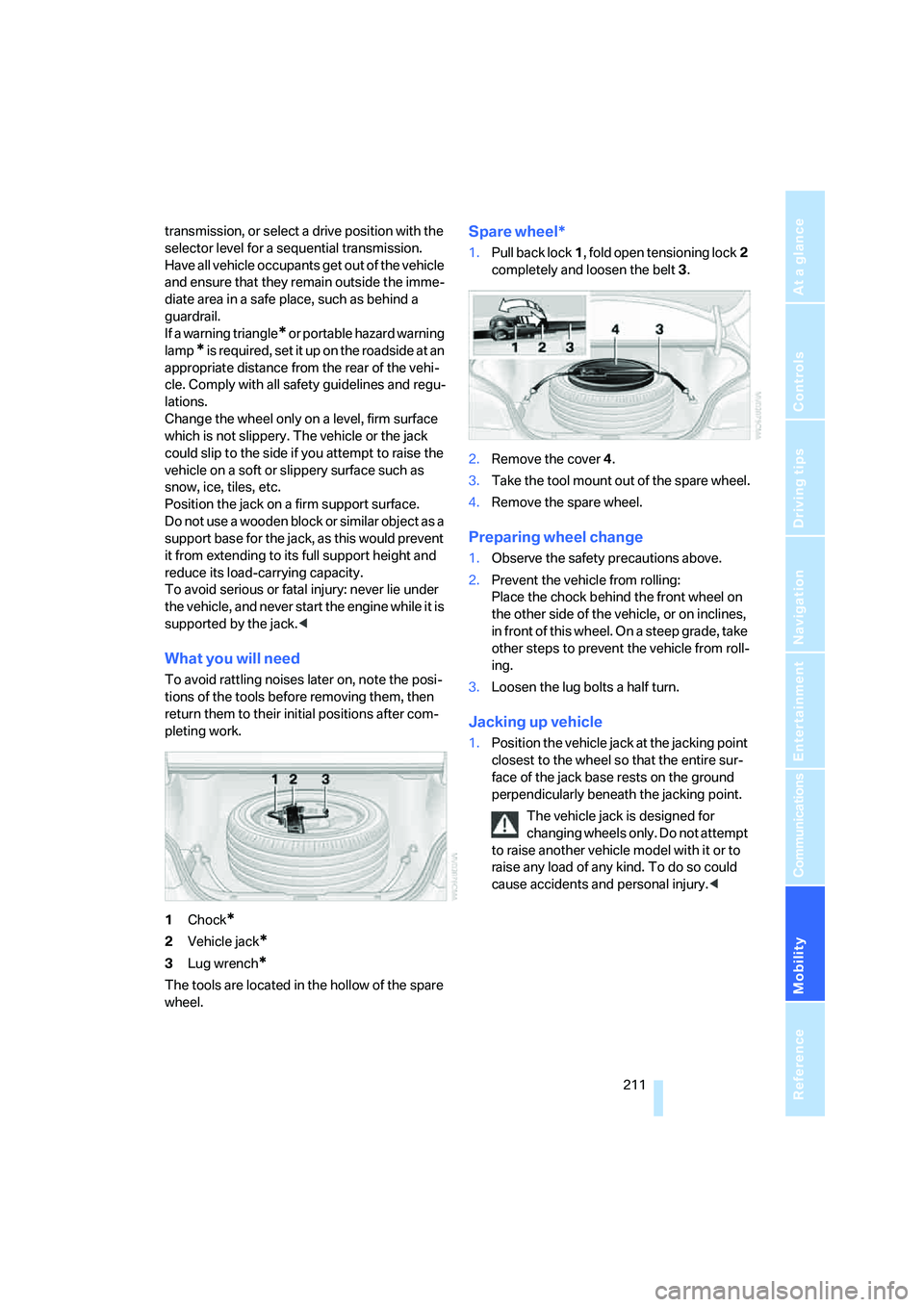
1Chock
*
2Vehicle jack*
3Lug wrench*
The tools are located in the hollow of the spare
wheel.
Spare wheel*
1.Pull back lock1, fold open tensioning lock2
completely and loosen the belt3.
2.Remove the cover4.
3.Take the tool mount out of the spare wheel.
4.Remove the spare wheel.
Preparing wheel change
1.Observe the safety precautions above.
2.Prevent the vehicle from rolling:
Place the chock behind the front wheel on
the other side of the vehicle, or on inclines,
in front of this wheel. On a steep grade, take
other steps to prevent the vehicle from roll-
ing.
3.Loosen the lug bolts a half turn.
Jacking up vehicle
1.Position the vehicle jack at the jacking point
closest to the wheel so that the entire sur-
face of the jack base rests on the ground
perpendicularly beneath the jacking point.
The vehicle jack is designed for
changing wheels only. Do not attempt
to raise another vehicle model with it or to
raise any load of any kind. To do so could
cause accidents and personal injury.<
Page 219 of 253
Mobility
217Reference
At a glance
Controls
Driving tips
Communications
Navigation
Entertainment
steered. For information on jump starting, refer
to page215. There is no power assistance with
the engine stopped. This then requires
increased effort for braking and steering.<
Switch on the hazard warning flashers depend-
ing on the local regulations. If the electrical sys-
tem fails, mark the vehicle to be towed, e.g. with
a sign or warning triangle in the rear window.
Manual transmission
Gearshift lever in neutral position.
Sequential Manual Transmission with
Drivelogic
Make sure that selector lever position N is
engaged with the ignition switched on, as
otherwise the engine can be damaged during
towing.<
Towing methods
Do not lift vehicle by tow fitting or body
and chassis parts, otherwise damage may
result.<
In some countries, towing with tow bars or
ropes in public traffic is not permitted. Familiar-
ize yourself with the regulations on towing in the
respective country.
With tow bar
The towing vehicle may not be lighter
than the vehicle to be towed, otherwise it
will not be possible to reliably control vehicle
response.<
The tow fittings used should be on the same
side on both vehicles. Should it prove impossi-
ble to avoid mounting the tow bar at an offset
angle, please observe the following:
>Clearance and maneuvering capability will
be sharply limited during cornering.
>When mounted at an angle, the tow bar will
exert lateral forces, tending to push the
vehicle sideways.
Only attach the tow bar to the tow fittings,
as attachment to other vehicle parts can
lead to damage.<
With tow rope
When starting off in the towing vehicle, make
sure that the tow rope is taut.
To avoid jerking and the associated
stresses on vehicle components when
towing, always use nylon ropes or nylon straps.
Only attach tow ropes to the tow fittings, as
attachment to other vehicle parts can lead to
damage.<
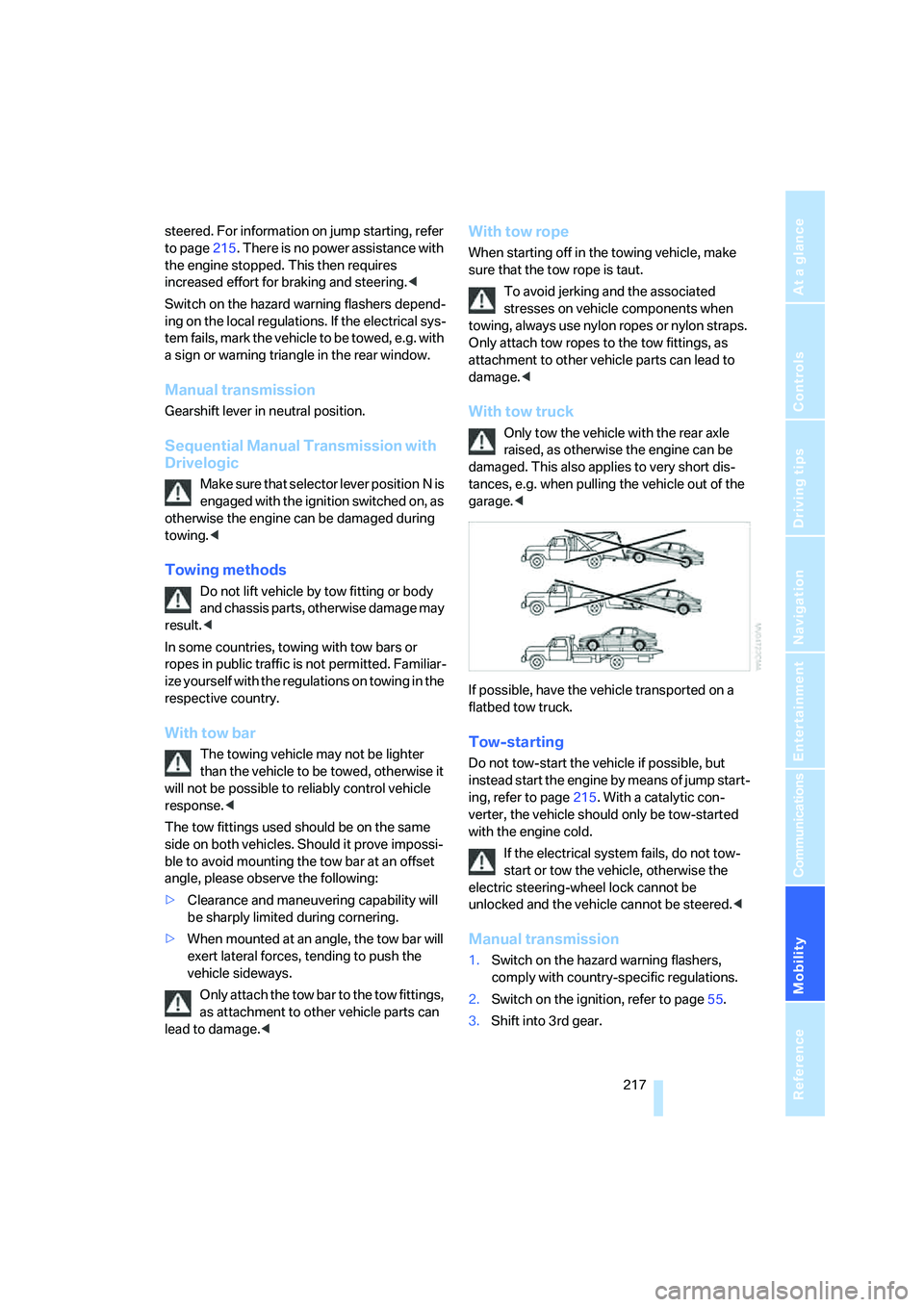
With tow truck
Only tow the vehicle with the rear axle
raised, as otherwise the engine can be
damaged. This also applies to very short dis-
tances, e.g. when pulling the vehicle out of the
garage.<
If possible, have the vehicle transported on a
flatbed tow truck.
Tow-starting
Do not tow-start the vehicle if possible, but
instead start the engine by means of jump start-
ing, refer to page215. With a catalytic con-
verter, the vehicle should only be tow-started
with the engine cold.
If the electrical system fails, do not tow-
start or tow the vehicle, otherwise the
electric steering-wheel lock cannot be
unlocked and the vehicle cannot be steered.<
Manual transmission
1.Switch on the hazard warning flashers,
comply with country-specific regulations.
2.Switch on the ignition, refer to page55.
3.Shift into 3rd gear.
Page 220 of 253
Giving and receiving assistance
218 4.Tow-start with the clutch completely
depressed and slowly release the clutch.
After the engine starts, immediately
depress the clutch again completely.
5.Stop at a suitable location, remove the tow
bar or rope and switch off the hazard warn-
ing flashers.
6.Have the vehicle checked.
Sequential Manual Transmission with
Drivelogic
1.Switch on the hazard warning flashers,
comply with country-specific regulations.
2.Switch on the ignition, refer to page55.
3.Tow-start in selector lever position N.
4.Move the selector lever into the drive posi-
tion and pull toward + within 2 seconds.
The correct gear will be selected and
engaged automatically.
5.Stop at a suitable location, remove the tow
bar or rope and switch off the hazard warn-
ing flashers.
6.Have the vehicle checked.
Page 239 of 253
Reference 237
At a glance
Controls
Driving tips
Communications
Navigation
Entertainment
Mobility
Forward, fast
– CD changer163
– CD player163
For your own safety5
Freeway, refer to Route
criteria131
Front airbags87
Front armrest, refer to Center
armrest, front104
Front passenger airbags,
deactivating87
Front seat adjustment42
FTM, refer to Flat Tire
Monitor82
Fuel193
– average consumption68
– display67
– high-quality brands193
– quality193
– specifications193
– tank contents, refer to
Capacities224
Fuel clock, refer to Fuel
gauge67
Fuel consumption display,
refer to Computer, average
fuel consumption68
Fuel display, refer to Fuel
gauge67
Fuel filler door192
– releasing in the event of
electrical malfunction192
Full mobile phone preparation
package168
Full screen display, refer to
Switching assistance
window off21
Fuses213
G
Garage door opener, refer to
Integrated universal remote
control102
Gasoline, refer to Required
fuel193
Gasoline display, refer to Fuel
gauge67Gear changes59
Gear display, refer to Displays
in instrument cluster59
Gearshift lever58
– manual transmission57
Gearshift lever, manual
transmission57
Gearshift lever positions,
manual transmission57
General driving notes112
Glass sunroof, electric38
– comfort operation from
outside32
– comfort operation with
comfort access37
– moving manually40
– remote control31
Glove compartment103
– lighting103
– rechargeable flashlight104
GPS navigation, refer to
Navigation system120
Grills, refer to Ventilation99
Gross vehicle weight, refer to
Weights224
Ground clearance114
H
Handbrake57
– indicator lamp13,57
Hand lamp, refer to
Rechargeable flashlight104
Hands-free system, refer to
Microphone14
Hazard warning flashers15
"HD radio"154
HD radio, refer to High
Definition Radio154
Head airbags87
Headlamp control,
automatic92
Headlamp flasher62Headlamps92
– care, refer to Caring for your
vehicle brochure
– cleaning, refer to Wiper
system62
– cleaning tank, refer to
Capacities224
– reservoir for washer
fluid200
Head Light, refer to Adaptive
Head Light93
Head restraints44
– front head restraints,
active45
– installing45
– removing45
– sitting safely41
"Head-Up Display"50,89
Head-Up Display88
– default view89
– M view88
– shift lights60
Heated
– mirrors48
– rear window98
– seats46
Heating96
– exterior mirrors48
– interior96
– rear window98
– residual heat99
– seats46
Heating with engine switched
off, refer to Residual heat99
Heavy cargo, refer to Securing
cargo116
Height, refer to
Dimensions223
Page 242 of 253
Everything from A to Z
240 Maintenance204
– refer to Service and
Warranty Information
Booklet for US models204
– refer to Service
requirements69
– refer to Warranty and
Service Guide Booklet for
Canadian models204
Maintenance system204
Malfunction warnings, refer to
Check Control71
Manual air distribution98
Manual operation
– door lock32
– driver's door32
– fuel filler door192
– glass sunroof40
– luggage compartment lid34
Manual transmission57
– tow-starting217
"Manual" with radio151
"Map direction of travel"135
Map display134
"Map facing north"135
Map for navigation
– changing scale135
– destination entry126
Map view facing north134
Master key, refer to Keys/
remote control28
Maximum cooling98
Maximum speed with winter
tires198
MDM, refer to M Dynamic
Mode80
"MDrive"50,80
MDrive50
"M Dynamic Mode"80
Measurements, refer to
Dimensions223
Memory, refer to Seat, mirror
and steering wheel
memory43
MENU, button refer to Start
menu17
Menus, refer to iDrive16Message list for traffic
information138
Microfilter100
Microphone
– for telephone14
– for voice command
system14
Mirror dimming feature48
Mirrors47
– automatic curb monitor48
– folding in and out47
– heating48
– memory, refer to Seat, mirror
and steering wheel
memory43
"Missed calls"174
Missed calls175
Mobile communications
devices in vehicle113
Mobile phone
– accepted calls175
– adjusting volume172
– calling173
– ending call174
– installation location, refer to
Center armrest104
– missed calls175
– operation by voice177
– operation via iDrive172
– redialing175
– refer to separate operating
instructions
– Top 8175
– touch tone dialing, refer to
Tone dialing method176
Mobile phone, refer to
separate operating
instructions
Mobile phone battery181
Mobility System208
Monitor, refer to iDrive16
Monitoring pressure of tires,
refer to Flat Tire Monitor82
"Monitor on / off"49
Most recent mobile phone
numbers175
MP3, refer to Compressed
audio files159Multi-function steering wheel,
refer to Buttons on steering
wheel11
Multifunction switch
– refer to Turn signals/
headlamp flasher62
– refer to Wiper system62
Music track
– sampling, scan161
Music track, finding161
Music tracks
– random play sequence162
"Mute on / off"49
"M View"89
M view90
MW, waveband150
N
"Navigation"68,121
Navigation destination
– entering manually121
– home address130
– selecting via map126
Navigation drive, installation
location120
Navigation DVD120
Navigation instructions, refer
to Switching voice
instructions on/off136