service BMW M5 2008 User Guide
[x] Cancel search | Manufacturer: BMW, Model Year: 2008, Model line: M5, Model: BMW M5 2008Pages: 260, PDF Size: 6.66 MB
Page 116 of 260
Things to remember when driving
114
Things to remember when driving
Break-in period
Moving parts need breaking-in time to adjust to
each other. To ensure that your vehicle contin-
ues to provide optimized economy of operation
throughout an extended service life, we request
that you devote careful attention to the follow-
ing section.
Do not use the driving programs 5 and 6 during
break-in, refer to Drivelogic on page61.
Engine and differential
Always obey all official speed limits.
Up to 1,200 miles/2,000 km
Drive at changing engine and driving speeds,
however do not exceed 5,500 rpm or 105 mph/
170 km/h.
Avoid full-throttle operation and use of the
transmission's kick-down mode during these
initial miles.
From 1,200 miles/2,000 km to
3,000 miles/5,000 km
The engine and driving speed can gradually be
increased up to a continuous vehicle speed of
135 mph/220 km/h. Only drive at top speed
briefly, e.g. when passing.
Transmission
The function of the transmission is only at its
optimized level after driving a distance of
approx. 300 miles/500 km. Do not exceed
engine speeds of 5,500 rpm during this time.
Tires
Due to technical factors associated with their
manufacture, tires do not achieve their full trac-
tion potential until after an initial break-in
period. Therefore, drive reservedly during the
first 200 miles/300 km.
Brake system
Brakes require an initial break-in period of
approx. 300 miles/500 km to achieve optimized
contact and wear patterns between brake pads
and rotors. Drive in a reserved manner during
this break-in period.
Clutch
The function of the clutch is only at its opti-
mized level after a distance driven of approx.
300 miles/500 km. With manual transmission:
During this break-in period, engage the clutch
gently.
Following part replacement
Observe the break-in instructions again if com-
ponents mentioned above must be replaced
after subsequent driving operation.
General driving notes
Closing luggage compartment lid
Operate the vehicle only when the lug-
gage compartment lid is completely
closed. Otherwise, exhaust fumes could pene-
trate into the passenger compartment.<
If it is absolutely necessary to drive with the lug-
gage compartment lid open:
1.Close all windows and the glass sunroof.
2.Increase the air volume of the automatic cli-
mate control to a high level, refer to
page99.
Hot exhaust system
As in all vehicles, extremely high temper-
atures are generated on the exhaust sys-
tem. Do not remove the heat shields installed
adjacent to it, and never apply undercoating to
them. When driving, standing at idle and while
parking take care to avoid possible contact
between the hot exhaust system and any highly
Page 121 of 260
Driving tips
119Reference
At a glance
Controls
Communications
Navigation
Entertainment
Mobility
BMW M5 Engineering
V10 High Output Engine
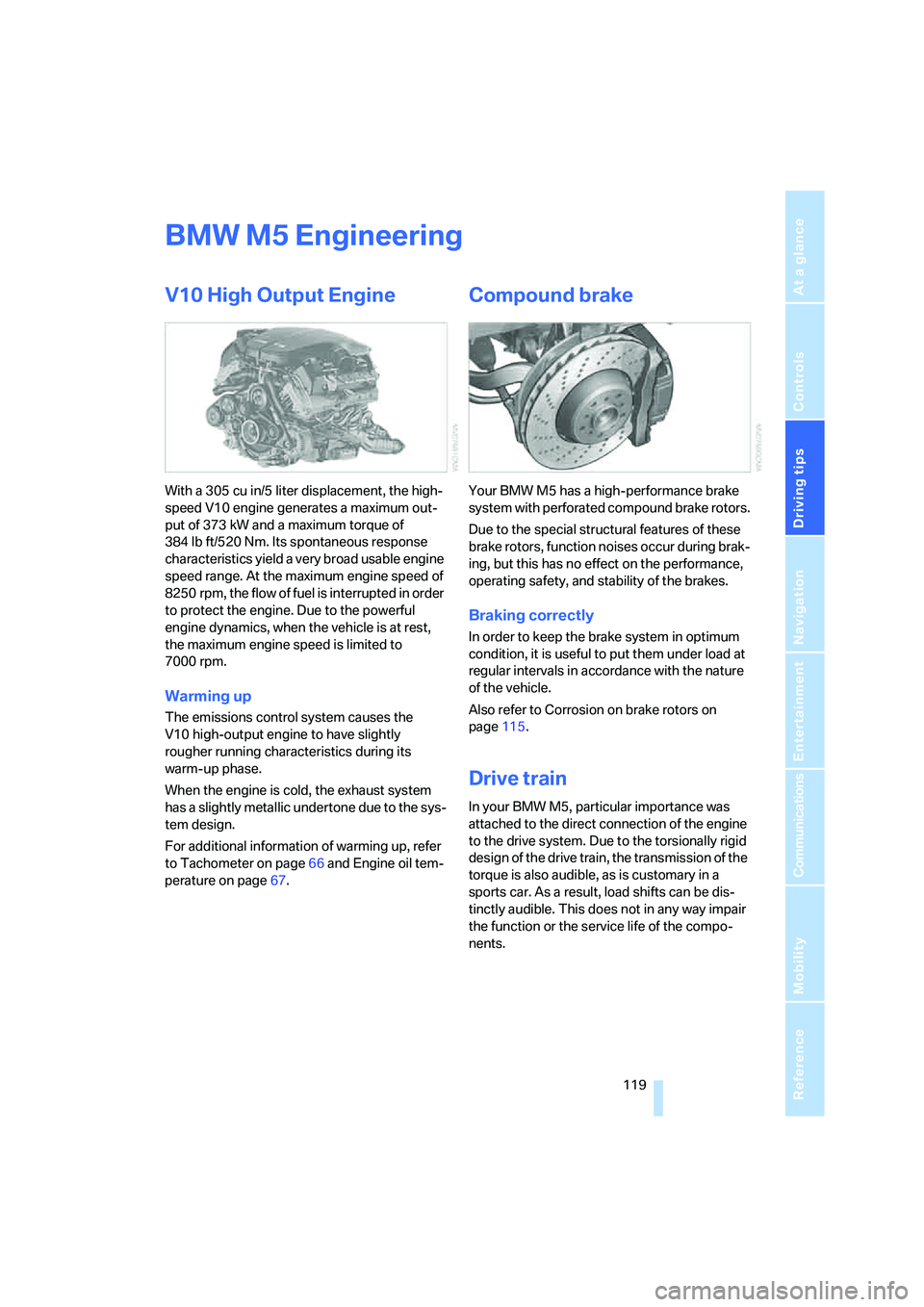
With a 305 cu in/5 liter displacement, the high-
speed V10 engine generates a maximum out-
put of 373 kW and a maximum torque of
384 lb ft/520 Nm. Its spontaneous response
characteristics yield a very broad usable engine
speed range. At the maximum engine speed of
8250 rpm, the flow of fuel is interrupted in order
to protect the engine. Due to the powerful
engine dynamics, when the vehicle is at rest,
the maximum engine speed is limited to
7000 rpm.
Warming up
The emissions control system causes the
V10 high-output engine to have slightly
rougher running characteristics during its
warm-up phase.
When the engine is cold, the exhaust system
has a slightly metallic undertone due to the sys-
tem design.
For additional information of warming up, refer
to Tachometer on page66 and Engine oil tem-
perature on page67.
Compound brake
Your BMW M5 has a high-performance brake
s y s t em wi t h p e rf o ra t e d c o m p o u n d b r a k e r o t o r s .
Due to the special structural features of these
brake rotors, function noises occur during brak-
ing, but this has no effect on the performance,
operating safety, and stability of the brakes.
Braking correctly
In order to keep the brake system in optimum
condition, it is useful to put them under load at
regular intervals in accordance with the nature
of the vehicle.
Also refer to Corrosion on brake rotors on
page115.
Drive train
In your BMW M5, particular importance was
attached to the direct connection of the engine
to the drive system. Due to the torsionally rigid
design of the drive train, the transmission of the
torque is also audible, as is customary in a
sports car. As a result, load shifts can be dis-
tinctly audible. This does not in any way impair
the function or the service life of the compo-
nents.
Page 158 of 260
Radio
156
Automatically sorting
stations*
For the "All stations" selection criterion, you
can set whether the most frequently used sta-
tions are displayed at the beginning.
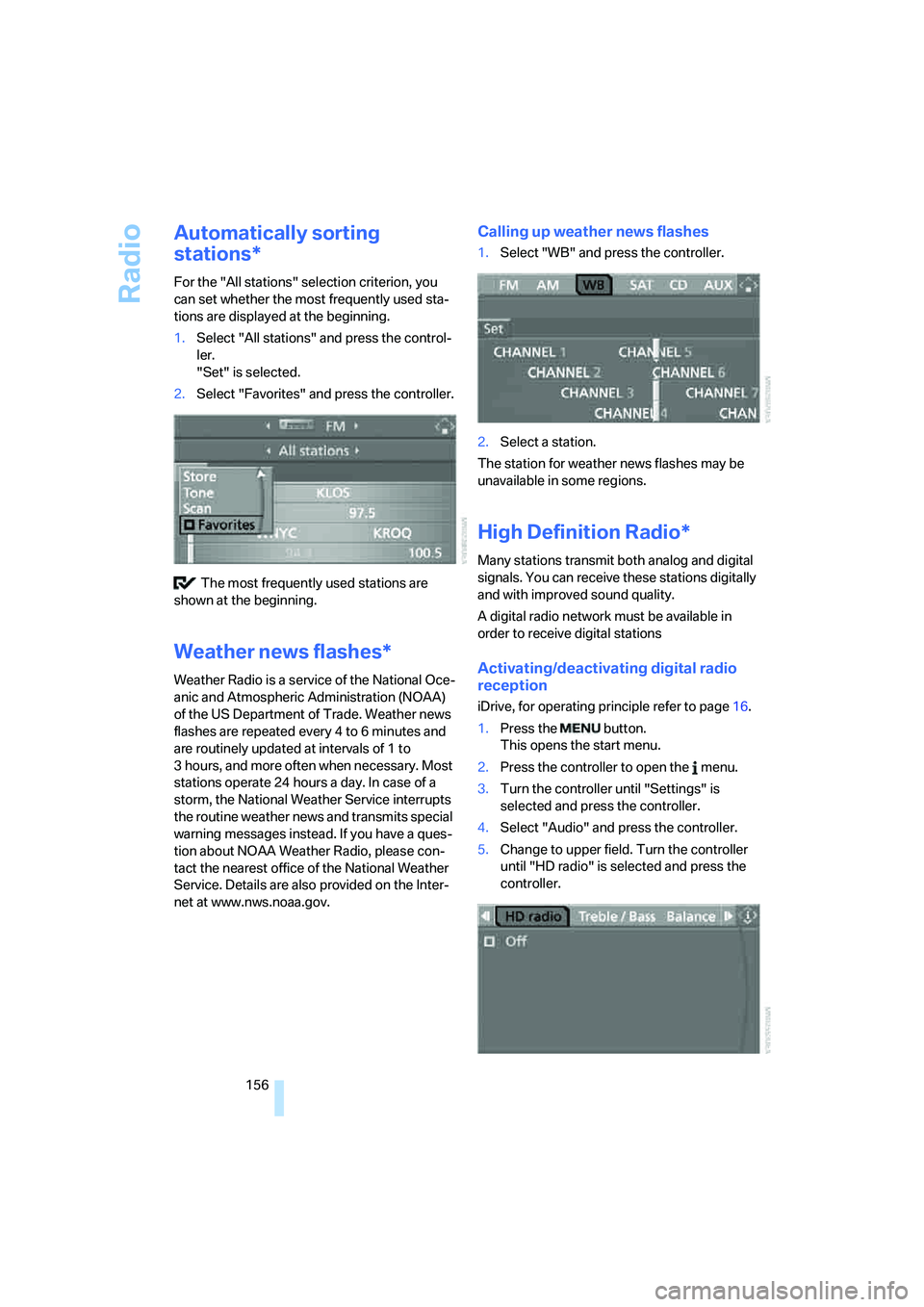
1.Select "All stations" and press the control-
ler.
"Set" is selected.
2.Select "Favorites" and press the controller.
The most frequently used stations are
shown at the beginning.
Weather news flashes*
Weather Radio is a service of the National Oce-
anic and Atmospheric Administration (NOAA)
of the US Department of Trade. Weather news
flashes are repeated every 4 to 6 minutes and
are routinely updated at intervals of 1 to
3 hours, and more often when necessary. Most
stations operate 24 hours a day. In case of a
storm, the National Weather Service interrupts
the routine weather news and transmits special
warning messages instead. If you have a ques-
tion about NOAA Weather Radio, please con-
tact the nearest office of the National Weather
Service. Details are also provided on the Inter-
net at www.nws.noaa.gov.
Calling up weather news flashes
1.Select "WB" and press the controller.
2.Select a station.
The station for weather news flashes may be
unavailable in some regions.
High Definition Radio*
Many stations transmit both analog and digital
signals. You can receive these stations digitally
and with improved sound quality.
A digital radio network must be available in
order to receive digital stations
Activating/deactivating digital radio
reception
iDrive, for operating principle refer to page16.
1.Press the button.
This opens the start menu.
2.Press the controller to open the menu.
3.Turn the controller until "Settings" is
selected and press the controller.
4.Select "Audio" and press the controller.
5.Change to upper field. Turn the controller
until "HD radio" is selected and press the
controller.
Page 175 of 260
Communications
This chapter summarizes how to operate your
mobile phone using iDrive or voice control and
how to use BMW Assist or TeleService.
Communications
Page 176 of 260
Telephoning
174
Telephoning
The concept
Your BMW is equipped with a full mobile phone
preparation package. After pairing a suitable
mobile phone in the vehicle once, you can oper-
ate the mobile phone via iDrive, with the buttons
on the steering wheel and by voice.
A mobile phone that has been paired once is
automatically detected again with the engine
running or the ignition switched on as soon as
it is in the vehicle interior. The logon data of up
to four mobile phones can be stored simulta-
neously. If several mobile phones are detected
simultaneously, the respective last mobile
phone paired can be operated via the vehicle.
Using a phone in your vehicle
Using snap-in adapter*
The so-called snap-in adapter, a mobile phone
cradle, enables the battery to be charged and
the mobile phone to be connected to the exter-
nal antenna of your vehicle. This ensures
improved network reception and a consistent
voice reproduction quality. Ask your BMW cen-
ter which mobile phones snap-in adapters are
offered for.
For your safety
A car phone makes life more convenient in
many ways, and can even save lives in an emer-
gency. While you should consult your mobile
phone's separate operating instructions for a
detailed description of safety precautions and
information, we request that you direct your
particular attention to the following:
Only make entries when traffic conditions
allow you to do so. Do not hold the mobile
phone in your hand while you are driving; use
the hands-free system instead. If you do not
observe this precaution, your being distracted
can endanger vehicle occupants and other road
users.<
Suitable mobile phones
Ask your BMW center which mobile phones
with a Bluetooth interface are supported by the
mobile phone preparation package or which
mobile phones snap-in adapters are available
for. These mobile phones support the functions
described in this Owner's Manual with a certain
software version. Malfunctions can occur with
other mobile phones.
Care instructions
You can find what you need to know about car-
ing for your mobile phone in the separate Caring
for your vehicle brochure and in the mobile
phone operating instructions.
Operating options
You can operate the mobile phone* using:
>Buttons on steering wheel, refer to page11
>iDrive, refer to page16
>Voice commands, refer to page185
>Programmable memory/direct selection
buttons, refer to page21
Avoid operating a mobile phone detected by
the vehicle with the keypad of the mobile
phone, otherwise malfunctions can occur.
Placing phone calls with BMW Assist
system*: BMW Assist calls
You can use the BMW Assist system via the
hands-free unit for BMW Assist calls.
When the status information "BMW Assist" or
"BMW Service" is displayed in "Communica-
tion", only BMW Assist calls are possible.
It may not be possible to establish a telephone
connection using the mobile phone while a con-
nection is being established to BMW Assist or
while a call to BMW Assist is already in
progress. If this happens, you must log off the
*
Page 183 of 260
181
Entertainment
Reference
At a glance
Controls
Driving tips Communications
Navigation
Mobility
Receiving calls
If you have the phone number of the caller
stored in the phone book and the phone num-
ber has been transmitted, the name of the entry
is displayed.
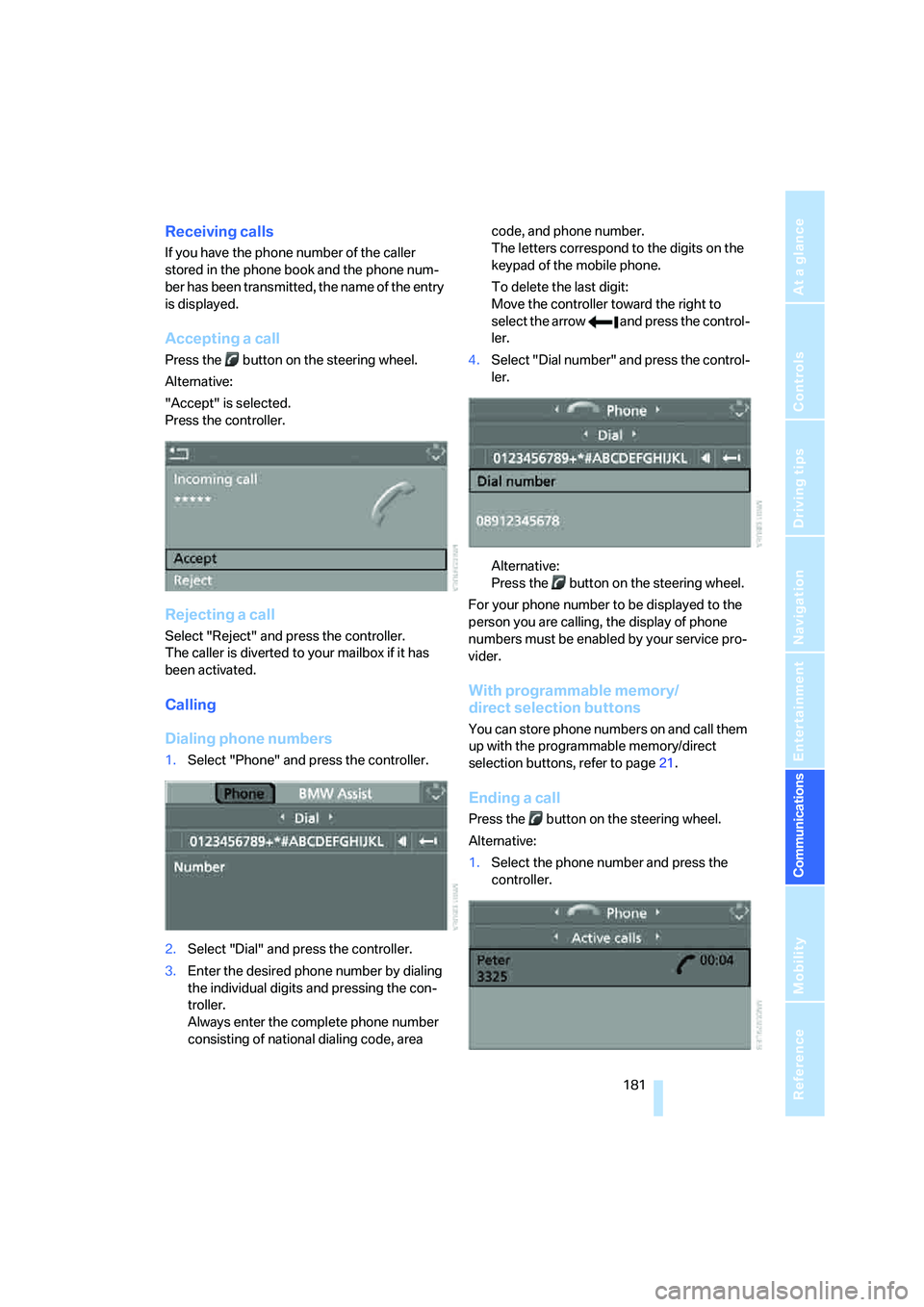
Accepting a call
Press the button on the steering wheel.
Alternative:
"Accept" is selected.
Press the controller.
Rejecting a call
Select "Reject" and press the controller.
The caller is diverted to your mailbox if it has
been activated.
Calling
Dialing phone numbers
1.Select "Phone" and press the controller.
2.Select "Dial" and press the controller.
3.Enter the desired phone number by dialing
the individual digits and pressing the con-
troller.
Always enter the complete phone number
consisting of national dialing code, area code, and phone number.
The letters correspond to the digits on the
keypad of the mobile phone.
To delete the last digit:
Move the controller toward the right to
select the arrow and press the control-
ler.
4.Select "Dial number" and press the control-
ler.
Alternative:
Press the button on the steering wheel.
For your phone number to be displayed to the
person you are calling, the display of phone
numbers must be enabled by your service pro-
vider.
With programmable memory/
direct selection buttons
You can store phone numbers on and call them
up with the programmable memory/direct
selection buttons, refer to page21.
Ending a call
Press the button on the steering wheel.
Alternative:
1.Select the phone number and press the
controller.
Page 185 of 260
183
Entertainment
Reference
At a glance
Controls
Driving tips Communications
Navigation
Mobility
5.Change the phone number.
6.Select "Dial number" and press the control-
ler.
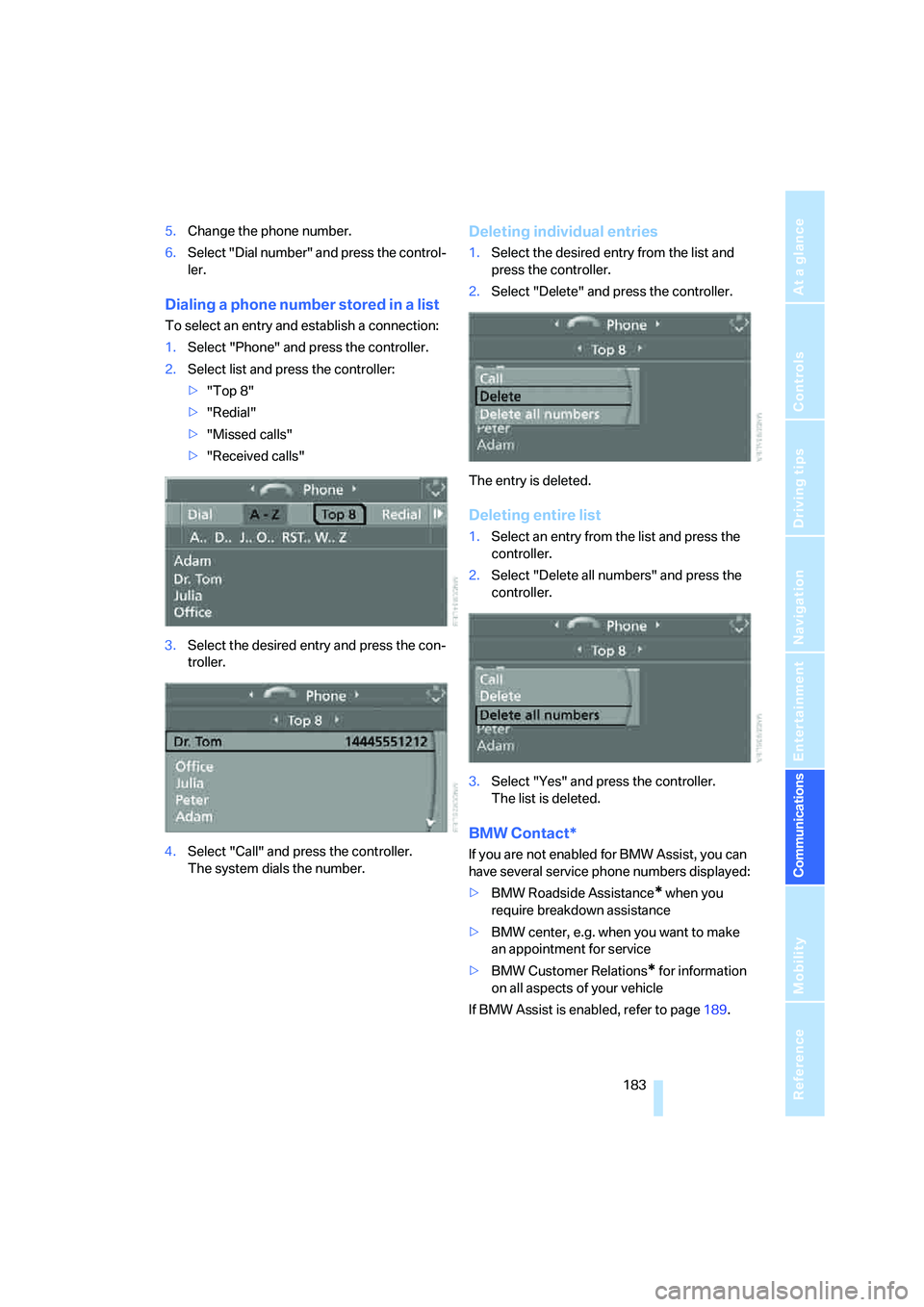
Dialing a phone number stored in a list
To select an entry and establish a connection:
1.Select "Phone" and press the controller.
2.Select list and press the controller:
>"Top 8"
>"Redial"
>"Missed calls"
>"Received calls"
3.Select the desired entry and press the con-
troller.
4.Select "Call" and press the controller.
The system dials the number.
Deleting individual entries
1.Select the desired entry from the list and
press the controller.
2.Select "Delete" and press the controller.
The entry is deleted.
Deleting entire list
1.Select an entry from the list and press the
controller.
2.Select "Delete all numbers" and press the
controller.
3.Select "Yes" and press the controller.
The list is deleted.
BMW Contact*
If you are not enabled for BMW Assist, you can
have several service phone numbers displayed:
>BMW Roadside Assistance
* when you
require breakdown assistance
>BMW center, e.g. when you want to make
an appointment for service
>BMW Customer Relations
* for information
on all aspects of your vehicle
If BMW Assist is enabled, refer to page189.
Page 186 of 260
Telephoning
184 You can dial the displayed service phone num-
bers if your mobile phone is paired in the vehi-
cle:
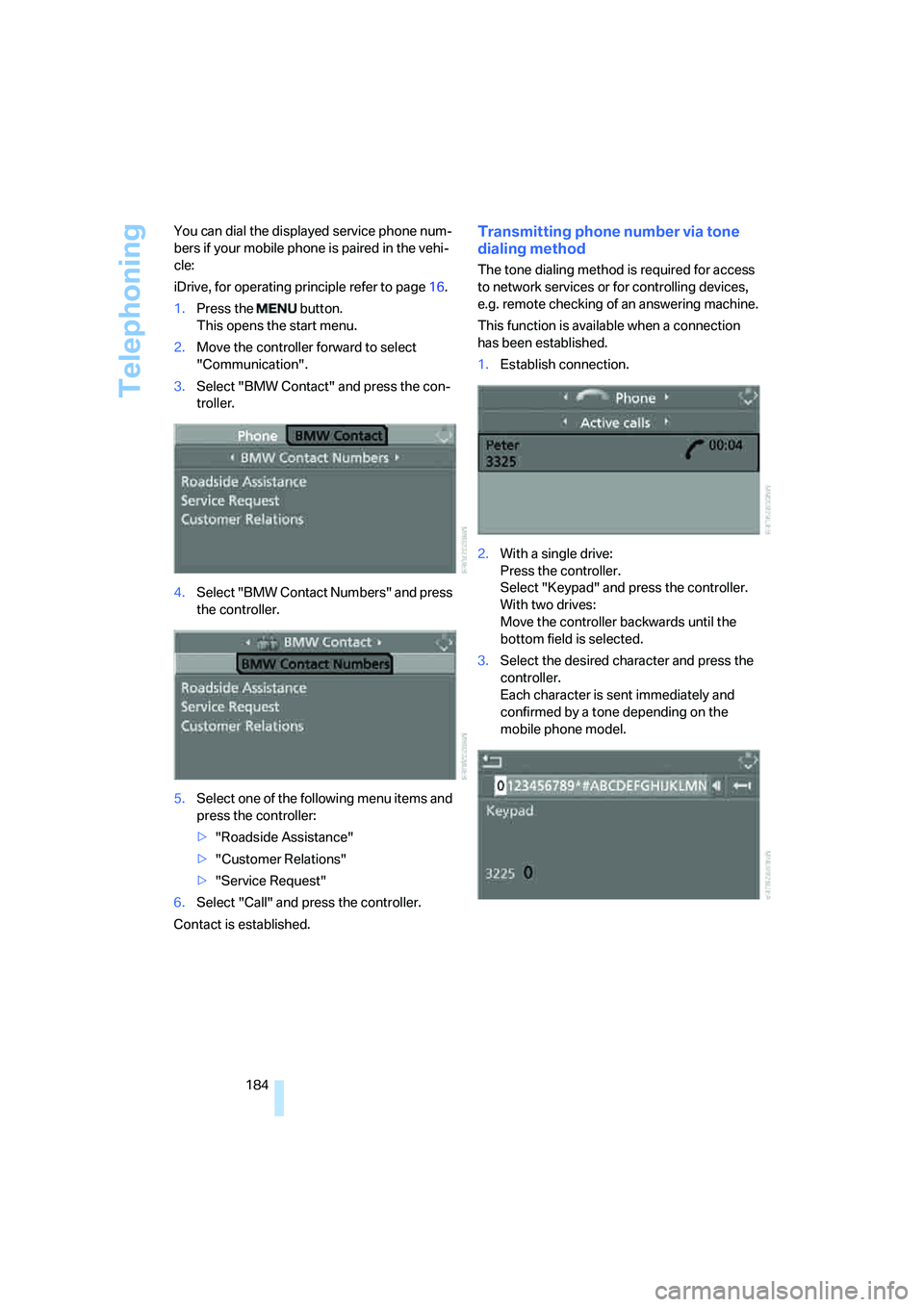
iDrive, for operating principle refer to page16.
1.Press the button.
This opens the start menu.
2.Move the controller forward to select
"Communication".
3.Select "BMW Contact" and press the con-
troller.
4.Select "BMW Contact Numbers" and press
the controller.
5.Select one of the following menu items and
press the controller:
>"Roadside Assistance"
>"Customer Relations"
>"Service Request"
6.Select "Call" and press the controller.
Contact is established.
Transmitting phone number via tone
dialing method
The tone dialing method is required for access
to network services or for controlling devices,
e.g. remote checking of an answering machine.
This function is available when a connection
has been established.
1.Establish connection.
2.With a single drive:
Press the controller.
Select "Keypad" and press the controller.
With two drives:
Move the controller backwards until the
bottom field is selected.
3.Select the desired character
and press the
controller.
Each character is sent immediately and
confirmed by a tone depending on the
mobile phone model.
Page 191 of 260
189
Entertainment
Reference
At a glance
Controls
Driving tips Communications
Navigation
Mobility
BMW Assist
BMW Assist provides you with various services.
For example, the position data of your vehicle
can be transmitted to the BMW Assist
Response Center if an emergency request
* has
been initiated.
Many BMW Assist services depend on the indi-
vidually agreed contract.
After your contract has expired, the BMW
Assist system will be deactivated by the BMW
Assist Response Center without you having to
visit a BMW center. After the BMW Assist sys-
tem has been deactivated, no BMW Assist ser-
vice will be available. The BMW Assist system
can be reactivated by a BMW center after sign-
ing a new contract.
Requirements
You can use BMW Assist when the following
requirements are met:
>The installed BMW Assist system is logged
on to a mobile phone network. This network
must be capable of transmitting the ser-
vices.
>To transmit position data, the vehicle must
be able to determine the current position.
>In order to activate and update BMW Assist,
a GPS signal must be available.
>You have subscribed to BMW Assist with
your BMW center or with the BMW Assist
Response Center. Activation must be com-
pleted.
>BMW Assist is activated, refer to page194.
Offered services
The following services are available via
BMW Assist:
>Emergency request, refer to page223:
When you press the SOS button, a connec-
tion is established to the BMW Assist
Response Center. The BMW Assist
Response Center contacts you and takes
further steps to help you.
>Automatic collision notification:
Under certain conditions, a connection is
established to the BMW Assist Response
Center immediately after a serious acci-
dent. If possible, the BMW Assist Response
Center contacts you and takes further steps
to help you.
>Enhanced roadside assistance:
You can call Roadside Assistance
* of the
BMW Group should you require help in the
event of a breakdown. If possible, the vehi-
cle data and position data are transmitted
during this time.
>BMW Customer Relations:
For information related to your vehicle, call
BMW Customer Relations.
>TeleService:
The data on the service status of your vehi-
cle or on required inspections are transmit-
ted to your BMW center either automati-
cally prior to the due date or when you
request a BMW service appointment.
>Remote door unlock:
Inform the BMW Assist Response Center,
e.g. if your remote control is not available
and you want to have the vehicle unlocked.
>Stolen vehicle recovery:
After your vehicle has been reported to the
police as stolen, the BMW Assist Response
Center can locate its position. To do this,
the vehicle electronics must be ready for
operation.
*
Page 192 of 260
BMW Assist
190 In addition, you can be provided with other ser-
vices, e.g. the concierge service or information
on route planning, traffic conditions, and the
weather. With Critical Calling, you can make a
limited number of calls via the BMW Assist
Response Center, e.g. if you do not have your
mobile phone with you.
Press the SOS button to contact the BMW
Assist Response Center, see below.
You also have access to the BMW Assist con-
cierge service via the Internet.
Characteristics of the offered services
The following characteristics apply to the ser-
vices:
>The offered services are country-specific.
>Voice contact is established or data are
transmitted, depending on the equipment
and the country. In some countries, it is
possible to do both.
>The data transmitted can, for example, be
the vehicle data, your current position or the
CBS Condition Based Service data.
Using services
Contacting BMW Assist Response
Center
You can contact the BMW Assist Response
Center via the SOS button.
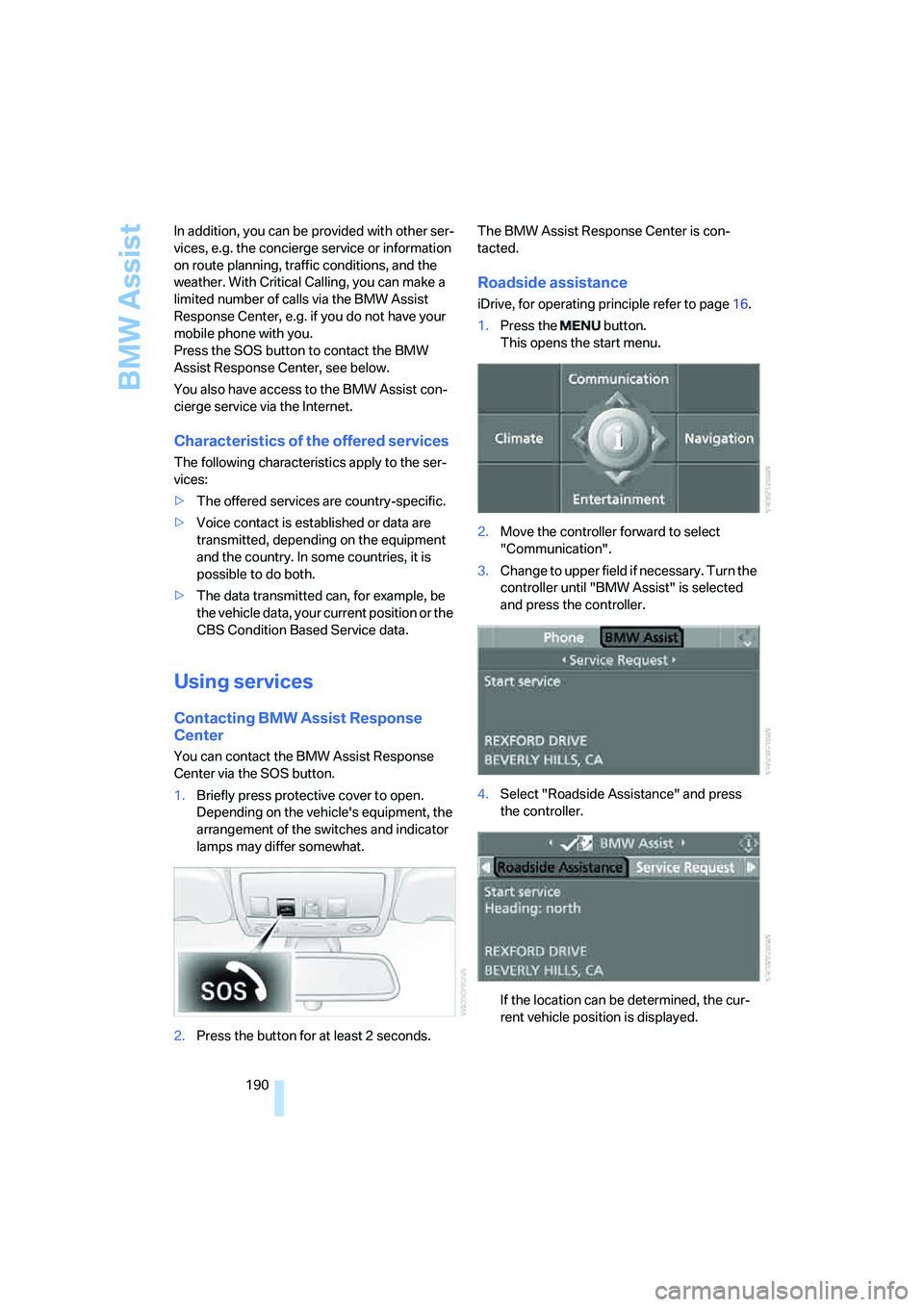
1.Briefly press protective cover to open.
Depending on the vehicle's equipment, the
arrangement of the switches and indicator
lamps may differ somewhat.
2.Press the button for at least 2 seconds.The BMW Assist Response Center is con-
tacted.
Roadside assistance
iDrive, for operating principle refer to page16.
1.Press the button.
This opens the start menu.
2.Move the controller forward to select
"Communication".
3.Change to upper field if necessary. Turn the
controller until "BMW Assist" is selected
and press the controller.
4.Select "Roadside Assistance" and press
the controller.
If the location can be determined, the cur-
rent vehicle position is displayed.