headlamp BMW M5 2010 User Guide
[x] Cancel search | Manufacturer: BMW, Model Year: 2010, Model line: M5, Model: BMW M5 2010Pages: 266, PDF Size: 9.08 MB
Page 224 of 266
Replacing components
222
Replacing components
Onboard toolkit
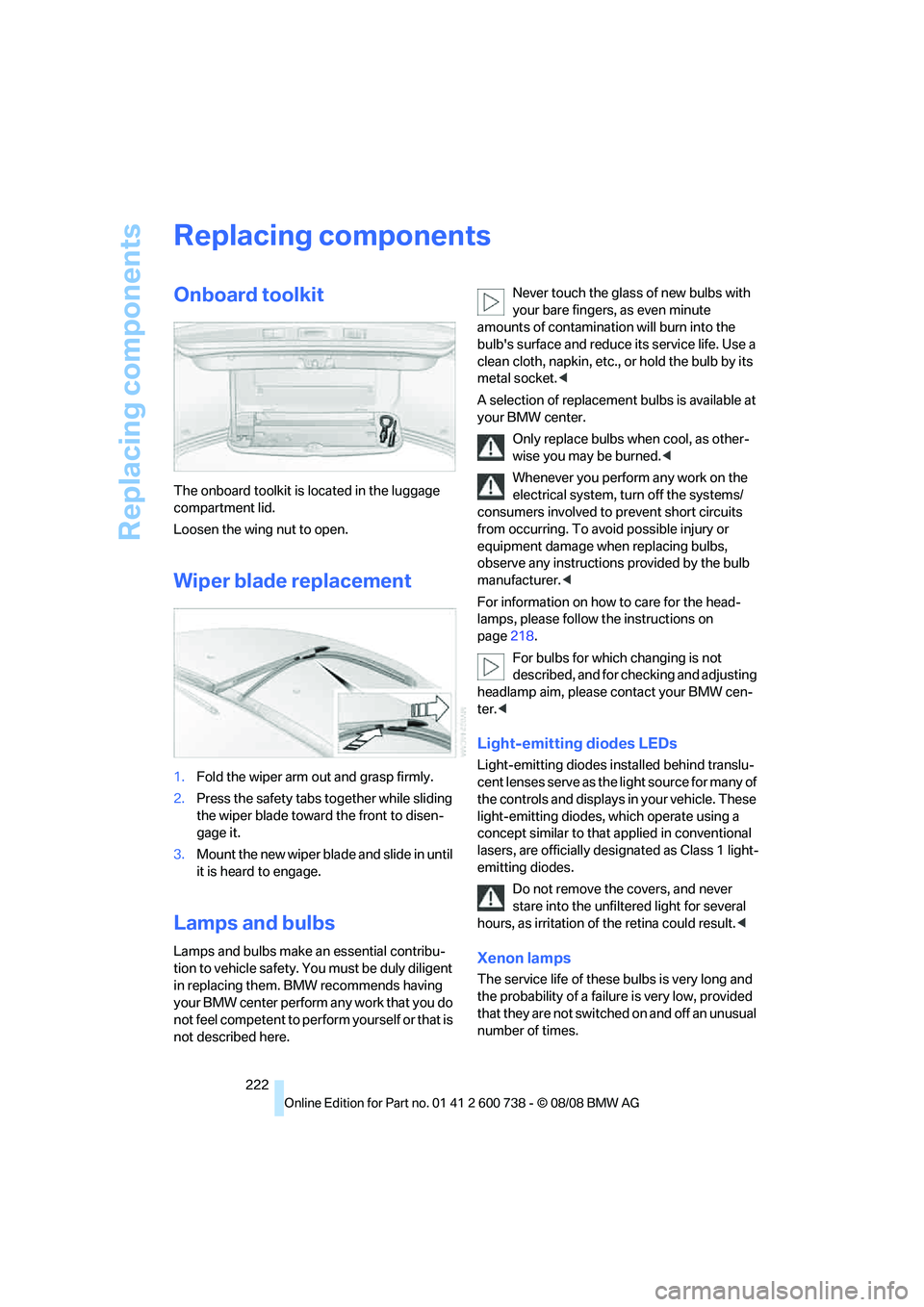
The onboard toolkit is located in the luggage
compartment lid.
Loosen the wing nut to open.
Wiper blade replacement
1.Fold the wiper arm out and grasp firmly.
2.Press the safety tabs together while sliding
the wiper blade toward the front to disen-
gage it.
3.Mount the new wiper blade and slide in until
it is heard to engage.
Lamps and bulbs
Lamps and bulbs make an essential contribu-
tion to vehicle safety. You must be duly diligent
in replacing them. BMW recommends having
your BMW center perform any work that you do
not feel competent to perform yourself or that is
not described here.Never touch the glass of new bulbs with
your bare fingers, as even minute
amounts of contamination will burn into the
bulb's surface and reduce its service life. Use a
clean cloth, napkin, etc., or hold the bulb by its
metal socket.<
A selection of replacement bulbs is available at
your BMW center.
Only replace bulbs when cool, as other-
wise you may be burned.<
Whenever you perform any work on the
electrical system, turn off the systems/
consumers involved to prevent short circuits
from occurring. To avoid possible injury or
equipment damage when replacing bulbs,
observe any instructions provided by the bulb
manufacturer.<
For information on how to care for the head-
lamps, please follow the instructions on
page218.
For bulbs for which changing is not
described, and for checking and adjusting
headlamp aim, please contact your BMW cen-
ter.<
Light-emitting diodes LEDs
Light-emitting diodes installed behind translu-
cent lenses serve as the light source for many of
the controls and displays in your vehicle. These
light-emitting diodes, which operate using a
concept similar to that applied in conventional
lasers, are officially designated as Class 1 light-
emitting diodes.
Do not remove the covers, and never
stare into the unfiltered light for several
hours, as irritation of the retina could result.<
Xenon lamps
The service life of these bulbs is very long and
the probability of a failure is very low, provided
that they are not switched on and off an unusual
number of times.
Page 241 of 266
Reference 239
At a glance
Controls
Driving tips
Communications
Navigation
Entertainment
Mobility
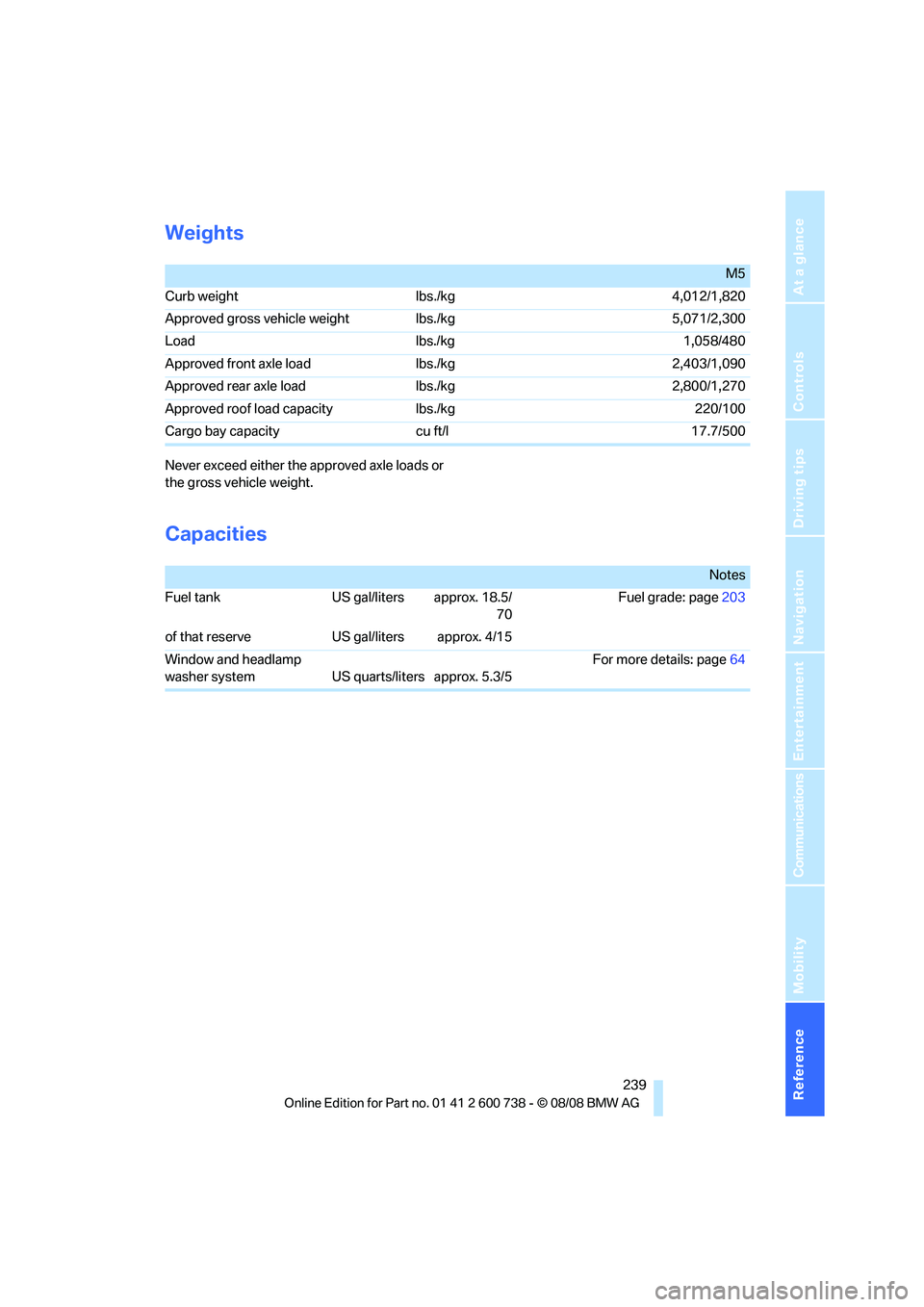
Weights
Never exceed either the approved axle loads or
the gross vehicle weight.
Capacities
M5
Curb weight lbs./kg 4,012/1,820
Approved gross vehicle weight lbs./kg 5,071/2,300
Load lbs./kg 1,058/480
Approved front axle load lbs./kg 2,403/1,090
Approved rear axle load lbs./kg 2,800/1,270
Approved roof load capacity lbs./kg 220/100
Cargo bay capacity cu ft/l 17.7/500
Notes
Fuel tank US gal/liters approx. 18.5/
70Fuel grade: page203
of that reserve US gal/liters approx. 4/15
Window and headlamp
washer system US quarts/liters approx. 5.3/5For more details: page64
Page 247 of 266
Reference 245
At a glance
Controls
Driving tips
Communications
Navigation
Entertainment
Mobility
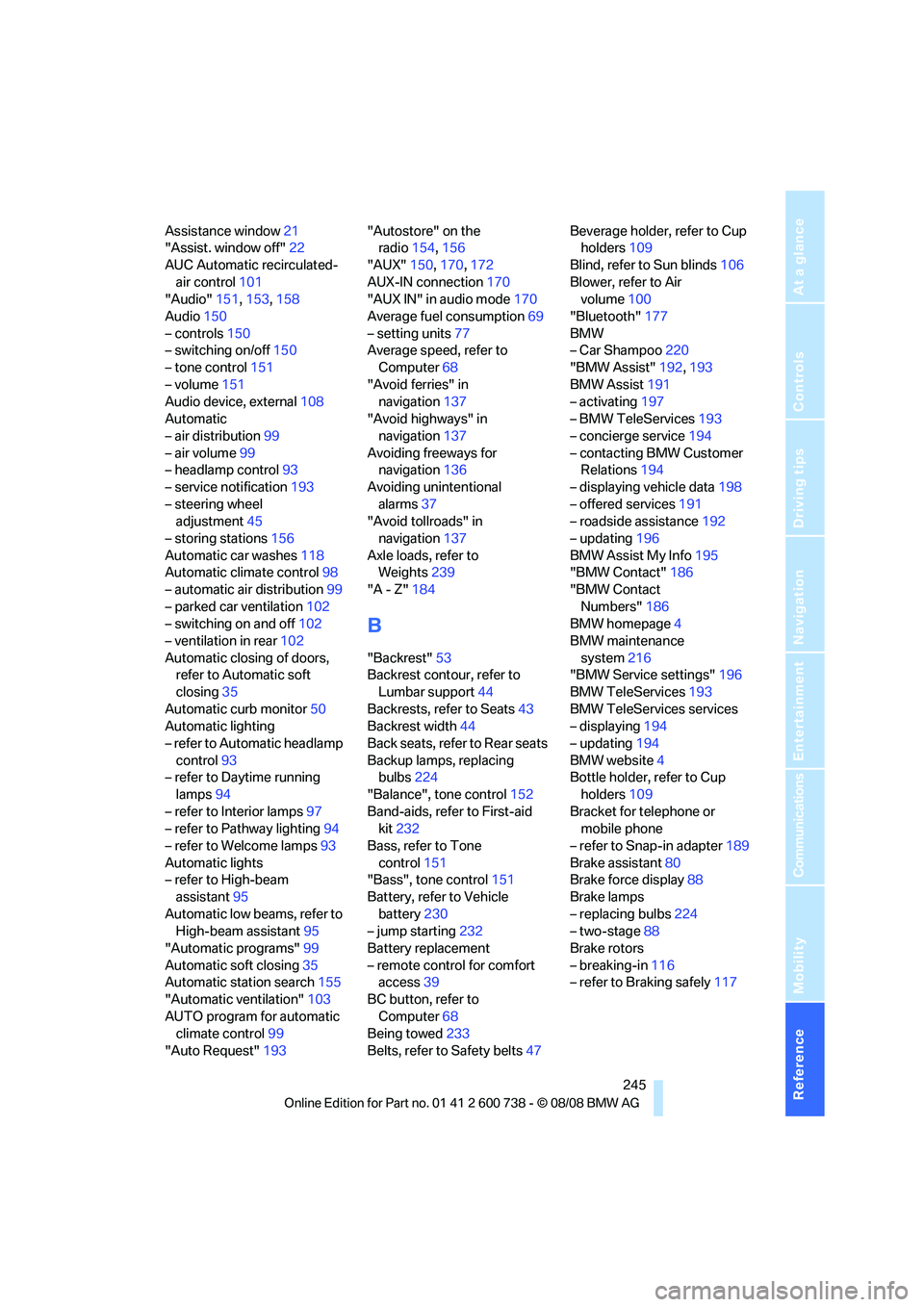
Assistance window21
"Assist. window off"22
AUC Automatic recirculated-
air control101
"Audio"151,153,158
Audio150
– controls150
– switching on/off150
– tone control151
– volume151
Audio device, external108
Automatic
– air distribution99
– air volume99
– headlamp control93
– service notification193
– steering wheel
adjustment45
– storing stations156
Automatic car washes118
Automatic climate control98
– automatic air distribution99
– parked car ventilation102
– switching on and off102
– ventilation in rear102
Automatic closing of doors,
refer to Automatic soft
closing35
Automatic curb monitor50
Automatic lighting
– refer to Automatic headlamp
control93
– refer to Daytime running
lamps94
– refer to Interior lamps97
– refer to Pathway lighting94
– refer to Welcome lamps93
Automatic lights
– refer to High-beam
assistant95
Automatic low beams, refer to
High-beam assistant95
"Automatic programs"99
Automatic soft closing35
Automatic station search155
"Automatic ventilation"103
AUTO program for automatic
climate control99
"Auto Request"193"Autostore" on the
radio154,156
"AUX"150,170,172
AUX-IN connection
170
"AUX IN" in audio mode170
Average fuel consumption69
– setting units77
Average speed, refer to
Computer68
"Avoid ferries" in
navigation137
"Avoid highways" in
navigation137
Avoiding freeways for
navigation136
Avoiding unintentional
alarms37
"Avoid tollroads" in
navigation137
Axle loads, refer to
Weights239
"A - Z"184
B
"Backrest"53
Backrest contour, refer to
Lumbar support44
Backrests, refer to Seats43
Backrest width44
Back seats, refer to Rear seats
Backup lamps, replacing
bulbs224
"Balance", tone control152
Band-aids, refer to First-aid
kit232
Bass, refer to Tone
control151
"Bass", tone control151
Battery, refer to Vehicle
battery230
– jump starting232
Battery replacement
– remote control for comfort
access39
BC button, refer to
Computer68
Being towed233
Belts, refer to Safety belts47Beverage holder, refer to Cup
holders109
Blind, refer to Sun blinds106
Blower, refer to Air
volume100
"Bluetooth"177
BMW
– Car Shampoo220
"BMW Assist"192,193
BMW Assist191
– activating197
– BMW TeleServices193
– concierge service194
– contacting BMW Customer
Relations194
– displaying vehicle data198
– offered services191
– roadside assistance192
– updating196
BMW Assist My Info195
"BMW Contact"186
"BMW Contact
Numbers"186
BMW homepage4
BMW maintenance
system216
"BMW Service settings"196
BMW TeleServices193
BMW TeleServices services
– displaying194
– updating194
BMW website4
Bottle holder, refer to Cup
holders109
Bracket for telephone or
mobile phone
– refer to Snap-in adapter189
Brake assistant80
Brake force display88
Brake lamps
– replacing bulbs224
– two-stage88
Brake rotors
– breaking-in116
– refer to Braking safely117
Page 248 of 266
Everything from A to Z
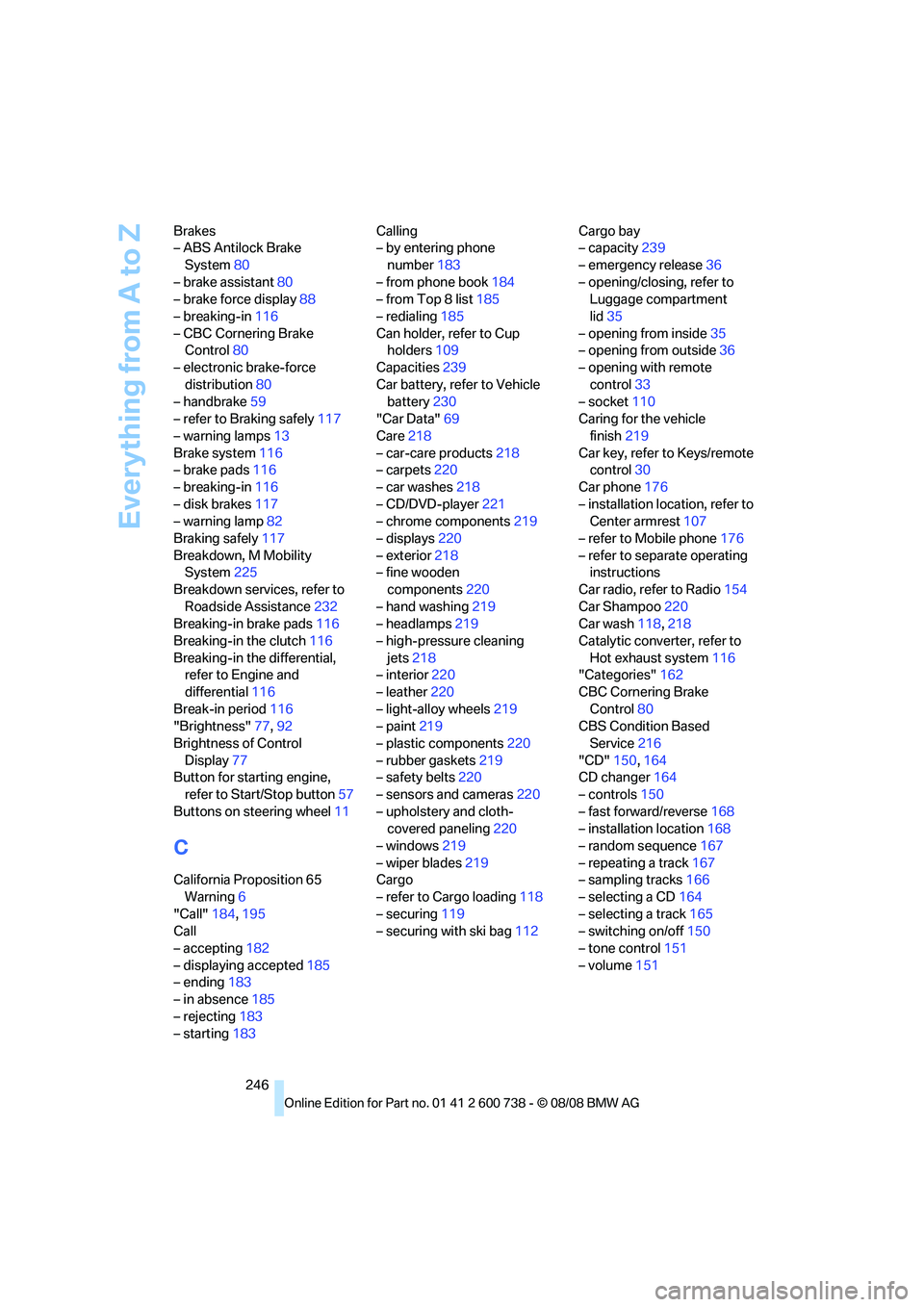
246 Brakes
– ABS Antilock Brake
System80
– brake assistant80
– brake force display88
– breaking-in116
– CBC Cornering Brake
Control80
– electronic brake-force
distribution80
– handbrake59
– refer to Braking safely117
– warning lamps13
Brake system116
– brake pads116
– breaking-in116
– disk brakes117
– warning lamp82
Braking safely117
Breakdown, M Mobility
System225
Breakdown services, refer to
Roadside Assistance232
Breaking-in brake pads116
Breaking-in the clutch116
Breaking-in the differential,
refer to Engine and
differential116
Break-in period116
"Brightness"77,92
Brightness of Control
Display77
Button for starting engine,
refer to Start/Stop button57
Buttons on steering wheel11
C
California Proposition 65
Warning6
"Call"184,195
Call
– accepting182
– displaying accepted185
– ending183
– in absence185
– rejecting183
– starting183Calling
– by entering phone
number183
– from phone book184
– from Top 8 list185
– redialing185
Can holder, refer to Cup
holders109
Capacities239
Car battery, refer to Vehicle
battery230
"Car Data"69
Care218
– car-care products218
– carpets220
– car washes218
– CD/DVD-player221
– chrome components219
– displays220
– exterior218
– fine wooden
components220
– hand washing219
– headlamps219
– high-pressure cleaning
jets218
– interior220
– leather220
– light-alloy wheels219
– paint219
– plastic components220
– rubber gaskets219
– safety belts220
– sensors and cameras220
– upholstery and cloth-
covered paneling220
– windows219
– wiper blades219
Cargo
– refer to Cargo loading118
– securing119
– securing with ski bag112Cargo bay
– capacity239
– emergency release36
– opening/closing, refer to
Luggage compartment
lid35
– opening from inside35
– opening from outside36
– opening with remote
control33
– socket110
Caring for the vehicle
finish219
Car key, refer to Keys/remote
control30
Car phone176
– installation location, refer to
Center armrest107
– refer to Mobile phone176
– refer to separate operating
instructions
Car radio, refer to Radio154
Car Shampoo220
Car wash118,218
Catalytic converter, refer to
Hot exhaust system116
"Categories"162
CBC Cornering Brake
Control80
CBS Condition Based
Service216
"CD"150,164
CD changer164
– controls150
– fast forward/reverse168
– installation location168
– random sequence167
– repeating a track167
– sampling tracks166
– selecting a CD164
– selecting a track165
– switching on/off150
– tone control151
– volume151
Page 253 of 266
Reference 251
At a glance
Controls
Driving tips
Communications
Navigation
Entertainment
Mobility
Glass sunroof, electric40
– convenient operation from
outside34
– convenient operation with
comfort access39
– moving manually41
– remote control33
Glove compartment107
– lighting107
GPS navigation, refer to
Navigation system124
Grills, refer to Ventilation102
Gross vehicle weight, refer to
Weights239
Ground clearance118
H
Handbrake59
– indicator lamp13,59
Hands-free system, refer to
Microphone14
Hand washing219
Hazard warning flashers15
"HD radio"158
HD radio, refer to High
Definition Radio158
Head airbags88
Headlamp
– cleaning tank, refer to
Capacities239
Headlamp control,
automatic93
Headlamp flasher63
Headlamps93
– cleaning, refer to Wiper
system64
– filler neck for washer
fluid211
Head Light, refer to Adaptive
Head Light95
Head restraints46
– active front head
restraints46
– removing47
– sitting safely43
"Head-Up Display"53,90Head-Up Display90
– default view91
– M view90
– shift lights63
Heated
– mirrors50
– rear window100
– seats48
– steering wheel51
Heating98
– exterior mirrors50
– interior98
– rear window100
– residual heat101
– seats48
– steering wheel51
Heating with engine switched
off, refer to Residual
heat101
Heavy cargo, refer to Securing
cargo119
Height, refer to
Dimensions238
Height adjustment
– seats44
– steering wheel51
High-beam assistant95,97
High beams95
– headlamp flasher95
– indicator lamp13
High Definition Radio158
High-pressure cleaning
jets218,219
High water, refer to Driving
through water117
Hills117
Holder for cups109
"Home address" in
navigation136
Homepage of BMW4
Hood210
Horn10
Hot exhaust system116
"Hour memo"76
"House number" in
destination entry129
Hydraulic brake assistant,
refer to Brake assistant80
Hydroplaning117
I
IBOC, refer to High Definition
Radio158
Ice, refer to Outside
temperature warning68
ID3 tag, refer to Information on
track166
Identification mark
– recommended tire
brands208
– tire coding205
Idle61
iDrive16
– assistance window21
– automatic climate control
with expanded scope99
– changing date and time76
– changing language78
– changing menu page20
– changing settings75
– changing units of measure
and display type77
– confirming selection or
entry20
– controller16
– controls16
– displays, menus18
– operating principle18
– selecting menu item20
– setting brightness77
– start menu18
– status information21
– symbols19
Ignition57
– switched off58
– switched on57
Ignition key, refer to Keys/
remote control30
Ignition key position 1, refer to
Radio readiness57
Ignition key position 2, refer to
Ignition on57
Ignition lock57
– starting engine with comfort
access39
i menu18
Imprint2
Page 256 of 266
Everything from A to Z
254 Monitoring pressure of tires,
refer to Flat Tire Monitor84
"Monitor on / off"52
Most recent mobile phone
numbers185
MP3
– compressed audio files164
– USB-audio interface/mobile
phone audio interface171
Multi-function steering wheel,
refer to Buttons on steering
wheel11
Multifunction switch
– refer to Turn signals/
headlamp flasher63
– refer to Wiper system64
Music tracks
– finding166
– random play sequence167
– sampling, scan166
"Mute on / off"52
M view91
MW, waveband154
"My Info"196
My Info, refer to BMW Assist
My Info195
N
"Navigation"69,126
Navigation destination
– entering manually126
– home address136
– selecting via map131
Navigation drive, installation
location124
Navigation DVD124
Navigation instructions, refer
to Switching voice
instructions on/off141Navigation system124
– address book134
– bypassing route
sections142
– destination entry126
– destination guidance in
assistance window124
– destination list133
– displaying current
position145
– displaying route139
– entering a destination
manually126
– entering destination via
voice129
– last destinations133
– navigation DVD124
– route list141
– searching for a special
destination132
– selecting destination using
information132
– selecting destination via
map131
– selecting route criteria136
– starting destination
guidance138
– switching off, refer to
Terminating/continuing
destination guidance138
– terminating/continuing
destination guidance138
– voice instructions141
– volume adjustment142
"Navigation voice
instructions"52,141
Neck support, refer to Head
restraints46
"New address" in
navigation134
"New destination"126,131
New remote control30
"New route"142
New wheels and tires207
"Next entertainment
source"52
"Normal" with EDC83
Nozzles, refer to Windshield
washer nozzles65
Nylon rope, refer to Tow-
starting and towing233
O
OBD socket, refer to Socket
for Onboard Diagnostics
interface217
Octane ratings, refer to Fuel
specifications203
Oil, refer to Engine oil212
Oil change intervals
– refer to Service
requirements70
Oil temperature68
"On a new destination" in
navigation132
Onboard computer, refer to
iDrive16
"Onboard info"69
Onboard toolkit222
"On destination"132
"On location"132
Opening and closing
– comfort access38
– from inside34
– from outside32
– using remote control32
– using the door lock34
Operating principle, iDrive18
Operation by voice for mobile
phone187
– adjusting volume188
– canceling187
– commands187
– correcting phone
number188
– dialing phone number188
– placing a call188
– redialing189
– voice phone book188
"Options"195,197
Orientation menu, refer to
Start menu18
Output, refer to Engine
data238
Page 261 of 266
Reference 259
At a glance
Controls
Driving tips
Communications
Navigation
Entertainment
Mobility
Station, refer to Radio154
"Status"71
Status information on Control
Display21
Status of this Owner's Manual
at time of printing5
Steam cleaners218,219
Steering wheel
– adjustment51
– automatic adjustment, refer
to Steering wheel
memory45
– buttons on steering
wheel11
– easy entry/exit51
– heating51
– lock, refer to Ignition lock57
– MDrive button52
– memory45
– programmable button51
– shift paddles62
"Steering wheel button"52
"Stop" for stopwatch75
Stopwatch75
Storage compartments108
"Store in address book" in
navigation134
"Store" in radio
mode157,163
Storing221
Storing current position134
Storing radio stations156
Storing sitting position, refer
to Seat, mirror and steering
wheel memory45
Storing tires208
Storing your vehicle221
"Street" in destination
entry128
Summer tires, refer to Wheels
and tires204
Sun blinds106
"Surround Settings", tone
control152,153
SW, waveband154
Switches, refer to Cockpit10Switching automatically
between high beams and
low beams, refer to High-
beam assistant95
Switching off engine58
Switching on
– audio150
– CD changer150
– CD player150
– radio150
Switching on hour signal76
Swiveling
– headlamps, refer to Adaptive
Head Light95
Symbols4
– indicator/warning lamps13
– navigation system144
– status information21
– traffic information with
navigation system142
T
Tachometer67
Tail lamps224
– replacing bulbs224
Tank contents, refer to
Capacities239
Target cursor for
navigation131
Technical alterations, refer to
For your own safety5
Technical data238
– capacities239
– dimensions238
Telematics, refer to
BMW Assist191
Telephone
– installation location, refer to
Center armrest107
– refer to Mobile phone176
"Telephone list"52Temperature
– adjusting in upper body
region99
– adjusting with automatic
climate control99
– changing units of
measure77
– refer to Coolant
temperature67
Temperature display
– changing units of
measure77
– outside temperature
warning68
Temperature gauge
– engine oil68
Tempomat, refer to Cruise
control65
"Text language"78
"Theater", tone control153
The individual vehicle5
Third brake lamp, refer to
Center brake lamp224
Through-loading system111
Tightening torque of the lug
bolts, refer to After
mounting229
Tilt alarm sensor37
– switching off38
Tilting down passenger-side
exterior mirror50
"Time"76
"Time format"76
Timer, refer to Preselecting
activation times103
"Timer 2" for parked-car
ventilation103
"Timer 1" for parked-car
ventilation103
Tire inflation pressures204
Tire pressure
– loss85,86
Tire Pressure Monitor
TPM
85
Tire Quality Grading206
Tire replacement
– new wheels and tires207