change time BMW M5 2010 Owner's Manual
[x] Cancel search | Manufacturer: BMW, Model Year: 2010, Model line: M5, Model: BMW M5 2010Pages: 266, PDF Size: 9.08 MB
Page 129 of 266
Navigation
Driving tips
127Reference
At a glance
Controls
Communications
Entertainment
Mobility
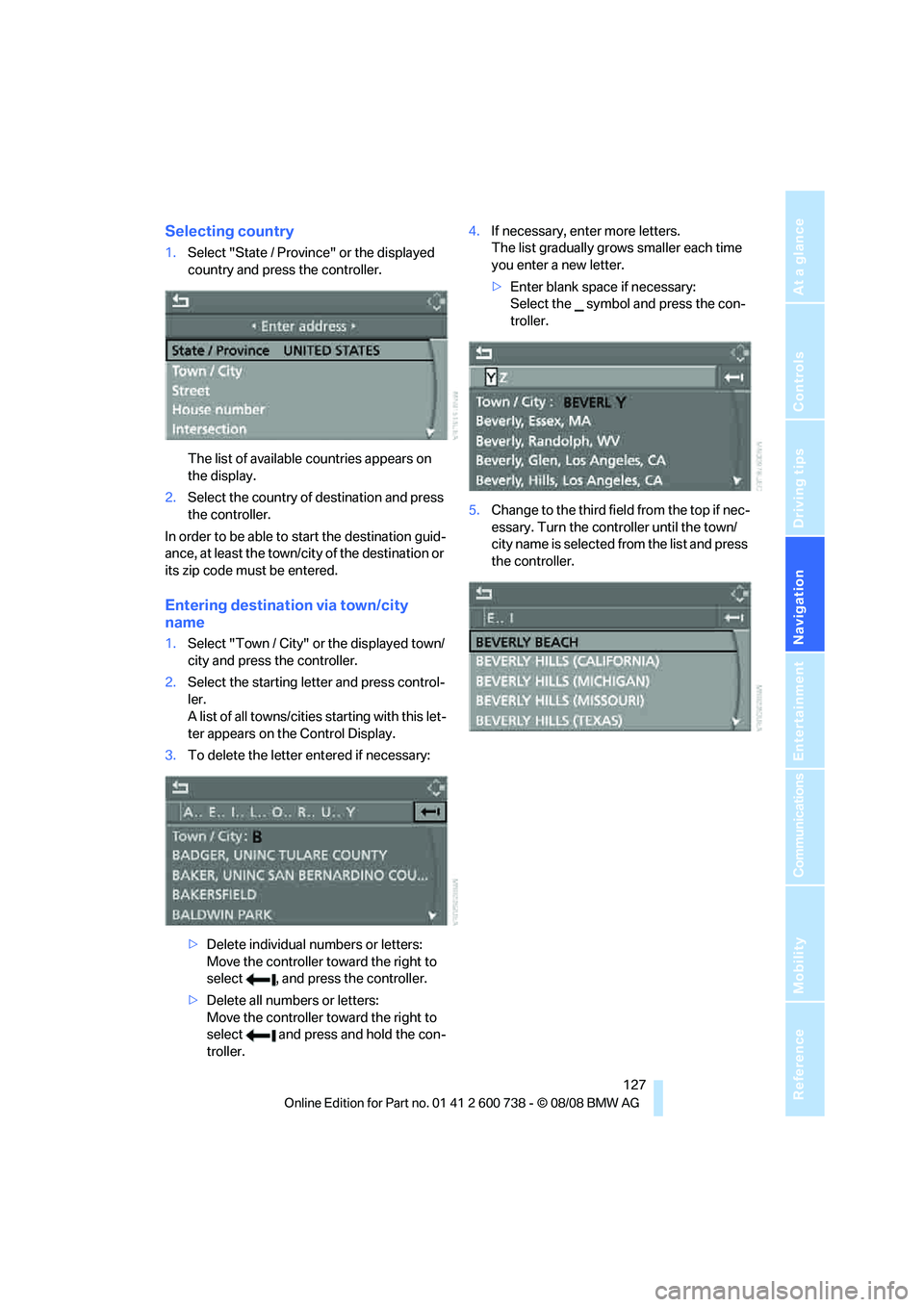
Selecting country
1.Select "State / Province" or the displayed
country and press the controller.
The list of available countries appears on
the display.
2.Select the country of destination and press
the controller.
In order to be able to start the destination guid-
ance, at least the town/city of the destination or
its zip code must be entered.
Entering destination via town/city
name
1.Select "Town / City" or the displayed town/
city and press the controller.
2.Select the starting letter and press control-
ler.
A list of all towns/cities starting with this let-
ter appears on the Control Display.
3.To delete the letter entered if necessary:
>Delete individual numbers or letters:
Move the controller toward the right to
select , and press the controller.
>Delete all numbers or letters:
Move the controller toward the right to
select and press and hold the con-
troller.4.If necessary, enter more letters.
The list gradually grows smaller each time
you enter a new letter.
>Enter blank space if necessary:
Select the symbol and press the con-
troller.
5.Change to the third field from the top if nec-
essary. Turn the controller until the town/
city name is selected from the list and press
the controller.
Page 131 of 266
Navigation
Driving tips
129Reference
At a glance
Controls
Communications
Entertainment
Mobility
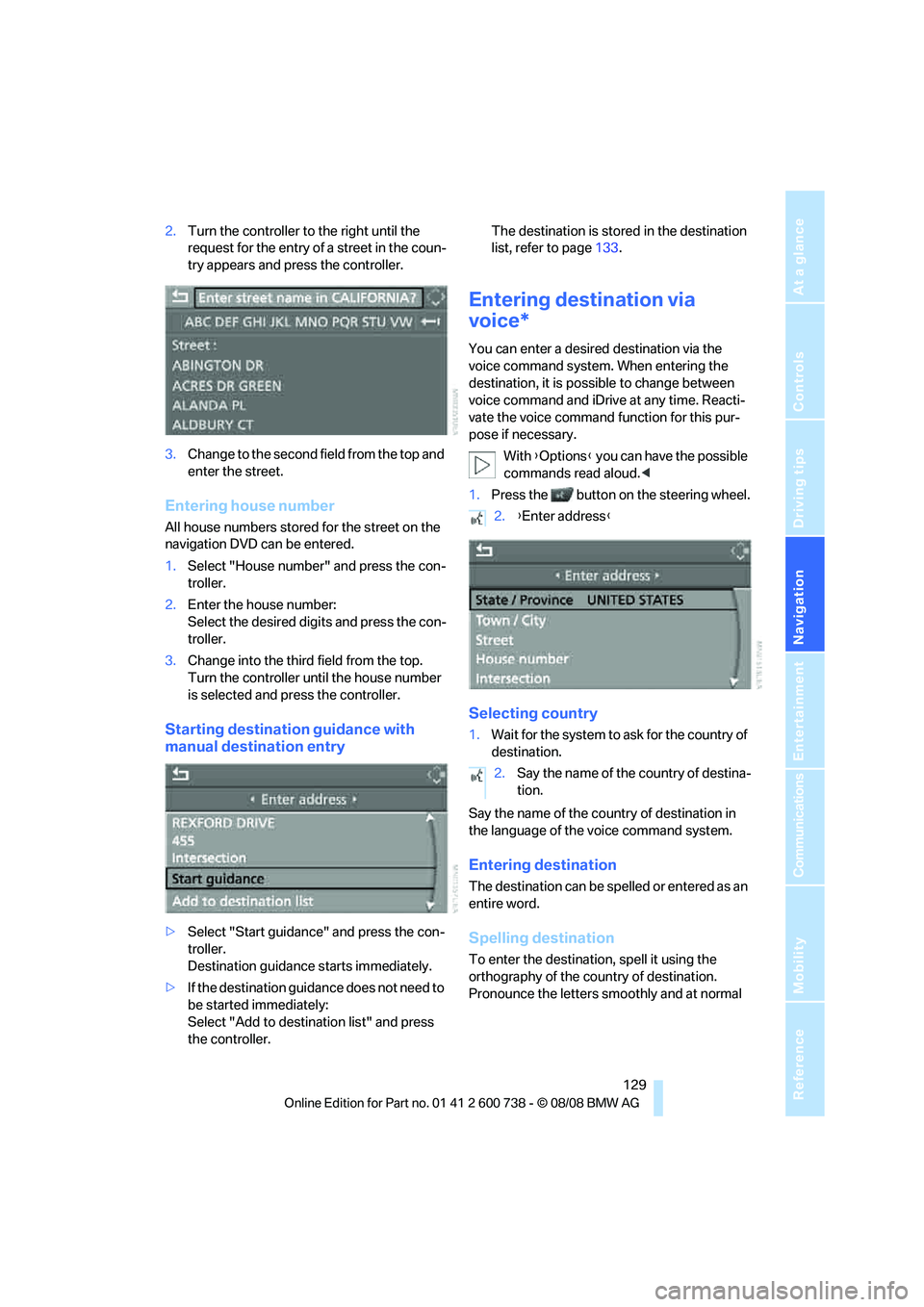
2.Turn the controller to the right until the
request for the entry of a street in the coun-
try appears and press the controller.
3.Change to the second field from the top and
enter the street.
Entering house number
All house numbers stored for the street on the
navigation DVD can be entered.
1.Select "House number" and press the con-
troller.
2.Enter the house number:
Select the desired digits and press the con-
troller.
3.Change into the third field from the top.
Turn the controller until the house number
is selected and press the controller.
Starting destination guidance with
manual destination entry
>Select "Start guidance" and press the con-
troller.
Destination guidance starts immediately.
>If the destination guidance does not need to
be started immediately:
Select "Add to destination list" and press
the controller.The destination is stored in the destination
list, refer to page133.
Entering destination via
voice*
You can enter a desired destination via the
voice command system. When entering the
destination, it is possible to change between
voice command and iDrive at any time. Reacti-
vate the voice command function for this pur-
pose if necessary.
With {Options} you can have the possible
commands read aloud.<
1.Press the button on the steering wheel.
Selecting country
1.Wait for the system to ask for the country of
destination.
Say the name of the country of destination in
the language of the voice command system.
Entering destination
The destination can be spelled or entered as an
entire word.
Spelling destination
To enter the destination, spell it using the
orthography of the country of destination.
Pronounce the letters smoothly and at normal
2.{Enter address}
2.Say the name of the country of destina-
tion.
Page 139 of 266
Navigation
Driving tips
137Reference
At a glance
Controls
Communications
Entertainment
Mobility
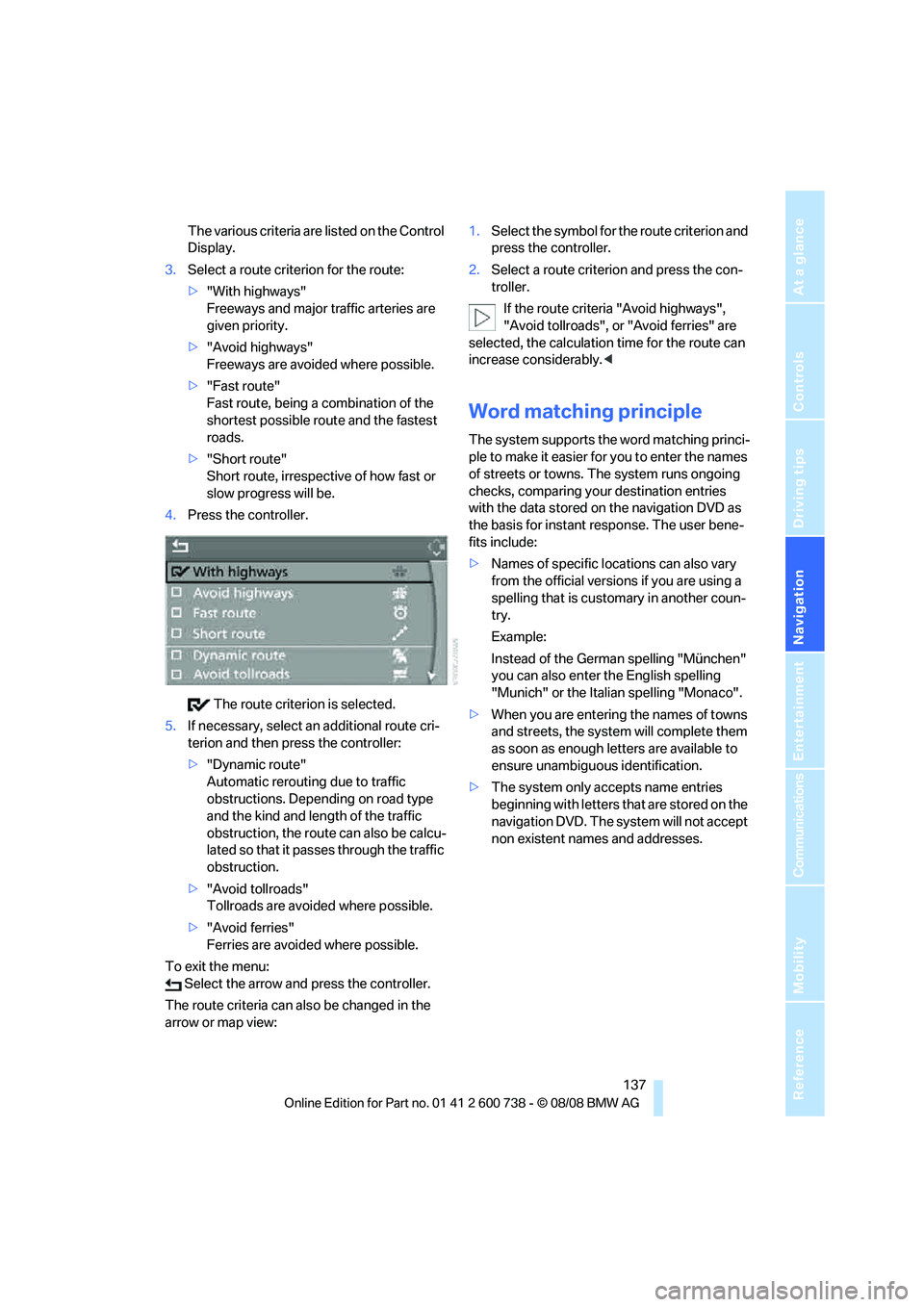
The various criteria are listed on the Control
Display.
3.Select a route criterion for the route:
>"With highways"
Freeways and major traffic arteries are
given priority.
>"Avoid highways"
Freeways are avoided where possible.
>"Fast route"
Fast route, being a combination of the
shortest possible route and the fastest
roads.
>"Short route"
Short route, irrespective of how fast or
slow progress will be.
4.Press the controller.
The route criterion is selected.
5.If necessary, select an additional route cri-
terion and then press the controller:
>"Dynamic route"
Automatic rerouting due to traffic
obstructions. Depending on road type
and the kind and length of the traffic
obstruction, the route can also be calcu-
lated so that it passes through the traffic
obstruction.
>"Avoid tollroads"
Tollroads are avoided where possible.
>"Avoid ferries"
Ferries are avoided where possible.
To exit the menu:
Select the arrow and press the controller.
The route criteria can also be changed in the
arrow or map view:1.Select the symbol for the route criterion and
press the controller.
2.Select a route criterion and press the con-
troller.
If the route criteria "Avoid highways",
"Avoid tollroads", or "Avoid ferries" are
selected, the calculation time for the route can
increase considerably.<
Word matching principle
The system supports the word matching princi-
ple to make it easier for you to enter the names
of streets or towns. The system runs ongoing
checks, comparing your destination entries
with the data stored on the navigation DVD as
the basis for instant response. The user bene-
fits include:
>Names of specific locations can also vary
from the official versions if you are using a
spelling that is customary in another coun-
try.
Example:
Instead of the German spelling "München"
you can also enter the English spelling
"Munich" or the Italian spelling "Monaco".
>When you are entering the names of towns
and streets, the system will complete them
as soon as enough letters are available to
ensure unambiguous identification.
>The system only accepts name entries
beginning with letters that are stored on the
navigation DVD. The system will not accept
non existent names and addresses.
Page 140 of 266
Destination guidance
138
Destination guidance
Starting destination
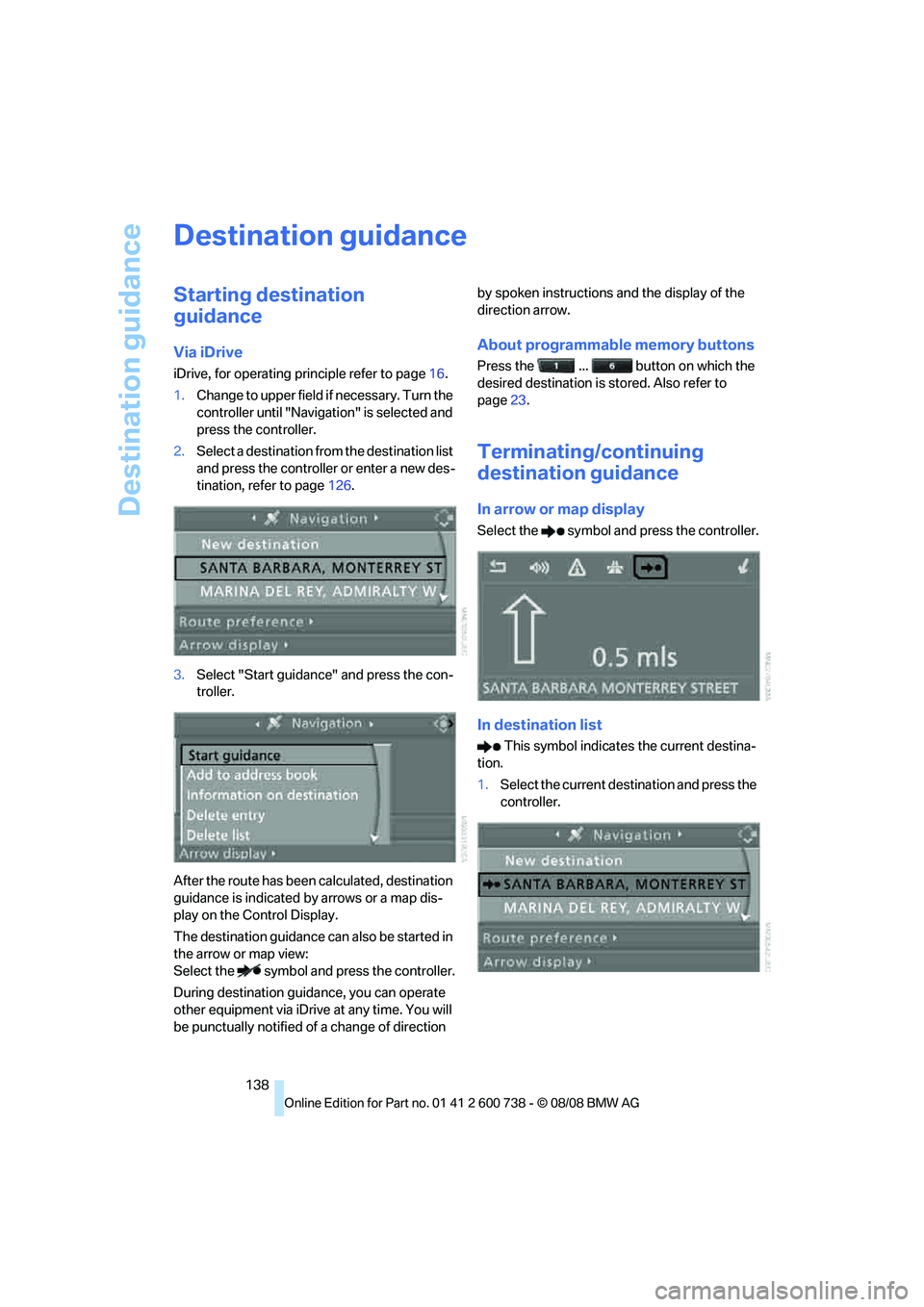
guidance
Via iDrive
iDrive, for operating principle refer to page16.
1.Change to upper field if necessary. Turn the
controller until "Navigation" is selected and
press the controller.
2.Select a destination from the destination list
and press the controller or enter a new des-
tination, refer to page126.
3.Select "Start guidance" and press the con-
troller.
After the route has been calculated, destination
guidance is indicated by arrows or a map dis-
play on the Control Display.
The destination guidance can also be started in
the arrow or map view:
Select the symbol and press the controller.
During destination guidance, you can operate
other equipment via iDrive at any time. You will
be punctually notified of a change of direction by spoken instructions and the display of the
direction arrow.
About programmable memory buttons
Press the ... button on which the
desired destination is stored. Also refer to
page23.
Terminating/continuing
destination guidance
In arrow or map display
Select the symbol and press the controller.
In destination list
This symbol indicates the current destina-
tion.
1.Select the current destination and press the
controller.
Page 141 of 266
Navigation
Driving tips
139Reference
At a glance
Controls
Communications
Entertainment
Mobility
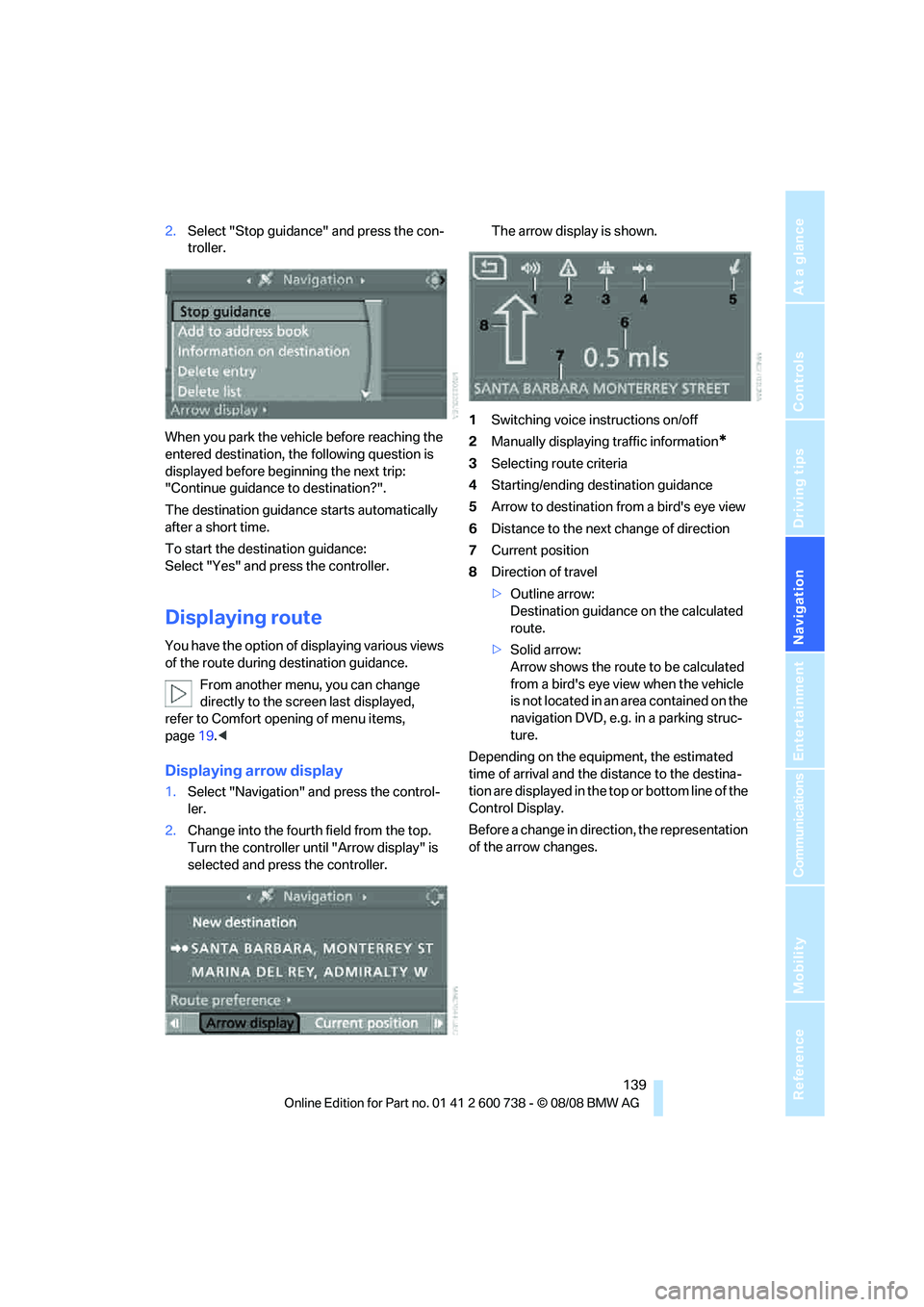
2.Select "Stop guidance" and press the con-
troller.
When you park the vehicle before reaching the
entered destination, the following question is
displayed before beginning the next trip:
"Continue guidance to destination?".
The destination guidance starts automatically
after a short time.
To start the destination guidance:
Select "Yes" and press the controller.
Displaying route
You have the option of displaying various views
of the route during destination guidance.
From another menu, you can change
directly to the screen last displayed,
refer to Comfort opening of menu items,
page19.<
Displaying arrow display
1.Select "Navigation" and press the control-
ler.
2.Change into the fourth field from the top.
Turn the controller until "Arrow display" is
selected and press the controller.The arrow display is shown.
1Switching voice instructions on/off
2Manually displaying traffic information
*
3Selecting route criteria
4Starting/ending destination guidance
5Arrow to destination from a bird's eye view
6Distance to the next change of direction
7Current position
8Direction of travel
>Outline arrow:
Destination guidance on the calculated
route.
>Solid arrow:
Arrow shows the route to be calculated
from a bird's eye view when the vehicle
is not located in an area contained on the
navigation DVD, e.g. in a parking struc-
ture.
Depending on the equipment, the estimated
time of arrival and the distance to the destina-
tion are displayed in the top or bottom line of the
Control Display.
Before a change in direction, the representation
of the arrow changes.
Page 142 of 266
Destination guidance
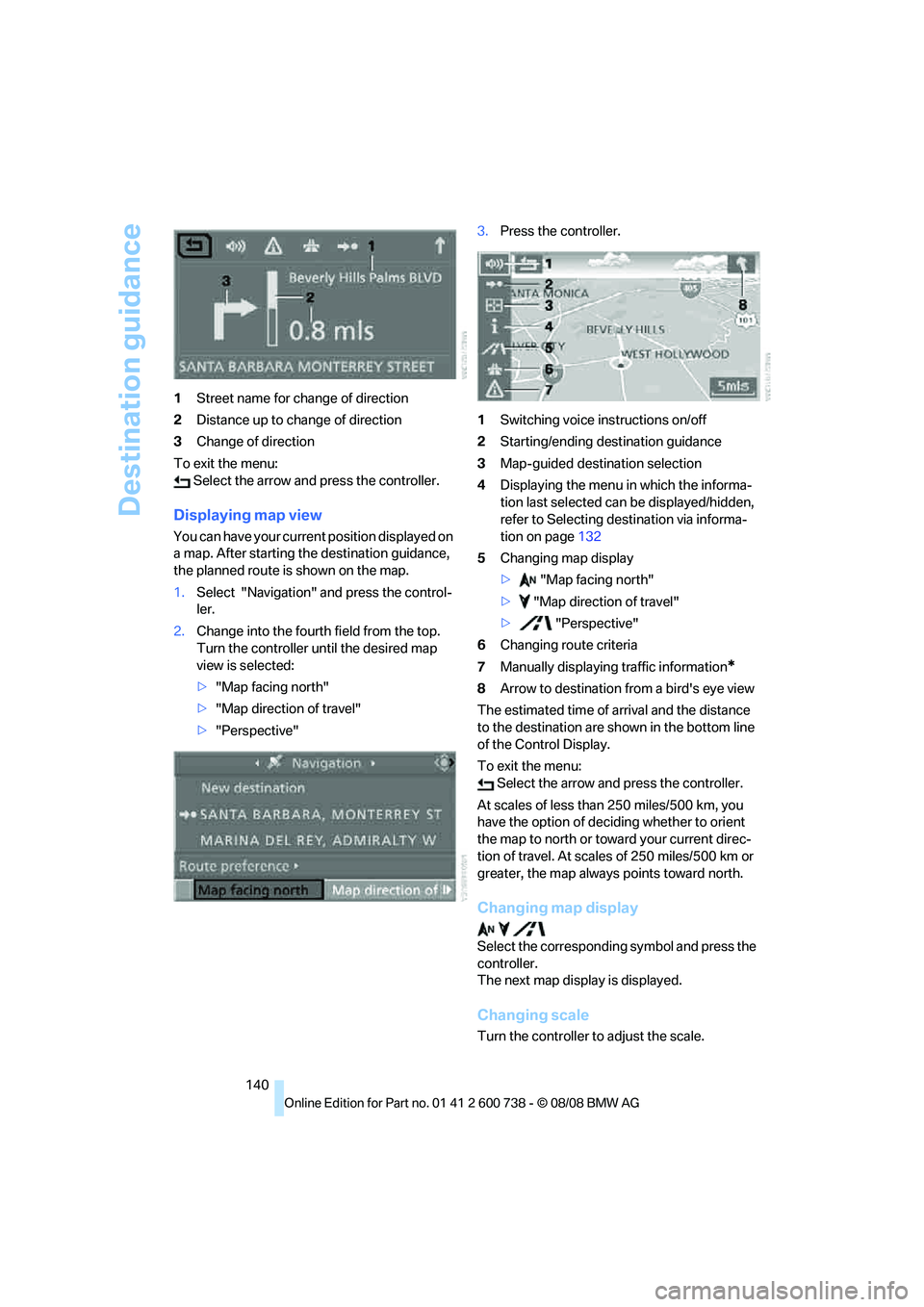
140 1Street name for change of direction
2Distance up to change of direction
3Change of direction
To exit the menu:
Select the arrow and press the controller.
Displaying map view
You can have your current position displayed on
a map. After starting the destination guidance,
the planned route is shown on the map.
1.Select "Navigation" and press the control-
ler.
2.Change into the fourth field from the top.
Turn the controller until the desired map
view is selected:
>"Map facing north"
>"Map direction of travel"
>"Perspective"3.Press the controller.
1Switching voice instructions on/off
2Starting/ending destination guidance
3Map-guided destination selection
4Displaying the menu in which the informa-
tion last selected can be displayed/hidden,
refer to Selecting destination via informa-
tion on page132
5Changing map display
> "Map facing north"
> "Map direction of travel"
> "Perspective"
6Changing route criteria
7Manually displaying traffic information
*
8Arrow to destination from a bird's eye view
The estimated time of arrival and the distance
to the destination are shown in the bottom line
of the Control Display.
To exit the menu:
Select the arrow and press the controller.
At scales of less than 250 miles/500 km, you
have the option of deciding whether to orient
the map to north or toward your current direc-
tion of travel. At scales of 250 miles/500 km or
greater, the map always points toward north.
Changing map display
Select the corresponding symbol and press the
controller.
The next map display is displayed.
Changing scale
Turn the controller to adjust the scale.
Page 143 of 266
Navigation
Driving tips
141Reference
At a glance
Controls
Communications
Entertainment
Mobility
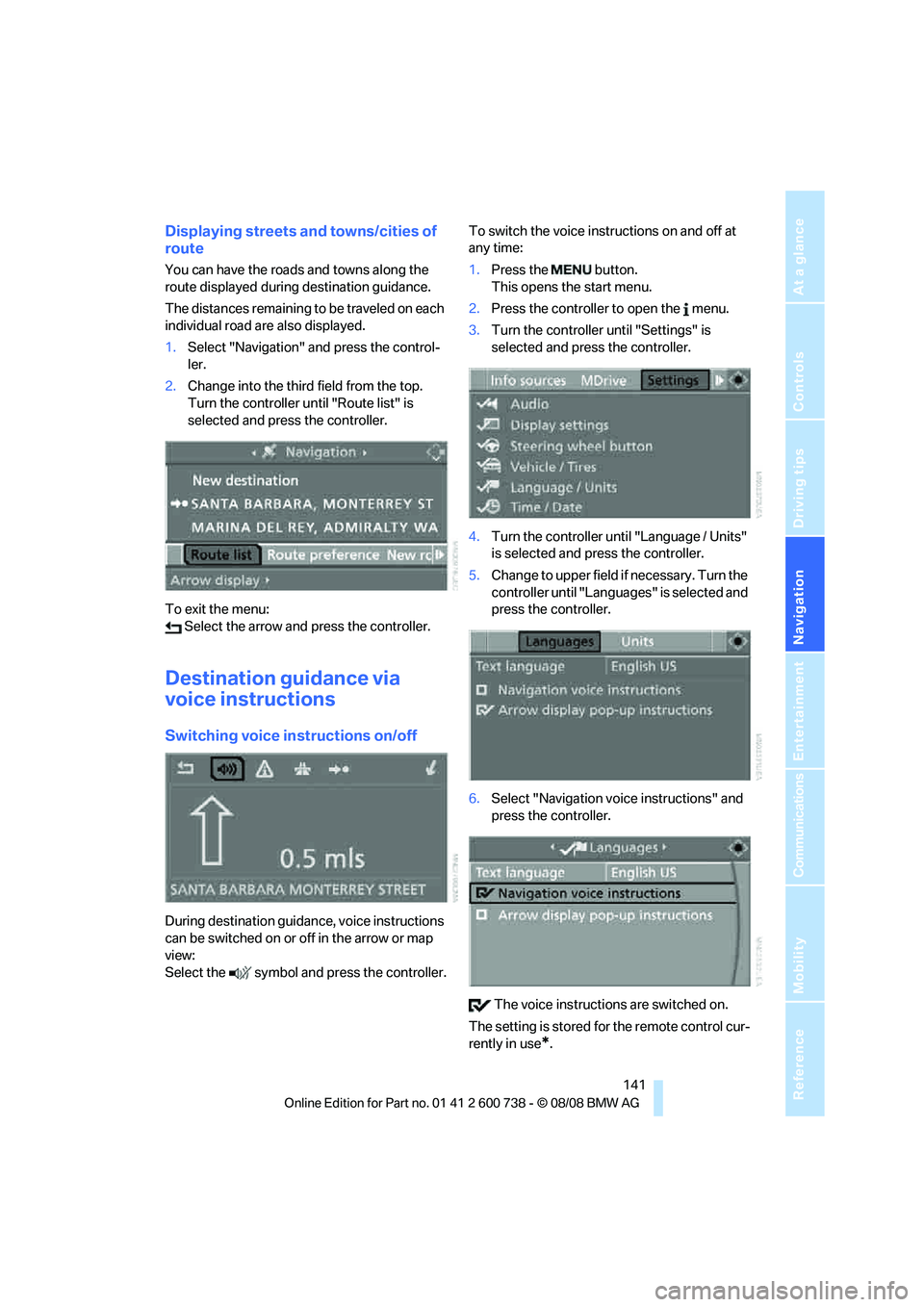
Displaying streets and towns/cities of
route
You can have the roads and towns along the
route displayed during destination guidance.
The distances remaining to be traveled on each
individual road are also displayed.
1.Select "Navigation" and press the control-
ler.
2.Change into the third field from the top.
Turn the controller until "Route list" is
selected and press the controller.
To exit the menu:
Select the arrow and press the controller.
Destination guidance via
voice instructions
Switching voice instructions on/off
During destination guidance, voice instructions
can be switched on or off in the arrow or map
view:
Select the symbol and press the controller.To switch the voice instructions on and off at
any time:
1.Press the button.
This opens the start menu.
2.Press the controller to open the menu.
3.Turn the controller until "Settings" is
selected and press the controller.
4.Turn the controller until "Language / Units"
is selected and press the controller.
5.Change to upper field if necessary. Turn the
controller until "Languages" is selected and
press the controller.
6.Select "Navigation voice instructions" and
press the controller.
The voice instructions are switched on.
The setting is stored for the remote control cur-
rently in use
*.
Page 165 of 266
Navigation
Entertainment
Driving tips
163Reference
At a glance
Controls
Communications
Mobility
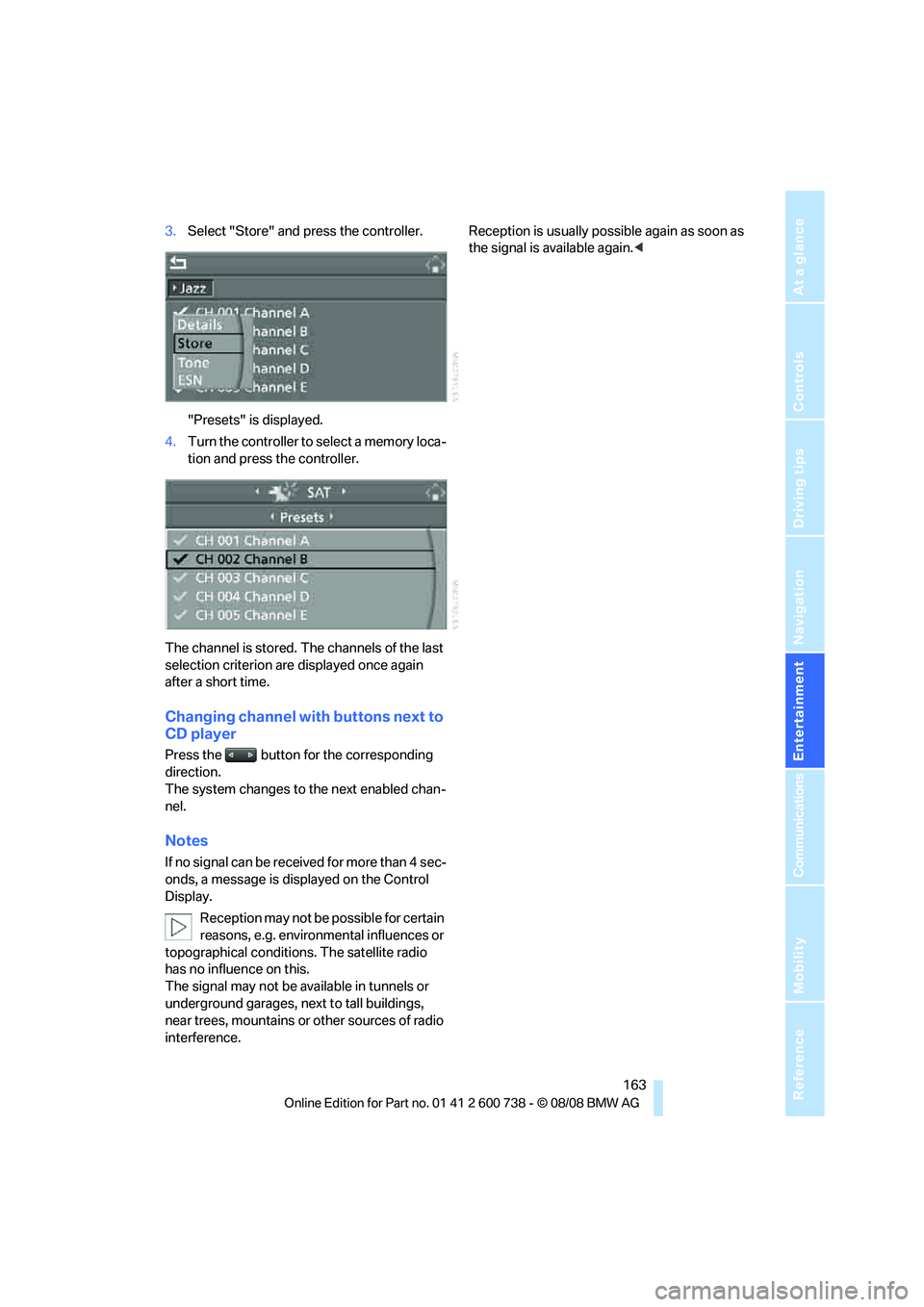
3.Select "Store" and press the controller.
"Presets" is displayed.
4.Turn the controller to select a memory loca-
tion and press the controller.
The channel is stored. The channels of the last
selection criterion are displayed once again
after a short time.
Changing channel with buttons next to
CD player
Press the button for the corresponding
direction.
The system changes to the next enabled chan-
nel.
Notes
If no signal can be received for more than 4 sec-
onds, a message is displayed on the Control
Display.
Reception may not be possible for certain
reasons, e.g. environmental influences or
topographical conditions. The satellite radio
has no influence on this.
The signal may not be available in tunnels or
underground garages, next to tall buildings,
near trees, mountains or other sources of radio
interference.Reception is usually possible again as soon as
the signal is available again.<
Page 249 of 266
Reference 247
At a glance
Controls
Driving tips
Communications
Navigation
Entertainment
Mobility
CD player164
– controls150
– fast forward/reverse168
– random sequence167
– repeating a track167
– sampling a track166
– selecting a track165
– switching on/off150
– tone control151
– volume151
Center armrest
– front107
– rear111
Center brake lamp224
Center console14
Central locking
– from inside34
– from outside32
Central locking system32
– comfort access38
Changes, technical, refer to
For your own safety5
Changes, technical, refer to
Parts and accessories6
Changing language on
Control Display78
Changing scale for
navigation140
Changing units of measure on
Control Display77
Changing wheels207,227
CHECK button73
Check Control72
"Check Control
messages"74
Check Gas Cap202
Checking the air pressure,
refer to Tire inflation
pressure204
Child restraint fixing system
LATCH55
Child restraint systems54
Child-safety lock56
Child seats, refer to
Transporting children
safely54
Chime, refer to Check
Control72
Chock228Chrome-plated parts220
Chrome polish220
Cigarette lighter109
Cigarette lighter socket, refer
to Connecting electrical
devices110
Cleaning your BMW, refer to
Care218
"Climate"49,
99
Clock68
– 12h/24h format76
– hour signal76
– setting time and date76
Closing
– from inside34
– from outside32
Closing fuel filler cap202
Clothes hooks108
Cockpit10
Cold start, refer to Starting
engine58
Comfort access38
– replacing battery, remote
control39
Comfort area, refer to Around
the center console14
"Comfort" with EDC83
"Communication"182,192,1
93,195
Compact Disc
– refer to CD changer164
– refer to CD player164
Compartment for remote
control, refer to Ignition
lock57
Compartments, refer to
Storage compartments108
Compressed audio files164
Computer68
– clock68
– displays on Control
Display69
– hour signal76
"Concert hall", tone
control153
"Concierge"195
Concierge service194
Condensation, refer to When
vehicle is parked117Condition Based Service
CBS216
"Confirmation"33
Confirmation signals for
locking and unlocking33
Connecting car vacuum
cleaner, refer to Connecting
electrical devices110
Consumption, refer to
Average fuel
consumption69
Consumption statistics, refer
to Average fuel
consumption69
"Continue guidance to
destination?"139
Control Center, refer to
iDrive16
Control Display, refer to
iDrive16
– setting brightness77
– switching off/on22
Controller, refer to iDrive16
Controls, refer to Cockpit10
Convenient operation
– glass sunroof33
– windows33
– windows and glass sunroof
with comfort access39
Coolant215
– checking level215
– temperature67
Cooling, maximum101
Cooling fluid, refer to
Coolant215
Cooling function, automatic
climate control101
Cooling system, refer to
Coolant215
Copyright2
Cornering Brake Control
CBC80
Country of destination for
navigation127
Courtesy lamps97
Cradle for telephone or mobile
phone107
Cruise control65
Cruising range69
Page 254 of 266
Everything from A to Z
252 Indicator/warning lamps
– ABS Antilock Brake
System82
– airbags90
– brake system82
– DSC13,81
– Flat Tire Monitor85
– high beams13
– MDrive13,53
– M Dynamic Mode13,81
– parking lamps/low beams13
– safety belt warning48
– TPM Tire Pressure
Monitor86
Indicator and warning
lamps13
Inflation pressure, refer to Tire
inflation pressure204
Inflation pressure monitoring,
refer to Flat Tire Monitor84
Inflation pressure monitoring,
refer to TPM Tire Pressure
Monitor85
Info menu18
Information
– on another location132
– on current position132
– on destination location132
"Information" in
navigation132
Information menu, refer to
imenu18
"Information on
destination"134
"Info sources"71
Initializing
– Flat Tire Monitor84
– radio, refer to Storing
stations156
– refer to Power failure230
– refer to Setting time and
date76
– seat, mirror and steering
wheel memory45
"Input map"131
Installation location
– CD changer168
– drive for navigation DVD124
– mobile phone107Instructions for navigation
system, refer to Voice
instructions141
Instrument cluster12
Instrument illumination, refer
to Instrument lighting97
Instrument lighting97
Instrument panel, refer to
Cockpit10
Instrument panel, refer to
Instrument cluster12
Integrated key30
Integrated universal remote
control105
Interesting destination for
navigation132
"Interim time"75
Interior lamps97
– switching on with remote
control33
Interior motion sensor37
– switching off38
Interior rearview mirror51
– automatic dimming
feature51
Intermittent mode of the
wipers64
J
Jacking points228
Joystick, refer to iDrive16
Jumpering, refer to Jump
starting232
Jump starting232
K
Keyless-Go, refer to Comfort
access38
Keyless opening and closing,
refer to Comfort access38
Key Memory, refer to Personal
Profile31
"Keypad"186Keys30
– key-related settings, refer to
Personal Profile31
– spare key30
Knock control203
L
Lamps
– refer to High-beam
assistant95
– refer to Parking lamps/low
beams93
Lamps and bulbs222
"Language / Units"77,78
"Language / Units" in
navigation125,141
"Languages"78
"Languages" in
navigation125,141
Lashing eyes, refer to
Securing cargo119
Last destinations, refer to
Destination list133
"Last seat pos."46
LATCH child restraint fixing
system55
Leather care220
LEDs light-emitting
diodes222
Length, refer to
Dimensions238
License plate lamp, replacing
bulbs225
Light-emitting diodes
LEDs222
Lighter109
"Lighting"64
Lighting
– instruments97
– lamps and bulbs222
– of the vehicle, refer to
Lamps93
Light switch93
"Limit"74