seat adjustment BMW M5 SEDAN 2007 E60 Owner's Manual
[x] Cancel search | Manufacturer: BMW, Model Year: 2007, Model line: M5 SEDAN, Model: BMW M5 SEDAN 2007 E60Pages: 256, PDF Size: 12.5 MB
Page 44 of 256
Adjusting
42
Seats
Note before adjusting
Never attempt to adjust your seat while
the vehicle is moving. The seat could
respond with unexpected movement, and the
ensuing loss of vehicle control could lead to an
accident.
Also on the passenger side, do not incline the
backrest too far to the rear while the vehicle is
being driven, otherwise there is a danger in the
event of an accident of sliding under the safety
belt, eliminating the protection normally pro-
vided by the belt.<
Please observe the information on damage to
safety belts provided on page46 and the infor-
mation on the active front
head restraints* on
page45.
Adjusting seat
To ensure that the safety systems con-
tinue to provide optimized protection,
please observe the adjustment instructions on
page41.<
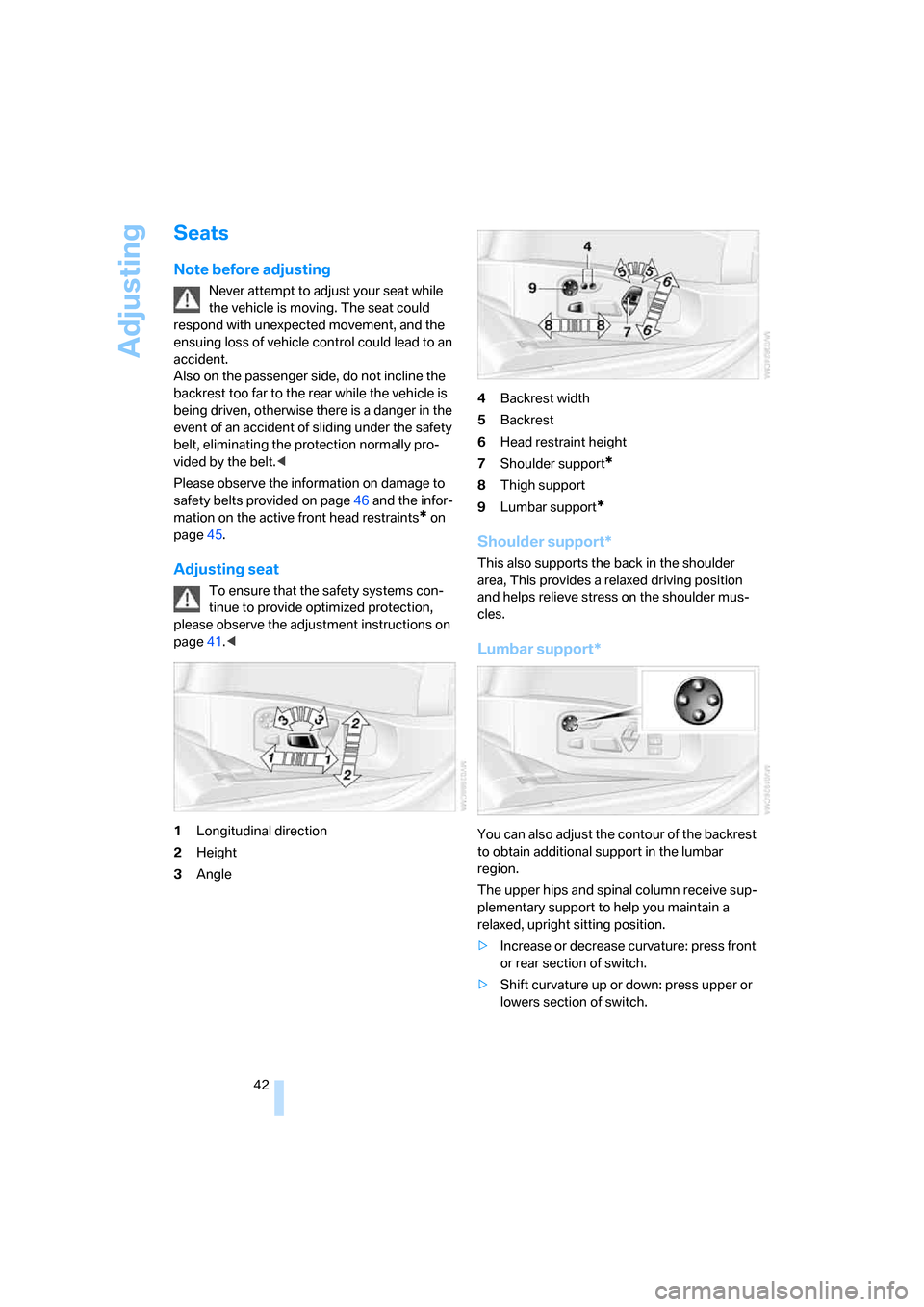
1Longitudinal direction
2Height
3Angle4Backrest width
5Backrest
6Head restraint height
7Shoulder support
*
8Thigh support
9Lumbar support
*
Shoulder support*
This also supports the back in the shoulder
area, This provides a relaxed driving position
and helps relieve stress on the shoulder mus-
cles.
Lumbar support*
You can also adjust the contour of the backrest
to obtain additional support in the lumbar
region.
The upper hips and spinal column receive sup-
plementary support to help you maintain a
relaxed, upright sitting position.
>Increase or decrease curvature: press front
or rear section of switch.
>Shift curvature up or down: press upper or
lowers section of switch.
ba8_m5us.book Seite 42 Montag, 5. Februar 2007 12:03 12
Page 45 of 256
Controls
43Reference
At a glance
Driving tips
Communications
Navigation
Entertainment
Mobility
Adjusting active backrest width*
First set a comfortable backrest width, see
above. Based on the backrest width set, the lat-
eral support is automatically adapted to the cur-
rent driving situation.
The adaptation of the backrest width and the
speed of the adjustment vary depending on the
program. You can select from among three pro-
grams from comfort to sport. The "Sport" pro-
gram provides increased lateral support on both
sides when driving through a quick succession
of curves.
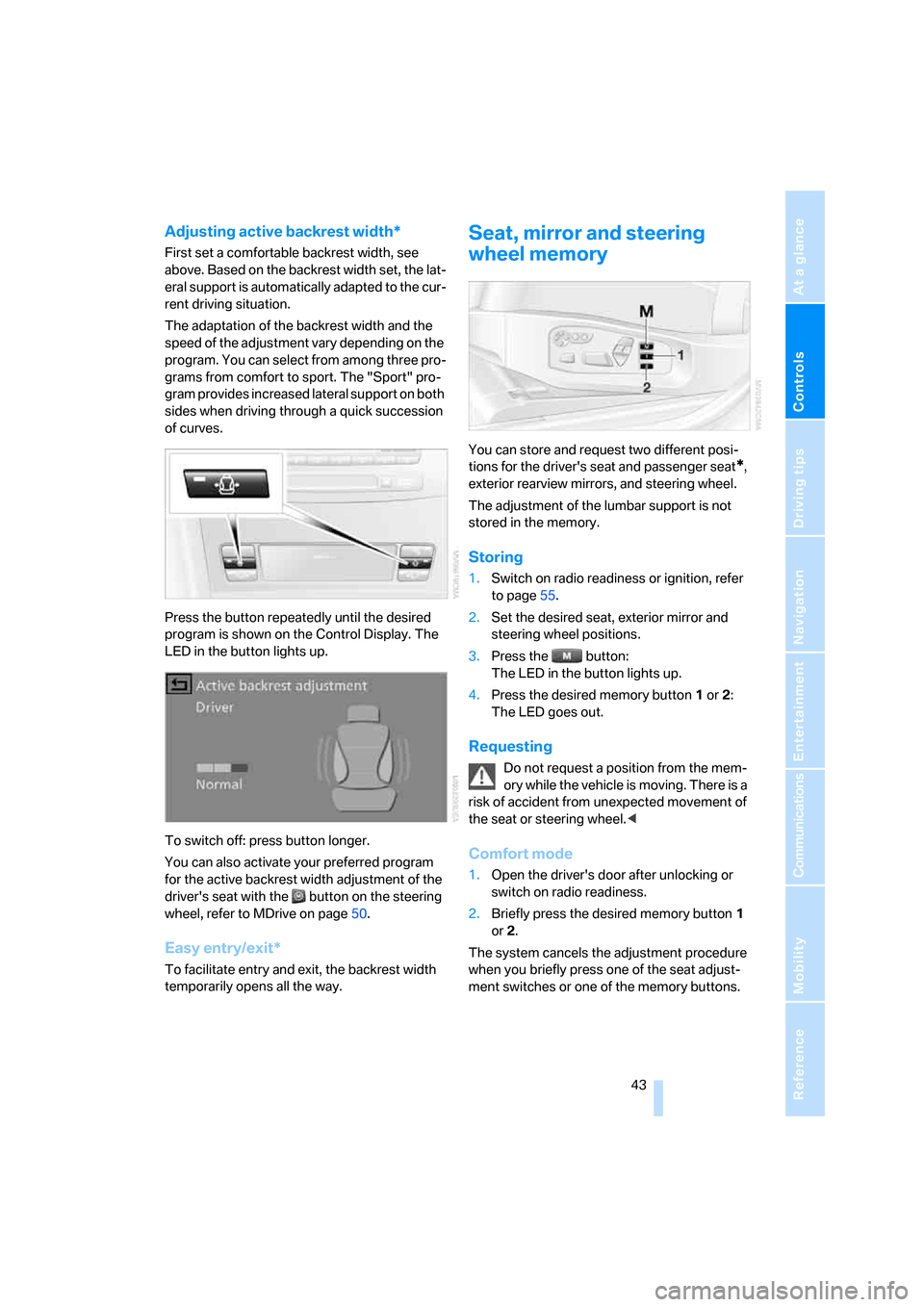
Press the button repeatedly until the desired
program is shown on the Control Display. The
LED in the button lights up.
To switch off: press button longer.
You can also activate your preferred program
for the active backrest width adjustment of the
driver's seat with the button on the steering
wheel, refer to MDrive on page50.
Easy entry/exit*
To facilitate entry and exit, the backrest width
temporarily opens all the way.
Seat, mirror and steering
wheel memory
You can store and request two different posi-
tions for the driver's seat and passenger seat
*,
exterior rearview mirrors, and steering wheel.
The adjustment of the lumbar support is not
stored in the memory.
Storing
1.Switch on radio readiness or ignition, refer
to page55.
2.Set the desired seat, exterior mirror and
steering wheel positions.
3.Press the button:
The LED in the button lights up.
4.Press the desired memory button1 or2:
The LED goes out.
Requesting
Do not request a position from the mem-
ory while the vehicle is moving. There is a
risk of accident from unexpected movement of
the seat or steering wheel.<
Comfort mode
1.Open the driver's door after unlocking or
switch on radio readiness.
2.Briefly press the desired memory button1
or2.
The system cancels the adjustment procedure
when you briefly press one of the seat adjust-
ment switches or one of the memory buttons.
ba8_m5us.book Seite 43 Montag, 5. Februar 2007 12:03 12
Page 46 of 256
Adjusting
44
Safety feature
1.Close the driver's door and switch the igni-
tion on or off.
2.Press the desired memory button1 or2
and maintain pressure until the adjustment
process has been completed.
If the button was pressed inadvertently:
press the button again; the LED goes out.
Requesting with remote control
The last positions of the driver's seat, the exte-
rior rearview mirrors, and steering wheel are
stored for the remote control currently in use.
You can choose when the position is requested:
>Request when unlocking vehicle
>Request when opening driver's door
When using this feature, always make
sure that the footwell behind the driver's
seat is empty and unobstructed. Failure to do
so could cause injury to persons or damage to
objects behind the seat as a result of a rearward
movement of the seat.<
The system cancels the adjustment procedure
when you briefly press one of the seat adjust-
ment switches or one of the memory buttons.
iDrive, for explanation of principle, refer to
page16.
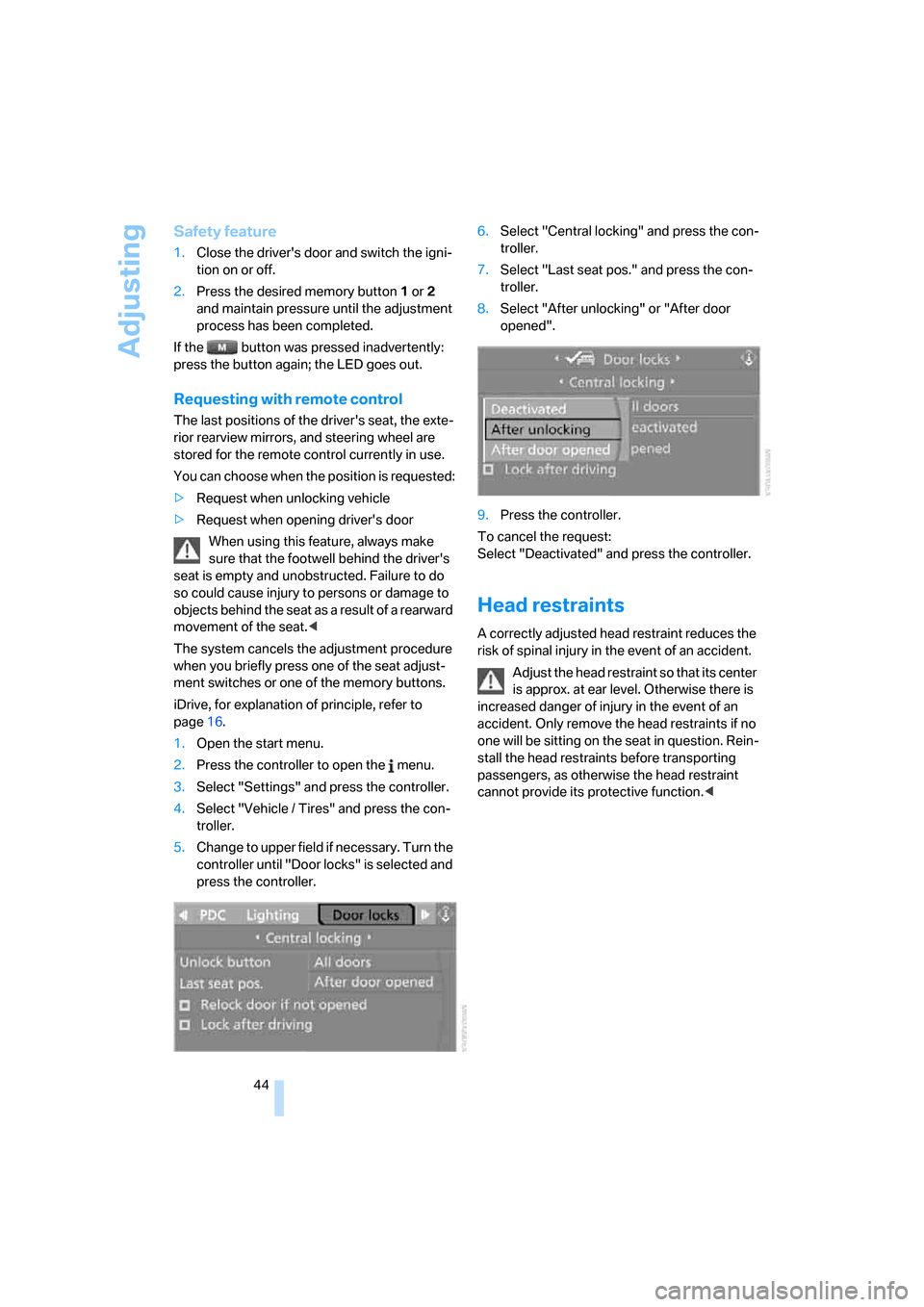
1.Open the start menu.
2.Press the controller to open the menu.
3.Select "Settings" and press the controller.
4.Select "Vehicle / Tires" and press the con-
troller.
5.Change to upper field if necessary. Turn the
controller until "Door locks" is selected and
press the controller.6.Select "Central locking" and press the con-
troller.
7.Select "Last seat pos." and press the con-
troller.
8.Select "After unlocking" or "After door
opened".
9.Press the controller.
To cancel the request:
Select "Deactivated" and press the controller.
Head restraints
A correctly adjusted head restraint reduces the
risk of spinal injury in the event of an accident.
Adjust the head restraint so that its center
is approx. at ear level. Otherwise there is
increased danger of injury in the event of an
accident. Only remove the head restraints if no
one will be sitting on the seat in question. Rein-
stall the head restraints before transporting
passengers, as otherwise the head restraint
cannot provide its protective function.<
ba8_m5us.book Seite 44 Montag, 5. Februar 2007 12:03 12
Page 47 of 256
Controls
45Reference
At a glance
Driving tips
Communications
Navigation
Entertainment
Mobility
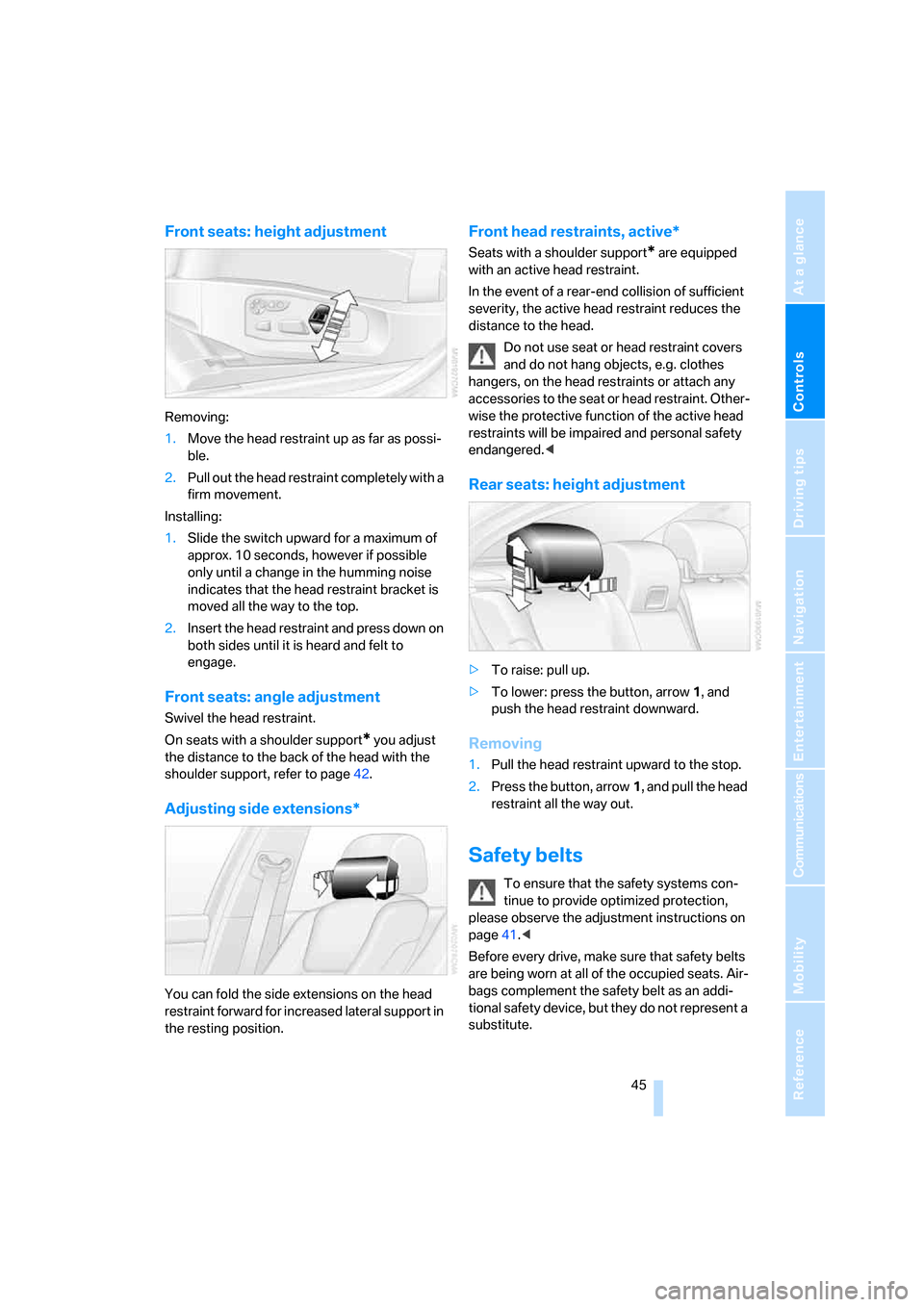
Front seats: height adjustment
Removing:
1.Move the head restraint up as far as possi-
ble.
2.Pull out the head restraint completely with a
firm movement.
Installing:
1.Slide the switch upward for a maximum of
approx. 10 seconds, however if possible
only until a change in the humming noise
indicates that the head restraint bracket is
moved all the way to the top.
2.Insert the head restraint and press down on
both sides until it is heard and felt to
engage.
Front seats: angle adjustment
Swivel the head restraint.
On seats with a shoulder support
* you adjust
the distance to the back of the head with the
shoulder support, refer to page42.
Adjusting side extensions*
You can fold the side extensions on the head
restraint forward for increased lateral support in
the resting position.
Front head restraints, active*
Seats with a shoulder support* are equipped
with an active head restraint.
In the event of a rear-end collision of sufficient
severity, the active head restraint reduces the
distance to the head.
Do not use seat or head restraint covers
and do not hang objects, e.g. clothes
hangers, on the head restraints or attach any
accessories to the seat or head restraint. Other-
wise the protective function of the active head
restraints will be impaired and personal safety
endangered.<
Rear seats: height adjustment
>To raise: pull up.
>To lower: press the button, arrow1, and
push the head restraint downward.
Removing
1.Pull the head restraint upward to the stop.
2.Press the button, arrow1, and pull the head
restraint all the way out.
Safety belts
To ensure that the safety systems con-
tinue to provide optimized protection,
please observe the adjustment instructions on
page41.<
Before every drive, make sure that safety belts
are being worn at all of the occupied seats. Air-
bags complement the safety belt as an addi-
tional safety device, but they do not represent a
substitute.
ba8_m5us.book Seite 45 Montag, 5. Februar 2007 12:03 12
Page 54 of 256
Transporting children safely
52
Transporting children safely
The right place for children
Do not leave children unattended in the
vehicle, otherwise they could endanger
themselves and other persons, e.g. by opening
the doors.<
Children always in the rear
Accident research shows that the safest place
for children is on the rear seat.
Children younger than 13 years of age or
with a height under 5 ft/150 cm may only
be transported in the rear in child restraint sys-
tems which correspond to the age, weight and
height of the child. Otherwise there is an
increased danger of injury in an accident.<
Children 13 years of age or older must wear a
safety belt as soon as a suitable child restraint
system can no longer be used due to their age,
size and weight.
Exception for front passenger seat
Should it be necessary to use a child
restraint system on the front passenger
seat, the front and side airbags on the passen-
ger side must be deactivated. Otherwise, there
is an increased risk of injury for the child if the
airbags are triggered, even with a child restraint
system.<
For more information on automatic deactivation
of the front passenger airbags, refer to page86.
Installing child restraint
systems
Observe the child restraint system manu-
facturer's instructions for selection,
installation and use of the child restraint sys-
tems. Otherwise the degree of protection may
be reduced.<
On front passenger seat
After mounting a child restraint system on
the front passenger seat, make sure that
the front and side airbags on the front passen-
ger side are deactivated, as otherwise there is
an increased risk of injury if the airbags are trig-
gered.<
Backrest width
Before mounting a child restraint system
on the front passenger seat, the backrest
width adjustment must be open completely.
After mounting the child's seat, no memory
position may be called up and the active back-
rest width adjustment must be deactivated,
otherwise the stability of the child's seat on the
front passenger seat is limited.<
1.After unlocking the vehicle, sit on the front
passenger seat and close the door to call up
the memory position.
2.Completely open the backrest width adjust-
ment, refer to page42.
3.Deactivate active backrest width adjust-
ment, refer to page43.
4.Install child's seat.
ba8_m5us.book Seite 52 Montag, 5. Februar 2007 12:03 12
Page 88 of 256
Technology for comfort, convenience and safety
86
Airbags
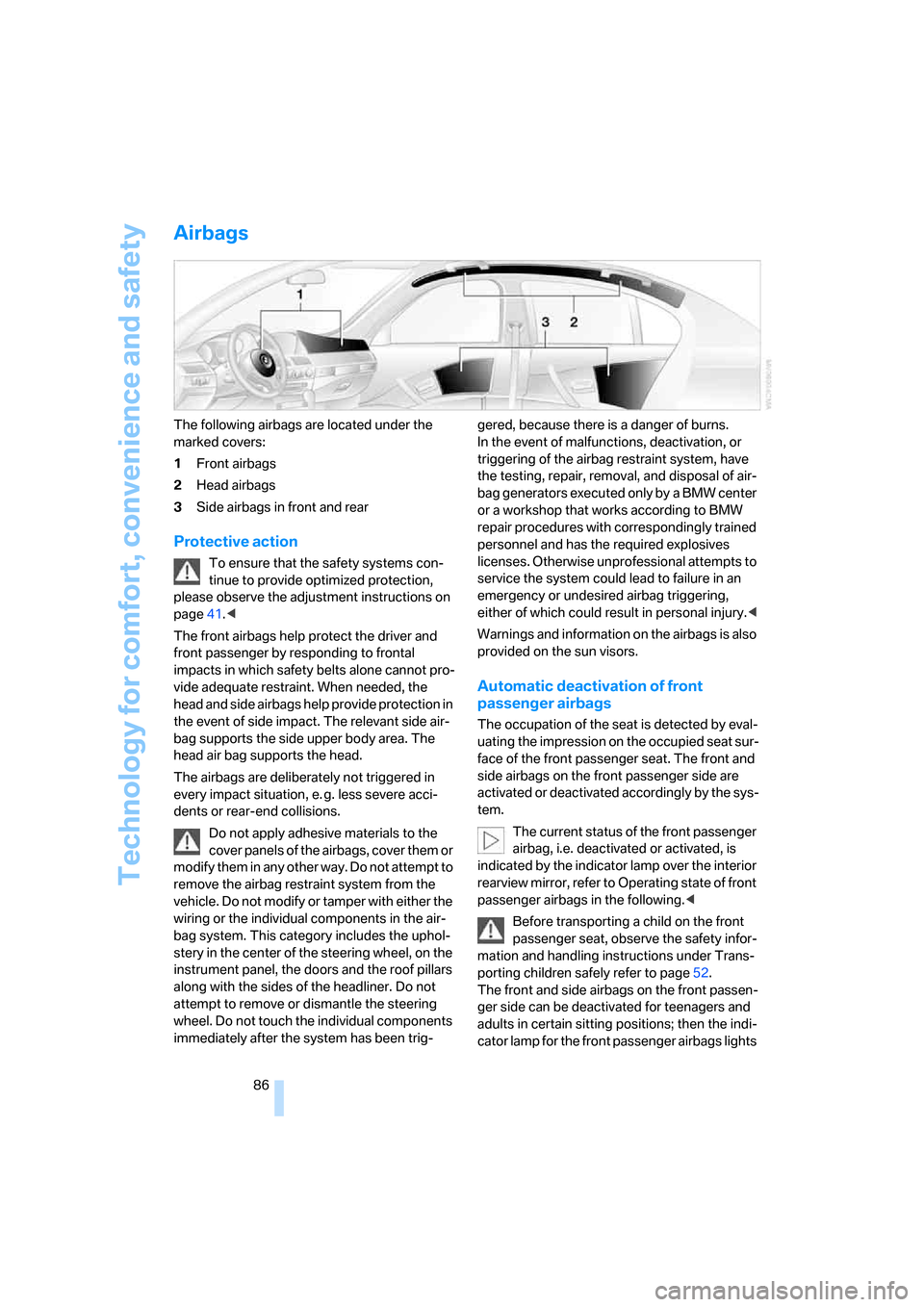
The following airbags are located under the
marked covers:
1Front airbags
2Head airbags
3Side airbags in front and rear
Protective action
To ensure that the safety systems con-
tinue to provide optimized protection,
please observe the adjustment instructions on
page41.<
The front airbags help protect the driver and
front passenger by responding to frontal
impacts in which safety belts alone cannot pro-
vide adequate restraint. When needed, the
head and side airbags help provide protection in
the event of side impact. The relevant side air-
bag supports the side upper body area. The
head air bag supports the head.
The airbags are deliberately not triggered in
every impact situation, e. g. less severe acci-
dents or rear-end collisions.
Do not apply adhesive materials to the
cover panels of the airbags, cover them or
modify them in any other way. Do not attempt to
remove the airbag restraint system from the
vehicle. Do not modify or tamper with either the
wiring or the individual components in the air-
bag system. This category includes the uphol-
stery in the center of the steering wheel, on the
instrument panel, the doors and the roof pillars
along with the sides of the headliner. Do not
attempt to remove or dismantle the steering
wheel. Do not touch the individual components
immediately after the system has been trig-gered, because there is a danger of burns.
In the event of malfunctions, deactivation, or
triggering of the airbag restraint system, have
the testing, repair, removal, and disposal of air-
bag generators executed only by a BMW center
or a workshop that works according to BMW
repair procedures with correspondingly trained
personnel and has the required explosives
licenses. Otherwise unprofessional attempts to
service the system could lead to failure in an
emergency or undesired airbag triggering,
either of which could result in personal injury.<
Warnings and information on the airbags is also
provided on the sun visors.
Automatic deactivation of front
passenger airbags
The occupation of the seat is detected by eval-
uating the impression on the occupied seat sur-
face of the front passenger seat. The front and
side airbags on the front passenger side are
activated or deactivated accordingly by the sys-
tem.
The current status of the front passenger
airbag, i.e. deactivated or activated, is
indicated by the indicator lamp over the interior
rearview mirror, refer to Operating state of front
passenger airbags in the following.<
Before transporting a child on the front
passenger seat, observe the safety infor-
mation and handling instructions under Trans-
porting children safely refer to page52.
The front and side airbags on the front passen-
ger side can be deactivated for teenagers and
adults in certain sitting positions; then the indi-
cator lamp for the front passenger airbags lights
ba8_m5us.book Seite 86 Montag, 5. Februar 2007 12:03 12
Page 236 of 256
Everything from A to Z
234
Everything from A to Z
Index
"..." Identifies Control Display
texts used to select
individual functions, and
indicates where to find them
in the text.
A
ABS Antilock Brake
System78
– indicator/warning lamp80
Accepted calls180
Accessories6
Accident, refer to Emergency
call219
Acoustic signal, refer to Check
Control70
Activated-charcoal filter for
automatic climate control99
"Activation time" for parked-
car ventilation100
Active seat ventilation47
Adapter for spare key28
Adaptive brake lamps, refer to
Brake force display85
Adaptive Head Light93
"Add digits" for mobile
phone180
Additives
– coolant206
– engine oil, refer to Approved
engine oils206
"Address book" for navigation
system130
Address for navigation
– deleting131
– entering122,125
– selecting130
– storing130
– storing current position130
"Add to address book"129"Add to destination
list"125,127
Adjusting active backrest
width43
Adjusting interior
temperature96
Adjusting the tone during
audio operation, refer to
Tone control147
Adjusting thigh support42
Adjustment in audio mode
– front/rear balance148
– right/left balance148
"After door opened"44
"After unlocking"44
Airbags86
– indicator/warning lamp87
– indicator lamp for front
passenger airbags87
– sitting safely41
Air distribution
– automatic96
– manual97
Airing, refer to Ventilation99
Air recirculation
– AUC Automatic
recirculated-air control
98
– recirculated-air mode98
"Air recirculation on / off"50
Air supply, automatic climate
control95
Air volume97
AKI, refer to Fuel quality197
Alarm system35
– avoiding unintentional
alarms35
– interior motion sensor35
– switching off alarm35
– switching off tilt alarm
sensor and interior motion
sensor36
– tilt alarm sensor35"All channels"157
"All doors"31
All-season tires, refer to
Winter tires202
"All stations", calling up with
radio150,154
Alterations, technical, refer to
For your own safety5
Altering stretch of road138
"AM", reception
range146,150
Antenna, refer to Caring for
your vehicle brochure
Antenna for mobile phone172
Antifreeze
– coolant206
– washer fluid63
Antilock Brake System
ABS78
– indicator/warning lamp80
Anti-theft alarm system, refer
to Alarm system35
Anti-theft system, refer to
Central locking system30
Approved axle loads, refer to
Weights228
Approved engine oils206
Approved gross vehicle
weight, refer to Weights228
Armrest, refer to Center
armrest, rear107
Around the center console14
Around the steering wheel10
Arrival time
– refer to Computer67
– refer to Starting destination
guidance134
"Arrow display" for navigation
system135
Artificial leather, refer to
Caring for your vehicle
brochure
ba8_m5us.book Seite 234 Montag, 5. Februar 2007 12:03 12
Page 237 of 256
Reference 235
At a glance
Controls
Driving tips
Communications
Navigation
Entertainment
Mobility
Ashtray
– front106
– rear106
Assist, refer to
BMW Assist187
Assistance systems, refer to
Driving stability control
systems78
Assistance window20
"Assist. window off"21
AUC Automatic recirculated-
air control98
"Audio"147,149,154
Audio146
– controls146
– switching on/off146
– tone control147
– volume147
Audio device, external105
Automatic
– air distribution96
– air volume96
– headlamp control91
– service notification189
– steering wheel
adjustment43
– storing stations152
Automatic car washes114
– also refer to Caring for your
vehicle brochure
Automatic climate control95
– automatic air distribution96
– parked car ventilation99
– switching on and off99
– ventilation in rear99
Automatic closing of doors,
refer to Automatic soft
closing33
Automatic curb monitor48
Automatic lighting
– refer to Automatic headlamp
control91
– refer to Daytime running
lamps92
– refer to Interior lamps94
– refer to Pathway lighting92
– refer to Welcome lamps91"Automatic programs"96
Automatic soft closing33
Automatic station search151
"Automatic ventilation"100
AUTO program for automatic
climate control96
"Autostore" on the
radio150,152
"AUX"146
,165,167
AUX-In connection105,165
Average fuel consumption67
– setting units75
Average speed, refer to
Computer66
"Avoid ferries" for navigation
system133
"Avoid highways" for
navigation system132
Avoiding freeways for
navigation132
Avoiding unintentional
alarms35
"Avoid tollroads" for
navigation system133
Axle loads, refer to
Weights228
"A - Z"180
B
"Backrest:"51
Backrest contour, refer to
Lumbar support42
Backrests, refer to Seats42
Backrest width42
Back seats, refer to Rear seats
Backup lamps, replacing
bulbs212
"Balance", refer to Tone
control148
Band-aids, refer to First-aid
kit220
Bass, refer to Tone
control147
"Bass", tone control148
Battery, refer to Vehicle
battery218
– jump starting220Battery replacement, remote
control for comfort
access37
BC button, refer to
Computer66
Being towed222
Belts, refer to Safety belts45
Beverage holder, refer to Cup
holders105
Blind, refer to Sun blinds103
Blower, refer to Air volume97
"Bluetooth"174
"BMW Assist"188
BMW Assist187
– activating192
– breakdown assistance188
– contacting BMW Customer
Relations190
– displaying vehicle data193
– information service190
– services offered187
– TeleService189
– updating191
"BMW Contact"182
"BMW Contact
Numbers"182
BMW homepage4
BMW maintenance
system208
"BMW Service settings"191
BMW website4
Bottle holder, refer to Cup
holders105
Bracket for telephone or
mobile phone, refer to Snap-
in adapter185
Brake assistant79
Brake force display85
Brake lamps
– replacing bulbs212
– two-stage85
Brake rotors
– breaking-in112
– refer to Braking safely113
ba8_m5us.book Seite 235 Montag, 5. Februar 2007 12:03 12
Page 242 of 256
Everything from A to Z
240 ESP Electronic Stability
Program, refer to DSC
Dynamic Stability
Control79
Event Data Recorders209
Exhaust system, refer to Hot
exhaust system112
Exterior mirrors48
– adjusting48
– automatic dimming
feature49
– automatic heating48
– folding in and out48
– tilting down passenger-side
exterior mirror48
External audio device105
Eye for tow-starting and
towing, refer to Tow
fitting221
F
"Fader", refer to Tone
control148
Fader, refer to Tone
control148
Failure messages, refer to
Check Control70
False alarm
– refer to Avoiding
unintentional alarms35
– refer to Switching off
alarm35
Fastening safety belts, refer to
Safety belts45
– warning lamp46
Fastest route for
navigation132
"Fast route" for
navigation132
"Favorites", calling up with
radio154
Filler neck for washer fluid63
Filling bottle, refer to
M Mobility System213
Filling sealant into wheel214
Filter, refer to Microfilter/
activated-charcoal filter99Fine wood, refer to Caring for
your vehicle brochure
First aid, refer to First-aid
kit220
First-aid kit220
Flashing
– during locking/unlocking,
refer to Setting confirmation
signals31
– triple turn signal
activation62
Flashlight, refer to
Rechargeable flashlight104
Flat tire
– changing wheels215
– Flat Tire Monitor81,83
– M Mobility System83,213
– refer to Tire condition200
– spare wheel216
– TPM Tire Pressure
Monitor83
– warning lamp83,84
Flat Tire Monitor81
– false alarms82
– initializing system82
– snow chains202
– system limits82
– warning lamp83
Floor mat, refer to Caring for
your vehicle brochure
Floor mats/carpets, refer to
Caring for your vehicle
brochure
Fluid reservoir, refer to Filler
neck for washer fluid63
"FM", reception
range146,150
FM, waveband150
Folding rear backrest108
Fold-over rear backrest108
Footbrake, refer to Braking
safely113
Footwell lamps, refer to
Interior lamps94
Forward, fast
– CD changer163
– CD player163
For your own safety5Freeway, refer to Route
criteria132
Front airbags86
Front armrest, refer to Center
armrest, front104
Front passenger airbags
– deactivating86
– deactivating, refer to
Exception for front
passenger seat52
Front seat adjustment42
"FTM"82
FTM, refer to Flat Tire
Monitor81
Fuel197
– average consumption67
– display66
– high-quality brands197
– quality197
– specifications197
– tank contents, refer to
Capacities228
Fuel clock, refer to Fuel
gauge66
Fuel consumption display,
refer to Computer, average
fuel consumption67
Fuel display, refer to Fuel
gauge66
Fuel filler door196
– releasing in the event of
electrical malfunction196
Full mobile phone preparation
package172
Full screen display, refer to
Switching assistance
window off21
Fuses218
G
Garage door opener, refer to
Integrated universal remote
control102
Gasoline, refer to Required
fuel197
Gasoline display, refer to Fuel
gauge66
Gear changes60
ba8_m5us.book Seite 240 Montag, 5. Februar 2007 12:03 12
Page 243 of 256
Reference 241
At a glance
Controls
Driving tips
Communications
Navigation
Entertainment
Mobility
Gear display, refer to Displays
in instrument cluster60
Gearshift lever59
– manual transmission57
Gearshift lever positions,
manual transmission57
General driving notes112
Glass sunroof, electric38
– comfort operation from
outside32
– comfort operation with
comfort access36
– moving manually39
– remote control31
Glove compartment103
– lighting103
– rechargeable flashlight104
GPS navigation, refer to
Navigation system120
Grills, refer to Ventilation99
Gross vehicle weight, refer to
Weights228
Ground clearance114
H
Handbrake57
– indicator lamp13,57
Hand lamp, refer to
Rechargeable flashlight104
Hands-free system, refer to
Microphone14
Hazard warning flashers15
"HD radio"154
HD radio, refer to High
Definition Radio154
Head airbags86
Headlamp control,
automatic91
Headlamp flasher61
Headlamps91
– care, refer to Caring for your
vehicle brochure
– cleaning, refer to Wiper
system62
– cleaning tank, refer to
Capacities228
– filler neck for washer
fluid204Head Light, refer to Adaptive
Head Light93
Head restraints44
– installing45
– removing45
– sitting safely41
"Head-Up Display"51,88
Head-Up Display88
– default view88
– M view88
– shift lights61
Heated
– mirrors48
– rear window97
– seats46
– steering wheel49
Heating95
– exterior mirrors48
– interior95
– rear window97
– residual heat98
– seats46
– steering wheel49
Heating with engine switched
off, refer to Residual heat98
Heavy cargo, refer to Securing
cargo116
Height, refer to
Dimensions227
Height adjustment
– seats42
– steering wheel49
High beams93
– headlamp flasher93
– indicator lamp13
High Definition Radio154
High water, refer to Driving
through water113
Hills114
Holder for cups105
"Home address" for
navigation system132
Homepage of BMW4
Hood203
Horn10
Hot exhaust system112
"Hour memo"74
"House number" for
destination entry125Hydraulic brake assistant,
refer to Brake assistant79
Hydroplaning113
I
IBOC, refer to High Definition
Radio154
Ice, refer to Outside
temperature warning66
ID3 tag, refer to Information on
track161
Identification mark
– recommended tire
brands202
– tire coding199
Idle59
iDrive16
– assistance window20
– automatic climate control
with expanded scope96
– changing date and time74
– changing language76
– changing menu page19
– changing settings73
– changing units of measure
and display type75
– confirming selection or
entry19
– controller16
– controls16
– displays, menus17
– operating principle17
– selecting menu item19
– setting brightness75
– start menu17
– status information20
– symbols18
Ignition55
– switched off56
– switched on55
Ignition key, refer to Keys/
remote control28
Ignition key position 1, refer to
Radio readiness55
Ignition key position 2, refer to
Ignition on55
ba8_m5us.book Seite 241 Montag, 5. Februar 2007 12:03 12