high beam BMW M6 2008 E63 User Guide
[x] Cancel search | Manufacturer: BMW, Model Year: 2008, Model line: M6, Model: BMW M6 2008 E63Pages: 262, PDF Size: 8.86 MB
Page 101 of 262
Controls
99Reference
At a glance
Driving tips
Communications
Navigation
Entertainment
Mobility
Manually switching between high
beams and low beams
If you wish or the situation requires, you can
intervene at any time.
>If the high-beam assistant has switched on
the high beams, but you wish to use the low
beams, just switch on the low beams with
the turn signal lever. This deactivates the
high-beam assistant.
In order to reactivate the system, briefly
press the turn signal lever in the high-beam
direction.
>If the high-beam assistant has switched on
the low beams, but you wish to use the high
beams, simply switch on the high beams as
usual. This deactivates the system and it is
up to you to switch back to low beams.
In order to reactivate the system, briefly
press the turn signal lever in the high-beam
direction.
>When the low beams are on, use the head-
lamp flasher as usual.
System limits
The high-beam assistant is designed to
maximize the amount of time that high
beams can be safely used and to quickly switch
back to low beams when traffic approaches.
The system cannot completely replace driver
intervention when unusual conditions are
encountered. For this reason, switch to low
beams when circumstances so dictate. Failure
to do so can pose a safety risk.<
Below are a few examples of situations in which
the system may not react or may only function
to a limited degree, requiring personal interven-
tion:
>in extremely unfavorable weather condi-
tions such as fog or heavy precipitation
>in sensing road users with poor inherent
illumination such as pedestrians, cyclists,
equestrians, horsedrawn vehicles, railroad
or shipping traffic close to the road, and at
deer crossings>in tight curves, on steep crests or dips, with
cross-traffic, or with partially hidden
oncoming traffic on divided highways
>in poorly illuminated areas and in the pres-
ence of highly reflective signs
>in the low speed range
>when the windshield is fogged up, dirty or
covered with stickers, decals etc. in the area
of the inside rearview mirror
>when the sensor is dirty. Clean the sensor
on the front side of the inside rearview mir-
ror with a cloth slightly moistened with glass
cleaner
Moreover, no system can operate without limi-
tations. High-beam assistant operation is sub-
ject to conditions that may reduce the system's
ability to recognize the difference between
actual vehicle head lamps or tail lamps and, for
example, highly reflective signs, markers, and
streetlights. To be on the safe side, the system
may periodically interpret these situations as
conditions that require low beams. Below are
some of the situations in which premature
switching to low beams can occur:
>approaching large and/or highly reflective
signs
>approaching certain lights, such as drive-
way lighting and porch lights
>approaching certain traffic signals
>approaching large reflective markers
In these situations, the system may interpret
the above conditions as a vehicle ahead requir-
ing a switch to low beams. When the conditions
return to normal, the system will reactivate the
high beams.
The high-beam assistant cannot replace the
driver's responsibility for complying with state
laws on high-beam switching or for adapting to
visibility and traffic conditions.
Page 102 of 262
Lamps
100
Switching off via iDrive
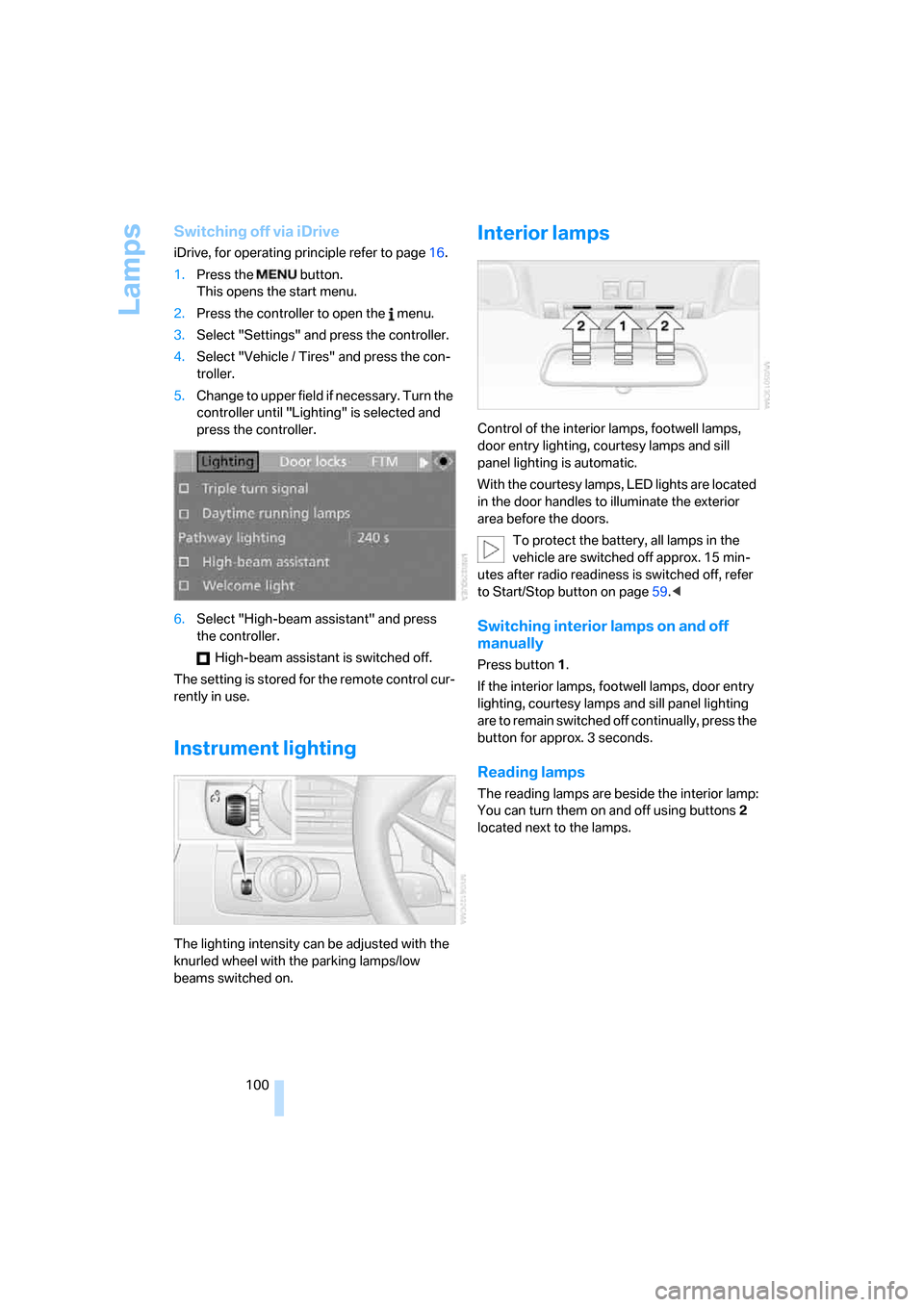
iDrive, for operating principle refer to page16.
1.Press the button.
This opens the start menu.
2.Press the controller to open the menu.
3.Select "Settings" and press the controller.
4.Select "Vehicle / Tires" and press the con-
troller.
5.Change to upper field if necessary. Turn the
controller until "Lighting" is selected and
press the controller.
6.Select "High-beam assistant" and press
the controller.
High-beam assistant is switched off.
The setting is stored for the remote control cur-
rently in use.
Instrument lighting
The lighting intensity can be adjusted with the
knurled wheel with the parking lamps/low
beams switched on.
Interior lamps
Control of the interior lamps, footwell lamps,
door entry lighting, courtesy lamps
and sill
panel lighting
is automatic.
With the courtesy lamps, LED lights are located
in the door handles to illuminate the exterior
area before the doors.
To protect the battery, all lamps in the
vehicle are switched off approx. 15 min-
utes after radio readiness is switched off, refer
to Start/Stop button on page59.<
Switching interior lamps on and off
manually
Press button 1.
If the interior lamps, footwell lamps, door entry
lighting, courtesy lamps and sill panel lighting
are to remain switched off continually, press the
button for approx. 3 seconds.
Reading lamps
The reading lamps are beside the interior lamp:
You can turn them on and off using buttons2
located next to the lamps.
Page 243 of 262
Reference 241
At a glance
Controls
Driving tips
Communications
Navigation
Entertainment
Mobility
"Assist. window off"21
AUC Automatic recirculated-
air control104
"Audio"151,153,158
Audio150
– controls150
– switching on/off150
– tone control151
– volume151
Audio device, external110
Automatic
– air distribution102
– air volume102
– cruise control67
– headlamp control96
– recirculated-air control
AUC104
– service notification193
– steering wheel
adjustment47
– storing stations156
Automatic car washes118
– also refer to Caring for your
vehicle brochure
Automatic climate control101
– automatic air
distribution102
– convertible program102
– switching on and off105
– ventilation with vehicle
parked106
Automatic closing of doors,
refer to Automatic soft
closing34
Automatic curb monitor52
Automatic lighting
– refer to Automatic headlamp
control96
– refer to Daytime running
lamps97
– refer to High-beam
assistant98
– refer to Interior lamps100
– refer to Pathway lighting97
– refer to Welcome lamps96
"Automatic programs"102
Automatic soft closing34Automatic station search155
"Automatic ventilation"106
AUTO program with
automatic climate
control102
"Autostore" on the
radio154,156
"AUX"150,170,
172
– in audio mode170
AUX-In connection110,170
Average fuel consumption71
– setting units79
"Avoid ferries" for navigation
system137
"Avoid highways" for
navigation system136
Avoiding freeways for
navigation136
Avoiding unintentional
alarms36
"Avoid tollroads" for
navigation system137
Axle loads, refer to
Weights235
"A - Z"184
B
Backrest contour, refer to
Lumbar support46
Backrests, refer to Seats46
Backrest width adjustment46
Backup lamps, replacing
bulbs, refer to Tail
lamps217
"Balance", refer to Tone
control152
Band-aids, refer to First-aid
kit225
Bass, refer to Tone
control151
"Bass", tone control151
Battery
– jump starting225
– refer to Vehicle battery222
Battery replacement, remote
control for comfort
access38BC button, refer to
Computer70
Being towed227
Belts, refer to Safety belts50
Beverage holder, refer to Cup
holders111
Blower, refer to Air
volume103
"Bluetooth"177
"BMW Assist"192
BMW Assist191
– activating196
– concierge service194
– contacting BMW Customer
Relations194
– displaying vehicle data197
– offered services191
– roadside assistance192
– TeleService193
– updating195
"BMW Contact"186
"BMW Contact
Numbers"186
BMW homepage4
BMW Maintenance
System214
"BMW Service settings"195
BMW website4
Bottle holder, refer to Cup
holders111
Bracket for telephone or
mobile phone, refer to Snap-
in adapter189
Brake assistant83
Brake force display90
Brake lamps
– replacing bulbs, refer to Tail
lamps217
– two-stage90
Brake rotors
– breaking-in116
– refer to Braking safely117
Page 249 of 262
Reference 247
At a glance
Controls
Driving tips
Communications
Navigation
Entertainment
Mobility
General driving notes116
Glove compartment109
– rechargeable flashlight110
GPS navigation, refer to
Navigation system124
Grills, refer to Ventilation105
Gross vehicle weight, refer to
Weights235
Ground clearance116
H
Handbrake61
– indicator lamp13,61
Hands-free system, refer to
Microphone14
Hazard warning flashers15
"HD radio"158
HD radio, refer to High
Definition Radio158
Head airbags90
Headlamp control,
automatic96
Headlamp flasher65
Headlamps
– care, refer to Caring for your
vehicle brochure
– cleaning, refer to Wiper
system66
– cleaning tank, refer to
Capacities235
– filler neck for washer
fluid209
– replacing bulbs216
Head Light, refer to Adaptive
Head Light98
Head restraints
– active front head
restraints48
– front48
– sitting safely45
"Head-Up Display"54,93
Head-Up Display93
– default view93
– M view94
– shift lights64Heated
– mirrors51
– rear window103
– seats51
– steering wheel52
Heater102
Heating
– exterior mirrors51
– interior101
– rear window103
– residual heat utilization105
– seats51
– steering wheel52
Heating with engine switched
off, refer to Residual
heat105
Heavy cargo, refer to Securing
cargo119
Height, refer to
Dimensions233
Height adjustment
– seats46
– steering wheel52
High-beam assistant98
High beams98
– headlamp flasher98
– indicator lamp13
High Definition Radio158
High water, refer to Driving
through water117
Hills118
Holder for cups111
"Home address" for
navigation system136
Homepage of BMW4
Hood208
Horn10
Hotel function33
– unlocking manually33
Hot exhaust system117
"Hour memo"78
"House number" for
destination entry129
Hydraulic brake assistant,
refer to Brake assistant83
Hydroplaning117
– also refer to Minimum tread
depth205
I
IBOC, refer to High Definition
Radio158
Ice, refer to Outside
temperature warning70
ID3-Tag, refer to Information
about track166
Identification mark
– recommended tire
brands206
– tire coding204
Idle62
iDrive16
– adjusting brightness79
– assistance window20
– changing date and time78
– changing language80
– changing menu page19
– changing settings77
– changing units of measure
and display form79
– controller16
– controls16
– displays, menus17
– operating principle17
– selecting menu item19
– selecting or confirming
entry19
– start menu17
– status information20
– symbols18
Ignition59
– switched off60
– switched on59
Ignition key, refer to Keys/
remote control28
Ignition key position 1, refer to
Radio readiness59
Ignition key position 2, refer to
Ignition on59
Ignition lock59
– starting engine with comfort
access38
i menu17
Imprint2
Page 256 of 262
Everything from A to Z
254 Signal horn, refer to Horn10
Signaling a turn, triple turn
signal activation65
Sill panel lighting, refer to
Interior lamps100
Sitting safely45
– with airbags45
– with head restraints45
– with safety belts45
Ski bag112
Slope assistant, refer to
Starting off on slopes117
SMG, refer to Sequential
Manual Transmission with
Drivelogic62
"SMG Drivelogic"54,64
Snap-in adapter
– mounting/removing189
– using176
Snow chains207
Socket, refer to Connecting
electrical devices112
Socket for Onboard
Diagnostics interface215
Socket for remote control,
refer to Ignition lock59
Soft closure aid, refer to
Automatic soft closing34
Song search with CD, refer to
Sampling tracks, scan166
SOS, refer to Initiating an
emergency request224
Spare
– adapter for spare key28
– fuses223
– key28
– wheel, driving with spare
wheel222
– wheel, refer to Changing
wheels220
Special oils, refer to Approved
engine oils212
Speed-dependent
volume152
Speed limit warning, refer to
Speed limit76
Speedometer12"Speed volume", refer to Tone
control152
Speed with winter tires206
"Sport" with EDC85
Stability control, refer to
Driving stability control
systems82
Start/Stop button59
– starting the engine60
– switching off the engine60
"Start" for stopwatch77
"Start guidance"129,138
Starting assistant, refer to
Starting off on slopes117
Starting difficulties, refer to
Jump starting225
Starting engine60
Starting off
– on a slippery surface117
– on slopes117
Start menu, iDrive17
"Start route guidance"131
"Start service"193
"Start Service" for
BMW Assist194
"State / Province" for
destination entry127
"State inspection"74
Station, refer to Radio154
"Status"73
Status information on Control
Display20
Status of this Owner's Manual
at time of printing5
Steering wheel
– adjustment52
– automatic adjustment, refer
to Easy entry/exit52
– automatic adjustment, refer
to Steering wheel
memory47
– buttons on steering
wheel11
– heating52
– lock, refer to Ignition lock59
– MDrive button53
– memory47
– programmable button53
– shift paddles63"Steering wheel button"53
Steering-wheel shift buttons,
refer to Shift paddles63
"Stop" for stopwatch77
"Stopwatch"77
Stopwatch77
Storage compartments110
"Store in address book" for
navigation system134
"Store" on the radio156,163
Storing current position134
Storing sitting position, refer
to Seat, mirror and steering
wheel memory47
Storing tires207
"Street" for destination
entry128
Summer tires, refer to Wheels
and tires202
"Surround Settings", refer to
Tone control152
SW, waveband154
Switches, refer to Cockpit10
Switching automatically
between high beams and
low beams, refer to High-
beam assistant98
Switching on
– audio150
– CD changer150
– CD player150
– radio150
Swiveling headlamps, refer to
Adaptive Head Light98
Symbols4
– indicator and warning
lamps13
– navigation system144
– status information20
– traffic information with
navigation system142