audio BMW M6 2008 E63 Owner's Guide
[x] Cancel search | Manufacturer: BMW, Model Year: 2008, Model line: M6, Model: BMW M6 2008 E63Pages: 262, PDF Size: 8.86 MB
Page 190 of 262
Telephoning
188
Example: dialing phone numbers
Start the dialog:
Press the button on the steering wheel.
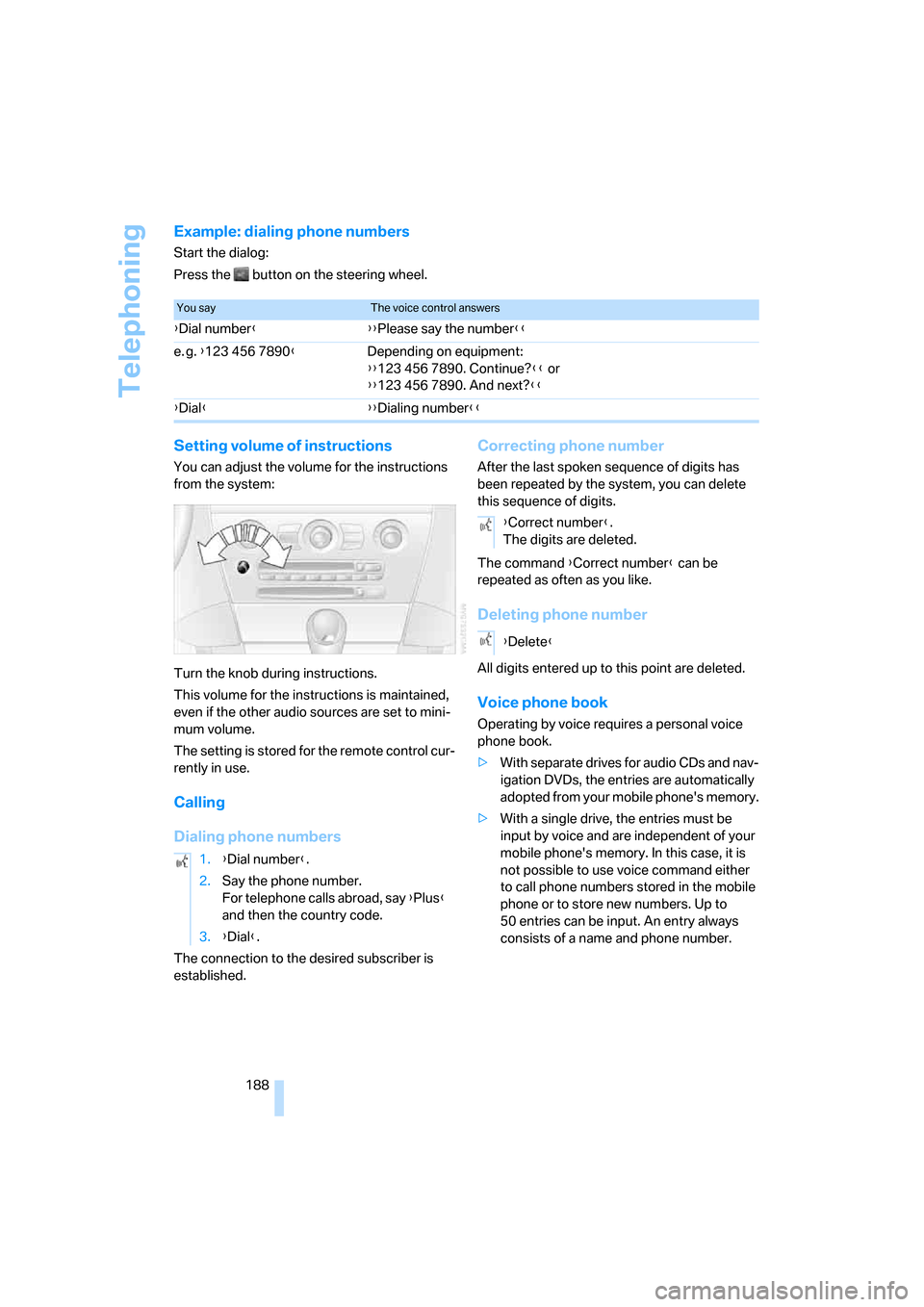
Setting volume of instructions
You can adjust the volume for the instructions
from the system:
Turn the knob during instructions.
This volume for the instructions is maintained,
even if the other audio sources are set to mini-
mum volume.
The setting is stored for the remote control cur-
rently in use.
Calling
Dialing phone numbers
The connection to the desired subscriber is
established.
Correcting phone number
After the last spoken sequence of digits has
been repeated by the system, you can delete
this sequence of digits.
The command {Correct number} can be
repeated as often as you like.
Deleting phone number
All digits entered up to this point are deleted.
Voice phone book
Operating by voice requires a personal voice
phone book.
>With separate drives for audio CDs and nav-
igation DVDs, the entries are automatically
adopted from your mobile phone's memory.
>With a single drive, the entries must be
input by voice and are independent of your
mobile phone's memory. In this case, it is
not possible to use voice command either
to call phone numbers stored in the mobile
phone or to store new numbers. Up to
50 entries can be input. An entry always
consists of a name and phone number.
You sayThe voice control answers
{Dial number}{{Please say the number}}
e. g. {123 456 7890}Depending on equipment:
{{123 456 7890. Continue?}} or
{{123 456 7890. And next?}}
{Dial}{{Dialing number}}
1.{Dial number}.
2.Say the phone number.
For telephone calls abroad, say {Plus}
and then the country code.
3.{Dial}.
{Correct number}.
The digits are deleted.
{Delete}
Page 240 of 262
Short commands of voice command system
238
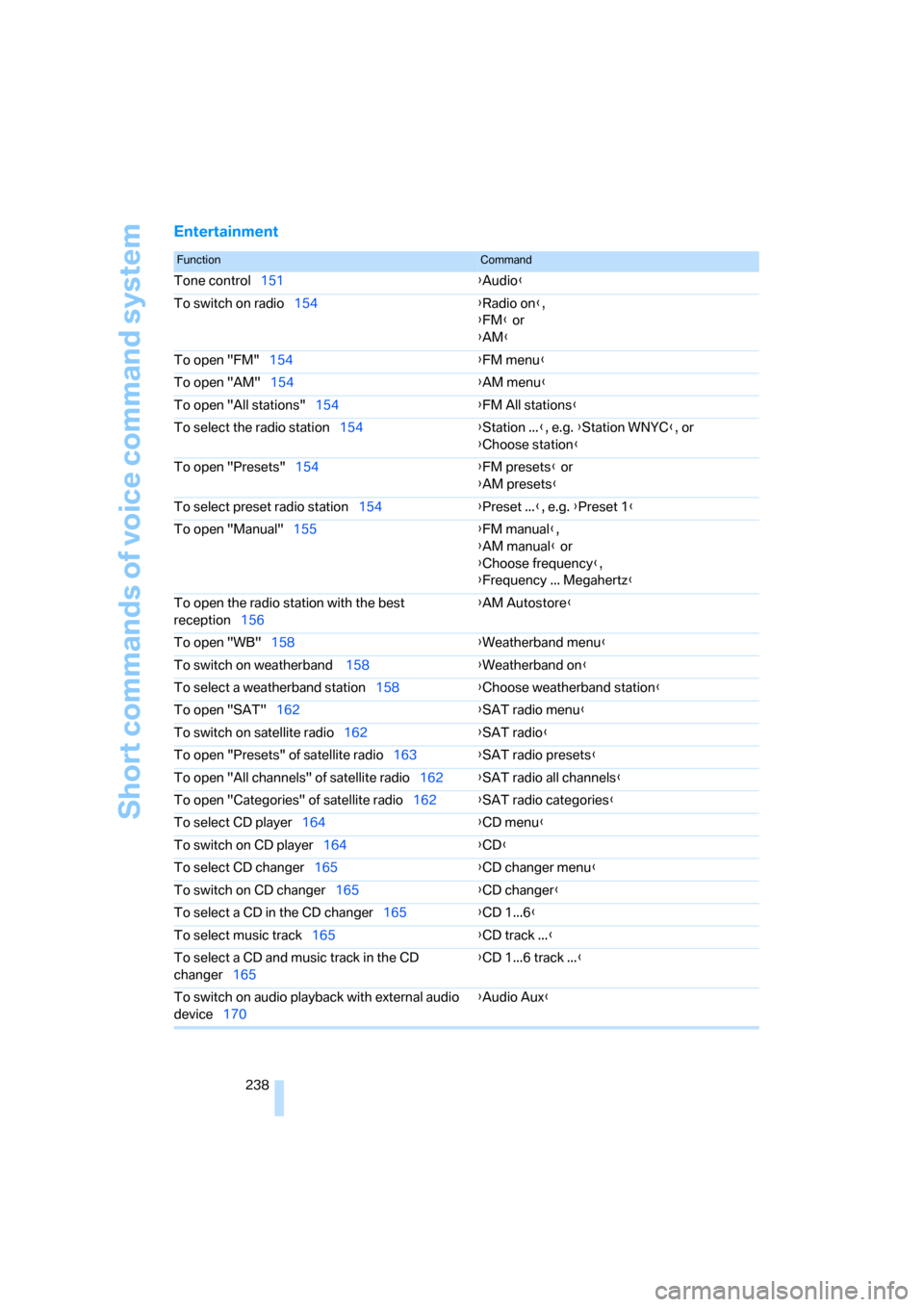
Entertainment
FunctionCommand
Tone control151{Audio}
To switch on radio154{Radio on},
{FM} or
{AM}
To open "FM"154{FM menu}
To open "AM"154{AM menu}
To open "All stations"154{FM All stations}
To select the radio station154{Station ...}, e.g. {Station WNYC}, or
{Choose station}
To open "Presets"154{FM presets} or
{AM presets}
To select preset radio station154{Preset ...}, e.g. {Preset 1}
To open "Manual"155{FM manual},
{AM manual} or
{Choose frequency},
{Frequency ... Megahertz}
To open the radio station with the best
reception156{AM Autostore}
To open "WB"158{Weatherband menu}
To switch on weatherband 158{Weatherband on}
To select a weatherband station158{Choose weatherband station
}
To open "SAT"162{SAT radio menu}
To switch on satellite radio162{SAT radio}
To open "Presets" of satellite radio163{SAT radio presets}
To open "All channels" of satellite radio162{SAT radio all channels}
To open "Categories" of satellite radio162{SAT radio categories}
To select CD player164{CD menu}
To switch on CD player164{CD}
To select CD changer165{CD changer menu}
To switch on CD changer165{CD changer}
To select a CD in the CD changer165{CD 1...6}
To select music track165{CD track ...}
To select a CD and music track in the CD
changer165{CD 1...6 track ...}
To switch on audio playback with external audio
device170{Audio Aux}
Page 242 of 262
Everything from A to Z
240
Everything from A to Z
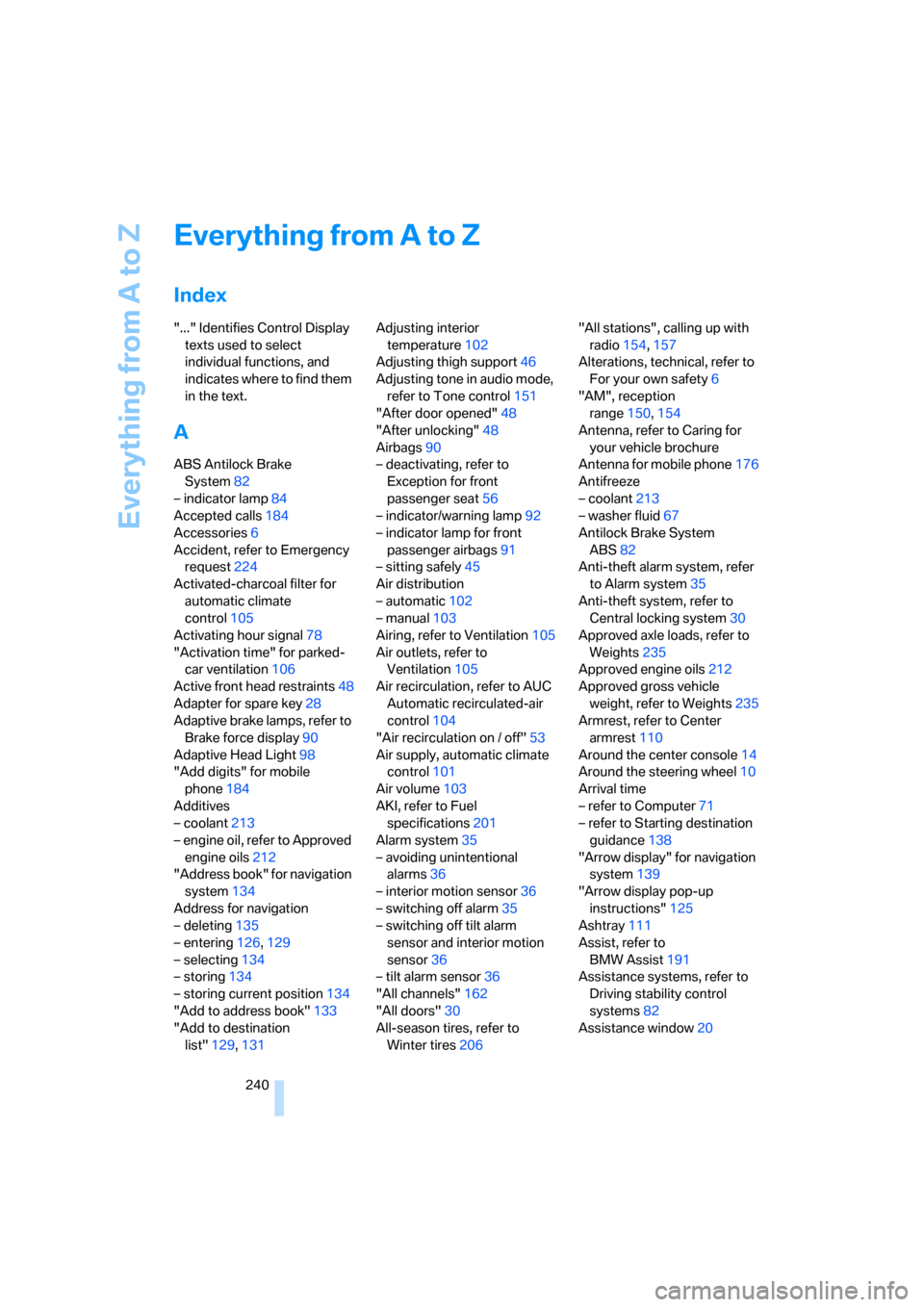
Index
"..." Identifies Control Display
texts used to select
individual functions, and
indicates where to find them
in the text.
A
ABS Antilock Brake
System82
– indicator lamp84
Accepted calls184
Accessories6
Accident, refer to Emergency
request224
Activated-charcoal filter for
automatic climate
control105
Activating hour signal78
"Activation time" for parked-
car ventilation106
Active front head restraints48
Adapter for spare key28
Adaptive brake lamps, refer to
Brake force display90
Adaptive Head Light98
"Add digits" for mobile
phone184
Additives
– coolant213
– engine oil, refer to Approved
engine oils212
"Address book" for navigation
system134
Address for navigation
– deleting135
– entering126,129
– selecting134
– storing134
– storing current position134
"Add to address book"133
"Add to destination
list"129,131Adjusting interior
temperature102
Adjusting thigh support46
Adjusting tone in audio mode,
refer to Tone control151
"After door opened"48
"After unlocking"48
Airbags90
– deactivating, refer to
Exception for front
passenger seat56
– indicator/warning lamp92
– indicator lamp for front
passenger airbags91
– sitting safely45
Air distribution
– automatic102
– manual103
Airing, refer to Ventilation105
Air outlets, refer to
Ventilation105
Air recirculation, refer to AUC
Automatic recirculated-air
control104
"Air recirculation on / off"53
Air supply, automatic climate
control101
Air volume103
AKI, refer to Fuel
specifications201
Alarm system35
– avoiding unintentional
alarms36
– interior motion sensor36
– switching off alarm35
– switching off tilt alarm
sensor and interior motion
sensor36
– tilt alarm sensor36
"All channels"162
"All doors"30
All-season tires, refer to
Winter tires206"All stations", calling up with
radio154,157
Alterations, technical, refer to
For your own safety6
"AM", reception
range150,154
Antenna, refer to Caring for
your vehicle brochure
Antenna for mobile phone176
Antifreeze
– coolant213
– washer fluid67
Antilock Brake System
ABS82
Anti-theft alarm system, refer
to Alarm system35
Anti-theft system, refer to
Central locking system30
Approved axle loads, refer to
Weights235
Approved engine oils212
Approved gross vehicle
weight, refer to Weights235
Armrest, refer to Center
armrest110
Around the center console14
Around the steering wheel10
Arrival time
– refer to Computer71
– refer to Starting destination
guidance138
"Arrow display" for navigation
system139
"Arrow display pop-up
instructions"125
Ashtray111
Assist, refer to
BMW Assist191
Assistance systems, refer to
Driving stability control
systems82
Assistance window20
Page 243 of 262
Reference 241
At a glance
Controls
Driving tips
Communications
Navigation
Entertainment
Mobility
"Assist. window off"21
AUC Automatic recirculated-
air control104
"Audio"151,153,158
Audio150
– controls150
– switching on/off150
– tone control151
– volume151
Audio device, external110
Automatic
– air distribution102
– air volume102
– cruise control67
– headlamp control96
– recirculated-air control
AUC104
– service notification193
– steering wheel
adjustment47
– storing stations156
Automatic car washes118
– also refer to Caring for your
vehicle brochure
Automatic climate control101
– automatic air
distribution102
– convertible program102
– switching on and off105
– ventilation with vehicle
parked106
Automatic closing of doors,
refer to Automatic soft
closing34
Automatic curb monitor52
Automatic lighting
– refer to Automatic headlamp
control96
– refer to Daytime running
lamps97
– refer to High-beam
assistant98
– refer to Interior lamps100
– refer to Pathway lighting97
– refer to Welcome lamps96
"Automatic programs"102
Automatic soft closing34Automatic station search155
"Automatic ventilation"106
AUTO program with
automatic climate
control102
"Autostore" on the
radio154,156
"AUX"150,170,
172
– in audio mode170
AUX-In connection110,170
Average fuel consumption71
– setting units79
"Avoid ferries" for navigation
system137
"Avoid highways" for
navigation system136
Avoiding freeways for
navigation136
Avoiding unintentional
alarms36
"Avoid tollroads" for
navigation system137
Axle loads, refer to
Weights235
"A - Z"184
B
Backrest contour, refer to
Lumbar support46
Backrests, refer to Seats46
Backrest width adjustment46
Backup lamps, replacing
bulbs, refer to Tail
lamps217
"Balance", refer to Tone
control152
Band-aids, refer to First-aid
kit225
Bass, refer to Tone
control151
"Bass", tone control151
Battery
– jump starting225
– refer to Vehicle battery222
Battery replacement, remote
control for comfort
access38BC button, refer to
Computer70
Being towed227
Belts, refer to Safety belts50
Beverage holder, refer to Cup
holders111
Blower, refer to Air
volume103
"Bluetooth"177
"BMW Assist"192
BMW Assist191
– activating196
– concierge service194
– contacting BMW Customer
Relations194
– displaying vehicle data197
– offered services191
– roadside assistance192
– TeleService193
– updating195
"BMW Contact"186
"BMW Contact
Numbers"186
BMW homepage4
BMW Maintenance
System214
"BMW Service settings"195
BMW website4
Bottle holder, refer to Cup
holders111
Bracket for telephone or
mobile phone, refer to Snap-
in adapter189
Brake assistant83
Brake force display90
Brake lamps
– replacing bulbs, refer to Tail
lamps217
– two-stage90
Brake rotors
– breaking-in116
– refer to Braking safely117
Page 245 of 262
Reference 243
At a glance
Controls
Driving tips
Communications
Navigation
Entertainment
Mobility
Central locking system30
– comfort access36
– hotel function33
Changes, technical, refer to
For your own safety6
Changing a wheel220
Changing language on
Control Display80
Changing scale for navigation
system display140
Changing units of measure on
Control Display79
Changing wheels206
CHECK button75
Check Control74
"Check Control
messages"75
Check Gas Cap200
Checking air pressure, refer to
Tire inflation pressure202
Child-restraint fixing system
LATCH57
Child restraint systems56
Child seats, refer to
Transporting children
safely56
Chock220
Chrome parts, refer to Caring
for your vehicle brochure
Cigarette lighter112
Cigarette lighter socket, refer
to Connecting electrical
devices112
Cleaning, refer to Caring for
your vehicle brochure
"Climate"102
Clock70
– 12h/24h format78
– hour signal78
– setting time and date78
Closing
– from inside32
– from outside30
Closing fuel filler cap200
Clothes hooks, Coupe111
Cockpit10
Cold start, refer to Starting
engine60Comfort access36
– replacing battery, remote
control38
Comfort closing
– windows, with comfort
access with Coupe37
– with comfort access37
"Comfort" with EDC85
"Communication"182,192
Compact disc
– refer to CD changer164
– refer to CD player164
Compartment for remote
control, refer to Ignition
lock59
Compartments, refer to
Storage compartments110
Compressed audio files164
Computer70
– clock70
– displays on Control
Display71
– hour signal78
"Concert hall", refer to Tone
control153
"Concierge"194
Concierge service194
Condensation, refer to When
vehicle is parked118
Condition Based Service
CBS214
"Confirmation"31
Confirmation signals for
locking and unlocking31
Connecting car vacuum
cleaner, refer to Connecting
electrical devices112
Consumption display, refer to
Average fuel
consumption71
Consumption statistics, refer
to Average fuel
consumption71
"Continue guidance to
destination?"139
Control Center, refer to
iDrive16Control Display, refer to
iDrive16
– setting brightness79
– switching off/on21
Controller, refer to iDrive16
Controls, refer to Cockpit10
Convenient operation
– convertible top31,32
– windows31,32
Convertible
– convertible program for
automatic climate
control102
– opening and closing
windows38
– rollover protection
system92
– top40
– wind deflector43
– window and convertible top
operation with comfort
access37
Convertible top
– care, refer to Caring for your
vehicle brochure
– closing manually42
– convenient operation32
– emergency closing42
– opening and closing41
Coolant213
– checking level213
– temperature69
Cooling, maximum104
Cooling function, automatic
climate control104
Cooling system, refer to
Coolant213
Copyright2
Cornering Brake Control
CBC82
Country of destination for
navigation127
Courtesy lamps, refer to
Interior lamps100
Cradle for telephone or mobile
phone110
Cruise control67
Cruising range71
Cup holders15,111
Page 246 of 262
Everything from A to Z
244 Curb weight, refer to
Weights235
"Current position"145
Current position
– displaying145
– entering134
– storing134
"Customer
Relations"186,194
Cylinders, refer to Engine
data232
D
Dashboard, refer to
Cockpit10
Data, technical232
– capacities235
– dimensions233
– engine232
– measurements233
– weights235
"Date"79
Date
– date format79
– setting79
"Date format"79
"Daytime running
lamps"97,100
Daytime running lamps97
– replacing bulbs217
DBC Dynamic Brake Control,
warning lamp85
"Deactivated"48
Decommissioning the vehicle,
refer to Caring for your
vehicle brochure
Defect, tires
– refer to Flat Tire Monitor86
– refer to Tire Pressure
Monitor87
Defrosting windows103
Defrosting windows and
removing condensation103
Defrosting windshield, refer to
Defrosting windows103
Defrost position, refer to
Defrosting windows103"Delete address book" for
navigation system135
"Delete all numbers" for
mobile phone185
"Delete data" for navigation
system135
"Delete" for mobile
phone185
Destination address
– deleting135
– entering126,129
Destination for navigation
– destination list133
– entering via voice129
– entry126
– home address136
– selecting from address
book134
– selecting using
information132
– storing134
Destination guidance138
– bypassing route
sections142
– canceling voice
instructions53
– changing specified
route136
– displaying route139
– distance and arrival138
– interrupting138
– starting138
– terminating/continuing138
– voice instructions141
– volume of voice
instructions142
Destination list for
navigation133
Destinations recently driven
to133
"Details" in audio
mode166,172
"Dial" for mobile phone183
"Dial number"183
Digital clock70
Digital radio, refer to High
Definition Radio158Dimensions
– Convertible234
– Coupe233
Directional indicators, refer to
Turn signals65
Direction instructions, refer to
Voice instructions141
Directory, refer to Phone
book184
Directory for navigation, refer
to Address book134
Direct selection buttons21
Displacement, refer to Engine
data232
"Display"79
Display, refer to iDrive
controls16
Display elements, refer to
Instrument cluster12
Displaying vehicle data197
Display lighting, refer to
Instrument lighting100
"Display off"21
Displays
– on Control Display, refer to
iDrive16
– refer to Instrument
cluster12
"Display settings"79,93
Displays on the windshield,
refer to Head-Up Display93
Disposal
– battery of remote control
with comfort access38
– coolant213
– vehicle battery223
Distance, refer to
Computer71
"Distance to dest."71
Distance to destination, refer
to Computer71
Distance warning, refer to
PDC Park Distance
Control81
Door entry lighting, refer to
Interior lamps100
Door key, refer to Keys/
remote control28
Page 248 of 262
Everything from A to Z
246 ESP Electronic Stability
Program, refer to DSC
Dynamic Stability
Control83
Event data recorders215
Exhaust system, refer to Hot
exhaust system117
Exterior mirrors51
– adjusting51
– automatic dimming
feature52
– automatic heating51
– folding in and out51
– tilting down passenger-side
mirror52
External audio device110
Eye for tow-starting and
towing, refer to Tow
fitting226
Eyes for lashing, refer to
Securing cargo119
F
"Fader", refer to Tone
control152
Fader, refer to Tone
control152
Failure messages, refer to
Check Control74
False alarm
– refer to Avoiding
unintentional alarms36
– refer to Switching off
alarm35
Fastening safety belts, refer to
Safety belts50
Fastest route for
navigation136
Fast forward
– CD changer168
– CD player168
"Fast route" for
navigation136
"Favorites", calling up with
radio157
Filler neck for washer fluid67Filling bottle, refer to
M Mobility System218
Filter, refer to Microfilter/
activated-charcoal filter105
Fine wood, refer to Caring for
your vehicle brochure
First aid, refer to First-aid
kit225
First-aid kit225
Flashing when locking and
unlocking, refer to Setting
confirmation signals31
Flashlight, refer to
Rechargeable flashlight110
Flat tire
– Flat Tire Monitor86
– M Mobility System218
– run-flat tires88
– spare wheel221
– Tire Pressure Monitor87
– warning lamp87,88
Flat Tire Monitor86
– false alarms86
– initializing system86
– limits of system86
– snow chains207
– warning lamp87
Floor mats, refer to Caring for
your vehicle brochure
Floor mats/carpets, refer to
Caring for your vehicle
brochure
Fluid reservoir, refer to Filler
neck for washer fluid67
"FM", reception
range150,154
FM, waveband154
Folding into raised position
convertible top
compartment floor,
Convertible35
Footbrake, refer to Braking
safely117
Footwell lighting, refer to
Interior lamps100
For specified oil grades, refer
to Approved engine oils212
For your own safety6Freeway, refer to Route
criteria136
Front airbags90
Front passenger airbags,
deactivating91
"FTM"87
FTM, refer to Flat Tire
Monitor86
Fuel
– average consumption71
– display70
– fuel specifications201
– high-quality brands201
– quality201
– specifications201
– tank contents, refer to
Capacities235
Fuel display, refer to Fuel
gauge70
Fuel filler door200
– releasing in the event of
electrical malfunction200
Fuel gauge70
Full mobile phone preparation
package176
Full screen display, refer to
Switching assistance
window off20
Fuses223
G
Garage-door opener, refer to
Integrated universal remote
control108
Gasoline
– refer to Average fuel
consumption71
– refer to Fuel
specifications201
– refer to Required fuel201
Gasoline display, refer to Fuel
gauge70
Gear changes63
Gear display, refer to Displays
in instrument cluster63
Gearshift lever, manual
transmission61
Page 252 of 262
Everything from A to Z
250 Mobile phone battery190
Mobile Service, refer to
Roadside Assistance225
Mobility System218
Monitor, refer to iDrive16
Monitoring pressure of tires,
refer to Flat Tire Monitor86
"Monitor on / off"53
Most recent mobile phone
numbers185
MP3
– compressed audio files164
– USB/audio interface171
Multifunction steering wheel,
refer to Buttons on steering
wheel11
Multifunction switch
– refer to Turn signals/
headlamp flasher65
– refer to Wiper system66
Music tracks
– random play sequence167
– sampling, scan166
"Mute on / off"53
"M View"93
"M view"94
MW, waveband154
N
"Navigation"71,126
Navigation destination
– entering manually126
– selecting via map131
Navigation drive, installation
location124
Navigation DVD124
Navigation instructions, refer
to Switching voice
instructions on/off141Navigation system124
– address book134
– bypassing route
sections142
– destination entry126
– destination guidance in
assistance window124
– destination list133
– displaying current
position145
– displaying route139
– entering a destination
manually126
– entering destination via
voice129
– last destinations133
– looking for interesting
destination132
– navigation DVD124
– route list141
– selecting destination using
information132
– selecting destination via
map131
– selecting route criteria136
– starting destination
guidance138
– switching off, refer to
Terminating/continuing
destination guidance138
– terminating/continuing
destination guidance138
– voice instructions141
– volume adjustment142
"Navigation voice
instructions"53,141
Neck support, refer to Front
head restraints48
"New address" for navigation
system134
"New destination"126,131
New remote controls28
"New route"142
New wheels and tires206
"Next entertainment
source"53
"Normal" with EDC85
Nozzles, refer to
Ventilation105
Nozzles, refer to Windshield
washer nozzles67
Nylon rope, refer to Tow-
starting and towing226
O
OBD socket, refer to Socket
for OBD Onboard
Diagnostics interface215
Octane ratings, refer to Fuel
specifications201
Odometer69
Oil, refer to Engine oil210
Oil change interval
– refer to Service and
Warranty Information
Booklet for US models or
Warranty and Service Guide
Booklet for Canadian
models
– refer to Service
requirements72
"On a new destination" for
navigation system132
"Onboard info"71
Onboard monitor, refer to
iDrive16
Onboard tool kit216
"On destination"132
"On location"132
Opening and closing
– comfort access36
– from inside32
– from outside30
– using door lock32
– using the remote control30
Operating principle, iDrive17
Operation by voice for mobile
phone187
– adjusting volume188
– canceling187
– commands187
– correcting phone
number188
– dialing phone number188
– placing a call188
– redialing189
– voice phone book188
Page 254 of 262
Everything from A to Z
252 "Random all" in audio
mode168
"Random directory" in audio
mode167
Random play sequence
– CD changer167
– CD player167
"RDS"157
Reading lamps100
Rear lamps, refer to Tail
lamps217
Rearview mirrors, refer to
Mirrors51
Rear window
– heating103
– opening and closing39
"Received calls"184
Reception
– quality157
– radio stations157
– regional station156
Reception quality of mobile
phone, refer to Status
information20
Rechargeable flashlight110
Recirculated-air mode, refer
to AUC Automatic
recirculated-air control104
Recirculation of air, refer to
AUC Automatic
recirculated-air control104
Reclining seat, refer to
Seats46
Recording times, refer to
Stopwatch77
"Redial" for mobile phone184
Redialing with mobile
phone189
Reflectors, refer to Tail
lamps217
Refueling200
Releasing, hood208
Releasing the locks, refer to
Unlocking37
"Relock door if not
opened"33
Remaining distance, refer to
Cruising range71Remaining distance to
destination, refer to
Computer71
Remote control28
– battery replacement38
– comfort access36
– garage-door opener108
– luggage compartment lid31
– malfunction31,38
Removing condensation from
windows103
"Repeat directory" in audio
mode167
"Repeat" in audio mode167
"Repeat track" in audio
mode
167
Replacement fuses223
Replacement remote control,
refer to New remote
controls28
Replacing bulbs, refer to
Lamps and bulbs216
Replacing tires, changing a
wheel220
Reporting safety defects7
Required fuel201
Reserve warning, refer to Fuel
gauge70
"Reset"87,88
– stopwatch77
– tone settings153
Reset, refer to Resetting tone
settings153
"Reset to default" with
MDrive54
Residual heat105
Restraint systems
– for children56
– refer to Safety belts50
Retreaded tires206
Reverse, fast
– CD changer168
– CD player168
Reverse gear62
– manual transmission61
Road map140
"Roadside
Assistance"186,192Roadside Assistance225
Roadside assistance192
Roadside parking lamps98
– replacing bulbs, refer to
Parking lamps217
Rollover protection system on
Convertible92
– lowering92
Rope, refer to Tow-starting
and towing226
Rotary/pushbutton, refer to
iDrive16
Route136
– bypassing sections142
– changing142
– changing criteria136
– display139
– displaying arrow display139
– displaying map view140
– displaying streets or towns/
cities141
– selecting136
Route information, refer to
Destination guidance with
voice instructions141
Route map, refer to Displaying
map view140
"Route preference",
changing136
Route selection136
Rubber parts, refer to Caring
for your vehicle brochure
Run-flat tires
– continuing driving with a
damaged tire88
– flat tire88
S
Safety belts50
– damage51
– indicator lamp50
– refer to Caring for your
vehicle brochure
– reminder50
– sitting safely45
Safety belt tensioners, refer to
Safety belts50
Page 255 of 262
Reference 253
At a glance
Controls
Driving tips
Communications
Navigation
Entertainment
Mobility
Safety systems
– ABS Antilock Brake
System82
– airbags90
– driving stability control
systems82
– rollover protection system,
Convertible92
– safety belts50
Satellite radio161
– enabling channels161
– selecting channel162
– storing channel162
"SAT" with radio150,161
"Save current
destination"136
"Scan"
– music tracks on CD166
– stations with radio155
Scan
– CD changer166
– CD player166
– radio155
"Scan all" in audio mode166
"Scan directory" in audio
mode166
Screw thread for tow
fitting227
SDARS, refer to Satellite
radio161
Seats46
– adjusting46
– adjusting backrest width46
– heating51
– lumbar support46
– memory, refer to Seat, mirror
and steering wheel
memory47
– sitting safely45
– storing the setting47
– thigh support46
Securing cargo119
– ski bag113
"Select as
destination"132,195
"Select current speed"77
Selecting audio sources, refer
to Operating via iDrive150Selecting frequency
manually155
Selecting menu items19
Selecting route136
Selection options with
navigation system136
Selector lever62
– manual transmission61
– Sequential Manual
Transmission62
Selector lever lock, refer to
Shiftlock62
Sequential Manual
Transmission with
Drivelogic62
– Drivelogic driving
programs63
– Drive mode63
– idle62
– initializing system, refer to
After changing wheels/
tires207
– kick-down63
– reverse gear62
– Sequential mode62
– shift lights64
– shiftlock62
– towing227
– tow-starting228
Sequential mode62
"Service"73,193,211
Service, refer to Roadside
Assistance225
Service and Warranty
Information Booklet for
US models214
Service Interval Display
– refer to CBS Condition
Based Service214
– refer to Service
requirements72
"Service notification"193
"Service Request"186,193
"Service
requirements"73,193,211
Service requirements72
– refer to CBS Condition
Based Service214"Service Status"197
"Set"
– in audio mode150
– in trip computer72
"Set date"79
"Set service date"74
"Set time"78
Setting button, refer to
Controls, controller16
"Settings"197
– for BMW Assist195
– for unlocking30
Settings
– changing on Control
Display77
– clock, 12h/24h mode78
– configuring, refer to
MDrive53
– configuring, refer to
Personal Profile29
– date79
– language80
– units of measure79
Settings menu, refer to
imenu17
Setting time, refer to
Preselecting activation
time106
Shifting63
Shift lights64
Shiftlock62
Shift paddles on steering
wheel63
Shock absorber control, refer
to EDC Electronic Damping
Control85
Short commands of voice
command system236
"Short route" for
navigation136
Short route in navigation, refer
to Selecting route136
"Show current position"131
"Show destination
position"131
Side airbags90
Side turn signals, replacing
bulbs217