maintenance BMW M6 COUPE 2015 F13M User Guide
[x] Cancel search | Manufacturer: BMW, Model Year: 2015, Model line: M6 COUPE, Model: BMW M6 COUPE 2015 F13MPages: 222, PDF Size: 4.66 MB
Page 168 of 222
Saving fuelVehicle features and optionsThis chapter describes all standard, country-
specific and optional features offered with the
series. It also describes features that are not
necessarily available in your car, e. g., due to
the selected options or country versions. This
also applies to safety-related functions and
systems. The respectively applicable country
provisions must be observed when using the
respective features and systems.
General information Your vehicle contains advanced technology for
the reduction of fuel consumption and emis‐
sions.
Fuel consumption depends on a number of dif‐
ferent factors.
Carrying out certain measures, such as a mod‐
erate driving style and regular maintenance,
can influence fuel consumption and the envi‐
ronmental impact.
Remove unnecessary cargo
Additional weight increases fuel consumption.
Remove attached parts
following use
Attached parts on the vehicle impair the aero‐
dynamics and increase the fuel consumption.
Close the windows and glass
sunroof
Driving with the glass sunroof and windows
open results in increased air resistance and
thereby reduces the range.Tires
General information
Tires can affect fuel consumption in various
ways, e.g., tire size may influence fuel con‐
sumption.
Check the tire inflation pressure
regularly
Check and, if needed, correct the tire inflation
pressure at least twice a month and before
starting on a long trip.
Low tire inflation pressure increases rolling re‐
sistance and thus raises fuel consumption and
tire wear.
Drive away immediately
Do not wait for the engine to warm-up while
the vehicle remains stationary. Start driving
right away, but at moderate engine speeds.
This is the quickest way of warming the cold
engine up to operating temperature.
Look well ahead when
driving
Avoid unnecessary acceleration and braking.
By maintaining a suitable distance to the vehi‐
cle driving ahead of you.
Driving smoothly and proactively reduces fuel
consumption.
Avoid high engine speeds
As a rule: driving at low engine speeds lowers
fuel consumption and reduces wear.
Use 1st gear to get the vehicle moving. Start‐
ing with the 2nd gear, accelerate rapidly. WhenSeite 164Driving tipsSaving fuel164
Online Edition for Part no. 01 40 2 959 695 - II/15
Page 169 of 222
accelerating, shift up before reaching high en‐
gine speeds.
When you reach the desired speed, shift into
the highest applicable gear and drive with the
engine speed as low as possible and at a con‐
stant speed.
If necessary, observe the gear shift indicator of
the vehicle, refer to page 86.
Use coasting When approaching a red light, take your foot
off the accelerator and let the vehicle coast to
a halt.
For going downhill take your foot off the accel‐
erator and let the vehicle roll.
The flow of fuel is interrupted while coasting.
Switch off the engine during
longer stops
Switch off the engine during longer stops, e.g.,
at traffic lights, railroad crossings or in traffic
congestion.
Auto Start/Stop function The Auto Start/Stop function of your vehicle
automatically switches off the engine during a
stop.
If the engine is switched off and then restarted
rather than leaving the engine running con‐
stantly, fuel consumption and emissions are
reduced. Savings can begin within a few sec‐
onds of switching off the engine.
In addition, fuel consumption is also deter‐
mined by other factors, such as driving style,
road conditions, maintenance or environmental
factors.Switch off any functions that
are not currently needed
Functions such as seat heating and the rear
window defroster require a lot of energy and
reduce the range, especially in city and stop-
and-go traffic.
Reel off these functions if they are not needed.
Have maintenance carried
out
Have vehicles maintained regularly to achieve
optimal vehicle efficiency and operating life.
The maintenance should be carried out by
your service center.
Also note the BMW Maintenance System, refer
to page 187.Seite 165Saving fuelDriving tips165
Online Edition for Part no. 01 40 2 959 695 - II/15
Page 171 of 222
Mobility
In order to always ensure your mobility, you will find important information on operating fluids,wheels and tires, maintenance and Roadside Assistance in the following.Online Edition for Part no. 01 40 2 959 695 - II/15
Page 191 of 222
MaintenanceVehicle features and options
This chapter describes all standard, country-
specific and optional features offered with the
series. It also describes features that are not
necessarily available in your car, e. g., due to
the selected options or country versions. This
also applies to safety-related functions and
systems. The respectively applicable country
provisions must be observed when using the
respective features and systems.
BMW maintenance system The maintenance system indicates required
maintenance measures, and thereby provides
support in maintaining road safety and the op‐
erational reliability of the vehicle.
In some cases scopes and intervals may vary
according to the country-specific version. Re‐
placement work, spare parts, fuels and lubri‐
cants and wear materials are calculated sepa‐
rately. Additional information is available from
the service center.
Condition Based Service
CBS
Sensors and special algorithms take into ac‐
count the driving conditions of your vehicle.
Based on this, Condition Based Service recog‐
nizes the maintenance requirements.
The system makes it possible to adapt the
amount of maintenance corresponding to your
user profile.
Detailed information on service requirements,
refer to page 85, can be displayed on the Con‐
trol Display.Service data in the remote control
Information on the required maintenance is
continuously stored in the remote control. Your service center will read out this data and
suggest the right array of service procedures for your vehicle.
Therefore, hand your service specialist the re‐
mote control with which the vehicle was driven
most recently.
Storage periods Storage periods during which the vehicle bat‐
tery was disconnected are not taken into ac‐
count.
If this occurs, have a service center update the
time-dependent maintenance procedures,
such as checking brake fluid and, if needed,
changing the engine oil and the microfilter/
activated-charcoal filter.
Service and Warranty
Information Booklet for US
models and Warranty and
Service Guide Booklet for
Canadian models
Please consult your Service and Warranty In‐
formation Booklet for US models and Warranty
and Service Guide Booklet for Canadian mod‐
els for additional information on service re‐
quirements.
Maintenance and repair should be performed
by your service center. Make sure to have reg‐
ular maintenance procedures recorded in the
vehicle's Service and Warranty Information
Booklet for US models, and in the Warranty
and Service Guide Booklet for Canadian mod‐
els. These entries are proof of regular mainte‐
nance.Seite 187MaintenanceMobility187
Online Edition for Part no. 01 40 2 959 695 - II/15
Page 192 of 222
Socket for OBD Onboard
Diagnosis
Note Socket for Onboard Diagnosis
The socket for onboard diagnostics may
only be used by the service center or a work‐
shop that operates in accordance with the
specifications of the vehicle manufacturer with
correspondingly trained personnel and other
authorized persons. Otherwise, use may result
in operating problems for the vehicle.◀
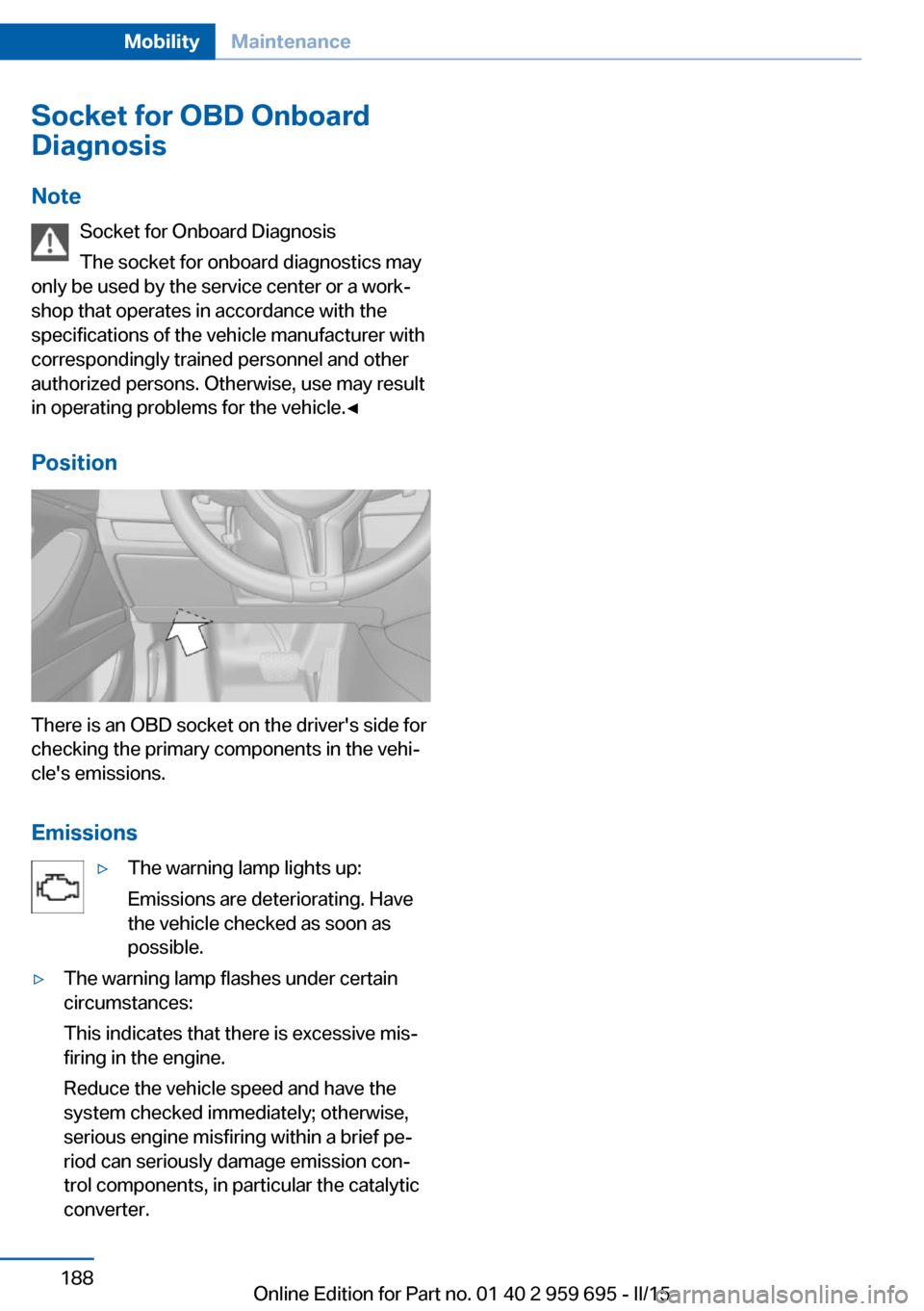
Position
There is an OBD socket on the driver's side for
checking the primary components in the vehi‐
cle's emissions.
Emissions
▷The warning lamp lights up:
Emissions are deteriorating. Have
the vehicle checked as soon as
possible.▷The warning lamp flashes under certain
circumstances:
This indicates that there is excessive mis‐
firing in the engine.
Reduce the vehicle speed and have the
system checked immediately; otherwise,
serious engine misfiring within a brief pe‐
riod can seriously damage emission con‐
trol components, in particular the catalytic
converter.Seite 188MobilityMaintenance188
Online Edition for Part no. 01 40 2 959 695 - II/15
Page 196 of 222
pressure in the event of a flat tire is unneces‐
sary.
Which is why no spare tire is available.
The tools for changing wheels are available as
accessories from your service center.
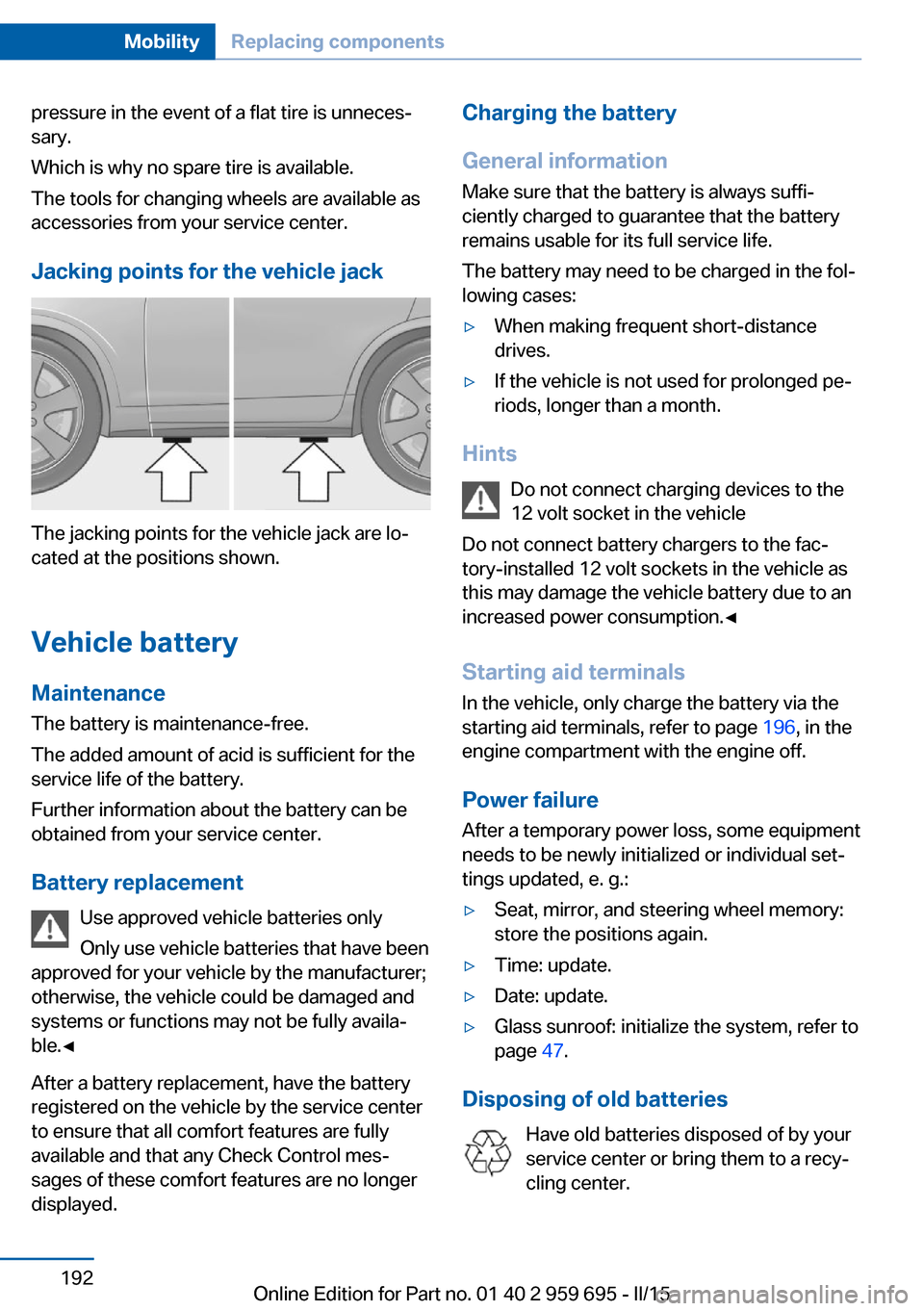
Jacking points for the vehicle jack
The jacking points for the vehicle jack are lo‐
cated at the positions shown.
Vehicle battery Maintenance
The battery is maintenance-free.
The added amount of acid is sufficient for the
service life of the battery.
Further information about the battery can be
obtained from your service center.
Battery replacement Use approved vehicle batteries only
Only use vehicle batteries that have been
approved for your vehicle by the manufacturer;
otherwise, the vehicle could be damaged and
systems or functions may not be fully availa‐
ble.◀
After a battery replacement, have the battery
registered on the vehicle by the service center
to ensure that all comfort features are fully
available and that any Check Control mes‐
sages of these comfort features are no longer
displayed.
Charging the battery
General information
Make sure that the battery is always suffi‐
ciently charged to guarantee that the battery
remains usable for its full service life.
The battery may need to be charged in the fol‐
lowing cases:▷When making frequent short-distance
drives.▷If the vehicle is not used for prolonged pe‐
riods, longer than a month.
Hints
Do not connect charging devices to the
12 volt socket in the vehicle
Do not connect battery chargers to the fac‐
tory-installed 12 volt sockets in the vehicle as
this may damage the vehicle battery due to an
increased power consumption.◀
Starting aid terminals
In the vehicle, only charge the battery via the
starting aid terminals, refer to page 196, in the
engine compartment with the engine off.
Power failure
After a temporary power loss, some equipment
needs to be newly initialized or individual set‐
tings updated, e. g.:
▷Seat, mirror, and steering wheel memory:
store the positions again.▷Time: update.▷Date: update.▷Glass sunroof: initialize the system, refer to
page 47.
Disposing of old batteries
Have old batteries disposed of by your
service center or bring them to a recy‐
cling center.
Seite 192MobilityReplacing components192
Online Edition for Part no. 01 40 2 959 695 - II/15
Page 212 of 222
Everything from A to Z
IndexA ABS, Antilock Brake Sys‐ tem 122
Acceleration Assistant, refer to Launch Control 75
Accessories and parts 7
Activated-charcoal filter 142
Active Blind Spot Detec‐ tion 117
Active M differential 126
Active Protection 119
Active seat, front 51
Active seat ventilation, front 51
Adaptive brake lights, refer to Brake force display 119
Adaptive Light Control 96
Additives, oil 184
Adjusting, steering wheel 58
Adjustments, seats/head re‐ straints 49
After washing vehicle 201
Airbags 100
Airbags, indicator/warning light 101
Air circulation, refer to Recir‐ culated-air mode 141
Air, dehumidifying, refer to Cooling function 141
Air distribution, manual 140
Air flow, automatic climate control 140
Air outlets, see ventila‐ tion 142
Air pressure, tires 172
Alarm system 44
Alarm, unintentional 45
All around the center con‐ sole 16 All around the interior rear‐
view mirror 17
All around the steering wheel 14
All-season tires, refer to Win‐ ter tires 177
Alternating-code hand-held transmitter 145
Alternative oil types 185
Animal detection, see Night Vision 113
Antifreeze, washer fluid 71
Antilock Brake System, ABS 122
Anti-slip control, refer to DSC 124
Approved axle load 206
Approved engine oils, see Suitable engine oil
types 185
Armrest, refer to Front center armrest 151
Arrival time 90
Ashtray 146
Assistance when driving off 122
Attentiveness assistant 119
AUTO intensity 140
Automatic car wash 200
Automatic Curb Monitor 56
Automatic deactivation, front- seat passenger airbags 102
Automatic headlight con‐ trol 96
Automatic locking 43
Automatic recirculated-air control 141
Automatic Soft Closing, doors 40
AUTO program, automatic cli‐ mate control 140 AUTO program, intensity 140
Auto Start/Stop function 65
Average fuel consumption 89
Average speed 89
Axle loads, weights 206
B Backrest curvature, refer to Lumbar support 50
Backrest, seats 49
Backrest, width 50
Band-aids, refer to First aid kit 195
Bar for tow-starting/ towing 198
Battery replacement, vehicle battery 192
Battery replacement, vehicle remote control 35
Battery, vehicle 192
Belts, safety belts 52
Beverage holder, cu‐ pholder 152
Blinds, sun protection 46
BMW Assist, see user's manual for Navigation, En‐
tertainment and Communi‐
cation
BMW Driver’s Guide App 6
BMW Homepage 6
BMW Internet page 6
BMW maintenance sys‐ tem 187
BMW M technology 156
Bottle holder, refer to Cu‐ pholder 152
Brake assistant 122
Brake discs, break-in 158
Brake force display 119
Brake lights, adaptive 119 Seite 208ReferenceEverything from A to Z208
Online Edition for Part no. 01 40 2 959 695 - II/15
Page 216 of 222
Identification number, see ve‐hicle identification num‐
ber 9
iDrive 18
Ignition key, refer to Remote control 34
Ignition off 63
Ignition on 63
Indication of a flat tire 104 , 106
Indicator and alarm lamps, see Check Control 79
Indicator lamp, see Check Control 79
Individual air distribution 140
Individual settings, refer to M Drive 122
Individual settings, refer to Personal Profile 35
Inflation pressure, tires 172
Inflation pressure warning FTM, tires 106
Info display, refer to On- Board computer 88
Initialize, Tire Pressure Moni‐ tor TPM 104
Initializing, Flat Tire Monitor FTM 106
Instrument cluster 78
Instrument cluster, electronic displays 78
Instrument lighting 98
Integrated key 34
Integrated Owner's Manual in the vehicle 29
Intelligent Emergency Re‐ quest 194
Intelligent Safety 107
Intensity, AUTO pro‐ gram 140
Interior equipment 144
Interior lights 98
Interior lights during unlock‐ ing 37
Interior lights with the vehicle locked 38 Interior motion sensor 44
Interior rearview mirror, auto‐ matic dimming feature 57
Internet page 6
Interval display, service re‐ quirements 85
Interval mode 70
J Jacking points for the vehicle jack 192
Jump-starting 196
K
Key/remote control 34
Keyless Go, refer to Comfort Access 41
Key Memory, refer to Per‐ sonal Profile 35
Knee airbag 101
L Lamp replacement, front 189
Lamp replacement, rear 191
Lane departure warning 116
Lane margin, warning 116
Language on Control Dis‐ play 92
Lashing eyes, securing cargo 163
LATCH child restraint sys‐ tem 61
Launch Control 75
Leather, care 202
LED headlights, bulb replace‐ ment 190
LED light 190
LEDs, light-emitting di‐ odes 190
Length, vehicle 206
Letters and numbers, enter‐ ing 24 License plate lamp, bulb re‐
placement 191
Light alloy wheels, care 202
Light control 96
Light-emitting diodes, LEDs 190
Lighting 95
Lighting, speaker 99
Lights 95
Lights and bulbs 189
Light switch 95
Load 163
Loading 162
Lock, door 39
Locking/unlocking via door lock 39
Locking/unlocking with re‐ mote control 37
Locking, automatic 43
Locking, settings 42
Locking via trunk lid 40
Low beams 95
Low beams, automatic, refer to High-beam Assistant 97
Lower back support 50
Low Speed Assistant 73
Lumbar support 50
M
Maintenance 187
Maintenance require‐ ments 187
Maintenance, service require‐ ments 85
Maintenance system, BMW 187
Make-up mirror 146
Malfunction displays, see Check Control 79
Manual air distribution 140
Manual air flow 140
Manual brake, refer to Parking brake 67
Manual operation, door lock 39 Seite 212ReferenceEverything from A to Z212
Online Edition for Part no. 01 40 2 959 695 - II/15