stop start BMW M6 GRAN COUPE 2015 F06M Owner's Guide
[x] Cancel search | Manufacturer: BMW, Model Year: 2015, Model line: M6 GRAN COUPE, Model: BMW M6 GRAN COUPE 2015 F06MPages: 226, PDF Size: 4.76 MB
Page 127 of 226
Driving stability control systemsVehicle features and optionsThis chapter describes all standard, country-
specific and optional features offered with the
series. It also describes features that are not
necessarily available in your car, e. g., due to
the selected options or country versions. This
also applies to safety-related functions and
systems. The respectively applicable country
provisions must be observed when using the
respective features and systems.
Antilock Brake System ABS ABS prevents locking of the wheels during
braking.
The vehicle contains its steering power even
during full brake applications, thus increasing
active safety.
ABS is operational every time you start the en‐
gine.
Brake assistant When you apply the brakes rapidly, this system
automatically produces the greatest possible
braking force boost. It reduces the braking dis‐
tance to a minimum during emergency stop.
This system utilizes all of the benefits provided
by ABS.
Do not reduce the pressure on the brake pedal
for the duration of the emergency stop.
Drive-off assistant This system supports driving off on inclines.
The parking brake is not required.1.Hold the vehicle in place with the foot
brake.2.Release the foot brake and drive off with‐
out delay.
After the foot brake is released, the vehicle is
held in place for approx. 2 seconds.
Depending on the vehicle load, the vehicle may
roll back slightly.
Driving off without delay
After releasing the foot brake, start driv‐
ing without delay, since the drive-off assistant
will not hold the vehicle in place for more than
approx. 2 seconds and the vehicle will begin to
roll back.◀
M Drive The conceptIndividual settings can be carried out in twopreassigned configurations for the vehicle.
When the engine is started, an efficient driving
state is active by default. M Drive is deacti‐
vated.
At a glance
Configurations The configurations are preassigned as follows:
▷"M Drive 1": relaxed, comfortable driving.▷"M Drive 2": sporty, dynamic driving.
Setting options
SymbolMeaning Dynamic Stability Control DSC, re‐
fer to page 125, and M Dynamic
Mode MDM. Programs of M Engine Dynamics
Control, refer to page 77.Seite 123Driving stability control systemsControls123
Online Edition for Part no. 01 40 2 954 258 - II/15
Page 173 of 226
Use coastingWhen approaching a red light, take your foot
off the accelerator and let the vehicle coast to
a halt.
For going downhill take your foot off the accel‐
erator and let the vehicle roll.
The flow of fuel is interrupted while coasting.
Switch off the engine during
longer stops
Switch off the engine during longer stops, e.g.,
at traffic lights, railroad crossings or in traffic
congestion.
Auto Start/Stop function The Auto Start/Stop function of your vehicle
automatically switches off the engine during a
stop.
If the engine is switched off and then restarted
rather than leaving the engine running con‐
stantly, fuel consumption and emissions are
reduced. Savings can begin within a few sec‐
onds of switching off the engine.
In addition, fuel consumption is also deter‐
mined by other factors, such as driving style,
road conditions, maintenance or environmental
factors.
Switch off any functions that
are not currently needed
Functions such as seat heating and the rear
window defroster require a lot of energy and
reduce the range, especially in city and stop-
and-go traffic.
Reel off these functions if they are not needed.Have maintenance carried
out
Have vehicles maintained regularly to achieve
optimal vehicle efficiency and operating life.
The maintenance should be carried out by
your service center.
Also note the BMW Maintenance System, refer
to page 191.Seite 169Saving fuelDriving tips169
Online Edition for Part no. 01 40 2 954 258 - II/15
Page 205 of 226
Tow-starting and towingNote Tow-starting and towing
For tow-starting or towing, switch off the
Intelligent Safety systems; otherwise malfunc‐
tions of the individual braking systems might
lead to accidents.◀
Manual transmission
Observe before towing your vehicle Gearshift lever in neutral position.
Towing When the parking brake is blocked
The parking brake cannot be released
manually.
Do not tow the vehicle with the parking brake
blocked, or the vehicle can be damaged.
Contact your service center.◀
Follow the towing instructions
Follow all towing instructions; otherwise,
vehicle damage or accidents may occur.◀▷Make sure that the ignition is switched on;
otherwise, the low beams, tail lights, turn
signals, and wipers may be unavailable.▷Do not tow the vehicle with the rear axle
tilted, as the front wheels could turn.▷When the engine is stopped, there is no
power assist. Consequently, more force
needs to be applied when braking and
steering.▷Larger steering wheel movements are re‐
quired.▷The towing vehicle must not be lighter
than the vehicle being towed; otherwise,
it will not be possible to control the vehi‐
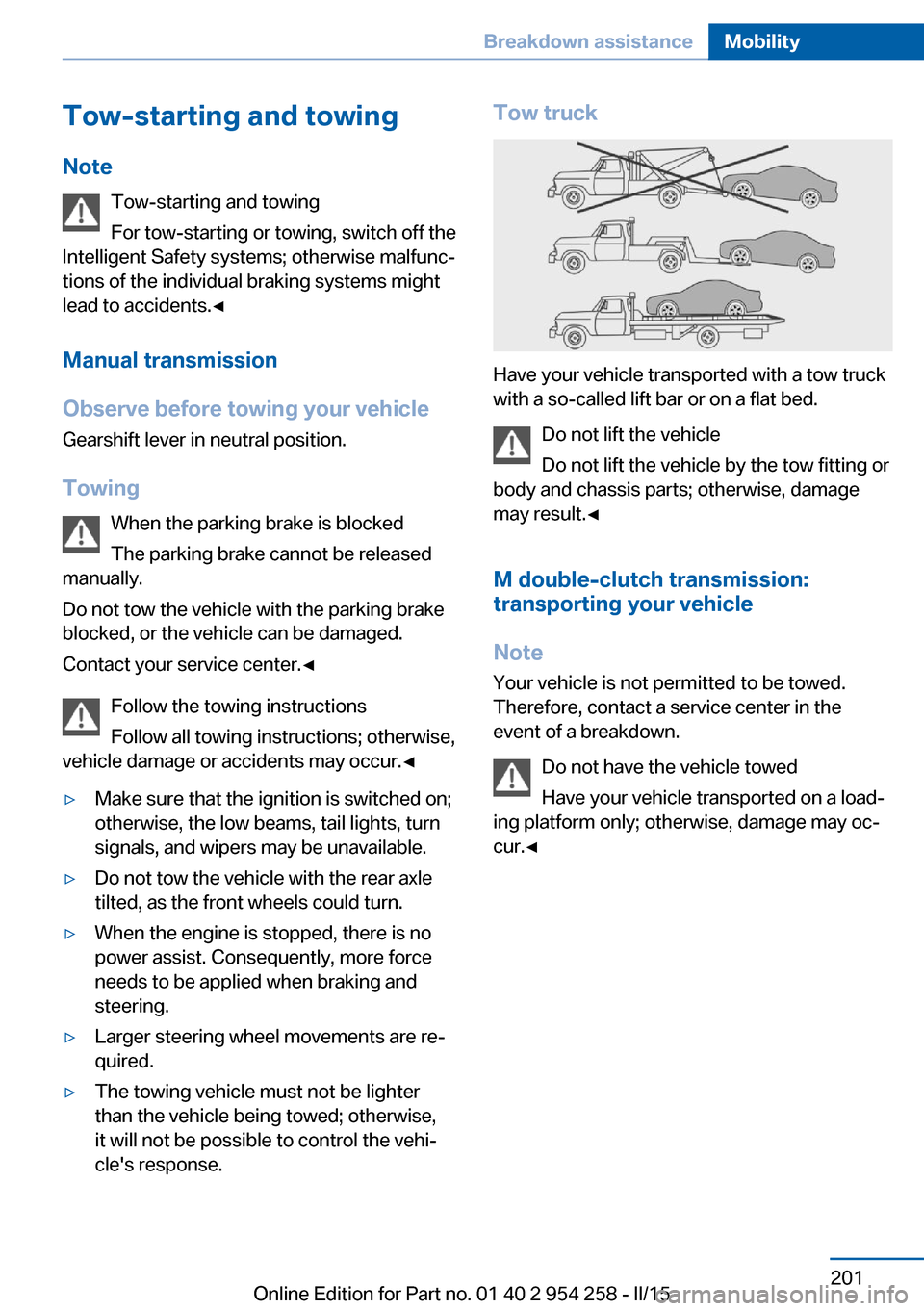
cle's response.Tow truck
Have your vehicle transported with a tow truck
with a so-called lift bar or on a flat bed.
Do not lift the vehicle
Do not lift the vehicle by the tow fitting or
body and chassis parts; otherwise, damage
may result.◀
M double-clutch transmission:
transporting your vehicle
Note Your vehicle is not permitted to be towed.
Therefore, contact a service center in the
event of a breakdown.
Do not have the vehicle towed
Have your vehicle transported on a load‐
ing platform only; otherwise, damage may oc‐
cur.◀
Seite 201Breakdown assistanceMobility201
Online Edition for Part no. 01 40 2 954 258 - II/15
Page 207 of 226
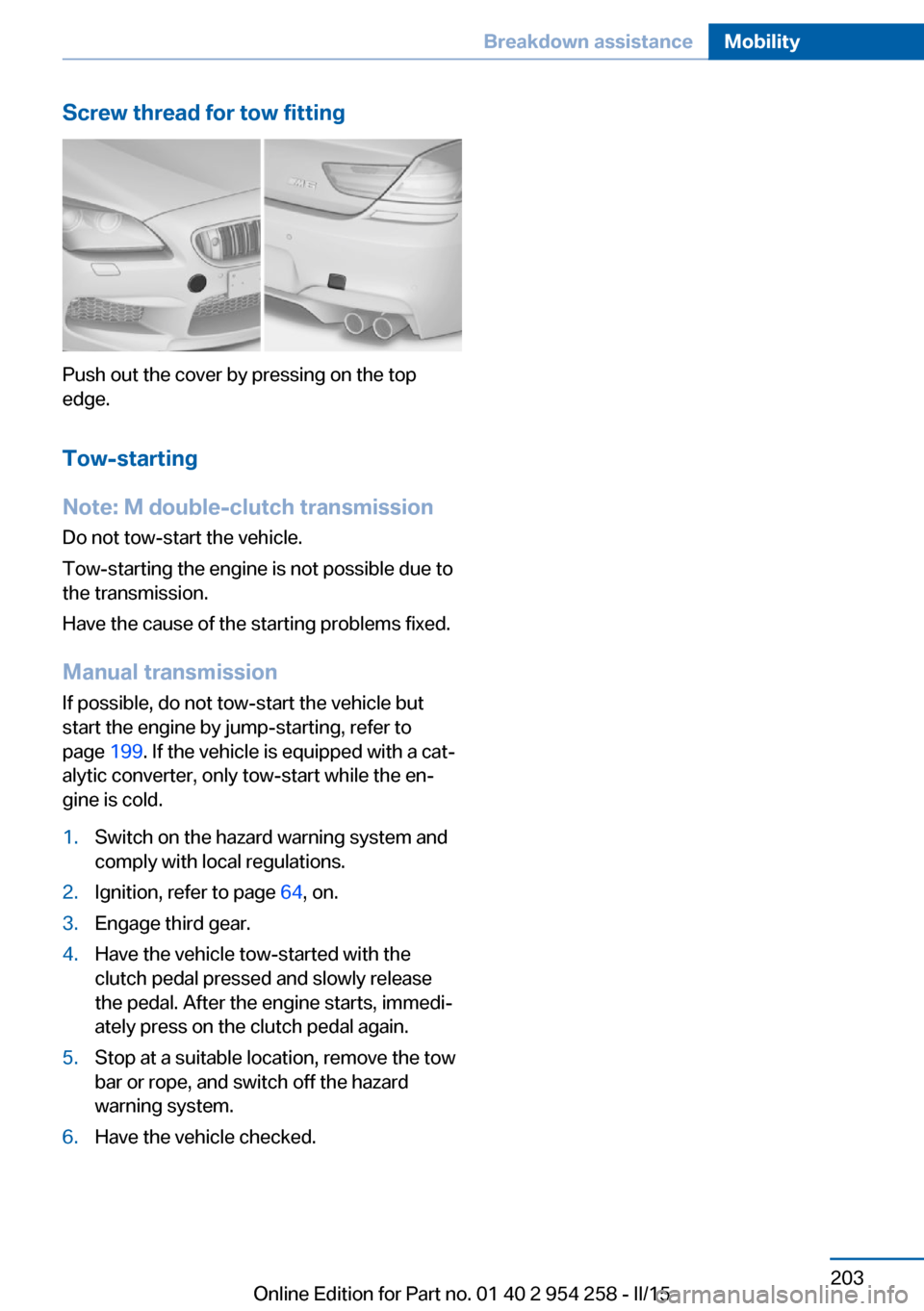
Screw thread for tow fitting
Push out the cover by pressing on the top
edge.
Tow-starting
Note: M double-clutch transmission
Do not tow-start the vehicle.
Tow-starting the engine is not possible due to
the transmission.
Have the cause of the starting problems fixed.
Manual transmission
If possible, do not tow-start the vehicle but
start the engine by jump-starting, refer to
page 199. If the vehicle is equipped with a cat‐
alytic converter, only tow-start while the en‐
gine is cold.
1.Switch on the hazard warning system and
comply with local regulations.2.Ignition, refer to page 64, on.3.Engage third gear.4.Have the vehicle tow-started with the
clutch pedal pressed and slowly release
the pedal. After the engine starts, immedi‐
ately press on the clutch pedal again.5.Stop at a suitable location, remove the tow
bar or rope, and switch off the hazard
warning system.6.Have the vehicle checked.Seite 203Breakdown assistanceMobility203
Online Edition for Part no. 01 40 2 954 258 - II/15
Page 209 of 226
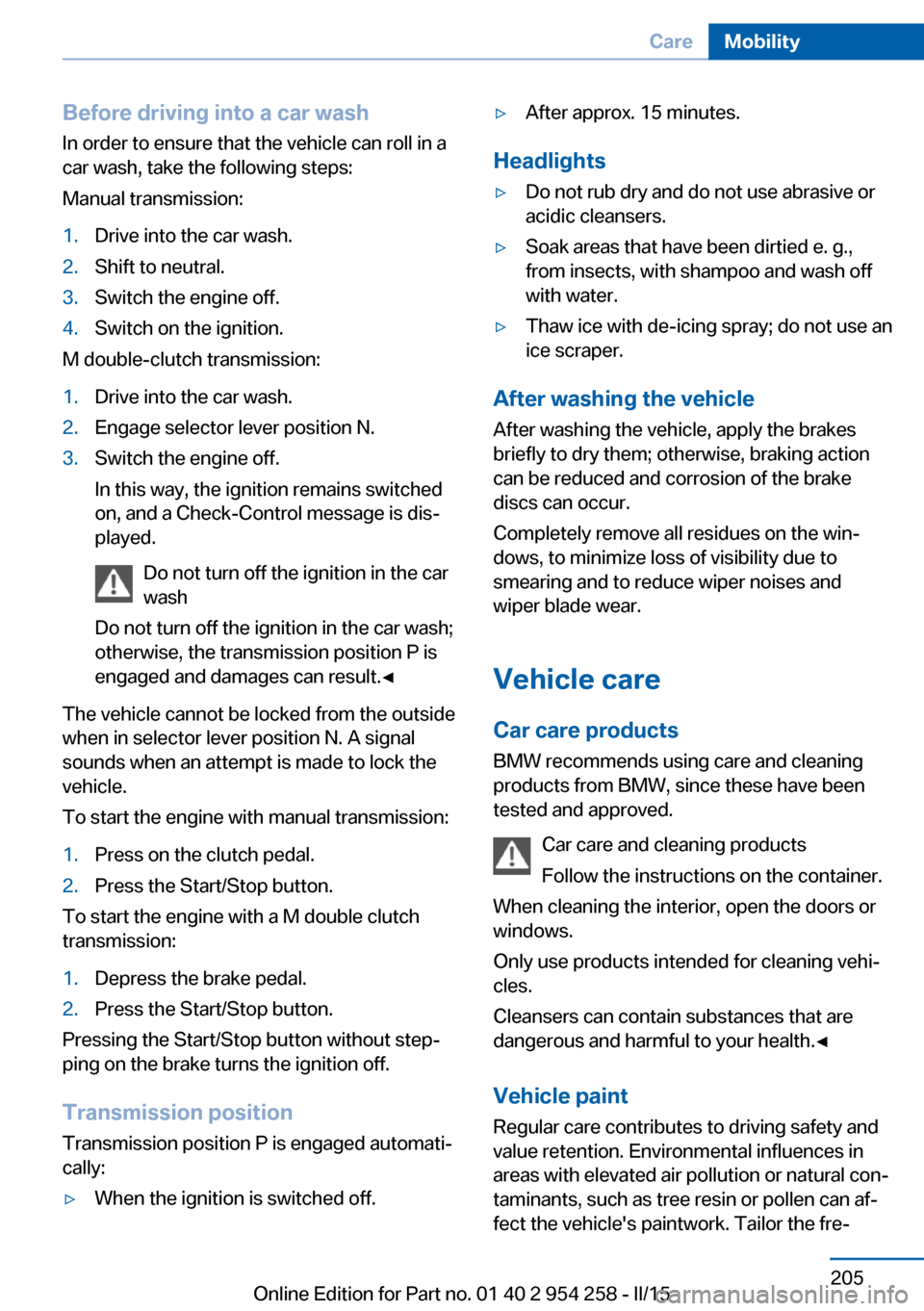
Before driving into a car wash
In order to ensure that the vehicle can roll in a
car wash, take the following steps:
Manual transmission:1.Drive into the car wash.2.Shift to neutral.3.Switch the engine off.4.Switch on the ignition.
M double-clutch transmission:
1.Drive into the car wash.2.Engage selector lever position N.3.Switch the engine off.
In this way, the ignition remains switched
on, and a Check-Control message is dis‐
played.
Do not turn off the ignition in the car
wash
Do not turn off the ignition in the car wash;
otherwise, the transmission position P is
engaged and damages can result.◀
The vehicle cannot be locked from the outside
when in selector lever position N. A signal
sounds when an attempt is made to lock the
vehicle.
To start the engine with manual transmission:
1.Press on the clutch pedal.2.Press the Start/Stop button.
To start the engine with a M double clutch
transmission:
1.Depress the brake pedal.2.Press the Start/Stop button.
Pressing the Start/Stop button without step‐
ping on the brake turns the ignition off.
Transmission position
Transmission position P is engaged automati‐
cally:
▷When the ignition is switched off.▷After approx. 15 minutes.
Headlights
▷Do not rub dry and do not use abrasive or
acidic cleansers.▷Soak areas that have been dirtied e. g.,
from insects, with shampoo and wash off
with water.▷Thaw ice with de-icing spray; do not use an
ice scraper.
After washing the vehicle
After washing the vehicle, apply the brakes
briefly to dry them; otherwise, braking action
can be reduced and corrosion of the brake
discs can occur.
Completely remove all residues on the win‐
dows, to minimize loss of visibility due to
smearing and to reduce wiper noises and
wiper blade wear.
Vehicle care
Car care products BMW recommends using care and cleaning
products from BMW, since these have been
tested and approved.
Car care and cleaning products
Follow the instructions on the container.
When cleaning the interior, open the doors or
windows.
Only use products intended for cleaning vehi‐
cles.
Cleansers can contain substances that are
dangerous and harmful to your health.◀
Vehicle paint
Regular care contributes to driving safety and
value retention. Environmental influences in
areas with elevated air pollution or natural con‐
taminants, such as tree resin or pollen can af‐
fect the vehicle's paintwork. Tailor the fre‐
Seite 205CareMobility205
Online Edition for Part no. 01 40 2 954 258 - II/15
Page 216 of 226
Everything from A to Z
IndexA ABS, Antilock Brake Sys‐ tem 123
Acceleration Assistant, refer to Launch Control 76
Accessories and parts 7
Activated-charcoal filter 143
Active Blind Spot Detec‐ tion 118
Active M differential 127
Active Protection 120
Active seat, front 52
Active seat ventilation, front 53
Adaptive brake lights, refer to Brake force display 120
Adaptive Light Control 97
Additives, oil 188
Adjusting, steering wheel 59
Adjustments, seats/head re‐ straints 50
After washing vehicle 205
Airbags 101
Airbags, indicator/warning light 102
Air circulation, refer to Recir‐ culated-air mode 142
Air, dehumidifying, refer to Cooling function 142
Air distribution, manual 141
Air flow, automatic climate control 141
Air outlets, see ventila‐ tion 145
Air pressure, tires 176
Alarm system 44
Alarm, unintentional 45
All around the center con‐ sole 16 All around the interior rear‐
view mirror 17
All around the steering wheel 14
All-season tires, refer to Win‐ ter tires 181
Alternating-code hand-held transmitter 148
Alternative oil types 189
Animal detection, see Night Vision 114
Antifreeze, washer fluid 72
Antilock Brake System, ABS 123
Anti-slip control, refer to DSC 125
Approved axle load 210
Approved engine oils, see Suitable engine oil
types 189
Armrest, refer to Front center armrest 155
Armrest, refer to Rear center armrest 155
Arrival time 91
Ashtray 149
Ashtray, rear 150
Assistance when driving off 123
Attentiveness assistant 120
AUTO intensity 141
Automatic car wash 204
Automatic Curb Monitor 57
Automatic deactivation, front- seat passenger airbags 103
Automatic headlight con‐ trol 97
Automatic locking 44
Automatic recirculated-air control 142 Automatic Soft Closing,
doors 40
AUTO program, automatic cli‐ mate control 141
AUTO program, intensity 141
Auto Start/Stop function 66
Average fuel consumption 90
Average speed 90
Axle loads, weights 210
B Backrest curvature, refer to Lumbar support 51
Backrest, seats 50
Backrest, width 52
Band-aids, refer to First aid kit 199
Bar for tow-starting/ towing 202
Battery replacement, vehicle battery 196
Battery replacement, vehicle remote control 35
Battery, vehicle 196
Belts, safety belts 53
Beverage holder, cu‐ pholder 156
Blinds, sun protection 47
BMW Assist, see user's manual for Navigation, En‐
tertainment and Communi‐
cation
BMW Driver’s Guide App 6
BMW Homepage 6
BMW Internet page 6
BMW maintenance sys‐ tem 191
BMW M technology 160
Bottle holder, refer to Cu‐ pholder 156 Seite 212ReferenceEverything from A to Z212
Online Edition for Part no. 01 40 2 954 258 - II/15
Page 217 of 226
Brake assistant 123
Brake discs, break-in 162
Brake force display 120
Brake lights, adaptive 120
Brake lights, brake force dis‐ play 120
Brake lights, bulb replace‐ ment 195
Brake pads, break-in 162
Braking, hints 164
Breakdown assistance 198
Break-in 162
Brightness of Control Dis‐ play 93
Bulb replacement, front 193
Bulb replacement, rear 195
Button, Start/Stop 64
Bypassing, refer to Jump- starting 199
C
California Proposition 65 Warning 7
Calling up mirror adjust‐ ment 44
Calling up seat adjust‐ ment 44
Calling up steering wheel ad‐ justment 44
Camera lenses, care 207
Camera, rearview cam‐ era 134
Camera, Side View 136
Camera, Top View 138
Can holder, refer to Cu‐ pholder 156
Car battery 196
Carbon ceramic brake M 160
Car care products 205
Care, displays 207
Care, vehicle 205
Cargo 166
Cargo area, enlarging 151
Cargo area, storage compart‐ ments 157 Cargo, securing 167
Cargo straps, securing cargo 167
Car key, refer to Remote con‐ trol 34
Carpet, care 207
Car wash 204
Catalytic converter, refer to Hot exhaust system 163
CBS Condition Based Serv‐ ice 191
CD/Multimedia, see user's manual for Navigation, En‐
tertainment and Communi‐
cation
Center console 16
Central locking system 40
Central screen, refer to Con‐ trol Display 18
Ceramic brake 160
Changes, technical, refer to Safety 7
Changing parts 193
Changing wheels 195
Changing wheels/tires 180
Chassis number, see vehicle identification number 9
Check Control 80
Checking the engine oil level electronically 187
Checking the oil level elec‐ tronically 187
Children, seating position 60
Children, transporting safely 60
Child restraint fixing sys‐ tem 60
Child restraint fixing system LATCH 62
Child restraint fixing systems, mounting 60
Child safety locks 63
Child seat, mounting 60
Child seats 60
Chrome parts, care 206
Cigarette lighter 149 Cleaning displays 207
Climate control 140
Climate control laminated tinted safety glass 163
Climate control wind‐ shield 163
Clock 84
Closing/opening via door lock 39
Closing/opening with remote control 37
Clothes hooks 156
Combination reel, refer to Turn signals 70
Combination switch, refer to Wiper system 70
Comfort Access 41
Compound brake 160
Compressor 181
Computer, refer to On-board computer 89
Condensation on win‐ dows 141
Condensation under the vehi‐ cle 165
Condition Based Service CBS 191
Confirmation signal 43
ConnectedDrive, see user's manual for Navigation, En‐
tertainment and Communi‐
cation
ConnectedDrive Services
Control Display 18
Control Display, settings 92
Controller 18
Control systems, driving sta‐ bility 123
Convenient opening with the remote control 37
Coolant 190
Coolant level 190
Coolant temperature 84
Cooling function 142
Cooling, maximum 142
Cooling system 190 Seite 213Everything from A to ZReference213
Online Edition for Part no. 01 40 2 954 258 - II/15
Page 218 of 226
Cornering light 97
Corrosion on brake discs 165
Cosmetic mirror 149
Courtesy lamps during un‐ locking 37
Courtesy lamps with the vehi‐ cle locked 38
Cruise control 129
Cruising range 85
Cupholder 156
Current fuel consumption 85
D
Damage, tires 179
Damping control 127
Damping control, dy‐ namic 127
Data, technical 210
Date 84
Daytime running lights 97
Defrosting, refer to Windows, defrosting 141
Dehumidifying, air 142
Deleting personal data 24
Deletion of personal data 24
Destination distance 90
Differential lock 127
Digital clock 84
Digital speed 84
Digital tachometer 84
Dimensions 210
Dimmable exterior mirrors 58
Dimmable interior rearview mirror 58
Direction indicator, refer to Turn signals 70
Display EfficientDynamics 86
Display, electronic, instru‐ ment cluster 79
Display in windshield 93
Display lighting, refer to In‐ strument lighting 99
Displays, cleaning 207
Disposal, coolant 190
Disposal, vehicle battery 196 Distance control, refer to
PDC 131
Distance to destination 90
Divided screen view, split screen 23
Door lock 39
Door lock, refer to Remote control 34
Doors, Automatic Soft Clos‐ ing 40
Double-clutch transmis‐ sion 73
Drivelogic 75
Drive mode 74
Drive-off assistant 123
Drive-off assistant, refer to DSC 125
Driver assistance, refer to In‐ telligent Safety 108
Driving Assistant, refer to In‐ telligent Safety 108
Driving Dynamics Control 77
Driving instructions, break- in 162
Driving notes, general 163
Driving on racetracks 161
Driving program, refer to Drivelogic 75
Driving stability control sys‐ tems 123
Driving tips 163
DSC Dynamic Stability Con‐ trol 125
Dynamic Damping Con‐ trol 127
Dynamic driving systems 86
Dynamic driving, system states 86
Dynamic Stability Control DSC 125
E EfficientDynamics 86
Electronic displays, instru‐ ment cluster 79 Electronic oil measure‐
ment 187
Electronic Stability Program ESP, refer to DSC 125
Emergency detection, remote control 35
Emergency release, fuel filler flap 172
Emergency Request 198
Emergency start function, en‐ gine start 35
Emergency unlocking, trunk lid 41
Energy Control 85
Energy recovery 85
Engine, automatic Start/Stop function 66
Engine, automatic switch- off 66
Engine compartment 185
Engine compartment, work‐ ing in 185
Engine coolant 190
Engine oil 187
Engine oil, adding 188
Engine oil additives 188
Engine oil change 189
Engine oil filler neck 188
Engine oil temperature 83
Engine oil types, alterna‐ tive 189
Engine oil types, ap‐ proved 189
Engine start during malfunc‐ tion 35
Engine start, jump-start‐ ing 199
Engine start, refer to Starting the engine 65
Engine stop 65
Engine temperature 83
Entering/exiting vehicle, as‐ sistance, steering wheel 59
Entering a car wash 204
Equipment, interior 147 Seite 214ReferenceEverything from A to Z214
Online Edition for Part no. 01 40 2 954 258 - II/15
Page 222 of 226
PPaint, vehicle 205
Park Distance Control PDC 131
Parked-car ventilation 145
Parked vehicle, condensa‐ tion 165
Parking aid, refer to PDC 131
Parking brake 68
Parking lights 96
Parts and accessories 7
Passenger side mirror, tilting downward 57
Pathway lines, rearview cam‐ era 135
PDC Park Distance Con‐ trol 131
Pedestrian detection, see Night Vision 114
Pedestrian warning with city braking function 111
Personal Profile 35
Personal Profile, exporting profiles 36
Pinch protection system, glass sunroof 48
Pinch protection system, win‐ dows 46
Plastic, care 206
Power failure 196
Power sunroof, glass 48
Power windows 45
Pressure, tire air pres‐ sure 176
Pressure warning FTM, tires 107
Preventing Auto Start Stop 67
Profile, refer to Personal Pro‐ file 35
Programmable memory but‐ tons, iDrive 23
Protective function, glass sunroof 48 Protective function, win‐
dows 46
Push-and-turn switch, refer to Controller 18
R Radiator fluid 190
Radio-operated key, refer to Remote control 34
Radio ready state 64
Radio, see user's manual for Navigation, Entertainment
and Communication
Rain sensor 71
Rear automatic climate con‐ trol 143
Rear center armrest 155
Rear lights 195
Rearview camera 133
Rearview mirror 57
Rear window defroster 142
Recirculated-air mode 142
Recommended fuel grade 174
Recommended tire brands 180
Refueling 172
Remaining range 85
Remote control/key 34
Remote control, malfunc‐ tion 38
Remote control, univer‐ sal 147
Replacement fuse 197
Replacing bulbs, see Lamp replacement 193
Replacing parts 193
Replacing wheels/tires 180
Reporting safety defects 9
RES button, see Cruise con‐ trol 129
Reserve warning, refer to Range 85
Reset, Tire Pressure Monitor TPM 105 Residual heat, automatic cli‐
mate control 143
Retaining straps, securing cargo 167
Retreaded tires 180
Reversing lamp, bulb replace‐ ment 195
Roadside parking lights 97
Roller sunblinds 47
RON recommended fuel grade 174
Rope for tow-starting/ towing 202
Rubber components, care 206
S
Safe braking 164
Safety 7
Safety belt reminder for driv‐ er's seat and front passen‐
ger seat 54
Safety belts 53
Safety belts, care 207
Safety Package, refer to Ac‐ tive Protection 120
Safety switch, windows 46
Safety systems, airbags 101
Saving fuel 168
Screen, refer to Control Dis‐ play 18
Screwdriver, see Onboard ve‐ hicle tool kit 193
Screw thread, refer to Screw thread for tow fitting, screw
thread for tow fitting 203
Sealant 181
Seat belts, refer to Safety belts 53
Seat heating, front 52
Seat heating, rear 53
Seating position for chil‐ dren 60
Seat, mirror, and steering wheel memory 56 Seite 218ReferenceEverything from A to Z218
Online Edition for Part no. 01 40 2 954 258 - II/15
Page 223 of 226
Seats 50
Seat ventilation, front 53
Selection list in instrument cluster 89
Selector lever 73
Selector lever position 73
Sensors, care 207
Sequential mode 74
Service and warranty 8
Service requirements, Condi‐ tion Based Service
CBS 191
Service requirements, dis‐ play 86
Services, ConnectedDrive
Servotronic 127
SET button, see Cruise con‐ trol 129
Settings, locking/unlock‐ ing 43
Settings, M Drive 123
Settings on Control Dis‐ play 92
Settings, storing for seat, mir‐ rors, steering wheel 56
Shift point indicator 95
Shoulder support 52
Side airbags 101
Side View 136
Signaling, horn 14
Signals when unlocking 43
Sitting safely 50
Size 210
Ski bag 152
Smallest turning radius 210
Smoker's package 149
Snow chains 184
Socket 150
Socket, OBD Onboard Diag‐ nostics 192
SOS button 198
Spare fuse 197
Speaker lighting 100
Specified engine oil types 189
Speed, average 90 Speed limit detection, on-
board computer 91
Speed limiter, display 88
Speed Limit Information 88
Speed warning 91
Split screen 23
Sport displays, torque dis‐ play, performance dis‐
play 91
Stability control systems 123
Standard view, head-up dis‐ play 94
Start/stop, automatic func‐ tion 66
Start/Stop button 64
Start function during malfunc‐ tion 35
Starting the engine 65
Status control display, tires 105
Status information, iDrive 22
Status of Owner's Manual 7
Steering assistance 127
Steering wheel, adjusting 58
Steering wheel heating 59
Steering wheel memory 56
Stopping the engine 65
Storage compartments 154
Storage compartments, loca‐ tions 154
Storage, tires 181
Storing the vehicle 207
Suitable engine oils 189
Summer tires, tread 179
Sun visor 149
Supplementary text mes‐ sage 83
Surround View 133
Switch-on times, parked-car ventilation 146
Switch, refer to Cockpit 14
Symbols 6
Symbols in the status field 22
SYNC program, automatic cli‐ mate control 142 System states of dynamic
driving 86
T
Tachometer 83
Tail and brake lights 195
Tail lights 195
Tail lights, bulb replace‐ ment 195
Technical changes, refer to Safety 7
Technical data 210
Technology, BMW M 160
Telephone, see user's manual for Navigation, Entertain‐
ment and Communication
Temperature, automatic cli‐ mate control 141
Temperature display for ex‐ ternal temperature 84
Temperature, engine oil 83
Terminal, starting aid 200
Text message, supplemen‐ tary 83
Theft alarm system, refer to Alarm system 44
Thermal camera, see Night Vision 114
Thigh support 51
Through-loading system 151
Tilt alarm sensor 45
Tilt glass roof 48
Tilt, seats 50
Time of arrival 91
Tire damage 179
Tire identification marks 177
Tire inflation pressure 176
Tire inflation pressure moni‐ tor, refer to FTM 107
Tire Pressure Monitor TPM 104
Tires, changing 180
Tire sealant 181
Tires, everything on wheels and tires 176 Seite 219Everything from A to ZReference219
Online Edition for Part no. 01 40 2 954 258 - II/15