key BMW SPORT WAGON 2001 Owner's Guide
[x] Cancel search | Manufacturer: BMW, Model Year: 2001, Model line: SPORT WAGON, Model: BMW SPORT WAGON 2001Pages: 238, PDF Size: 2.44 MB
Page 78 of 238
78n
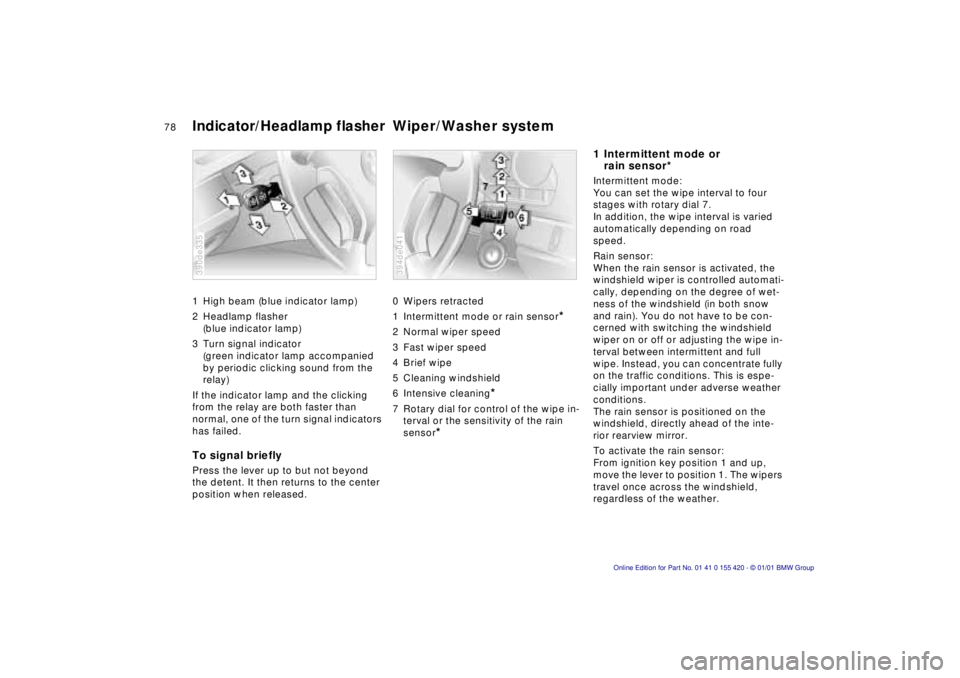
Indicator/Headlamp flasher Wiper/Washer system1 High beam (blue indicator lamp)
2 Headlamp flasher
(blue indicator lamp)
3 Turn signal indicator
(green indicator lamp accompanied
by periodic clicking sound from the
relay)
If the indicator lamp and the clicking
from the relay are both faster than
normal, one of the turn signal indicators
has failed.To signal brieflyPress the lever up to but not beyond
the detent. It then returns to the center
position when released.390de335
0 Wipers retracted
1 Intermittent mode or rain sensor
*
2 Normal wiper speed
3 Fast wiper speed
4 Brief wipe
5 Cleaning windshield
6 Intensive cleaning
*
7 Rotary dial for control of the wipe in-
terval or the sensitivity of the rain
sensor
*
394de041
1 Intermittent mode or
rain sensor*Intermittent mode:
You can set the wipe interval to four
stages with rotary dial 7.
In addition, the wipe interval is varied
automatically depending on road
speed.
Rain sensor:
When the rain sensor is activated, the
windshield wiper is controlled automati-
cally, depending on the degree of wet-
ness of the windshield (in both snow
and rain). You do not have to be con-
cerned with switching the windshield
wiper on or off or adjusting the wipe in-
terval between intermittent and full
wipe. Instead, you can concentrate fully
on the traffic conditions. This is espe-
cially important under adverse weather
conditions.
The rain sensor is positioned on the
windshield, directly ahead of the inte-
rior rearview mirror.
To activate the rain sensor:
From ignition key position 1 and up,
move the lever to position 1. The wipers
travel once across the windshield,
regardless of the weather.
Page 79 of 238
IndexDataTechnologyRepairsCar careControlsOverview
79n
Wiper/Washer systemYou can leave the lever permanently in
position 1. It is then only necessary to
activate the rain sensor from ignition
key position 1 and up. To do this
>turn rotary dial 7 briefly or
>use either the cleaning windshield 5
or the intensive cleaning 6.
To modify the sensitivity of the rain
sensor:
Turn rotary dial 7.
To deactivate the rain sensor:
Move lever to position 0.
Turn the rain sensor off in auto-
matic car washes. Failure to do so
could result in damage caused by un-
desired wiper activation.< 2 Normal wiper speedThe wipers automatically revert to inter-
mittent operation when the vehicle is
stationary (not on vehicles with rain
sensor
*).
3 Fast wiper speedThe wipers automatically revert to nor-
mal speed when the vehicle is station-
ary (not on vehicles with rain sensor
*).
5 Cleaning windshieldThe system sprays washer fluid against
the windshield and activates the wipers
for a brief period.
If you only pull the lever briefly, the sys-
tem sprays washer fluid onto the wind-
shield without activating the wipers.6 Intensive cleaning
*
As in setting 5. In addition, an intensive-
action washer fluid is first sprayed on
the windshield.
For changing the wiper blades, refer to
page 182.
Cleaning headlamps
*
If they are on, the headlamps will also
be cleaned every fifth time you activate
cleaning windshield (5) or intensive
cleaning (6).
Do not use the washers if there is
any danger that the fluid will
freeze on the windshield, otherwise vi-
sion could be obscured. For this rea-
son, use an antifreeze agent. Refer to
page 164.
Do not use the washers when the reser-
voir is empty, since this could cause
damage to the washer pump. Windshield washer jetsThe windshield washer jets are warmed
automatically when the ignition key is in
position 2.
Page 81 of 238
IndexDataTechnologyRepairsCar careControlsOverview
81n
Cruise controlYou can store and automatically main-
tain any desired vehicle speed above
approx. 20 mph (30 km/h).
Do not use cruise control on twis-
ting roads, when high traffic den-
sity prevents driving at a constant
speed, or when the road surface is slick
(snow, rain, ice) or loose (rocks or gra-
vel, sand).< 390de654
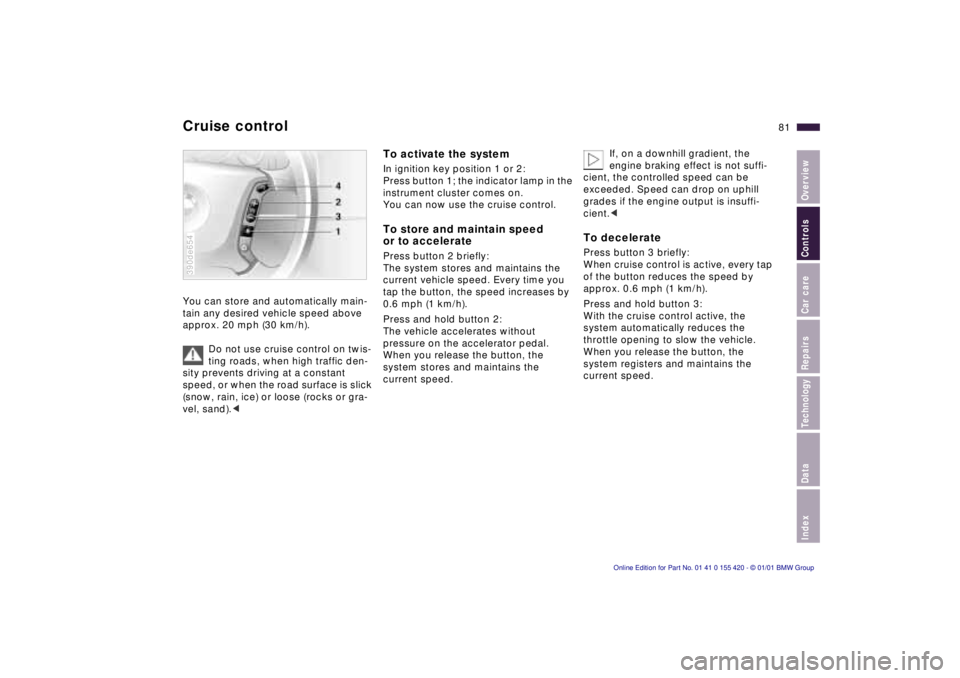
To activate the systemIn ignition key position 1 or 2:
Press button 1; the indicator lamp in the
instrument cluster comes on.
You can now use the cruise control.To store and maintain speed
or to accelerate Press button 2 briefly:
The system stores and maintains the
current vehicle speed. Every time you
tap the button, the speed increases by
0.6 mph (1 km/h).
Press and hold button 2:
The vehicle accelerates without
pressure on the accelerator pedal.
When you release the button, the
system stores and maintains the
current speed.If, on a downhill gradient, the
engine braking effect is not suffi-
cient, the controlled speed can be
exceeded. Speed can drop on uphill
grades if the engine output is insuffi-
cient.<
To deceleratePress button 3 briefly:
When cruise control is active, every tap
of the button reduces the speed by
approx. 0.6 mph (1 km/h).
Press and hold button 3:
With the cruise control active, the
system automatically reduces the
throttle opening to slow the vehicle.
When you release the button, the
system registers and maintains the
current speed.
Page 82 of 238

82n
Cruise controlTo interrupt the cruise controlWhen the system is activated, press
button 1. The indicator lamp stays on.
You can use the cruise control again as
desired.
In addition, the system is also automati-
cally deactivated in response to the
following conditions:
>When you apply pressure to the
brake pedal.
>When you apply pressure to the
clutch pedal, and when you move
the automatic transmission selector
lever from "Drive" to "Neutral".
>If you exceed or fall below the
programmed speed for an extended
period (by depressing the accelera-
tor, for example).
To resume the stored settingPress button 4:
The vehicle accelerates to and main-
tains the last speed stored. When you
turn the ignition key to position 0, the
stored speed is deleted from the sys-
tem's memory and the system is deacti-
vated.To deactivate the systemWhen the cruise control has been inter-
rupted, press button 1 again. The indi-
cator lamp goes off and the stored
speed is canceled.
Page 83 of 238
IndexDataTechnologyRepairsCar careControlsOverview
83n
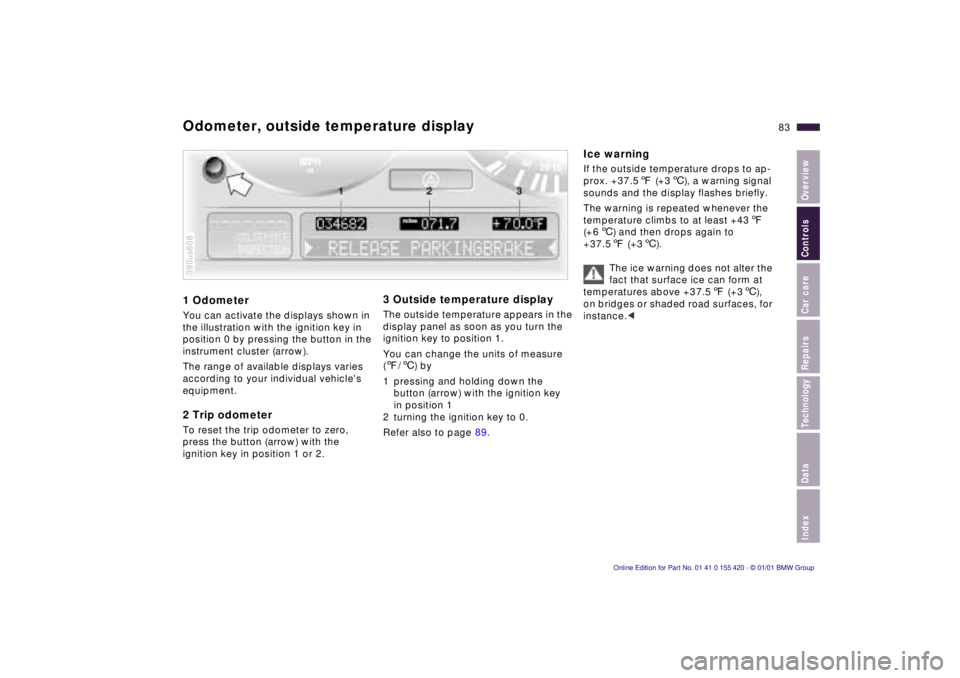
1 OdometerYou can activate the displays shown in
the illustration with the ignition key in
position 0 by pressing the button in the
instrument cluster (arrow).
The range of available displays varies
according to your individual vehicle's
equipment.2 Trip odometerTo reset the trip odometer to zero,
press the button (arrow) with the
ignition key in position 1 or 2.390us608
3 Outside temperature displayThe outside temperature appears in the
display panel as soon as you turn the
ignition key to position 1.
You can change the units of measure
(7/6) by
1 pressing and holding down the
button (arrow) with the ignition key
in position 1
2 turning the ignition key to 0.
Refer also to page 89.
Ice warningIf the outside temperature drops to ap-
prox. +37.57 (+36), a warning signal
sounds and the display flashes briefly.
The warning is repeated whenever the
temperature climbs to at least +437
(+66) and then drops again to
+37.57 (+36).
The ice warning does not alter the
fact that surface ice can form at
temperatures above +37.57 (+36),
on bridges or shaded road surfaces, for
instance.<
Odometer, outside temperature display
Page 86 of 238
86n
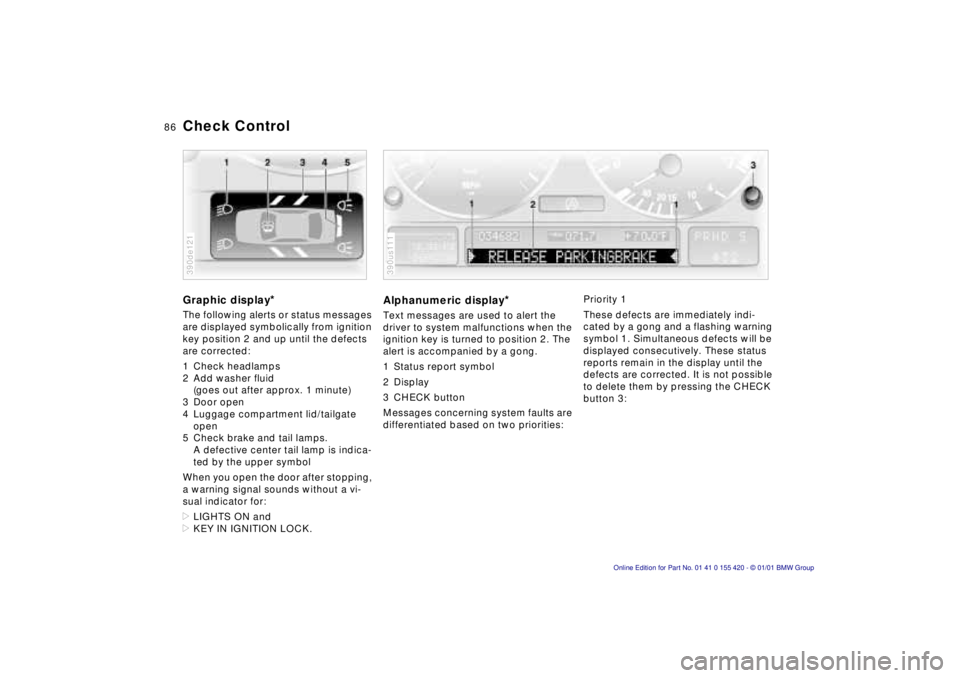
Check ControlGraphic display
*
The following alerts or status messages
are displayed symbolically from ignition
key position 2 and up until the defects
are corrected:
1 Check headlamps
2 Add washer fluid
(goes out after approx. 1 minute)
3 Door open
4 Luggage compartment lid/tailgate
open
5 Check brake and tail lamps.
A defective center tail lamp is indica-
ted by the upper symbol
When you open the door after stopping,
a warning signal sounds without a vi-
sual indicator for:
>LIGHTS ON and
>KEY IN IGNITION LOCK.390de121
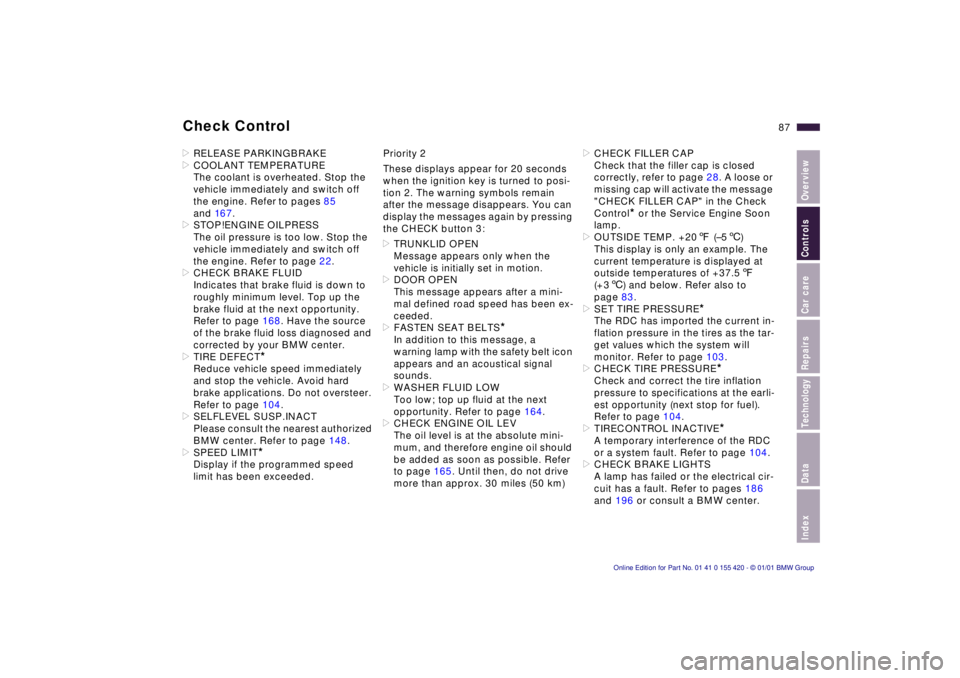
Alphanumeric display
*
Text messages are used to alert the
driver to system malfunctions when the
ignition key is turned to position 2. The
alert is accompanied by a gong.
1 Status report symbol
2 Display
3 CHECK button
Messages concerning system faults are
differentiated based on two priorities:390us111
Priority 1
These defects are immediately indi-
cated by a gong and a flashing warning
symbol 1. Simultaneous defects will be
displayed consecutively. These status
reports remain in the display until the
defects are corrected. It is not possible
to delete them by pressing the CHECK
button 3:
Page 87 of 238
IndexDataTechnologyRepairsCar careControlsOverview
87n
Check Control>RELEASE PARKINGBRAKE
>COOLANT TEMPERATURE
The coolant is overheated. Stop the
vehicle immediately and switch off
the engine. Refer to pages 85
and 16 7.
>STOP!ENGINE OILPRESS
The oil pressure is too low. Stop the
vehicle immediately and switch off
the engine. Refer to page 22.
>CHECK BRAKE FLUID
Indicates that brake fluid is down to
roughly minimum level. Top up the
brake fluid at the next opportunity.
Refer to page 168. Have the source
of the brake fluid loss diagnosed and
corrected by your BMW center.
>TIRE DEFECT
*
Reduce vehicle speed immediately
and stop the vehicle. Avoid hard
brake applications. Do not oversteer.
Refer to page 104.
>SELFLEVEL SUSP.INACT
Please consult the nearest authorized
BMW center. Refer to page 148.
>SPEED LIMIT
*
Display if the programmed speed
limit has been exceeded.Priority 2
These displays appear for 20 seconds
when the ignition key is turned to posi-
tion 2. The warning symbols remain
after the message disappears. You can
display the messages again by pressing
the CHECK button 3:
>TRUNKLID OPEN
Message appears only when the
vehicle is initially set in motion.
>DOOR OPEN
This message appears after a mini-
mal defined road speed has been ex-
ceeded.
>FASTEN SEAT BELTS
*
In addition to this message, a
warning lamp with the safety belt icon
appears and an acoustical signal
sounds.
>WASHER FLUID LOW
Too low; top up fluid at the next
opportunity. Refer to page 164.
>CHECK ENGINE OIL LEV
The oil level is at the absolute mini-
mum, and therefore engine oil should
be added as soon as possible. Refer
to page 165. Until then, do not drive
more than approx. 30 miles (50 km)>CHECK FILLER CAP
Check that the filler cap is closed
correctly, refer to page 28. A loose or
missing cap will activate the message
"CHECK FILLER CAP" in the Check
Control
* or the Service Engine Soon
lamp.
>OUTSIDE TEMP. +207 (–56)
This display is only an example. The
current temperature is displayed at
outside temperatures of +37.57
(+36) and below. Refer also to
page 83.
>SET TIRE PRESSURE
*
The RDC has imported the current in-
flation pressure in the tires as the tar-
get values which the system will
monitor. Refer to page 103.
>CHECK TIRE PRESSURE
*
Check and correct the tire inflation
pressure to specifications at the earli-
est opportunity (next stop for fuel).
Refer to page 104.
>TIRECONTROL INACTIVE
*
A temporary interference of the RDC
or a system fault. Refer to page 104.
>CHECK BRAKE LIGHTS
A lamp has failed or the electrical cir-
cuit has a fault. Refer to pages 186
and 196 or consult a BMW center.
Page 88 of 238
88n
Check Control>CHECK LOWBEAM LIGHTS
CHECK SIDE LIGHTS
CHECK REAR LIGHTS
CHECK FRONT FOGLAMPS
CHECK LICPLATE LIGHT
CHECK HIGHBEAM LIGHTS
CHECK BACK UP LIGHTS
Defective bulb or circuit. Refer to
pages 183 and 196 or consult your
BMW center.
>TRANS. FAILSAFE PROG
Please consult the nearest BMW
center. Refer to pages 74, 77.
>CHECK BRAKE LININGS
Have the brake pads inspected by
your BMW center. Refer to page 146.
>CHECK COOLANT LEVEL
Coolant too low, top up at the next
opportunity. Refer to page 167.
>ENGINE FAILSAFE PROG
*
The electronics allow for continued
driving with reduced engine output or
rpms.
Please have the system inspected by
your BMW center.
Displays after completion of tripAll of the malfunctions registered during
the trip appear consecutively when the
key is turned to position 0.
One of the following displays may ap-
pear:
>LIGHTS ON
>KEY IN IGNITION LOCK
>CHECK ENGINE OIL LEV
Add engine oil at the next opportunity
(next stop for fuel). Refer to page 16 5.
Display appears when you open the
driver's door after parking the vehicle.
A supplementary gong is also heard.
Status reports remain available for a
period of approx. three minutes after
the display goes out and the key is re-
moved from the ignition. Press the
CHECK button. If there were multiple
reports, press the CHECK button re-
peatedly to view them all in sequence.
To check the Check ControlPress the CHECK button 3 with the
ignition key in position 2:
CHECK CONTROL OK appears in the
display.
No malfunctions are present in the
monitored systems.
You can have the Check Control
messages displayed in a different
language.<
Page 89 of 238
IndexDataTechnologyRepairsCar careControlsOverview
89n
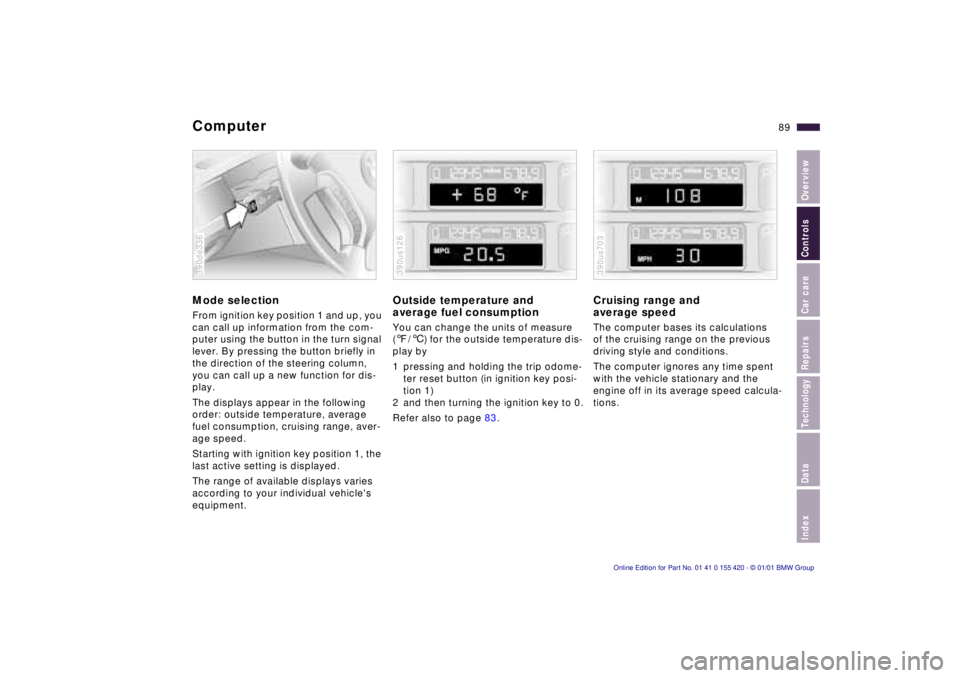
ComputerMode selectionFrom ignition key position 1 and up, you
can call up information from the com-
puter using the button in the turn signal
lever. By pressing the button briefly in
the direction of the steering column,
you can call up a new function for dis-
play.
The displays appear in the following
order: outside temperature, average
fuel consumption, cruising range, aver-
age speed.
Starting with ignition key position 1, the
last active setting is displayed.
The range of available displays varies
according to your individual vehicle's
equipment.390de336
Outside temperature and
average fuel consumptionYou can change the units of measure
(7/6) for the outside temperature dis-
play by
1 pressing and holding the trip odome-
ter reset button (in ignition key posi-
tion 1)
2 and then turning the ignition key to 0.
Refer also to page 83.390us126
Cruising range and
average speed The computer bases its calculations
of the cruising range on the previous
driving style and conditions.
The computer ignores any time spent
with the vehicle stationary and the
engine off in its average speed calcula-
tions.390us703
Page 93 of 238
IndexDataTechnologyRepairsCar careControlsOverview
93n
Digital clock in the MID
*
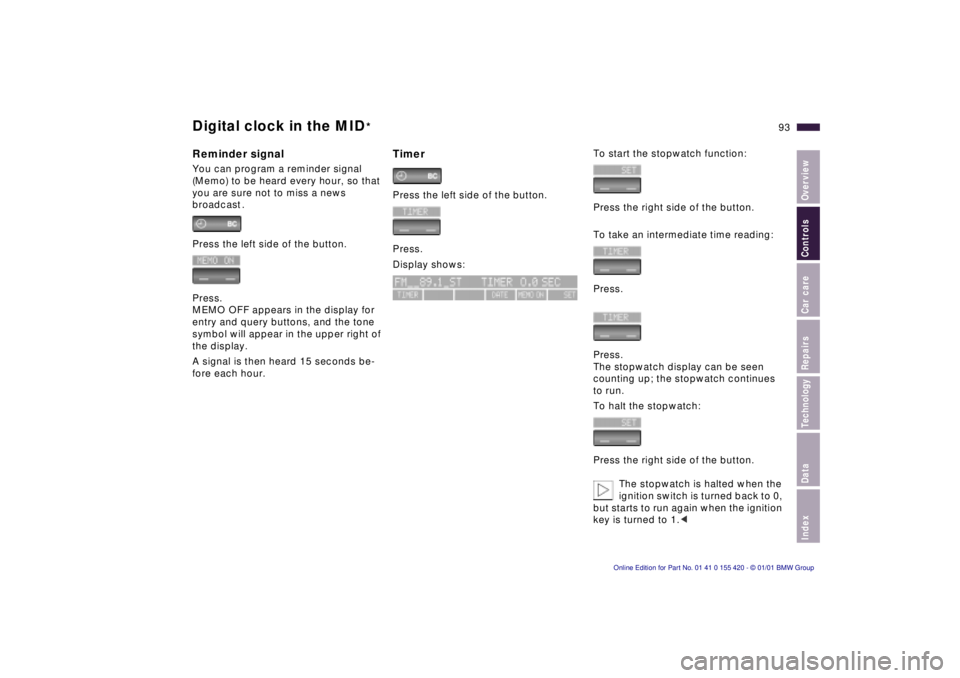
Reminder signalYou can program a reminder signal
(Memo) to be heard every hour, so that
you are sure not to miss a news
broadcast .
Press the left side of the button.
Press.
MEMO OFF appears in the display for
entry and query buttons, and the tone
symbol will appear in the upper right of
the display.
A signal is then heard 15 seconds be-
fore each hour.
TimerPress the left side of the button.
Press.
Display shows:
To start the stopwatch function:
Press the right side of the button.
To take an intermediate time reading:
Press.
Press.
The stopwatch display can be seen
counting up; the stopwatch continues
to run.
To halt the stopwatch:
Press the right side of the button.
The stopwatch is halted when the
ignition switch is turned back to 0,
but starts to run again when the ignition
key is turned to 1.<