Symbols BMW X1 2014 E84 User Guide
[x] Cancel search | Manufacturer: BMW, Model Year: 2014, Model line: X1, Model: BMW X1 2014 E84Pages: 297, PDF Size: 7 MB
Page 176 of 297
If there is no message, the system changes to
the My Favorites category. All favorites cur‐
rently being broadcast can be selected from a
list.
Managing the favorites
Activating/deactivating the favorites
Favorites can be activated and deactivated
globally and individually.1."Satellite radio"2. "Manage favorites"3.Select "Activate alert" or the desired favor‐
ites.
The setting is stored for the remote control
currently in use.
Deleting favorites
1."Satellite radio"2. "Manage favorites"3.Highlight the desired favorite.4.Open "Options".5."Delete entry"
Traffic Jump Traffic and weather information for a selected
region is broadcast every few minutes.
Selecting a region
1."Radio"2."Satellite radio"3.Open "Options".4."Set jump"5.Select the desired region.
The region is stored for the remote control cur‐
rently in use.
Activating/deactivating the jump
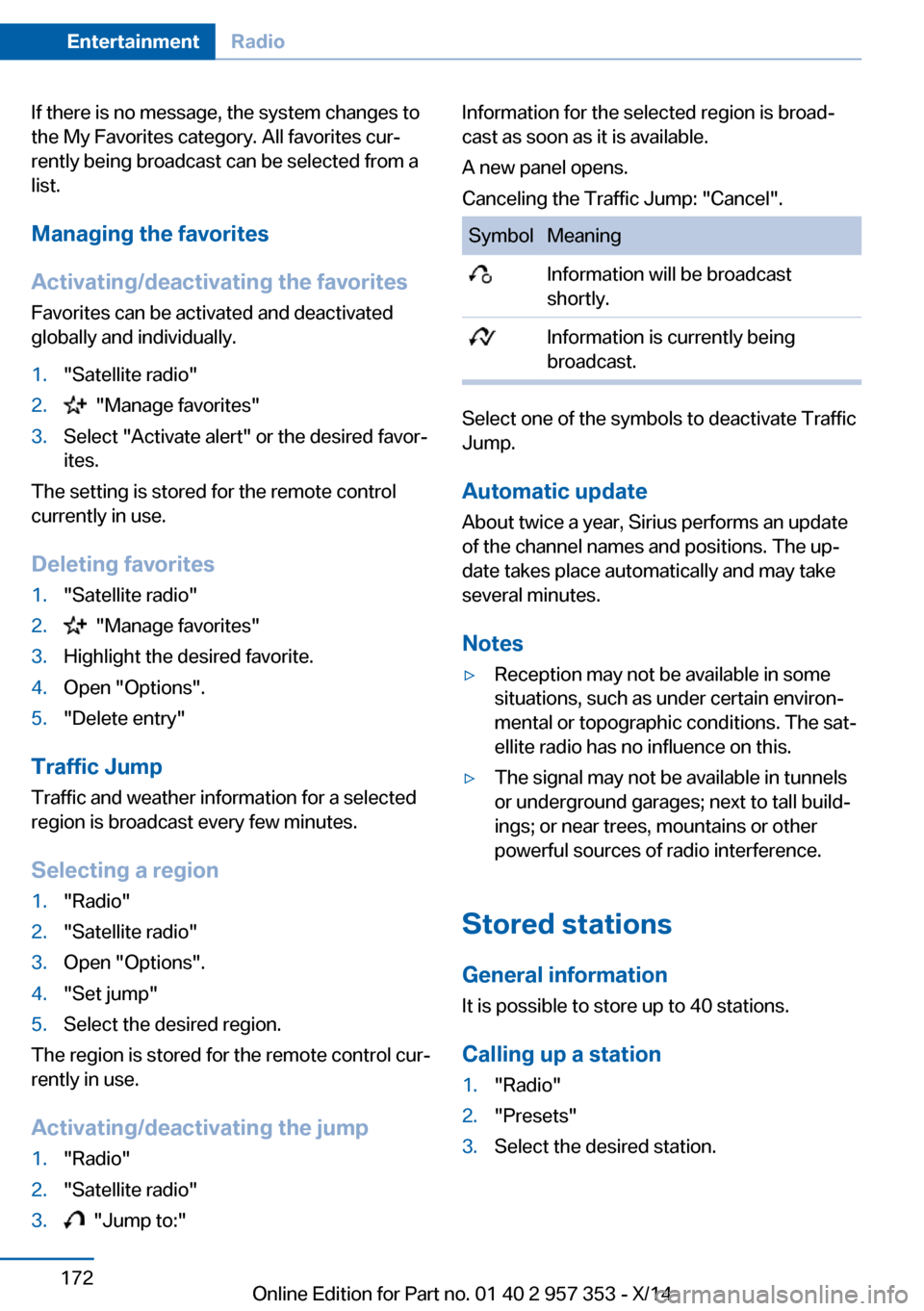
1."Radio"2."Satellite radio"3. "Jump to:"Information for the selected region is broad‐
cast as soon as it is available.
A new panel opens.
Canceling the Traffic Jump: "Cancel".SymbolMeaning Information will be broadcast
shortly. Information is currently being
broadcast.
Select one of the symbols to deactivate Traffic
Jump.
Automatic update
About twice a year, Sirius performs an update
of the channel names and positions. The up‐
date takes place automatically and may take
several minutes.
Notes
▷Reception may not be available in some
situations, such as under certain environ‐
mental or topographic conditions. The sat‐
ellite radio has no influence on this.▷The signal may not be available in tunnels
or underground garages; next to tall build‐
ings; or near trees, mountains or other
powerful sources of radio interference.
Stored stations
General information It is possible to store up to 40 stations.
Calling up a station
1."Radio"2."Presets"3.Select the desired station.Seite 172EntertainmentRadio172
Online Edition for Part no. 01 40 2 957 353 - X/14
Page 202 of 297
ceived calls are displayed on the Control Dis‐
play.
Audio source
A mobile phone can be used as an audio
source.
Pairing and connecting a mobile
phone
Pairing the mobile phone
To avoid becoming distracted and pos‐
ing an unnecessary hazard both to your own
vehicle's occupants and to other road users,
only pair the mobile phone while the vehicle is
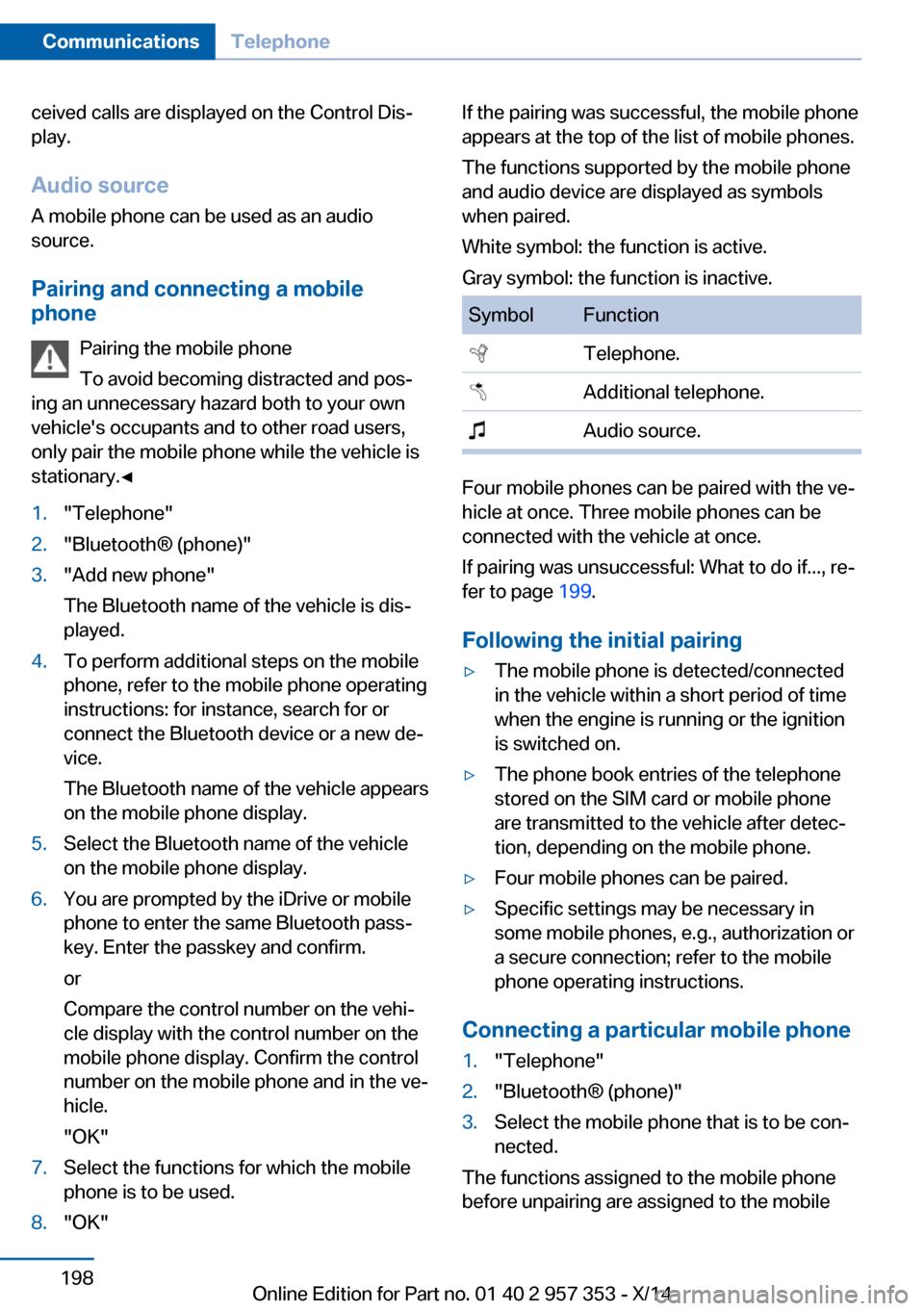
stationary.◀1."Telephone"2."Bluetooth® (phone)"3."Add new phone"
The Bluetooth name of the vehicle is dis‐
played.4.To perform additional steps on the mobile
phone, refer to the mobile phone operating
instructions: for instance, search for or
connect the Bluetooth device or a new de‐
vice.
The Bluetooth name of the vehicle appears
on the mobile phone display.5.Select the Bluetooth name of the vehicle
on the mobile phone display.6.You are prompted by the iDrive or mobile
phone to enter the same Bluetooth pass‐
key. Enter the passkey and confirm.
or
Compare the control number on the vehi‐
cle display with the control number on the
mobile phone display. Confirm the control
number on the mobile phone and in the ve‐
hicle.
"OK"7.Select the functions for which the mobile
phone is to be used.8."OK"If the pairing was successful, the mobile phone
appears at the top of the list of mobile phones.
The functions supported by the mobile phone
and audio device are displayed as symbols
when paired.
White symbol: the function is active.
Gray symbol: the function is inactive.SymbolFunction Telephone. Additional telephone. Audio source.
Four mobile phones can be paired with the ve‐
hicle at once. Three mobile phones can be
connected with the vehicle at once.
If pairing was unsuccessful: What to do if..., re‐
fer to page 199.
Following the initial pairing
▷The mobile phone is detected/connected
in the vehicle within a short period of time
when the engine is running or the ignition
is switched on.▷The phone book entries of the telephone
stored on the SIM card or mobile phone
are transmitted to the vehicle after detec‐
tion, depending on the mobile phone.▷Four mobile phones can be paired.▷Specific settings may be necessary in
some mobile phones, e.g., authorization or
a secure connection; refer to the mobile
phone operating instructions.
Connecting a particular mobile phone
1."Telephone"2."Bluetooth® (phone)"3.Select the mobile phone that is to be con‐
nected.
The functions assigned to the mobile phone
before unpairing are assigned to the mobile
Seite 198CommunicationsTelephone198
Online Edition for Part no. 01 40 2 957 353 - X/14
Page 212 of 297
ContactsNote
Equipment version with the mobile phone
preparation package.
At a glance
Contacts can be created and edited. The con‐
tacts from the mobile phone are displayed as
well if this function is supported by the mobile
phone. The addresses can be adopted as des‐
tinations for navigation and the phone num‐
bers can be dialed.
Displaying contacts
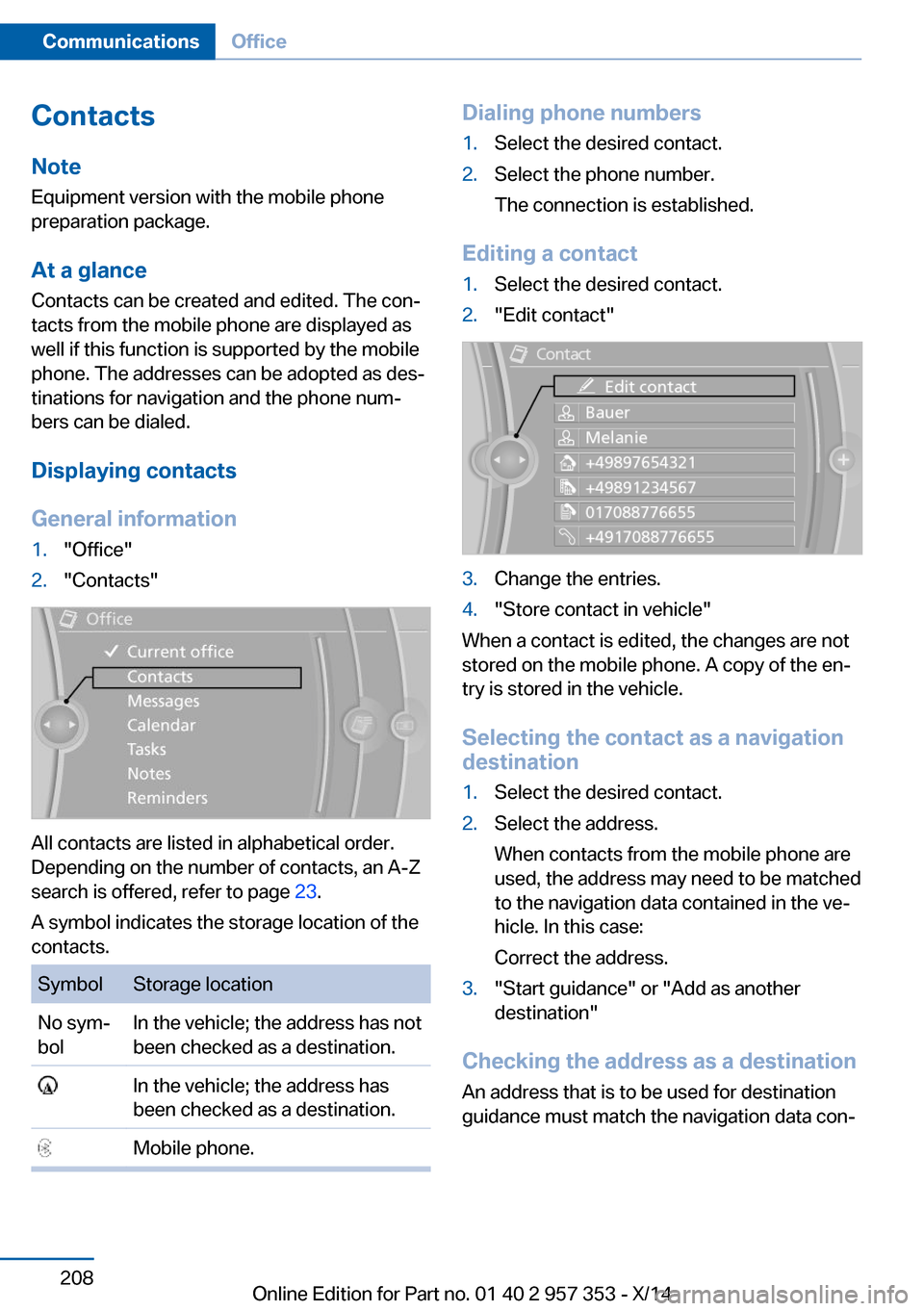
General information1."Office"2."Contacts"
All contacts are listed in alphabetical order.
Depending on the number of contacts, an A-Z
search is offered, refer to page 23.
A symbol indicates the storage location of the
contacts.
SymbolStorage locationNo sym‐
bolIn the vehicle; the address has not
been checked as a destination. In the vehicle; the address has
been checked as a destination. Mobile phone.Dialing phone numbers1.Select the desired contact.2.Select the phone number.
The connection is established.
Editing a contact
1.Select the desired contact.2."Edit contact"3.Change the entries.4."Store contact in vehicle"
When a contact is edited, the changes are not
stored on the mobile phone. A copy of the en‐
try is stored in the vehicle.
Selecting the contact as a navigation
destination
1.Select the desired contact.2.Select the address.
When contacts from the mobile phone are
used, the address may need to be matched
to the navigation data contained in the ve‐
hicle. In this case:
Correct the address.3."Start guidance" or "Add as another
destination"
Checking the address as a destination
An address that is to be used for destination
guidance must match the navigation data con‐
Seite 208CommunicationsOffice208
Online Edition for Part no. 01 40 2 957 353 - X/14
Page 221 of 297
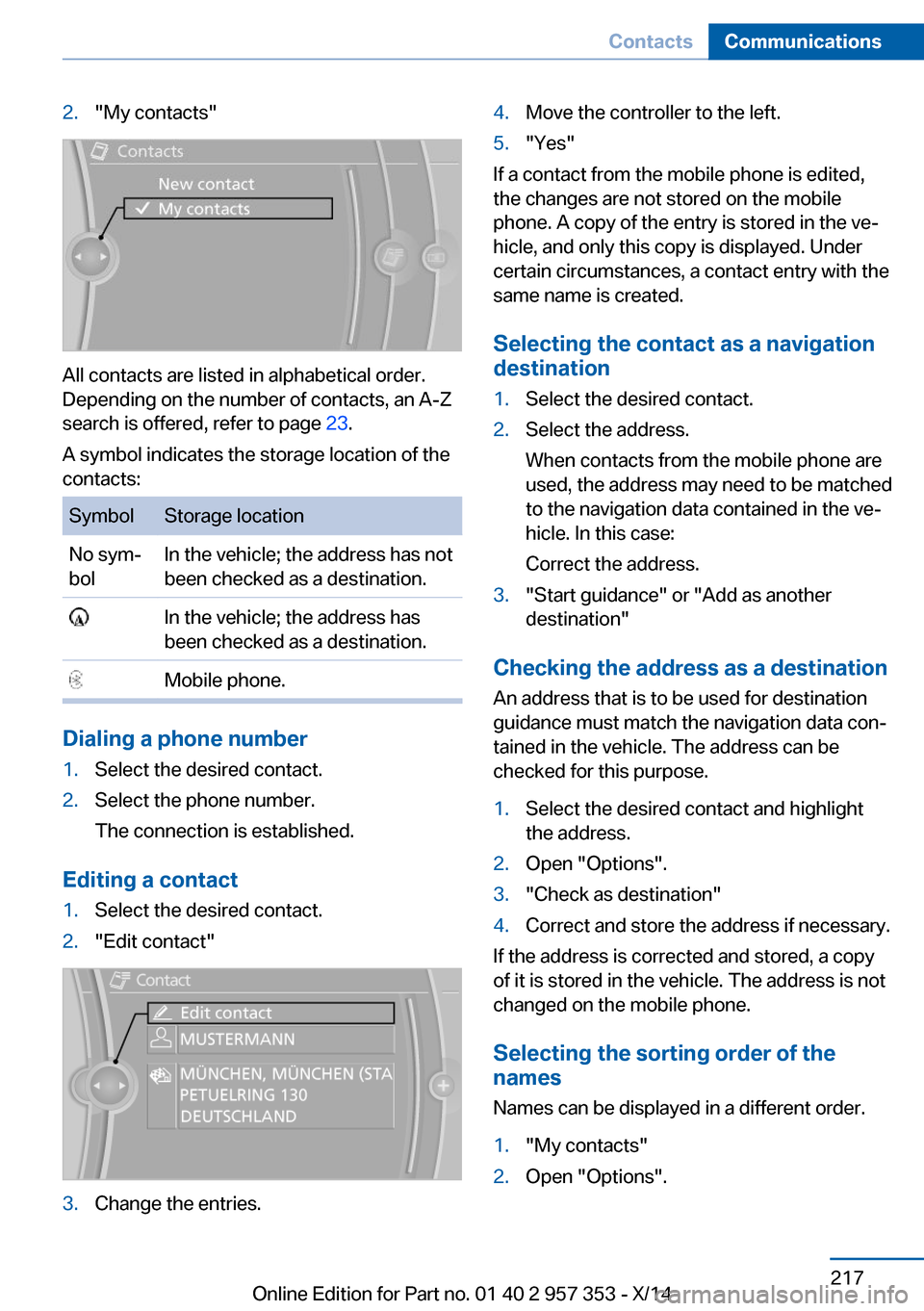
2."My contacts"
All contacts are listed in alphabetical order.
Depending on the number of contacts, an A-Z
search is offered, refer to page 23.
A symbol indicates the storage location of the
contacts:
SymbolStorage locationNo sym‐
bolIn the vehicle; the address has not
been checked as a destination. In the vehicle; the address has
been checked as a destination. Mobile phone.
Dialing a phone number
1.Select the desired contact.2.Select the phone number.
The connection is established.
Editing a contact
1.Select the desired contact.2."Edit contact"3.Change the entries.4.Move the controller to the left.5."Yes"
If a contact from the mobile phone is edited,
the changes are not stored on the mobile
phone. A copy of the entry is stored in the ve‐
hicle, and only this copy is displayed. Under
certain circumstances, a contact entry with the
same name is created.
Selecting the contact as a navigation
destination
1.Select the desired contact.2.Select the address.
When contacts from the mobile phone are
used, the address may need to be matched
to the navigation data contained in the ve‐
hicle. In this case:
Correct the address.3."Start guidance" or "Add as another
destination"
Checking the address as a destination
An address that is to be used for destination
guidance must match the navigation data con‐
tained in the vehicle. The address can be
checked for this purpose.
1.Select the desired contact and highlight
the address.2.Open "Options".3."Check as destination"4.Correct and store the address if necessary.
If the address is corrected and stored, a copy
of it is stored in the vehicle. The address is not
changed on the mobile phone.
Selecting the sorting order of the
names
Names can be displayed in a different order.
1."My contacts"2.Open "Options".Seite 217ContactsCommunications217
Online Edition for Part no. 01 40 2 957 353 - X/14
Page 293 of 297
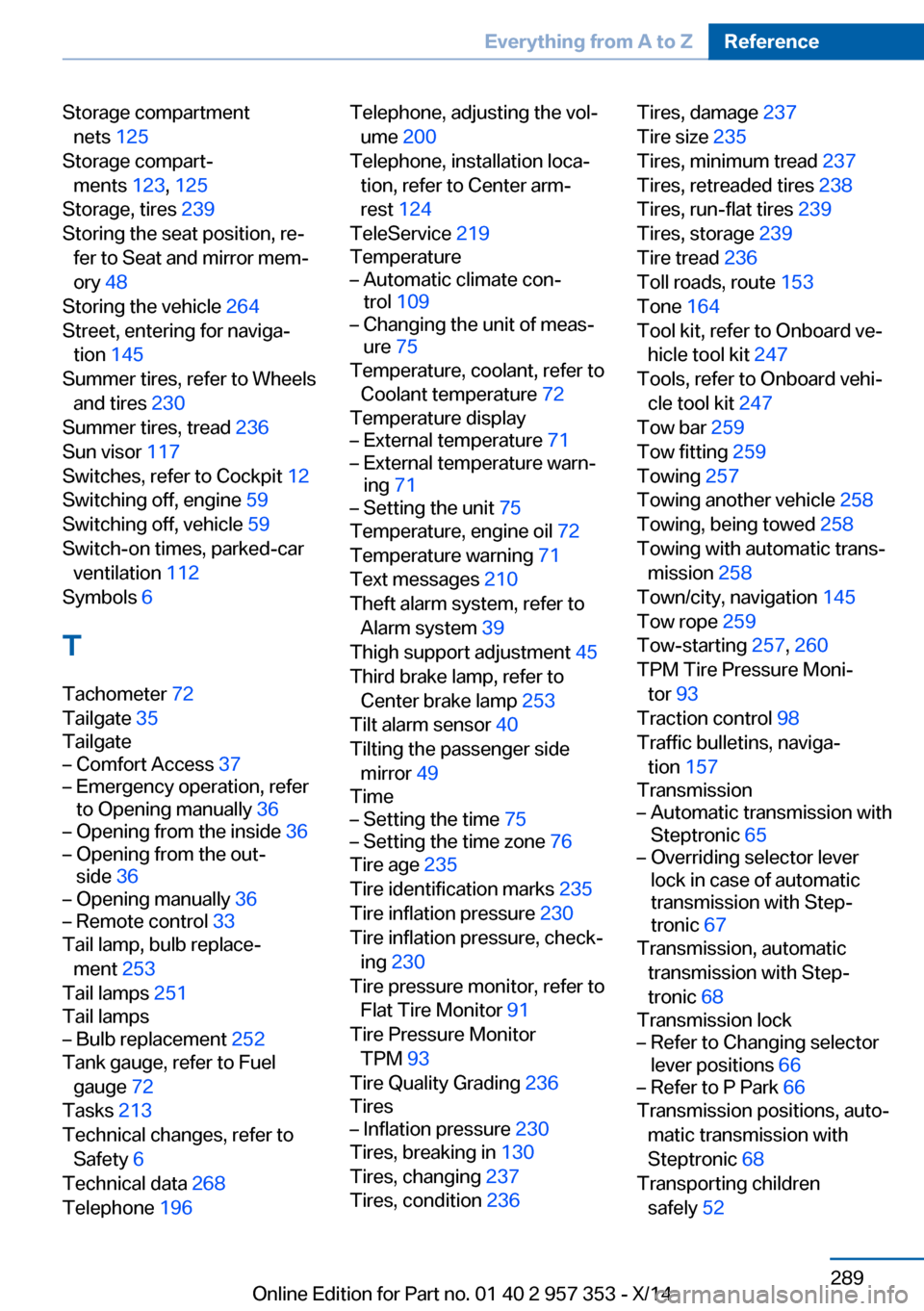
Storage compartmentnets 125
Storage compart‐ ments 123, 125
Storage, tires 239
Storing the seat position, re‐ fer to Seat and mirror mem‐
ory 48
Storing the vehicle 264
Street, entering for naviga‐ tion 145
Summer tires, refer to Wheels and tires 230
Summer tires, tread 236
Sun visor 117
Switches, refer to Cockpit 12
Switching off, engine 59
Switching off, vehicle 59
Switch-on times, parked-car ventilation 112
Symbols 6
T Tachometer 72
Tailgate 35
Tailgate– Comfort Access 37– Emergency operation, refer
to Opening manually 36– Opening from the inside 36– Opening from the out‐
side 36– Opening manually 36– Remote control 33
Tail lamp, bulb replace‐
ment 253
Tail lamps 251
Tail lamps
– Bulb replacement 252
Tank gauge, refer to Fuel
gauge 72
Tasks 213
Technical changes, refer to Safety 6
Technical data 268
Telephone 196
Telephone, adjusting the vol‐
ume 200
Telephone, installation loca‐ tion, refer to Center arm‐
rest 124
TeleService 219
Temperature– Automatic climate con‐
trol 109– Changing the unit of meas‐
ure 75
Temperature, coolant, refer to
Coolant temperature 72
Temperature display
– External temperature 71– External temperature warn‐
ing 71– Setting the unit 75
Temperature, engine oil 72
Temperature warning 71
Text messages 210
Theft alarm system, refer to Alarm system 39
Thigh support adjustment 45
Third brake lamp, refer to
Center brake lamp 253
Tilt alarm sensor 40
Tilting the passenger side mirror 49
Time
– Setting the time 75– Setting the time zone 76
Tire age 235
Tire identification marks 235
Tire inflation pressure 230
Tire inflation pressure, check‐ ing 230
Tire pressure monitor, refer to Flat Tire Monitor 91
Tire Pressure Monitor TPM 93
Tire Quality Grading 236
Tires
– Inflation pressure 230
Tires, breaking in 130
Tires, changing 237
Tires, condition 236
Tires, damage 237
Tire size 235
Tires, minimum tread 237
Tires, retreaded tires 238
Tires, run-flat tires 239
Tires, storage 239
Tire tread 236
Toll roads, route 153
Tone 164
Tool kit, refer to Onboard ve‐ hicle tool kit 247
Tools, refer to Onboard vehi‐ cle tool kit 247
Tow bar 259
Tow fitting 259
Towing 257
Towing another vehicle 258
Towing, being towed 258
Towing with automatic trans‐ mission 258
Town/city, navigation 145
Tow rope 259
Tow-starting 257, 260
TPM Tire Pressure Moni‐ tor 93
Traction control 98
Traffic bulletins, naviga‐ tion 157
Transmission– Automatic transmission with
Steptronic 65– Overriding selector lever
lock in case of automatic
transmission with Step‐
tronic 67
Transmission, automatic
transmission with Step‐
tronic 68
Transmission lock
– Refer to Changing selector
lever positions 66– Refer to P Park 66
Transmission positions, auto‐
matic transmission with
Steptronic 68
Transporting children safely 52
Seite 289Everything from A to ZReference289
Online Edition for Part no. 01 40 2 957 353 - X/14