lock BMW X1 2015 E84 Workshop Manual
[x] Cancel search | Manufacturer: BMW, Model Year: 2015, Model line: X1, Model: BMW X1 2015 E84Pages: 297, PDF Size: 7.01 MB
Page 256 of 297
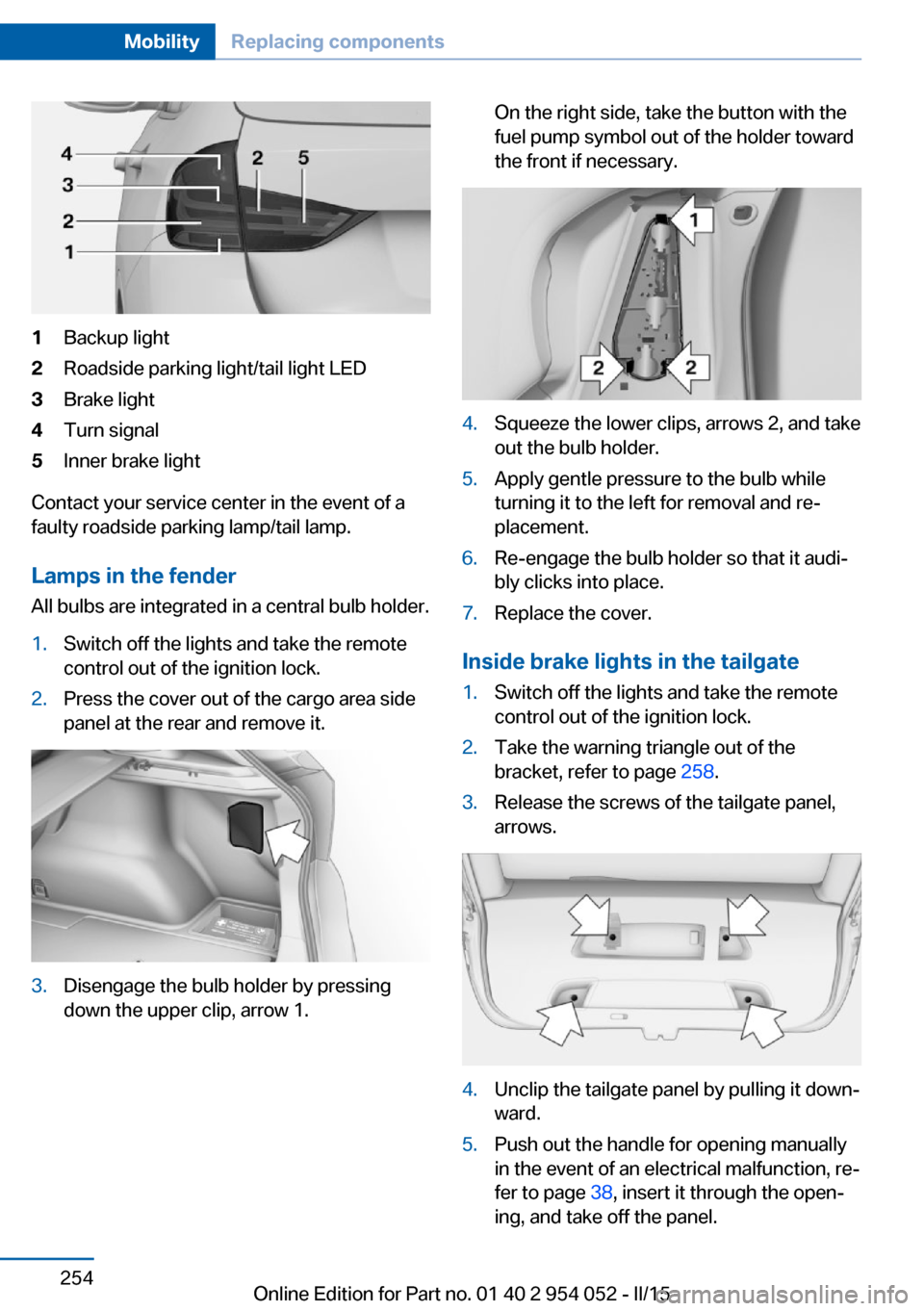
1Backup light2Roadside parking light/tail light LED3Brake light4Turn signal5Inner brake light
Contact your service center in the event of a
faulty roadside parking lamp/tail lamp.
Lamps in the fender All bulbs are integrated in a central bulb holder.
1.Switch off the lights and take the remote
control out of the ignition lock.2.Press the cover out of the cargo area side
panel at the rear and remove it.3.Disengage the bulb holder by pressing
down the upper clip, arrow 1.On the right side, take the button with the
fuel pump symbol out of the holder toward
the front if necessary.4.Squeeze the lower clips, arrows 2, and take
out the bulb holder.5.Apply gentle pressure to the bulb while
turning it to the left for removal and re‐
placement.6.Re-engage the bulb holder so that it audi‐
bly clicks into place.7.Replace the cover.
Inside brake lights in the tailgate
1.Switch off the lights and take the remote
control out of the ignition lock.2.Take the warning triangle out of the
bracket, refer to page 258.3.Release the screws of the tailgate panel,
arrows.4.Unclip the tailgate panel by pulling it down‐
ward.5.Push out the handle for opening manually
in the event of an electrical malfunction, re‐
fer to page 38, insert it through the open‐
ing, and take off the panel.Seite 254MobilityReplacing components254
Online Edition for Part no. 01 40 2 954 052 - II/15
Page 258 of 297
General information
Ensure that the battery is sufficiently charged
to achieve the full battery life.
It may be necessary to charge the battery in
the following cases:▷When the vehicle is frequently used to
drive short distances.▷When the vehicle has not been driven for
more than one month.
Starting aid terminals
Only charge using the starting aid terminals,
refer to page 259, in the engine compartment
while the engine is switched off.
Power failure
After a temporary power loss, some equipment
needs to be reinitialized.
Individual settings need to be reprogrammed:
▷Seat and mirror memory: store the posi‐
tions again, refer to page 50.▷Time: update, refer to page 77.▷Date: update, refer to page 78.▷Radio station: save again, refer to
page 168.▷Navigation system: wait for the navigation
system to be operational.▷Panoramic glass sunroof: it may only be
possible to tilt the roof. Have the system
initialized by the service center.▷Digital compass: recalibrate, refer to
page 117.▷xDrive: the system automatically initializes
as you drive. During this time, indicator
lamps light up. If the lamps do not disap‐
pear during the current trip, have the sys‐
tem checked.
Disposing of old batteries
Have old batteries disposed of by your
service center or bring them to a recy‐
cling center.
Maintain the battery in an upright position for
transport and storage. Secure the battery so
that it does not tip over during transport.
Fuses Replacing fuses
Never attempt to repair a blown fuse and
do not replace a defective fuse with a substi‐
tute of another color or amperage rating; this
could lead to a circuit overload, ultimately re‐
sulting in a fire in the vehicle.◀
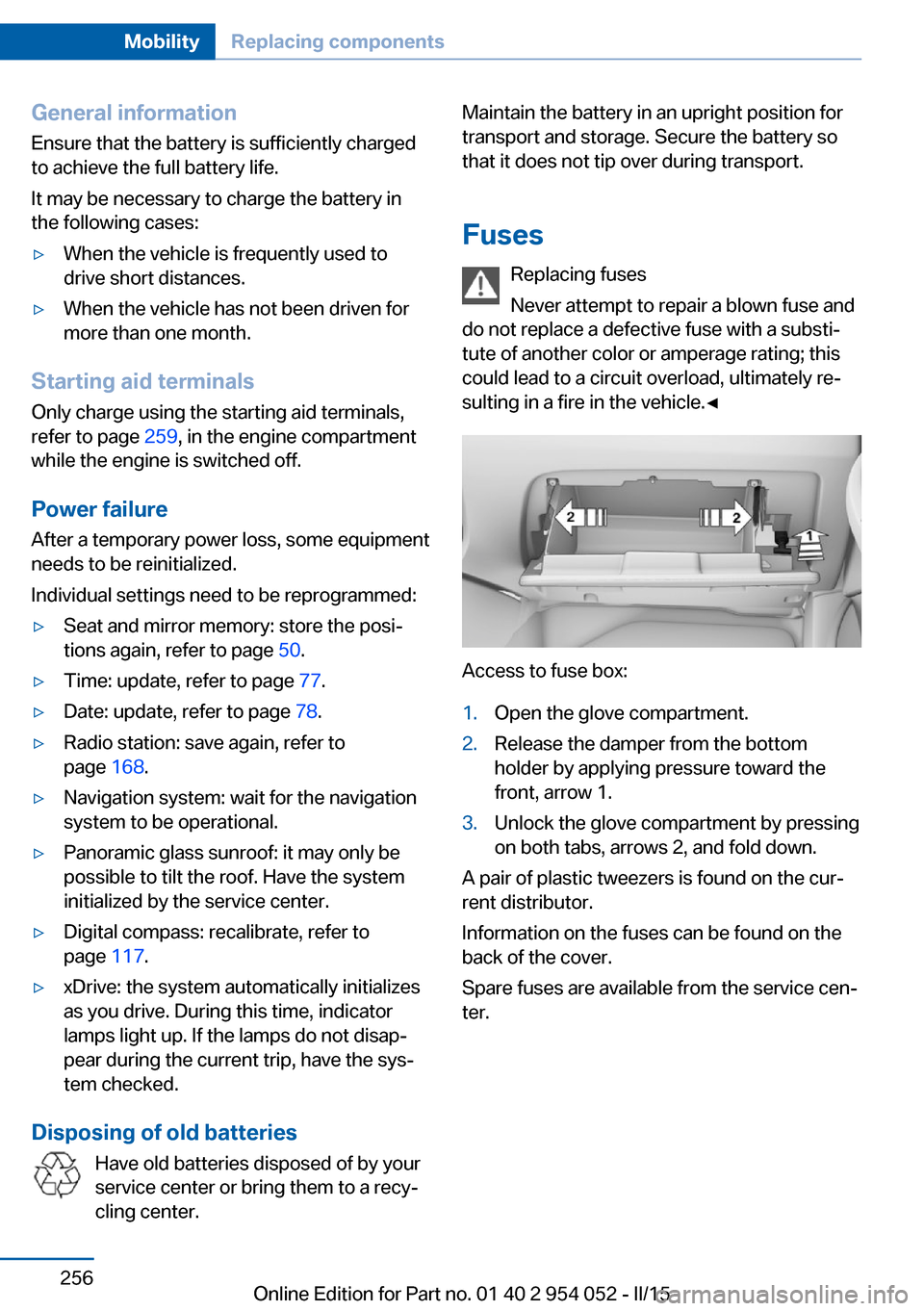
Access to fuse box:
1.Open the glove compartment.2.Release the damper from the bottom
holder by applying pressure toward the
front, arrow 1.3.Unlock the glove compartment by pressing
on both tabs, arrows 2, and fold down.
A pair of plastic tweezers is found on the cur‐
rent distributor.
Information on the fuses can be found on the
back of the cover.
Spare fuses are available from the service cen‐
ter.
Seite 256MobilityReplacing components256
Online Edition for Part no. 01 40 2 954 052 - II/15
Page 263 of 297
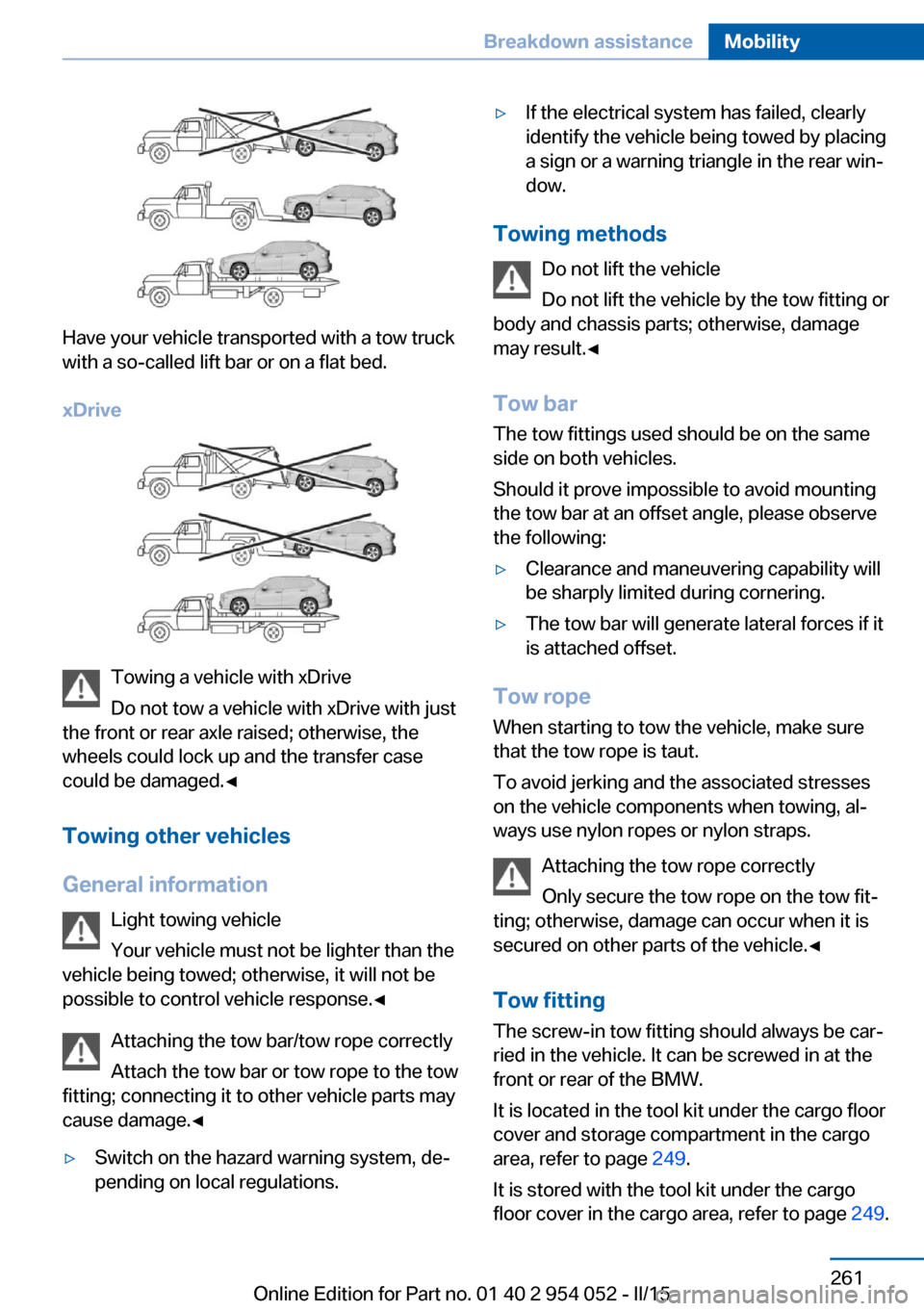
Have your vehicle transported with a tow truck
with a so-called lift bar or on a flat bed.
xDrive
Towing a vehicle with xDrive
Do not tow a vehicle with xDrive with just
the front or rear axle raised; otherwise, the
wheels could lock up and the transfer case
could be damaged.◀
Towing other vehicles
General information Light towing vehicle
Your vehicle must not be lighter than the
vehicle being towed; otherwise, it will not be possible to control vehicle response.◀
Attaching the tow bar/tow rope correctly
Attach the tow bar or tow rope to the tow
fitting; connecting it to other vehicle parts may
cause damage.◀
▷Switch on the hazard warning system, de‐
pending on local regulations.▷If the electrical system has failed, clearly
identify the vehicle being towed by placing
a sign or a warning triangle in the rear win‐
dow.
Towing methods
Do not lift the vehicle
Do not lift the vehicle by the tow fitting or
body and chassis parts; otherwise, damage
may result.◀
Tow bar The tow fittings used should be on the same
side on both vehicles.
Should it prove impossible to avoid mounting
the tow bar at an offset angle, please observe
the following:
▷Clearance and maneuvering capability will
be sharply limited during cornering.▷The tow bar will generate lateral forces if it
is attached offset.
Tow rope
When starting to tow the vehicle, make sure
that the tow rope is taut.
To avoid jerking and the associated stresses
on the vehicle components when towing, al‐
ways use nylon ropes or nylon straps.
Attaching the tow rope correctly
Only secure the tow rope on the tow fit‐
ting; otherwise, damage can occur when it is
secured on other parts of the vehicle.◀
Tow fitting
The screw-in tow fitting should always be car‐
ried in the vehicle. It can be screwed in at the
front or rear of the BMW.
It is located in the tool kit under the cargo floor
cover and storage compartment in the cargo
area, refer to page 249.
It is stored with the tool kit under the cargo floor cover in the cargo area, refer to page 249.
Seite 261Breakdown assistanceMobility261
Online Edition for Part no. 01 40 2 954 052 - II/15
Page 266 of 297
Automatic transmission1.Release the parking brake, refer to
page 63.2.Drive into the car wash.3.Depress the brake pedal if necessary.4.Engage the selector lever or transmission
position N.5.Switch the engine off.6.Leave the remote control in the ignition
lock so that the vehicle can roll.
In 8-gear automatic transmissions, transmis‐
sion position P is engaged automatically:
▷Automatically after approx. 30 minutes.▷When the remote control is removed from
the ignition lock.
Headlights
▷Do not rub dry and do not use abrasive or
caustic cleansers.▷Soak areas that have been soiled e.g. due
to insects, with shampoo and wash off with
water.▷Thaw ice with de-icing spray; do not use an
ice scraper.
After washing the vehicle
After washing the vehicle, apply the brakes
briefly to dry them; otherwise, braking action
can be reduced and corrosion of the brake
discs can occur.
Fully remove any residue from the windows to
prevent obstruction of view from streaking,
wiping noises, and wiper wear.
Vehicle careCar care productsBMW recommends using cleaning and care
products from BMW, since these have been
tested and approved.
Car care and cleaning products
Follow the instructions on the container.
When cleaning the interior, open the doors or
windows.
Only use products intended for cleaning vehi‐
cles.
Cleansers can contain substances that are
dangerous and harmful to your health.◀
Vehicle paint Regular care contributes to driving safety and
value retention. Environmental influences in
areas with high air pollution or natural contami‐
nants, such as tree resin or pollen, can have an
impact on the vehicle paint. Tailor the fre‐
quency and extent of your car care to these in‐
fluences.
Immediately remove aggressive substances,
such as spilled fuel, oil, grease, or bird drop‐
pings, to prevent damage to or discoloration of
the paintwork.
Leather care
Remove dust from the leather often, using a
cloth or vacuum cleaner.
Otherwise, particles of dust and road grime
chafe in pores and folds, and lead to increased
wear and premature degradation of the leather
surface.
To guard against discoloration, such as from
clothing, provide leather care roughly every
two months.
Clean light-colored leather more frequently as
dust and dirt are more noticeable.
Use leather care products; otherwise, dirt and
grease will gradually break down the protective
layer of the leather surface.
Suitable care products are available from the
service center.
Upholstery material care Vacuum regularly with a vacuum cleaner.Seite 264MobilityCare264
Online Edition for Part no. 01 40 2 954 052 - II/15
Page 274 of 297
Short commands for voice activationsystemVehicle equipment
This chapter describes all series equipment as
well as country-specific and special equipment
offered for this model series. Therefore, it also
describes equipment that may not be found in
your vehicle, for instance due to the selected
special equipment or the country version. This
also applies to safety-related functions and
systems.
When using the features and systems descri‐
bed here, adhere to local regulations.General information
Instructions for voice activation system, refer
to page 27.
To have the available spoken instructions read
out loud: ›Voice commands‹
The following short commands apply to vehi‐
cles equipped with a voice activation system.
They have no function in vehicles in which only
the mobile phone is operated using the voice.
Adjusting
Vehicle
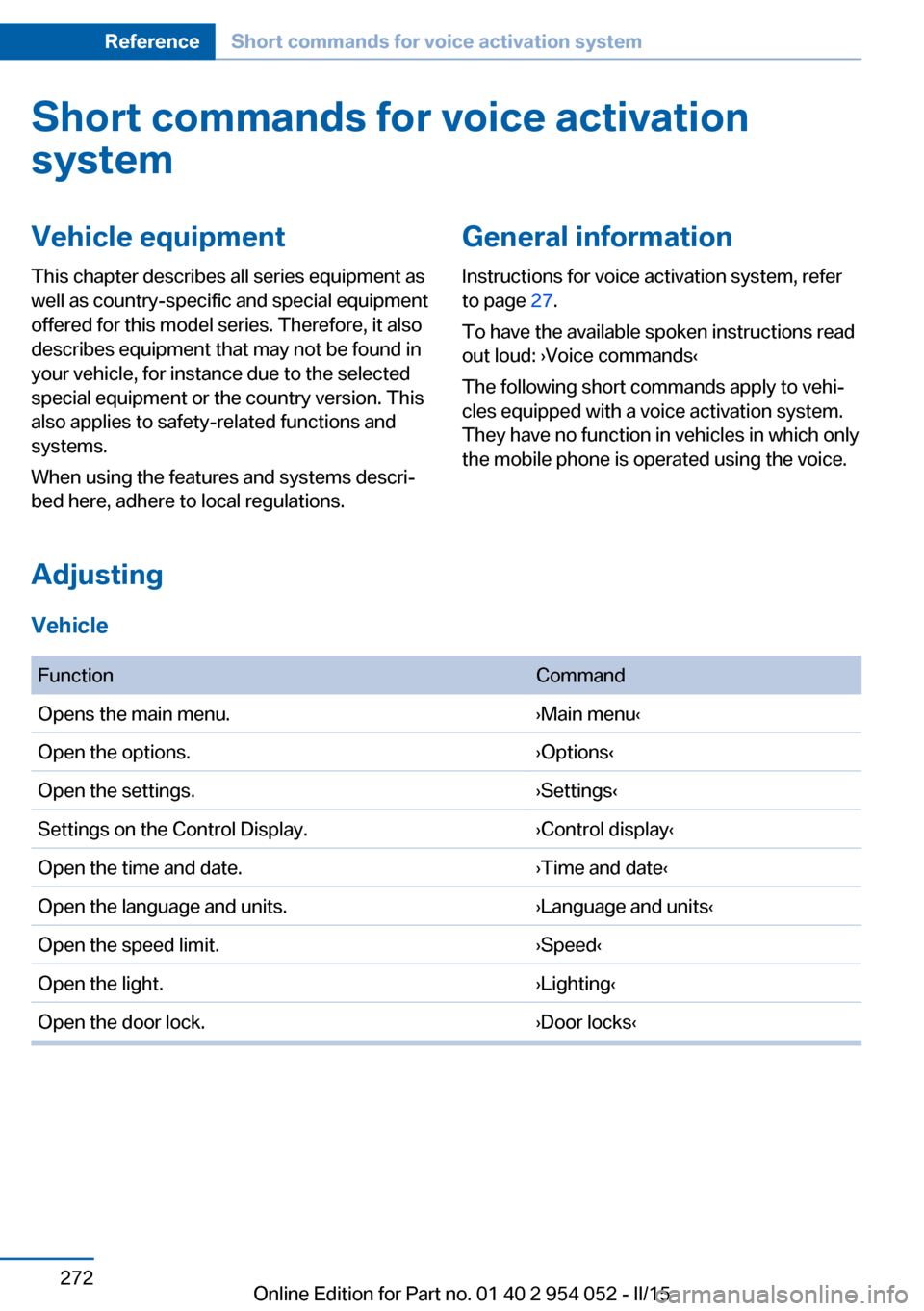
FunctionCommandOpens the main menu.›Main menu‹Open the options.›Options‹Open the settings.›Settings‹Settings on the Control Display.›Control display‹Open the time and date.›Time and date‹Open the language and units.›Language and units‹Open the speed limit.›Speed‹Open the light.›Lighting‹Open the door lock.›Door locks‹Seite 272ReferenceShort commands for voice activation system272
Online Edition for Part no. 01 40 2 954 052 - II/15
Page 282 of 297
Everything from A to Z
IndexA ABS, Antilock Brake Sys‐ tem 99
Accident, refer to Emergency Request, initiating 257
Acoustic signal, refer to Check Control 82
Activated charcoal filter with automatic climate con‐
trol 113
Adaptive brake lights, refer to Brake force display 98
Adaptive Light Control 86
Additional telephone 198
Additives, coolant 246
Additives, engine oil 245
After washing vehicle 264
Airbags 90
Airbags, indicator/warning light 93
Air circulation, refer to Recir‐ culated air mode 112
Air conditioning mode, auto‐ matic climate control 110
Air conditioning mode, venti‐ lation 113
Air distribution, auto‐ matic 111
Air distribution, manual 111
Air drying, refer to Cooling function 112
Air flow rate 112
Airing, refer to Ventila‐ tion 113
Air pressure, refer to Tire in‐ flation pressure 232
Air supply, automatic climate control 110
Air supply, ventilation 113 Air vents, refer to Ventila‐
tion 113
Alarm system 41
Alarm system, avoiding unin‐ tentional alarms 42
Alarm system, ending an alarm 41
Alarm system, interior motion sensor 42
Alarm system, tilt alarm sen‐ sor 42
All around the headliner 19
ALL program 112
All-season tires, refer to Win‐ ter tires 240
All-wheel drive, refer to xDrive 101
Alternating-code hand-held transmitter 116
AM/FM station 168
Announcement, navigation, see Spoken instruc‐
tions 157
Antifreeze, coolant 246
Antifreeze, washer fluid 67
Antilock Brake System, ABS 99
Anti-slip control, refer to Dy‐ namic Stability Control
DSC 99
Anti-theft protection 34
Appointments 214
Approved axle loads, refer to Weights 270
Approved engine oils 245
Approved gross vehicle weight, refer to
Weights 270
Armrest, refer to Center arm‐ rest 126 Arrival time, refer to Com‐
puter 76
Ashtray 119
Assistance with driving off, refer to Drive-off assis‐
tant 102
Assistance with starting en‐ gine, refer to Jump-start‐
ing 258
Audio device, external 126
Audio playback 177
Audio playback, Blue‐ tooth 189
Automatic, air distribu‐ tion 111
Automatic, air flow rate 111
Automatic car wash 263
Automatic climate con‐ trol 110
Automatic climate control, automatic air distribu‐
tion 111
Automatic, cruise control 103
Automatic Curb Monitor 51
Automatic headlight con‐ trol 86
Automatic recirculated air control 112
Automatic Start/Stop func‐ tion 61
Automatic transmission with Steptronic 67, 70
Automatic transmission with Steptronic, interlock 67
Automatic transmission with Steptronic, kickdown 68, 70
Automatic transmission with Steptronic, overriding selec‐
tor lever lock 69
AUTO program with auto‐ matic climate control 111 Seite 280ReferenceEverything from A to Z280
Online Edition for Part no. 01 40 2 954 052 - II/15
Page 284 of 297
Cargo floor panel, foldingup 123
Cargo floor panel, raising 123
Cargo net, refer to Partition net 121
Cargo straps, securing cargo 137
Car key, refer to Integrated key/remote control 32
Carpet, care 265
Car phone, installation loca‐ tion, refer to Center arm‐
rest 126
Car phone, refer to Tele‐ phone 198
Car vacuum cleaner, connect‐ ing, refer to Connecting
electrical devices 119
Car wash 263
Catalytic converter, refer to Hot exhaust system 133
CBS Condition Based Serv‐ ice 247
CD/DVD 176
CD notes 180
CDs, storing 181
Cell phone, installation loca‐ tion, refer to Center arm‐
rest 126
Center armrest, front 126
Center armrest, rear 126
Center brake lamp, bulb re‐ placement 255
Center console, refer to Around the center con‐
sole 18
Central locking, Comfort Ac‐ cess 39
Central locking from the in‐ side 37
Central locking from the out‐ side 33
Central locking, setting the unlocking characteristics 34
Central screen, refer to Con‐ trol Display 20 Changes, technical, refer to
Safety 7
Changing wheels/tires 239
Check Control 82
Children, transporting 54
Child restraint fixing system LATCH 55
Child restraint fixing sys‐ tems 54
Child restraint fixing systems, mounting 54
Child safety locks 57
Child seat, mounting 54
Child seats, refer to Trans‐ porting children safely 54
Chrome parts, care 265
Cigarette lighter, connecting electrical devices 119
Cigarette lighter, refer to Lighter 119
Cigarette lighter socket 119
Circulation of air, refer to Re‐ circulated air mode 112
Cleaning, displays 266
Cleaning your BMW, refer to Care 263
Clock 73
Clock, 12h/24h format 78
Clock, setting the time and date 78
Clock, setting the time zone 78
Closing from the inside 37
Closing from the outside 34
Clothes hooks 127
Cockpit 14
Cold start, refer to Starting the engine 60
Combination instrument, refer to Instrument cluster 16
Combination switch, refer to Turn signal/high beams/
headlamp flasher 64
Combination switch, refer to Washer/wiper system 64
Comfort Access 39 Comfort Access, battery re‐
placement 41
Comfort area, refer to Around the center console 18
Compact wheel, inflation pressure 232
Compartment for remote control, refer to Ignition
lock 59
Compartment in floor 123
Compartments, refer to Stor‐ age compartments 125
Compass, digital 117
Computer 75
Computer, displaying infor‐ mation 75
Computer, displays on the Control Display 76
Concierge service 221
Condensation under the vehi‐ cle 134
Condition Based Service CBS 247
Confirmation signals 35
Connecting, mobile phone, refer to Pairing the mobile
phone 199
Consumption, refer to Aver‐ age fuel consumption 75
Contacts 210
Control Display 20
Control Display, care 266
Control Display, settings 79
Controller 21
Controls and displays 14
Control systems, driving sta‐ bility 99
Convenient operation, glass sunroof 34
Convenient operation, win‐ dow 34
Coolant 246
Coolant, checking the level 246
Coolant temperature 74 Seite 282ReferenceEverything from A to Z282
Online Edition for Part no. 01 40 2 954 052 - II/15
Page 285 of 297
Cooling function, switchingon and off 112
Cooling, maximum 111
Cooling system, refer to Cool‐ ant 246
Corrosion on brake discs 134
Courtesy lights, refer to Inte‐ rior lights 89
Cradle for telephone or mo‐ bile phone, refer to Snap-in
adapter 207
Cruise control 103
Cruise control, malfunc‐ tion 105
Cupholder 127
Curb weight, refer to Weights 270
Current fuel consumption 74
Current location, storing 148
Curve lights, refer to Adaptive Light Control 86
D
Dashboard lighting, refer to Instrument lighting 89
Dashboard, refer to Cock‐ pit 14
Data, technical 270
Date, date format 79
Date, setting 78
Daytime running lights 86
Daytime running lights, bulb replacement 253
Defroster, rear window 113
Destination entry via the ad‐ dress book 148
Destination guidance 155
Destination guidance with in‐ termediate destinations 153
Destination input, naviga‐ tion 146
Digital clock 73
Digital compass 117
Digital radio 169
Dimming mirrors 52 Directional indicators, refer to
Turn signals 64
Display lighting, refer to In‐ strument lighting 89
Displays and controls 14
Displays, care 266
Displays, cleaning 266
Displays, refer to Instrument cluster 16
Disposal, coolant 246
Disposal, vehicle battery 256
Distance warning, refer to Park Distance Control
PDC 105
Divided rear seat backrest, re‐ fer to Cargo area, enlarg‐
ing 121
Divided screen view, split screen 24
Door key, refer to Remote control with integrated
key 32
Door lock 36
Doors, manual operation 37
Doors, unlocking and locking, confirmation signals 35
Doors, unlocking and locking from the inside 37
Doors, unlocking and locking from the outside 34
DOT Quality Grades 238
Downhill control 101
Draft-free ventilation 113
Drive-off assistant 102
Driving away on inclines, refer to Drive-off assistant 102
Driving notes, breaking in 132
Driving notes, general 132
Driving on poor roads 134
Driving stability control sys‐ tems 99
Driving through water 133
Driving tips, refer to Driving notes 132 Dry air, refer to Cooling func‐
tion 112
DSC Dynamic Stability Con‐ trol 99
DTC Dynamic Traction Con‐ trol 100
DTMF suffix dialing 204
DVD/CD 176
DVDs, storing 181
DVD, video 178
Dynamic destination guid‐ ance 162
Dynamic Stability Control DSC 99
Dynamic Traction Control DTC 100
E ECO PRO 140
ECO PRO display 140
ECO PRO driving mode 140
ECO PRO mode 140
EfficientDynamics, refer to Saving fuel 139
Electrical malfunction, door lock 37
Electrical malfunction, driver's door 37
Electrical malfunction, fuel filler flap 229
Electrical malfunction, tail‐ gate 38
Electric seat adjustment 47
Electronic brake-force distri‐ bution 99
Electronic engine oil level check 243
Electronic Stability Program ESP, refer to Dynamic Sta‐
bility Control DSC 99
Emergency operation, auto‐ matic transmission, refer to
Overriding selector lever
lock 69 Seite 283Everything from A to ZReference283
Online Edition for Part no. 01 40 2 954 052 - II/15
Page 286 of 297
Emergency operation, doorlock, refer to Manual opera‐
tion 37
Emergency operation, fuel filler flap, unlocking man‐
ually 229
Emergency Request 257
Energy-conscious driving, re‐ fer to Current fuel consump‐
tion 74
Energy, saving, Automatic Start/Stop function 61
Energy, saving, refer to Sav‐ ing fuel 139
Engine, breaking in 132
Engine compartment 242
Engine coolant, refer to Cool‐ ant 246
Engine oil, adding 245
Engine oil, additives, refer to Approved engine oils 245
Engine oil, alternative oil types 245
Engine oil, BMW maintenance system 247
Engine oil change intervals, refer to Service require‐
ments 80
Engine oil, checking the level 243
Engine oil, filling ca‐ pacity 271
Engine oil temperature 74
Engine oil types, alterna‐ tive 245
Engine oil types, ap‐ proved 245
Engine, overheating, refer to Coolant temperature 74
Engine start, assistance 258
Engine, starting 60
Engine, starting, Comfort Ac‐ cess 39
Engine, starting, Start/Stop button 59 Engine, stopping, Start/Stop
button 59
Engine, switching off 61
Environmentally friendly driv‐ ing, refer to Current fuel
consumption 74
Equalizer 166
Equipment, interior 115
ESP Electronic Stability Pro‐ gram, refer to Dynamic Sta‐
bility Control DSC 99
Exchanging wheels/tires 239
Exhaust system 133
Exterior mirrors 51
Exterior mirrors, adjusting 51
Exterior mirrors, automatic dimming 52
Exterior mirrors, automatic heating 52
Exterior mirrors, folding in and out 52
External audio device 126
External devices 186
External temperature dis‐ play 73
External temperature display, changing the unit of meas‐
ure 77
External temperature display, on computer 77
External temperature warn‐ ing 73
Eyes for securing cargo 137
F
Fader 166
Failure messages, refer to Check Control 82
False alarm, avoiding uninten‐ tional alarms 42
False alarm, ending an alarm 41
Fastening safety belts, refer to Safety belts 48 Fault messages, refer to
Check Control 82
Filling capacities 271
Filter, refer to Microfilter/acti‐ vated-charcoal filter with au‐
tomatic climate control 113
Fine wood, care 265
First aid kit 258
Fitting for towing 261
Flashing when locking/ unlocking 35
Flat Tire Monitor FTM 93
Flat Tire Monitor FTM, snow chains 241
Flat tire, run-flat tires 241
Flat tire, Tire Pressure Moni‐ tor TPM 95
Flat tire, warning light 94, 96
Flat tire, wheel change 255
Flooding, refer to Driving through water 133
Floor carpet, care 265
Floor mats, care 265
FM/AM station 168
Fog lamps, indicator lamp 88
Fog lights 88
Foldable rear seat back‐ rest 121
Folding sun visor 119
Foot brake 133
Footwell lights, refer to Inte‐ rior lights 89
For your own safety 7
Four-wheel drive, refer to xDrive 101
Front airbags 90
Front fog lights 88
Front passenger airbags, de‐ activating 91
FTM Flat Tire Monitor 93
Fuel 230
Fuel, additives 230
Fuel, average consump‐ tion 75
Fuel cap 228
Fuel cap, closing 228 Seite 284ReferenceEverything from A to Z284
Online Edition for Part no. 01 40 2 954 052 - II/15
Page 287 of 297
Fuel consumption display,average fuel consump‐
tion 75
Fuel consumption display, current fuel consump‐
tion 74
Fuel-efficient driving, refer to Current fuel consump‐
tion 74
Fuel filler flap 228
Fuel filler flap, closing 228
Fuel filler flap, opening 228
Fuel filler flap, unlocking in case of an electrical mal‐
function 229
Fuel gauge 74
Fuel, refer to Average fuel consumption 75
Fuel, saving 139
Fuel tank capacity, refer to Filling capacities 271
Fuel tank contents, refer to Filling capacities 271
Fuel tank, refer to Filling ca‐ pacities 271
Fuse 256
G
Garage door opener, refer to Integrated universal remote
control 115
Gasoline 230
Gasoline gauge, refer to Fuel gauge 74
Gas station recommenda‐ tion 157
Gear change, automatic transmission with Step‐
tronic 68, 71
Gear change, via shift pad‐ dles 71
Gear display, automatic trans‐ mission with Steptronic 67
General driving notes 132
Glare protection 119 Glass sunroof, electric, opera‐
tion 34
Glass sunroof, refer to Panor‐ amic glass sunroof 44
Glove compartment 125
Glove compartment, light‐ ing 125
GPS navigation, refer to Navi‐ gation system 144
Gross vehicle weight, refer to Weights 270
H
Halogen headlamps, bulb re‐ placement 251
Handbrake, refer to Parking brake 63
Hand-held transmitter, alter‐ nating code 116
Hands-free microphone 18
Hazard warning system 257
HDC Hill Descent Con‐ trol 101
HD Radio 169
Head airbags 90
Headlamp control, refer to Parking lamps/low
beams 85
Headlamp flasher 64
Headlamps, bulb replace‐ ment 251
Headlamps, care 264
Headlamps, cleaning 66
Headlight control, auto‐ matic 86
Headlight courtesy delay fea‐ ture 86
Headlight cover, remov‐ ing 251
Headlight flasher, indicator lamp 17
Headlights 85
Headlights, cleaning, washer fluid 67
Headliner 19 Head restraints 49
Head restraints, adjusting the height 49
Head restraints, removing 50
Heatable mirrors 52
Heatable rear window 113
Heatable seats 48
Heating, mirrors 52
Heating, seats 48
Heavy cargo, refer to Stowing cargo 137
Height adjustment, seats 46
Height, refer to Dimen‐ sions 270
High-beam Assistant 87
High-beams 87
High beams/low beams, auto‐ matic, refer to High-beam
Assistant 87
High beams, bulb replace‐ ment 251
High-beams, indicator lamp 17
High-pressure washers 263
Hill Descent Control HDC 101
Hill drive-off assistant, refer to Drive-off assistant 102
Hills 134
Holder for beverages 127
Holder for remote control, re‐ fer to Ignition lock 59
Homepage 6
Hood 243
Hood, opening 243
Horn 14
Hot exhaust system 133
Hotline 223
House number, entering for navigation 147
Hydraulic brake assistant 99
Hydroplaning 133 Seite 285Everything from A to ZReference285
Online Edition for Part no. 01 40 2 954 052 - II/15