service indicator BMW X1 XDRIVE 28I 2014 User Guide
[x] Cancel search | Manufacturer: BMW, Model Year: 2014, Model line: X1 XDRIVE 28I, Model: BMW X1 XDRIVE 28I 2014Pages: 295, PDF Size: 7.06 MB
Page 244 of 295
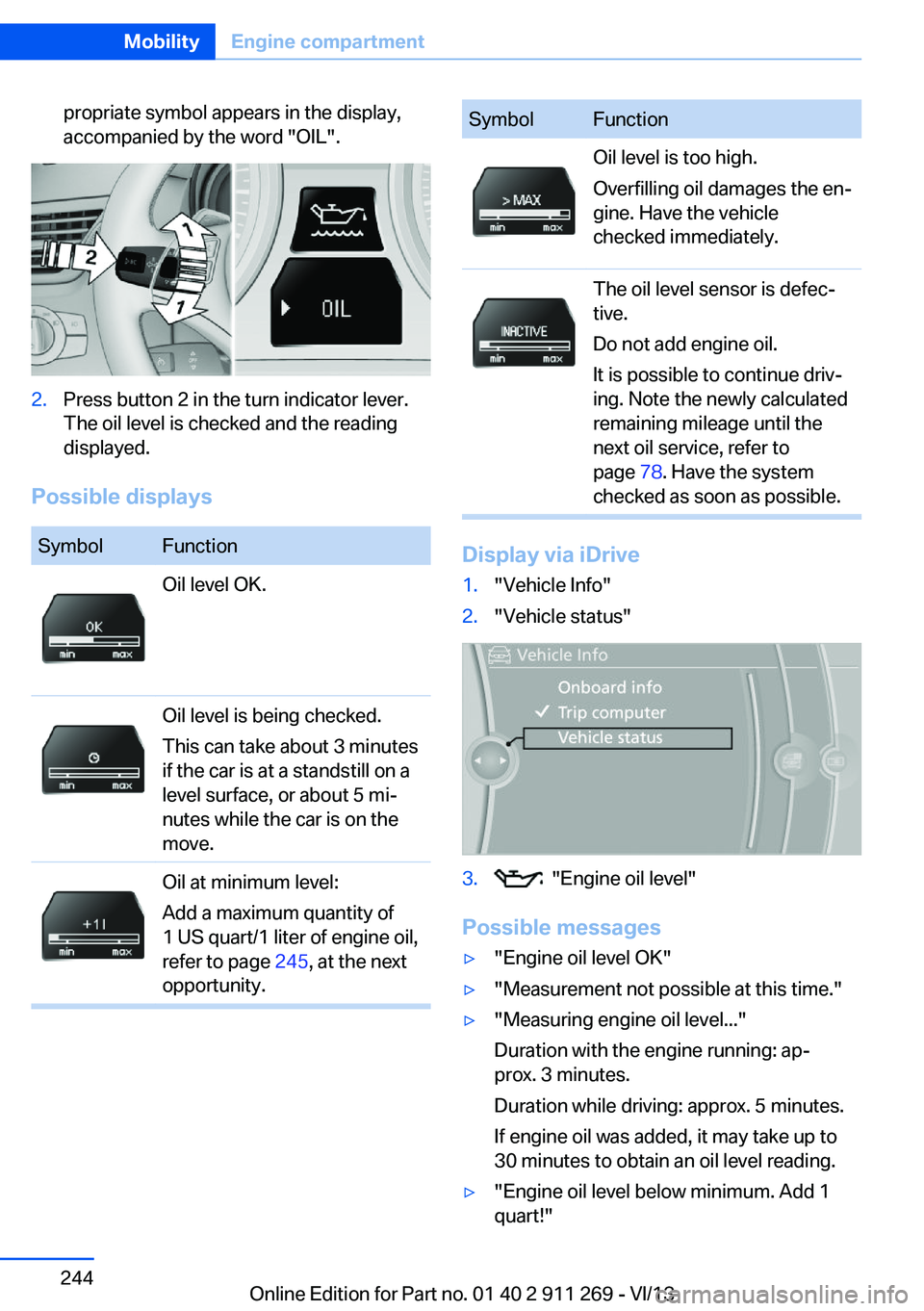
propriate symbol appears in the display,
accompanied by the word "OIL".2.Press button 2 in the turn indicator lever.
The oil level is checked and the reading
displayed.
Possible displays
SymbolFunctionOil level OK.Oil level is being checked.
This can take about 3 minutes
if the car is at a standstill on a
level surface, or about 5 mi‐
nutes while the car is on the
move.Oil at minimum level:
Add a maximum quantity of
1 US quart/1 liter of engine oil,
refer to page 245, at the next
opportunity.SymbolFunctionOil level is too high.
Overfilling oil damages the en‐
gine. Have the vehicle
checked immediately.The oil level sensor is defec‐
tive.
Do not add engine oil.
It is possible to continue driv‐
ing. Note the newly calculated
remaining mileage until the
next oil service, refer to
page 78. Have the system
checked as soon as possible.
Display via iDrive
1."Vehicle Info"2."Vehicle status"3. "Engine oil level"
Possible messages
▷"Engine oil level OK"▷"Measurement not possible at this time."▷"Measuring engine oil level..."
Duration with the engine running: ap‐
prox. 3 minutes.
Duration while driving: approx. 5 minutes.
If engine oil was added, it may take up to
30 minutes to obtain an oil level reading.▷"Engine oil level below minimum. Add 1
quart!"Seite 244MobilityEngine compartment244
Online Edition for Part no. 01 40 2 911 269 - VI/13
Page 246 of 295
Oil changeAn oil change should be carried out by the
service center only.
Coolant
General information Danger of burns from hot engine
Do not open the cooling system while
the engine is hot; otherwise, escaping coolant
may cause burns.◀
Suitable additives
Only use suitable additives; otherwise,
engine damage may occur. The additives are
harmful to your health.◀
Coolant consists of water and additives.
Not all commercially available additives are
suitable for your vehicle. Ask your service cen‐
ter for suitable additives.
Checking the coolant level
1.Do not open the hood until the engine has
cooled down.2.Turn the expansion tank cap counterclock‐
wise slightly to allow any accumulatedpressure to escape; then continue turning
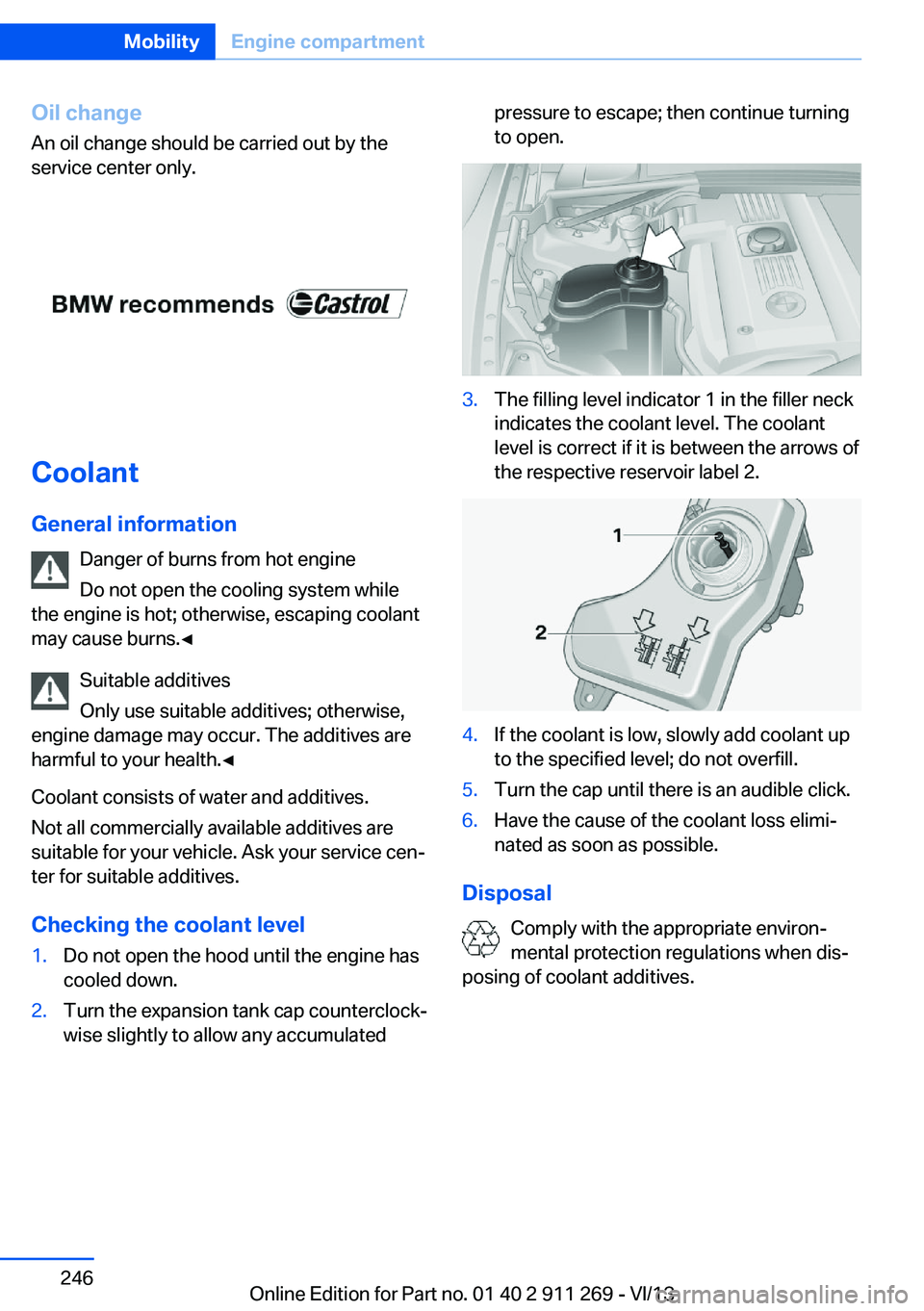
to open.3.The filling level indicator 1 in the filler neck
indicates the coolant level. The coolant
level is correct if it is between the arrows of
the respective reservoir label 2.4.If the coolant is low, slowly add coolant up
to the specified level; do not overfill.5.Turn the cap until there is an audible click.6.Have the cause of the coolant loss elimi‐
nated as soon as possible.
Disposal
Comply with the appropriate environ‐
mental protection regulations when dis‐
posing of coolant additives.
Seite 246MobilityEngine compartment246
Online Edition for Part no. 01 40 2 911 269 - VI/13
Page 248 of 295
Maintenance and repair should be performed
by your service center. Make sure to have reg‐
ular maintenance procedures recorded in the
vehicle's Service and Warranty Information
Booklet for US models, and in the Warranty
and Service Guide Booklet for Canadian mod‐
els. These entries are proof of regular mainte‐
nance.
Socket for OBD Onboard
Diagnosis
Socket for Onboard Diagnosis
The socket for Onboard Diagnosis may
only be used by the service center, by work‐
shops that operate according to the specifica‐
tions of the vehicle manufacturer with appro‐
priately trained personnel, and by other
authorized persons. Otherwise, its use may
lead to vehicle malfunctions.◀
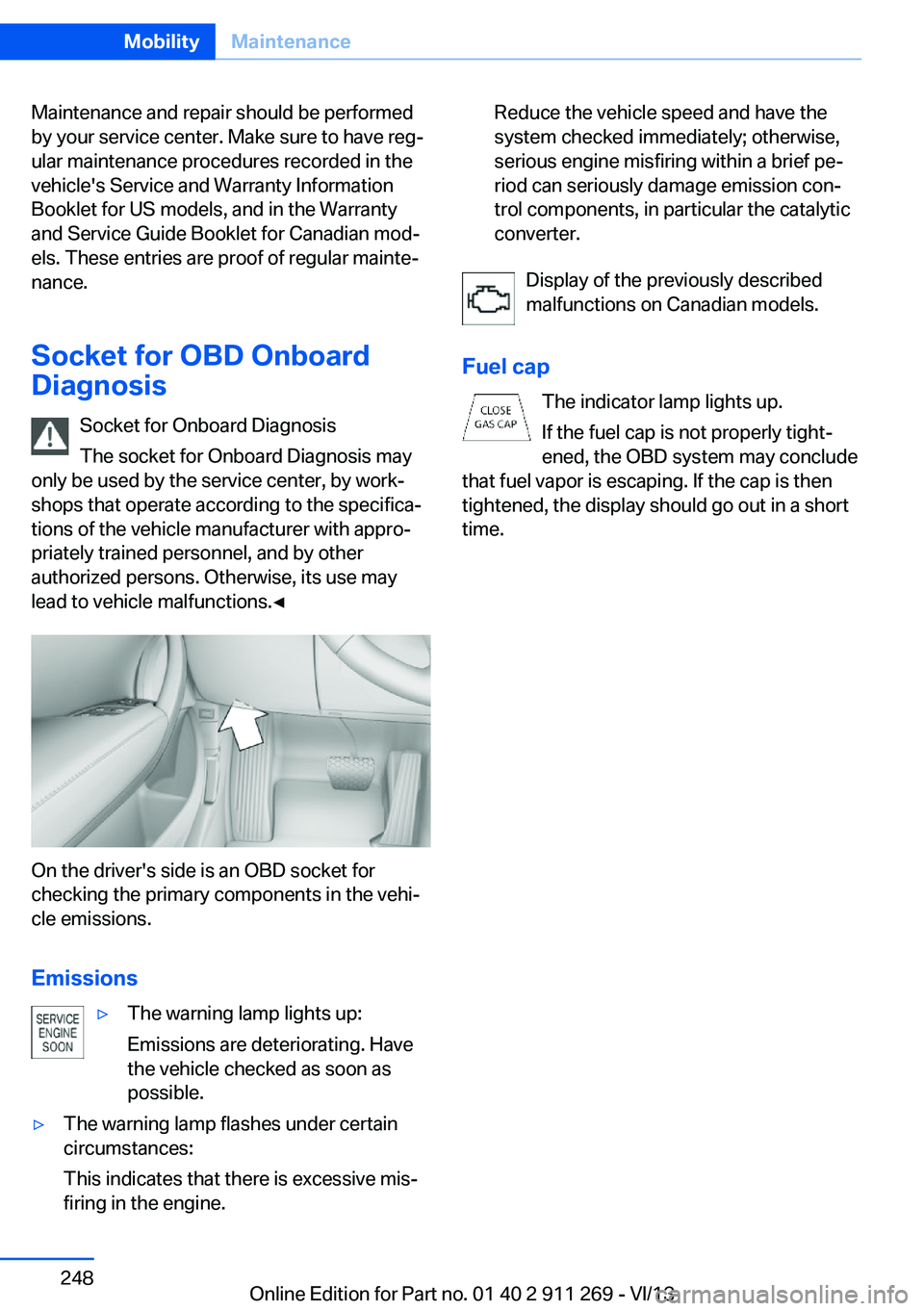
On the driver's side is an OBD socket for
checking the primary components in the vehi‐
cle emissions.
Emissions
▷The warning lamp lights up:
Emissions are deteriorating. Have
the vehicle checked as soon as
possible.▷The warning lamp flashes under certain
circumstances:
This indicates that there is excessive mis‐
firing in the engine.Reduce the vehicle speed and have the
system checked immediately; otherwise,
serious engine misfiring within a brief pe‐
riod can seriously damage emission con‐
trol components, in particular the catalytic
converter.
Display of the previously described
malfunctions on Canadian models.
Fuel cap The indicator lamp lights up.
If the fuel cap is not properly tight‐
ened, the OBD system may conclude
that fuel vapor is escaping. If the cap is then
tightened, the display should go out in a short
time.
Seite 248MobilityMaintenance248
Online Edition for Part no. 01 40 2 911 269 - VI/13
Page 255 of 295
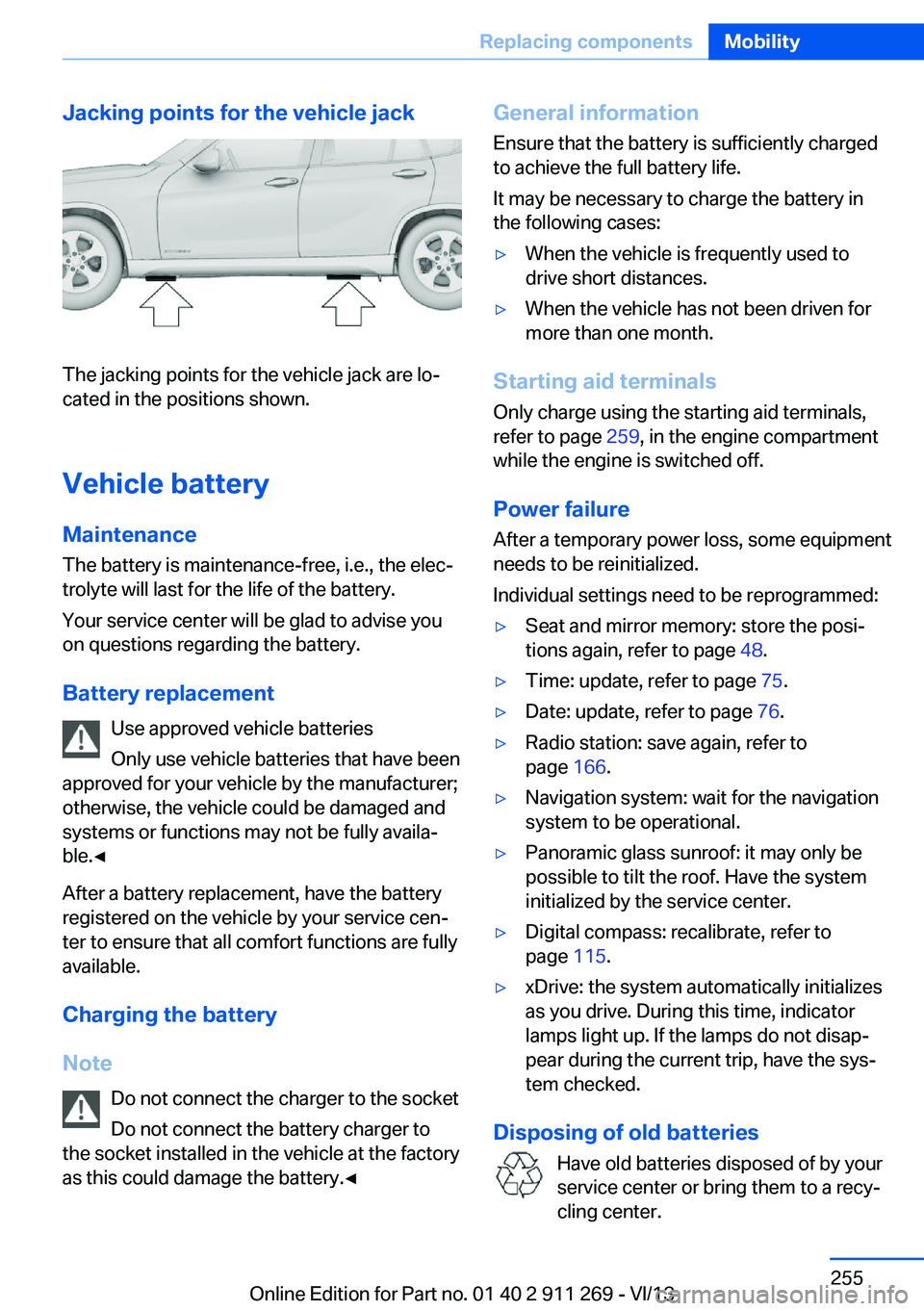
Jacking points for the vehicle jack
The jacking points for the vehicle jack are lo‐
cated in the positions shown.
Vehicle battery
Maintenance
The battery is maintenance-free, i.e., the elec‐ trolyte will last for the life of the battery.
Your service center will be glad to advise you
on questions regarding the battery.
Battery replacement Use approved vehicle batteries
Only use vehicle batteries that have been
approved for your vehicle by the manufacturer;
otherwise, the vehicle could be damaged and
systems or functions may not be fully availa‐
ble.◀
After a battery replacement, have the battery
registered on the vehicle by your service cen‐
ter to ensure that all comfort functions are fully
available.
Charging the battery
Note Do not connect the charger to the socket
Do not connect the battery charger to
the socket installed in the vehicle at the factory
as this could damage the battery.◀
General information
Ensure that the battery is sufficiently charged
to achieve the full battery life.
It may be necessary to charge the battery in
the following cases:▷When the vehicle is frequently used to
drive short distances.▷When the vehicle has not been driven for
more than one month.
Starting aid terminals
Only charge using the starting aid terminals,
refer to page 259, in the engine compartment
while the engine is switched off.
Power failure
After a temporary power loss, some equipment
needs to be reinitialized.
Individual settings need to be reprogrammed:
▷Seat and mirror memory: store the posi‐
tions again, refer to page 48.▷Time: update, refer to page 75.▷Date: update, refer to page 76.▷Radio station: save again, refer to
page 166.▷Navigation system: wait for the navigation
system to be operational.▷Panoramic glass sunroof: it may only be
possible to tilt the roof. Have the system
initialized by the service center.▷Digital compass: recalibrate, refer to
page 115.▷xDrive: the system automatically initializes
as you drive. During this time, indicator
lamps light up. If the lamps do not disap‐
pear during the current trip, have the sys‐
tem checked.
Disposing of old batteries
Have old batteries disposed of by your
service center or bring them to a recy‐
cling center.
Seite 255Replacing componentsMobility255
Online Edition for Part no. 01 40 2 911 269 - VI/13
Page 283 of 295
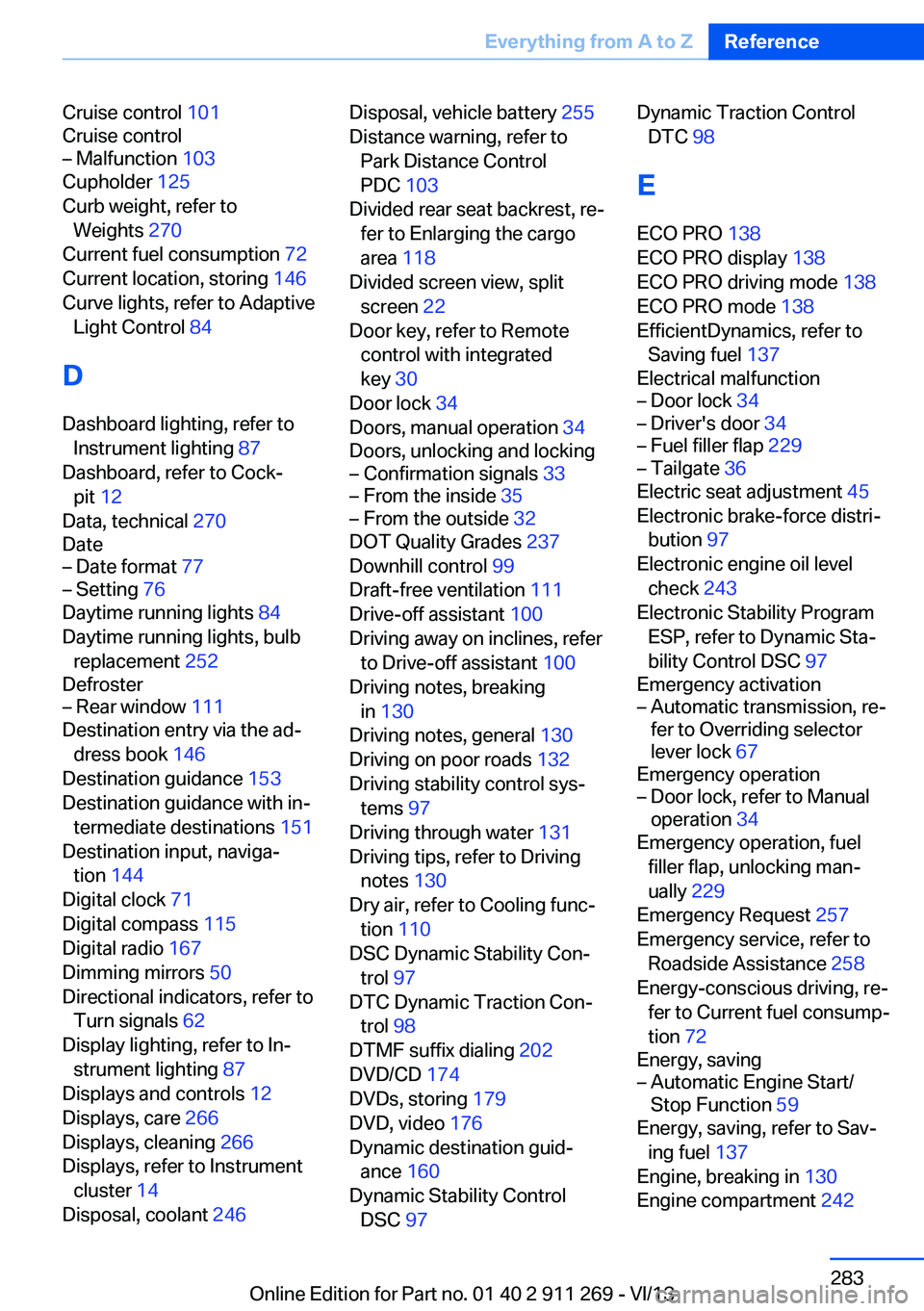
Cruise control 101
Cruise control– Malfunction 103
Cupholder 125
Curb weight, refer to Weights 270
Current fuel consumption 72
Current location, storing 146
Curve lights, refer to Adaptive Light Control 84
D
Dashboard lighting, refer to Instrument lighting 87
Dashboard, refer to Cock‐ pit 12
Data, technical 270
Date
– Date format 77– Setting 76
Daytime running lights 84
Daytime running lights, bulb replacement 252
Defroster
– Rear window 111
Destination entry via the ad‐
dress book 146
Destination guidance 153
Destination guidance with in‐ termediate destinations 151
Destination input, naviga‐ tion 144
Digital clock 71
Digital compass 115
Digital radio 167
Dimming mirrors 50
Directional indicators, refer to Turn signals 62
Display lighting, refer to In‐ strument lighting 87
Displays and controls 12
Displays, care 266
Displays, cleaning 266
Displays, refer to Instrument cluster 14
Disposal, coolant 246
Disposal, vehicle battery 255
Distance warning, refer to Park Distance Control
PDC 103
Divided rear seat backrest, re‐ fer to Enlarging the cargo
area 118
Divided screen view, split screen 22
Door key, refer to Remote control with integrated
key 30
Door lock 34
Doors, manual operation 34
Doors, unlocking and locking– Confirmation signals 33– From the inside 35– From the outside 32
DOT Quality Grades 237
Downhill control 99
Draft-free ventilation 111
Drive-off assistant 100
Driving away on inclines, refer to Drive-off assistant 100
Driving notes, breaking in 130
Driving notes, general 130
Driving on poor roads 132
Driving stability control sys‐ tems 97
Driving through water 131
Driving tips, refer to Driving notes 130
Dry air, refer to Cooling func‐ tion 110
DSC Dynamic Stability Con‐ trol 97
DTC Dynamic Traction Con‐ trol 98
DTMF suffix dialing 202
DVD/CD 174
DVDs, storing 179
DVD, video 176
Dynamic destination guid‐ ance 160
Dynamic Stability Control DSC 97
Dynamic Traction Control
DTC 98
E
ECO PRO 138
ECO PRO display 138
ECO PRO driving mode 138
ECO PRO mode 138
EfficientDynamics, refer to Saving fuel 137
Electrical malfunction– Door lock 34– Driver's door 34– Fuel filler flap 229– Tailgate 36
Electric seat adjustment 45
Electronic brake-force distri‐ bution 97
Electronic engine oil level check 243
Electronic Stability Program ESP, refer to Dynamic Sta‐
bility Control DSC 97
Emergency activation
– Automatic transmission, re‐
fer to Overriding selector
lever lock 67
Emergency operation
– Door lock, refer to Manual
operation 34
Emergency operation, fuel
filler flap, unlocking man‐
ually 229
Emergency Request 257
Emergency service, refer to Roadside Assistance 258
Energy-conscious driving, re‐ fer to Current fuel consump‐
tion 72
Energy, saving
– Automatic Engine Start/
Stop Function 59
Energy, saving, refer to Sav‐
ing fuel 137
Engine, breaking in 130
Engine compartment 242
Seite 283Everything from A to ZReference283
Online Edition for Part no. 01 40 2 911 269 - VI/13
Page 284 of 295
Engine coolant, refer to Cool‐ant 246
Engine oil, adding 245
Engine oil, additives, refer to Approved engine oils 245
Engine oil, alternative oil types 245
Engine oil, BMW maintenance system 247
Engine oil change intervals, refer to Service require‐
ments 78
Engine oil, checking the level 243
Engine oil, filling ca‐ pacity 271
Engine oil temperature 72
Engine oil types, alterna‐ tive 245
Engine oil types, ap‐ proved 245
Engine, overheating, refer to Coolant temperature 72
Engine start, assistance 258
Engine, starting 58
Engine, starting– Comfort Access 37
Engine, starting, Start/Stop
button 57
Engine, stopping, Start/Stop button 57
Engine, switching off 59
Environmentally friendly driv‐ ing, refer to Current fuel
consumption 72
Equalizer 164
Equipment, interior 113
ESP Electronic Stability Pro‐ gram, refer to Dynamic Sta‐
bility Control DSC 97
Exchanging wheels/tires 239
Exhaust system 130
Exterior mirrors 49
Exterior mirrors, adjusting 49
Exterior mirrors, automatic dimming 50
Exterior mirrors, automatic
heating 50
Exterior mirrors, folding in and out 50
External audio device 124
External devices 184
External temperature dis‐ play 71
External temperature display– Changing the unit of meas‐
ure 75– On computer 75
External temperature warn‐
ing 71
Externel temperature dis‐ play 71
Eyes for securing cargo 135
F
Fader 164
Failure messages, refer to Check Control 80
False alarm
– Avoiding unintentional
alarms 40– Ending an alarm 39
Fastening safety belts, refer
to Safety belts 46
Fault messages, refer to Check Control 80
Filling capacities 271
Filter
– Refer to Microfilter/acti‐
vated-charcoal filter with
automatic climate con‐
trol 111
Fine wood, care 265
First aid kit 258
Fitting for towing 262
Flashing when locking/ unlocking 33
Flat Tire Monitor FTM 91
Flat Tire Monitor FTM, snow chains 241
Flat tire, run-flat tires 240
Flat tire, Tire Pressure Moni‐
tor TPM 93
Flat tire, warning lamp 92, 94
Flat tire, wheel change 254
Flooding, refer to Driving through water 131
Floor carpet, care 265
Floor mats, care 265
FM/AM station 166
Fog lamps 86
Fog lamps, indicator lamp 86
Foldable rear seat back‐ rest 118
Foot brake 131
Footwell lamps, refer to Inte‐ rior lamps 87
For your own safety 6
Four-wheel drive, refer to xDrive 99
Front airbags 88
Front fog lamps 86
FTM Flat Tire Monitor 91
Fuel 230
Fuel– Refer to Average fuel con‐
sumption 73
Fuel, additives 230
Fuel, average consump‐ tion 73
Fuel cap 228
Fuel cap, closing 228
Fuel consumption display
– Average fuel consump‐
tion 73
Fuel consumption display,
current fuel consump‐
tion 72
Fuel-efficient driving, refer to Current fuel consump‐
tion 72
Fuel filler flap, closing 228
Fuel filler flap, opening 228
Fuel filler flap, unlocking in case of an electrical mal‐
function 229
Fuel gauge 72
Fuel, saving 137
Seite 284ReferenceEverything from A to Z284
Online Edition for Part no. 01 40 2 911 269 - VI/13
Page 289 of 295
Rearview mirror, refer to Mir‐rors 49
Rear window defroster 111
Rear window, washing 64
Rear window wiper 64
Recirculated air mode 110
Recommended tire brands 240
Redialing 203
Refueling 228
Remaining distance to desti‐ nation, refer to Com‐
puter 74
Remaining range for service, refer to Service require‐
ments 78
Remaining range, refer to Range 73
Reminders 216
Remote app 225
Remote control– Battery replacement 38– Comfort Access 37– Garage door opener 113– Malfunction 33, 38– Tailgate 33– Universal 113
Remote control, removing
from the ignition lock 57
Remote control, service data 247
Remote inquiry 202
Remote Services 225
Replacement fuse 256
Replacement remote con‐ trol 30
Replacing wheels/tires 239
Reporting safety defects 9
Reserve warning, refer to Fuel gauge 72
Reservoir for washer fluid, re‐ fer to Washer fluid reser‐
voir 65
Resetting, Tire Pressure Monitor TPM 94
Restraining systems
– Refer to Safety belts 46Restraint systems for chil‐
dren 52
Retaining straps, securing cargo 135
Retreaded tires 240
Reverse gear– Automatic transmission with
Steptronic 66
Rim cleaner, care 265
Road, avoiding 153
Road detour 153
Roadside Assistance 221
Roadside parking lamp
– Bulb replacement 252
Roadside parking lamps 85
RON gasoline quality 230
RON, refer to Fuel qual‐ ity 230
Roof load capacity 270
Roof-mounted luggage rack 136
Rope, refer to Towing 261
Route 154
Route criteria, route 153
Route, displaying 154
Route section, bypass‐ ing 154
RSC Runflat System Compo‐ nent, refer to Run-flat
tires 240
Rubber components, care 265
Run-flat tires 240
Run-flat tires, tire inflation pressure 232
Running lights, refer to Park‐ ing lamps/low beams 83
S Safe braking 131
Safety 6
Safety belts 46
Safety belts
– Damage 47
Safety belts, care 265
Safety belts, indicator/warn‐
ing lamp 47
Safety belts, reminder 47
Safety switch for rear win‐ dows 41
Safety systems– Safety belts 46
Safety systems, airbags 88
Safety tires, refer to Run-flat tires 240
Satellite radio 168
Saving fuel 137
Scale, changing during navi‐ gation 156
Screen, refer to Control Dis‐ play 18
Search, refer to BMW On‐ line 222
Seat adjustment
– Manual 44
Seat adjustment, electric 45
Seat and mirror memory 48
Seat belts
– Refer to Safety belts 46
Seat heating 46
Seats
– Adjusting 44– Adjusting electrically 45– Heating 46– Memory, refer to Seat and
mirror memory 48– Sitting safely 44– Storing the setting, refer to
Seat and mirror memory 48
Selector lever, automatic
transmission with Step‐
tronic 66, 68
Selector lever lock, overrid‐ ing 67
Selector lever lock, refer to Changing selector lever po‐
sitions, Shiftlock 66
Selector lever lock, releas‐ ing 68
Selector lever positions, auto‐ matic transmission with
Steptronic 66
Seite 289Everything from A to ZReference289
Online Edition for Part no. 01 40 2 911 269 - VI/13
Page 291 of 295
T
Tachometer 72
Tailgate– Comfort Access 37– Emergency operation, refer
to Opening manually 36– Opening from the inside 36– Opening from the out‐
side 36– Opening manually 36– Remote control 33
Tail lamp, bulb replace‐
ment 254
Tail lamps 253
Tail lamps
– Bulb replacement 253, 254
Tank gauge, refer to Fuel
gauge 72
Tasks 215
Technical changes, refer to Safety 6
Technical data 270
Telephone 196
Telephone, adjusting the vol‐ ume 200
Telephone, installation loca‐ tion, refer to Center arm‐
rest 124
TeleService 221
Temperature
– Automatic climate con‐
trol 109– Changing the unit of meas‐
ure 75
Temperature, coolant, refer to
Coolant temperature 72
Temperature display
– External temperature 71– External temperature warn‐
ing 71– Setting the unit 75
Temperature, engine oil 72
Temperature warning 71
Text messages 212
Theft alarm system, refer to Alarm system 39
Thigh support adjustment 45
Third brake lamp, refer to
Center brake lamp 254
Tilting the passenger side mirror 49
Time– Setting the time 75– Setting the time zone 76
Tire age 237
Tire identification marks 237
Tire inflation pressure 232
Tire inflation pressure, check‐ ing 232
Tire pressure monitor, refer to Flat Tire Monitor 91
Tire Pressure Monitor TPM 93
Tire Quality Grading 237
Tires
– Inflation pressure 232
Tires, breaking in 130
Tires, changing 239
Tires, condition 238
Tires, damage 239
Tire size 237
Tires, minimum tread 238
Tires, retreaded tires 240
Tires, run-flat tires 240
Tires, storage 240
Tire tread 238
Toll roads, route 153
Tone 164
Tool kit, refer to Onboard ve‐ hicle tool kit 249
Tools, refer to Onboard vehi‐ cle tool kit 249
Tow bar 261
Tow fitting 262
Towing 260
Towing another vehicle 260
Towing, being towed 260
Towing with automatic trans‐ mission 260
Town/city, navigation 145
Tow rope 261
Tow-starting 260, 262
TPM Tire Pressure Moni‐ tor 93
Traction control 98
Traffic bulletins, naviga‐ tion 157
Transmission– Automatic transmission with
Steptronic 65– Overriding selector lever
lock in case of automatic
transmission with Step‐
tronic 67
Transmission, automatic
transmission with Step‐
tronic 68
Transmission lock
– Refer to Changing selector
lever positions 66– Refer to P Park 66
Transmission positions, auto‐
matic transmission with
Steptronic 68
Transporting children safely 52
Treble, tone 164
Trip computer, refer to Dis‐
plays on the Control Dis‐
play 74
Trip-distance counter, refer to Trip odometer 71
Triple turn signal activa‐ tion 62
Trip odometer 71
Trips, planning 151
Trunk, refer to Cargo area 118
Turning circle, refer to Dimen‐ sions 270
Turning lamps, refer to Adap‐ tive Light Control 84
Turn signal
– Indicator/warning lamp 14
Turn signals 62
Turn signals
– Bulb replacement 253– Bulb replacement, front 253
Turn signals, triple turn signal
activation 62
Seite 291Everything from A to ZReference291
Online Edition for Part no. 01 40 2 911 269 - VI/13