display BMW X1 XDRIVE 28I 2014 Owners Manual
[x] Cancel search | Manufacturer: BMW, Model Year: 2014, Model line: X1 XDRIVE 28I, Model: BMW X1 XDRIVE 28I 2014Pages: 295, PDF Size: 7.06 MB
Page 5 of 295
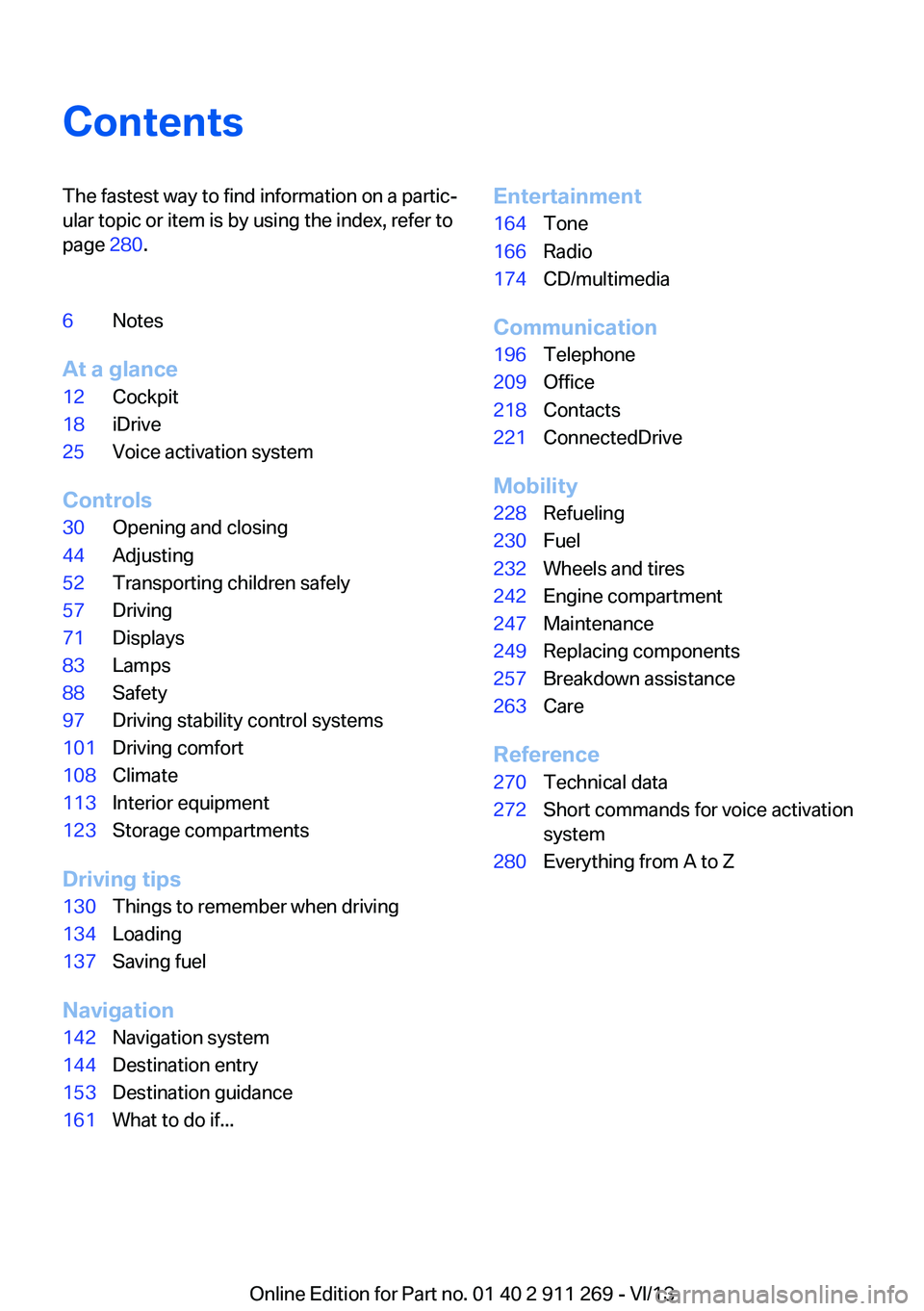
ContentsThe fastest way to find information on a partic‐
ular topic or item is by using the index, refer to
page 280.6Notes
At a glance
12Cockpit18iDrive25Voice activation system
Controls
30Opening and closing44Adjusting52Transporting children safely57Driving71Displays83Lamps88Safety97Driving stability control systems101Driving comfort108Climate113Interior equipment123Storage compartments
Driving tips
130Things to remember when driving134Loading137Saving fuel
Navigation
142Navigation system144Destination entry153Destination guidance161What to do if...Entertainment164Tone166Radio174CD/multimedia
Communication
196Telephone209Office218Contacts221ConnectedDrive
Mobility
228Refueling230Fuel232Wheels and tires242Engine compartment247Maintenance249Replacing components257Breakdown assistance263Care
Reference
270Technical data272Short commands for voice activation
system280Everything from A to Z
Online Edition for Part no. 01 40 2 911 269 - VI/13
Page 6 of 295
NotesUsing this Owner's Manual
The fastest way to find information on a partic‐
ular topic is by using the index.
An initial overview of the vehicle is provided in
the first chapter.
Additional sources of information Should you have any questions, your service
center will be glad to advise you at any time.
Information on BMW, e.g., on technology, is
available on the Internet: bmwusa.com
Symbols
Indicates precautions that must be followed
precisely in order to avoid the possibility of
personal injury and serious damage to the ve‐
hicle.
◄ Marks the end of a specific item of informa‐
tion.
"..." Identifies Control Display texts used to se‐
lect individual functions.
›...‹ Verbal instructions to use with the voice ac‐
tivation system.
››...‹‹ Identifies the answers generated by the
voice activation system.
Refers to measures that can be taken to
help protect the environment.
Symbols on vehicle components
Indicates that you should consult the rele‐
vant section of this Owner's Manual for infor‐
mation on a particular part or assembly.
Vehicle equipment
This Owner's Manual describes all models, all series equipment, as well as country-specific
and special equipment offered in the model
series.Therefore, this Owner's Manual also de‐
scribes and depicts equipment that may not be
contained in your vehicle because of the se‐ lected special equipment or country version,
for example.
This also applies to safety-related functions
and systems.
For options and equipment not described in
this Owner's Manual, please refer to the Sup‐
plementary Owner's Manuals.
On right-hand drive vehicles, some controls
are arranged differently than shown in the illus‐
trations.
Status of this Owner'sManual at time of printing
The manufacturer of your vehicle pursues a
policy of constant development that is con‐
ceived to ensure that our vehicles continue to
embody the highest quality and safety stan‐
dards. In rare cases, therefore, the features de‐
scribed in this Owner's Manual may differ from
those in your vehicle.
Updates made after the editorial
deadline
Any updates made after the editorial deadline
for the Owner's Manuals are located in the ap‐
pendix of the printed quick reference for the
vehicle.
For your own safety Warranty
Your vehicle is technically configured for the
operating conditions and registration require‐
ments applying in the country of first delivery
— homologation. If your vehicle is to be oper‐
ated in a different country it might be neces‐Seite 6Notes6
Online Edition for Part no. 01 40 2 911 269 - VI/13
Page 11 of 295
At a glance
These overviews of buttons, switches and
displays are intended to familiarize you with your
vehicle. You will also become quickly acquainted with the available control concepts and options.Online Edition for Part no. 01 40 2 911 269 - VI/13
Page 14 of 295
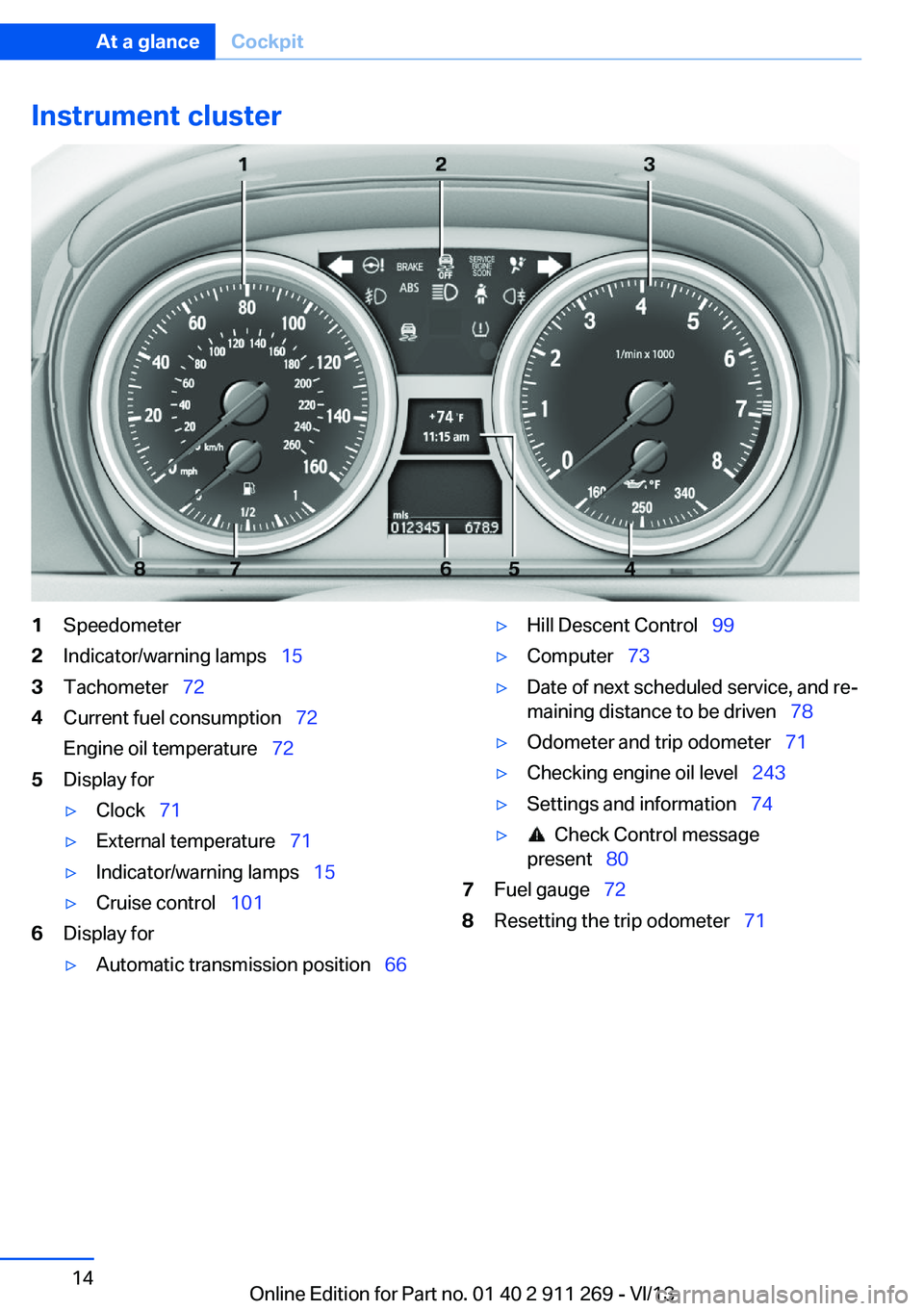
Instrument cluster1Speedometer2Indicator/warning lamps 153Tachometer 724Current fuel consumption 72
Engine oil temperature 725Display for▷Clock 71▷External temperature 71▷Indicator/warning lamps 15▷Cruise control 1016Display for▷Automatic transmission position 66▷Hill Descent Control 99▷Computer 73▷Date of next scheduled service, and re‐
maining distance to be driven 78▷Odometer and trip odometer 71▷Checking engine oil level 243▷Settings and information 74▷ Check Control message
present 807Fuel gauge 728Resetting the trip odometer 71Seite 14At a glanceCockpit14
Online Edition for Part no. 01 40 2 911 269 - VI/13
Page 15 of 295
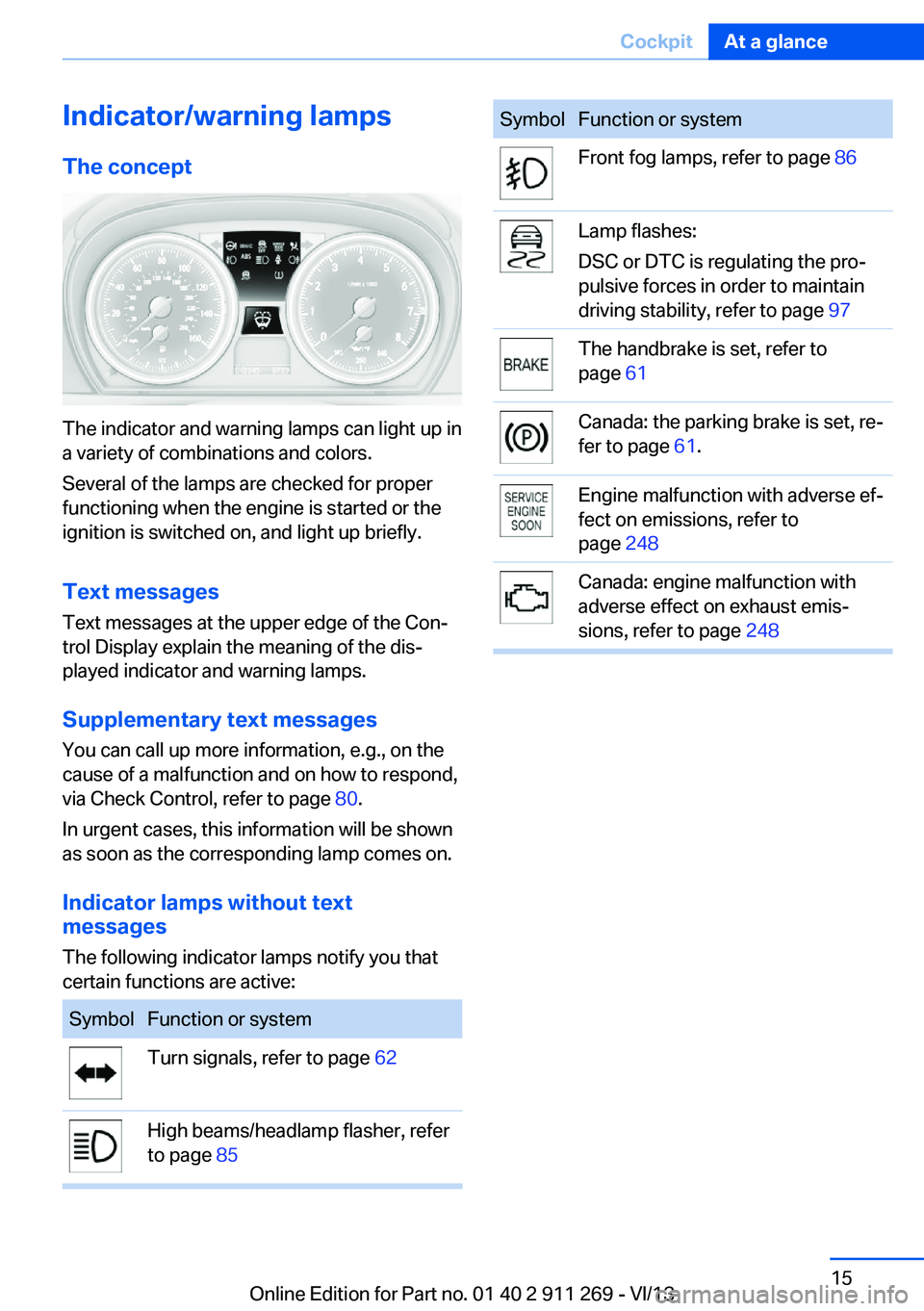
Indicator/warning lampsThe concept
The indicator and warning lamps can light up in
a variety of combinations and colors.
Several of the lamps are checked for proper
functioning when the engine is started or the
ignition is switched on, and light up briefly.
Text messages Text messages at the upper edge of the Con‐
trol Display explain the meaning of the dis‐
played indicator and warning lamps.
Supplementary text messages
You can call up more information, e.g., on the
cause of a malfunction and on how to respond,
via Check Control, refer to page 80.
In urgent cases, this information will be shown
as soon as the corresponding lamp comes on.
Indicator lamps without text
messages
The following indicator lamps notify you that
certain functions are active:
SymbolFunction or systemTurn signals, refer to page 62High beams/headlamp flasher, refer
to page 85SymbolFunction or systemFront fog lamps, refer to page 86Lamp flashes:
DSC or DTC is regulating the pro‐
pulsive forces in order to maintain
driving stability, refer to page 97The handbrake is set, refer to
page 61Canada: the parking brake is set, re‐
fer to page 61.Engine malfunction with adverse ef‐
fect on emissions, refer to
page 248Canada: engine malfunction with
adverse effect on exhaust emis‐
sions, refer to page 248Seite 15CockpitAt a glance15
Online Edition for Part no. 01 40 2 911 269 - VI/13
Page 16 of 295
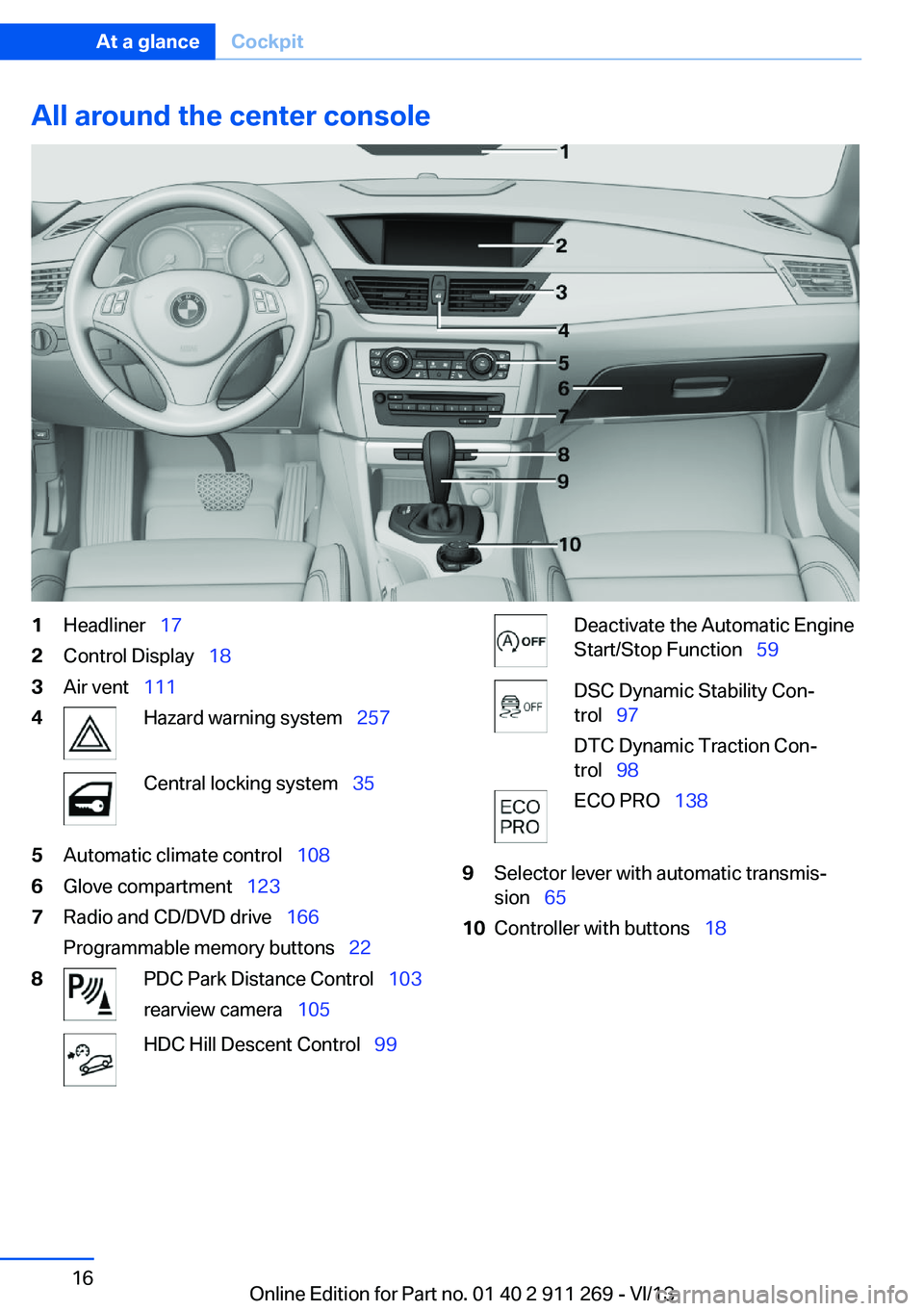
All around the center console1Headliner 172Control Display 183Air vent 1114Hazard warning system 257Central locking system 355Automatic climate control 1086Glove compartment 1237Radio and CD/DVD drive 166
Programmable memory buttons 228PDC Park Distance Control 103
rearview camera 105HDC Hill Descent Control 99Deactivate the Automatic Engine
Start/Stop Function 59DSC Dynamic Stability Con‐
trol 97
DTC Dynamic Traction Con‐
trol 98ECO PRO 1389Selector lever with automatic transmis‐
sion 6510Controller with buttons 18Seite 16At a glanceCockpit16
Online Edition for Part no. 01 40 2 911 269 - VI/13
Page 18 of 295
iDriveVehicle equipment
This chapter describes all series equipment as
well as country-specific and special equipment
offered for this model series.Therefore, it also
describes equipment that may not be found in
your vehicle, for instance due to the selected
special equipment or the country version. This
also applies to safety-related functions and
systems.
The concept
The iDrive combines the functions of a multi‐
tude of switches. Thus, these functions can be
operated from a central location.
Using the iDrive during a trip
To avoid becoming distracted and pos‐
ing an unnecessary hazard to your vehicle's
occupants and to other road users, never at‐
tempt to use the controls or enter information
unless traffic and road conditions allow this.◀
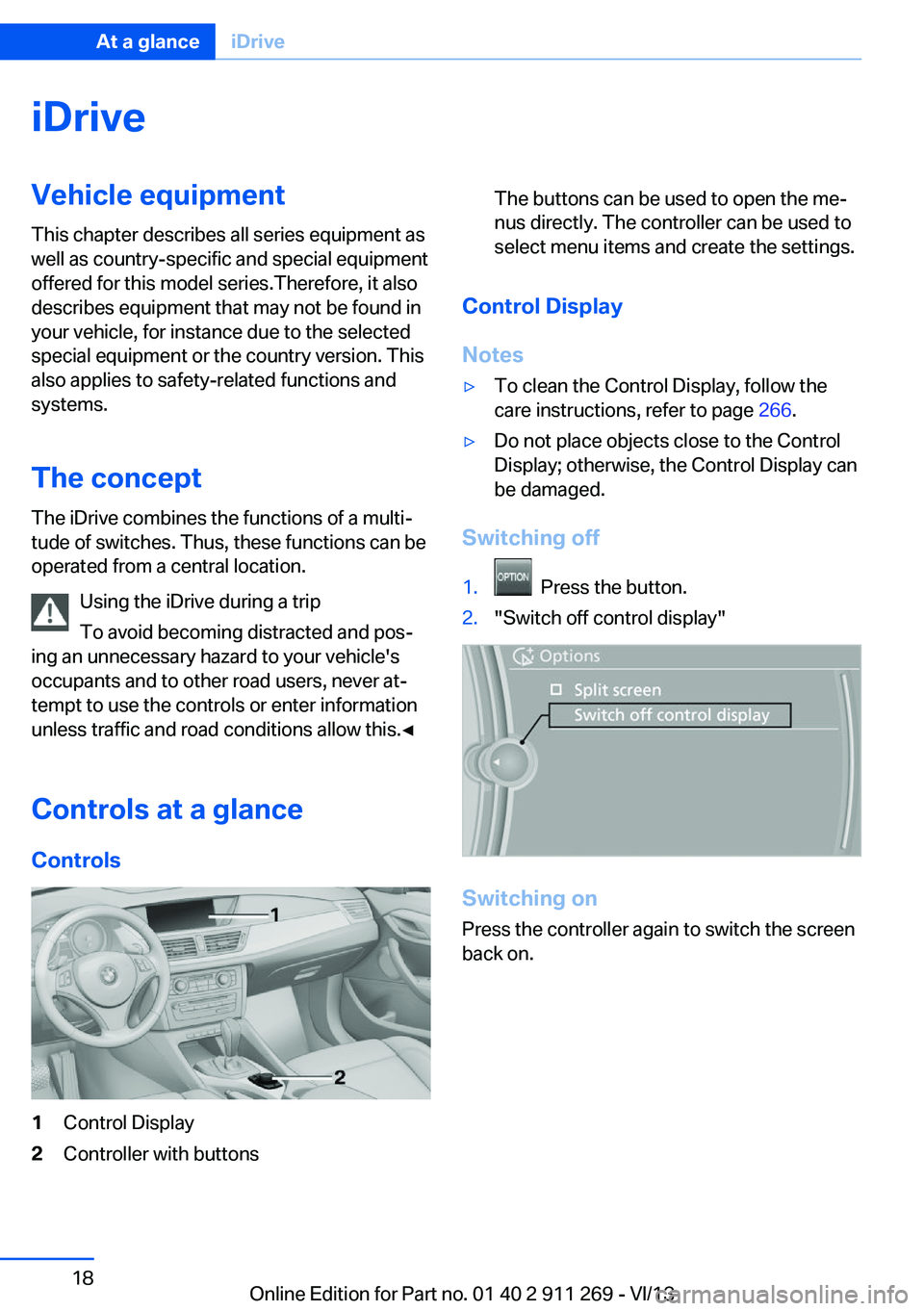
Controls at a glance Controls1Control Display2Controller with buttonsThe buttons can be used to open the me‐
nus directly. The controller can be used to
select menu items and create the settings.
Control Display
Notes
▷To clean the Control Display, follow the
care instructions, refer to page 266.▷Do not place objects close to the Control
Display; otherwise, the Control Display can
be damaged.
Switching off
1. Press the button.2."Switch off control display"
Switching on
Press the controller again to switch the screen
back on.
Seite 18At a glanceiDrive18
Online Edition for Part no. 01 40 2 911 269 - VI/13
Page 19 of 295
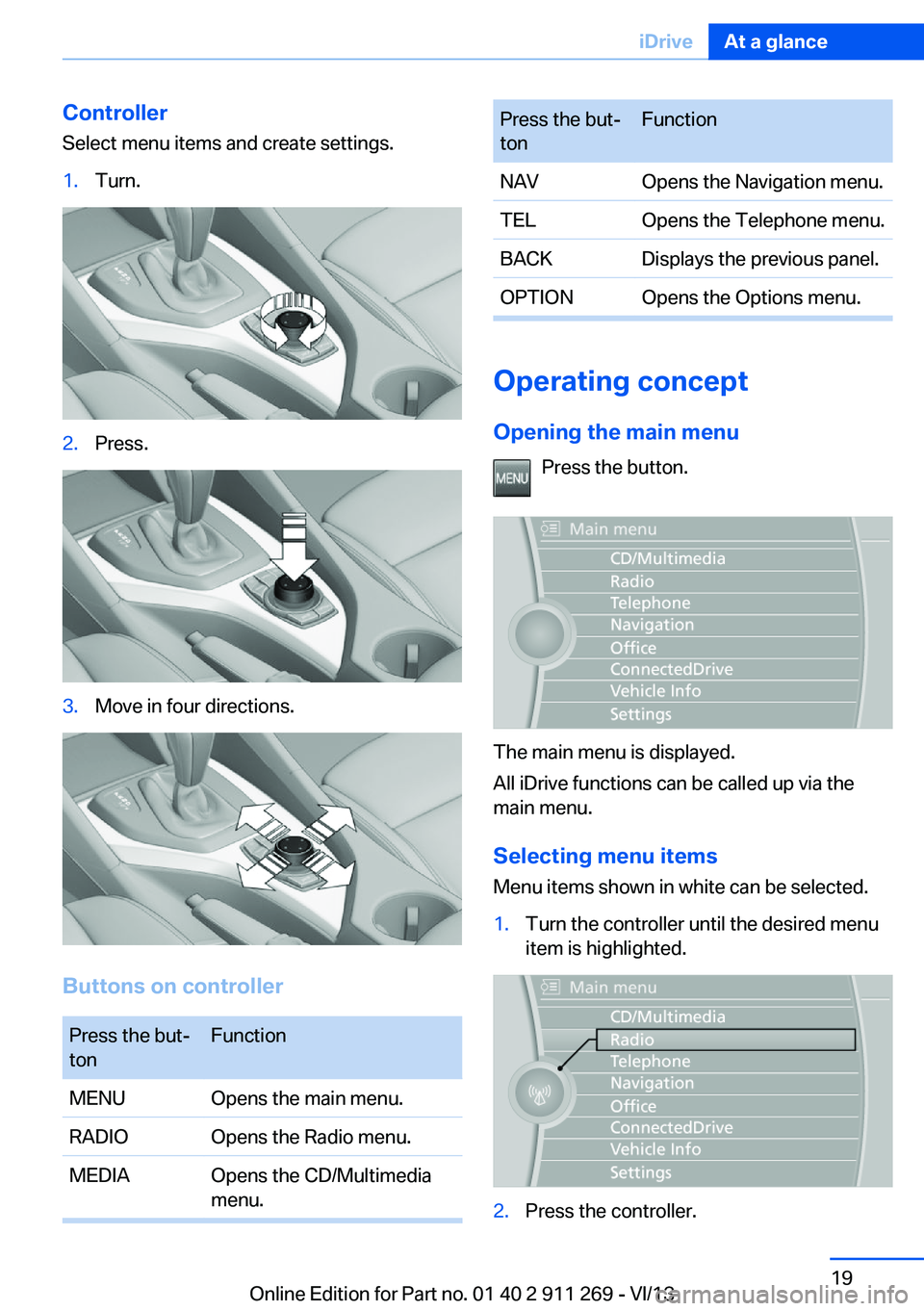
Controller
Select menu items and create settings.1.Turn.2.Press.3.Move in four directions.
Buttons on controller
Press the but‐
tonFunctionMENUOpens the main menu.RADIOOpens the Radio menu.MEDIAOpens the CD/Multimedia
menu.Press the but‐
tonFunctionNAVOpens the Navigation menu.TELOpens the Telephone menu.BACKDisplays the previous panel.OPTIONOpens the Options menu.
Operating concept
Opening the main menu Press the button.
The main menu is displayed.
All iDrive functions can be called up via the
main menu.
Selecting menu items
Menu items shown in white can be selected.
1.Turn the controller until the desired menu
item is highlighted.2.Press the controller.Seite 19iDriveAt a glance19
Online Edition for Part no. 01 40 2 911 269 - VI/13
Page 20 of 295
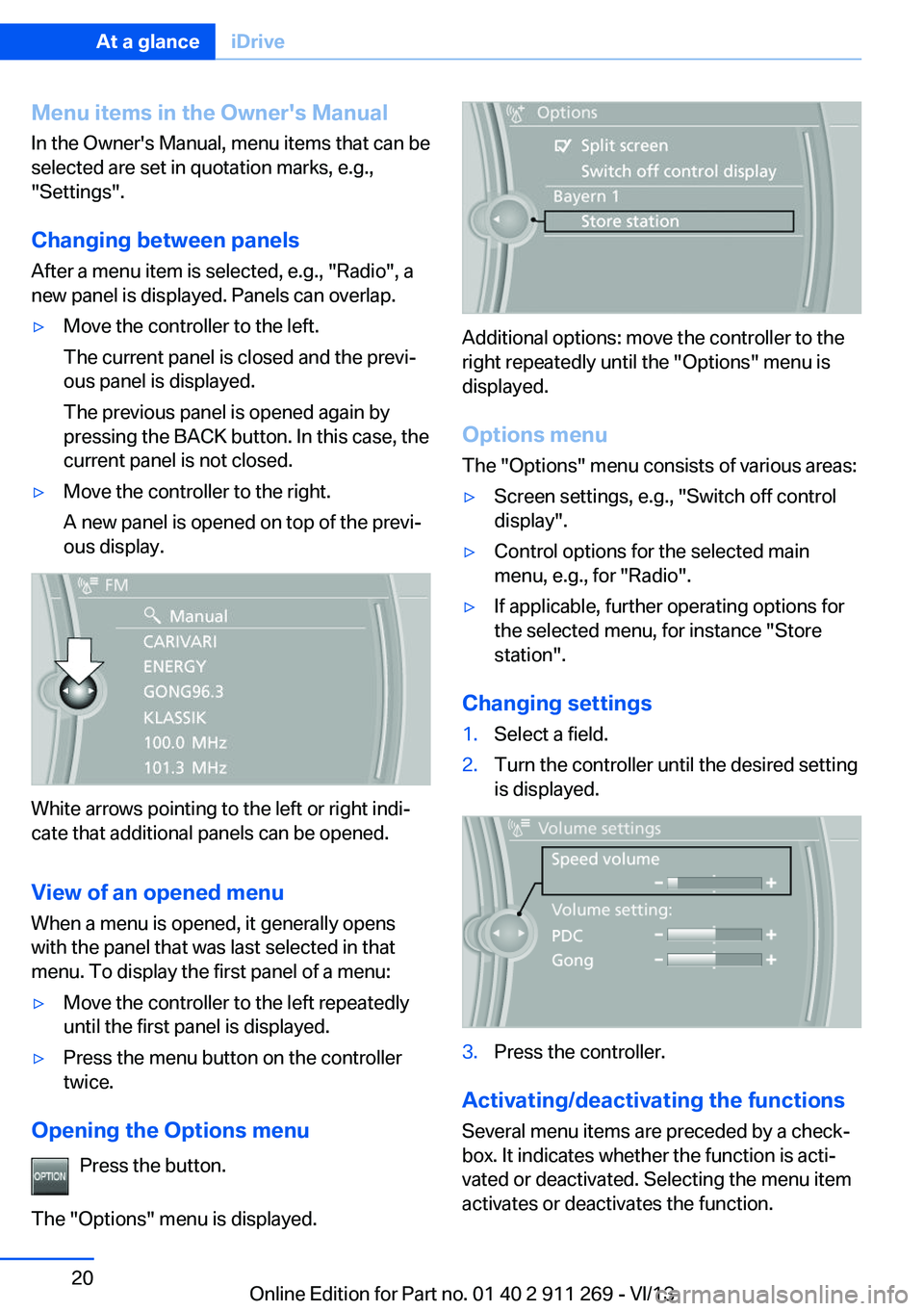
Menu items in the Owner's ManualIn the Owner's Manual, menu items that can be
selected are set in quotation marks, e.g.,
"Settings".
Changing between panels
After a menu item is selected, e.g., "Radio", a
new panel is displayed. Panels can overlap.▷Move the controller to the left.
The current panel is closed and the previ‐
ous panel is displayed.
The previous panel is opened again by
pressing the BACK button. In this case, the
current panel is not closed.▷Move the controller to the right.
A new panel is opened on top of the previ‐
ous display.
White arrows pointing to the left or right indi‐
cate that additional panels can be opened.
View of an opened menu
When a menu is opened, it generally opens
with the panel that was last selected in that
menu. To display the first panel of a menu:
▷Move the controller to the left repeatedly
until the first panel is displayed.▷Press the menu button on the controller
twice.
Opening the Options menu
Press the button.
The "Options" menu is displayed.
Additional options: move the controller to the
right repeatedly until the "Options" menu is
displayed.
Options menu The "Options" menu consists of various areas:
▷Screen settings, e.g., "Switch off control
display".▷Control options for the selected main
menu, e.g., for "Radio".▷If applicable, further operating options for
the selected menu, for instance "Store
station".
Changing settings
1.Select a field.2.Turn the controller until the desired setting
is displayed.3.Press the controller.
Activating/deactivating the functions
Several menu items are preceded by a check‐
box. It indicates whether the function is acti‐
vated or deactivated. Selecting the menu item
activates or deactivates the function.
Seite 20At a glanceiDrive20
Online Edition for Part no. 01 40 2 911 269 - VI/13
Page 21 of 295
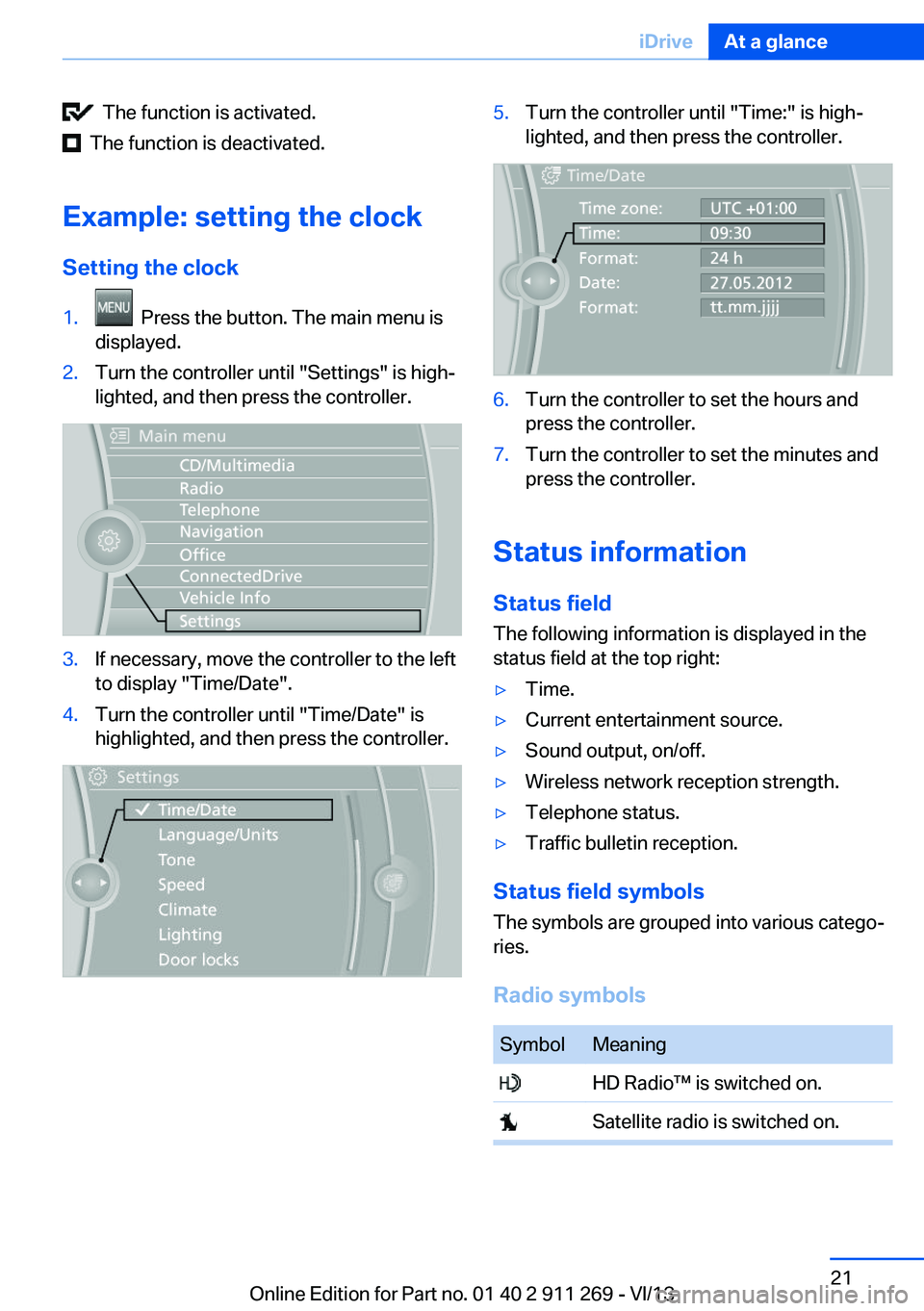
The function is activated.
The function is deactivated.
Example: setting the clock Setting the clock
1. Press the button. The main menu is
displayed.2.Turn the controller until "Settings" is high‐
lighted, and then press the controller.3.If necessary, move the controller to the left
to display "Time/Date".4.Turn the controller until "Time/Date" is
highlighted, and then press the controller.5.Turn the controller until "Time:" is high‐
lighted, and then press the controller.6.Turn the controller to set the hours and
press the controller.7.Turn the controller to set the minutes and
press the controller.
Status information
Status field The following information is displayed in the
status field at the top right:
▷Time.▷Current entertainment source.▷Sound output, on/off.▷Wireless network reception strength.▷Telephone status.▷Traffic bulletin reception.
Status field symbols
The symbols are grouped into various catego‐
ries.
Radio symbols
SymbolMeaning HD Radio™ is switched on. Satellite radio is switched on.Seite 21iDriveAt a glance21
Online Edition for Part no. 01 40 2 911 269 - VI/13