head BMW X1 XDRIVE 28I 2014 Owners Manual
[x] Cancel search | Manufacturer: BMW, Model Year: 2014, Model line: X1 XDRIVE 28I, Model: BMW X1 XDRIVE 28I 2014Pages: 295, PDF Size: 7.06 MB
Page 12 of 295
CockpitVehicle equipment
This chapter describes all series equipment as
well as country-specific and special equipment
offered for this model series.Therefore, it alsodescribes equipment that may not be found in
your vehicle, for instance due to the selected
special equipment or the country version. This
also applies to safety-related functions and
systems.
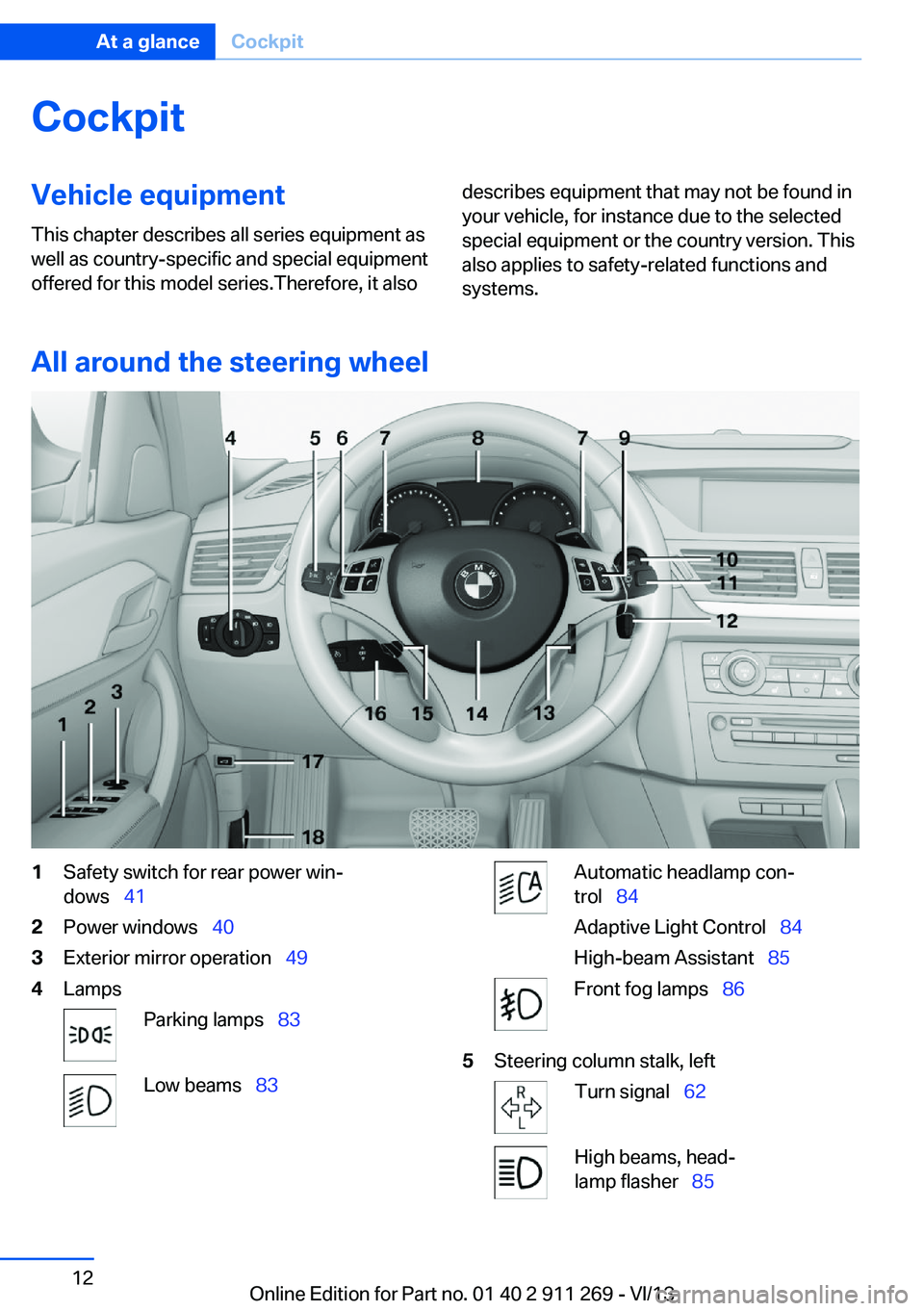
All around the steering wheel
1Safety switch for rear power win‐
dows 412Power windows 403Exterior mirror operation 494LampsParking lamps 83Low beams 83Automatic headlamp con‐
trol 84
Adaptive Light Control 84
High-beam Assistant 85Front fog lamps 865Steering column stalk, leftTurn signal 62High beams, head‐
lamp flasher 85Seite 12At a glanceCockpit12
Online Edition for Part no. 01 40 2 911 269 - VI/13
Page 15 of 295
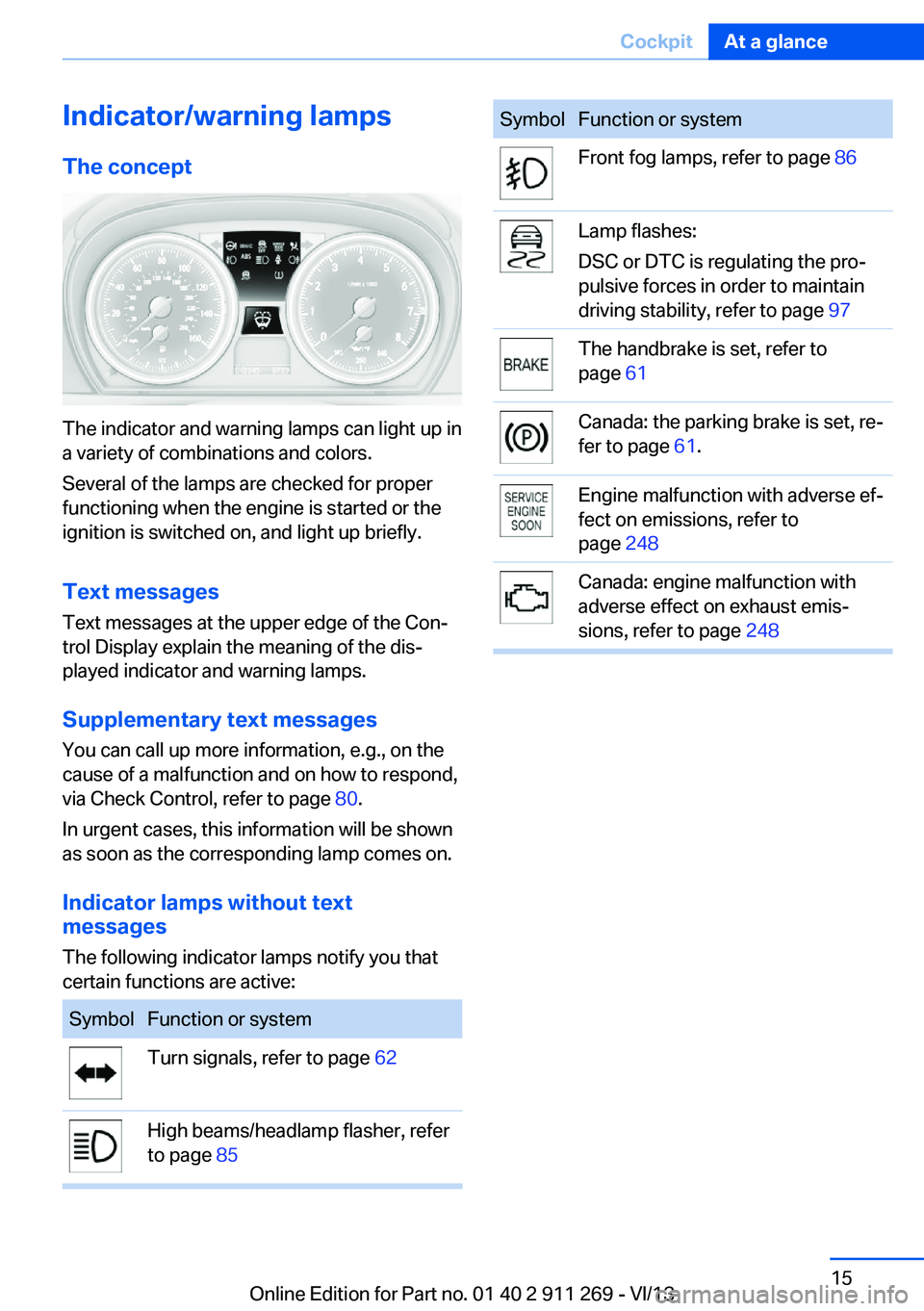
Indicator/warning lampsThe concept
The indicator and warning lamps can light up in
a variety of combinations and colors.
Several of the lamps are checked for proper
functioning when the engine is started or the
ignition is switched on, and light up briefly.
Text messages Text messages at the upper edge of the Con‐
trol Display explain the meaning of the dis‐
played indicator and warning lamps.
Supplementary text messages
You can call up more information, e.g., on the
cause of a malfunction and on how to respond,
via Check Control, refer to page 80.
In urgent cases, this information will be shown
as soon as the corresponding lamp comes on.
Indicator lamps without text
messages
The following indicator lamps notify you that
certain functions are active:
SymbolFunction or systemTurn signals, refer to page 62High beams/headlamp flasher, refer
to page 85SymbolFunction or systemFront fog lamps, refer to page 86Lamp flashes:
DSC or DTC is regulating the pro‐
pulsive forces in order to maintain
driving stability, refer to page 97The handbrake is set, refer to
page 61Canada: the parking brake is set, re‐
fer to page 61.Engine malfunction with adverse ef‐
fect on emissions, refer to
page 248Canada: engine malfunction with
adverse effect on exhaust emis‐
sions, refer to page 248Seite 15CockpitAt a glance15
Online Edition for Part no. 01 40 2 911 269 - VI/13
Page 16 of 295
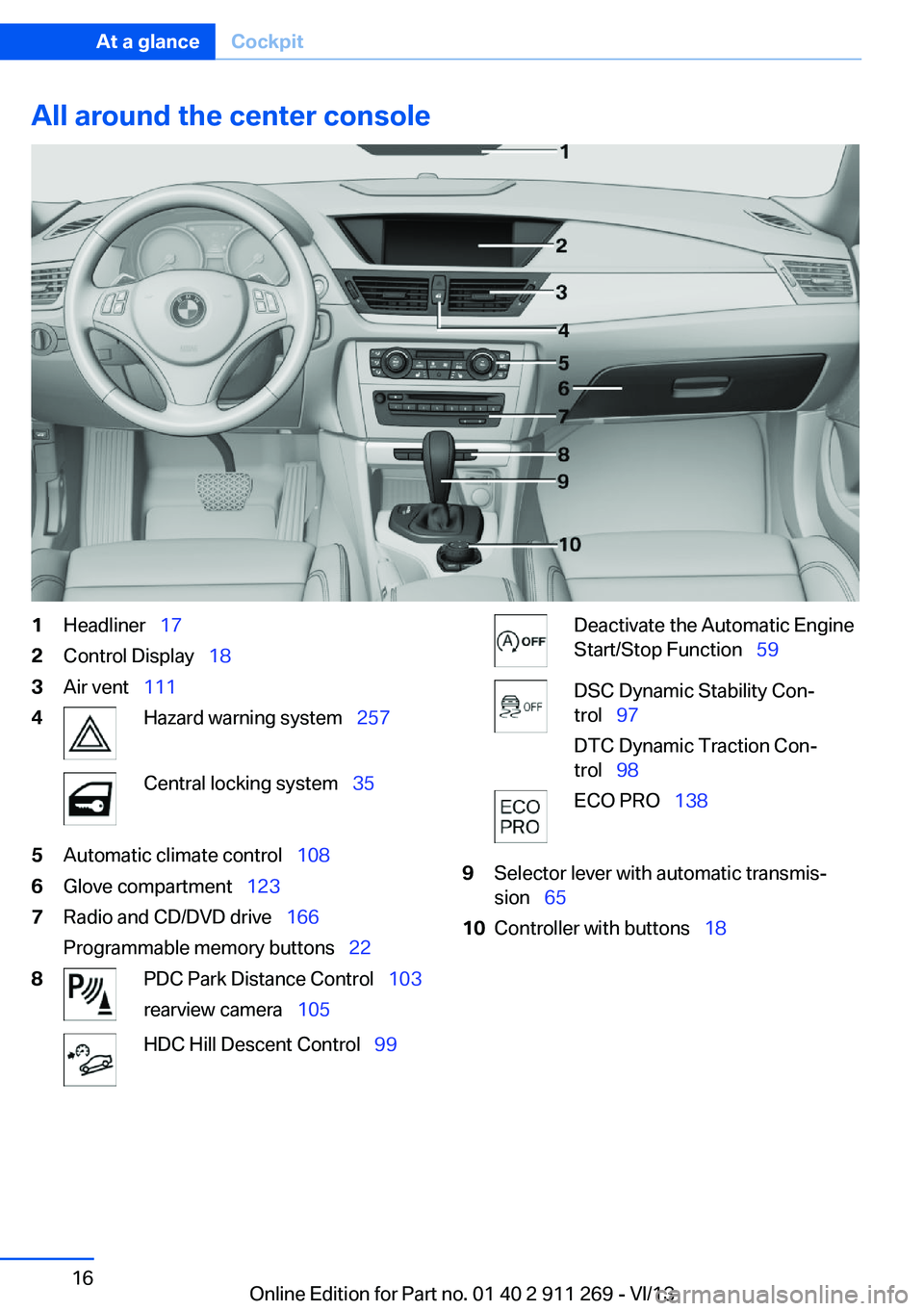
All around the center console1Headliner 172Control Display 183Air vent 1114Hazard warning system 257Central locking system 355Automatic climate control 1086Glove compartment 1237Radio and CD/DVD drive 166
Programmable memory buttons 228PDC Park Distance Control 103
rearview camera 105HDC Hill Descent Control 99Deactivate the Automatic Engine
Start/Stop Function 59DSC Dynamic Stability Con‐
trol 97
DTC Dynamic Traction Con‐
trol 98ECO PRO 1389Selector lever with automatic transmis‐
sion 6510Controller with buttons 18Seite 16At a glanceCockpit16
Online Edition for Part no. 01 40 2 911 269 - VI/13
Page 17 of 295
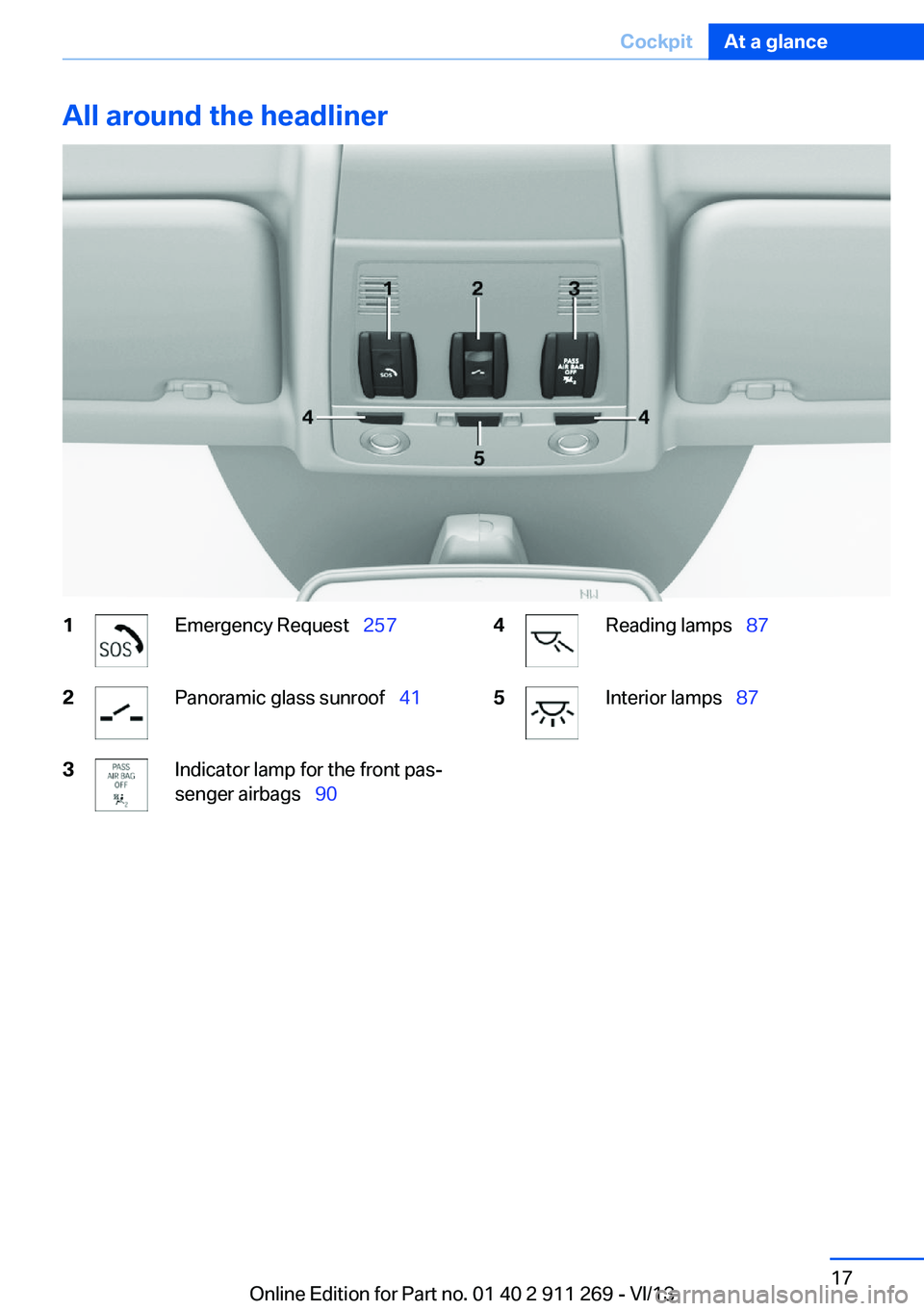
All around the headliner1Emergency Request 2572Panoramic glass sunroof 413Indicator lamp for the front pas‐
senger airbags 904Reading lamps 875Interior lamps 87Seite 17CockpitAt a glance17
Online Edition for Part no. 01 40 2 911 269 - VI/13
Page 31 of 295
▷The remote control used is detected when
the vehicle is unlocked and the stored pro‐
file is called up.▷Your personal settings will be recognized
and called up again even if the vehicle has
been used in the meantime by someone
else with another remote control.
The individual settings are stored for a maxi‐
mum of four remote controls. They are stored
for two remote controls if Comfort Access is in
use.
Personal Profile settingsThe following functions and settings can be
stored in a profile.
More information on the settings can be found
under:
▷Assigning the programmable memory but‐
tons, refer to page 22.▷Response of the central locking system
when the car is being unlocked, refer to
page 32.▷Automatic locking of the vehicle, refer to
page 35.▷Automatic call-up of the driver's seat posi‐
tion after unlocking, refer to page 33.▷Settings for the display on the Control Dis‐
play and in the instrument cluster:▷12h/24h clock format, refer to
page 76.▷Date format, refer to page 77.▷Brightness of the Control Display, refer
to page 78.▷Language on the Control Display, refer
to page 77.▷Units of measure for fuel consumption,
distance covered/remaining distances,
and temperature, refer to page 75.▷Show visual warning for the Park Distance
Control PDC, refer to page 104.▷Backup camera:▷Function selection, refer to page 106.▷Type of display, refer to page 107.▷Light settings:▷Triple turn signal activation, refer to
page 62.▷Welcome lamps, refer to page 83.▷Headlamp courtesy delay feature, refer
to page 84.▷Daytime running lights, refer to
page 84.▷High-beam Assistant, refer to
page 85.▷Automatic climate control: AUTO program,
cooling function and automatic recircu‐
lated air control activated/deactivated,
temperature, air flow rate and distribution,
refer to page 108.▷Navigation:▷Voice activation, refer to page 155.▷Route criteria, refer to page 153.▷Map view settings, refer to page 157.▷Entertainment:▷Tone control, refer to page 164.▷Radio, stored stations, refer to
page 172.▷CD/multimedia, audio source listened
to last, refer to page 174.▷Telephone: volume, refer to page 200.
Central locking system
The concept The central locking system becomes active
when the driver's door is closed.
The system simultaneously engages and re‐
leases the locks on the following:
▷Doors.▷Tailgate.▷Fuel filler flap.Seite 31Opening and closingControls31
Online Edition for Part no. 01 40 2 911 269 - VI/13
Page 44 of 295
AdjustingVehicle equipment
This chapter describes all series equipment as
well as country-specific and special equipment
offered for this model series.Therefore, it also
describes equipment that may not be found in
your vehicle, for instance due to the selected
special equipment or the country version. This
also applies to safety-related functions and
systems.
Sitting safely
The ideal seating position can make a vital
contribution to relaxed, fatigue-free driving.
The seating position plays an important role in
an accident in combination with:▷Safety belts, refer to page 46.▷Head restraints, refer to page 47.▷Airbags, refer to page 88.
Seats
Note before adjusting Do not adjust the seat while driving
Never attempt to adjust the driver's seat
while driving. The seat could respond with un‐
expected movement and the ensuing loss of
vehicle control could lead to an accident.◀
Do not incline the backrest too far to the
rear
Do not incline the backrest on the front pas‐
senger side too far to the rear during driving.
Otherwise, there is the danger of sliding under
the safety belt in an accident. This would elimi‐
nate the protection normally provided by the
belt.◀
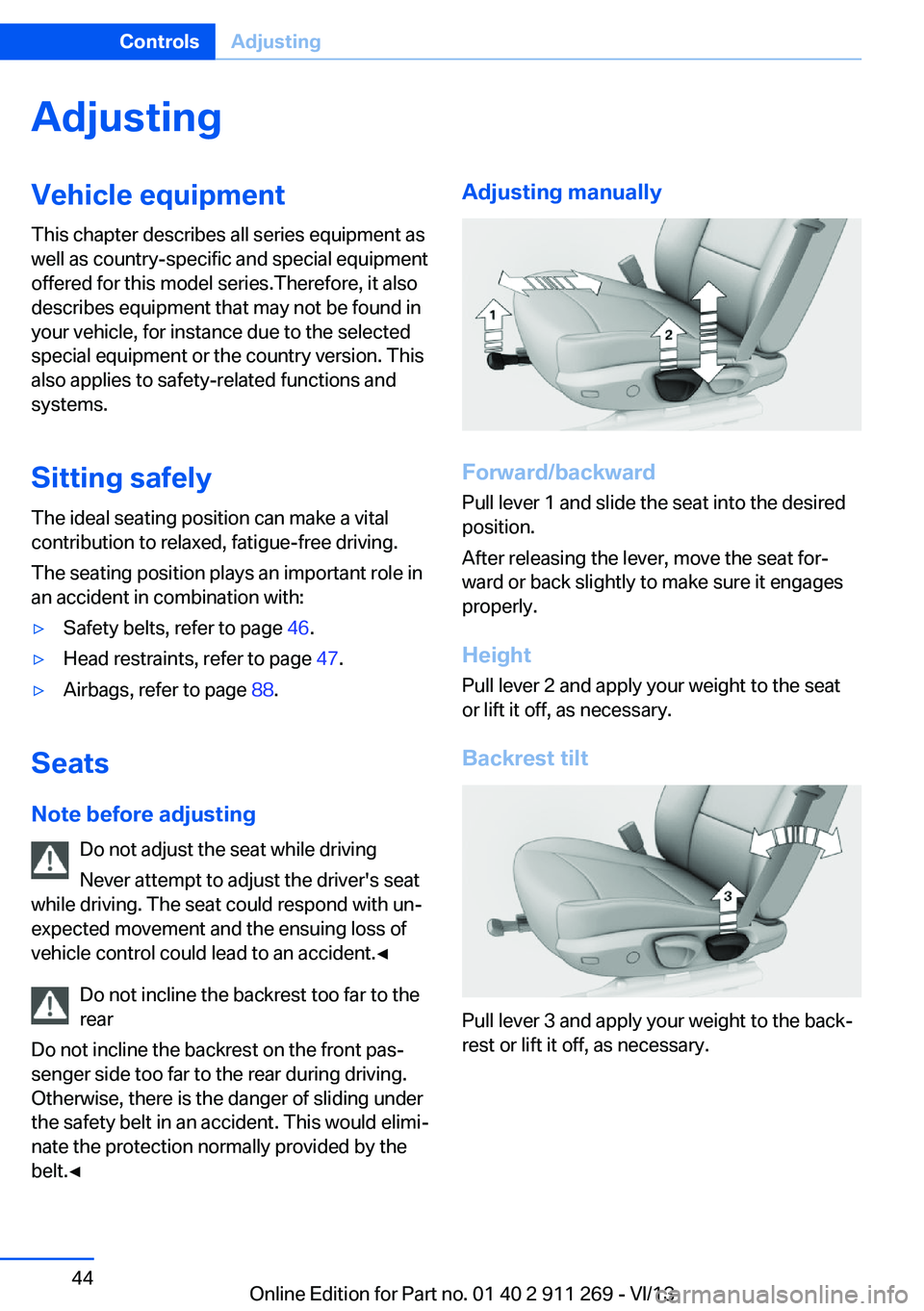
Adjusting manually
Forward/backward
Pull lever 1 and slide the seat into the desired
position.
After releasing the lever, move the seat for‐
ward or back slightly to make sure it engages
properly.
Height
Pull lever 2 and apply your weight to the seat
or lift it off, as necessary.
Backrest tilt
Pull lever 3 and apply your weight to the back‐
rest or lift it off, as necessary.
Seite 44ControlsAdjusting44
Online Edition for Part no. 01 40 2 911 269 - VI/13
Page 45 of 295
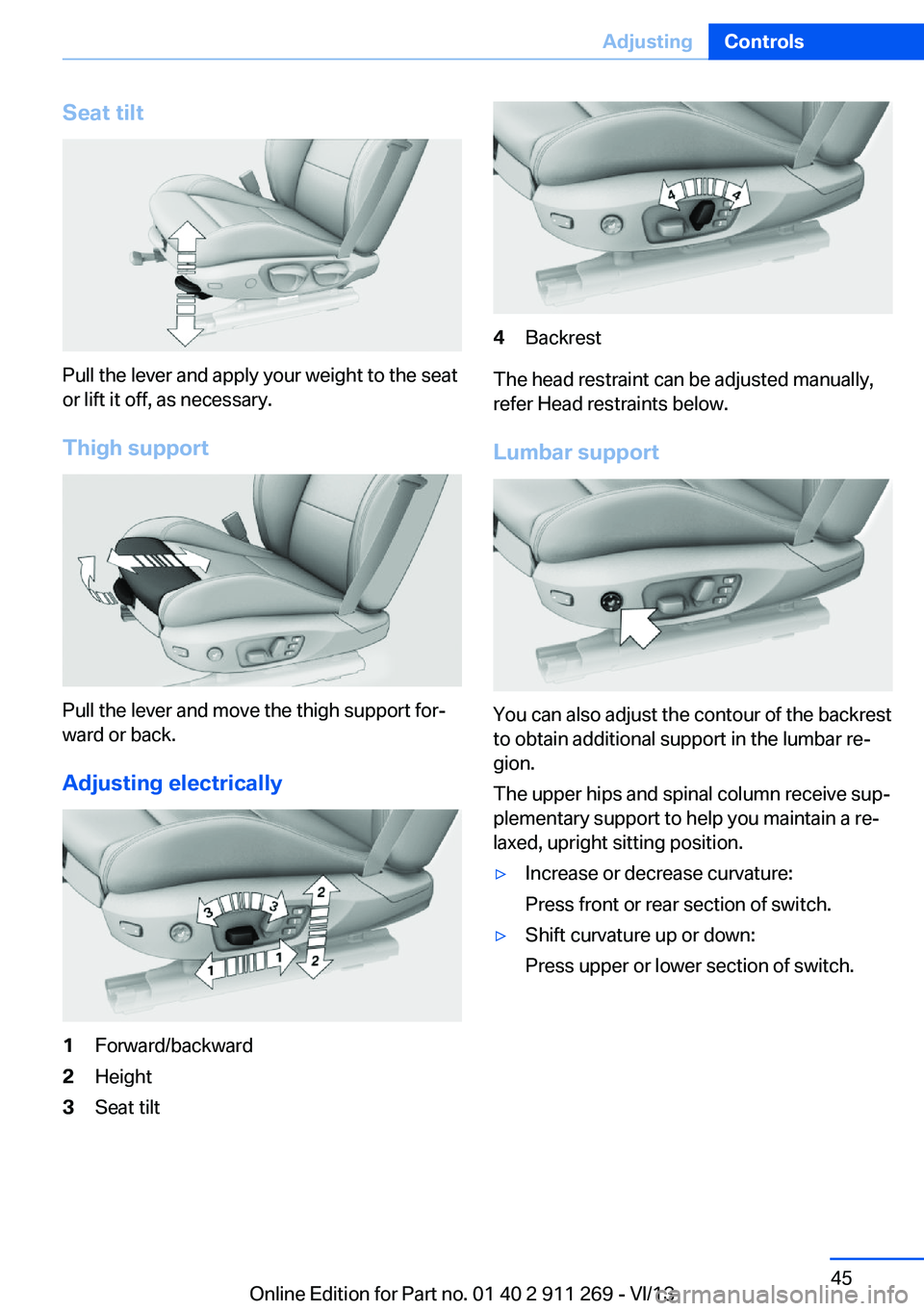
Seat tilt
Pull the lever and apply your weight to the seat
or lift it off, as necessary.
Thigh support
Pull the lever and move the thigh support for‐
ward or back.
Adjusting electrically
1Forward/backward2Height3Seat tilt4Backrest
The head restraint can be adjusted manually,
refer Head restraints below.
Lumbar support
You can also adjust the contour of the backrest
to obtain additional support in the lumbar re‐
gion.
The upper hips and spinal column receive sup‐
plementary support to help you maintain a re‐
laxed, upright sitting position.
▷Increase or decrease curvature:
Press front or rear section of switch.▷Shift curvature up or down:
Press upper or lower section of switch.Seite 45AdjustingControls45
Online Edition for Part no. 01 40 2 911 269 - VI/13
Page 47 of 295
The safety belt must not lie across the neck,
rub on sharp edges, be routed over solid or
breakable objects, or be pinched.◀
Reduction of restraining effect
Avoid wearing clothing that prevents the
belt from fitting properly, and pull the shoulder
belt periodically to readjust the tension across
your lap; otherwise, the retention effect of the
safety belt may be reduced.◀
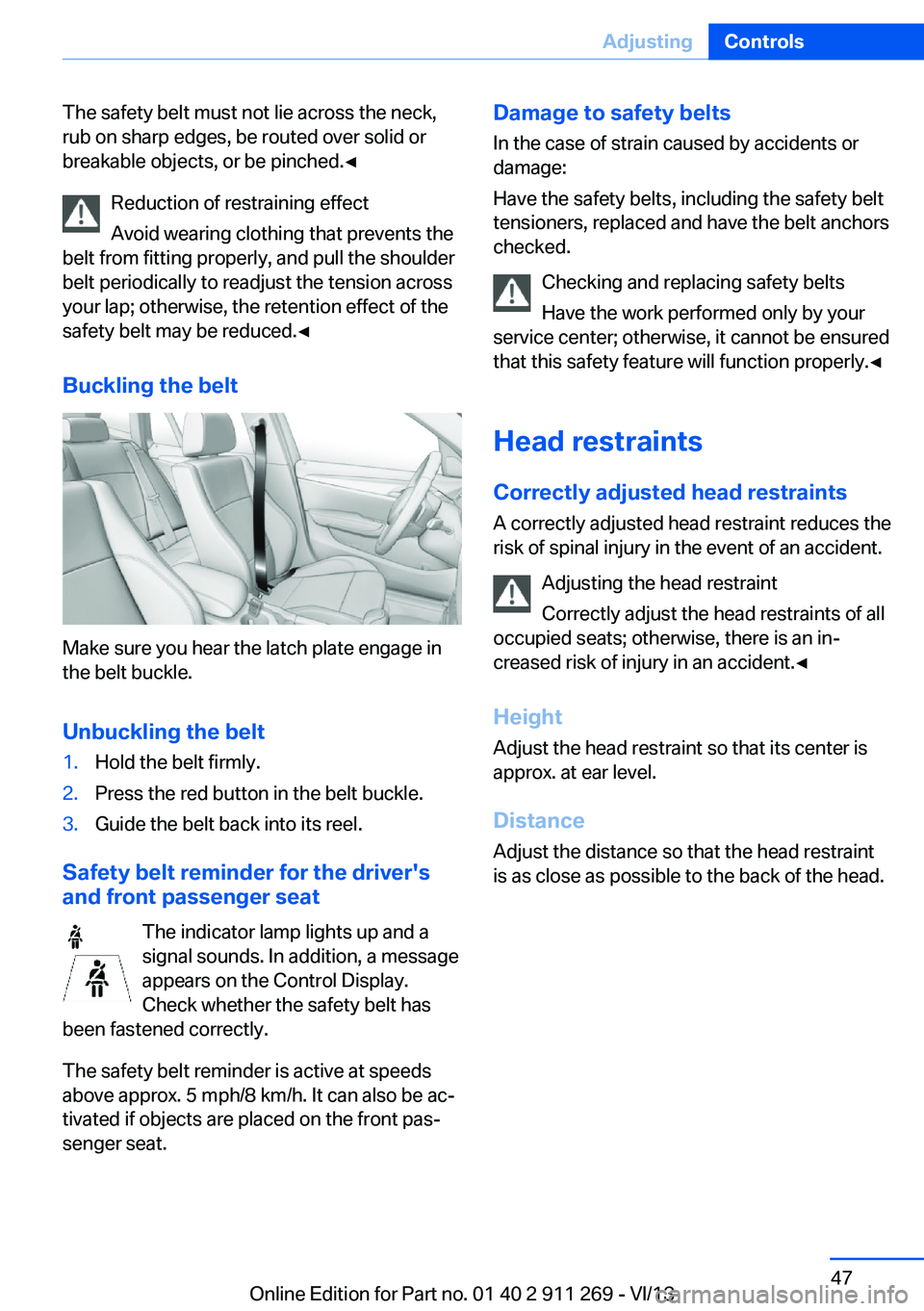
Buckling the belt
Make sure you hear the latch plate engage in
the belt buckle.
Unbuckling the belt
1.Hold the belt firmly.2.Press the red button in the belt buckle.3.Guide the belt back into its reel.
Safety belt reminder for the driver's
and front passenger seat
The indicator lamp lights up and a
signal sounds. In addition, a message
appears on the Control Display.
Check whether the safety belt has
been fastened correctly.
The safety belt reminder is active at speeds
above approx. 5 mph/8 km/h. It can also be ac‐
tivated if objects are placed on the front pas‐
senger seat.
Damage to safety belts
In the case of strain caused by accidents or
damage:
Have the safety belts, including the safety belt
tensioners, replaced and have the belt anchors
checked.
Checking and replacing safety belts
Have the work performed only by your
service center; otherwise, it cannot be ensured
that this safety feature will function properly.◀
Head restraints
Correctly adjusted head restraints
A correctly adjusted head restraint reduces the
risk of spinal injury in the event of an accident.
Adjusting the head restraint
Correctly adjust the head restraints of all
occupied seats; otherwise, there is an in‐
creased risk of injury in an accident.◀
Height Adjust the head restraint so that its center is
approx. at ear level.
Distance Adjust the distance so that the head restraint
is as close as possible to the back of the head.Seite 47AdjustingControls47
Online Edition for Part no. 01 40 2 911 269 - VI/13
Page 48 of 295
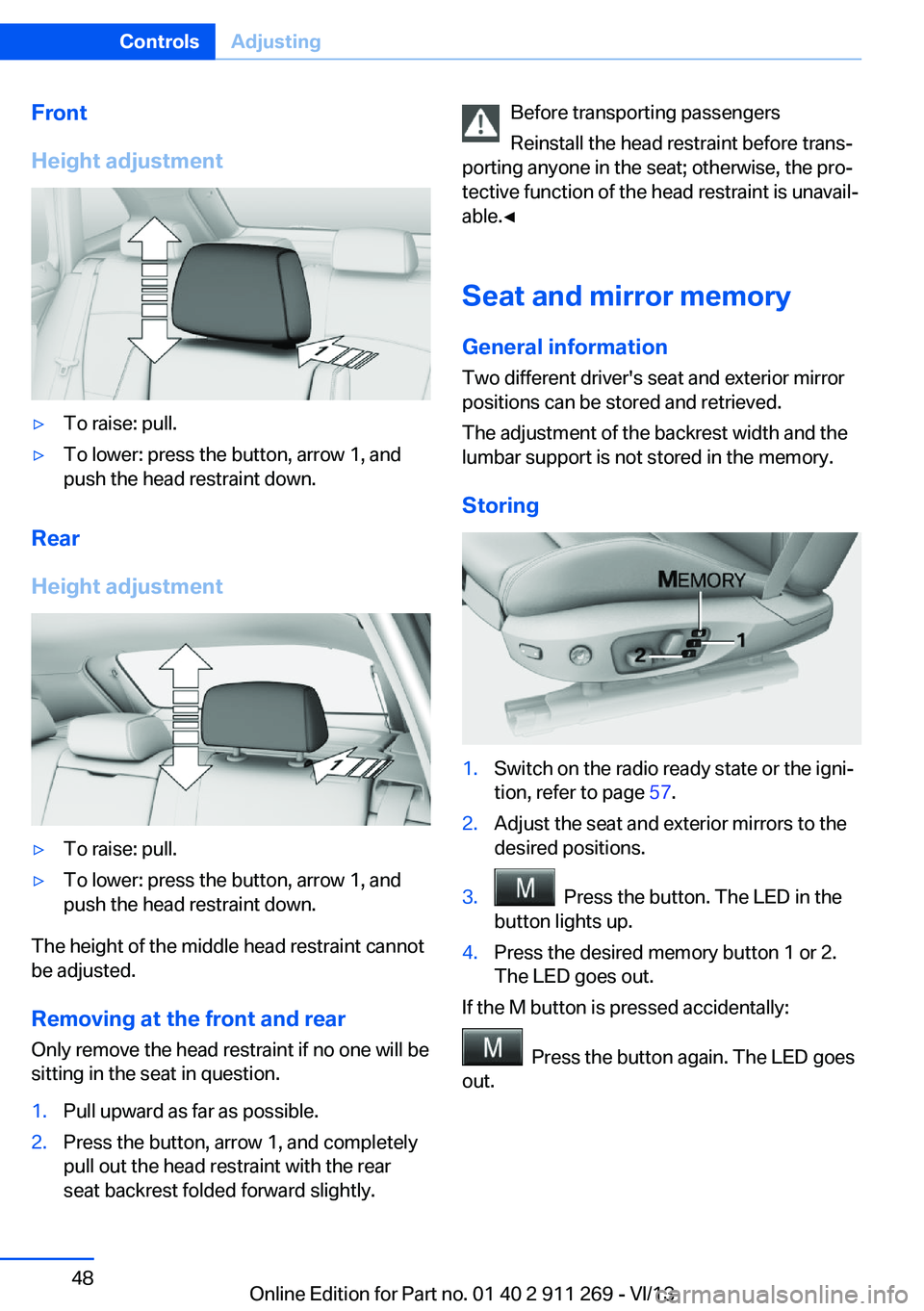
Front
Height adjustment▷To raise: pull.▷To lower: press the button, arrow 1, and
push the head restraint down.
Rear
Height adjustment
▷To raise: pull.▷To lower: press the button, arrow 1, and
push the head restraint down.
The height of the middle head restraint cannot
be adjusted.
Removing at the front and rear Only remove the head restraint if no one will be
sitting in the seat in question.
1.Pull upward as far as possible.2.Press the button, arrow 1, and completely
pull out the head restraint with the rear
seat backrest folded forward slightly.Before transporting passengers
Reinstall the head restraint before trans‐
porting anyone in the seat; otherwise, the pro‐
tective function of the head restraint is unavail‐
able.◀
Seat and mirror memory
General information
Two different driver's seat and exterior mirror
positions can be stored and retrieved.
The adjustment of the backrest width and the
lumbar support is not stored in the memory.
Storing1.Switch on the radio ready state or the igni‐
tion, refer to page 57.2.Adjust the seat and exterior mirrors to the
desired positions.3. Press the button. The LED in the
button lights up.4.Press the desired memory button 1 or 2.
The LED goes out.
If the M button is pressed accidentally:
Press the button again. The LED goes
out.
Seite 48ControlsAdjusting48
Online Edition for Part no. 01 40 2 911 269 - VI/13
Page 54 of 295
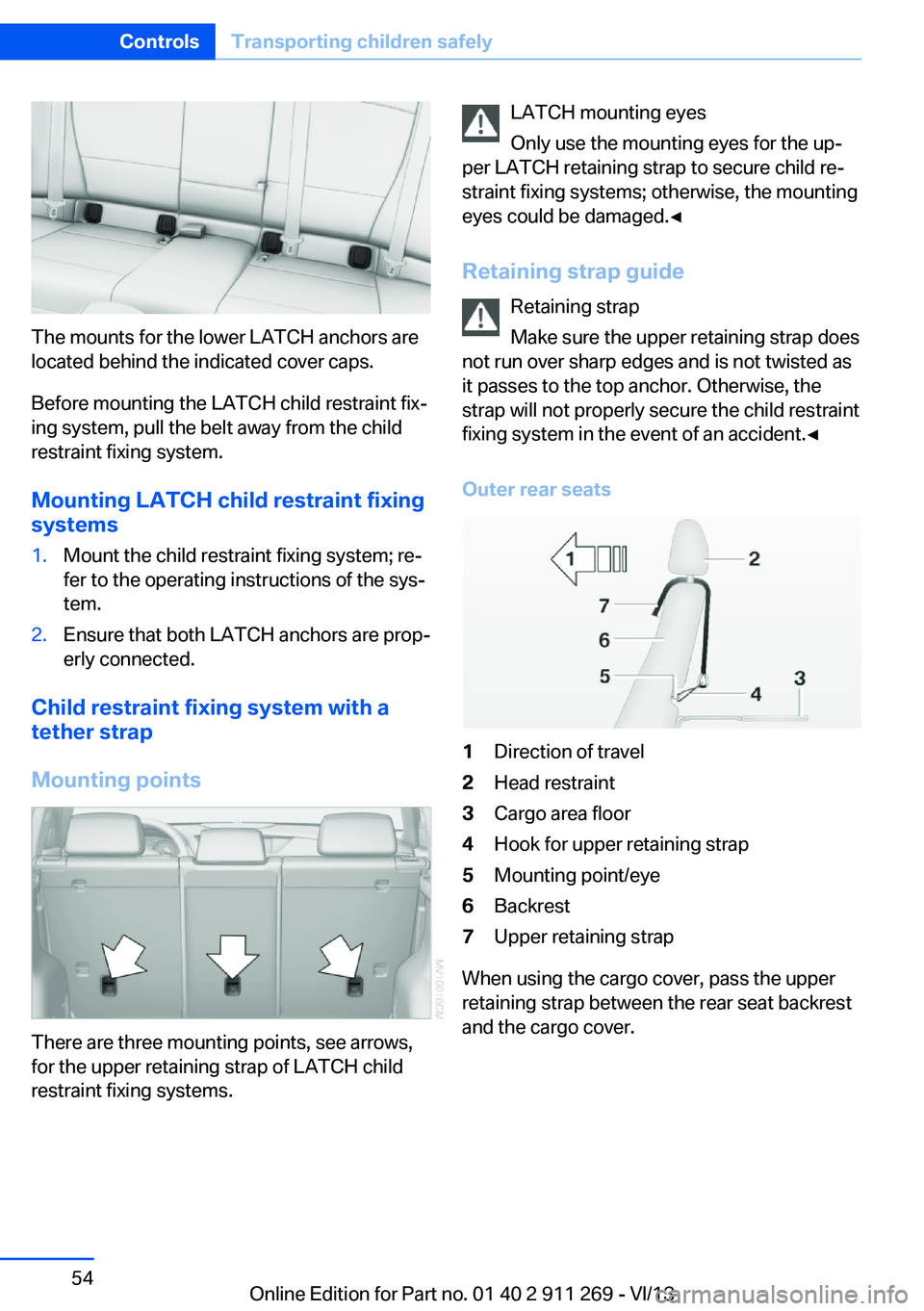
The mounts for the lower LATCH anchors are
located behind the indicated cover caps.
Before mounting the LATCH child restraint fix‐
ing system, pull the belt away from the child
restraint fixing system.
Mounting LATCH child restraint fixingsystems
1.Mount the child restraint fixing system; re‐
fer to the operating instructions of the sys‐
tem.2.Ensure that both LATCH anchors are prop‐
erly connected.
Child restraint fixing system with a
tether strap
Mounting points
There are three mounting points, see arrows,
for the upper retaining strap of LATCH child
restraint fixing systems.
LATCH mounting eyes
Only use the mounting eyes for the up‐
per LATCH retaining strap to secure child re‐
straint fixing systems; otherwise, the mounting
eyes could be damaged.◀
Retaining strap guide Retaining strap
Make sure the upper retaining strap does
not run over sharp edges and is not twisted as
it passes to the top anchor. Otherwise, the
strap will not properly secure the child restraint
fixing system in the event of an accident.◀
Outer rear seats1Direction of travel2Head restraint3Cargo area floor4Hook for upper retaining strap5Mounting point/eye6Backrest7Upper retaining strap
When using the cargo cover, pass the upper
retaining strap between the rear seat backrest
and the cargo cover.
Seite 54ControlsTransporting children safely54
Online Edition for Part no. 01 40 2 911 269 - VI/13