steering BMW X3 2.5I 2004 E83 User Guide
[x] Cancel search | Manufacturer: BMW, Model Year: 2004, Model line: X3 2.5I, Model: BMW X3 2.5I 2004 E83Pages: 132, PDF Size: 3.62 MB
Page 59 of 132
Reference
At a glance
Controls
Driving tips
Mobility
57
Lamps
Parking lamps/low beams
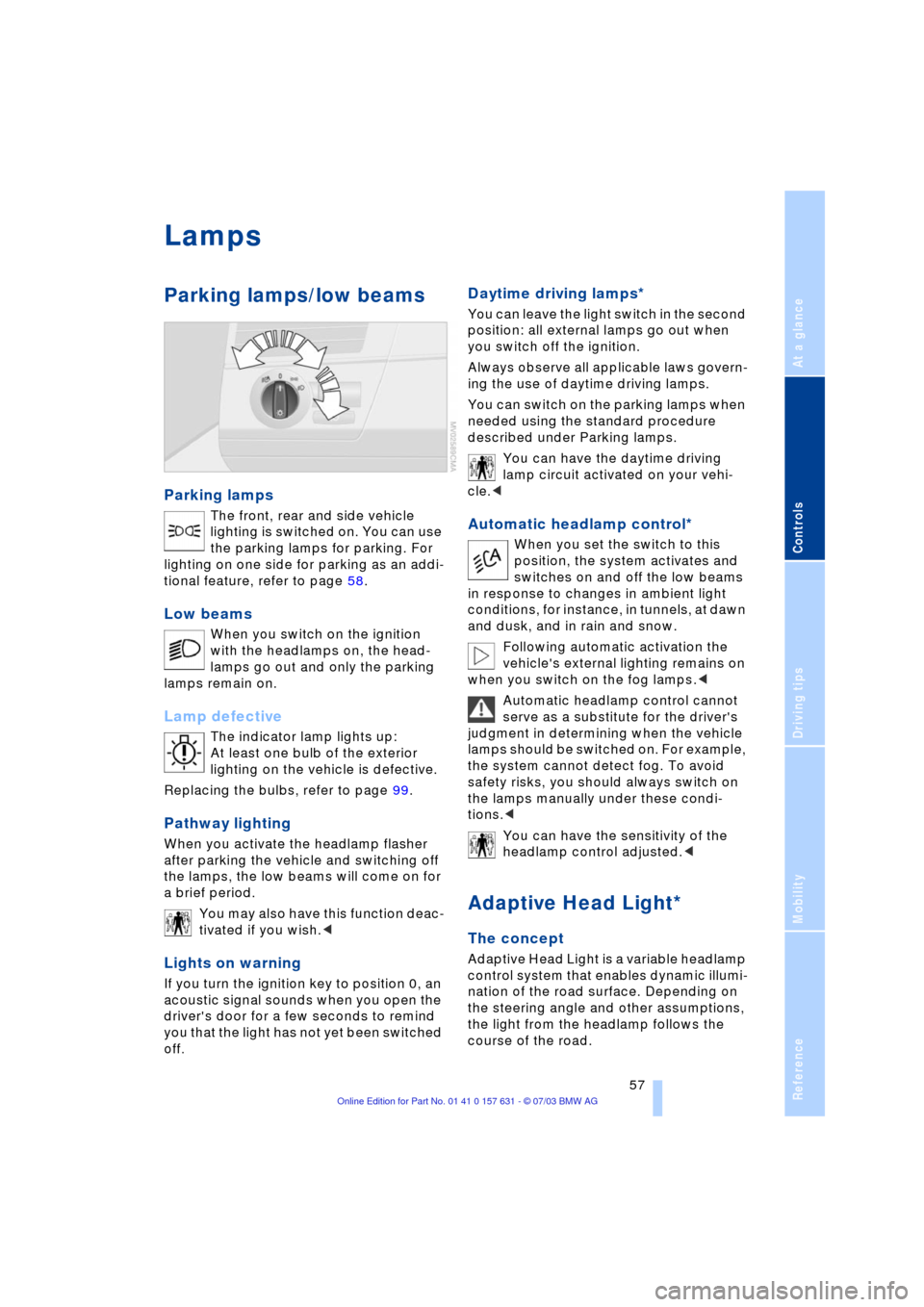
Parking lamps
The front, rear and side vehicle
lighting is switched on. You can use
the parking lamps for parking. For
lighting on one side for parking as an addi-
tional feature, refer to page 58.
Low beams
When you switch on the ignition
with the headlamps on, the head-
lamps go out and only the parking
lamps remain on.
Lamp defective
The indicator lamp lights up:
At least one bulb of the exterior
lighting on the vehicle is defective.
Replacing the bulbs, refer to page 99.
Pathway lighting
When you activate the headlamp flasher
after parking the vehicle and switching off
the lamps, the low beams will come on for
a brief period.
You may also have this function deac-
tivated if you wish.<
Lights on warning
If you turn the ignition key to position 0, an
acoustic signal sounds when you open the
driver's door for a few seconds to remind
you that the light has not yet been switched
off
.
Daytime driving lamps*
You can leave the light switch in the second
position: all external lamps go out when
you switch off the ignition.
Always observe all applicable laws govern-
ing the use of daytime driving lamps.
You can switch on the parking lamps when
needed using the standard procedure
described under Parking lamps.
You can have the daytime driving
lamp circuit activated on your vehi-
cle.<
Automatic headlamp control*
When you set the switch to this
position, the system activates and
switches on and off the low beams
in response to changes in ambient light
conditions, for instance, in tunnels, at dawn
and dusk, and in rain and snow.
Following automatic activation the
vehicle's external lighting remains on
when you switch on the fog lamps.<
Automatic headlamp control cannot
serve as a substitute for the driver's
judgment in determining when the vehicle
lamps should be switched on. For example,
the system cannot detect fog. To avoid
safety risks, you should always switch on
the lamps manually under these condi-
tions.<
You can have the sensitivity of the
headlamp control adjusted.<
Adaptive Head Light*
The concept
Adaptive Head Light is a variable headlamp
control system that enables dynamic illumi-
nation of the road surface. Depending on
the steering angle and other assumptions,
the light from the headlamp follows the
course of the road.
Page 79 of 132
Reference
At a glance
Controls
Driving tips
Mobility
77
to a fire, and with it the risk of serious prop-
erty damage as well as personal injury.<
Parking the vehicle
Condensation forms in the air conditioner
system during operation, and then exits
under the vehicle. Traces of condensed
water under the vehicle are thus normal.
Before driving into the car wash
Fold in the exterior mirrors, refer to
page 31, as otherwise they could be dam-
aged due to the width of the vehicle.
Deactivate the rain sensor as otherwise
damage could result from undesired wiper
activation, refer to page 42.
Hydroplaning
When driving on wet or slushy roads,
reduce road speed. If you do not, a
wedge of water can form between tires and
road surface. This phenomenon is referred
to as hydroplaning, and is characterized by
a partial or complete loss of contact
between tires and road surface, ultimately
undermining your ability to steer and brake
the vehicle.<
Driving through water
Do not drive through water on the
road if it is deeper than 20 in/50 cm,
and then only at walking speed. Otherwise,
the vehicle's engine, the electrical systems
and the transmission may be damaged.<
Safe braking
Emergency stops
The best way to brake is to apply maximum
pressure to the brake pedal during emer-
gency Ð panic stops. Since the vehicle
maintains steering responsiveness, you
can nevertheless avoid possible obstacles
with a minimum of steering effort.
Pulsation at the brake pedal combined with
sounds from the hydraulic circuits indicates
to the driver that ABS is in its active mode. Do not drive with your foot resting on
the brake pedal. Otherwise, even light
but consistent pedal pressure can lead to
high temperatures, brake wear and possi-
bly even brake failure.<
Wet conditions
While driving in wet conditions and in
heavy rain, it is a good idea to apply light
pressure to the brake pedal every few
miles. Watch traffic conditions to ensure
that this maneuver does not endanger
other road users. The heat which is gener-
ated by the brake applications helps to dry
the brake pads and rotors. The required
braking force will then be available when
you need it.
On a grade
You can retain full and unimpaired braking
efficiency by downshifting to a gear in
which only minimal brake applications are
needed when descending long or steep
downhill stretches.
You can further enhance the engine's brak-
ing effect by selecting a lower gear in the
automatic transmission's manual mode,
downshifting as far as first gear on
extremely steep stretches, refer to
page 38. This strategy helps you avoid
placing excessive loads on the brake sys-
tem.
During slower downhill driving, use the Hill
Descent Control HDC, refer to page 51.
Never drive with the clutch pressed,
with the transmission in Neutral or
with the engine switched off, as otherwise
there is no engine braking when the trans-
mission is in Neutral, and no power-assist
for brakes and steering.
Never allow floor mats, carpets or any other
objects to protrude into the area around the
accelerator and brake pedals and obstruct
their movement.<
Corrosion
When the vehicle is driven only occasion-
ally, during extended periods when the
vehicle is not used at all, and in operating
conditions where brake applications are
Page 81 of 132
Reference
At a glance
Controls
Driving tips
Mobility
79
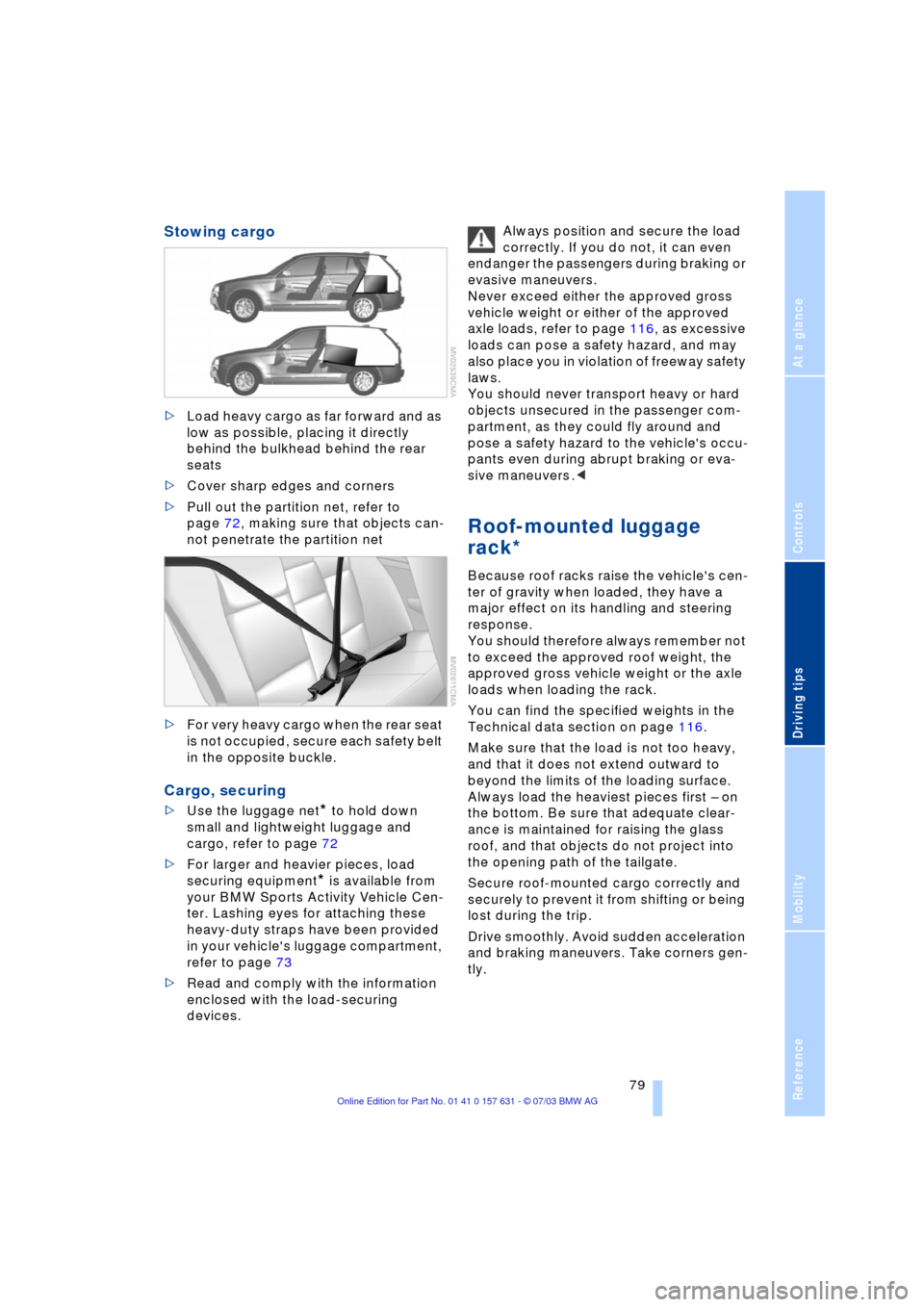
Stowing cargo
>Load heavy cargo as far forward and as
low as possible, placing it directly
behind the bulkhead behind the rear
seats
>Cover sharp edges and corners
>Pull out the partition net, refer to
page 72, making sure that objects can-
not penetrate the partition net
>For very heavy cargo when the rear seat
is not occupied, secure each safety belt
in the opposite buckle.
Cargo, securing
>Use the luggage net* to hold down
small and lightweight luggage and
cargo, refer to page 72
>For larger and heavier pieces, load
securing equipment
* is available from
your BMW Sports Activity Vehicle Cen-
ter. Lashing eyes for attaching these
heavy-duty straps have been provided
in your vehicle's luggage compartment,
refer to page 73
>Read and comply with the information
enclosed with the load-securing
devices.Always position and secure the load
correctly. If you do not, it can even
endanger the passengers during braking or
evasive maneuvers.
Never exceed either the approved gross
vehicle weight or either of the approved
axle loads, refer to page 116, as excessive
loads can pose a safety hazard, and may
also place you in violation of freeway safety
laws.
You should never transport heavy or hard
objects unsecured in the passenger com-
partment, as they could fly around and
pose a safety hazard to the vehicle's occu-
pants even during abrupt braking or eva-
sive maneuvers .<
Roof-mounted luggage
rack*
Because roof racks raise the vehicle's cen-
ter of gravity when loaded, they have a
major effect on its handling and steering
response.
You should therefore always remember not
to exceed the approved roof weight, the
approved gross vehicle weight or the axle
loads when loading the rack.
You can find the specified weights in the
Technical data section on page 116.
Make sure that the load is not too heavy,
and that it does not extend outward to
beyond the limits of the loading surface.
Always load the heaviest pieces first Ð on
the bottom. Be sure that adequate clear-
ance is maintained for raising the glass
roof, and that objects do not project into
the opening path of the tailgate.
Secure roof-mounted cargo correctly and
securely to prevent it from shifting or being
lost during the trip.
Drive smoothly. Avoid sudden acceleration
and braking maneuvers. Take corners gen-
tly.
Page 97 of 132
Reference
At a glance
Controls
Driving tips
Mobility
95
Do not fill beyond the upper mark on the
dipstick. Excess oil can damage the
engine.
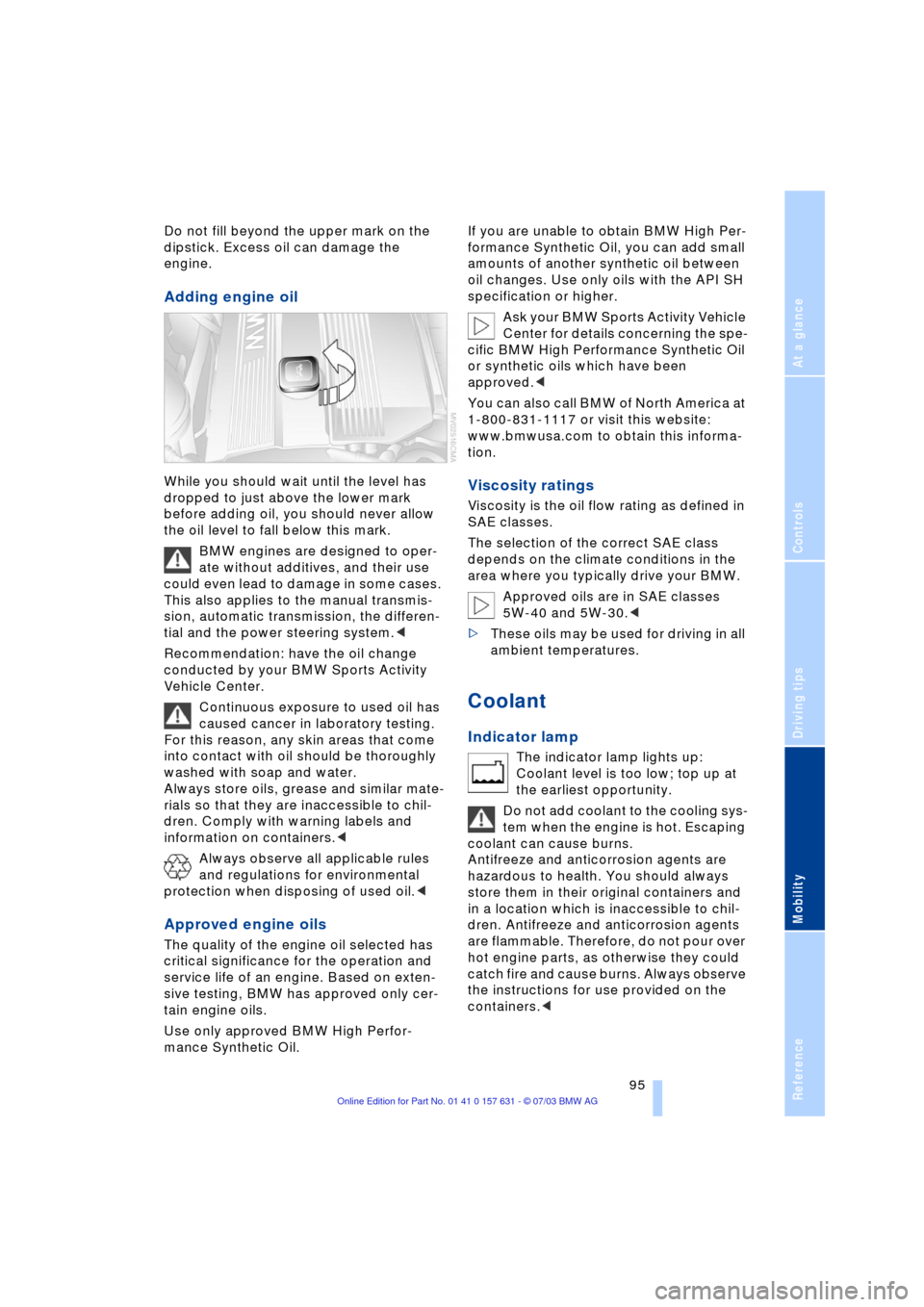
Adding engine oil
While you should wait until the level has
dropped to just above the lower mark
before adding oil, you should never allow
the oil level to fall below this mark.
BMW engines are designed to oper-
ate without additives, and their use
could even lead to damage in some cases.
This also applies to the manual transmis-
sion, automatic transmission, the differen-
tial and the power steering system.<
Recommendation: have the oil change
conducted by your BMW Sports Activity
Vehicle Center.
Continuous exposure to used oil has
caused cancer in laboratory testing.
For this reason, any skin areas that come
into contact with oil should be thoroughly
washed with soap and water.
Always store oils, grease and similar mate-
rials so that they are inaccessible to chil-
dren. Comply with warning labels and
information on containers.<
Always observe all applicable rules
and regulations for environmental
protection when disposing of used oil.<
Approved engine oils
The quality of the engine oil selected has
critical significance for the operation and
service life of an engine. Based on exten-
sive testing, BMW has approved only cer-
tain engine oils.
Use only approved BMW High Perfor-
mance Synthetic Oil.If you are unable to obtain BMW High Per-
formance Synthetic Oil, you can add small
amounts of another synthetic oil between
oil changes. Use only oils with the API SH
specification or higher.
Ask your BMW Sports Activity Vehicle
Center for details concerning the spe-
cific BMW High Performance Synthetic Oil
or synthetic oils which have been
approved.<
You can also call BMW of North America at
1-800-831-1117 or visit this website:
www.bmwusa.com to obtain this informa-
tion.
Viscosity ratings
Viscosity is the oil flow rating as defined in
SAE classes.
The selection of the correct SAE class
depends on the climate conditions in the
area where you typically drive your BMW.
Approved oils are in SAE classes
5W-40 and 5W-30.<
>These oils may be used for driving in all
ambient temperatures.
Coolant
Indicator lamp
The indicator lamp lights up:
Coolant level is too low; top up at
the earliest opportunity.
Do not add coolant to the cooling sys-
tem when the engine is hot. Escaping
coolant can cause burns.
Antifreeze and anticorrosion agents are
hazardous to health. You should always
store them in their original containers and
in a location which is inaccessible to chil-
dren. Antifreeze and anticorrosion agents
are flammable. Therefore, do not pour over
hot engine parts, as otherwise they could
catch fire and cause burns. Always observe
the instructions for use provided on the
containers.<
Page 105 of 132
Reference
At a glance
Controls
Driving tips
Mobility
103
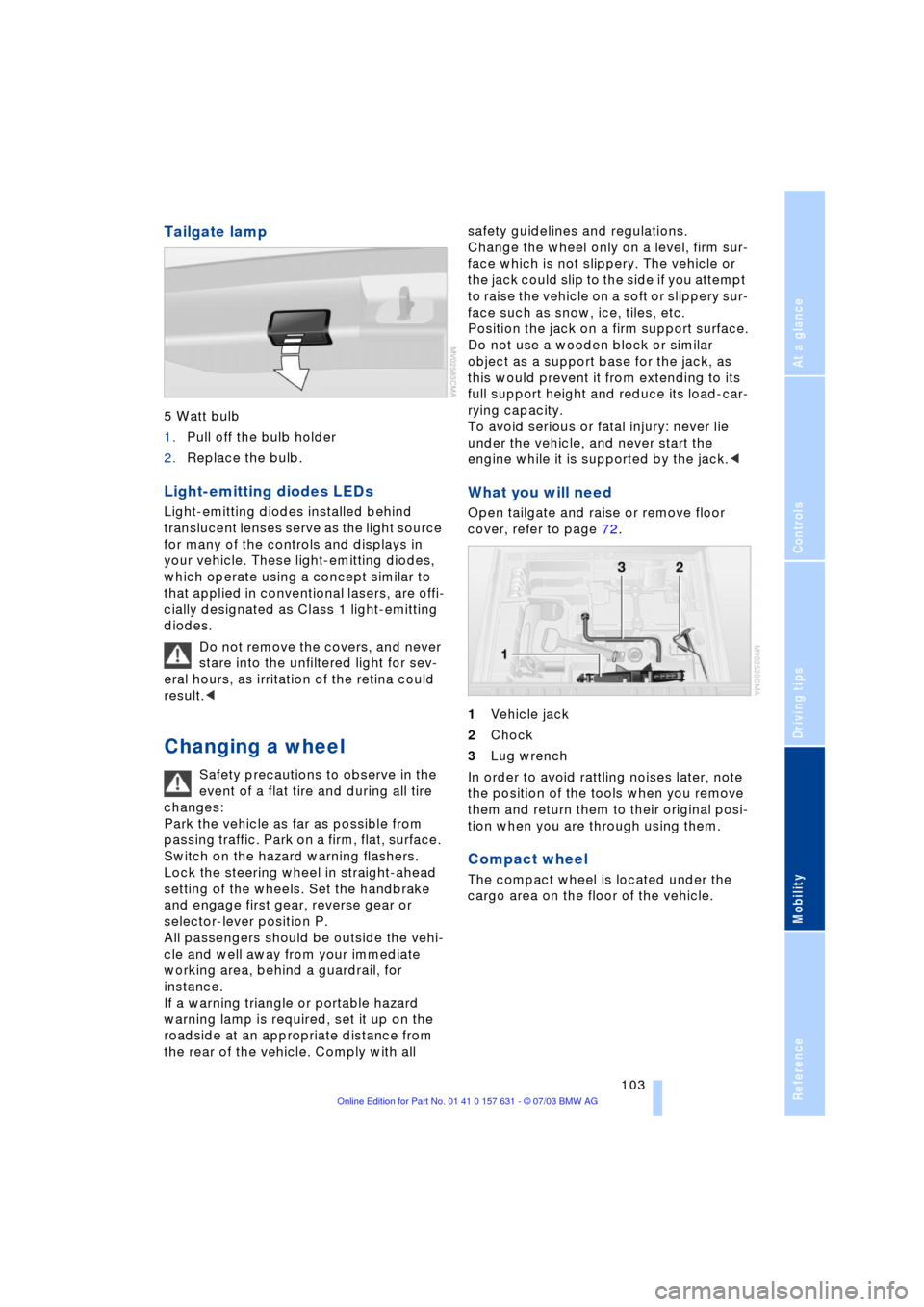
Tailgate lamp
5 Watt bulb
1.Pull off the bulb holder
2.Replace the bulb.
Light-emitting diodes LEDs
Light-emitting diodes installed behind
translucent lenses serve as the light source
for many of the controls and displays in
your vehicle. These light-emitting diodes,
which operate using a concept similar to
that applied in conventional lasers, are offi-
cially designated as Class 1 light-emitting
diodes.
Do not remove the covers, and never
stare into the unfiltered light for sev-
eral hours, as irritation of the retina could
result.<
Changing a wheel
Safety precautions to observe in the
event of a flat tire and during all tire
changes:
Park the vehicle as far as possible from
passing traffic. Park on a firm, flat, surface.
Switch on the hazard warning flashers.
Lock the steering wheel in straight-ahead
setting of the wheels. Set the handbrake
and engage first gear, reverse gear or
selector-lever position P.
All passengers should be outside the vehi-
cle and well away from your immediate
working area, behind a guardrail, for
instance.
If a warning triangle or portable hazard
warning lamp is required, set it up on the
roadside at an appropriate distance from
the rear of the vehicle. Comply with all safety guidelines and regulations.
Change the wheel only on a level, firm sur-
face which is not slippery. The vehicle or
the jack could slip to the side if you attempt
to raise the vehicle on a soft or slippery sur-
face such as snow, ice, tiles, etc.
Position the jack on a firm support surface.
Do not use a wooden block or similar
object as a support base for the jack, as
this would prevent it from extending to its
full support height and reduce its load-car-
rying capacity.
To avoid serious or fatal injury: never lie
under the vehicle, and never start the
engine while it is supported by the jack.<
What you will need
Open tailgate and raise or remove floor
cover, refer to page 72.
1Vehicle jack
2Chock
3Lug wrench
In order to avoid rattling noises later, note
the position of the tools when you remove
them and return them to their original posi-
tion when you are through using them.
Compact wheel
The compact wheel is located under the
cargo area on the floor of the vehicle.
Page 107 of 132
Reference
At a glance
Controls
Driving tips
Mobility
105
Mounting compact wheel
1.Unscrew the lug bolts and remove the
wheel
2.Remove accumulations of mud or dirt
from the mounting surfaces of the
wheel and hub. Clean the lug bolts
3.Position the new wheel or compact
wheel. Secure the wheel by turning at
least two lug bolts into opposite bolt
holes
4.Screw in the remaining lug bolts.
Tighten all the bolts securely in a diag-
onal pattern
5.Lower the jack and remove it from
beneath the vehicle
6.Tighten the lug bolts in a diagonal pat-
tern
7.Check and correct the tire inflation
pressure at the earliest opportunity.
Protect valve stems and valve stem
seal caps against dirt and contamina-
tion. Dirt in valve stems is a frequent source
of gradual air loss.<
After mounting the compact wheel or cor-
recting the inflation pressure, reinitialize
the Flat Tire Monitor, refer to page 53.
The vehicle jack is designed for
changing wheels only. Do not attempt
to raise another vehicle model with it or to
raise any load of any kind. To do so could
cause accidents and personal injury.
To ensure safety, always have the lug bolts
checked with a calibrated torque wrench to
ensure that they are tightened to the spec-
ified torque of 101 lb ft/140 Nm as soon as
possible.<
Stow the defective wheel in the luggage
compartment.
When you mount wheels other than Genu-
ine BMW light-alloy wheels, different lug
bolts may also be required.
Replace the defective tire as soon as pos-
sible and have the new wheel/tire bal-
anced.
Driving with the compact wheel
Drive reservedly and do not exceed a
speed of 50 mph/80 km/h. Do not
deactivate DSC, as otherwise unstable
driving conditions may result.<
The driving characteristics change, for
example reduced track stability on braking,
extended braking distance, and altered
self-steering characteristics in the limit
range. In conjunction with winter tires,
these characteristics are more pro-
nounced.
Only one compact wheel may be
mounted. You should re-equipping to
wheels and tires of the original size as
quickly as possible.<
Battery
Battery care
The battery is 100% maintenance-free, i.e.,
the electrolyte will last for the life of the bat-
tery when the vehicle is operated in a tem-
perate climate.
Please contact your BMW Sports
Activity Vehicle Center with any ques-
tions concerning the battery.<
Do not disconnect the battery when
the engine is running. If you do so, the
ensuing voltage surge will damage the
vehicle's onboard electronics.<
Indicator lamp
The battery charge-current indica-
tor lamp lights up:
The battery is no longer being
charged. There is a defect on the alternator
V-belt or charge current circuit of the alter-
nator. Contact the nearest BMW Sports
Activity Vehicle Center.
Do not continue driving if the V-belt is
defective. The engine could be dam-
aged due to overheating.
Moreover, an increased amount of force is
required for steering if the onboard supply
voltage falls dramatically.<
Page 122 of 132
Everything from A to Z
120 Bottle holder, refer to
Beverage holders 67
Brake fluid 96
Ð indicator lamp 96
Ð level 96
Ð replacing 96
Brake force display 54
Brake lamps
Ð defect 57
Ð indicator lamp 12
Ð replacing the bulbs 102
Brake pads and rotors
Ð breaking-in procedure 76
Brakes 77, 96
Ð ABS 77
Ð brake fluid 96
Ð break-in procedure 76
Ð handbrake 38
Ð indicator/warning
lamp 38
Brake system
Ð brake-fluid level 96
Ð brake pads 96
Ð corrosion 77
Ð disc brakes 76, 77
Ð indicator lamp 96
Ð rotors 76, 77
Brake wear warning
Ð brake pads 96
Ð indicator lamp 96
Break-in procedures 76
Bulbs and lamps 99
Buttons in steering
wheel 14
C
California Proposition
65 Warning 98
Capacities 117
Car care, refer to Caring for
your vehicle brochure
Car-care products, refer to
Caring for your vehicle
brochure
Care, refer to Caring for
your vehicle brochureCargo area 71
Ð capacity 116
Ð cover 71
Ð floor cover 72
Ð folding rear seat
backrest 71
Ð increasing volume 71
Ð lashing eyes 73
Ð manual unlocking 21
Ð opening, remote
control 19
Ð opening/closing 21
Ð opening from the
outside 21
Ð sockets 73
Ð volume 116
Cargo bay, refer to Cargo
area 71
Cargo loading 78
Caring for leather, refer to
Caring for your vehicle
brochure
Caring for the carpet, refer
to Caring for your vehicle
brochure
Caring for the vehicle finish,
refer to Caring for your
vehicle brochure
Car keys, refer to Key
set 18
Car phone preparation 70
Car wash 77
Car wash, refer to Caring
for your vehicle brochure
Catalytic converter, refer to
High temperatures 76
Central locking system 18
Ð interior 20
Changes, technical, refer to
For your own safety 6
Changing a wheel 103
Check Gas Cap
Ð indicator lamp 12, 84
Checking inflation
pressure 86
Child's seats, refer to
Child-restraint
systems 34
Child-restraint systems 34
Child-safety locks 36
Chock 103Chrome parts, care, refer to
Caring for your vehicle
brochure
Cigarette lighter
Ð front 69
Ð rear 69
Circulation of air, refer to
Recirculated-air
mode 61, 64
Cleaning, vehicle, refer to
Caring for your vehicle
brochure
Cleaning the windshield 42
Cleaning windows,
reservoir 94
Clean the rear window 42
Clock 46
Ð 12/24 hour mode 48
Ð setting, refer also to
Owner's Manual for
Radio/Onboard
computer 46
Clutch 76
Ð breaking in 76
Cockpit 10
Cold start, refer to Starting
the engine 37
Comfort operation
Ð panorama glass roof 20
Compact wheel
Ð wheel changes 103
Compression ratio, refer to
Engine data 114
Computer 47
Computer, functions 48
Condensation, refer to A/C
operation 61, 64
Connecting a vacuum
cleaner, refer to Lighter
socket 69
Consumption, refer to
Average fuel
consumption 48
Consumption indicator,
refer to Fuel gauge 45
Contents 3
Controls, refer to
Cockpit 10
Convenience operation
Ð from outside 20
Ð windows 20
Page 123 of 132
Reference
At a glance
Controls
Driving tips
Mobility
121
Coolant 95
Ð indicator lamp 95
Ð level 96
Ð temperature gauge 45
Coolant temperature
gauge 45
Cooling, refer to
Temperature 61
Copyright 2
Cruise control
Ð buttons in steering
wheel 14
Ð indicator lamp 43
Cruise control, refer to
Ð Programmable cruise
control 43
Cruising range 48
Cup holder, refer to
Beverage holders 67
Curb weight 116
Cylinders, refer to Engine
data 114
D
Dashboard system, refer to
Cockpit 10
Data, technical
Ð dimensions 115
Ð engine 114
Ð filling capacities 117
Ð weights 116
Daytime driving lamp 57
DBC Dynamic Brake
Control 50
Ð indicator lamp 50
Decommissioning the
vehicle, refer to Caring for
your vehicle brochure 97
Defect, refer to Manual
operation
Defects 7
Defrosting, windows 61
Ð air conditioner 62
Ð automatic climate
control 64
Ð rear window
defroster 61, 65Defrosting windows and
removing condensation
Ð air conditioner 62
Ð automatic climate
control 64
Defrosting windshield, refer
to Defrosting
windows 62, 64
Defrost position, refer to
Defrosting
windows 62, 64
Digital clock 46
Dimensions 115
Dipstick, engine oil 94
Directional indicators, refer
to Turn signal
indicators 41
Discs brakes 76, 77
Displacement, refer to
Engine data 114
Display lighting, refer to
Instrument lighting 58
Displays, refer to
Instrument
cluster 11
Disposal
Ð batteries 106
Ð oil 95
Doors
Ð locking and unlocking 20
Ð manual operation 20
DOT Quality Grades 88
Draft-free ventilation 61, 65
Drawbar support load 116
Driving lamps, refer to
Parking lamps/low
beams 57
Driving notes 76
Driving on bad roads 80
Driving stability control
systems 50
Driving through water 80
DSC Dynamic Stability
Control 50
Ð indicator lamp 51
E
Electrical malfunction
Ð door lock 20
Ð doors 20
Ð driver's door 20
Ð fuel filler door 84
Ð panorama glass roof 24
Ð tailgate 21
Electric power windows 22
Electronic Stability
Program ESP, refer to
Dynamic Stability
Control 50
Emergency actuation, refer
to Manual operation
Emergency call 107
Engine
Ð breaking in 76
Ð data 114
Ð indicator lamp 37
Ð malfunction in electronic
circuitry 38
Ð speed 45
Engine compartment 93
Engine coolant 95
Engine hood 92
Engine oil 95
Ð indicator/warning
lamp 94
Ð prescribed oils 95
Engine oil grades 95
Engine oil level 94
Ð indicator/warning
lamp 94
Engine oil pressure 94
Ð indicator/warning
lamp 94
Engine oil sensor 94
Ð indicator/warning
lamp 94
Engine output, refer to
Engine data 114
Engine temperature, refer
to Coolant
temperature 45
Equipment range, refer to
Service and Warranty
Information Booklet for
Page 124 of 132
Everything from A to Z
122 US models, Warranty and
Service Guide Booklet for
Canadian models
ESP Electronic Stability
Program, refer to DSC
Dynamic Stability
Control 50
Exhaust system, refer to
High temperatures 76
Exterior mirror
Ð automatic dimming
feature 32
Exterior mirrors 31
F
Fan, refer to Air
supply 61, 64
Filling the windshield
washer reservoir 94
Filter
Ð refer to Microfilter 62
Ð refer to Microfilter/
Activated charcoal
filter 65
First-aid kit 108
Fittings, tow-starting and
towing 109
Flat tire 103
Ð compact wheel 103
Ð Flat Tire Monitor 53
Flat Tire Monitor 53
Ð indicator lamp 53
Flooding, refer to Driving on
bad roads 80
Floor cover 72
Fluid level
Ð indicator lamp 94
Fog lamps 58
Ð replacing bulbs 102
Folding rear seat back 71
Folding rear seat
backrest 71
Footbrake, refer to Brake
system 77, 96
Footbrake, refer to General
driving notes 77, 96
Front/rear reading
lamps 58
Front airbags 54
Front center armrest 68Front seat adjustment 27
Fuel 85
Ð average
fuel consumption 48
Ð capacity 117
Ð gauge 45
Ð quality 85
Ð volume 48
Fuel capacity 117
Fuel clock, refer to Fuel
gauge 45
Fuel display, refer to Fuel
gauge 45
Fuel filler cap 84
Fuel filler door 84
Ð releasing in the event of
electrical defect 84
Fuses 106
G
Garage-door opener, refer
to Integrated universal
remote control 66
Gasoline, refer to Fuel
quality 85
Gasoline consumption,
refer to Average fuel
consumption 48
Gasoline display, refer to
Fuel gauge 45
Gear changes, refer to
Automatic transmission
with Steptronic 40
Gear display 41
Gear lever
Ð automatic transmission
with Steptronic 39
Ð manual transmission 39
General driving notes 76
Glove compartment 68
Grills, refer to
Ventilation 61, 65
Ground clearance 80
H
Halogen lamps 100
Handbrake
Ð indicator lamp 38Hands-free microphone,
refer to Car phone
preparation 70
Hands-free system 70
Hazard warning flashers 10
HDC Hill Descent
Control 51
Headlamp control,
automatic 57
Headlamp flasher 41
Ð indicator lamp 41
Headlamps 100
Ð bulb replacement 99
Headlamps, care, refer to
Caring for your vehicle
brochure
Headlamp washer
reservoir 94
Headlamp washer
system 94
Ð cleaning headlamps 42
Ð tank capacity, refer to
Filling capacities 117
Ð washer fluid 94
Head restraints 28
Heated mirrors 32
Heated rear window
Ð air conditioner 61
Ð automatic climate
control 65
Heated seats 30
Heated steering wheel 31
Heated windshield,
automatic climate
control 64
Heating
Ð exterior mirror 32
Ð rear window 61, 65
Ð seats 30
Ð steering wheel 31
Heating and
ventilation 60, 63
Heavy cargo, refer to Cargo
loading 78
Height, refer to
Dimensions 115
Height adjustment
Ð seats 28
Ð steering wheel 31
Page 128 of 132
Everything from A to Z
126 Starting assistance, refer to
Jump-starting 108
Starting difficulties
Ð temperature 38
Starting-off assistance,
DSC 50
Starting the engine 38
Startup difficulties
Ð jump-starting 108
Status of this Owner's
Manual at time of
printing 5
Steering lock 37
Steering wheel 10, 14
Ð adjustment 31
Ð lock 37
Steering wheel heater 31
Steering wheel with
buttons 14
Steptronic 39
Storage compartments 68
Storage package 68
Storage package nets 68
Storage space, refer to
Cargo area 71
Storing seat position, refer
to Seat and mirror
memory 29
Storing the seat
adjustment 29
Straps, refer to Loading 78
Stroke, refer to Engine
data 114
Supply reservoir cleaning
systems 94
Switches, refer to
Cockpit 10
Switching off the engine 38
Symbols 4
T
Table of contents 3
Tachometer 45
Tailgate
Ð closing 21
Ð emergency operation 21
Ð opening from the
outside 21
Ð remote control 19Tailgate lamp
Ð bulb replacement 103
Tail lamps
Ð bulb replacement 102
Ð indicator lamp 57
Tank capacity 117
Technical modifications 6
Telephone, refer to
separate Owner's Manual
Temperature
Ð air conditioner 61
Ð automatic climate
control 64
Temperature, tires 88
Temperature display
Ð ice warning 47
Ð outside temperature 47
Ð setting the units 47
Temperature gauge 45
Thigh support
adjustment 28, 29
Three-point belt 30
Tightening torque 105
Tilt alarm sensor 25
Ð switching off 25
Tilt function, passenger-
side mirror 32
Tire inflation pressures 86
Tire pressure monitoring,
refer to Flat Tire
Monitor 53
Tires
Ð age 88
Ð break-in procedure 76
Ð changing 89
Ð condition 89
Ð DOT Quality Grades 88
Ð flat 103
Ð inflation pressure 86, 87
Ð replacing 89
Ð storage 90
Ð temperature 88
Ð traction 88
Ð treadwear 88
Ð Uniform Tire Quality
Grading 89
Ð wear indicators, refer to
Tire tread/damage 89
Ð wheel change 103
Tools, refer to Onboard tool
kit 99Torque of lug bolts 105
Tow bar 109
Tow fittings 109
Towing 109
Towing the vehicle 109
Tow rope 109
Tow sockets for tow
fitting 109
Tow-starting 109
Track width, refer to
Dimensions 115
Traction 88
Traction control
Ð DSC 50
Trailer loads 116
Transmission 39
Ð automatic transmission
with Steptronic 39
Ð manual transmission 39
Transmission lockout, refer
to P Parking 40
Transmission
malfunction 41
Transporting children 34
Transporting children
safely 34
Tread depth, refer to Tire
tread 89
Treadwear 88
Trip-distance counter, refer
to Trip odometer 45
Trip odometer 45
Trunk, refer to Cargo
area 71
Trunk lid, refer to
Tailgate 21
Turning circle, refer to
Dimensions 115
Turn signal indicators 41
Ð bulb replacement 101
Turn signal indicators, side
Ð bulb replacement 101
U
Underbody protection,
refer to Caring for your
vehicle brochure
Uniform Tire Quality
Grading 89