Start BMW X3 2011 F25 Service Manual
[x] Cancel search | Manufacturer: BMW, Model Year: 2011, Model line: X3, Model: BMW X3 2011 F25Pages: 262, PDF Size: 11.2 MB
Page 166 of 262
Music collection
Backing up the music collection
The entire music collection can be stored on a
USB device. Make sure there is enough free
memory capacity on the USB device.
Depending on the number of tracks, backing up
the music collection may take several hours.
Therefore, it is best to perform the backup dur‐
ing a long trip.1.Starting the engine.2.Connect the USB device to the USB inter‐
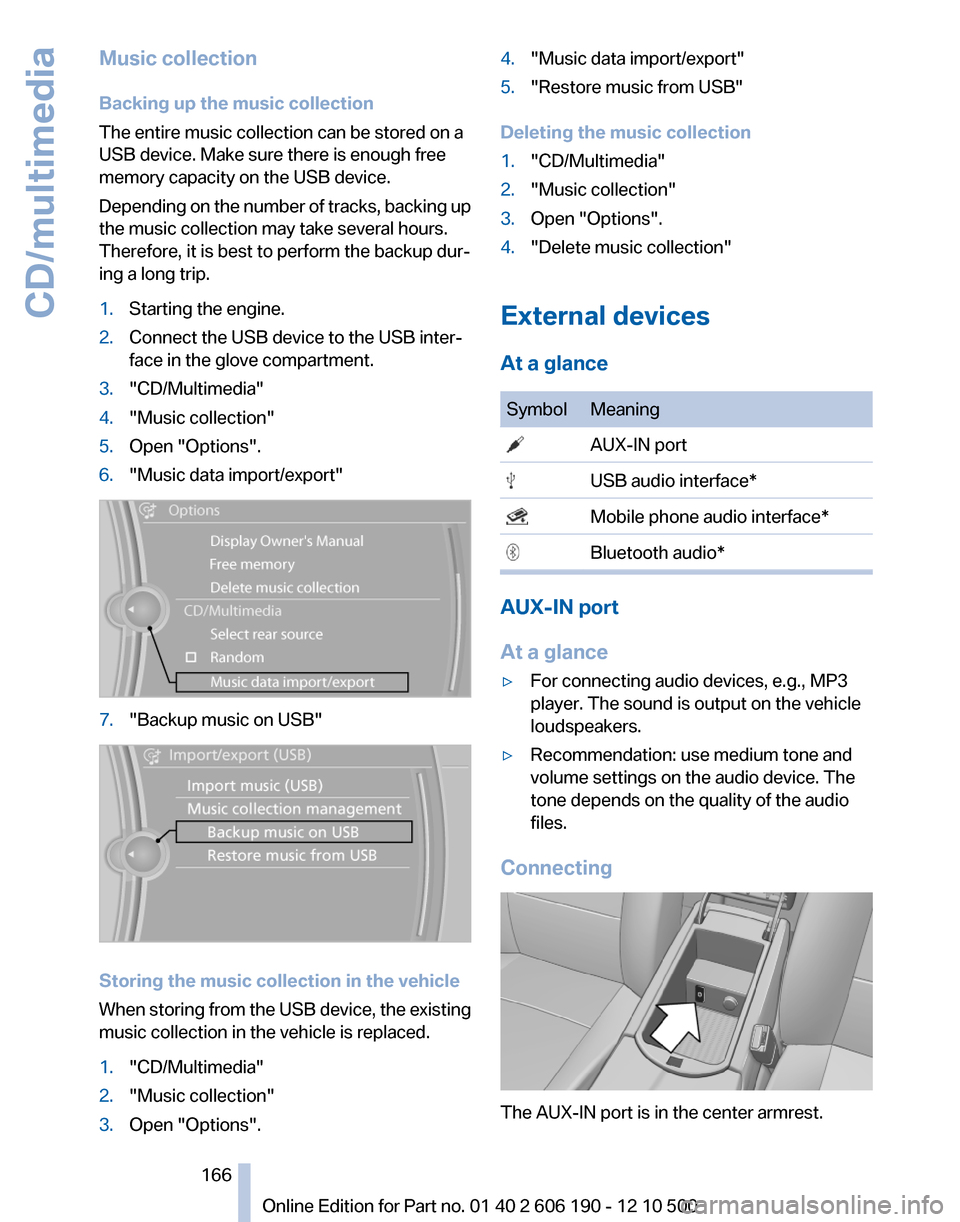
face in the glove compartment.3."CD/Multimedia"4."Music collection"5.Open "Options".6."Music data import/export"7."Backup music on USB"
Storing the music collection in the vehicle
When storing from the USB device, the existing
music collection in the vehicle is replaced.
1."CD/Multimedia"2."Music collection"3.Open "Options".4."Music data import/export"5."Restore music from USB"
Deleting the music collection
1."CD/Multimedia"2."Music collection"3.Open "Options".4."Delete music collection"
External devices
At a glance
SymbolMeaning AUX-IN port USB audio interface* Mobile phone audio interface* Bluetooth audio*
AUX-IN port
At a glance
▷For connecting audio devices, e.g., MP3
player. The sound is output on the vehicle
loudspeakers.▷Recommendation: use medium tone and
volume settings on the audio device. The
tone depends on the quality of the audio
files.
Connecting
The AUX-IN port is in the center armrest.
Seite 166166
Online Edition for Part no. 01 40 2 606 190 - 12 10 500CD/multimedia
Page 168 of 262
Connect the Apple iPod/iPhone
with the AUX-IN port and USB in‐
terface using the special cable
adapter or with the USB interface
using the flexible adapter cable*.
The Apple iPod/iPhone menu structure is sup‐
ported by the USB audio interface.
Connection of a USB device via the
USB audio interface
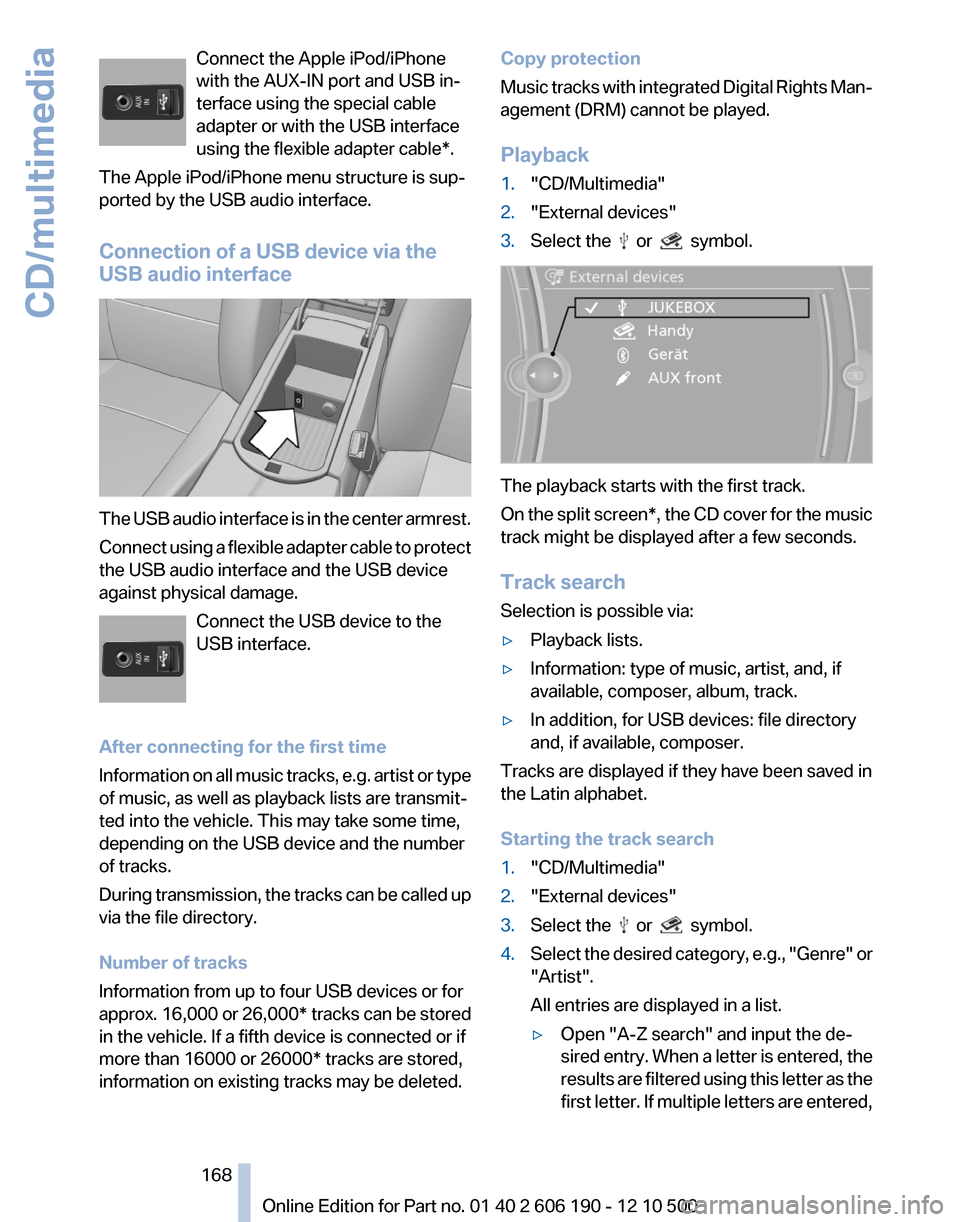
The USB audio interface is in the center armrest.
Connect using a flexible adapter cable to protect
the USB audio interface and the USB device
against physical damage.
Connect the USB device to the
USB interface.
After connecting for the first time
Information on all music tracks, e.g. artist or type
of music, as well as playback lists are transmit‐
ted into the vehicle. This may take some time,
depending on the USB device and the number
of tracks.
During transmission, the tracks can be called up
via the file directory.
Number of tracks
Information from up to four USB devices or for
approx. 16,000 or 26,000* tracks can be stored
in the vehicle. If a fifth device is connected or if
more than 16000 or 26000* tracks are stored,
information on existing tracks may be deleted.
Copy protection
Music tracks with integrated Digital Rights Man‐
agement (DRM) cannot be played.
Playback1."CD/Multimedia"2."External devices"3.Select the or symbol.
The playback starts with the first track.
On the split screen*, the CD cover for the music
track might be displayed after a few seconds.
Track search
Selection is possible via:
▷Playback lists.▷Information: type of music, artist, and, if
available, composer, album, track.▷In addition, for USB devices: file directory
and, if available, composer.
Tracks are displayed if they have been saved in
the Latin alphabet.
Starting the track search
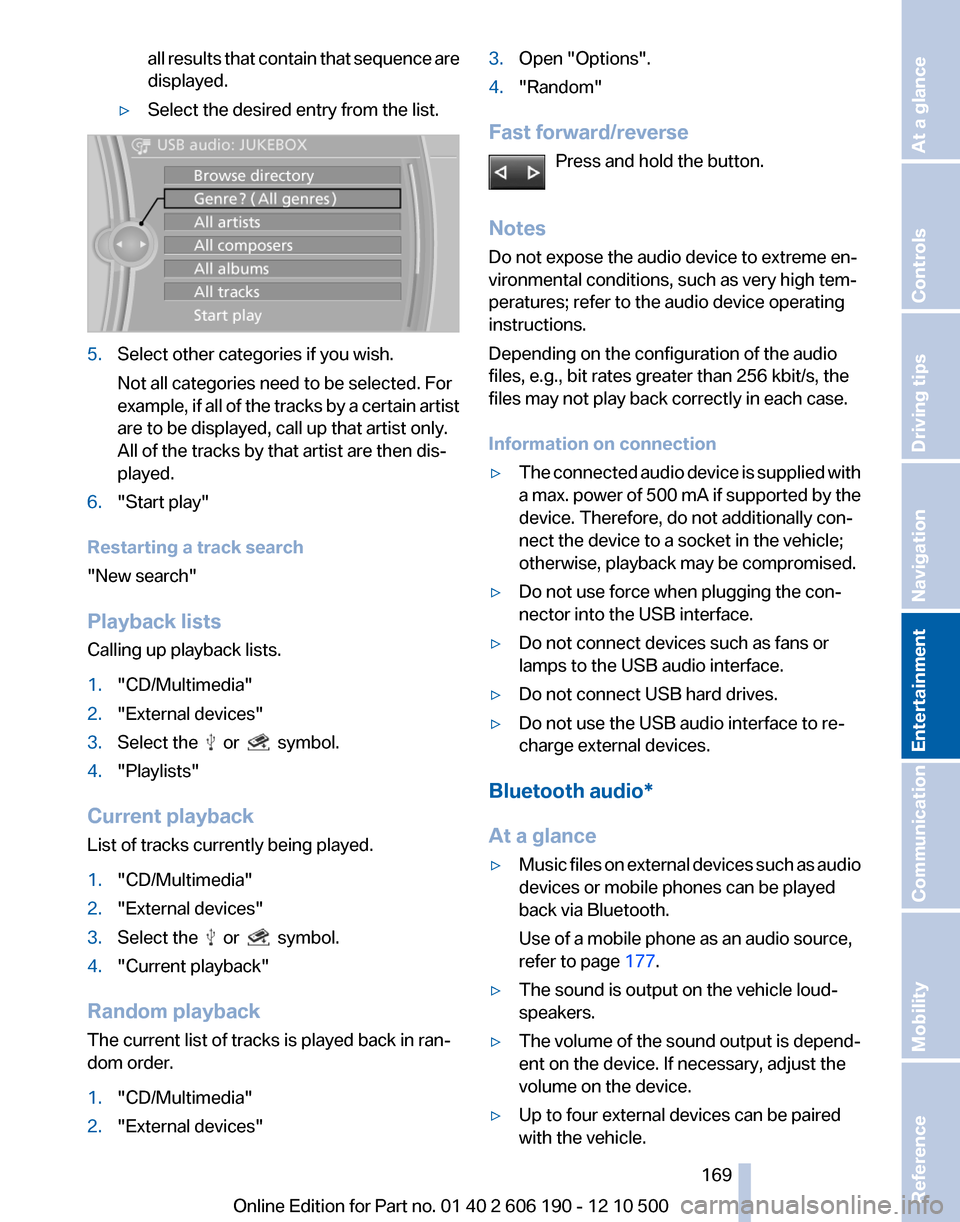
1."CD/Multimedia"2."External devices"3.Select the or symbol.4.Select the desired category, e.g., "Genre" or
"Artist".
All entries are displayed in a list.▷Open "A-Z search" and input the de‐
sired entry. When a letter is entered, the
results are filtered using this letter as the
first letter. If multiple letters are entered,Seite 168168
Online Edition for Part no. 01 40 2 606 190 - 12 10 500CD/multimedia
Page 169 of 262
all results that contain that sequence are
displayed.▷Select the desired entry from the list.5.Select other categories if you wish.
Not all categories need to be selected. For
example, if all of the tracks by a certain artist
are to be displayed, call up that artist only.
All of the tracks by that artist are then dis‐
played.6."Start play"
Restarting a track search
"New search"
Playback lists
Calling up playback lists.
1."CD/Multimedia"2."External devices"3.Select the or symbol.4."Playlists"
Current playback
List of tracks currently being played.
1."CD/Multimedia"2."External devices"3.Select the or symbol.4."Current playback"
Random playback
The current list of tracks is played back in ran‐
dom order.
1."CD/Multimedia"2."External devices"3.Open "Options".4."Random"
Fast forward/reverse
Press and hold the button.
Notes
Do not expose the audio device to extreme en‐
vironmental conditions, such as very high tem‐
peratures; refer to the audio device operating
instructions.
Depending on the configuration of the audio
files, e.g., bit rates greater than 256 kbit/s, the
files may not play back correctly in each case.
Information on connection
▷The connected audio device is supplied with
a max. power of 500 mA if supported by the
device. Therefore, do not additionally con‐
nect the device to a socket in the vehicle;
otherwise, playback may be compromised.▷Do not use force when plugging the con‐
nector into the USB interface.▷Do not connect devices such as fans or
lamps to the USB audio interface.▷Do not connect USB hard drives.▷Do not use the USB audio interface to re‐
charge external devices.
Bluetooth audio*
At a glance
▷Music files on external devices such as audio
devices or mobile phones can be played
back via Bluetooth.
Use of a mobile phone as an audio source,
refer to page 177.▷The sound is output on the vehicle loud‐
speakers.▷The volume of the sound output is depend‐
ent on the device. If necessary, adjust the
volume on the device.▷Up to four external devices can be paired
with the vehicle.Seite 169169
Online Edition for Part no. 01 40 2 606 190 - 12 10 500
ReferenceMobilityCommunicationEntertainmentNavigationDriving tipsControlsAt a glance
Page 171 of 262
1."CD/Multimedia"2."Bluetooth (audio)"3.If necessary, "Bluetooth audio".4.Select the desired device from the list of
paired devices.5.Open "Options".6."Configure phone"7."Audio"8."OK"
Connecting the device
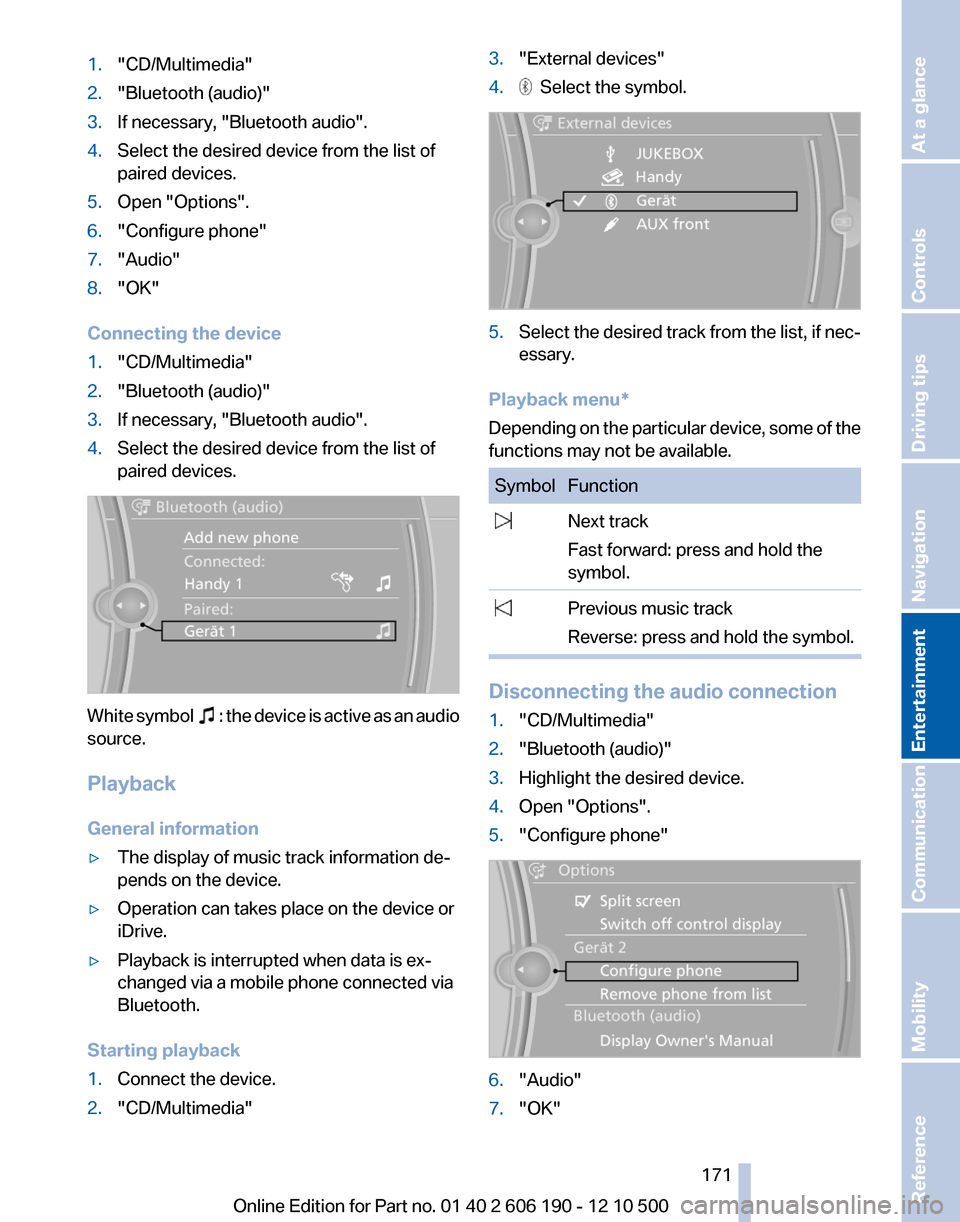
1."CD/Multimedia"2."Bluetooth (audio)"3.If necessary, "Bluetooth audio".4.Select the desired device from the list of
paired devices.
White symbol : the device is active as an audio
source.
Playback
General information
▷The display of music track information de‐
pends on the device.▷Operation can takes place on the device or
iDrive.▷Playback is interrupted when data is ex‐
changed via a mobile phone connected via
Bluetooth.
Starting playback
1.Connect the device.2."CD/Multimedia"3."External devices"4. Select the symbol.5.Select the desired track from the list, if nec‐
essary.
Playback menu*
Depending on the particular device, some of the
functions may not be available.
SymbolFunction Next track
Fast forward: press and hold the
symbol. Previous music track
Reverse: press and hold the symbol.
Disconnecting the audio connection
1."CD/Multimedia"2."Bluetooth (audio)"3.Highlight the desired device.4.Open "Options".5."Configure phone"6."Audio"7."OK"Seite 171171
Online Edition for Part no. 01 40 2 606 190 - 12 10 500
ReferenceMobilityCommunicationEntertainmentNavigationDriving tipsControlsAt a glance
Page 172 of 262
Unpairing a device1."CD/Multimedia"2."Bluetooth (audio)"3.If necessary, "Bluetooth audio".4.Highlight the device that is to be unpaired.5.Open "Options".6."Remove phone from list"
What to do if...
Information on suitable devices can be found at
www.bmwusa.com/bluetooth.
Suitable mobile phones, refer to page 176.
▷The device is not supported by the vehicle.
Perform a software update*, refer to
page 172, if needed.▷The device could not be paired or con‐
nected.
Do the Bluetooth passkeys on the device
and the vehicle match? Enter the same
passkey on the device and via iDrive.
Did it take longer than 30 seconds to enter
the passkey? Repeat the pairing procedure.
Are too many Bluetooth devices connected
to the device or vehicle? Delete connections
with other devices if necessary.
Is the mobile phone in power-save mode or
does it have only a limited remaining battery
life? Charge the mobile phone in the snap-
in adapter or via the charging cable.
Depending on the mobile phone, it is possi‐
ble that only one device can be connected
to the vehicle. Unpair the connected device
from the vehicle and pair and connect only
one device.
The device no longer reacts? Switch the de‐
vice off and on again.
Repeat the pairing procedure.▷Music cannot be played back.
Start the program for playing back music
data on the device and select a track on the
device if necessary.
Switch the radio off and on again.▷Music files can only be played back softly.
Adjust the volume settings on the device.▷Playback is disturbed when buttons are
pressed or by other messages on the de‐
vice.
Switch off the button tones and other signal
tones on the device.▷Playback is interrupted by a telephone call
or traffic bulletin and is not resumed auto‐
matically.
Switch the radio off and on again.▷Playback is not possible if the mobile phone
is connected both via Bluetooth Audio and
via the extended connectivity of the music
player in the mobile phone*.
Disconnect one of the two connections; for
example, disconnect the audio connection,
refer to page 171, and restart playback.
If all points in this list have been checked and the
required function is still not available, please
contact the hotline or service center.
Software update*
The vehicle supports various external devices
depending on the current software version. A
software update may result in vehicle support of
new mobile phones or new external devices, for
example.
Software updates and related current informa‐
tion is available at www.bmw.com/update.
Displaying the current version
The currently installed software is displayed.
1."Settings"2."Software update"3."Show current version"
Updating the software
The software may only be updated when the ve‐
hicle is stationary.
Seite 172172
Online Edition for Part no. 01 40 2 606 190 - 12 10 500CD/multimedia
Page 173 of 262
1.Store the file for the software update in the
main directory on a USB flash drive.2.Insert the USB flash drive into the USB in‐
terface of the USB audio interface in the
center armrest. An update via the USB in‐
terface in the glove compartment is not pos‐
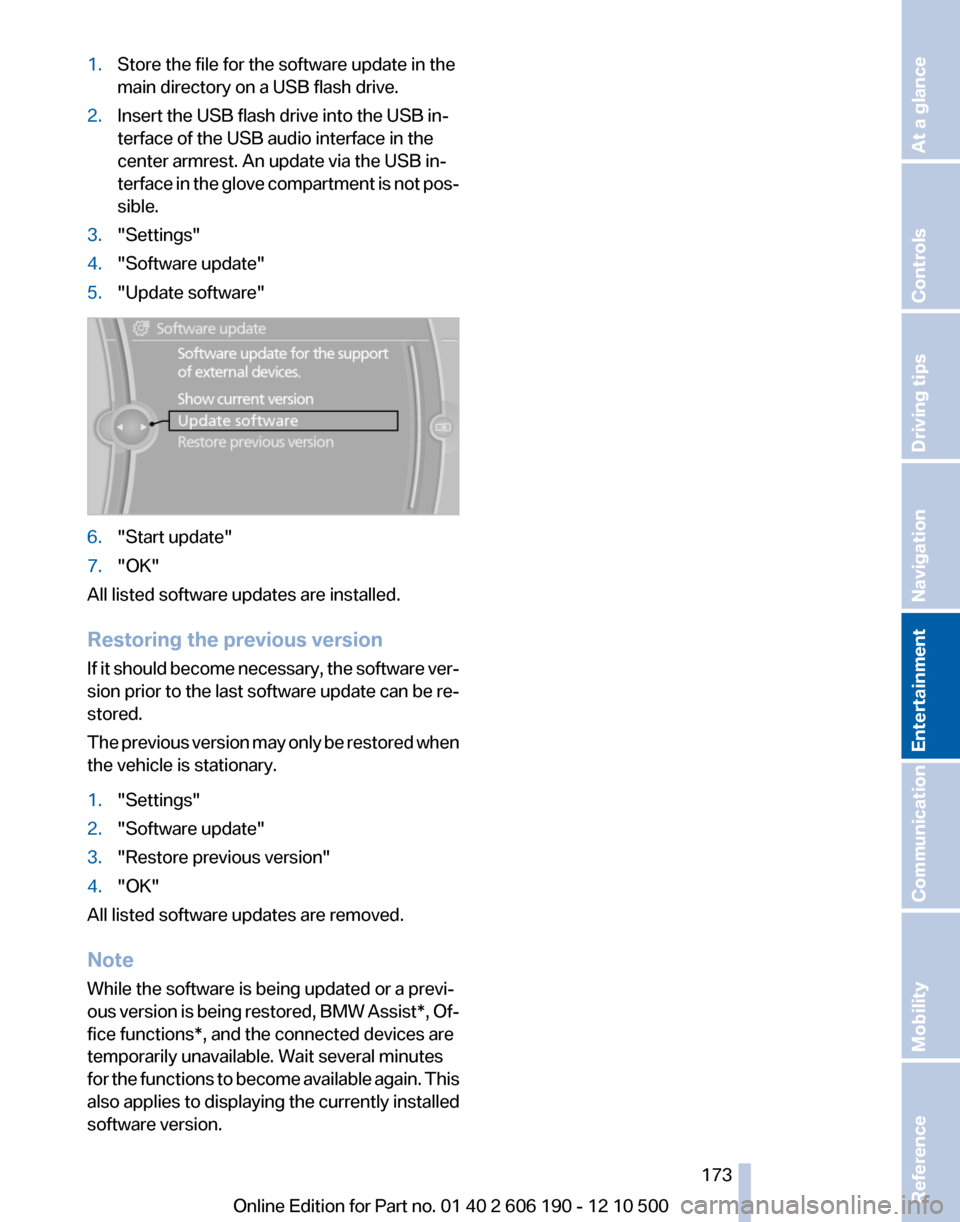
sible.3."Settings"4."Software update"5."Update software"6."Start update"7."OK"
All listed software updates are installed.
Restoring the previous version
If it should become necessary, the software ver‐
sion prior to the last software update can be re‐
stored.
The previous version may only be restored when
the vehicle is stationary.
1."Settings"2."Software update"3."Restore previous version"4."OK"
All listed software updates are removed.
Note
While the software is being updated or a previ‐
ous version is being restored, BMW Assist*, Of‐
fice functions*, and the connected devices are
temporarily unavailable. Wait several minutes
for the functions to become available again. This
also applies to displaying the currently installed
software version.
Seite 173173
Online Edition for Part no. 01 40 2 606 190 - 12 10 500
ReferenceMobilityCommunicationEntertainmentNavigationDriving tipsControlsAt a glance
Page 186 of 262
SymbolStorage locationNo symbolIn the vehicle; the address has not
been checked as a destination. In the vehicle; the address has
been checked as a destination. Mobile phone.
Dialing phone numbers*
1.Select the desired contact.2.Select the phone number.
The connection is established.
Editing a contact
1.Select the desired contact.2."Edit contact"3.Change the entries.4."Store contact in vehicle"
When a contact is edited, the changes are not
stored on the mobile phone. A copy of the entry
is stored in the vehicle.
Selecting the contact as a navigation
destination*
1.Select the desired contact.2.Select the address.
When contacts from the mobile phone are
used, the address may need to be matched
to the navigation data contained in the vehi‐
cle. In this case:
Correct the address.3."Start guidance" or "Add as another
destination"Checking the address as a destination *
An address that is to be used for destination
guidance must match the navigation data con‐
tained in the vehicle. The address can be
checked for this purpose.1.Select the desired contact and highlight the
address.2.Open "Options".3."Check as destination"4.Correct and store the address if necessary.
If the address is corrected and stored, a copy of
it is stored in the vehicle. The address is not
changed on the mobile phone.
Displaying a contact's Internet
address*
An Internet address stored for a contact can be
called up.
1.Select the desired contact.2.Select the Internet address.
The selected Internet address is displayed
in the browser.
New contact
A contact can have up to 8 phone numbers,
2 addresses, 3 e-mail addresses and one Inter‐
net address.
1."Office"2."Contacts"3.Open "Options".4."New contact"5.The entry fields are still filled with the previ‐
ous entries: "Delete input fields"Seite 186186
Online Edition for Part no. 01 40 2 606 190 - 12 10 500Office
Page 188 of 262
▷My Info* messages from the BMW Assist
Portal.▷Messages from the BMW Assist Concierge
service*.▷E-mails from the mobile phone.
Displaying messages
1."Office"2."Messages"
A symbol identifies the type of message.
SymbolMessage type Text messages. My Info Message from the Concierge serv‐
ice. E-mail from mobile phone.
Deleting messages
Messages from the Concierge service, My Info,
and BMW Search* can be deleted.
Delete a message:
1."Office"2."Messages"3.Select the desired message.4.Open "Options".5."Delete message"
Delete all messages:
1."Office"2."Messages"3.Open "Options".4."Delete all messages"
Text messages
Calling the sender of a text message
1.Select the desired message.2. Select the symbol.Saving the sender in the contacts1.Highlight the desired message.2.Open "Options".3."Store as new contact" or "Add to existing
contact"
Reading the text message out loud
Read the text message out loud, refer to
page 192.
My Info
Starting destination guidance
1.Select the message.2. "Start guidance" or "Add as another
destination"
Dialing the number in the message
Up to 4 phone numbers can be transmitted with
a message.
1.Select the desired message.2. "Call":
If the message contains a number, the con‐
nection is established.
"Select phone number":
If the message contains more than one num‐
ber, select the desired number from the list.
The connection is established.
Opening the Internet address
1.Select the desired message.2. "Open link in browser"
Message from the Concierge service
Starting destination guidance
1.Select the desired message.Seite 188188
Online Edition for Part no. 01 40 2 606 190 - 12 10 500Office
Page 189 of 262
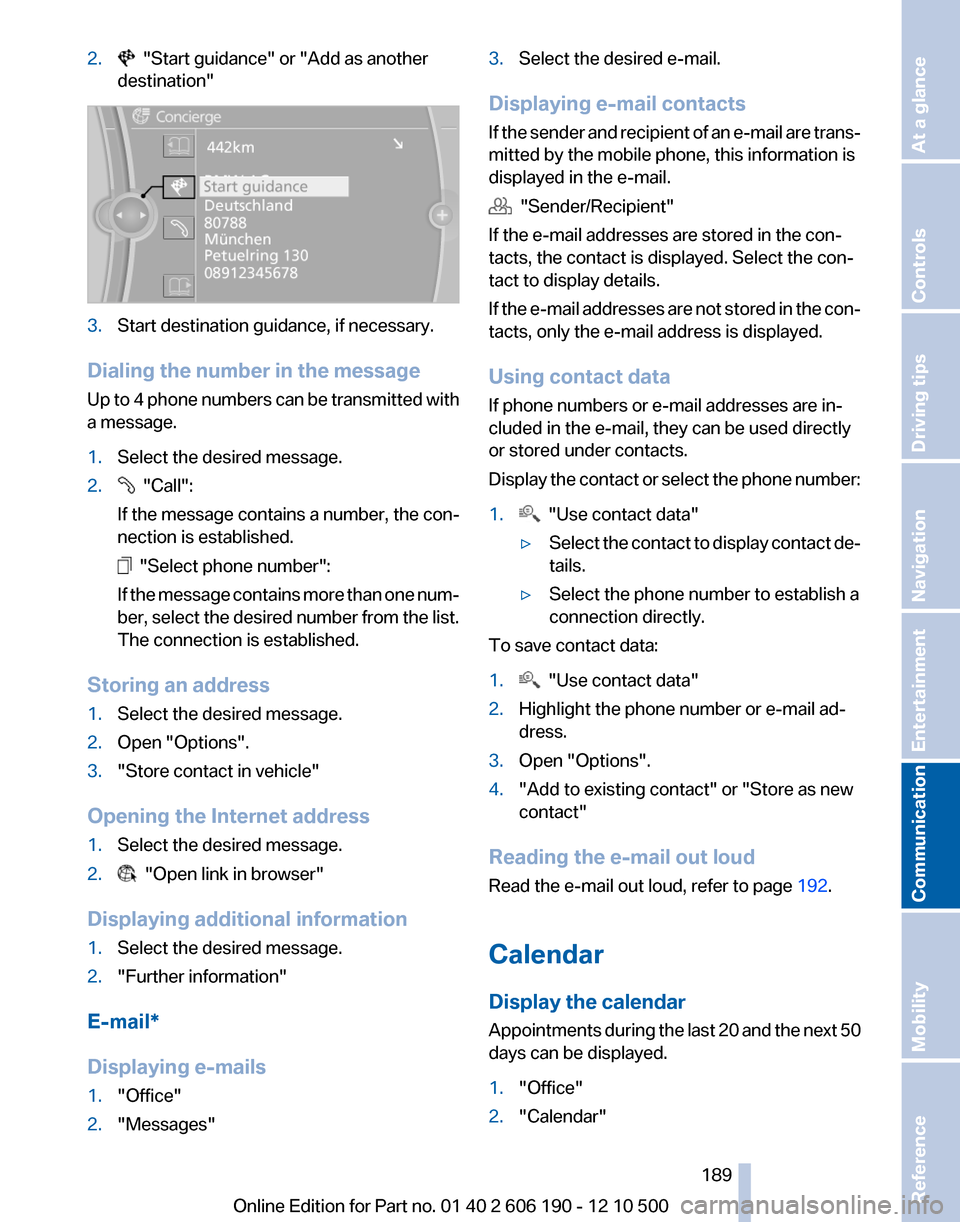
2. "Start guidance" or "Add as another
destination"3.Start destination guidance, if necessary.
Dialing the number in the message
Up to 4 phone numbers can be transmitted with
a message.
1.Select the desired message.2. "Call":
If the message contains a number, the con‐
nection is established.
"Select phone number":
If the message contains more than one num‐
ber, select the desired number from the list.
The connection is established.
Storing an address
1.Select the desired message.2.Open "Options".3."Store contact in vehicle"
Opening the Internet address
1.Select the desired message.2. "Open link in browser"
Displaying additional information
1.Select the desired message.2."Further information"
E-mail*
Displaying e-mails
1."Office"2."Messages"3.Select the desired e-mail.
Displaying e-mail contacts
If the sender and recipient of an e-mail are trans‐
mitted by the mobile phone, this information is
displayed in the e-mail.
"Sender/Recipient"
If the e-mail addresses are stored in the con‐
tacts, the contact is displayed. Select the con‐
tact to display details.
If the e-mail addresses are not stored in the con‐
tacts, only the e-mail address is displayed.
Using contact data
If phone numbers or e-mail addresses are in‐
cluded in the e-mail, they can be used directly
or stored under contacts.
Display the contact or select the phone number:
1. "Use contact data"▷Select the contact to display contact de‐
tails.▷Select the phone number to establish a
connection directly.
To save contact data:
1. "Use contact data"2.Highlight the phone number or e-mail ad‐
dress.3.Open "Options".4."Add to existing contact" or "Store as new
contact"
Reading the e-mail out loud
Read the e-mail out loud, refer to page 192.
Calendar
Display the calendar
Appointments during the last 20 and the next 50
days can be displayed.
1."Office"2."Calendar"Seite 189189
Online Edition for Part no. 01 40 2 606 190 - 12 10 500
ReferenceMobilityCommunicationEntertainmentNavigationDriving tipsControlsAt a glance
Page 192 of 262
1."Office"2."Reminders"3.Select the desired reminder.
The corresponding appointment or the task are
displayed.
Reading out loud
Text messages, e-mails, appointment entries,
tasks, and notes can be read out loud.
1.Select the desired message, appointment,
task, or note.2. Select the symbol.
The following options are available during read‐
ing:
▷ "Pause"
Interrupt reading. Select again to restart
reading.▷ "To beginning"
Start reading message again from the be‐
ginning.▷ Select the symbol.
Skip a paragraph.▷ Select the symbol.
Go back one paragraph.▷To end reading, tilt the controller to the left.
What to do if...
Information on suitable mobile phones, refer to
page 176.
▷Appointments, tasks, notes, text messages,
or e-mails from the mobile phone are not
displayed.
The mobile phone is not capable of the
missing function or is not connected cor‐
rectly.
The Office function is deactivated.
The mobile phone is connected as an addi‐
tional phone.Appointments are older than 20 days or are
more than 50 days in the future.
The tasks have been marked as completed
or have a due date that lies more than
90 days in the future.
Depending on the number of stored ap‐
pointments, task notes, and messages in
the mobile phone, not all are displayed in the
vehicle.▷Not all appointments and tasks from the mo‐
bile phone are displayed at the right time?
The time zone, time or date is incorrectly set
on the Control Display and mobile phone.▷Entries are not displayed in full length.
Text were already transmitted from the mo‐
bile phone in a shortened form.
Synchronization between the mobile phone
and vehicle may take several minutes.▷The contact pictures are not being dis‐
played?
Up to 200 contact pictures can be stored in
the vehicle.▷If all points in this list have been checked and
the required function is still not available,
please contact the hotline or service center.Seite 192192
Online Edition for Part no. 01 40 2 606 190 - 12 10 500Office